I'll show you how to add lip sync to AI videos in ChatGPT and Claude by building two ecommerce ads for a small plant shop in one chat connected to fal.
The first ad re-voices a generated product clip with H3 Max Lip Sync's video-to-video endpoint, and the second makes a studio photo of the shop owner speak through the image-to-video endpoint.
TL;DR
- ChatGPT and Claude can add lip sync to an AI video once fal is connected, as H3 Max Lip Sync then runs from the chat on a clip or a still plus one audio file.
- Claude reaches fal through a custom connector pointed at
https://mcp.fal.ai/mcp-relay, while ChatGPT goes through the fal plugin whenever a chat opens with @fal. - H3 Max Lip Sync video-to-video re-syncs a clip of 5 seconds or more at 480P or 768P, billed at $0.10 or $0.20 per second of output on fal as of November 2026.
- For stills, H3 Max Lip Sync image-to-video animates one image to audio of 5 seconds or longer at up to 2K, for $0.05 to $0.32 per second plus a 1.2x multiplier past 15 seconds.
- When the voiceover and the clip differ in length,
duration_modeon the video-to-video endpoint sets how long the result runs, andcut_offis its default. - fal is the best place to add lip sync from ChatGPT and Claude, since one sign-in covers both H3 Max Lip Sync endpoints along with the models that produce the footage and the voiceover.
Can ChatGPT and Claude add lip sync to an AI video?
Yes, ChatGPT and Claude can add lip sync to an AI video once fal is connected to the chat.
Before that connection exists, teams adding lip sync to AI videos tend to hit the same problems:
- The footage and the voiceover are made in different tools from the lip sync, so files get downloaded from one tab and uploaded into another.
- A generated presenter doesn't always say the exact line you approved, and a regenerated clip comes back as a different take.
- The new voiceover and the clip run for different lengths, and it's hard to tell in advance whether the result will be cut short or padded.
- The price of a take only becomes clear after it has rendered, which makes retries difficult to budget.
fal solves the first problem by running the models behind the footage and the voiceover in the same chat as both H3 Max Lip Sync endpoints, where results come back as hosted URLs that the next request can use.
For a changed line, H3 Max Lip Sync video-to-video on fal starts from the clip you already approved and replaces its soundtrack with the new read.
Length gaps are documented up front on fal, as the video-to-video endpoint has four duration_mode values and image-to-video output always matches the audio.
On cost, the assistant can quote a run with get_pricing ahead of time, while both H3 Max Lip Sync endpoints charge per second of output on fal with no subscription.
All of this runs through our MCP server, whose eleven tools let the assistant look up a schema, quote a price, upload a file and follow a queued job.
In Claude, that server is added as a custom connector, whereas ChatGPT installs the fal plugin.
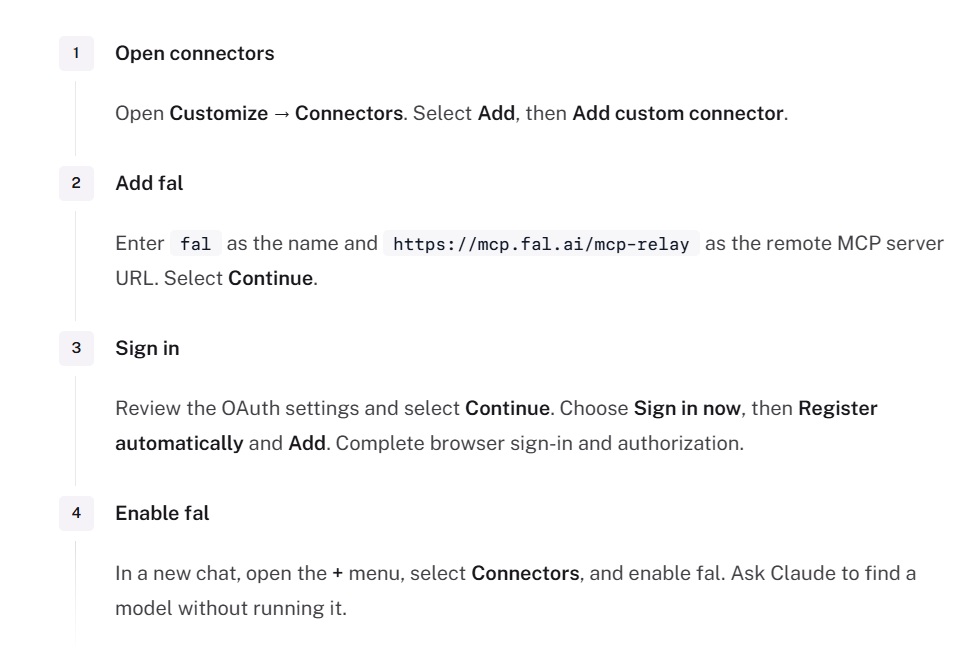
Sign-in for both apps is an OAuth approval in your browser, with no API key to create for the chat.
The chat app handles the conversation and the tool calls, though the mouth movement itself is generated by H3 Max Lip Sync, which our research team post-trained on top of MiniMax H3.
I stay on the fal route in this guide because one fal balance covers the generation models as well as the lip sync.
A preset presenter with built-in text-to-speech is a different job, which I cover for VEED Avatars and both HeyGen Avatar 4 endpoints in AI avatar videos in Claude and ChatGPT.
Which H3 Max Lip Sync endpoint fits your ad?
I'd use H3 Max Lip Sync video-to-video when the ad already exists as a clip with motion worth keeping, and image-to-video when one still of the presenter is the starting point.
Both endpoints take an audio_url and return the synced file under video, along with the duration and the seed of the run.
The comparison below uses the schemas and prices on our model pages as of November 2026, with one row per criterion:
| Criterion | H3 Max Lip Sync video-to-video | H3 Max Lip Sync image-to-video |
|---|---|---|
| Endpoint ID | minimax/h3-max/lip-sync/video-to-video | minimax/h3-max/lip-sync/image-to-video |
| Starting file | video_url, a clip from 5 seconds to 15 minutes | image_url, one still image |
| Aspect ratio accepted | 0.4 to 2.5 | 0.4 to 2.5 |
| Audio length | 0.1 seconds to 15 minutes | 5 seconds to 15 minutes |
| Output length | Follows duration_mode, with cut_off as the default | Matches the audio |
| Resolution | 480P or 768P, default 768P | 480P, 768P, 1080P or 2K, default 768P |
| Fields beyond the two inputs | duration_mode, resolution, seed, enable_safety_checker | resolution, enable_transcription, seed, enable_safety_checker |
| Price per second of output | $0.10 at 480P, $0.20 at 768P | $0.05 at 480P, $0.08 at 768P, $0.16 at 1080P, $0.32 at 2K |
| Long-video pricing | No multiplier listed | 1.2x on videos over 15 seconds |
I'd recommend image-to-video whenever both routes would work, since a second of 768P output is $0.08 there against $0.20 on video-to-video.
When footage calls for a different model, I'd look first at the nine alternatives tested next to H3 Max Lip Sync in our 10 best AI lip sync generators.
What do Claude and ChatGPT need before the first lip sync?
Claude and ChatGPT both need one connection to fal and a fal account that holds credits before the first lip sync, while neither setup asks for an API key.
Since a new fal account starts without credits, you'll need at least the $1 minimum top-up in place.
The clicks differ between the two apps, as this table based on our setup pages for Claude and ChatGPT shows:
| Setup detail | Claude | ChatGPT |
|---|---|---|
| Where fal is added | Customize → Connectors, then Add and Add custom connector | The fal plugin listing, then Install plugin |
| What you enter | The name fal and the URL https://mcp.fal.ai/mcp-relay | Nothing beyond the install |
| Sign-in | Sign in now → Register automatically → Add, then the browser sign-in | Connect on the fal app if prompted, then the browser sign-in |
| Calling fal in a chat | fal switched on from the + menu, under Connectors, in a new chat | @fal typed in a new chat |
| Workspace approval | A Team or Enterprise owner adds fal under Organization settings → Connectors first, as can an Enterprise member with connector-management permission | Administrator approval, where the workspace asks for it |
If the Add custom connector option is missing, Claude's custom connector guide covers plan availability and organization permissions.
fal bills paid runs to the Active MCP account chosen on the dashboard's MCP & connectors page, where your personal account stays the default until you pick a team.
My first message in a new Claude chat costs nothing, because Claude only reads schemas and prices for it:
Use fal to read the schemas for minimax/h3-max/lip-sync/video-to-video and minimax/h3-max/lip-sync/image-to-video.
List the resolution options on both endpoints, then the duration_mode values on the video one.
Price both of them in one get_pricing call, together with minimax/h3-max/text-to-video, fal-ai/minimax/speech-2.8-hd and google/nano-banana-2.1.
This message is a lookup only, so no model should run.
For the rest of this chat, show me the cost of a run and wait for my approval before starting it.
Queue video jobs with submit_job and follow them with check_job on the same request ID, because a second submission is billed as a second job.
When the connection is healthy, Claude comes back with the options from both schemas and a rate for all five endpoints.
I batch the five IDs because get_pricing takes as many as 50 in one comma-separated list.
Our docs are explicit that asking for approval in a prompt adds no gate on the server, which is why my first message spells out the spending rule.
Claude Code connects to this server too, through a terminal command I laid out in how to generate AI videos using Claude and MCP, along with the signed upload for local files.
The floor plan to 3D home build is a longer Claude session on this connector, with nine steps that mix image and video runs.
When the same campaign needs animated graphics, H3 Max handles those through this connector too, as the motion design video guide shows.
falMODEL APIs
The fastest, cheapest and most reliable way to run genAI models. 1 API, 100s of models
How do you lip sync an existing AI video in Claude?
You lip sync an existing AI video in Claude in four steps: put the clip on a public URL, voice the new line, pick a duration_mode and run H3 Max Lip Sync video-to-video.
My example is a vertical creator-style ad for a plant shop's self-watering planter, and I generate the clip in the chat so that nothing has to exist beforehand.
Claude is already holding paid runs for my approval, so the messages below only describe the request.
Step 1: Generate the product clip with H3 Max
The source clip for this ad comes from H3 Max text-to-video, and H3 Max shares its post-trained base with the lip sync endpoints.
I ask for 10 seconds in 9:16 at 768P, because H3 Max Lip Sync video-to-video renders no higher than that.
In the prompt, I keep the creator's face toward the lens and the planter below her chin, since the H3 Max Lip Sync landing page advises that a visible mouth gives the cleanest sync.
Generate the source clip with minimax/h3-max/text-to-video.
Set duration to 10, aspect_ratio to 9:16, resolution to 768P and prompt_expansion_mode to disabled.
Pass the text below as the prompt, word for word:

Vertical phone video filmed in a bright living room. A woman in her early thirties with wavy auburn hair and a cream cardigan stands beside a window and talks to the camera in a friendly, relaxed way. She holds a matte white ceramic self-watering planter with a trailing pothos at chest height, well below her chin, with a small water-level window visible on its base. Her face stays toward the lens for the whole shot and her mouth is never covered. In the final second she lifts the planter toward the lens and smiles. The phone stays still at eye level, with soft daylight from the left and shelves of houseplants blurred behind her. No on-screen text or logos.

Give me the video URL once the job completes, as Step 4 uses it.
Generated using H3 Max on fal, a post-trained variant of MiniMax H3.
Try it in ChatGPT Try it in fal AgentAt the standard $0.08 per second in effect since November 2026, this 10-second H3 Max clip is an $0.80 run at 768P.
More H3 Max product clips, with the code behind them, are in my ecommerce pipeline for generating AI videos with an API.
The schema for H3 Max text-to-video says the output can run up to about 0.7 seconds longer than requested, so I size the audio for a clip of 10 to 10.7 seconds.
If your ad already exists, you can skip this generation and paste the clip's public URL for upload_file to move onto our CDN.
Accepted formats on video-to-video are MP4, MOV, WebM, M4V and GIF, with a minimum clip length of 5 seconds.
💡 Tip: a Kling 4.0 take made with the Kling API guide goes through the same steps, as does a clip from any model in our roundup of image-to-video generators for photoshoots.
Step 2: Voice the new line with MiniMax Speech 2.8 HD
MiniMax Speech 2.8 HD turns the script into the audio file the lips will follow, at $0.10 per 1,000 characters on fal.
You'll want the read to end before the clip does.
In our lip sync roundup, a 127-character script came back at roughly 7.6 seconds on this model's default voice, or about 17 characters per second.
By that rate, the 149-character line below should finish near 9 seconds.
In the message I switch output_format from its hex default to url and ask Claude to report duration_ms, which avoids a rerun just to get a usable link.
Voice the line below with fal-ai/minimax/speech-2.8-hd on its default voice.
Set output_format to url.
Send the text exactly as written:

This planter keeps my pothos watered for two weeks on a single fill. I top up the base when the little window runs low, and that's the whole routine.

Report the audio URL and the duration_ms value from the response.
Generated using MiniMax Speech 2.8 HD on fal, an AI model from MiniMax.
Try it in ChatGPT Try it in fal AgentA recorded voiceover works as well, as long as the file has a public URL for upload_file and uses MP3, OGG, WAV, M4A or AAC.
Other text-to-speech models for this script are ranked in our best text-to-speech APIs roundup.
Step 3: Pick a duration_mode for the length gap
On H3 Max Lip Sync video-to-video, duration_mode sets the output length whenever the read and the clip run for different times.
Leaving the field out applies cut_off, and the model page documents four values in total:
duration_mode | Read shorter than the clip | Read longer than the clip | Output length |
|---|---|---|---|
cut_off (default) | Clip trimmed to the read | Read trimmed to the clip | The shorter of the two |
loop | Clip trimmed to the read | Clip repeated forward | The audio's length |
bounce | Clip trimmed to the read | Clip alternated between forward and reverse playback | The audio's length |
silence | Read padded with silence | Request rejected with a validation error | The clip's length |
With a 10-second clip and a read near 9 seconds, the first three modes would end the ad when the voice stops.
I tend to pick silence when a clip ends on a product beat, as this one does with the planter lifted toward the lens in its final second.
The price of that choice is the full clip at $0.20 per second of 768P output, about $0.20 more than a cut_off take ending at 9 seconds.
Nothing in the schema describes what the mouth does across the padded stretch, so that tail is the first thing I watch on the finished take.
Before paying, I have Claude lay out the options in a message that runs no model:
Compare the duration_ms of the read with a clip length of 10 to 10.7 seconds.
For each duration_mode value on minimax/h3-max/lip-sync/video-to-video, tell me the output duration and the cost at 768P.
Keep this as a calculation, with no model runs.
Step 4: Run H3 Max Lip Sync video-to-video
The last request sends the clip and the read to H3 Max Lip Sync video-to-video at 768P with duration_mode set to silence.
Now run minimax/h3-max/lip-sync/video-to-video.
Use the clip from Step 1 as video_url and the read from Step 2 as audio_url.
Set duration_mode to silence and resolution to 768P.
After I approve the quote, submit the job and keep checking that one request until it finishes.
Send back the video URL with the duration and seed values from the result.
Generated using H3 Max Lip Sync on fal, a post-trained variant of MiniMax H3.
Try it in ChatGPT Try it in fal AgentH3 Max Lip Sync video-to-video normalizes output to 24 fps and uses the supported aspect ratio nearest the source, so I confirm the result is still 9:16 before editing.
My next check is a side-by-side with the source clip, as the model page describes the mouth sync and says nothing about the rest of the frame.
I queue this job with submit_job, because that page's sample result shows 39 seconds of inference for a 7.7-second output, close to the 45 seconds run_model waits by default.
A 10-second result at 768P is a $2.00 run, or half of that for a 480P draft of the same take.
I'd normally judge a take on its consonants first, using the closure check from our lip sync roundup, where the lips should shut fully on the p in pothos and the b in base.
The seed from the response goes into my notes next to the URLs, in case the same take is needed again.
How do you make a product photo talk in Claude?
You make a product photo talk in Claude with H3 Max Lip Sync image-to-video, which needs one still with a clear face and a voice track of 5 seconds or more.
The second plant-shop ad is a 3:4 portrait of the shop owner for a feed placement, drafted at 480P and finished at 1080P.
Step 1: Create the presenter still with Nano Banana 2.1
Nano Banana 2.1 generates the still in this chat, so Claude already holds a hosted URL for image_url.
I write a front-facing or three-quarter face with a visible mouth into the prompt, as the H3 Max Lip Sync landing page recommends.
Open eyes are in the prompt too, because a portrait caught mid-blink kept its eyes shut for a whole clip when I built the API lip sync pipeline.
Generate one image with google/nano-banana-2.1 at aspect_ratio 3:4 and resolution 2K.
Use this prompt without changing it:

A 3:4 studio portrait for a plant shop ad. A woman in her fifties with a silver bob and a dark green canvas apron stands behind a plywood counter in front of a pale terracotta wall. She looks into the camera with open eyes and a closed, relaxed mouth. With both hands she holds a matte white ceramic self-watering planter with a trailing pothos at chest height, well below her chin. Soft window light from the right falls evenly across her face. Chest-up medium shot, camera level with her eyes, her whole face crisp. The frame contains no lettering or logos.

Share the image URL afterward, so the lip sync request can use it as image_url.

Generated using Nano Banana 2.1 on fal, an AI model from Google.
Try it in ChatGPT Try it in fal AgentA 2K still is about a $0.06 run, with the token math behind that number covered in the Nano Banana API guide.
A real photo works too once it has a public URL, provided the person in it agreed to appear and you hold the rights to the voice.
Stills with an aspect ratio between 0.4 and 2.5 are accepted, then rendered at the supported ratio nearest the image, so I make the still in the shape the placement needs.
You can change the still's mood before syncing with one of the 25 setups in the lighting prompts guide.
Step 2: Voice a read of at least 5 seconds
A tagline shorter than 5 seconds needs lengthening before H3 Max Lip Sync image-to-video will take it, as the endpoint's audio minimum is 5 seconds.
At about 17 characters per second, 5 seconds works out to roughly 85 characters.
My scripts for this endpoint run past 100 characters to stay clear of that floor.
The shop owner's line is 164 characters, which should read in close to 10 seconds.
To set her apart from the creator in the first ad, I lower pitch by 2 inside voice_setting and leave voice_id on its Wise_Woman default.
Voice this line with fal-ai/minimax/speech-2.8-hd and set output_format to url.
Inside voice_setting, set pitch to -2 and leave voice_id on its default.
Send the text exactly as written:

Hi, I'm Paula, and we pot these planters by hand in our shop. Fill the base once, and your plant drinks on its own for about two weeks. Delivery is free this month.

Report the audio URL and duration_ms, and flag the read if it runs under 5 seconds.
Generated using MiniMax Speech 2.8 HD on fal, an AI model from MiniMax.
Try it in ChatGPT Try it in fal AgentIn my experience, it's simpler to sync a clean voice track and add music afterwards in an editor.
The image-to-video schema warns that transcription can turn music or laughter into words that were never spoken.
For audio that's mostly singing or noise, enable_transcription set to false is the documented switch on H3 Max Lip Sync image-to-video.
Step 3: Draft the sync at 480P
It's ideal to start with a 480P draft on H3 Max Lip Sync image-to-video, where a second of output is $0.05 and a problem with the mouth or the eyes shows up before 1080P rates apply.
Draft the shop-owner ad with minimax/h3-max/lip-sync/image-to-video.
Use the Nano Banana 2.1 still as image_url and Paula's read as audio_url.
Set resolution to 480P and leave enable_transcription on its default.
Once I approve the quote, return the video URL with its duration and seed.
Generated using H3 Max Lip Sync on fal, a post-trained variant of MiniMax H3.
Try it in ChatGPT Try it in fal AgentThe video comes back as long as the read, since H3 Max Lip Sync image-to-video has no duration field and follows the audio.
This ad's draft comes to roughly $0.50, based on the exact output length that the duration value in the result reports.
Step 4: Render the final at 1080P
Once the draft looks right, the same two URLs go back to H3 Max Lip Sync image-to-video with resolution set to 1080P.
The 480P draft is approved.
Run minimax/h3-max/lip-sync/image-to-video again with the same image_url and audio_url.
Set resolution to 1080P and pass the seed from the draft.
Once I approve the quote, track the job to completion and send the final video URL.
Generated using H3 Max Lip Sync on fal, a post-trained variant of MiniMax H3.
Try it in ChatGPT Try it in fal AgentI pass the draft's seed along and still rewatch the final in full, since nothing in the schema promises that a seed carries a take from 480P to 1080P.
The 1080P tier bills $0.16 per second, which makes this 10-second final $1.60.
A 2K render for a placement like a homepage banner doubles that bill to $3.20.
Once a video runs past 15 seconds, the 1.2x multiplier applies to all of it, which puts a 30-second 768P clip at $2.88.
When a larger set of ads shares one recurring presenter, I start from a reference spec and a turnaround sheet, as the AI character consistency workflow describes.
What changes when you run these lip sync prompts in ChatGPT?
In ChatGPT, the first message of the chat has to start with @fal to call the fal plugin, after which the rest of the prompts can stay as written.
The fal plugin signs in to the same fal account and model catalog as Claude's connector, so the endpoint IDs and field names in my messages carry over unchanged.
The H3 Max Lip Sync landing page also has Try in ChatGPT buttons that open a new chat with a request already typed in this form:
@fal with H3 Max Lip Sync, make a lip-sync video of this person saying this line using Image 1 <image URL>, Audio 1 <audio URL>: Hi, I'm Paula, and we pot these planters by hand in our shop.
I'd use that one-line pattern for a quick test of a single still.
I usually keep the stepped prompts from the Claude walkthroughs for a paid ad, since they put the price quote and the 480P draft ahead of the final render.
ChatGPT's developer mode offers a second route, where a workspace creates a custom app from https://mcp.fal.ai/mcp-relay and signs in with OAuth.
The ChatGPT setup page in our docs notes that a custom app on a Pro plan is limited to read-only tools, which leaves the fal plugin as the way to run lip sync on Pro.
I'd point to building a game with GPT-6 Astra as a worked example of a multi-step ChatGPT project on the fal plugin.
How much does H3 Max Lip Sync cost from ChatGPT and Claude?
As of November 2026, H3 Max Lip Sync costs $0.10 or $0.20 per second of output on video-to-video and $0.05 to $0.32 per second on image-to-video, according to our model pages.
You pay nothing extra for running the job from a chat, as our docs describe the MCP server as free and bill model runs at standard API pricing.
What ChatGPT or Claude charges for the conversation is separate and depends on your plan with OpenAI or Anthropic.
These are the H3 Max Lip Sync costs at four output lengths:
| Output length | Video-to-video, 480P | Video-to-video, 768P | Image-to-video, 480P | Image-to-video, 768P | Image-to-video, 1080P | Image-to-video, 2K |
|---|---|---|---|---|---|---|
| 5 seconds | $0.50 | $1.00 | $0.25 | $0.40 | $0.80 | $1.60 |
| 10 seconds | $1.00 | $2.00 | $0.50 | $0.80 | $1.60 | $3.20 |
| 15 seconds | $1.50 | $3.00 | $0.75 | $1.20 | $2.40 | $4.80 |
| 30 seconds | $3.00 | $6.00 | $1.80 | $2.88 | $5.76 | $11.52 |
The image-to-video figures for 30 seconds include the 1.2x multiplier on videos over 15 seconds, in line with the model page's own example of $2.88 at 768P.
Our video-to-video page lists per-second rates with no multiplier line, so its 30-second row uses the base rate, though I'd still have Claude confirm a long job with get_pricing.
At list rates, with each sync priced as a 10-second take, the two plant-shop ads add up like this:
| Run | Endpoint | Settings | Cost |
|---|---|---|---|
| Source clip | minimax/h3-max/text-to-video | 10 seconds, 9:16, 768P | $0.80 |
| Creator read | fal-ai/minimax/speech-2.8-hd | 149 characters | About $0.015 |
| Video-to-video sync | minimax/h3-max/lip-sync/video-to-video | 768P, silence | $2.00 |
| Presenter still | google/nano-banana-2.1 | 3:4, 2K | About $0.06 |
| Shop-owner read | fal-ai/minimax/speech-2.8-hd | 164 characters | About $0.016 |
| Image-to-video draft | minimax/h3-max/lip-sync/image-to-video | 480P | $0.50 |
| Image-to-video final | minimax/h3-max/lip-sync/image-to-video | 1080P | $1.60 |
| Total | Five endpoints | Seven runs | About $4.99 |
Should the H3 Max clip run its extra 0.7 seconds, the clip costs up to $0.06 more and a silence sync at 768P up to $0.14 more.
Lip sync fixes mapped to H3 Max Lip Sync fields
When a take from H3 Max Lip Sync looks or sounds off, I trace the problem to one input or one field before paying for a retake.
| What I see | What I change |
|---|---|
| The ad stops before the clip's closing beat | duration_mode set to silence on video-to-video |
silence returns a validation error | A read no longer than the clip, or loop to extend the clip to the audio |
| Image-to-video won't accept the audio | A read of at least 5 seconds, through a longer script or a MiniMax pause tag such as <#0.5#> between sentences |
| Video-to-video won't accept the clip | A clip of 5 seconds or more, with an aspect ratio between 0.4 and 2.5 |
| Mouth shapes drift on a track with music or laughter | A clean voice track, or enable_transcription set to false on image-to-video |
| The eyes stay closed for the whole video | A new still with the eyes open |
| The result looks soft in its placement | The next resolution tier, up to 768P on video-to-video and 2K on image-to-video |
Based on my experience, changing one setting per retake is the only way to tell which change fixed the take.
Retakes are billed as new jobs on both H3 Max Lip Sync endpoints, so fewer and more deliberate ones cost less.
A job billed twice or charges on the wrong account are connection and billing problems, and I'd use the errors table in the avatar video guide for Claude and ChatGPT for those.
Recently Added


















Add lip sync to your next AI video on fal
You no longer need a reshoot to change a line in a product ad once ChatGPT or Claude is connected to fal.
H3 Max Lip Sync covers both starting points from that chat, with video-to-video for footage at up to 768P and image-to-video for stills at up to 2K.
Through the same connection, you can reach over 1,000 models in our catalog, billed per use, with no GPUs to manage.
You can try it by dropping a clip or a photo into either endpoint's playground with an audio file, or by pasting the first message from this guide into a new chat.
The same pipeline in Python or JavaScript, with queued jobs and webhooks, is written up in how to lip sync AI videos with an API.
Lip sync in ChatGPT and Claude FAQ
How do your own clip and voiceover get into the chat?
Your own clip and voiceover reach fal through upload_file, which copies a file from a public URL onto our CDN and returns a link you can pass to H3 Max Lip Sync as video_url or audio_url.
Our hosted MCP server has no access to paths on your computer, so an attachment only goes through when the chat app itself hands over the file's bytes or a URL.
Files under 1 MB can also travel as base64 data, while Claude Code can send local files of up to 90 MB through a signed upload.
What are the length limits on each H3 Max Lip Sync endpoint?
H3 Max Lip Sync video-to-video takes clips from 5 seconds to 15 minutes with audio from 0.1 seconds to 15 minutes, and image-to-video takes audio from 5 seconds to 15 minutes.
Those limits come from our schemas as of November 2026.
Image-to-video output always matches the audio's duration, with no separate length setting.
On image-to-video, videos over 15 seconds carry the 1.2x multiplier, which takes a 20-second read at 1080P from $3.20 at the base rate to $3.84.
Does H3 Max Lip Sync work with languages other than English?
H3 Max Lip Sync image-to-video works with audio in any language, according to the H3 Max Lip Sync landing page, whose demo runs English, Spanish, Japanese, French, Portuguese, German and Italian.
The page credits accurate sync across languages to a default step, in which the endpoint transcribes the audio and uses that transcript to guide mouth shapes.
For the read itself, MiniMax Speech 2.8 HD has a language_boost field with options from Spanish and German to Japanese and Korean.
I dubbed one presenter into Spanish and German with this endpoint in the API lip sync guide.
Which other lip sync models can ChatGPT and Claude run through fal?
ChatGPT and Claude can run other lip sync models on fal through the same connection, such as HeyGen Lipsync Precision and Sync React-1.
HeyGen Lipsync Precision takes start_time and end_time values for re-syncing one stretch of a longer video.
Sync React-1 changes the presenter's expression as well as the lips through a required emotion field, on clips of 15 seconds or less.
All ten models from our best AI lip sync generators roundup are compared there on one product read.
Can you use H3 Max Lip Sync videos in paid ads?
H3 Max Lip Sync videos can run in paid ads, as both model pages carry a Commercial use label and the H3 Max Lip Sync landing page says output generated through the fal API can be used in commercial projects.
The same page asks you to hold the rights to the face and the voice you upload, so a team member's photo needs their consent first.
Disclosure of AI-generated presenters is handled by each ad platform's own policy, which I read for a placement before the campaign launches.