![AI Character Consistency: Prompts & Workflows [2026]](https://refinery.fal.media/url/https%3A%2F%2Fv3b.fal.media%2Ffiles%2Fb%2F0aab7c4d%2Fkwxu6yccgCYhxPol2ex4f.jpg/tr:w-1920,q-80/kwxu6yccgCYhxPol2ex4f.webp)
In this guide, I'll walk you through how we build a character on fal that holds its face, its wardrobe and its small details across a full set of e-commerce and UGC shots, from the first reference sheet through to video.
TL;DR
AI character consistency means a character reading as the same person in every output, with the face, build, wardrobe and small signature details holding steady from one generation to the next.
Getting it right means moving identity out of the prompt and into better storage, generating a single multi-angle turnaround sheet, feeding crops from that sheet as reference images into every model downstream, and escalating to a trained LoRA once a character recurs often enough to justify the upfront cost.
fal is the best place to run that AI character consistency workflow because every one of those storage types has an endpoint here reading the same sheet through one API, covering new scenes on fal-ai/instant-character at $0.1 per megapixel, masked edits on fal-ai/ideogram/character/edit from $0.10, character training on fal-ai/flux-lora-fast-training at $2 a run, and video on minimax/h3-max/reference-to-video at $0.08 per second of 768p output with four square reference images falling inside the free token allowance, which puts a full character package ending in a video shot at around $2.34 with no GPU to manage.
Where does character identity actually get stored?
Identity storage is the place a model actually reads your character from when it generates, whether that turns out to be the words in your prompt, an image you attached, the model weights themselves, or a project that still remembers what you settled on last week.
I'll walk you through four places, in ascending order of how tightly they hold.
Every method in this guide is a way of moving identity out of the weakest storage and into a stronger one, so knowing which storage you're on tells you what your ceiling is before you spend anything.
Prompt storage leaks by design
Prompt storage means keeping your character in the text, writing out hair, wardrobe and features in every request and trusting the model to land on the same person each time, an approach most teams start with before going looking for something sturdier.
Words set a boundary around a face without picking one.
Our creator wears a single silver hoop in her left ear, and no sentence can specify which hoop, at which angle, catching the light how.
Every run gets to choose again inside whatever the sentence permits.
That looseness has a use, since prompts are the right storage for everything you want moving between shots, meaning location, action, camera, weather and time of day.
From my experience, trouble starts when identity stays in prompt storage after you've built something better.
What a reference image pins down
Reference conditioning means handing the model a picture of your character alongside the prompt, so identity arrives as pixels it can copy from and the prompt is left to describe the situation.
An image pins the specific instance, down to that exact hoop at that angle catching that much light.
Several fal endpoints read this storage, and the two that carry the image half of this guide do opposite jobs with it: one generating fresh frames around a reference while the other repaints part of a frame you already approved.
Trained weights, the hardest lock available
A LoRA is a small set of extra weights trained on your own images and loaded on top of a base model, teaching that model your specific character and binding it to a made-up word you choose, so writing that word into a prompt calls the character up.
Training moves the character out of the input layer entirely and into the model itself, a different arrangement from everything above it.
Attaching references per request stops being necessary once the trigger word handles the addressing for you.
Project memory and the decisions behind the pixels
fal Agent is our creative assistant for running a whole production through one conversation, reaching across the image and video models on fal and keeping references, decisions and rejected takes attached to a project between sessions.
That last part is a fourth kind of storage, because the three above it all lose the reasoning.
They hold what the character looks like without holding which eleven takes you rejected, or the grade you settled on in week two, or which crop turned out to work for close-ups.
A reference image cannot tell you why it was chosen over the other four candidates, any more than a set of weights can tell you what got ruled out along the way.
How do you build the reference set everything else reads from?
The way to build a reference set is to build a short spec, generate one clean source image, and then expand that source into a multi-angle turnaround sheet that every method below reads its crops from.
Writing the character spec
A spec is a deliberately short checklist of fixed facts, like this one for the character we'll follow through the rest of the guide:
Mara, late twenties, UGC creator for an outdoor apparel label. Copper curls tied back, loose at the temples. Wire-frame glasses. Freckles across the nose and upper cheeks. A single silver hoop in the left ear, nothing in the right. Hero piece, a rust-orange quilted vest worn over a cream ribbed long-sleeve, vest unzipped. Build, 5'7", broad through the shoulders.
The single hoop and the freckles are doing more work than the hair color.
Big features survive almost anything, while the small ones fail first, which makes them your early warning system when you're checking a batch.
Keep the spec somewhere you can paste from, because retyping it introduces exactly the variation you're working to eliminate.
Generating the source portrait
Turn the spec into an actual prompt by adding the four things a checklist leaves out, meaning framing, pose, lighting and background.
We run this on openai/gpt-image-2.5/sunburst/text-to-image at 1024 by 1536:
Prompt: Front-facing portrait of a woman in her late twenties, framed from mid-thigh up, standing square to the camera with her arms relaxed at her sides, neutral expression, looking into the lens. Copper curls tied back with loose strands at the temples. Wire-frame glasses. Freckles scattered across the nose and upper cheeks. One small silver hoop in her left ear, no earring in her right ear. She wears a rust-orange quilted vest, unzipped, over a cream ribbed long-sleeve top. Even shadowless studio lighting with no directional shadow on the face. Flat neutral grey background. Sharp focus across both the face and the garment texture. Photographic, 50mm lens, shot at chest height. No text, no watermarks, no props.
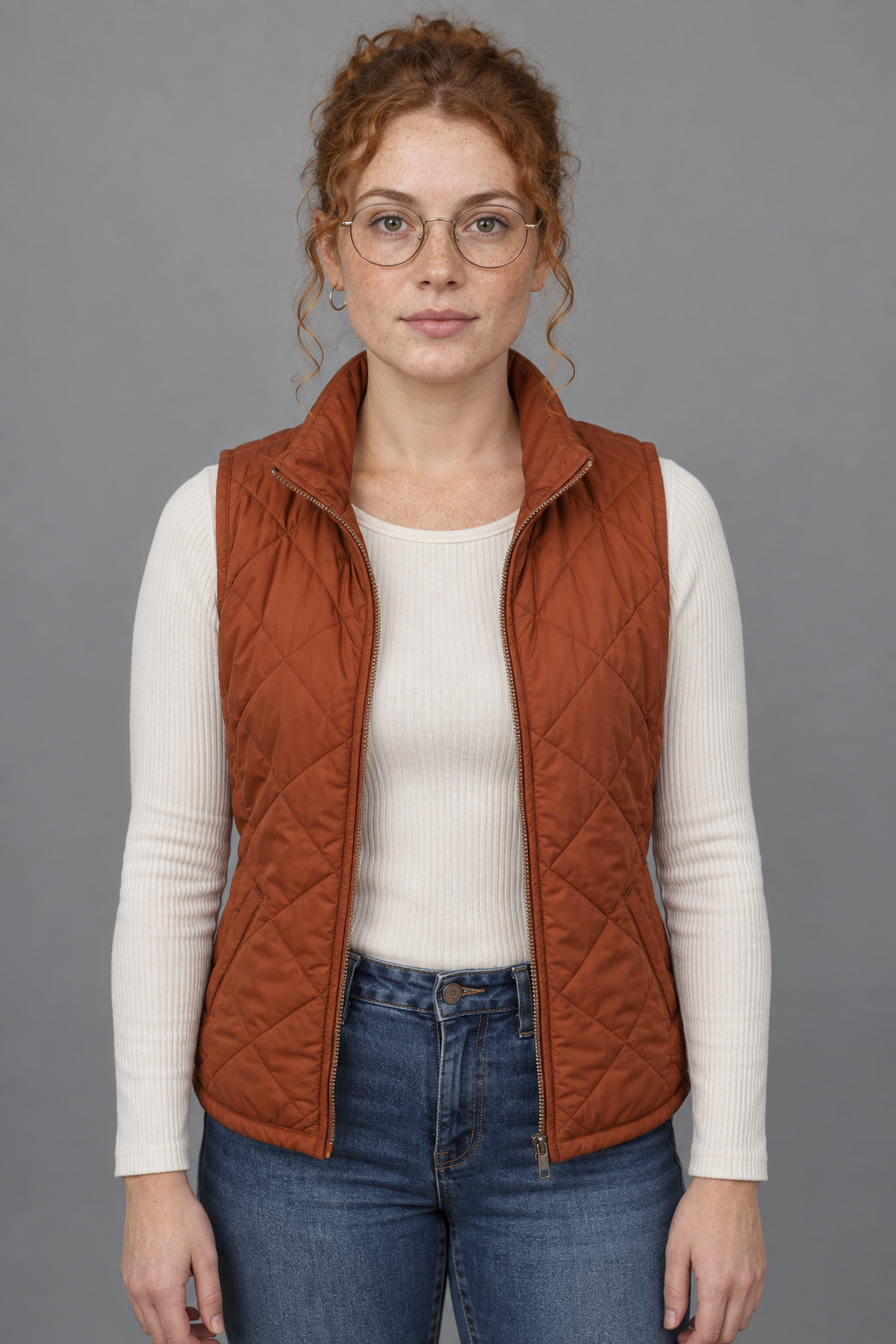
Generated using GPT Image 2.5 on fal, an AI model from OpenAI.
Pro tip: you can set num_images to 4 and pick one, which costs $0.16464 for the set at high quality and is the last point in the whole workflow where picking a different face is cheap.
Here's what you want to do here:
Check which ear the hoop landed on before you commit, since left and right are the least dependable instructions you can give an image model, and update the spec to match the winning image if it came out mirrored.
Resist keeping a runner-up, because a second source image is how you end up with two slightly different people three weeks into a project.
From one photo to eight panels
Feeding one source image through this step returns all eight panels in a single generation.
I'll run this on openai/gpt-image-2.5/sunburst/edit, an endpoint built to read as many as 16 reference images and keep a subject stable across instructions scoped tightly to what you asked for.
Panel layout is unforgiving work, so the tighter scoping matters more here than raw aesthetic quality.
Prompt: Build a character reference sheet from the attached photo. Lay it out as a four by two grid, four columns across and two rows down. Each column is one camera angle, with the full figure on the top row and a head-and-shoulders crop of that same angle directly beneath it. Column one is a straight-on front angle. Column two shows the character turned to her left, in profile, with the matching left-profile crop below. Column three is the same turn to her right, with the matching right-profile crop below. Column four is the back of the figure, with the rear head crop below it. Hold the character at the same scale in every full-body panel and at the same crop distance in every portrait panel. Light the whole sheet with even, shadowless studio light against a neutral grey background. Separate panels with hairline borders and leave equal margins around each figure. No text, no labels, no watermarks.
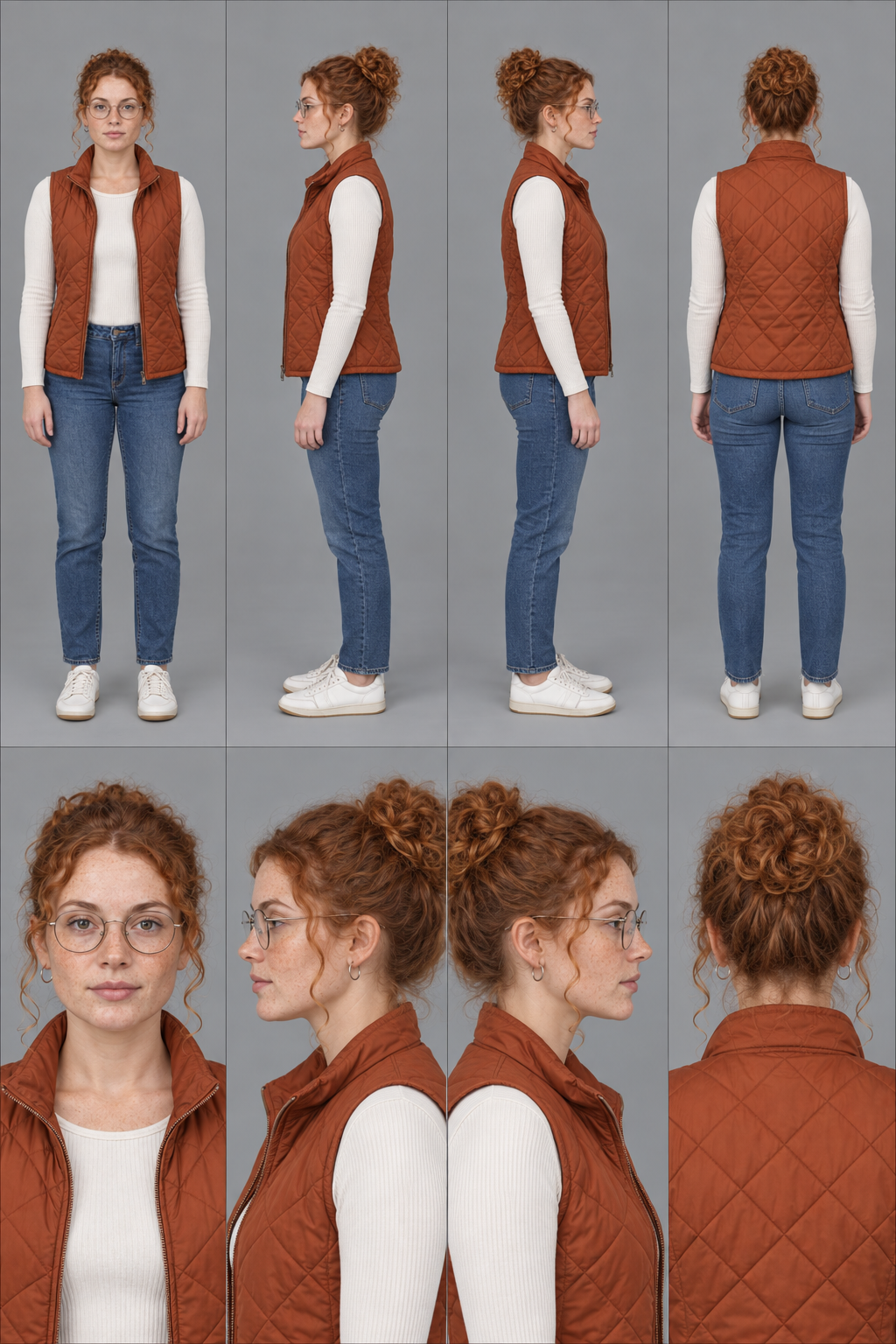
Generated using GPT Image 2.5 on fal, an AI model from OpenAI.
Note: flat lighting on the sheet is a deliberate choice here. Dramatic side light bakes a shadow pattern into the cheekbone and the jaw, then every downstream model treats that pattern as anatomy and carries it into scenes lit from somewhere else entirely.
Even light hands over geometry with nothing attached to it.
A 1024 by 1536 sheet at high quality runs $0.04116 on this endpoint, with one input image included in that figure.
You can push it to 3840 by 2160 for $0.10008 when you want panels big enough to crop hard into.
Which endpoints hold a character across images?
Two endpoints cover this, and they work in opposite directions, with Instant Character building new frames around your reference while Ideogram's character edit repaints a region inside a frame you already approved.
How do you put the same character in a new scene?
Send one crop from the sheet to fal-ai/instant-character as image_url, then write a prompt describing only the situation.
Here are two from the vest launch, one for the product page and one for paid social, both written as situation only:
Prompt: Mara standing against a cream paper sweep in the rust-orange quilted vest over the cream long-sleeve, hands in the vest pockets, weight on her back foot, catalog lighting with a large softbox from the left, shot at chest height on an 85mm lens.
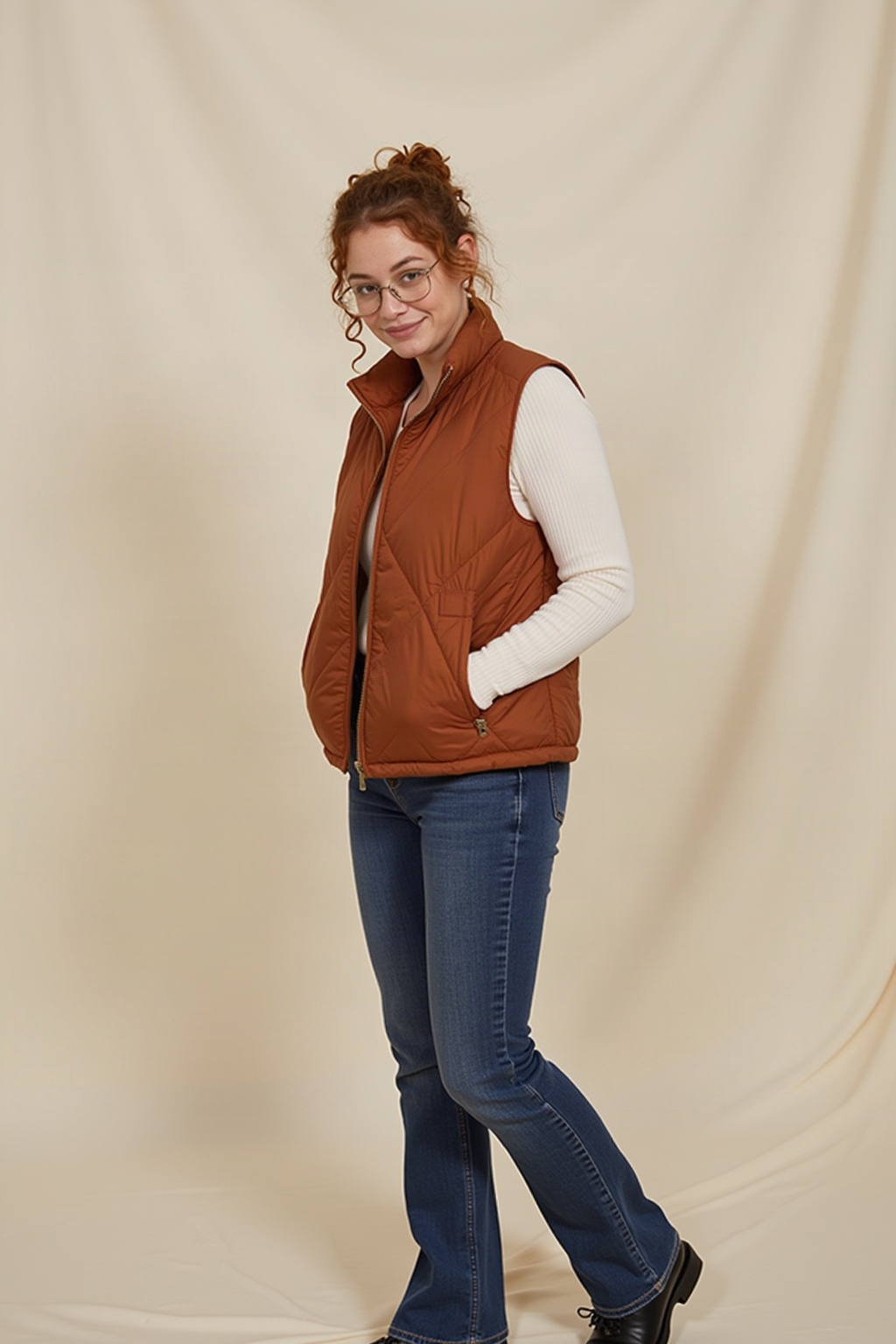
Generated using InstantCharacter on fal.
Prompt: Mara holding a phone at arm's length in her kitchen, mid-sentence, pulling the rust-orange vest on over the cream long-sleeve, bright overcast light through the window behind the camera, framing slightly off-center and a little low, the loose look of a front-facing phone camera.
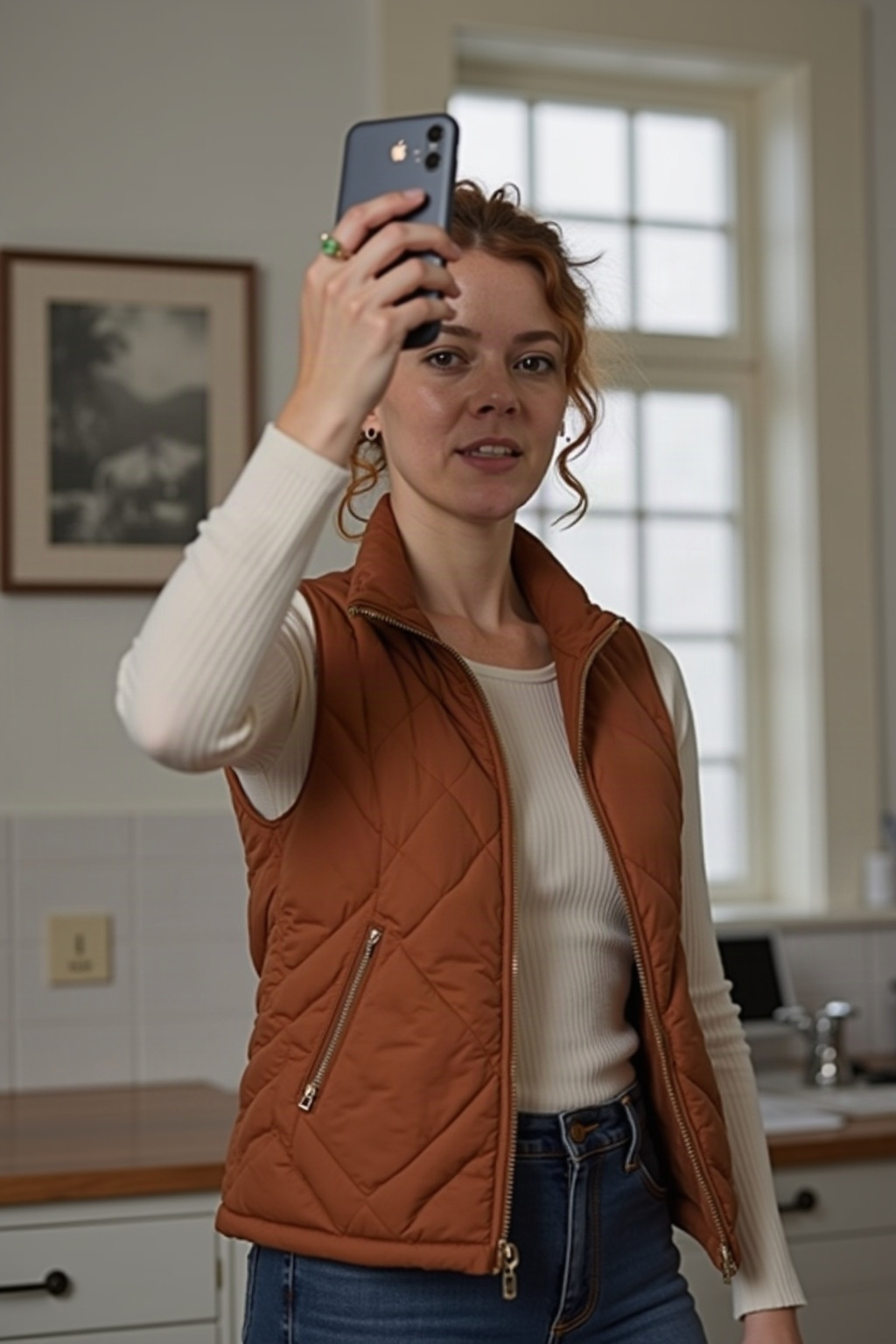
Generated using InstantCharacter on fal.
Neither prompt describes her hair, her glasses or her freckles.
All three of those details arrived with the reference, so describing them a second time puts two sources of truth into one request for the model to average.
Here's what you should know about the settings:
Only scale really needs attention here, governing how prominent the reference subject is in the output, with fal's default of 1 being where we'd leave it unless a busy frame starts swallowing the character.
guidance_scale defaults to 3.5 and num_inference_steps to 28, a pair that handles most scenes without any adjustment.
Point negative_prompt at the specific artifacts you keep seeing, not at a wall of generic quality terms.
Output defaults to square_hd at 1024 by 1024, with custom dimensions available through image_size.
Billing runs at $0.1 per megapixel, putting a 1024 by 1024 generation just over ten cents.
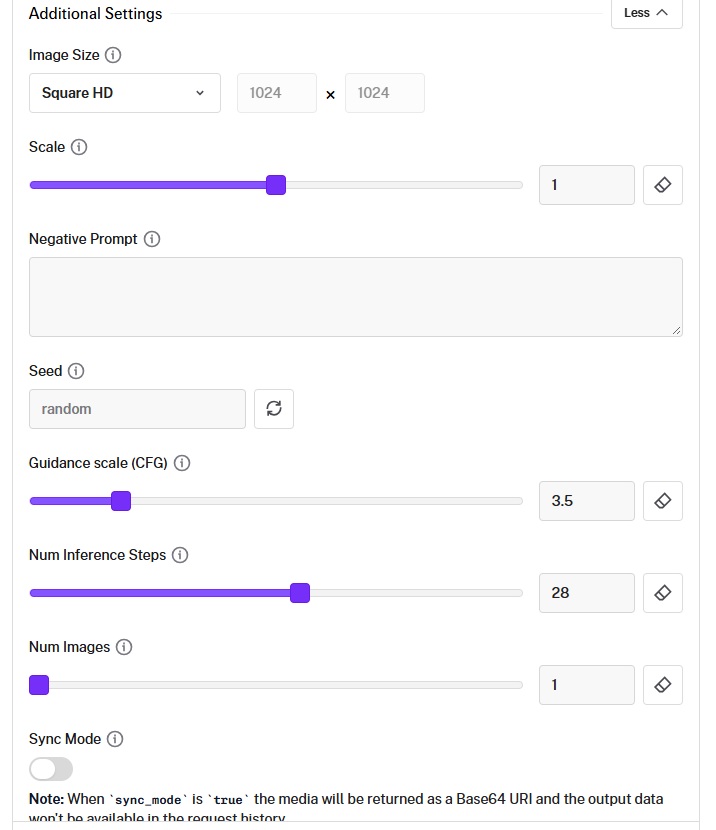
One reference image per request is the limit here.
So a shot of the back of her head wants the rear panel sent as the reference, never the front one.
falMODEL APIs
The fastest, cheapest and most reliable way to run genAI models. 1 API, 100s of models
How do you change wardrobe or pose without losing the face?
You can mask the region you want repainted and pass the character reference through a separate field, on ideogram/character/edit.
Three inputs carry the request, starting with image_url, the frame being edited:
mask_url marks the region to repaint at dimensions identical to the input image.
reference_image_urls carries the character reference, with the endpoint reading one image from that list and ignoring the rest, under a 10MB total cap across JPEG, PNG or WebP.
reference_mask_urls applies a mask to the character reference itself.
Masking everything in that reference except the head tells the endpoint to take the face while leaving the wardrobe to the frame underneath.
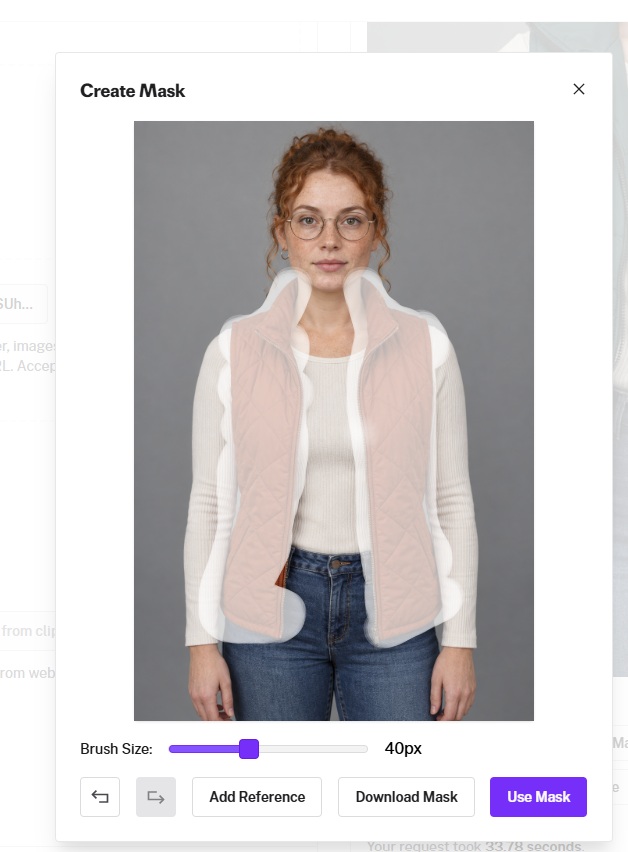
On a coat swap, that one distinction decides the result. As the mask handles location, the prompt stays short:
Prompt: Mara in the same quilted vest in deep forest green, same zip position, same posture.
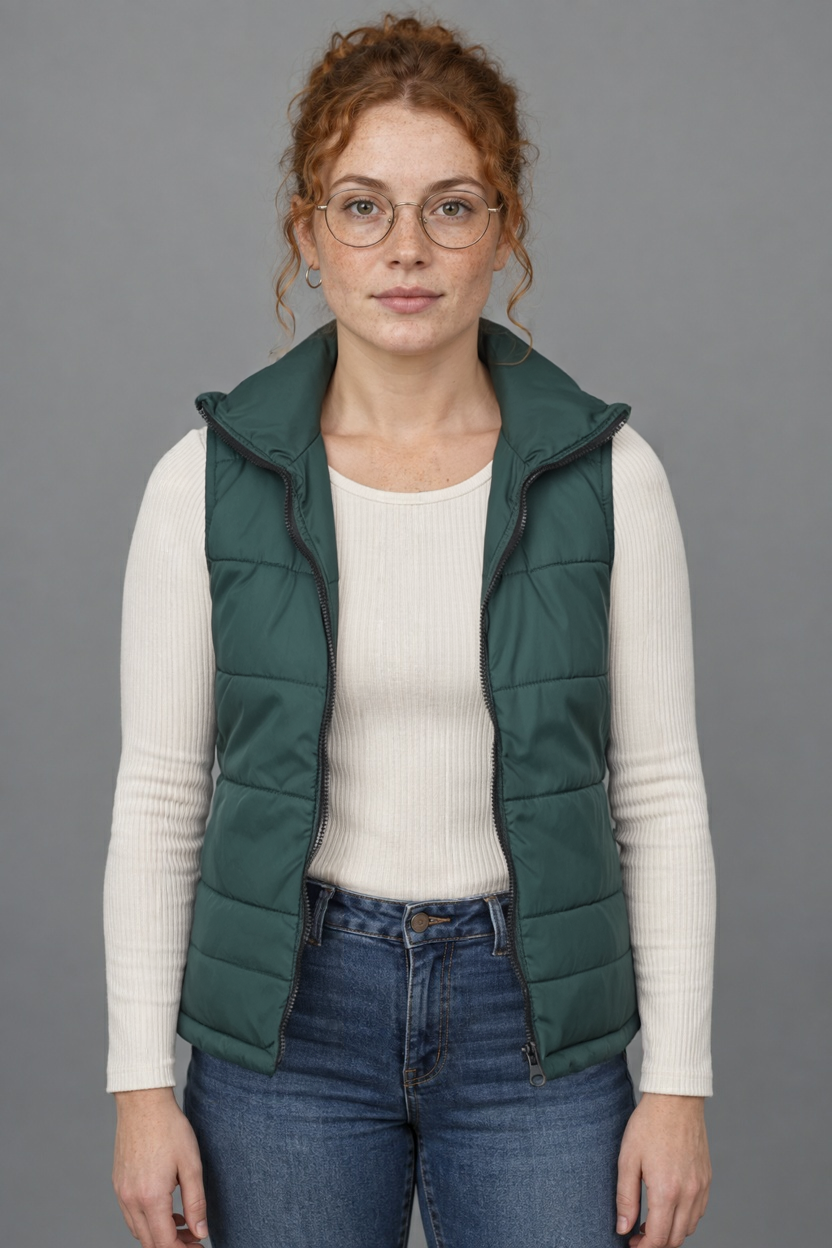
Generated using Ideogram V3 Character Edit on fal, an AI model from Ideogram.
Quality and price move together through rendering_speed, where TURBO runs $0.10, BALANCED is the default at $0.15, and QUALITY is $0.20 per image.
Pro tip: expand_prompt sends your instruction through Ideogram's MagicPrompt before generation and defaults to true, which helps on short conversational prompts and gets in the way on brand work where a named color cannot be allowed to wander.
One trap catches people on this endpoint, since reference_image_urls carries your character while image_urls carries style reference, and confusing the two returns a frame that looks technically fine and is wearing somebody else's face.
Every mask has to come off the same canvas as its frame at matching dimensions.
Organized working files matter more on this endpoint than clever prompting does.
When is a custom LoRA worth the money?
Once the character recurs often enough that handling references per shot costs more than training does.
A mascot shipping weekly qualifies, an episodic series qualifies, and a one-off set of eight launch images does not.
fal-ai/flux-lora-fast-training takes a zip of images, a trigger_word and a step count defaulting to 1,000.
You want to leave is_style off for a character, since that flag switches off auto-captioning and segmentation masks on the grounds that style transfer does not need them.
On the dataset, our team's guidance is 1024 by 1024 or larger with no compression artifacts and consistent quality across the set, while this workflow puts the working number at ten or more varied photos.
Your sheet panels count toward that set, though shots taken on different days at different distances under different light are worth considerably more than eight near-identical portraits.
Choose a trigger word that nothing else will collide with.
Something along the lines of Mara, then used in every prompt you write against the trained model.
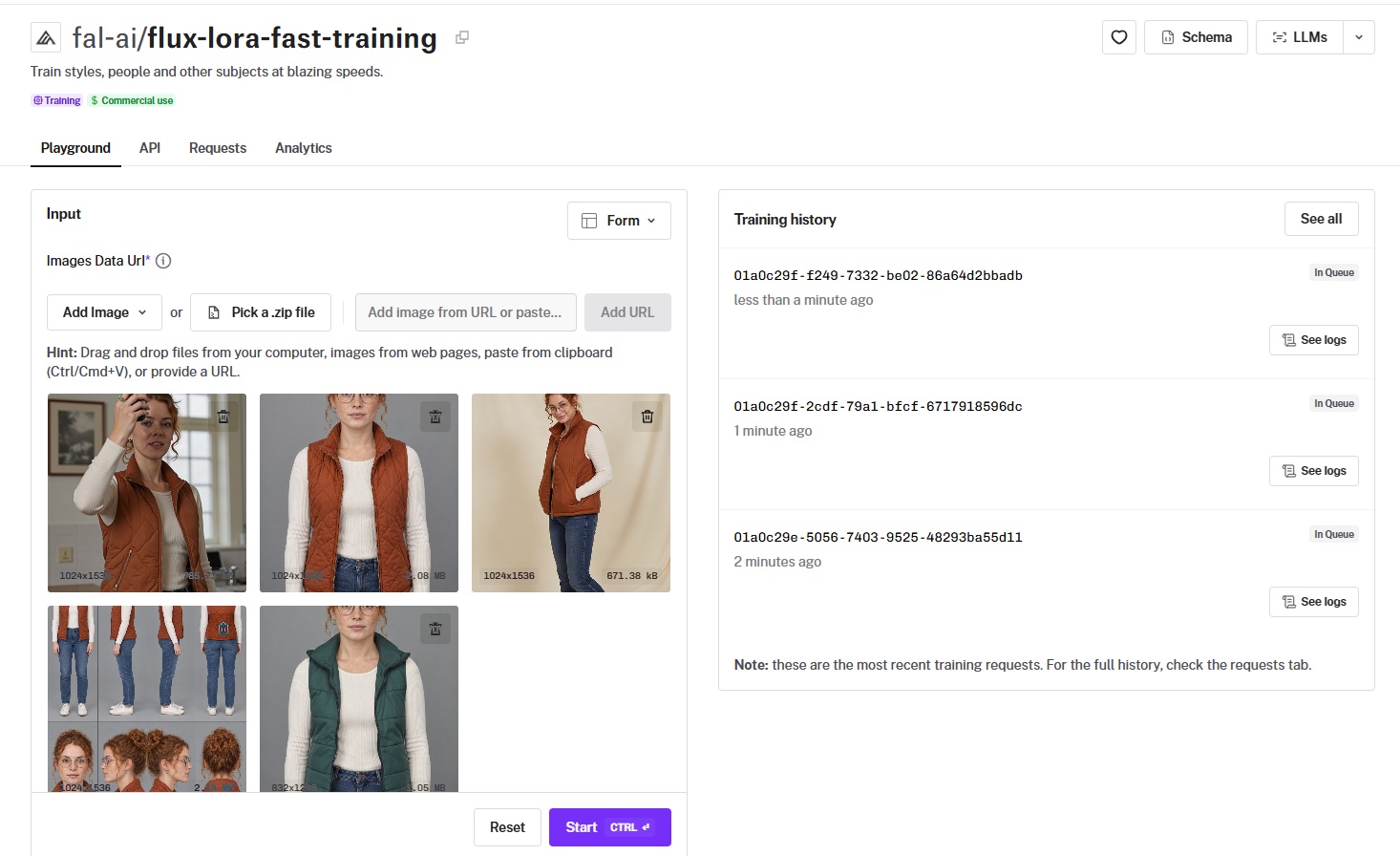
Training runs $2 and scales linearly with steps, putting a 2,000-step run at $4.
Generation afterwards goes through fal-ai/flux-lora, passing the trained weights as a LoRA path with a scale value.
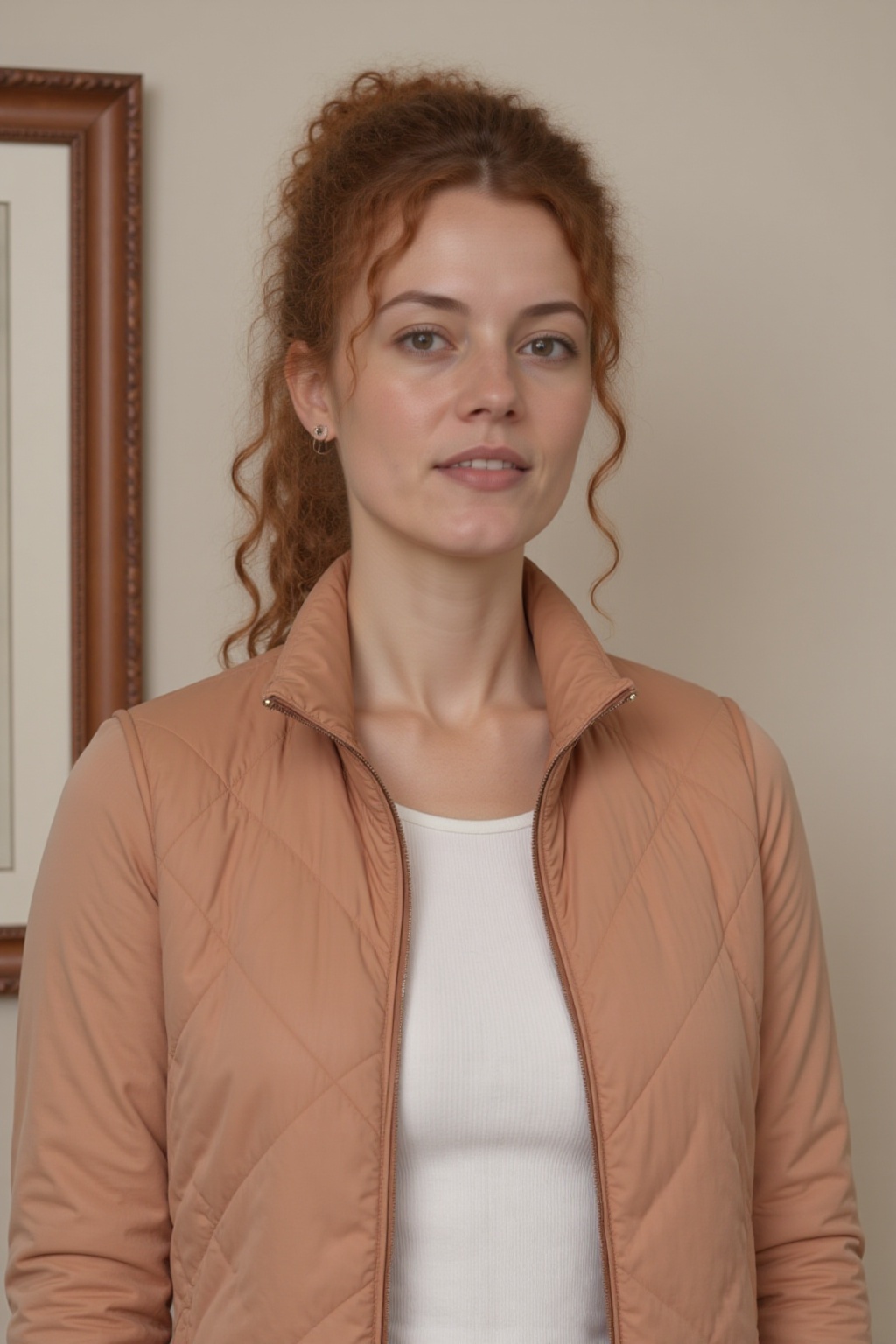
Generated using FLUX LoRA on fal, an AI model from Black Forest Labs.
For face-forward work, fal-ai/flux-lora-portrait-trainer is tuned toward portraits, billed per step against a 1,000-step minimum.
The honest trade-off is that a LoRA gives you the hardest lock available anywhere in this guide while also being the only method that bills you before a single usable frame exists.
How do you carry a character into video?
Send sheet crops as reference images to minimax/h3-max/reference-to-video, then name them in the prompt by modality and position.
H3 Max is our post-trained variant of MiniMax H3, tuned for stronger prompt adherence and aesthetics, and co-optimized with our own inference stack for throughput.
Reference images, videos and audio clips share a single cap of 12 files per request, and the prompt addresses them in plain words as Image 1, Image 2, Video 1 and Audio 1, following their order in the request.
Selection beats volume under a cap that tight, because a fit check where our creator turns her back to camera needs the rear panel in the reference set, and a model holding only front-on material will design the back of her head from scratch on every run.
Now, we're about to do a cropping exercise of Mara:
- Image 1 = column one, top row, which is the front full-body panel.
- Image 2 = column four, top row, which is the back full-body panel.
Note: since H3 Max Reference to Video wants the aspect ratio of the images to be between 0.4 and 2.5, I had to cut Mara's legs a little bit from the crop.
Prompt: Image 1 is the creator, and Image 2 is the same creator from behind. She walks toward the camera along a sunlit sidewalk in the rust-orange quilted vest, stops, turns her back to show how the vest sits across the shoulders, then looks over her left shoulder and laughs. Handheld phone camera at chest height, following her with a slight bounce in the frame. Bright overcast daylight, street noise underneath.
Generated using H3 Max on fal.
Here are a few settings that matter on H3 Max Reference To Video:
duration defaults to 5 seconds, with fal's published pricing tables running out to 15.
resolution offers 480P, 768P as the default, and 1080P produced as a latent refinement from a native 768P source.
aspect_ratio defaults to adaptive and accepts everything from 21:9 down to 9:16.
prompt_expansion_mode defaults to balanced, spends around 30 seconds on a richer rewrite under quality, and leaves your wording untouched under disabled, which is what you want once the references are carrying identity and your prompt is doing exact art direction.
Output billing runs per second of video at the resolution you picked, coming to $0.05 at 480p, $0.08 at 768p and $0.16 at 1080p.
References are billed separately through a token allowance.
Every request includes 4,096 reference tokens at no charge, shared across all images, videos and audio clips, with anything beyond that charged at $0.02 per 1,000 tokens and prorated to the actual count.
That allowance is generous enough to change how you work. A square reference image processes to 1,024 by 1,024 and contributes 1,024 tokens, so four square crops from your sheet cost nothing at all, and a fifth adds $0.02048.
Crops at 16:9 are heavier at 1,824 tokens each, putting the third one just past the allowance for $0.02752.
A ten-second 768p clip carrying four square sheet crops therefore comes to $0.80, all of it output cost.
The reference video is the input that actually moves the bill.
A five-second 16:9 clip encoded at the 768p profile is 32,256 tokens, adding $0.56320 once the allowance is spent, so trim any motion reference down to the seconds that carry the movement you want.
How does fal Agent hold a character across a project?
Our fal Agent can hold a character across multiple projects by keeping references, decisions, and rejected takes attached to the project, so work resumed weeks later opens with the character already in context.
Memory is scoped per project, keeping a fashion campaign and a game cinematic from contaminating each other.
The agent also runs across models and modalities inside one job.
That matches how character work goes in practice, since a single brief tends to touch a sheet generator, an editor, an upscaler and a video model before anything ships.
Here's an example brief for a vest launch:
Prompt to fal Agent: Here's my creator reference sheet. Build eight shots for the rust-orange vest launch, same face and same vest in all eight, four on a cream paper sweep for the product page and four as phone-camera UGC for paid social. Then animate the front pose into a six-second fit-check loop. Bright, slightly cool grade throughout. Tell me what each step cost.
The model started out by generating eight shots with Nano Banana Pro:
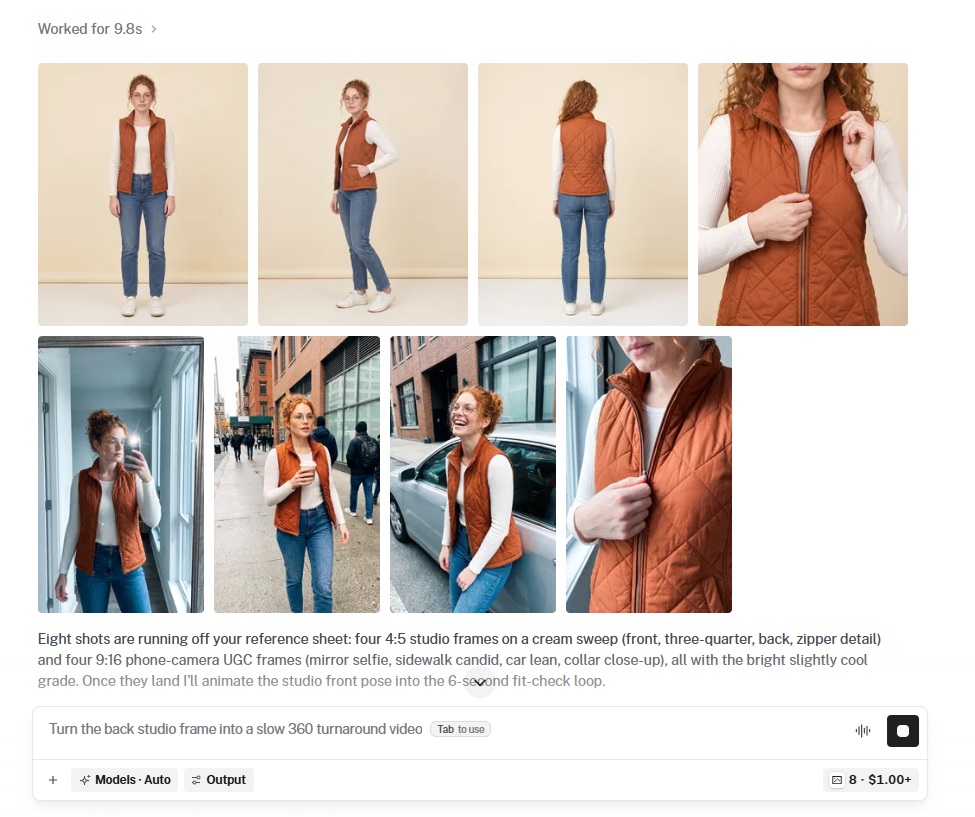
And then proceeded to generate a 6-second fit-check with H3 Max (all of this is one shot from the prompt).
Access comes through credit plans, with Starter at $50 per month, Pro at $200 per month including 5% off UI, Sandbox, Playground and CLI usage, and Max at $1,000 per month at 10% off.
Credits spend across every fal product, get drawn down before pay-as-you-go rates and roll over monthly, while API usage stays pay-as-you-go throughout.
Programmatic runs through the API and CLI are listed as coming soon, alongside a drop-in MCP server for driving the agent from a coding editor.
Recently Added


Build your character on fal
Reference conditioning got good enough that character consistency became a question about where you store identity and how carefully you build that storage once.
Every endpoint above runs on fal through one API with usage-based pricing and no infrastructure on your side, all of them reading the same sheet.
Open the playground with one photo and the turnaround prompt, then keep the crops.
FAQs
Can you keep the same character across different models on fal?
Yes, and the sheet is what makes it portable.
Crops from one turnaround feed Instant Character, Ideogram's character edit and H3 Max without modification, because all three read reference images through standard URL fields.
Fidelity still varies between models, though holding the reference identical and keeping identity out of the prompts removes the largest source of variation you control.
What are some character sheet templates that you can use?
These are the two sheets I build alongside the turnaround on every character, and you can lift both as they are. Swap the specifics and keep the structure.
Both run on openai/gpt-image-2.5/sunburst/edit with your source portrait attached, same as the turnaround, and both cost $0.10008 at 3840 by 2160 on high quality.
Template one, the expression sheet. For UGC where your creator talks to camera. A turnaround holds her angles and says nothing about what her face does mid-sentence.
Build an expression sheet from the attached photo.
Lay it out as a three by two grid, six equal panels.
Every panel is a head-and-shoulders crop of the same character at the same distance, facing the camera straight on.
Panel order runs left to right along the top row, then left to right along the bottom row: neutral, warm closed-mouth smile, mid-sentence talking with the mouth open, eyebrows raised in surprise, focused and serious, laughing with the head tipped back slightly.
Hold the hair, wardrobe and jewelry identical in all six panels.
Light every panel with even, shadowless studio light against a neutral grey background.
Hairline borders between panels and equal margins around each head.
No text, no labels, no watermarks.
Template two, the colorway sheet. For the product page, one approved pose across every variant in the drop.
Build a colorway sheet from the attached photo.
Lay it out as a two by two grid, four equal panels.
Every panel shows the same character in the same standing pose, framed from mid-thigh up, facing the camera straight on.
Panel one keeps the garment exactly as it appears in the attached photo.
Panel two puts the same garment in deep forest green.
Panel three puts it in charcoal grey.
Panel four puts it in cream.
Hold the face, hair, jewelry, pose and framing identical across all four panels, changing only the garment color.
Light all four with even, shadowless studio light against a neutral grey background.
Hairline borders between panels and equal margins around each figure.
No text, no labels, no watermarks.
Neither one replaces the turnaround, since neither carries angle coverage.
Two habits that save reruns:
Build the grid squarer than feels necessary, because H3 Max rejects reference images narrower than 0.4 on width divided by height and a hard crop off a wide row lands under that.
And leave background margin around each figure so you have something to crop into later.
Does the wardrobe need to match in every panel of the sheet?
For your primary set, yes, because mixed wardrobe across panels teaches a reference-conditioned model that clothing is negotiable, and it will start negotiating.
Build a second sheet for the second look, one per costume, and keep them as separate references, since mixing costumes into a single grid is what caused the problem in the first place.
What resolution should a character reference be?
Large enough that a crop of the face survives the shot you plan to use it in.
Sheet panels at 3840 by 2160 leave headroom to crop into a single portrait and still hand a model plenty of facial detail, where a 1024 by 1024 sheet divided into eight panels leaves each face rather small.
For LoRA training specifically, fal's guidance is 1024 by 1024 or larger per image with no compression artifacts.
How do you handle a character who needs a second look?
Treat every distinct look as its own reference set.
A creator in the rust-orange vest and the same creator in a packable rain shell are two sheets sharing one face, generated by running the turnaround prompt a second time against a source image in the second outfit.
Masked editing on ideogram/character/edit covers one-off changes, while a look appearing across many shots deserves its own sheet.
Does this work for non-human characters?
Yes, with no change to the sequence, since a mascot, a creature or a stylized illustrated character all go through the same source image, turnaround sheet and reference-conditioned generation.
Flat lighting and matched scale matter more for non-human subjects, since the model has fewer learned priors to fall back on when it fills gaps.
What makes a character drift?
Four things cause almost all of it, and diagnosis runs backward from the symptom:
Wardrobe drifting while the face holds is the most common and the most fixable, since reference-conditioned models weight faces heavily and leave clothing to whatever the scene prompt implies, so name the garment and its color in the prompt and keep one crop showing it at size.
Close-ups slipping while the wide shots hold means your reference crop and your framing are mismatched, and the sheet carries portrait panels under the full-body ones for exactly that reason.
A character going unrecognizable the moment they turn means the reference set has no profile or rear coverage, leaving the model to invent it fresh on every run.
Drift that appears right after you rewrote a prompt means identity language is still sitting in the prompt and competing with the reference, so strip it out, and paste whatever has to stay every single time.
What does a full character workflow cost on fal?
Around $2.50 for the vest launch set end to end, at standard rates, with no GPU booked anywhere along the way.
Four source portrait candidates on GPT Image 2.5 come to $0.16464 and the 3840 by 2160 turnaround sheet is $0.10008.
Eight scene images through Instant Character at 1024 by 1024 are about $0.84, four colorway edits on Ideogram V3 Character Edit at BALANCED are $0.60, and one 10-second 768p clip on H3 Max is $0.80.
Training a LoRA on top adds $2 at 1,000 steps, buying a shorter setup on every future shoot but not cheaper inference, since generation still bills per image afterward.
Can the output be used commercially?
The endpoints covered here are marked for commercial use on fal, with licensing detail set out in fal's terms of service.
Check those terms before a client campaign goes live, particularly where partner models are involved.
![How To Create Ads With AI: The Ultimate Guide [2026]](https://refinery.fal.media/url/https%3A%2F%2Fv3b.fal.media%2Ffiles%2Fb%2F0aa0ad7c%2F2oIkwFrEDe7JZCVjaX3rP_how-to-create-ads-with-ai.jpg/tr:w-1280,q-80/2oIkwFrEDe7JZCVjaX3rP_how-to-create-ads-with-ai.webp)