This guide breaks down GPT Image 2 and FLUX 2 Max on fal across architecture, parameter surface, text rendering, editing pipelines, pricing tiers, and the workflows where one earns its place over the other.
TL;DR
GPT Image 2 launched on April 21, 2026 on fal as OpenAI's quality-first image model. The AI model is reasoning-driven and aims to decide how much compute to spend on a prompt based on its complexity.
You get three discrete quality tiers (low, medium, high), per-image pricing that scales from $0.005 at low quality on 1024x768 to $0.401 at high quality on 3840x2160, and BYOK support that lets you pass your own openai_api_key to route generations through your own OpenAI quota.
Streaming is available on both the text-to-image and edit endpoints, and the AI image generation model handles dense multilingual text, including CJK scripts, on its way to high-fidelity output.
FLUX 2 Max comes from Black Forest Labs on fal as an editing-first flagship in the FLUX.2 family.
Built on a 32-billion-parameter rectified flow transformer paired with a Mistral-3 24B vision-language model, Max is positioned for state-of-the-art image generation and the highest-quality editing in the family.
Per-megapixel billing on both endpoints runs $0.07 for the first megapixel of output and $0.03 per extra megapixel, so a 1024x1024 generation costs $0.07 and a 1920x1080 generation costs $0.10. On the edit endpoint, input images count as processed megapixels at the same rate.
The editing endpoint accepts up to 10 reference images per the FLUX.2 family spec, the prompt syntax supports @Image1 and @Image2 references for natural multi-image composition, and HEX color codes drop into the prompt body as a documented feature for brand-accurate color matching.
How do GPT Image 2 and FLUX 2 Max compare on paper?
Here's how GPT Image 2 and FLUX 2 Max stack up:
| GPT Image 2 | FLUX 2 Max | |
|---|---|---|
| Best for | Pixel-perfect text rendering, multilingual content (CJK and Latin), UI mockups, and mask-based inpainting | State-of-the-art generation, high quality multi-reference editing, brand-color discipline, and professional production assets |
| Architecture | Reasoning-driven multimodal model developed with built-in "thinking" mode and with multi-format output. | 32B-parameter rectified flow transformer paired with Mistral-3 24B VLM, Black Forest Labs |
| Pricing model | Per image, three quality tiers (low, medium, high) | Per megapixel ($0.07 first MP, $0.03 each extra MP) on both text-to-image and edit |
| 1024x1024 (high quality) | $0.211 | $0.07 |
| 1920x1080 (high quality) | $0.158 | $0.10 |
| 3840x2160 (high quality) | $0.401 | Output caps at ~4 MP per generation |
| Quality tiers | Low, medium, high | None (editing-first flagship, single tier) |
| Multi-image references | Yes (image_urls list) | Up to 10 reference images |
| HEX color prompting | Yes | Yes |
| Streaming support | Yes (text-to-image and edit) | No |
| BYOK (your own API key) | Yes (openai_api_key) | No |
| Native CJK rendering | Yes. | Yes. |
| Output formats | PNG, JPEG, WebP | JPEG, PNG |
| Aspect ratio presets | 6 presets, custom dimensions supported | 6 presets, custom dimensions supported |
| Resolution constraints | 655,360 to 8,294,400 pixels, max edge 3840px, max 3:1 aspect ratio | Output up to ~4 MP |
| Commercial use | Yes | Yes |
What is the main architectural difference between GPT Image 2 and FLUX 2 Max?
The two models start from different design philosophies:
GPT Image 2's parameter surface
GPT Image 2 hands developers a quality-tier dial. The model itself is reasoning-driven.
Simple briefs get short reasoning passes, dense ones get longer ones, and the time spent thinking varies on a per-call basis.
Quality is exposed as a three-step enum:
quality: "low" runs faster and ships at the lowest token cost.
quality: "medium" sits in the middle.
quality: "high" is the default and pushes the model to spend more compute on complex prompts.
You also get sync_mode for direct data-URI returns, output_format with three options (jpeg, png, webp), num_images for batch requests, and an openai_api_key field for routing the call through your own OpenAI account quota.
The GPT Image 2 edit endpoint adds image_urls (a list, so multiple references can stack into a single edit) and mask_image_url, where white pixels in the mask indicate which regions the model is allowed to change, and black pixels are preserved exactly.
FLUX 2 Max's parameter surface
FLUX 2 Max takes a different approach. The architecture is a 32-billion-parameter rectified flow transformer coupled with the Mistral-3 24B vision-language model.
The VLM is the part that handles language, world knowledge, and prompt-level reasoning, while the rectified flow transformer handles the visual side (how objects sit in space, how materials catch light, and how the composition resolves).
The way it works is that you write the prompt, set image_size (preset or custom width and height), pass an optional seed for reproducibility, set safety_tolerance and enable_safety_checker, and pick output_format between jpeg or png.
What FLUX 2 Max adds in exchange for that lean surface happens at the prompt level instead of the parameter level.
A few prompting features come built into the pipeline:
JSON-structured prompts for precise control over complex generations. You can pass a JSON object with fields like scene, subjects, style, color_palette, lighting, mood, composition, and camera (with sub-fields for angle, distance, lens) and the model parses it as a structured spec instead of free text.
HEX color codes for precise color matching and brand consistency. You can drop strings like "color #2D5A3D" or "gradient from hex #FF6B6B to hex #4ECDC4" into the prompt body and the model reads them as exact color targets.
Both models can interpret HEX in practice, but FLUX 2 Max is the only one of the two that surfaces it as an official capability with documented prompting patterns.
@ image referencing. On the FLUX 2 Max edit endpoint, prompts like "@image1 wearing the outfit from @image2" let you reference uploaded images directly without index numbering.
Multilingual prompting is part of FLUX 2 Max's positioning too, and we're about to test this in one of the head-to-head prompts I've prepared for both AI models.
How do GPT Image 2 and FLUX 2 Max look side-by-side?
I ran four head-to-head tests on fal, picking prompts that stress different parts of each model's architecture, including multilingual product packaging, a pixel-perfect dashboard UI, HEX-coded brand product photography, and a precision edit.
Let's see how both AI image generation models compare:
Test 1: Multilingual product packaging with Latin and CJK typography
Prompt: "A photorealistic studio product shot of a cylindrical metal tea tin standing on a soft beige linen surface, three-quarter view, slight overhead angle. The tin is forest green with a matte finish. The front label features the brand name 'Kasumi-Cha' in large serif Latin lettering above three vertical Japanese characters reading 霧の茶 in traditional brushstroke calligraphy. Below the calligraphy, in smaller Latin text, the line: 'Single-Origin Sencha · Harvested May 2026 · Shizuoka Prefecture'. On the side of the tin, a tiny ingredients block reads: 'Contents: 100g loose-leaf green tea. Brew at 70°C for 90 seconds.' Soft north-window light, gentle shadow falling to the right, shallow depth of field with the back of the tin slightly out of focus. No props, no other objects, no extra text anywhere on the tin."
GPT Image 2:
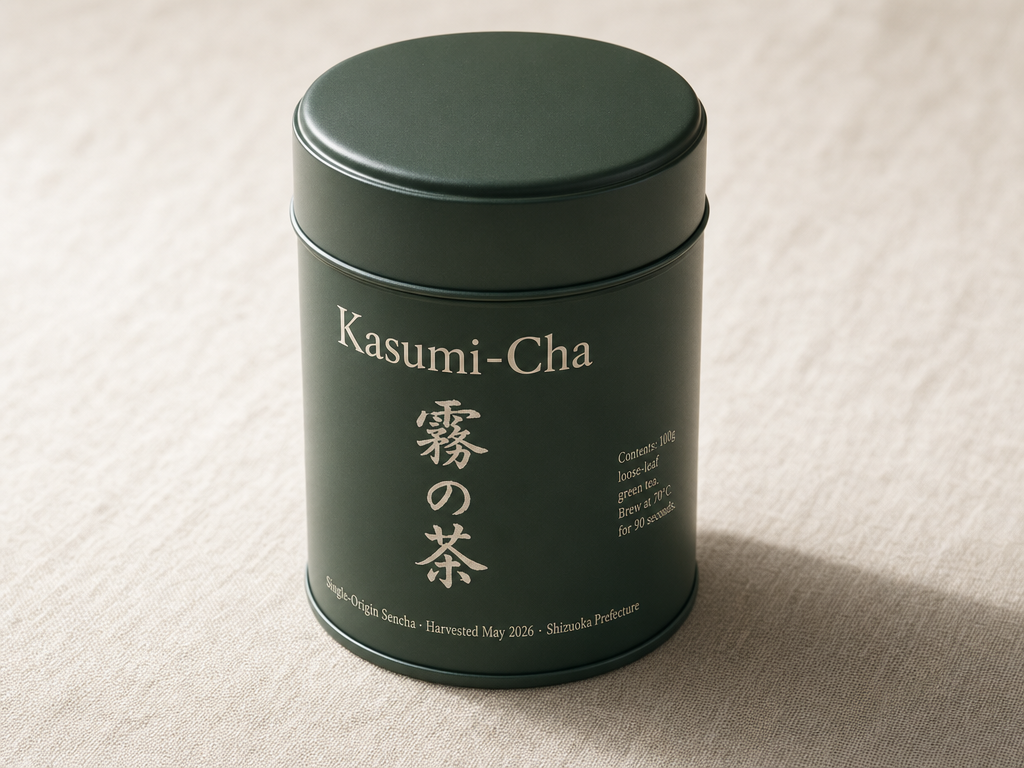
Generated using GPT Image 2 on fal, an AI model from OpenAI.
FLUX 2 Max:
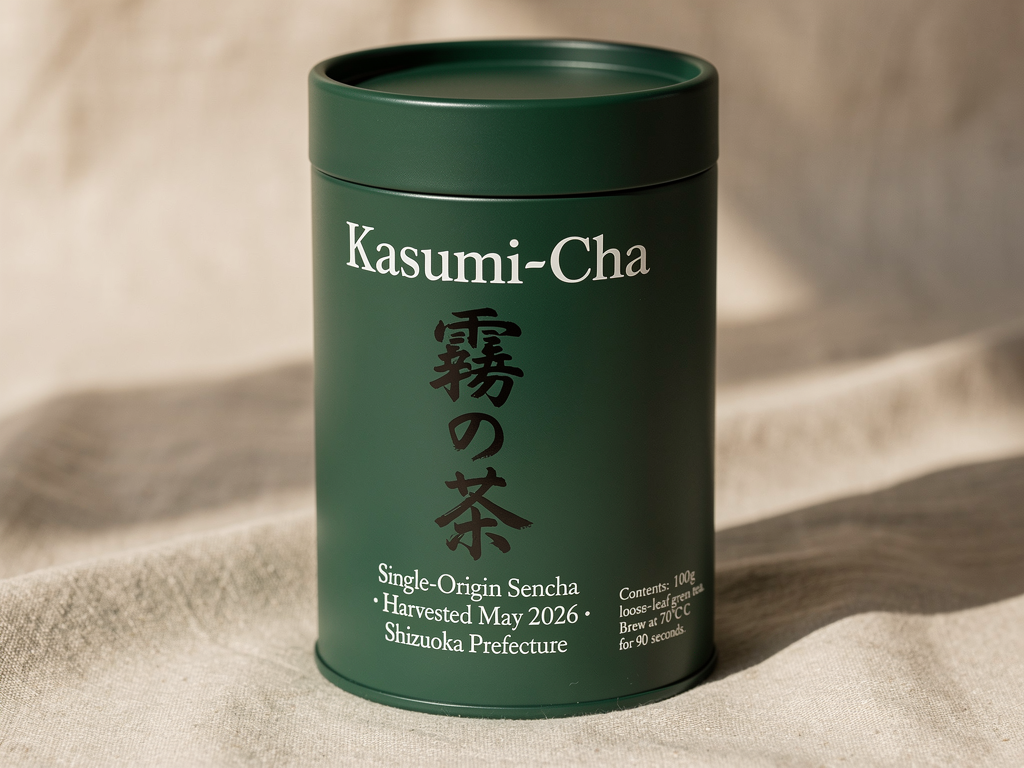
Generated using FLUX 2 Max on fal, an AI model from Black Forest Labs.
My take: Both AI models did a really great job with the image generation process and writing in Japanese, although I can see small errors in both images:
GPT Image 2's image was not able to write the last word "seconds" correctly, although everything else holds up.
FLUX 2 Max's image has 2 times "C", which is something that took me some time to see.
Nonetheless, both of these are small errors that can easily get fixed with an AI image editor.
Test 2: Pixel-perfect SaaS analytics dashboard
Prompt: "A pixel-perfect screenshot of a SaaS analytics dashboard at 1440x900 resolution, in dark mode. Top navigation bar in hex #0F1117 with the brand 'Pulseboard' in bold sans-serif on the left, followed by tabs labeled 'Overview', 'Funnels', 'Cohorts', 'Reports', 'Settings'. On the far right of the navbar, a search field with placeholder 'Search metrics or events…', a bell icon with a small red dot, and a circular avatar with the initial 'M'. Main content area below: a left sidebar at 240px wide showing five collapsible sections labeled 'Pinned', 'Acquisition', 'Engagement', 'Retention', 'Revenue', each with chevron arrows. Center grid of four KPI cards reading 'Active Users 28,419 ▲ 12.4%', 'New Signups 1,204 ▲ 3.1%', 'Churn Rate 4.8% ▼ 0.6%', 'MRR $84,210 ▲ 7.2%'. Below the cards, a wide line chart titled 'Daily Active Users · Last 30 days' with two lines (one teal, one muted gray for comparison), x-axis labeled with dates from Apr 03 to May 02, y-axis labeled in increments of 5K. Right column shows a vertical activity feed with five rows, each with a small avatar, a name, and an event description like 'Lina M. completed onboarding · 4m ago'. Realistic UI typography, 1px borders in hex #1F2229, no extra text or watermark."
GPT Image 2:
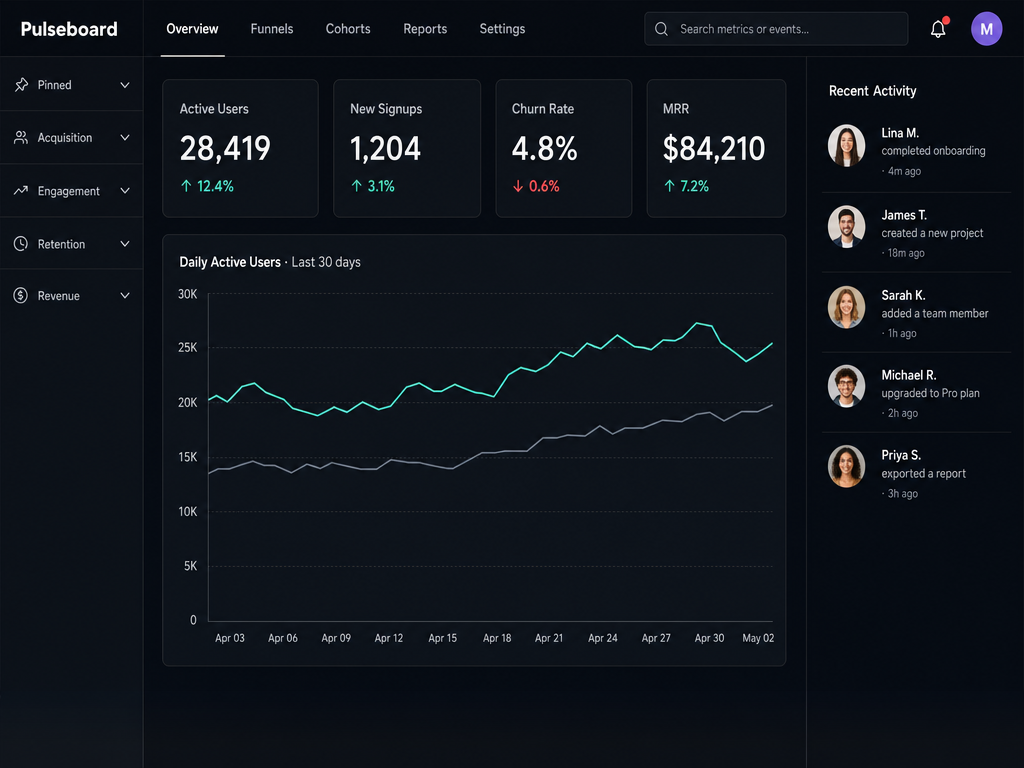
Generated using GPT Image 2 on fal, an AI model from OpenAI.
FLUX 2 Max:
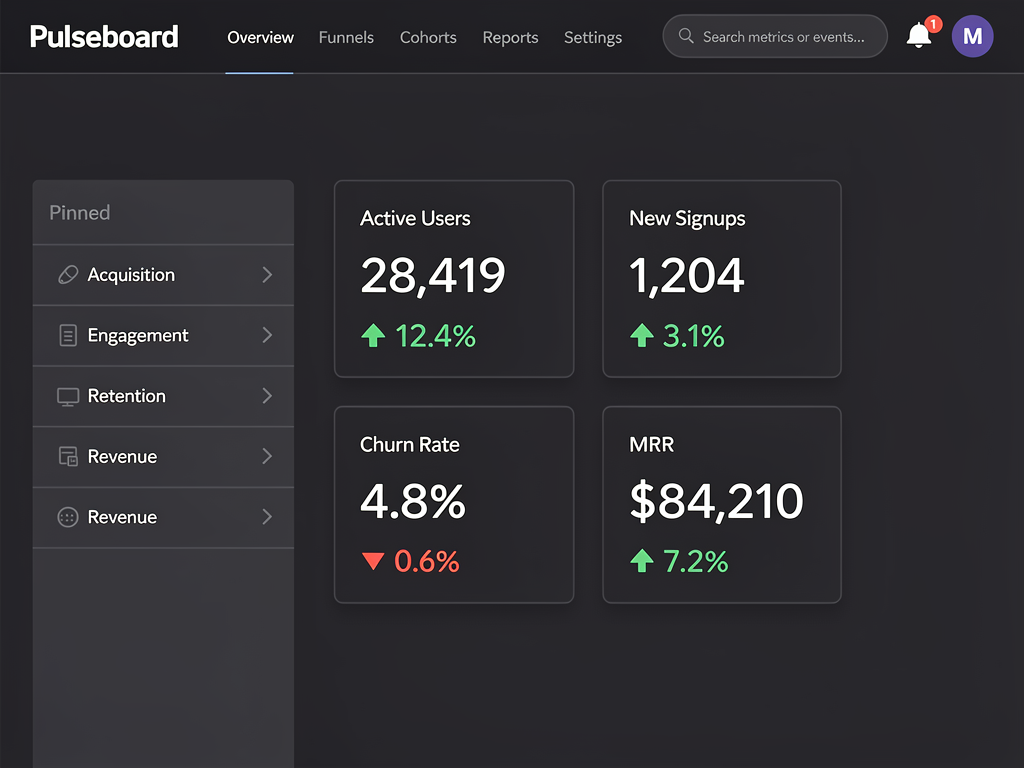
Generated using FLUX 2 Max on fal, an AI model from Black Forest Labs.
My take: GPT Image 2 is the clear winner here for me, as it better adhered to the prompt that I gave it, including creating that line chart and adding the recent activity section, although I don't know how it came up with the 4 other people in the image and why it decided to come up with images for all of the people.
falMODEL APIs
The fastest, cheapest and most reliable way to run genAI models. 1 API, 100s of models
Test 3: HEX-coded brand product shot
Prompt: "A close-up product shot of a matte ceramic spice jar standing on a polished concrete kitchen counter, three-quarter angle, eye level. The jar body is glazed in color hex #2D5A3D with a subtle satin finish. The wraparound label is hex #F4E4C1 cream paper with brown text in hex #3A2418. Label text reads, top to bottom: brand name 'Marais & Sons' in elegant serif, then 'SMOKED PAPRIKA' in tall bold sans-serif caps, then a thin horizontal rule, then 'No. 04 · Pimentón de la Vera · 60g'. The lid is brushed copper, hex #B87333, with the brand monogram 'M&S' embossed on top. Soft side lighting from the upper left, a faint shadow stretching to the lower right, a hint of green herbs slightly out of focus in the background. The three painted surfaces must match the hex values exactly: jar body #2D5A3D, label background #F4E4C1, lid copper #B87333."
GPT Image 2:
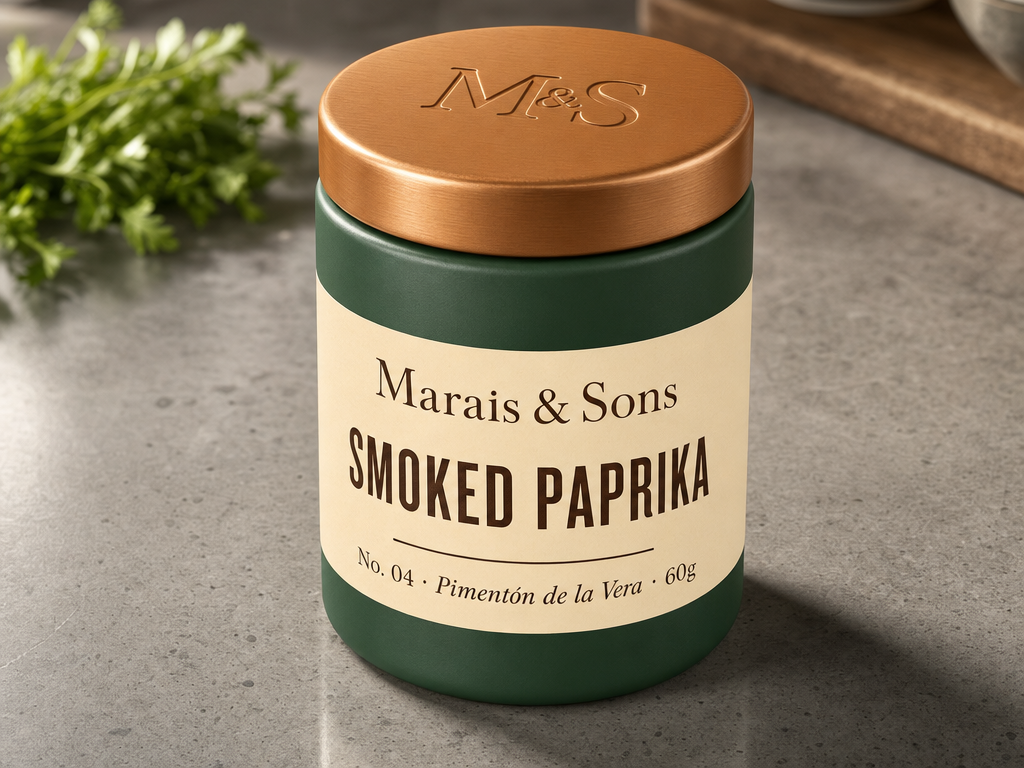
Generated using GPT Image 2 on fal, an AI model from OpenAI.
FLUX 2 Max:
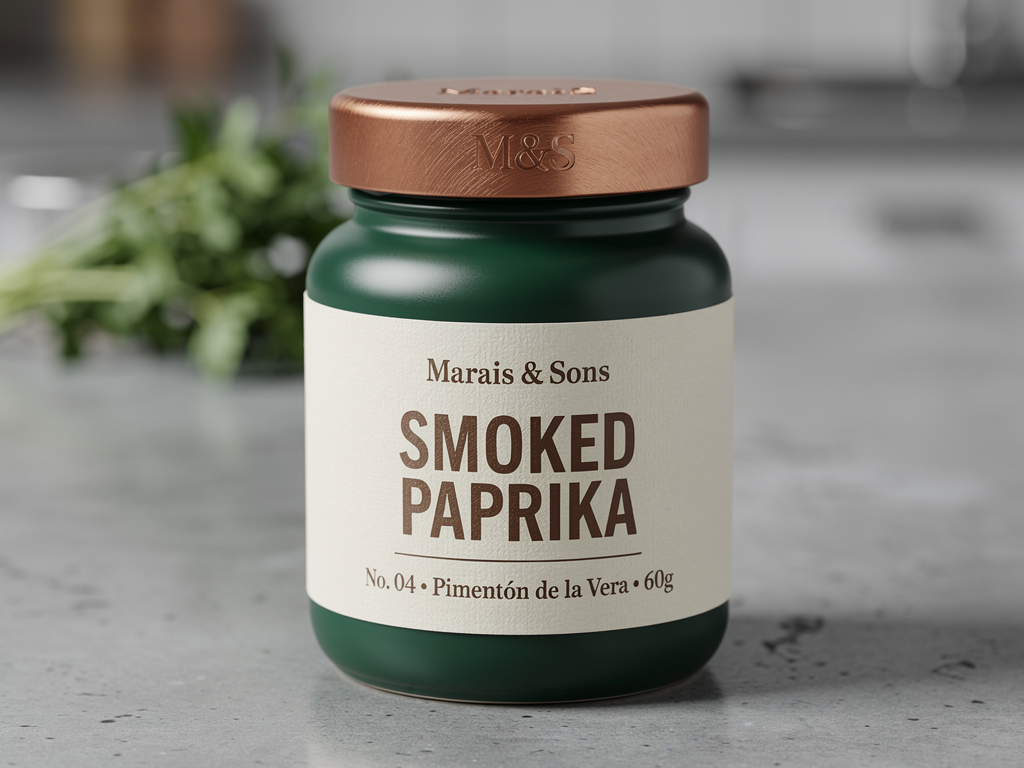
Generated using FLUX 2 Max on fal, an AI model from Black Forest Labs.
My take: FLUX 2 Max wins both the photorealism and HEX code adherence in this one, although I was surprised to see how close GPT Image 2 came to be.
Test 4: Single-image edit with text replacement on small surfaces
Source image prompt: "A studio photo of a wooden bookshelf with five visible book spines, each lit by warm side-lighting and showing a slight wood-grain texture on the shelf itself."

Generated using Nano Banana 2 on fal.
Image editing prompt: "Keep the wooden bookshelf, lighting, depth of field, and dust particles in the original image exactly the same. Replace only the lettering on the five visible book spines with these new titles, in the same order from left to right: 'The Quiet Cartographer' (deep navy spine, gold embossed serif), 'Salt and Other Histories' (cream linen spine, black sans-serif), 'Verge: Notes from the Coast' (forest green leather spine, silver foil), 'How Bridges Listen' (burnt orange cloth spine, charcoal serif), and 'A Field Guide to Almost' (dark plum spine, copper script). Match each spine's height, thickness, and shadow to the original book it replaces. Keep all other books, the shelf's wood grain, and the surrounding objects untouched."
GPT Image 2 (edit endpoint):
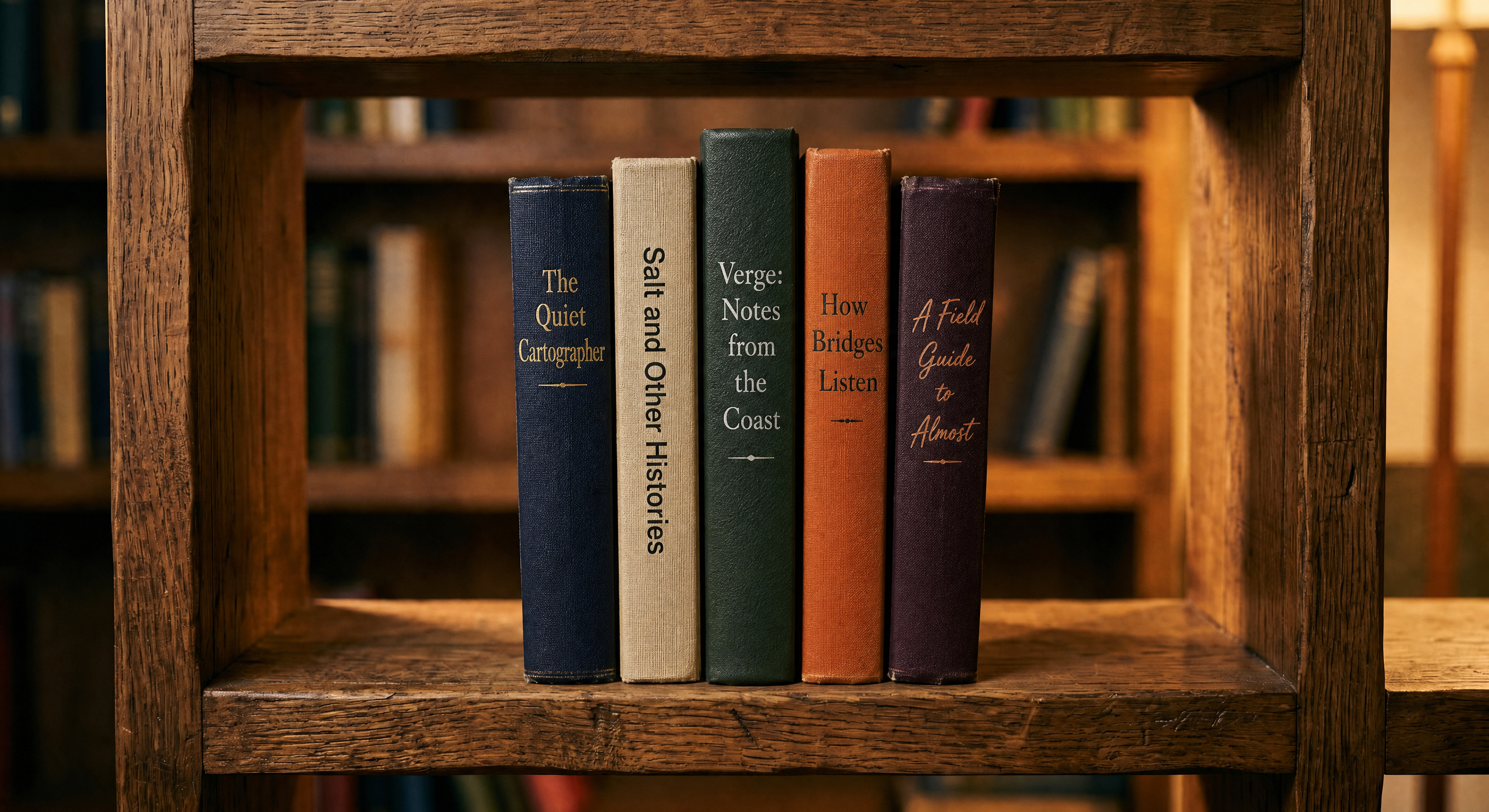
Generated using GPT Image 2 (edit endpoint) on fal, an AI model from OpenAI.
FLUX 2 Max (edit endpoint):
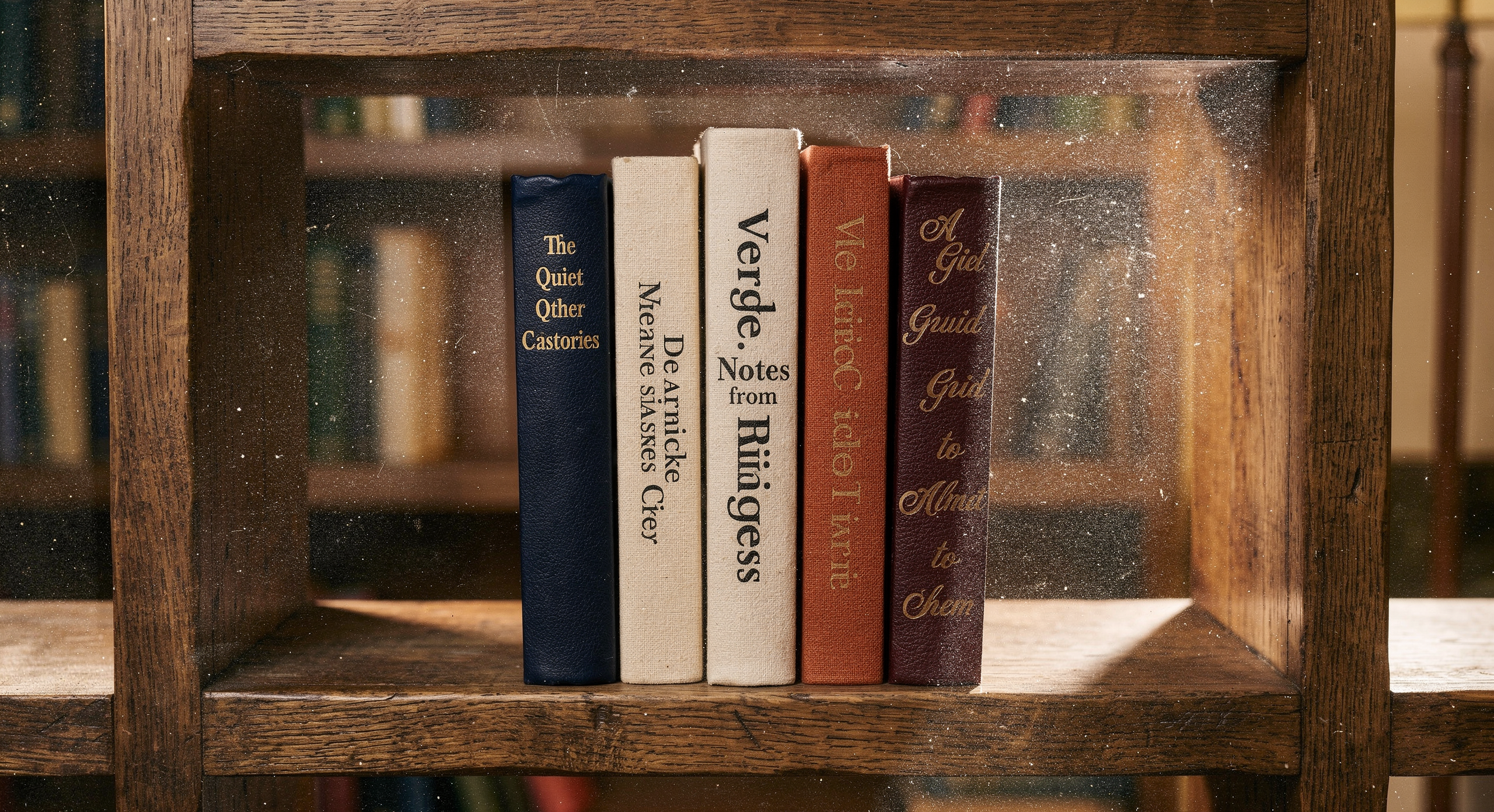
Generated using FLUX 2 Max (edit endpoint) on fal, an AI model from Black Forest Labs.
My take: GPT Image 2 edit absolutely nailed it. 10/10 execution. Exactly what I wanted to see.
On the other hand, FLUX 2 Max's edit was rather disappointing, as it got the 5 books' titles wrong and inserted some dust particles into the image, which was not needed.
Want to push GPT Image 2 even harder? See our prompting tips for getting the most out of GPT Image 2 as well as our guide on how to use GPT Image 2 to its potential.
What does it cost to run GPT Image 2 vs. FLUX 2 Max on fal?
The two models bill on different units, so direct per-image comparisons depend on resolution and quality settings.
GPT Image 2 pricing on fal
GPT Image 2 charges per image, with the rate set by the combination of resolution and quality tier.
Text-to-image rates at high quality (the default):
$0.145 at 1024x768.
$0.211 at 1024x1024.
$0.165 at 1024x1536.
$0.158 at 1920x1080.
$0.222 at 2560x1440.
$0.401 at 3840x2160.
Medium quality runs roughly a quarter of those numbers (for example, $0.053 at 1024x1024 versus $0.211 at high).
Low quality drops to fractions of a cent at most resolutions (for example, $0.006 at 1024x1024).
The edit endpoint adds the cost of one input image on top of those rates. So a 1024x1024 high-quality edit costs $0.219 instead of $0.211.
The underlying token rates are $5.00 input, $1.25 cached, and $10.00 output per 1M text tokens, plus $8.00 input, $2.00 cached, and $30.00 output per 1M image tokens.
The quality parameter shifts how many output tokens get spent, which is why high quality costs roughly 3 to 4 times medium and medium costs roughly 7 to 9 times low.
FLUX 2 Max pricing on fal
FLUX 2 Max bills per megapixel, rounded up to the nearest megapixel, with the same structure on both the text-to-image and edit endpoints: $0.07 for the first megapixel of output, $0.03 per extra megapixel.
A 1024x1024 generation rounds to 1 MP and costs $0.07. A 1920x1080 generation rounds to 2 MP and costs $0.10 ($0.07 for the first megapixel plus $0.03 for the second).
And a 512x512 generation, despite being smaller, still rounds up to 1 MP and lands at the same $0.07 floor.
On the edit endpoint, input images count as processed megapixels at the same per-MP rate.
A 1024x1024 edit with one 1 MP input image costs $0.07 for the output plus $0.03 for the input, totalling $0.10.
Compared to FLUX.2 [pro] at $0.03 per first megapixel, Max costs roughly 2.3x more per call. The premium reflects Max's positioning as the editing flagship in the FLUX.2 family.
How does GPT Image 2's vs. FLUX 2 Max's pricing look at scale?
To make the comparison concrete, here's what 1,000 images per month costs across two common output sizes:
At 1024x1024: GPT Image 2 high lands at $211, GPT Image 2 medium at $53, FLUX 2 Max at $70.
At 1920x1080: GPT Image 2 high lands at $158, GPT Image 2 medium at $40, FLUX 2 Max at $100.
A few things to notice in those numbers.
GPT Image 2 high stays more expensive than FLUX 2 Max at both sizes, but the gap is meaningful: 3x at 1024x1024 ($211 vs. $70) and roughly 1.6x at 1920x1080 ($158 vs. $100).
The per-megapixel structure on FLUX 2 Max scales more aggressively as output resolution climbs, while GPT Image 2 high actually gets cheaper between 1024x1024 and 1920x1080 because the underlying token math shifts.
GPT Image 2 medium is the cheapest tier of the three at both resolutions ($53 and $40), so it's the budget option for batch work that doesn't need flagship-tier fidelity.
It's also worth mentioning that, in our GPT Image 2 review, we went over how running GPT Image 2 at low quality gives back a reasonable result at an affordable price point.
How do you run GPT Image 2 and FLUX 2 Max on fal?
Both models are exposed through fal's JavaScript SDK, so switching between them is a single endpoint string change.
All you have to do is to install the client, set FAL_KEY, and then call fal.subscribe with the right endpoint:
javascript
import { fal } from "@fal-ai/client";

// GPT Image 2 - text-to-image
const gptResult = await fal.subscribe("openai/gpt-image-2", {
  input: {
    prompt:
      "A matte ceramic vase on a linen tablecloth, soft north-window light, shallow depth of field",
    image_size: "landscape_4_3",
    quality: "high",
    output_format: "png",
  },
});

// FLUX 2 Max - text-to-image
const fluxResult = await fal.subscribe("fal-ai/flux-2-max", {
  input: {
    prompt:
      "A matte ceramic vase on a linen tablecloth, soft north-window light, shallow depth of field",
    image_size: "landscape_4_3",
    output_format: "png",
  },
});
The shared shape covers prompt, image_size, and output_format. The model-specific parameters diverge from there.
GPT Image 2 adds quality with three tiers, num_images for batch, sync_mode for direct data-URI returns, and openai_api_key for BYOK.
The edit endpoint (openai/gpt-image-2/edit) adds image_urls and mask_image_url.
FLUX 2 Max adds seed for reproducibility, safety_tolerance (1 to 5, API only), and enable_safety_checker.
The edit endpoint (fal-ai/flux-2-max/edit) adds image_urls (up to 10 references per the FLUX.2 family spec).
When should you use GPT Image 2 vs. FLUX 2 Max?
Rather than declaring a winner, here's how the two slot into different workflows:
When GPT Image 2 is the right call
Pick GPT Image 2 when output fidelity needs to be the deciding factor on a per-call basis.
Text-heavy assets where pixel-accurate typography matters belong here. That covers infographics, packaging, marketing materials with dense Latin text, and multilingual content with CJK scripts.
Need a UI mockup or a dashboard recreation? GPT Image 2's the one that handles layout discipline, realistic copy, and small typography reliably.
Mask-based inpainting jobs work well here too. The mask_image_url field keeps unrelated regions of the source image pixel-identical, which helps with product photo background swaps and regional touch-ups.
Per-call quality flexibility is also part of the GPT Image 2 surface. The three-tier quality enum lets you push hero deliverables to high while keeping lower-stakes previews at medium or low to save on tokens.
If you're already paying for OpenAI credits, the BYOK field routes generations through your own account quota and keeps that work on the same billing as the rest of your OpenAI usage.
When FLUX 2 Max is the right call
Got a hero asset where flagship-tier generation matters more than the unit cost? FLUX 2 Max is the highest-quality variant in the FLUX.2 family, and the per-megapixel premium is built around that.
For multi-image editing jobs that combine up to 10 reference images, the @Image1 syntax keeps prompts readable, and the edit endpoint was built around that exact compositional workflow.
Brand workflows that need exact color matching benefit from documented HEX prompting patterns rather than relying on a model's emergent ability to read color codes. FLUX 2 Max is the model with that documentation.
Got compositions complex enough that JSON-structured prompts would help? FLUX 2 Max's prompt parser pins down scene, subjects, lighting, mood, and camera through explicit JSON fields.
Production assets that need to land at flagship fidelity without per-call configuration also fit Max's lane. The 32-billion-parameter architecture coupled with the Mistral-3 24B VLM is what's doing the heavy lifting on world knowledge and contextual reasoning.
Recently Added














Run GPT Image 2 and FLUX 2 Max on fal
GPT Image 2 and FLUX 2 Max come from different design philosophies.
One spends compute reasoning about your prompt before it generates.
The other is BFL's editing-first flagship, built on a 32-billion-parameter rectified flow transformer and positioned for the highest-quality output in the FLUX.2 family.
Output from either model is production-grade, and the same fal.subscribe call shape works for both endpoints.
Switching between them comes down to the endpoint string with no separate integration and no schema translation.
You can pick the one that matches the work you're actually doing or wire both behind a routing layer if your projects span both ends of the spectrum.
Test GPT Image 2 and FLUX 2 Max in the fal playground, or skip straight to API integration in a few lines of code.
GPT Image 2 vs. FLUX 2 Max FAQs
What is the main difference between GPT Image 2 and FLUX 2 Max?
The main difference between GPT Image 2 and FLUX 2 Max is that GPT Image 2 offers best-in-class text rendering in both English and non-English content, while FLUX 2 Max has hard-to-match cinematic quality and lighting.
Do both models support HEX color codes in prompts?
Both can interpret HEX color codes in practice, but only FLUX 2 Max documents this as an official prompting feature with recommended patterns (like prefixing the code with the keyword "color" or "hex").
Can I use my own OpenAI API key with GPT Image 2?
Yes. You can pass openai_api_key in the input and fal will route the request through your own OpenAI account quota. fal's quota does not apply to BYOK calls.
FLUX 2 Max doesn't have an equivalent BYOK field.
Can both GPT Image 2 and FLUX 2 Max be used in commercial projects?
Yes. Output from GPT Image 2 and FLUX 2 Max on fal can be used in commercial projects.
![How To Use GPT Image 2.5: Prompts & Workflows [2026]](https://refinery.fal.media/url/https%3A%2F%2Fv3b.fal.media%2Ffiles%2Fb%2F0aaa6b4b%2FjBkm-8tILO2kyixv19ugu.jpg/tr:w-1280,q-80/jBkm-8tILO2kyixv19ugu.webp)