In this guide, I'll review the 10 best AI models for editing images in 2026, covering edit accuracy, context preservation, multi-image compositing, speed, and pricing, so you can pick the right one without burning credits on trial and error.
What Factors Should Be Considered When Evaluating AI Image Editing Tools?
Edit Accuracy and Instruction Following
This is what I tested first. Can the model actually do what you ask it to, or does it interpret "change the car to blue" as "repaint the entire scene in blue haze"?
I gave each model the same source image and editing instruction, then checked whether the edit landed where it should, with the right intensity, and without hallucinating extra changes I didn't ask for.
Some models nail simple color swaps but fall apart on spatial instructions like "move the object to the left" or "add something behind the subject."
Others handle complex multi-step instructions well but occasionally overshoot, adding stylistic changes you never requested.
Note: I'm going to compare all AI image editing models with the same source image and editing instruction so that we can see the difference:
Source image prompt: "A photo of a red vintage car parked on a cobblestone street with a cafe in the background."
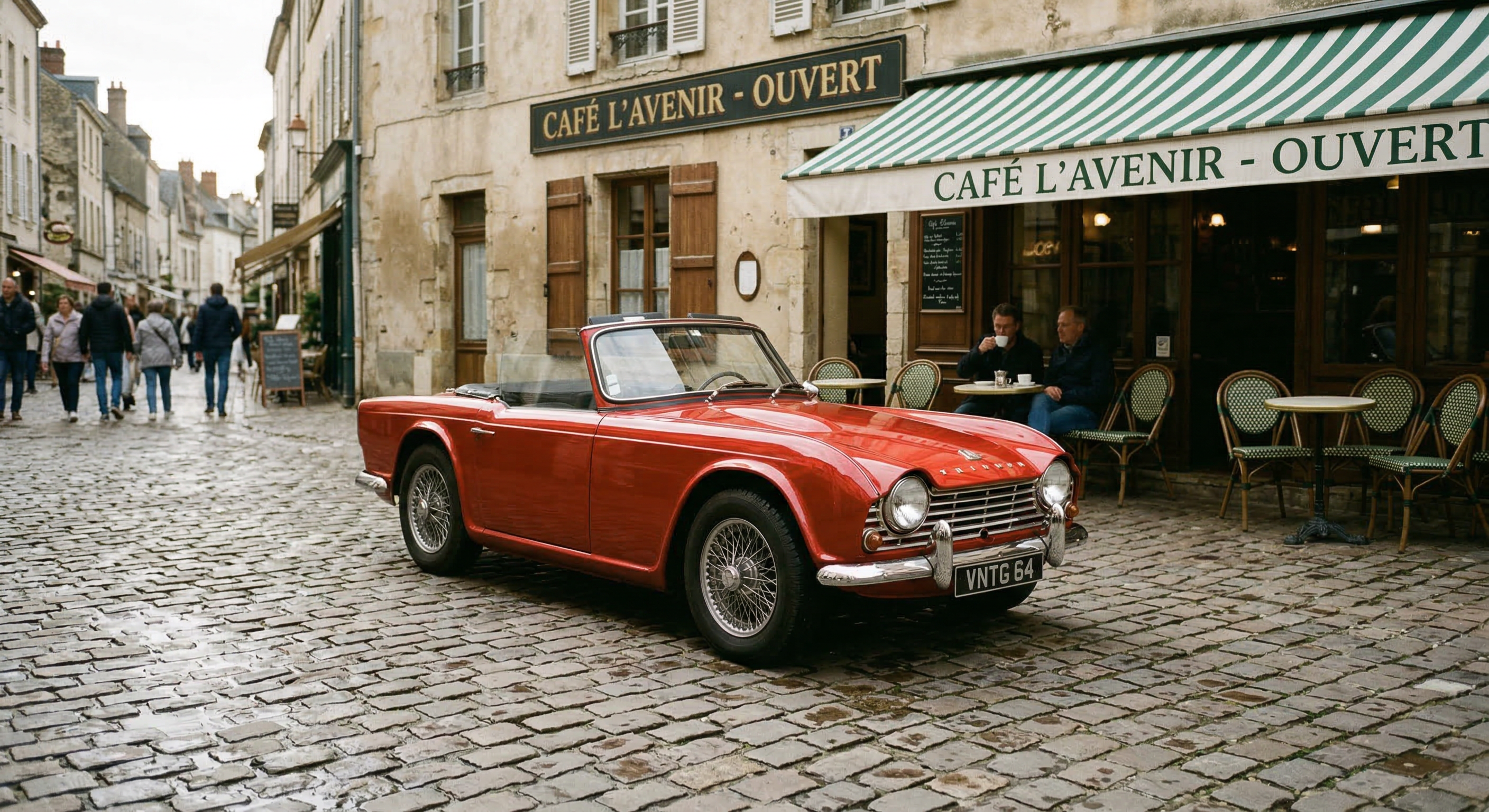
Generated using Nano Banana 2 on fal.
Image editing prompt: "Change the car to deep navy blue, add soft morning fog in the background, and place a small potted cypress tree on the sidewalk beside the car."
Context Preservation
This is the factor that separates usable editing models from frustrating ones. When you ask the model to change one thing, does it leave everything else alone?
I looked at whether untouched areas stayed sharp, whether lighting remained consistent after the edit, and whether the model introduced artifacts or subtle style shifts in regions you never mentioned.
A model that edits the car perfectly but softens the cafe windows or shifts the cobblestone texture has a context preservation problem.
Multi-Image Input and Compositing
Some editing tasks need more than a single source image. Maybe you want to swap a product into a new scene, transfer a style from a reference photo, or composite elements from four different shots into one frame.
I tested how many reference images each model accepts, whether it understands spatial relationships between them (e.g., "put the person from image 1 into the scene from image 2"), and whether the composited result looks coherent or obviously stitched together.
The range here is wide: some models cap at 1 input image, while others accept 10 or even 14.
Cost Per Edit
Image editing pricing on fal varies depending on the model, resolution, and quality tier.
The real question isn't just the sticker price. It's how many edits does it take to get a usable result?
A model that costs $0.04 per edit but nails it on the first try is cheaper in practice than a $0.02 model that takes four attempts.
I factored in both per-edit cost and first-attempt success rate when evaluating value for money.
Rough benchmark: most models on this list charge per image at standard resolution (1K). Higher resolutions like 2K and 4K typically cost 1.5x to 2x more.
What Are The Best AI Image Editing Tools in 2026?
The best AI image editing platform in 2026 is fal, which provides access to top editing models, including Nano Banana 2 Edit and FLUX.2 [pro] Edit.
Here's my shortlist of the 10 best models I reviewed:
| AI Image Editing Models | Best For | Price to Use |
|---|---|---|
| fal | Teams and developers who need access to every top editing model through a single, fast API with pay-per-use pricing | Pay-per-use, starting at $0.009/image. |
| Nano Banana 2 Edit | Teams that need fast semantic editing with up to 14 reference images, web search grounding, and thinking modes | From $0.06/image on fal (512px). |
| FLUX.2 [pro] Edit | Production teams that need consistent, multi-reference editing with zero configuration and JSON prompt support | $0.03/megapixel on fal. |
| FLUX.1 Kontext [pro] | Teams doing iterative edits that require character consistency, typography changes, and style transfer across multiple rounds | $0.04/image on fal. |
| Seedream 5.0 Lite Edit | Teams processing multi-source compositions at high resolution with tight per-edit budgets | $0.035/image on fal. |
| GPT Image 1.5 Edit | Teams that need variable quality tiers, mask-based inpainting, and real-time streaming for interactive editing workflows | From $0.009/image on fal. |
| Seedream 4.5 Edit | Teams assembling product composites from multiple source images with natural language spatial instructions | $0.04/image on fal. |
| Grok Imagine Edit | Budget-conscious teams running high-volume simple edits where cost per edit matters most | $0.022/image on fal. |
| FireRed Image Edit | Developers who want open-source editing with bilingual instruction support and tunable acceleration modes | $0.0325/megapixel on fal. |
| Nano Banana Pro Edit | Teams that need maximum reasoning depth for complex multi-element compositions and premium text rendering | $0.15/image on fal (1K). |
fal
fal.ai (that's us) is the best place to edit images with AI in 2026, as our platform gives you access to every image editing model on this list through a single API with pay-per-use pricing and no GPU management.
Full disclosure: Even though fal is our platform, I'll provide an unbiased perspective on why it's the best option for AI image editing in 2026.
Instead of signing up for separate accounts with Google, Black Forest Labs, OpenAI, xAI, and ByteDance, you integrate once with fal and get access to all of them.
Same API key, same billing, same integration pattern. Swap one model endpoint string for another, and you're editing with a different model. No code changes beyond that.
But the real reason fal sits at #1 isn't just model access. It's speed.
We built our inference engine from scratch with custom CUDA kernels optimized for specific model architectures, rather than wrapping general-purpose frameworks like most competitors do.
The result? Cold starts of 5-10 seconds versus 20-60 seconds on other platforms, which is the difference between an interactive editing workflow and one that makes your users stare at a loading spinner.
Here are the three things that make fal the best platform for AI image editing.
One API for Every Image Editing Model You Need
Instead of juggling separate integrations with Google's Gemini models, Black Forest Labs' FLUX, OpenAI's GPT Image, and ByteDance's Seedream, you integrate once with fal. The same API pattern works across all 600+ models on the platform.
Your auth, error handling, queue logic, and billing stay identical whether you're editing with Nano Banana 2 for fast semantic changes, FLUX.2 [pro] for production compositing, or Kontext for iterative character edits.
What this means in practice: you can run quick edits through Grok Imagine at $0.022 per image for drafts, let users upgrade to Nano Banana Pro at $0.15 for final production output, and add FLUX.1 Kontext [pro] for typography work, all without touching your integration code.
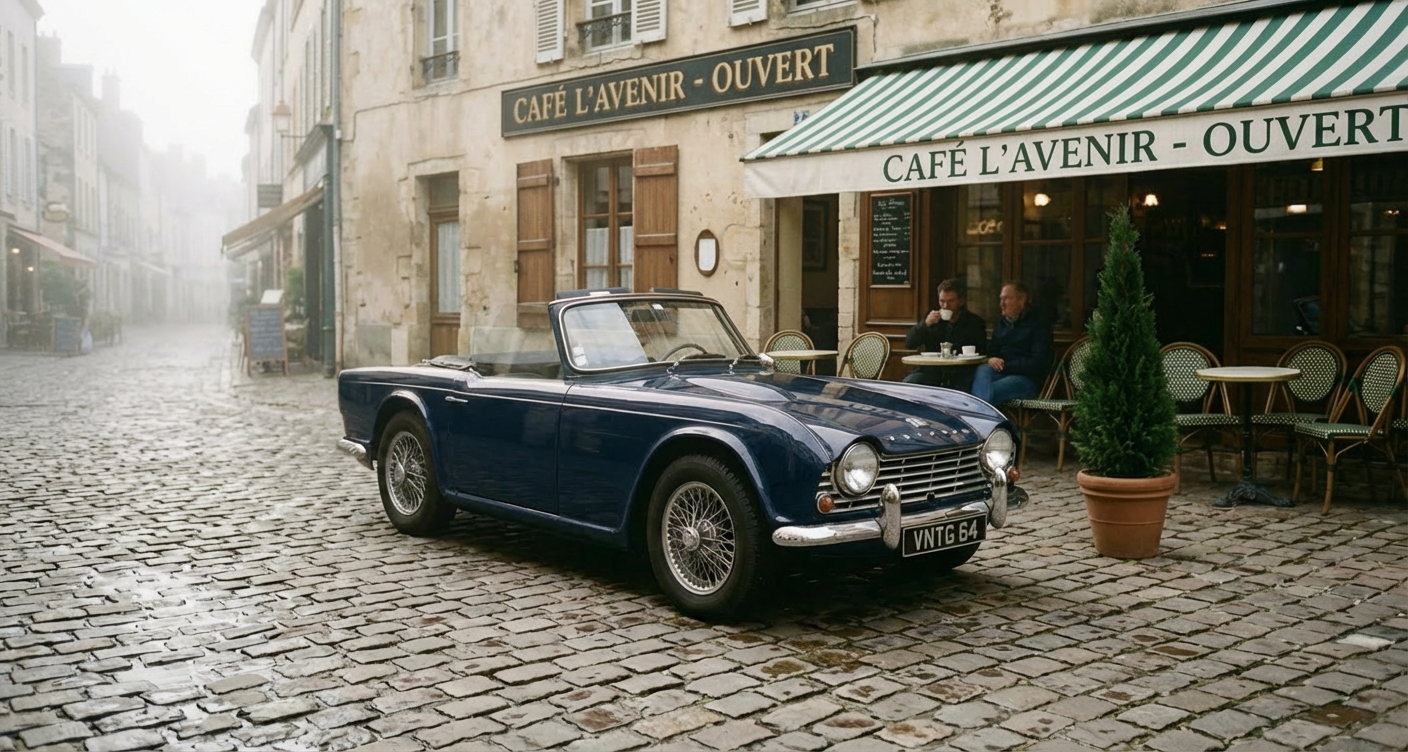
Generated using Nano Banana Pro Edit on fal.
When a new editing model drops, fal typically has it available on day one. Seedream 5.0 Lite's editing endpoint is already live on the platform.
Six lines of code to get started:
javascript
import { fal } from "@fal-ai/client";
const result = await fal.subscribe("fal-ai/nano-banana-2/edit", {
  input: {
    prompt: "Change the background to a sunset beach scene",
    image_urls: ["https://your-image-url.com/photo.png"],
  },
});
Every model also has a playground where you can test it in your browser before writing any code.
Speed That Actually Matters for Production
Our engineering team writes custom CUDA kernels for specific model architectures and uses techniques like epilogue fusion to eliminate unnecessary memory transfers between GPU operations.
For image editing specifically, this means models like Nano Banana 2 Edit and FLUX.1 Kontext [pro] return edited images in seconds, not minutes.
The infrastructure handles autoscaling automatically: regional GPU routing sends requests to the nearest available cluster, a custom CDN delivers edited images with minimal latency, and the system expands from zero to thousands of GPUs based on demand without any configuration on your side.
For teams building interactive editing tools, product photo pipelines, or real-time creative workflows, this gap is the difference between usable and unusable.
Pay-Per-Use Pricing With No Idle Costs
fal charges per edit rather than requiring you to reserve GPU capacity or commit to monthly subscriptions. You don't pay when your app is idle. You don't estimate capacity in advance.
For image editing specifically, pricing starts at $0.009/image per edit for GPT Image 1.5 and goes up to $0.15 per edit for premium models like Nano Banana Pro.
The range means you can pick the right model for each task and only pay for what you actually generate.
No hidden fees for API calls, storage, or CDN delivery. You pay for generation and computing: end of the story.
Pricing
fal uses pay-as-you-go pricing with no subscriptions or minimum commitments.
Here's a snapshot of some of our image editing costs:
- GPT Image 1.5: $0.009/image.
- Grok Imagine Edit: $0.022/image.
- FLUX.2 [pro] Edit: $0.03/megapixel.
- FireRed Image Edit: $0.0325/megapixel.
- Seedream 5.0 Lite Edit: $0.035/image.
- FLUX.1 Kontext [pro]: $0.04/image.
- Seedream 4.5 Edit: $0.04/image.
- Nano Banana 2 Edit: $0.08/image at 1K.
- Nano Banana Pro Edit: $0.15/image at 1K.
Pros & Cons
Pros:
- Access to 600+ models through a single API, including every editing model on this list.
- Fastest inference engine on the market with custom CUDA kernels and 5-10 second cold starts.
- Pay-per-use pricing with no idle costs, subscriptions, or minimum commitments.
- SOC 2 compliant and ready for enterprise procurement processes.
Cons:
- Per-edit pricing can feel expensive for casual, low-volume use compared to running models locally.
- No IP indemnity for generated content. If your use case requires legal coverage for outputs, you'll need to build that layer yourself.
falMODEL APIs
The fastest, cheapest and most reliable way to run genAI models. 1 API, 100s of models
Nano Banana 2 Edit
Best for: Teams that need fast, semantically aware image editing with up to 14 reference images, optional web search grounding, and configurable thinking modes.
Similar to: Nano Banana Pro Edit, GPT Image 1.5 Edit.
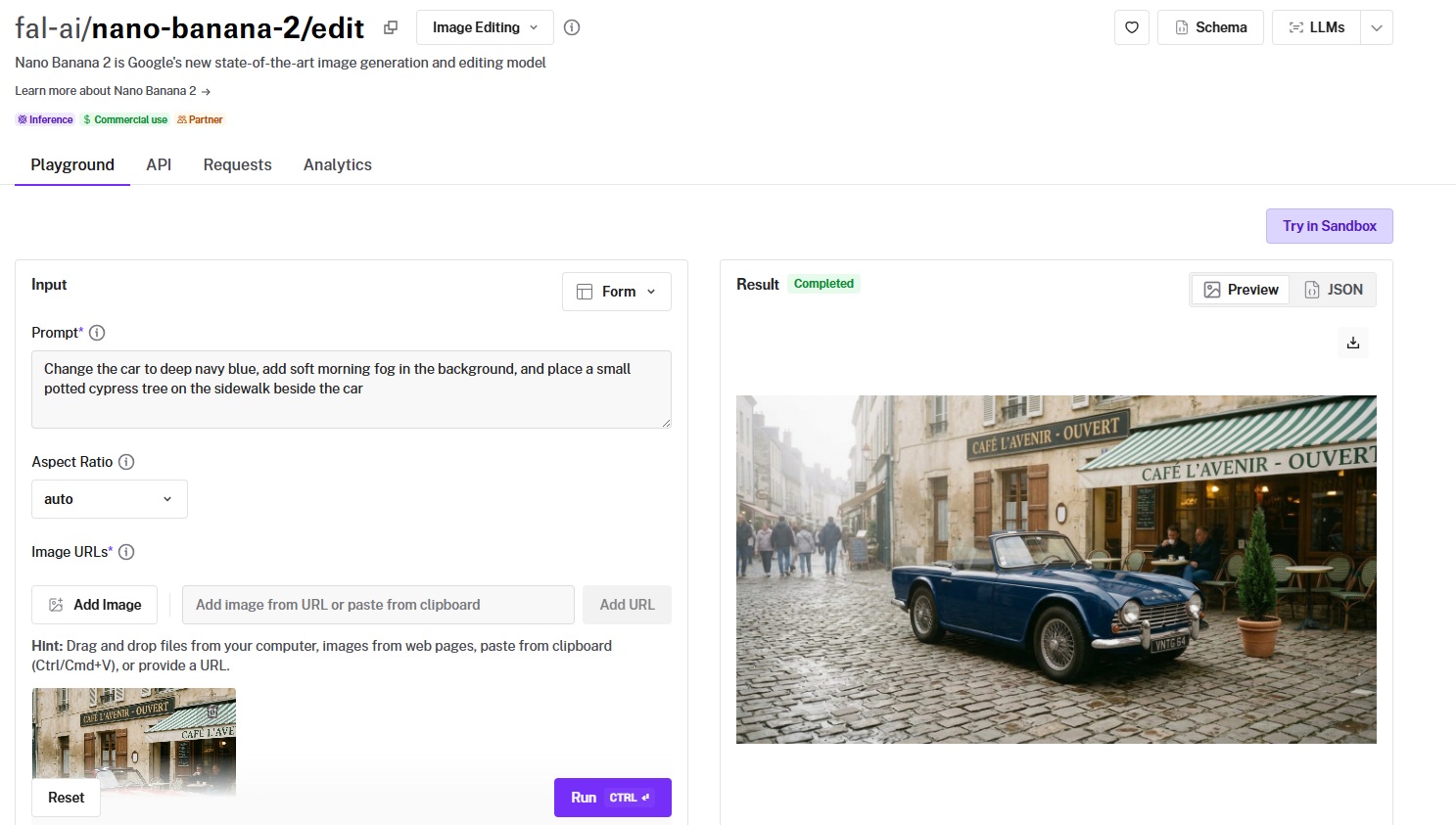
Nano Banana 2 Edit is Google's editing endpoint built on the Gemini 3.1 Flash Image architecture.
It combines speed with genuine semantic understanding, meaning it reasons about what you want changed and what should stay intact, rather than blindly applying a diffusion pass over the whole image.
Performance
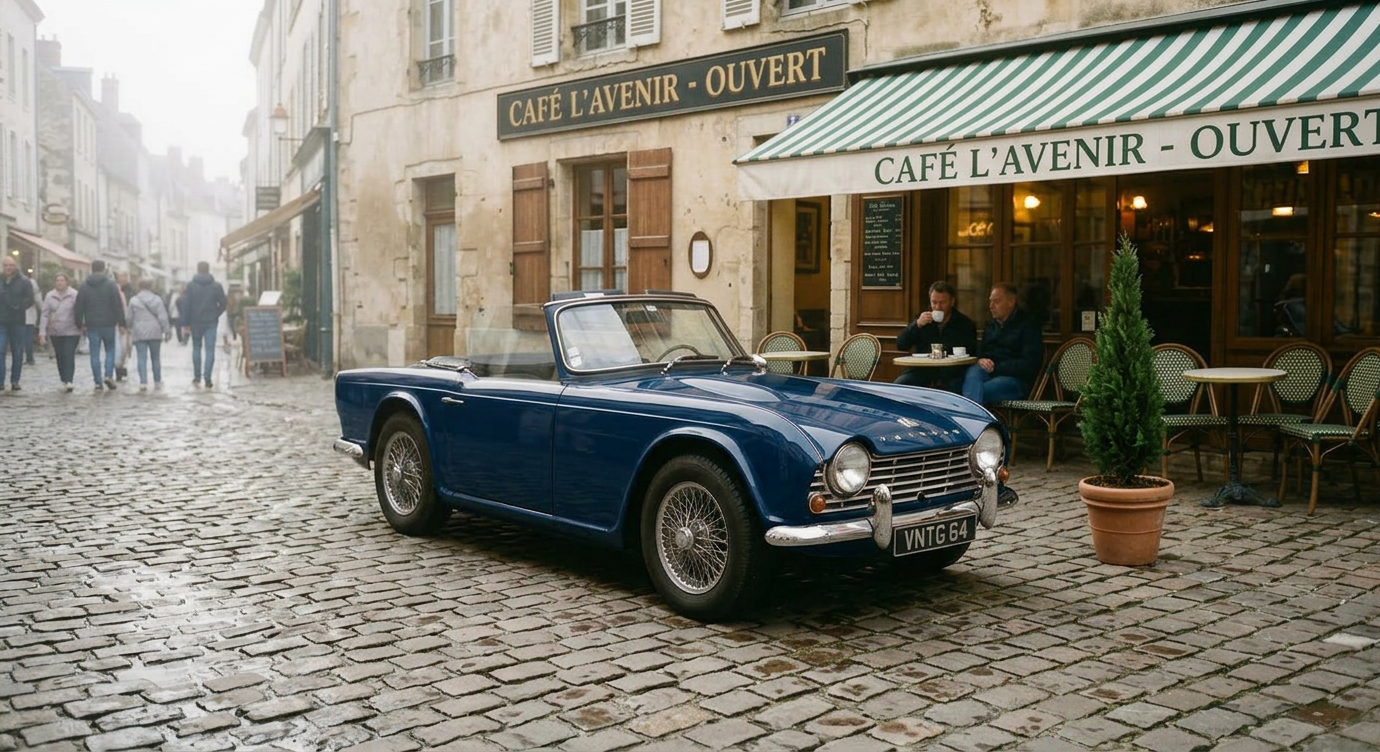
Generated using Nano Banana 2 Edit on fal, an AI model from Google.
- Edit accuracy and instruction following: This is where the Flash architecture earns its keep. Multi-step instructions like "change the car color, add fog, and insert an object" executed cleanly in my testing without the model conflating steps or hallucinating extras. The optional thinking modes help with complex prompts. Setting thinking to "high" noticeably improved accuracy on spatial instructions.
- Context preservation: Strong. Untouched regions stayed sharp and consistent. I noticed occasional subtle lighting shifts on complex edits at 1K resolution, but bumping to 2K eliminated most of those.
- Multi-image input and compositing: 14 reference images is the joint highest on this list (tied with Nano Banana Pro). The model understands spatial relationships between references well. Compositing a subject from one image into a scene from another produced coherent results without obvious seam artifacts.
- Speed and cost per edit: $0.08 per image at 1K. 2K costs $0.12 (1.5x), 4K costs $0.16 (2x), and there's a budget-friendly 0.5K tier at $0.06. Web search adds $0.015 per edit. Thinking adds $0.002. Generation speed is fast thanks to the Flash architecture.
- Resolution and output options: 0.5K, 1K, 2K, and 4K. Output formats include PNG, JPEG, and WebP. SynthID digital watermarking on all outputs. Aspect ratios range from standard (1:1, 16:9) to extreme (4:1, 8:1, 1:4, 1:8).
How to Run Nano Banana 2 Edit on fal
Available through fal's API and playground at fal. Same integration pattern as every other model on fal.
Unique features to configure: enable_web_search for edits that need real-world visual context, thinking_level for complex multi-step instructions, and the resolution parameter for cost-quality tradeoffs.
You can batch up to 4 edited images per request. The limit_generations parameter lets you control whether the model produces additional variations beyond what you asked for.
Pricing
Here's how much it costs to use Nano Banana 2 Edit on fal:
- 0.5K (512px): $0.06/image.
- 1K (standard): $0.08/image.
- 2K: $0.12/image (1.5x standard rate).
- 4K: $0.16/image (2x standard rate).
- Web search grounding: add $0.015 per edit.
- Thinking mode: add $0.002 per edit.
Pros & Cons
Pros:
- 14 reference images, the joint highest input capacity on this list, with genuine semantic understanding of spatial relationships between them.
- Web search grounding and thinking modes add capabilities that no other editing model on this list offers.
- Four resolution tiers (0.5K through 4K) and extreme aspect ratios (4:1, 8:1) give you flexibility that most editing models lack.
Cons:
- SynthID watermarking is applied to all outputs.
FLUX.2 [pro] Edit
Best for: Production teams that need consistent, multi-reference editing with zero parameter configuration, JSON structured prompts, and predictable output quality.
Similar to: FLUX.1 Kontext [pro], Seedream 5.0 Lite Edit.
![FLUX.2 [pro] Edit playground on fal](https://v3b.fal.media/files/b/0a937ee1/eJPufEvCJe1b7QcXTbpvl_flux%202%20pro%20edit%20playground%20-%20after%20similar%20to.jpg)
FLUX.2 [pro] Edit is Black Forest Labs' production-grade editing model that combines up to 9 reference images through a pipeline built for reliability over experimentation.
The defining characteristic is zero configuration: no guidance scale, no inference steps, and no tuning knobs to fiddle with.
Performance
![Generated using FLUX.2 [pro] Edit on fal](https://v3b.fal.media/files/b/0a937ee1/g0cJq-vzZK6_vLwO_baos_Generated%20using%20FLUX.2%20%5Bpro%5D%20Edit%20on%20fal%2C%20an%20AI%20model%20from%20Black%20Forest%20Labs..jpg)
Generated using FLUX.2 [pro] Edit on fal, an AI model from Black Forest Labs.
- Edit accuracy and instruction following: Very consistent. The fixed internal optimization means you get predictable results across runs, which is exactly what production pipelines need. JSON structured prompts are a standout feature. You can specify scene elements, subjects, camera settings, and color palettes with granular control that natural language can't match.
- Context preservation: This is where FLUX.2 [pro] Edit shines. Edits are precisely scoped. When I asked it to change a jacket color, the rest of the image came back pixel-for-pixel identical in feel. No subtle style drift, no background softening.
- Multi-image input and compositing: Up to 9 reference images with 9 megapixels total input. The @ referencing system ("@image1 wearing the outfit from @image2") makes multi-image workflows intuitive. HEX color code control lets you specify exact colors for brand consistency.
- Speed and cost per edit: $0.03 for the first megapixel of output, plus $0.015 per extra megapixel of input and output. A standard 1024x1024 edit costs roughly $0.03. A 1920x1080 edit costs about $0.045. This megapixel-based pricing rewards smaller, targeted edits.
- Resolution and output options: Auto-sizing based on input, or custom width and height. Output in JPEG or PNG. Safety tolerance configurable from 1 (strictest) to 5.
How to Run FLUX.2 [pro] Edit on fal
Available through fal's API and playground at fal. Same integration pattern as every other model on fal.
The standout integration features are JSON structured prompts for precise control over complex edits, HEX color codes for exact color matching, and @ image referencing for intuitive multi-image workflows.
No guidance scale or inference steps to configure.
Pricing
It costs $0.03 for the first megapixel of output, plus $0.015 per extra megapixel of input and output, rounded up to the nearest megapixel.
A 1024x1024 edit costs $0.03. A 1920x1080 edit costs $0.045.
Pros & Cons
Pros:
- Zero-configuration editing: no guidance scale, inference steps, or tuning parameters to manage. Ideal for automated production pipelines.
- JSON structured prompts, HEX color control, and @ image referencing give you precision that natural-language-only models can't match.
- Megapixel-based pricing rewards targeted edits. A standard 1024x1024 edit costs just $0.03.
Cons:
- No thinking modes, web search grounding, or extreme aspect ratios.
- Output limited to JPEG and PNG. No WebP option.
FLUX.1 Kontext [pro]
Best for: Teams doing iterative editing workflows that require character consistency across multiple rounds, typography changes, and style transfer without fine-tuning.
Similar to: FLUX.2 [pro] Edit, Nano Banana 2 Edit.
![FLUX.1 Kontext [pro] playground on fal](https://v3b.fal.media/files/b/0a937ee1/YB7y_9Gx0Ui4K1YxniYdo_flux%201%20kontext%20pro%20playground%20-%20after%20similar%20to.jpg)
FLUX.1 Kontext [pro] is Black Forest Labs' 12-billion parameter multimodal flow transformer designed specifically for in-context editing.
The key differentiator is character consistency: you can modify backgrounds, lighting, and styles across multiple editing rounds while the model preserves the identity of people and objects without any fine-tuning.
Performance
![Generated using FLUX.1 Kontext [pro] on fal](https://v3b.fal.media/files/b/0a937ee1/C_vthsfYNEbr3lfnoMl55_Generated%20using%20FLUX.1%20Kontext%20%5Bpro%5D%20on%20fal%2C%20an%20AI%20model%20from%20Black%20Forest%20Labs..jpg)
Generated using FLUX.1 Kontext [pro] on fal, an AI model from Black Forest Labs.
- Edit accuracy and instruction following: Strong on targeted, specific instructions. Kontext reads both image context and text instructions simultaneously, which means it makes edits that are logically and visually consistent with the scene.
- Context preservation: Excellent. This is Kontext's defining strength. Across multiple rounds of iterative edits, untouched areas remained stable. Characters maintained their identity, clothing, and pose through background swaps and style changes.
- Multi-image input and compositing: Single image input only. Kontext takes one image_url, not a list. This limits it for multi-source compositing workflows. Its strength is iterative refinement of a single image, not assembling elements from multiple sources.
- Speed and cost per edit: $0.04 per image. In my testing, edits returned quickly enough for interactive workflows where you're tweaking and re-running.
- Resolution and output options: Configurable aspect ratios from 21:9 through 9:21. Output in JPEG or PNG. Guidance scale adjustable (default 3.5). Optional prompt enhancement for improved results.
How to Run FLUX.1 Kontext [pro] on fal
Available through fal's API and playground at fal. Same integration pattern as every other model on fal.
The guidance_scale parameter controls how closely the model follows your instruction versus preserving the original image.
The enhance_prompt option can improve results on shorter, vaguer instructions. Safety tolerance goes up to 6, the widest range on this list.
Pricing
It costs $0.04 per image to use FLUX.1 Kontext [pro] on fal.
Pros & Cons
Pros:
- Best character consistency on this list. Modify backgrounds, styles, and lighting while preserving subject identity across multiple editing rounds with no fine-tuning.
- Typography editing that actually works. Changing text on signs, labels, and posters produces clean, readable results.
- 12B parameter model with adjustable guidance scale and prompt enhancement for fine-tuning edit intensity.
Cons:
- Single image input only. No multi-image compositing or reference-based editing.
- Output limited to JPEG and PNG.
Seedream 5.0 Lite Edit
Best for: Teams processing multi-source compositions at high resolution on a tight per-edit budget, especially for creative advertising and product mockup workflows.
Similar to: Seedream 4.5 Edit, FLUX.2 [pro] Edit.
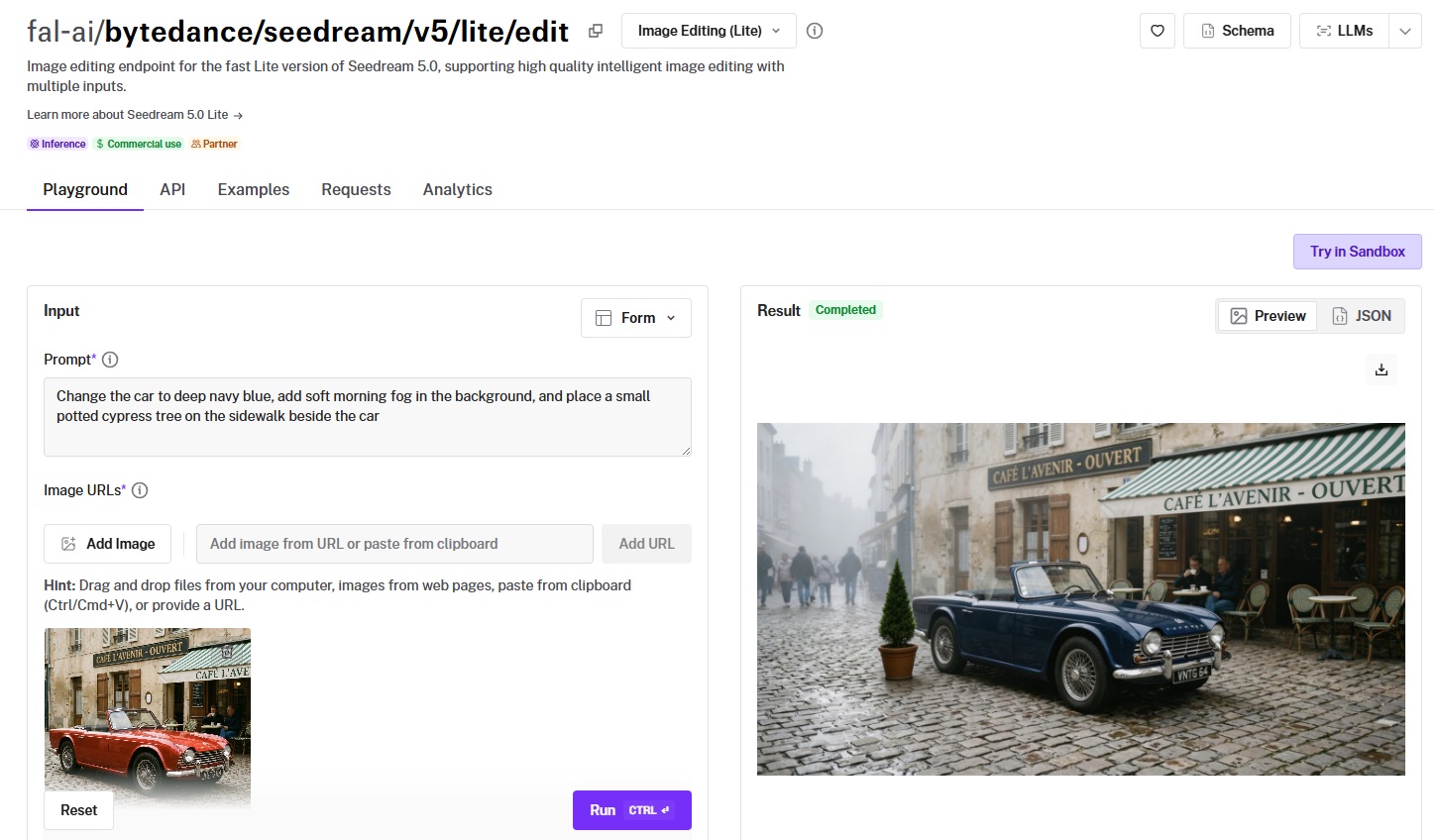
Seedream 5.0 Lite Edit is ByteDance's latest editing model, built for speed and high-resolution output.
At $0.035 per image with support for up to 10 reference images and resolutions up to 3072x3072 (9 megapixels), it offers the best ratio of resolution to cost on this list.
Performance
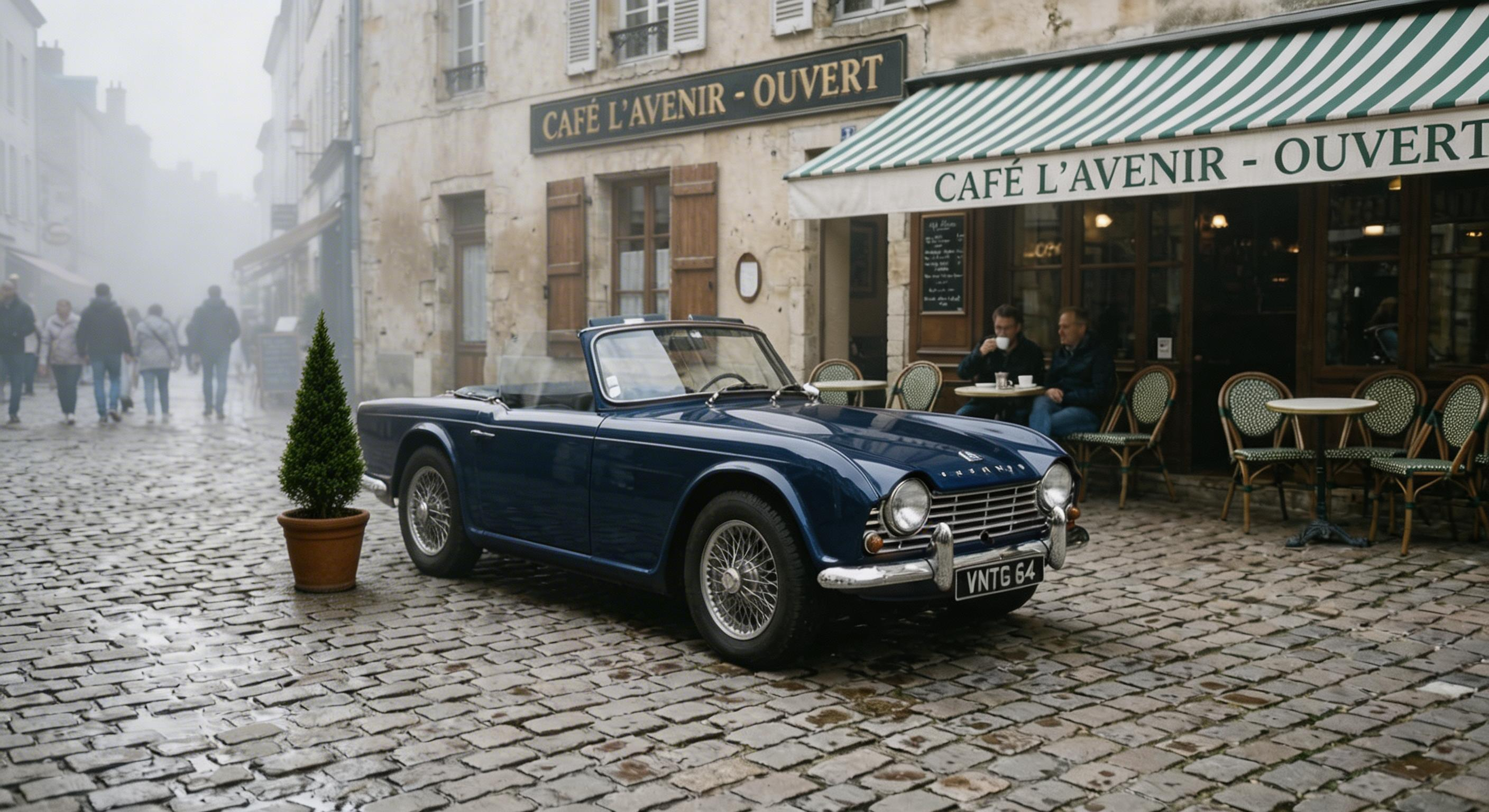
Generated using Seedream 5.0 Lite Edit on fal, an AI model from ByteDance.
- Edit accuracy and instruction following: Solid across standard editing tasks. Product replacement, text overlay copying, and element repositioning all worked well in my testing. The model interprets Figure 1, Figure 2, Figure 3 spatial references cleanly when compositing across multiple source images.
- Context preservation: Good at maintaining depth, perspective, and lighting when integrating elements from different sources. I noticed it occasionally smooths fine texture details at lower resolutions, but at 2K and 3K this wasn't an issue.
- Multi-image input and compositing: Up to 10 reference images. If you send more than 10, the model uses the last 10. Multi-image composition is a strength here: product swaps, logo integration, and text copying between images all executed naturally.
- Speed and cost per edit: $0.035 per image. That's 28 edits per $1.00. You can run up to 6 separate generations per API call, with the max_images parameter enabling multiple variations per generation. For batch workflows, this adds up to significant savings.
- Resolution and output options: Resolutions from auto_2K (2560x1440) up to auto_3K (3072x3072). Custom dimensions supported between those ranges. PNG output via URL or data URI. Safety checker enabled by default.
How to Run Seedream 5.0 Lite Edit on fal
Available through fal's API and playground at fal. Same integration pattern as every other model on fal.
Use the num_images parameter (1-6) for separate generations and max_images for multi-image output per generation.
The image_size parameter accepts both presets (auto_2K, auto_3K, square_hd) and custom width/height objects. Safety checker is on by default but can be toggled via API.
Pricing
It costs $0.035 per image to use Seedream 5.0 Lite Edit on fal.
Pros & Cons
Pros:
- Best resolution-to-cost ratio on this list: up to 9 megapixels (3072x3072) at $0.035 per edit.
- 10 reference images with batch generation (up to 6 per call) makes it ideal for high-volume product mockup workflows.
Cons:
- Output format limited to PNG.
- Fewer aspect ratio options and no extreme ratios.
GPT Image 1.5 Edit
Best for: Teams that need variable quality tiers for different stages of a workflow, mask-based inpainting for precise regional edits, and real-time streaming for interactive applications.
Similar to: Nano Banana 2 Edit, Nano Banana Pro Edit.
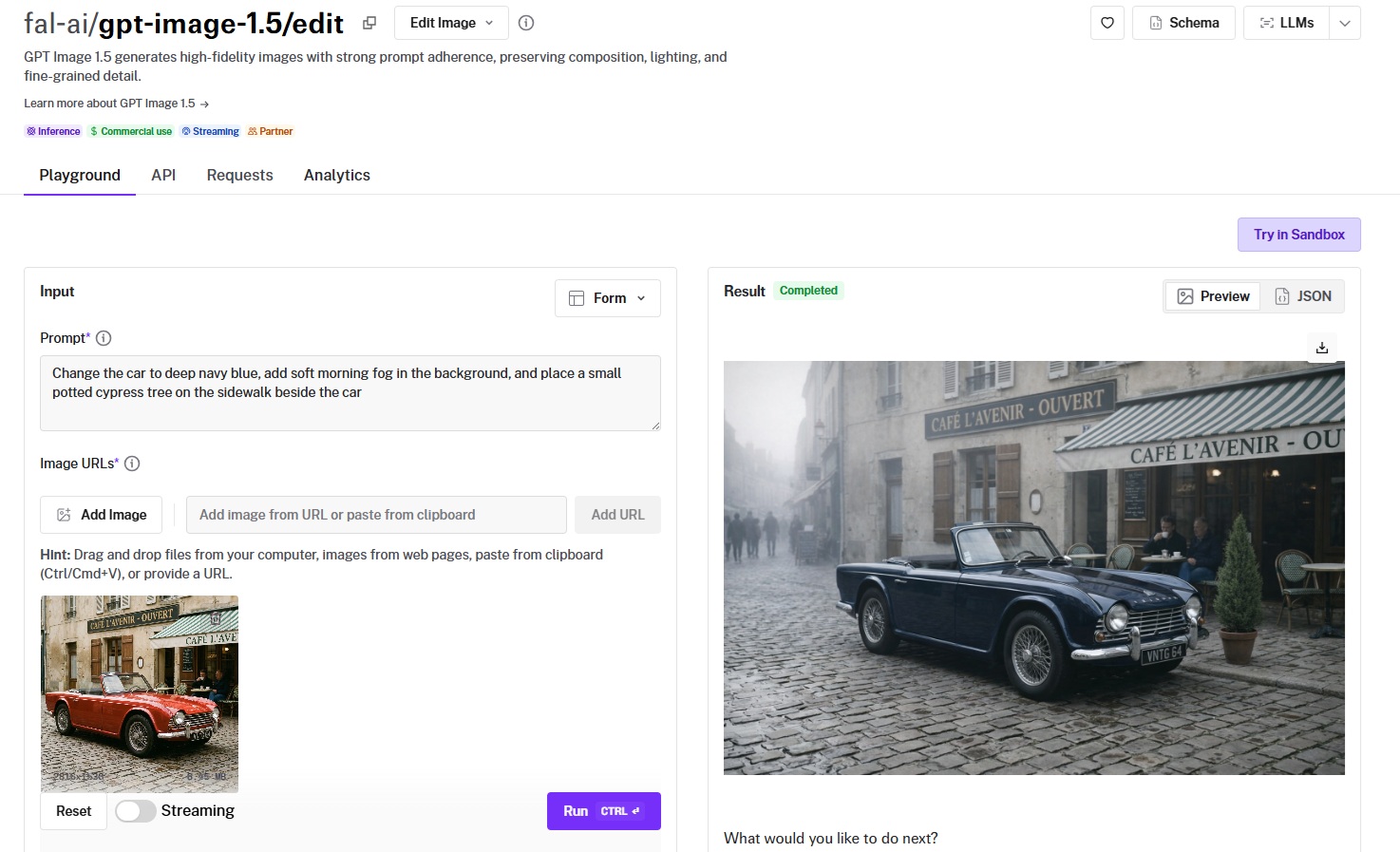
GPT Image 1.5 Edit is OpenAI's multimodal editing model, and it's the only model on this list that supports both mask-based inpainting and real-time streaming.
This makes it uniquely suited for interactive editing applications where users paint a mask, describe the change, and see results appear progressively.
Performance
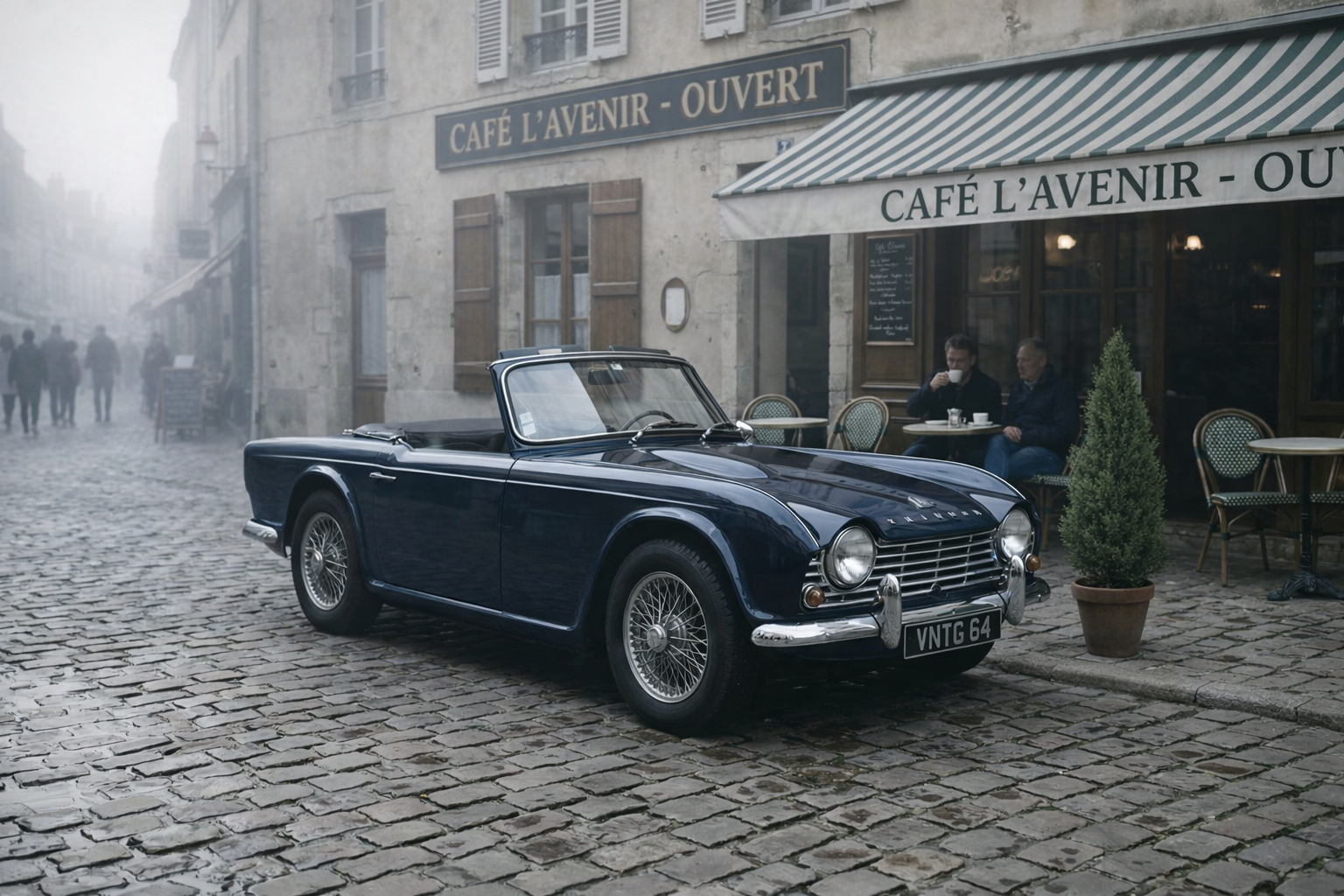
Generated using GPT Image 1.5 Edit on fal, an AI model from OpenAI.
- Edit accuracy and instruction following: The model's reasoning about edits is strong, particularly for complex compositional changes. At low quality, accuracy drops noticeably on spatial instructions, but color and style changes still land well. The mask_image_url parameter gives you precise control over which region gets edited.
- Context preservation: Very good, especially with input_fidelity set to "high." The model preserves fine details in unmasked regions reliably. At low input fidelity, some detail loss is expected, but the overall composition holds.
- Multi-image input and compositing: Accepts multiple image URLs as references. The mask-based approach means you can target exactly which part of the image to edit while leaving everything else untouched, which is a different paradigm from the natural-language-only models.
- Speed and cost per edit: Pricing is token-based with per-image surcharges that vary by quality and size. Low quality at 1024x1024 costs $0.009. Medium quality at the same size costs $0.034. High quality jumps to $0.133. Plus input token costs ($0.005/1K text tokens, $0.008/1K image tokens).
- Resolution and output options: Three fixed sizes: 1024x1024, 1536x1024, and 1024x1536. Output in JPEG, PNG, or WebP. Background control (auto, transparent, opaque) is unique to this model. Transparent backgrounds are useful for product photography workflows.
How to Run GPT Image 1.5 Edit on fal
Available through fal's API and playground at fal. Same integration pattern as every other model on fal.
The streaming endpoint (fal.stream) delivers progressive results, ideal for interactive editing UIs.
The mask_image_url parameter enables precise inpainting.
The input_fidelity parameter (low or high) controls how much detail from the source images is preserved.
Quality tiers (low, medium, high) let you trade cost for output fidelity within the same model.
Pricing
GPT Image 1.5 Edit pricing on fal varies by quality and size:
- Low quality: $0.009 (1024x1024), $0.013 (other sizes).
- Medium quality: $0.034 (1024x1024), $0.050-$0.051 (larger sizes).
- High quality: $0.133 (1024x1024), $0.199-$0.200 (larger sizes).
- Input text tokens: $0.005 per 1,000 tokens.
- Input image tokens: $0.008 per 1,000 tokens.
- Output text tokens (reasoning): $0.010 per 1,000 tokens.
Pros & Cons
Pros:
- Only model on this list with mask-based inpainting and real-time streaming, enabling interactive editing workflows that no other model here supports.
- Three quality tiers let you use $0.009 drafts during exploration and $0.133 production output without switching models.
- Transparent background support is a standout for product photography and asset creation.
Cons:
- Token-based pricing on top of per-image charges makes cost prediction complex for budgeting.
- Fixed resolution options (1024x1024, 1536x1024, 1024x1536) with no custom sizing or 4K output.
Seedream 4.5 Edit
Best for: Teams assembling complex product composites from multiple source images using natural language spatial instructions with Figure references.
Similar to: Seedream 5.0 Lite Edit, Nano Banana 2 Edit.
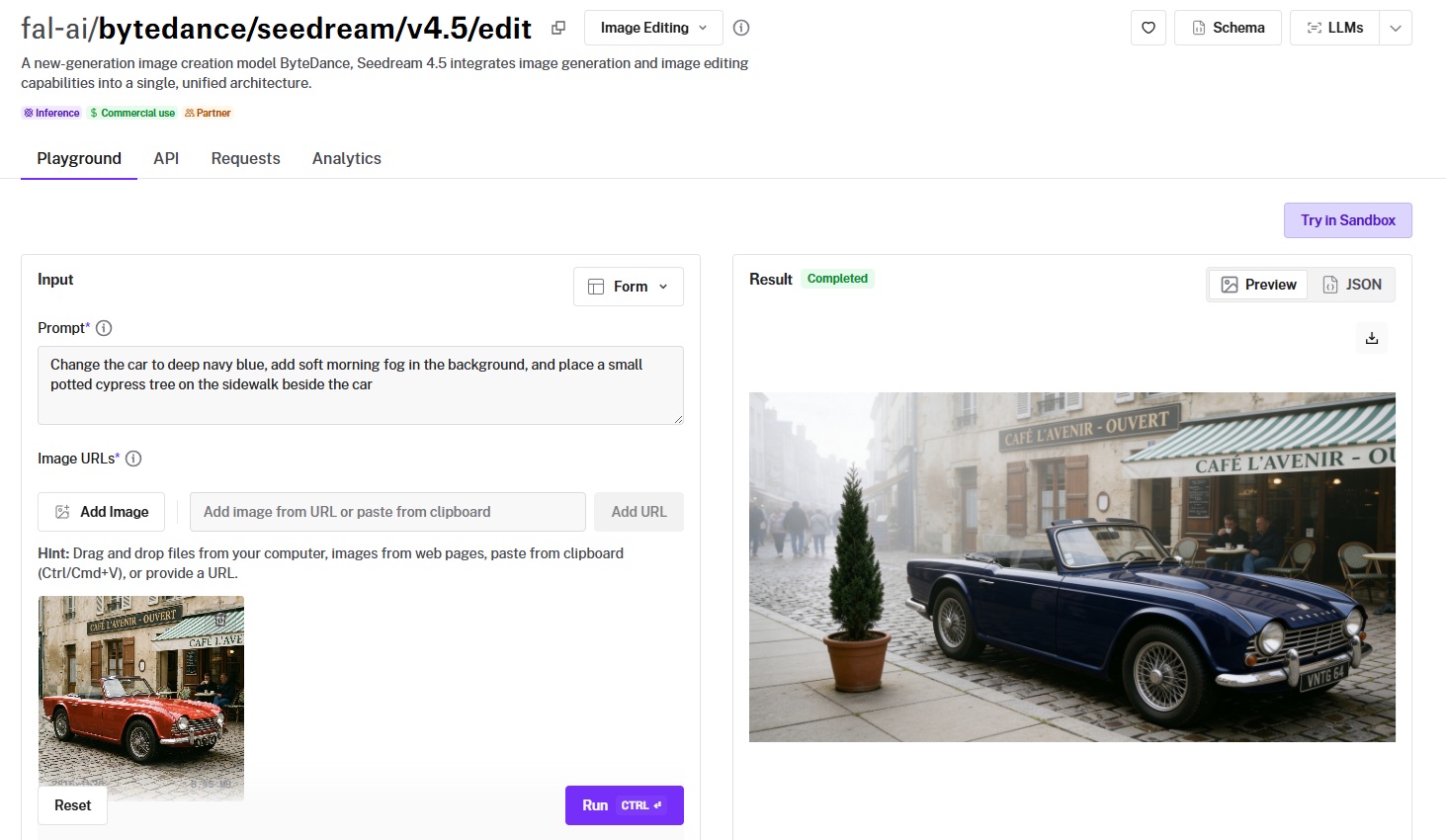
Seedream 4.5 Edit is ByteDance's unified architecture that consolidates image generation and editing into a single model.
It processes up to 10 reference images simultaneously, interpreting spatial references like "replace the product in Figure 1 with that in Figure 2" for complex multi-source compositions.
Performance
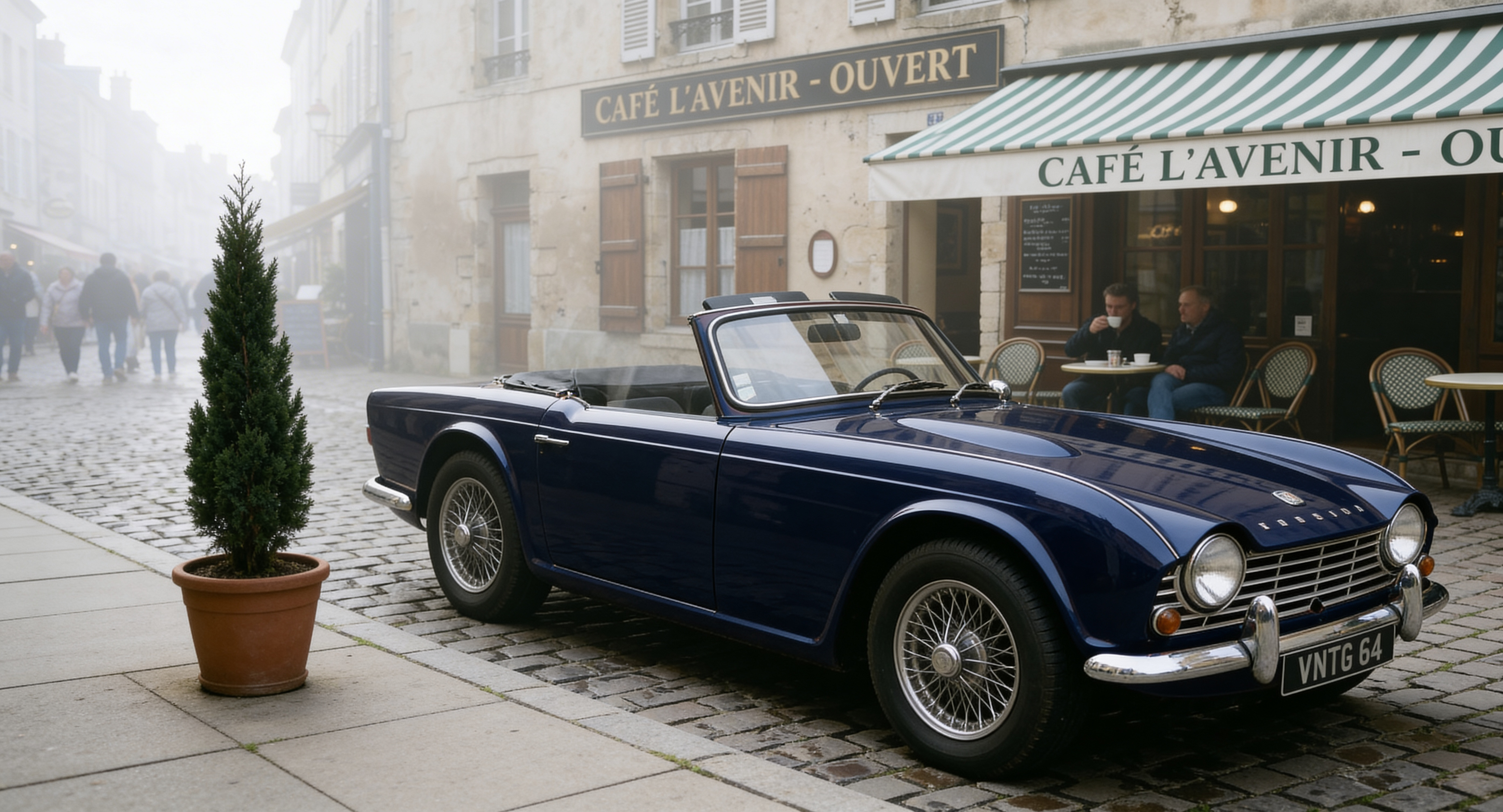
Generated using Seedream 4.5 Edit on fal, an AI model from ByteDance.
- Edit accuracy and instruction following: The Figure-referencing system is well-implemented. The model maintains spatial relationships between referenced elements, which matters for product composite workflows where precise positioning is required.
- Context preservation: Maintains depth, perspective, and lighting when integrating elements from different sources. The safety checker runs by default, which adds a small amount of processing overhead but keeps outputs clean.
- Multi-image input and compositing: Up to 10 reference images. Multi-image generation is supported via the max_images parameter (up to 6 per generation), and num_images controls how many separate generations to run. This combination gives you considerable throughput for batch workflows.
- Speed and cost per edit: $0.04 per image. Approximately 60 seconds per edit based on reported processing times. That's slower than Flash-based models, but the output quality at up to 16.8 megapixels compensates for many use cases.
- Resolution and output options: Up to 16.8 megapixels (4096x4096). Configurable dimensions between 1920 and 4096 pixels per axis. Preset sizes include auto_2K and auto_4K.
How to Run Seedream 4.5 Edit on fal
Available through fal's API and playground at fal. Same integration pattern as every other model on fal.
Use num_images for separate generation runs and max_images for multi-output per generation.
The image_size parameter accepts presets and custom width/height objects. Webhook support is available for async batch workflows processing large image sets.
Pricing
It costs $0.04 per image to use Seedream 4.5 Edit on fal.
Pros & Cons
Pros:
- Figure-referencing system makes multi-source compositing intuitive: "replace the product in Figure 1 with that in Figure 2" works as expected.
- Up to 16.8 megapixels (4096x4096) with configurable dimensions and multi-generation batching.
Cons:
- Approximately 60 seconds per edit, which limits interactive workflows.
- Approximately 60-second edit times may limit interactive workflows despite the high resolution ceiling.
Grok Imagine Edit
Best for: Budget-conscious teams running high-volume simple edits where per-edit cost is the primary constraint.
Similar to: FireRed Image Edit, FLUX.2 [pro] Edit.
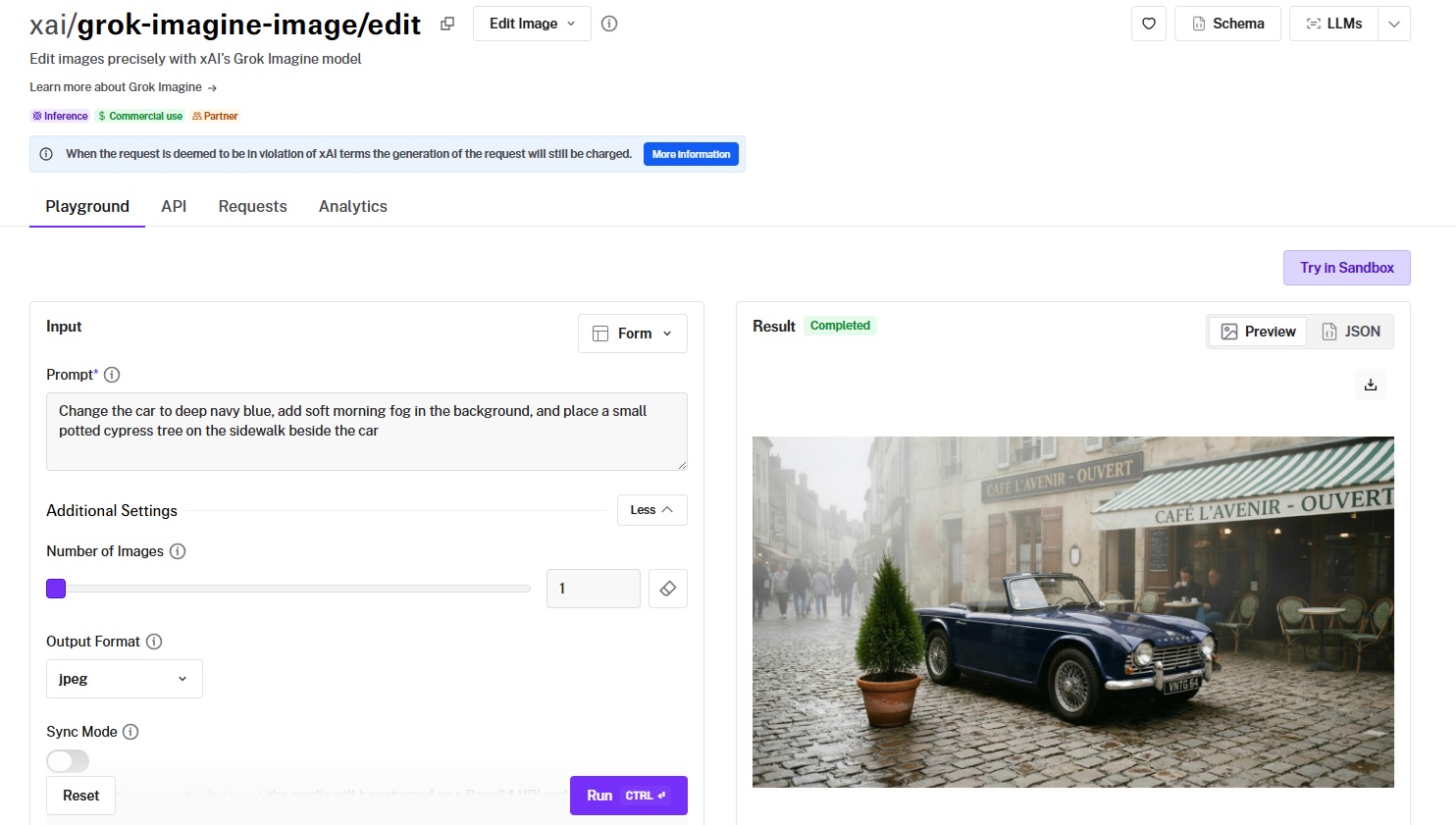
Grok Imagine Edit is xAI's editing model, and at $0.022 per image ($0.02 for output, $0.002 for input), it's one of the cheapest per-edit options on this list. 45 edits per $1.00.
For straightforward edits like style changes, object modifications, and scene adjustments, it delivers solid results at a price that makes high-volume processing practical.
Performance
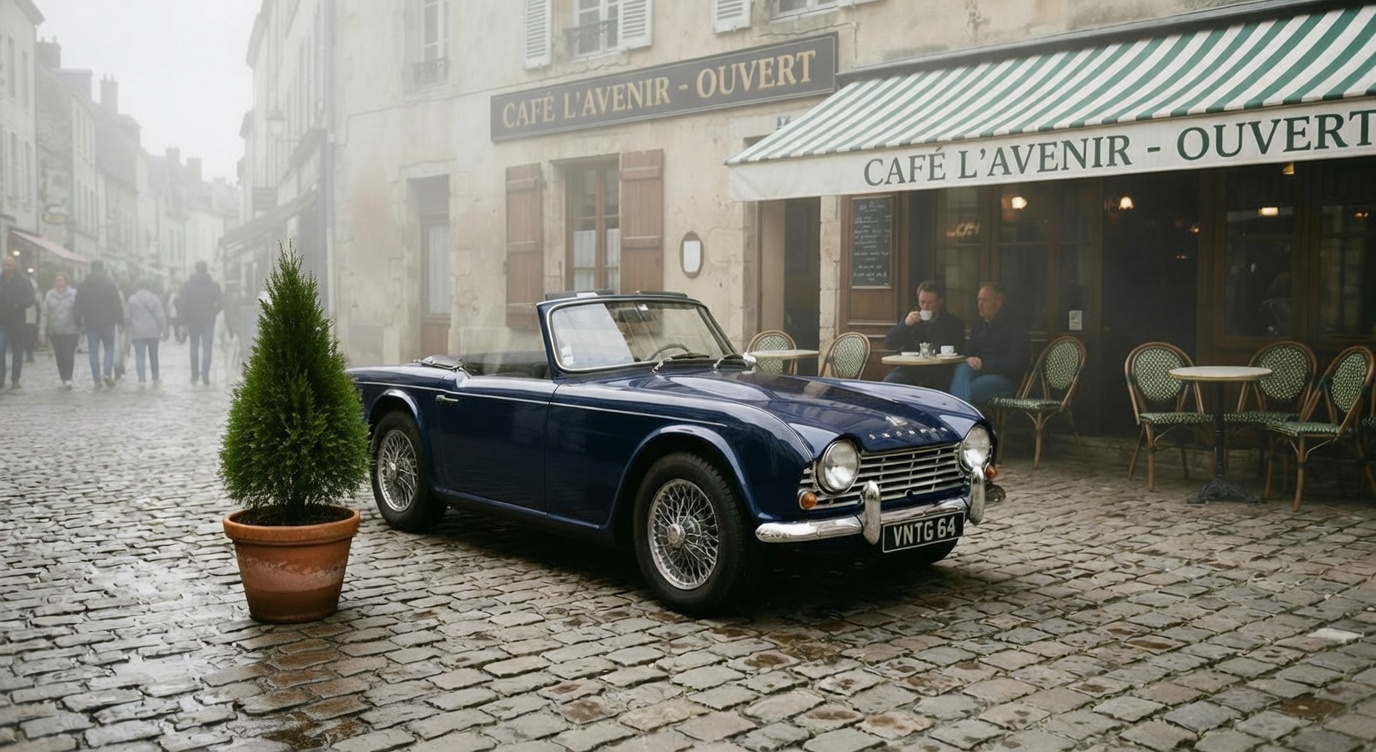
Generated using Grok Imagine Edit on fal, an AI model from xAI.
- Edit accuracy and instruction following: Good on single-focus instructions. "Make this scene more realistic" and "change the style to watercolor" produced clean results. Multi-step instructions with several distinct changes were less reliable, occasionally merging steps or missing the final one.
- Context preservation: Reasonable for the price point. Simple edits preserve context well. Complex edits occasionally introduce subtle style shifts in untouched areas, particularly in background regions.
- Multi-image input and compositing: Up to 3 images. This is the lowest reference image limit on the list. For single-image edits or light compositing, it's fine. For complex multi-source assembly, you'll want a model with higher limits.
- Speed and cost per edit: $0.022 per image. Fast enough for batch processing. Note: requests that violate xAI's terms are still charged, so review their content policy before building automated pipelines.
- Resolution and output options: Output in JPEG, PNG, or WebP. No configurable resolution tiers. The revised_prompt field in the response shows you how the model interpreted your instruction, which is useful for debugging prompt issues.
How to Run Grok Imagine Edit on fal
Available through fal's API and playground at fal. Same integration pattern as every other model on fal.
The model returns a revised_prompt field showing its interpretation of your instruction, which helps with prompt refinement.
Note: requests deemed to violate xAI's terms are still charged for the generation.
Pricing
It costs $0.022 per image to use Grok Imagine Edit on fal ($0.02 for image output, $0.002 for image input).
Pros & Cons
Pros:
- Cheapest per-edit option on this list at $0.022/image. 45 edits per $1.00.
- Revised prompt field helps debug and refine editing instructions.
Cons:
- 3-image input limit constrains multi-source compositing.
FireRed Image Edit
Best for: Developers who want an open-source editing model with bilingual instruction support (English and Chinese), tunable acceleration modes, and standard diffusion controls.
Similar to: FLUX.2 [pro] Edit, Grok Imagine Edit.
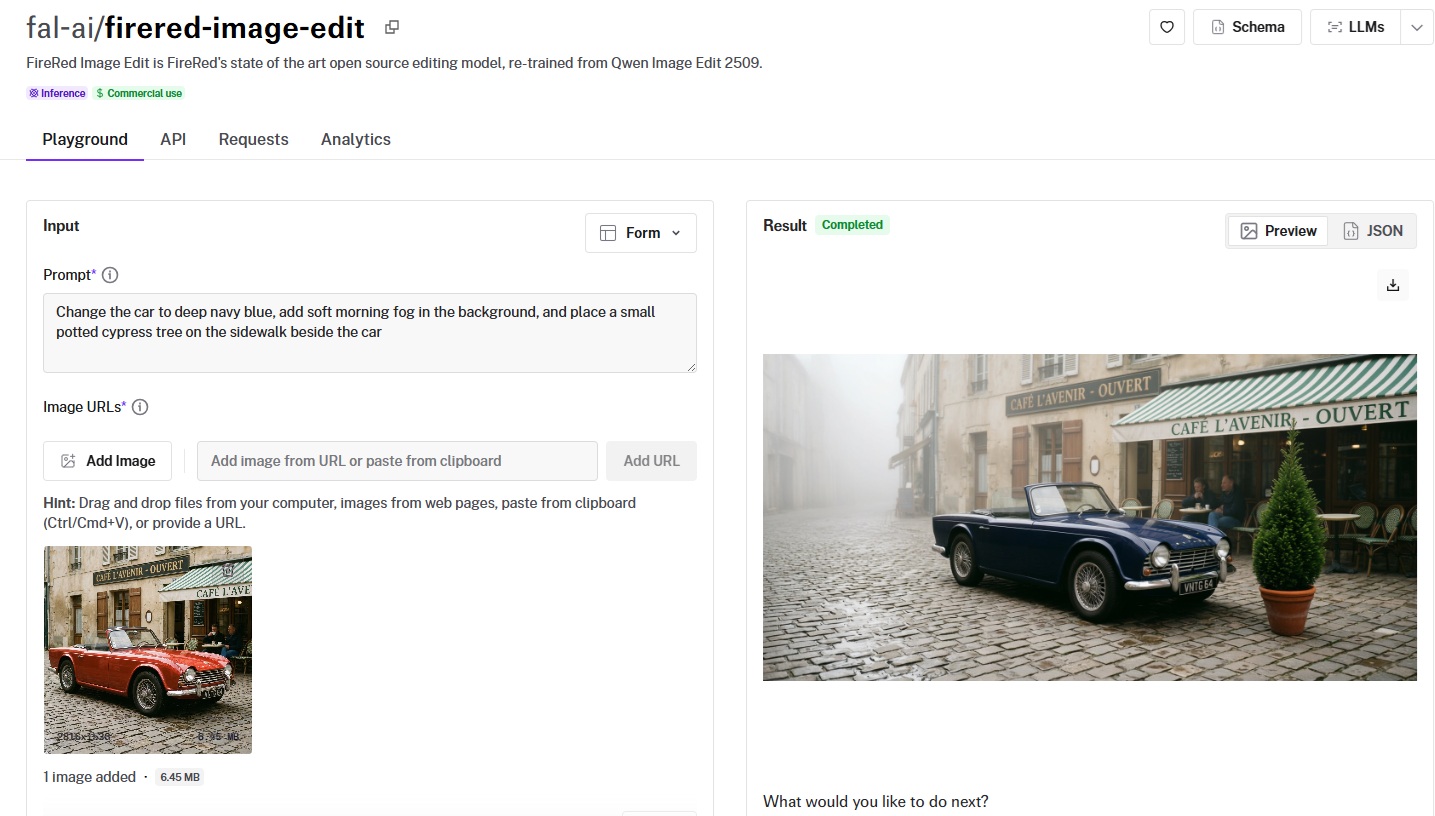
FireRed Image Edit is an open-source editing model from FireRed, retrained from Qwen Image Edit 2509.
It gives you direct control over inference steps, guidance scale, and acceleration modes (none, regular, high), enabling developers to tune the editing pipeline.
Performance
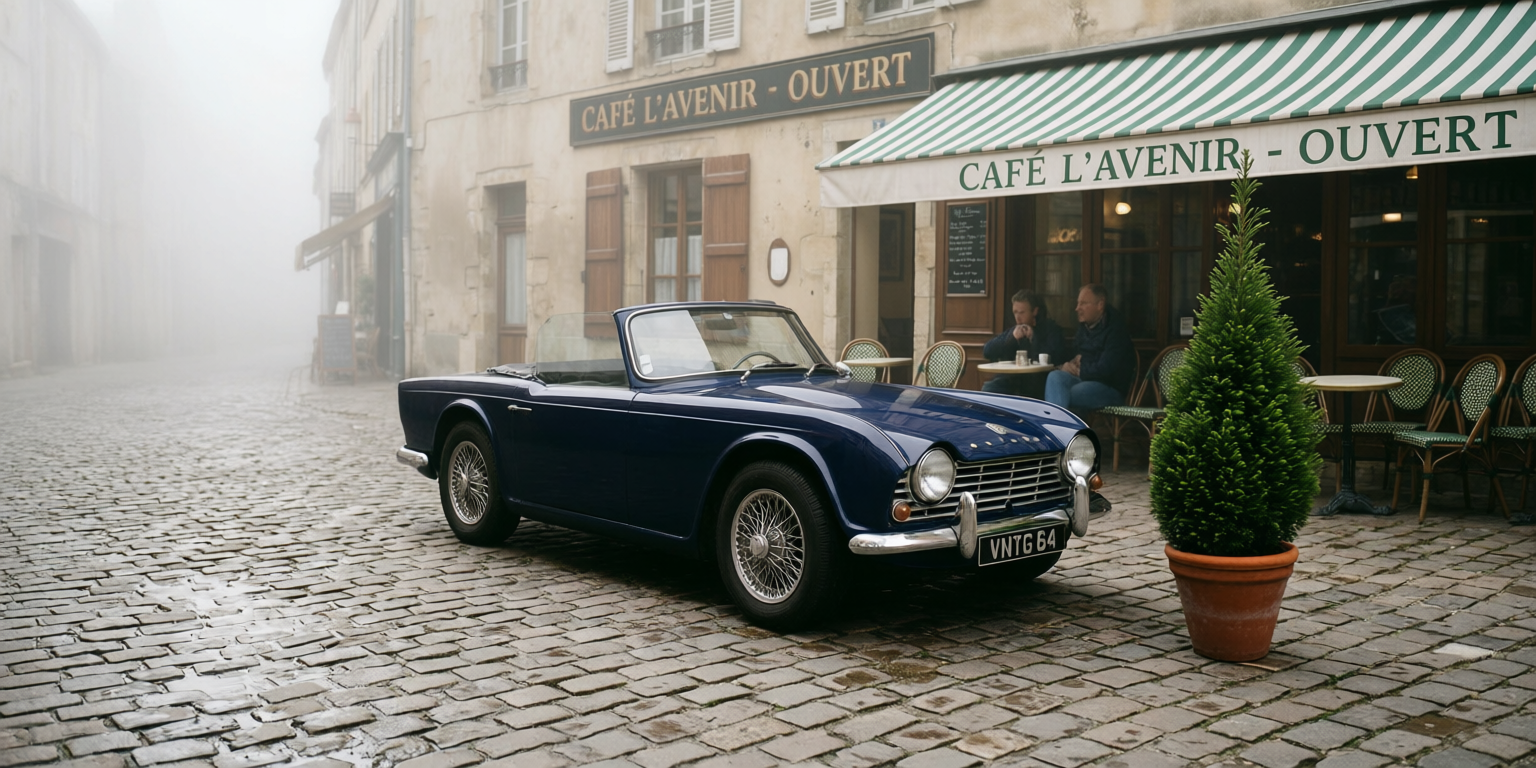
Generated using FireRed Image Edit on fal.
- Edit accuracy and instruction following: Solid on standard editing tasks. The tunable guidance scale (default 4) and inference steps (default 30) let you trade accuracy for speed depending on the task. A higher guidance scale produces edits that follow instructions more literally.
- Context preservation: Good when using the recommended defaults. Reducing inference steps below 20 for speed starts to degrade preservation of fine details in untouched areas. The negative prompt parameter helps prevent unwanted changes by explicitly specifying what to avoid.
- Multi-image input and compositing: Supports multiple image URLs for style transfer, virtual try-on, and reference-based editing. The multi-image support is practical for workflows like transferring a style from one image to another or compositing subjects across scenes.
- Speed and cost per edit: $0.0325 per megapixel. The acceleration parameter is unique to FireRed: "regular" balances speed and quality, "high" prioritizes speed at the cost of some detail, and "none" gives maximum quality with longer generation times.
- Resolution and output options: Custom image sizes or presets (square_hd, portrait_4_3, landscape_16_9, etc.). Output in JPEG or PNG. Negative prompt support for fine control.
How to Run FireRed Image Edit on fal
Available through fal's API and playground at fal. Same integration pattern as every other model on fal.
The unique parameters are acceleration (none, regular, high), num_inference_steps (default 30), guidance_scale (default 4), and negative_prompt.
These give you more control over the speed-quality tradeoff than any other model on this list. Commercial use is enabled.
Pricing
It costs $0.0325 per megapixel to use FireRed Image Edit on fal.
Pros & Cons
Pros:
- Most configurable model on this list: tunable inference steps, guidance scale, negative prompts, and three acceleration modes give you granular control over the editing pipeline.
- Bilingual English and Chinese instruction support.
- Open-source with commercial licensing.
Cons:
- Requires parameter knowledge to get the best results.
- Output limited to JPEG and PNG.
Nano Banana Pro Edit (Gemini 3 Pro Image)
Best for: Teams that need maximum reasoning depth for complex multi-element compositions, fine typography, and the highest compositional ceiling Google's image editing can offer.
Similar to: Nano Banana 2 Edit, GPT Image 1.5 Edit.
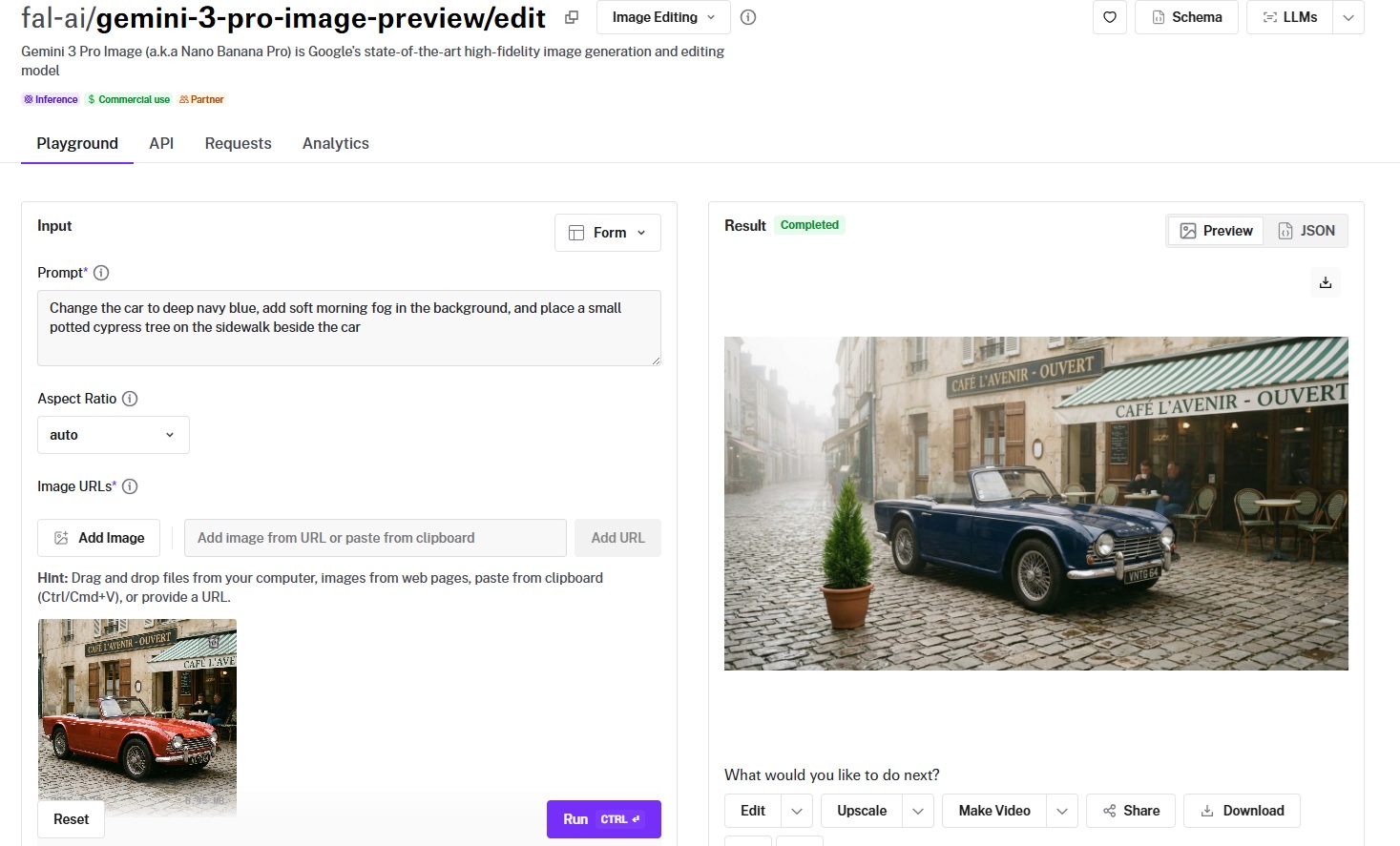
Nano Banana Pro Edit is Google's premium editing model, built on the Gemini 3 Pro Image architecture.
It trades speed and cost efficiency for deep semantic reasoning, as it's capable of interpreting complex editing instructions with a strong level of compositional understanding.
Performance
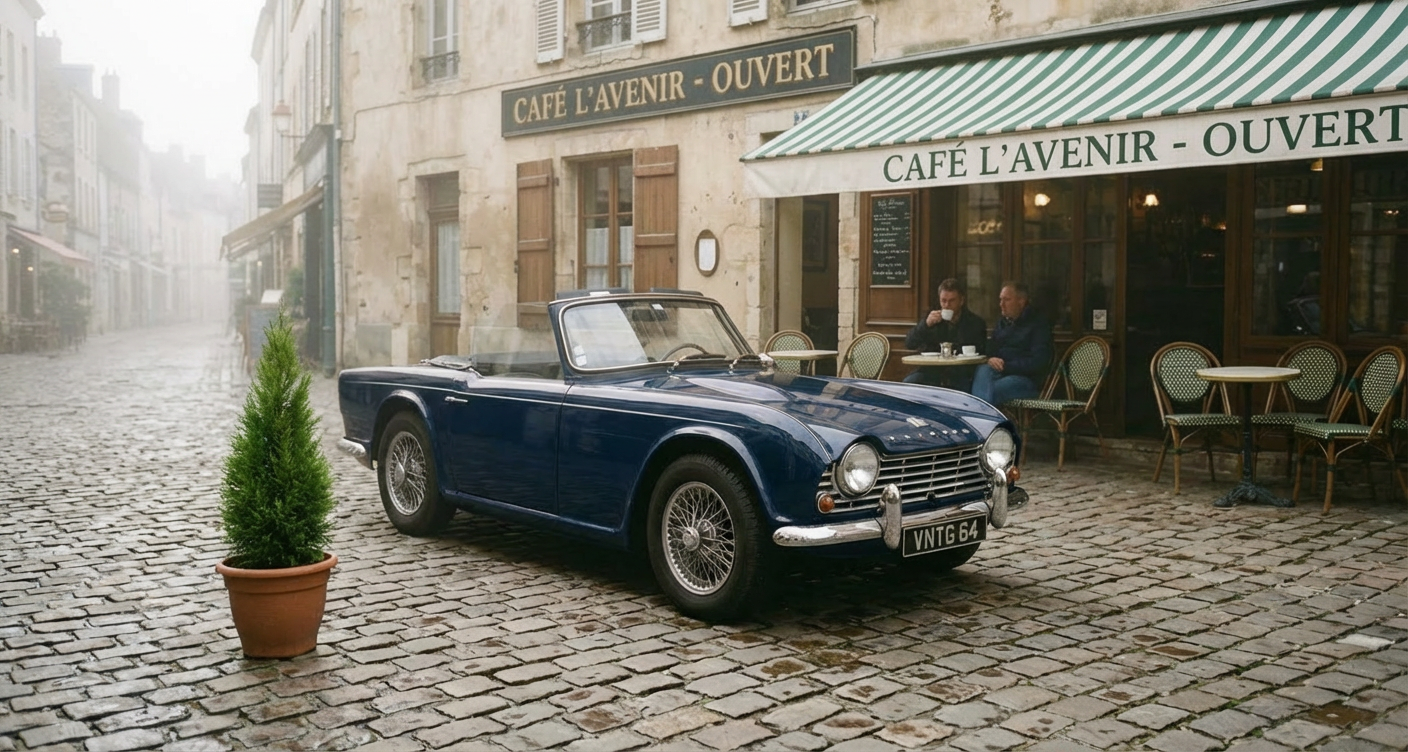
Generated using Nano Banana Pro Edit on fal, an AI model from Google.
- Edit accuracy and instruction following: The best on this list for complex, multi-element instructions. Where other models occasionally conflate steps or miss subtleties, Nano Banana Pro's reasoning architecture processes each element of the instruction distinctly. Text rendering in edited images is noticeably cleaner than on any other model I tested.
- Context preservation: Excellent. The Pro architecture's deeper reasoning means it understands object boundaries, lighting interactions, and spatial relationships at a level that produces edits blending naturally into the source image. I didn't notice the subtle lighting shifts that occasionally appeared with the Flash-based models.
- Multi-image input and compositing: Up to 14 reference images, tied with Nano Banana 2. Web search grounding is available for edits that need real-world context. The model handles multi-image compositing with sophisticated understanding of how elements from different sources should interact.
- Speed and cost per edit: $0.15 per image at 1K. 4K outputs cost $0.30 (2x rate). That's roughly 7 edits per $1.00 at standard resolution. Generation times are longer than Flash-based models, reflecting the deeper reasoning process.
- Resolution and output options: 1K, 2K, and 4K. No 0.5K budget tier. Output in JPEG, PNG, and WebP. SynthID watermarking on all outputs.
How to Run Nano Banana Pro Edit on fal
Available through fal's API and playground at fal. Same integration pattern as every other model on fal.
If you've already integrated Nano Banana 2 Edit, switching to Nano Banana Pro is a one-line endpoint change: swap "nano-banana-2/edit" for "gemini-3-pro-image-preview/edit."
Web search grounding and resolution parameters work identically across both endpoints. The limit_generations parameter controls variation output.
Pricing
Here's how much it costs to use Nano Banana Pro Edit on fal:
- 1K (standard) and 2K: $0.15/image.
- 4K: $0.30/image (2x standard rate).
Pros & Cons
Pros:
- Deepest semantic reasoning on this list. Complex multi-element edits land on the first try where cheaper models need two or four passes.
- Best text rendering accuracy of any editing model I tested. Fine typography for packaging, signage, and print-ready assets.
- Character consistency for up to 5 people across edits, per Google, with 14 reference images.
Cons:
- Starts from $0.15/image (1K), which can be expensive.
- No 0.5K budget tier and no thinking mode options.
Recently Added


















Edit Images at Scale Through a Single API With fal
The AI image editing space has more capable models now than at any point in the past two years.
And that's actually the problem: picking the right one requires testing, which costs time and credits.
If you want access to the best-performing editing models, such as Nano Banana 2 Edit, FLUX.2 [pro] Edit, FLUX.1 Kontext [pro], Seedream 5.0 Lite Edit, and GPT Image 1.5 Edit, all through a single API with pay-per-use pricing and no GPU headaches, fal is the fastest way to get there.
You can test any model in the playground or plug into the API in minutes.

![How To Make a Character Replacement Video [2026]](https://refinery.fal.media/url/https%3A%2F%2Fv3b.fal.media%2Ffiles%2Fb%2F0aadb85e%2F7WRfwSK5_hI2OtOrkuSKX.jpg/tr:w-1280,q-80/7WRfwSK5_hI2OtOrkuSKX.webp)