This guide covers how to use HappyHorse-1.0 on the app right now, which generation controls matter, prompts that actually pull its strengths out, and how it stacks up against Seedance 2.0 on the same brief.
TL;DR
Right now, the only place we could independently test it is happyhorse.app, a third-party web app that is not affiliated with the HappyHorse development team.
It is browser-based and can work on either a pay-as-you-go basis or with a subscription.
The whole pitch about the AI model is its joint audio-video generation, as the visuals and sound come out of a single forward pass.
After testing, I can confirm that the AI model has best-in-class lip-sync across different languages.
HappyHorse-1.0 is not available on fal yet, and I'm not sure about what the pricing would look like.
That said, on its browser app, it definitely appears to be on the pricier side, costing me ~$4 for 5-seconds of Pro generation with audio on.
What is HappyHorse-1.0?
Short version: it's a text-to-video and image-to-video model that outputs 1080p clips with audio generated in the same pass as the visuals.
The long version: HappyHorse-1.0's site describes a single token sequence where the audio and video get generated together, in the same forward pass.
The picture and the sound aren't produced by two separate models and then synced up after.
They come out of the same model at the same time.
That's the pitch, and it's what the site claims is behind the lip-sync quality that users are voting for on the Arena.
One of my goals was to test under independent testing if that claim holds up and if it's a true architectural shift: and you'd be surprised with the results as much as I was.
Prompt: A woman in her late twenties sits at a sunlit kitchen counter, slicing lemons into a glass pitcher. She glances up, says a single sentence in French directly to camera in a calm, unhurried tone, then goes back to her task. Close medium shot, warm window light from the left, the faint sound of ice clinking against the glass in the background.
Generated using HappyHorse-1.0 (Pro variant), an AI model from Alibaba.
Where can you use HappyHorse-1.0 right now? (April 2026)
Even though there are quite a lot of tips around where to use it right now, the only location where we could independently test the AI model is happyhorse.app. Worth flagging up front: this site is a third-party web app that is not affiliated with the HappyHorse development team, and we can't independently confirm that the generations it returns come from the underlying HappyHorse-1.0 model.
It can be accessed on your browser, and the experience was as smooth as you'd expect - you sign up for an account, get some money in on either pay-as-you-go or a subscription, and you're ready to start generating.
For example, the video you're seeing above took me ~$4 in credits to generate (400 credits) for a 5-second clip with audio on, and using its Pro model variant.
One thing you can't do yet is call it from code, as there does not appear to be a public API.
Will HappyHorse-1.0 be available on fal?
Once the API is live, we'd aim to make HappyHorse-1.0 available through fal alongside the other video models already on the platform, such as Seedance 2.0, Kling 3.0, and Veo 3.1.
The advantage for marketing teams and developers would be that you wouldn't need separate accounts and separate billing to use and manage these different AI models.
The same API key you're already using for Seedance 2.0 would also cover HappyHorse-1.0.
Pricing on fal for HappyHorse-1.0 hasn't been announced yet.
How do you use HappyHorse-1.0 on the app?
Here's how you can get started with HappyHorse-1.0's web app:
Step 1: Sign up for HappyHorse's app
Go to happyhorse.app and look to add some credits after creating your account, because there did not appear to be any free credits to use for the AI model.
Step 2: Go to the AI video dashboard
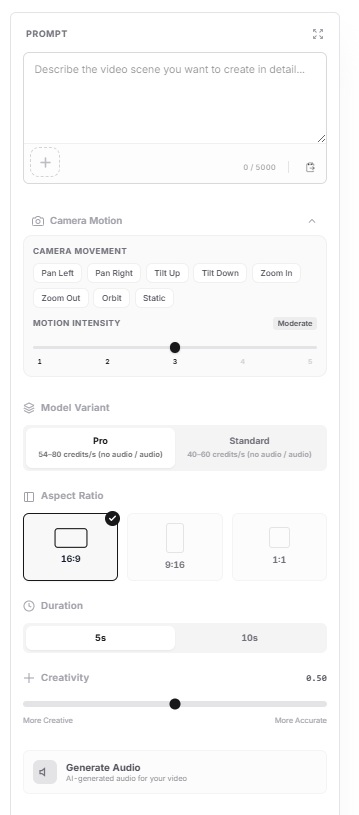
Next up, you want to go to its AI video dashboard, where there are more options than on the home page, and where you'll be able to refine your prompt and camera motion.
Step 3: Configure your generation options
From here on, you need to select between multiple options:
Model variant: Pro vs. standard. Pro runs the full-quality 1080p pass, while standard runs faster and costs fewer credits per generation.
Aspect ratio: 16:9 for landscape, 9:16 for vertical. There's also 1:1.
Duration: You can select from 5 to 10 seconds.
Generate audio toggle: AI-generated audio for your video, although keep it in mind that it'll cost more.
Creativity: From 0.00 to 1.00, you're basically selecting if you'd like the model to get more creative with the execution of your prompt, or to be more accurate and literal with the execution. For this guide, I left it at 0.50.
Camera motion: You can play around with the camera movement and also the motion intensity of the videos.
If you're new to AI video generation, here's what both of these things mean:
➡️ Motion intensity refers to the amount of activity and speed of objects, subjects, or the environment between frames.
➡️ Camera movement refers to the movement of the virtual "lens" or viewpoint within the 3D space of the scene.
falMODEL APIs
The fastest, cheapest and most reliable way to run genAI models. 1 API, 100s of models
Step 4: Write your prompt (or upload your image)
For text-to-video, your prompt does better when it covers four things at once:
What the subject is doing.
How the camera is framed and moved.
The lighting quality.
The audio direction (if audio is on).
Prompt: A bookbinder in a small workshop presses a fresh leather cover onto a stack of signatures, using a bone folder to smooth the seam in long even strokes. Tight overhead shot on her hands. No voice, only the soft scrape of the folder and the quiet creak of the press, with warm afternoon light coming in from a side window.
Generated using HappyHorse-1.0, an AI model from Alibaba.
For image-to-video, you can skip re-describing the scene.
The image already does that for the model.
All you have to do is write a short prompt about what should move and how.
Step 5: Run it and save the file
Hit generate.
You can review what comes back and then regenerate if the prompt didn't land.
It can then be downloaded as MP4.
Generation felt fast to me, well, not exactly instant, but fast enough to iterate on different scenes even though I was using the Pro variant.
How to prompt HappyHorse-1.0?
Here are a few habits worth building in, based on what comes out of the site's gallery and what my testing has shown me:
Say what the camera does, not just where it is: "Medium shot slowly tracking left as the subject turns toward the window" is a framing, a direction, plus a trigger.
Write the sound as if you're directing a sound designer: Name the language for dialogue. Name the one sound you want in the ambient bed. Say "no dialogue" if you don't want any.
Anchor the light in space and time: "Warm lighting" is an adjective. "Golden hour sun coming through a west-facing window at a low angle" tells the model where the light is and how it falls on the subject.
Prompt: A boxer in his mid-thirties stands alone in an empty gym at 2am, gloves off, hands wrapped in sweat-darkened tape, facing a heavy bag that's still swinging from the last round. The camera orbits slowly around him in a 90-degree arc, starting on his profile and ending behind his shoulder, landing the shot as he lifts his head to look up at the bag. A single overhead tungsten lamp hangs ten feet above him, throwing hard shadow straight down across his eyes and lighting only the top half of his torso. No dialogue. The only sound is the slow, steady creak of the chain holding the bag as it continues to swing.
Generated using HappyHorse-1.0, an AI model from Alibaba.
One more observation: Similar to other AI video generation models, the less description you provide the AI model about the objects, the more assumptions they're going to make.
For example, here I didn't tell the AI model much about the boxer other than him being in his mid-30s, but it assumed that he is muscular.
What are the top use cases for HappyHorse-1.0?
Based on my testing and also what I've seen around the internet in terms of what people have generated with HappyHorse-1.0, here are what I'd say are its best use cases:
Creator monologues and talking-to-camera content: Single-subject portraits where the face is the shot. Reaction videos, product reveals, tutorial openers. The lip-sync is the standout feature here.
Multilingual content creation: The AI model seems to be doing incredibly well with languages like French, Japanese, Korean, and Mandarin.
Ambient brand pieces where sound matches action: HappyHorse generates audio in the same pass as the visuals rather than syncing it afterwards. That's most useful for short-form content where there's no sound designer in the pipeline fixing alignment issues by hand.
Explainers and short-form educational content: This AI model would be perfect for content creation where a person speaks plainly about a specific concept, with the lip movement believable enough to carry the lesson.
Recently Added























Try HappyHorse-1.0 on fal when it launches
When HappyHorse-1.0 becomes publicly available, we at fal plan to make it accessible through its API alongside over 1,000 other production-ready AI models.
That means you'd be able to access it through the same unified API that serves models like Kling 3.0, Veo 3.1, Sora 2, and Seedance 2.0.
Keep an eye on fal for the launch announcement.
HappyHorse-1.0 Frequently Asked Questions around usage
Should I generate with audio on or off?
Audio on is where I think the model's architectural advantage sits, despite the increase in the final cost.
Turn it off, and you're getting a good-but-not-special video generator instead of a model built around joint audio-video synthesis.
That said, standard mode with audio off runs faster and will cost fewer credits per generation, which makes it the right setting while you're iterating on a prompt.
How long should my prompts be?
Three to four detailed sentences seem to be the sweet spot.
You want to be covering four things: the subject and what they're doing, the camera framing and movement, the lighting quality, and the audio direction if audio is on.
Going longer than that tends to produce diminishing returns, and can hurt results by forcing the model to weight details you don't actually care about.
How do I get the multilingual lip-sync to work?
You want to name the language explicitly in the prompt.
"Says a short line in Japanese" tells the model to generate Japanese speech with Japanese mouth movement.
"Says a short line" without naming the language defaults to English, which is fine unless English wasn't what you wanted.
![What is Seedance 2.5? Everything You Need to Know [2026]](https://refinery.fal.media/url/https%3A%2F%2Fv3b.fal.media%2Ffiles%2Fb%2F0aa63095%2FxJ5ttmbJKh8poGeQwhqqj.jpg/tr:w-1280,q-80/xJ5ttmbJKh8poGeQwhqqj.webp)
![10 Best Text-to-Image APIs In 2026 [Reviewed]](https://refinery.fal.media/url/https%3A%2F%2Fv3b.fal.media%2Ffiles%2Fb%2F0a9eafbe%2FB4vvwLBImuOfSepWIVfwO_best-text-to-image-apis-2026.jpg/tr:w-1280,q-80/B4vvwLBImuOfSepWIVfwO_best-text-to-image-apis-2026.webp)