In this guide, I am going to cover how to use Seedance 2.0 on fal.
You'll learn how to write prompts that control model behavior, how the unified audio-video architecture changes your production workflow, which settings directly affect output quality and cost, and how to run both the image-to-video and reference-to-video pipelines, step by step.
How Can You Structure Seedance 2.0 Prompts?
Seedance 2.0 wants cinematic direction, not image-generation keywords.
Think of your prompt as a shot list you'd hand to a director of photography. You describe:
What's happening in the scene?
How does the camera move?
What sounds should be present?
How do shots transition?
The model interprets these as production instructions.
Forget quality boosters and comma-separated tag lists. The model responds to narrative structure: subject, action, camera, sound, cuts.
One thing to stop doing here (if you're coming from another AI model) would be writing static scene descriptions.
A prompt like "cinematic shot of a mountain landscape, 4K, beautiful lighting" gives the model almost nothing to work with for motion.
You need to describe what moves, how it moves, and what the camera does while it's happening.
From the example prompts ByteDance has published, a reliable prompt structure looks like this:
- Subject and action first.
- Camera movement second.
- Sound or audio cues third (if specific sounds matter).
- Shot transitions last (if multi-shot).
For prompt length, we've seen that the model handles detailed prompts well.
The example prompts from ByteDance's own demos run 2-4 sentences for single shots and 4-8 sentences for multi-shot sequences.
Short, vague prompts tend to produce generic motion, while specific, directed prompts produce intentional results.
Prompt (simple, single shot):
A golden retriever runs across a sandy beach at sunset, kicking up wet sand with each stride, the camera tracking alongside at ground level. Waves crash softly in the background.
Generated using Seedance 2.0 on fal.
Prompt (structured, multi-shot):
Shot 1: Close-up of an espresso machine portafilter locking into place with a metallic click. Shot 2: Wide angle of dark espresso pouring into a white ceramic cup, steam rising, the sound of liquid hitting porcelain. Shot 3: Slow pull-back revealing a busy cafe interior, ambient conversation and soft jazz in the background.
Generated using Seedance 2.0 on fal.
Here are a few practical tips from our testing:
Describe sound explicitly when it matters.
The model generates audio by default (unless you turn it off on fal), but mentioning specific sounds in your prompt, such as the crack of thunder or rain hitting a tin roof, gives the audio generation something concrete to anchor to.
Use camera terminology that a cinematographer would recognize.
Dolly zoom, rack focus, tracking shot, handheld, POV, and aerial shot all work as we expected.
The model handles these as literal camera instructions, not stylistic suggestions.
For multi-shot prompts, label your shots clearly.
"Shot 1:" and "Shot 2:" formatting gives the model explicit cut points.
Without labels, longer prompts tend to produce a single continuous take rather than an edited sequence.
One primary action per shot.
If a single shot tries to contain a character running, a camera pan, a lightning strike, and a mood shift all at once, the model has to pick what to prioritize.
Give each shot one clear verb and one camera movement. Everything else is context.
How to Use Seedance 2.0's Native Audio-Video Generation?
This is where Seedance 2.0 earns its place in the conversation.
The model generates synchronized audio alongside every frame of video, including sound effects, ambient sound, music, and lip-synced dialogue.
This isn't a post-processing step or a separate model bolted on. The audio and video come from the same generation process, which means timing is inherently locked.
The practical technique that matters most: be specific about what you want to hear.
If your prompt describes an explosion, the model will generate explosion audio.
But if you describe "a massive explosion that shakes the camera, debris clattering across concrete," the audio generation has more to work with.
Sound cues in your prompt function like audio direction.
falMODEL APIs
The fastest, cheapest and most reliable way to run genAI models. 1 API, 100s of models
Prompt:
A vinyl record drops onto a turntable, the needle settles into the groove with a soft crackle. The camera slowly zooms into the spinning label as warm analog music begins to play. Dust particles float in the beam of a nearby desk lamp.
Generated using Seedance 2.0 on fal.
The model seems to understand genre context well.
An action scene gets percussive, tense scoring. A slow landscape gets ambient, atmospheric sound.
We've also noticed that dialogue with lip-sync works, but the audio quality appears to be strongest on sound effects and ambient audio.
If your primary use case is dialogue-heavy content, we'd recommend you test the lip-sync quality against your standards before committing to a production pipeline.
What Are the Settings That Matter on Seedance 2.0?
Resolution
Seedance 2.0 supports two resolution options: 480p and 720p.
480p is faster to generate and useful for rapid prototyping or testing prompt ideas before committing to a full-quality render.
720p is the higher-quality option and what you'd use for anything production-facing.
There is no 1080p or 4K option on Seedance 2.0 on fal.
Duration
The model supports 4 to 15 seconds per generation, or "auto" to let the model decide based on the prompt.
The auto setting is a solid default for most use cases.
The model reads your prompt and picks a duration that fits the action described.
Do note that multi-shot prompts tend to result in longer outputs when set to auto, since the model needs time for each shot and the transitions between them.
For precise control, you can set the duration explicitly.
We've noticed that short clips (4-5 seconds) work well for single-shot product demos and social media content, while longer clips (10-15 seconds) are where the multi-shot capability becomes most useful.
Pricing scales per second, so duration directly affects cost.
Aspect Ratio
There are six presets plus auto: 21:9, 16:9, 4:3, 1:1, 3:4, and 9:16:
21:9 is for ultrawide cinematic content.
16:9 is standard landscape.
9:16 is vertical, built for mobile-first platforms like TikTok, Instagram Reels, and YouTube Shorts.
1:1 is square, which we found useful for social media feeds.
The auto setting infers the best ratio from your prompt or, in image-to-video mode, from the input image dimensions.
It's reliable enough to use as a default unless you have specific platform requirements.
Generate Audio
The "Generate Audio" function is on by default on fal and generates synchronized sound effects, ambient sounds, music, and lip-synced speech.
Seed
Random by default. You can set a specific integer for reproducible results, though ByteDance notes that results may still vary slightly even with the same seed.
It can be useful for iterating on a prompt while keeping the visual composition roughly consistent.
How to Use Image-to-Video with Seedance 2.0?
Beyond text-to-video, Seedance 2.0 has a dedicated image-to-video endpoint on fal that animates a still image based on a motion prompt.
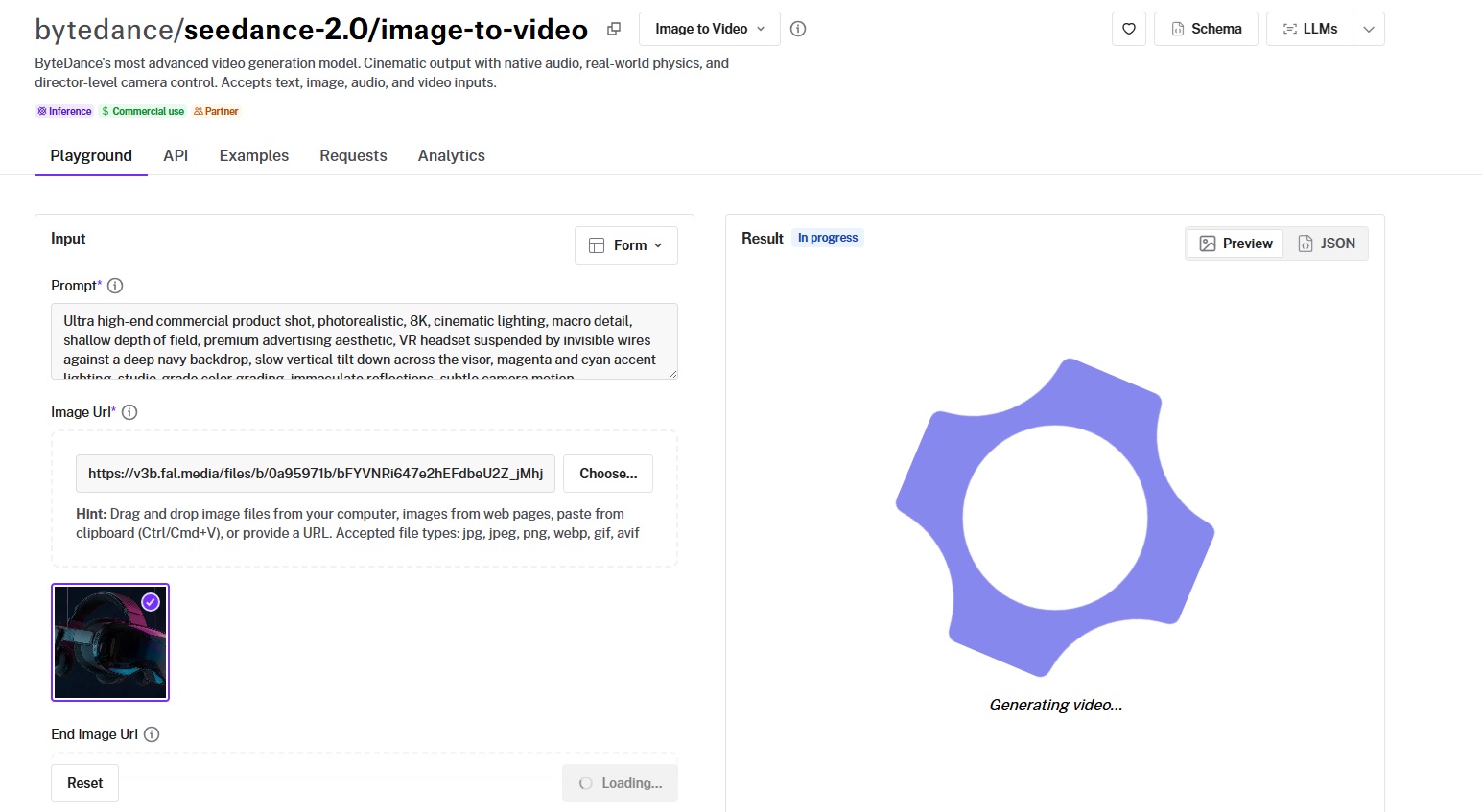
The endpoint is bytedance/seedance-2.0/image-to-video.
You provide a starting image URL and a text prompt describing the desired motion. The model preserves the visual content of your image while adding the movement you describe.
This is useful for bringing product photography to life, animating concept art, or creating video content from existing brand assets without starting from scratch.
One distinctive feature: you can also provide an end frame image via the end_image_url parameter.
When set, the generated video transitions smoothly from the starting image to the ending image.
Think of it as A-to-B animation, especially useful for before-and-after product demos or morphing effects.
Prompt (with this starting image):
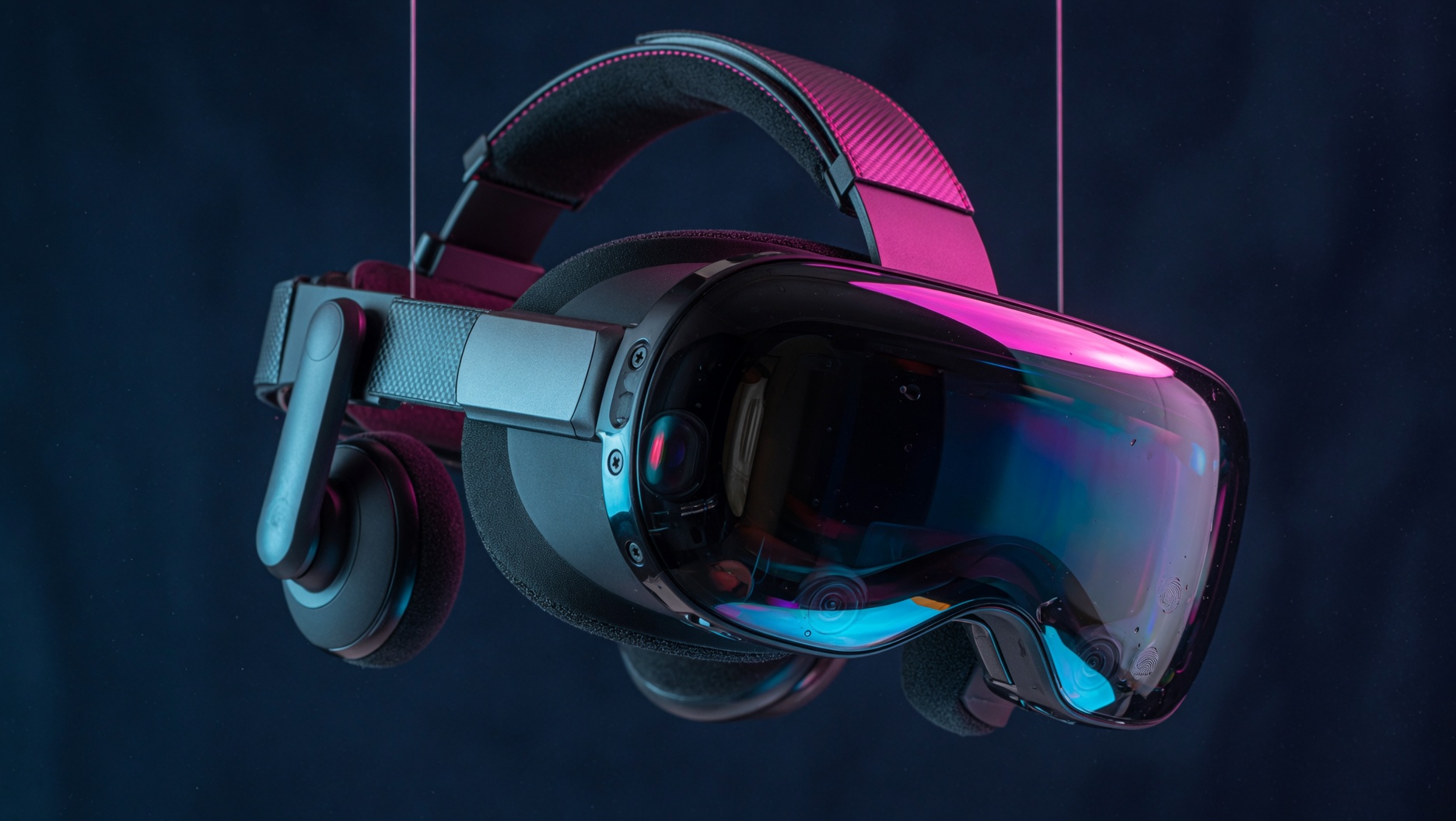
A VR headset hangs suspended against a deep navy backdrop, catching magenta and cyan accent lights along its visor. The camera tilts slowly downward across the surface, pulling reflections into frame as it moves. A faint electronic hum builds underneath.
Generated using Seedance 2.0 on fal.
The JavaScript call for image-to-video looks like this:
javascript
import { fal } from "@fal-ai/client";

const result = await fal.subscribe("bytedance/seedance-2.0/image-to-video", {
  input: {
    prompt:
      "Slow camera push toward the subject, soft wind moves the hair, natural light shifts slightly.",
    image_url: "https://your-image-url.jpg",
    resolution: "720p",
    duration: "10",
    generate_audio: true,
  },
  logs: true,
  onQueueUpdate: (update) => {
    if (update.status === "IN_PROGRESS") {
      update.logs.map((log) => log.message).forEach(console.log);
    }
  },
});
The image-to-video endpoint supports the same resolution, duration, aspect ratio, and audio parameters as the text-to-video endpoint. Input images are accepted in JPEG, PNG, and WebP formats, up to 30 MB per image.
How to Use Reference-to-Video with Seedance 2.0?
The reference-to-video endpoint is where Seedance 2.0 becomes a true multi-modal production tool.
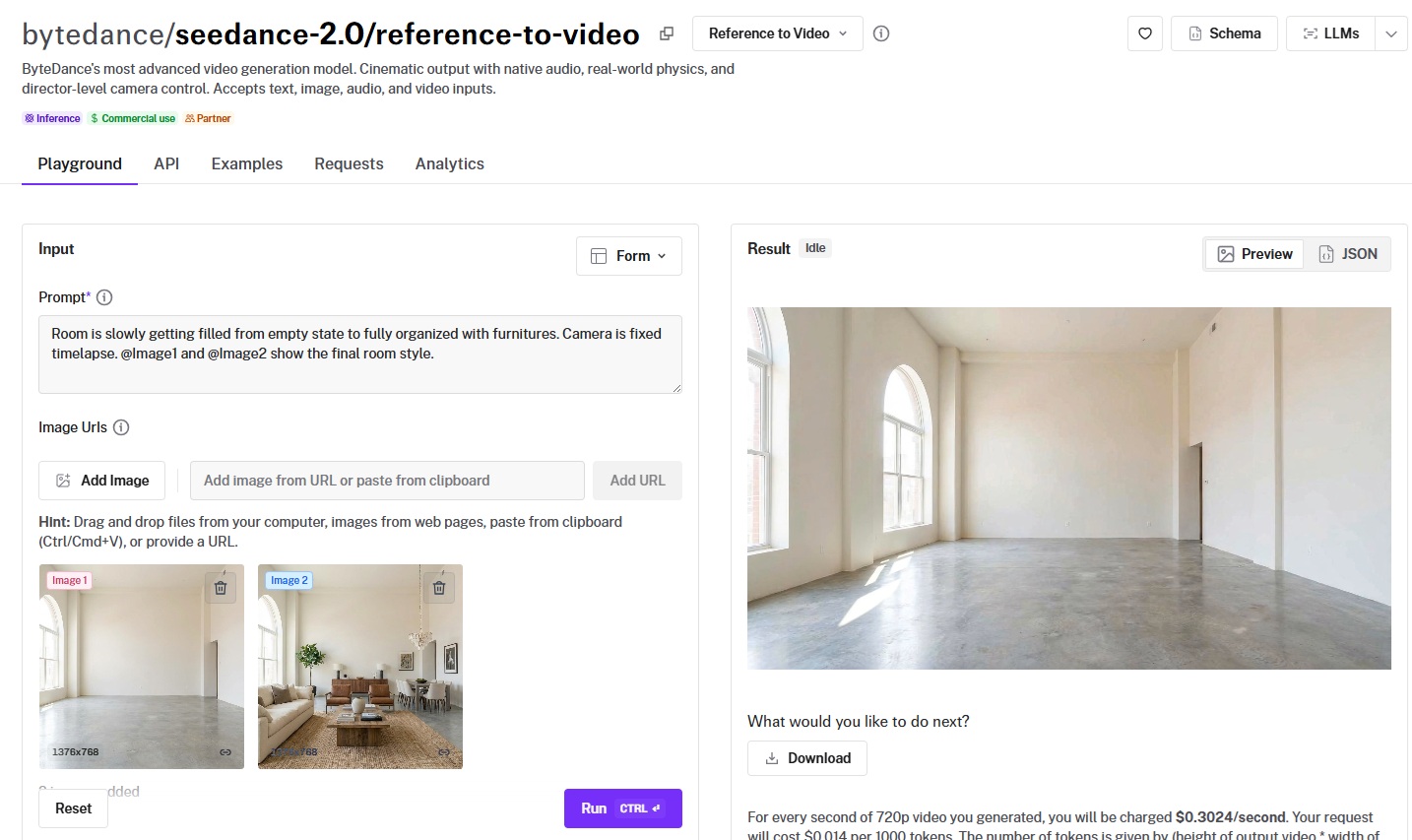
The endpoint is bytedance/seedance-2.0/reference-to-video.
It accepts up to 9 reference images, 3 reference videos, and 3 audio clips alongside a text prompt. The total number of files across all input types can't exceed 12.
You reference these inputs in your prompt using tags: @Image1, @Image2, @Video1, @Audio1, and so on.
This lets you describe exactly how each reference should influence the output.
For example, you could provide a product photo as @Image1, a mood board image as @Image2, and an audio clip of a voiceover as @Audio1, then prompt:
"@Image1 is the hero product. Place it center frame on a wooden surface styled like @Image2. Camera slowly orbits the product. @Audio1 plays as the voiceover."
Prompt (with 2 1376x768 reference images):
Room is slowly getting filled from empty state to fully organized with furnitures. Camera is fixed timelapse. @Image1 and @Image2 show the final room style.
Generated using Seedance 2.0 on fal.
Reference video inputs have specific constraints:
Each video must be between roughly 480p and 720p in resolution.
Combined duration across all video inputs can't exceed 15 seconds, and total size must stay under 50 MB.
Audio references are accepted in MP3 and WAV formats, with each file capped at 15 MB and a combined duration of 15 seconds.
If you provide audio, you need at least one reference image or video alongside it.
We found this endpoint particularly useful for enterprise workflows where brand consistency matters.
You can feed the model your existing brand assets, footage from previous campaigns, and audio from your voice talent, then generate new content that stays visually and sonically consistent.
How to Use Seedance 2.0's Multi-Shot Generation?
Seedance 2.0 can produce multiple shots with natural cuts and transitions within a single generation.
You label each shot in your prompt, describe the action and camera for each, and the model generates the full sequence with built-in transitions.
The key constraints: you can set the duration to 10-15 seconds (or "auto") to give the model enough time for all shots, and keep each shot focused on one primary action and one camera movement.
If your prompt describes four shots but the duration is only 5 seconds, the model will compress or skip shots. Give it room.
Prompt:
15-second commercial. Shot 1: extreme close-up of condensation dripping down a glass bottle, the sound of ice clinking. Shot 2: the bottle rises from a bed of crushed ice, camera tilting up slowly, bright backlight creating a halo effect. Shot 3: a hand grabs the bottle against a sunset rooftop backdrop, the city humming below.
Generated using Seedance 2.0 on fal.
What Is Seedance 2.0's Pricing on fal?
Seedance 2.0's pricing on fal is calculated per second of generated video. There are two tiers: standard and fast.
Standard tier at 720p: Text-to-video: $0.3034 per second. Image-to-video: $0.3024 per second. Reference-to-video: $0.3024 per second.
Fast tier at 720p: Text-to-video: $0.2419 per second. Image-to-video: $0.2419 per second. Reference-to-video: $0.2419 per second.
If you provide video inputs to the reference-to-video endpoint, the price is multiplied by 0.6.
That brings it to approximately $0.1814 per second on standard and $0.1452 per second on fast.
Here are some example numbers:
A 10-second text-to-video clip on the standard tier at 720p costs approximately $3.03.
The same clip on the fast tier costs approximately $2.42.
Audio generation is included at no extra cost. The price is the same whether generate_audio is on or off.
The fast-tier endpoints (bytedance/seedance-2.0/fast/text-to-video, bytedance/seedance-2.0/fast/image-to-video, bytedance/seedance-2.0/fast/reference-to-video) use the same schema and parameters as the standard endpoints.
Who Needs Seedance 2.0?
We've noticed that many teams generating video with AI have hit the same wall.
You generate a 5-second clip, and it looks decent, but there's no audio.
So you run a separate sound effects model, a separate music model, maybe a lip-sync model if there's dialogue.
Then you stitch everything together in post, hope the timing lines up, and repeat when it doesn't.
That's three to five tools in a pipeline for one clip.
For product teams building video into an app or workflow, this fragmentation is the bottleneck.
Every additional model in the chain adds latency, cost, failure points, and integration work.
Ad agencies prototyping creative concepts hit the same issue at a different scale: they need fast iterations on short commercial spots, but each iteration requires re-syncing audio to new visuals.
E-commerce teams face it too. A product demo video with realistic ambient sound and a voiceover used to require a videographer, a sound designer, and an editor.
AI video generation was supposed to collapse that, but not when audio and video live in separate pipelines.
Seedance 2.0 generates audio and video together in a single pass. Sound effects land on cue, dialogue lip-syncs automatically, and there's no post-production audio layering needed.
On fal, the simplest way to see this in action is a single API call:
javascript
import { fal } from "@fal-ai/client";

const result = await fal.subscribe("bytedance/seedance-2.0/text-to-video", {
  input: {
    prompt:
      "A street musician plays saxophone under a bridge, the sound echoing off concrete walls. Camera slowly pushes in from a wide shot.",
    resolution: "720p",
    duration: "10",
    generate_audio: true,
  },
  logs: true,
  onQueueUpdate: (update) => {
    if (update.status === "IN_PROGRESS") {
      update.logs.map((log) => log.message).forEach(console.log);
    }
  },
});
You get back a video with synchronized audio. No separate audio model, no post-processing, and no stitching.
For enterprise teams, this means fewer models to manage, fewer API calls per output, and fewer places where timing can break.
As for creative teams, this means faster iteration on short-form content where audio is half the impact.
Recently Added





Run Seedance 2.0 on fal
AI video generation has reached a point where a single model can handle camera direction, physics simulation, multi-shot editing, and synchronized audio in one pass.
Seedance 2.0 is built for that kind of production-grade output.
If you want to access Seedance 2.0 through a single API with pay-per-use pricing and no GPU management, fal is the fastest way to get started.
Test the model in the playground or plug into the API in minutes.
Seedance 2.0 FAQ
What Is the Cost of Using Seedance 2.0?
Seedance 2.0's pricing on fal is per second of generated video.
On the standard tier at 720p, text-to-video costs $0.3034 per second and image-to-video costs $0.3024 per second.
On the fast tier, all endpoints cost $0.2419 per second at 720p. Audio generation is included at no extra cost.
A 10-second clip on the standard tier runs approximately $3.03, and the same clip on the fast tier costs approximately $2.42.
How Do You Access Seedance 2.0?
You can run Seedance 2.0 on fal through the API or the playground.
You can sign up on fal, grab an API key from your dashboard, and start generating immediately.
The model is available through the JavaScript, Python, Swift, Java, Kotlin, and Dart client libraries, or you can call the REST API directly.
Which Countries Can Access Seedance 2.0?
Seedance 2.0 is available globally through fal's infrastructure. Developers and teams in any country can sign up and start using the API.
Does Seedance 2.0 Generate Audio Automatically?
Yes. Seedance 2.0 generates synchronized audio alongside video by default, including sound effects, ambient sounds, music, and lip-synced dialogue.
You don't need a separate audio model or post-production step. The generate_audio parameter is on by default.
How Long Can Seedance 2.0 Videos Be?
Seedance 2.0 generates videos between 4 and 15 seconds per API call.
You can set the duration explicitly or use "auto" to let the model decide based on your prompt.
Within that 15-second window, the AI video generation model can produce multi-shot sequences with natural cuts and transitions, so a single output can feel like an edited clip rather than one continuous take.
![Nano Banana Pro Prompting Guide & Examples [2026]](https://refinery.fal.media/url/https%3A%2F%2Fv3b.fal.media%2Ffiles%2Fb%2F0a9e92ad%2FdgU0a7pspdC0xXfh7ajVQ_nano-banana-pro-prompting-guide.jpg/tr:w-1280,q-80/dgU0a7pspdC0xXfh7ajVQ_nano-banana-pro-prompting-guide.webp)

![How To Use LTX-2.5: Prompts & Workflows [2026]](https://refinery.fal.media/url/https%3A%2F%2Fv3b.fal.media%2Ffiles%2Fb%2F0aa6bbe3%2FmDUJlHttJdksDteEA8gq0.jpg/tr:w-1280,q-80/mDUJlHttJdksDteEA8gq0.webp)