This review covers what actually changed in the GPT Image 2 upgrade, where you can use the model today, the pricing math at production volume, and how it stacks up against Nano Banana 2.
TL;DR
GPT Image 2 launched April 21, 2026, as the next major release in OpenAI's native image generation line, replacing GPT Image 1.5 as the default. It is the first OpenAI image model with built-in reasoning.
The headline upgrades are its text rendering accuracy, neutral color rendering across scene types, deeper world knowledge for sparse prompts, and resolution support up to 4K.
You can run it through fal for text-to-image and for image editing with optional mask support.
Pricing scales by quality tier and resolution, ranging from $0.01 per image at the lowest setting to $0.41 per image at native 4K high quality.
I'd say that the AI image generation model is best for marketing assets where copy lives inside the image, photoreal product photography, and UI mockups.
Do note that GPT Image 2 has a knowledge cutoff of December 2025, which is relevant when generating images of recent products, brands, or people.
My verdict: the hype is mostly justified, but the real story is the workflow trick that brings 4K output down to a fraction of native cost. More on that below.
Where can you currently access GPT Image 2?
You can access GPT Image 2 on fal.
The text-to-image endpoint is openai/gpt-image-2, and the editing endpoint with mask support is openai/gpt-image-2/edit.
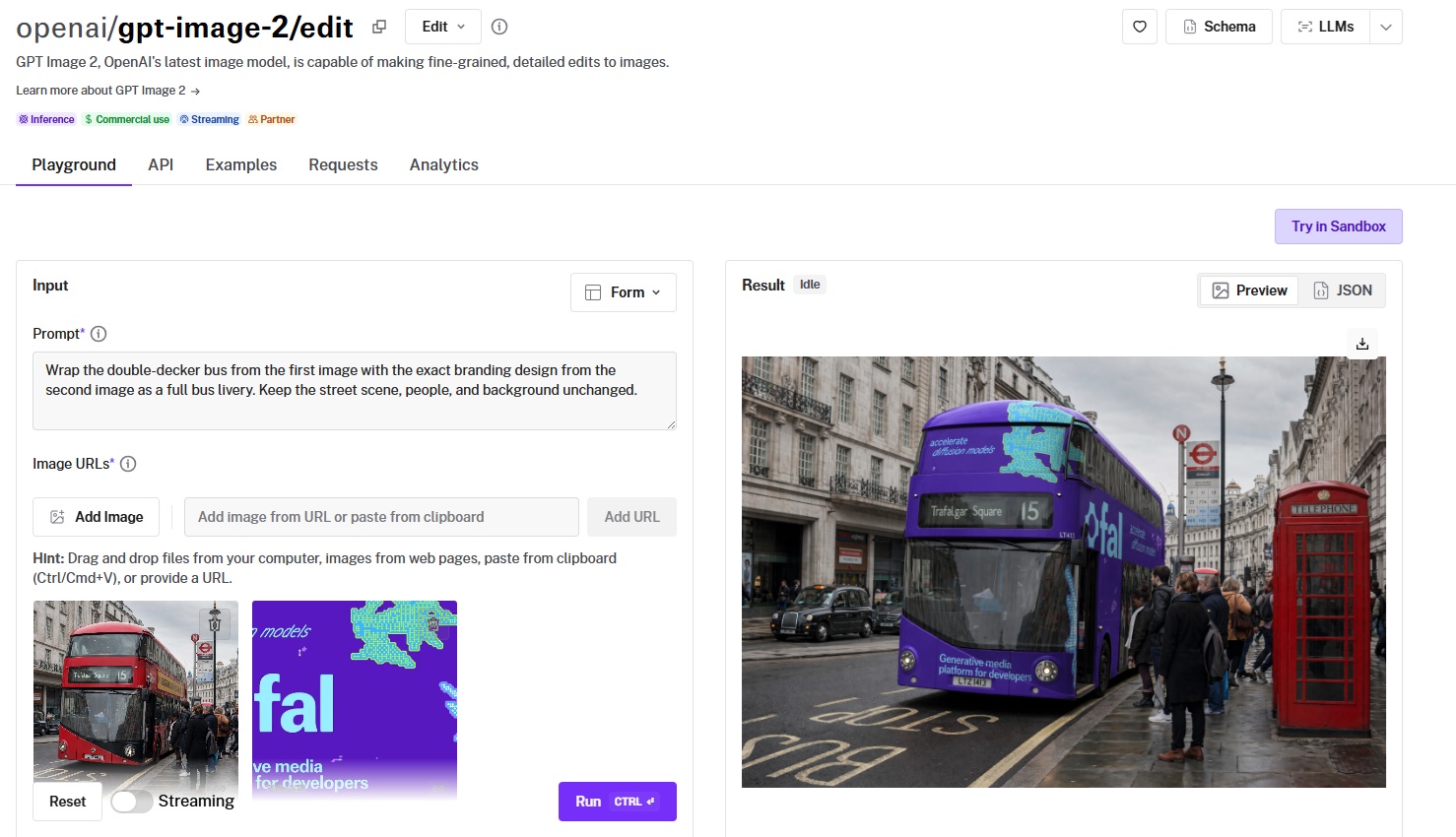
You can run either through the fal playground without writing any code, or call them through the same API you already use for FLUX, Nano Banana 2, Seedream, and the rest of fal's image catalog.
How much does it cost to use GPT Image 2 on fal?
GPT Image 2 is billed by tokens. Here are the per-image costs across its canonical sizes:
| Size | Low | Medium | High |
|---|---|---|---|
| 1024 x 768 | $0.01 | $0.04 | $0.15 |
| 1024 x 1024 | $0.01 | $0.06 | $0.22 |
| 1024 x 1536 | $0.01 | $0.05 | $0.17 |
| 1920 x 1080 | $0.01 | $0.04 | $0.16 |
| 2560 x 1440 | $0.01 | $0.06 | $0.23 |
| 3840 x 2160 | $0.02 | $0.11 | $0.41 |
There are two things that stood out to me here: the cost spread between low and high quality appears to be quite big.
At 1024x1024, you pay 22 times more for a high-quality output than a low-quality one.
To me, that looks like a deliberate signal from OpenAI: not every job needs the full reasoning pass, and the pricing is designed to push you toward the right tier for the work.
The second thing nobody covering the launch is highlighting: at $0.41 per image for native 4K high quality, the model is pricing itself out of any pipeline running more than a few hundred 4K outputs a month.
A 5,000-image catalog at 4K high quality costs $2,050 per run.
However, I've found that there's a way around it.
OpenAI's own launch documentation recommends starting with quality=low because the results are noticeably stronger than the price suggests.
On fal, you can chain a low-quality generation into the image upscaler in a single API call, which gets you to 4K output for a fraction of the native 4K cost.
The exact savings depend on the upscaler tier you pair it with, but the workflow is built to take advantage of fal's pipeline support.
Here's an example generation with a low-quality parameter, 3840 x 2160, to see how much it'd cost me in the end:
Prompt: A photorealistic interior shot of a small independent bookstore on a Sunday afternoon, taken at eye level with a 35mm lens. A handwritten staff pick card sits propped on a small wooden easel in front of a stack of three hardcover novels on the front display table. The card reads, in cursive ink: "STAFF PICK - SADIE - This one wrecked me in the best way. Read it slow." The novel on top has a custom cover that reads "THE LANTERN KEEPERS - A NOVEL BY ELENA HARTWELL" in clean serif typography over a muted blue gradient. Soft afternoon light from a window on the left, warm tungsten accent from a hanging Edison bulb, slight depth of field with the back of the store blurred. A few stray autumn leaves stuck to the wooden floor near the door. No watermarks, no extra text in frame.
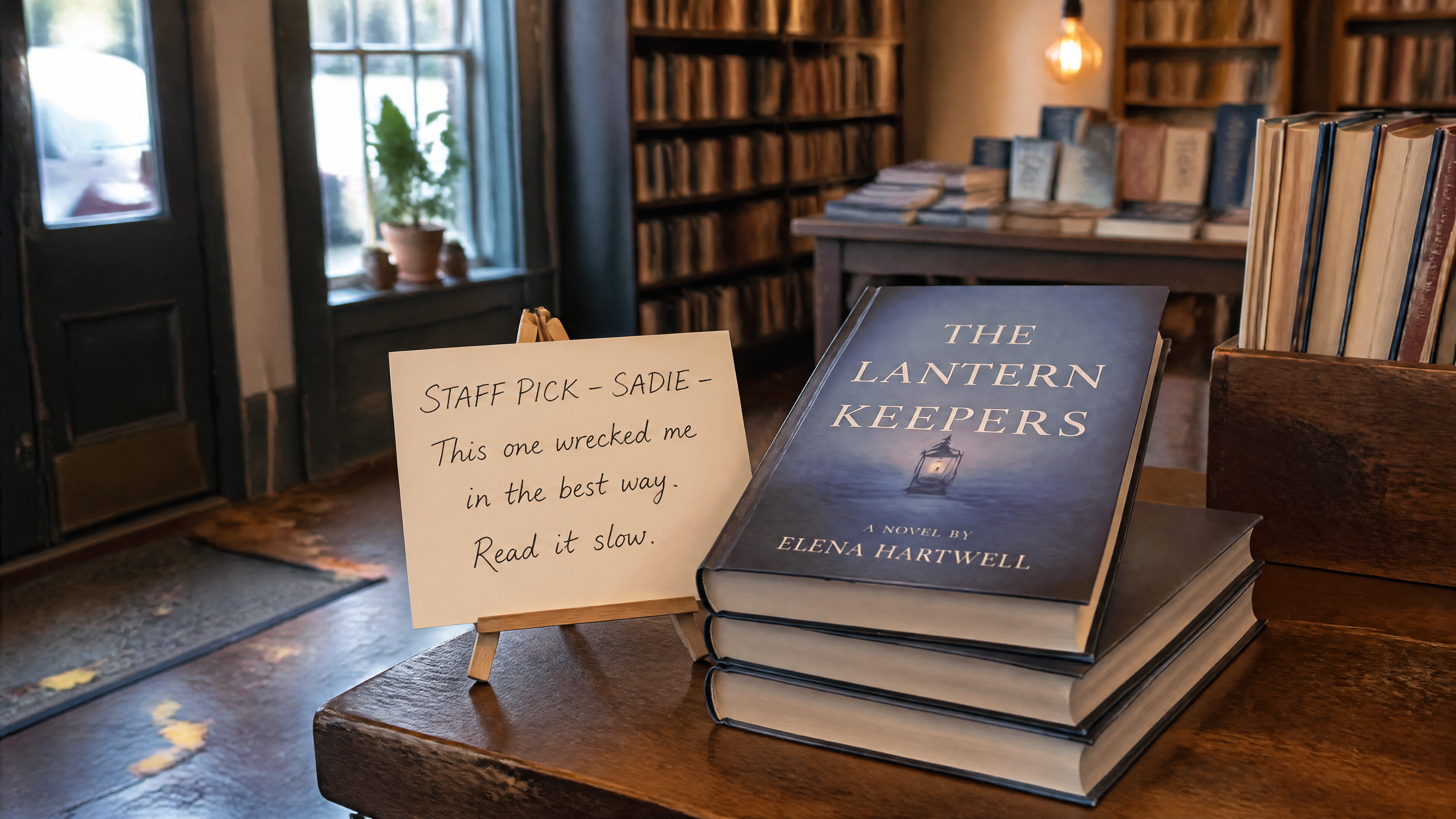
Generated using GPT Image 2 on fal, an AI model from OpenAI.
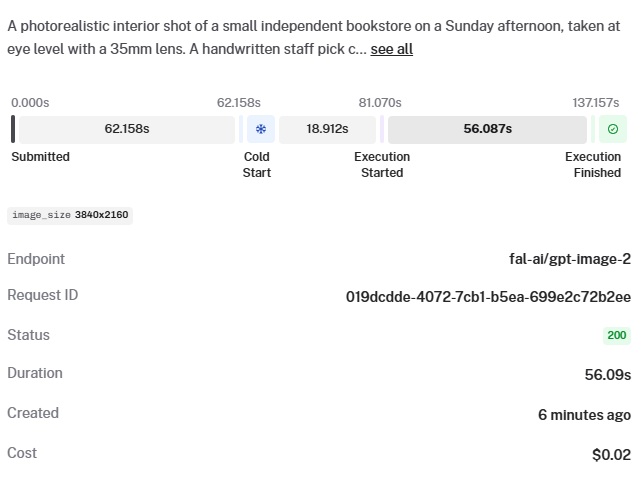
Not bad for "low quality" and $0.02. In fact, under some circumstances, I'd be glad to keep it like that.
What are the key features and differences of GPT Image 2?
Each of the features below gets a real test prompt that I ran through our GPT Image 2 playground at quality=high:
Text rendering that survives complex prompts
This is the actual reason to look at the model.
Text inside generated images has been the longest-running embarrassment in this space.
GPT Image 1.5 made a real dent in it, and GPT Image 2 closes most of the remaining gap.
But across the work I've put through it, multi-line headlines, signage with mixed font weights, and CJK characters all hold together cleanly on the first or second try.
Posters with bullet points actually have readable bullet points.
Product labels read like product labels.
The kind of work that used to need a Photoshop pass at the end mostly doesn't anymore.
To put the multilingual side under load, here's a Korean pojangmacha menu board with mixed densities:
Prompt: A handwritten chalkboard menu mounted on the wood-paneled wall of a small Seoul pojangmacha (street tent bar), photographed straight-on at 9 PM with warm interior light from a hanging incandescent bulb. The board is divided into four sections with chalk dividers. Top-left section header "안주" lists six dishes with prices in won: "파전 - ₩12,000", "계란말이 - ₩9,000", "닭발 - ₩15,000", "오뎅탕 - ₩11,000", "골뱅이무침 - ₩14,000", "떡볶이 - ₩10,000." Top-right section header "술" lists four items: "소주 (참이슬) - ₩4,000", "막걸리 (장수) - ₩5,000", "맥주 (카스) - ₩5,000", "청하 - ₩6,000." Bottom-left section "오늘의 추천" has a single line in larger handwriting: "삼겹살 + 김치찌개 세트 - ₩28,000." Bottom-right section is a small hand-drawn map of Seoul with three neighborhoods circled in chalk: 종로, 홍대, 강남. Realistic chalk texture on dark green slate, slight smudging on the dividers, uneven handwriting that looks like a real owner wrote it. The Korean characters must be rendered with correct stroke order and proper jamo composition.
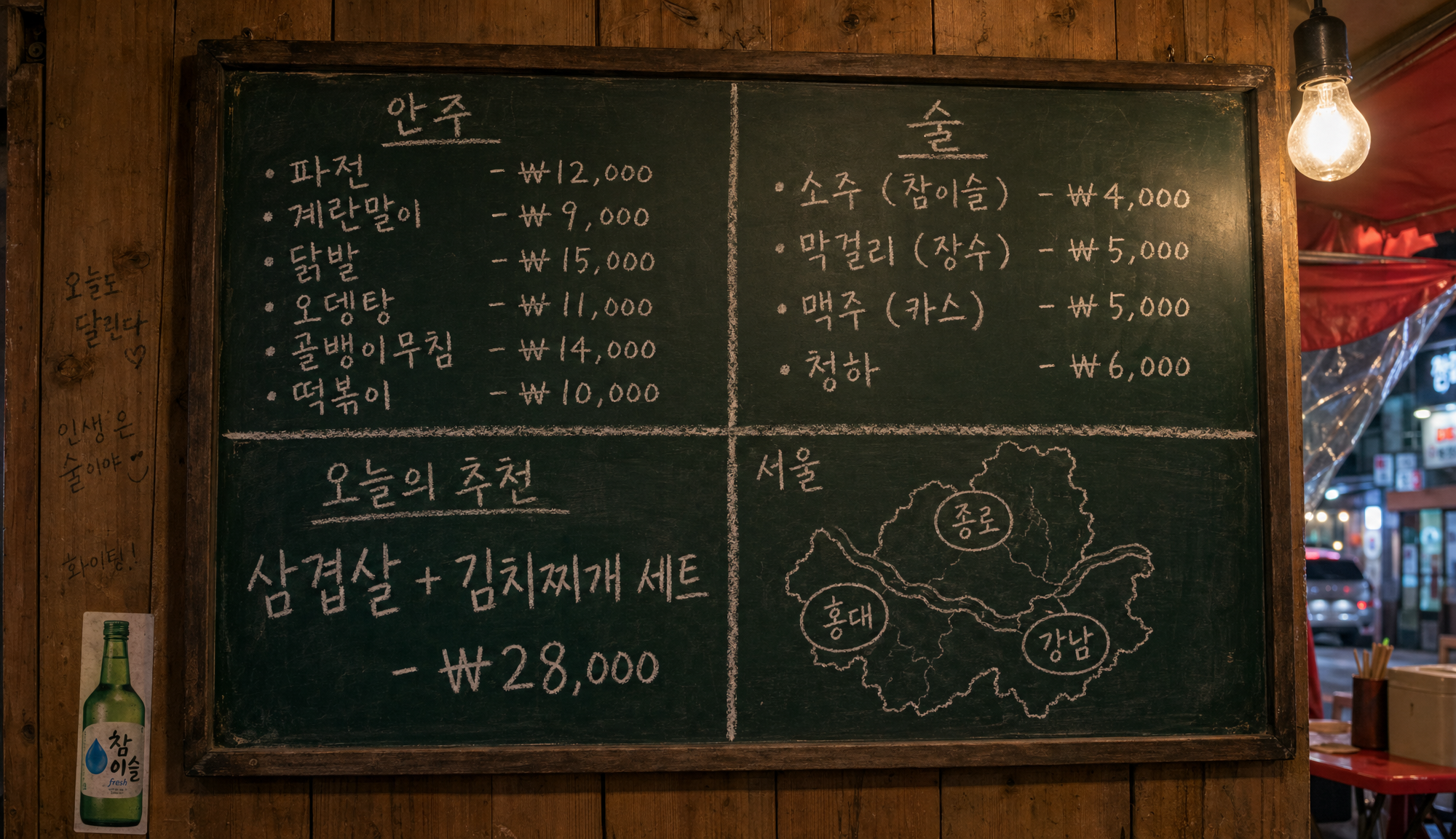
Generated using GPT Image 2 on fal, an AI model from OpenAI.
This was my multilingual stress test, and the AI model aced it.
Korean rendering has historically been the failure mode where models produce shapes that look correct from a thumbnail but fall apart at full resolution.
I can appreciate the consistency of the won symbol across the price column, and also the level of detail of the background.
falMODEL APIs
The fastest, cheapest and most reliable way to run genAI models. 1 API, 100s of models
Built-in reasoning, or "thinking mode"
OpenAI positions GPT Image 2 as the first image model with reasoning baked into the generation pipeline rather than bolted on as a separate step.
In practice, that means the model spends a variable amount of compute interpreting the prompt before it commits to pixels, which is part of why the quality tiers matter so much: the high tier is paying for more of that thinking time.
For complex multi-element prompts where earlier models would silently drop half your instructions, this is the architectural shift that lets the model actually hold the brief.
The Korean menu board above is the kind of prompt where it shows up indirectly: fourteen lines of Hangul, four section headers, a regional map, and a chalk texture, all needing to coexist without one piece bleeding into another.
Color rendering that doesn't lean amber
GPT Image 2 ships with neutral color across scene types.
Daylight reads as daylight. Studio whites read as white. The model finally gets out of its own way on color and that small change makes the outputs feel less like AI generations and more like reference photos.
Here's the test I used to confirm it:
Prompt: An overhead 90-degree top-down photograph of a watchmaker's workbench, shot like a flat-lay product image. Centered on the bench is a disassembled mechanical wristwatch with the movement exposed: balance wheel, mainspring barrel, gear train, and four screws laid out on a small white tray to the right of the case. To the left, a polished steel caseback sits face-up showing reflections of the overhead workshop lights and a faint reflection of the watchmaker's loupe hovering above it. A pair of fine tweezers, a brass dust blower, and a green cutting mat fill the lower half of the frame. The bench itself is dark walnut. Lighting is soft and diffused from directly above. The reflections on the polished caseback should be physically plausible relative to the light source. The gear teeth should mesh correctly where they meet. No watch dial visible. No hands. No text.
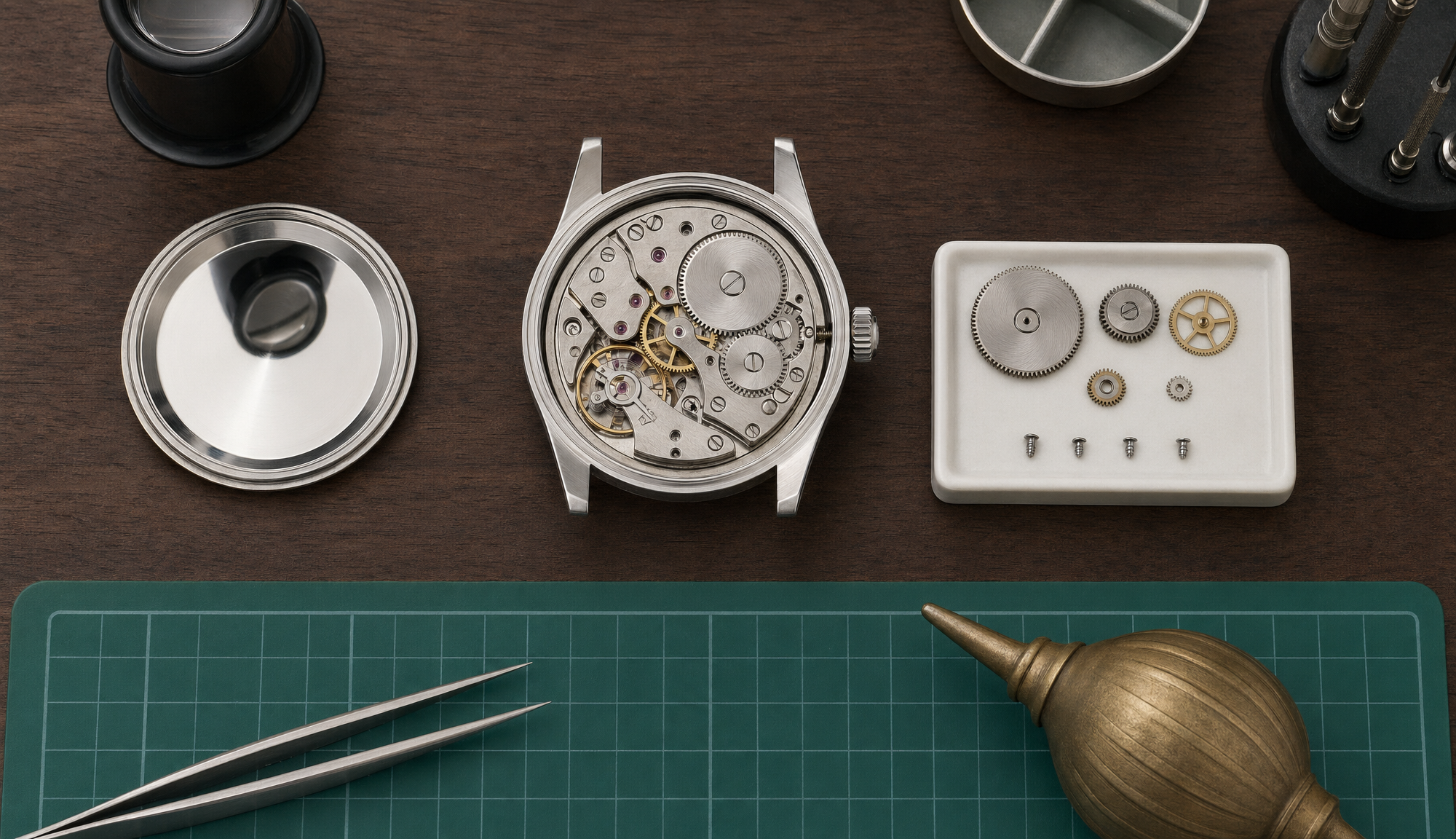
Generated using GPT Image 2 on fal, an AI model from OpenAI.
I can see how the white tray is actually white instead of cream-tinted, and how the polished steel caseback reflection obeys real optics.
Let's see how that same prompt would look on GPT Image 1.5 so we can make the distinction:
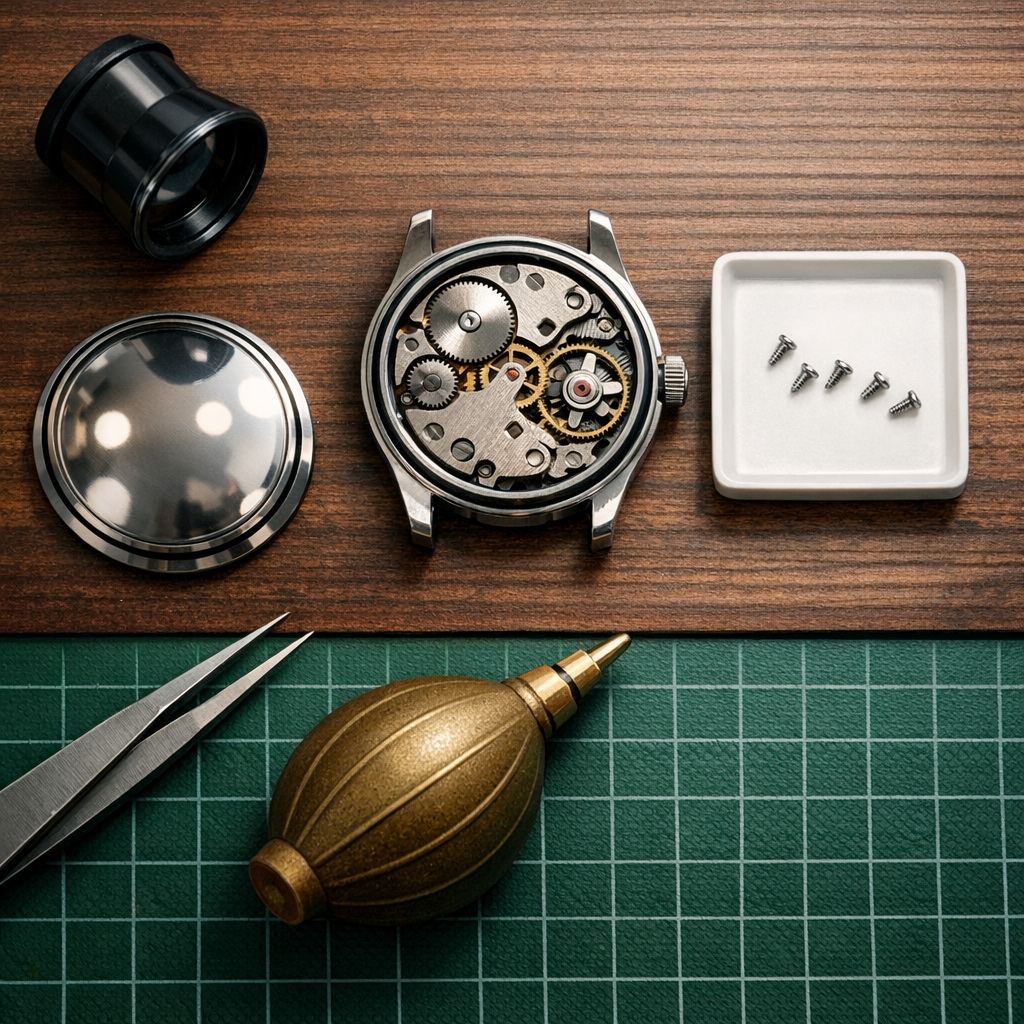
Generated using GPT Image 1.5 on fal, an AI model from OpenAI.
The problem I'd say here is that the white tray is too white and does not look as realistic as I'd expect, and the reflection of the steel caseback is not as clear as with GPT Image 2.
Sharper inference about how the world looks
I was surprised to see the model's grasp of how things actually appear in the world.
You can give it a sparse prompt with no styling notes and get back something that looks like it was scouted, not generated.
Prompt: A vet clinic waiting room on a Tuesday afternoon. Realistic photograph, eye-level perspective, no humans in frame.
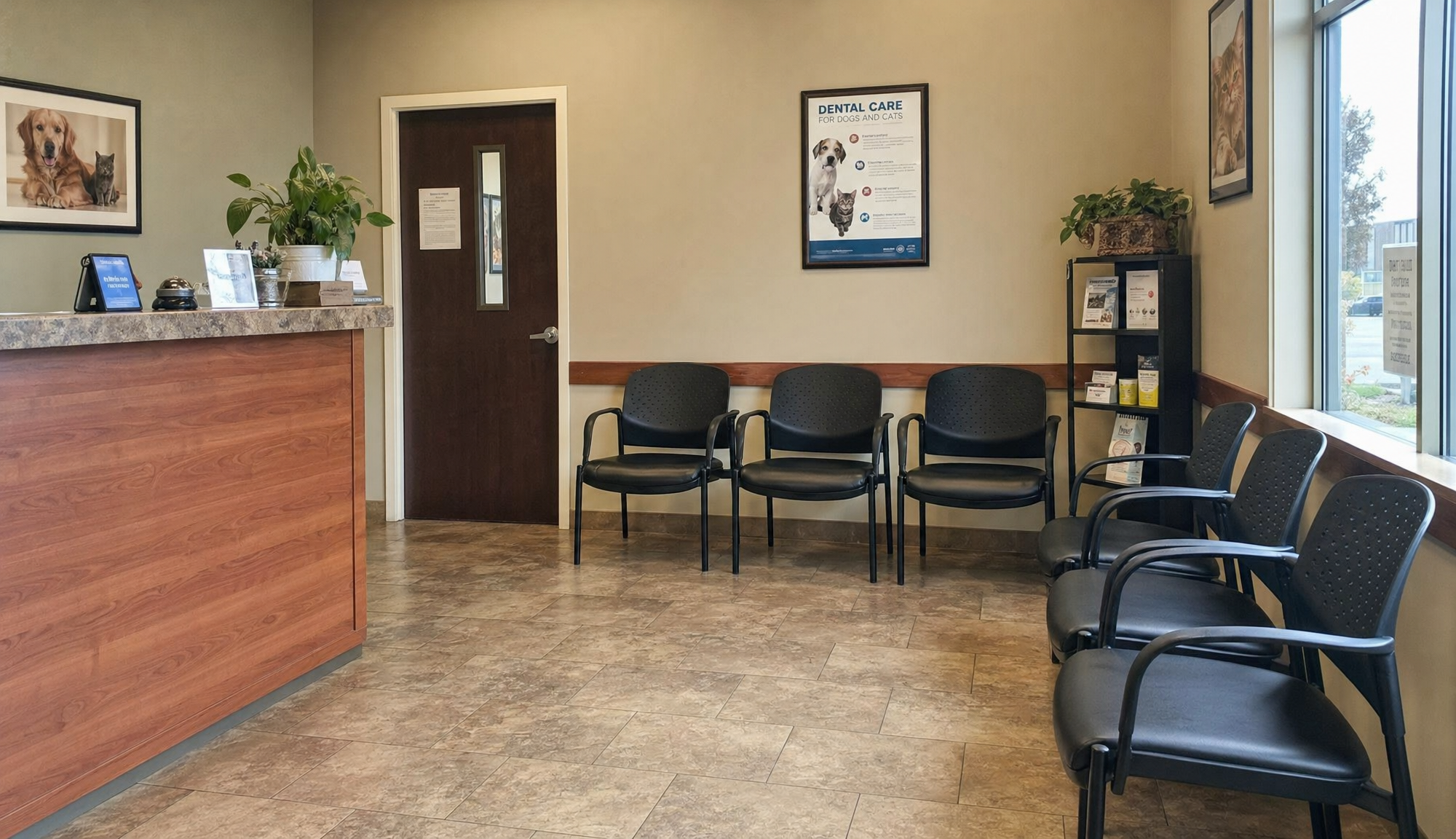
Generated using GPT Image 2 on fal, an AI model from OpenAI.
The prompt was not long or detailed by any means.
Despite this, I can see what appears to be a normal-looking vet clinic's waiting room.
One thing worth flagging: the model's knowledge cutoff is December 2025, so anything that landed after that date (a new product launch, a recent rebrand, a public figure who became newsworthy this year) is outside what it can render accurately without reference images.
Mask-based editing on a dedicated endpoint
The editing endpoint at openai/gpt-image-2/edit accepts both prompt-only edits and mask-based inpainting.
White regions of a mask indicate areas to change.
Black regions stay pixel-perfect.
You can also pass multiple reference images for compositing or style work.
The real test for an editing endpoint isn't whether it can change one thing. It's whether it can change one thing while leaving six other things alone:
Source setup: A candid overhead photograph of a wooden kitchen counter with a coffee cup, an open paperback book, a small potted herb plant, a folded newspaper, and a pair of reading glasses arranged across the surface. Window light from the left.
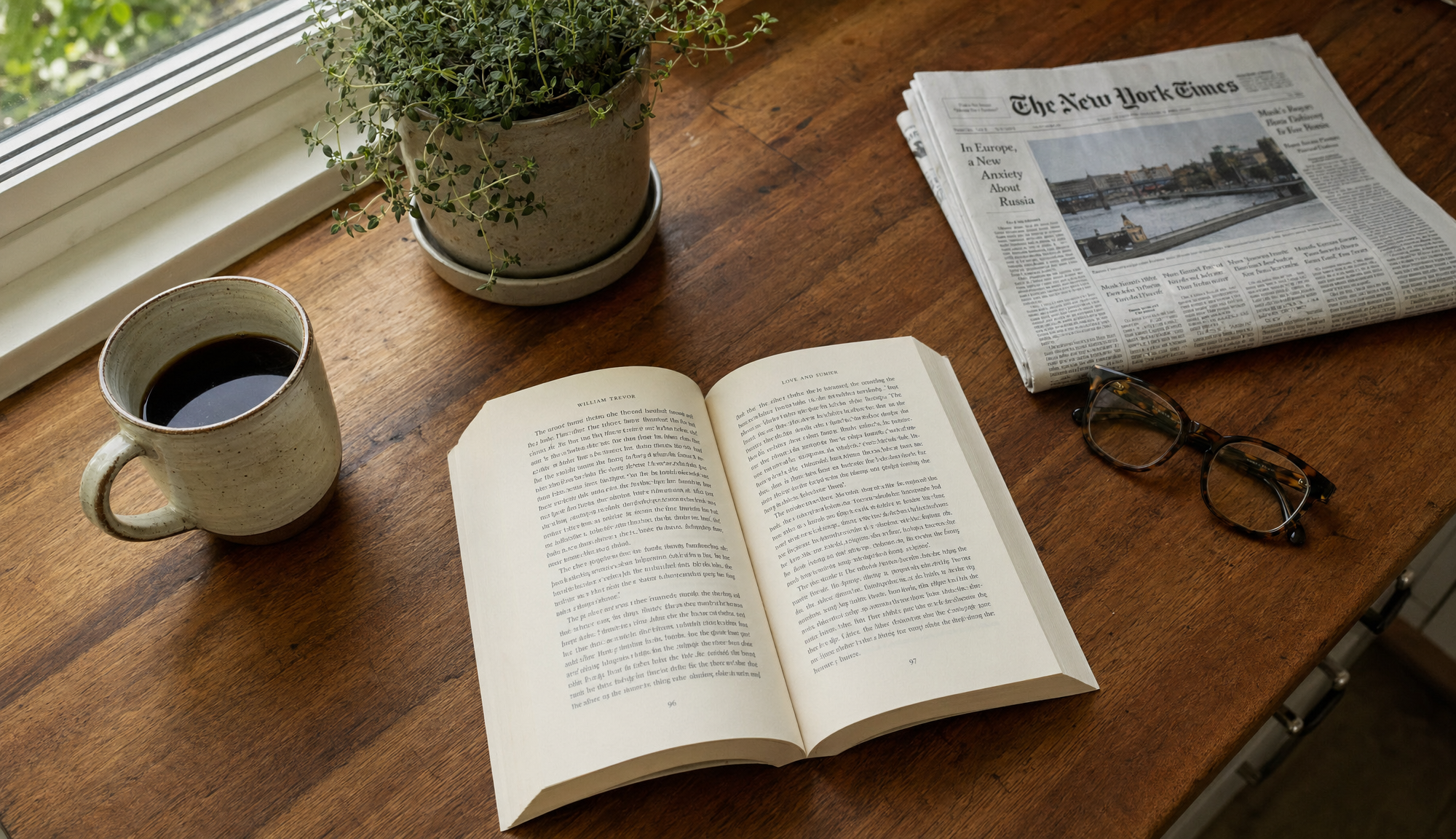
Generated using GPT Image 2 on fal, an AI model from OpenAI.
Edit prompt: Replace only the paperback book with a hardcover edition of the same approximate size, with a custom cover design that reads "THE PRACTICE OF EVERYDAY LIFE - MICHEL DE CERTEAU - UNIVERSITY OF MINNESOTA PRESS" in a clean academic-press serif typeface. Preserve the coffee cup position, the herb plant, the folded newspaper, the reading glasses, the wooden counter texture, the window light direction, and all existing shadows exactly. The new book should cast a contact shadow that matches the existing lighting. Do not move any other object. Do not change the camera angle or framing.
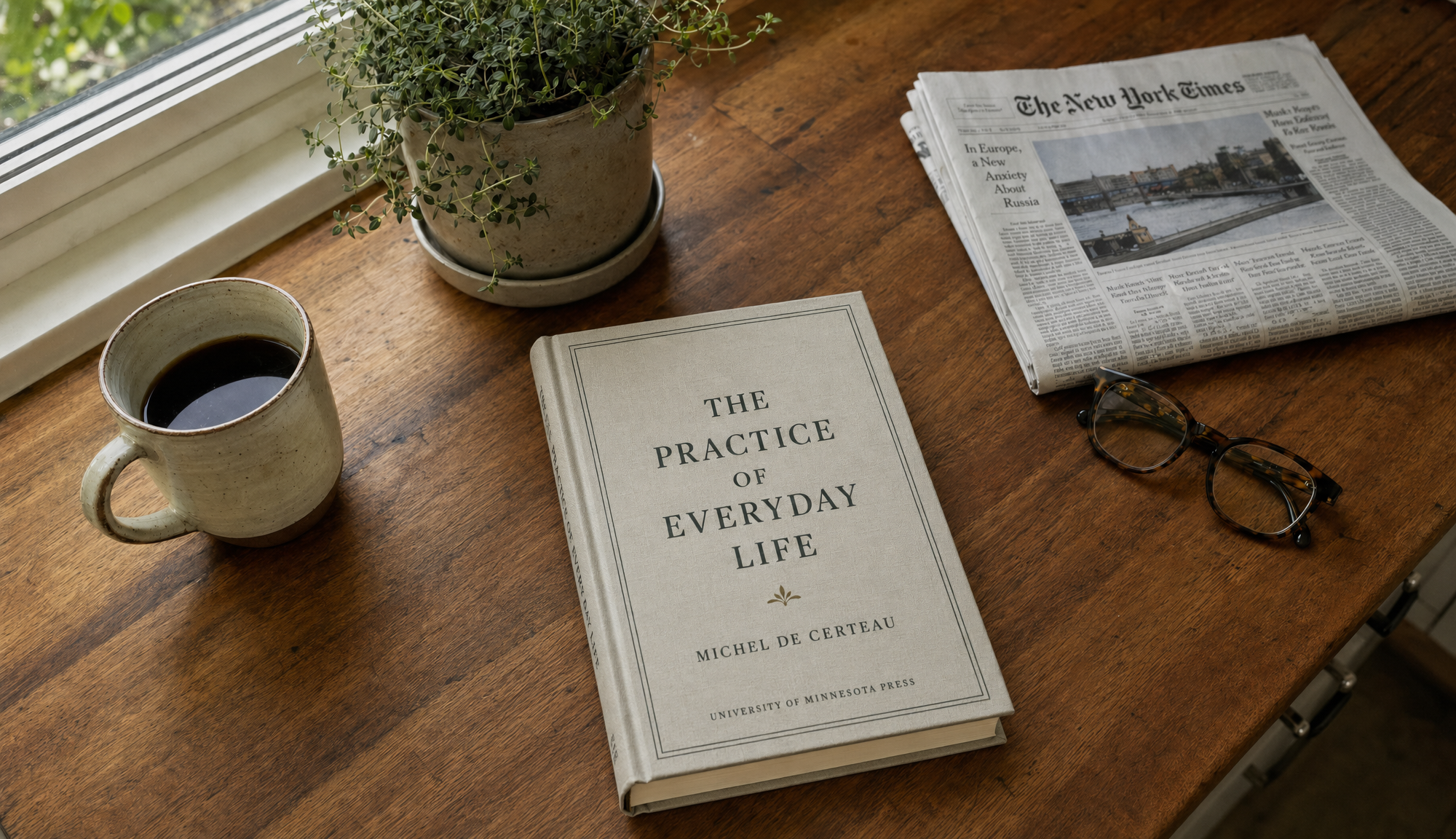
Generated using GPT Image 2 Edit on fal, an AI model from OpenAI.
Three things mattered on this edit:
The book had to switch from paperback to hardcover with the cover text rendered cleanly across a curved spine: and it did a good job on that.
The other six elements on the counter had to stay locked in position with their existing shadows intact: above expectations.
And the new book had to cast a contact shadow that matched the existing lighting direction, not import a new one from a different scene: best-in-class execution.
Resolution support up to 4K with constraints
Both edges of any output have to be multiples of 16. The longest single edge can go up to 3840 pixels.
The aspect ratio cap is 3:1 in either direction, while the total pixel count must land between 655,360 and 8,294,400.
That gives you everything from a tall 1024x640 portrait crop to a full 3840x2160 4K landscape.
Pro tip: Native 4K works, but you'll want to test it on your specific use case before building a pipeline that depends on it.
What are the best commercial use cases of GPT Image 2?
After my product testing, here are what I think are the best commercial use cases of GPT Image 2 in 2026:
Marketing creatives
Posters, product mockups, social ads, and out-of-home concepts all benefit from text rendering that holds up to a second look.
Headlines stay readable. Brand colors aren't fighting a yellow cast across every output, and logo placement reads correctly on the first or second pass instead of needing manual cleanup.
E-commerce product imagery
Catalog-scale generation is viable here, because labels render with consistent fidelity instead of needing a designer to correct ingredient lists or product names by hand.
Background swaps via the edit endpoint open up a workflow where a single source photo becomes dozens of contextual variants without a reshoot.
UI and design mockups
Component spacing reads correctly on screen, navigation hierarchies stay legible at small sizes, and typography behaves the way it does in actual shipped software.
For early-stage prototyping, design reviews, or pitch decks where a screen mock has to look like a screen rather than a vibe board, GPT Image 2 returns something usable inside the first few generations.
Multilingual content
CJK scripts and several other non-Latin systems render with correct character construction rather than glyphs that look right at a glance but break under inspection.
For brands localizing creative across markets, this removes a manual touch-up step that used to be unavoidable with older AI image generation models.
GPT Image 2 vs Nano Banana 2: head-to-head
Here's how the specs line up of GPT Image 2 against Nano Banana 2:
| GPT Image 2 | Nano Banana 2 | |
|---|---|---|
| Architecture | OpenAI GPT Image 2 | Google Gemini 3.1 Flash Image |
| Max Resolution | 4K (3840x2160) | 4K |
| Aspect Ratios | Custom dimensions, multiples of 16, max 3:1 ratio | 15 presets including auto, 21:9, 16:9, 3:2, 4:3, 5:4, 1:1, 4:5, 3:4, 2:3, 9:16, 4:1, 1:4, 8:1, and 1:8 |
| Text Rendering | Near-perfect text rendering | Character-by-character validated typography |
| Editing | Dedicated endpoint with mask support | Same model handles editing, up to 14 reference images |
| Character Consistency | Not natively claimed | Up to 5 people across generations |
| Web Search Grounding | Not exposed through fal endpoint | Optional, $0.015 per generation |
| Speed | Reasoning model, slower at high quality | Flash-tier inference, faster |
| Lowest Tier | $0.01 per image (low quality, 1024x768) | $0.06 per image (0.5K, 512px) |
| Standard Tier | $0.04 to $0.06 per image (medium, 1024-1080p) | $0.08 per image (1K) |
| 4K Tier | $0.41 per image (high quality) | $0.16 per image (2x rate) |
| Watermarking | Standard image output | SynthID digital watermarking on all outputs |
I'd say that GPT Image 2 has the edge on text rendering accuracy when the prompt asks for specific copy, color fidelity in neutral scenes, and depth of world knowledge when the prompt is sparse.
The reasoning step pays for itself when the work is complex.
On the other hand, Nano Banana 2 has the edge on speed, character consistency across multiple frames (which matters for storyboarding and campaign work), multi-image compositing in a single pass, and 4K pricing.
At native 4K, it's $0.25 cheaper per image than GPT Image 2 at the high tier.
To put both against each other on the same brief, I ran a single prompt through both endpoints.
Prompt: A bird's-eye view of a busy farmer's market on a Saturday morning, showing eight distinct vendor stalls arranged in two rows of four. Each stall has a hand-painted wooden sign visible from above with the vendor name and what they sell. Reading left to right, top row: "WILLOW & RYE BAKERY - sourdough & pastries", "GREEN VALLEY DAIRY - raw milk & cheese", "ORCHARD HILL - heirloom apples", "FOLEY FARMS - eggs & poultry." Bottom row: "RIVERBED MUSHROOMS - foraged & cultivated", "SMALL AXE PRESERVES - jams & pickles", "TIDE LINE FISH - day-boat catch", "MARIGOLD FLOWERS - cut bouquets." Customers are walking between the stalls. Each stall has different produce visible on tables. The aisles between stalls are filled with shoppers carrying canvas bags. Soft morning light, no lens distortion. Wooden ground beneath. The eight signs must all be readable.
GPT Image 2:
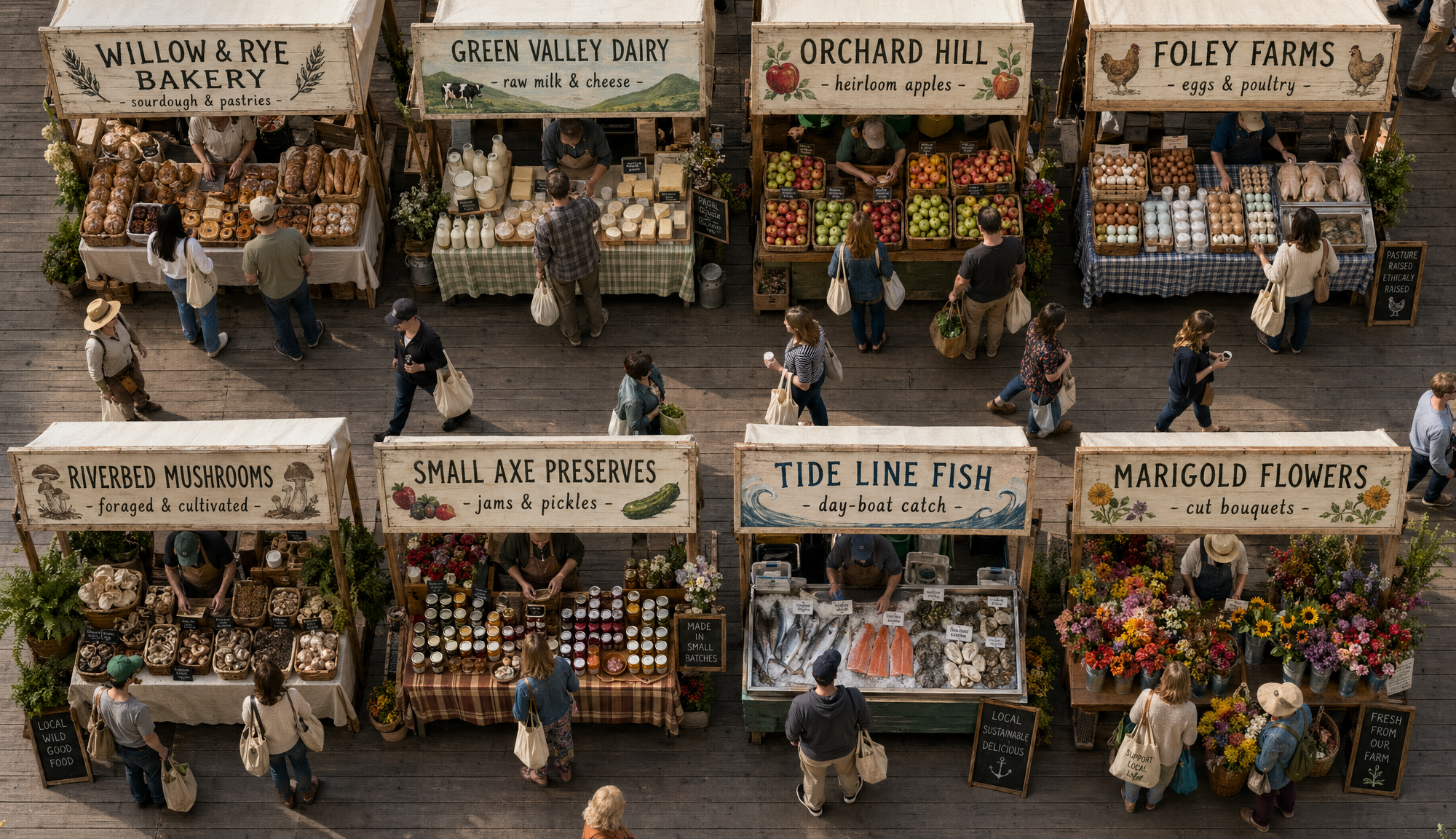
Generated using GPT Image 2 on fal, an AI model from OpenAI.
Nano Banana 2:
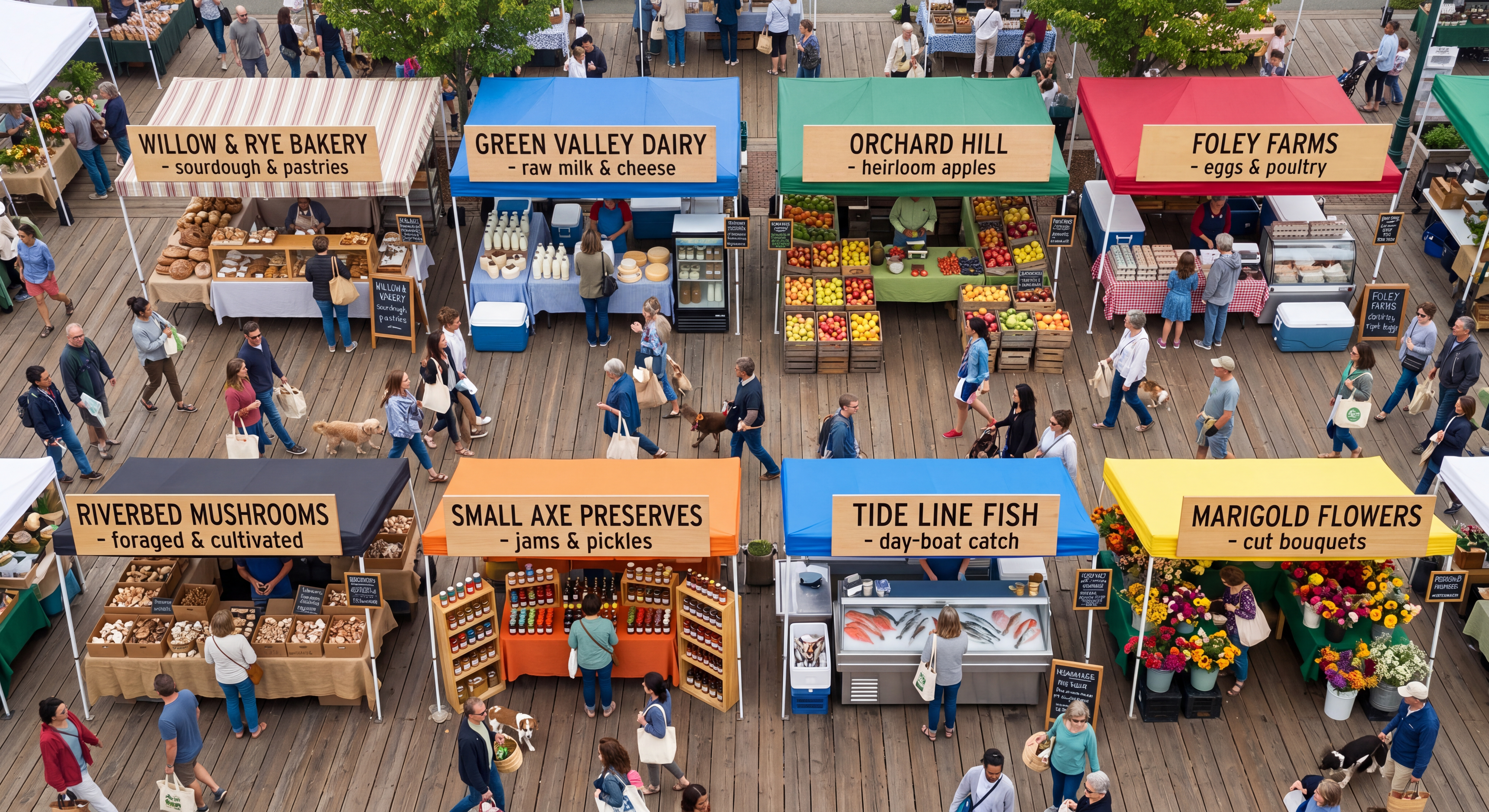
Generated using Nano Banana 2 on fal, an AI model from Google.
I built this prompt to challenge both models on text rendering, counting, spatial layout, and world knowledge at the same time.
Here are the results:
Nano Banana 2 won the speed game, generating the image about 60 seconds faster than GPT Image 2.
Both AI models did a good job with the text rendering.
GPT Image 2 won the realism game for me, as Nano Banana 2's image looks rather cartoon-ish. In fairness to the AI model, I didn't specify that it should be realistic, so it defaulted to this execution.
What are the pros and cons of GPT Image 2?
Here are the pros and cons of GPT Image 2 based on my testing and also published features:
Pros
✅ Best-in-class text rendering accuracy. Multi-line copy, mixed weights, and CJK scripts hold up under load.
✅ Good colors overall, with neutral color rendering across scene types.
✅ World knowledge fills in sparse prompts believably. You don't have to over-specify every prop and lighting detail to get a coherent scene.
✅ Quality tiers give real cost control. Low quality at $0.01 per image is genuinely usable for iteration, not just a token discount tier.
✅ Mask-based editing on a separate endpoint enables precise inpainting workflows for product photography and asset refinement.
✅ Multilingual support, particularly Chinese, Japanese, and Korean, has moved from "needs manual cleanup" to "ships as-is."
Cons
❌ Takes more time to load up the images compared to other image generation models.
❌ High quality at 4K runs $0.41 per image, which gets expensive quickly at production volume. The quality=low plus upscaler workflow on fal sidesteps this for most use cases but it's worth knowing the native cost upfront.
❌ Knowledge cutoff is December 2025. Anything newer (recent product releases, fresh brand identities, public figures who broke through this year) won't render accurately without you supplying reference images via the edit endpoint.
Recently Added



Run GPT Image 2 on fal
GPT Image 2 is live on fal as of April 21, 2026, with both endpoints reachable through the same API and SDK pattern you'd use for any other model in fal's catalog.
The minimum integration is two lines of JS once you have a key.
javascript
import { fal } from "@fal-ai/client";

const result = await fal.subscribe("openai/gpt-image-2", {
  input: {
    prompt: "Your prompt here",
    image_size: "landscape_4_3",
    quality: "high",
    num_images: 1,
    output_format: "png",
  },
});

console.log(result.data.images[0].url);
For editing, change the endpoint to openai/gpt-image-2/edit and pass image_urls along with an optional mask_image_url.
GPT Image 2 FAQs
Is GPT Image 2 actually worth the hype?
Yes, GPT Image 2 is, indeed, worth the hype.
The text rendering and photorealism upgrades hold up under real testing, not just curated demos, and the color rendering improvement is something you'll feel as soon as you stack outputs next to previous generations.
The asterisk is on 4K: native high-quality 4K is officially experimental and expensive at $0.41 per image. For production at that resolution, the quality=low plus upscaler workflow on fal is the version that actually pencils out.
How do I get the cheapest 4K output from GPT Image 2 on fal?
You can generate at quality=low for $0.01 to $0.02 per image at most resolutions, then chain into fal's image upscaler in the same pipeline.
Combined with a dedicated upscaler, you land near 4K output quality at a meaningful discount versus the native 4K rate.
Can I bring my own OpenAI key when using GPT Image 2 on fal?
Yes. Pass openai_api_key in the input parameter and the request routes through your own OpenAI account and quota instead of fal's billing.
It can be useful if you're already sitting on OpenAI credits or if you need usage attributed to a specific billing relationship for accounting.
What's the difference between GPT Image 2 and Nano Banana 2?
GPT Image 2 is OpenAI's reasoning-heavy quality-first model.
Nano Banana 2 runs on Google's Gemini 3.1 Flash Image architecture, which uses multimodal reasoning at Flash-tier speed and adds character consistency for up to 5 people across separate generations.
GPT Image 2 wins on text rendering precision and color fidelity.
Nano Banana 2 wins on speed, 4K pricing ($0.16 vs $0.41), reference image limits (up to 14), and any workflow that needs the same character to recur across multiple outputs.