
In this guide, I'll go over how you can generate music with AI in 2026, including some of the best music generation models to use, prompting techniques, and configuring the settings inside fal's playground to create your next best track.
TL;DR
The prompt does most of the work, so spell out what you'd hand a producer: the genre and feel, the instruments, the tempo, the mood, and the structure you want.
Three of the best music generation models are available on fal, and each has a job they're good at: Lyria 3 Pro handles full structured songs and image-prompted moods, MiniMax Music 2.6 is for lyric-driven tracks with tag-based arrangement, and Eleven Music gives you section-by-section control over how a piece is built.
The settings matter as much as the prompt, where the instrumental toggle, the section durations, the audio format, and the track length all shape what comes back.
Everything here runs through fal on one @fal-ai/client call and pay-per-use pricing, and there's a playground when you want to experiment with the models first before using the API.
Note: The way I've structured this guide is going through how to best prompt the AI music generation models for best results, then the best AI music models that you can use, the settings that matter during music generation, and then mistakes to avoid when generating music with AI. You can jump to the section that you came here for, although I'd recommend you read this article through my recommended route, and you'll see why.
Where's the best place to generate AI music?
fal offers the best place to generate music from text with our unified API for every model in this guide, custom-built inference engine, and pay-per-use pricing.
That means creating one account here to generate music with all of our AI music generation models with no separate sign-up for each provider, and a bill that only moves when you generate.
Calling a model is one @fal-ai/client call, and trading one model for another is a single change to the endpoint string.
The same account also opens up over 1,000 models across image, video, editing, and 3D, so music is only part of what you can reach.
As nothing about your code changes when you switch models, you can rough out an idea on a cheaper one and re-run the final on a higher-fidelity model without rewriting anything.
Here's what a request looks like:
import { fal } from "@fal-ai/client";

const result = await fal.subscribe("fal-ai/lyria3/pro", {
  input: {
    prompt:
      "An energetic electronic dance track with soaring synth leads, punchy four-on-the-floor kick drums, and a catchy vocal hook singing 'Feel the rhythm, feel the night'. 128 BPM.",
  },
  logs: true,
  onQueueUpdate: (update) => {
    if (update.status === "IN_PROGRESS") {
      update.logs.map((log) => log.message).forEach(console.log);
    }
  },
});

console.log(result.data);
console.log(result.requestId);
How do you prompt AI music models for the best results?
Nobody really spells this out when you start, but these models will happily play whatever you ask for.
However, they're only ever as good as the brief you give them.
I found that out early, when I fed one three genres and a key change in a single breathless sentence and got back something that couldn't decide whether it was a ballad or a banger.
The fix was never fancier vocabulary. It was handing the model the kind of detail I'd give someone running the session.
Six habits get me most of the way there:
Brief the whole track, not a keyword list
Tags on their own don't give the model much to work with.
If you write "edm, energetic, synth", you'll have handed it a genre, an adjective, and a sound source, but nothing about what the track is for or how it should move.
This is why you want to fill that part in.
Tell it the genre and the feeling you're after, say where the track will end up, and let it arrange around that.
Watch the gap between a tag dump and an actual brief:
Prompt: An energetic progressive house anthem at 128 BPM, soaring detuned supersaw leads over a punchy four-on-the-floor kick, a side-chained bassline that pumps with every beat, building from a stripped-back intro into a euphoric festival drop.
Generated using Lyria 3 Pro on fal.
Note: Tag-style prompts genuinely do work for music as well. I just don't think that they're optimal for 2026. AI music generation models have got significantly smarter over time, and you can explain to them exactly what you're looking for without separating tags by comma. This is why, for the rest of this guide, I'll write conversational prompts to the AI music generation models and not tags.
Set the tempo and the groove
Tempo is the first thing anyone feels in a track, and these AI models can read and understand it in everyday language.
You want to give an exact BPM when you've got one, or describe the feel you want, whether that's a slow ballad or a driving four-on-the-floor.
Pin it down, and the model stops drifting into an energy you never asked for.
Prompt: A nostalgic 80s city pop track set to a late-night drive through a neon city, 104 BPM, a warm female vocal gliding over a groovy slap-bass synth and glassy electric piano.
Generated using MiniMax Music 2.6 on fal.
I specified 104 BPM so it can put it in that relaxed mid-tempo city-pop groove.
Get specific about the instruments
I used to write "piano" and wonder why every track sounded the same. A Wurlitzer will be understood completely differently from just a "piano."
The more specific you are with the instrument, the better.
Let's see what that looks like:
Prompt: A warm cinematic cue where a solo cello carries the melody over sustained string pads, a distant felt piano filling the space beneath, light timpani swells lifting it from intimate to triumphant, kept fully orchestral with no drums.
Generated using Lyria 3 Pro on fal.
I named the felt piano and the cello specifically and kept it drum-free, both to hold that intimate film-score feel.
Direct the vocal, or skip it entirely
A vocal sets a song's character faster than almost anything.
You want to name the voice: a soulful female lead, a male baritone, a breathy falsetto, or a full gospel choir.
And when you want a backing track with no singing, you can say so up front so the model commits the whole arrangement to the instrumental.
Let's see how that works out:
Prompt: A soulful neo-soul ballad, an intimate male baritone, a warm Rhodes, brushed drums, an upright bass, 72 BPM.
Lyrics: [Verse] City lights blur on the rain-streaked glass / Every red light asking how long this can last / [Chorus] But I'll wait for you, I'll wait for you / Through the slow hours till the morning breaks through
Generated using MiniMax Music 2.6 on fal.
I asked for a male baritone here, and since MiniMax sings the exact lyrics you pass it, the phrasing landed where I wrote it.
Map out the song's structure
A song with no map wanders too much.
This is why, in some models like MiniMax Music 2.6, you want to drop in structure tags like [Intro], [Verse], [Chorus], [Bridge], and [Outro], then write the actual lyrics under each one so the model has words to sing and a shape to follow.
Here's how that looks:
Prompt: An anthemic indie-rock track, jangly electric guitars, a driving live-drum feel, an earnest male lead, 120 BPM, building to a big final chorus.
Lyrics: [Intro] [Verse] We drew the map on the back of a receipt / Two tanks of gas and a town we'd never meet / [Chorus] So drive, drive, leave the lights behind / Whatever's out there, we'll take our time / [Bridge] And if the road runs out, we'll build the rest / [Chorus] So drive, drive, leave the lights behind.
Generated using MiniMax Music 2.6 on fal.
I gave the chorus its own tag so the model would build a real lift into it and not flatten every section the same way.
Dial in the production and the era
Two tracks with identical notes can feel like different songs depending on how they're produced.
A few words about the mix steer the whole vibe: warm analog tape, a clean modern pop mix, wide stereo reverb, a gritty crushed master.
Naming a decade does a lot of that work on its own, since "1970s soul" and "2020s hyperpop" each arrive with a built-in sound.
Prompt: A dreamy bedroom-pop instrumental, warm cassette-tape saturation, reverb-soaked guitars, soft analog synth pads, gentle 90 BPM drum machine, washed-out and nostalgic.
Generated using Eleven Music on fal.
I leaned on the cassette-tape saturation to push it toward that washed-out, half-remembered feel.
What are the best AI music models you can use?
The best AI music generation models today are Lyria 3 Pro, MiniMax Music 2.6, and Eleven Music.
Let's go over each one of them and see how they perform:
Lyria 3 Pro
Lyria 3 Pro is Google's latest music model, built to generate complete, structured songs up to three minutes long from a text or image prompt.
You can use it on a pay-per-use basis inside fal's playground:
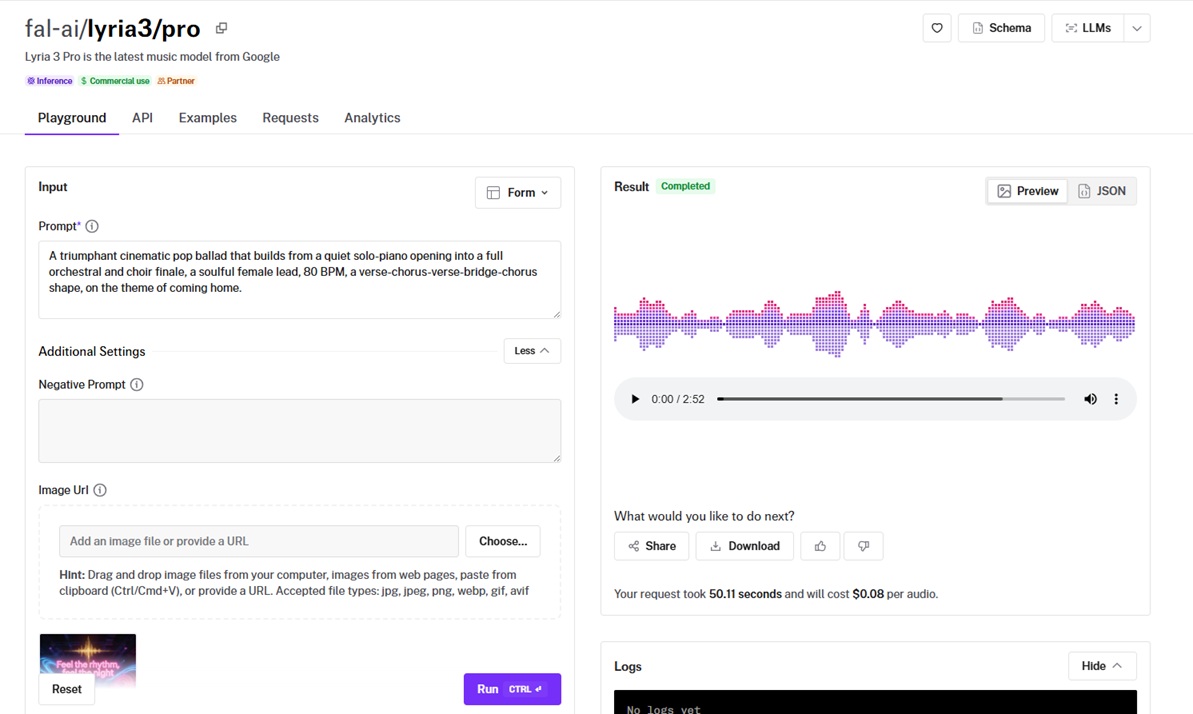
The thing I keep coming back to it for is full-song structure with timed lyrics and tempo control you write out in words, so you can shape an arrangement from a quiet opening to a powerful finish without ever leaving the prompt box.
It handles vocals and lyrics across English, German, Spanish, French, Hindi, Japanese, Korean, and Portuguese, and you can hand it an image to set the mood and theme of the music.
Output is a full MP3 up to three minutes at 44.1 kHz; every track carries a SynthID watermark for provenance, and there are safety filters built in to keep it from imitating real artists' voices.
Pricing on fal is $0.08 per generated audio, which keeps a full three-minute song relatively affordable to generate.
Let's see it in practice:
Prompt: A triumphant cinematic pop ballad that builds from a quiet solo-piano opening into a full orchestral and choir finale, a soulful female lead, 80 BPM, a verse-chorus-verse-bridge-chorus shape, on the theme of coming home.
Generated using Lyria 3 Pro on fal.
falMODEL APIs
The fastest, cheapest and most reliable way to run genAI models. 1 API, 100s of models
MiniMax Music 2.6
MiniMax Music 2.6 turns a style description and a set of lyrics into a finished track, with the vocals, backing, and arrangement handled in one pass.
It splits the job into two inputs, where a style prompt handles mood and genre and a separate lyrics field carries the actual words, so you can keep one set of lyrics fixed and try it on as many genres as you have patience for.
Similar to Lyria 3 Pro, you can use it on a pay-per-use basis inside fal's playground:
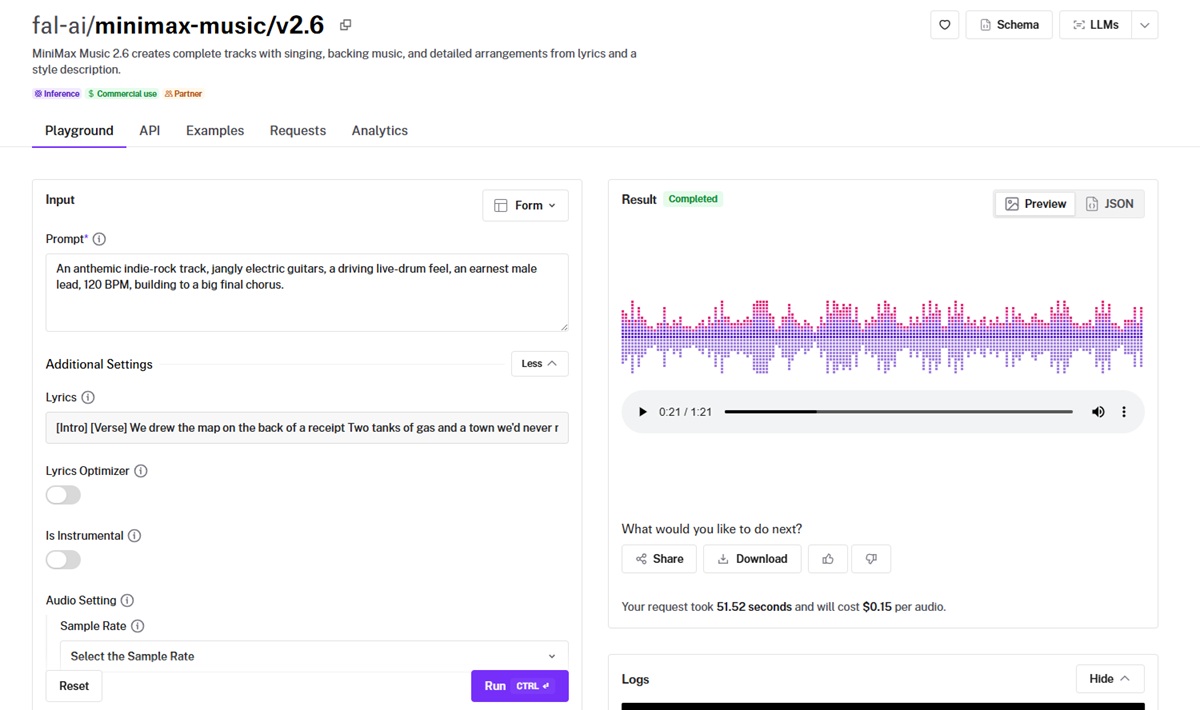
You can steer the arrangement with structure tags like [Intro], [Verse], [Pre Chorus], [Chorus], [Bridge], and [Outro] dropped straight into the lyrics, and the model builds around them.
💡 Pro tip: If you turn up with a vibe but no words, the lyrics optimizer writes them from your prompt, and an instrumental toggle drops the vocal for a backing track.
You also get control over sample rate up to 44.1 kHz, bitrate up to 256 kbps, and output as mp3, wav, or pcm, with pricing on fal at $0.15 per audio.
Let's see what that looks like in action:
Prompt: A breezy summer pop song, bright acoustic guitar, a four-on-the-floor groove, a warm female lead with stacked harmonies, 118 BPM, joyful and open.
Lyrics: [Verse] Woke up to a sky I haven't seen in weeks / [Chorus] And we run, we run, with the windows down / Nothing left to prove in this sleepy town.
Generated using MiniMax Music 2.6 on fal.
Eleven Music
Eleven Music is the one to reach for when you want to direct a track section by section, through what it calls a composition plan.
You define each part of the song as its own block, with its own positive and negative styles, its own duration, and its own lyrics, and the model stitches them into one continuous piece.
Similar to Lyria 3 Pro and MiniMax Music 2.6, you can use it on a pay-per-use basis inside fal's playground:
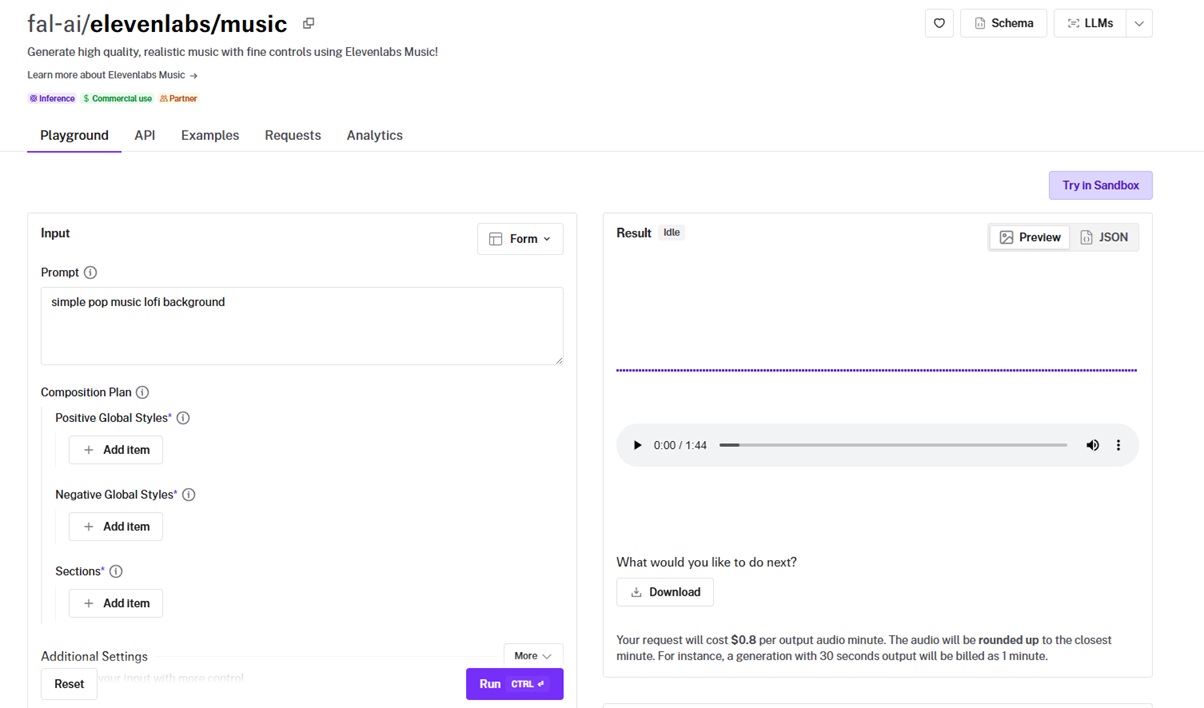
A text prompt works fine when you don't need that much control, alongside a force-instrumental toggle and a music-length control measured in milliseconds.
Output runs from a light mp3 up to lossless pcm, and a Respect Sections Durations switch sets how strictly the model holds to the timing you give each block.
Pricing on fal is $0.80 per output audio minute, rounded up to the nearest minute, so a 30-second result bills as one minute.
Let's see the model in action:
Prompt: An ominous expedition score for a dense rainforest at night, breathy low woodwinds, restless hand percussion, a slow swell of strings as the canopy closes in, a creeping sense of being watched.
Generated using Eleven Music on fal.
I ran this from a single text prompt with no composition plan, and it still came back layered, not looped, which I liked.
What are the settings that matter during AI music generation?
Once you've written the prompt, a handful of controls decide the rest.
Here are the ones worth knowing before you hit run:
Prompt and lyrics: The prompt carries the style and mood, plus the instruments you want featured. On MiniMax Music 2.6 and Eleven Music, you can pass lyrics in a separate field, so the words and the musical direction stay independent, while Lyria 3 Pro reads both out of one descriptive prompt.
Instrumental toggle: MiniMax's is_instrumental and Eleven Music's force_instrumental cut the vocal and commit the whole arrangement to a backing track. I'd switch it on for anything going under a video or a podcast.
Lyrics optimizer: MiniMax Music 2.6 writes lyrics from your prompt when you leave the lyrics field empty and turn the optimizer on, which is the quickest path to a full vocal track when you have a mood but no words yet.
Composition plan: Eleven Music's plan splits a song into sections, each with its own styles, duration in milliseconds, and lyrics.
Music length: Eleven Music's music_length_ms sets the total runtime in milliseconds, from three seconds up to ten minutes, and it works with the text-prompt path. If you leave it off, the model picks a length from your prompt.
Respect sections durations: With a composition plan in play, this sets how strictly Eleven Music holds each section to its timing. I'd keep it on when the cut has to hit an exact length, and turn it off when I'd rather the model nudge section lengths for a smoother result while holding the total runtime.
Audio settings: MiniMax exposes sample rate up to 44.1 kHz and bitrate up to 256 kbps, which set the fidelity of the file. Higher values sound better and weigh more, so you want to match them to where the track is headed.
Output format: Eleven Music's output_format packs codec, sample rate, and bitrate into one string, from a compact mp3_44100_128 up to lossless pcm_44100. MiniMax offers mp3, wav, and pcm, and Lyria 3 Pro hands back a 44.1 kHz MP3.
Negative prompt: Lyria 3 Pro takes a negative prompt to keep specific elements out, like "low quality, distorted."
Image prompt: Lyria 3 Pro can take an image_url and write music that matches the mood and theme of the picture, which I think is a quick way to score a piece of art or a scene without first turning the feeling into words.
To see a few working together, I built this one in the Eleven Music playground with force-instrumental on, the music length set to around 45 seconds, and the output format left on mp3_44100_128.
Prompt: A cinematic orchestral build that opens on sparse, tense solo piano, brings in sustained strings and low timpani as the tension climbs, then breaks into a full triumphant orchestra and choir with cymbal swells, wide stereo and emotional.
Generated using Eleven Music on fal.
What should you avoid when generating AI music?
A handful of habits will quietly sink a track before it gets going, and they're usually why you're on your tenth re-roll of the same idea:
A bare list of genre tags: If you just pile up commas with no mood or arrangement, the model would have nothing to build a song from.
Leaving the tempo unset: If you skip the BPM or the feel and the model guesses, its guess won't always match the energy in your head.
Skipping structure on a full song: Ask for a song with no [Verse] or [Chorus] tags and you often get something that loops or wanders with no real hook.
Overloading one prompt: If you stack a dozen instruments and a sudden key change into one breathless sentence, the model has to start cutting things. This is why you want to settle on the core feel and the lead instruments first, then add the rest in order of importance.
Passing loose lyrics: When you want specific words sung, you want to lay them out cleanly with line breaks and structure tags.
Recently Added


















Generate music on fal
AI music has more genuinely usable models now than it has ever had, and these three stretch from a quick instrumental bed all the way to a full song with vocals and a real arc.
You can pick whichever suits the work in front of you and run it on fal's playground or with our API on a pay-per-use basis and no GPU to maintain.
You can spend a minute in the playground to hear a model, or wire up the API and hop between the three with a one-line endpoint swap.
Frequently asked questions
What makes an AI-generated track sound professional?
Mostly it's how clearly you brief the model and which settings you choose before you run it.
From what I've seen, the tracks that sound finished tend to name a real genre and tempo and a couple of instruments you've actually picked, not a vague mood.
You want to give it a clear structure, so the song builds and resolves, point the vocal somewhere or commit to an instrumental, and the result stops sounding like a loop.
The model handles the performance, but the direction is all yours, so the closer your brief gets to what you'd tell someone in the studio, the more professional the result will sound.
Which model should I pick for AI music?
That depends on what you're making.
Here's how I'm looking at it:
Lyria 3 Pro is a strong default for a full, structured song up to three minutes, and it can take an image to set the mood.
MiniMax Music 2.6 fits lyric-driven tracks where you want the words synced exactly and the arrangement guided by structure tags.
Eleven Music suits anyone who needs section-level control over how a piece builds, through its composition plan.
💡 On fal, you can try all three under one account and pick per task, since switching is a one-line endpoint change.
How much does it cost to generate music on fal?
You pay per generation, and the rate depends on the model.
Lyria 3 Pro is $0.08 per audio for a full track on fal.
MiniMax Music 2.6 is $0.15 per audio on fal.
Eleven Music is $0.80 per output audio minute on fal, rounded up to the nearest minute.
There's no subscription on fal, so you only pay for what you actually generate.
Can I use AI-generated music commercially?
Yes, though the details are worth a look first. I'd advise you to check the specifics on each model's fal page before you ship anything.
Lyria 3 Pro also adds an inaudible SynthID watermark to every track for provenance.
![How To Use Seedream 5.0 Pro: Prompts & Workflows [2026]](https://refinery.fal.media/url/https%3A%2F%2Fv3b.fal.media%2Ffiles%2Fb%2F0aa263f0%2FQoO-7lvm8ASuM5HWpb20X.jpg/tr:w-1280,q-80/QoO-7lvm8ASuM5HWpb20X.webp)