The same handbag photo can pass for a catalog shot or a night campaign frame depending on how it's lit, and with Nano Banana 2.1 on fal you can change that light without a reshoot.
I'll show you 25 lighting prompts on one cognac leather handbag, all run as relights of the same packshot.
TL;DR
- All 25 images in this guide relight one 2K packshot of a cognac leather handbag through google/nano-banana-2.1/edit on fal, so the bag and the framing stay fixed while the light changes.
- The list covers 24 classic photo and film setups, plus prism light, which I added for social ads.
- A
system_promptholds the rules that keep the handbag unchanged, leaving the lighting prompts free to describe the light and the marks it leaves on the leather and brass. - The base packshot uses a mid-gray paper sweep, which renders near-white under high key light and near-black under low key light.
- On our model pages' short-prompt figures (about 100 tokens, medium thinking, as of November 2026), one 2K relight from a single input image costs about $0.061.
- At those rates, the base packshot plus all 25 relights comes to roughly $1.58 at 2K.
- A placement table maps the 25 setups to product pages, paid social, seasonal campaigns, evening edits and story-led ads.
- fal is the best place to relight product photos with Nano Banana 2.1, as one API key reaches both endpoints and you can test a lighting prompt on your own photo in the edit playground.
What does lighting change in an AI product image?
When you light a product, you decide which parts catch light and which fall into shadow, and that sets how much of the shape and surface a shopper can read at a glance.
On a leather handbag, a light skimming across the front panel at a low angle turns the pebbled grain into thousands of tiny highlights, while a broad frontal light flattens the same grain into a smooth brown surface.
Polished brass needs something different: a turn-lock only reads as metal when it carries a bright reflection with a defined edge.
Shoppers also guess the setting from the light, reading an orange sodium glow as a street at night and a striped shadow as a room with blinds, even though the set behind the bag never changes.
For an online store, that means one approved photo can serve a product page and a holiday email once the light is rewritten for both.
Which lighting setups suit which ecommerce placements?
My picks for the main product image are high key and clamshell lighting, while the other 23 setups spread across secondary images, paid social, seasonal campaigns, evening edits and story-led ads, as the table below shows.
| Placement | Setups from this guide | What the light does for that placement |
|---|---|---|
| Main product image | High key, Clamshell | Keeps color and outline accurate on a near-white or neutral backdrop |
| Secondary product images | Overcast soft light, Rembrandt, Split lighting, Hard top light | Brings out grain depth and the bag's volume |
| Paid social and feed posts | Direct flash, Colored gels, Venetian blinds, Prism light | Adds a graphic pattern or color that reads at thumbnail size |
| Seasonal and holiday campaigns | Golden hour, Dappled light, Candlelight, Firelight | Sets a season or time of day without a location shoot |
| Evening and luxury edits | Low key, Rim light, Backlit silhouette, Moonlight | Isolates the bag's outline against darkness |
| Story-led ads and lookbooks | Practicals only, Fluorescent, Flashlight, Sodium vapor, Red emergency, Lightning flash, Underlighting | Suggests a place or a moment around the bag |
Before using anything outside the first row on a marketplace, I'd check that marketplace's own rules for main images.
How do you relight one product photo with Nano Banana 2.1 on fal?
You relight a product photo on fal by sending it to google/nano-banana-2.1/edit as image 1, with a prompt that describes the new light and a system prompt that lists what has to stay the same.
Over four steps, the handbag goes from a neutral packshot to a relit image you can check against the original.
Step 1: Generate or upload the base packshot
Since every relight starts from the base packshot, it's ideal to light it as neutrally as possible, with the drama left to the edits.
I'd normally shoot the base on a mid-gray paper sweep, because gray can go near-white when it's flooded with light and near-black when light is kept off it.
The bag in this guide comes from the Nano Banana 2.1 text-to-image endpoint, though a photo of your own product works the same way once it's uploaded.
Base packshot prompt (text-to-image, 4:5, 2K, medium thinking): A catalog packshot of a structured top-handle handbag in cognac pebbled leather, standing upright in a three-quarter front view on a mid-gray paper sweep. One rolled handle arcs over the top, a front flap closes with a polished brass turn-lock, cream contrast stitching runs along every edge and the painted edges are dark brown. Even, low-contrast light from a large overhead softbox with fill from both sides leaves only a faint contact shadow under the base. Shot at bag height on a 70mm lens with the bag centered and even margins around it, in natural color with no text or logos anywhere.
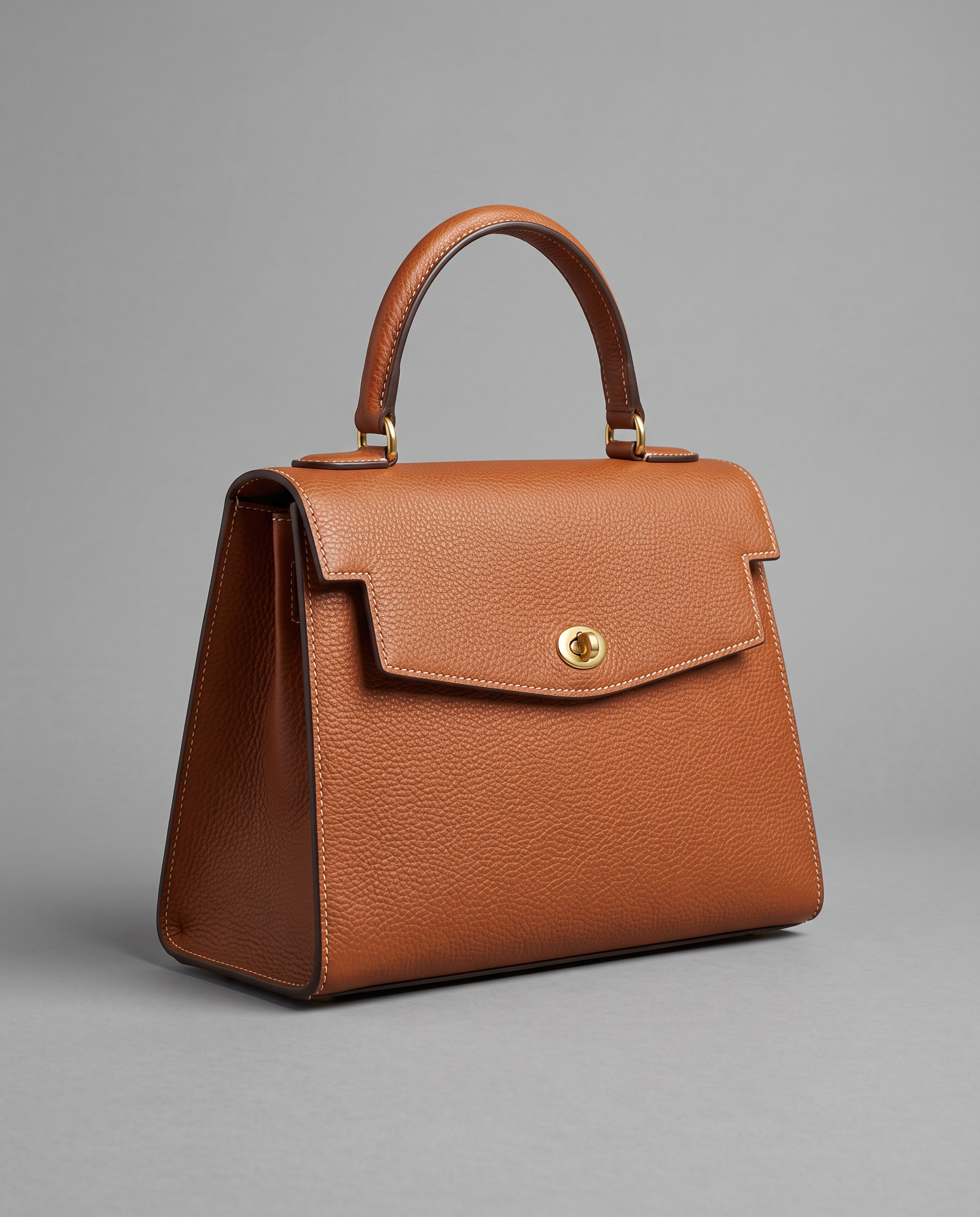
Generated using Nano Banana 2.1 on fal, an AI model from Google.
Try it in ChatGPT Try it in fal AgentI went with 4:5 because it fits both a product grid tile and a feed post, and with 2K so the stitching holds up when a shopper zooms in.
Step 2: Lock the product in a system prompt
The system_prompt field takes a standing instruction for the whole request, kept apart from the image prompt, which is why I put everything a relight must not touch into it.
Our edit model page recommends naming what stays the same as well as what changes, and a system prompt can state that once for all 25 requests:
You relight product photographs for an online leather goods store. Image 1 is the approved packshot of a structured top-handle handbag in cognac pebbled leather, with one rolled handle, a front flap closed by a polished brass turn-lock, cream contrast stitching along every edge and dark brown painted edges. Change the lighting and anything else the request names. Keep the bag's shape, grain, stitching, hardware and leather color exactly as in image 1, so any change in how the bag looks comes from the new light. Keep the camera position and crop of image 1, and add no text or logos.
I wrote the clause about the new light for setups such as sodium vapor and colored gels, since the leather should look orange or teal on screen while the bag itself stays cognac.
Step 3: Send each lighting prompt to the edit endpoint
A relight is one call to google/nano-banana-2.1/edit that pairs a lighting prompt from the sections below with the base packshot in image_urls:
python
import fal_client

SYSTEM_PROMPT = open("relight_rules.txt").read()  # the system prompt from step 2
base_url = fal_client.upload_file("handbag-base.png")  # or the URL of the step 1 output

LIGHTING = {
    "high-key": "Turn the set into a high key catalog shot, lit evenly by ...",
    "rembrandt": "Give the bag Rembrandt-style lighting from one soft key light ...",
    # one entry for each of the 25 setups below
}

for name, prompt in LIGHTING.items():
    result = fal_client.subscribe(
        "google/nano-banana-2.1/edit",
        arguments={
            "prompt": prompt,
            "system_prompt": SYSTEM_PROMPT,
            "image_urls": [base_url],
            "aspect_ratio": "4:5",
            "resolution": "2K",
        },
    )
    print(name, result["images"][0]["url"])
I set aspect_ratio to 4:5 by name, as auto only usually follows the input image.
The Python client reads FAL_KEY from your environment, while our AI image API tutorial covers key setup plus queued batches if you'd rather submit all 25 relights at once.
All the relights below use the same settings: the base packshot as image 1, 4:5, 2K, medium thinking (the default) and the system prompt from step 2.
Step 4: Check each relight against the base
Before I judge the light, every output goes next to the original packshot so I can compare the turn-lock and the handle curve, as a relight is only usable while the bag still matches.
My second check is whether the light arrives from the side the prompt named, as Google points to occasional left and right confusion in Nano Banana 2.1's spatial layouts.
What goes into a lighting prompt for a product relight?
A product relight prompt needs two things: where the light comes from in the frame, and the marks it leaves on the product and the backdrop.
The edit model has to redraw every highlight and shadow on a bag it may not otherwise change, so it needs to know where those marks go.
I write the light as marks on the handbag, such as where the brightest highlight lands on the turn-lock and which panel falls into shadow.
Setup names like Rembrandt or split lighting come from portrait work, so I spell out in each prompt what the pattern looks like on a leather bag with no face.
Directions in the prompts refer to the frame, as in "the left of the frame", because a bag facing the camera has its own left on the frame's right.
Writing directions this way is the simplest guard I know against mirrored light.
You'll also want to say whether the light source appears in the picture, since "just out of frame" keeps the set empty and "at the left edge of the frame" adds a lamp.
I give the gray sweep its own instruction too, as a shopper reads the setup from the backdrop's shade almost as much as from the bag.
For colored light, it's best to name the real source, such as a sodium streetlamp or a red emergency lamp, with a color word added only where the source leaves room for doubt.
None of the prompts runs past four sentences, as the system prompt already carries the bag's description and the rules about what stays fixed.
falMODEL APIs
The fastest, cheapest and most reliable way to run genAI models. 1 API, 100s of models
Main product image lighting prompts
Shoppers judge color and outline on the first image of a listing, and high key and clamshell lighting keep both accurate on the cognac handbag.
High key
High key lighting keeps nearly everything in the frame bright, with shadows on the handbag so pale they barely register.
It's the closest of the 25 to a standard catalog shot and the one I'd start with for a main image.
Prompt: Turn the set into a high key catalog shot, lit evenly by two large softboxes at roughly 45 degrees on either side of the camera, with a separate light pushing the gray sweep to a clean near-white. Shadows on the leather stay soft and pale, leaving a light gray haze under the base and one broad highlight on the brass turn-lock.
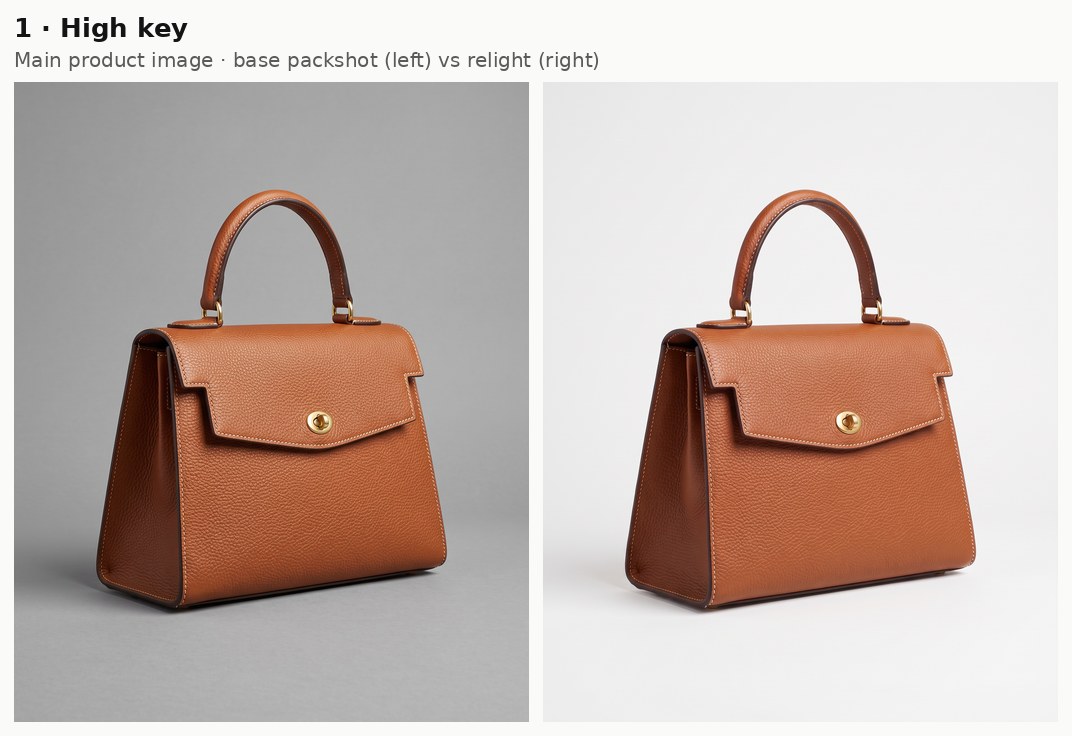
Generated using Nano Banana 2.1 Edit on fal, an AI model from Google.
Try it in ChatGPT Try it in fal AgentClamshell
Clamshell lighting puts the camera between two sources, a softbox just above the lens and a reflector just below it, with the handbag lit from the top and the bottom at once.
I'd recommend it whenever the strip under the flap looks muddy in the base shot, since the reflector bounces light straight into that gap.
Because the result stays bright from top to bottom, clamshell also works as a backup main image.
Prompt: Light the bag clamshell style: a large softbox directly above the camera angles down at the front panel, while a white reflector just below the lens bounces light up under the flap. The front of the bag stays bright from top to bottom with no dark pocket under the handle, and the gray sweep stays mid-gray.
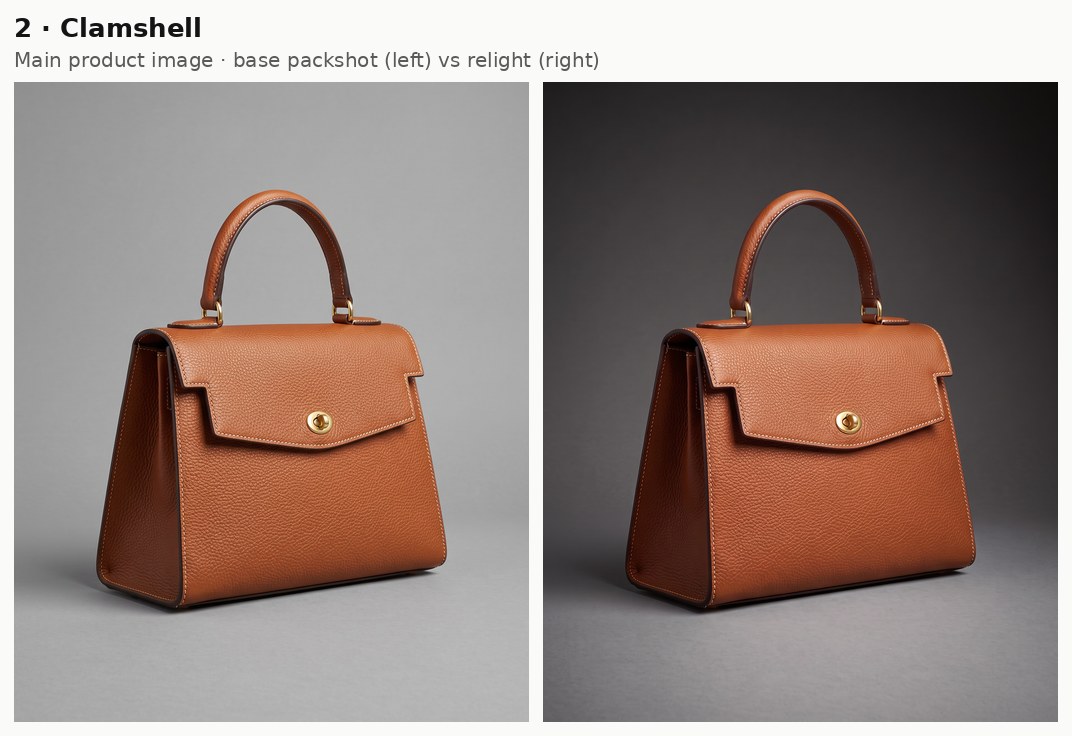
Generated using Nano Banana 2.1 Edit on fal, an AI model from Google.
Try it in ChatGPT Try it in fal AgentPrompts that bring out leather texture
Once shoppers swipe past the main image, they zoom in on grain and stitching, so I light the handbag from the side or from above in the next four prompts to give the leather depth.
Overcast soft light
Overcast light has no direction you can point to, as cloud spreads the sun across the whole sky and leaves the shadows around the handbag soft and faint.
Based on my experience, it's the safest choice for the second image on a listing, as the color stays honest and the grain gets only a gentle lift.
Prompt: Replace the studio light with soft daylight from a heavy overcast sky, coming from high on the left of the frame and wrapping around the bag. The cognac leather reads true with a slightly cool cast in its shadows, and the pebbled grain shows as a fine, even texture.
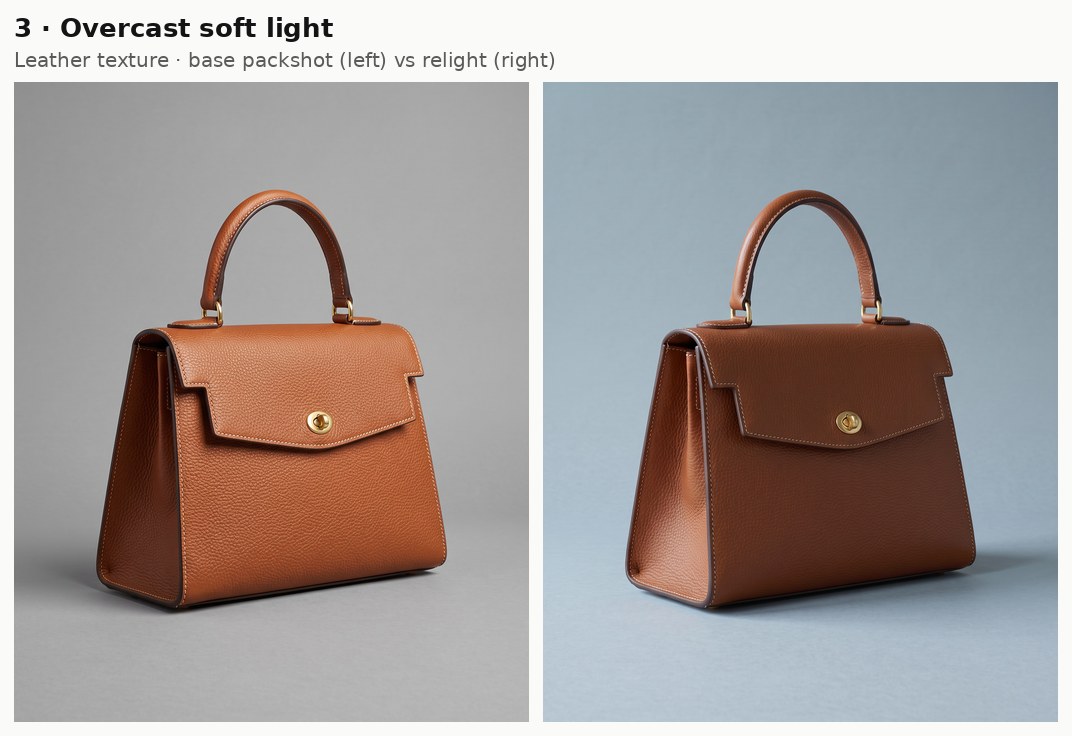
Generated using Nano Banana 2.1 Edit on fal, an AI model from Google.
Try it in ChatGPT Try it in fal AgentRembrandt
Rembrandt lighting uses the angle from the painter's portraits: a key light high up and about 45 degrees to one side of the subject.
On the handbag, the same angle lights the front panel and leaves a matching wedge of light on the shaded side panel, which gives the bag a sculpted, painterly look.
Prompt: Give the bag Rembrandt-style lighting from one soft key light high on the left of the frame, about 45 degrees off the camera axis, slanting down across the flap. The right side panel falls into deep brown shadow except for a small lit triangle near its top corner, and with no fill, the gray sweep darkens gradually toward the right edge of the frame.
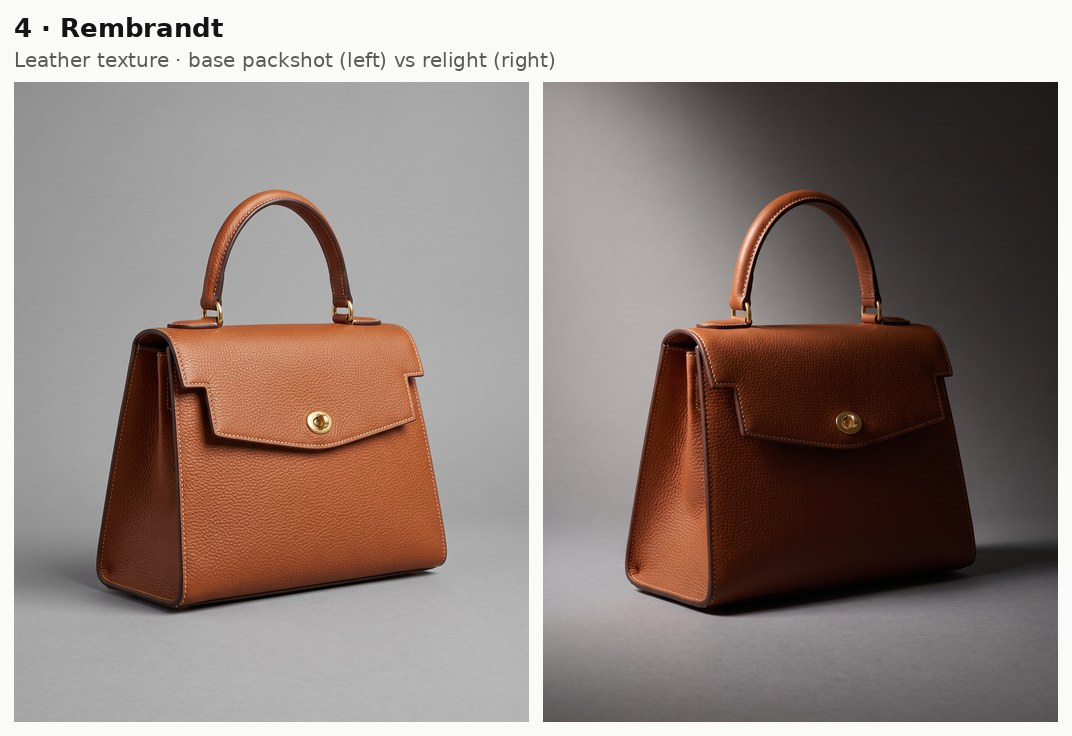
Generated using Nano Banana 2.1 Edit on fal, an AI model from Google.
Try it in ChatGPT Try it in fal AgentIf the wedge on the side panel comes back too large, a higher key light in the prompt is the first thing I'd change.
Split lighting
Split lighting cuts the handbag down the middle with one hard side light.
Of all 25 setups, I'd say this one shows the pebbled grain best, because the hard side light turns the bumps into tiny shadows.
Prompt: Set up split lighting with one hard light level with the bag, placed at 90 degrees to the camera on the left of the frame. The bag divides down the middle at the brass turn-lock, its left half lit by raking light that picks out the pebbled grain and its right half falling to near-black. The gray sweep stays dark apart from a strip of light along its left side.
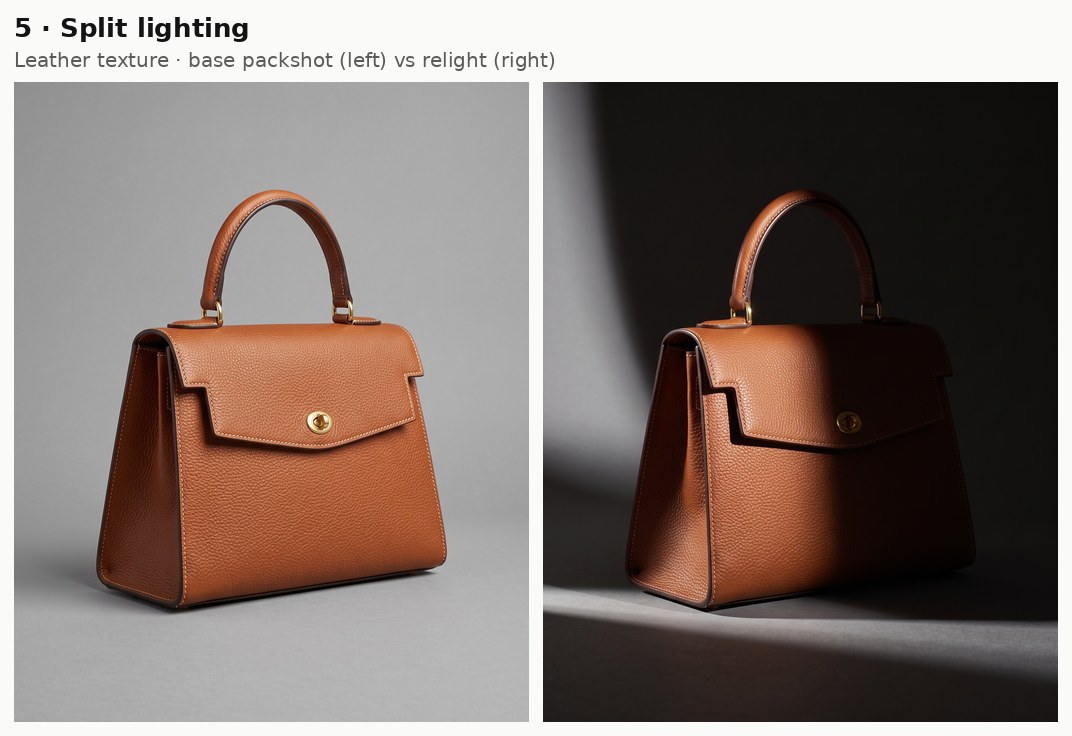
Generated using Nano Banana 2.1 Edit on fal, an AI model from Google.
Try it in ChatGPT Try it in fal AgentHard top light
Hard top light is one bare source straight above the subject: every upward-facing surface goes bright, and short, dense shadows drop right underneath.
I usually reach for it when the handle shape and the top edge of the flap are what sell the bag.
Prompt: Hang one hard spotlight directly above the bag, pointing straight down, so the rolled handle and the top edge of the flap catch bright highlights. The lower front panel falls into graded shadow above a tight, dark shadow under the base, while a circle of light on the sweep fades to charcoal toward the frame edges.
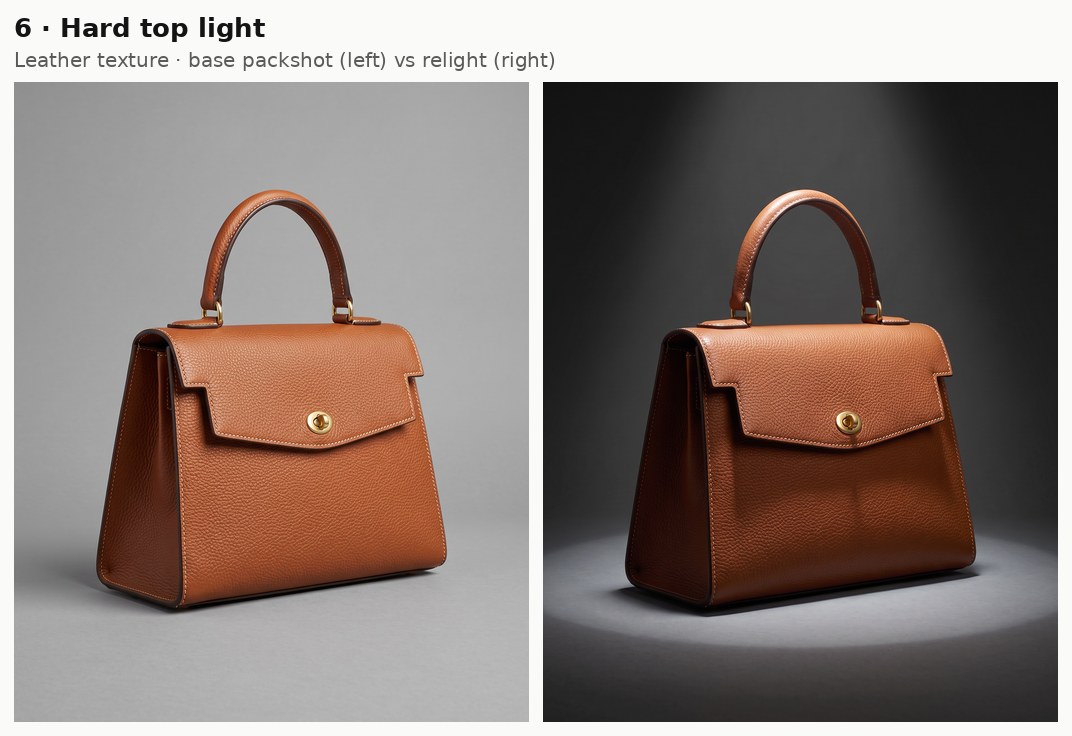
Generated using Nano Banana 2.1 Edit on fal, an AI model from Google.
Try it in ChatGPT Try it in fal AgentPaid social lighting prompts
People scroll past a feed post in a moment, so for paid social I'd lean on a hard pattern or a strong color that still reads at thumbnail size.
Direct flash
With direct flash, a bare flash fires from the camera position straight at the subject and gives flat, bright frontal light with a hard shadow outline behind.
The result looks like a fashion snapshot, with the brass hardware on the handbag flaring under the flash.
Prompt: Relight the shot with a single bare flash mounted on the camera and fired straight at the bag, giving the front panel a bright, flat look and the brass turn-lock a hard specular hot spot. A crisp dark shadow outline of the bag lands on the gray sweep just behind it.
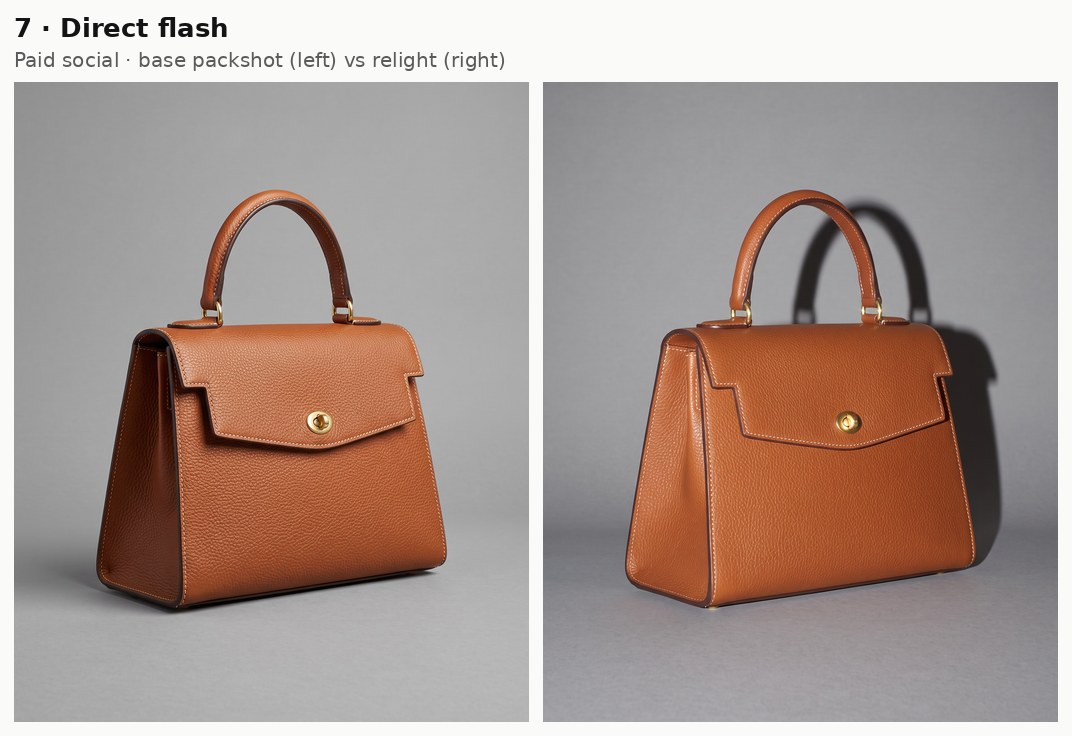
Generated using Nano Banana 2.1 Edit on fal, an AI model from Google.
Try it in ChatGPT Try it in fal AgentI'd keep that hard shadow in even if it feels harsh at full size, since the outline is what keeps the bag readable on a small phone screen.
Venetian blinds
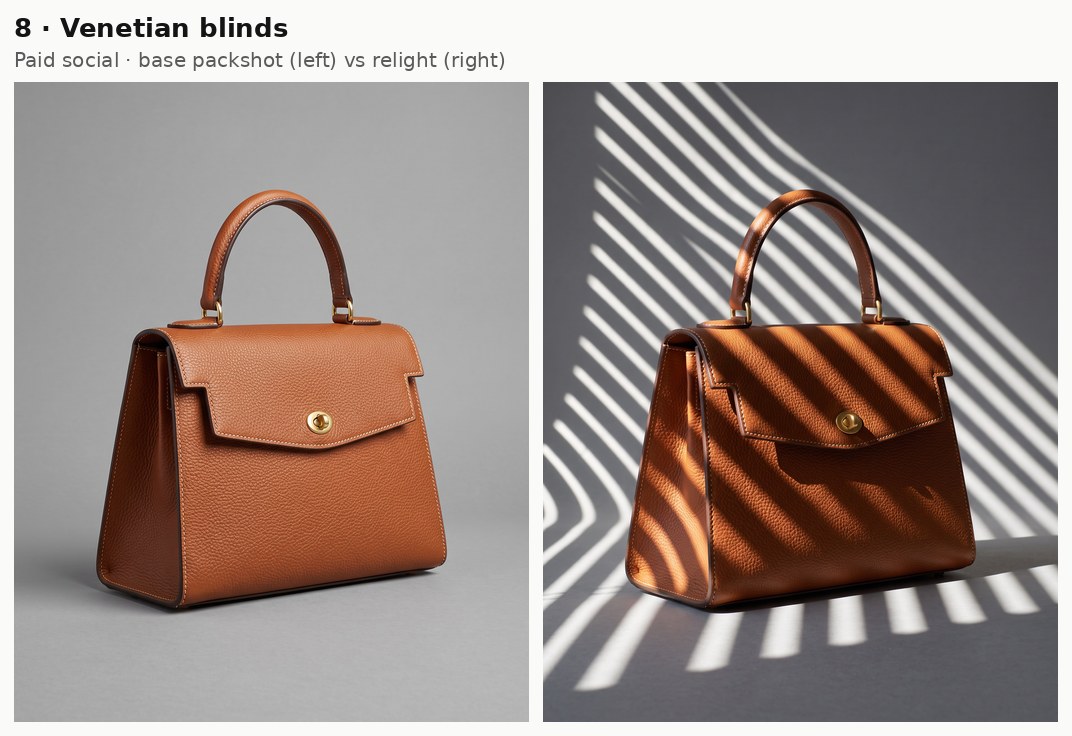
In venetian blind lighting, hard sunlight through slatted blinds paints parallel bands of light and shadow.
As the bands bend over the handbag's curves, you can read its shape from the stripes alone, and a feed ad gets a bold graphic pattern out of it.
Prompt: Let hard late-morning sunlight fall through venetian blinds on the left of the frame, laying parallel diagonal stripes of light and shadow across the front of the bag and onto the gray sweep behind it. The stripes bend where they wrap over the curve of the handle, and between them the bag drops into cool shade.
Generated using Nano Banana 2.1 Edit on fal, an AI model from Google.
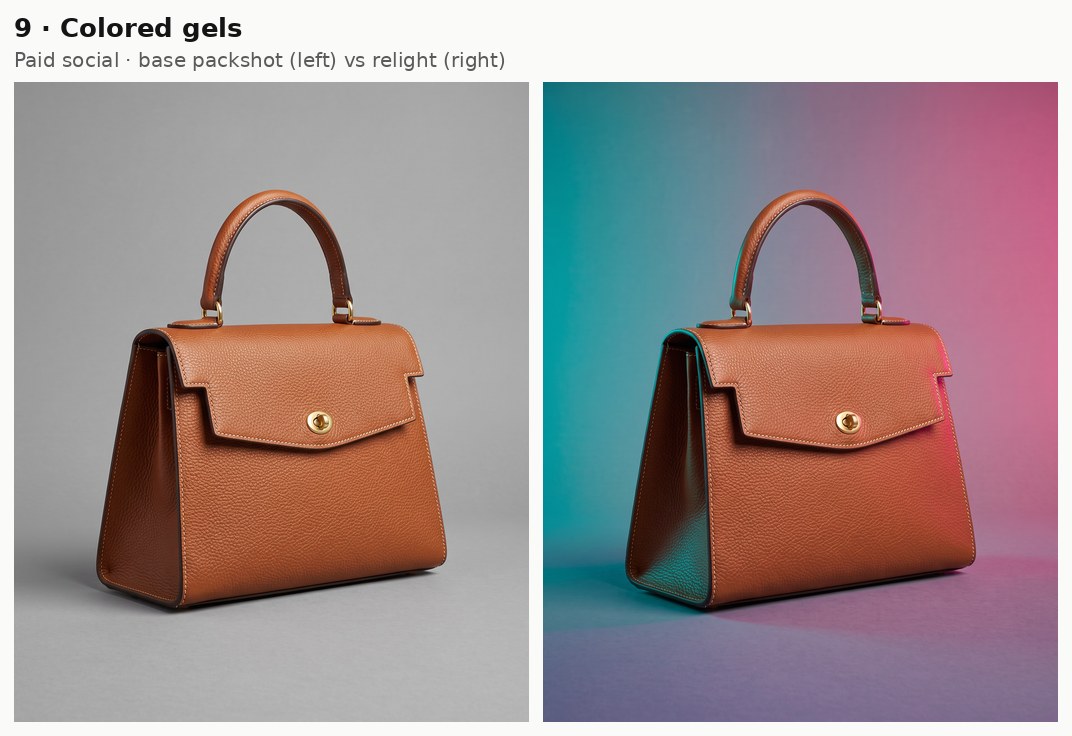
Try it in ChatGPT Try it in fal AgentColored gels
Colored gels are tinted filters over lights, often teal on one side of the subject and magenta on the other.
Where the two colors meet on the cognac handbag, a violet band forms across the flap, and I like that band as the opening frame of a social ad.
Prompt: Put a teal gel on a light at the left of the frame and a magenta gel on a light at the right, both about 60 degrees off the camera axis. Teal light covers the left side of the bag and the sweep while magenta covers the right side. Where the colors overlap on the front of the flap they blend into violet, and the brass turn-lock picks up both.
Generated using Nano Banana 2.1 Edit on fal, an AI model from Google.
Try it in ChatGPT Try it in fal AgentFor a quieter version, light amber and light blue gels give the same split with less saturation.
Prism light (the setup I added)
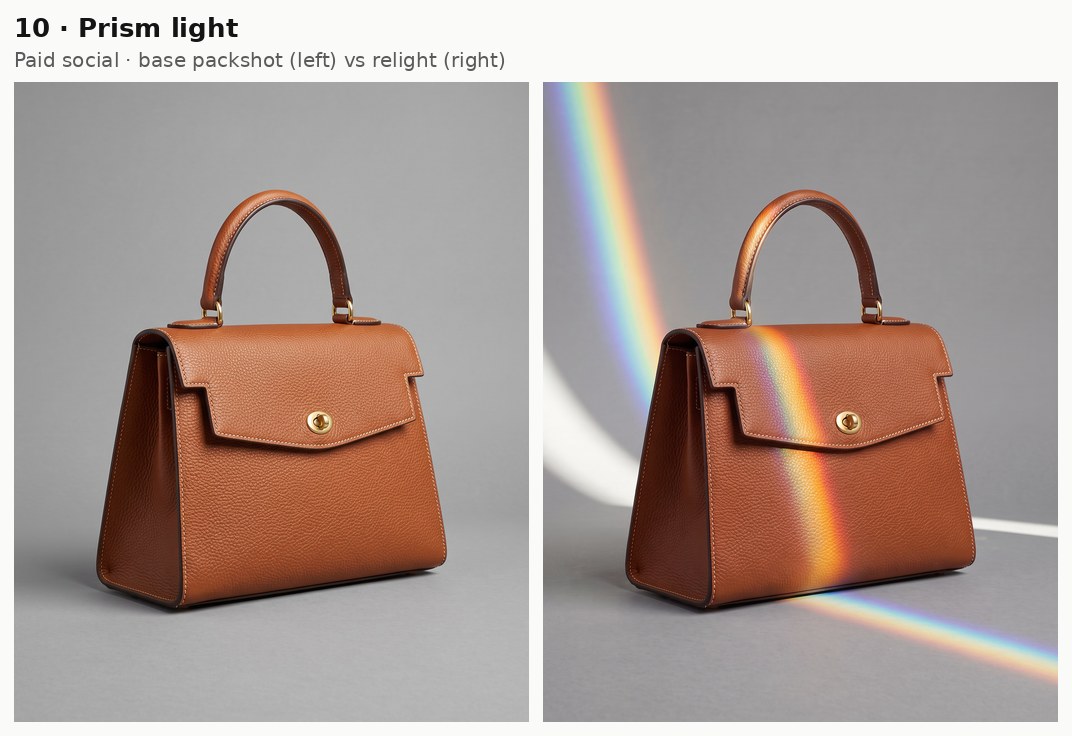
Prism light is white light passed through a glass prism, which splits it into a narrow band of rainbow color that falls across the subject.
I added it as the 25th setup because none of the original 24 produces a full spectrum, and I wanted one option that adds color to a social post without gels or props.
Prompt: Add hard white sunlight from the upper left of the frame, passing through a glass prism held just out of frame. A narrow rainbow band with soft edges, running from red to violet, falls diagonally across the front flap and onto the gray sweep, with the rest of the bag in clean, neutral daylight.
Generated using Nano Banana 2.1 Edit on fal, an AI model from Google.
Try it in ChatGPT Try it in fal AgentYou'll want to keep the band narrow, because a wide spectrum across the whole flap starts to hide the leather.
Seasonal campaign lighting
A shopper can guess the season from low sun or candle flames, so I use sun and flame here to move the handbag into a season without a location shoot.
Golden hour
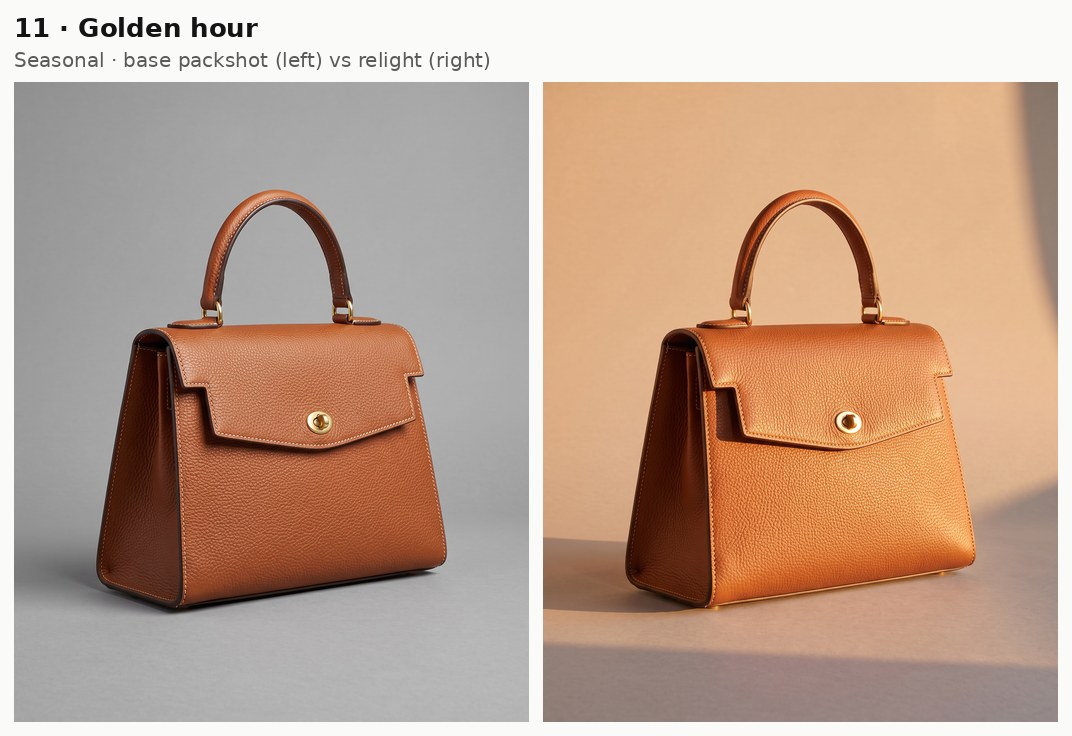
Golden hour light comes from a sun only a few degrees above the horizon and reaches the handbag warm and almost sideways.
For autumn and summer campaigns, I'd call it the most dependable of the warm setups, with the grain picked out by the low angle as a bonus.
Prompt: Bring golden hour sun into the set, entering low from the right of the frame as if through a large studio window. Warm amber light rakes across the front panel and picks out the pebbled grain. A long, soft-edged shadow stretches left across the gray sweep, which takes on a peach tint.
Generated using Nano Banana 2.1 Edit on fal, an AI model from Google.
Try it in ChatGPT Try it in fal AgentDappled light
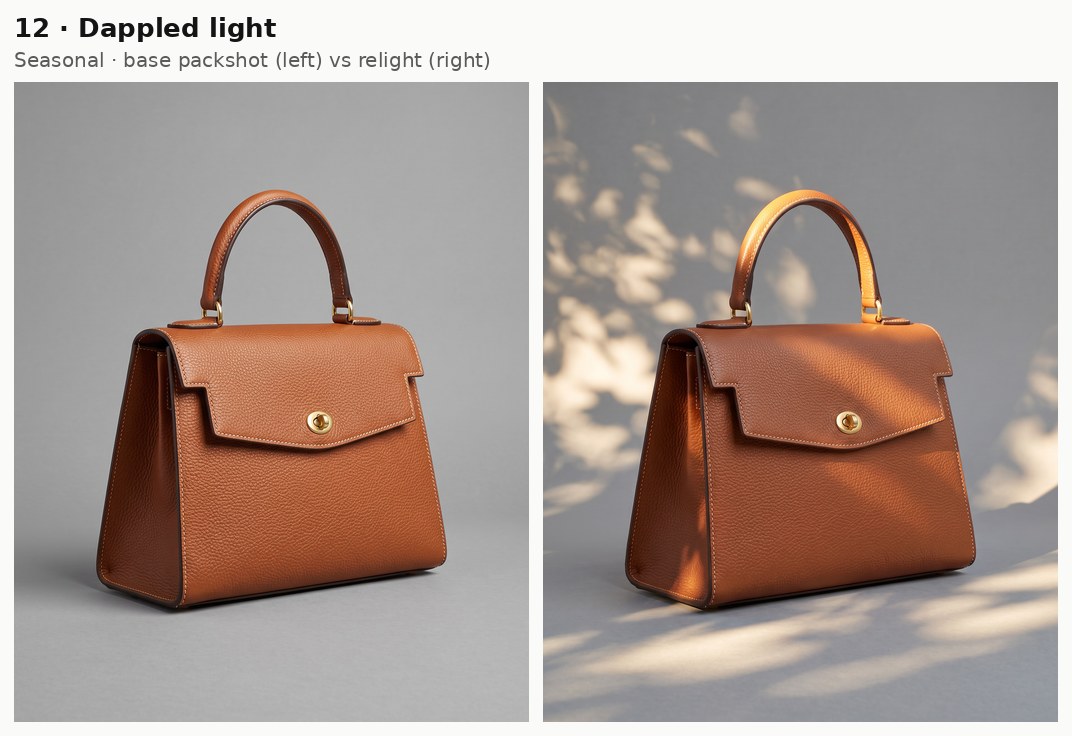
Dappled light is what reaches the handbag after the sun passes through leaves: patches of brightness, each with a soft edge, scattered over cool shade.
I'd put it on seasonal banners and email headers, as the pattern reads as spring or summer outdoors.
Prompt: Filter afternoon sun through the leaves of a tree beyond the left edge of the frame. Irregular pools of warm light and cool shade, each with soft edges, fall across the bag and the gray sweep, with one bright patch landing on the handle.
Generated using Nano Banana 2.1 Edit on fal, an AI model from Google.
Try it in ChatGPT Try it in fal AgentCandlelight
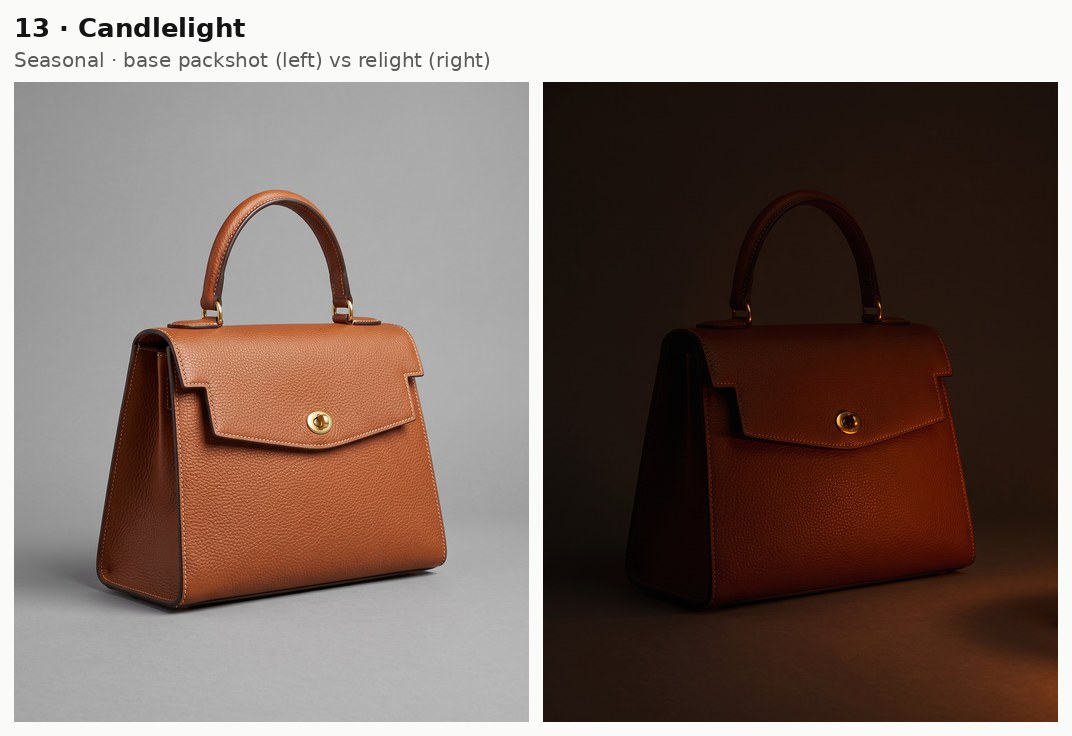
A candle is a tiny, low source, so its glow covers only the part of the handbag nearest the flame and leaves the rest dark.
With the candles in the frame, nobody needs a caption to know it's a holiday or Valentine's Day campaign.
Prompt: Light the bag only with the warm glow of two pillar candles on the floor just out of frame at the lower right, with no candles or flames visible anywhere in the picture. Deep orange light glows across the lower right of the bag and fades into darkness within a hand's width, leaving the handle and the left side barely visible, and two tiny warm flame reflections show on the brass turn-lock.
Generated using Nano Banana 2.1 Edit on fal, an AI model from Google.
Try it in ChatGPT Try it in fal AgentIf the flames come out larger than real candles would be, I'd add the candles' height, around 10 cm, to the next run.
Firelight
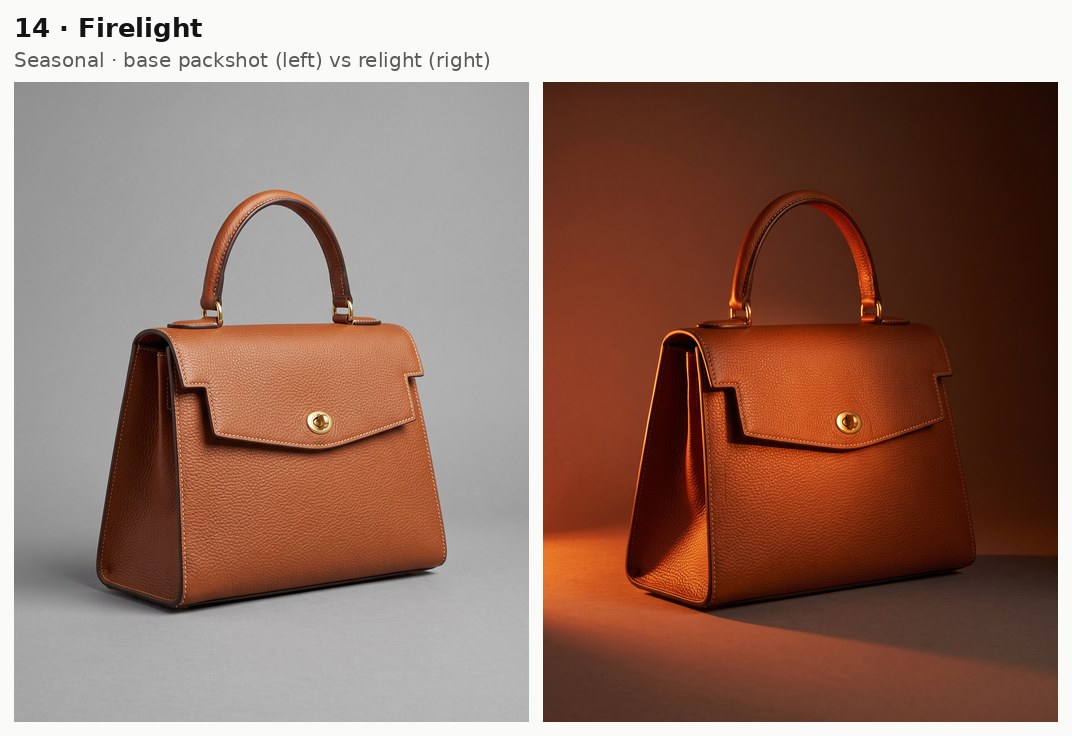
Firelight comes from a large, flickering source and lights the handbag unevenly, brighter in some patches than others.
I tend to save it for a holiday gift guide, as the glow reads like a cabin or a living room in winter.
Prompt: Light the bag with the glow of an open fireplace beyond the left edge of the frame, at floor level. Broad orange-red light washes unevenly across the left side and the front panel, and the bag casts a long, wavering shadow to the right across the gray sweep, with the upper right corner of the frame left in warm darkness.
Generated using Nano Banana 2.1 Edit on fal, an AI model from Google.
Try it in ChatGPT Try it in fal AgentEvening and luxury lighting prompts
For evening and luxury edits, most of the handbag stays in shadow, leaving the outline and the brass hardware as the only things to look at.
Low key
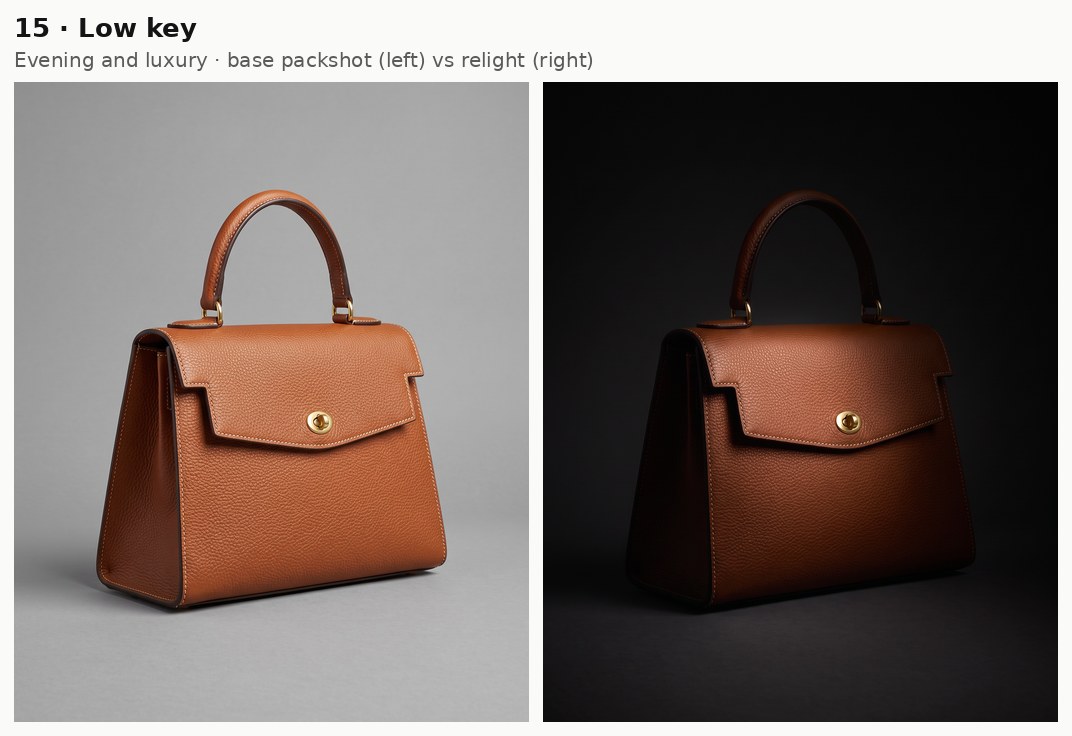
In a low key image, dark tones cover most of the frame and a single controlled light shows only the parts of the handbag you choose.
For an evening line it works well, with the brass hardware ending up as the brightest thing in the picture.
Prompt: Darken the set into a low key shot lit by one softbox fitted with a grid, high on the left of the frame, reaching only the front of the flap and the brass turn-lock. The rest of the bag sinks into deep shadow and the gray sweep goes almost black, yet the cream stitching still reads as a thin line along the flap.
Generated using Nano Banana 2.1 Edit on fal, an AI model from Google.
Try it in ChatGPT Try it in fal AgentThat thin cream line is the only detail left in the frame, and if it disappears completely, I'd ask for slightly more light on the flap in the next run.
Rim light
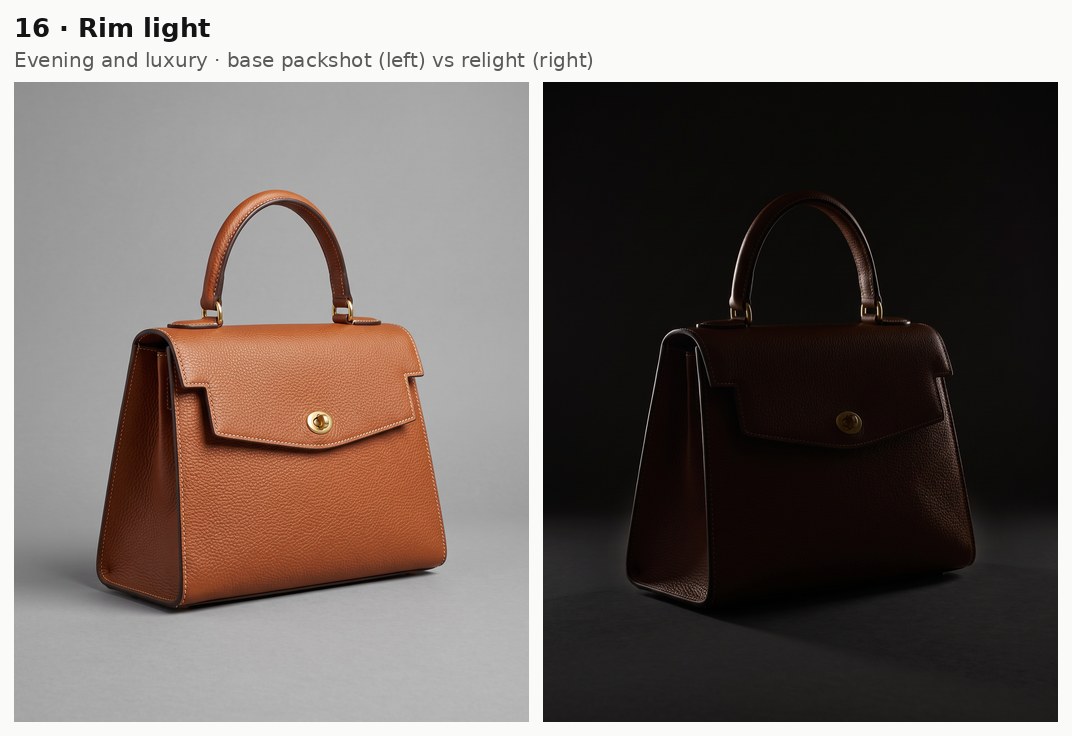
With rim lighting, the handbag is lit only from behind, so the camera sees a thin bright edge along the handle and side seams and very little else.
It suits structured bags best, as one line of light is enough to show a boxy shape.
Prompt: Place two narrow strip softboxes behind the bag, one on each side, aimed at its back edges, with no light from the front. A thin bright line traces the curve of the handle and both side seams while the front of the bag stays dark brown, and the gray sweep goes near-black so the outline stands clear.
Generated using Nano Banana 2.1 Edit on fal, an AI model from Google.
Try it in ChatGPT Try it in fal AgentBacklit silhouette
In a backlit silhouette, the front of the handbag gets no light at all against a glowing backdrop, and the outline is all a shopper sees.
Since the grain and color disappear, I'd only run this one as a launch teaser.
Prompt: Make the bag a backlit silhouette against the gray sweep lit to a bright, even white glow, with no light reaching the front of the bag. The bag reads as a dark brown shape with the handle arc and the turn-lock's profile crisp against the background, and a faint glow wraps around its side edges where the backlight spills past.
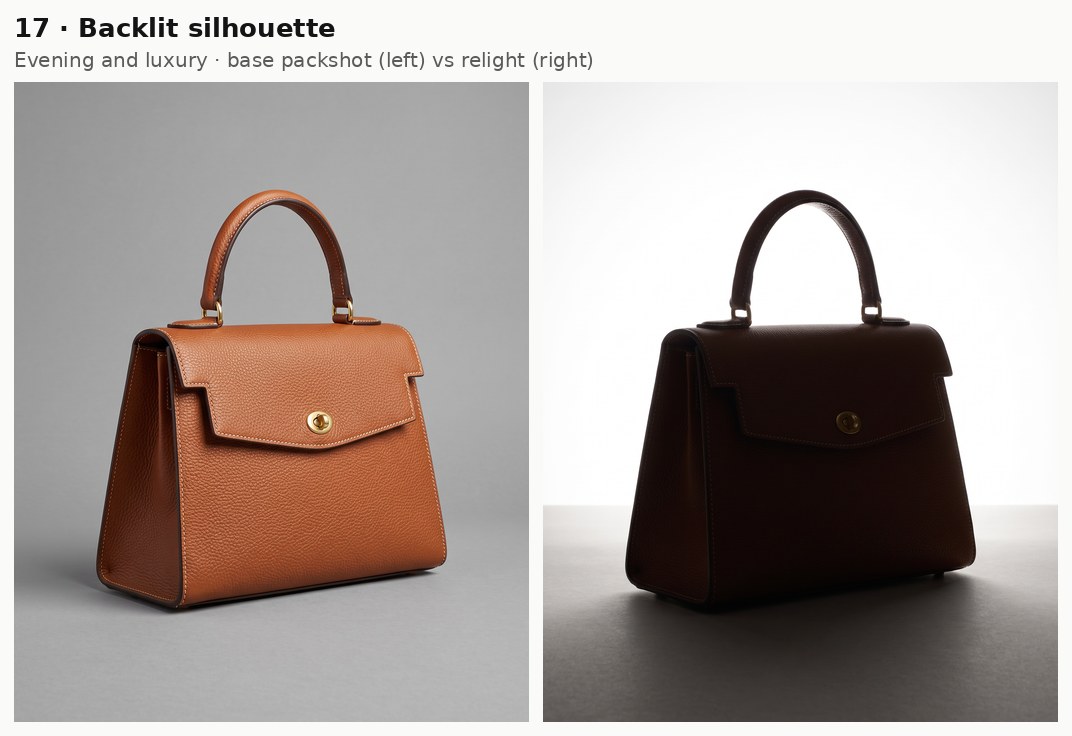
Generated using Nano Banana 2.1 Edit on fal, an AI model from Google.
Try it in ChatGPT Try it in fal AgentMoonlight
Moonlight in photos and films is usually shown as dim, blue-silver light, which drains most of the warmth out of a color like cognac.
I'd pick it for an evening collection, since the leather stays rich but loses the warmth a lamp would add.
Prompt: Turn the scene into night lit only by moonlight from a high window on the right of the frame. Dim blue-silver light falls across the top of the flap and the handle, leaving the cognac leather a deep, muted brown, and the gray sweep fades into blue-black shadow.
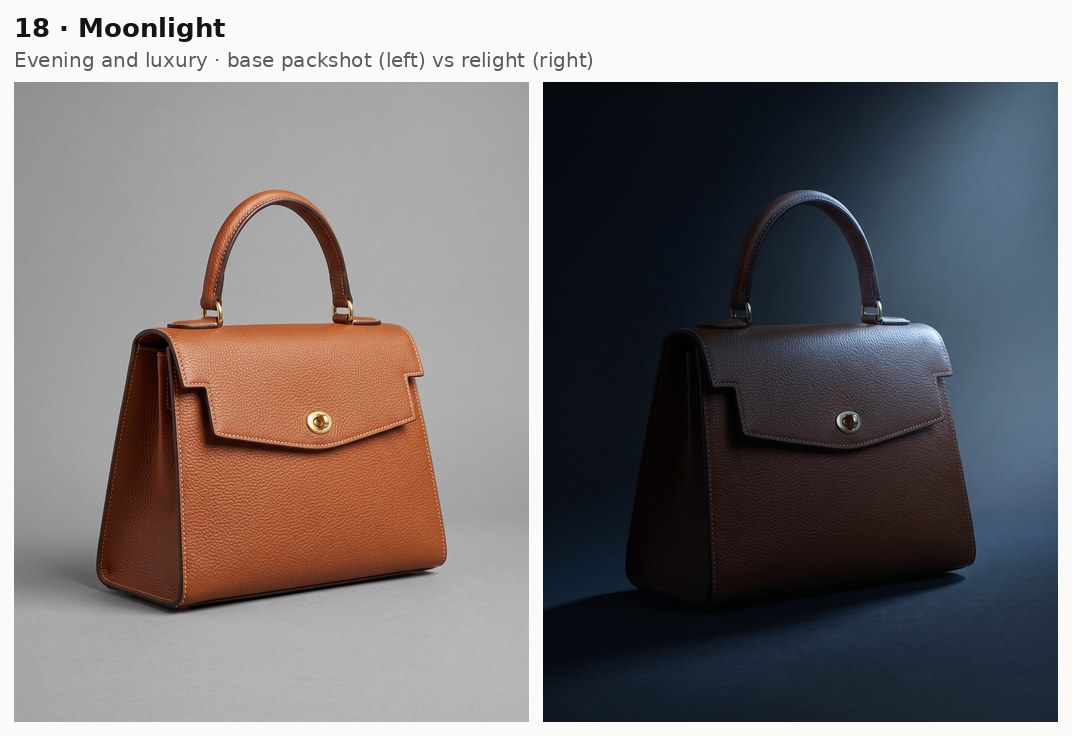
Generated using Nano Banana 2.1 Edit on fal, an AI model from Google.
Try it in ChatGPT Try it in fal AgentStory-led ad lighting
For story-led ads, I want the light to hint at a place or a moment, from a lamp-lit living room to a stairwell during a power cut, while the set stays the same gray sweep.
Practicals only
A practicals-only setup lights the handbag with lamps you can see in the picture and nothing hidden off camera.
Because the edit has to add those lamps to the set, I name both of them and their positions in the frame.
Prompt: Light the bag only with warm household lamps placed just out of frame, a table lamp beyond the left edge and a low floor lamp beyond the right edge, with no lamps or bulbs visible in the picture. Their light falls off quickly, so the left side of the bag glows amber and the right side drops into soft brown shadow, while the gray sweep takes on a warm, dim glow.
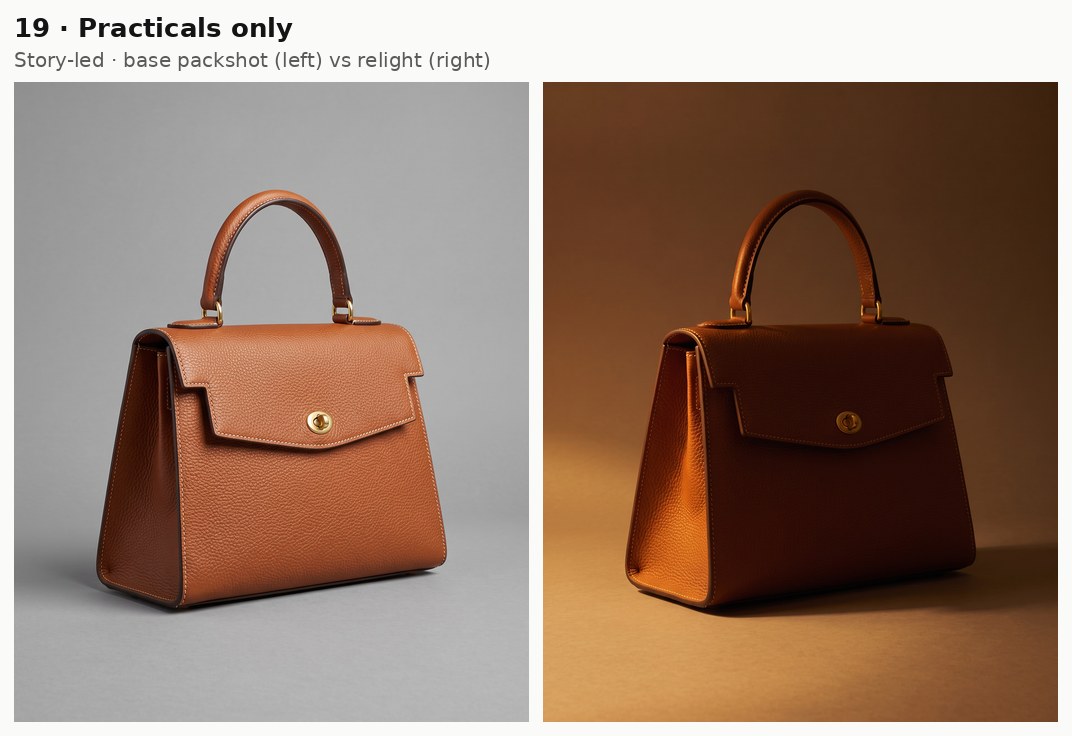
Generated using Nano Banana 2.1 Edit on fal, an AI model from Google.
Try it in ChatGPT Try it in fal AgentI'd look over this relight more closely than the others, because adding objects to the set is a bigger edit than changing light alone.
Fluorescent
Bare fluorescent tubes light the handbag from above with almost no modeling, and their light carries a slight green tint.
It's my pick for workwear or utility ads, since the handbag ends up looking like it's in a stockroom or an office after hours.
Prompt: Mount bare fluorescent tubes overhead, like an office stockroom after hours, as the only light. The flat, even light carries a clear green-cyan cast that shifts the gray sweep to a pale mint gray and pulls the leather's shadows toward olive, and two long, thin white reflections of the tubes run across the top of the flap and the brass turn-lock.
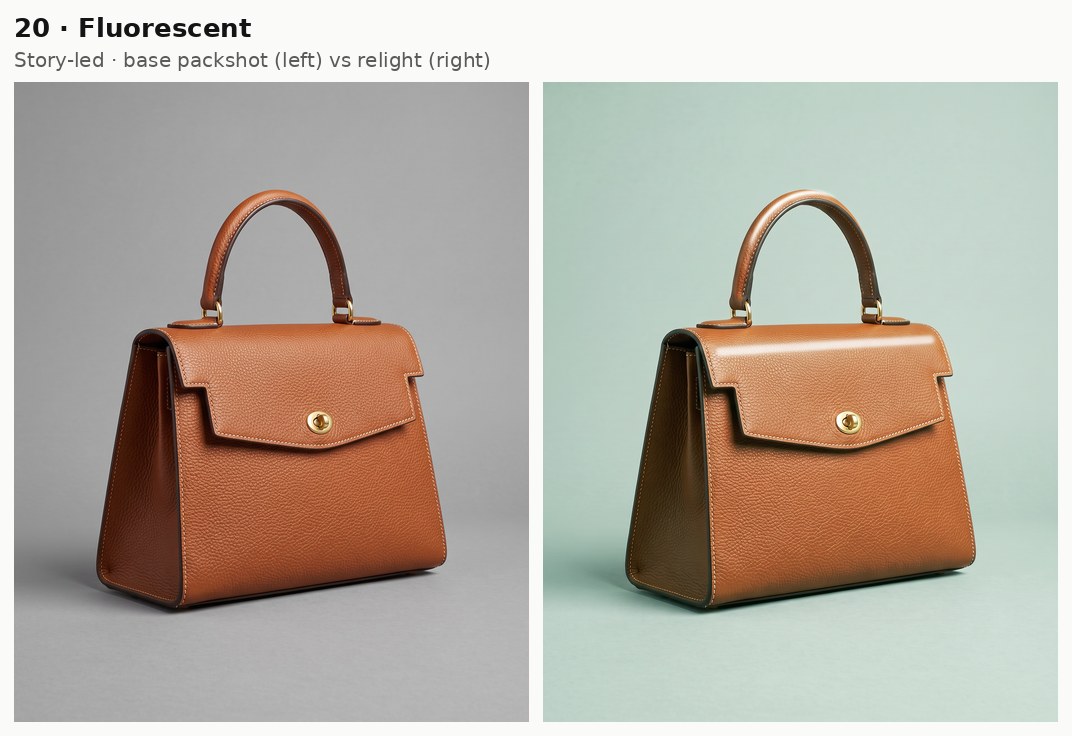
Generated using Nano Banana 2.1 Edit on fal, an AI model from Google.
Try it in ChatGPT Try it in fal AgentFlashlight
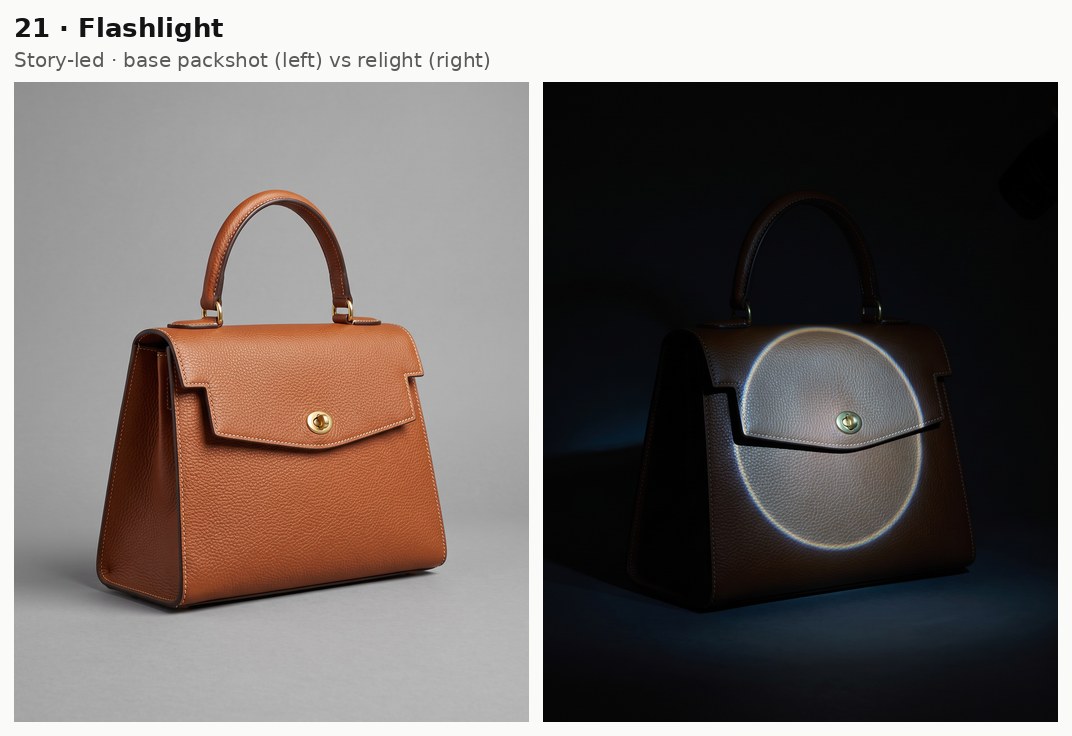
A flashlight throws a narrow, hard beam into a dark space and reveals only one circle of the subject.
I'd save it for a mystery theme or a limited-drop reveal, as the beam suggests someone finding the bag in the dark.
Prompt: The room is dark, and a handheld flashlight beam from just above the camera, slightly to the right of the frame, lands on the bag. A hard-edged circle of cool white light covers the flap and the brass turn-lock, with a faint bright ring at its edge. Outside the beam, the rest of the bag and the gray sweep fall to near-black.
Generated using Nano Banana 2.1 Edit on fal, an AI model from Google.
Try it in ChatGPT Try it in fal AgentSodium vapor
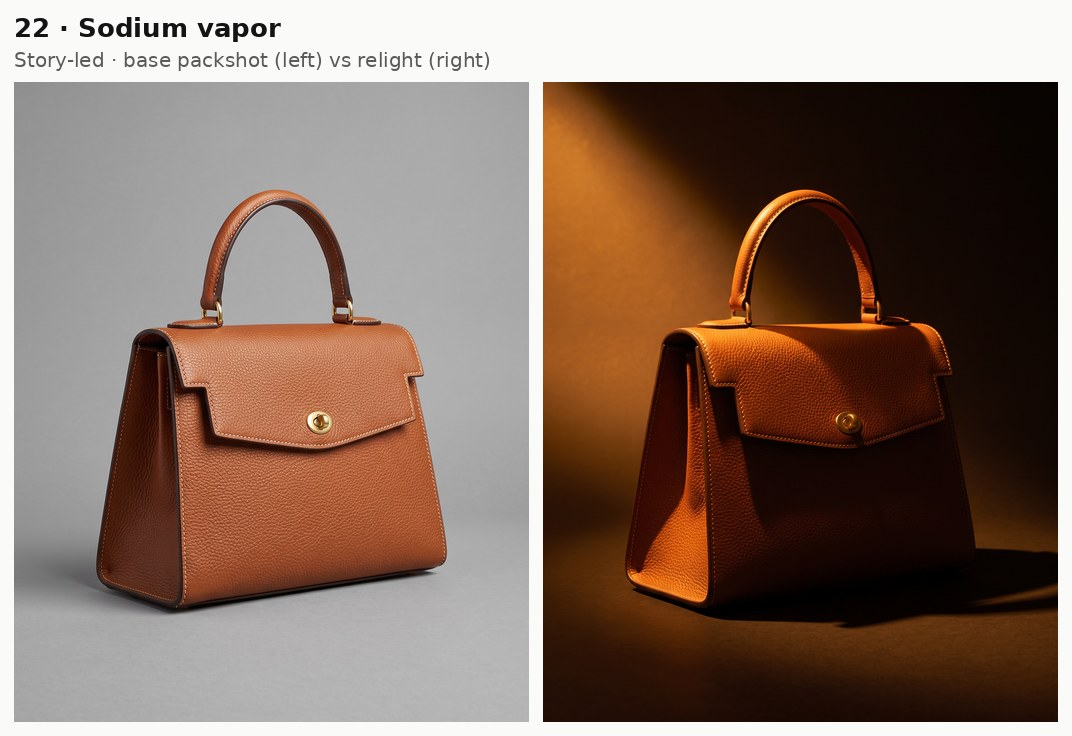
Sodium vapor streetlamps give off a narrow band of orange light, so the cognac leather and the cream stitching end up in nearly the same orange.
Shoppers read that orange as a city street after dark, so I'd use it for a nightlife or commuter campaign.
Prompt: Switch the scene to night, lit only by a sodium-vapor streetlamp high on the left of the frame and shining in through a window. The monochrome orange-yellow light turns the cognac leather and the cream stitching into shades of a single orange, while the gray sweep behind the bag falls to a dark brown-black.
Generated using Nano Banana 2.1 Edit on fal, an AI model from Google.
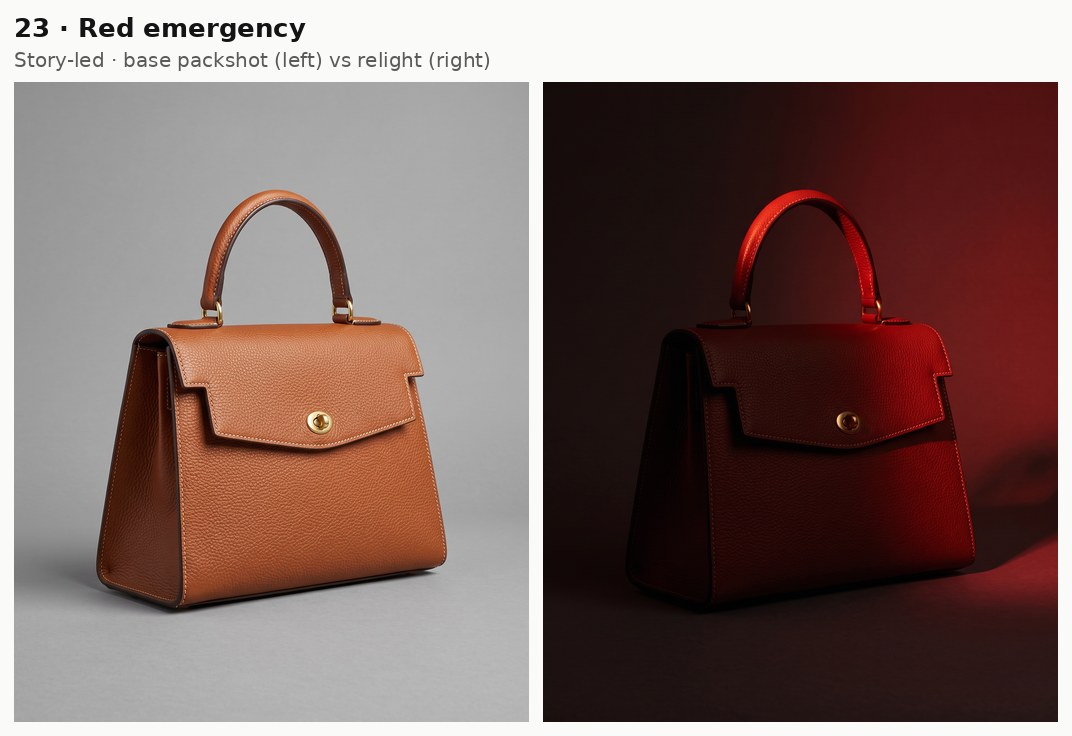
Try it in ChatGPT Try it in fal AgentSodium vapor and red emergency light both hide the bag's real color, which is why I'd never use either as the only image on a product page.
Red emergency
Red emergency lighting is the saturated red glow films use for alarms and power cuts, usually from a single lamp in a corridor or stairwell.
Red is a bold choice for a handbag, but it works for campaign teasers where tension is the point of the image.
Prompt: Relight the bag as if a power cut left only a red emergency lamp burning above a door on the right of the frame. Saturated red light reaches the right side of the bag and the top of the handle while the front panel drops into deep crimson shadow, and the rest of the frame stays dark apart from a red wash on the upper right of the gray sweep.
Generated using Nano Banana 2.1 Edit on fal, an AI model from Google.
Try it in ChatGPT Try it in fal AgentLightning flash
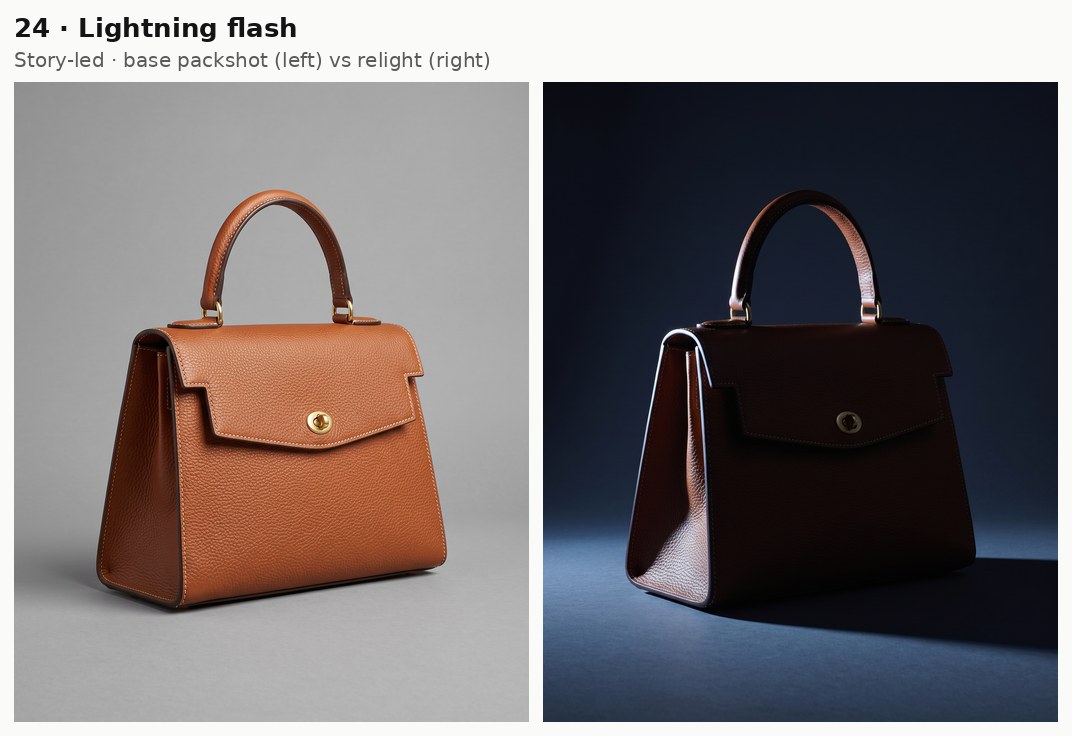
A lightning flash is a split second of hard, blue-white light during a storm, strong enough to throw sharp shadows across a dark scene.
Rainy-season stories and autumn lookbooks are the obvious fits, though a frozen flash works in any dramatic teaser.
Prompt: Freeze the instant of a lightning flash in a dark room, as a burst of hard blue-white light from just out of frame on the left hits the bag from the side. It throws a sharp, long shadow to the right across the gray sweep, with no window, sky or outdoor scene visible anywhere in the picture. Everything outside the flash falls to dark navy.
Generated using Nano Banana 2.1 Edit on fal, an AI model from Google.
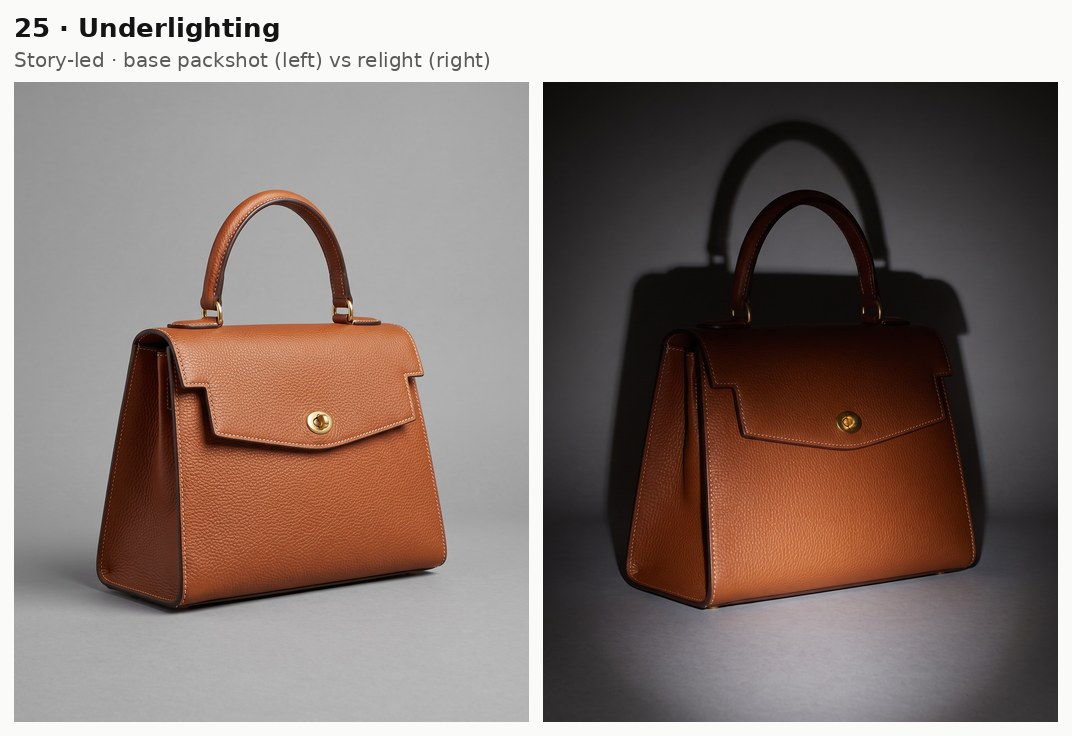
Try it in ChatGPT Try it in fal AgentUnderlighting
Underlighting places the light below the subject and aims it upward, which reverses the shadows people expect and gives an eerie, theatrical look.
It can also pass for a lit display plinth on a product, and I'd consider it for a Halloween drop or a gallery-style lookbook.
Prompt: Move the only light to the floor just in front of the bag, aimed upward. Light catches the lower front panel and the underside of the flap while the handle fades into shadow. A tall shadow of the bag stretches up the gray sweep behind it.
Generated using Nano Banana 2.1 Edit on fal, an AI model from Google.
Try it in ChatGPT Try it in fal AgentHow much does it cost to relight a product photo with Nano Banana 2.1?
As of November 2026, a 2K relight from one input image runs about $0.061 on fal, based on the short-prompt figures on our Nano Banana 2.1 model pages.
Input tokens bill at $1.764 per million on both Nano Banana 2.1 endpoints.
Output image tokens bill at $35.294 per million and output text and thinking at $8.823 per million, so the rendered image accounts for most of a request's price.
Our pages list $0.059 for a 2K text-to-image output and $0.063 for a 2K edit with two 1K input images, both from a prompt of about 100 tokens.
Each input image adds about 1,120 tokens (roughly $0.002), which puts a one-image relight near $0.061 at 2K.
| Output resolution | Base packshot (text-to-image) | One relight (edit, one input image) | Base packshot plus 25 relights |
|---|---|---|---|
| 1K | $0.040 | about $0.042 | about $1.09 |
| 2K | $0.059 | about $0.061 | about $1.58 |
| 4K | $0.134 | about $0.136 | about $3.53 |
I've rounded the published rates into estimates here, but each request's real charge follows the tokens it used.
The system prompt in this guide adds roughly 150 input tokens per request, though at our input rate that comes to well under a tenth of a cent.
Thinking bills as output text, and our Nano Banana 2.1 guide measured a one-reference 2K edit at $0.0743 on high thinking against $0.0613 on medium (16:9, short prompt, October 2026).
A relight you run three times to get the shadow right also bills three times, as each attempt counts as its own request.
Our Nano Banana API guide has the full token math behind these figures.
Here are some fixes for common relighting problems
Below are the relighting problems I'd watch for on a product like this handbag, paired with the first change I'd make to the request.
| Problem | First change to try |
|---|---|
| The turn-lock or handle shape drifts from the base packshot | A hardware description in system_prompt, then thinking_level raised to high, which our docs say can improve complex compositions |
| Light arrives from the opposite side | A direction tied to an edge of the frame, since Google notes occasional left and right confusion |
| A lamp or candle appears when the source should stay hidden | The words "just out of frame", plus a line saying no light source is visible |
| The soft shadow from the base packshot survives under a hard light | The new shadow's direction and length written out, with a line saying the earlier overhead light is gone |
| The output comes back in a different aspect ratio | aspect_ratio set to 4:5 by name, as auto only usually follows the input image |
| Stitching looks soft when a shopper zooms in | 2K or 4K output, which Google recommends for small text and which I'd apply to fine stitching too |
| One image comes back for a prompt that asked for several lighting versions | One setup per request, as limit_generations is on by default and keeps one image per generation, whatever count the prompt mentions |
Recently Added






Run Nano Banana 2.1 on fal
Edit models can now change the light on an existing product photo, which lets one approved packshot supply images for many placements.
Nano Banana 2.1 runs all 25 setups in this guide from a single handbag photo, at about $0.061 per 2K relight on our model pages' short-prompt figures.
On fal, a single API key covers both Nano Banana 2.1 endpoints and the rest of our model catalog, with pay-per-use billing and no GPUs to manage.
The Nano Banana 2.1 Edit playground takes your own product photo and any prompt from this guide.
Our Sandbox lets you compare Nano Banana 2.1 with other image models side by side before you write code.
For more prompt patterns, our Nano Banana 2.1 guide covers brand system prompts and mask-based edits.
Our roundup of AI image editing tools covers other editing models you can call with the same key, and there's a separate prompting guide for the reference-driven Krea 3.
Lighting prompt FAQ
Can Nano Banana 2.1 relight a photo of my own product?
Yes, Nano Banana 2.1 Edit accepts your own product photo in image_urls, either as a public URL or as a file uploaded to fal storage.
Up to 14 images fit in one edit request, and a relight can use that room for a second reference, such as a close-up of the real leather.
Do these lighting prompts work with text-to-image generation?
The same lighting language fits a Nano Banana 2.1 text-to-image prompt, placed after the product and scene description.
The trade-off is that each text-to-image run draws the product again, so the edit endpoint stays the safer route when the bag has to match an approved photo.
Which resolution should a relit product image use?
For product pages, 2K suits most relights, at about $0.061 per edit on our short-prompt figures as of November 2026.
Drafts work at 1K for about $0.042 a relight, while 4K (about 16 megapixels) costs about $0.136 per relight and suits print or large displays.
How many lighting setups fit in one Nano Banana 2.1 request?
One Nano Banana 2.1 request returns one lighting setup, because limit_generations is on by default and keeps each generation to one image.
The num_images field accepts 1 to 4 and returns separate generations of the same prompt, each billed on its own, which helps when you want to pick the best take of a single setup.
Can a relit packshot become a product video?
Yes, a relit packshot can serve as the first frame for an image-to-video model on fal, with the clip starting from the new lighting.
We rank the models that accept a still like this one in our AI image-to-video generators roundup.