![How To Use Nano Banana 2.1: Prompts & Workflows [2026]](https://refinery.fal.media/url/https%3A%2F%2Fv3b.fal.media%2Ffiles%2Fb%2F0aae3ec6%2Fr6q5F7plT50VNA6Xb8x7j.jpg/tr:w-1920,q-80/r6q5F7plT50VNA6Xb8x7j.webp)
In this guide, I'll cover prompting Nano Banana 2.1 on fal for ecommerce: the settings and system prompts that keep a brand consistent, and the workflows that take a perfume house and a trail shoe label from a first image to storyboards, localised ads, colourways and an 8:1 banner.
TL;DR
- Nano Banana 2.1 is Google's update to Nano Banana 2, keeping Flash-level speed while improving mask-based editing and subject consistency at up to 4K.
- Two endpoints run it on fal:
google/nano-banana-2.1for text-to-image, plusgoogle/nano-banana-2.1/editfor anything that starts from existing media. - For ecommerce work, brand rules belong in
system_prompt, and the shot belongs in the prompt, which keeps the label wording or shoe construction identical in every request across a catalogue. - The edit endpoint takes up to 14 references, and Google rates it for up to four consistent characters and 10 objects per request.
- Mask-based edits need no mask file, because marks painted onto the input image tell Nano Banana 2.1 which region to change.
- Both endpoints run behind one fal API key, from $0.0396 per image at 1K to $0.1335 at 4K (one 16:9 text-to-image output with a short prompt and medium thinking).
- The best place to run Nano Banana 2.1 is on fal, as our playground turns a tested brand prompt into client code, and our Sandbox compares it with Nano Banana Pro side by side.
Where can you access Nano Banana 2.1?
You can access Nano Banana 2.1 on fal through a text-to-image endpoint and an edit endpoint, both billed by token from the same account.
- google/nano-banana-2.1 for text-to-image, when the product exists only as a written brief.
- google/nano-banana-2.1/edit for image-to-image, when the work starts from existing media such as a product photo or a spec sheet.
We mark both endpoints for commercial use, and each one opens in a browser playground for testing a prompt before it goes into code.
Calls bill against prepaid credit that tops up from $1, and each request pays only for the tokens it actually uses.
On the code side, @fal-ai/client covers JavaScript and fal-client covers Python, with queueing and status polling handled inside both.
Here is what that looks like:
import { fal } from "@fal-ai/client";

const result = await fal.subscribe("google/nano-banana-2.1", {
  input: {
    prompt: "An action shot of a black lab swimming in an inground suburban swimming pool. The camera is placed meticulously on the water line, dividing the image in half, revealing both the dogs head above water holding a tennis ball in it's mouth, and it's paws paddling underwater."
  },
  logs: true,
  onQueueUpdate: (update) => {
    if (update.status === "IN_PROGRESS") {
      update.logs.map((log) => log.message).forEach(console.log);
    }
  },
});

console.log(result.data);
console.log(result.requestId);
Before committing to Nano Banana 2.1, a team can run the same brief on Nano Banana Pro or Nano Banana 2 side by side in our Sandbox.
Which Nano Banana 2.1 settings change an ecommerce result?
Beyond the prompt itself, resolution and thinking level account for most price differences, and aspect_ratio and system_prompt account for most visual ones.
prompt: the shot description, anywhere from 3 to 50,000 characters, with any on-image copy quoted exactly.system_prompt: an optional instruction sent apart from the prompt, which makes it a good place to add your brand's rules.resolution: 1K by default, 2K at about 4 megapixels, 4K at about 16 megapixels, and no 512px tier on this version.aspect_ratio: auto by default, plus ten everyday ratios between 21:9 and 9:16 and four extreme ones (8:1, 4:1, 1:4 and 1:8) for banners and strips.thinking_level: medium unless you change it, covered in its own section further down.enable_web_search: off by default, and once switched on, Nano Banana 2.1 grounds the image in current Google Search results.num_images: 1 to 4 per request, billed as separate generations.output_format: png by default, with jpeg and webp available when product pages need lighter files.seed: sets the random number generator's seed, which is worth logging next to approved catalogue images.safety_tolerance: a scale from 1 (strictest) to 6 that defaults to 4 and can only be set through the API, not the playground.limit_generations: on by default, returning one image per generation and ignoring any image count written into the prompt.sync_mode: returns images inline as data URIs, at the cost of leaving them out of request history.
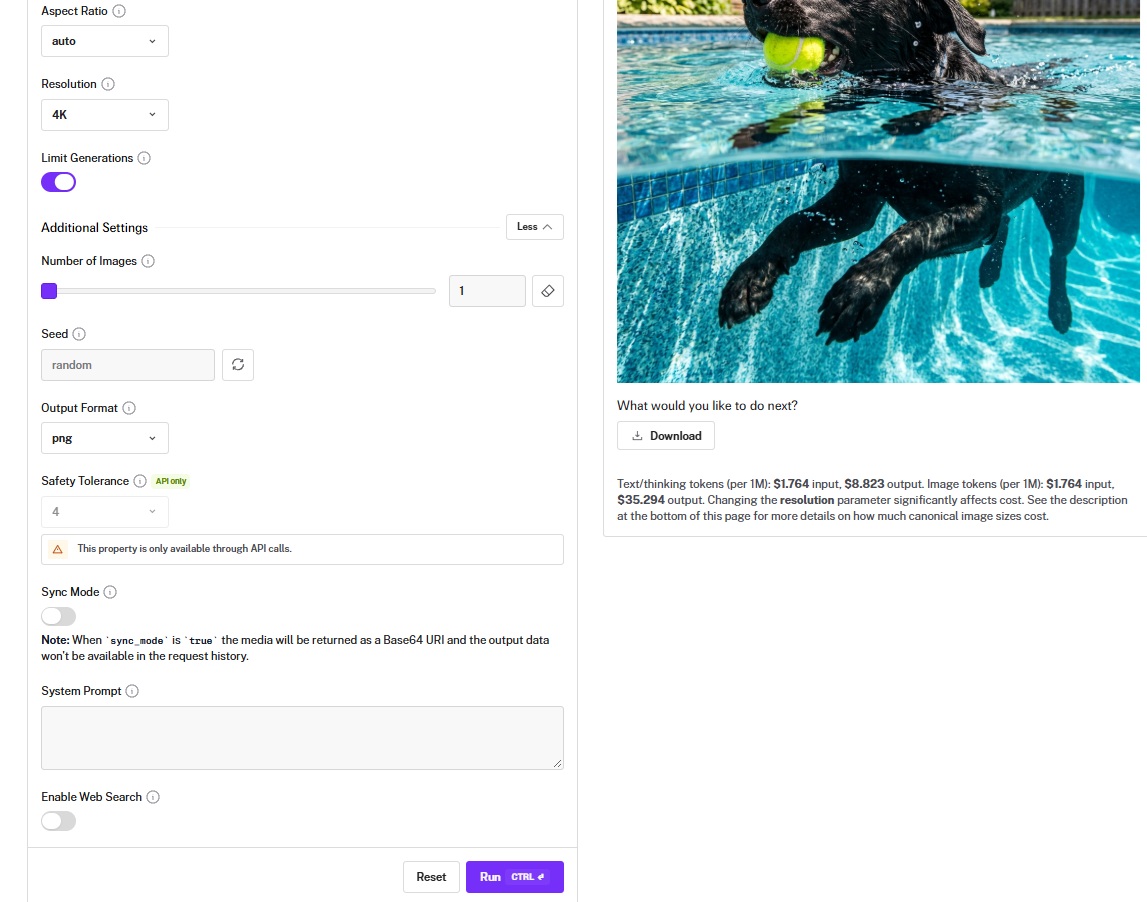
Only the edit endpoint takes source material, in two forms:
image_urls: up to 14 images, required unless the request carries a video or a PDF.video_urlandpdf_url: context files of up to 15 MB, or a YouTube link in place of a video file.
On the edit endpoint, auto usually matches the shape of the input image, while text-to-image chooses a shape from the prompt.
I'd set aspect_ratio by hand whenever an output is headed for a placement with a fixed spec, such as a 4:5 feed slot or an 8:1 site hero.
How should you set up Nano Banana 2.1 prompts for a brand?
Brand rules belong in system_prompt, written once, while the prompt carries only the shot.
Nano Banana 2.1 receives the two as separate instructions, and the system prompt steers style across the whole request.
A catalogue sends the same bottle or shoe through hundreds of requests.
When a team retypes the label wording into each of those prompts, the wording itself starts to drift from one prompt to the next.
Every example below comes from one of two invented brands: the Paris fragrance house CORVELLE and the Lake District trail running label TARNFELL.
Each brand has one system prompt, and the shot prompts that follow only describe what is new in the frame.
System prompt (CORVELLE):
You are the art director for CORVELLE, a Paris fragrance house. Every image is a photograph for print or film advertising unless the prompt names another medium. The house palette is oxblood and smoked amber. The bottle is a heavy faceted flacon in smoked amber glass with a flat, polished brass cap, rendered with accurate refraction. Its front label is ivory paper printed with "CORVELLE" in a high-contrast serif above "AMBRE DE SEL" in small spaced capitals. Never change the bottle's shape or its label wording. Add no logos or text beyond the label and whatever the prompt quotes.
System prompt (TARNFELL):
You are the art director for TARNFELL, a trail running footwear label from the English Lake District. Every image is for ecommerce, either a product page or paid social, and is a photograph unless the prompt names another medium. The house look is overcast fell light in slate grey and moss green, with one signal-orange accent. The shoe is the TARNFELL Ghyll: a low-cut trail shoe with a moss green engineered mesh upper, a slate grey rubber toe bumper, a signal-orange heel pull loop and a black outsole with deep 5 mm lugs. "TARNFELL" runs along the heel counter in white capitals. Keep the shoe's construction and wordmark exactly as described unless the prompt changes them on purpose.
With the brand rules handled, we write positions in thirds of the frame.
We also check placement on every output, since Google says Nano Banana 2.1 occasionally swaps left and right.
On the edit endpoint, our docs recommend referring to inputs by their position in image_urls.
Our prompts say image 1 and image 2 for that reason, and they name the fixed parts of each image right beside the change.
Google's name for that pattern is semantic masking, where the prompt names a single element to change and declares the rest of the image off limits.
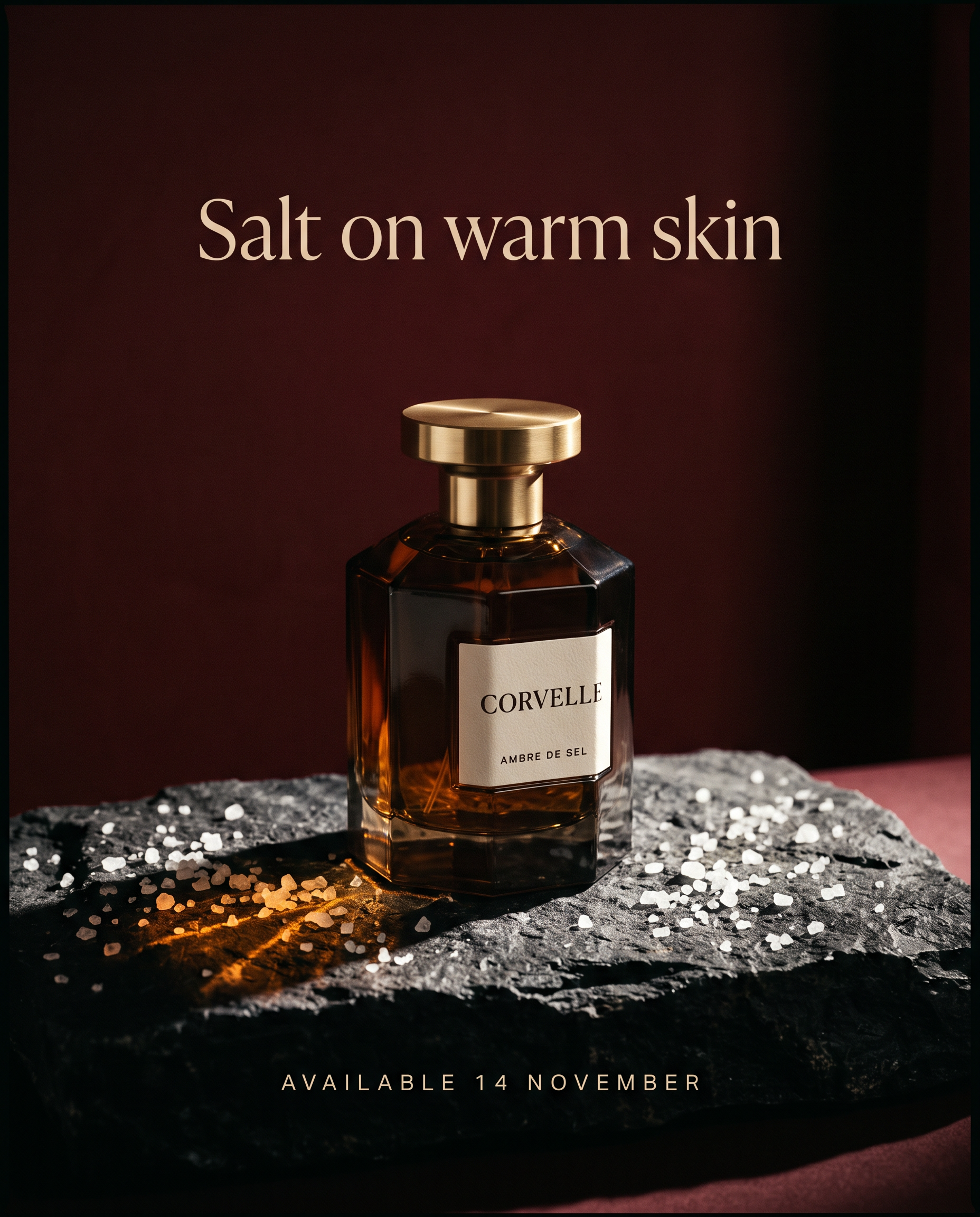
The fragrance key visual below pairs the CORVELLE system prompt with a short shot prompt:
Prompt (text-to-image, 4:5, 2K, medium thinking, CORVELLE system prompt): A winter launch key visual for Ambre de Sel, for a department store window and a 4:5 social placement. The bottle stands alone on a slab of rough black basalt scattered with coarse sea salt crystals, in front of an oxblood backdrop that falls into shadow at the edges. One hard light from the upper right throws an amber caustic through the glass onto the stone. In the upper third, centred, the line "Salt on warm skin" in a light, wide-set serif in warm ivory. Below the bottle, centred, "Available 14 November" in small spaced capitals in the same ivory.
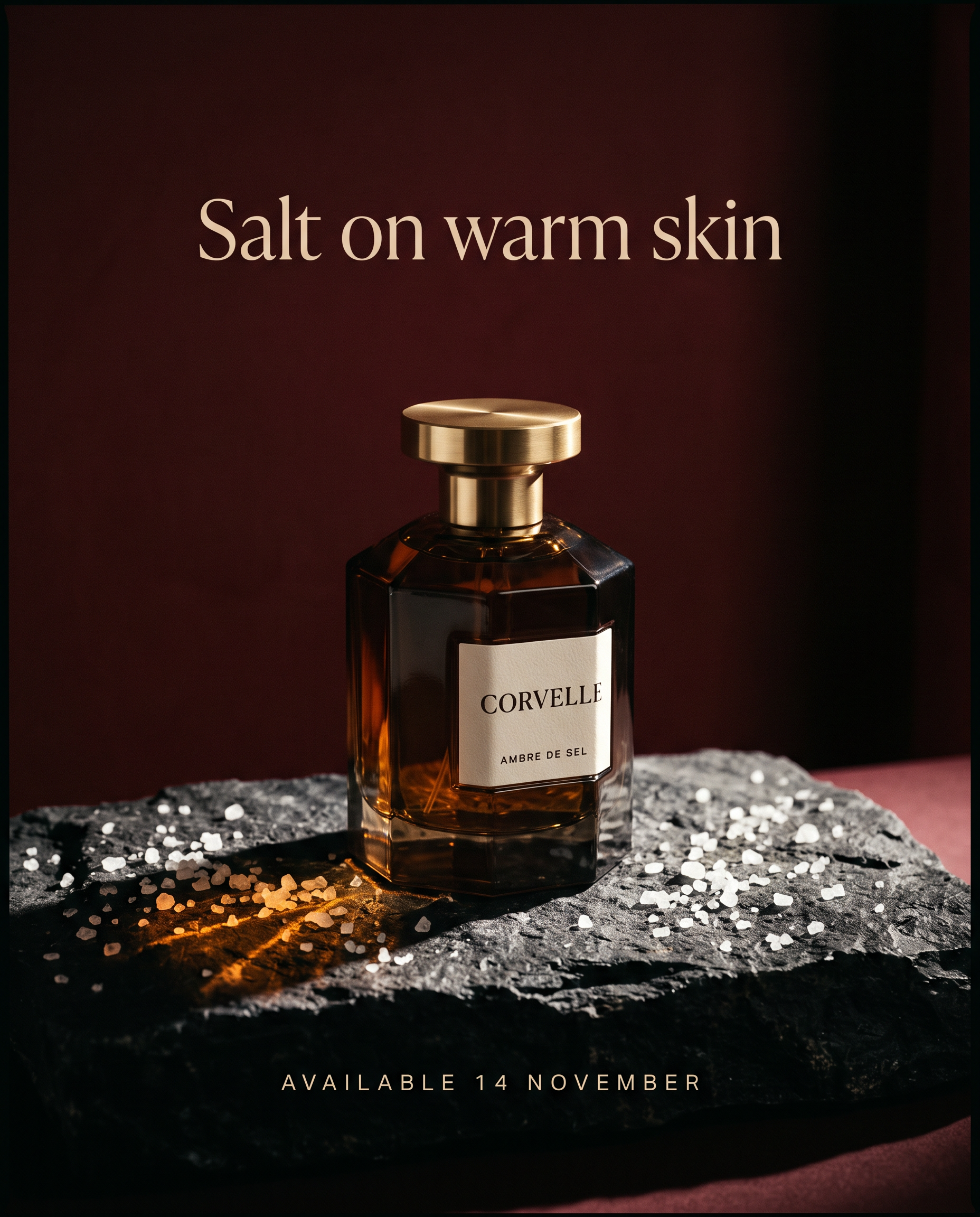
Generated using Nano Banana 2.1 on fal, an AI model from Google.
The render runs at 2K for the sake of the date line, as Google says small type may blur at 1K.
falMODEL APIs
The fastest, cheapest and most reliable way to run genAI models. 1 API, 100s of models
How do you keep one cast and one bottle consistent across a TV ad storyboard?
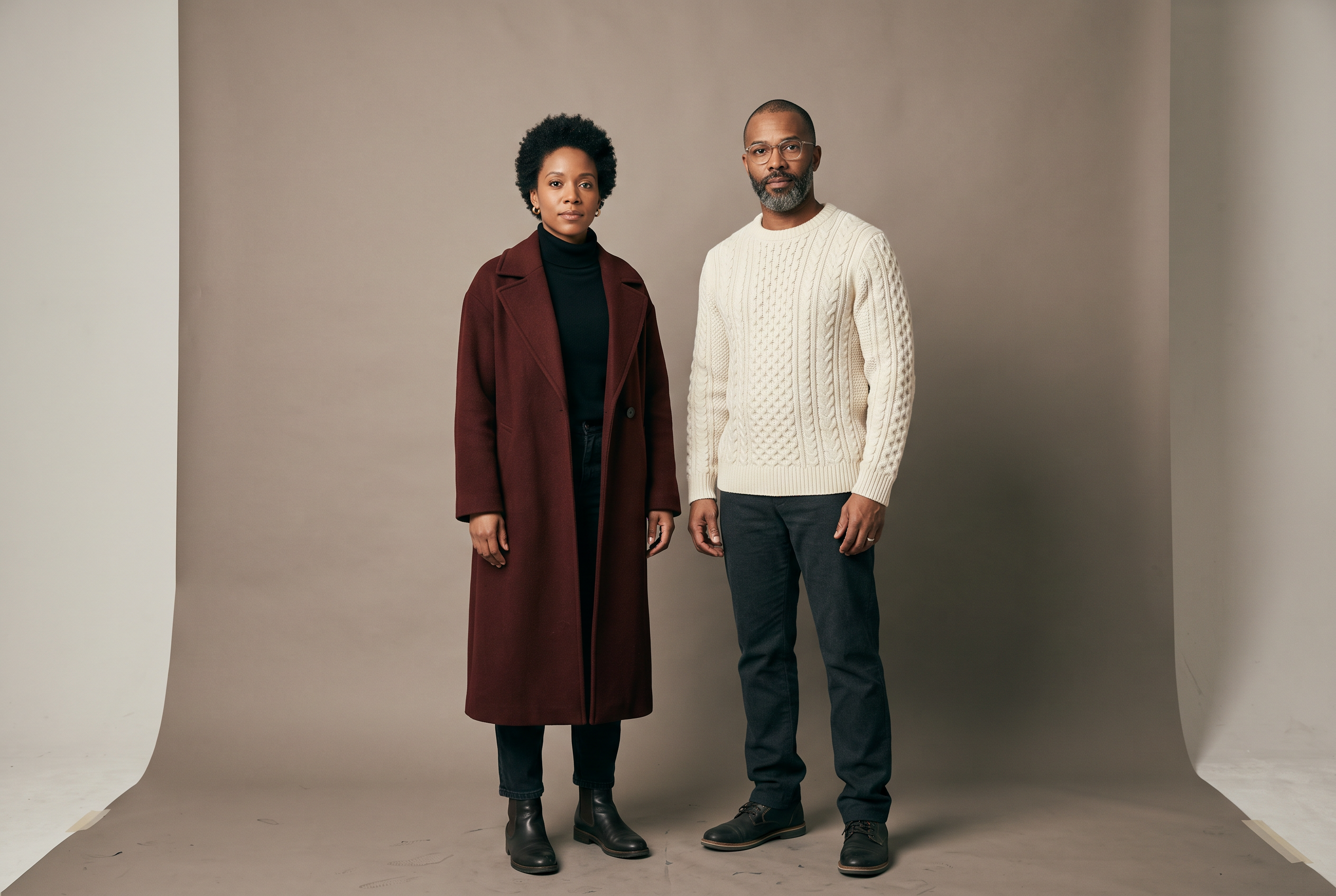
The storyboard starts from one casting image of the cast.
Every frame is then a separate Nano Banana 2.1 Edit call with the casting image and the product as references.
Google rates Nano Banana 2.1 for up to four consistent characters per request, so a two-person spot leaves headroom.
Its model card scores multi-character consistency at 1106 Elo with thinking on, higher than any other editing category Google reports for the model.
No frame is edited from another, so frame four never inherits a mistake from frame three.
The board below is a 30-second CORVELLE spot called Salt Road, told in four frames at 16:9 on high thinking.
Prompt (text-to-image, 3:2, 2K, medium thinking, CORVELLE system prompt): A casting photograph for a CORVELLE television spot: two actors standing side by side against a warm grey paper backdrop, full length, in even soft light with neutral expressions. On the left, a woman in her late thirties with short dark curls and small gold studs, wearing a long oxblood wool coat over a black roll-neck. On the right, a man in his early forties with a close-trimmed grey beard and rimless glasses, wearing an ivory cable-knit sweater and dark trousers. No props and no text.
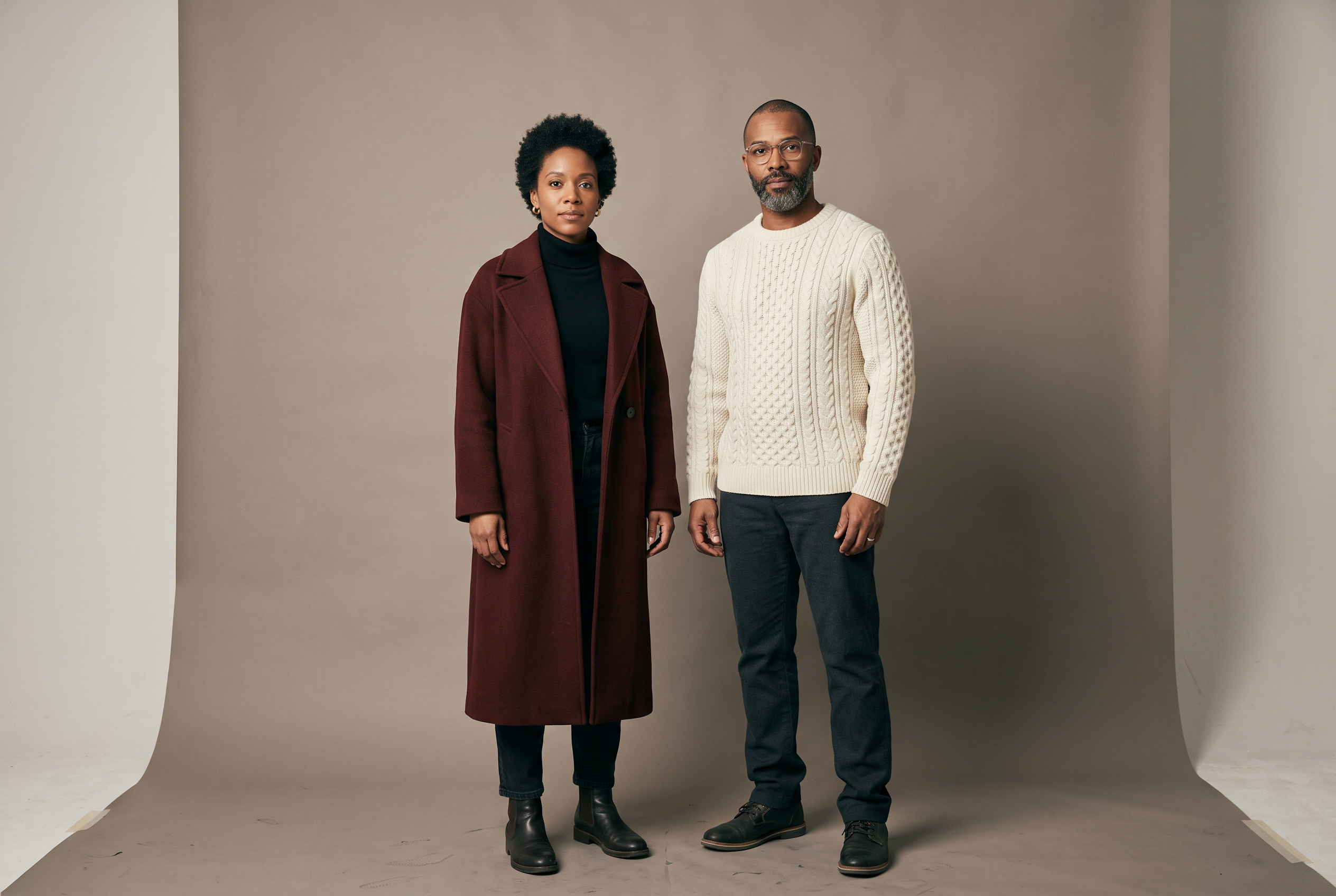
Generated using Nano Banana 2.1 on fal, an AI model from Google.
Frame 1 (edit, image 1: the casting photo, 16:9, 2K, high thinking, CORVELLE system prompt): Frame 1 of a photographic storyboard for a 30-second fragrance film. The woman and the man from image 1 walk away from camera along a stone sea wall at winter dusk, the wind lifting her coat as waves break white against the wall on the right. Ahead of them, the lights of a small harbour town. They are small in the frame, in the lower left third, with sky filling the top half. Keep both faces and outfits exactly as in image 1. No product and no text in this frame.
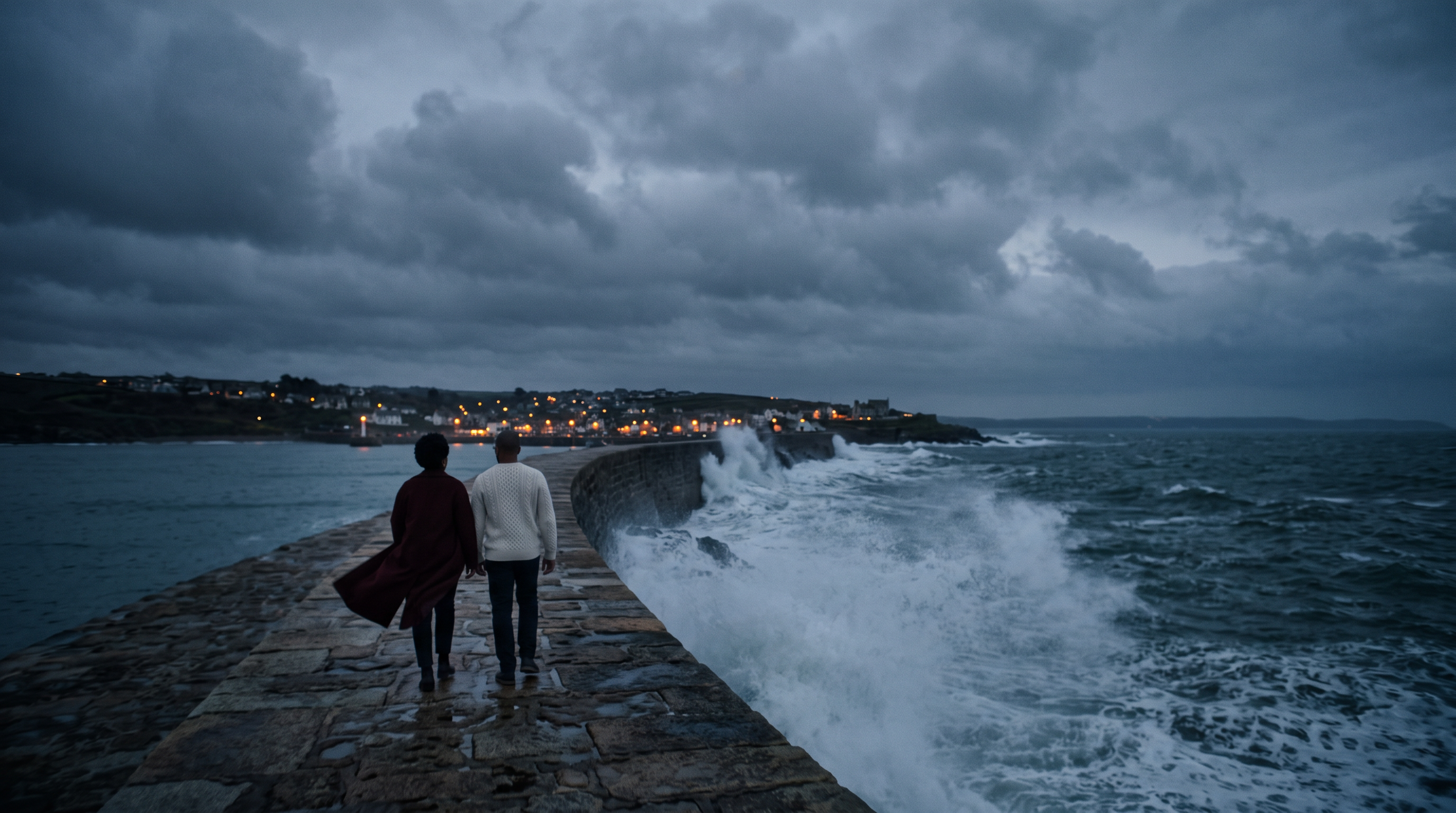
Generated using Nano Banana 2.1 Edit on fal, an AI model from Google.
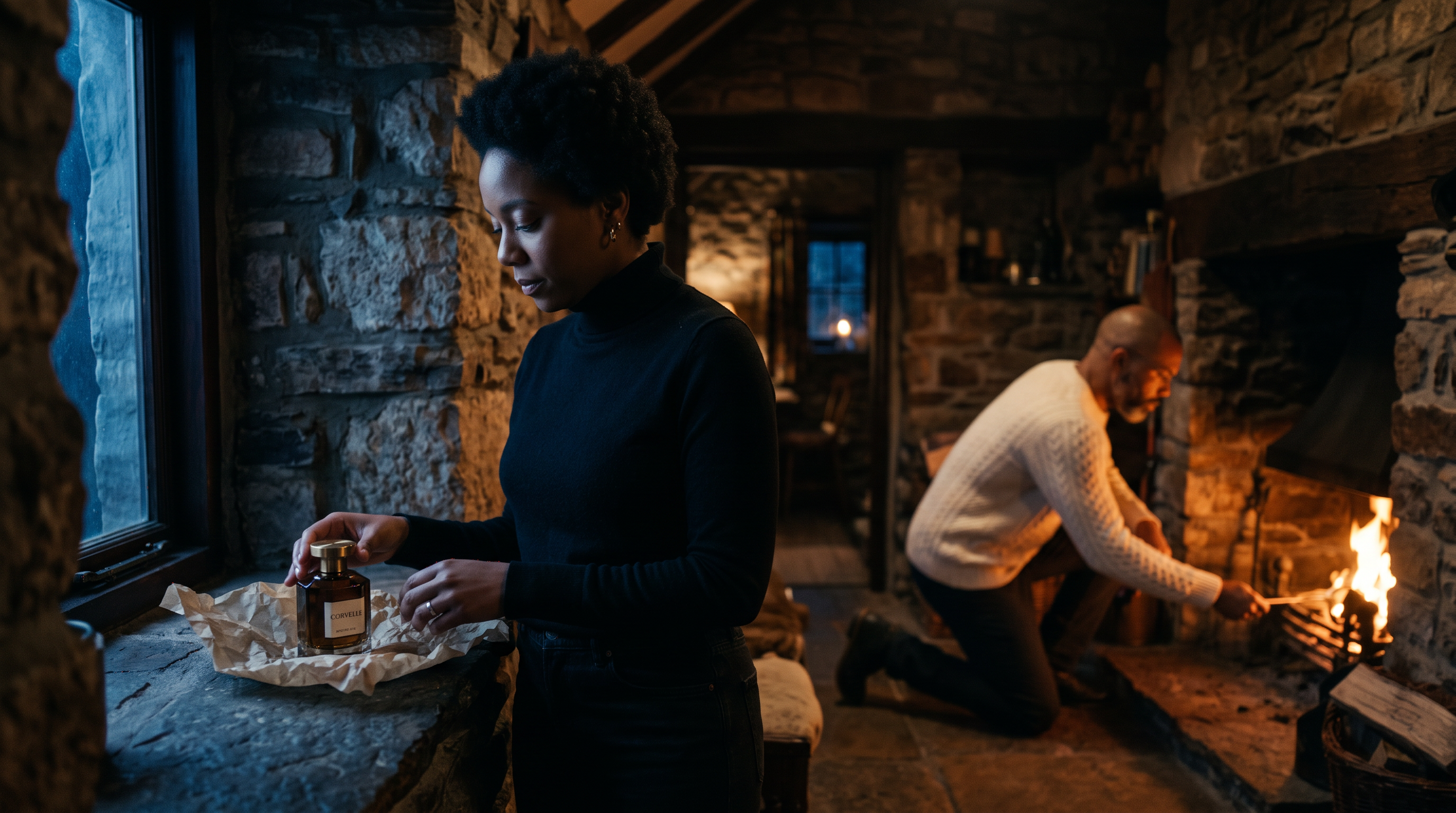
Frame 2 (edit, image 1: the casting photo, image 2: the CORVELLE key visual, 16:9, 2K, high thinking, CORVELLE system prompt): Frame 2 of the same storyboard. Inside a small stone cottage at night, the woman from image 1 has taken off her coat and stands at a deep window ledge in her black roll-neck, unwrapping the bottle from image 2 out of tissue paper. Behind her, slightly out of focus, the man from image 1 kneels to light a fire. Warm firelight comes from the right and cold blue window light from the left. The bottle and its label match image 2 exactly, and both faces match image 1. No text.
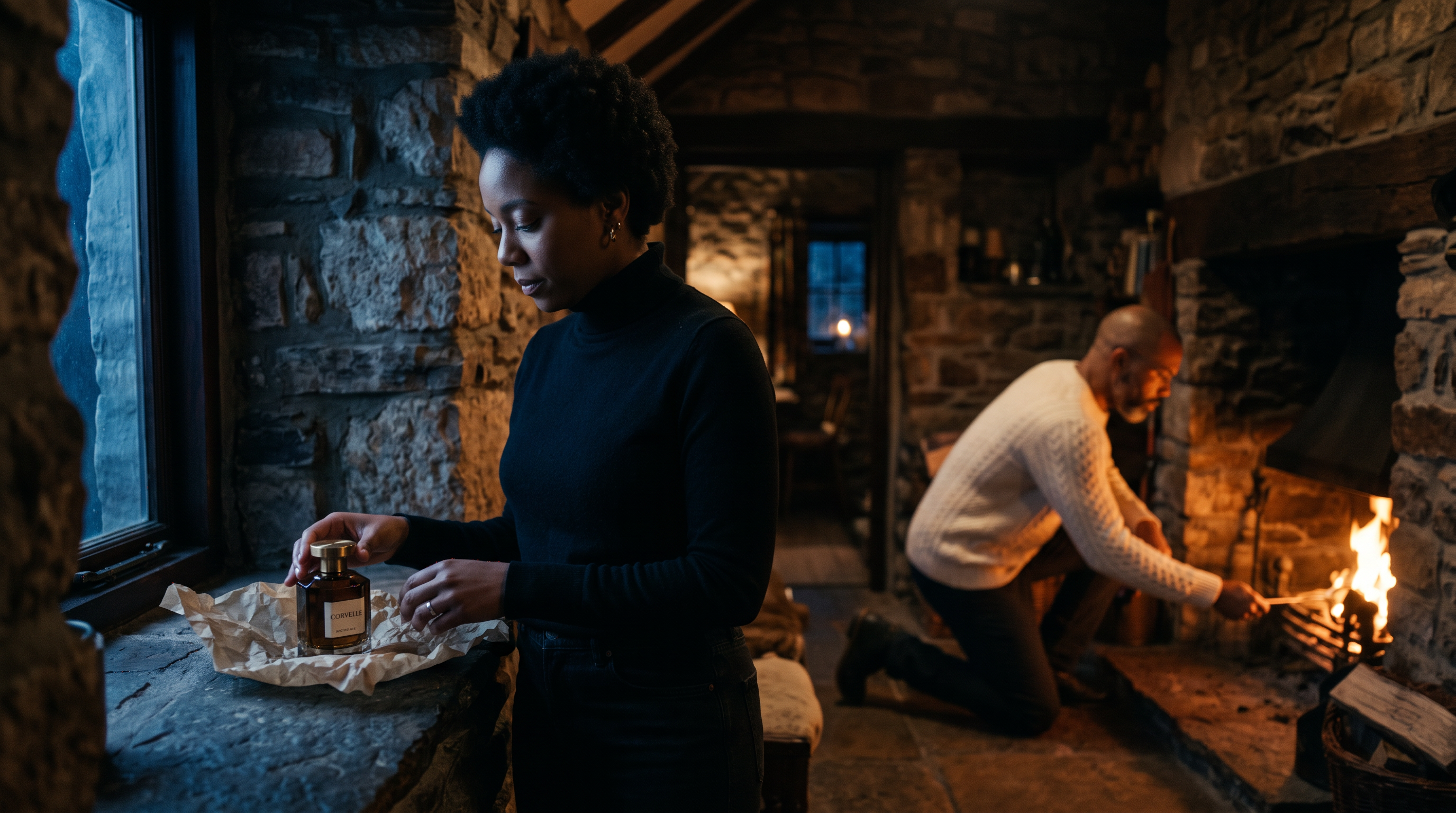
Generated using Nano Banana 2.1 Edit on fal, an AI model from Google.
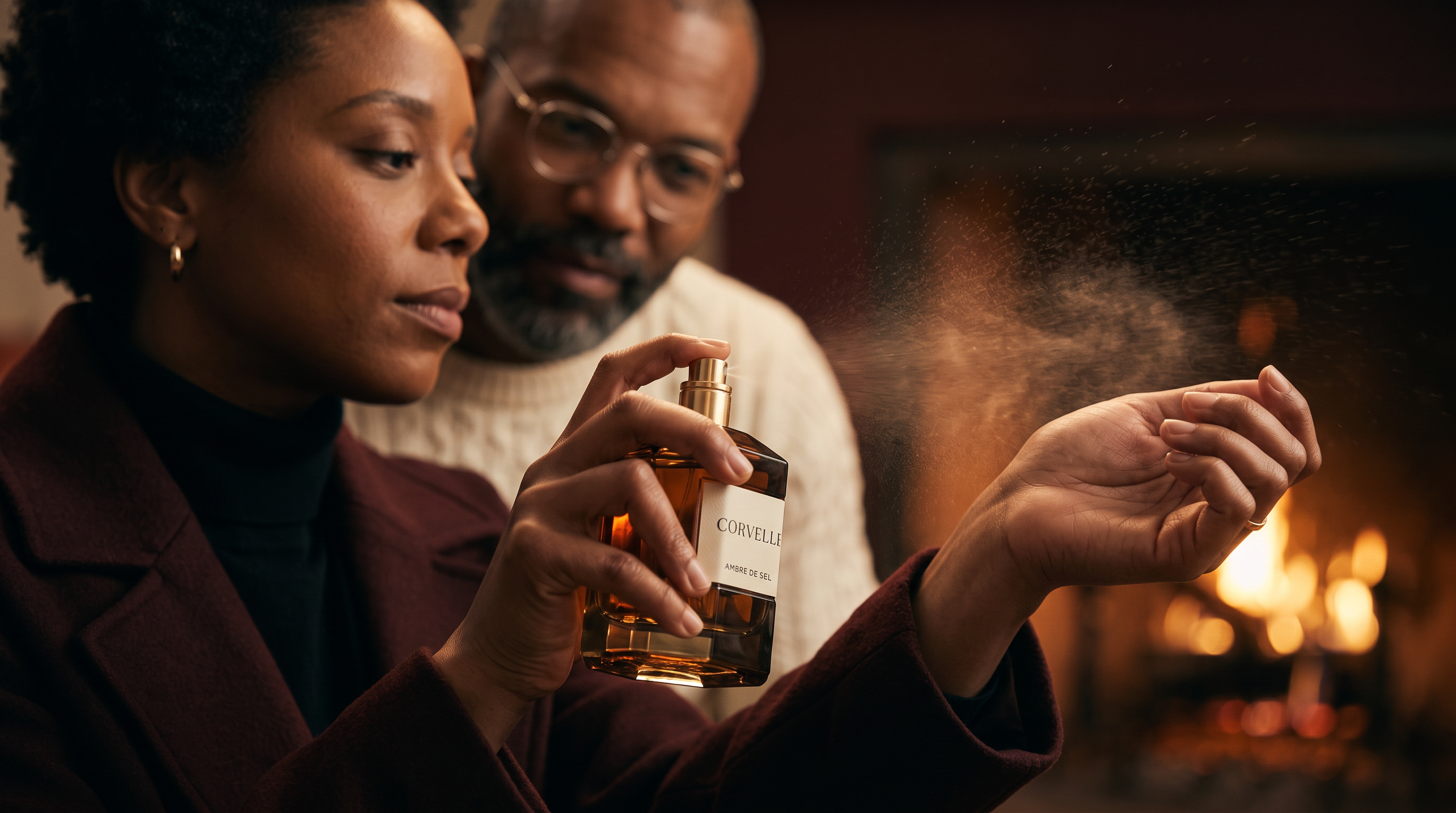
Frame 3 (edit, image 1: the casting photo, image 2: the CORVELLE key visual, 16:9, 2K, high thinking, CORVELLE system prompt): Frame 3 of the same storyboard, a close-up. The woman from image 1 sprays the bottle from image 2 onto the inside of her wrist, holding it so the front label faces the camera and reads clearly, with a fine mist caught in the firelight. The man from image 1 is a soft shape over her shoulder, leaning in. Shallow focus on the bottle and her wrist. Her face and hands match image 1, and the bottle matches image 2. No text beyond the label.
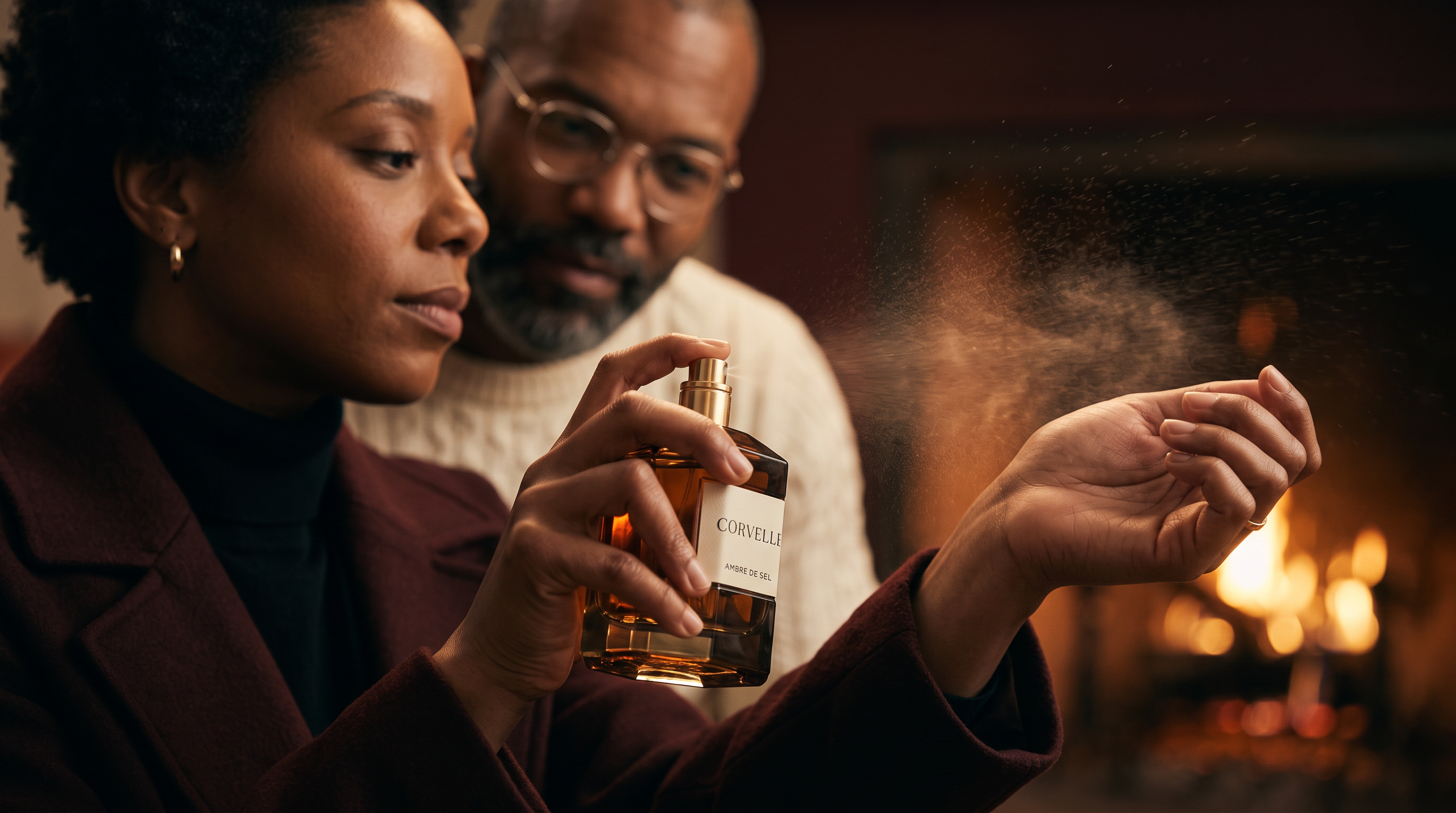
Generated using Nano Banana 2.1 Edit on fal, an AI model from Google.
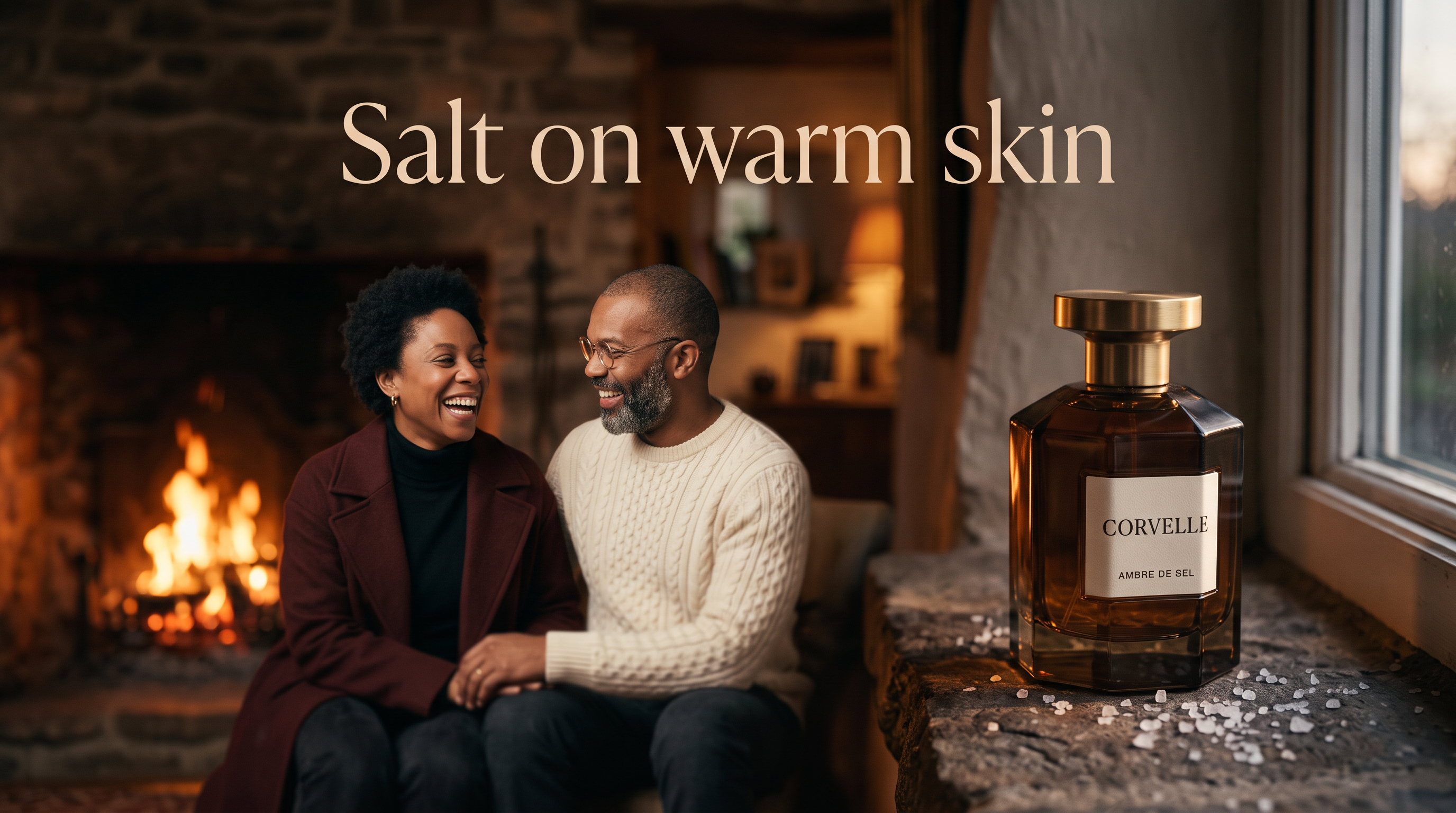
Frame 4 (edit, image 1: the casting photo, image 2: the CORVELLE key visual, 16:9, 2K, high thinking, CORVELLE system prompt): Frame 4, the end card of the same storyboard. The bottle from image 2 stands sharp on the stone window ledge in the foreground with its label facing camera, while the woman and the man from image 1 laugh by the fire behind it, out of focus. In the upper third, centred, "Salt on warm skin" in a light, wide-set serif in warm ivory. Keep the bottle consistent with image 2 and both people consistent with image 1.
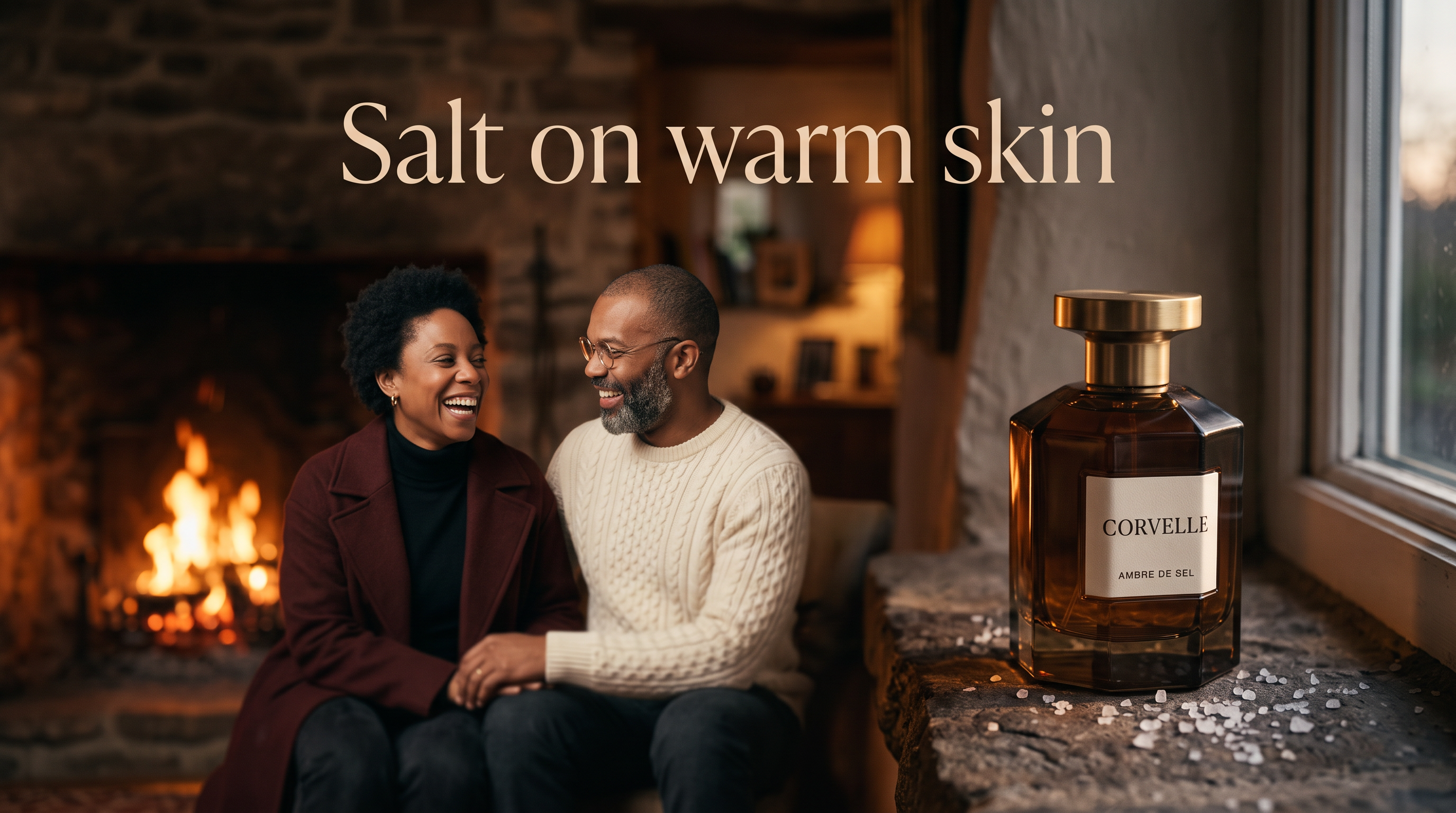
Generated using Nano Banana 2.1 Edit on fal, an AI model from Google.
Frame 1 carries only the casting photo, because the bottle is not in shot yet and an unused reference would still bill as input tokens.
When a director adds a fifth frame after review, the same casting image goes in again with no second casting run.
Can Nano Banana 2.1 relight a product shot without moving the product?
Yes, a Nano Banana 2.1 edit can swap the light in a scene from a written description while the bottle and camera angle hold their positions.
For a fragrance house, one approved key visual becomes a December gifting version with no second shoot to book.
Our relight prompts describe the new light the way a gaffer would, by source and direction, with the untouched objects listed at the end.
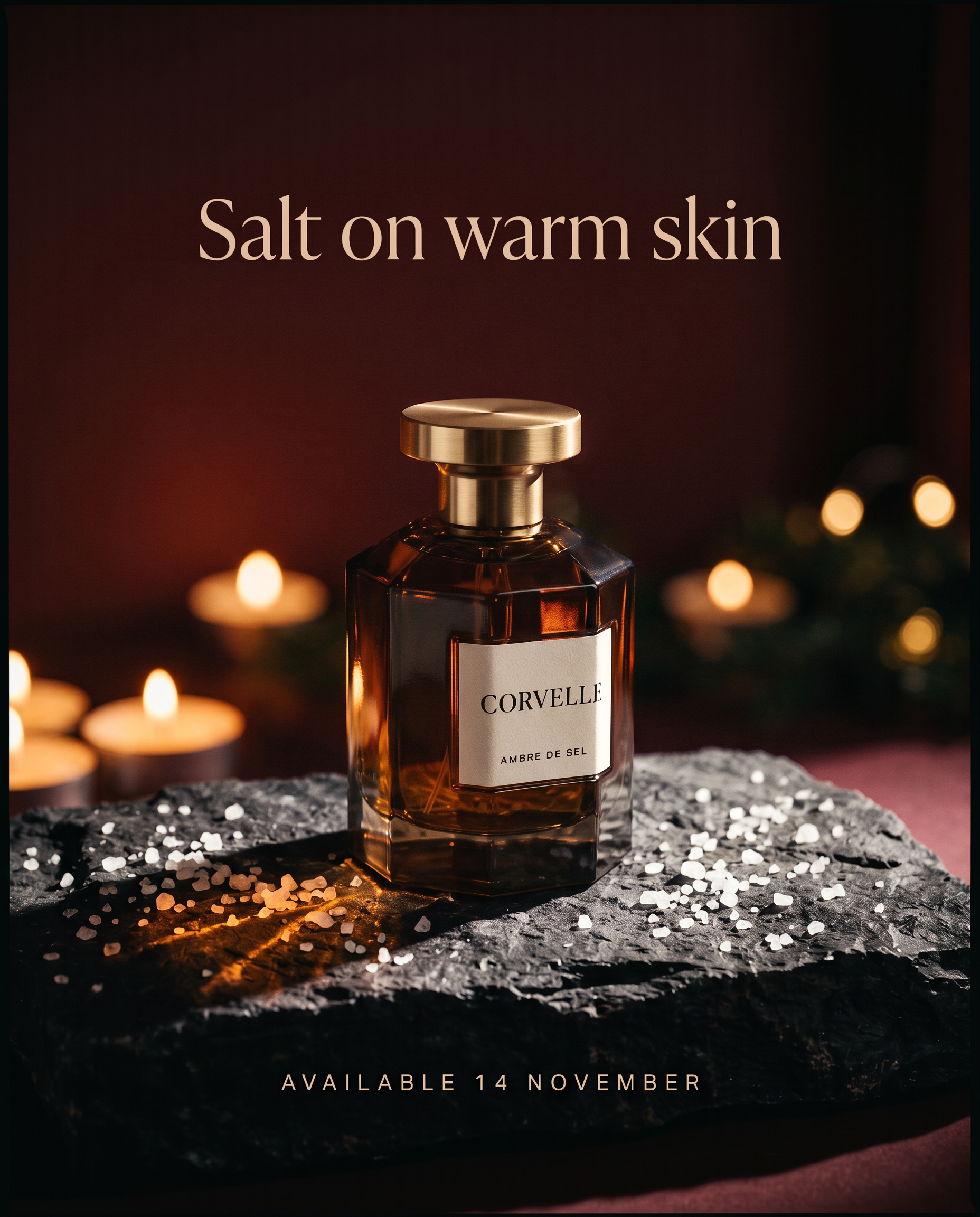
Prompt (edit, input: the CORVELLE key visual, auto ratio, 2K, medium thinking, CORVELLE system prompt): Change only the lighting in this image, turning it into a late evening holiday scene. The hard light from the upper right is gone, and the bottle is now lit by a cluster of low candles just out of frame on the left, casting a warm flicker through the glass and a long soft shadow across the basalt to the right. The backdrop falls deeper into oxblood shadow, with a few out-of-focus warm points of light behind the bottle. Keep the bottle, label, salt crystals, basalt slab, both lines of copy and camera angle untouched.
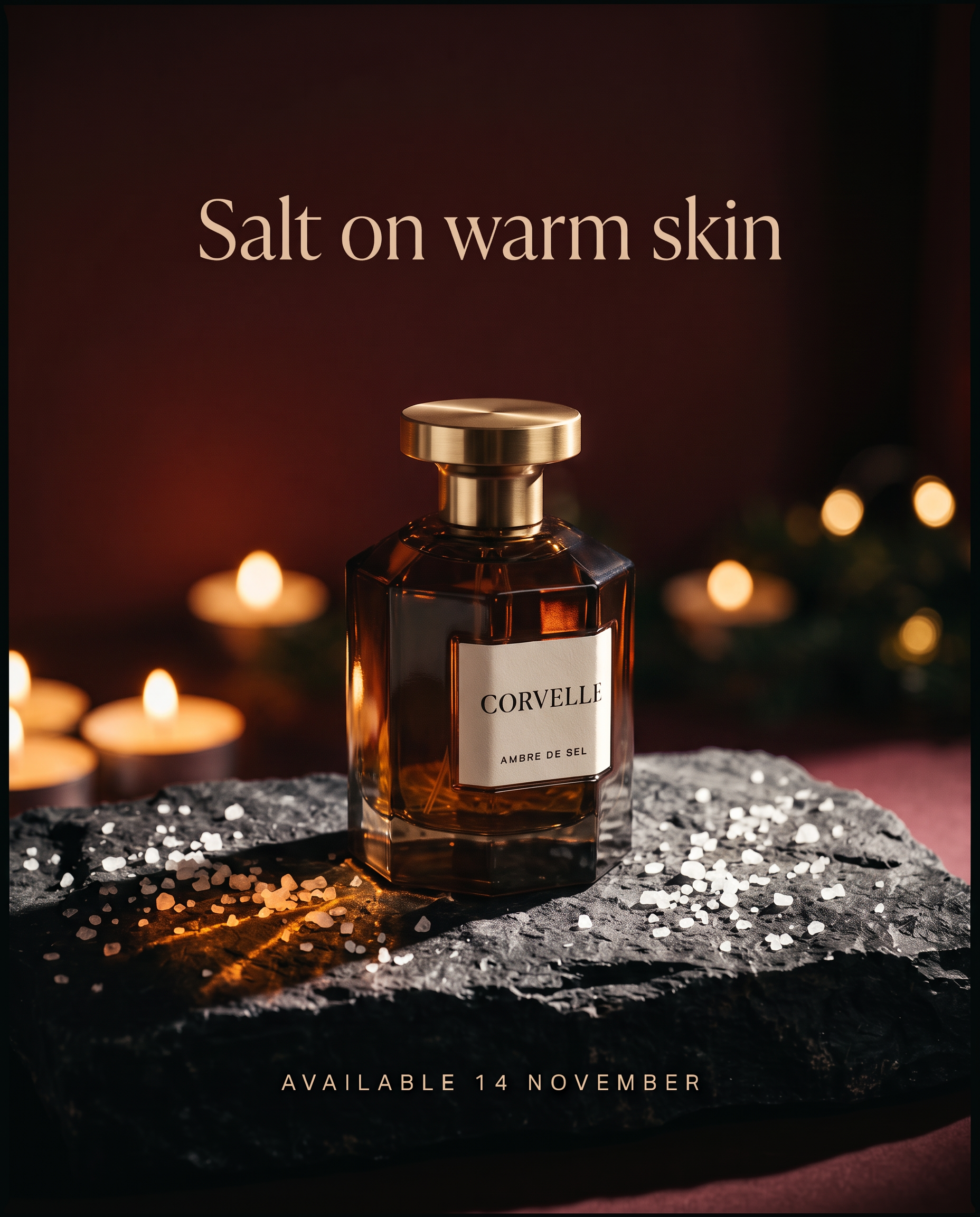
Generated using Nano Banana 2.1 Edit on fal, an AI model from Google.
What is the safest way to localise ad copy in a Nano Banana 2.1 image?
We localise CORVELLE ads with a Nano Banana 2.1 edit on the finished English visual, quoting the approved translation so that only the copy changes.
Google highlights localised text rendering in several languages for Nano Banana 2.1, and our docs name localised marketing as a core use.
The translation comes from us and never from the model, because an approved market line usually arrives from a local team and would need checking either way.
Our prompts also state that the label keeps its Latin lettering, so the label is never part of the translation request.
Both edits start from the English output, and a native reader in each market signs off the result before launch.
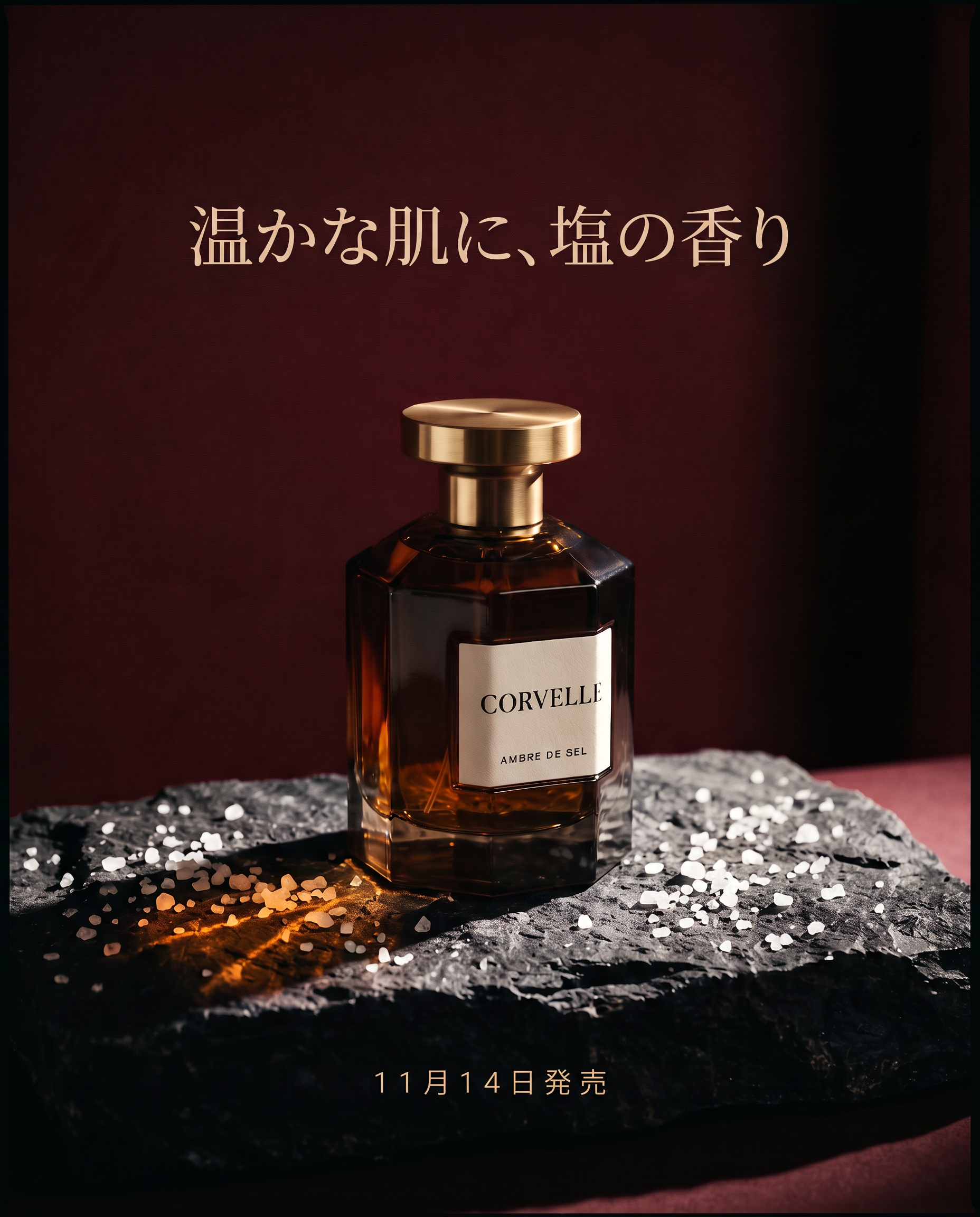
Prompt (edit, input: the CORVELLE key visual, auto ratio, 2K, medium thinking, CORVELLE system prompt): In this image, change only the two lines of advertising copy. Replace "Salt on warm skin" with "温かな肌に、塩の香り" in a light Mincho typeface in warm ivory, at the same size and position. Replace "Available 14 November" with "11月14日発売" in the same small spaced style. Leave the bottle, its Latin-lettered label, the basalt and the light as they are.
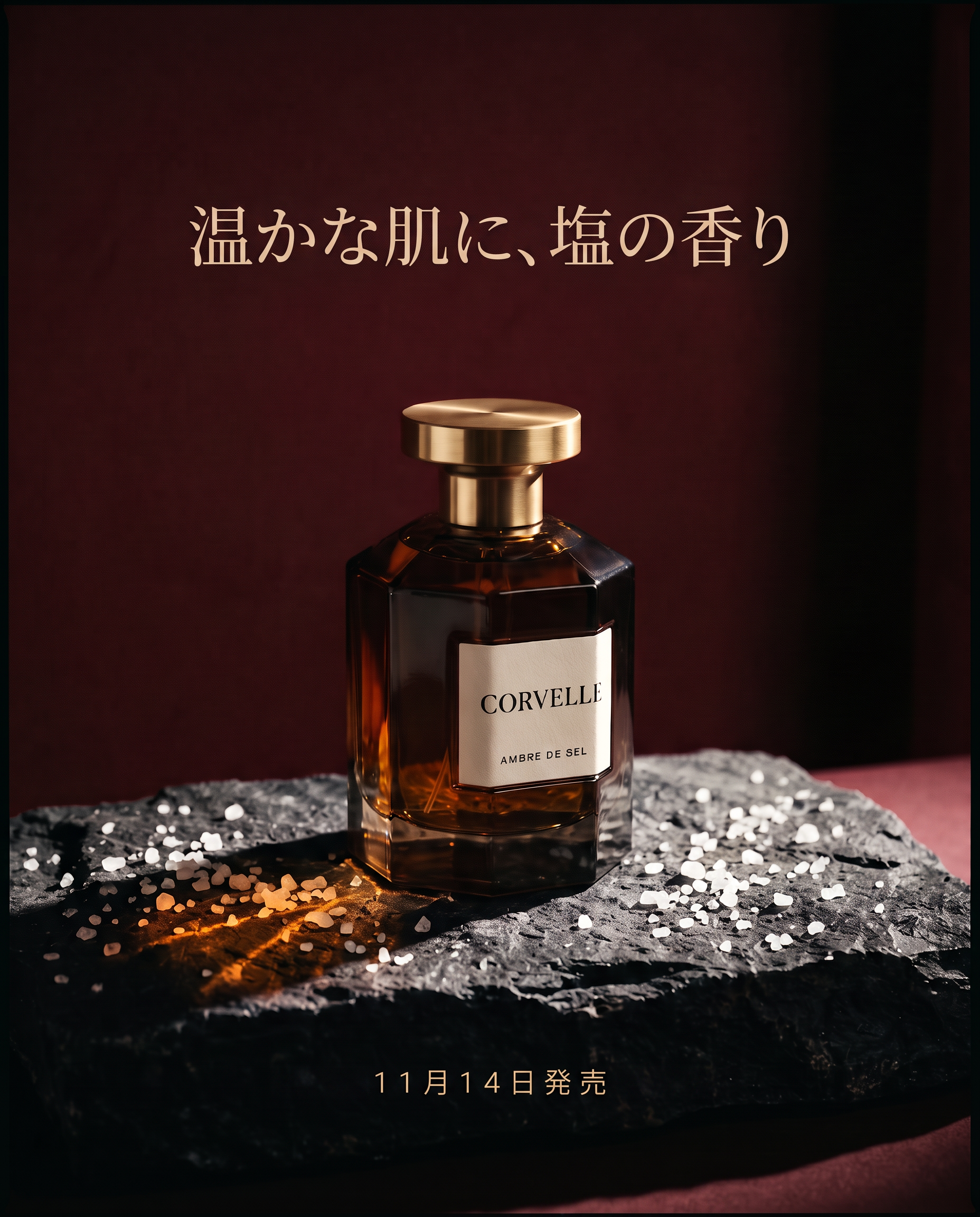
Generated using Nano Banana 2.1 Edit on fal, an AI model from Google.
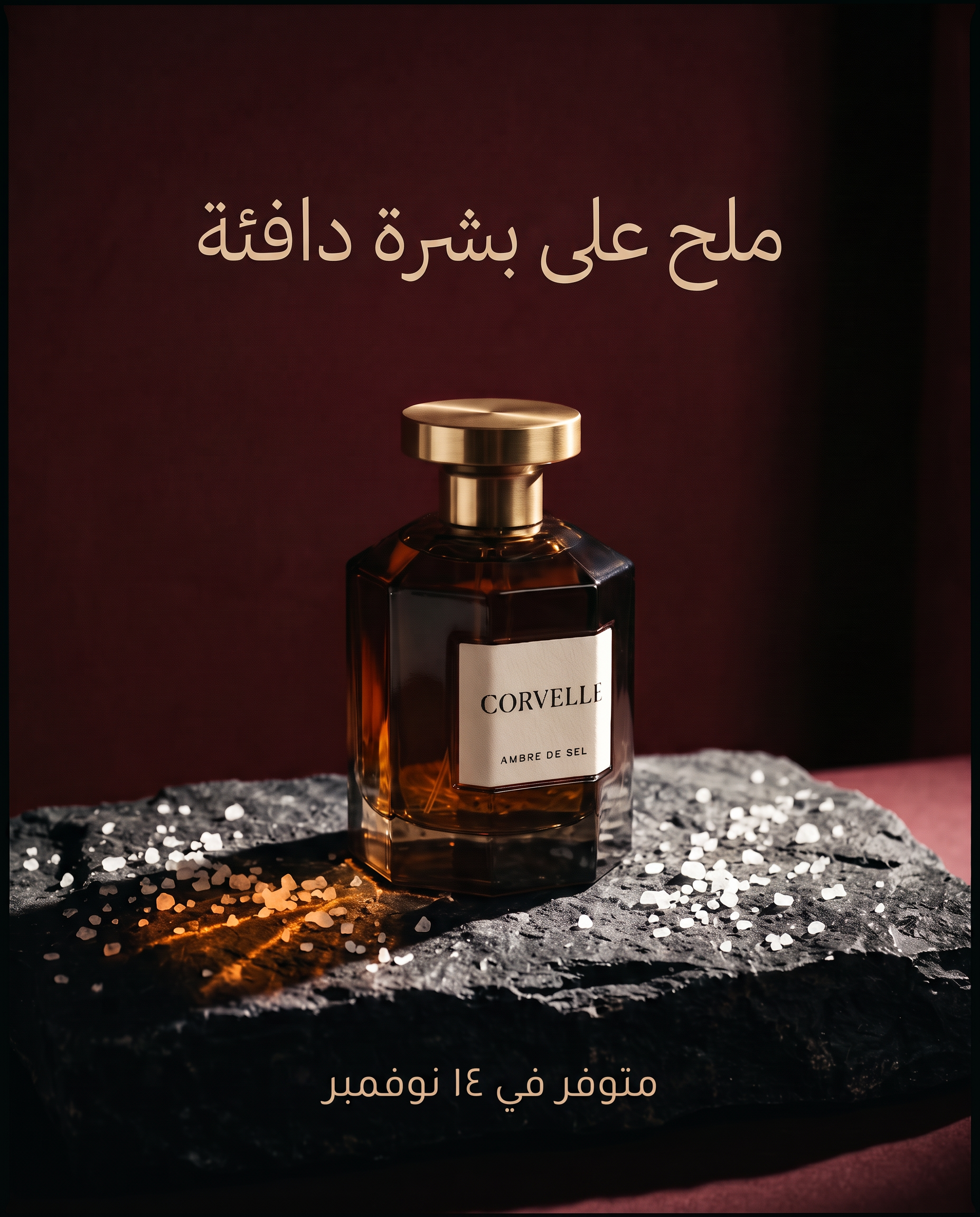
Prompt (edit, input: the CORVELLE key visual, auto ratio, 2K, medium thinking, CORVELLE system prompt): Edit only the two lines of advertising copy, for the Gulf market. Replace "Salt on warm skin" with "ملح على بشرة دافئة" in a light Naskh typeface in warm ivory, centred in the same position and set right to left. Replace "Available 14 November" with "متوفر في ١٤ نوفمبر" in a smaller weight of the same face. Nothing else in the image changes, and the label keeps its Latin lettering.
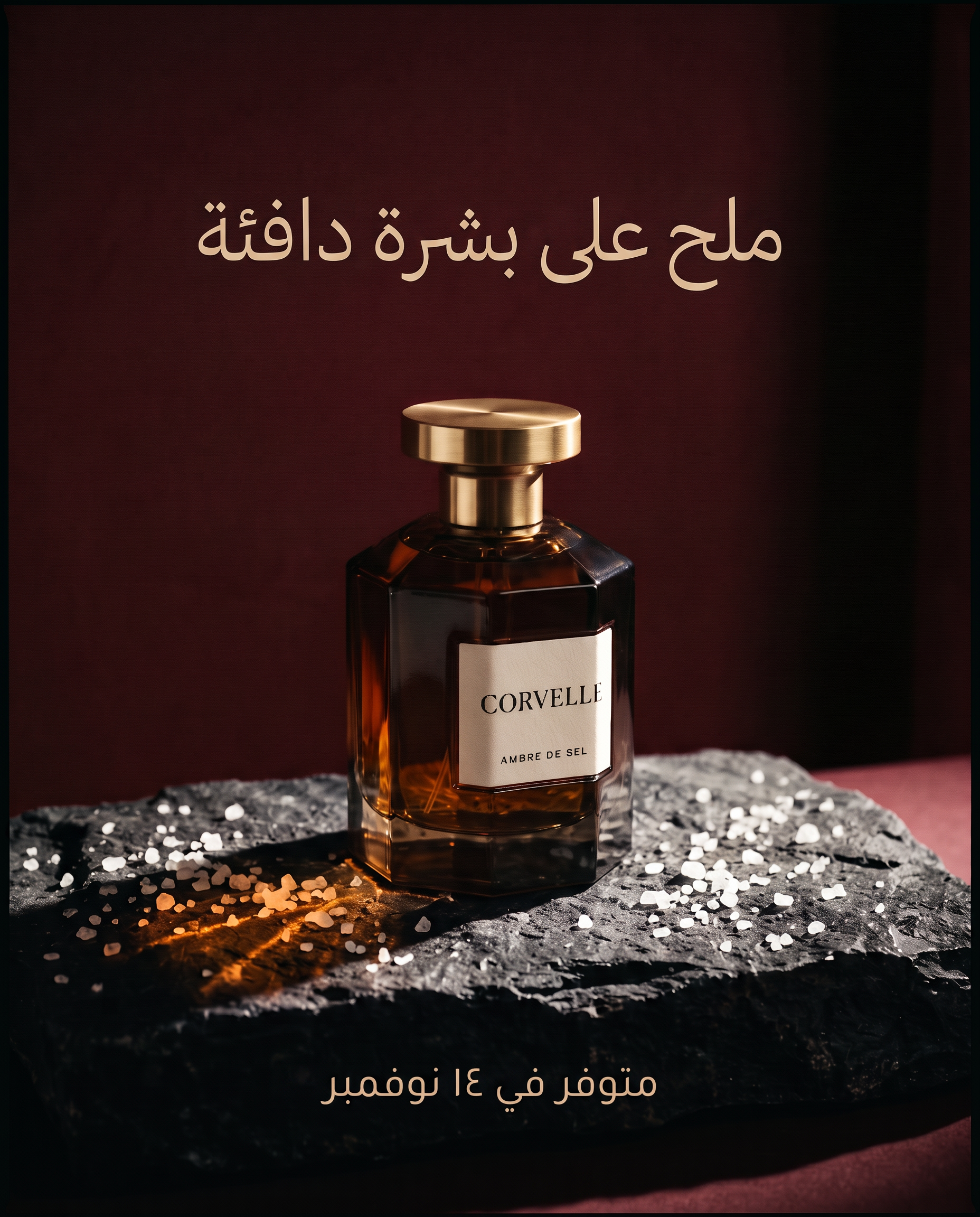
Generated using Nano Banana 2.1 Edit on fal, an AI model from Google.
How do you turn a footwear sketch into a product render with Nano Banana 2.1?
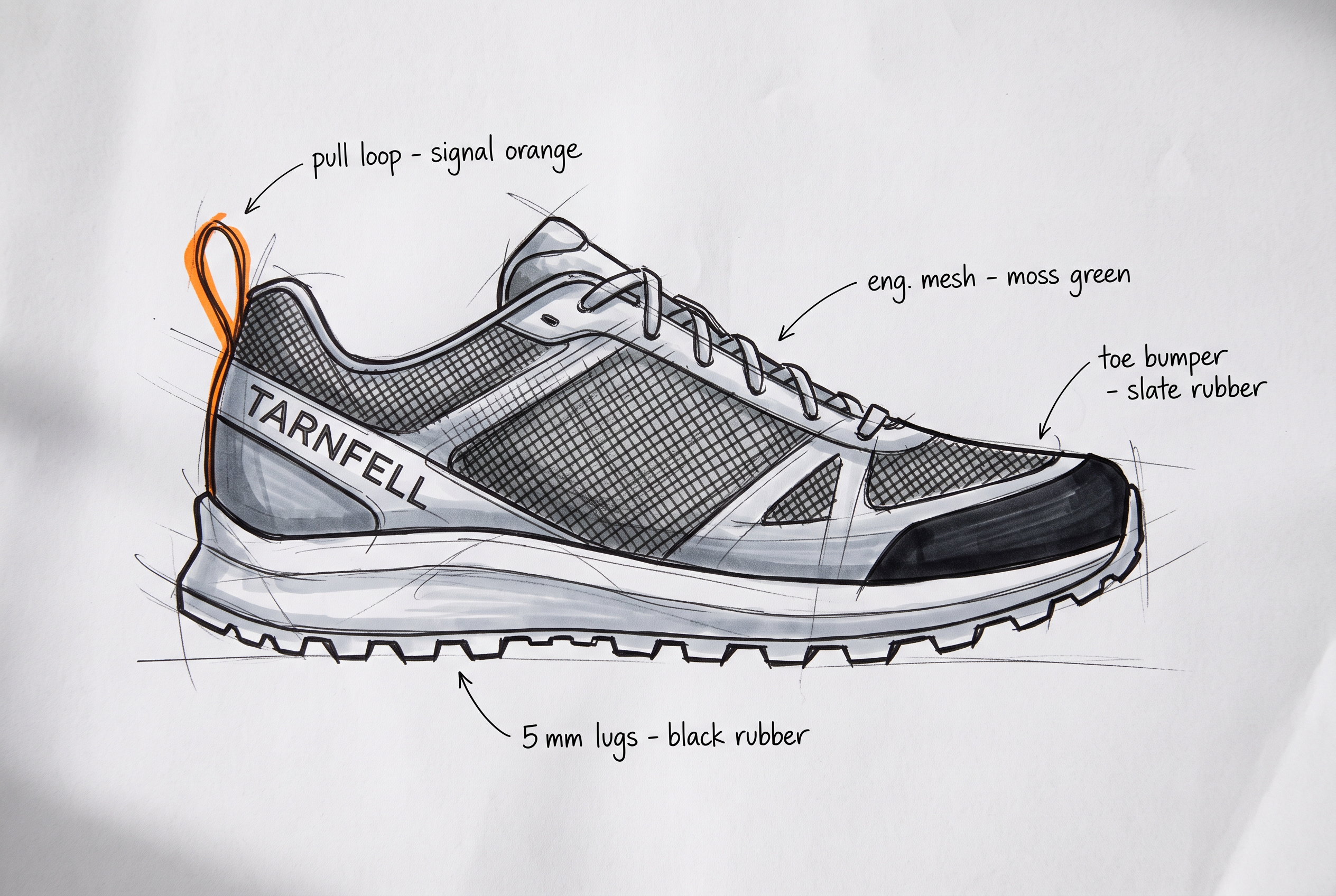
Designers can send a rough sketch to the Nano Banana 2.1 edit endpoint as the input image, and the model refines it into a finished one.
A TARNFELL marker drawing can reach the product page as a render before any sample exists.
A direct-to-consumer label can open pre-orders on that render while the first samples are still at the factory, as long as the final product matches it.
We keep the designer's written notes on the sketch, and the prompt tells the model to read them as material callouts and leave them out of the render.
Prompt (edit, input: a marker sketch of the TARNFELL Ghyll, auto ratio, 2K, medium thinking, TARNFELL system prompt): A footwear designer's marker sketch of the TARNFELL Ghyll on white layout paper, lateral side view of a right shoe with the toe pointing right, drawn in black fineliner and cool grey markers. Cross-hatching fills the upper to mark the engineered mesh, a solid black marker band wraps the toe for the bumper, and the outsole shows deep, evenly spaced lugs drawn in profile. The heel pull loop is the only colour, a quick stroke of orange marker. "TARNFELL" is lettered along the heel counter. Short handwritten notes with thin leader lines read "eng. mesh - moss green", "toe bumper - slate rubber", "pull loop - signal orange" and "5 mm lugs - black rubber". Loose construction lines, no background and no other text.
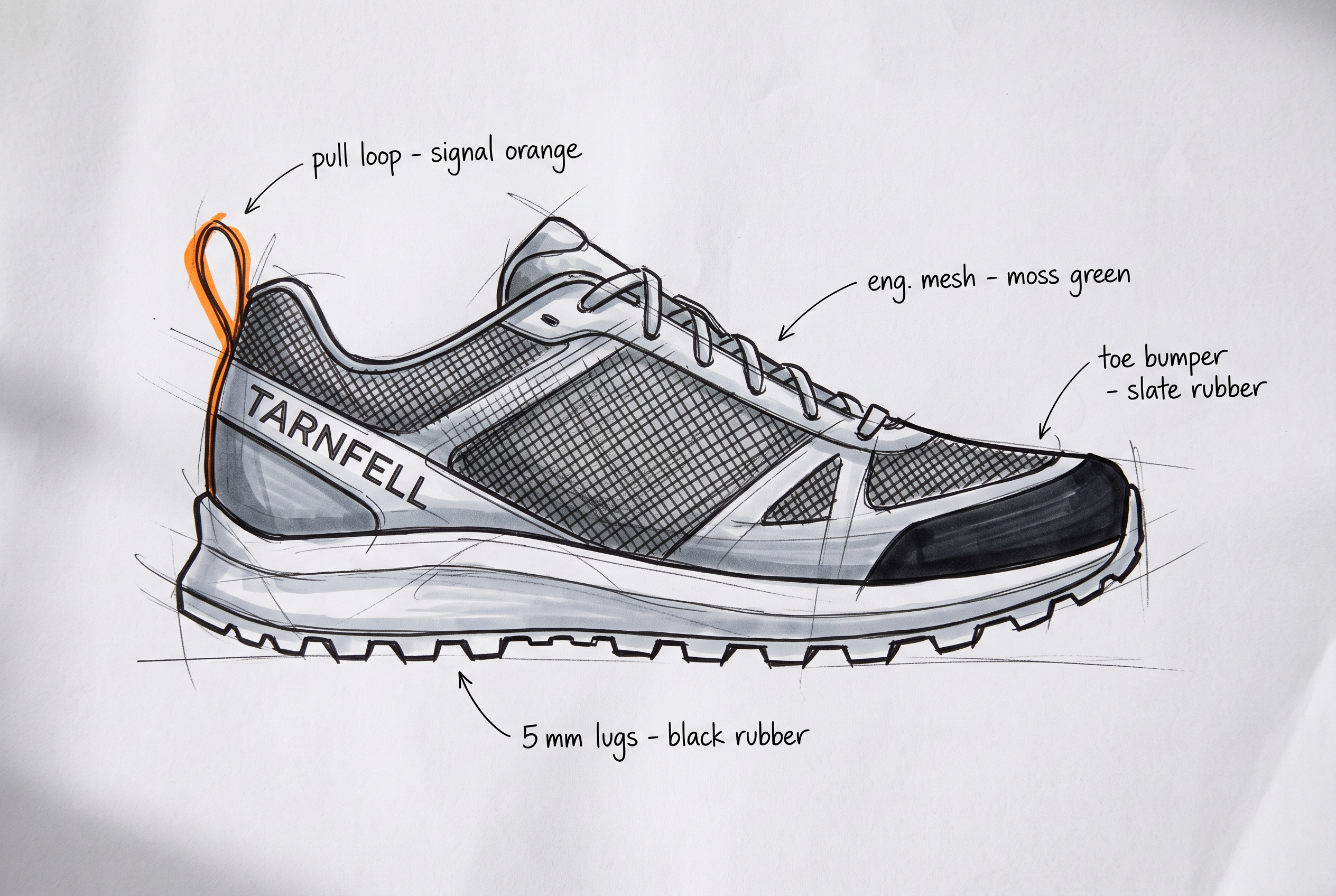
Generated using Nano Banana 2.1 Edit on fal, an AI model from Google.
And this was the final output I got:
Prompt: Render this marker sketch as a finished product image of the TARNFELL Ghyll for a product page, lateral side view, with the shoe floating just above a pale concrete floor and a soft contact shadow beneath it. Follow the sketch's proportions and lug pattern exactly. Read the hatched areas as engineered mesh and the solid black band as the toe bumper. Soft overcast top light and true-to-life colour. Remove every sketch line and annotation from the final image.
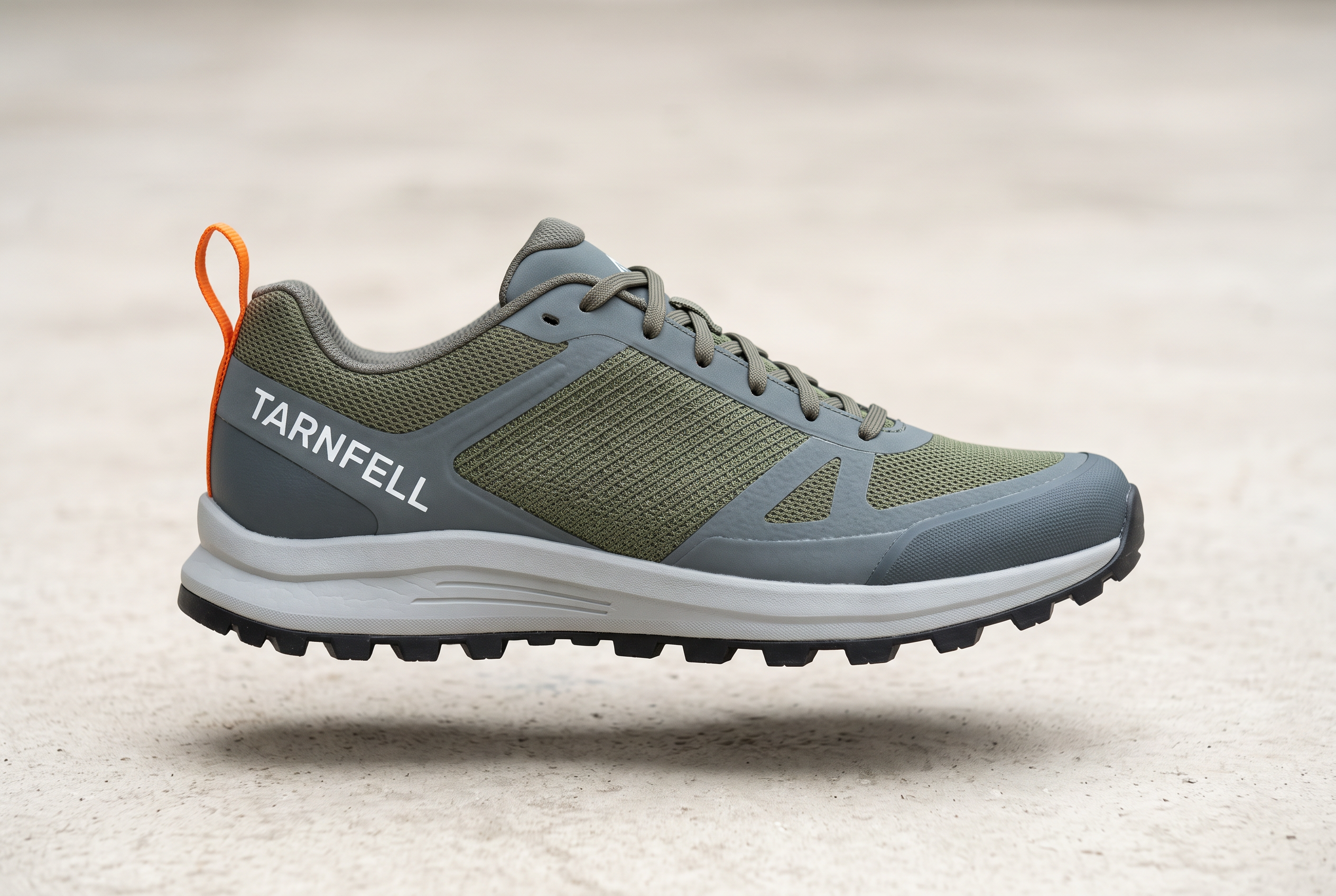
Generated using Nano Banana 2.1 Edit on fal, an AI model from Google.
What can Nano Banana 2.1 build from a product spec PDF?
With a spec sheet passed through pdf_url, Nano Banana 2.1 can lay out a marketplace listing infographic whose figures come from the document.
Our docs name summary infographics among the outputs a PDF or video input supports, and PDFs can be up to 15 MB.
The image and the product listing then draw on one file, which gives the team a single source to check against.
We set thinking to high for this one, because Google's infographic factuality figures are a thinking-on result.
Prompt (edit, pdf_url: the Ghyll spec sheet, image 1: the Ghyll render, 1:1, 2K, high thinking, TARNFELL system prompt): Using the attached specification sheet and the shoe in image 1, design the second image of a marketplace listing as a square infographic on a light warm grey background. The shoe in three-quarter view fills the left half. On the right, four callouts with thin leader lines point to the matching parts of the shoe, each with a short label and its figure from the specification sheet: lug depth, heel-to-toe drop, weight and stack height. Across the top, "TARNFELL GHYLL" in condensed capitals. Use only figures that appear in the document, and spell every label exactly as the document does.
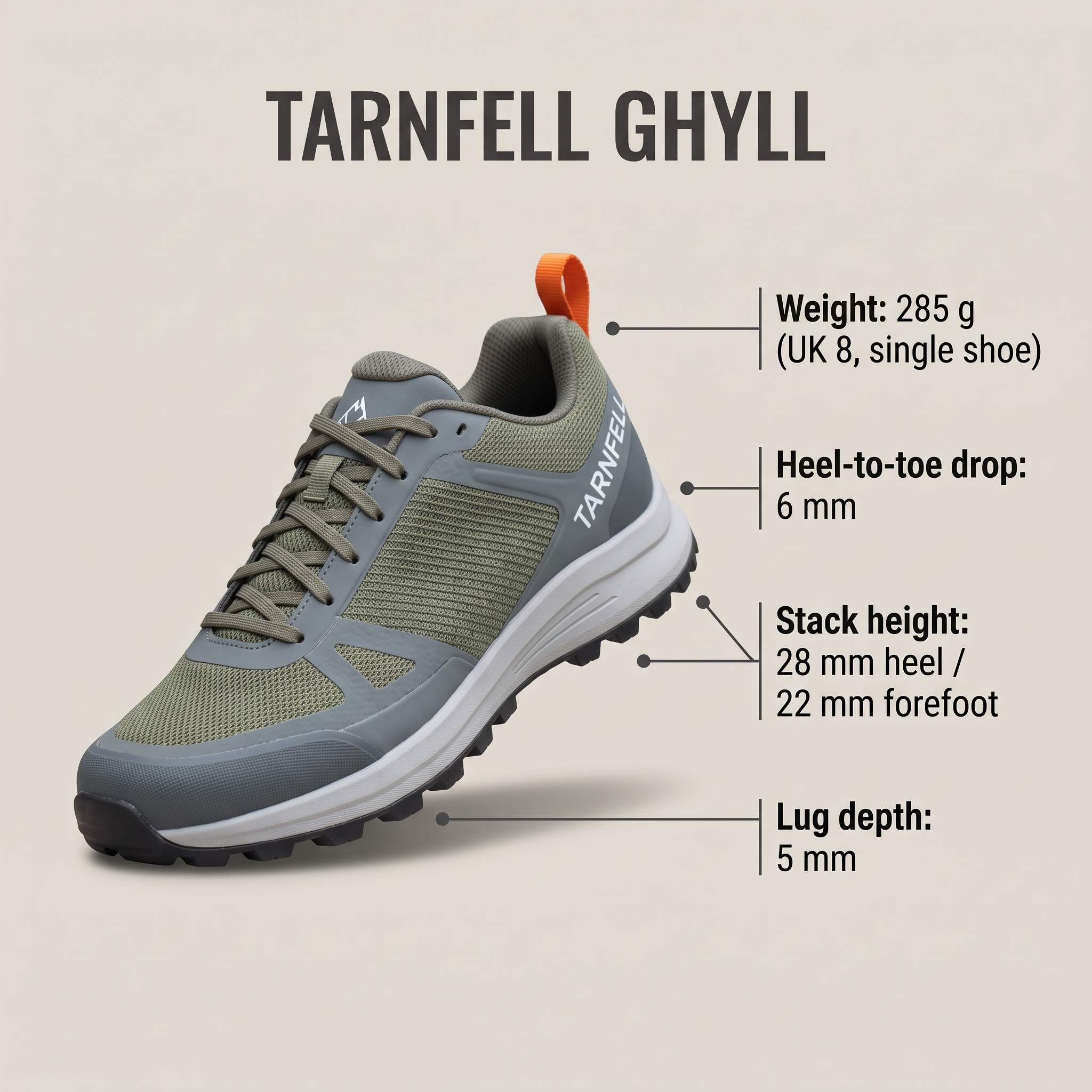
Generated using Nano Banana 2.1 Edit on fal, an AI model from Google.
We check every figure on the output against the PDF before upload, since a neat layout is no proof the numbers were read correctly.
How does mask-based editing work on Nano Banana 2.1?
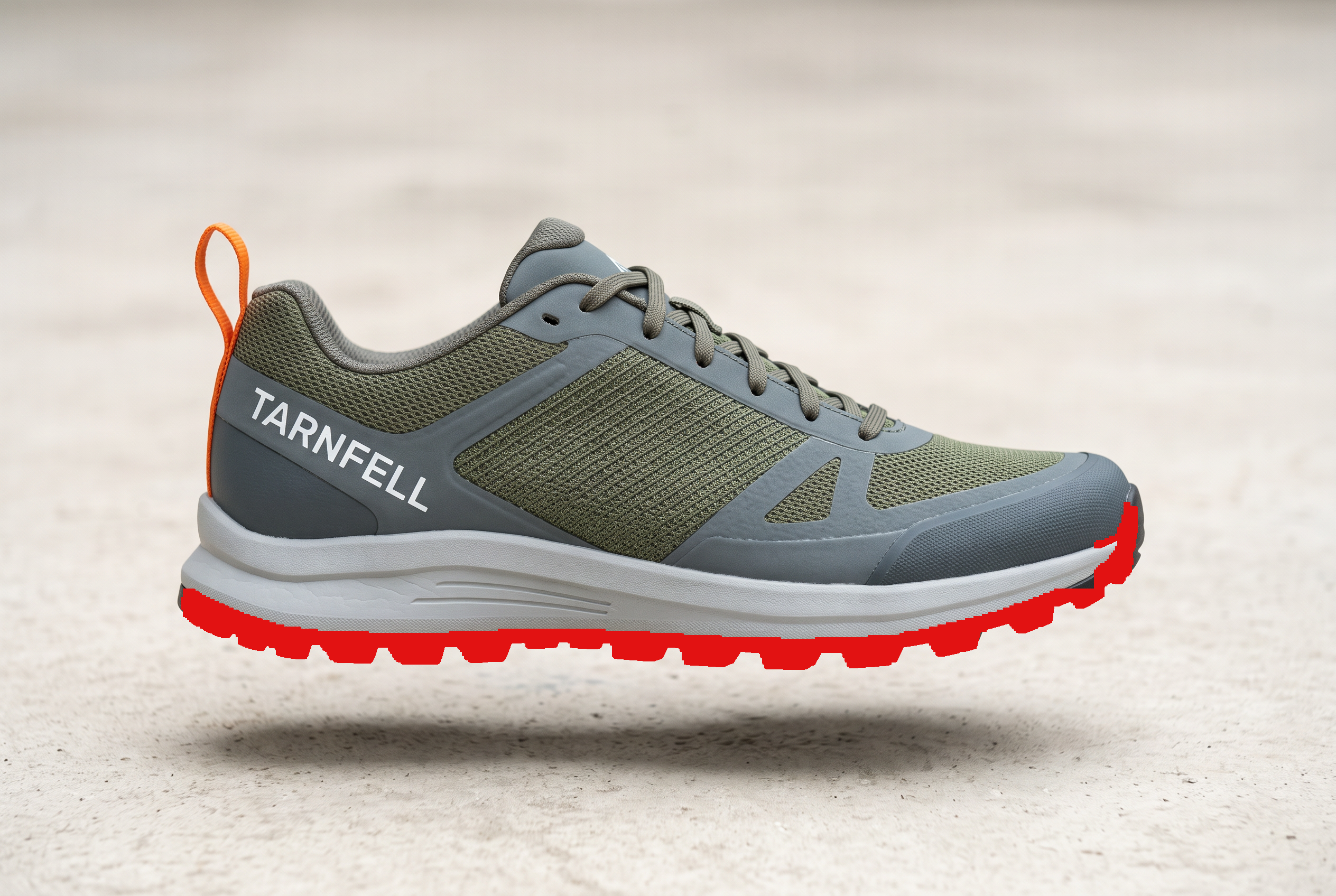
Nano Banana 2.1 has no mask parameter, so the mask is painted onto the input image itself and the prompt describes what the marked region becomes.
Mask-based editing is one area Google singles out for improvement in version 2.1.
A TARNFELL colourway then takes one painted region and one edit call on the approved Ghyll render.
I painted the outsole solid red in an image editor for the second colourway, which we named Ember.
The prompt's final line asks for the paint to be removed, as Google warns that marks can occasionally survive into the output.
Prompt (edit, input: the Ghyll render with the outsole painted red, auto ratio, 2K, medium thinking, TARNFELL system prompt): Change only the region painted red. Recolour the outsole and its lugs from black to signal orange, with every lug's shape and spacing unchanged. The upper, toe bumper, laces, wordmark, shadow and background stay as they are. Remove all of the red paint from the final image.
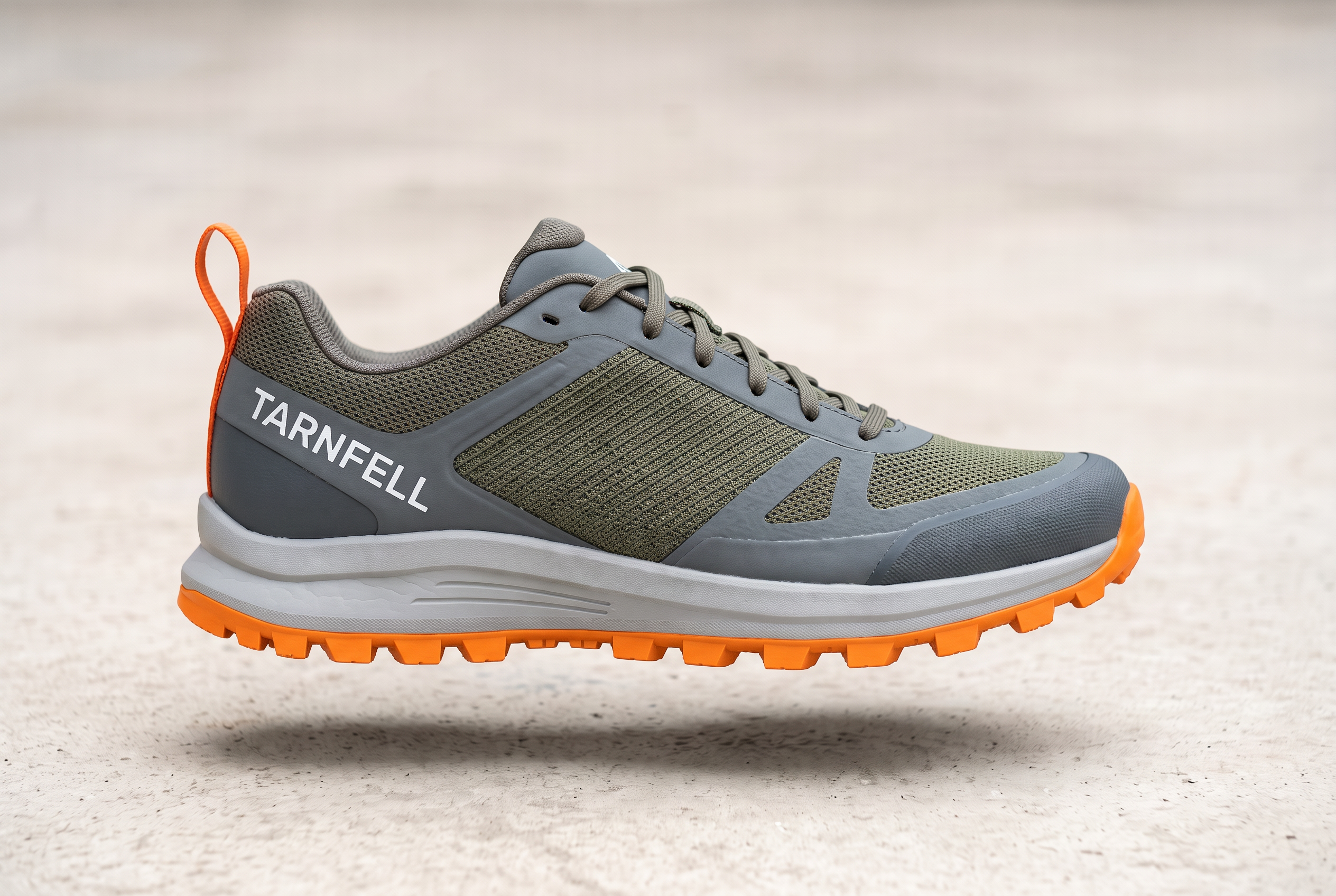
Generated using Nano Banana 2.1 Edit on fal, an AI model from Google.
What does a Nano Banana 2.1 restyle prompt for a social teaser look like?
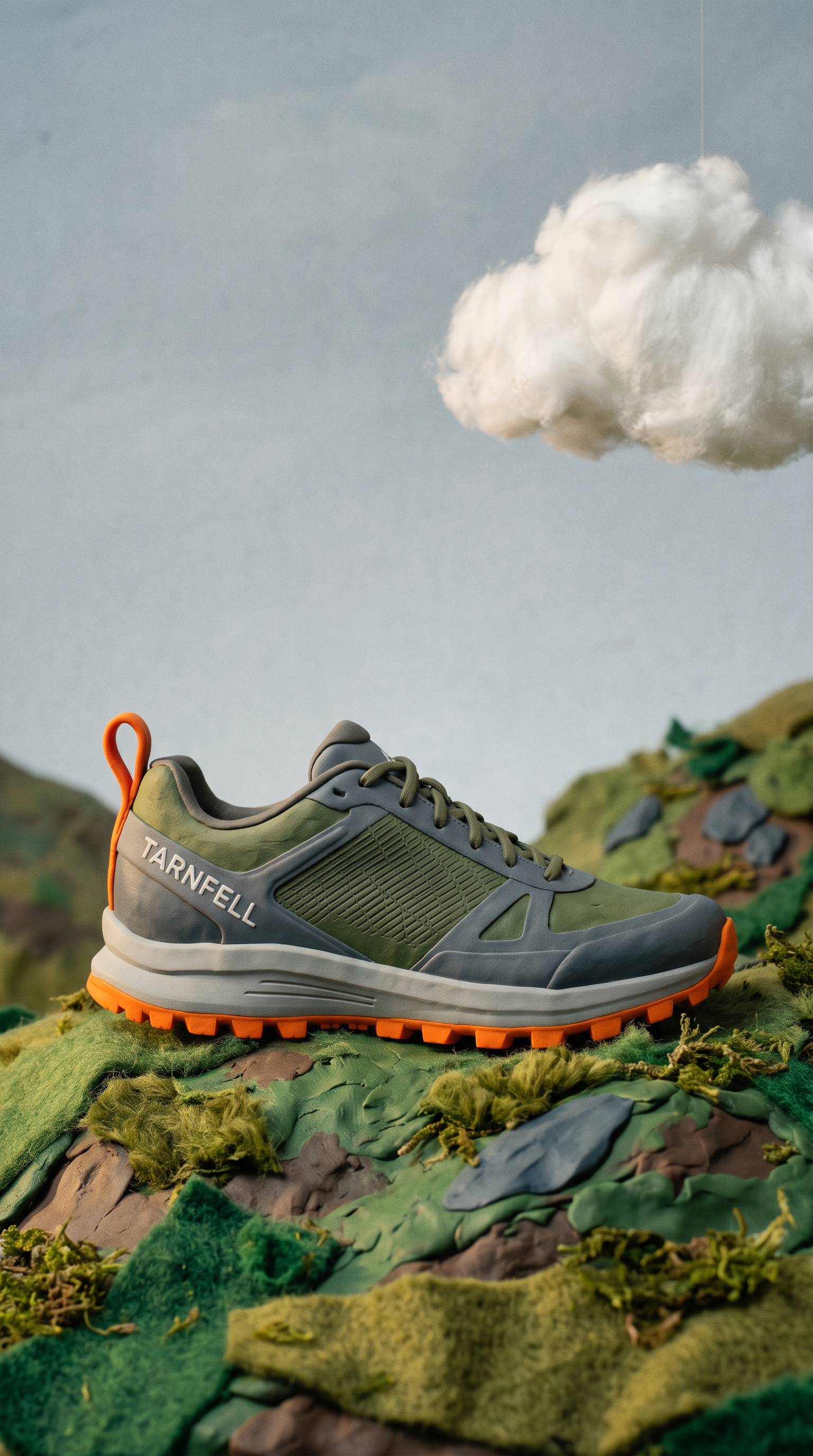
A Nano Banana 2.1 restyle prompt names the new medium, such as clay or watercolour, and states that the shoe's panels and colours stay as they were in the approved TARNFELL render.
Our model page lists campaign variants among the uses for restyling.
We use it for launch teasers, where a claymation shoe gives people scrolling a reason to stop before the product photos go live.
Prompt (edit, input: the Ember colourway render, 9:16, 2K, medium thinking, TARNFELL system prompt): Restyle the shoe from the provided image as a claymation stop-motion set for a vertical launch teaser. The Ghyll is sculpted in matte plasticine with visible thumbprints and softened edges, its colours and panel layout unchanged, and the TARNFELL wordmark pressed into the heel in white clay. It stands on a small clay fell with felt grass and a cotton-wool cloud above, lit like a miniature set by one warm key light. Leave the top fifth of the frame as empty sky for a caption.
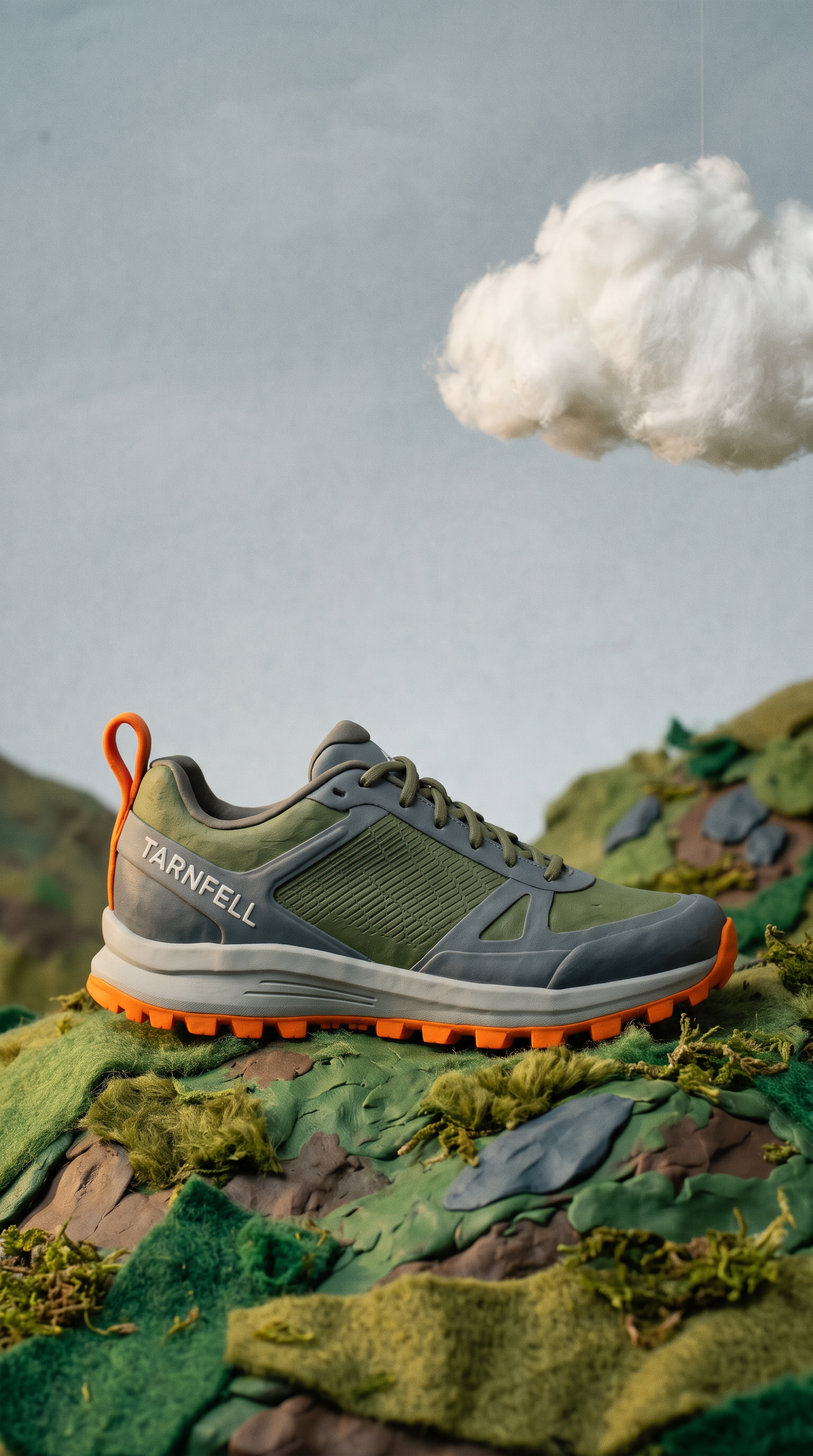
Generated using Nano Banana 2.1 Edit on fal, an AI model from Google.
Which Nano Banana 2.1 aspect ratios suit ecommerce banners?
Nano Banana 2.1's 8:1 and 4:1 ratios suit site heroes, while 1:4 and 1:8 cover tall mobile strips.
Google says the tiling artifacts these extreme formats showed at 2K and 4K are fixed in 2.1.
That is why we render any full-width desktop banner at 4K.
An 8:1 frame is mostly width, so our prompt places the copy in the centre third and a shoe on either side of it.
Prompt (edit, image 1: the Ghyll render, image 2: the Ember colourway, 8:1, 4K, high thinking, TARNFELL system prompt): A homepage hero banner for the TARNFELL Ghyll launch in an extreme wide 8:1 frame. One continuous fell ridge runs the full width under low cloud, with wet grass underfoot and a fast stream cutting across the right of the frame. The shoe from image 1 stands on a flat rock in the left third, and the shoe from image 2 lies on its side at the edge of the stream in the right third, water running over its orange lugs. The centre third stays clear for copy: "THE GHYLL" in white condensed capitals, and under it "Two colourways. One ridge." in small spaced capitals.

Generated using Nano Banana 2.1 Edit on fal, an AI model from Google.
When should a Nano Banana 2.1 product image use web search?
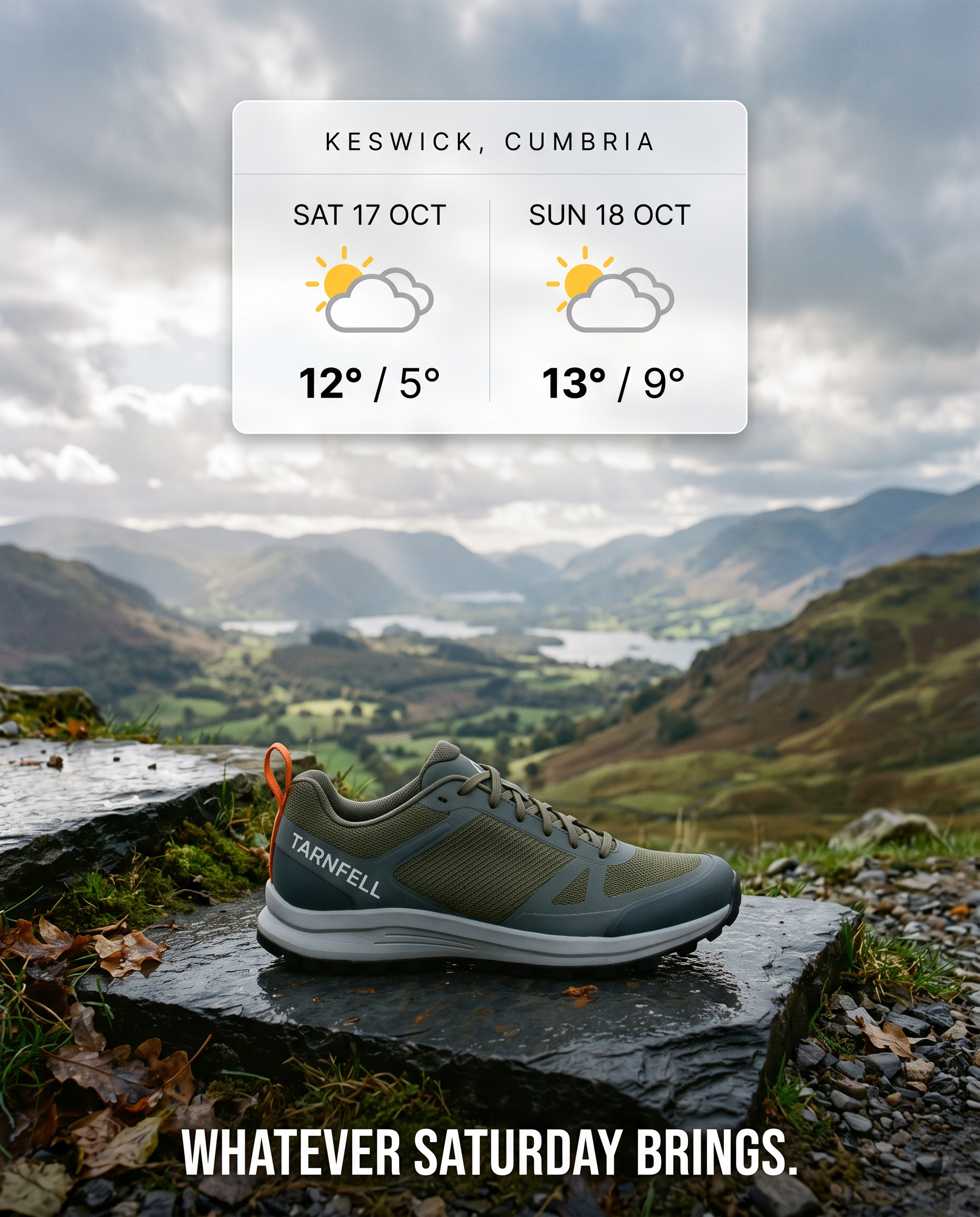
A product image needs Nano Banana 2.1's web search when it depends on facts newer than the model's training, such as this weekend's weather or a current event.
I typically leave enable_web_search off for invented scenes, as there is nothing for the model to look up.
We charge no separate fee for search, but the results Nano Banana 2.1 reads bill as input tokens, which puts a grounded image a little above an ungrounded one in cost.
TARNFELL uses the forecast as its hook, because runners plan weekends on the fells around it.
The ad below asks for the real weekend forecast for Keswick, so the card reflects the day the request ran.
Prompt (edit, image 1: the Ghyll render, 4:5, 2K, medium thinking, web search on, TARNFELL system prompt): Look up the weather forecast for Keswick, Cumbria, for this coming Saturday and Sunday. Build a 4:5 paid social ad with the shoe from image 1 on a wet slate step in the foreground and a fell valley behind it whose sky matches the forecast conditions. In the upper third, a clean white forecast card shows both days with a weather icon and the high and low temperatures in °C, exactly as forecast. Along the bottom, "Whatever Saturday brings." in condensed capitals.
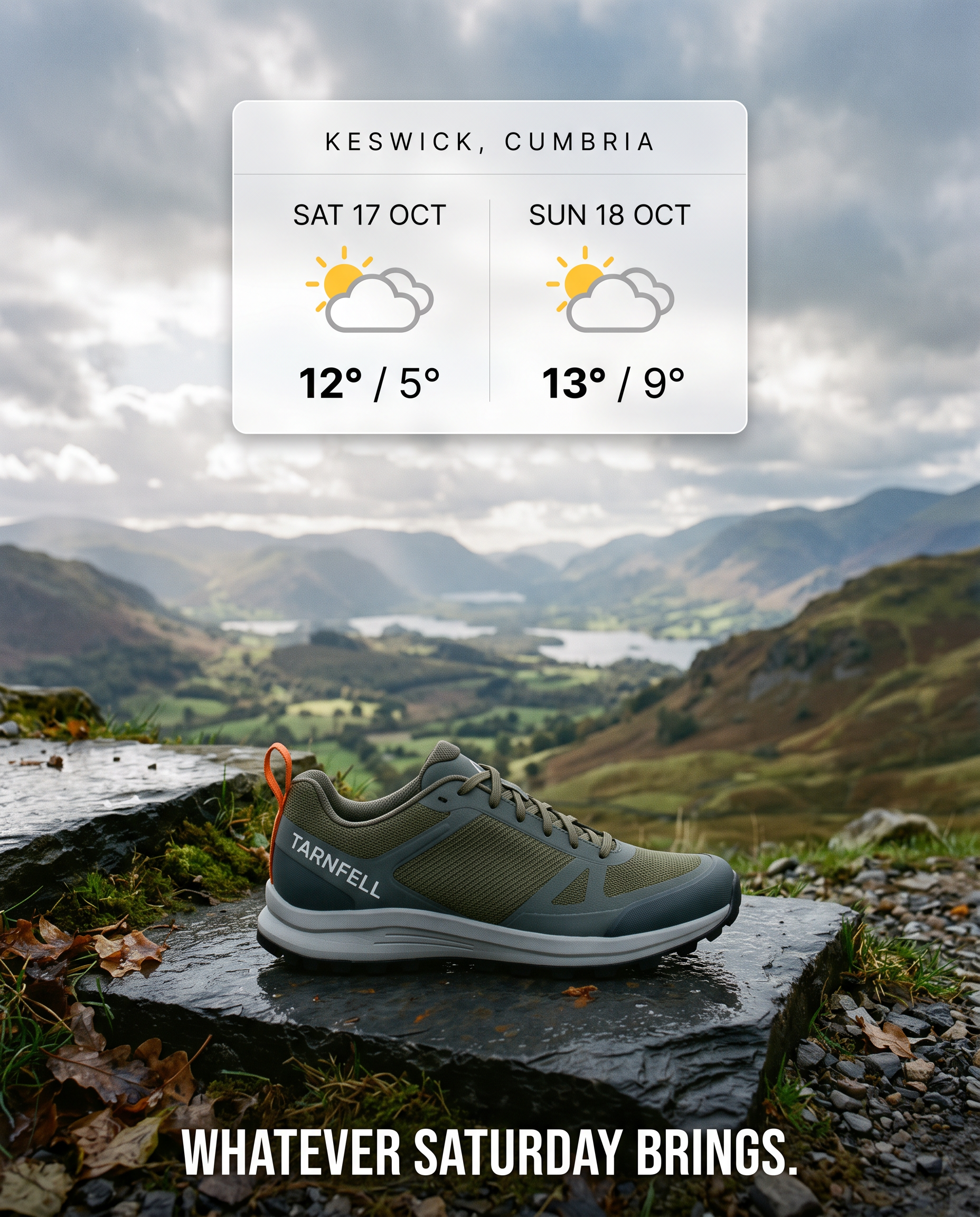
Generated using Nano Banana 2.1 Edit on fal, an AI model from Google.
We re-render the ad before every flight and check the card against the forecast source, since the image only reflects the day it was generated.
Which thinking level should a Nano Banana 2.1 product job run on?
Minimal and medium billed identically in our billing tests, so the real choice for a product job is between medium and high.
I'd say that high is worth its extra cost once a frame carries several references or depends on exact placement.
Nano Banana 2.1 plans its answer to a prompt before it draws anything, with thinking_level deciding how much of that planning a request spends.
Google's model card reports that turning thinking on improved every benchmark it published.
On infographic factuality, the score went from 0.328 without thinking to 0.521 with it.
The editing figures a catalogue team should watch are multi-reference editing, up from 1041 to 1066 Elo, and product consistency, up from 981 to 1024.
In our billing tests, high added between roughly one and one and a half cents per image for a 16:9 text-to-image output with a short prompt.
At 1K that meant $0.0490 against $0.0396, and at 2K it meant $0.0732 against $0.0593.
The endpoint docs describe minimal as the faster setting, though it billed exactly what medium did, so speed is the only argument for it.
Across the examples above, we ran the single-product edits on medium, from the relight to the claymation teaser.
The storyboard frames ran on high, as did anything built on exact placement, such as the infographic or the 8:1 banner.
How much does Nano Banana 2.1 cost on fal?
Nano Banana 2.1 bills by token on fal, and our billing tests put one 16:9 text-to-image output at $0.0396 for 1K.
The same request cost $0.1335 at 4K, with a short prompt and medium thinking.
| Resolution | Text-to-image, minimal or medium | Text-to-image, high | Edit, minimal or medium | Edit, high |
|---|---|---|---|---|
| 1K (default) | $0.0396 | $0.0490 | $0.0415 | $0.0493 |
| 2K | $0.0593 | $0.0732 | $0.0613 | $0.0743 |
| 4K | $0.1335 | $0.1435 | $0.1354 | $0.1468 |
Every figure is what we billed for a single 16:9 image from a short prompt, measured on October 7, 2026, and the edit columns assume one reference image.
Those per-image figures are built up from the following token rates on both endpoints:
- Inputs, text and media alike, bill at $1.764 per million tokens.
- Outputs bill at $8.823 per million tokens for text and thinking and $35.294 per million for images, at about 1,120 image tokens for 1K and 3,780 for 4K.
Most of the price therefore depends on resolution, while a long prompt or high thinking adds only a little.
An extra reference on the edit endpoint adds about 1,120 input tokens (roughly $0.002), and search results or PDF content count as input tokens too.
Priced from the table, the nine CORVELLE images in this guide come to about $0.61, and the four high-thinking storyboard frames make up about $0.30 of that.
The six TARNFELL images total about $0.47 before PDF and search tokens.
The 4K banner on high is the largest single line in the footwear set, at about $0.149.
Both totals use the table's 16:9, short-prompt rates, and our longer prompts with a system prompt attached add a fraction of a cent to each one.
Recently Added


How do you start generating with Nano Banana 2.1 on fal?
The quickest start is our Nano Banana 2.1 playground, where a System Prompt field takes either brand prompt from this guide before any code exists.
A single 2K run of the CORVELLE key visual costs about $0.0593 at the table's 16:9 rate, enough to judge both the label and the date line in one pass.
From there, the playground's input-mode selector switches the form to Python, JavaScript or cURL, carrying over the inputs you just tested.
Billing is per token with no GPUs to manage, so a catalogue team pays only for the requests it actually runs.
Check out fal to get started.
Frequently asked questions about Nano Banana 2.1
How is Nano Banana 2.1 different from Nano Banana 2?
Nano Banana 2.1 updates Nano Banana 2 (Gemini 3.1 Flash Image) at the same Flash speed.
Google reports better text rendering and character consistency, along with gains in visual quality and prompt adherence.
Tiling artifacts on the extreme wide and tall ratios are fixed at 2K and 4K, and 2.1 does not offer the 512px tier from Nano Banana 2.
Does fal allow commercial use of Nano Banana 2.1 images?
Yes, both Nano Banana 2.1 endpoints carry our commercial use label, so outputs can run on product pages and in paid ads.
The advertiser is still responsible for clearing any real trademarks or real people that appear in a frame.
What is the reference image limit on Nano Banana 2.1?
The Nano Banana 2.1 edit endpoint takes up to 14 reference images per request, and Google's figures allow up to four characters and 10 high-fidelity objects to stay consistent within that.
A video or a PDF can join the request as context, and with either one present the image_urls field becomes optional.
How large can a Nano Banana 2.1 image be?
The largest Nano Banana 2.1 output is 4K at about 16 megapixels, in any supported ratio between 1:8 and 8:1.
One request returns up to four images, and they bill as separate generations.
Does Nano Banana 2.1 need a separate mask file?
No, a separate mask file is not needed, because the marks painted or drawn on the input image define the region Nano Banana 2.1 edits.
The same prompt should ask for the marks to be removed, per Google, since painted marks sometimes remain in the output.

![10 Best Virtual Try-On APIs in 2026 [Reviewed]](https://refinery.fal.media/url/https%3A%2F%2Fv3b.fal.media%2Ffiles%2Fb%2F0aa0ad85%2Ft1AjEGt_gapabWxSItcbb_best-virtual-try-on-apis-2026.jpg/tr:w-1280,q-80/t1AjEGt_gapabWxSItcbb_best-virtual-try-on-apis-2026.webp)
![How To Make a Character Replacement Video [2026]](https://refinery.fal.media/url/https%3A%2F%2Fv3b.fal.media%2Ffiles%2Fb%2F0aadb85e%2F7WRfwSK5_hI2OtOrkuSKX.jpg/tr:w-1280,q-80/7WRfwSK5_hI2OtOrkuSKX.webp)