![What is Seedance 2.5? Everything You Need to Know [2026]](https://refinery.fal.media/url/https%3A%2F%2Fv3b.fal.media%2Ffiles%2Fb%2F0aa63095%2FxJ5ttmbJKh8poGeQwhqqj.jpg/tr:w-1920,q-80/xJ5ttmbJKh8poGeQwhqqj.webp)
Dreamina Seedance 2.5 has just landed on fal, and we're more than excited about this.
The model is live on fal across three endpoints, and this guide covers what it does, where it's strong, how those endpoints differ, and what a generation actually costs.
TL;DR
Dreamina Seedance 2.5 is live on fal now through 3 endpoints: text-to-video, image-to-video and reference-to-video.
A single generation runs up to 30 seconds, with audio produced alongside the picture.
Output is 480p or 720p across six aspect ratios on all three endpoints, with image-to-video defaulting to the framing of your input image.
Billing is token-based at $0.0214 per 1,000 tokens, landing around $0.4730 per second of 720p output and $0.2205 at 480p.
The best places to run Dreamina Seedance 2.5 is through fal's playground, Sandbox, API, MCP server, CLI, and from the fal Agent.
What is Seedance 2.5?
Seedance 2.5 is the newest model in ByteDance's Seedance video line, which belongs to the company's Seed family of foundation models spanning image (Seedream 5.0 Pro), audio (Seed Audio 1.0), and language work.
The Seedance models are built around motion quality and the camera and scene control that production work needs, with consistency held from one shot to the next.
Two things about Seedance 2.5 change how you use it:
The first is that one model handles every input type.
Text, stills, video and audio all go in the front, and video with matching sound comes out the back.
Sound isn't added afterwards.
Picture and audio get decided together inside the same generation, so a footstep and the frame the foot lands on agree with each other.
The second is that 30 seconds is the model's real working length, not a length it reaches by joining shorter pieces.
The whole clip is in view while it's being made.
Nothing resets partway through.
If someone picks up a glass in the fourth second, it's the same glass, in the same hand, at second twenty-six.
What changed between Seedance 2.0 and Seedance 2.5?
Clip length went from 15 seconds to 30
Length has been the binding constraint on video models for a while now.
The usual workaround is to generate several short pieces and cut them together, or run an extender over a short one, which leaves you managing continuity by hand at every join.
Doubling the native ceiling covers the length most advertising actually runs at, without any of that.
The reference budget went from 12 files to 50
Reference-to-video now accepts 50 files in a single generation.
Your 50 breaks down into a ceiling of 30 stills, 10 clips and 10 audio files, with the video and audio pools each limited to about 30 seconds of total running time.
Every file gets an index you can call out in the prompt, so nothing depends on the model correctly guessing which reference does which job.
It doesn't force every reference into every frame either.
Relevance gets decided per scene, so a location still can stay out of the close-ups without you asking for that.
Characters hold both their faces and their voices through group scenes and shot changes.
Sound is generated with the picture, not after it
Audio and visuals come out of the same generation, which shows up in lip sync, in impact timing, and in ambience that matches what's on screen.
Turning audio off saves you nothing, since your token count depends only on frame area and duration.
➡️ You can leave generate_audio on unless the brief calls for silence.
auto settings for duration and framing
With duration on auto, the model picks a length that suits what you've described.
aspect_ratio on auto behaves the same way on text-to-video and reference-to-video, taking its cue from whatever you've given it.
Both are convenient, and both make your bill unpredictable, because frame area and duration are precisely what you're billed on.
Pass explicit values whenever you need to know the cost before you hit run.
falMODEL APIs
The fastest, cheapest and most reliable way to run genAI models. 1 API, 100s of models
What is Seedance 2.5 actually good at?
Continuity across a long take
This is the capability worth building around.
A product can be handled in the first second and still be the same product, unchanged, at second twenty-eight.
Wardrobe, faces, which way people are facing, who's holding what: all of it survives the full duration, which means you can write a shot with five beats in it and get five beats back in order.
Here's a 30-second take:
Settings: duration 30, resolution 720p, aspect_ratio 16:9, generate_audio true.
Style: one unbroken handheld take, 1990s documentary look, 16mm grain, no artificial fill. The only light source in frame is the candles. Scene: the back service staircase of a grand hotel during a power cut. Six floors of tight stone spiral, chipped green paint, a brass handrail, a fire door on every landing. Total darkness apart from the flames. Subject: a young porter in a burgundy uniform with gold piping, carrying a three-tier white wedding cake at chest height on a silver salver. Exactly nine lit candles stand in the top tier. Action: he climbs from the ground floor to the sixth without stopping. He passes a chambermaid with an armful of sheets on the second landing, a chef smoking by an open window on the fourth, and a wet mop bucket he steps around on the fifth. His breathing gets heavier as he climbs. Wax runs down one candle and pools on the icing. At the top he turns to the camera, out of breath, and says: "Nine. Still nine." Camera: follows from just below and behind at candle height, turning with the spiral, never cutting. Audio: footsteps echoing off stone, laboured breathing, sheets rustling, a lighter clicking on the fourth landing, rain against a window. No music.
Generated using Dreamina Seedance 2.5 on fal, an AI model from ByteDance.
Weight and momentum read correctly
A heavy coat thrown over a shoulder carries the swing its weight implies, then settles at roughly the right speed.
Hair and loose fabric move like hair and loose fabric.
A subject moved into a windy exterior gets wind into their clothing, and the light of that exterior lands on their face.
Let's see it in action:
Settings: duration 12, resolution 720p, aspect_ratio 21:9, generate_audio true.
Style: high-end fashion film, 65mm, cold white light from overhead banks, hard shadows, deep black surround, no grade tricks. Scene: the working section of an aeronautical wind tunnel. Riveted steel walls, a mesh grille filling the back of frame, hazard tape on the floor, a fan array far upstream. Subject: a model standing on a painted cross at centre frame, in a floor-length unlined silk cape over a fitted black bodysuit, waist-length dark hair loose, barefoot. Action: the tunnel starts dead calm. The cape hangs straight and her hair rests on her shoulders. The fans step up once and the hem begins to lift and ripple from the bottom edge. They step up again and the cape pulls horizontal behind her, hair streaming flat, the silk snapping at the trailing edge. She leans into it. On the last increase she loses her footing slightly, corrects, and the cape wraps once around her forearm before releasing. Camera: locked-off wide for the first half, then a slow push to a mid shot. No handheld. Audio: fans spooling up in stages, silk cracking in the airflow, a low resonance through the steel, her breath catching. No music.
Generated using Dreamina Seedance 2.5 on fal, an AI model from ByteDance.
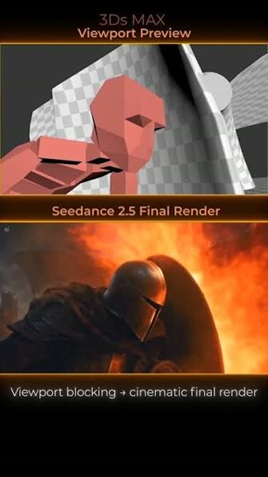
Previsualisation from a 3D viewport
You can block a scene out in Blender or any other 3D package, screenshot the viewport, and pass that in as a reference.
Rough geometry is enough.
Grey boxes standing in for people and props will carry the staging, the entrances and exits, the camera's route through the space, and the moments the light changes, provided the prompt says which box represents what.
A more finished blockout carries more of the load, so the model treats it as a structure to re-skin with real materials, characters and styling while the staging holds.
Directing the clip as a timed shot list
Prompts can be written with time ranges against them: 0 to 3s does one thing, 3 to 7s does the next.
The ranges should run consecutively, never overlapping.
Let's see it in action:
Settings: duration 12, resolution 720p, aspect_ratio 4:3, generate_audio true.
Style: 1970s television variety broadcast, shot on 2-inch videotape, slightly blown highlights, visible scan lines, hard front key from studio lamps, saturated reds. Scene: a small studio stage with a red velvet curtain and an audience in silhouette. A lacquered black cabinet on castors, chest height, two doors on the front. Cast: a magician in a wine-coloured dinner jacket, and an assistant in a silver sequinned leotard. 0 to 2s: the magician opens both cabinet doors wide. It is empty. He rolls the cabinet a full turn on its castors so all four sides come past camera. 2 to 4s: he shuts the doors. The assistant walks in from the left and stands beside him with her hands visible. 4 to 6.5s: the two of them stand still, looking at the cabinet. Nothing happens. The audience noise dies away. 6.5 to 8s: three slow knocks come from inside. The magician does not react. The assistant looks at him. 8 to 10s: he opens the doors. A second assistant, identical to the first, steps out and stands next to her. 10 to 12s: both assistants turn to the audience together. The magician says: "You saw all four sides." Camera: locked-off wide for the whole thing. No cuts, no zooms. Audio: studio room tone, castors on a wooden stage, three knocks with the resonance of an empty box, one sharp intake of breath from the audience, applause starting slightly late.
Generated using Dreamina Seedance 2.5 on fal, an AI model from ByteDance.
💡 One caveat before you write a whole board this way: Timestamps allocate proportion, not frames, so asking for something at 4.2 seconds gets you an event roughly there with roughly that much screen time.
Native performance in eleven languages
Chinese, English, Spanish, Indonesian, Malay, Thai, Arabic, Portuguese, Vietnamese, Japanese and Korean are all supported languages.
A script gets performed in its own language, so nothing needs dubbing afterwards.
Stability work also keeps stray subtitles and uninvited background music out of the output, which leaves a cleaner take for whoever does the text and music pass.
Let's test it out:
Settings: duration 10, resolution 720p, aspect_ratio 16:9, generate_audio true.
Style: contemporary drama, 35mm, available light, glass reflections left in, muted institutional palette. Scene: inside a simultaneous interpreting booth at the back of a conference hall. A sloped console with two microphones and a jack panel. Through the angled glass, a delegate at a lectern far below and a half-filled hall. Subject: an interpreter in her forties, closed headphones on, one hand flat on the console. Action: she listens for two seconds with her eyes on the delegate. On the monitor beside her the delegate is speaking Japanese, and says: "私たちは、その条件には同意できません。" She leans into the microphone and delivers it in Spanish, evenly and without hesitation: "No podemos aceptar esas condiciones." Then she lifts her hand off the console and waits. Camera: slow drift from a profile mid shot round to three-quarter, finishing with the delegate visible through the glass over her shoulder. Audio: the delegate's Japanese thin and compressed as headphone bleed, her Spanish close and dry on the booth microphone, air conditioning, a chair moving in the hall beyond the glass. No music.
Generated using Dreamina Seedance 2.5 on fal, an AI model from ByteDance.
What are the three Seedance 2.5 endpoints?
All three return the same kind of thing: up to 30 seconds at 480p or 720p with synchronized audio.
What separates them is what you're allowed to attach.
Text to video
bytedance/seedance-2.5/text-to-video takes a prompt on its own.
The full aspect ratio enum is available here, from 21:9 through to 9:16, so framing is something you set in the request.
Spoken lines go in double quotes.
The model reads that as dialogue, then generates both the lip movement and the voice for it.
Image to video
bytedance/seedance-2.5/image-to-video takes image_url as the opening frame, plus an optional end_image_url when you want to choose where the clip lands.
The still image decides what everything looks like, while the prompt decides what it all does (so don't spend words on the coat that's already in the frame).
If I were you, I'd spend them on how the coat moves, where the camera goes, and what you can hear.
Reference to video
bytedance/seedance-2.5/reference-to-video takes image_urls, video_urls and audio_urls, addressed by position in the prompt.
Of the three endpoints, this is the one to reach for when the output has to match material that already exists.
Stills pin down how a subject or a garment looks, clips supply motion style, audio supplies rhythm and timing, and the prompt explains what to do with all of it.
You can also edit videos through this endpoint too.
Supplying a clip alongside a description of what should be different gets you the change, with the original motion and camera work preserved.
Extension works the same way, except the description covers what happens next and the model continues the scene from there.
Where can you access Seedance 2.5?
The best place to access Dreamina Seedance 2.5 is on fal, billed per token of generated output, with no plan and no minimum spend.
You can access the model on our playground, Sandbox, API, MCP server and CLI.
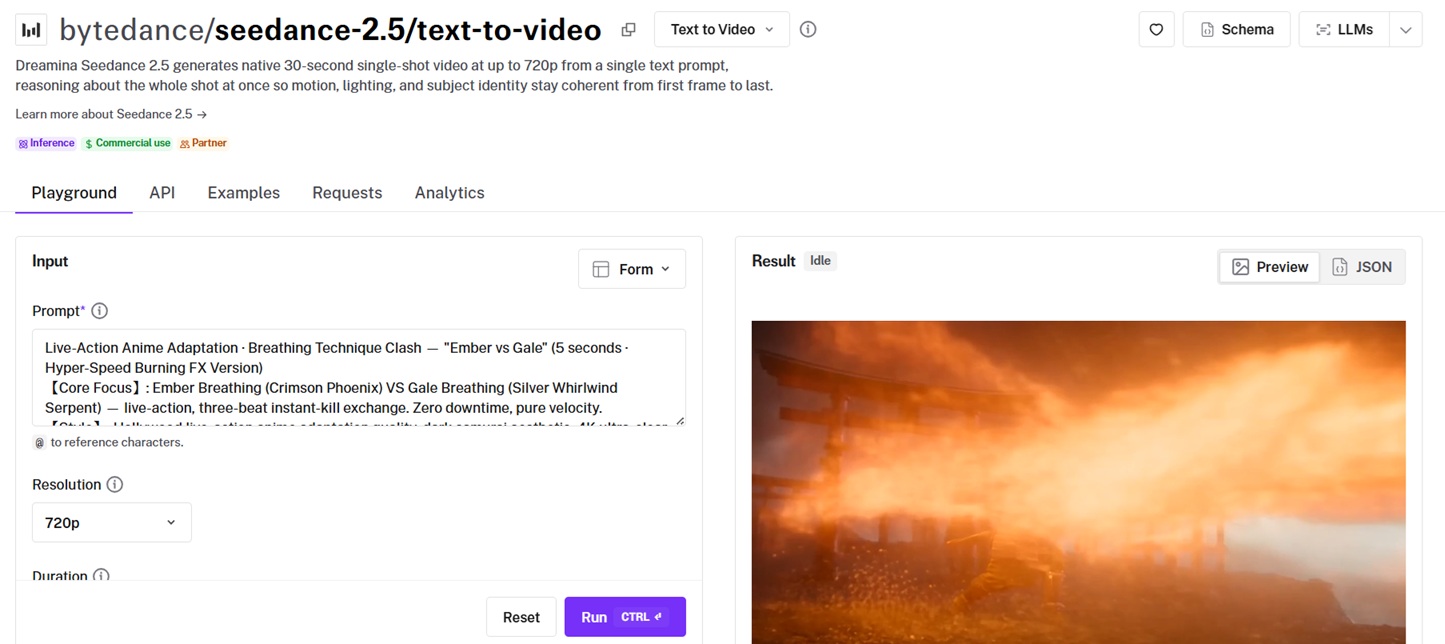
It also runs inside fal Agent, which matters more for this model than you'd expect.
fal Agent keeps project context across sessions, so your references, your decisions and the takes you threw away stay attached to the project and are still there weeks later.
For a model whose whole argument is consistency across a long take, having the source material and the failed attempts in one place saves a great deal of repeated setup.
Here's an example text-to-video call if you want to use fal's API:
import { fal } from "@fal-ai/client";

const result = await fal.subscribe("bytedance/seedance-2.5/text-to-video", {
  input: {
    prompt:
      "An octopus finds a football in the ocean and excitedly calls its octopus friends to come and play. Cut scene to an octopus football game under the sea.",
  },
  logs: true,
  onQueueUpdate: (update) => {
    if (update.status === "IN_PROGRESS") {
      update.logs.map((log) => log.message).forEach(console.log);
    }
  },
});

console.log(result.data);
console.log(result.requestId);
Switching endpoints is a one-line change to the model string plus whichever media field the new endpoint wants.
That pattern holds across the other 1,000 models on the platform, so the auth and billing side gets learned once and then stops being interesting.
How much does Seedance 2.5 cost on fal?
Billing is token-based, and tokens are a function of frame area, duration and frame rate:
tokens = (output_height * output_width * duration_seconds * 24) / 1024
You're charged $0.0214 per 1,000 tokens at both 480p and 720p, with no subscription and no minimum.
For standard 16:9 output that lands around $0.4730 per second at 720p and $0.2205 per second at 480p, audio included.
Those per-second numbers are approximations for the common case.
The formula is what actually bills you, so frame area is the thing that moves your bill.
In practice, every 720p option in the table below lands within about half a percent of the others on area, so at a fixed resolution the aspect ratio barely changes the cost.
| Generation | Tokens | Cost |
|---|---|---|
| 5s at 720p 16:9 (1280x720) | 108,000 | ~$2.31 |
| 30s at 720p 16:9 | 648,000 | ~$13.87 |
| 10s at 480p 16:9 (864x496) | 100,440 | ~$2.15 |
Reference-to-video bills differently in one respect.
When a reference video is attached, its duration gets counted alongside your output duration, and the whole price is then multiplied by 0.6.
That comes to about $0.2838 per second at 720p and $0.1323 at 480p, applied to input and output seconds alike.
So trim reference clips down to the part that matters, because every second you send is a billed second.
Reference stills and reference audio aren't billed at all.
Every result comes back with its seed attached.
What settings does Seedance 2.5 give you?
Here are the settings that matter in Seedance 2.5 on fal:
resolution takes 480p or 720p, and defaults to 720p.
duration takes auto or any whole number of seconds from 4 to 30, and defaults to auto.
aspect_ratio takes auto, 21:9, 16:9, 4:3, 1:1, 3:4 or 9:16 on text-to-video and reference-to-video, and defaults to auto.
Image-to-video takes the same enum but defaults to auto, which reads framing off your input image.
Pass an explicit ratio when you need to know the cost in advance, since frame area is what you're billed on:
generate_audio defaults to true and has no effect on your token count.
seed comes back with every result.
end_user_id identifies your end customer, and the docs list it as required for B2B access.
How does Seedance 2.5 compare to Seedance 2.0?
Seedance 2.0 is still live on fal, and still the right call for a lot of work, so read the table as scope, never as a ranking.
| Detail | Seedance 2.0 | Dreamina Seedance 2.5 |
|---|---|---|
| Status on fal | Live | Live |
| Max clip length | Up to 15 seconds | Up to 30 seconds |
| Resolution | Up to 4K | 480p or 720p |
| Inputs | Text, image, audio, video | Text, image, audio, video |
| Reference budget | 9 images, 3 videos, 3 audio (12 files total) | 30 images, 10 videos, 10 audio (50 files total) |
| Native audio | Yes | Yes |
Editor's opinion: what the launch version changes for production work
When you put the two changes together in Seedance 2.5 from Seedance 2.0, the model starts to feel less like a prompt box and more like a set of instructions you hand off.
Thirty seconds as one continuous take means a scene plays out without the cuts that come from splicing short clips together, which covers most of what a short ad or a single narrative beat needs.
Fifty references means the look you've already locked down travels straight into the generation, so the model has your actual material to work from and guesses less.
For teams sitting on an existing asset library, that's where the value concentrates.
More of what you've already built feeds the output, and you burn fewer attempts getting to something usable.
Writing "0 to 3s, then 3 to 6s" gets you far closer to a shot list than a paragraph ever does, and it moves the conversation from describing a mood to directing a sequence.
I'd expect advertisers and short-form creators to take to this quickly, because a 30-second spot with sound is now one request.
Recently Added










Try Seedance 2.5 on fal
Seedance 2.5 runs through the same API and playground you'd use for Seedance 2.0, Veo 3.1 or any of the other AI video generators on the platform.
If you haven't signed up for fal yet, you can get started for free.
Frequently asked questions about Seedance 2.5
What is Seedance 2.5?
Dreamina Seedance 2.5 is the current model in ByteDance's Seedance video line, and it's live on fal.
A single request returns up to 30 seconds of video with synchronized audio, generated from text, from one still image, or from as many as 50 mixed references.
Is Seedance 2.5 available now?
Yes.
All three endpoints are live on fal today.
What is the maximum Seedance 2.5 clip length?
Thirty seconds, as one continuous take.
That's worth knowing because most models make shorter clips and reach length by joining them, which usually leaves something visible where two renders meet.
How many references can Seedance 2.5 use?
Up to 50 files in a single reference-to-video request, capped at 30 images, 10 videos and 10 audio clips.
The video pool and the audio pool are each limited to about 30 seconds of total running time.
What resolution does Seedance 2.5 output?
480p or 720p, across six aspect ratios from 21:9 through to 9:16.
Image-to-video takes its aspect ratio from your input image.
How is Seedance 2.5 different from Seedance 2.0?
Seedance 2.0 makes clips up to 15 seconds and takes 12 reference files.
Seedance 2.5 takes that to 30 seconds and 50 files.
Both bill per token, but Seedance 2.5 runs $0.0214 per 1,000 tokens against $0.014 on Seedance 2.0.
Both are live on fal and both generate native audio.
How much does Seedance 2.5 cost on fal?
fal bills Seedance 2.5 per token of generated output, at $0.0214 per 1,000 tokens, with no subscription.
In practice that's around $0.4730 per second of 720p 16:9 video and around $0.2205 per second at 480p, with reference video generations multiplied by 0.6.
Does Seedance 2.5 generate audio?
Yes, and it's on by default.
Audio comes out of the same generation as the picture, covering ambient sound, effects and lip-synced dialogue, with no effect on your token count.
![How To Create a Multi-Angle Video With Seedance 2.5? [2026]](https://refinery.fal.media/url/https%3A%2F%2Fv3b.fal.media%2Ffiles%2Fb%2F0aac4654%2Fl_XpD5ZyeaxkHTMN-k3Na.jpg/tr:w-1280,q-80/l_XpD5ZyeaxkHTMN-k3Na.webp)
![How To Use GPT-6 Astra for Video Editing [2026]](https://refinery.fal.media/url/https%3A%2F%2Fv3b.fal.media%2Ffiles%2Fb%2F0aaccd45%2FEjhkMmqNCeXgPjrrnRgU5.jpg/tr:w-1280,q-80/EjhkMmqNCeXgPjrrnRgU5.webp)
![How To Use GPT Image 2.5: Prompts & Workflows [2026]](https://refinery.fal.media/url/https%3A%2F%2Fv3b.fal.media%2Ffiles%2Fb%2F0aaa6b4b%2FjBkm-8tILO2kyixv19ugu.jpg/tr:w-1280,q-80/jBkm-8tILO2kyixv19ugu.webp)