![How To Use Grok Imagine: Prompts & Workflows [2026]](https://refinery.fal.media/url/https%3A%2F%2Fv3b.fal.media%2Ffiles%2Fb%2F0aa3f6f2%2FeqWDXFmZkKpp4cIZtsH-V.jpg/tr:w-1920,q-80/eqWDXFmZkKpp4cIZtsH-V.webp)
This guide walks through how you can use Grok Imagine's text-to-video, image-to-video on Grok Imagine Video 1.5, and video editing endpoints on fal, with prompts you can paste into the playground or the API.
TL;DR
Grok Imagine, built by xAI on its Aurora engine, generates the picture and its sound in one pass, so a good prompt has to describe what you hear with the same care as what you see.
Any shot with more than one beat, or a line of spoken dialogue, works best written as time-coded segments like (0-4s) and (4-8s), which the model follows more reliably than loose prose.
Vague praise like "cinematic masterpiece" leaves the model guessing, so describe what's actually on screen and how it moves and sounds.
Every endpoint on fal is pay-per-second with no subscription, from $0.05 a second for text-to-video at 480p, and the audio is generated in the same pass.
Where can you access Grok Imagine?
The best place to access Grok Imagine is on fal, which operates on a pay-per-use model, where you can use the video generator with no plan or minimum spend commitment.
Setup is a one-time thing with the @fal-ai/client SDK.
After that, moving between Grok endpoints means changing the model string and a couple of input fields, and the same pattern holds for the 1,000-plus other models fal hosts.
You won't be relearning how authentication or billing works each time you switch.
You can also use fal's playground to experiment with video generation before you use fal's API.
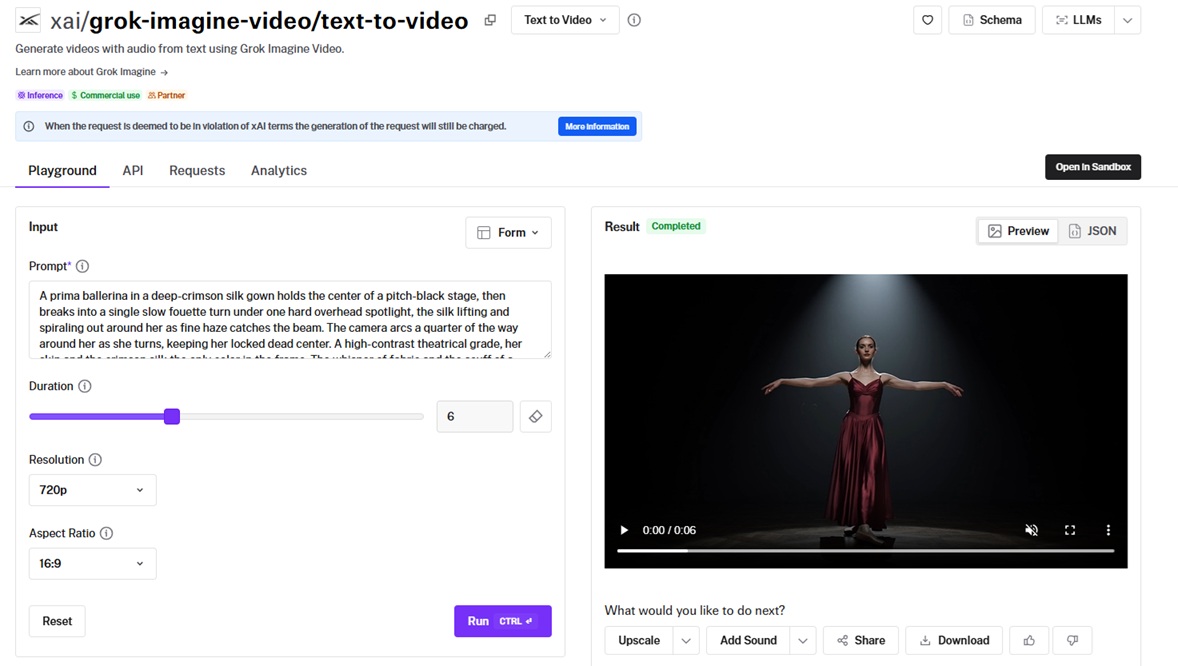
One distinction is worth getting straight before you start, because there are two model tracks in play:
-
Base Grok Imagine covers text-to-video, image-to-video, video editing, reference-to-video, and extend-video.
-
Grok Imagine Video 1.5 is a separate, higher-end image-to-video endpoint that runs longer clips at its own pricing, and it's the one this guide uses for the image-to-video section.
Here's what a text-to-video call looks like, start to finish:
javascript
import { fal } from "@fal-ai/client";

const result = await fal.subscribe("xai/grok-imagine-video/text-to-video", {
  input: {
    prompt:
      "Anime schoolgirl bursting out of house door, cherry blossoms blowing, morning light, speed lines indicating rush, chibi-ready expressions, classic shojo aesthetic, vibrant colors",
  },
  logs: true,
  onQueueUpdate: (update) => {
    if (update.status === "IN_PROGRESS") {
      update.logs.map((log) => log.message).forEach(console.log);
    }
  },
});

console.log(result.data);
console.log(result.requestId);
What does a Grok Imagine prompt need?
Grok Imagine does what you tell it, closely.
It holds a camera move and a cut better than most models I've reached for, which puts the work back on you to make the calls.
If you leave a decision open, the model doesn't get creative with it.
It defaults to the most average version of your scene.
What follows is what actually moves a shot, and where people burn words for nothing.
Here's what a Grok Imagine prompt needs:
The two anchors: subject and action
Every prompt starts from two fixed points.
The subject is who or what is on screen.
The action is what they do and how that motion reads.
Get those two right, and the rest is refinement; get them vague and no amount of styling saves the shot.
Here the subject and the action carry the whole thing, one dancer and one turn, with everything else stripped back.
Prompt: A prima ballerina in a deep-crimson silk gown holds the center of a pitch-black stage, then breaks into a single slow fouette turn under one hard overhead spotlight, the silk lifting and spiraling out around her as fine haze catches the beam. The camera arcs a quarter of the way around her as she turns, keeping her locked dead center. A high-contrast theatrical grade, her skin and the crimson silk the only color in the frame. The whisper of fabric and the scuff of a pointe shoe on lacquered wood, held in near silence.
Generated using Grok Imagine on fal, an AI model from xAI.
Directing sound and dialogue
Sound matters more here than on most video models, because Grok Imagine writes the audio natively in the same pass as the picture.
Leave it unspecified, and the model picks for you, often with music you didn't want.
This is why you want to name the ambient bed, call out the one or two effects that should land, and say explicitly whether you want a track or silence.
Dialogue works through double quotes.
Whatever you put inside them is spoken aloud in the clip, with the mouth animated to match.
You also want to keep spoken lines short and pin each one to a timecode, and the sync stays where you placed it.
This one leans on both at once, a single spoken line sitting inside a sound world you build around it.
Prompt: A woman in an emerald couture gown stands at the floor-to-ceiling window of a darkened penthouse, a thunderstorm rolling over the city far below, her reflection sharp in the glass. (0-4s) She turns from the window and says, low and even: "He was never going to let us walk away." (4-8s) A flash of lightning throws her shadow hard across the room as she takes one step forward. Cool blue night light cut with the warm pool of a single lamp, an anamorphic look with soft flares. Her voice close and controlled, rain drumming the glass, a distant roll of thunder, a single sustained cello note swelling under the lightning.
Generated using Grok Imagine on fal, an AI model from xAI.
Specific beats vague
The clearest way to feel the difference is to run the same idea twice.
A loose prompt leaves every decision to the model, and it fills the gaps with the most average version of the scene it knows.
Prompt: A cool cinematic shot of a luxury car at night, epic, 8k, stunning.
Generated using Grok Imagine on fal, an AI model from xAI.
A directed prompt closes those gaps one at a time, so the model has a single scene to build and little room to drift.
Prompt: A matte-silver grand tourer carves through a rain-soaked tunnel at night, rows of sodium lights streaking overhead and smearing across the wet bodywork, spray fanning off the rear tires. A low camera tracks the front wheel arch as the car accelerates, the tunnel lights rippling along the polished flank. A cold cinematic grade with warm highlights, shot on anamorphic glass, the beams flaring across the lens. The deep swell of the engine echoing off the tunnel walls, tires singing on wet asphalt, a low pulsing bass beneath it.
Generated using Grok Imagine on fal, an AI model from xAI.
The second one isn't better for being longer.
It's better because every phrase (the rain-soaked tunnel, the streaking lights, the spray off the tires, the engine echoing off the walls) takes a decision out of the model's hands and puts it in yours.
One caution from working with it: the more detail you load in, the more separate things the model has to get right, and a few usually slip on the first pass.
I normally treat the early generations as rough drafts and rewrite whatever broke, whether that's the camera move or a sound cue that never showed up, until the shot settles.
falMODEL APIs
The fastest, cheapest and most reliable way to run genAI models. 1 API, 100s of models
How do you prompt Grok Imagine for text-to-video?
The best way to prompt Grok Imagine's text-to-video model is to give it something moving.
Static, pretty scenes are where every AI video model looks the same, and motion with weight behind it is where this one separates.
Here are some examples of what Grok Imagine can do:
One unbroken slow-motion take, physics on full display
Prompt: In extreme slow motion, a thoroughbred racehorse and its jockey explode out of the starting gate, front hooves tearing up a wide spray of wet turf, the horse's muscles rippling and mane whipping as it drives forward, hot breath steaming in cold dawn air. A low tracking shot runs level with the horse's chest, the grandstand a soft blur behind. A high-contrast cinematic grade, a low sun rimming the horse in gold. The thunder of hooves on turf, the metallic snap of the gate, heavy straining breath, a swelling orchestral score.
Generated using Grok Imagine on fal, an AI model from xAI.
A multi-cut spot written as a single generation
You can rough out a whole short film in one render by putting the edit into the prompt as timecoded beats.
Prompt: A teaser for a luxury fragrance, cut as three beats in one take. (0-3s) A woman in a black silk slip trails one hand along a marble balustrade as she descends a sweeping staircase, gold light raking across the stone. (3-6s) Cut to a slow macro of a faceted glass bottle turning on black velvet, splitting a single beam into color. (6-9s) Cut to her stepping into a shaft of sunlight in a vast empty hall, the frame flaring toward white. A rich warm grade with deep blacks, shot on anamorphic glass, the lower frame kept clear for a name to be set in later. The hush of silk on marble, distant heels echoing, a slow string motif, no voiceover.
Generated using Grok Imagine on fal, an AI model from xAI.
💡 Rendered text is hit-or-miss on many video models, more miss than hit at small sizes, so I keep an empty area in the frame for a logo or a line and add the type during the edit.
An epic establishing shot at full scale
Prompt: A wide establishing shot at golden hour: a colossal ringed gas giant hangs low over the jagged spires of an alien desert city, its light washing the sandstone towers in amber and violet while two small airships drift between them. The camera cranes up slowly from a narrow market street to reveal the full skyline against the planet. Enormous scale, volumetric god rays cutting through hanging dust, a rich sci-fi grade with deep shadows. A low ambient drone, wind moving through the towers, the faint murmur of a market below, a vast orchestral swell as the planet fills the sky.
Generated using Grok Imagine on fal, an AI model from xAI.
How do you animate a still image with Grok Imagine Video 1.5?
Image-to-video here runs on Grok Imagine Video 1.5, xai/grok-imagine-video/v1.5/image-to-video, which takes a starting frame and a prompt and grows it into a full clip with sound.
Two things set it apart: it holds the identity of your source frame closely, and it runs out to 15 seconds.
This means a good prompt says what the still is, then says how it should move.
Let's go over some example prompts:
A luxury product macro that moves just enough
Image prompt: A macro product photograph of a heavy crystal whisky tumbler holding amber whisky and a single perfectly clear ice sphere, backlit on a dark polished surface, faceted crystal catching a warm rim of light, deep blacks, shallow depth of field, high-end spirits advertising photography, ultra sharp.

Image generated by Nano Banana 2 Lite on fal, an AI model from Google.
Video prompt: Bring the glass to life, the whisky swirling slowly as the ice sphere turns and a thin curl of chill vapor lifts off the surface, a single bead of condensation sliding down the crystal and catching the backlight. Hold the exact glass, lighting, and amber tone of the source frame. The soft clink of ice against crystal over a low room tone, nothing more.
Generated using Grok Imagine Video 1.5 on fal, an AI model from xAI.
A portrait that holds a face through a scene change
Changing the world around a person while keeping their face intact is the real test of an image-to-video model, and it's what this one is built for.
Image prompt: A high-fashion beauty close-up of a woman with sculpted editorial makeup and dewy skin, a single diamond drop earring, dramatic soft key light, deep black background, medium-format camera, glossy magazine-cover quality, crisp fine detail.
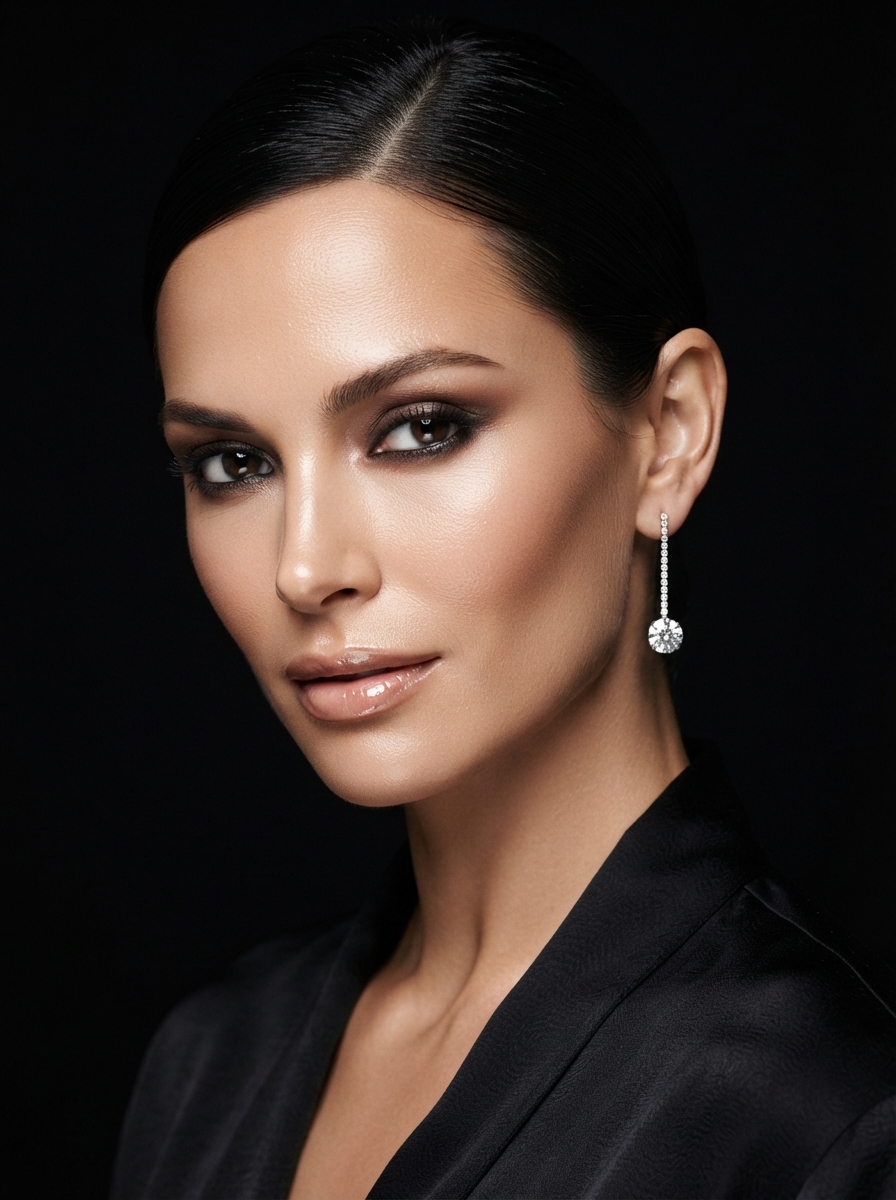
Image generated by Nano Banana 2 Lite on fal, an AI model from Google.
Video prompt: (0-4s) She slowly opens her eyes and lifts her chin toward the light, the diamond earring catching a sharp glint. (4-9s) A soft gust stirs a few strands of her hair as the black background dissolves into a slow-moving field of golden bokeh behind her. (9-13s) The faintest knowing smile crosses her face. Keep her exact face, makeup, and earring from the still, and add a slow push-in. Flawless soft key light, a high-gloss fashion-film grade. Almost silent, a soft rising synth pad with a single bright chime as the earring flares.
Generated using Grok Imagine Video 1.5 on fal, an AI model from xAI.
A UGC-style influencer clip
This is probably the most common thing people actually make with a model like this.
A creator talking to camera about a product, phone-shot, no crew.
1.5 carries it because it keeps the face steady and speaks the line for you, so you write the script and skip the shoot.
Image prompt: A vertical phone selfie of a woman in her late twenties sitting in a sunlit bedroom, holding a small unbranded skincare bottle up toward the camera, natural window light, casual authentic UGC look, slightly soft focus, shot on a smartphone front camera, 9:16 portrait framing.
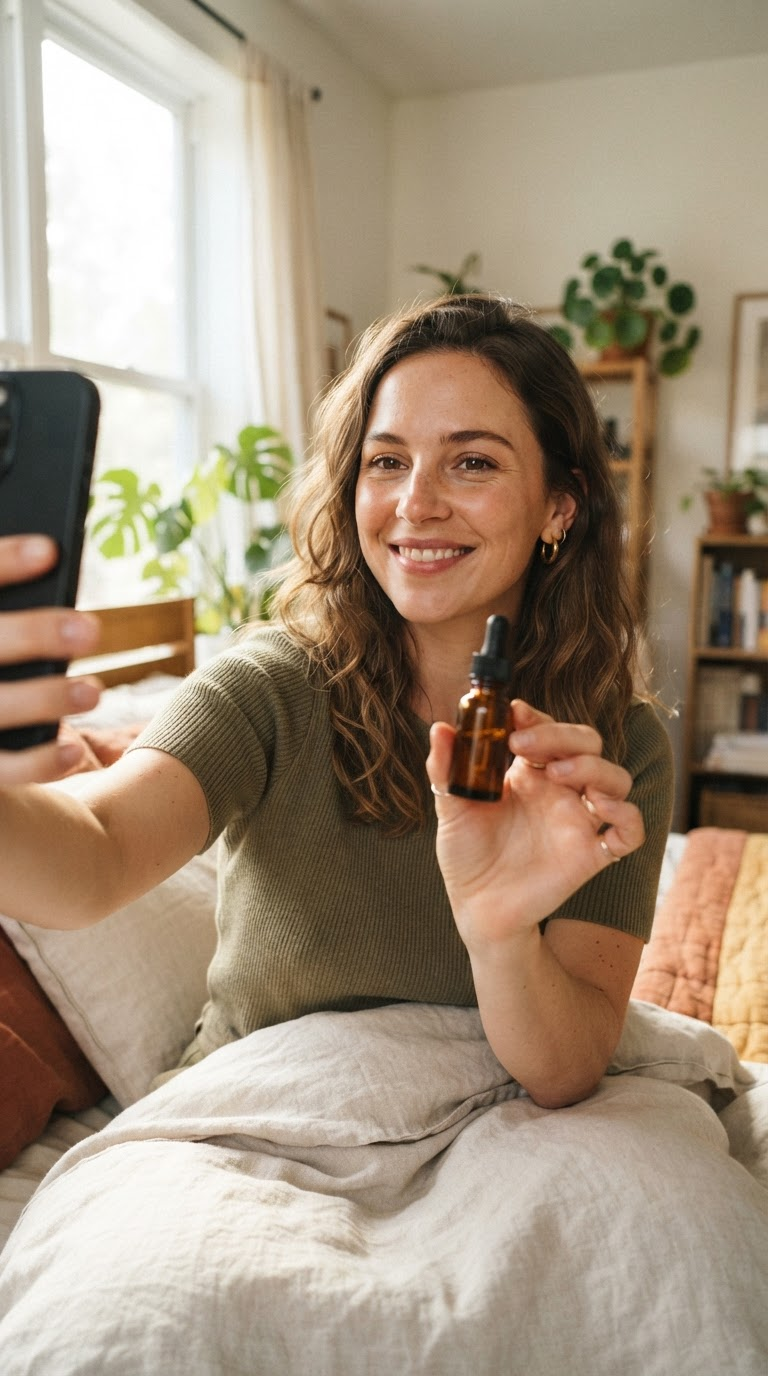
Image generated by Nano Banana 2 Lite on fal, an AI model from Google.
Video prompt: (0-5s) She looks into the lens with easy energy and says: "Okay, I did not expect this to actually work, but look at my skin." (5-9s) She turns the bottle to show the label and gestures at her cheek with a small laugh. Keep her exact face and the room from the still, and add a loose handheld sway like she's filming herself. Bright natural light, the slightly oversaturated look of a phone camera. Her voice clear and casual, a quiet room tone, a soft upbeat lo-fi track low in the mix.
Generated using Grok Imagine Video 1.5 on fal, an AI model from xAI.
How do you edit a clip with Grok Imagine's edit-video endpoint?
Edit-video, xai/grok-imagine-video/edit-video, is a video-to-video step: it runs on footage you already have, whether that's a phone clip, a piece of stock, or something you shot on set, and reworks it from a text instruction.
There are two constraints that shape how you use it: the input is resized down to a maximum area of 854 by 480 pixels and cut to 8 seconds, so the model is ideal for short passes, and results hold together best when you change the look of a clip and leave its motion alone.
Let's go over to see what that looks like:
Dressing the background of a UGC clip
Let's take the vertical UGC creator clip as a source.
We'll leave her, her voice, and the whole take alone.
For this edit, we'll only add something behind her:
Prompt: Add a soft cluster of warm out-of-focus string lights glowing and gently twinkling in the background behind her. Leave her, her spoken line, the audio, and the framing exactly as generated, and add only the background lights.
Generated using Grok Imagine Edit on fal, an AI model from xAI.
Adding atmosphere to a spot
A light touch on the teaser: a few petals drifting through the frame, nothing else moved.
Source: the three-cut luxury fragrance teaser generated in the text-to-video section.
Prompt: Add a scatter of delicate white flower petals drifting slowly down through all three shots, a few passing close to the lens. Keep the cuts, the motion, the timing, and the audio exactly as generated, and add only the falling petals.
Generated using Grok Imagine Edit on fal, an AI model from xAI.
Adding a single element to a product macro
You can also use the video editing endpoint to make small additions.
Let's take the whisky glass macro generated in the image-to-video section.
Prompt: Add a slow, thin curl of smoke rising and drifting off the top of the glass, catching the backlight. Keep the whisky's swirl, the turning ice, and the audio exactly as generated, and add only the rising smoke.
Generated using Grok Imagine Edit on fal, an AI model from xAI.
➡️ Since Grok Imagine's edit-video endpoint only generates up to 8 seconds of edited footage, it'll inevitably cut out 9 or more seconds of content, similar to what I supplied the model in my examples.
How much does Grok Imagine cost on fal?
Every endpoint bills per second with no subscription, and for the two generation endpoints, the audio is part of that per-second cost with nothing added for it.
Text-to-video is $0.05 a second at 480p and $0.07 a second at 720p, which puts a 10-second 720p clip at about $0.70.
Image-to-video on Grok Imagine Video 1.5 is $0.08 a second at 480p and $0.14 a second at 720p, with $0.01 added per input image, so a 10-second 720p clip with audio comes to roughly $1.41.
Edit-video is billed on both ends: $0.05 a second of output at 480p or $0.07 at 720p, with $0.01 a second of input video on top.
That works out to $0.06 a second all in at 480p and $0.08 at 720p, so a 6-second 480p edit is about $0.36.
➡️ Pro tip: As there's no commitment up front, you can run cheap 480p passes while you're still shaping the prompt and save the 720p render for the version you want to keep.
Recently Added













Start creating with Grok Imagine on fal
Every Grok Imagine video endpoint on fal bills by the second with no subscription, and you can test any of them in the playground before writing a line of code.
You can sketch a scene from scratch in text-to-video, animate a still on Grok Imagine Video 1.5, or rework existing footage with edit-video, all from one SDK and one account.
A fal account is free to create, and that's all it takes to start.
Grok Imagine FAQs
Can I use Grok Imagine clips in commercial work?
Yes.
Content generated through fal can be used in commercial projects, so a clip can go into a paid campaign or a client deliverable.
Usage rights and any model-specific conditions are set out in fal's terms of service, so check those for the details.
What separates Grok Imagine from Grok Imagine Video 1.5?
Base Grok Imagine covers text-to-video, image-to-video, and clip editing.
Grok Imagine Video 1.5 is a separate, higher-end image-to-video endpoint that runs longer clips, up to 15 seconds, at its own pricing.
Where can you access the Grok Imagine API?
The Grok Imagine API is available on fal with pay-per-use billing and no subscription.
Why should you use fal to run Grok Imagine?
fal gives you every Grok Imagine endpoint behind one client, with queueing and webhooks handled and no GPUs or subscription to manage.
The same integration reaches the 1,000-plus other models on fal, outputs are cleared for commercial work, and the playground lets you test a shot in the browser before you touch the API.
How do you use Grok Imagine on fal?
There are more ways in than the two this guide uses.
The playground runs any endpoint in the browser with no code, and the @fal-ai/client SDK carries the same calls into production with queueing and webhooks.
Past those, fal's Sandbox and Workflows cover experimentation and multi-model pipelines, and the MCP server and CLI bring the endpoints into agents and terminals.
What video generation endpoints does Grok Imagine have on fal?
Grok Imagine's video generators across a handful of endpoints:
-
xai/grok-imagine-video/text-to-video generates a clip with synchronized audio from a text prompt.
-
xai/grok-imagine-video/image-to-video animates a still frame into a clip.
-
xai/grok-imagine-video/edit-video reworks an existing clip from a text instruction.
-
xai/grok-imagine-video/v1.5/image-to-video is the higher-end image-to-video endpoint this guide uses, running longer clips up to 15 seconds.
-
xai/grok-imagine-video/extend-video lets you extend videos with up to 10 seconds from a prompt.
![10 Best Virtual Try-On APIs in 2026 [Reviewed]](https://refinery.fal.media/url/https%3A%2F%2Fv3b.fal.media%2Ffiles%2Fb%2F0aa0ad85%2Ft1AjEGt_gapabWxSItcbb_best-virtual-try-on-apis-2026.jpg/tr:w-1280,q-80/t1AjEGt_gapabWxSItcbb_best-virtual-try-on-apis-2026.webp)