![What Is Reference-to-Video for AI Video Generation? [2026]](https://refinery.fal.media/url/https%3A%2F%2Fv3b.fal.media%2Ffiles%2Fb%2F0aab9e0c%2FgFQmcbyrNCUfVWR2Q0p7z.jpg/tr:w-1920,q-80/gFQmcbyrNCUfVWR2Q0p7z.webp)
Every team building a series out of AI video hits the same wall around shot four, when the creator who carried the first three comes back with a different jawline and a jacket that quietly changed color.
This guide covers what reference-to-video does with your uploads, the four e-commerce and UGC jobs it handles well, the prompting habits that hold a face steady across angles, and what a generation costs on H3 Max Reference-to-Video.
TL;DR
Reference-to-video means uploading your own images, video clips and audio next to the prompt and addressing each asset by name inside it, so the model knows which reference carries the face, which carries the wardrobe, which carries the motion and which sets the timing.
Getting it right means doing the work before you generate, building one multi-angle character sheet with an image model so nothing is left to invent a profile from a headshot, attaching only the references that carry the concept.
fal is the best place to run that reference-to-video workflow because the image model that builds the sheet and the video endpoint that consumes it operate behind one key and one bill, with no GPU to manage and no monthly subscription to worry about.
What is reference-to-video?
Reference-to-video is a generation mode where the model treats every uploaded asset as a named element your prompt can point at, so what you write lands closer to a shot instruction than a scene description.
A prompt written for this mode names which reference supplies the character and which supplies the movement, then states what has to survive unchanged into the output.
The difference from image-to-video comes from the job the upload performs.
An image-to-video call treats your picture as frame one and animates outward from that exact composition, while a reference call reads identity and material off the same picture before placing that subject into whatever scene your prompt describes, at whatever angle the shot needs.
How does reference-to-video differ from text-to-video and image-to-video?
Reference-to-video gives you more control than either of the other modes because your subject arrives as a file the model can read.
Text-to-video describes that subject in words the model reinterprets on every run, and image-to-video hands over a composition the model then has to keep.
| Mode | What you supply | What the model holds steady | What it's for |
|---|---|---|---|
| Text-to-video | A prompt | Nothing between runs | Exploration, concepting, one-off shots |
| Image-to-video | One frame, sometimes a last frame too | The exact composition you uploaded | Animating a still you already like |
| Reference-to-video | A prompt with images, clips, and audio | Subject identity, wardrobe, set, motion style, timing | Series work, multi-subject scenes, product and wardrobe swaps |
💡 The cost of that control is preparation, since a reference call wants assets, and the quality of those assets sets the ceiling on what comes back.
What can you build with reference-to-video?
A creator persona who shows up in every ad you run
The mode was built for this job, where a reference sheet of your persona goes in alongside a still of the set, and the prompt describes the action layered on top of both.
Brands running paid social need the same face across dozens of variants, and supplying that face as a reference is what stops every variant from needing its own shoot.
Start by generating the persona on GPT Image 2.5, keeping the lighting flat and the styling minimal so the sheet built from it stays legible:
Prompt: A photorealistic portrait of a woman in her late twenties, light brown hair in a loose messy bun, wearing an oversized washed-denim shirt over a plain white tee. Neutral studio lighting, light gray studio backdrop, eye level, 50mm lens, sharp focus on the face. Shoulders square to camera, relaxed closed-mouth expression, no makeup styling, no jewelry, no props.
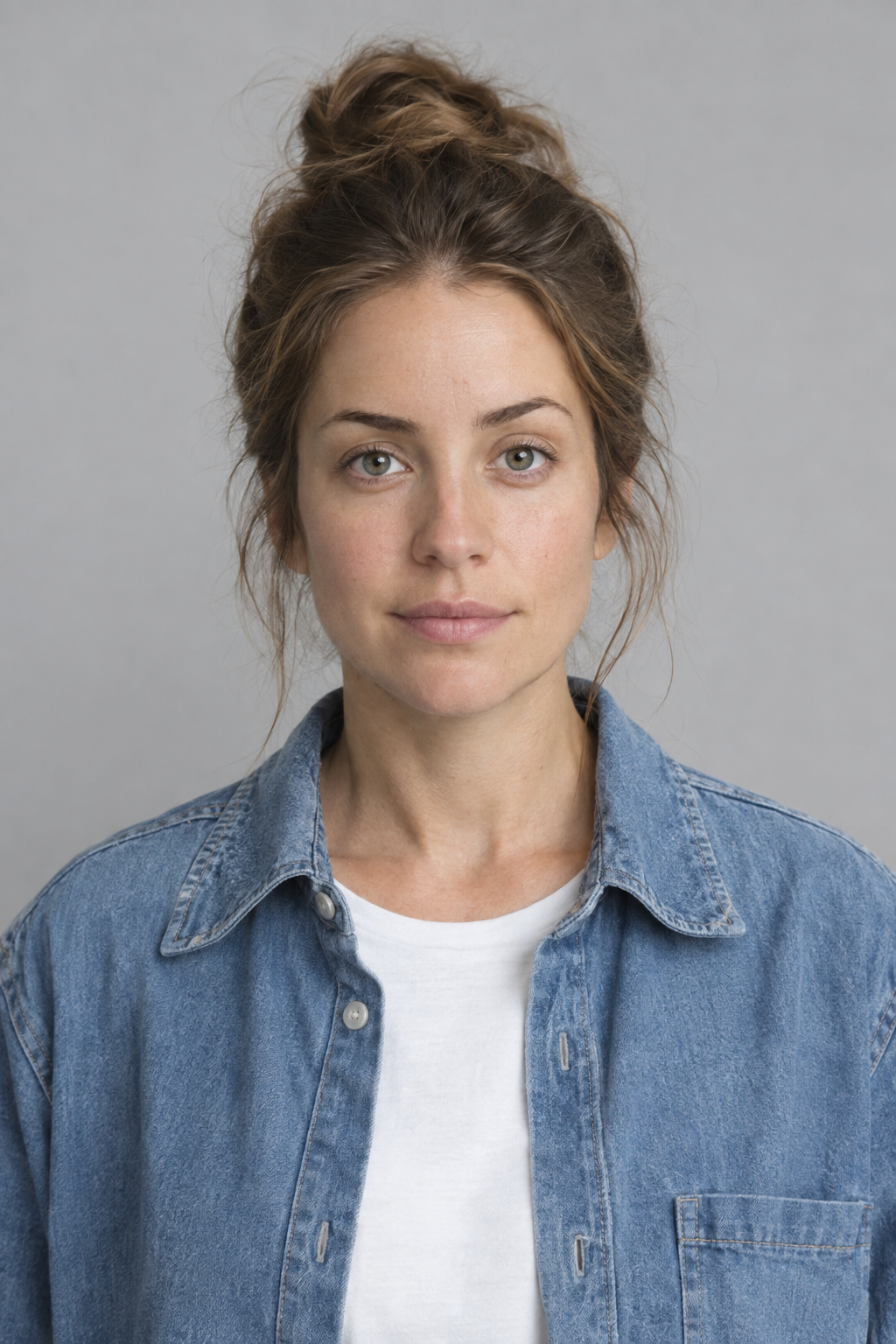
Generated using GPT Image 2.5 on fal, an AI model from OpenAI.
That portrait then goes through the four-column sheet prompt further down, which is what becomes Image 1.
Image 2 is the set, and it wants to be shot the way the ad will be framed:
Prompt: A small bathroom counter photographed at counter height, white quartz surface, a 30ml amber glass serum bottle with a black dropper cap standing front and center, a folded hand towel and a small ceramic dish softly out of focus behind it. Morning light from a window on the left, soft shadows, vertical 9:16 framing, blank label, no hands in shot.
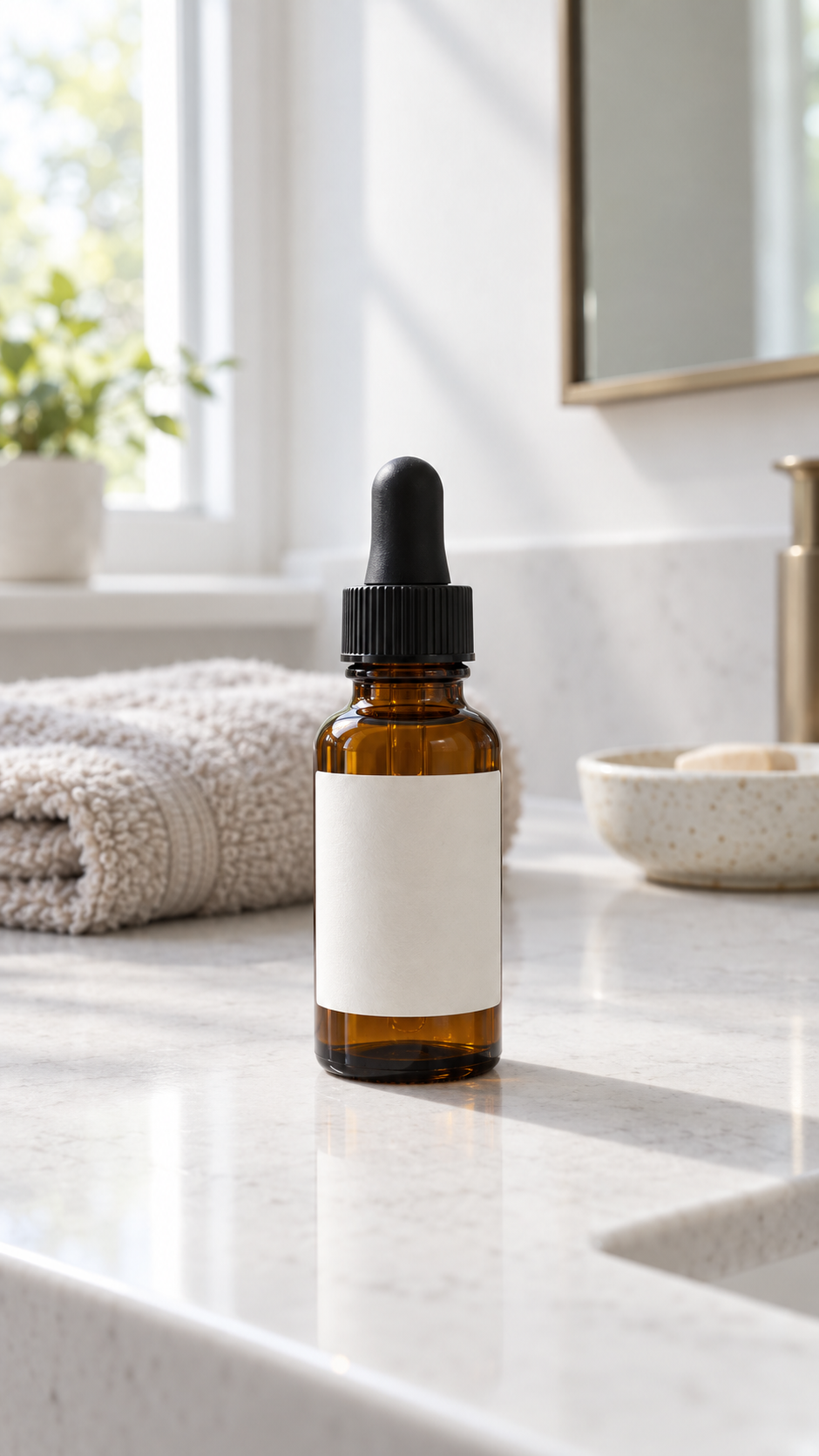
Generated using GPT Image 2.5 on fal, an AI model from OpenAI.
With both references in hand, the generation prompt does the rest:
Prompt: Image 1 is a character reference sheet for our creator persona. Use it only for her appearance and do not reproduce its panel layout. Image 2 is the bathroom counter. Take her face, hair, and denim shirt from Image 1, and take the counter, the bottle, and the morning window light from Image 2. She steps into frame from the right, lifts the amber bottle off the counter with one hand, and holds it steady at chest height facing camera. Vertical framing, phone at eye level, one continuous take, no cuts.
Generated using H3 Max on fal, a post-trained variant of MiniMax H3.
Swapping the set still and the action line while holding the same persona reference returns the next ad variant with the same creator in it, and nothing about the first generation needs repeating.
Two-person UGC where both faces have to hold
Identity lock scales past one subject, so a second reference image gives you a second person the model has to keep, and native audio carries the dialogue you write for them.
Reaction and duet formats depend on it, since the whole thing collapses the moment one of the two faces drifts mid-clip.
Position in the list is what the index refers to, which means the second entry in your image array becomes Image 2 in the prompt.
Generate both people under identical lighting, because a reference pair shot differently is the fastest way to get an output where one face reads as composited onto the other:
Prompt: A photorealistic portrait of a woman in her mid twenties with shoulder-length dark curls, wearing a faded green crewneck sweatshirt. Flat even indoor lighting, plain off-white wall behind her, eye level, waist-up framing, sharp focus on the face, no props.

Generated using GPT Image 2.5 on fal, an AI model from OpenAI.
Prompt: A photorealistic portrait of a man in his mid twenties with a buzzcut and thin wire-frame glasses, wearing a light gray zip hoodie. Flat even indoor lighting, plain off-white wall behind him, eye level, waist-up framing, sharp focus on the face, no props.
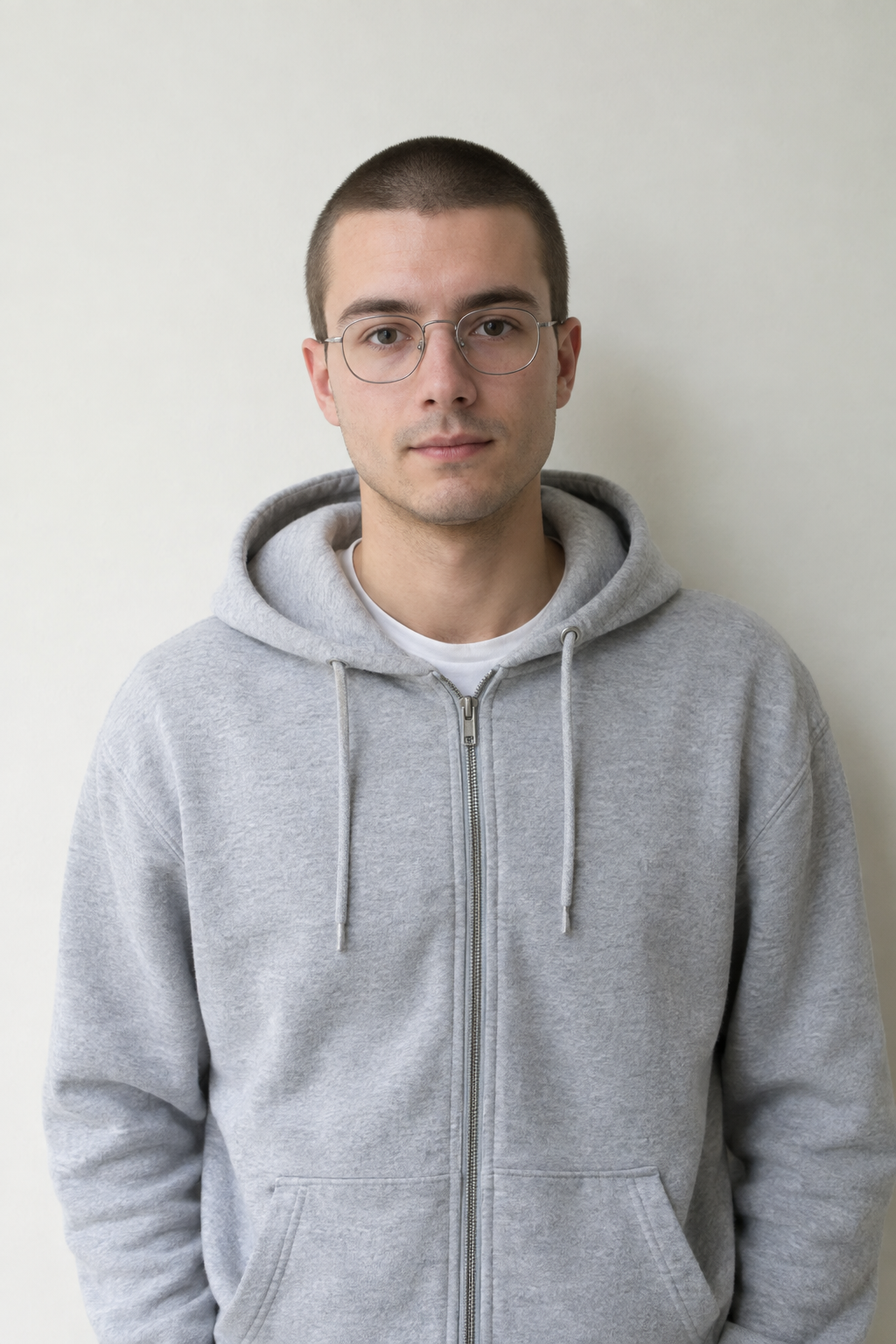
Generated using GPT Image 2.5 on fal, an AI model from OpenAI.
Those two become Image 1 and Image 2 in the order you attach them:
Prompt: Image 1 is the creator. Image 2 is her roommate. Keep both faces and both outfits exactly as they appear in their reference images. The creator pulls a sneaker out of the box, holds it up by the heel and says, "Forty bucks." Her roommate takes it, flips it over to look at the sole and answers, "That's a fake." Native audio with lip-synced English dialogue, apartment room tone under the voices, no music, phone held at arm's length in vertical framing.
Generated using H3 Max on fal, a post-trained variant of MiniMax H3.
Wardrobe and product swaps over borrowed motion
Motion arrives here as a video reference while appearance arrives as image references, and the prompt tells the model which side of that pairing to preserve.
One hero clip becomes the whole catalog this way, with the model and the camera move holding steady while the product on screen changes.
A catalog team with a real shoot substitutes its own footage for the motion reference, but the whole set can be generated, and the order matters because the model reference has to feed both the hero clip and the swap.
Start with the model on GPT Image 2.5, full body and carrying nothing, since a model reference already holding a bag gives the swap a second bag to reason about:
Prompt: A photorealistic full-body shot of a woman in her late twenties, dark hair tied back, wearing straight-leg black trousers and a plain white shirt. Standing square to camera, arms relaxed at her sides, neutral expression, empty hands. Even studio lighting, light gray backdrop, no bag, no jewelry, no accessories.
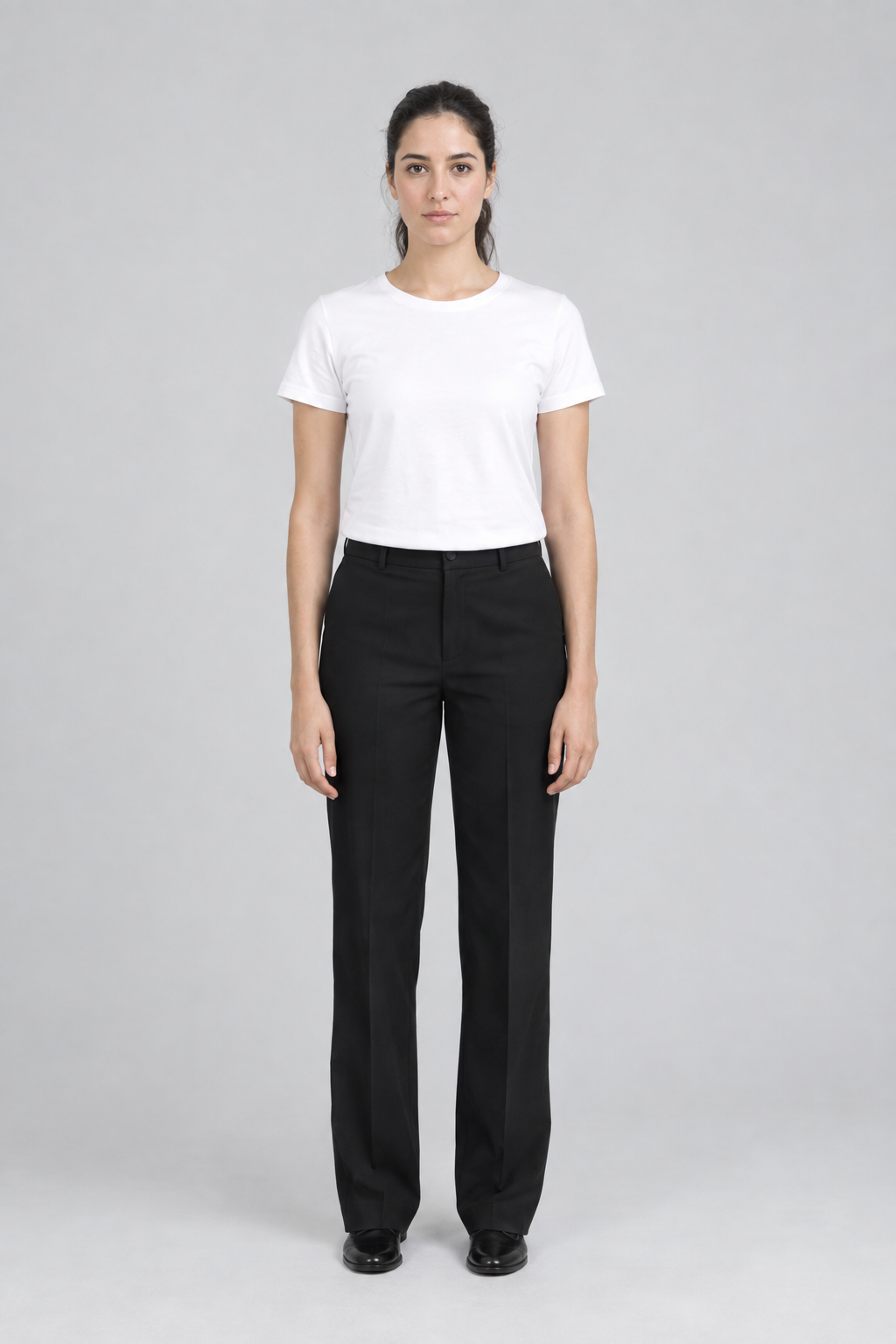
Generated using GPT Image 2.5 on fal, an AI model from OpenAI.
The product comes next, and a packshot with the hardware hidden is the most common reason a swap comes back wrong, so lay the strap out before you generate and not after the video fails:
Prompt: A tan leather crossbody bag photographed straight on against a plain white sweep, brass buckle and adjustable woven strap both fully visible, the strap laid flat so none of the hardware is obscured. Soft, even studio lighting, faint contact shadow beneath the bag, no model, no branding, no text.
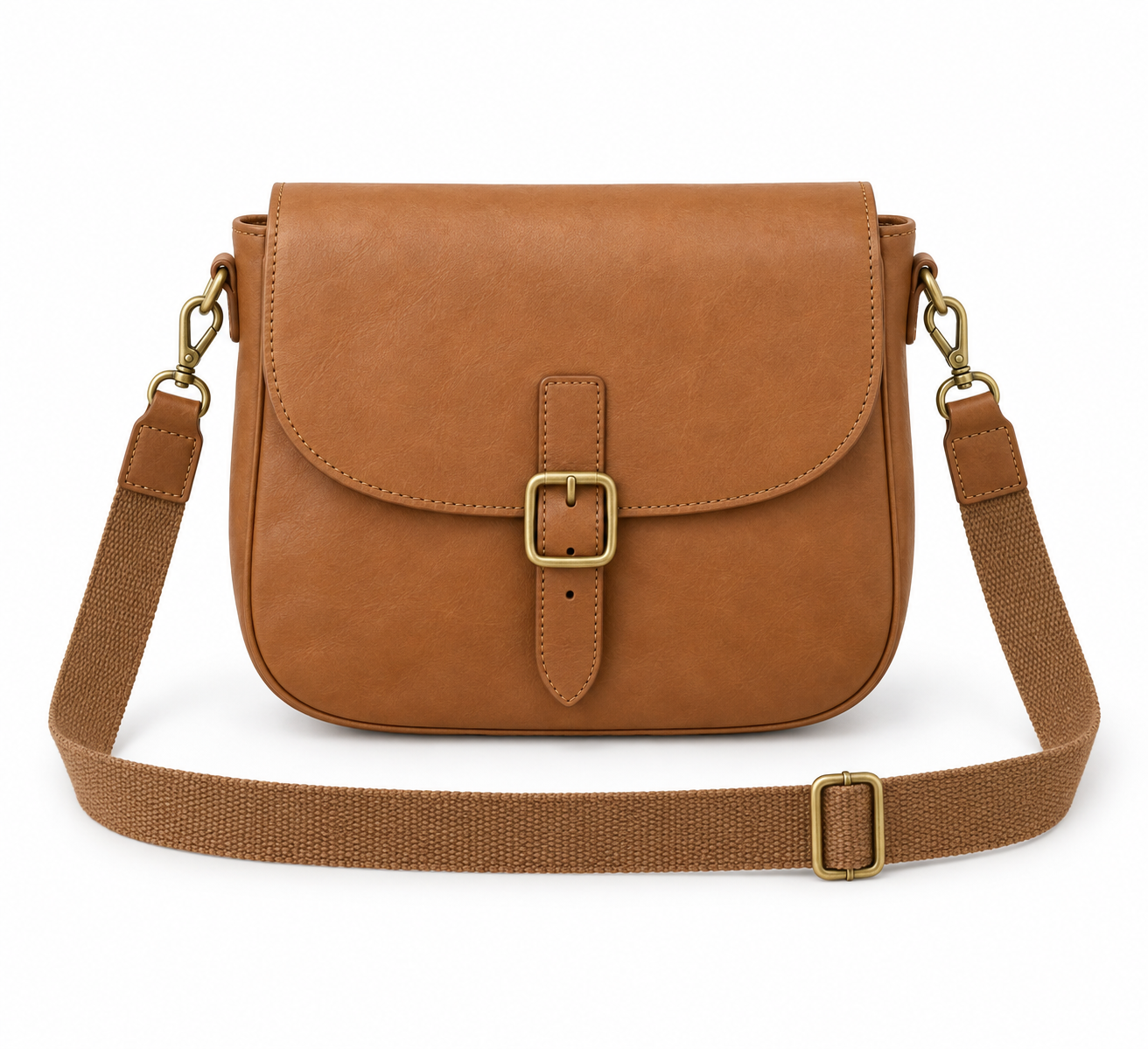
Generated using GPT Image 2.5 on fal, an AI model from OpenAI.
The motion reference is a separate generation on a different endpoint, H3 Max Image-to-Video at minimax/h3-max/image-to-video, which animates the model reference as its opening frame:
Prompt: She walks toward camera at a steady pace with her arms swinging naturally, while the camera pushes in slowly. Even studio lighting, one continuous take, no cuts.
Generated using H3 Max on fal, a post-trained variant of MiniMax H3.
You want to keep the product out of that clip on purpose, because Video 1 only has to carry motion and camera work, and the bag arrives separately from Image 2.
One motion reference then serves every SKU in the catalog, which is the whole economy of the setup.
Reusing the same model image as both the opening frame of the clip and Image 1 in the swap is also what makes "hold her face exact" something you can actually check afterward:
Prompt: Image 1 is the model. Image 2 is the tan leather crossbody bag, SKU 4471. Video 1 is the hero clip. Put the bag from Image 2 on the model from Image 1, and match the walk, the pacing, and the camera push from Video 1. Hold her face exact and hold the bag's buckle and strap hardware exact. Take nothing else from Video 1.
Generated using H3 Max on fal, a post-trained variant of MiniMax H3.
falMODEL APIs
The fastest, cheapest and most reliable way to run genAI models. 1 API, 100s of models
Cuts that land on the music
An audio reference functions as a timing signal, which is a different job from supplying a soundtrack, and the prompt has to tie an on-screen action to the track before the model treats it as a clock.
Image 1 here is a square front-view crop from the creator persona sheet, the same persona the serum ad used, which is the payoff for generating that sheet once.
The crop also pays for itself on this particular request.
A 16:9 sheet at 1,824 tokens, the 9:16 desk still at 1,824, and a 15-second track at roughly 1,200 come to 4,848 reference tokens, which is 752 past the free allowance and $0.01504 on every run.
A 1,024-token square crop brings the same three references to 4,048, which stays inside the allowance and costs nothing.
That leaves the desk as the only asset in this example that still has to be generated from scratch:
Prompt: A creator's desk photographed from directly overhead, pale wood surface, three phone cases laid out in a row with even spacing, one matte black, one translucent lilac, one cream with a raised camera edge, a closed laptop at the top of frame and a small trailing plant in the corner. Soft diffused daylight, no hands, no text, vertical 9:16 framing.
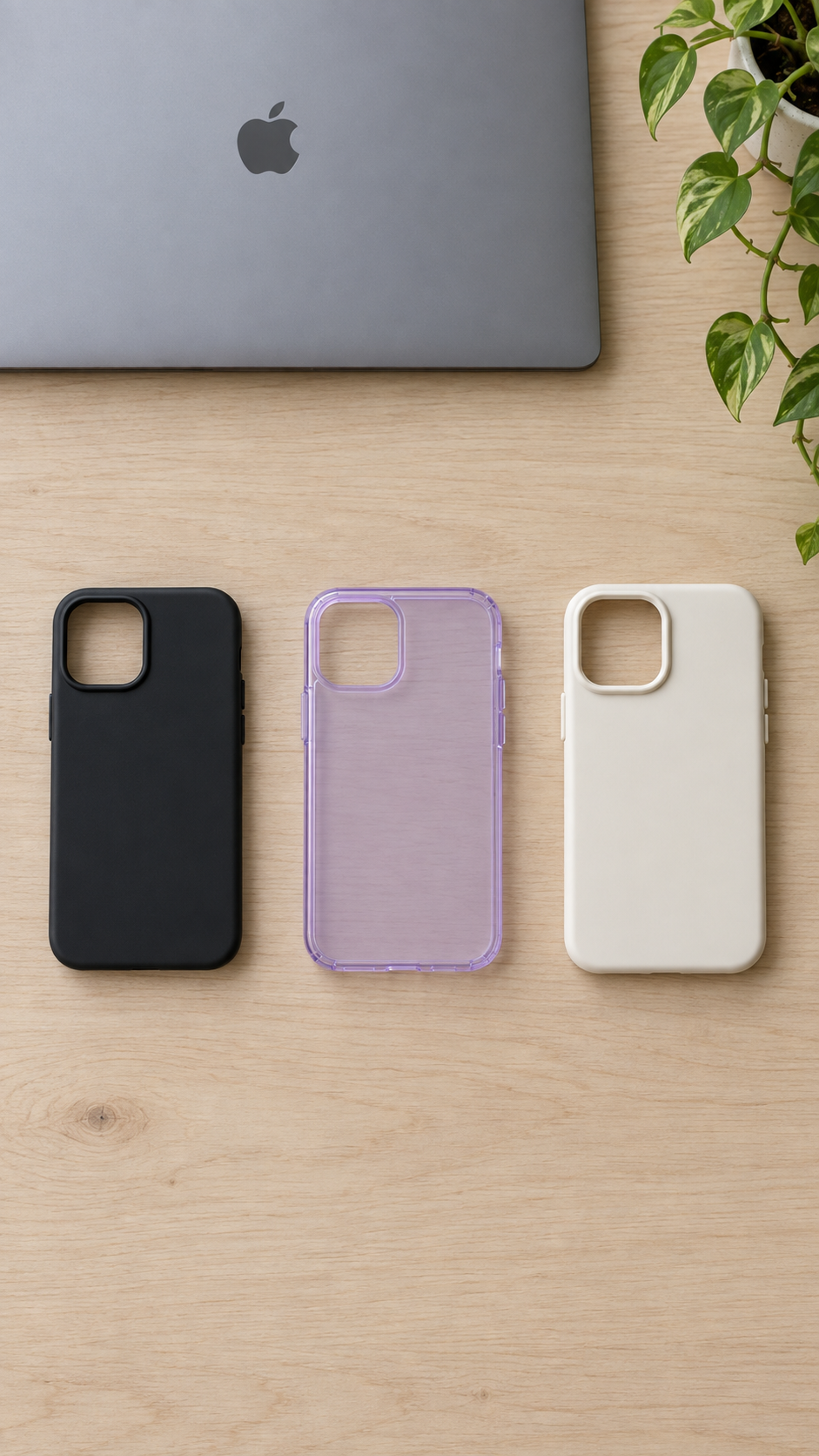
Generated using GPT Image 2.5 on fal, an AI model from OpenAI.
The track comes off the same platform, since Seed Audio 1.0 generates music as one layer of its output alongside dialogue and sound effects, and a music-only brief is a valid prompt for it:
Prompt: Upbeat lo-fi house instrumental, no vocals and no dialogue. A clear four-on-the-floor kick, warm analog bass, soft electric piano chords, and a light shaker on the offbeats. Bright and loopable, steady enough to cut picture against. 15 seconds.
Generated using Seed Audio 1.0 on fal, an AI model from ByteDance.
And for the reference-to-video prompt:
Prompt: Image 1 is the creator. Image 2 is the desk she films at, with the three phone cases laid out. Audio 1 is the track. Cut her movement to Audio 1 so that every case swap lands on a downbeat, with the desk and the lighting from Image 2 unchanged throughout. Vertical framing, a fast whip between each swap.
Generated using H3 Max on fal, a post-trained variant of MiniMax H3.
How do you get consistent results from reference-to-video?
Name every reference and say what must not move
The model is left guessing whenever a reference goes unaddressed in the prompt.
A line like "the character from Image 1 performs the motion in Video 1" outperforms dropping four files into the form and writing a scene description that never mentions any of them.
References are addressed by modality and by their order in each list, so the third image you attach is Image 3 whether or not you ever mention images one and two.
The playground prompt field takes # as a shortcut for referencing your inputs, which saves counting positions by hand.
When you want something held and not merely present, you can name it and name what it must not pick up, along the lines of taking the camera move from Video 1 and none of its lighting.
Turn off prompt expansion when your wording is exact
Prompt expansion is the setting most people never touch, and it rewrites your prompt before generation.
The default balanced mode returns in about a second, quality mode spends up to around 30 seconds building a richer prompt, and disabled sends your wording through untouched.
Exact dialogue and negative instructions are the cases where expansion works against you, because a rewrite can soften the phrasing the model needed to hear.
The response carries the expanded prompt that was sent to the model, which is the fastest way to work out whether a strange result came from your wording or from the rewrite.
That field comes back empty when expansion was disabled, when it left your prompt alone, or when MiniMax's hosted API did the rewriting internally, so it is a diagnostic you get most of the time and not every time.
Why a multi-angle character sheet beats a headshot
A single front-facing headshot tells the model nothing about your character's profile, so the model invents one, and it invents a different one on the next run.
A four-column sheet resolves that in a single asset, generated with an image model before you go anywhere near the video endpoint.
Prompt for GPT Image 2.5 Edit, run against an uploaded photo (I'll take the creator from the previous prompt): Turn the uploaded photo into a character reference sheet. Lay it out as four vertical columns, one per viewing angle. Each column holds a full-body shot on top with the matching head-and-shoulders portrait directly below it. Column 1 is the front view. Column 2 is the left profile, with body and portrait both facing left. Column 3 is the right profile, with body and portrait both facing right. Column 4 is the back view with a matching rear portrait. Even spacing and identical framing in every column, clean silhouette, thin panel borders, flat even lighting, no text.
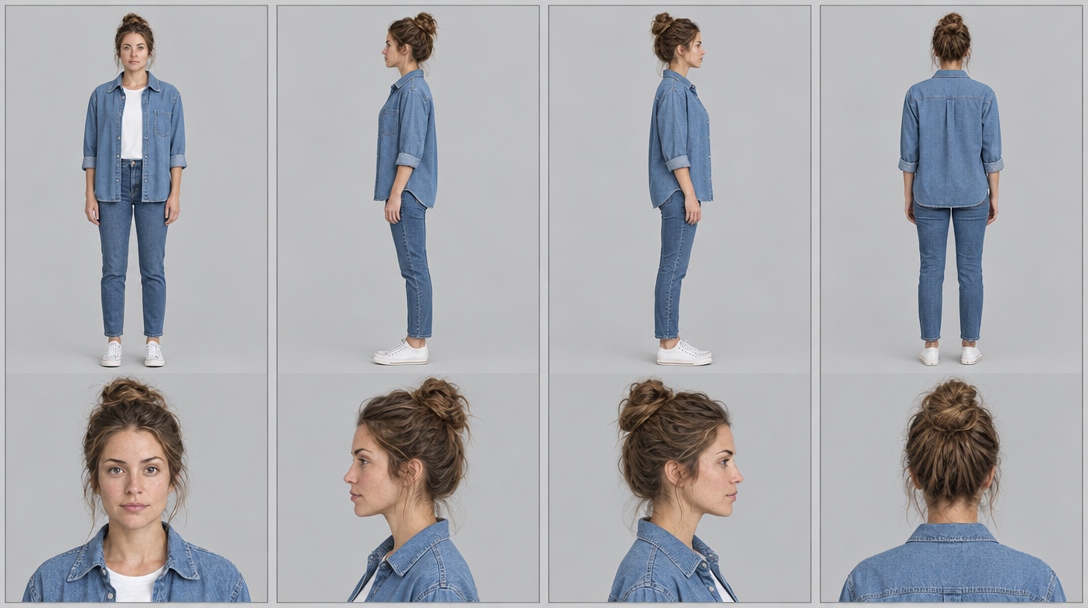
Generated using GPT Image 2.5 on fal, an AI model from OpenAI.
The sheet pays off in two ways, the first being that it occupies one of your 12 reference slots while carrying eight usable views of the same person.
The second is arithmetic, since eight separate square images come to 8,192 reference tokens and add $0.08192 to the request once the free allowance is deducted.
A single 16:9 sheet comes to 1,824 tokens, stays inside the 4,096 that every request includes, and leaves 2,272 tokens of allowance for your other references.
Pro tip: keep the sheet near 16:9 when you build it, because the short edge of every reference image is brought down to 1,024 pixels, which turns an ultra-wide 4:1 strip into a 4,096 by 1,024 reference that eats the entire free allowance on its own.
Iterating at 480p before you commit
Composition and reference weighting read perfectly well at 480p, so you want to lock the arrangement and note the working seed there, then save full resolution for the version that's already right.
The saving runs on two axes at once, because 480p costs $0.05 per second of output against $0.08 at 768p, and it also encodes reference video on a lower-resolution profile.
One 5-second reference video costs $0.16768 in reference charges at 480p against $0.56320 at 768p, which is under a third on the reference side alone.
Across a whole test, the gap narrows because output is only part of the bill, so a 5-second clip with two images and a 5-second reference video runs $0.45864 at 480p against $1.00416 at 768p, a little under half.
Trimming video references belongs in the same pass, since reference-video charges scale with duration and cutting a 15-second clip down to 5 seconds takes $1.97440 of reference charge down to $0.56320 on every run.
Which model should you run reference-to-video on?
In terms of value for money and generation speed, H3 Max Reference-to-Video at minimax/h3-max/reference-to-video is the endpoint I'd point you at, our own post-training of MiniMax H3, built against our inference stack so throughput went up without quality coming down to pay for it.
References cap at 12 files in total across images, videos and audio together, with video and audio clips running 2 to 15 seconds each and a combined 15-second ceiling on either.
Resolution runs 480p, 768p and 1080p with 768p as the default, where 1080p is a latent refinement of a native 768p generation, while duration defaults to 5 seconds and aspect ratio defaults to adaptive.
Billing is the output cost plus a reference surcharge, where output is duration multiplied by the rate for your resolution, and the surcharge covers any reference tokens past the 4,096 that every request includes for free, charged at $0.02 per 1,000 on the exact count.
Here's how that looks:
| Output resolution | Per second | 5 seconds | 10 seconds | 15 seconds |
|---|---|---|---|---|
| 480p | $0.05 | $0.25 | $0.50 | $0.75 |
| 768p | $0.08 | $0.40 | $0.80 | $1.20 |
| 1080p | $0.16 | $0.80 | $1.60 | $2.40 |
A square reference image costs 1,024 tokens and a 16:9 one costs 1,824, so four square images land exactly on the allowance, while reference video is the input that moves the number at 32,256 tokens for five seconds at 768p.
Reference encoding is identical at 768p and 1080p, so moving a finished shot up to 1080p costs the difference in the output rate alone, $0.08 per second, with the reference charge unchanged.
Where is the best place to generate reference-to-video content?
The best place to generate reference-to-video content is on fal, as the image model that builds your character sheet and the video endpoint that consumes it operate behind the same API key and the same account.
A character sheet is an intermediate asset, and it loses time every time it crosses a platform boundary.
References upload through our own file storage and return as URLs the endpoint accepts, which removes the step of hosting your assets publicly before you can use them, and the client will auto-upload a binary if you hand it one directly.
As for reference weighting, it gets worked out in the playground, where you attach assets, type # to pull them into the prompt, and iterate at 480p until the arrangement holds, after which the same inputs go straight through the API.
We host over 1,000 models, so GPT Image 2.5 for the references, Seed Audio 1.0 for the track, H3 Max for the shot, and an upscaler for delivery all run on one account and one bill.
Pricing is per output with no subscription, and every model page carries its own commercial-use designation, which is worth checking before anything ships.
New accounts start with no credits, and the minimum top-up is one dollar.
Recently Added










Get started with reference-to-video workflows on fal
Reference-to-video is the first generation mode where preparation beats prompt craft.
The teams getting clean output are the ones building the character sheet, cropping their references tight, naming every asset in the prompt, and testing the arrangement at 480p before spending anything on a full-resolution run.
The endpoint is live now, and a first reference set can go into the playground without a line of code.
Create your free fal account and get started with H3 Max.
Frequently asked questions
What can go wrong with reference-to-video, and how do you fix it?
Identity drift on turns is the failure I see most, and it traces back almost every time to a reference set containing no profile and no rear view, which leaves the model improvising the angles you never supplied.
Reference overload produces a different symptom, where several similar inputs get averaged into a subject resembling none of them, and the repair is subtraction, not a better prompt.
Style bleed appears when a motion reference carries more than motion into the output, so the color grade or the background of your source clip turns up in a scene that was only supposed to borrow the camera move.
Naming the exclusion helps there, along the lines of taking only the camera move and pacing from Video 1 and none of its lighting or setting.
Timing that misses is usually a prompt problem, since a track attached without a mention is never treated as a clock, and the model needs an explicit tie between an on-screen action and the audio before it starts cutting to the beat.
Is reference-to-video the same as image-to-video?
No, and the difference is in what the upload gets used for.
Image-to-video treats your image as the literal first frame and animates from that exact composition, while reference-to-video reads identity and material off the image and builds a new shot that can place the subject at any angle your prompt calls for.
How many reference images should you use?
You can start with two or three that carry the concept and add only when something specific is missing, because every reference competes for influence and overlapping references tend to average into a subject matching none of them.
The ceiling runs far above what you will usually want, at 12 files counted across images, videos, and audio together.
How much does a reference-to-video clip cost on H3 Max?
A 5-second 768p clip with a single reference image costs $0.40, since that image sits well inside the free reference allowance.
Ten seconds at 768p with four reference images comes to $0.80 on the same logic, while a 5-second clip built from two reference images and a 5-second reference video comes to $1.00416.
Reference video is what moves the number, so trimming your clips is the single most effective thing you can do to control spend.
Does reference audio actually affect the video?
It does, provided the prompt says so, since a track attached without a mention gives the model no reason to cut to it.
Tying a specific on-screen action to the audio in your wording turns the track into a timing signal for movement, at roughly 80 tokens per second of cost.
Can you use H3 Max reference-to-video output commercially?
The endpoint carries a commercial-use designation on fal, though designations are set per model, so confirm on the model page before you ship.
The rights you hold in the reference assets themselves remain your responsibility, which matters most when you are uploading photographs of real people.
What does a clean reference image look like?
Well-lit single-subject images transfer identity more reliably than group shots or anything where the face is partly occluded, and the crop matters as much as the lighting does.
A reference that includes half of someone else's shoulder hands the model a second person to reason about, which surfaces later as a face borrowing features from both.
Resolution above the processing ceiling buys you nothing, so uploading a square image at 2048 pixels costs exactly what uploading it at 1024 costs, both of them arriving as the same processed reference and billing 1,024 tokens.
How many references are too many?
Every reference competes for influence over the same output, and in my testing, composites start going muddy well before the 12-file ceiling.
Four assets that each contribute something different about the subject return a cleaner result than nine that overlap, so the working order is to begin with the two or three carrying the concept and add only what's demonstrably missing once you've seen what comes back.