
You might have seen it: a live shopping host is mid-pitch when someone on her team types a line into a side panel, and the tan handbag on her shoulder turns emerald green without the stream dropping a frame.
The model behind that trick is Lucy 2.5, Decart's real-time video editor, live on fal today.
This guide walks through what the capability unlocks and how to prompt a model that edits footage while the footage is still being shot.
TL;DR
Lucy 2.5, Decart's video-to-video model for editing footage in real-time, is live on fal at the decart/lucy-2-5/realtime endpoint.
The model works on live feeds and on recorded footage at 30fps with latency close to zero, touching only the element you name while the motion and light around it hold steady.
One prompt field drives everything, from object swaps and background changes through to full scene restyles and VFX.
Character swaps and virtual try-on read from a reference image, minimum 512x512, in JPEG, PNG, or WebP format.
Pricing on fal runs $0.04 for each second of processed video, usage-based, with no infrastructure to manage, which is why it's the best place to run Lucy 2.5 and do real-time video editing.
The fastest way in is the fal playground, and production apps connect through fal's realtime API over WebRTC.
What is real-time video editing with AI?
Real-time video editing with AI means a model transforms footage as fast as the footage plays, so the edited stream comes back with near-zero delay.
Lucy 2.5 does this at 30fps on live or recorded video, editing frame by frame for as long as a session runs.
Most generative video tools accept a prompt and hold the job in a queue, then hand back a finished file once the render completes.
Lucy 2.5 never enters that queue. You point a camera or a stream at the endpoint and type an instruction.
The change appears on the moving image while the image keeps moving.
The prompt field stays open for the whole session, and new edits stack on top of earlier ones without a single stop.
Long sessions hold up too: streams can run for hours with no drift and no identity collapse.
What can you edit with Lucy 2.5?
Lucy 2.5 covers object adds, replacements, and removals, background swaps, attribute changes like color and texture, global style changes, character swaps, virtual try-on, and special effects, all driven from a single prompt field.
The two capabilities that pair the prompt with a reference image are virtual try-on and character swap.
The API schema asks for that reference at a minimum of 512x512 in JPEG, PNG, or WebP.
Every other capability can run from text alone.
Edit isolation separates a real editing model from a filter.
Lucy 2.5 changes the element you named and leaves the rest of the frame alone, and that means a jacket can change color while the hands holding a product and the camera movement carry on untouched.
The 2.5 generation also improved reliability on small and off-center objects, and on non-human objects, which matters because so much commercial footage puts the product in someone's hand at the edge of the frame.
What does real-time editing unlock?
Real-time editing turns published video into a surface you can keep working on, which opens formats that queue-based rendering was never going to serve.
Live shopping that answers the chat
A host can show one sneaker in four colorways during a single unboxing, each swap prompted live as viewers ask for a specific one.
Virtual try-on runs on the same Lucy 2.5 endpoint: a shopper's camera feed and a garment reference image put the piece on their body, in their room, under their lighting, at 30fps.
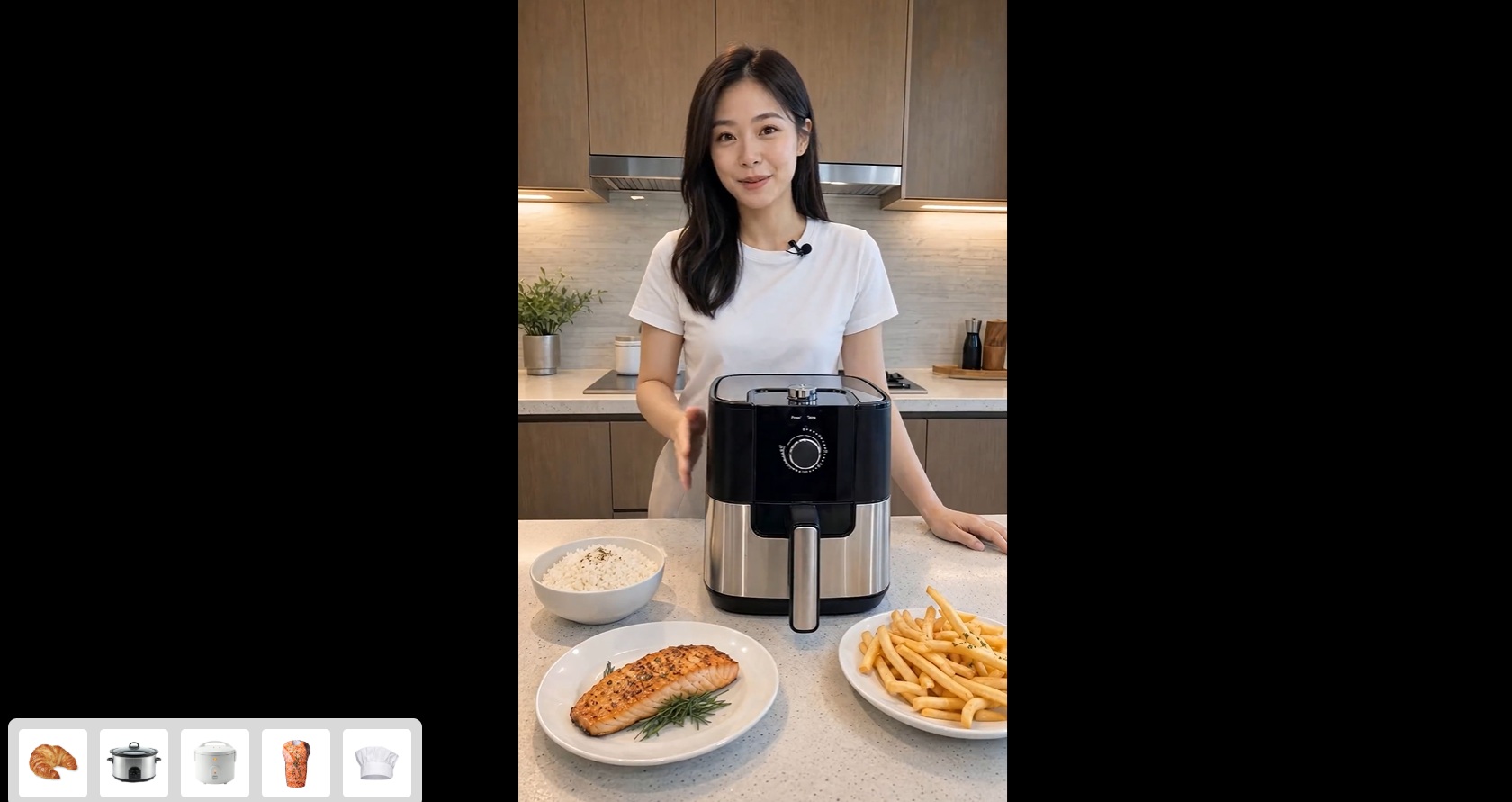
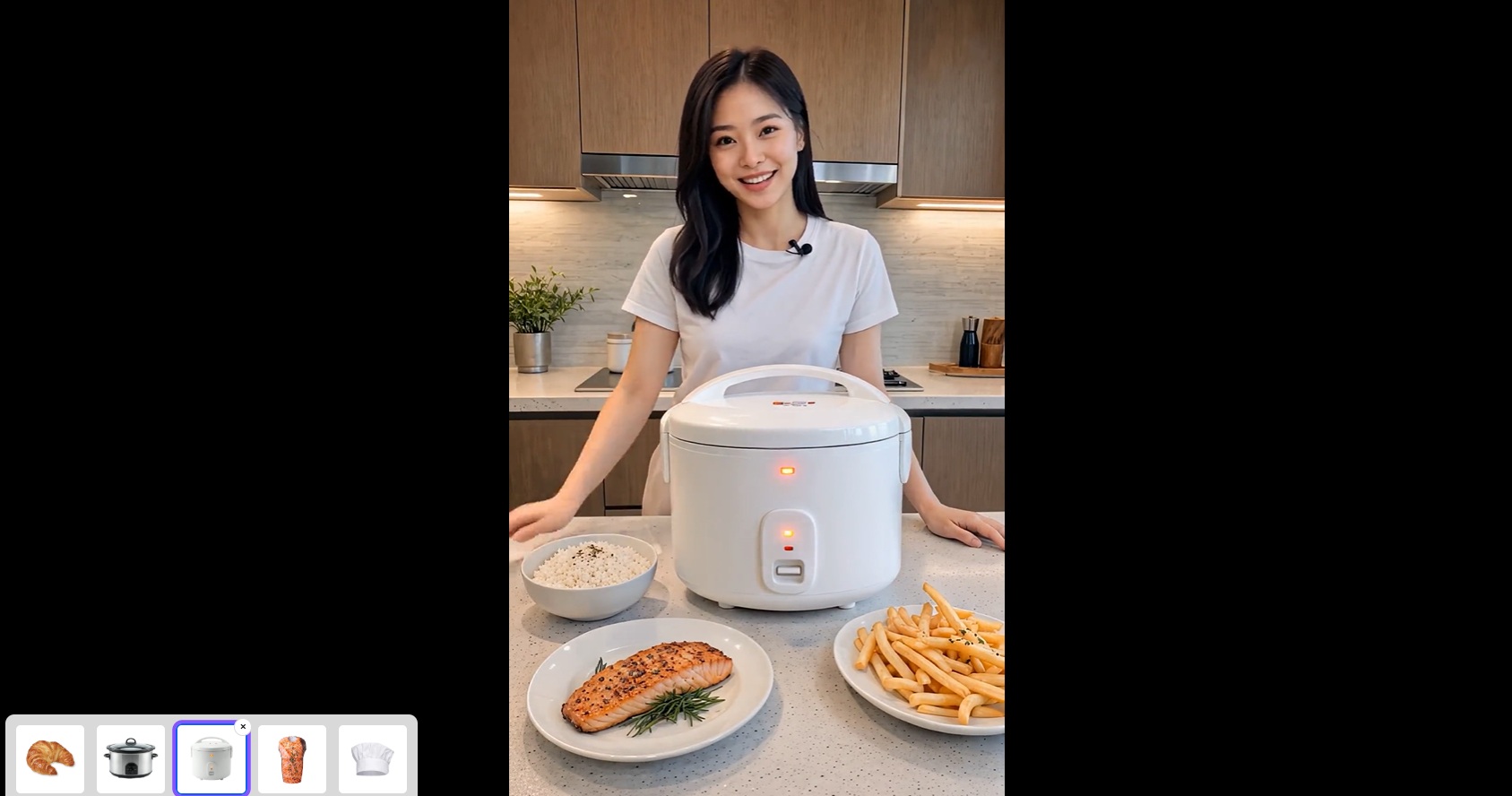
Watching the answer appear on your own shoulders mid-stream is a very different experience from squinting at a size chart.
Ad creative that re-dresses itself
One filmed spot becomes many finished spots.
With Lucy 2.5 attached to the footage, the soda can on the picnic table becomes the client's bottle for one market, and the billboard behind the actors picks up this quarter's campaign art.


For the holiday cut, the whole scene shifts from golden hour to winter dusk.
Placement slots that were locked on the shoot day stay open for new creative after the footage is already out in the world.
Streams with a resident VFX desk
The supported effects on Lucy 2.5 run from fireballs to smoke, and the model page names gaming as a use case because a world you can type at is a game mechanic.
A streamer can set the desk on virtual fire when a subscriber milestone hits, or step into a costumed character through a reference image.
Between segments, you can push the entire room through a full style change.
None of that requires a post team, because there is no post.
Walkthroughs that stage themselves
An agent touring an empty apartment on camera can furnish the living room mid-walkthrough.
Buyers watch the bare room fill in with a sofa, a rug, wall art, and warmer light while the tour carries on, with no staging crew involved and nothing pre-rendered.
Lucy 2.5 keeps the geometry of the room and the motion of the walk intact, and the staging reads as the same footage with better furniture.
In-app creation features that ship as an endpoint
Platforms can hand real-time transformation to their own creators.
A live restyle feature inside a camera flow is one WebRTC integration against decart/lucy-2-5/realtime.
The endpoint is serverless on fal, and the bill scales with seconds of processed video and nothing else.
falMODEL APIs
The fastest, cheapest and most reliable way to run genAI models. 1 API, 100s of models
Does Lucy 2.5 work on recorded video too?
Yes, Lucy 2.5 accepts recorded footage as well as live feeds, per the model's input spec on fal.
The recorded path is easy to overlook next to the live demos.
An ad library shot over the past three years becomes raw material again, since archived spots can pick up current packaging and a fresh seasonal grade without a reshoot.
The footage plays through the endpoint with the edits applying at 30fps, and the transformed stream comes back in a single pass, no timeline software involved.
For a content team, nothing in the archive has to stay final.
Where is the best place to access Lucy 2.5?
The best place to access Lucy 2.5 is fal, where the model runs in a browser playground for instant testing and as a realtime API endpoint at decart/lucy-2-5/realtime for production apps.
Start in the fal playground
The Lucy 2.5 playground on fal runs against your webcam or a video feed straight from the browser.
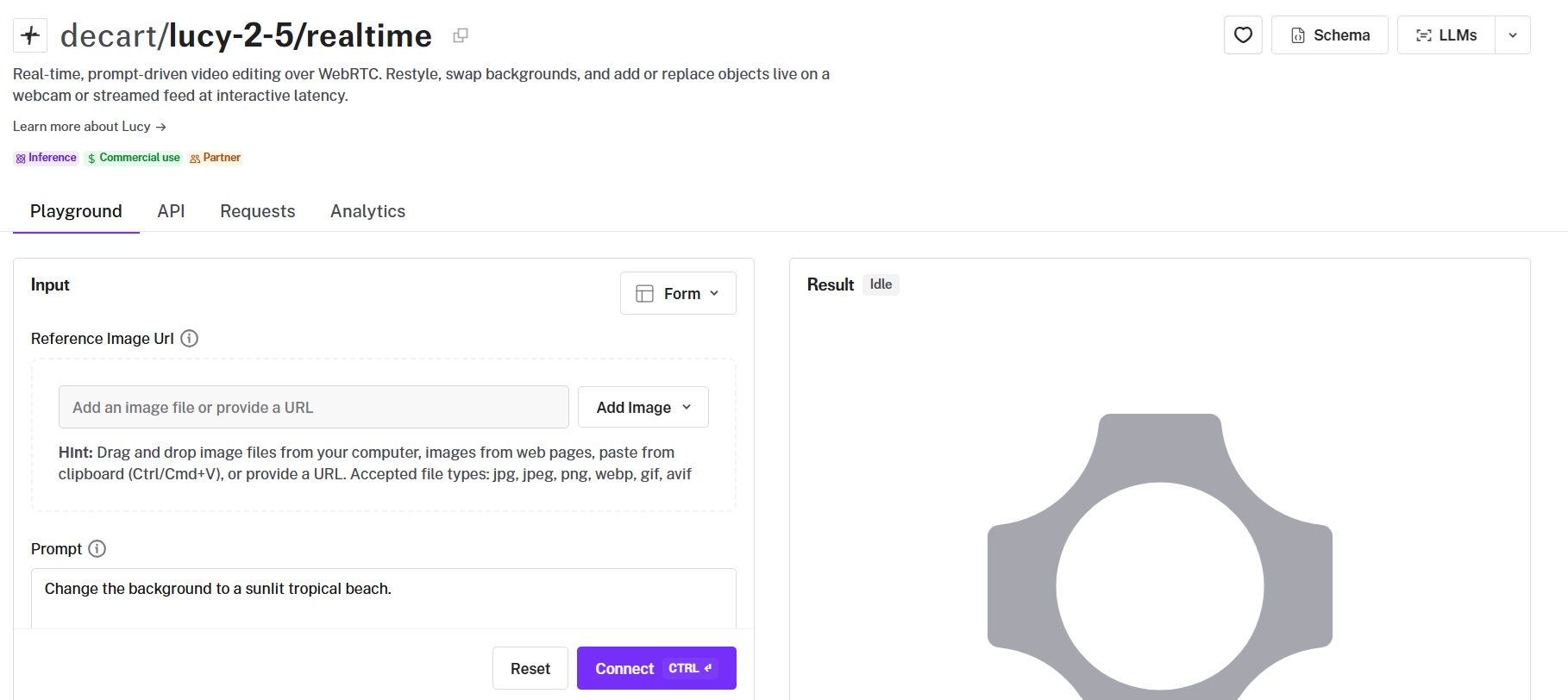
Type a prompt and connect, with an optional reference image attached when the edit calls for one.
One quirk to know: @-mention syntax for referencing characters is not supported on Lucy 2.5, so describe the reference in words, along the lines of "the character in the reference image."
The playground also exposes a prompt expansion toggle, on by default, which lets Decart enhance your instruction before applying it.
Integrate the realtime API
Production apps connect through fal's realtime client, which handles the signaling handshake for the session.
Install the JavaScript client and open a connection:
import { fal } from "@fal-ai/client";

const connection = fal.realtime.connect("decart/lucy-2-5/realtime", {
  onResult: (result) => {
    console.log(result);
  },
  onError: (error) => {
    console.error(error);
  },
  // Fetch short-lived JWT token from your backend
  tokenProvider: async (app) => {
    const response = await fetch("/api/fal/realtime-token", {
      method: "POST",
      headers: { "Content-Type": "application/json" },
      body: JSON.stringify({ app }),
    });
    return response.text();
  },
  tokenExpirationSeconds: 10,
});

connection.send({});
➡️ Never ship your FAL_KEY to the browser.
The token provider pattern above exists so the client only ever holds a short-lived JWT minted by your backend.
The fal connection itself is a signaling relay, and once the handshake completes, video travels directly between the end user's browser and Decart, with the stream running at 30fps at what fal describes as interactive latency.
How much does Lucy 2.5 cost?
Lucy 2.5 costs $0.04 for every second of video it processes on fal.
Billing is usage based on fal's serverless platform, and a ten-minute virtual try-on session comes to $24, with nothing accruing while no video is being processed.
fal's terms allow commercial use of what you generate through the API, with the full licensing detail in the terms of service.
How do you prompt Lucy 2.5?
You want to prompt Lucy 2.5 with short, specific edit instructions that name one change at a time and anchor that change to what the camera can currently see.
A single prompt field drives every capability, and the craft is in how you phrase and sequence instructions on a feed that never pauses.
Say what changes and what holds still
The prompts that land cleanly tell Lucy 2.5 which element to touch and what that element should become, then spell out which physical properties need to carry over.
A product swap for a beverage spot might read:
"Replace the white coffee mug in his left hand with a matte black energy drink can, keeping his grip and the window light on the can as he gestures."
A background swap for a talking-head UGC ad follows the same shape:
"Swap the background for a marble kitchen counter with soft daylight from the right, keeping my hair edges clean."
Half of each prompt describes what must not change, and that half is what keeps the rest of the frame safe from the edit.
Stack edits one send at a time
A Lucy 2.5 session behaves like a director calling adjustments between takes, except the take never ends.
For example, a wardrobe change, then a furniture swap, then a new window with a view.
You want to follow that rhythm: send one edit and give the change a beat to settle before the next goes out.
For example, an ad team dressing a set for a spring campaign might run the sequence:
"Turn the gray sofa into a butter yellow boucle couch."
"Swap the framed print above the couch for a large botanical line drawing."
"Shift the room's color grade toward soft morning light with long warm shadows."
Each line changes one thing, and a miss is easy to spot and cheap to re-prompt.
Bring a reference image for people and garments
Virtual try-on and character swap read from the reference_image_url field, and the schema wants at least 512x512 in JPEG, PNG, or WebP.
Describe the reference in words inside the prompt, since @-mention syntax is not supported on Lucy 2.5.
A try-on session for a streetwear drop might attach a lookbook shot and prompt:
"Put the oversized varsity jacket from the reference image on me, layered over my current top, sleeves pushed up."
For a branded stream, attach the mascot design and go with:
"Swap the host for the mascot in the reference image, matching the host's movements and keeping the desk setup unchanged."
Decide what prompt expansion should do for you
The enable_prompt_expansion setting on Lucy 2.5 defaults to true, and while the toggle is on, Decart expands your instruction before applying it.
Leave expansion on for short, conversational prompts, where the enhancement fills in descriptive detail on your behalf.
Consider turning expansion off once you are writing precise, art-directed instructions and want them applied as written, a discipline that counts most on brand work where an exact color or product detail cannot drift.
Write VFX like stage directions
The strongest VFX prompts on Lucy 2.5 place the effect and tie it to an object already in frame:
"Add thick smoke rolling in from the left of the frame, pooling around the sneakers on the table."
"Set off a slow-motion explosion of gold light behind me the moment I raise the bottle."
An effect anchored to an on-screen object settles into the shot far more convincingly than a bare noun dropped over the scene.
Recently Added


















Video stops being a finished file
For as long as video has existed as a digital format, the export was the finish line.
Lucy 2.5 moves that line, as footage keeps taking direction during the broadcast and after publication, one typed instruction at a time.
The fastest proof is the Lucy 2.5 playground on fal.
All you have to do is point a webcam at yourself and ask for a jacket you do not own.
A blink later, you are wearing one, and no paragraph in this guide can compete with that.
Get started with a free account on fal.
FAQs
What makes fal the best place to use Lucy 2.5?
fal is where Lucy 2.5 is live right now, in a browser playground and as the decart/lucy-2-5/realtime API endpoint, with no infrastructure on your side of the connection.
Billing is usage-based at $0.04 per second with no minimums, and Lucy 2.1 runs on the same platform when a team wants the earlier real-time endpoint.
The same account covers testing in the browser and shipping over WebRTC, so the path from first prompt to production stays short.
Do you need a GPU to run Lucy 2.5?
No, Lucy 2.5 runs serverless on fal, and nothing gets provisioned on your side.
The playground works straight from the browser, and production apps connect through the realtime API with an API key and a short-lived token.
What inputs does Lucy 2.5 accept?
Lucy 2.5 accepts video, live or recorded, along with text prompts and optional reference images.
The reference image applies to virtual try-on and character swap, at a minimum of 512x512 in JPEG, PNG, or WebP, and every other edit type can run from the prompt alone.
Does quality hold up on long Lucy 2.5 streams?
Yes. Decart trained Lucy to self-correct across long sessions, and streams hold for hours with no identity collapse.
Stability at that length keeps full-length live shopping broadcasts and stream marathons on the table, where a drifting face would cut the session short.
Can Lucy 2.5 output be used commercially?
Yes, work generated through the fal API is cleared for commercial projects under fal's terms of service.
Check the terms for the licensing specifics before a client campaign goes live.

![How To Use Ideogram V4: Prompts & Workflows [2026]](https://refinery.fal.media/url/https%3A%2F%2Fv3b.fal.media%2Ffiles%2Fb%2F0aa265fa%2FcWzF9yv1t94j1xFln_W_p.jpg/tr:w-1280,q-80/cWzF9yv1t94j1xFln_W_p.webp)