![How To Generate AI Videos Using Claude and MCP [2026]](https://refinery.fal.media/url/https%3A%2F%2Fv3b.fal.media%2Ffiles%2Fb%2F0aaf916f%2Fq8BHWGB1lp94_TzmLRBdE.jpg/tr:w-1920,q-80/q8BHWGB1lp94_TzmLRBdE.webp)
I'll show you how I make ecommerce video ads from a single Claude chat, with Claude Opus 5.5 writing the prompts and Seedance 2.5 on fal rendering the footage.
After the fal MCP setup in Claude and Claude Code, we'll build four ads for an unbranded vitamin C serum, from an 8-second studio shot to a 30-second spot made from a product photo.
TL;DR
- Once the fal MCP server is connected, Claude Opus 5.5 (or the latest Opus model when you're reading this guide) can write and run Seedance 2.5 prompts from a regular Claude chat.
- I use Seedance 2.5 text-to-video for ads where a written product description is enough, and reference-to-video when the product in the ad has to follow your photo across a take of up to 30 seconds.
- Setting
draftto true gives a 480p first take, which works out to $0.2149 per second at 480p rates (9:16 or 16:9) and stays completable at 1080p for seven days. - The four drafts in this guide come to about $13.54 by our token formula as of October 2026 (63 seconds of 480p output, three ads in 9:16 and one in 16:9), plus $0.15 for the packshot.
- fal Agent is the closer alternative to Claude for dropping product photos into a chat and asking questions about a finished clip, whereas Claude Code handles catalog work where photos and prompts are already files in a folder.
Can Claude generate AI videos?
Yes, Claude can generate AI videos as soon as fal is added as a connector, because Claude Opus 5.5 can then run Seedance 2.5 and the other video models on fal without leaving the chat.
That connector is our MCP server: eleven tools covering everything from model search to job polling.
Claude's part in this guide is writing the prompts and making the calls to fal, while the footage and its soundtrack come from Seedance 2.5.
Both the Claude app and Claude Code connect to https://mcp.fal.ai/mcp-relay, so the prompts below work in either one.
My default is the Claude app, though I move to Claude Code when the product photos are saved on my laptop.
Our guide to motion design video generation with Claude uses the same connector with MiniMax H3 Max, in case you're after keyframe-driven motion graphics.
To run Seedance 2.5 without Claude at all, how to access Seedance 2.5 on fal walks through the routes from the playground to the CLI.
Which Seedance 2.5 endpoint should you use for ecommerce ads?
I'd use Seedance 2.5 text-to-video for ads where a written description of the product is enough, and Seedance 2.5 reference-to-video when the product on screen has to follow your own photos.
Each Seedance 2.5 request returns one MP4 of up to 30 seconds with its own soundtrack, so I don't need an audio editor for drip sounds or a presenter's voice.
Text-to-video has no image input in its schema, leaving the prompt as the only description of your bottle or box.
Reference-to-video accepts up to 30 product photos in an image_urls list, with the prompt pointing at the first one as @Image1.
One clean, front-facing packshot is the reference I start from, adding more angles only when the ad turns the product around.
Our explainer on what reference-to-video is covers how references steer video models in more depth.
These are the fields I set on the two endpoints, next to the values this guide uses:
| Field | Text-to-video | Reference-to-video | Setting in this guide |
|---|---|---|---|
prompt | Required | Optional, with references named @Image1, @Video1 or @Audio1 | The exact Seedance 2.5 prompt given in each step |
image_urls | Not in the schema | Up to 30 images at 30 MB each, within 50 files across all media types | The packshot as @Image1 in the 30-second spot |
duration | auto, or 4 to 30 seconds | auto, or 4 to 30 seconds | 8 s for the hero ad, 15 s for the presenter ad, 10 s for the lifestyle ad, 30 s for the spot |
aspect_ratio | auto, 21:9, 16:9, 4:3, 1:1, 3:4 or 9:16 | Same options | 9:16 for the vertical ads, 16:9 for the spot |
resolution | 480p, 720p or 1080p, default 720p | Same options | 480p through draft for first takes, 1080p through draft completion for finals |
draft | true returns a 480p preview and a draft_id | Same behavior | true for the first take of each ad |
generate_audio | Default true, priced the same on or off | Same behavior | true |
bitrate_mode | standard by default, or high for a larger encode | Same options | standard |
It pays to pin duration and aspect_ratio to fixed values, as leaving either on auto changes the token count and the price along with it.
Where do you add the fal MCP server in the Claude app?
You add the fal MCP server in the Claude app under Customize and Connectors, as a custom connector pointing at https://mcp.fal.ai/mcp-relay, then approve access to your fal account in a browser window.
Here's the setup, following the Claude setup page in our docs:
- In Claude, go to Customize and then Connectors, where you choose Add and then Add custom connector.
- Name the connector fal and paste
https://mcp.fal.ai/mcp-relayinto the remote MCP server URL field before pressing Continue. - On the OAuth screen, press Continue and choose Sign in now.
- Pick Register automatically followed by Add, and approve fal in the browser tab that opens.
- Back in Claude, open a fresh chat and enable fal from the Connectors list under the plus sign.
Claude's custom connector guide lists the plans and organization permissions that include custom connectors, in case that option is missing for you.
A few account details are good to know before the first paid run:
- Team and Enterprise: a workspace owner adds fal first under Organization settings and then Connectors, and Enterprise members whose role includes connector management can add it as well. Everyone else then connects their own fal sign-in from Customize and Connectors.
- API keys: none are involved, since authorization happens through OAuth in that browser tab.
- Cost: the MCP server itself adds nothing on top of model runs, and a Seedance 2.5 render started from Claude is billed at our standard rates, the same as a request through our API.
- Which account pays: spend goes to the Active MCP account picked on the MCP & connectors screen in your fal dashboard. It stays on your personal account until you choose a team there or select Use for MCP from that team's row menu in Account settings.
- Jobs already running: they keep billing to whichever account started them, though a selected account that can't be reached stops new operations without touching your personal credits.
Before spending anything, I'd recommend one free check in a new chat, which a working connection answers with a list of Seedance 2.5 endpoint IDs:
Use fal to search for Seedance 2.5 models and list the endpoint IDs you find, without running any of them.
The documented fix for a failed authentication is to complete the browser sign-in and authorization again, and a token or key should never go into the chat.
Does Claude Code use the same fal MCP server?
Yes, Claude Code connects to the same https://mcp.fal.ai/mcp-relay server, added with one terminal command and authorized from the /mcp menu.
The Claude Code setup page splits the setup into three steps:
- Run this command in your terminal to register the fal server:
bash
claude mcp add --transport http --scope user fal https://mcp.fal.ai/mcp-relay- In Claude Code, run
/mcpand choose Authenticate on the fal entry to start the browser sign-in. - Once the sign-in completes, ask Claude Code for the Seedance 2.5 endpoint list, with no model runs.
Our docs give one fix for fal tools that still don't show up: starting a fresh Claude Code session.
I keep fal on the user scope so it's available in every project, while --scope project limits the connection to one project and saves it in .mcp.json.
In my experience, Claude Code is the better route once your product photos are files on your computer.
The hosted fal server can't read a local path, but upload_file can hand back a signed upload URL for a file of up to 90 MB.
Claude Code then sends the bytes to that URL with an HTTP PUT from your shell.
This is the request I send for a local photo:
Upload ./photos/serum-front.jpg to fal with upload_file and prepare_upload, using the file's real size in bytes.
Send the raw bytes to the upload_url with an HTTP PUT and the returned headers, with no Authorization header and no redirects.
Only after the PUT returns a 2xx status, give me the file_url and keep the signed upload URL out of your reply.
Claude Code can also save the finished MP4s into your project folder.
I like to keep each ad's Seedance 2.5 prompt in a file next to its video, so the same formats are quick to rerun for the next product.
falMODEL APIs
The fastest, cheapest and most reliable way to run genAI models. 1 API, 100s of models
How should you write Seedance 2.5 prompts for ecommerce ads?
I'd write a Seedance 2.5 ad prompt as a short shot description that names the product in identical words in every ad and puts the action in the order it happens.
The Seedance 2.5 docs ask for specific camera and lighting direction, and for prompts of 20 to 30 seconds they suggest a sequence of beats.
The product description is the one part I never let drift, which is why the three text-to-video ads in this guide paste the same product line:
an unbranded 30 ml amber glass dropper bottle of vitamin C serum with a matte white rubber bulb and a brushed gold collar, with no label or text anywhere on it
Identical wording keeps the description constant, though text-to-video still generates the bottle fresh in every run, so small differences between ads are possible.
When the bottle has to match your real product, that's the job for reference-to-video in Step 6.
Seedance 2.5 generates a voice and lip movement for spoken lines placed in double quotes.
In the UGC-style ad, the presenter's lines stay on how the serum feels and how she uses it, and I'd label the finished ad as AI-generated wherever the platform asks.
Rules on synthetic presenters and endorsements differ by market, so whoever approves your ads should read the script before anything runs.
I leave logos and on-screen copy out of my prompts and add the brand name and the offer in an editor afterward, because ad copy changes much more often than the footage under it.
That's also why I ask for empty space on one side of the 30-second spot's final frame.
The short ads get a few sentences in order, while the 30-second spot gets a time range per beat.
All four prompts carry a sound line near the end, and I keep generate_audio on, as our schema prices a Seedance 2.5 generation the same with or without audio.
More prompt patterns for the Seedance 2.5 endpoints are in our Seedance 2.5 workflows guide.
How do you make ecommerce video ads with Claude and Seedance 2.5?
You make ecommerce video ads with Claude and Seedance 2.5 in one Claude chat, where every ad starts as a 480p draft and only the drafts you approve move on to a final render.
Below, I'll build four ads for the same unbranded vitamin C serum: a studio hero ad, a UGC-style presenter ad, a lifestyle ad and a 30-second spot.
Approval isn't built into the MCP server, so I write the rule that Claude quotes a price and waits for my go into the prompts themselves.
Step 1: Brief Claude and price the ad set
It's ideal to start with a planning message that runs nothing, giving Claude the product and the pricing rules before the first render.
I'm making four video ads for an unbranded vitamin C serum with Seedance 2.5 on fal.
Describe the product in all text-to-video prompts with this exact line: an unbranded 30 ml amber glass dropper bottle of vitamin C serum with a matte white rubber bulb and a brushed gold collar, with no label or text anywhere on it.
The studio hero ad (8 seconds) and the lifestyle ad (10 seconds) run on bytedance/seedance-2.5/text-to-video in 9:16.
The UGC-style presenter ad also runs on text-to-video in 9:16, at 15 seconds.
The fourth ad is a 30-second spot in 16:9 on bytedance/seedance-2.5/reference-to-video, with a product packshot as its reference image.
Use fal to read the schemas for both endpoints and for bytedance/seedance-2.5/draft/complete, then price each ad as a 480p draft and as a 720p final.
Also tell me how a 1080p draft completion is billed, since that's how I plan to finish the approved ads.
Nothing should run from this message, because it's only for planning and pricing.
For the rest of this chat, quote the price of any run and hold it until I approve.
Submit videos with submit_job and keep checking the same request with check_job until it finishes, because a second submit is a second bill.
I name submit_job and check_job in this message because a resubmitted request is billed as a separate job.
Claude's quote should also match the cost table further down, since a gap is easier to settle at this point than after the first draft.
Step 2: Start with an 8-second studio hero ad
I'd normally open a set with a product-only shot, since it's the cut I'd test first in a vertical placement such as Instagram Reels or TikTok.
Draft the studio hero ad on bytedance/seedance-2.5/text-to-video with draft set to true, duration 8, aspect_ratio 9:16 and generate_audio true.
Pass the text below to Seedance 2.5 as the prompt, unchanged:

Vertical studio commercial for a skincare product. An unbranded 30 ml amber glass dropper bottle of vitamin C serum with a matte white rubber bulb and a brushed gold collar, with no label or text anywhere on it, stands upright on a wet slab of pale travertine in front of a warm apricot backdrop. The camera starts low and close at the base of the bottle and rises slowly up the amber glass while a soft key light from the left rakes across it. The dropper lifts out of the bottle on its own, and one drop of golden serum falls from its tip in slow motion and spreads into a small glossy bead on the stone. The camera finishes on the whole bottle centered in frame, with the dropper back in place and a thin line of light along the gold collar. Shallow depth of field and clean commercial lighting. Audio: a soft drip as the serum lands, over a low, warm synth pad. No voices. No logos or on-screen text.

Once I approve the quote, submit the job and send back the draft video link along with its draft_id.
Step 3: Add a UGC-style presenter with two spoken lines
A static phone and short lines are what you'll want here, because they keep the lip sync easy to judge in a 480p draft.
Now make the UGC-style presenter ad on the same endpoint with draft set to true and duration 15.
Keep aspect_ratio at 9:16 and generate_audio on, because the presenter speaks two lines on camera.
Send this text as the prompt without changing a word:

Vertical smartphone video propped on a kitchen counter at chest height, the way a creator films a quick evening skincare clip. A woman in her late twenties in a grey sweatshirt stands behind the counter with an unbranded 30 ml amber glass dropper bottle of vitamin C serum with a matte white rubber bulb and a brushed gold collar, with no label or text anywhere on it. She lifts the bottle toward the lens and says: "Three drops at night, after I wash my face." She squeezes one drop onto the back of her hand and rubs it in with two fingers. She glances back at the camera and says: "It feels like water and doesn't leave anything sticky behind." The phone stays still, with warm under-cabinet light and a kettle softly out of focus behind her. Audio: her voice close to the phone microphone with a little kitchen room tone. No music.

Price it and hold the run until I approve, then send the draft link with its draft_id.
Step 4: Put the serum into a morning routine
In the lifestyle ad, I keep a hand in the frame and leave faces out so the attention stays on the bottle.
The lifestyle ad goes to bytedance/seedance-2.5/text-to-video as a draft, at duration 10 and aspect_ratio 9:16 with generate_audio on.
The prompt for this ad is the following text, word for word:

Vertical lifestyle shot of a calm bathroom at sunrise. Early light comes through linen blinds and lays soft stripes across a white marble vanity, where an unbranded 30 ml amber glass dropper bottle of vitamin C serum with a matte white rubber bulb and a brushed gold collar, with no label or text anywhere on it, stands beside a folded white towel. Steam drifts up from a small ceramic cup of tea next to the towel. The camera pushes in slowly toward the bottle, and a woman's hand with short natural nails enters from the right and lifts the bottle out of frame. The light stripes keep moving gently across the empty marble as the shot ends. Warm natural colors with soft contrast, styled like an editorial lifestyle photo. Audio: quiet morning ambience with birdsong outside the window and a light clink of glass leaving the marble. No music or voices.

When I've approved the quote, go ahead and return the draft link plus the draft_id.
Step 5: Generate a packshot or upload your product photo
The spot needs a product image to reference before it can be drafted.
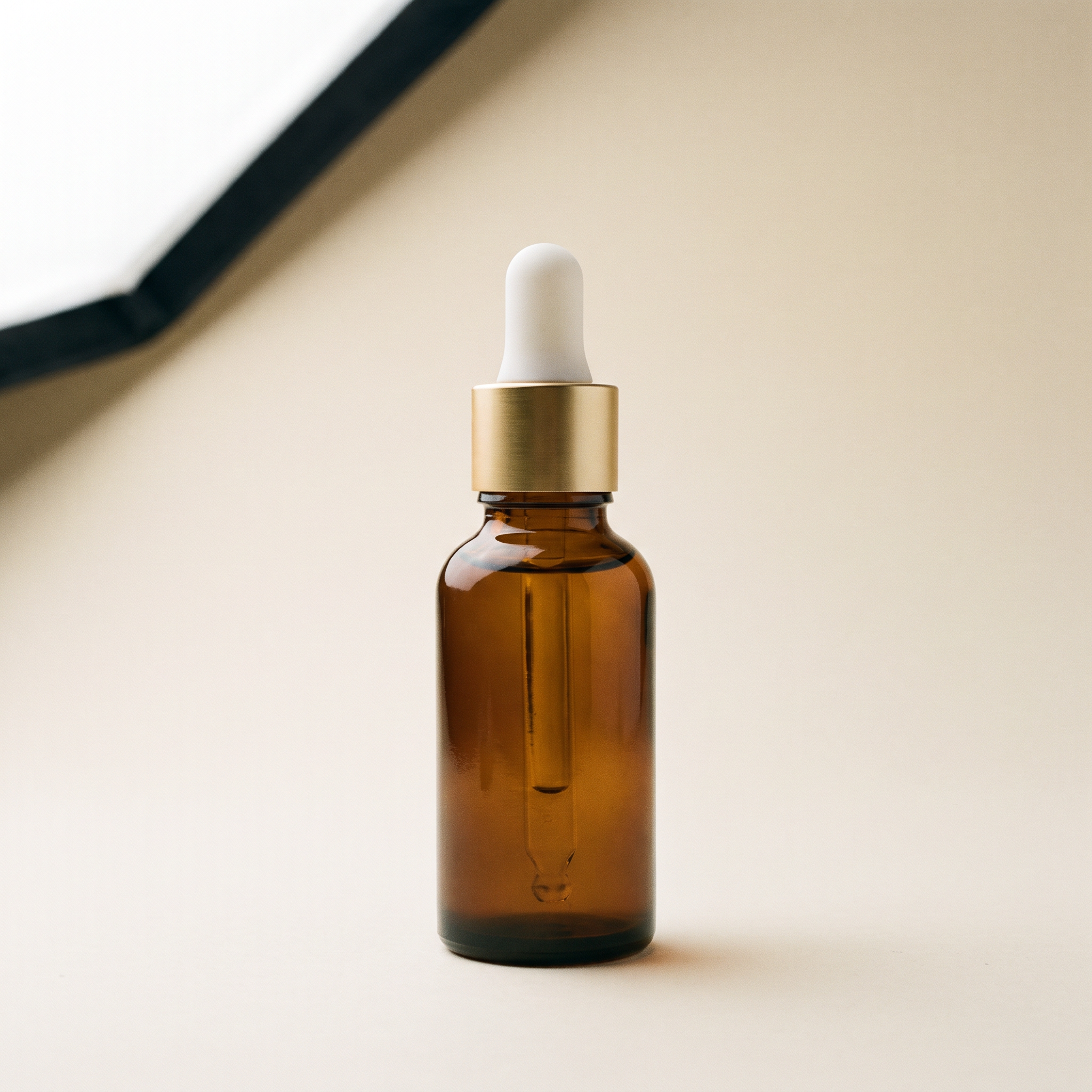
For an unbranded serum like this one, I generate it with Nano Banana Pro at $0.15 per image at 2K.
Make a reference packshot on fal-ai/nano-banana-pro, square (1:1) at 2K resolution, after checking its schema and its price.
Hold the run until I've approved the price you quote.
Send the text below to Nano Banana Pro as the image prompt:

Studio packshot of an unbranded 30 ml amber glass dropper bottle of vitamin C serum with a matte white rubber bulb and a brushed gold collar, standing upright in the center of a warm off-white paper sweep. One large softbox above and to the left lights the bottle evenly and leaves a gentle contact shadow under it. No label or text on the bottle and nothing else in the frame.

When the run finishes, send me the packshot link for the next step.
 Try it in ChatGPT
Try it in fal Agent
Try it in ChatGPT
Try it in fal Agent
Selling a real product changes this step, since you can paste the image address from your product page into the chat and skip the generation.
Claude then copies that photo onto fal's CDN with upload_file and passes the returned cdn_url to Seedance 2.5 as @Image1.
Step 6: Turn the packshot into a 30-second spot
The spot is one continuous 30-second take in 16:9 for a product page or a YouTube placement, built around the packshot as @Image1.
At 480p or 720p, a 16:9 frame has the same pixel count as its 9:16 version, so turning the frame sideways leaves the price per second unchanged.
For the spot, use bytedance/seedance-2.5/reference-to-video with task set to reference and the packshot link as the only entry in image_urls.
Set draft to true, duration to 30, aspect_ratio to 16:9 and generate_audio to true.
Use the text below as the prompt, keeping its line breaks:

@Image1 is the product. One continuous 30-second shot with no cuts, filmed as a premium skincare commercial around the serum bottle from @Image1.
0 to 6 seconds: an extreme close-up of the bottle from @Image1 standing on wet travertine, with water droplets beading on the amber glass under a soft key light.
6 to 12 seconds: the camera pulls back and arcs to the right to reveal a white marble bathroom vanity in early sunlight, with the bottle next to a small dish of sliced oranges.
12 to 20 seconds: a woman's hand lifts the dropper, and golden serum falls in slow motion onto her fingertips while the camera keeps circling the bottle.
20 to 26 seconds: the hand puts the dropper back and leaves the frame, and the sunlight warms from pale yellow to soft gold.
26 to 30 seconds: the camera comes to rest on a still shot with the bottle in the right third of the frame and empty space on the left.
Keep the bottle's shape and colors identical to @Image1 through the whole shot. No logos or on-screen text.
Audio: a soft piano melody that starts at 6 seconds and resolves at 30 seconds, with a light drip when the serum falls. No voices.

Quote the price before you submit, and don't send the job until I approve it.
Before paying $6.45 for a 30-second draft of an untested look, I'd rather draft the opening beat alone at 5 seconds for $1.07.
Here's what the output looks like:
Try it in ChatGPT Try it in fal AgentStep 7: Review with sound and finish at 1080p
Based on my experience reviewing ad cuts, a voice drifting off the lips or a drip sound landing late is easy to miss on mute, so I watch each draft through with headphones.
If a draft misses, Claude gets the second where the problem starts plus a short description, and I ask for a rewrite of only that part of the Seedance 2.5 prompt.
From there, an approved draft has two routes to a final file.
The first is bytedance/seedance-2.5/draft/complete: it regenerates the draft's task at 1080p from the draft_id alone, with no prompt or settings to resend.
Our schema allows that completion within seven days and only on the fal account that made the draft, which means keeping the same Active MCP account selected for both runs.
The draft/complete page bills 1080p at roughly $0.0234 per 1,000 tokens, which our model page rounds to about $1.164 per second.
That puts the 8-second hero ad near $9.31 and the 30-second spot near $34.92.
Because those figures are rounded, I still have Claude confirm each completion with get_pricing before it runs.
The second route is a fresh 720p run of the same prompt, with a price you can work out from the token formula, though it's a new generation that isn't guaranteed to match the draft.
The studio hero ad and the 30-second spot drafts are approved.
Complete both of them at 1080p with bytedance/seedance-2.5/draft/complete, using the draft_ids you saved.
Price each completion with get_pricing and wait for my approval, then keep checking those two requests until you have both video links.
Here's what the 1080p 30-second video looks like now:
What does a four-ad Seedance 2.5 set cost?
Drafting all four ads costs $13.54 at our standard rates as of October 2026, for 63 seconds of 480p output across three 9:16 ads and one 16:9 spot, plus $0.15 for the packshot.
Per our Seedance 2.5 pricing, the model bills $0.0214 per 1,000 tokens at 480p and 720p, and roughly $0.0234 per 1,000 tokens at 1080p, which the model page rounds to about $1.164 per second.
Without an input video, a request's tokens equal output height × width × seconds × 24 ÷ 1,024.
A 480p frame is 496×864 in 9:16 and 864×496 in 16:9, working out to 10,044 tokens or $0.2149 per second.
At 720p, the 720×1280 and 1280×720 frames come to 21,600 tokens or $0.4622 per second.
I've priced everything from the token formula, which comes in slightly under the approximate per-second figures on the model page.
| Ad | Endpoint | Length and aspect ratio | 480p draft | 720p regenerated final |
|---|---|---|---|---|
| Studio hero | text-to-video | 8 s, 9:16 | $1.72 | $3.70 |
| UGC-style presenter | text-to-video | 15 s, 9:16 | $3.22 | $6.93 |
| Lifestyle | text-to-video | 10 s, 9:16 | $2.15 | $4.62 |
| 30-second spot | reference-to-video | 30 s, 16:9 | $6.45 | $13.87 |
| Total | Both endpoints | 63 s | $13.54 | $29.12 |
Neither the audio track nor the packshot reference adds tokens, because with no video going in, the formula counts only output pixels and seconds.
A second take of any ad costs its row's 480p figure again, so one rewrite of the UGC-style ad adds $3.22.
Claude quotes 1080p completions per ad, as covered in Step 7.
The chat itself runs on your Claude plan, and fal charges only for model runs.
How does fal Agent compare with Claude for product ads?
fal Agent is the closer match when you want to attach product photos straight into a chat and ask questions about a finished clip.
Claude is my pick when the product photos and prompts are already files on my computer, because Claude Code can upload a local photo through a signed URL and keep the prompts in the project folder.
fal Agent runs in the browser, and during Early Access signed-in fal accounts have access by default without a plan, subject to account and organization restrictions.
Since fal Agent and Claude call the same Seedance 2.5 endpoints, the Seedance 2.5 prompt texts in this guide carry over, though the MCP tool instructions apply to Claude only.
| Claude with the fal connector | fal Agent | |
|---|---|---|
| Getting product photos in | A public image URL copied with upload_file, or a signed upload sent from Claude Code | Image attachments the agent uses as references or edit sources |
| Reviewing drafts | You watch each draft and give Claude a timestamp with the fix | The agent can answer questions about a video with timestamps |
| Keeping brand and product notes | A Claude Project holds them for the chats inside it | Projects hold chats, media, documents and a shared memory across sessions |
| What bills | fal's pay-as-you-go model rates, with Claude covered by your Claude plan | Only the model runs, as reasoning, sandbox, web search and video understanding are free for now |
| Optional monthly plans | None needed on the fal side | Credit plans from $50 to $1,000 a month, with 5% or 10% off usage on the two upper tiers |
Credits from a fal Agent plan work across fal products, and fal spends them before any pay-as-you-go billing starts.
The Pro and Max usage discounts apply in fal's own interfaces such as the Playground and Sandbox, while direct API usage stays pay as you go.
Enterprise admins can also set how long fal Agent keeps chats and generated media, from 1 hour to 1 year or Forever, though a finite period turns off durable project memory.
Recently Added














Build your first Seedance 2.5 ad set from Claude
One Claude conversation connected to fal can take a serum from a single product line to four finished ads.
Swapping the serum line for a description of your own product turns the four prompts above into the first draft of your next ad set.
Over 1,000 models run on fal behind the same connector, so the chat you set up today can also reach Nano Banana Pro for packshots or any other text-to-video model you want to compare.
Frequently asked questions
Can Seedance 2.5 work from my store's product photos?
Yes, Seedance 2.5 reference-to-video accepts public product image URLs, which Claude can first copy onto fal's CDN with upload_file.
One request takes up to 30 images at 30 MB each, named @Image1, @Image2 and onward in the prompt.
Does a square 1:1 version of an ad cost more than a vertical one?
No, a 1:1 Seedance 2.5 video at 720p is 960×960, the same pixel count as 720×1280, so it bills the same $0.4622 per second.
At 480p, the 640×640 square frame is slightly smaller than 496×864, bringing it down to about $0.2054 per second.
What happens if Claude submits the same Seedance 2.5 job twice?
Each call to submit_job or run_model starts its own billable job, so a duplicate costs as much as the original.
While a draft is rendering, Claude should keep polling the existing request ID with check_job, and cancel_job can stop a duplicate that's still queued or running.
How long does a Seedance 2.5 draft stay usable?
A Seedance 2.5 draft_id can be completed at 1080p for seven days, as long as the completion runs on the fal account that created it.