![How To Do Motion Design Video Generation With Claude [2026]](https://refinery.fal.media/url/https%3A%2F%2Fv3b.fal.media%2Ffiles%2Fb%2F0aad8f5b%2FicfBKMBlAWrEWLYl0P_ob.jpg/tr:w-1920,q-80/icfBKMBlAWrEWLYl0P_ob.webp)
Claude can make a motion design video without a single tool installed on your computer, as long as the fal connector is switched on in your Claude chat.
Below, I'll have Claude Opus 5.5 turn three keyframes of an unbranded speaker into a looping vertical film, with MiniMax H3 Max animating every move between them.
TL;DR
In a Claude chat with the fal connector switched on, Claude Opus 5.5 can generate keyframes on fal and hand the motion between them to MiniMax H3 Max reference-to-video, with nothing to install.
In the keyframe method, Claude generates the frames each shot has to hit and H3 Max generates the motion that connects them.
When a shot opens on the exact frame the previous one landed on, the join has no hard cut, and the three shots play as one continuous take.
Can Claude make motion design videos by itself?
Yes, Claude Motion with Opus 5.5 the current latest Opus model of Claude as of 5th of October, 2026) can make a motion design video from an ordinary Claude chat once you connect the fal MCP server, as it can then run image and video models on fal for you.
Claude only ever outputs text, so the pictures and the video come from the models it calls on fal.
Many of the showreels people shared after Opus 5.5's release took a different path, with Claude writing the whole animation as code in Claude Code.
That coded route needs developer tools on your computer and suits type-heavy pieces, while the fal route needs nothing beyond a Claude chat and a fal account:
| Claude chat with the fal connector | Coded animation in Claude Code | |
|---|---|---|
| What you need | A Claude chat and a fal account, linked through the fal connector | Claude Code plus developer tools installed on your computer |
| Who makes the frames | Image and video models on fal, directed by Claude | Code that Claude writes |
| Suited to | Real products, camera moves and lighting | Kinetic type, interfaces and charts |
| Cost | Your Claude plan plus per-run fal pricing | Your Claude plan |
💡 If you've never opened a terminal, the fal route in this guide is the one to start with.
How does the keyframe method work?
Claude generates a handful of still keyframes on fal, and MiniMax H3 Max reference-to-video animates the move between each pair.
H3 Max is MiniMax H3 after post-training by fal Research, which tuned it to follow prompts more faithfully and to render with a stronger visual finish.
We also co-tuned the model and our in-house serving stack to raise throughput without lowering output quality.
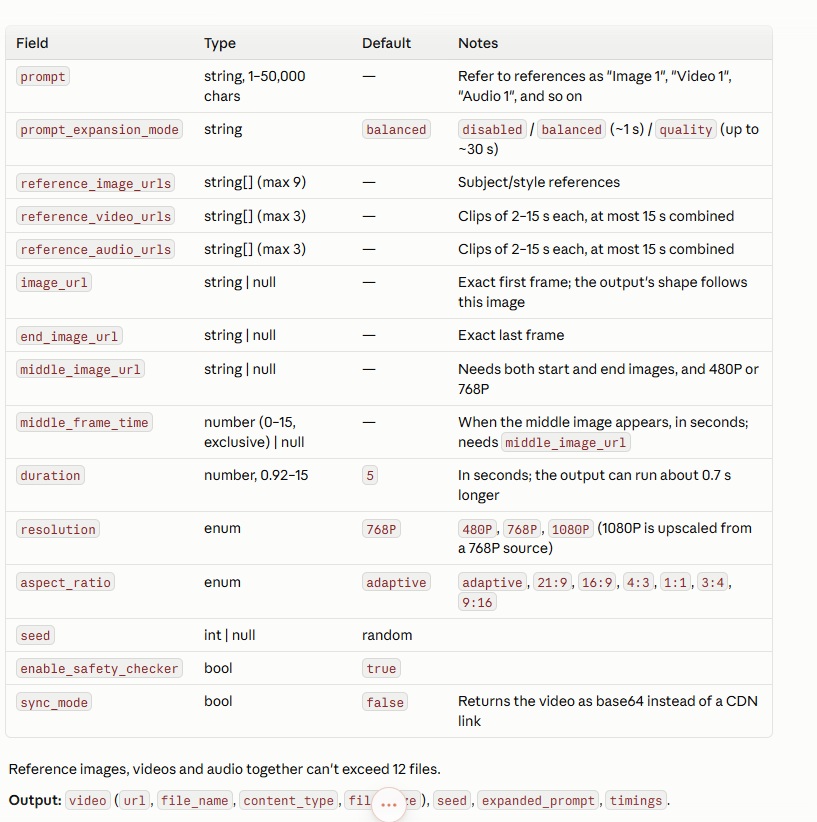
On the H3 Max reference-to-video schema, image_url and end_image_url fix the exact frames a video opens and ends on.
You can also add reference images to the same request and name them in the prompt as Image 1, Image 2, and so on, up to 12 reference files per request across all media types.
I like to chain shots by starting every new shot on the exact frame the previous one landed on.
The joins have no hard cut to hide, though the camera's speed can still change at a join, so I watch each one at full speed.
Our schema has no setting that holds lettering still between keyframes.
If a word has to stay legible, I put it on a keyframe, where H3 Max opens or lands on it exactly.
These are the H3 Max reference-to-video fields Claude sets for each shot, next to what our schema accepts.
| Field | What our schema accepts | Setting for a keyframe shot |
|---|---|---|
image_url | The image the video opens on exactly, and the output canvas follows its shape | The shot's opening keyframe |
end_image_url | The image the video ends on exactly | The shot's landing keyframe, which is also the next shot's image_url |
reference_image_urls | Subject or style images named Image 1, Image 2 and onward in the prompt, with up to 12 reference files per request | The product photo as Image 1 |
duration | Seconds, default 5, with output that may run up to roughly 0.7 s past the request | 5 |
resolution | 480P, 768P or 1080P, default 768P, where 1080P is latent refinement from a native 768P source | 480P for a test, 768P for the finals |
aspect_ratio | adaptive by default, or 21:9, 16:9, 4:3, 1:1, 3:4 and 9:16 | 9:16, matching the keyframes |
prompt_expansion_mode | disabled, balanced (about a second) or quality (up to about 30 seconds) | disabled, so the shot prompt reaches the model as Claude wrote it |
seed | Random when omitted, and returned with every output | Left random for a first take, then reused from the output when you revise that take |
For video and audio references, see our explainer on reference-to-video.
What do you need before the first prompt?
You need Claude Opus 5.5 in the Claude app and a fal account with credits, linked through the fal connector.
You can add the fal connector to the Claude app in four steps:
- Open Customize, then Connectors, and select Add followed by Add custom connector.
- Enter fal as the name and
https://mcp.fal.ai/mcp-relayas the remote MCP server URL, then select Continue. - Review the OAuth settings and select Continue, then choose Sign in now, Register automatically and Add before finishing the browser sign-in.
- In a new chat, turn fal on from Connectors in the plus-sign menu.
If Add custom connector doesn't show up, check Claude's custom connector guide, since availability depends on your Claude plan.
➡️ On Team and Enterprise plans, a workspace owner adds fal under Organization settings, then Connectors, before members can connect it from Customize.
You never handle an API key here, because sign-in happens through OAuth in your browser.
The fal MCP server itself is free, and the only fal charges come from model runs Claude starts through it, billed at our standard rates.
If you want to spend a team's credits, select that team as the Active MCP account on the MCP & connectors page in your fal dashboard.
Before anything bills, I check the connection with one free prompt in a new chat.
Use fal to look up minimax/h3-max/reference-to-video and tell me its input fields and its price.
Don't run any model yet, and don't spend any credits on this check.
falMODEL APIs
The fastest, cheapest and most reliable way to run genAI models. 1 API, 100s of models
How do you make a motion design video with Claude and H3 Max?
Everything below happens in one Claude chat with the fal connector switched on, and you can paste each prompt as written.
The film pushes into the O of the word LOUD until it becomes the speaker's grille, then pulls back to the word again, so the last frame matches the first.
Step 1: Generate the product still
I have Claude make the product photo first, since every keyframe after it is an edit of this one image.
Use fal to generate a product photo with fal-ai/nano-banana-pro, at aspect ratio 9:16 and resolution 2K.
Show me the price first and wait for my go.
Use this exact text as the image prompt for Nano Banana Pro:
Studio product photograph of an unbranded cylindrical portable speaker wrapped in tangerine woven fabric, with a matte cream top cap that has a circular grille of small round perforations.
The camera looks down at a three-quarter angle from slightly above, showing the top grille and the front of the fabric clearly.
The speaker stands alone in the center of a sweep of warm cream paper, lit by one large softbox from the upper left with a soft contact shadow underneath.
No logos or text anywhere on the speaker or the backdrop.
After I approve, run it and give me the image link.
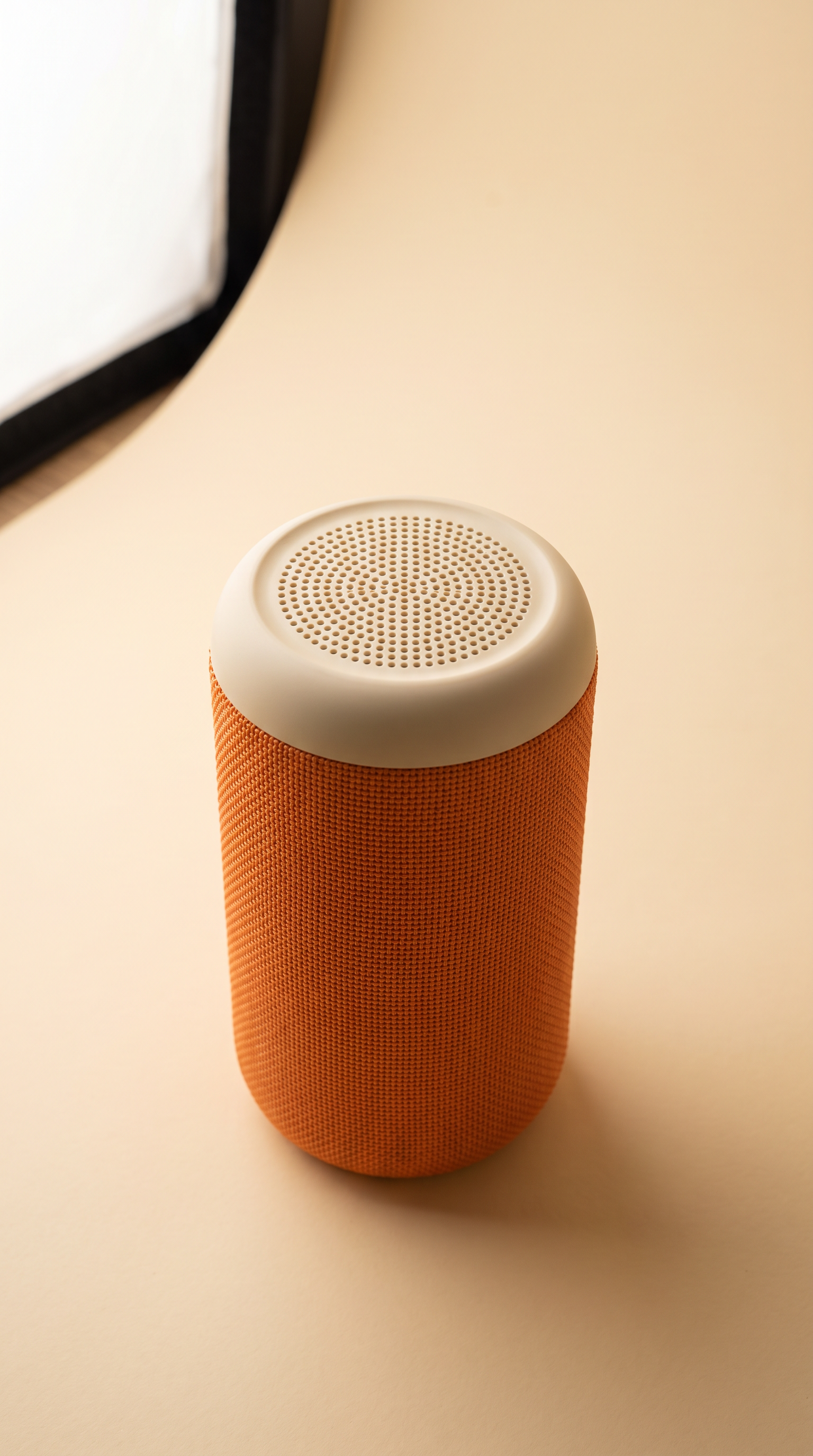
Generated using Nano Banana Pro on fal, an AI model from Google.
My still came back at 1536 x 2752 after about 26 seconds in fal's queue, at the quoted $0.15.
Nano Banana Pro also has an optional web search that adds $0.015 per image, which a studio product shot doesn't need.
Step 2: Turn the still into three keyframes
I make the keyframes with Nano Banana Pro's edit endpoint and the product photo as the input, which helps keep the same speaker in every frame.
Now make three keyframes with fal-ai/nano-banana-pro/edit, using the product photo as the input image each time.
Keep every keyframe at 9:16 and 2K, with the same cream backdrop and tangerine color as the product photo.
K0: the word LOUD in heavy tangerine capitals across the full width of the cream backdrop, with the O drawn as a thick tangerine ring and no speaker in the frame.
K1: an extreme close-up looking straight down at the speaker's top, so the round grille fills the frame.
K2: the whole speaker centered at about 60% of the frame height, with two thin tangerine rings around it.
Price the keyframes and wait for my go, then give me the image links labeled K0, K1 and K2.
The three edits cost $0.45 together, at $0.15 per keyframe image.
K0 does double duty, because the last shot lands back on it to close the loop.
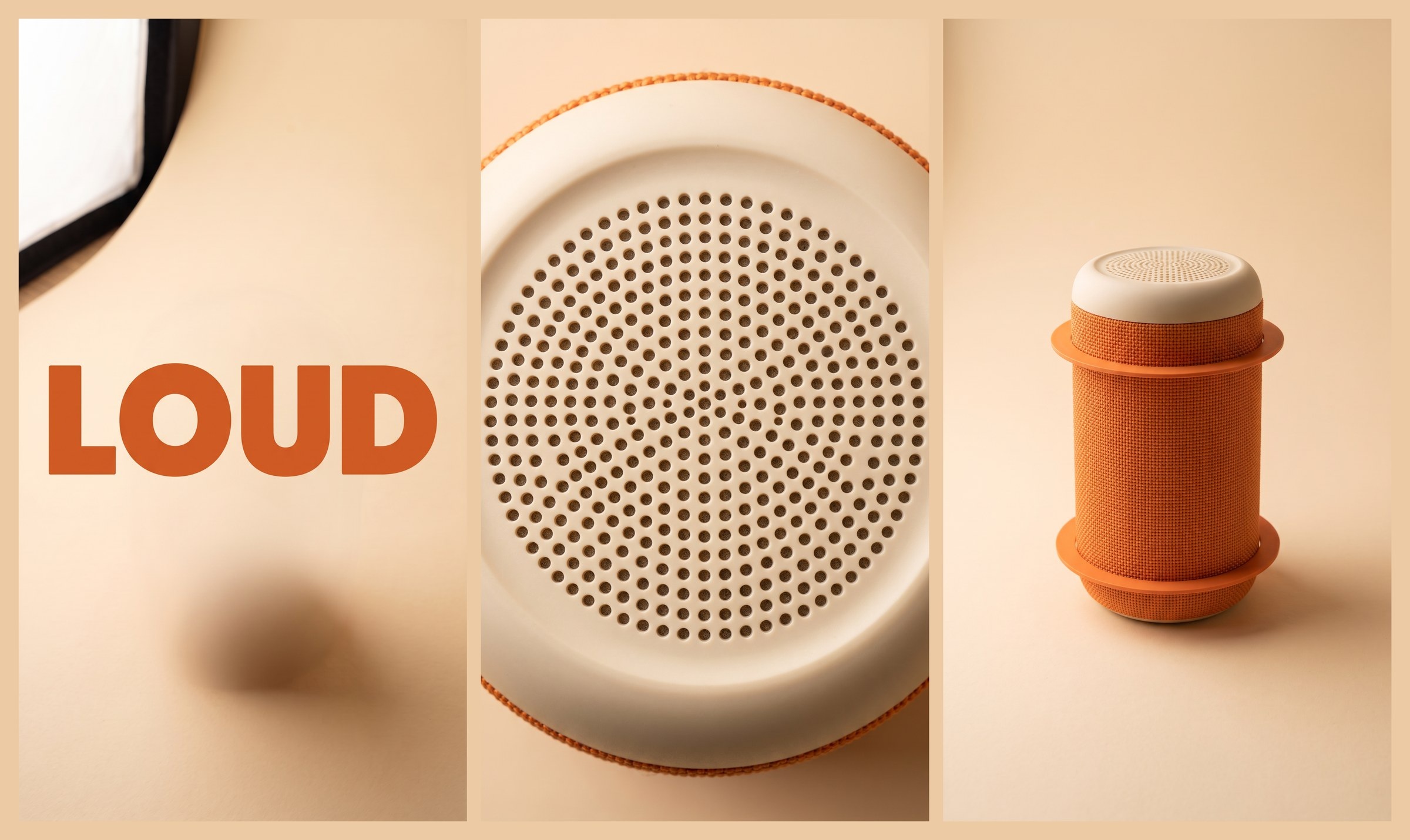
Generated using Nano Banana Pro on fal, an AI model from Google.
Note: Claude originally provided me with 3 separate images; I just combined them into 1 so it can be easier for you to see.
Step 3: Check the keyframes before any video
A bad keyframe costs $0.15 to redo, while a bad 768P shot built on it costs $0.40, so I look at all three closely.
My two checks are that LOUD is spelled correctly in K0 and that K1 and K2 show the same speaker as the product photo.
In this case, I feel like nothing needs to be changed, although I'd advise you to look closely to what you're generating at this stage.
The speaker in K2 came out at about 47% of the frame height, below the 60% I asked for, and the softbox from the product photo carried into K0 and K2.
Neither one broke a shot, so I kept both keyframes as they were.
Step 4: Test shot 1 at 480P
Shot 1 has the biggest jump in the film, from flat type to a close-up of the grille, so I test it at 480P for $0.25 before paying for the finals.
Make shot 1 with minimax/h3-max/reference-to-video at 480P as a test before the finals.
Use K0 as image_url, K1 as end_image_url and the product photo in reference_image_urls as Image 1.
Set duration to 5 and aspect_ratio to 9:16, and turn prompt_expansion_mode to disabled.
Write the shot prompt yourself: the camera pushes into the O until the ring becomes the speaker's grille, with one soft whoosh and no music.
Show me the price and wait for my go, then submit the job and keep checking that same request until you have the video link.
Give me the video link and the exact shot prompt you used.
In output charges, the estimate should come to $0.25, which is five seconds at $0.05 per second.
The product photo counts as one 9:16 reference image at 1,824 tokens, and Claude's price checks in my run counted the opening and landing keyframes as two more, which brings a request to 5,472 tokens and adds about $0.03.
If the opening and landing frames don't count toward reference tokens, the test costs its $0.25 output charge alone.
Claude only waits for my approval because the prompt tells it to, as the fal MCP server has no approval gate of its own.
Pro tip: if Claude stops before the video is ready, you can ask it to check the same request again, because a second submit_job call starts a second billable job.
I watch the test at full speed with sound, and anything that looks wrong goes back to Claude with a timestamp so it can rewrite the shot prompt.
Here's the exact shot prompt Claude wrote and used for shot 1:
The shot opens on the word LOUD in heavy tangerine capitals on a warm cream paper backdrop. The camera pushes in slowly and steadily toward the letter O, and the thick tangerine ring fills more and more of the frame. As the camera passes into the ring, it becomes the edge of the speaker from Image 1, and the cream space inside the O becomes its matte cream top cap, so the shot ends looking straight down at the round grille of small perforations filling the frame. One continuous push-in with no cuts, soft even studio light, the same tangerine and cream colors throughout. Audio: a single soft whoosh during the push-in. No music, no voices, no other sounds. No text other than LOUD, no logos.
Generated using H3 Max on fal, a post-trained variant of MiniMax H3.
A rather funny note: H3 Max's speed surprised Claude Opus 5.5, which made it check it before sending it.
Step 5: Render the three shots at 768P
Once the test lands on both keyframes, all three shots move to 768P at $0.40 each.
Shot 1 works, so render it again at 768P with the same shot prompt and settings.
Shot 2 opens on K1 and lands on K2, with the camera pulling back from the grille to show the whole speaker.
Shot 3 opens on K2 and lands on K0, with the speaker shrinking into the O as the letters return.
Keep every other setting from shot 1, and use the same sound note in every shot prompt.
Price the three runs together and wait for my go before you submit them.
Give me the three video links in order, along with the shot prompts you used.
The three five-second shots at 768P cost $1.20 in output together.
Claude's estimate for my three finals came to about $1.28, because it counted the opening and landing keyframes as reference images in each request.
Shot 1 at 768P reused the test prompt word for word.
Claude adjusted two things on its own: it changed "the push-in" to "the camera move" in the sound note for shots 2 and 3, and it left the 60% size out of the shot 2 prompt so the prompt wouldn't contradict K2.
Shot 2 prompt (K1 to K2):
The shot opens looking straight down at the speaker's matte cream top cap, with the round grille of small perforations filling the frame. The camera pulls back slowly and steadily and tilts to a slight three-quarter view from above, revealing the tangerine woven fabric and then the whole speaker from Image 1, standing upright in the center of a warm cream paper backdrop with two tangerine rings around it. The shot ends on the whole speaker, centered in the frame. One continuous pull-back with no cuts, soft even studio light, the same tangerine and cream colors throughout. Audio: a single soft whoosh during the camera move. No music, no voices, no other sounds. No text, no logos.
Generated using H3 Max on fal, a post-trained variant of MiniMax H3.
And shot 3 prompt (K2 to K0):
The shot opens on the whole speaker from Image 1 standing upright in the center of a warm cream paper backdrop, with two tangerine rings around it. The speaker shrinks smoothly toward the center of the frame, its round silhouette turning into the thick tangerine ring of the letter O, while the letters L, U and D return on either side, until the word LOUD in heavy tangerine capitals sits across the cream backdrop. One continuous move with no cuts, soft even studio light, the same tangerine and cream colors throughout. Audio: a single soft whoosh during the camera move. No music, no voices, no other sounds. No text other than LOUD, no logos.
Generated using H3 Max on fal, a post-trained variant of MiniMax H3.
Step 6: Join the shots into one film
Our merge-videos endpoint joins the three clips in order on fal, so nothing has to run on your computer.
Join the 768P shots into one video, in order, with fal-ai/ffmpeg-api/merge-videos.
Check its schema and price first, then wait for my go before you run it.
Give me the link to the finished film when it's done.
As shot 3 lands on K0, the end of the film matches its first frame, which lets it loop when a platform replays it.
Generated using H3 Max on fal, a post-trained variant of MiniMax H3.
My finished film came out at 15.5 seconds, 768×1344 at 24 fps, with H.264 video and AAC audio.
The merge ran for about 13 seconds on fal's clock and bills by processing time, which Claude estimated at less than a cent for my run.
What should you budget for a three-shot keyframe film?
The walkthrough comes to between $2.05 and $2.17 at our standard rates before retries, depending on whether the opening and landing keyframes count as reference images.
Three five-second 9:16 shots at 768P on MiniMax H3 Max reference-to-video account for $1.20 to $1.28 of that.
H3 Max reference-to-video output is priced per second of requested duration: $0.05 at 480P, $0.08 at 768P and $0.16 at 1080P.
Above the 4,096 reference tokens included in each request, extra tokens cost $0.02 per 1,000, prorated.
A 9:16 reference image counts as 1,824 tokens, so the product photo on its own stays inside the allowance.
With the opening and landing keyframes counted as well, a shot carries 5,472 reference tokens, and the 1,376 tokens above the allowance add about $0.03.
| Item | Endpoint | Rate on fal | Walkthrough cost |
|---|---|---|---|
| Product still, 9:16 at 2K | fal-ai/nano-banana-pro | $0.15 per image at 1K or 2K | $0.15 |
| Three keyframes, 9:16 at 2K | fal-ai/nano-banana-pro/edit | $0.15 per image at 1K or 2K | $0.45 |
| Shot 1 test, five seconds at 480P | minimax/h3-max/reference-to-video | $0.05 per second of output | $0.25 to $0.28 |
| Three final shots, five seconds each at 768P | minimax/h3-max/reference-to-video | $0.08 per second of output | $1.20 to $1.28 |
| Joining the clips | fal-ai/ffmpeg-api/merge-videos | Billed by processing time | Under $0.01 in my run |
| Total before retries | $2.05 to $2.17 |
An extra take costs $0.40 at 768P, and an extra keyframe costs $0.15.
Since this method skips middle frames, any shot can also run at 1080P, at $0.80 for five seconds of output.
On the Claude side, the chat runs on your Claude plan.
When is fal Agent a better fit than Claude for motion design?
I'd pick fal Agent when I want an agent that watches the shots itself and cuts them on a timeline, and Claude when the film is part of a bigger chat project.
We built fal Agent as our own agent for generative media work, and while it's in Early Access, access is switched on by default for signed-in fal accounts.
Both routes run the same models on fal, so the differences show up in where you work and how the footage gets reviewed.
| Claude chat with the fal connector | fal Agent | |
|---|---|---|
| Where you work | The Claude app, in an ordinary chat | fal's site, as an Early Access product |
| Setup | A custom connector and an OAuth sign-in to fal | A fal sign-in, with access switched on by default |
| How footage gets reviewed | You watch each clip and describe fixes to Claude | Video understanding that answers questions about a clip with timestamps |
| Putting the cut together | Shots joined in order with our merge-videos endpoint | A video sequences timeline with clips and audio layers, exported as one file |
| Extra tools in the same chat | Anything else you use Claude for, such as copy or planning around the film | Web search and a Python sandbox for media work |
| Cost | Your Claude plan plus fal model runs at standard rates | fal model runs only, with its reasoning and tools free for now and optional credit plans from $50 per month |
Recently Added














Turn a keyframe board into a film with H3 Max
Claude Opus 5.5 doesn't need a code editor to direct motion design, since the fal connector lets it run the image and video models itself.
In this guide, three keyframes and one Claude chat are all the H3 Max runs need.
On fal, H3 Max is one of more than 1,000 models you can call through a single API, billed per run with no GPUs to manage.
Your first H3 Max run can be a $0.25 test of the hardest shot on your board, sent straight from a Claude chat.
Frequently asked questions
Does Claude Opus 5.5 output video files?
No, Claude Opus 5.5 returns text only, so the MP4s in this guide come from H3 Max and our merge-videos endpoint on fal.
Can an H3 Max keyframe shot run at 1080P?
Yes, a shot with only an opening and a landing keyframe can run at 1080P, where five seconds of output costs $0.80.
If you add a middle_image_url waypoint, the shot is limited to native 480P or 768P.
Does the fal MCP server cost anything on top of model runs?
No, there's no charge for the fal MCP server itself, though a generation started through it bills at the same rate as a direct call to our API.
Do you need a fal API key to use H3 Max in Claude?
No, the fal connector signs in through OAuth in your browser, so you never copy or paste a key anywhere.
Can you run the same prompts in Claude Code?
Yes, the same prompts work once you add fal to Claude Code with claude mcp add --transport http --scope user fal https://mcp.fal.ai/mcp-relay and sign in through /mcp.
Claude Code can also build coded animations on your computer, though that route needs developer tools this guide leaves out.
![How To Use MiniMax H3 Max by fal [2026]](https://refinery.fal.media/url/https%3A%2F%2Fv3b.fal.media%2Ffiles%2Fb%2F0aa8d8df%2FzGardl5KrzR208BCfi318.jpg/tr:w-1280,q-80/zGardl5KrzR208BCfi318.webp)