


MiniMax H3 Max
fal's H3 Max model ranks #1 for overall quality, prompt understanding, and aesthetics in all evaluations, while generating a 5-second video in under 3 seconds.
Your prompt opens in the H3 Max playground, ready to generate.
How to get five free H3 Max videos a day
Sign in and the fal sandbox runs MiniMax H3 Max free: five generations a day at up to 15 seconds each, with native audio.
1. Sign in to fal
2. Describe the shot
3. Generate 5 free videos a day


H3 Max is ranked #1 for image to video
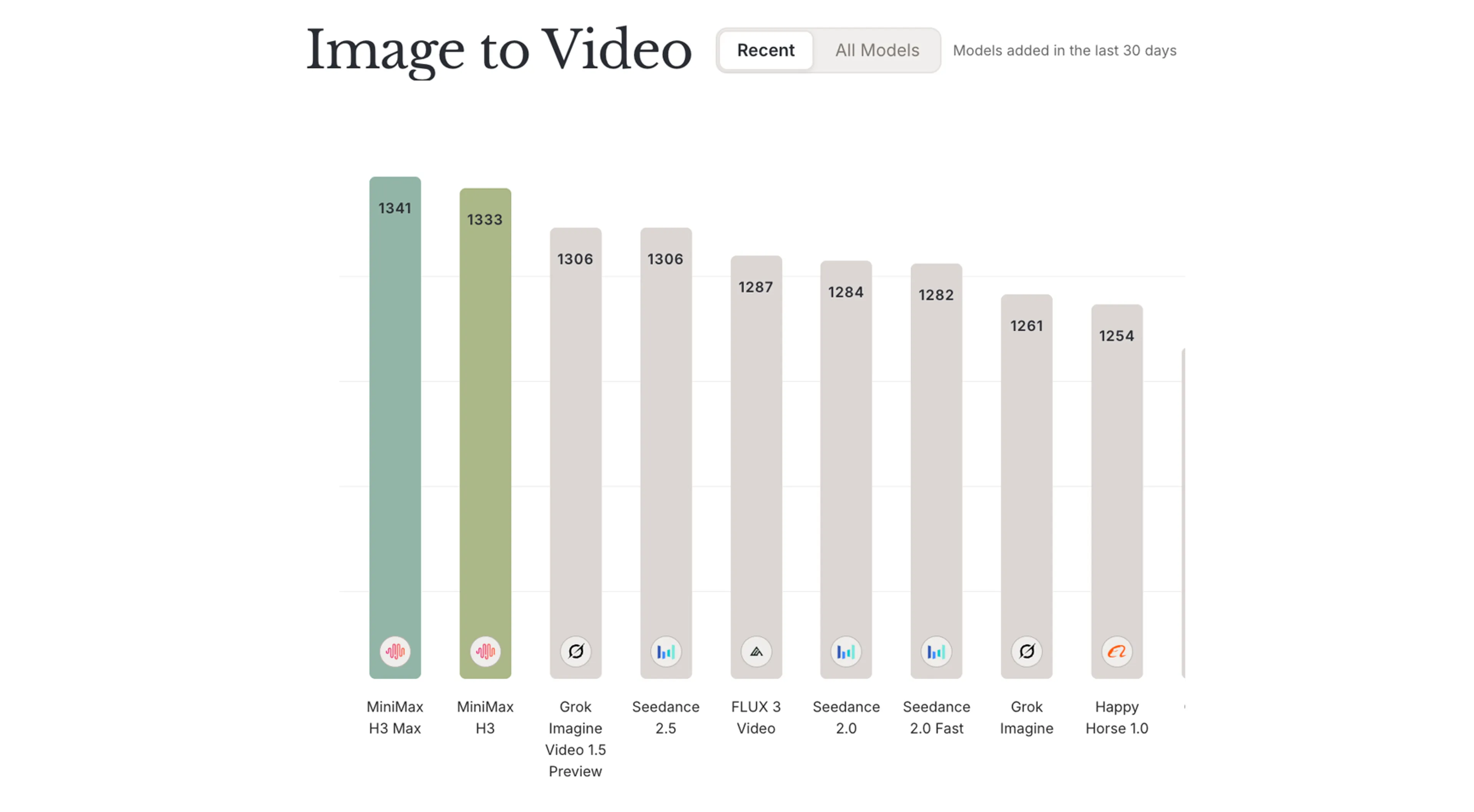
First on the Design Arena image-to-video board
Design Arena scores H3 Max at an Elo of 1,341 on its image-to-video board, ahead of the base model it was post-trained from and every other model listed. See the full board.
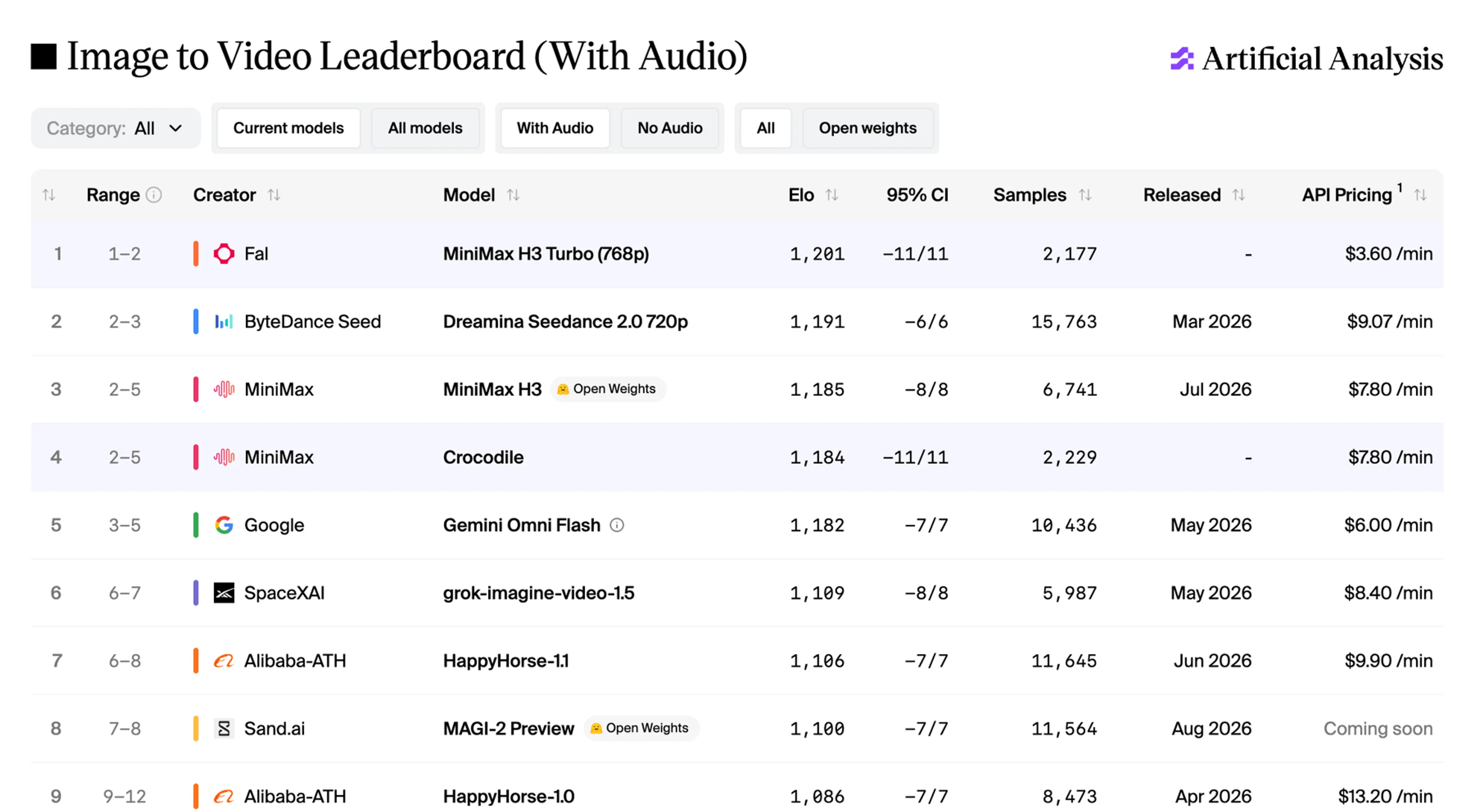
First on the image-to-video leaderboard with audio
Artificial Analysis ranks H3 Max first with audio, at an Elo of 1,201 with a 95% confidence interval of plus or minus 11 over 2,177 samples. See the full leaderboard. It is listed there under its internal name, MiniMax H3 Turbo (768p).


What is the fastest AI video generation model?
The fastest AI video generation models on fal are H3 Max Turbo and H3 Max, both post-trained by fal from MiniMax H3. That ranking is fal's own measurement of the two endpoints, taken on September 8, 2026. The criterion is generation time: the timings.inference value each endpoint reports on its own response, recorded at every resolution and duration the text-to-video schema accepts, on H3 Max Turbo and H3 Max. Measured that way, H3 Max Turbo returns every configuration faster than the clip plays, from 0.44 seconds for a 5-second 480p clip to 13.56 seconds for 15 seconds at 1080p.
| 5 seconds | 480p | Text to video | 0.44s | 0.75s |
|---|---|---|---|---|
| 10 seconds | 480p | Text to video | 1.00s | 1.72s |
| 15 seconds | 480p | Text to video | 1.71s | 3.14s |
| 5 seconds | 768p | Text to video | 1.54s | 2.46s |
| 10 seconds | 768p | Text to video | 4.29s | 7.55s |
| 15 seconds | 768p | Text to video | 8.44s | 15.17s |
| 5 seconds | 1080p | Text to video | 2.33s | 3.12s |
| 10 seconds | 1080p | Text to video | 6.81s | 8.89s |
| 15 seconds | 1080p | Text to video | 13.56s | 17.63s |
A clip that renders in under 3 seconds can sit inside a live working session rather than interrupting it. Teams can run several takes of the same shot, compare them side by side, and keep the best one, in about the time a single generation used to take.
What these numbers measure
What changes your wait time
Where the speed comes from
What H3 Max costs
Billing is per second of output video and priced per resolution, with no minimums and no subscription, so a 5-second 768p clip costs $0.40. Text to video and image to video bill at the same rate on each model. The 75% launch discount ended on September 14, 2026.
| Resolution | H3 Max Turbo by fal | H3 Max by fal |
|---|---|---|
| 480p | $0.025 / second | $0.05 / second |
| 768p | $0.04 / second | $0.08 / second |
| 1080p | $0.08 / second | $0.16 / second |
Five generations a day stay free for signed-in users regardless, at up to 15 seconds each. H3 Max Turbo bills at half of H3 Max at every resolution, so the faster model is also the cheaper one. Full fal pricing is on the pricing page, and each endpoint carries its own current rate on its model page.
Post-trained by fal
H3 Max is post-trained by fal on top of the open-weight base MiniMax H3 model.
New data, aimed at adherence and aesthetics
Designed around our own inference engine
Quality first, then speed
What you can make with H3 Max
Camera moves you can direct
Ask for a low tracking shot chasing a scooter downhill and you get the move, not an approximation of it. The camera stays locked on the subject, the background streaks at the speed the shot implies, the lean carries through the corner, and the engine sits under all of it in sync with the picture.
Two stills become one shot
Give H3 Max an opening frame and, if you want, a closing one, and it animates the whole journey between them. Here the two inputs were a balloon being inflated on wet morning grass and a distant view high above the valley: the model turned them into a single unbroken ascent, burner roaring and wind picking up right on cue.
The same character, shot after shot
One generation, six locations, one person: the hair, the jacket, the proportions, and the face all hold as the light swings from a Victorian street at noon to an office at sunset. Keeping a character stable across cuts is the hard part of animated work, and H3 Max does it inside a single request.
Sound generated with the picture, not after it
Every generation comes back with synchronized audio: room tone, foley, music, and ambience cut to what is on screen. Describe the sound in the same prompt as the shot and it lands in the same pass, so there is nothing to sync afterwards.
One look, held across every shot
Give H3 Max a visual language and it keeps it. The clip here is a single 15-second generation that cuts between six shots of animated Greek vase painting without breaking style: the same palette, linework, gold leaf, and hand-set lettering from the first frame to the last.
It hits the beats in the order you wrote them
Prompt adherence is what fal's post-training targeted first. Name the beats and they arrive in sequence, and words you ask for on screen come back legible and correctly set rather than approximated. The more precise the prompt, the more of it survives to the render.
The model behind the free tier
The free daily generations run on MiniMax H3 Max. Need more than five a day, or want to call it from your own app? The same endpoints are pay-per-use through the API, with no subscription.


fal's H3 Max is a post-trained variant of MiniMax H3, tuned for stronger prompt adherence and better aesthetics while co-optimized with our custom inference stack for higher throughput with no compromises on output quality
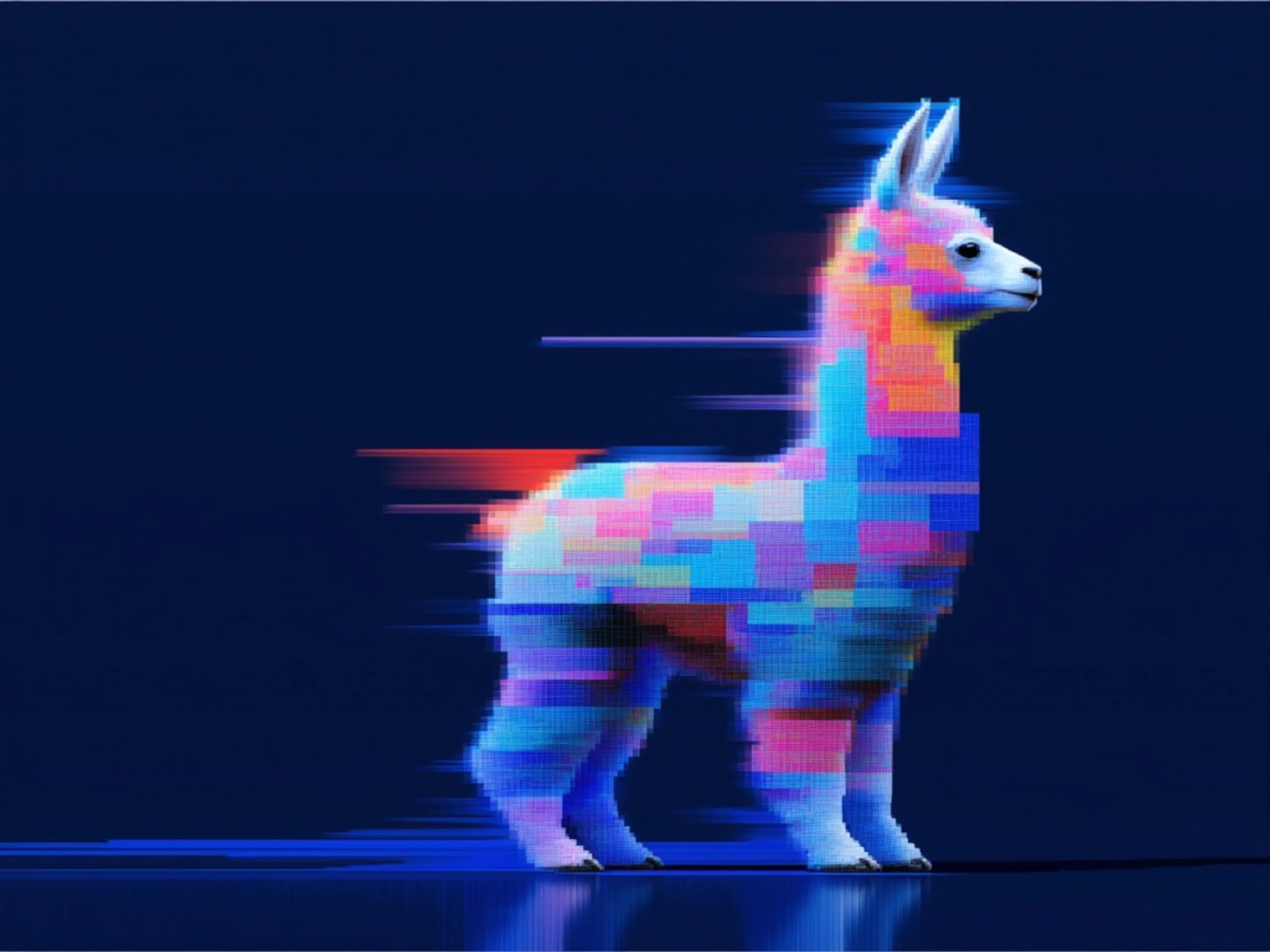
fal's H3 Max is a post-trained variant of MiniMax H3, tuned for stronger prompt adherence and better aesthetics while co-optimized with our custom inference stack for higher throughput with no compromises on output quality


See what H3 Max can create
One prompt each, one pass, no editing and no post-production. Turn the sound on: every clip came back from H3 Max with its audio already in place, at the same 768p the free daily tier runs at. Run any prompt yourself in ChatGPT or fal Agent, including the long shot briefs, which H3 Max reads down to the beat.
One continuous take, no cuts
"BLACK MIRROR TIDEFLATS / THE COLLAPSING SEA-CATHEDRAL Style: 8K cinematic. Photorealistic, no 3D render, no game engine, no game-cutscene aesthetic. Cinematography: naturalistic master cinematography. Lighting: high-contrast dramatic light. Cold storm-blue dusk across the flats vs. blinding sodium-orange furnace glow pouring from the toppling structure. The wet mirror surface doubles every light source into a second inverted world. Color: 60:30:10, dominant gunmetal blue and wet slate (the tideflats and sky) / secondary sodium amber and rust-red (burning floodlights, corroded steel) / accent magnesium white and cobalt blue (the failing reactor core and its arc-flashes). Camera: physical cine lens. 180 degree shutter motion blur. Continuous handheld operator shake, motivated by the ground concussions rolling through the shallow water. Physics: gravity and inertia respected. Steel trusses buckle and fold under their own mass; spray, ash and salt mist obey atmospheric drag. SUBJECTS: @pilot: a lone figure in a salt-crusted pressure suit crewing a skeletal wind-skiff, a low wheeled land-yacht with a torn carbon sail, hunched at the tiller, cracked gold-tinted visor reflecting the falling structure, throwing twin walls of white spray from its outriggers. @cathedral: a colossal derelict sea-rig, a kilometre of rusted iron lattice and floodlight towers, listing and buckling as it collapses into the shallows, shedding burning platform decks and cobalt arc-flash from its ruptured core. LOCATION: an endless tidal flat of black volcanic glass under two inches of standing water, a perfect mirror to the horizon, broken by rotting mooring pylons and drifting curtains of salt mist, the skyline dominated by the burning collapse. ACTION, ONE CONTINUOUS TAKE, single unbroken handheld tracking shot, NO cuts, 15 seconds. 0:00-0:05 Medium-Wide on @pilot: camera tracks alongside the skiff as it carves between rotting pylons that burst into splinters and spray behind the wheels; the horizon tears open as @cathedral enters frame, leaning, trailing burning deck plates. 0:05-0:10 continuous zoom-in / tilt up: camera glides past the skiff and tilts up through the pylons onto the collapse; a core vessel detonates, the shockwave ripping the standing water into a flat sheet and bending the flare into a horizontal streak across frame. 0:10-0:15 Extreme Close-Up on @cathedral: telephoto-compressed view of the disintegrating rig against the sky, steel plate peeling and glowing white-hot, raining burning debris down toward the camera. CONSTRAINTS: 16:9 anamorphic widescreen. ONE CONTINUOUS SHOT, absolutely NO hard cuts. Telephoto compression during the zoom. No slow-motion. Photoreal throughout. AUDIO (NO MUSIC): deep structural groan of failing steel, the hiss and slap of water under the hull, tearing-metal screech from above, the rigging-hum and canvas crack of the skiff at speed, wind roar across open flats."
Playable-looking game footage
"Create a pixel-art side-scrolling platformer gameplay animation, presented as authentic 16-bit / 32-bit retro game footage. The game is a fast, continuous San Francisco-themed endless runner. A heroic pixel-art adventurer automatically runs from left to right while the camera smoothly tracks the character, keeping the hero roughly centered on screen. The player cannot stop or move around obstacles. Every obstacle that enters the hero's running path must require either jumping over it or ducking underneath it. GAMEPLAY Obstacles approach clearly from the right side of the screen with enough visual anticipation to understand what is happening. There are only two ways to avoid hazards. JUMP: used for anything occupying the ground-level running path. DUCK: used for anything crossing directly above the running path at head or upper-body height. Every gameplay obstacle must physically intersect the hero's path if no action is taken. San Francisco-themed obstacles: a cheerful corgi runs directly across the hero's path and the hero jumps completely over it; a startup founder charges toward the hero holding out a giant term sheet, jump over the person; an autonomous delivery robot rolls into the running path, jump over it; an abandoned electric scooter lies horizontally across the sidewalk, jump over it; a shopping cart rolls into the running path, jump over it; a low-flying delivery drone crosses at the hero's head level, duck underneath it; a flock of pigeons flies across the path at head height, duck underneath them; low construction scaffolding extends across the sidewalk, duck underneath it. Keep obstacles visually distinct and spaced far enough apart that every jump or duck reads clearly as a deliberate gameplay action. SAN FRANCISCO ENVIRONMENT Multi-layer parallax scrolling. Foreground: lush grass, sidewalk edges, rocks, flowers, fire hydrants, cable-car rails, fallen leaves, utility covers and small particles moving quickly. Midground: colorful Victorian houses, steep streets, cafes, trees, cable cars, fences, stone walls, staircases, scaffolding and occasional fantasy waterfalls at medium speed. Background: enormous green hills, dense neighborhoods, downtown skyscrapers, the Transamerica Pyramid, distant castle-like silhouettes, the Bay, the Golden Gate Bridge and mountains beyond the city, moving slowly. Very distant atmospheric layer: colorful California sky, enormous clouds, drifting coastal fog, distant birds. Blend recognizable San Francisco architecture with a lush fantasy-adventure world: Victorian houses beside ancient stone ruins, cable-car tracks winding through grassy hills, waterfalls descending beside city staircases, the Golden Gate Bridge appearing dramatically between mountains and fog. Background pedestrians, cars and scenery are decorative only. HERO ANIMATION A highly polished 8 to 12 frame running cycle with expressive movement, bouncing hair and clothing, an animated cape or jacket, natural arm and leg motion, and tiny dust particles beneath the boots. Transition cleanly between RUN, JUMP, LAND, RUN, DUCK, RUN. Jump animations must visibly carry the hero completely over each ground obstacle; duck animations must visibly lower the hero enough for airborne obstacles to pass over. Keep the hero's design, face, clothing, colors, proportions and sprite dimensions consistent throughout every frame. SCORE AND GAME UI A small, authentic retro-game score counter in the upper-right corner, simple pixel font, continuously increasing as the hero survives, such as SCORE 004820. Keep the interface minimal. No menus, tutorial text or dialogue boxes. MUSIC AND SOUND Energetic retro video-game music throughout, like a polished SNES or early PlayStation-era adventure game: upbeat and catchy, chiptune-inspired synths, punchy retro drums, melodic bass and a bright adventurous lead melody. Synchronized retro sound effects: soft rhythmic footsteps while running, a short arcade-style jump sound on each jump, a quick swoosh while ducking, a landing sound on touchdown, drone buzzing as drones approach, pigeon wing flaps, small environmental sounds for passing cable cars, and a subtle point sound after clearing an obstacle. Music stays the dominant layer with effects mixed cleanly underneath. PIXEL-ART REQUIREMENTS Crisp hand-crafted pixel art with clearly visible individual pixels, a limited retro palette and extremely detailed sprite work, resembling a premium modern indie pixel-art platformer. No 3D rendering, no vector graphics, no smooth painted edges, no realistic textures, no motion blur, no anti-aliased artwork. CAMERA Classic side-view 2D platformer perspective, fixed camera height, smooth horizontal tracking, no zooming, no cuts, no camera rotation. The hero stays approximately centered while the environment moves continuously from right to left. Format: 16:9 widescreen, side-scrolling 2D gameplay, continuous gameplay, retro soundtrack and sound effects, minimal score HUD, no logos."
A line to camera, lip synced
"A chef in her forties looks straight into the camera in a bright open kitchen and says, "The secret is you never crowd the pan." She smiles and turns back to the stove. Clean daylight from a window, white tile, flour on her apron, a strand of hair loose. Medium close-up, 50mm, slight handheld. Sound: her voice close and clear, a gentle sizzle, a knife on a board off screen."
Claymation frog with pancakes
"Stop-motion claymation: a round green frog in a knitted scarf carries a stack of pancakes across a tiny kitchen set, sets it down, then looks at camera and blinks. Visible fingerprints in the clay, felt walls, warm practical lamps, stepped 12fps motion. Sound: playful pizzicato strings, soft clay squeaks, a plate clink."
Hummingbird at a trumpet flower
"Slow-motion close-up of a hummingbird hovering at a red trumpet flower in a sunlit garden, wings a blur, tongue flicking into the bloom. Backlit at golden hour with bokeh highlights, pollen and dust in the air, one bruised petal. Long lens, very shallow focus. Sound: rapid wing hum, garden birdsong, a distant sprinkler."
Espresso, macro
"Macro shot of espresso pulling from a chrome portafilter into a warm glass, thick golden crema blooming and swirling. Bright morning light through a cafe window, steam curling, water spots on the chrome, a few coffee grounds on the tray. 100mm macro, shallow focus, slight handheld drift. Sound: grinder winding down, the hiss of the pump, liquid pattering into glass, cafe chatter behind."



Scale beyond the free tier with the MiniMax H3 Max API
The client API handles the request submit protocol. It will handle the request status updates and return the result when the request is completed.
import { fal } from "@fal-ai/client";

const result = await fal.subscribe("minimax/h3-max/text-to-video", {
  input: {
    prompt:
      "Slow dolly forward down a rain-slick night-market alley, steam pouring off a noodle cart under a buzzing red neon sign. 35mm anamorphic, practical lights only, wet cobblestones doubling every highlight. Sound: wok sizzle and clang, rain ticking on tin awnings, neon hum.",
    resolution: "768P",
    aspect_ratio: "16:9",
    duration: 5,
    prompt_expansion_mode: "balanced",
  },
  logs: true,
  onQueueUpdate: (update) => {
    if (update.status === "IN_PROGRESS") {
      update.logs.map((log) => log.message).forEach(console.log);
    }
  },
});

console.log(result.data.video.url);
// result.data.timings.inference is the render time on the backend:
// about 2.5s for a 5-second 768p clip.
console.log(result.data.timings);

Common questions about MiniMax H3 Max
What is MiniMax H3 Max?
MiniMax H3 Max is a post-trained variant of MiniMax H3, post-trained by fal Research and optimized for speed by fal's inference team. The post-training used fal's in-house reinforcement learning framework against real generation workloads and human preferences, tuning the model for stronger prompt adherence, better audio-visual quality and improved aesthetics. The serving path was co-designed alongside those changes rather than bolted on afterwards. Everything that makes the base model distinctive carries over, including unified multimodal context and natively synchronized audio and video.
How do I use MiniMax H3 Max for free?
Sign in and run it in the fal sandbox: five free generations a day at up to 15 seconds each, with synchronized audio. The allowance resets on a rolling 24-hour window, and there is no subscription: past that, the same model is pay-per-use through the API.
Is MiniMax H3 Max really the #1 image to video model?
It is first on both of the public image-to-video boards we track. Design Arena scores H3 Max at an Elo of 1,341, ahead of base MiniMax H3 at 1,333 and every other model on that board. Artificial Analysis ranks it first on its image-to-video leaderboard with audio, at an Elo of 1,201 with a 95% confidence interval of plus or minus 11 over 2,177 samples. fal's own head-to-head human preference studies, run against twelve leading video models, put it first on overall quality, prompt understanding and aesthetics as well. Information updated as of September 8, 2026.
What resolution and duration does H3 Max support?
H3 Max generates at 480p, 768p, or 1080p, with 768p the default and the resolution it is tuned around. At 16:9, 768p is 1344x768 at 24 FPS. Durations run from 5 to 15 seconds at any of the three resolutions, and text to video covers 21:9, 16:9, 4:3, 1:1, 3:4, and 9:16. On image to video the output follows the aspect ratio of the image you pass in. For 2K output, use standard MiniMax H3 instead.
What is the fastest AI video generation model?
The fastest AI video generation models on fal are H3 Max Turbo and H3 Max, both post-trained by fal from MiniMax H3. The source is fal's own measurement of the two endpoints, and the criterion is generation time: the timings.inference value each endpoint reports on its own response, recorded at every resolution and duration the text-to-video schema accepts. On that measure H3 Max Turbo returns every configuration faster than the clip plays, and H3 Max does so in all but the two longest. A 5-second 768p video generates in 1.54 seconds on Turbo and 2.46 seconds on H3 Max; a 15-second 480p video generates in 1.71 seconds on Turbo and 3.14 seconds on H3 Max. Measured on September 8, 2026. See the full benchmark table.
How long does MiniMax H3 Max take to generate a video?
A 5-second clip at 768p renders in under 3 seconds end to end, which is faster than real time. Generation itself is about 2.46 seconds of that on H3 Max and 1.54 seconds on H3 Max Turbo, reported as timings.inference on every response. Longer clips scale from there: 15 seconds at 768p takes 15.17 seconds to generate on H3 Max and 8.44 seconds on Turbo, and 15 seconds at 480p takes 3.14 and 1.71 seconds. Elapsed time adds queue wait, prompt expansion, and encode on top of those figures. The speed comes from co-designing the inference engine with the post-training rather than dropping new weights into a generic serving path.
What settings give the best results with H3 Max?
Stay at 768p, generate 5 to 10 seconds, and leave prompt expansion on balanced. Balanced decides per request how much to rewrite your prompt and usually adds about a second, which keeps the end-to-end time close to the render time; fast returns almost immediately and quality can spend up to 30 seconds on the rewrite alone. Describe the sound as well as the shot, since audio is generated in the same pass as the picture.
How is MiniMax H3 Max different from standard MiniMax H3?
H3 Max is fal's post-trained variant, tuned for prompt adherence, audio-visual quality, and aesthetics, and co-optimized with fal's inference stack so a 5-second 768p clip renders in under 3 seconds. Standard MiniMax H3 is a separate frontier model with its own endpoints: it generates at 2K, runs up to 15 seconds, and adds reference to video and video editing, and on fal's stack it runs about 15x faster than MiniMax's own inference. Reach for H3 Max when you want speed and prompt adherence, and standard H3 when you need 2K or the reference and editing endpoints.
How much does MiniMax H3 Max cost on fal.ai?
H3 Max lists at $0.08 per second at 768p, or $4.80 per minute. The 75% launch discount ended on September 14, 2026. H3 Max Turbo is half of H3 Max at every resolution. There are no minimums and no subscription, and the first five generations a day are free. Current pricing for each endpoint is listed on its model page and on the fal.ai pricing page.
What does a 15-second clip cost compared with other video models?
Fifteen seconds is H3 Max's longest single generation. Here is what it costs, next to the same fifteen seconds on fal today at each model's tier closest to 768p: MiniMax H3 Max, 768p: $1.20 ($0.30 until September 14, 2026)Wan 3.0, 720p: $1.50Kling v3 Standard with audio, 720p: $1.89FLUX 3, 720p: $2.55Seedance 2.5, 720p: $7.10All five models can generate 15 seconds in one request. Rates are fal's published prices as of August 26, 2026, and Kling is quoted on the cheapest v3 tier that generates audio, since H3 Max always does. Current pricing for every endpoint lives on its own model page.
Which H3 Max endpoints are available?
Two at launch: text to video and image to video, which also handles first-to-last keyframes through an optional end_image_url. Reference to video follows later this week. Information updated as of September 8, 2026.
How do I get started with the API?
Install the fal.ai SDK (Python or JavaScript), grab an API key from your dashboard, and make your first request in a few lines of code. The API is serverless, so there are no GPUs to manage. Check the API documentation for every available parameter.
Can I use MiniMax H3 Max for commercial projects?
Yes. Content generated through the fal.ai API can be used in commercial projects. Check fal.ai's terms of service for full details on usage rights and licensing.

Get in touch about MiniMax H3 Max
Want to learn more about integrating MiniMax H3 Max into your workflow? Leave your details and our team will reach out.