![How To Create Ads With AI: The Ultimate Guide [2026]](https://refinery.fal.media/url/https%3A%2F%2Fv3b.fal.media%2Ffiles%2Fb%2F0aa0ad7c%2F2oIkwFrEDe7JZCVjaX3rP_how-to-create-ads-with-ai.jpg/tr:w-1920,q-80/2oIkwFrEDe7JZCVjaX3rP_how-to-create-ads-with-ai.webp)
This guide walks through the whole job of building an ad with AI, from the first product image through editing, motion, and the final cut, all on fal.
It covers which model to reach for at each step, how to prompt the image and video models like a photographer and a director, and the advanced techniques that turn a single render into a finished campaign.
💡 I'll work through building the advertising materials for a fictional skincare brand called Lumora.
TL;DR
The AI ad creation pipeline runs in four moves: generate a hero image, edit it, animate it into video, and then edit the videos based on what you need (e.g., adding subtitles, upscaling, removing something, etc.).
You want to match the model to your use case, with GPT Image 2 and Nano Banana 2 for the imagery, and Seedance 2.0 and Happy Horse 1.0 for the video.
It's best to prompt the way a director briefs a crew: describe the scene, the light and its direction, the lens and focus, the materials, and the exact words you want on screen.
fal runs every one of these through a single @fal-ai/client call on pay-per-use pricing, and the playground's "what would you like to do next" panel hands one generation straight to the next step.
Where's the best place to create ads with AI?
fal is the best place to create ads with AI, with one unified API across every model in this guide and pay-per-use pricing on a custom-built inference engine, so your generation speed is optimized.
You can run the entire pipeline out of a single fal account, and billing is per generation, with no monthly plan to carry between campaigns.
The integration is one @fal-ai/client call, and switching from an image model to a video or music model is a matter of changing the endpoint string.
That same account reaches over 1,000 models for image, video, audio, editing, and 3D, far past the handful covered here.
Since nothing about the call changes when you swap models, you can rough out a concept on a fast, cheap model and only move up to a pricier, higher-fidelity one once the idea is locked, with no rewrite in between.
A request for image generation looks like this:
javascript
import { fal } from "@fal-ai/client";

const result = await fal.subscribe("fal-ai/gpt-image-2", {
  input: {
    prompt:
      "A photorealistic Tokyo cafe interior at golden hour, neon signs reflected in rain-slicked pavement outside the window",
    image_size: "landscape_4_3",
    quality: "high",
    num_images: 1,
    output_format: "png",
  },
  logs: true,
  onQueueUpdate: (update) => {
    if (update.status === "IN_PROGRESS") {
      update.logs.map((log) => log.message).forEach(console.log);
    }
  },
});

console.log(result.data.images[0].url);
The campaign we'll build
Meet Lumora, a fictional skincare brand launching its first product: Lumora Glow Drops, a vitamin C brightening serum.
The bottle is frosted glass with a brushed-copper dropper cap and a matte sage-green label.
The wordmark reads "LUMORA" in a thin uppercase serif, with "GLOW DROPS" set lighter beneath it.
The palette stays warm copper, soft sage, and cream, and the mood is calm morning light on dewy skin.
The line we want the ad to land on is "Wake up brighter."
Every prompt from here on uses that brand kit, so the product looks like the same product whether it's resting on a counter or printed across a poster.
I know that it is the consistency that's the hard part of any AI ad, and one of the main purposes of this guide is to keep that brand consistency from the first image to the final frame.
What are the best AI models for each part of an ad?
The best AI models for creating advertisements are:
Nano Banana 2 and GPT Image 2 for the hero image.
Nano Banana Pro Edit and GPT Image 2 Edit for editing the images.
Seedance 2.0 and Happy Horse 1.0 for generating the videos from images.
Happy Horse 1.0 Edit, VEED's subtitles, and Bytedance's video upscaler for editing the videos.
The trick is reaching for the right one at each stage, and since fal puts all of them behind the same call, switching costs you nothing.
Let's dive into how all of these models work together to generate the perfect advertisement for Lumora:
How to create ads with AI?
Here's my step-by-step guide on how you can generate ads with AI on fal for our fictional brand, Lumora:
Step 1: Generate the hero image
Everything starts with one clean product frame, because everything after it inherits whatever this image gets right.
For a hero with text on the label, GPT Image 2 is going to be my pick here, since it reasons about a prompt before it draws and renders small type cleanly (landing around $0.145 for a high-quality frame).
Prompt: A studio product shot of the Lumora Glow Drops bottle on a clean cream studio backdrop, soft three-point lighting with a clean highlight down the frosted glass, the brushed-copper dropper cap catching a small glint, the label reading "LUMORA" in a thin uppercase serif with "GLOW DROPS" beneath and a small line "Vitamin C Brightening Serum · 30ml", shot on an 85mm lens at f/4, sharp front to back, neutral warm grade.
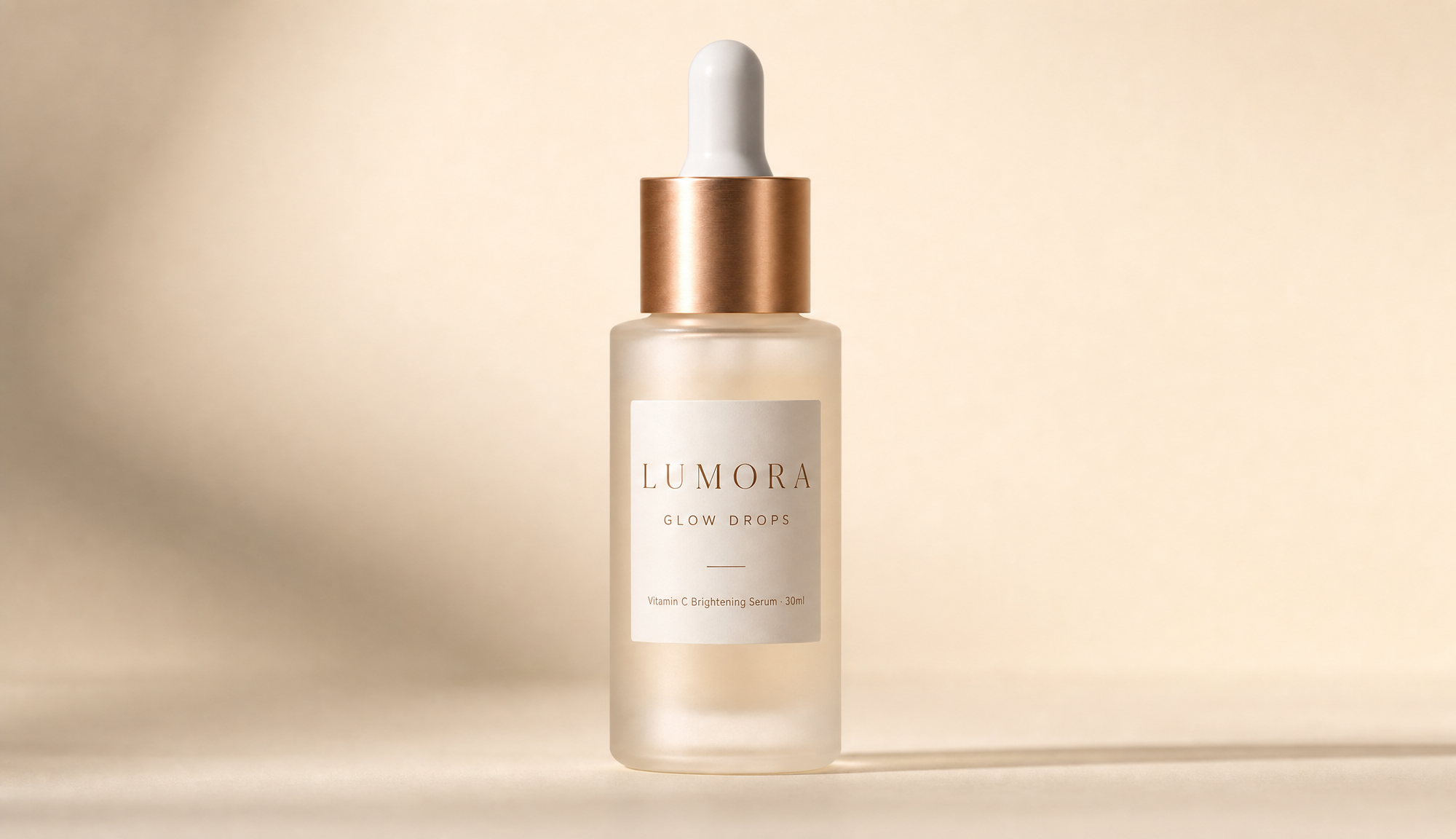
Generated using GPT Image 2 on fal.
I locked the lighting and put every line of the label in quotes up front, because everything downstream inherits whatever this first frame gets right or wrong.
💡 Pro tip: You can hand the model a described scene, not a string of keywords, so it has real relationships to reason about.
This is why you want to put any on-pack text in quotes and name the typeface, since that's the line between usable copy and a reshoot.
💡 Another pro tip: What's more, you can name the light and its direction, then the lens and the materials, like "frosted glass" and "brushed copper."
Those cues will do more for realism than a stack of words like "ultra-detailed."
When you want faster, punchier variations to test, you can run the same brief through Nano Banana 2, Google's Gemini 3.1 Flash Image model, at $0.08 a frame.
It takes a conversational brief and can pull a live web detail into the render for $0.015 more when a sign or label has to match something real (which I think is ideal for agencies who work with multiple clients and need to pull info from the web about product lines).
Prompt: A bright lifestyle shot of the Lumora Glow Drops bottle on a sunny bathroom shelf beside a folded sage hand towel, water droplets on the tile behind it, punchy saturated daylight, a small "FRESH BATCH" tag hanging off the shelf, shot at eye level.
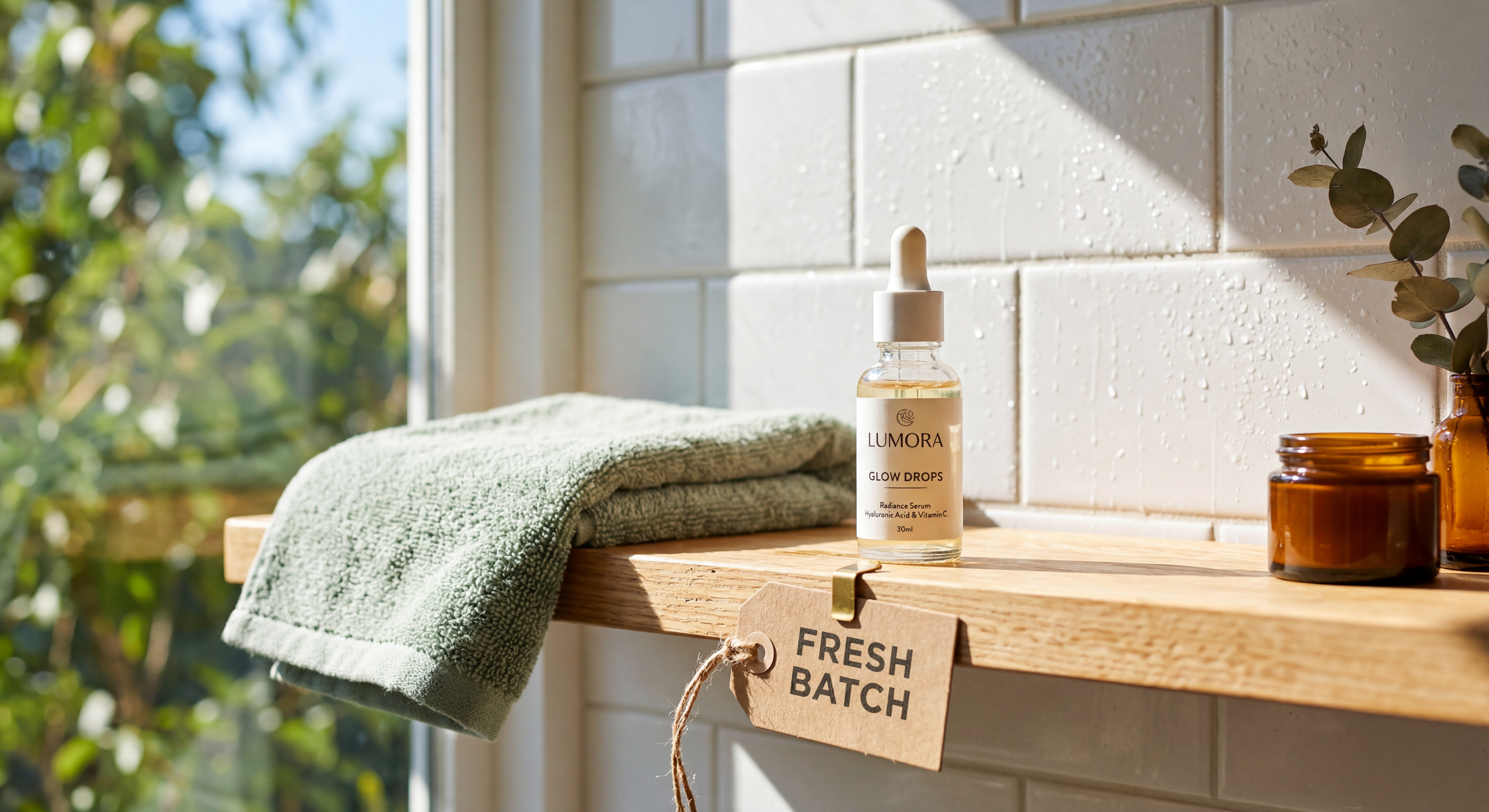
Generated using Nano Banana 2 on fal.
I experimented with switching to Nano Banana 2 for the lifestyle angle because I wanted the bright daylight color quickly, and I quoted the "FRESH BATCH" tag so the small text would still come out clean.
falMODEL APIs
The fastest, cheapest and most reliable way to run genAI models. 1 API, 100s of models
Step 2: Edit and refine
A first render is a draft.
From the playground, the "what would you like to do next" panel hands this exact image to an editing endpoint, so you keep working on the asset you just made without downloading and re-uploading.
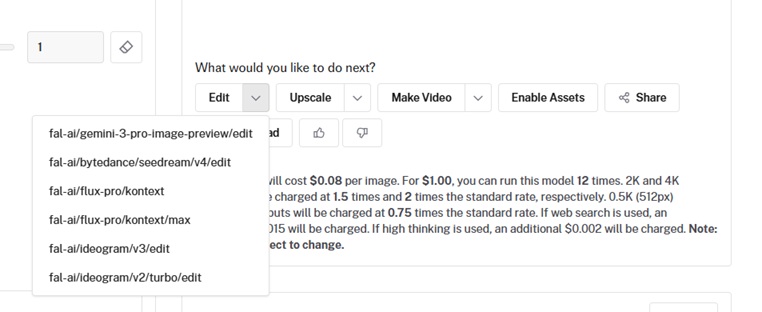
The first move is a written fix: describe the change and call out what should stay put, so the model doesn't redraw the parts you like.
Prompt (edit): Keep the bottle, label, and lighting exactly as they are. Replace the cream background with a soft sage-green gradient. Change nothing else.
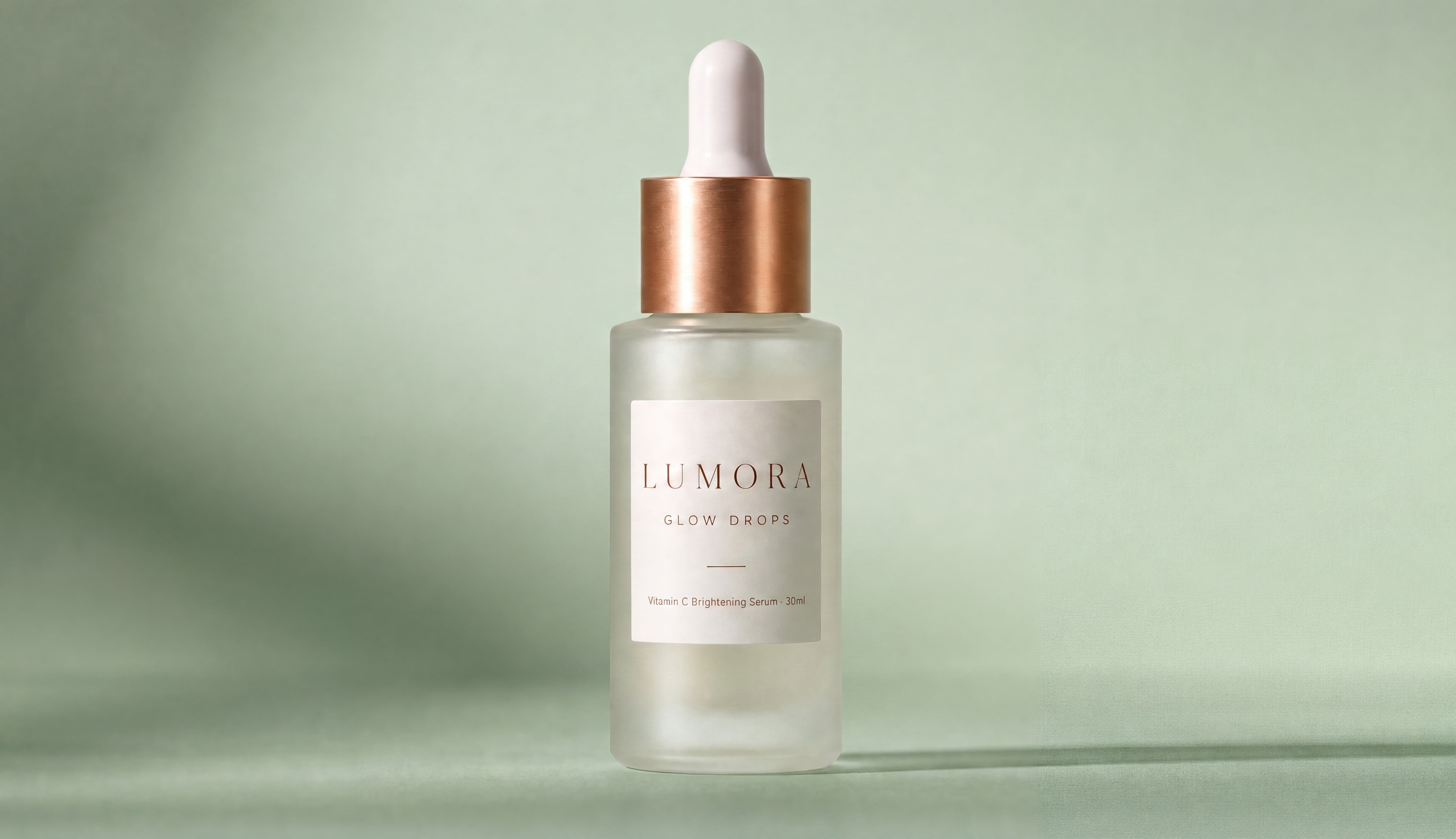
Generated using Nano Banana Pro Edit on fal.
I told it to keep the bottle and lighting and only swap the background, because naming what stays put is how you stop an edit model from quietly redrawing the parts you already liked.
The second is a masked edit, for a surgical change to one region.
You pass a mask alongside the image, and the white area marks what the model may repaint, and the black area stays pixel-for-pixel.
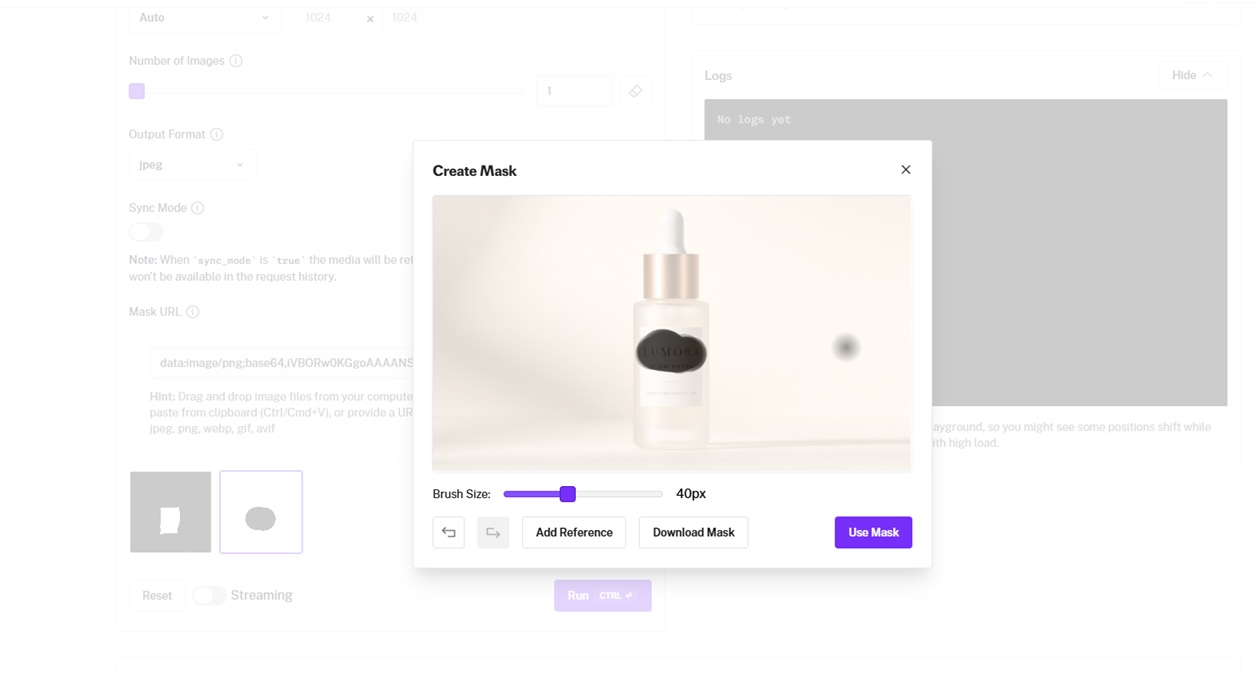
Prompt (masked edit): Within the masked label area only, sharpen the "GLOW DROPS" lettering and deepen the copper foil tone. Leave everything outside the mask unchanged.
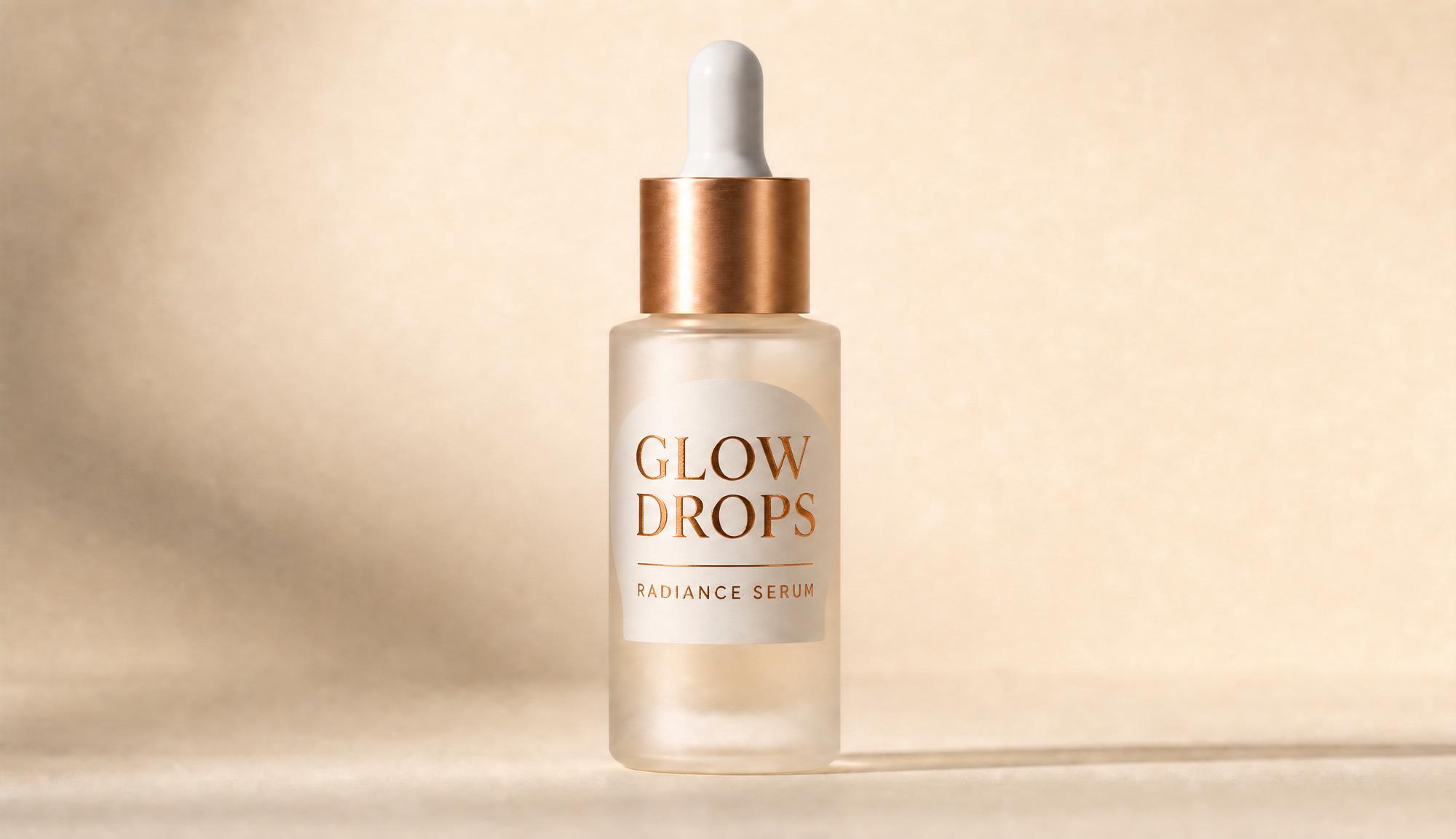
Generated using GPT Image 2 Edit on fal.
I masked just the label so the sharpening couldn't touch anything else, which is the safe way to fix one detail on a hero you've already approved.
💡 Pro tip: When you're editing, the rule flips from generation: tell the model what to leave alone, not just what to change.
For anything precise, like a single word on a label, you can add a mask so only the marked area can move.
Step 3: Turn the final image into video
The next step is to create a video from our finalized image.
You can feed the locked hero into an image-to-video endpoint with a short motion prompt, and the model keeps the look of your frame while adding movement and synchronized sound.
Seedance 2.0 would be my pick here for the job, as it animates a still, scores the clip natively with foley and ambient sound, and runs 4 to 15 seconds up to 1080p, which is roughly $0.30 a second for 720p and $0.682 a second for 1080p.
Prompt (image-to-video): A slow, smooth push-in toward the Lumora bottle, soft morning light warming the frosted glass and the copper cap, the scene calm and still, quiet room ambience.
Generated using Seedance 2.0 on fal.
I fed the locked hero straight into image-to-video so the bottle would move without losing its look (for this example, I decided to stick with Nano Banana Pro's edit), and left audio on so the drop brings its own sound.
💡 Pro tip: You can give the clip one clear motion beat and name the camera move with a length, like "slow dolly-in over four seconds."
For a line of dialogue, put it in double quotes and the model lip-syncs it, with no separate dubbing pass.
The model scores the clip whether you brief the sound or not, so you also want to describe the room tone and any foley you want.
You can ask for the quiet you're after, not "no music," because telling a model to leave something out is the fastest way to summon it.
Happy Horse 1.0 is the other strong option, and it reads multi-shot prompts with timestamps, so you can block a tiny sequence in a single generation.
Let's see what that'll look like:
Prompt: Shot 1 (0 to 2s, wide): a bright minimal bathroom, morning light, the Lumora bottle on a sage tray. Shot 2 (2 to 4s, close): a hand lifts the bottle and tilts the copper dropper. Shot 3 (4 to 5s, macro): a drop lands on the back of a hand and catches the light. Soft ambient room tone, gentle water sounds.
Generated using Happy Horse 1.0 on fal.
I blocked this as three timestamped shots so Happy Horse would cut between them, turning five seconds into a small sequence and not one held shot.
Step 4: Finalize the video with video editors
Once you've got the video nailed that you want to use across your advertisements, you can spice it up by either editing it, adding subtitles to it, voiceover, or upscaling it.
Each one is a fal video-to-video endpoint, so the clip moves from the model that made it straight into the model that finishes it, with no new account and no export in between:
Add a voiceover
A voiceover gives the spot a human read, and because Happy Horse 1.0 edits a clip from a written instruction, it adds one straight onto the product shot with no presenter on screen.
You can name the line and the delivery in the prompt and set the audio to regenerate, and it lays the read over the footage.
Prompt (video edit): Keep all original motion and framing, and add a soft, calm female voiceover that says, "New Lumora Glow Drops, a vitamin C brightening serum. Wake up brighter."
Generated using Happy Horse 1.0 on fal.
I named the exact line in the prompt and set the audio to regenerate, so the read comes through over the existing motion without touching the picture.
Add subtitles
Once the clip has a spoken line, you can add subtitles to carry the message on the muted social feeds where most ads play.
VEED Subtitles transcribes the audio, styles the captions, and burns them into the footage in one call, with translation and a brand-term word list on top, at $0.10 per minute of input video.
Prompt (subtitle settings): language en-US, style preset "glass", position: bottom.
Generated using VEED Subtitles on fal.
I picked a vertical-friendly caption style, since the whole point of subtitles here is the viewer who never turns the sound on.
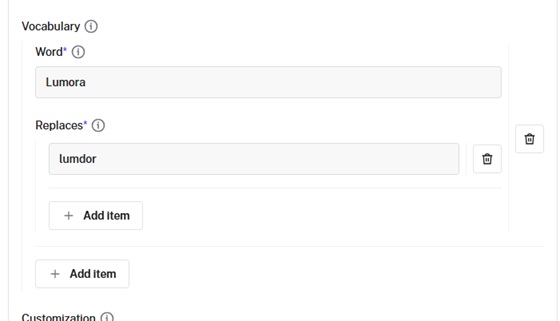
Note: You might not get this right the first time. This is why you want to add a vocabulary to it, where you add the word that gets wrong and what it replaces.
Upscale the final cut
A final upscale takes the cut to a clean delivery resolution for a big placement, with no reshoot.
Bytedance Upscaler lifts a clip up to 4K with presets tuned to the footage, at $0.0072 per second for 1080p, $0.0144 for 2K, and $0.0288 for 4K at 30 fps.
Prompt (upscale settings): ugc preset, target resolution 4K, pro enhancement tier, 30 fps, fidelity high.
Generated using Bytedance Upscaler on fal.
I ran the ugc preset because it's tuned for creator-style footage, and kept it at 30 fps.
What are some of the advanced AI advertising techniques?
I also wanted to show you a handful of techniques that you can use to create better targeted advertisements:
Reference-to-video
Reference-to-video is when you hand a model a set of references, label them in the prompt, and describe how they fit together.
For example, Seedance 2.0's reference-to-video endpoint takes up to 12 reference files spanning images, videos, and audio clips, and the model weaves them into a single cinematic output.
You can also reference assets in your prompt using @Image1, @Video1, @Audio1, etc.
That's how the same face, or the same bottle, shows up consistently across a whole ad set.
Masks
A mask gives you surgical control over a single edit.
With GPT Image 2's editing endpoint, a black-and-white mask marks the one region the model may repaint and leaves every other pixel exact, which is the safe way to change a word on a label without disturbing the rest of the frame.
Start and end frame control
You can design both ends of a shot and let the model fill the middle.
For example, Seedance 2.0's image-to-video endpoint accepts a start frame and an end frame, so you set the exact opening and closing compositions and the motion gets generated between them.
Multi-image compositing
Multi-image compositing lets you build a scene out of parts.
Nano Banana 2's editing endpoint reads up to fourteen reference images and works out how to merge them, so you can drop a product into a location or carry one image's style onto another without booking a photo shoot.
Character and subject consistency
It's possible to hold one identity steady across generations.
Nano Banana 2 keeps up to five people consistent from frame to frame, which matters the moment a campaign leans on a recurring presenter who has to read as the same person every time.
Web search grounding
You can pull a real detail into the render.
An AI model like Nano Banana 2 can ground an output in live information, which helps when a date or a label has to match something that genuinely exists right now.
What to avoid when creating AI ads
Here are a few habits that quietly pull an ad back toward generic from what I've seen others mess up (and myself, matter of fact):
Throwing a pile of keywords at the model gives it nothing to connect, and the result usually looks like generic stock with no real sense of place. This is why you want to describe an actual scene and the gap closes fast.
Loose on-screen text can lead to misspellings and odd spacing, which is why you want to put the exact phrase in quotes and name the typeface every time words appear in the frame.
Cramming a whole thirty-second story into one five-second clip forces the model to drop beats. You'll need to block the sequence into shots, or generate the moments separately and assemble them.
Forgetting that the video model is already making sound leads to clips with audio you didn't plan. Describe the ambience you want, or set the audio behavior deliberately.
Skipping the cheap draft pass burns budget on renders you end up rejecting. I'd advise you to lock the look on a fast tier first, then commit to the full-resolution version.
Listing what you don't want can backfire, since the model sometimes reads the banned thing as a request. You want to describe the clean, quiet frame you do want and let the absences sort themselves out.
Recently Added











Create your AI ad on fal
There has never been a wider set of capable models for every step of an ad, and the models in this guide cover the whole job, from the hero image to the finished, scored cut.
Whichever ones fit your campaign, fal gives you a single API and pay-per-use pricing, with no GPU to manage and no separate accounts to juggle.
You can test any of them in the playground in a minute, hand one generation to the next step with a click, or wire up the API and move between models with a one-line endpoint change.
Frequently asked questions
How much does it cost to make an ad with AI on fal?
Pricing is pay-per-use, and the total is just the sum of the steps you run.
A hero image on GPT Image 2 lands around $0.145 at high quality; an edit pass is a similar order, and a 10-second 1080p video clip runs a few dollars depending on the model (e.g., it will be $6.82 for a 10-second Seedance 1080p clip).
With fal, you pay only for what you generate, with no subscription.
How do I keep my product looking the same across every shot?
You want to lock one true hero image first, then build from it.
It's possible to: animate that frame with image-to-video so the product carries through, use reference-to-video to hold a subject across multiple shots, and use multi-image compositing or character consistency when a recurring face or item has to match across the set.
How long can the video ad be?
It depends on the model, with Seedance 2.0 running 4 to 15 seconds and Happy Horse 1.0 running 3 to 15 seconds per generation.
For a longer ad, you can extend via a video extension model like Veo 3.1 up to 30 seconds, or generate the beats separately and assemble them into the final cut.
![Seedance 2.0 Prompting Guide & Examples [2026]](https://refinery.fal.media/url/https%3A%2F%2Fv3b.fal.media%2Ffiles%2Fb%2F0a9e945a%2FnsNbCHwzblV9c3mgRtzst_seedance-2-0-prompting-guide.jpg/tr:w-1280,q-80/nsNbCHwzblV9c3mgRtzst_seedance-2-0-prompting-guide.webp)