Dreamina Seedance 2.5 is live on fal across three endpoints (text-to-video, image-to-video, and reference-to-video), and there are six ways to reach them.
I'll go through each one, including billing costs, and which I'd pick for which kind of job.
Prompt: Vertical UGC, 9:16, 10 seconds, handheld on a phone's front camera at arm's length. A woman in a bathrobe holds a badly creased linen shirt up to the lens in a sunlit bedroom and says: "Meeting in twenty minutes. Look at this." She swings the shirt onto a hanger just off frame and runs a handheld steamer down it in one pass, steam blooming off the linen and the crease pulling flat under the plate. The phone tips back to her face for the last beat and she lifts an eyebrow. Window light blowing out the curtain behind her, slight sway in the hold, no cuts. Audio: room reverb with the phone mic clipping on her voice, the steamer gurgling then hissing, fabric brushing the hanger, one short exhale at the end.
Generated using Dreamina Seedance 2.5 on fal, an AI model from ByteDance.
TL;DR
fal is the best place to run Seedance 2.5, as every endpoint is here, reachable with a single API key and billed per second of output with no GPU to stand up on your side.
There are six ways to use Seedance 2.5 on fal: the playground, fal Agent, Sandbox, the API, an MCP server, and two separate command line tools.
Seedance 2.5 is billed on output tokens on fal, which works out to roughly $0.4730 a second at 720p and $0.2205 at 480p for 16:9, audio included either way.
My shortlist, if you want to skip the rest: playground to find a prompt you like, 480p to iterate, the API once you know what you're building, and the fal Agent if the deliverable is a set of shots that have to match.
| Access method | Best for | What you need |
|---|---|---|
| Playground | Finding the prompt, then lifting the request as code | A fal account |
| fal Agent | A run of shots that have to look like one shoot | A paid Agent plan (pricing starts from $200/month) |
| Sandbox | Settling whether Seedance is the right model at all | A fal account |
| API | Anything that has to run without you watching it | An API key and the fal client |
| MCP server | Generating from your editor without opening a browser | An API key and an MCP client that speaks Streamable HTTP |
| Terminal (CLI) | One-off renders with fal api, repeatable work with genmedia | An API key and a shell |
How do you run Seedance 2.5 in the fal playground?
Each of the three endpoints gets a page of its own, and the form on that page is drawn from the schema, so nothing you can type into it will surprise the API.
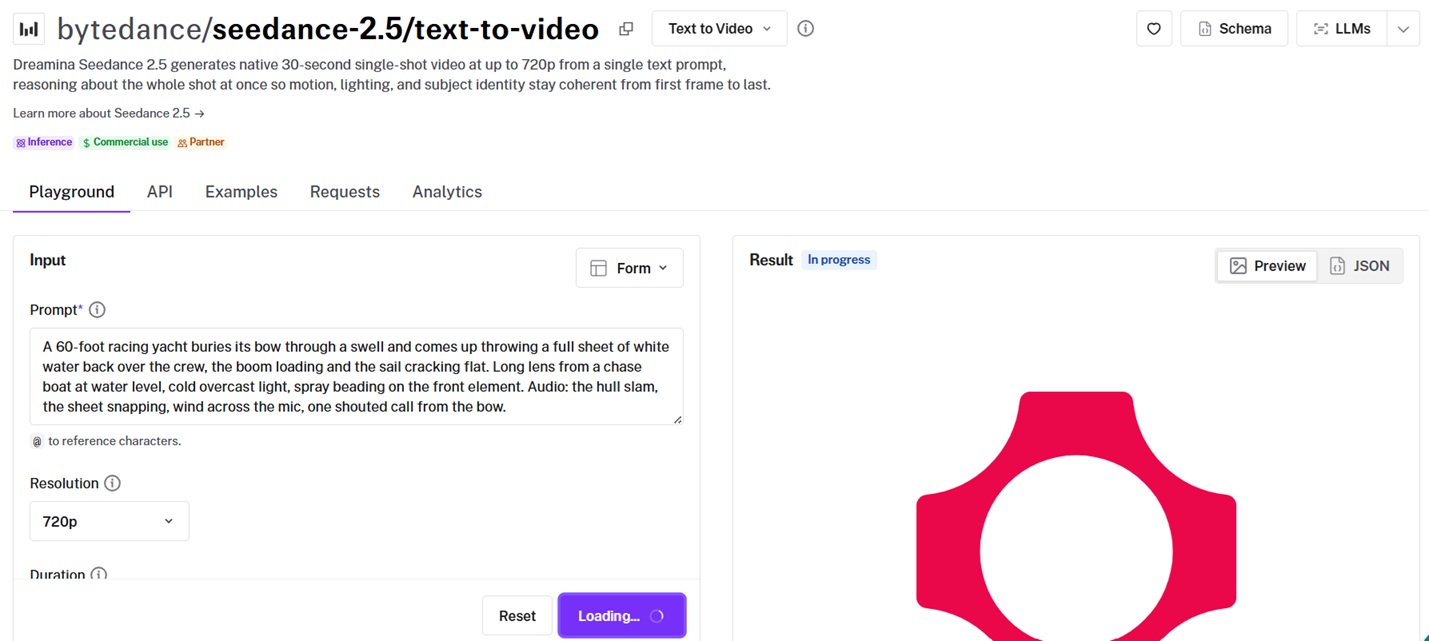
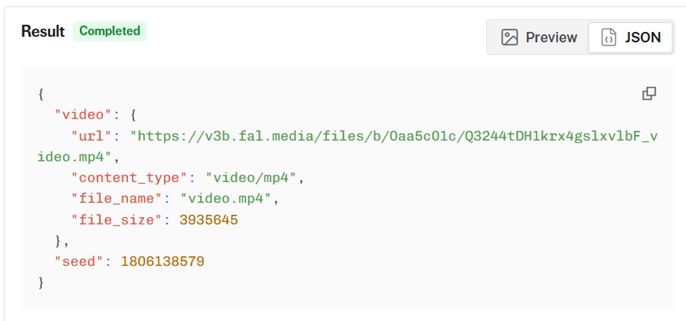
When a run finishes, the page hands you that exact request back as code in JavaScript, Python, or cURL:
-
Start at bytedance/seedance-2.5/text-to-video. The image-to-video and reference-to-video pages behave identically.
-
Prompt is required everywhere. On image-to-video, an image URL is required too. Everything else already has a default.
-
Media goes wherever the endpoint expects it, which is one Image URL with an optional End Image URL on image-to-video, or three separate lists on reference-to-video.
-
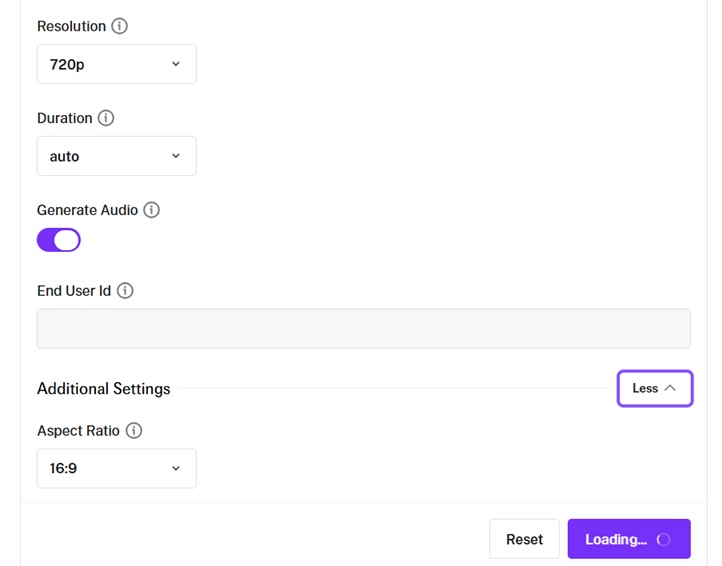
Resolution and Duration are on the main form. Aspect Ratio is tucked behind Additional Settings.
-
Ctrl and Enter fires the request.
Prompt: A 60-foot racing yacht buries its bow through a swell and comes up throwing a full sheet of white water back over the crew, the boom loading and the sail cracking flat. Long lens from a chase boat at water level, cold overcast light, spray beading on the front element. Audio: the hull slam, the sheet snapping, wind across the mic, one shouted call from the bow.
Generated using Dreamina Seedance 2.5 on fal, an AI model from ByteDance.
➡️ What's more, every result comes with the request as working code in JavaScript, Python, or cURL, with your parameters already filled in.
Dialogue
Speech wrapped in double quotes comes back lip synced, because the sound is generated in the same latent space as the picture and never layered on top afterward.
Prompt: She sets a folded note on the counter, looks up, and says: "Tell him I waited." Then she turns for the door. Slow push in, handheld, one fluorescent tube overhead throwing a green cast, rain running down the glass behind her. Audio: rain on the window, the note sliding across laminate, her line, the door chime as she leaves.
Generated using Dreamina Seedance 2.5 on fal, an AI model from ByteDance.
Duration and aspect ratio on auto
Both fields default to auto, which is the model choosing for you.
Both also feed the token count you're billed against, so set them explicitly the moment the number matters. Duration accepts any whole second from 4 to 30.
falMODEL APIs
The fastest, cheapest and most reliable way to run genAI models. 1 API, 100s of models
How do you use Seedance 2.5 in fal Agent (new)?
fal Agent is our new creative workspace that drives the model catalog on your behalf.
We knew that the model stopped being the difficult part a while ago, as you can already see and use some of the best AI video generators on the internet like Seedance 2.5.
What I feel is difficult now is holding one face steady across eight shots without rebuilding your whole setup every time you change your mind about shot three.
This is why memory is scoped to your fal agent project, so the references and the takes you threw out are all still attached three weeks later.
What you hand it reads more like a brief than a model prompt.
Chat (not really 'prompt'): I want you to use Seedance 2.5: Six-shot teaser for a titanium eyewear launch, 16:9, one grade across all six. Beats: the frames on a lint free cloth, the hinge opening, a three quarter face wearing them under hard side light, a macro of the temple engraving, a wide of a rooftop at blue hour, the logo plate. Keep the engraving exact from the attached flat, and hold the same face in every shot that has one. Board it first, then render the three that carry the spot at 720p and tell me what each step cost.
After that, similar to a chatting experience with an LLM, the model thought for 15.9 seconds and created me the plan of action:
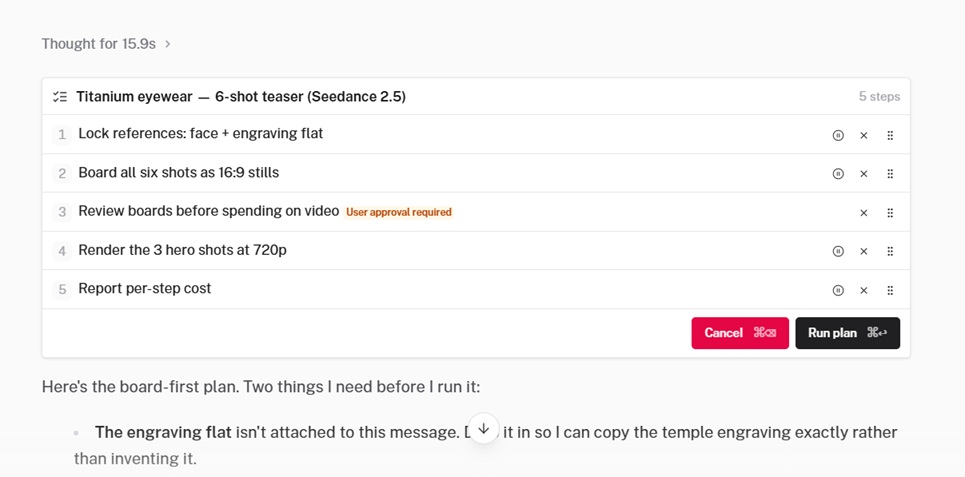
I'm happy with it, so I clicked on 'Run plan' to proceed. There'll be user approval at the 'review boards before spending on video' part.
After the model started working through my request, it was essentially asking me for my opinion on a few images (generated using Nano Banana Pro), then it rendered 3 hero shots at 720p, and it reported the per-step cost.
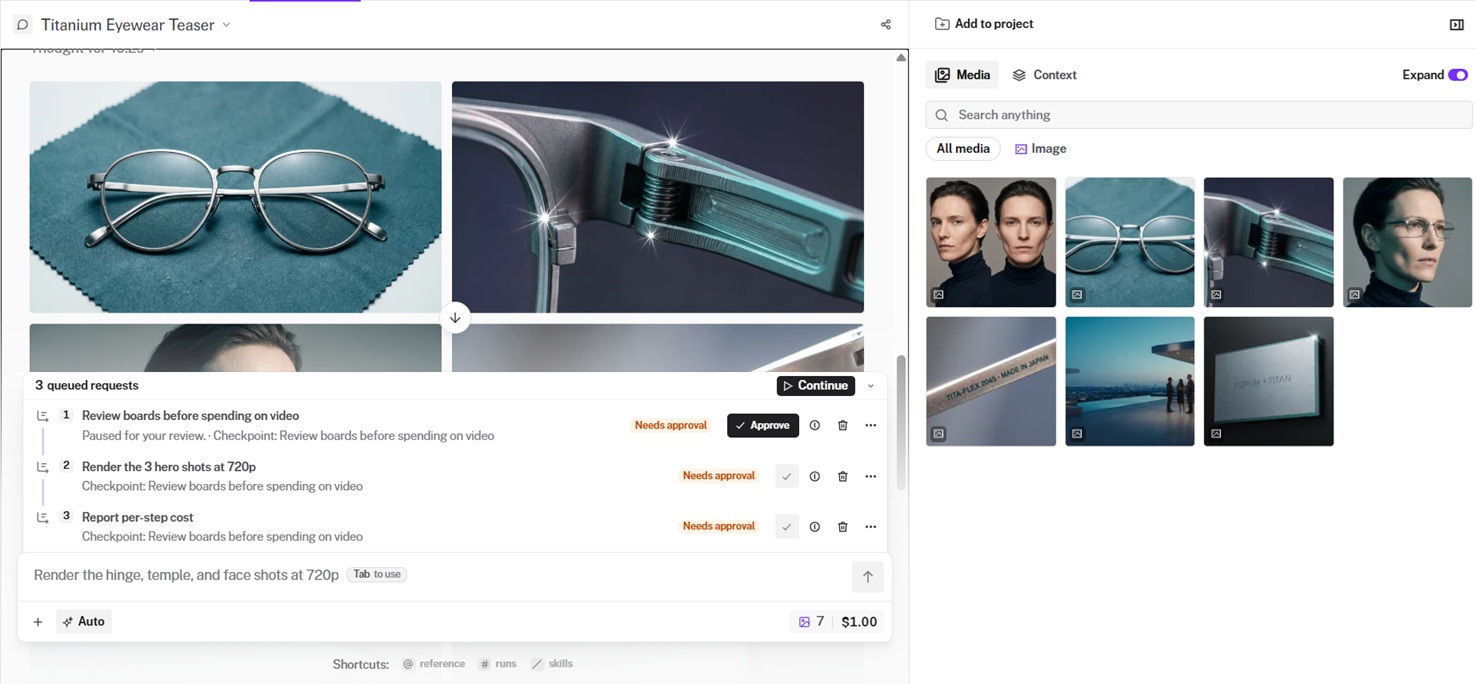
You'd have to click on 'approve' to let the model continue working after you're happy with its proposed output.
And if you want to better control the output, you can send feedback to the agent, and also upload your own media.
What's more, you can edit out the proposed references.
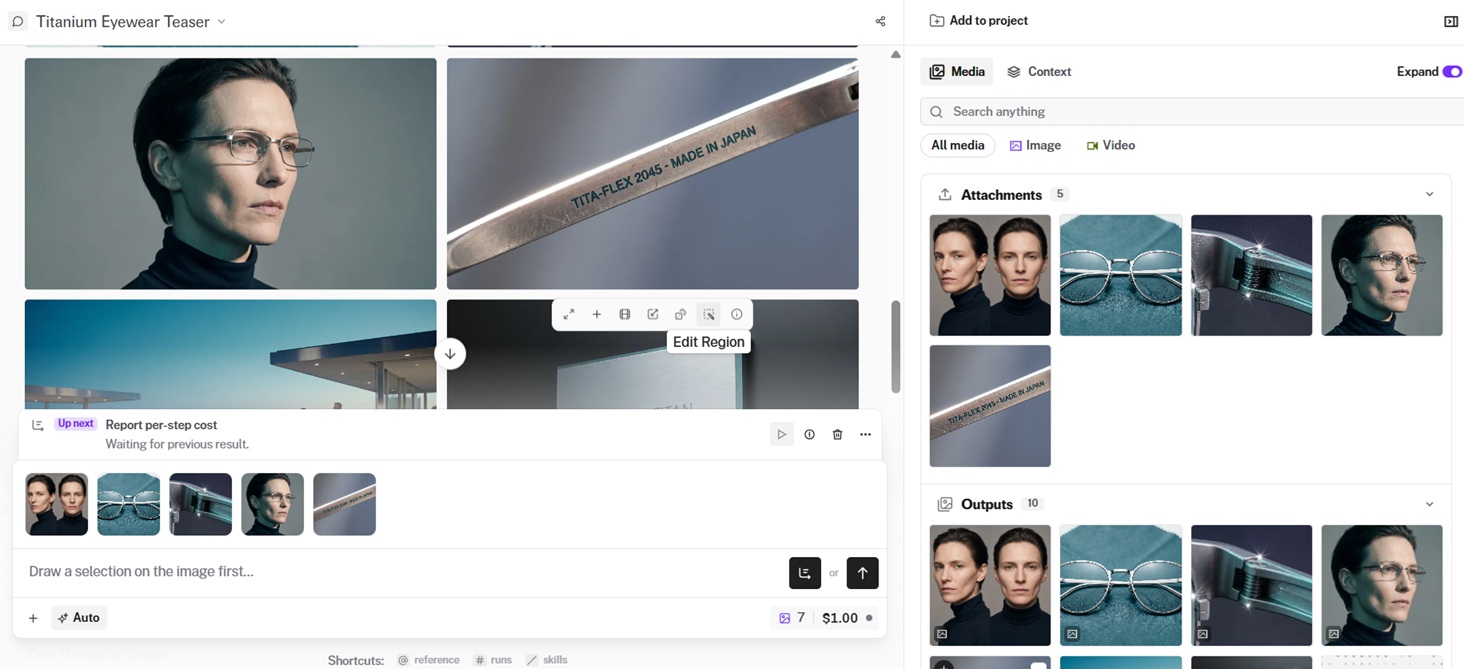
Next up, you'll be able to see the first variations of the videos that you generated with the approved references, and be able to iterate on them.
Access to the fal agent is an add-on.
Pro is $200 a month, Max is $1,000, and each includes that much in credits spendable anywhere on fal, with 5% and 10% off the UI, Sandbox, playground, and CLI, respectively.
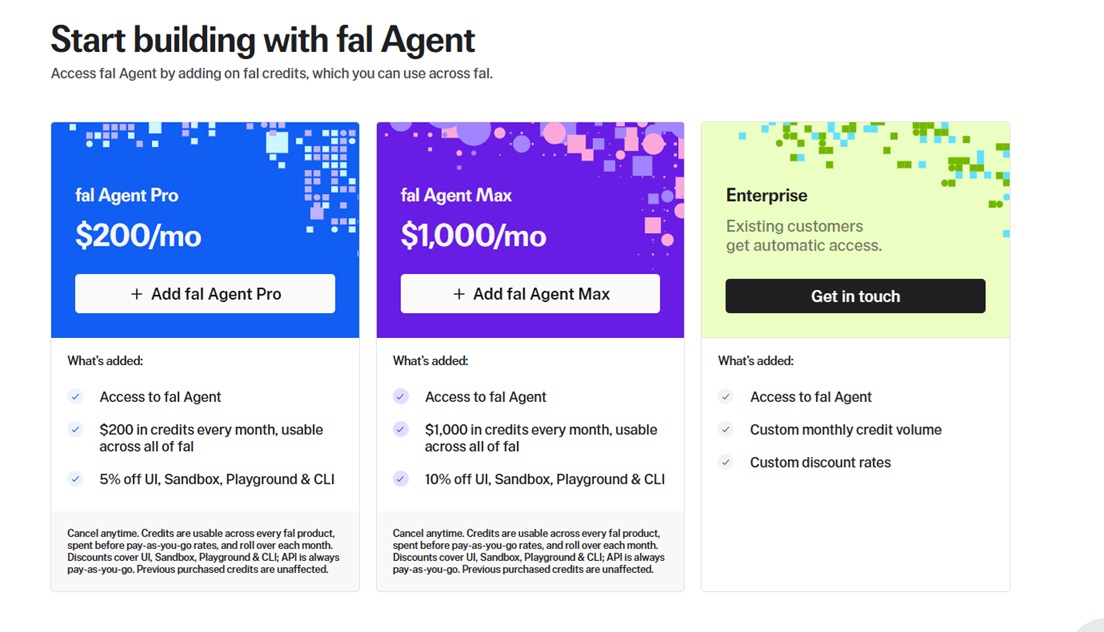
Credits roll over month to month and get drawn down ahead of pay-as-you-go rates.
API calls stay pay-as-you-go at every tier.
Worth being straight about it: this is the only surface here with a subscription attached.
If your work is one clip at a time and not campaigns, you don't need it.
How do you run Seedance 2.5 in fal Sandbox?
After you open fal's Sandbox, you can choose Video from the top tabs, then Text to Video as the operation.
The way the Sandbox works is that you paste your prompt, set duration (can be auto) and aspect ratio, open the model picker, and select Seedance 2.5.
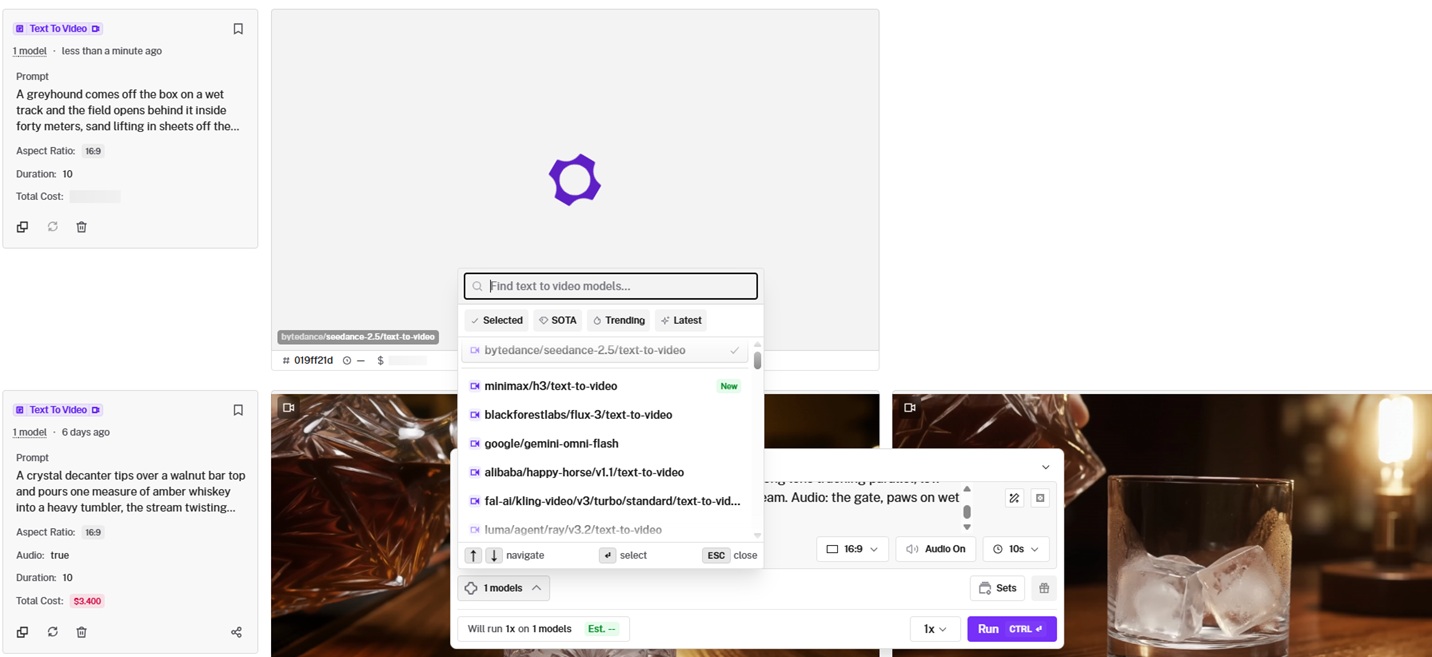
Before you submit, you'll see an estimate of what the run will cost. Worth reading on a model priced per second.
Prompt: A greyhound comes off the box on a wet track and the field opens behind it inside forty meters, sand lifting in sheets off the paws. Long lens tracking parallel, low sun straight into the barrel, dust hanging in the beam. Audio: the gate, paws on wet sand, the crowd coming up a beat late.
Generated using Dreamina Seedance 2.5 on fal, an AI model from ByteDance.
💡 With more than one model in the picker, a single submission runs the same prompt across all of them, then badges the fastest and cheapest result.
How do you call the Seedance 2.5 API on fal?
Seedance 2.5 answers on the same interface every other model on fal answers on, so whatever you build here transfers to the next model you try.
Here's how to set it up:
bash
npm install --save @fal-ai/client
export FAL_KEY="YOUR_API_KEY"
And here's how the API call looks like:
javascript
import { fal } from "@fal-ai/client";

const result = await fal.subscribe("bytedance/seedance-2.5/text-to-video", {
  input: {
    prompt:
      "An octopus finds a football in the ocean and excitedly calls its octopus friends to come and play. Cut scene to an octopus football game under the sea.",
  },
  logs: true,
  onQueueUpdate: (update) => {
    if (update.status === "IN_PROGRESS") {
      update.logs.map((log) => log.message).forEach(console.log);
    }
  },
});

console.log(result.data);
console.log(result.requestId);
You can add the target aspect_ratio, resolution, duration, and generate_audio.
json
{
  "prompt": "An octopus finds a football in the ocean and excitedly calls its octopus friends to come and play. Cut scene to an octopus football game under the sea.",
  "resolution": "720p",
  "duration": "auto",
  "aspect_ratio": "auto",
  "generate_audio": true
}
Generated using Dreamina Seedance 2.5 on fal, an AI model from ByteDance.
The three endpoints and what each one takes
prompt, aspect_ratio, resolution, duration, generate_audio are common to all three.
The media inputs are the difference.
text-to-video wants nothing beyond the prompt and selecting the duration, aspect ratio, resolution, and choosing generate_audio to be on or off.
image-to-video requires image_url, which becomes frame one.
JPEG, PNG, or WebP, 30 MB ceiling.
The optional end_image_url lands the clip on a composition you've already settled.
reference-to-video takes three lists: up to 30 in image_urls and up to 10 each in video_urls and audio_urls, which is also the 50-file ceiling across all three.
You call them out positionally in the prompt as @Image1, @Video1, @Audio1.
Every video and audio reference has to run between 1.8 and 30.2 seconds, with each list's combined duration capped at 30.2 as well.
Audio references won't work alone, so at least one image or video has to travel with them.
json
{
  "prompt": "An octopus finds a football in the ocean and excitedly calls its octopus friends to come and play. Cut scene to an octopus football game under the sea.",
  "image_urls": [
    "https://v3b.fal.media/files/b/0a8eba37/Cqg-4Uwzyz4DELfceT1CF_a17e588773ec45b1a9e6f100a787b80b.jpg"
  ],
  "resolution": "720p",
  "duration": "auto",
  "aspect_ratio": "auto",
  "generate_audio": true
}
Generated using Dreamina Seedance 2.5 on fal, an AI model from ByteDance.
Editing and extension both route through this same endpoint, with no separate model ID for either.
You describe a change against a reference clip, or you describe what comes after it ends.
How do you give your coding assistant access to Seedance 2.5 through fal's MCP server?
fal hosts an MCP server that exposes the platform as tools for any Model Context Protocol client.
Your coding assistant can read Seedance 2.5's schema, check pricing, upload inputs, and submit renders without you writing the call.
Connect it
Here's how you can connect fal to Claude Code in one command:
bash
claude mcp add --transport http fal-ai \
  https://mcp.fal.ai/mcp \
  --header "Authorization: Bearer YOUR_FAL_KEY"
Cursor wants a block in mcp.json, which is reachable by searching the command palette for "Open MCP settings":
json
{
  "mcpServers": {
    "fal-ai": {
      "url": "https://mcp.fal.ai/mcp",
      "headers": {
        "Authorization": "Bearer YOUR_FAL_KEY"
      }
    }
  }
}
You want to then restart Cursor afterwards.
Windsurf uses the same shape under Settings, then MCP, with serverUrl as the key name.
For example, I was able to add fal's API key to my code assistant, Claude Code's browser edition, and I can generate videos from talking to Claude conversationally about the video I want with the resolution, aspect ratio, and duration.
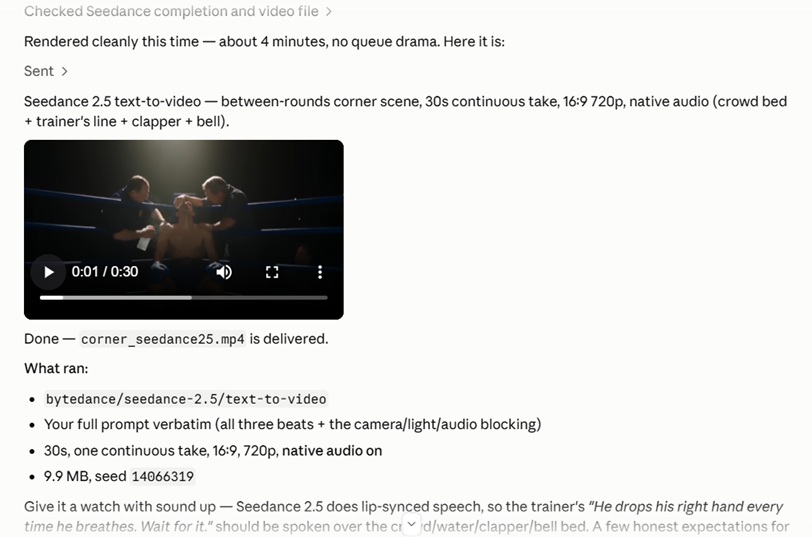
The tools that matter for Seedance 2.5
Nine tools ship on the server, and three of them carry the weight on a model this slow.
submit_job is the important one: A 30-second render at 720p will sit long enough that a synchronous call looks broken, and submit_job returns a request ID straight away for check_job to collect against later.
check_job is its partner, collecting the result when the render lands.
get_model_schema is the third, pulling exact field names and accepted values.
Of the other six, run_model is the one to know: it runs and waits, which is fine at 480p and short durations but not at 30 seconds.
get_pricing quotes a run before you spend on it, upload_file pushes a local file or a remote URL to fal's CDN for any of the reference lists, and search_models, search_docs, and recommend_model only matter when you don't yet know which model you want.
Asks that work describe the whole sequence.
Something like "pull the reference to video schema, put these three stills and this audio file on the CDN, submit at 720p for 12 seconds, then poll until it lands" gets chained from one message.
Prompt: A glass elevator climbs the outside of a night atrium in one continuous rise, the city filling the frame behind it and the interior lights sliding down the pane as the car goes up. Locked off from a facing balcony, long lens, no cut. Audio: cable hum, a floor chime, traffic somewhere below.
Generated using Dreamina Seedance 2.5 on fal, an AI model from ByteDance.
How do you run Seedance 2.5 from the terminal?
Two tools reach Seedance 2.5 from a shell, and they're built for different jobs:
fal API, for a one-off video generation
fal is the deployment CLI, but fal api will call any catalog model, which makes it the quickest thing on this list to get working:
bash
pip install fal
fal auth login

fal api bytedance/seedance-2.5/text-to-video \
  prompt="A theater safety curtain rises on an empty stage, work light throwing the rigging shadows up the back wall." \
  duration=10 \
  resolution=720p \
  aspect_ratio=16:9 \
  generate_audio:=true
The := deserves a second of attention.
A bare = ships the value as a string.
Adding the colon runs it through a JSON parser first, which is how integers and booleans survive the trip.
Seedance 2.5 is gentler about this than most video models, because duration and resolution are both string enums in the schema and stay on =.
In that whole call, generate_audio:=true is the only field needing the colon.
Status and logs print while the render runs.
Bracket notation handles nested values.
genmedia, for anything repeatable
genmedia is a separate binary that reads the room: something human readable in a terminal, structured JSON the second you pipe it or pass --json.
Add the per-session gallery and the skill bundle for coding agents, and it's the obvious pick for automated work.
On Linux or macOS:
bash
curl https://genmedia.sh/install -fsS | bashThe binary goes into ~/.genmedia with genmedia added to your PATH.
Windows gets its own installer, documented alongside the rest of genmedia.
FAL_KEY in your environment is enough, or genmedia setup will store it encrypted locally.
Here's how the full run looks:
bash
# See what the endpoint takes
genmedia schema bytedance/seedance-2.5/text-to-video

# Fire it off without blocking
genmedia run bytedance/seedance-2.5/text-to-video \
  --prompt "A theater safety curtain rises on an empty stage and the work light throws the rigging shadows up the back wall as it climbs, dust turning in the beam. Locked off from row five, 35mm, the house dark and the stage the only source. Audio: the winch, the weight of the curtain, one cough from somewhere in the empty house." \
  --duration 12 \
  --resolution 720p \
  --async
# -> { "request_id": "abc123..." }

# Pick it up later and save the file
genmedia status bytedance/seedance-2.5/text-to-video abc123 --result --download
Generated using Dreamina Seedance 2.5 on fal, an AI model from ByteDance.
genmedia upload ./frame.jpg returns a CDN URL for --image_url or any of the reference lists.
Flags map one-to-one onto schema field names, which makes genmedia run bytedance/seedance-2.5/reference-to-video --help the fastest answer to what an endpoint accepts.
Reach for --async for the same reason the queue exists in code.
Failures write JSON to stderr and exit non-zero, so a pipeline notices.
💡 Each session gets its own HTML gallery under ~/.genmedia/gallery/sessions/, viewable with genmedia gallery open current.
What does Seedance 2.5 cost on fal?
Billing is token-based at $0.0214 per 1,000 tokens, and that rate is identical at 480p and 720p.
What moves is how many tokens a render burns.
tokens = (output_height * output_width * duration_seconds * 24) / 1024
The 24 is the frame rate and it is fixed, so the only variables are your output's pixel area and how long it runs.
Prompt length and image or audio reference count have no effect.
Video reference duration does, because it is billed.
Reference to video changes the formula in one case.
When a video reference is attached, input video duration gets added to output duration inside the brackets, and the total is then multiplied by 0.6.
Image and audio references are free on every endpoint.
Here's how the math looks, approximately:
| What you're running | 720p | 480p |
|---|---|---|
| Text to video, image to video | ~$0.4730 per second | ~$0.2205 per second |
| Reference to video, images and audio only | ~$0.4730 per second | ~$0.2205 per second |
| Reference to video with a video reference | ~$0.2838 per billed second | ~$0.1323 per billed second |
Those are our own approximations for 16:9, and they land a couple of percent above what the formula returns. Read them as a ceiling and budget from the token math.
Audio moves none of these numbers.
It comes out of the same pass, so switching generate_audio off saves you nothing at all.
💡 I'd recommend you settle composition and pacing at 480p, where a 10-second 16:9 test runs about $2.15 by the token formula, or $2.21 at the rounded per-second rate above. Move up once you're happy.
Recently Added















Run Seedance 2.5 on fal
Thirty seconds in a single pass, sound generated in the same latent space as the picture, and up to 50 references when a face or a label has to survive an entire take.
Five of the six surfaces draw on the same key, so between them the choice is about how you like to work.
fal Agent is the exception, with a monthly plan attached, and an Agent plan also shaves 5% or 10% off everything except the API.
If you want one place to start, open the playground, get to a prompt you like at 480p, then take the code it hands back.
Seedance 2.5 access FAQ
Is there a public Seedance 2.5 API?
Yes, on fal.
You can generate a key from the dashboard, and it will call bytedance/seedance-2.5/text-to-video straight away.
The JavaScript and Python clients both cover all three endpoints, and so does raw REST.
Can you use Seedance 2.5 without writing code?
Yes, on three separate surfaces.
Every endpoint has a playground page whose form is built from its own schema, reference lists included.
Sandbox is the one to open when the real question is whether Seedance suits the job.
fal Agent covers the case where one idea turns into a run of shots.
Does one key cover both the MCP server and the CLI?
Yes, it does.
Only the header format changes: the MCP server takes Authorization: Bearer YOUR_FAL_KEY, while direct REST calls to fal.run take Authorization: Key YOUR_FAL_KEY.
The CLIs handle it for you.
![AI Character Consistency: Prompts & Workflows [2026]](https://refinery.fal.media/url/https%3A%2F%2Fv3b.fal.media%2Ffiles%2Fb%2F0aab7c4d%2Fkwxu6yccgCYhxPol2ex4f.jpg/tr:w-1280,q-80/kwxu6yccgCYhxPol2ex4f.webp)
![How To Use FLUX 3: Prompts & Workflows [2026]](https://refinery.fal.media/url/https%3A%2F%2Fv3b.fal.media%2Ffiles%2Fb%2F0aa634ac%2FQDj7UCejgvCv5IKAwDFLP.jpg/tr:w-1280,q-80/QDj7UCejgvCv5IKAwDFLP.webp)