![How To Use FLUX 3: Prompts & Workflows [2026]](https://refinery.fal.media/url/https%3A%2F%2Fv3b.fal.media%2Ffiles%2Fb%2F0aa634ac%2FQDj7UCejgvCv5IKAwDFLP.jpg/tr:w-1920,q-80/QDj7UCejgvCv5IKAwDFLP.webp)
In this guide, I'll cover how to prompt every mode FLUX 3 has, from one line of text through to a keyframed shot list, with prompts you can paste into fal's playground or drop straight into an API call.
TL;DR
FLUX 3 is Black Forest Labs' multimodal model, trained on video, images and audio inside one architecture, so a clip and its soundtrack come out of the same pass. Output runs any whole number of seconds from 5 to 20, at 720p or 1080p, 24 fps.
The behaviour that changes how you prompt the video generator is coverage: Black Forest Labs built it to put several scenes and camera angles inside a single generation and hold them coherent, so even a ten-second prompt can carry an edit.
Five core modes cover text, one still, a start and end frame, a keyframe array, and continuing footage you already have. Each has a cheap draft twin, and Draft Enhance finishes the draft you signed off on at full quality, on the same seed.
fal is the best place to run all eleven FLUX 3 endpoints behind one API key, billed per second of output with nothing to provision, reachable through the playground, Sandbox, API, MCP server and CLI.
Where can you access FLUX 3?
The best place to access FLUX 3 is on fal, billed per second of generated video, with no plan and no minimum spend.
There are five core endpoints:
blackforestlabs/flux-3/text-to-video needs nothing but a prompt.
blackforestlabs/flux-3/image-to-video adds image_url, and that still becomes the opening frame.
blackforestlabs/flux-3/first-last-frame-to-video adds start_image_url and end_image_url.
blackforestlabs/flux-3/keyframes-to-video takes a keyframes array of up to 10 objects, each with an image_url and a frame_index.
blackforestlabs/flux-3/extend-video takes video_url, capped at 50 MB and 15 seconds of MP4.
Each of those has a draft twin at the same path with /draft appended, and an eleventh endpoint, blackforestlabs/flux-3/draft-enhance, finishes a draft at full quality.
All five share the same six parameters: prompt, aspect_ratio, resolution, duration, generate_audio and safety_tolerance.
Here's an example of a text-to-video call with fal's API:
javascript
import { fal } from "@fal-ai/client";

const result = await fal.subscribe("blackforestlabs/flux-3/text-to-video", {
  input: {
    prompt:
      "A red panda walks along a mossy log in a sunlit forest, one continuous unbroken shot. Ambient birdsong and rustling leaves.",
  },
  logs: true,
  onQueueUpdate: (update) => {
    if (update.status === "IN_PROGRESS") {
      update.logs.map((log) => log.message).forEach(console.log);
    }
  },
});

console.log(result.data);
console.log(result.requestId);
Moving to another FLUX 3 endpoint means changing the model string and adding one media field.
The same pattern reaches the 1,000-plus other models fal hosts, so authentication and billing never need relearning.
For work without code, every endpoint has its own playground page with a form generated from its schema, and you can also use fal's Sandbox, where you can put one prompt through FLUX 3 and a second model side by side.
What does a FLUX 3 prompt need?
Black Forest Labs frames this better than I can: direct the scene, don't inventory the objects in it.
You want to say what happens, how the subject moves, what the camera does, and what the whole thing looks and sounds like.
Concrete nouns and verbs the lens could actually resolve; adjectives leave the result to chance.
Beyond that, two decisions shape a prompt: which format you write it in and how much you leave out.
Length is not the goal on its own.
Black Forest Labs is explicit that over-stuffing a prompt can make the motion less coherent, which lines up with what a format name buys you: cut whatever the format already answers, and spend the words on what it doesn't.
The four prompt shapes, and when to use each
A short phrase: "A red fox leaping through fresh snow, telephoto" is a complete prompt. The model fills in framing, motion and mood, which is what you want for fast exploration or a single clear subject, and risky when a specific detail has to survive.
A natural-language one-liner: The default, and the one I reach for most. Black Forest Labs' shape for it runs camera, then subject, then action, then environment, then the supporting motion and look. One flowing sentence, loose enough that you can revise the camera without touching the lighting.
Labeled fields: The same content broken into lines (e.g., camera shot, subject and action, depth of field, lighting and palette, motion, and style). It's worth the extra typing when you're tuning one lever at a time and want to see which change did what.
Timestep prompting: Ranges like 0.0–1.5s with one beat each, and the word HARD CUT wherever the angle changes. This is the format for action that has to land on a mark.
Prompt: A car chase from a 1971 American crime picture, shot on real streets with the traffic still running. It opens on a dark sedan idling at a red light in a downtown intersection, cuts wide as a second car clips its rear quarter and both come off the line through crossing traffic, then drops to a bumper-mounted camera as they climb a hill and go light over the crest. Grainy 35mm, blown highlights, hand-held from the sidewalk on the wide. Big-block engines under load, tyres barking on hot asphalt, no score at all.
Generated using FLUX 3 on fal, an AI model from Black Forest Labs.
falMODEL APIs
The fastest, cheapest and most reliable way to run genAI models. 1 API, 100s of models
How do you prompt FLUX 3 for text-to-video?
All you have to do to get started with FLUX 3's text-to-video endpoint is to prepare your prompt, select your target resolution (720p or 1080p), select your aspect ratio, set "generate audio" as either on or off, set your safety tolerance level, and click run.
A set piece written as a timestep prompt
Three beats across ten seconds, with every cut marked explicitly.
This is the shape to reach for when a specific moment has to land at a specific time.
Prompt, duration: 10: Golden hour on a carrier deck, cut like coverage of a real deck operation. Grainy anamorphic, hard raking sun, heavy flare across the lens. 0.0–3.5s — long lens through the heat haze as a fighter taxis onto the catapult and the shuttle locks on, deck crew in coloured jerseys signalling across the frame. HARD CUT. 3.5–7.0s — low and wide at deck level, the burners light and the aircraft is thrown off the bow in under two seconds, deck plating shuddering under the camera. HARD CUT. 7.0–10.0s — tilt up to hold the jet as it rolls into a climbing turn against a bank of cloud. Audio across all three: turbine spool-up building into a physical roar, the catapult release, wind and radio chatter underneath.
Generated using FLUX 3 on fal, an AI model from Black Forest Labs.
A creature reveal with the camera held still
Prompt: A creature reveal from a prestige fantasy series. A longship rows through flat grey fog at first light, oars dipping, the crew silent and watching the water. The fog thins and something enormous breaks the surface off the port side, a ridged back the length of the ship rising and sliding past without hurrying, close enough that the water lifts against the hull. It ends on a wide from high above, the ship tiny beside the shape as it goes under again. Desaturated cold grade, long lens, no camera shake at all. Oars in water, timber straining, one held breath from the crew, and a low subsonic note under the surfacing.
Generated using FLUX 3 on fal, an AI model from Black Forest Labs.
➡️ Note: Weight is a camera decision more than a design one.
A steady frame reads as heavy; a shaking one reads as small and panicked.
That's the reason for the only negative direction in the prompt.
This one is deliberately the harder audio ask.
Oars, straining timber and a body of water displacing give the mix something physical to work from, but a held breath and a subsonic note are abstract, and abstract cues are where the audio pass has least to go on.
💡 If it comes back thin, I can add a sound that a moving object would actually make.
A luxury spot cut as three beats
Prompt: A three-beat spot for a high jewellery house. It opens on a diamond necklace laid out on black velvet in total darkness, then a hard beam sweeps across it and fires the stones into colour one at a time, then a hand in a black silk sleeve lifts it clear and fastens it at the nape of a neck, the stones throwing points of light across the collarbone as they settle. Macro for the sweep, a slow push-in for the fastening, a high-contrast grade with pure black around everything. The whisper of silk, a faint chain sound, one sustained cello note and nothing else.
Generated using FLUX 3 on fal, an AI model from Black Forest Labs.
How do you extend a FLUX 3 clip?
extend-video takes a video URL and a prompt for what comes next, then generates footage running on from the end of your source.
Two numbers shape how you use it:
fal caps the input at 50 MB and 15 seconds of MP4, and the endpoint bills $0.41 a second at 720p, more than double a fresh generation.
Black Forest Labs describes the continuation as reading the last few seconds of picture and audio, so the tail of the clip is what the model is working from.
You want to write the prompt from the final beat, then, not from the whole scene.
Restating the light and the lens feel is what keeps the seam quiet.
Source: the 10-second carrier launch clip above, extended by 8 seconds.
Prompt, duration: 8: The camera stays with the jet a moment longer as it shrinks against the cloud bank, then drops back down to the deck, where the catapult track is already venting steam and the next aircraft is being taxied forward into position. A crew member crosses the foreground wiping down a visor. Keep the golden hour light, the heavy flare and the long lens feel of the source footage. Jet noise falling away into the distance, steam venting hard, deck radio and wind coming back up underneath.
Generated using FLUX 3 on fal, an AI model from Black Forest Labs.
How do you animate a still image with FLUX 3?
image-to-video uses one image as the opening frame and grows the clip out from it.
The prompt picks up a second job here: saying what to leave alone.
An explicit note on the framing and the light separates a clip that continues your still from one that drifts off it.
A product macro with one physical event in it
Image prompt: A macro food photograph of a glossy dark chocolate sphere on a warm slate plate, gold leaf at the crown, a shallow ring of raspberry coulis around the base, hard side light from the left with a soft fill, deep black background, razor-sharp focus on the front of the sphere, high-end restaurant menu photography.
![Image generated by FLUX.2 [pro] on fal, an AI model from Black Forest Labs.](https://v3b.fal.media/files/b/0aa54357/GAB2sWM-wNzh8-toCTe_p_A%20macro%20food%20photograph%20of%20a%20glossy%20dark%20chocolate%20sphere.png)
Image generated by FLUX.2 [pro] on fal, an AI model from Black Forest Labs.
Video prompt: A thin stream of hot salted caramel comes into frame from above and lands on the crown of the sphere. The shell gives way and collapses inward in one slow motion, opening to a warm pool of caramel and pistachio crumb inside while steam lifts off the surface. Hold the plate, the coulis ring and the hard side light exactly as they are in the still, and keep the camera locked off throughout. The pour, the crack of the shell, cutlery and quiet room tone in a restaurant far behind it, no music.
Generated using FLUX 3 on fal, an AI model from Black Forest Labs.
💡 Locked-off is the right call on product work.
An editor can cut a single physical event that happens inside a static frame; a camera move layered on top of it just adds a second thing to match.
A portrait with a spoken line and a lighting change
Dialogue goes inside double quotes, which is the syntax Black Forest Labs uses in its own examples.
Their prompts also close with an explicit instruction against on-screen text and subtitles, which is worth copying, because a video model handed a line of dialogue will sometimes decide to caption it.
Image prompt: A photorealistic close portrait of a woman in a white pressure suit strapped into the seat of a cramped spacecraft capsule, visor up, sweat at her hairline, banks of switches behind her shoulder and a small round window glowing with pale blue Earth light, hard practical lighting from the instrument panel, shallow depth of field, 40mm anamorphic lens, cinematic science fiction still, no text.
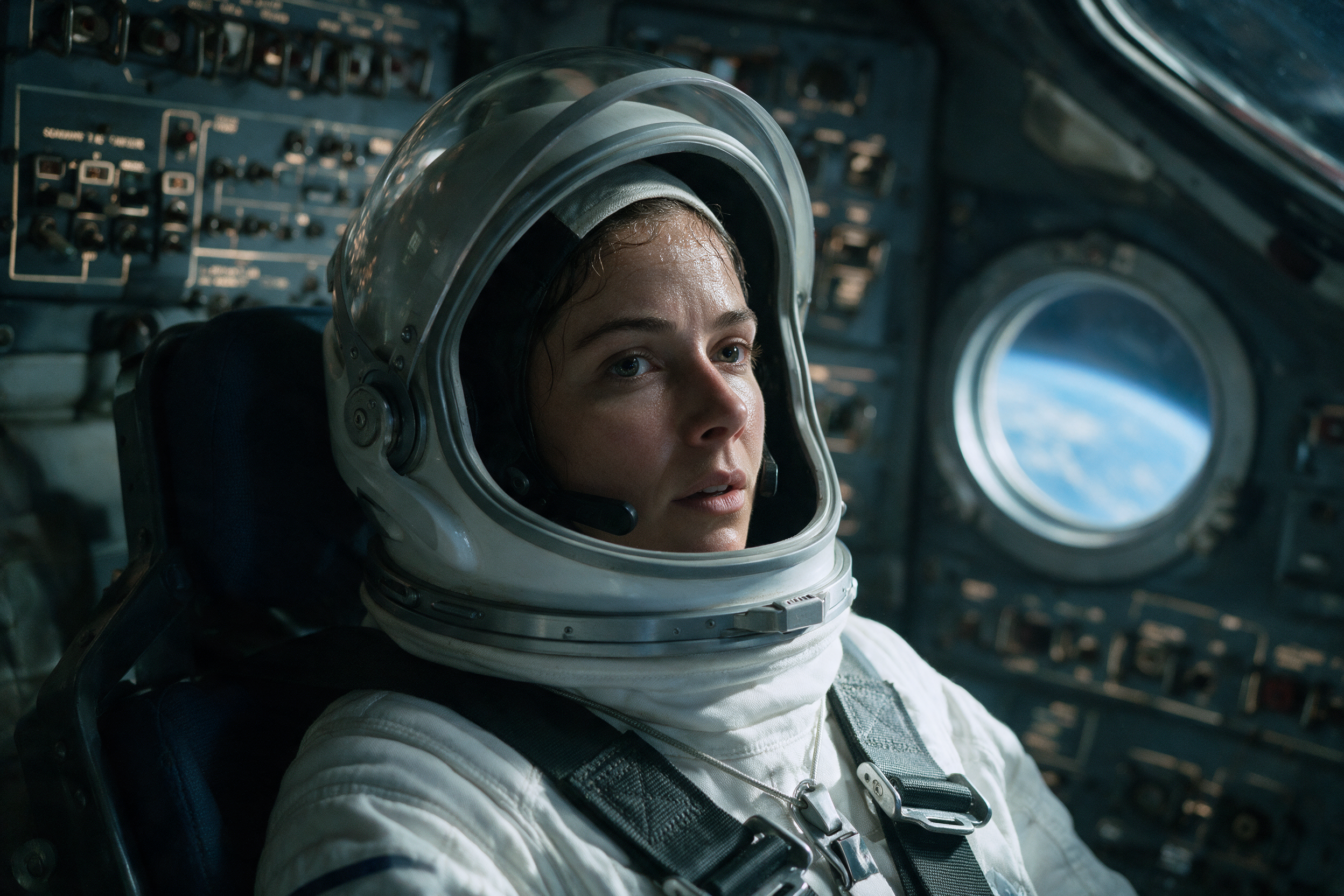
Image generated by Seedream 5.0 on fal, an AI model from ByteDance.
Video prompt: She reaches up to flip a switch above her head, looks into the lens and says, level and quiet: "Tell them we made it to the far side." The capsule starts to shudder and the window behind her fills with orange as re-entry begins, throwing hard moving light across her visor and the panel. Keep her exact face, suit and the switch banks from the still, and push the camera in very slightly across the clip. Her voice close and dry inside the helmet mic, structural groaning under it, hull buffeting and a rising roar building through the last two seconds, no music. No on-screen text, no subtitles.
Generated using FLUX 3 on fal, an AI model from Black Forest Labs.
How do you use first and last frame to video?
first-last-frame-to-video pins both ends and fills the middle.
duration has no auto option here, because the model needs a fixed timeline to place the end frame against.
The 5-second default is short for anything with an arc in it.
Transformations are what this mode is for, and the two stills carry most of the outcome.
Building the two frames
My approach: generate the start frame, then run flux-2-pro/edit on that same file to produce the end frame.
Two independent text-to-image calls give you two subjects that don't quite match, different bone structure and a slightly different room, and the model has to resolve that gap somewhere inside your ten seconds.
Editing one frame into the other removes the problem at source.
Start frame prompt: A cinematic film still of a man in a soaked wool overcoat standing alone at the mouth of a narrow brick alley at night, seen from the front at full height, head lowered, hands braced against the wall, heavy rain falling through the beam of a single sodium streetlamp behind him, wet cobbles throwing back the light, a high-contrast monster-movie grade with deep blacks, 35mm anamorphic, no text.
![Image generated by FLUX.2 [pro] on fal, an AI model from Black Forest Labs.](https://v3b.fal.media/files/b/0aa54357/fCJBUvgrZO8zBmV2Td5mD_A%20cinematic%20film%20still%20of%20a%20man%20in%20a%20soaked%20wool%20overcoat%20standing%20alone%20at%20the%20mouth%20of%20a%20narrow%20brick%20alley%20at%20night.png)
Image generated by FLUX.2 [pro] on fal, an AI model from Black Forest Labs.
End frame prompt, run on the start frame with flux-2-pro/edit: Keep the alley, the wet cobbles, the sodium lamp behind, the rain and the exact camera position. Replace the man with a hulking wolf-like creature filling the same space at the same distance, shoulders far broader, head raised, the shredded remains of the wool overcoat hanging off it, mostly read as a silhouette against the lamp with the rim light picking out wet fur. Same grade, same lens, nothing else in the frame changes.
![Image generated by FLUX.2 [pro] on fal, an AI model from Black Forest Labs.](https://v3b.fal.media/files/b/0aa5435a/aJp84L0GxlzhS6SAyFLcZ_Keep%20the%20alley%2C%20the%20wet%20cobbles%2C%20the%20sodium%20lamp%20behind%2C%20the%20rain%20and%20the%20exact%20camera%20position.png)
Image generated by FLUX.2 [pro] on fal, an AI model from Black Forest Labs.
The video prompt
Prompt, duration: 10: One continuous transformation from the man to the creature, the camera locked to the same position in the alley throughout. His back arches and the shoulders broaden, the overcoat splits along the seams, the silhouette grows into the frame and the head lifts last. Rain keeps falling through the sodium beam the whole way and the wet cobbles hold their reflections. No cuts and no change of angle. Rain on stone and fabric, coat seams tearing, low guttural breathing turning into something else, one long held note underneath, no music. No on-screen text.
Generated using FLUX 3 on fal, an AI model from Black Forest Labs.
➡️ One caveat on that negative instruction.
Our team at fal describes this endpoint as interpolating a smooth transition between the two frames, so it may already behave this way without being told.
Black Forest Labs' guidance points the same way: in their format, a cut is something you mark with HARD CUT, not something that turns up uninvited.
Given the model cuts by default elsewhere, I'd leave the instruction in as cheap insurance.
How do you build a shot with keyframes to video?
keyframes-to-video is the same idea as first and last frame, but with more control points.
You pass up to 10 keyframes, each with an image_url and a frame_index, and FLUX 3 generates the motion between them.
Indices are counted at 24 fps, have to be unique, and can't exceed duration × 24.
An explicit duration is required so the model can validate the positions you gave it.
Placing the indices
A 10-second clip gives you 240 frames to work with. Frame 0 opens, frame 96 lands at 4 seconds, frame 216 lands at 9 seconds.
The gap at the end is deliberate.
Frame 240 is the ceiling at ten seconds, so a keyframe parked there leaves nothing after your final composition and breaks the call outright if you ever shorten the duration.
Backing off to 216 costs nothing and buys a second of runway.
The three keyframes (first image is generated from scratch, and the next 2 are edits)
Frame 0: A cinematic still of two bare hands in the cuffs of a black dinner jacket resting on the brass dial of a bank vault door, shot tight from just behind the shoulder, the chamber in near darkness with a single work lamp on the floor throwing light up across the steel, high-contrast heist film still, no text.
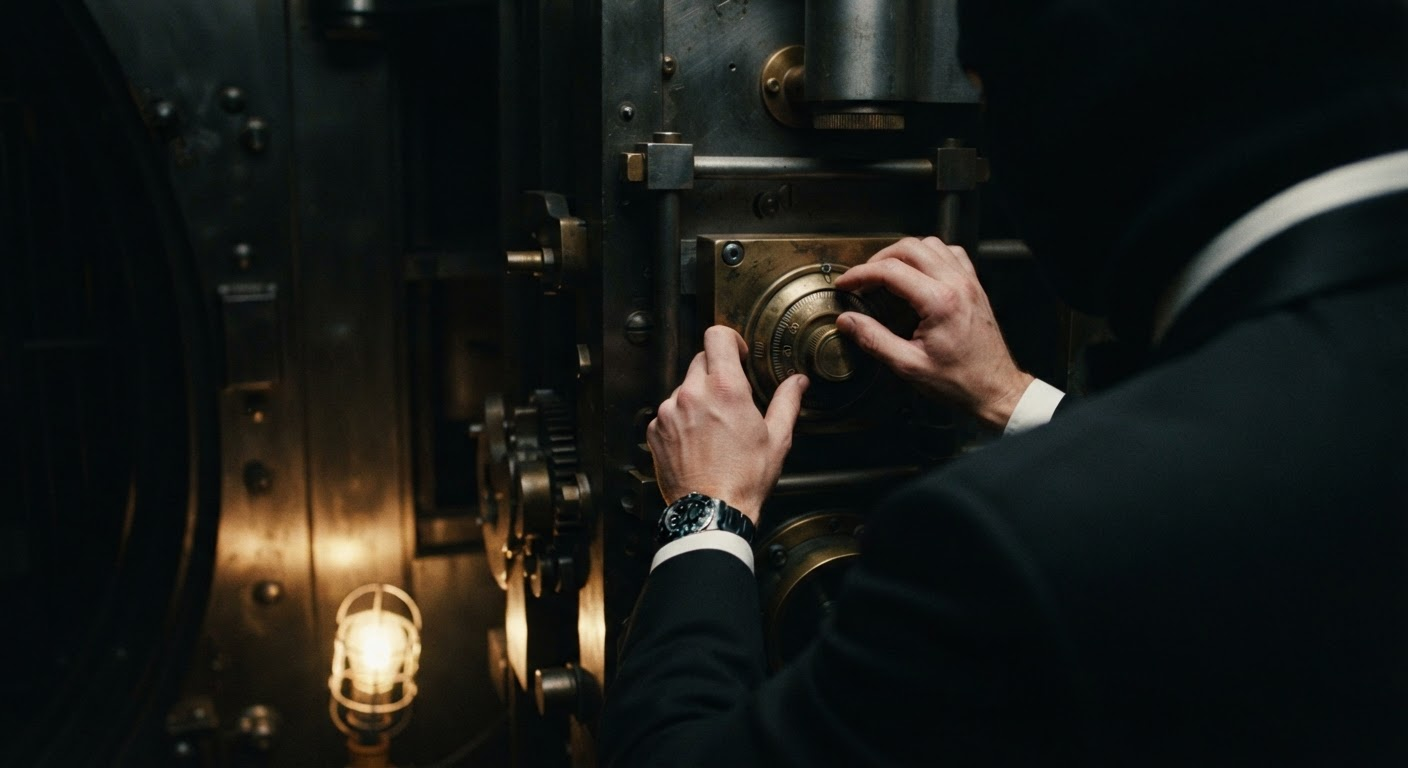
Image generated by Nano Banana 2 Lite on fal, an AI model from Google.
Frame 96: The same vault door in the same chamber under the same low work lamp, now swung a third of the way open, a hard wedge of warm light spilling out from inside across the dark floor, the same hands still on the edge of the door, dust hanging in the beam.
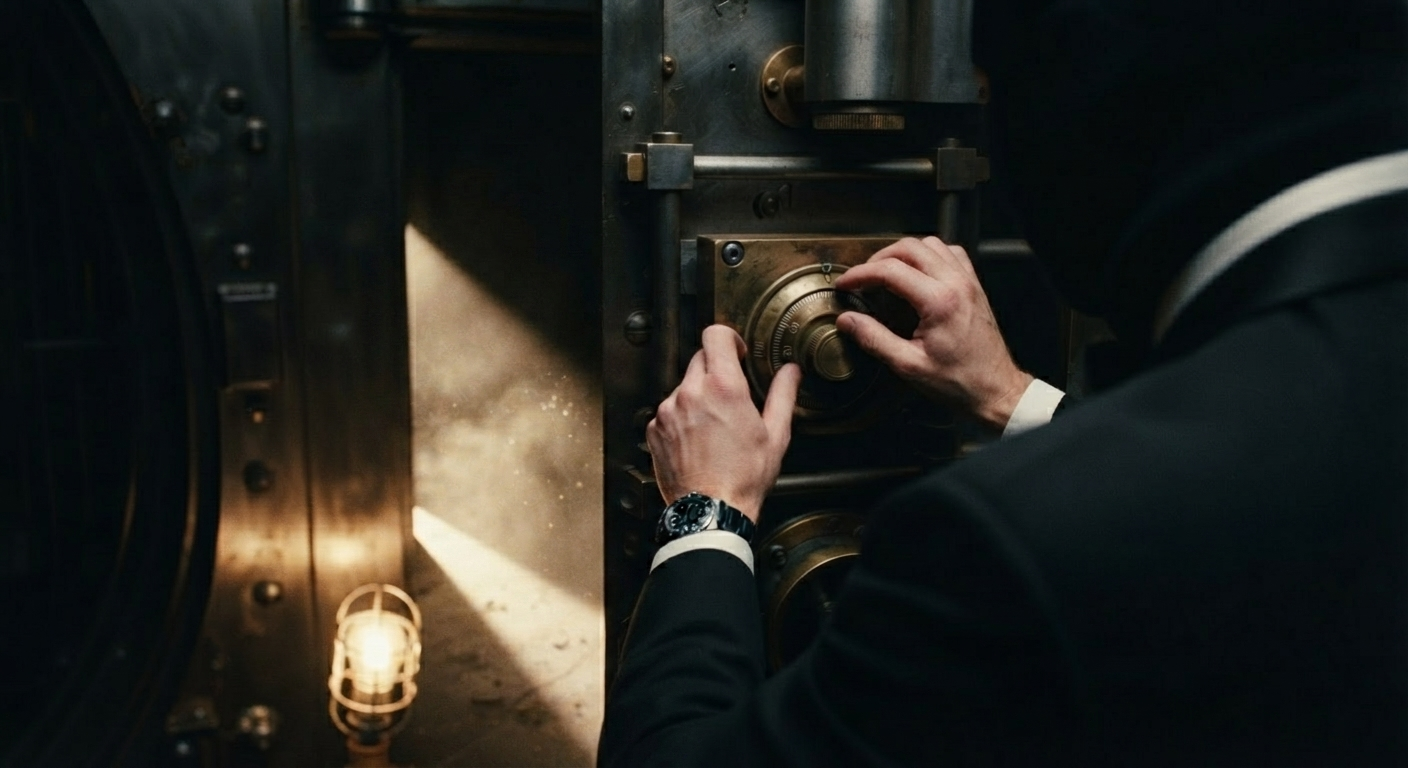
Image generated by Nano Banana 2 Lite Edit on fal, an AI model from Google.
Frame 216: The same chamber with the vault door fully open, a figure in the black dinner jacket standing in the doorway in full silhouette against the light from inside, shot wide and low from the floor, dust and the work lamp still in frame.
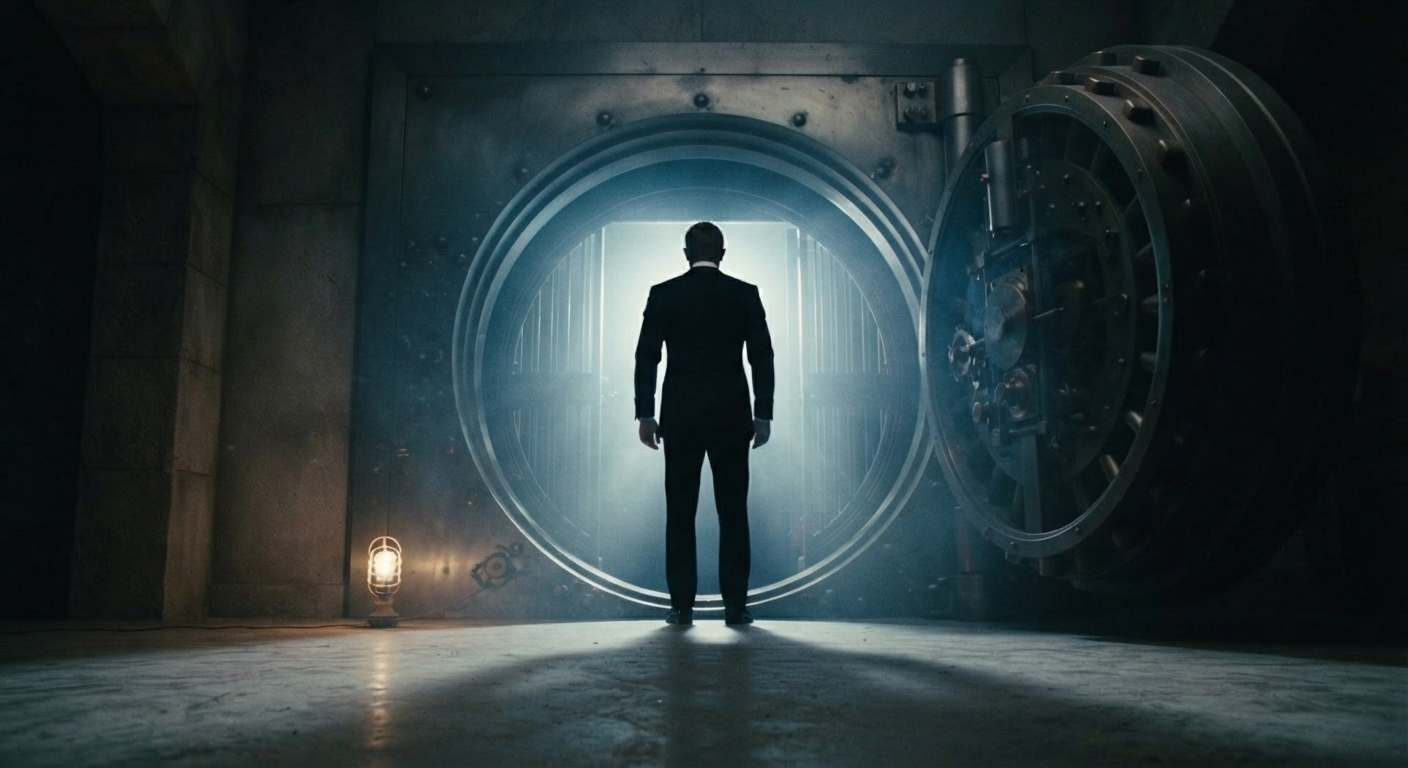
Image generated by Nano Banana 2 Lite Edit on fal, an AI model from Google.
Video prompt, duration: 10, aspect_ratio: 21:9: The final beat of a heist picture. The hands work the dial until the lock gives, the door swings out under its own weight and light floods across the chamber floor, and the figure steps into the doorway and stops there in silhouette. Locked-off low angle, one continuous move, high contrast with deep blacks. The dial clicking, the bolts drawing back, a heavy hinge, one long breath at the end, no music.
Generated using FLUX 3 on fal, an AI model from Black Forest Labs.
The two modes answer different questions.
With two frames, you specify an outcome and leave the route open.
A three-keyframe array specifies every composition and hands the model nothing but the movement in between, which is closer to how a storyboard works than how a prompt does.
💡 A note on the text side of consistency.
If a shot has to hold a face across a cut, Black Forest Labs' schema repeats the subject description word for word in every shot block.
The same discipline applies here: the phrase "black dinner jacket" appears in all three keyframe prompts on purpose, and changing it between frames is how you get two different people.
How does the FLUX 3 draft workflow work?
Every core mode has a draft twin, and this is the part of FLUX 3 that changed how I work.
The draft pass
A draft endpoint returns a fast 720p preview plus a draft_cache file.
draft-enhance takes that cache and re-renders at full quality on the same seed and the same motion, with no re-planning.
The enhance schema makes the constraint obvious.
It accepts a cache URL and a safety tolerance, and nothing else. No prompt field.
So the draft is where every creative decision gets fixed. It isn't a preview of the render. It's the render, at lower quality.
On the four standard modes, that narrows the draft down to prompts that might not land: multi-angle clips, or anything with a physical event sitting in the middle of one.
Extend is the exception, on commercial grounds.
The rates there make drafting every extension the cheaper route, which the pricing section works through.
Worth adding that Black Forest Labs treats iteration as the normal case, not a sign you wrote a bad prompt: their own worked example goes from "a video of a eagle" to a full cinematic description over four passes.
The draft endpoints are what make that loop affordable at 1080p.
Draft prompt: A wingsuit flight through a canyon at dawn, cut like a sports documentary. It opens on the exit, a flier stepping off a granite ledge into open air with the valley still in shadow below, then drops into a low pass following the river with canyon walls sliding past close enough to read the rock, and ends looking up as the canopy cracks open and the flier swings out over a bend in the water in full sunlight. Chest-mounted camera for the pass, long lens from the opposite wall for the exit. Wind roar over the mic, the snap of the canopy, one held breath at the exit, no music.
Generated using FLUX 3 Draft on fal, an AI model from Black Forest Labs.
The enhance pass
The draft response comes back with two files: the 720p preview you just watched, and a draft_cache.
Take the URL off that cache, hand it to draft-enhance as draft_cache_url, and that's the entire call.
There's no duration, no resolution and no aspect ratio to restate, because all of it is already sitting in the cache.
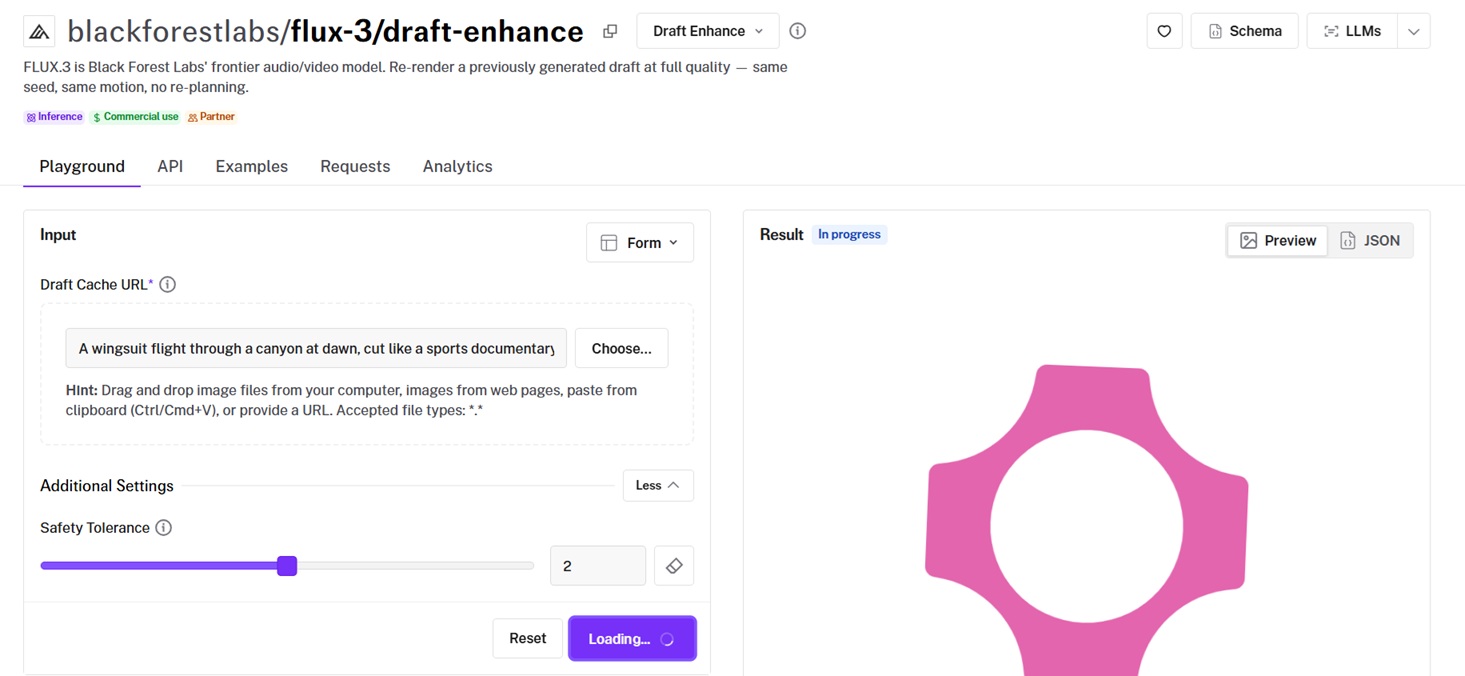
What comes back is the video and nothing else.
The core endpoints return a seed alongside the clip; enhance doesn't, since it's reusing the draft's.
The useful part is that the cache is durable, so the two halves don't have to happen in one sitting.
You can draft five versions of a shot on Monday, circulate the previews, and enhance the one that won on Wednesday without re-rendering anything.
You can file the cache URL next to each preview while you're doing it.
Five drafts of the same prompt look nearly identical in a folder, and the cache URL is the only thing that tells you which preview belongs to which render.
How much does FLUX 3 cost on fal?
Every endpoint bills per second of generated video.
None of the eleven lists an audio surcharge, and Draft Enhance states outright that synchronized audio is included.
| Endpoint | 720p | 1080p |
|---|---|---|
| Text-to-video, image-to-video, first-last-frame, keyframes | $0.17/s | $0.29/s |
| Extend-video | $0.41/s | $0.53/s |
| Draft: text, image, first-last-frame, keyframes | $0.06/s | — |
| Draft: extend-video | $0.12/s | — |
| Draft Enhance | — | $0.29/s |
Recently Added









Start creating with FLUX 3 on fal
Eleven endpoints, one API key, billed by the second with no subscription attached.
You can sketch a sequence from text, animate a still, pin both ends of a transformation, storyboard a shot with keyframes, or continue footage you already have, all from the same integration.
A fal account is free to create, and the playground will run any of these in the browser before you write a line of code.
FLUX 3 FAQs
Can I use FLUX 3 clips in commercial work?
Yes. Content generated through fal can be used in commercial projects, so a clip can go into a paid campaign or a client deliverable.
Usage rights and any model-specific conditions are set out in fal's terms of service.
How long can a FLUX 3 clip be?
Any whole number of seconds from 5 to 20 in a single generation, at 24 fps.
Text-to-video, image-to-video and extend-video also accept auto, which hands the length decision to the model.
First-last-frame and keyframes need an explicit duration, since the model uses it to place your images on the timeline.
What resolutions does FLUX 3 support?
720p and 1080p, with 720p as the default. Black Forest Labs released the model at both.
The draft endpoints return 720p only, and Draft Enhance renders at full-quality 1080p.
Does FLUX 3 generate audio?
Yes, in the same pass as the picture, with no separate charge.
generate_audio defaults to true on every generation endpoint, and the model produces dialogue, effects and ambience alongside the frames.
Scenes built on physical action give the audio pass more to work from than abstract ones, so footsteps, impacts, weather and engines tend to come back stronger than atmosphere alone.
How do you write a timestep prompt for FLUX 3?
Split the runtime into ranges like 0.0–1.5s, give each range one beat, and write HARD CUT on its own wherever the angle changes.
Why should you use fal to run FLUX 3?
fal gives you all eleven FLUX 3 endpoints behind one client, with queueing and webhooks handled, no GPUs to manage, and no subscription.
The same integration reaches the over 1,000 other models on fal, outputs are cleared for commercial work, and the playground lets you test a shot in the browser before using the API.
How do you use FLUX 3 on fal?
There are more ways in than the two this guide uses.
The playground runs any endpoint in the browser with no code, and the @fal-ai/client SDK carries the same calls into production with queueing and webhooks.
Past those, fal's Sandbox and Workflows cover experimentation and multi-model pipelines, and the MCP server and CLI bring the endpoints into agents and terminals.
![How To Use Ideogram V4: Prompts & Workflows [2026]](https://refinery.fal.media/url/https%3A%2F%2Fv3b.fal.media%2Ffiles%2Fb%2F0aa265fa%2FcWzF9yv1t94j1xFln_W_p.jpg/tr:w-1280,q-80/cWzF9yv1t94j1xFln_W_p.webp)