![How To Use Reve 2.1: Prompts & Workflows [2026]](https://refinery.fal.media/url/https%3A%2F%2Fv3b.fal.media%2Ffiles%2Fb%2F0aa30d29%2Fu_6F-C3_TrrNWDHjrPiNz.jpg/tr:w-1920,q-80/u_6F-C3_TrrNWDHjrPiNz.webp)
In this guide, I'll go over how you can effectively use Reve 2.1, including how it plans a layout before rendering, how it handles in-image text and foreign scripts, what native 4K changes, and six prompts plus an edit and a remix for the playground or the API.
TL;DR
Reve 2.1 is Reve's native 4K image model on fal, and it plans a layout first, reasoning about structure, hierarchy, and spatial relationships before rendering into that plan, which keeps crowded compositions legible.
Output is native 4K, a true 16 megapixels, so small type and fine detail survive a zoom, with no separate upscaler in the loop.
Text is the strongest part: Reve sets words as real layout elements and keeps them readable inside a busy frame, with multilingual rendering that now extends to foreign scripts.
Two more endpoints extend it: reve/2.1/edit changes one element of a single image from a text instruction, and reve/2.1/remix combines up to eight references into one new frame.
You can access Reve 2.1 and its 3 endpoints on fal, with a cost of $0.25 per image; commercial use included.
Where can you access Reve 2.1?
The best place to access Reve 2.1 is on fal across three endpoints: reve/2.1/text-to-image to generate images, reve/2.1/edit to change a single image, and reve/2.1/remix to combine references.
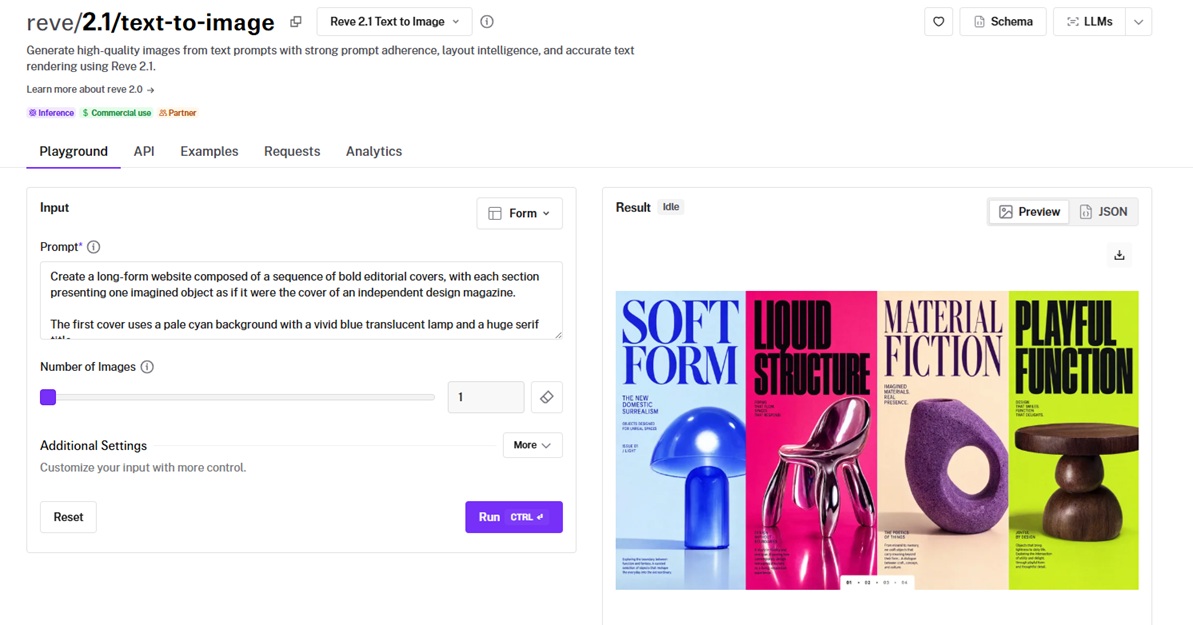
On fal, there's no subscription or minimum that you have to worry about, as you'll be only charged per generated image, with no other fees.
The @fal-ai/client library works with every model on fal, including video, audio, virtual try-on, and music models, so this call has the same shape for any endpoint.
Authentication and the queue are handled for you.
A generation call looks like this:
javascript
import { fal } from "@fal-ai/client";

const result = await fal.subscribe("reve/2.1/text-to-image", {
  input: {
    prompt:
      "A towering stack of golden fluffy pancakes drizzled with amber honey syrup, topped with fresh blackberries and sliced bananas, served on a white ceramic plate on a rustic wooden table with a soft blue-gray background.",
  },
  logs: true,
  onQueueUpdate: (update) => {
    if (update.status === "IN_PROGRESS") {
      update.logs.map((log) => log.message).forEach(console.log);
    }
  },
});

console.log(result.data);
console.log(result.requestId);
How should you brief Reve 2.1?
Reve plans the composition before rendering, so it works best with a brief that specifies the scene, not just a loose description.
There are two ways to write to it:
The first is a photograph: you want to state the subject, the camera position, the lighting, and the mood, and Reve resolves the rest.
Let's see what that looks like:
Prompt: A cinematic wide film still of a weathered trawler captain gripping the wheel in the pilothouse of a small fishing boat, caught at the instant a wave breaks over the bow on a black night at sea. Framed slightly off-center through the salt-crusted windscreen, sea spray streaking sideways across the glass, the red and amber glow of the instrument panel raking up across his lined face and grey stubble while cold blue lightning flickers through the side window behind him. He wears a soaked yellow oilskin, water running off the brim of his hood, knuckles pale on the spokes. Shot on a 32mm anamorphic lens at f2, a shallow plane holding his eyes and the compass while the stern falls into black, deep rich shadow, a faint horizontal flare lifting off the panel lights. Fine 35mm grain, the held-breath tension of a boat riding up the face of a swell. No text in the frame. Aspect ratio 21:9.
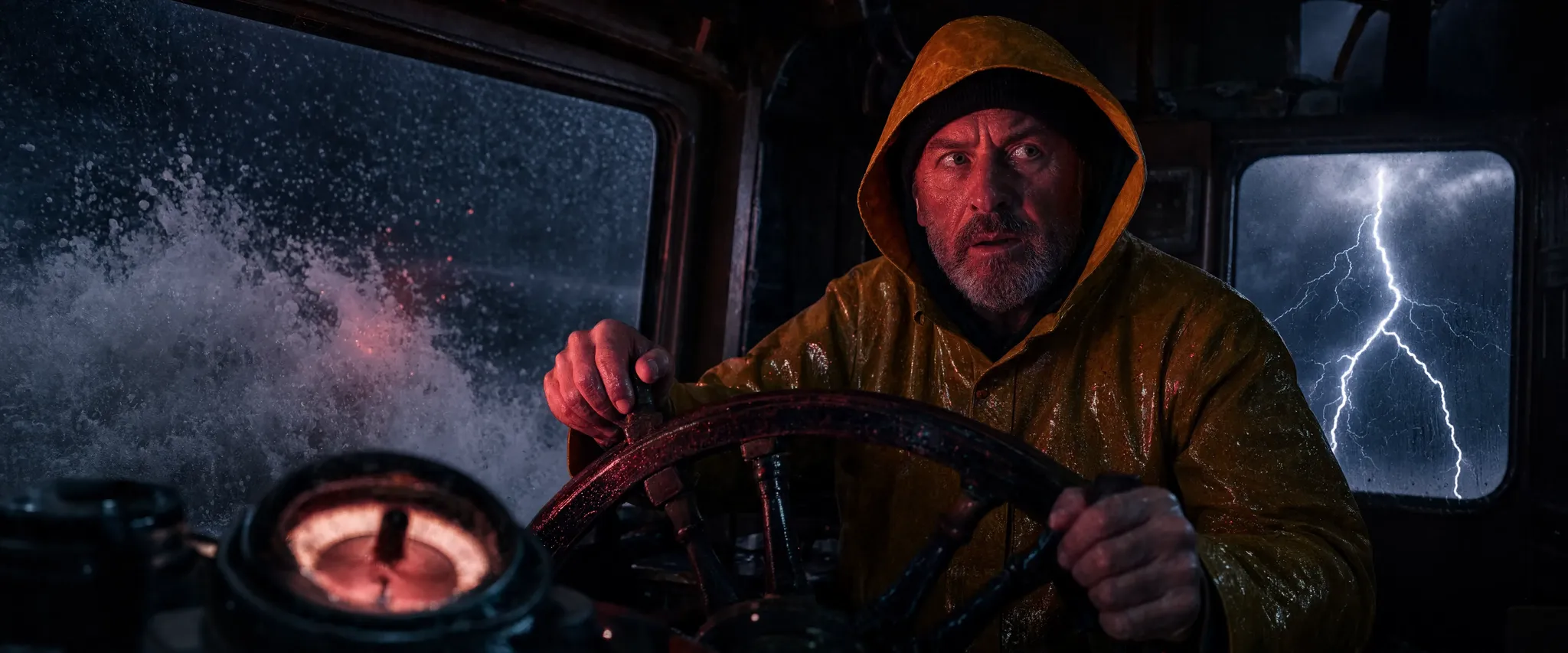
Generated using Reve 2.1 on fal, an AI model from Reve.
The second is something built from parts, like a screen, a page, or a diagram.
For those, you want to specify the structure: name the regions, say what goes in each, put every piece of copy in double quotes, and note its placement.
Prompt: A desktop web app for a regional coastal railway, dark premium interface rendered like a shipped product. A narrow left rail of thin monochrome icons, then a top bar reading "COASTLINE RAIL" beside a live clock "21:47" and a search field labeled "Find a service". The main column is a live departures board titled "Departures, Central Quay" with seven rows, each showing a time, a destination, a platform, and a status: "21:52 Harborford, Plat 3, On time", "22:04 Saltmere, Plat 1, Boarding", "22:15 Kestrel Bay, Plat 4, Delayed 6m", and four more realistic rows in the same format. To the right, a rounded panel titled "Live route map" shows a simplified coastal line with labeled stops and a moving train dot. Below it, three fare cards read "Single £4.20", "Day pass £9.60", and "Coastal saver £24", each with a small "Buy" button. A wide status banner across the top reads "ALL LINES ON TIME" in calm green. Crisp small sans-serif type, one teal accent on charcoal panels, thin dividers, soft depth. Aspect ratio 16:9.
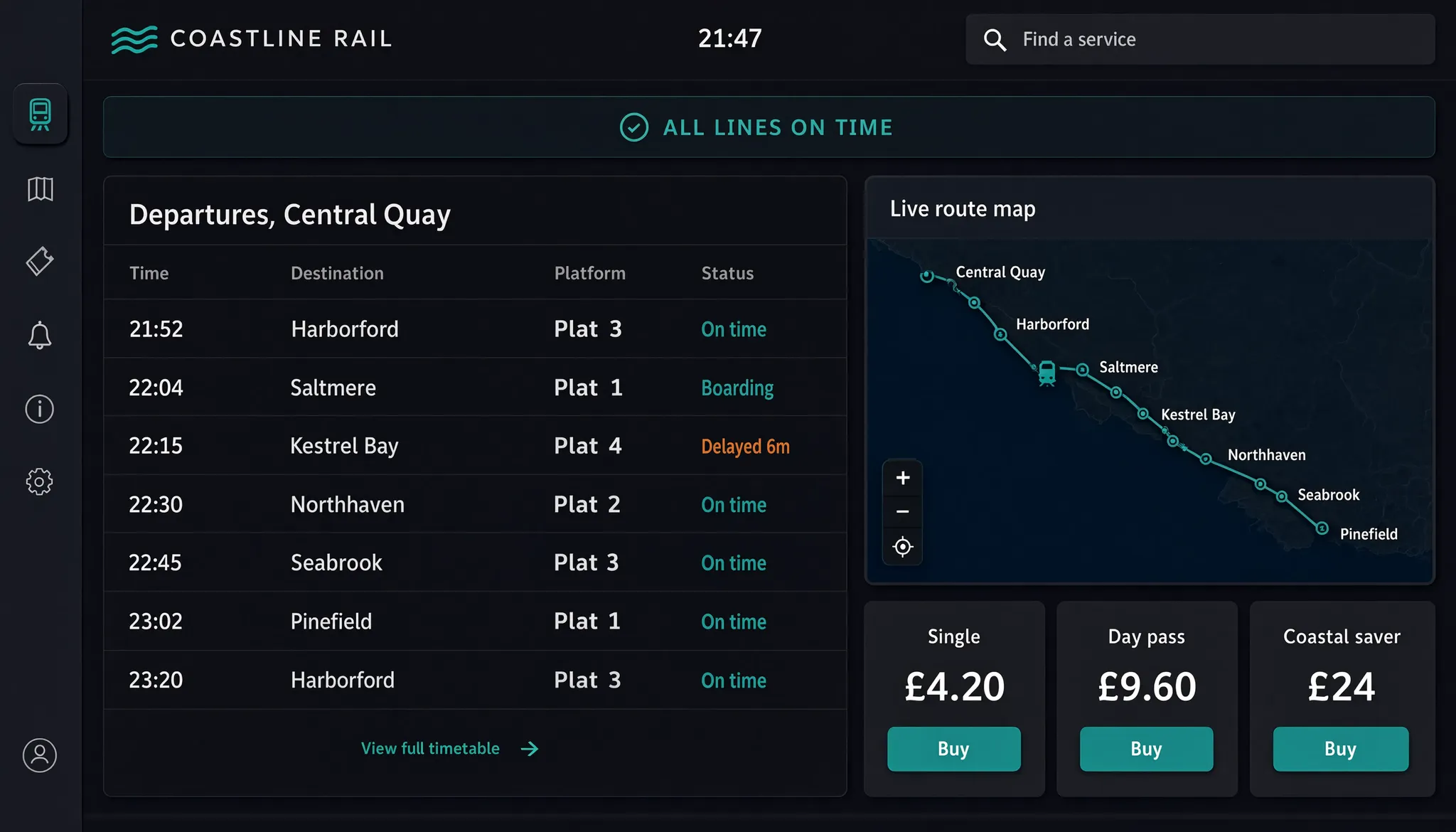
Generated using Reve 2.1 on fal, an AI model from Reve.
Reve resolves the arrangement and tracks more elements than a description-only prompt can.
Columns stay aligned, and the row text stays readable, which is usually the hardest part to get right in image generation.
How far does Reve 2.1's text rendering go?
Reve treats text as a layout element, not pixels painted in at the end.
As a word is an object in the layout, type stays legible even when the frame is crowded.
To place text, you want to put the exact words in double quotes and state where each goes.
Text support extends beyond English to foreign scripts, so a single layout can carry non-English copy and accented characters.
Native 4K is what keeps that readable: at a full 16 megapixels, a label that would smear at 1K stays crisp.
Dense blocks of small body copy are the most likely to need a proofread at full zoom.
Here's a text-heavy example:
Prompt: A high-resolution educational infographic in portrait orientation on a warm off-white background, titled "ANATOMY OF A MECHANICAL WATCH" across the top in a fine engraved serif, with a smaller Japanese subtitle beneath reading "機械式時計の構造". The center holds a large, precisely drawn exploded diagram of a wristwatch movement, its parts floating apart in clean vertical order: the mainplate, the mainspring barrel, the gear train, the balance wheel, the escapement, and the dial. Thin leader lines connect each part to a bilingual label pairing English with the French horology term: "Balance wheel, balancier", "Escapement, échappement", "Mainspring, ressort moteur", "Jewel bearing, rubis". A slim panel down the left edge lists three specs as small caps: "Frequency, 28,800 vph", "Jewels, 25", "Power reserve, 70h". A compact legend in the lower right maps a gold dot to "keeps time" and a steel dot to "transmits power". Consistent margins, hairline rules between sections, every label and number spelled exactly as written, crisp legible type at every size. Aspect ratio 3:4.
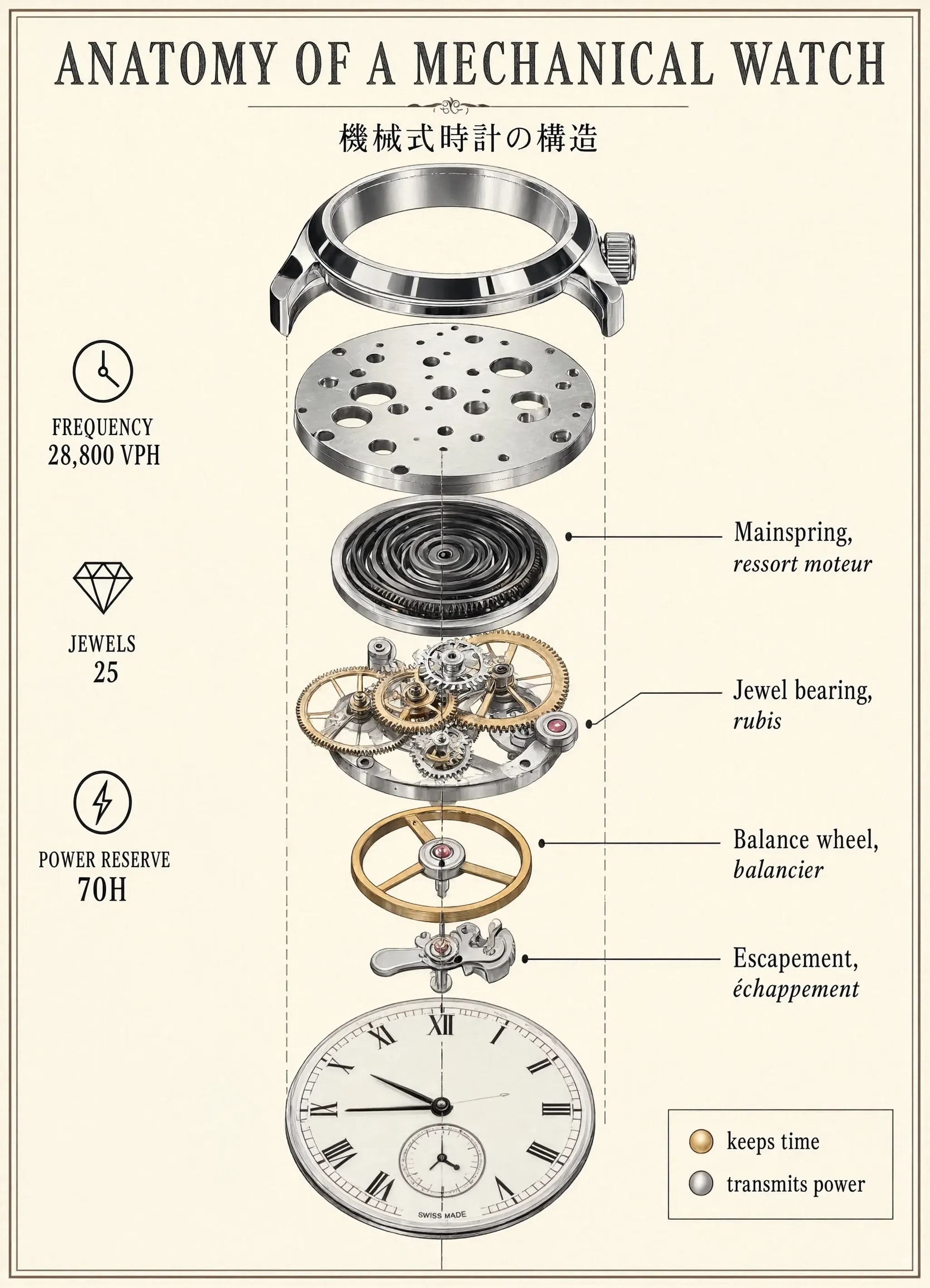
Generated using Reve 2.1 on fal, an AI model from Reve.
falMODEL APIs
The fastest, cheapest and most reliable way to run genAI models. 1 API, 100s of models
How much detail does a Reve 2.1 prompt need?
Every choice you skip, Reve makes for you, and an unguided choice trends toward the median.
If you skip the palette, it will most likely return something generic.
So the details worth specifying are structural: the grid and the placement, before any styling.
You want to give it the arrangement and the on-frame copy directly, and it builds to that:
Prompt: A premium advertising hero of a single faceted glass perfume bottle standing on a rough-cut travertine plinth, centered against a deep graphite studio background. The bottle is filled with pale amber liquid, its heavy glass shoulders catching a hard rim light from the upper right that throws a crisp caustic pattern onto the stone, while a soft warm fill from the lower left reveals the frosted texture of the cap. A fine mist of water clings to the glass, a few droplets frozen mid-slide. On the bottle's front face, an embossed wordmark reads "MÉRIDIEN" in a thin high-contrast serif, with a smaller line beneath reading "Eau de Parfum, 50ml". In the lower-left third, clean small caps read "NOTES OF FIG, CEDAR, SEA SALT", leaving open space along the top for a campaign line. Studio product photography, 100mm macro at f8, tack-sharp on the embossing and the caustics, deep controlled shadow, a cool graphite grade warmed only by the liquid. Aspect ratio 4:5.
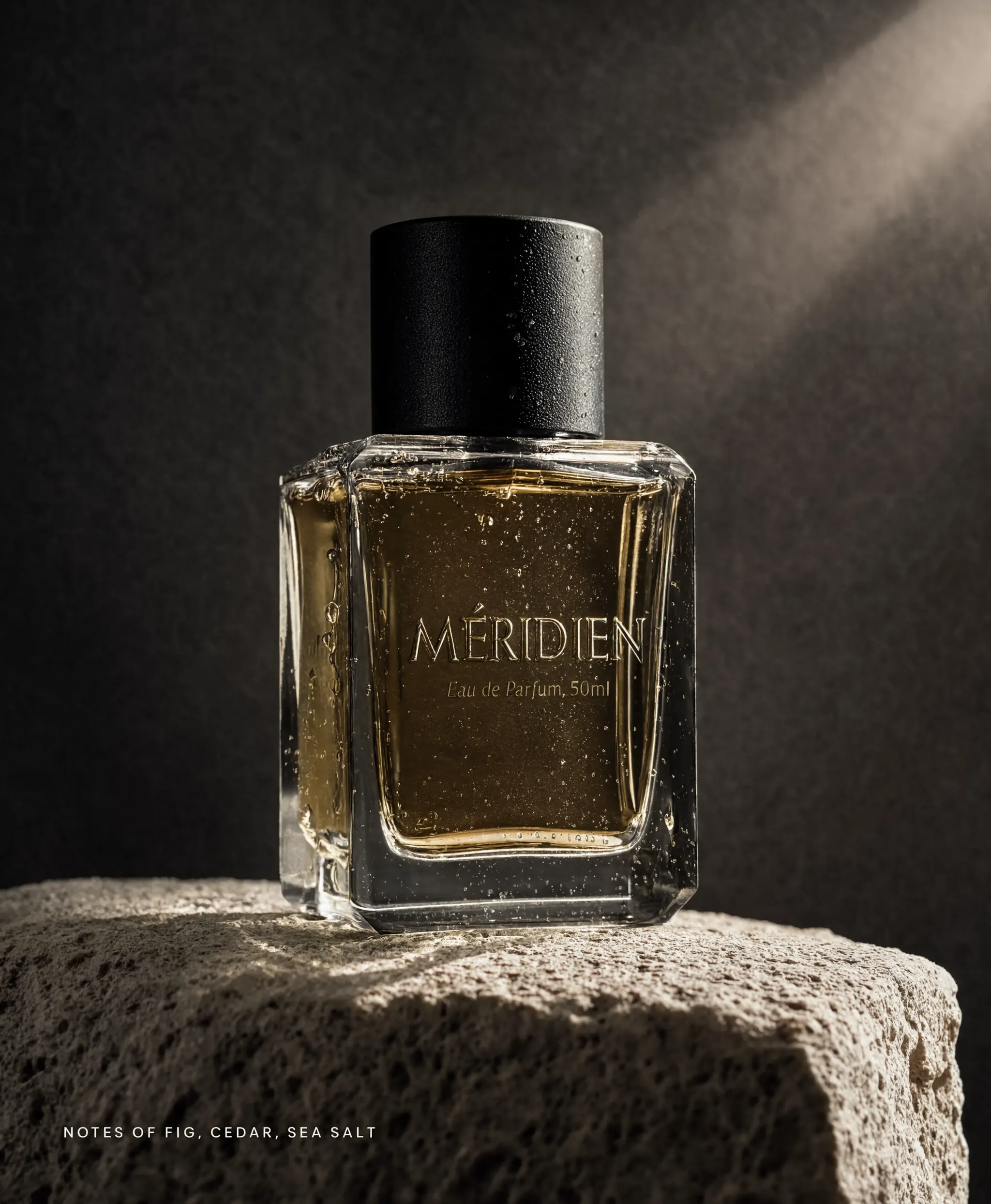
Generated using Reve 2.1 on fal, an AI model from Reve.
💡 One caveat on dense prompts: If a frame is overloaded, some requested elements can drop out.
When the same element keeps disappearing across runs, the prompt is doing too much, so split it into two passes and recombine them in the editor.
How do you stop Reve 2.1 output looking obviously AI?
Output tends to be obviously AI-generated when the creative choices were left to defaults, not because of obvious glitches like distorted hands.
Overriding those defaults in a few areas fixes most of it.
Lighting has the biggest effect, and Reve responds to a described source, so specify where the light comes from, how hard it is, its color, and its direction.
"Well lit" produces a flat, even wash, while a specified setup like a warm key with a cool edge light looks deliberate.
Materials are next, since texture is where the model puts its detail.
You want to name the material: the nap of felt, the bloom on old wax, the grain in brushed brass, the subsurface glow in skin.
A generic "detailed" does little.
Composition is third: by default Reve centers the subject under even light.
To avoid that, place the subject off-center, capture motion, or let a foreground element cross the frame.
Finally, add atmosphere: haze, a volumetric light shaft, a shallow focus falloff, or a rim light on the subject.
Together, those choices turn a static product shot into a campaign image:
Prompt: A high-energy e-commerce hero shot of a single performance running shoe frozen mid-stride as it kicks up a spray of water and fine track grit, shot low and slightly off-center against a deep charcoal studio background lit like a sports campaign. The shoe is a bold electric-orange and black racing sneaker with a woven knit upper, a sculpted white foam midsole, an exposed carbon plate, and a lugged rubber outsole, tilted hard as if pushing off the ground. A cold blue rim light rakes from behind and catches the flying droplets and dust, while a warm key from the lower left picks out the weave of the knit and the sheen of the foam. Sharp frozen water beads and a faint motion streak sell the speed, backlit haze softening the far background. On the wall behind, a heavy condensed sans wordmark reads "VELOCE", with a smaller line beneath reading "OUTRUN THE CLOCK". Studio product photography, 85mm at f4, tack-sharp on the shoe and the flying spray, dramatic controlled shadow, a punchy high-contrast grade. Aspect ratio 16:9.
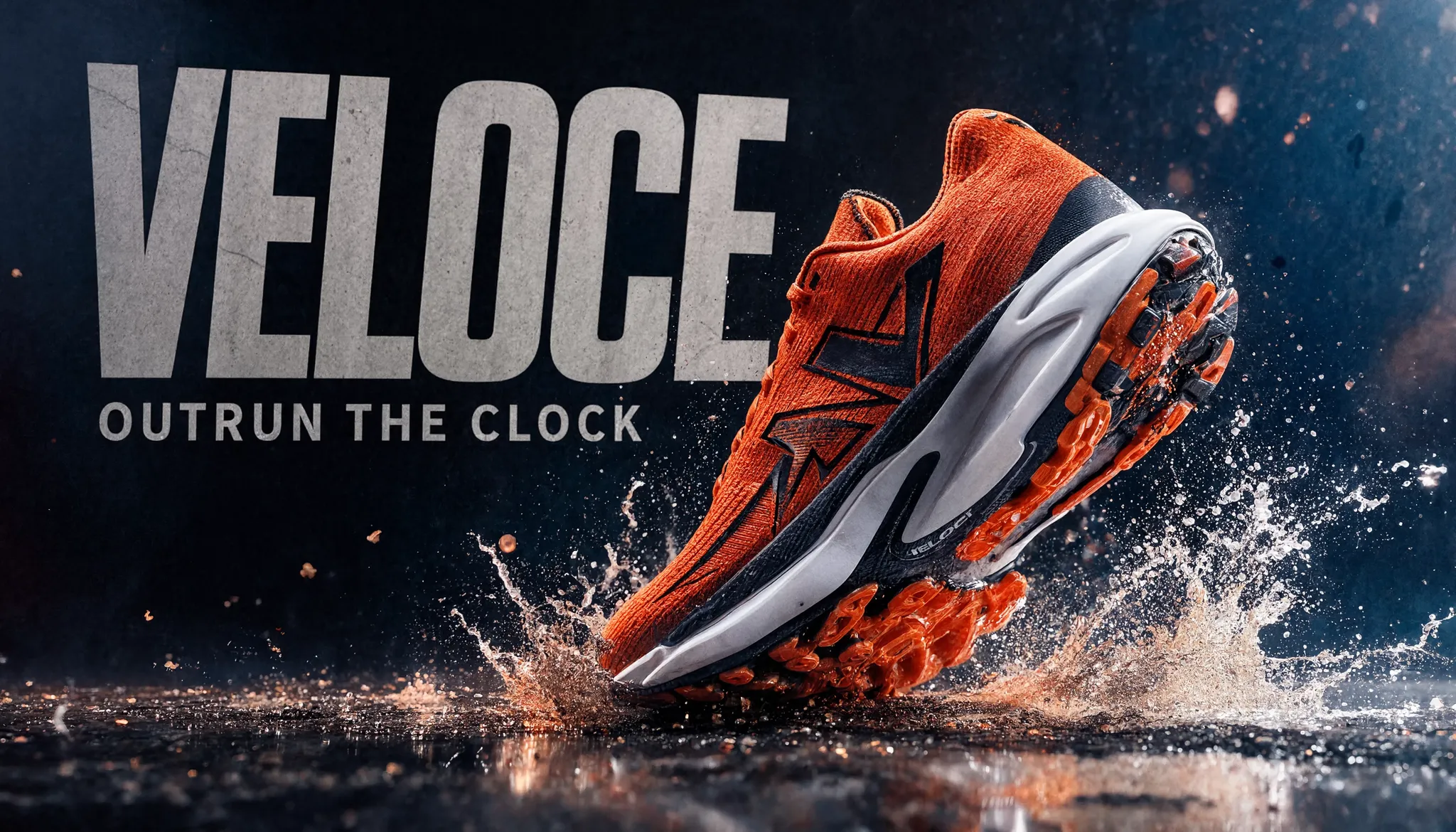
Generated using Reve 2.1 on fal, an AI model from Reve.
How does Reve 2.1 hold a busy, imagined scene together?
The same layout planning that keeps a chart organized also holds a crowded, unusual scene together.
As Reve blocks out regions before rendering, many unlikely elements can share one frame and still compose cleanly.
A surreal example:
Prompt: A wide cinematic photograph of an impossible design museum at golden hour, a cavernous marble hall with a vaulted glass roof, shot on a 24mm lens with two-point perspective. Shafts of warm afternoon light fall through the glass and pool in a thin sheet of still water covering the polished floor, so every object is mirrored beneath it. Oversized everyday things are displayed as if they were sculpture: a house-height brushed-brass desk lamp arching over the center, a marble staircase that curls back into its own underside, a row of velvet armchairs growing out of the floor like mushrooms, a chandelier assembled from floating water droplets. A single small human figure in a grey coat stands far down the hall for scale, dwarfed by the objects. Discreet museum placards on slim stands carry short legible labels: "OBJECT NO. 14, ASCENT", "THE LISTENING CHAIR", "DROPLET FIXTURE, 2031". Realistic materials, bright natural light, crisp reflections, subtle surrealism kept quiet enough to feel real. Aspect ratio 2:1.
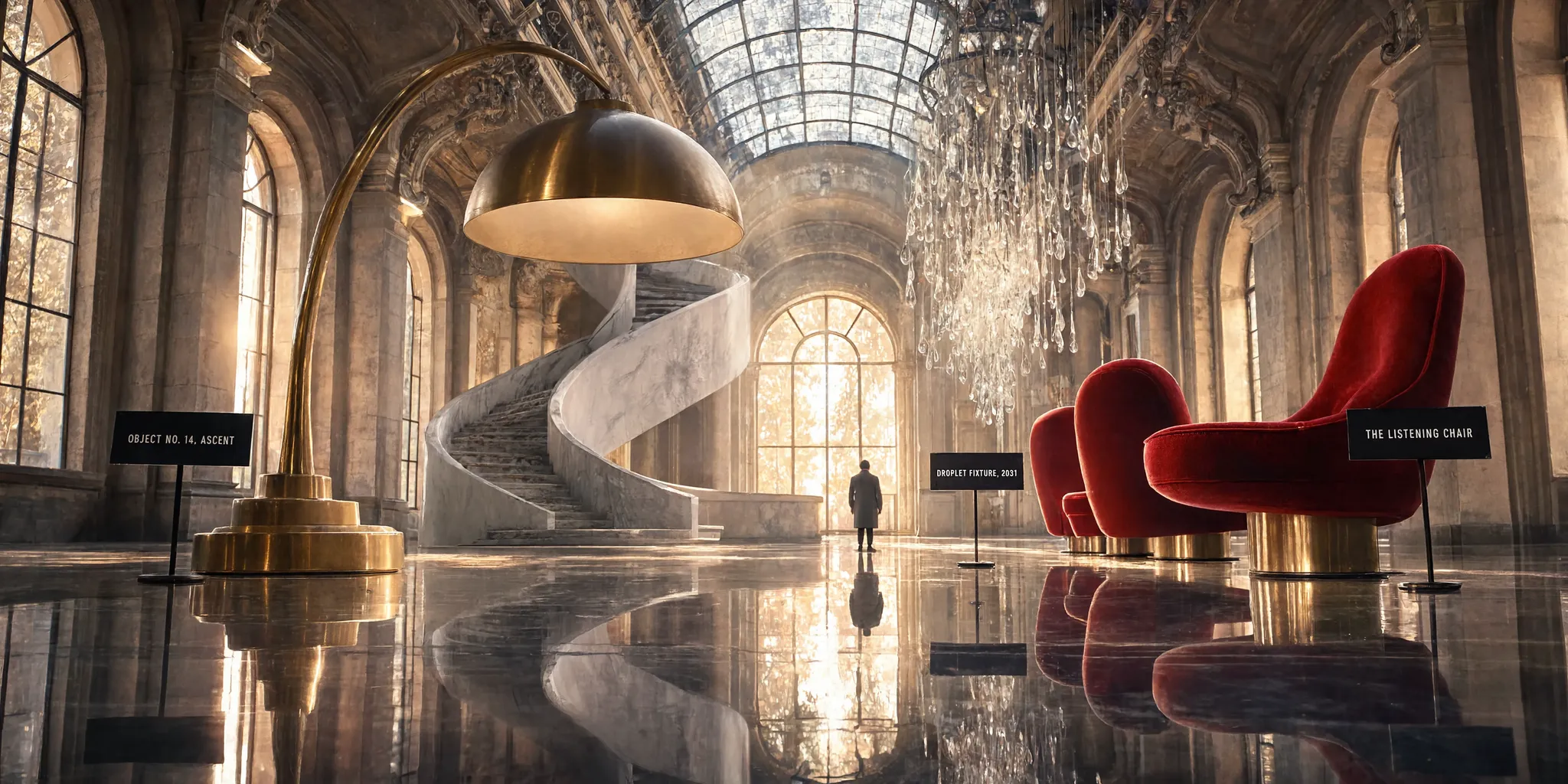
Generated using Reve 2.1 on fal, an AI model from Reve.
How does the Reve 2.1 editor work?
I believe that the editor is one of the main reasons to use Reve, so it is worth covering in detail.
Reve 2.1 Edit works from a single image: you load the picture you want to change, then describe the change in ordinary words.
Unlike generating from scratch, editing preserves the layout, since Reve tracks what each region is.
So it can change one region and leave the rest unchanged.
For clean results, state exactly what changes and that everything else stays the same.
Reusing the departures app from earlier, this edit changes one panel only:
Prompt: Change only the status banner at the top from "ALL LINES ON TIME" in green to "COASTAL LINE DELAYED 12 MIN" in amber, and update the "22:15 Kestrel Bay" row status from "Delayed 6m" to "Delayed 18m". Keep every other row, the live route map, the fare cards, the left rail, the clock, and the exact layout the same.
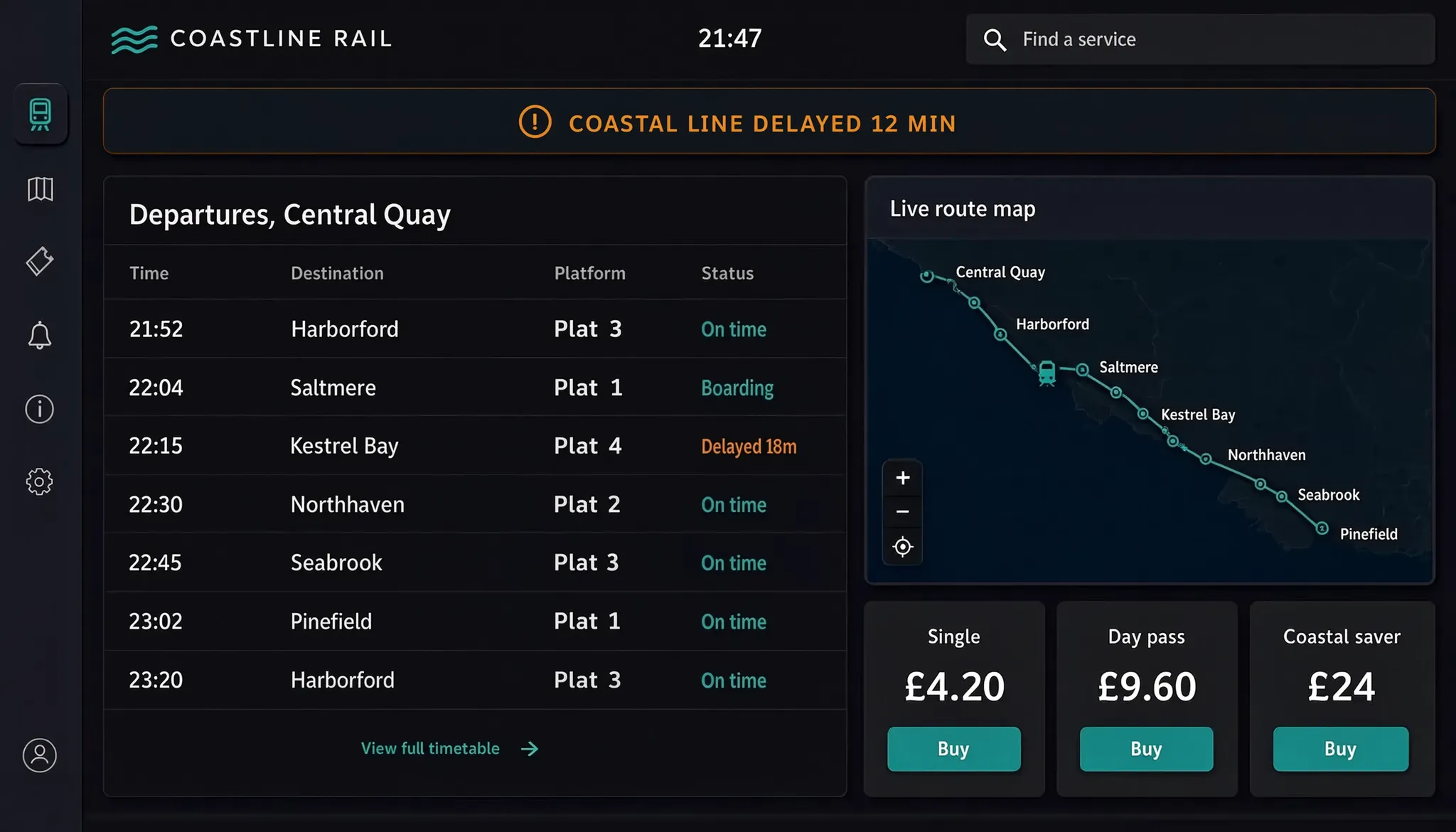
Generated using Reve 2.1 on fal, an AI model from Reve.
The same call also promotes a sketch to a finished screen.
Supply a rough wireframe and ask for the built version in the same visual identity, and it renders the finished design.
How does Reve 2.1 remix multiple images?
Remix builds one new image out of several reference images you provide.
You load up to eight references, and in your prompt you point at any of them with <frame>N</frame>, counting from zero, so the first image you load is <frame>0</frame>, the second is <frame>1</frame>, and so on.
You want to give it separate plates, like a product, a setting, and a logo, and it composites them into one frame, matching perspective and lighting.
It also reads boxes you draw on a reference: you can mark a colored rectangle on an image, point the prompt at that box, and Reve places an object or sets text where you marked, which pins position more precisely than describing it in words.
Here is the full workflow for a headphones key visual.
First, make the three plates (any model works, Nano Banana 2 Lite is a fast option):
A pair of matte-black over-ear headphones, unbranded, shot straight on and centered on a pure white background. No logo and no text on the headphones. Soft even studio light, a faint soft shadow beneath, sharp focus, the full product visible with clean margins on all sides.
A minimalist concrete gallery interior with a single empty light-grey plinth in the center, shot at eye level. Smooth grey concrete walls and a polished concrete floor, soft daylight falling from a large window on the left, calm neutral shadows. The plinth is bare, nothing resting on it, and there is no text anywhere. Clean architectural photography, realistic materials, plenty of empty wall space above and behind the plinth.
A wordmark logo reading "TONAL" in a clean geometric sans-serif, matte white, centered on a solid black background. Flat 2D logo with no effects or shadows, high contrast, generous margin around the text, nothing else in the frame.
Then load them into the remix tool in this exact order, because the numbering follows the order you add them:
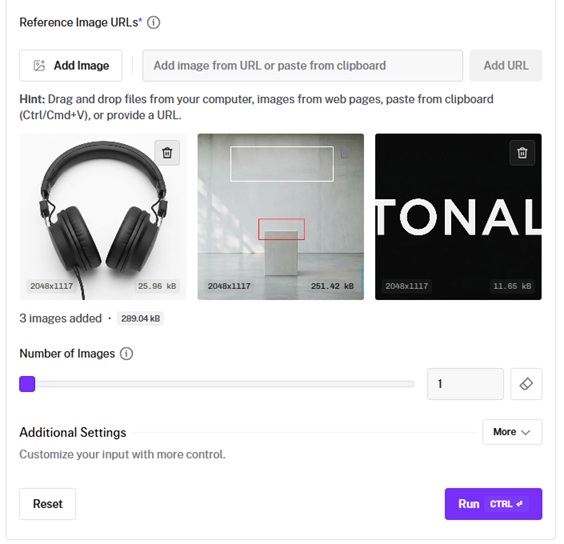
Now write one prompt that ties the plates and the boxes together.
The notes in brackets explain what each part is doing, so delete them before you run it.
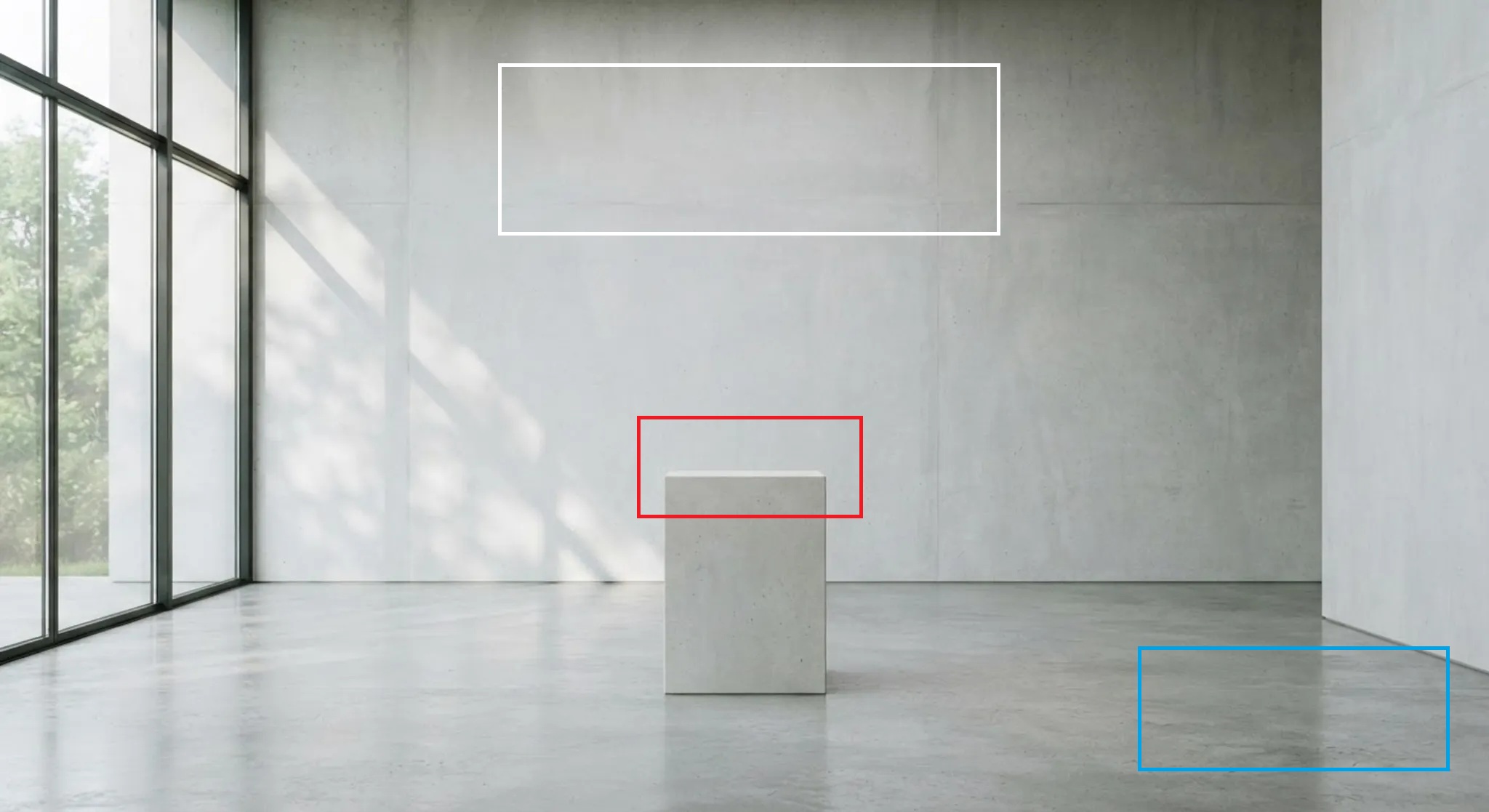
Prompt: Assemble one premium key visual for a headphones brand out of the three references. Use the concrete gallery from <frame>1</frame> as the full scene. Place the matte-black headphones from <frame>0</frame> inside the red box on the plinth, angled a few degrees toward the camera, resting naturally with a soft contact shadow. Render the "TONAL" wordmark from <frame>2</frame> in white inside the white box on the wall, at a scale that fills the box. Inside the blue box in the lower right, add a small caption reading "STUDIO REFERENCE MONITORS, 2031" in a matching sans. Match the soft daylight from the left across every element, keep one consistent shadow direction, use a cool neutral grade, and hold enough depth of field that the headphones and the wall wordmark stay sharp. Photorealistic gallery product photography, no text beyond the wordmark and the caption. Aspect ratio 16:9.
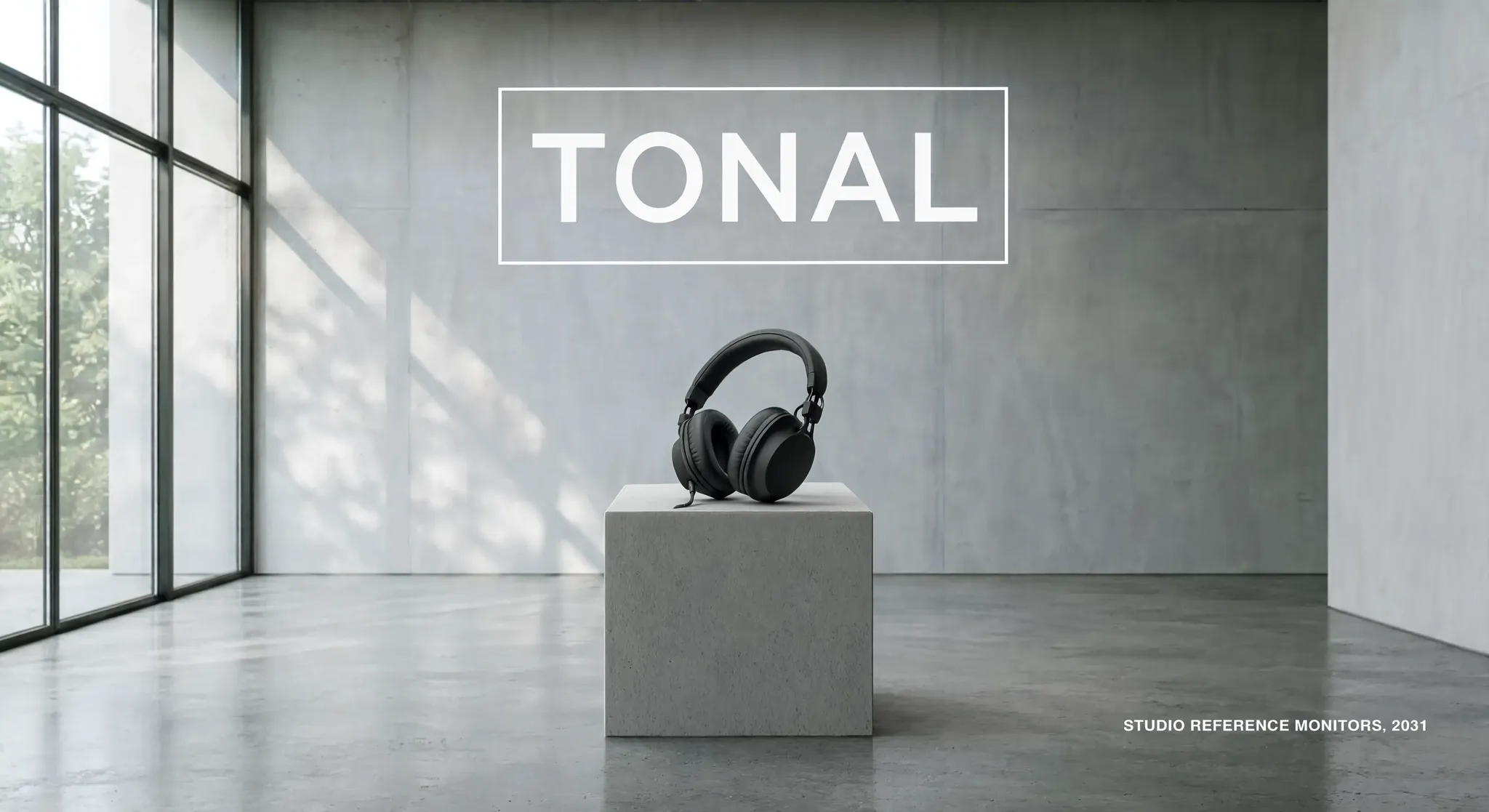
Generated using Reve 2.1 on fal, an AI model from Reve.
💡 The boxes matter.
I used distinct, non-overlapping colors and size each box to fit its contents, since a tight box can crop the result.
Which Reve 2.1 settings actually matter?
The schema is short:
aspect_ratio picks the frame shape, from ultra-wide 4:1 and 21:9 down to tall 1:4, with 16:9, 4:3, 1:1, and 9:16 for the common jobs.
On auto, Reve picks one to fit the brief, and since every image renders at a full 16 megapixels, aspect_ratio only sets the frame shape.
num_images sets how many images you get per run, and each is billed separately.
output_format defaults to png, with jpeg and webp available for smaller files.
sync_mode returns the image inline as a data URI, and the result is not saved to your request history, so leave it off when you want the file stored on fal.
What does Reve 2.1 cost on fal?
On fal, Reve 2.1 is billed by the image at a single rate.
Generation, edits, and remixes each cost $0.25 per image at any aspect ratio, since every image is a full 4K render.
Commercial use is included, subject to fal's terms.
A four-image run comes to $1.00, and a remix returns one image at $0.25 regardless of how many references it draws on.
Recently Added









Run Reve 2.1 on fal
Reve 2.1 is strongest on typographic and layout-driven work.
The playground is free to open, and you pay only when you generate.
A reliable workflow is to generate one strong base image, then refine it with edits, which is more efficient than re-generating repeatedly.
You want to get the composition and lighting right once, then use the editor and remix for the rest.
You can get started with the playground in a free account.
FAQs about prompting Reve 2.1
Can I use Reve 2.1 images commercially?
Yes.
It carries fal's commercial use label, and generated images can be used in commercial projects, subject to fal's terms of service.
What resolution does Reve 2.1 produce?
Native 4K, a full 16 megapixels, which is 4096 by 4096 at a 1:1 ratio.
PNG is the default, with JPEG and WebP available, and because the resolution is native there is no separate upscaling step.
Can Reve 2.1 write text in languages other than English?
Yes.
Its text rendering is multilingual and now extends to foreign scripts, so a layout can carry non-English copy alongside English, which suits posters, packaging, signage, and interface mockups.
How are edit and remix different on Reve 2.1?
Edit takes one image and one written instruction and changes a single element while the rest stays put.
Remix takes as many as eight references and merges them into a fresh frame, and it can place elements with the colored boxes you draw on an input.
![How To Use MiniMax H3 Max by fal [2026]](https://refinery.fal.media/url/https%3A%2F%2Fv3b.fal.media%2Ffiles%2Fb%2F0aa8d8df%2FzGardl5KrzR208BCfi318.jpg/tr:w-1280,q-80/zGardl5KrzR208BCfi318.webp)
![How To Use LTX-2.5: Prompts & Workflows [2026]](https://refinery.fal.media/url/https%3A%2F%2Fv3b.fal.media%2Ffiles%2Fb%2F0aa6bbe3%2FmDUJlHttJdksDteEA8gq0.jpg/tr:w-1280,q-80/mDUJlHttJdksDteEA8gq0.webp)