![How To Use LTX-2.5: Prompts & Workflows [2026]](https://refinery.fal.media/url/https%3A%2F%2Fv3b.fal.media%2Ffiles%2Fb%2F0aa6bbe3%2FmDUJlHttJdksDteEA8gq0.jpg/tr:w-1920,q-80/mDUJlHttJdksDteEA8gq0.webp)
In this article, I'll go over how you can use LTX-2.5's different endpoints, what some of its best prompt structures are, and its pricing on fal.
TL;DR
LTX-2.5 is Lightricks' open-weights video model, and it writes the soundtrack while it writes the picture, so anything you leave out of the prompt gets invented on your behalf.
Multishot changes the job: a single generation carries several connected shots, so you end up briefing an edit and not a shot.
Every modality ships twice: on text and image inputs, Pro holds the quality ceiling, and Fast holds the resolution and length ceilings at a lower price per second.
All six endpoints run on fal behind one key, priced by the second, with the LTX trainers there too if you want to teach the model something it doesn't already know.
Where can you access LTX-2.5?
The best place to access LTX-2.5 is on fal, as it serves LTX-2.5 as six separate endpoints, priced by the second, with nothing to subscribe to underneath it.
lightricks/ltx-2.5/text-to-video/pro takes a prompt and returns video with synchronized audio.
lightricks/ltx-2.5/text-to-video/fast takes the same input in the distilled variant, with 1440p, 4K, 48fps and durations up to 20 seconds unlocked.
lightricks/ltx-2.5/image-to-video/pro adds image_url as the opening frame, plus an optional end_image_url that fixes the closing composition.
lightricks/ltx-2.5/image-to-video/fast does the same in the distilled variant with the extended ceilings.
lightricks/ltx-2.5/audio-to-video/pro takes audio_url between 2 and 20 seconds and builds the picture against it, with an optional image_url if you want to fix the opening frame.
Supplying one moves guidance_scale from 5 to 9.
lightricks/ltx-2.5/audio-to-video/fast covers the same input at speed.
A text-to-video call looks like this:
javascript
import { fal } from "@fal-ai/client";

const result = await fal.subscribe("lightricks/ltx-2.5/text-to-video/pro", {
  input: {
    prompt:
      "Through-the-veil shot of a bride's face during an Indian wedding ceremony, camera positioned behind the sheer red dupatta fabric, the embroidered pattern creating a textured overlay on her face, her eyes lined with kohl looking down at henna-covered hands, marigold garlands in soft background bokeh, 85mm f/1.2 focused through the fabric layer, warm tungsten and candlelight, Mira Nair Monsoon Wedding intimacy",
  },
  logs: true,
  onQueueUpdate: (update) => {
    if (update.status === "IN_PROGRESS") {
      update.logs.map((log) => log.message).forEach(console.log);
    }
  },
});

console.log(result.data);
console.log(result.requestId);
Swapping endpoints costs you one line: a different model string, plus whatever media field the new endpoint expects.
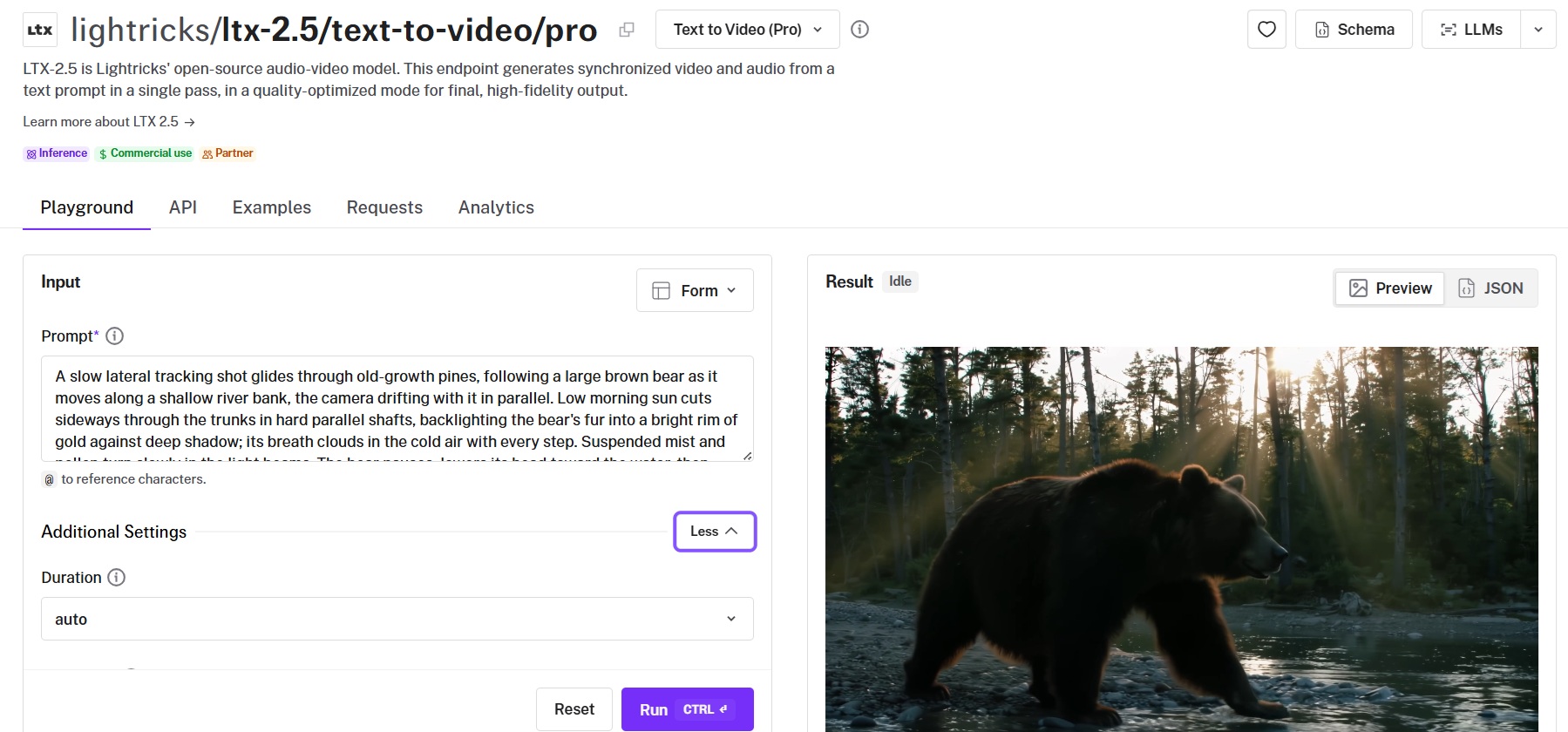
If you'd sooner not write code at all, each endpoint has a playground on its model page that mirrors the schema field for field.
What goes into an LTX-2.5 prompt?
Lightricks asks for six things in one flowing paragraph, and I'd rank them by what it costs you to leave each one out.
Sound tops that ranking, since LTX-2.5 scores the picture on the same pass, and a prompt with no audio in it hands your mix to the model.
Camera comes next, because the framing decides how heavy everything in the shot feels.
Character detail is the one I see dropped most often, and the fix is writing emotion as something a lens can actually register: a jaw held tight, a hand that won't stay still, never the word "anxious".
The shot type and the scene fill in behind those, along with the action itself, and the scene dressing is the first thing I thin out once a prompt starts to sprawl.
Every prompt below comes with the settings I'd run it on, and the section further down explains why each one is set that way.
Settings: lightricks/ltx-2.5/text-to-video/pro, duration 10, resolution 1080p, aspect ratio 16:9, fps 24, generate audio on, camera motion left empty.
Prompt: A long lens tracks a lone endurance prototype through a rain-soaked forest section of a night race, the car in faded blue and orange livery, spray boiling off the rear tyres in the headlight beam of the car behind it. Standing water throws light back up into the trees on both sides, and the wet armco carries a long red smear from the taillights as the car passes. The driver lifts, the brake discs glow orange through the wheel spokes, and the car turns in and is gone into the next corner. Telephoto compression from a trackside marshal post, shallow focus with wet grass in the foreground, heavy 35mm grain, deep blacks with blown highlights where the lights hit the rain. Sound: a flat-twelve engine on the overrun, tyres cutting through standing water, rain on the canopy overhead, one distant whistle.
Generated using LTX-2.5 on fal, an AI model from Lightricks.
Almost every sound in that list is attached to something in the frame.
The one exception, the distant whistle, is a marshal at a post the camera has already been placed at, so it has a source even if you never see it.
That's the test: not visible, but locatable.
I write the audio line last, then walk back through the picture and check each cue against it, and anything I can't point at in the shot gets cut or traded for the object that's actually making the noise.
At the end of a long prompt, I still catch myself reaching for mood words, a tense atmosphere or a sense of dread, and those hand the mix straight back to the model.
A thin track never wants more adjectives.
It wants one more moving object in the frame with a sound attached to it.
How do you write a multishot prompt?
Multishot is worth learning properly, as one generation can hold several connected shots with the same people, the same room, the same light and the same voice running through all of them.
You want to write the scene as one chronological paragraph, no shot list and no screenplay sluglines, and describe every cut in prose.
Four things go in at each transition:
Name the edit in words, so a hard cut reads as a hard cut and a dissolve reads as a dissolve.
Re-establish the shot from scratch, since scale, angle, lens and light all reset at a cut and the model has nothing to infer them from.
Re-identify anyone who comes back using the words you used the first time, because "the woman in the bronze gown" carries her across the edit and a pronoun does not.
Say what happens to the sound, explicitly, since silence at a cut is not a default the model will choose for you.
Lightricks puts the working range at two to four shots per generation, and says anything past that needs shorter, clearer beats.
I stop at three, because a fourth shot takes its runtime out of the other three and every beat gets thinner for it.
The prompt below runs three shots and two cuts.
Settings: lightricks/ltx-2.5/text-to-video/pro, duration 10, resolution 1080p, aspect ratio 16:9, fps 24, generate audio on, camera motion left empty, because three shots here want three different camera behaviours and one enum value would override all of them.
Prompt: A wide shot establishes the courtyard of a Marrakech riad at dusk, zellige tile underfoot, tall silk curtains lifting in the wind between the arches, a shallow fountain holding the last orange light. A woman in a bronze silk gown crosses the far side of the courtyard and passes behind a column, her reflection dragging across the water. A hard cut moves to a macro close-up of a faceted glass perfume bottle standing on the tiled lip of the fountain, stopper off, low sun throwing a hard caustic through the glass and across the tile; the wind and the water continue across the cut, unchanged. A match cut connects the shape of the stopper to the same woman in the bronze silk gown, now in a medium shot under the arcade, lifting her wrist toward the camera and turning her head away from it; the ambience holds and a low synth pad rises underneath it for the first time. Handheld on the wide, locked off on the macro, a slow drift on the last shot, 50mm throughout, warm practical light with deep blue fill from the open sky. Sound: wind moving heavy fabric, water in a shallow basin, swifts overhead, the synth pad entering on the final shot.
Generated using LTX-2.5 on fal, an AI model from Lightricks.
For image-to-video, I prefer to stay single-shot unless there's a real reason to cut.
I feel like if you bought that opening frame with a whole separate generation, cutting away from it at the three-second mark throws the spend away.
How do you prompt LTX-2.5 for text-to-video?
In the playground, you write the prompt, pick a resolution and an aspect ratio, set duration and fps, leave audio on, then run it.
Let's go over two prompts here, aimed at two different parts of the model:
A dense frame, on purpose
Pro endpoints run Diffusion Fidelity Rendering.
Lightricks built it to spend compute unevenly across a clip, with the busiest frames drawing the most, so a crowd makes an obvious thing to point it at.
So here I'm ignoring the advice about keeping a frame uncluttered:
Settings: lightricks/ltx-2.5/text-to-video/pro, duration 8, resolution 1080p, aspect ratio 16:9, fps 25, generate audio on, camera motion left empty since the push-in is written into the prompt.
Prompt: A slow push-in down a narrow Venetian calle at night during carnival, a masked crowd pressing past the lens in both directions. Bauta masks, brocade capes and feathered tricorns fill the frame, lit only by handheld torches and the warm spill from an open doorway, gold catching on every wet surface. A woman in a white volto mask turns toward the camera as she passes, holds for a beat, and is swallowed by the crowd behind her. At the end of the calle, water slaps against stone steps where a gondola is moored. Handheld 35mm at f/2, damp air thick with torch smoke, deep shadow between light sources, high dynamic range, period carnival grade. Sound: dense overlapping chatter and laughter in Italian, boot heels on wet stone, a tambourine somewhere ahead, water against stone.
Generated using LTX-2.5 on fal, an AI model from Lightricks.
One thing I keep out of a shot like this: signage.
Short text renders better than it used to, and Lightricks still says outright that neither the spelling nor its stability from one frame to the next can be relied on.
A performance and a spoken line
Quotation marks around the line, with the language and the accent named right next to it.
Settings: lightricks/ltx-2.5/text-to-video/pro, duration 8, resolution 1080p, aspect ratio 16:9, fps 24, generate audio on, camera motion left empty. I'd recommend you stay at 24 or 25 fps for dialogue, since 50fps pulls the performance toward a video look.
Prompt: A slow dolly in on a man seated at a small table in a Vienna hotel room in 1974, framed from just off his left shoulder. He is in his fifties, thinning grey hair, tie loosened, a cigarette burning down in an ashtray he has forgotten about. A single practical lamp on the table lights him hard from below the eyeline and leaves the rest of the room in near darkness, the window behind him carrying wet streetlight and nothing else. He looks up at someone off camera, waits, and says quietly in English with a slight German accent: "You had the file for six weeks and you brought me a photograph." Then he taps the ash and looks back down. 40mm at f/2, cool tungsten falloff, fine grain, one continuous shot with no cuts. Sound: his voice close and dry with the room's small reverb under it, traffic hissing on wet road below, a radiator ticking, no music.
Generated using LTX-2.5 on fal, an AI model from Lightricks.
The beat of stillness before he speaks is deliberate.
A line that starts on frame one leaves the lip sync nothing to lock against, and I've had better results letting the face arrive first.
falMODEL APIs
The fastest, cheapest and most reliable way to run genAI models. 1 API, 100s of models
Which settings actually change the output?
Most of the schema explains itself, so here's what differs between the two variants on the text-to-video and image-to-video endpoints.
Audio-to-video takes none of these, since the track you upload decides the length and the endpoint exposes no resolution or fps control at all.
| Parameter | Pro | Fast |
|---|---|---|
| Duration | 6, 8, 10, auto | 6 through 20 in even steps, auto |
| Resolution | 720p, 1080p | 720p, 1080p, 1440p, 2160p |
| fps | 24, 25, 50 | 24, 25, 48, 50 |
| Aspect ratio | 16:9, 9:16, plus auto on image-to-video | 16:9, 9:16, plus auto on image-to-video |
| Audio | On by default | On by default |
duration defaults to auto, and Lightricks calls that Auto Duration: the model works out a length from the action you described, before any frames get made.
I leave it alone for anything atmospheric and set it by hand the moment a beat has to hit an exact second, because a shot that wants ten seconds and gets six arrives half-finished.
camera_motion trips people up: it accepts one of eight fixed values, from dolly_in and jib_up through to static and focus_shift, and the schema applies that move to the generated video.
If the prompt describes a push-in while the parameter says dolly_left, that's two orders issued to one camera operator.
I like to keep camera direction in the prose, since a written move can be tied to a specific moment in the action and a dropdown value can't, and I'd reach for the enum when the same move has to repeat across a batch.
The one exception in the settings lines through this guide is static, which can't contradict a prompt, so I set it on anything locked off and leave the field empty everywhere else.
generate_audio stays on by default, and I'd leave it on even when the sound is getting replaced later, because the picture the model makes with audio enabled is the picture it was built to make.
How do you generate a clip from a still image with LTX-2.5?
Image-to-video grows the shot outward from the frame you supply, so half the prompt's job becomes protecting what's already there.
Here, you'll want to name the framing and the light, then spell out which objects have to stay where they are.
One pour, one crack of ice, nothing else moving
Image settings: 16:9, generated at the highest resolution the image model offers, since this file becomes the first frame of the video and any softness in it carries through.
Image prompt: A macro product photograph of a heavy cut-crystal decanter and a single empty rocks glass on a dark walnut bar top, shot from just above the level of the wood, hard backlight raking through the crystal and throwing sharp caustics across the grain, a wall of unlit bottles far behind dissolved into deep shadow, amber spirit halfway up the decanter, razor-sharp focus on the near facet of the glass, no text or labels anywhere in frame, high-end spirits campaign photography.
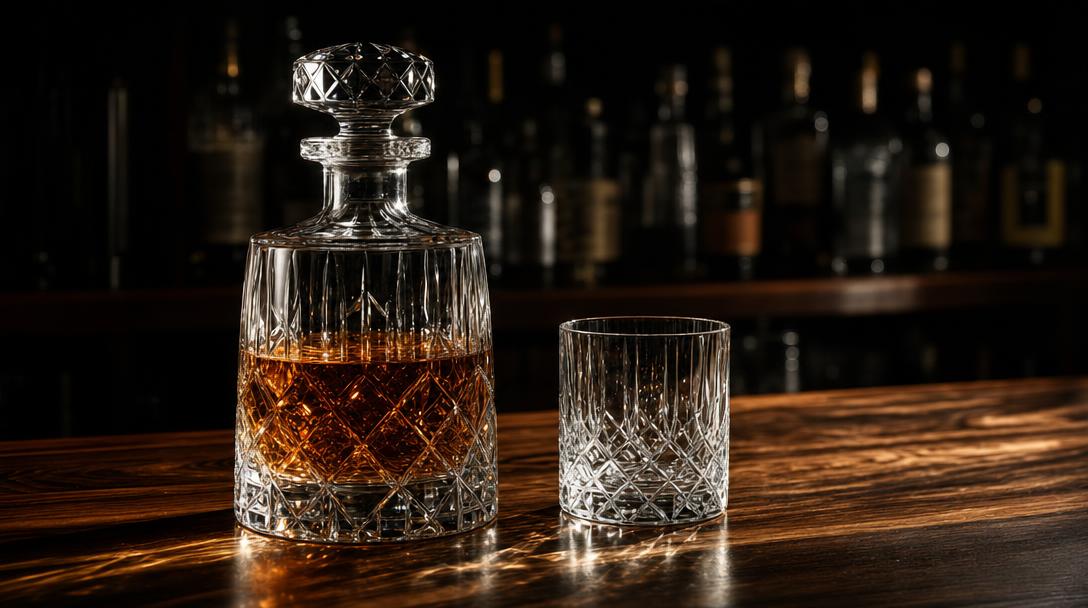
Image generated by GPT Image 2 on fal, an AI model from OpenAI.
Settings: lightricks/ltx-2.5/image-to-video/pro, start image the still above, end image left empty, duration 6, resolution 1080p, aspect ratio auto so it inherits the still, fps 25, generate audio on, camera motion static.
Video prompt: A stream of amber spirit pours into the rocks glass from off frame right and rises to two thirds, the surface settling as it fills and the caustics on the walnut shifting with it. A single large clear ice cube is lowered in and cracks once, sending a fine line of bubbles up the inside of the glass. Hold the decanter, the bar top, the backlight and the framing of the still exactly as they are, and keep the camera locked off for the entire shot. Sound: the pour, one sharp crack of ice, a bar several metres away with low conversation and no music.
Generated using LTX-2.5 on fal, an AI model from Lightricks.
I'd nail the camera down for anything running as a product shot.
One event inside a still frame gives an editor a clean cut point.
A camera move happening on top of that event hands them a second thing to reconcile, with nothing gained for it.
Pinning both ends with an end frame
end_image_url turns image-to-video into a transformation, where you supply the opening and closing compositions, and LTX-2.5 works out the middle.
We'll make the second image by editing the first.
Writing a fresh prompt for the end frame gets you a room that's almost the same room, and almost is the expensive case here, because the model then spends your ten seconds quietly reconciling two sets of architecture.
Image settings: 16:9 on both frames, at matching dimensions, since a size mismatch between start and end frame is the fastest way to get a drift you didn't ask for.
Start frame prompt: A wide cinematic still of an abandoned grand hotel ballroom at midday, shot square-on from the entrance, chandeliers dark and bagged in dust sheets, furniture shrouded along the walls, parquet buckled and grey with dust, tall boarded windows leaking hard shafts of light across the floor, faded gilt mouldings, cold desaturated grade, 24mm, no people, no text.
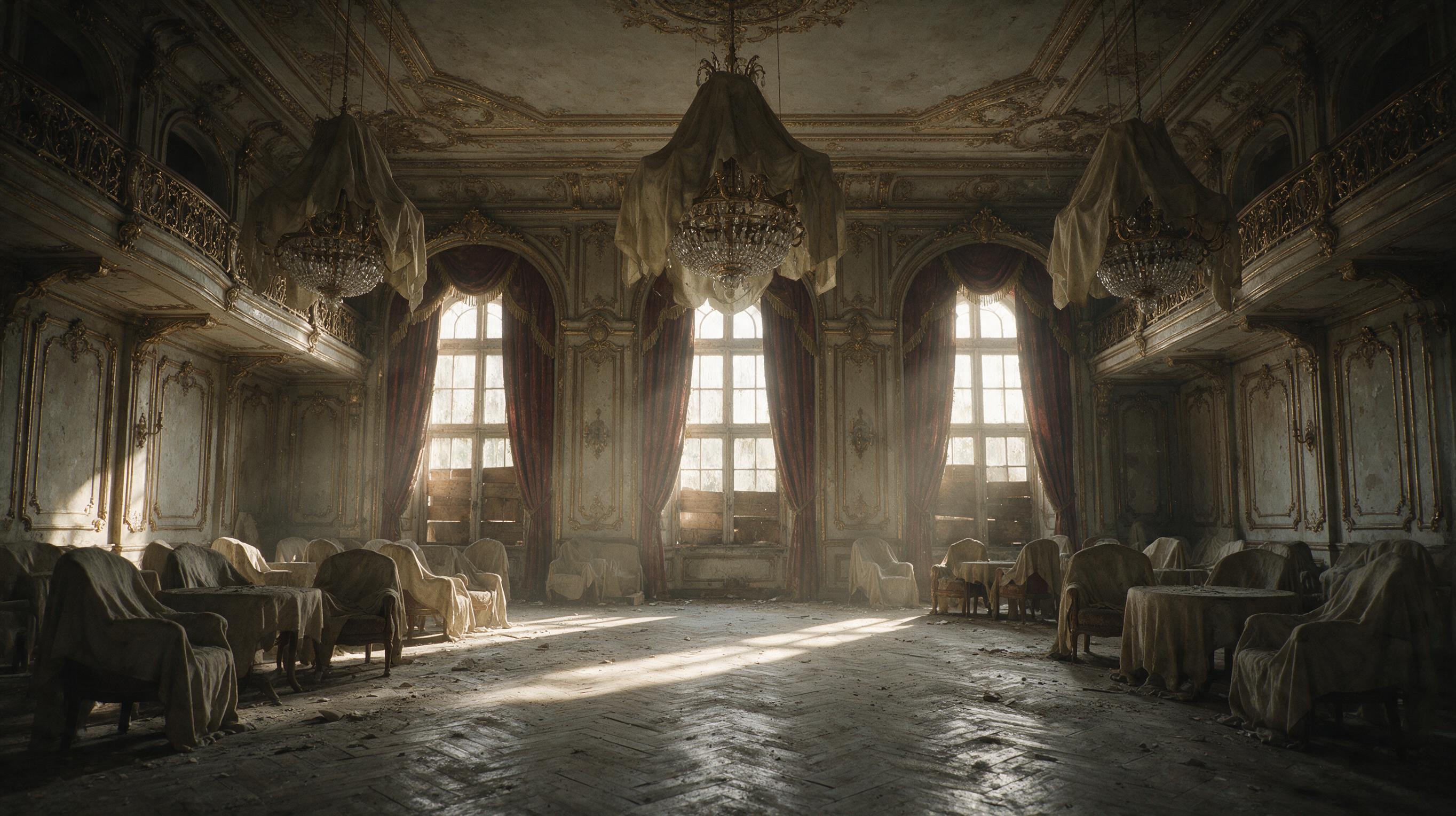
Image generated by Seedream 5.0 on fal, an AI model from ByteDance.
End frame settings: run as an edit on the start frame file, not as a fresh generation, and keep the output dimensions identical.
End frame prompt: Keep the room, the square-on camera position, the windows and the gilt mouldings exactly as they are. Restore the ballroom to a full night in 1928: chandeliers lit and dropping warm light, dust sheets gone, parquet polished and reflecting, the floor filled with couples mid-dance in black tie and beaded dresses, warm amber grade, the windows now dark with night outside. Nothing about the architecture or the camera position changes.
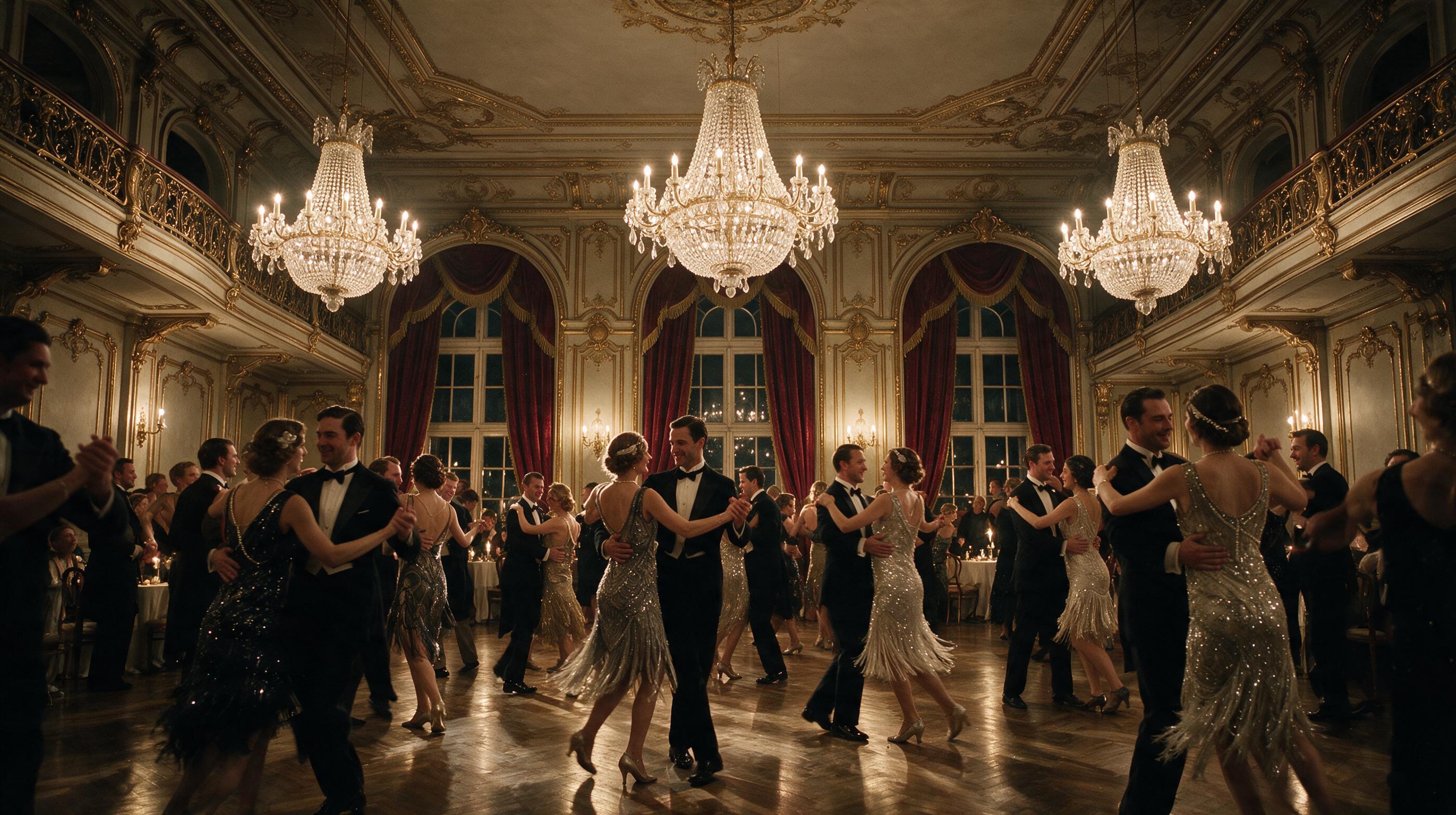
Image generated by Seedream 5.0 Pro Edit on fal, an AI model from ByteDance.
Settings: lightricks/ltx-2.5/image-to-video/pro, start image the empty ballroom, end image the lit ballroom, duration 10, resolution 1080p, aspect ratio auto, fps 24, generate audio on, camera motion static.
Video prompt: One continuous transformation from the empty room to the full ballroom, the camera locked to the same position throughout. Dust lifts off the sheets and they draw away, the boards come off the windows and the light outside turns from midday to night, the chandeliers come up one at a time from the far end of the room toward the camera, and the dancers arrive into frame already mid-step. The parquet gains its polish last. No cuts and no change of angle at any point. Sound: dead dusty room tone with a faint wind in the boards, then a distant band and a room full of voices swelling in as the chandeliers light, arriving fully by the last two seconds.
Generated using LTX-2.5 on fal, an AI model from Lightricks.
Ordering the transformation keeps it from happening all at once.
How do you build a video around an audio track?
Audio-to-video reverses the usual relationship: you supply a track between 2 and 20 seconds, and the picture gets generated against it.
The prompt template loses a whole section here, because the sound has already been decided, so those words go into performance and delivery.
Neither example below uses a first frame, so guidance_scale starts at its text-driven default of 5.
I'd stay there and only push it up if the picture wanders off what you described.
A track with a rhythm the picture has to hit
Audio settings: target 9 seconds, exported as wav or mp3, and keep it inside the 2 to 20 second window the endpoint accepts. The clip you get back runs as long as the file you upload, and you are billed on that length.
Audio prompt: Nine seconds of solo flamenco guitar in bulería rhythm, dry close-mic recording in a small tiled room, sharp rasgueado bursts and hand percussion on the guitar body, palmas clapping on the offbeat, no vocals, no reverb tail.
Audio generated using Seed Audio 1.0 on fal, an AI model from ByteDance.
Settings: lightricks/ltx-2.5/audio-to-video/pro, audio the track above, image left empty, guidance scale 5, aspect ratio 16:9. This endpoint has no duration, resolution, fps, camera motion or audio toggle to set.
Video prompt: A flamenco dancer alone in a bare whitewashed room with a worn wooden floor, shot as a single continuous medium wide from a low angle. She wears a heavy black bata de cola with a long trailing hem that she works with her feet, and she dances hard through the whole take, heel stamps landing on the boards, the train whipping around her and dust lifting into a hard shaft of afternoon light from one high window. Her arms carry the phrasing, her expression is set and unsmiling, and she snaps her head toward the camera on the final accent.
Generated using LTX-2.5 on fal, an AI model from Lightricks.
A voice track and a face to hang it on
Audio settings: target 9 seconds at a natural pace, since a rushed read gives the lip sync less to work with. Export as wav or mp3, under the 20-second ceiling.
Audio prompt: A woman in her forties speaking American English, low and measured, a defense lawyer near the end of a long trial, no urgency anywhere in the delivery, quiet courtroom room tone sitting behind the voice: "You have heard eleven days of testimony. Not one of those days put my client in that room." 9 seconds.
Audio generated using Seed Audio 1.0 on fal, an AI model from ByteDance.
Settings: lightricks/ltx-2.5/audio-to-video/pro, audio the voice track above, image left empty, guidance scale 5, aspect ratio 16:9.
Video prompt: A woman in her forties in a charcoal suit stands at the lectern of a wood-panelled courtroom, framed in a slow push-in from the jury box side at chest height. Hard afternoon light comes through tall windows to her left and cuts a hot band across the panelling behind her, dust turning in the beam, the gallery behind her in soft focus and still. She speaks directly toward the jury off camera left, one hand flat on the lectern, and holds the last line for a moment before looking down at her notes. 50mm at f/2, warm wood tones against cool window light, quiet 35mm grain, one continuous take.
Generated using LTX-2.5 on fal, an AI model from Lightricks.
Neither of those prompts carries a Sound: line.
A written description would only compete with the file you uploaded, and the file wins.
When should you use the Fast variants?
Fast is LTX-2.5's distilled variant, and the claim behind it is that this generation holds far more quality, prompt adherence and motion than earlier distillations did. The comparison is against previous distilled models, not against Pro.
It costs less per second at every resolution, and on text and image inputs it holds the ceilings Pro doesn't: 1440p, 4K, 48fps, and clips out to 20 seconds. On audio-to-video, the two variants take identical inputs and differ on price alone.
The cheaper variant owning the premium ceilings looks backwards until you notice what those ceilings get used for.
A 10-second 4K turntable is a delivery spec and not a creative problem, and it needs no compute spent on crowd detail that was never in the frame.
So Fast takes my iteration passes, anything long, and anything at 4K.
Pro takes the final render on the dense and difficult shots.
The trade is Diffusion Fidelity Rendering, which Pro has and Fast doesn't.
Settings: lightricks/ltx-2.5/text-to-video/fast, duration 10, resolution 2160p, aspect ratio 16:9, fps 48, generate audio on, camera motion static.
Prompt: A matte black electric motorcycle stands on a slow-rotating steel turntable in a blacked-out studio, lit by two hard rim lights that rake along the tank and the exposed battery casing and leave the centre of the bike in shadow. The turntable makes one unhurried revolution, the rim light travelling along each machined edge in turn, the front wheel catching a hard specular line as it comes around. A thin layer of haze holds the light beams above the floor. Locked-off camera at hub height, 85mm, deep black background with no visible floor line, high-contrast product grade, no text anywhere in the frame. Sound: a low electrical hum from the motor, the faint mechanical roll of the turntable, dead studio air with no reverb.
Generated using LTX-2.5 Fast on fal, an AI model from Lightricks.
How much does LTX-2.5 cost on fal?
Text-to-video and image-to-video charge by the second of output, and the audio track costs nothing extra at any resolution.
| Endpoint | 720p | 1080p | 1440p | 4K |
|---|---|---|---|---|
| Text-to-video Pro, image-to-video Pro | $0.12/s | $0.17/s | Not available | Not available |
| Text-to-video Fast, image-to-video Fast | $0.09/s | $0.13/s | $0.19/s | $0.30/s |
Ten seconds of 1080p video works out at $1.70 on Pro and $1.30 on Fast.
Small gap across one clip, and it stops being small somewhere around the fortieth version of the same shot.
Audio-to-video bills on the audio you upload rather than the video that comes back.
Since the clip matches the file, that lands on the same number of seconds, and the useful consequence is that you know what a generation costs before you run it: $0.17/s on Pro, $0.13/s on Fast.
There's no resolution selector on this endpoint: 1080p is what it returns.
Recently Added














Start creating with LTX-2.5 on fal
Six endpoints, one key, and a bill that counts only the seconds you generated.
Text in, a still in, or a track in, with the same integration covering all three.
An account costs nothing to create on fal, and every endpoint has a browser form for testing a shot before you write any code.
LTX-2.5 FAQs
Can you fine-tune LTX-2.5?
Yes, and that's the argument for open weights a closed model can't make.
LoRA training adds a style, a character, or a behaviour the base model never learned.
You can train on fal and run the result on fal, and there are already more than 80 LTX fine-tunes on the platform you could pick up without training anything yourself.
Lightricks also released the pretrained checkpoint underneath the production model, the one that never went through supervised fine-tuning, aimed at teams pushing a video model somewhere video models don't usually go, like robotics or industrial simulation.
One thing to read before you build on any of it: the licence is the LTX-2.x Community License, which is not an OSI licence.
Commercial use is allowed, with a paid licence required from Lightricks for any company at $10 million or more in annual revenue, and further use restrictions attached on top of that.
Where can you access the LTX-2.5 API?
The LTX-2.5 API is available on fal with pay-per-use billing and no subscription.
How long can an LTX-2.5 clip be?
On text-to-video and image-to-video, Pro runs 6, 8 or 10 seconds, and Fast runs in even steps from 6 up to 20 seconds, and both accept auto, which hands the decision to Auto Duration.
Audio-to-video works differently, since the clip matches the track you upload, and that has to fall between 2 and 20 seconds.
Does LTX-2.5 generate audio?
Yes, on the same pass that makes the picture, at no extra charge, with generate_audio set true by default on text-to-video and image-to-video.
Sounds with a visible source in the frame land better than atmosphere described in the abstract.
Why should you use fal to run LTX-2.5?
fal gives you all six LTX-2.5 endpoints behind one client, with queueing and webhooks handled, no GPUs to manage, and no subscription.
The same integration reaches the over 1,000 other models on fal, outputs are cleared for commercial work, and the playground lets you test a shot in the browser before using the API.
How do you use LTX-2.5 on fal?
There are more ways in than the two this guide uses.
The playground runs any endpoint in the browser with no code, and the @fal-ai/client SDK carries the same calls into production with queueing and webhooks.
Past those, fal's Sandbox, Agent and Workflows cover experimentation and multi-model pipelines, and the MCP server and CLI bring the endpoints into AI assistants and terminals.