
In this guide, I'll go over what filler word removal does to a recording, how the detection works, how to run HeyGen's filler word removal on fal, and where the hesitations are worth keeping.
TL;DR
Filler word removal is a subtractive edit, not a rewrite: HeyGen's model on fal transcribes your take, locates fillers and long silences, removes those ranges, and returns one cleaned cut.
The endpoint has one required input, a video URL, and returns the cleaned file with four numbers attached: original_duration, output_duration, num_cuts, and reduction_pct.
Pricing on fal is $0.01 per second of input video with a 60-second minimum per job, so any clip under a minute bills at $0.60.
Credits aren't deducted when the model finds nothing to remove.
Fillers aren't always noise: interviews, testimonials, and anything where hesitation carries meaning need a lighter hand than a product clip does.
What does filler word removal actually take out of a recording?
Two kinds of things, and they need different machinery to find.
The lexical half is made of tokens in the transcript.
A few of those tokens have no other job anywhere in the language: uh, um, er.
The rest are ordinary words that sometimes carry weight and sometimes carry none, and "so" is the cleanest illustration of the problem.
The sentence "so we shipped it, so, um, yeah" uses "so" twice, once to hold two clauses together and once to hold nothing whatsoever.
Any tool that treats the token as a token will damage the first one while removing the second.
The structural half isn't lexical at all. It's timing.
Repairs are the stumbles where a sentence starts, dies, and restarts, as in "we tried, we tried moving the approval step."
Dead air is the space between finished thoughts, and unlike a filler, it costs you runtime without leaving anything in the transcript to point at.
HeyGen's model on fal covers both halves in one run, which spares you chaining a separate silence trim behind it.
There's one thing it won't do, and it's the property I'd care about most: your speech is never regenerated.
➡️ What comes back is the audio you recorded with ranges missing, so there's no cloned voice and no synthetic delivery anywhere in the file.
The words are the words you said, in the voice you said them in, and on footage you might have to defend later that counts for more than the hours you saved.
The picture around each edit does get rebuilt, which is a separate operation and the reason the cuts don't show.
Here's an example of a previous clip with filler words:
And here's what HeyGen's filler word removal was able to do:
Video generated with HeyGen's Filler Word Removal, on fal.
How does AI filler word removal work under the hood?
Five things happen between upload and download, and only the last one is specific to video.
➡️ HeyGen publishes the outline of the job as transcribe, detect, remove, render, so the opening stages come from them, and the middle of this list is my own model of what the work requires.
1. A timed index of every word
Trimming dead air is a signal problem, and a threshold solves it.
Fillers don't yield to that approach, because "uh" is a perfectly well-behaved piece of audio that happens to mean nothing.
So the opening pass produces something closer to a search index than a detector: a transcript where every token carries a start and an end on the recording's own clock.
HeyGen's documentation confirms that order, since the job transcribes the audio before it detects anything.
Every decision after this is a lookup against that index.
2. Deciding which tokens are doing work
Judging "uh" needs no context at all, since the sound has no competing use.
Judging "so" or "right" or "actually" needs the clause around it, which is what makes this a language task and not a find-and-replace over a list of banned words.
A banned-list implementation quietly wrecks the sentences that needed the word, and nothing in the output tells you which ones it damaged.
3. Placing the cut points
A transcript timestamp labels a region, and treating it as a knife edge is how homegrown versions of this go wrong.
An edit placed on the raw number takes a bite out of the first syllable of whatever follows.
Each range gets nudged outward or inward to land where the phonetics allow, and the intake of air ahead of a hesitation gets counted as part of the filler, because that's what it belongs to.
4. Joining the audio
Two accurate edges will still click when they meet, since room tone carries a texture and slicing across the middle of one is audible.
A few frames of overlap at every join hold the noise floor continuous underneath the splice.
5. Holding the picture together
Everything above happens in the audio, and the audio is the easier half.
Four hundred milliseconds is about ten frames at 24 fps, which is more than enough time for a head to be somewhere else.
The usual answers are to let the jump show or to hide the moment under a cutaway.
falMODEL APIs
The fastest, cheapest and most reliable way to run genAI models. 1 API, 100s of models
How do you clean up a take in the fal playground?
Nothing beats watching the model work on footage you recorded yourself, and the playground gets you there without writing anything.
Drop a video into the Video URL field on the model page and hit run.
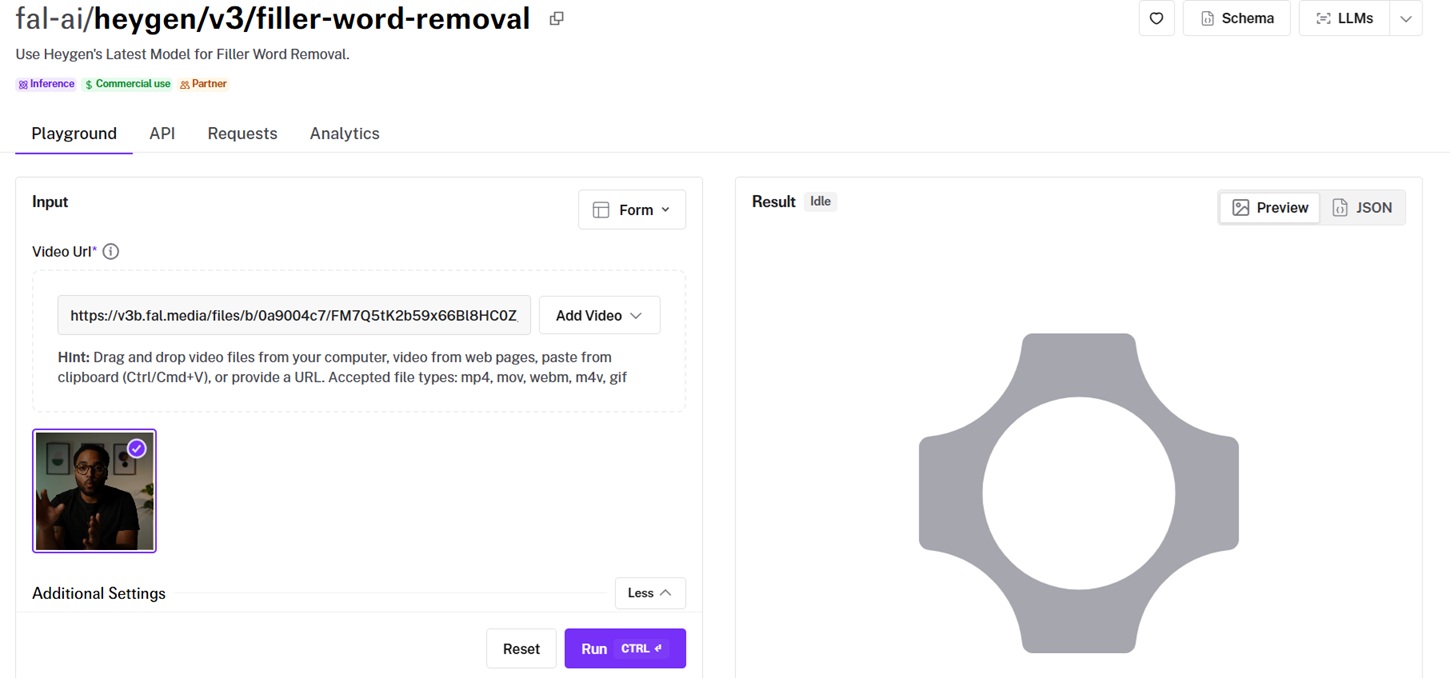
What the endpoint takes
video_url carries the source file, and it's the only required field.
Uploads, clipboard pastes, and URLs all work, across mp4, mov, webm, m4v, and gif.
title is an optional label for the job, which will be important once you're running enough of these to lose track of them.
That's the whole input surface.
What it gives back
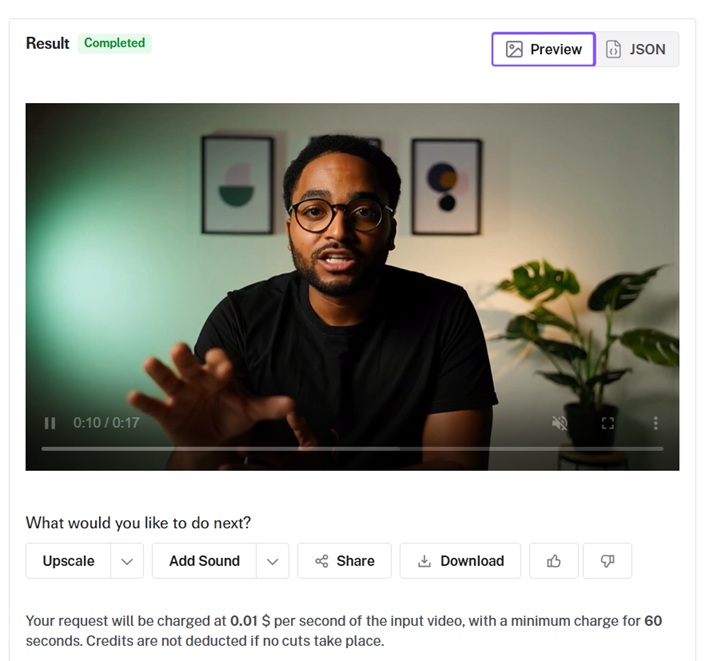
The cleaned file arrives as a final video, cut down in a few seconds, with the option to:
- Download it.
- Upscale it.
- Add sound.
- Share it.
What does a 30-second take look like before and after?
Recording something badly on purpose is harder than it sounds, so I generated the hesitation directly.
The source below comes from HeyGen Avatar V on fal, which delivers whatever script you hand it, stumbles included.
Script: Alright, so, um, welcome to the, uh... sorry. Welcome to part two of the expense policy walkthrough. Last time we covered, you know, receipts, and, um, what counts as a business meal. Today I want to, like, walk through the approval flow, because, I mean, that's where most of the tickets come from. Uh. So the first thing you'll notice is, um, the new dropdown. Yeah. So. Let's get into it.
Generated using HeyGen Avatar V on fal, an AI model from HeyGen.
The same file goes through the filler word removal endpoint untouched.
The hesitation is gone from the version below, and the delivery underneath it is unchanged.
Processed using HeyGen Filler Word Removal on fal, an AI model from HeyGen.
What happens on a 15-second clip from Seedance 2.0?
An avatar reading a script is one kind of test.
Footage that looks like somebody's phone propped against a shelf is a harder one, because now the edit has to survive camera noise and a background that moves.
Seedance 2.0 builds audio and video together in a single pass and will run to 15 seconds in one generation, so the whole source clip arrives from one request.
Any line you put in double quotes gets spoken and lip-synced, and that's the lever for specifying a hesitant delivery.
Prompt: A man in his late forties stands in the aisle of a small parts warehouse, talking to a phone propped on a shelf at chest height. Steel racking runs behind him out of focus, overhead fluorescents give the scene a flat cool cast, and he holds a clipboard he keeps glancing down at. Locked-off framing with the slight wide-angle distortion of a phone lens, no camera movement. Audio: his voice close and a little boxy from the room, a forklift beeping faintly somewhere off camera. He says: "Right, so, um, quick one before the shift. The, uh... the pick sequence changed on aisle four, so, you know, don't go by the old sheet. Um, and, I mean, we tried, we tried flagging it in the app, and, uh, that didn't really take. So. Yeah, just, um, check the board first."
Worth watching for in generation: hesitation is a performance choice, and a model reading a filler-heavy line can smooth it into fluent speech.
Commas, ellipses, and doubled words are the controls you have over pacing, and if the read comes back too polished, exaggerating the stumbles in the prompt beats regenerating on the same wording.
Generated using Seedance 2.0 on fal, an AI model from ByteDance.
And let's see if the filler word removal will handle the job here:
Processed using HeyGen Filler Word Removal on fal, an AI model from HeyGen.
When should you leave the fillers alone?
HeyGen aims the model at footage where somebody spoke off the cuff, typically webinars, screen recordings, interviews and all-hands.
I'd pull the editorial question apart from the technical one on that list, because an interview is exactly the case where the model will work and you might still not want it to.
Cleanup reaches diminishing returns sooner than most people expect.
Hesitation does structural work in speech. It holds the floor while a speaker thinks, and it signals that more is coming.
A 40-minute interview with every hesitation removed starts to sound processed, because nobody talks in finished sentences.
Four cases where I'd go light or skip it:
- Interviews and documentary footage, where hesitation is part of how a person comes across and cutting it edits their character.
- Testimony, legal recordings, and anything under a compliance regime, where an edit that moves emphasis becomes a problem you don't want to explain.
- Comedy and anything built on timing, since the beat before a line is frequently the line.
- Very short social cuts that are already fast, where taking the last of the air out leaves a viewer no room to keep up.
The endpoint runs as a single pass, and HeyGen describes it in the same terms: no review step and no edit decisions to make.
That keeps the operation fast and predictable, and it means you don't hand-pick survivors.
Where can you run HeyGen's filler word removal on fal?
HeyGen's filler word removal runs on fal in a playground and through the API, billed per second of input with no subscription attached.
A single integration with the @fal-ai/client SDK covers it, and the call shape matches every other endpoint in the catalog.
Auth, the queue, error handling, and billing behave the same whether you're calling this model, a video generator, or an image model.
The API request is short:
javascript
import { fal } from "@fal-ai/client";

const result = await fal.subscribe("fal-ai/heygen/v3/filler-word-removal", {
  input: {
    video_url: "https://v3b.fal.media/files/b/0a9004c7/FM7Q5tK2b59x66Bl8HC0Z_vt-lang-en.mp4",
  },
  logs: true,
  onQueueUpdate: (update) => {
    if (update.status === "IN_PROGRESS") {
      update.logs.map((log) => log.message).forEach(console.log);
    }
  },
});

console.log(result.data);
console.log(result.requestId);
How much does HeyGen's filler word removal cost on fal?
Billing follows the length of the video you send in, not the length of what returns: $0.01 per second of input video.
A 60-second minimum charge per job, putting a floor of $0.60 on any single run.
Credits aren't deducted when the model finds nothing to remove.
Both demo clips above are shorter than a minute, so each one bills at the $0.60 floor.
A 12-minute recording costs $7.20, and the figure holds however many cuts the model makes.
Recently Added
































Run HeyGen's filler word removal on fal
Cleanup has always been the least interesting part of video work and the part that ate the most hours.
Handing it to a model that reads the transcript, removes the hesitation, and reconstructs the frames turns a manual pass into a step you can automate and stop thinking about.
On fal, that step is one endpoint with pay-per-use pricing, no GPUs to manage, and no subscription in front of it.
Test it in the playground on something you've already published, or wire it into your pipeline through the API in a few lines.
FAQ
Which words does the model treat as fillers?
Sounds with no dictionary entry are the unambiguous core, and nothing else competes for them.
Words that do double duty, such as "so" and "right" and "actually," get judged against the clause they appear in.
Detection has to be contextual for that second group, because the same token does real work one sentence later.
Is my voice regenerated at any point?
No, and that's what separates a cleanup pass from a dub.
The model removes ranges from what you recorded and joins what survives, so nothing in the output is synthesized speech.
The result arrives as an MP4, so treat the performance as untouched and the encode as new.
Does the same run handle silences?
Yes, filler words and long silences are both in scope for a single run.
Dead air between sentences gets tightened alongside the "um" tokens.
Whether the silences or the fillers account for more of your recovered runtime depends on the take, and the two output fields together tell you: num_cuts counts filler segments only, so num_cuts at zero alongside a positive reduction_pct means the entire saving came from dead air.
Does removing fillers improve how a video performs?
The claim is everywhere and the mechanism is reasonable: a shorter runtime carrying the same content gives a viewer fewer chances to leave.
I'm not going to hand you an effect size, because the honest answer depends on your format and audience.
What you can do is measure it yourself, since reduction_pct gives you a number to correlate against retention across a batch of published videos.
Can I choose which fillers get removed?
No, the endpoint applies one pass with no per-word approval step.
That's the trade-off for a single call with a predictable cost and no interface to sit in front of.
For footage where individual hesitations carry weight, treat the output as a proposal and keep the source.
What happens if my take was already clean?
The model finds nothing to remove, and credits aren't deducted for the run.
That makes it cheap to use as a check, which is a different job from using it as a fix.
You can wire it in as a pre-publish gate and pay only on the takes that needed work.
![What is H3 Max Camera Controls (Multi-Angle) & How To Use It? [2026]](https://refinery.fal.media/url/https%3A%2F%2Fv3b.fal.media%2Ffiles%2Fb%2F0aabbf2b%2Fq8usbuG4heGtr4-AYyqfk.jpg/tr:w-1280,q-80/q8usbuG4heGtr4-AYyqfk.webp)

![How To Use GPT-6 Astra for Video Editing [2026]](https://refinery.fal.media/url/https%3A%2F%2Fv3b.fal.media%2Ffiles%2Fb%2F0aaccd45%2FEjhkMmqNCeXgPjrrnRgU5.jpg/tr:w-1280,q-80/EjhkMmqNCeXgPjrrnRgU5.webp)