This guide breaks down FLUX vs. Qwen Image, covering architecture, output quality, text rendering, speed, pricing, editing workflows, LoRA ecosystems, and licensing so you can pick the right family for your workflow.
TL;DR
FLUX.2 [pro] is the better default for most developers building production pipelines. It costs $0.03 for the first megapixel on fal and belongs to a large model family spanning $0.003/megapixel drafts to premium editing.
Qwen Image earns its spot when text rendering accuracy and multilingual generation are the priority. The base model costs $0.02/megapixel on fal, and the newest Qwen Image 2.0 Pro ($0.075/image) is ranked #1 on AI Arena for text-to-image generation.
Here's how they stack up:
| FLUX | Qwen Image | |
|---|---|---|
| Creator | Black Forest Labs | Alibaba |
| Architecture | Rectified flow transformer with VLM encoder | Multimodal Diffusion Transformer (MMDiT) with VL encoder |
| Best for | Photorealism, zero-config production quality, speed-sensitive pipelines | Text rendering, multilingual generation, compositional accuracy |
| Family price range | $0.003/megapixel (schnell) to $0.08/image (Kontext [max]) | $0.02/megapixel (base) to $0.075/image (Qwen Image 2.0 Pro) |
| Speed | Fast (optimized flow matching, no step config needed) | Moderate at default (30 steps), fast with turbo mode (10 steps) |
| Text rendering | Good (enhanced typography in FLUX.2 [flex] and Kontext [max]) | Strong (complex text rendering, multilingual, perspective-aware) |
| Editing family | Kontext [pro] ($0.04/image), Kontext [max] ($0.08/image), native edit endpoints across FLUX.2 | Edit 2511 ($0.03/megapixel), Qwen Image 2.0 Edit ($0.035/image), 2.0 Pro Edit ($0.075/image), Layered ($0.05/image) |
| LoRA ecosystem | Mature (multiple trainers on fal, $5 per 1,000-step run for klein 4B) | Growing ($2 per 1,000-step run, dedicated trainers for generation and editing) |
| Open-source license | Mixed (Apache 2.0 for schnell and klein 4B; non-commercial for dev; API-only for pro) | Apache 2.0 across all open-source models |
| Advanced prompting | JSON structured prompts, HEX color control, @ image referencing | Natural language prompts, prompt expansion |
| Reference images | Up to 9 images (9 MP total input) via FLUX.2 [pro] Edit | Multi-image support via Edit 2509 and 2.0 endpoints |
| Output formats | PNG, JPEG, WebP | PNG, JPEG, WebP |
| LoRA support | Full ecosystem (dev, klein Base, Krea variants) | LoRA and turbo mode on fal |
The Architecture Split: Flow Matching vs. LLM-Powered Diffusion
Both FLUX and Qwen Image are diffusion-based systems that use transformer architectures.
Neither is autoregressive in the token-generation sense.
The real difference is in how they encode your prompt before generating pixels.
FLUX is built by Black Forest Labs. The architecture uses rectified flow matching, which learns straight-line paths between noise and images.
This tends to produce cleaner output with fewer inference steps than standard diffusion.
The FLUX.1 generation paired a 12 billion parameter flow transformer with dual text encoders.
FLUX.2 upgraded this by coupling the flow transformer with a vision-language model, giving the system real-world knowledge and contextual reasoning on top of its spatial generation capabilities.
![Generated using FLUX.2 [pro] on fal](https://v3b.fal.media/files/b/0a928992/tt4JECof6EjSf4Y2VBaS9_FLUX%202%20PRO%20IMAGE%20AFTER%20FLUX.2%20upgraded%20this%20by%20coupling%20the%20flow%20transformer%20with%20a%20vision-language%20model.jpg)
Generated using FLUX.2 [pro] from Black Forest Labs on fal.
Qwen Image, built by Alibaba's Qwen team, takes a different approach to the same problem.
It uses a Multimodal Diffusion Transformer paired with a vision-language model as its text encoder.
Where FLUX.1's encoders treated prompts as weighted token collections, Qwen's VL encoder interprets creative direction more like a language model would.
It understands context, spatial relationships, and semantic meaning in ways that traditional text encoders miss.
The practical result: Qwen Image achieves strong text rendering across multiple languages with correct perspective, adapting to surfaces like glass, fabric, and signage rather than overlaying flat text.

Generated using Qwen Image 2.0 Pro by Alibaba on fal.
The newest Qwen Image 2.0 redesigned this architecture. It runs an architecture that unifies generation and editing in a single model with native 2048x2048 resolution.
Both families have converged toward the same general design: a vision-language model handling prompt interpretation, with a diffusion transformer handling pixel generation.
The practical difference?
FLUX generates images that tend toward polished, cinematic photorealism.
Qwen Image generates images that tend to follow complex prompts more precisely.
Speed: Where the Gap Actually Matters
FLUX offers the widest speed range of any image generation family.
At the fast end, FLUX.1 [schnell] generates images in just 4 inference steps at $0.003/megapixel on fal, making it extremely fast for a 12 billion parameter model.
FLUX.2 [flash] and FLUX.2 [dev] Turbo sit just above that, delivering better quality than schnell while staying fast.
FLUX.2 [klein] 4B pushes accessibility further with a 4-step inference designed for consumer hardware. Note that the 4-step inference applies specifically to the distilled variant of Klein 4B, not the base variant.
FLUX.2 [pro] sits in the production tier: it doesn't expose step or guidance parameters at all, handling optimization internally for consistent output without configuration.
Qwen Image's base model defaults to 30 inference steps with a guidance scale of 2.5.
That's more steps than FLUX's fastest options, which translates to longer generation times per image.
But fal's Qwen Image endpoint offers a turbo mode that drops this to 10 steps at CFG 1.2, and three acceleration levels (none, regular, high) for additional speed control.
Qwen Image 2512 and Qwen Image 2.0 share the same acceleration options.
The speed gap matters most in two scenarios:
First, iteration loops. When you're dialing in a prompt over 50 generations, even a few seconds difference per image compounds fast. FLUX's faster options (schnell, flash, Turbo, klein) make rapid prototyping feel closer to real-time.
Second, batch pipelines. If you're generating 500 images for a product catalog, the faster model finishes the job in a fraction of the time, and you're paying for fewer compute-seconds on fal's infrastructure.
If your workflow involves real-time features like live previews, interactive editors, or streaming generation, FLUX.1 [schnell] or FLUX.2 [dev] Turbo are the strongest option.
Qwen Image with turbo mode and high acceleration is competitive for standard API-based generation, where sub-second response isn't critical.
falMODEL APIs
The fastest, cheapest and most reliable way to run genAI models. 1 API, 100s of models
Side-by-Side: Image Comparison Tests
To see how these differences play out visually, here are head-to-head generations from FLUX.2 [pro] and Qwen Image 2 Pro using identical prompts on fal.
Test 1: Text Rendering
Prompt: "A vintage movie poster for a film called 'The Last Garden' starring Elena Voss, with tagline 'Some things grow back stronger' in serif typography, 1970s Saul Bass-inspired design"
FLUX.2 [pro]:
![Generated using FLUX.2 [pro] on fal](https://v3b.fal.media/files/b/0a928993/T9F4RU6q93IBtEQ2pjOEv_FLUX%202%20PRO%20ON%20A%20vintage%20movie%20poster%20for%20a%20film%20called%20The%20Last%20Garden.png)
Generated using FLUX.2 [pro] on fal, an AI model from Black Forest Labs.
Qwen Image 2 Pro:

Generated using Qwen Image on fal, an AI model from Alibaba.
Test 2: Photorealism
Prompt: "Close-up of a weathered leather journal on a wooden desk, fountain pen resting across the open pages, warm afternoon light from a nearby window casting long shadows, shallow depth of field, shot on 85mm lens"
FLUX.2 [pro]:
![Generated using FLUX.2 [pro] on fal](https://v3b.fal.media/files/b/0a928992/BOoXx66-Q2h11vDvAMqyc_FLUX%202%20PRO%20Close-up%20of%20a%20weathered%20leather%20journal%20on%20a%20wooden%20desk.png)
Generated using FLUX.2 [pro] on fal, an AI model from Black Forest Labs.
Qwen Image 2 Pro:

Generated using Qwen Image on fal, an AI model from Alibaba.
Test 3: Complex Multi-Element Scene
Prompt: "A busy Parisian café terrace at golden hour, four people at separate tables each engaged in different activities, reading, sketching, talking on phone, and eating a croissant, with a waiter carrying a tray of espressos in the middle ground and the Eiffel Tower visible in the distance"
FLUX.2 [pro]:
![Generated using FLUX.2 [pro] on fal](https://v3b.fal.media/files/b/0a928993/0YIP-cqG7zy7NJOZV7Cah_FLUX%202%20PRO%20ON%20A%20busy%20Parisian%20cafe%20terrace%20at%20golden%20hour.png)
Generated using FLUX.2 [pro] on fal, an AI model from Black Forest Labs.
Qwen Image 2 Pro:

Generated using Qwen Image on fal, an AI model from Alibaba.
Test 4: Product Photography
Prompt: "A matte black ceramic coffee mug on a sunlit marble countertop, morning light streaming through linen curtains, a small succulent in the background slightly out of focus, editorial product photography style"
FLUX.2 [pro]:
![Generated using FLUX.2 [pro] on fal](https://v3b.fal.media/files/b/0a928993/ughifAeyVhjI019lL0MYT_FLUX%202%20PRO%20ON%20A%20matte%20black%20ceramic%20coffee%20mug%20on%20a%20sunlit%20marble%20countertop.png)
Generated using FLUX.2 [pro] on fal, an AI model from Black Forest Labs.
Qwen Image 2 Pro:

Generated using Qwen Image on fal, an AI model from Alibaba.
Pricing: The Math That Matters
The per-generation cost difference between FLUX and Qwen Image is small at standard resolution.
But it adds up at scale, and both families extend into different price tiers.
FLUX.2 [pro] pricing on fal
$0.03 for the first megapixel of output, plus $0.015 per extra megapixel of input and output, rounded up to the nearest megapixel. A 1024x1024 image costs $0.03, and a 1920x1080 image costs $0.045 ($0.03 for the first megapixel + $0.015 for the second megapixel). A 512x512 output costs $0.03 ($0.03 for 0.25 megapixels, rounded to 1 megapixel).
FLUX.2 [pro] also has an edit endpoint with the same tiered pricing structure, supporting up to 9 reference images (9 MP total input).
Qwen Image pricing on fal
$0.02 per megapixel, billed by rounding up to the nearest megapixel. A standard 1-megapixel image costs $0.02.
The broader FLUX family on fal
- FLUX.1 [schnell]: $0.003/megapixel (fastest drafts, 4 steps, Apache 2.0).
- FLUX.2 [flash]: $0.005/megapixel (fast generation with better quality than schnell).
- FLUX.2 [dev] Turbo: $0.008/megapixel (8-step distillation).
- FLUX.2 [dev]: $0.012/megapixel (open-weight, LoRA training base, editing at $0.012/MP per input and output).
- FLUX.1 [dev]: $0.025/megapixel (original community LoRA standard).
- FLUX.2 [pro]: $0.03 first MP, $0.015 per extra MP (zero-config production, text-to-image and editing).
- FLUX 1.1 [pro]: $0.04/megapixel (production photorealism).
- Kontext [pro]: $0.04/image (in-context editing with character consistency).
- FLUX.2 [flex]: $0.05/megapixel on both input and output (adjustable steps and guidance, enhanced typography).
- FLUX 1.1 [pro] Ultra: $0.06/image (native 2K resolution).
- Kontext [max]: $0.08/image (premium editing, improved prompt adherence and typography).
The broader Qwen Image family on fal
- Qwen Image: $0.02/megapixel (foundation model, LoRA and turbo support).
- Qwen Image 2512: $0.02/megapixel (improved photorealism, finer textures, more realistic human generation).
- Qwen Image Edit 2511: $0.03/megapixel (native 2560x2560 resolution, three acceleration levels).
- Qwen Image Edit 2511 with LoRA: $0.035/megapixel (includes LoRA gallery presets for specific editing tasks).
- Qwen Image 2.0 standard: $0.035/image (7B parameter unified generation and editing, native 2K resolution).
- Qwen Image 2.0 Edit: $0.035/image (natural language editing, no masks required).
- Qwen Image Layered: $0.05/image (RGBA layer decomposition).
- Qwen Image 2.0 Pro: $0.075/image (#1 on AI Arena, infographics and typography optimized).
- Qwen Image 2.0 Pro Edit: $0.075/image (production-grade editing, style transfer, multi-image compositing).
What this looks like at scale
For a team generating 1,000 images per month at 1 megapixel: FLUX.2 [pro] costs $30. Qwen Image costs $20. Qwen Image 2.0 standard costs $35. That's a range of $20 to $35, depending on which model fits the use case.
At 10,000 images per month: FLUX.2 [pro] costs $300. Qwen Image costs $200. Qwen Image 2.0 standard costs $350.
But if that same team routes quick drafts through FLUX.1 [schnell] at $0.003/megapixel and only sends final renders to FLUX.2 [pro], the blended cost drops well below Qwen Image's flat $0.02.
A 70/30 split of schnell and FLUX.2 [pro] across 10,000 images comes to roughly $111, nearly half of Qwen Image's $200.
That's the advantage of a deeper model family. You're not locked into one price tier.
A practical approach: route rapid iterations through FLUX.1 [schnell] ($0.003/megapixel) or FLUX.2 [flash] ($0.005/megapixel) for drafts, then send final selects to FLUX.2 [pro] ($0.03 first MP) for photorealism or Qwen Image ($0.02/megapixel) for text-heavy compositions.
For maximum text and composition quality, Qwen Image 2.0 Pro at $0.075/image delivers the highest fidelity in the Qwen family.
What Makes Each Family Different Beyond the Flagship
FLUX.2 [pro] and Qwen Image 2 Pro are the production-tier flagships, but each family extends in directions the other doesn't.
FLUX's speed and price tiers
FLUX's image generation family spans from $0.003/megapixel drafts (schnell) to premium editing output (Kontext [max] at $0.08/image) in a single API.
The lineup between those extremes is dense: flash at $0.005, Turbo at $0.008, dev at $0.012, pro at $0.03, flex at $0.05. FLUX.2 [klein] 4B is available under Apache 2.0, making it the most accessible FLUX model for local deployment and custom training.
This range means you can match cost and speed to each task without leaving the FLUX ecosystem.
FLUX.2 [pro]'s advanced prompting
FLUX.2 [pro] supports three prompting techniques that Qwen Image doesn't offer natively.
JSON structured prompts let you specify scene elements, subjects, camera settings, lighting, and composition as a structured object rather than natural language.
HEX color code control enables exact color matching for brand consistency (e.g., "a wall painted in color #2ECC71").
And @ image referencing lets you reference uploaded images directly in prompts (e.g., "@image1 wearing the outfit from @image2").
FLUX.2 [pro] also enables prompt enhancement by default, automatically refining your instructions for better output.
FLUX.2 [flex]'s typography control
FLUX.2 [flex] ($0.05/megapixel on input and output) features enhanced typography and text rendering capabilities, described as the best in the FLUX family.
It also exposes adjustable inference steps and guidance scale, which the [pro] endpoint doesn't.
This makes flex the right choice within the FLUX family when you need fine-grained control over generation quality and cost, or when text accuracy within the FLUX ecosystem matters more than speed.
Qwen Image 2.0: unified generation and editing
Qwen Image 2.0 is the biggest recent addition to the Qwen family.
It runs an architecture that unifies text-to-image generation and image editing in a single model with native 2048x2048 resolution.
The standard tier ($0.035/image) is optimized for speed and rapid iteration.
The Pro tier ($0.075/image) is built for final production assets where detail, text accuracy, and composition quality matter most.
Both tiers support natural language editing without masks, and the editing workflow is straightforward: describe the change, provide a source image, and the model handles spatial reasoning and pixel-level transformations.
Qwen Image 2.0 Pro is particularly strong for infographics, data visualizations, movie posters, comics, and any design requiring accurate multi-section layouts with readable text placement.
Qwen Image's editing ecosystem
Qwen Image's editing family goes wider than FLUX's in specific directions.
Edit 2511 ($0.03/megapixel) supports native 2560x2560 resolution with 30-step default inference and three acceleration levels (none, regular, high).
Qwen Image Layered ($0.05/image) decomposes images into Photoshop-style RGBA layers with configurable layer count (default 4), a capability that no FLUX model offers natively.
And Qwen Image 2.0 Edit ($0.035/image standard, $0.075/image Pro) handles style transfer, object insertion and removal, text editing, background replacement, and cross-domain editing through natural language alone.
Example prompt: Make this scene summer setting. (from winter).

Generated using Qwen-Image-2.0 Edit on fal.
FLUX's Kontext editing
FLUX's editing story centers on the Kontext sub-family.
Kontext [pro] ($0.04/image) handles in-context editing with character consistency preservation.
Example prompt: Change the car color to red (from yellow).
![Generated using FLUX.1 Kontext [pro] on fal](https://v3b.fal.media/files/b/0a928992/bmtchzWOrlDKBmC5CWXww_after%20example%20prompt%20-%20Change%20the%20car%20color%20to%20red.jpg)
Generated using FLUX.1 Kontext [pro] on fal.
Kontext [max] ($0.08/image) adds improved prompt adherence and typography generation over the [pro] variant.
FLUX.2 [pro] Edit supports up to 9 reference images (9 MP total input) for multi-image compositing with the same tiered pricing as text-to-image, and FLUX.2 [dev] Edit ($0.012/megapixel per input and output) offers a cost-efficient editing option for high-volume workflows.
How to Run Both Models on fal
You can run every FLUX and Qwen Image model through fal's API or test them in the playground at fal.
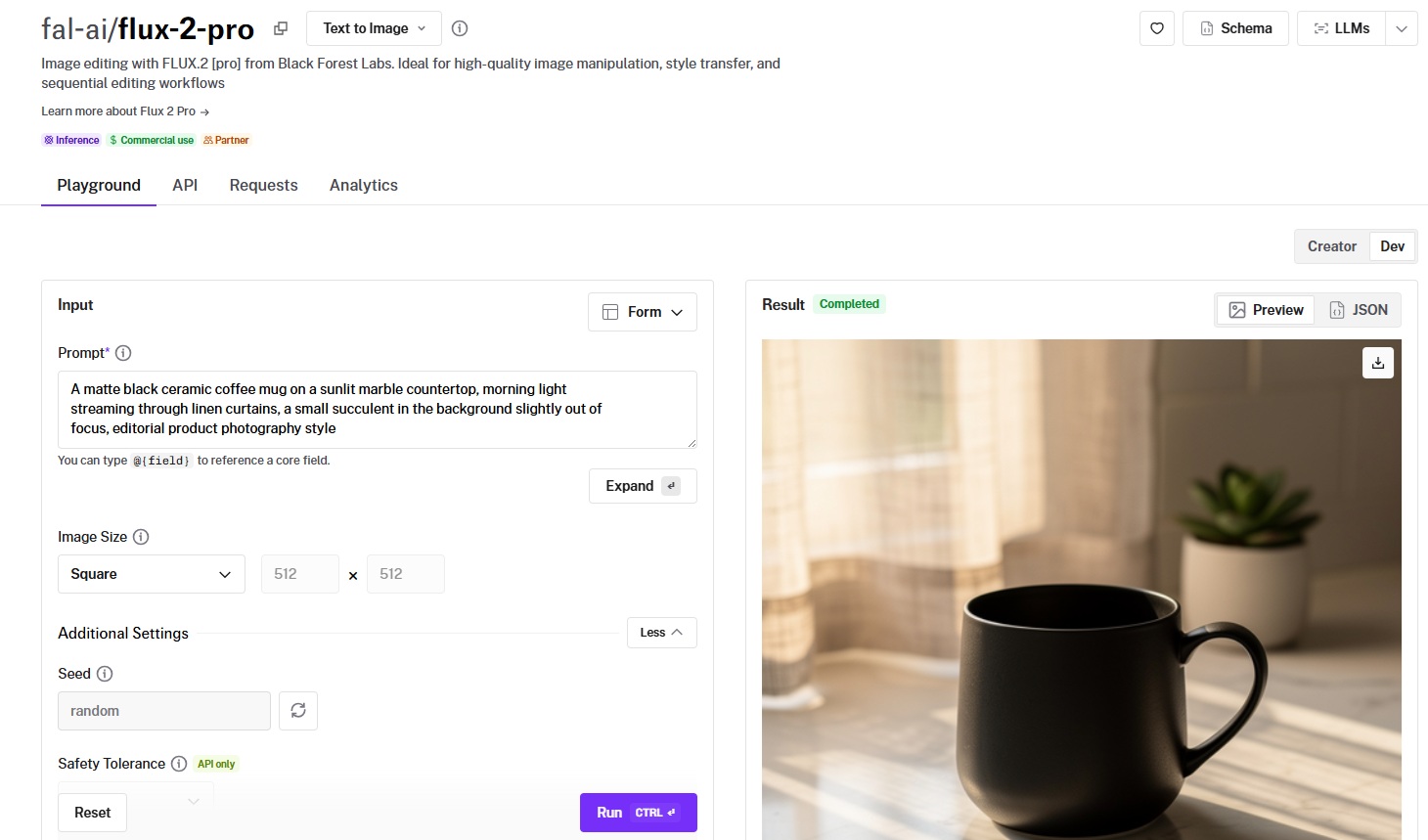
Same integration pattern across all models. If you've already integrated one, switching to any other is a one-line endpoint change.
Here's what the code looks like in JavaScript:
javascript
import { fal } from "@fal-ai/client";
// FLUX.2 [pro]
const fluxResult = await fal.subscribe("fal-ai/flux-2-pro", {
  input: {
    prompt: "A ceramic coffee mug on a marble countertop, morning light",
  },
});
// Qwen Image — same pattern, different endpoint
const qwenResult = await fal.subscribe("fal-ai/qwen-image", {
  input: {
    prompt: "A ceramic coffee mug on a marble countertop, morning light",
  },
});
And in Python:
python
import fal_client
# FLUX.2 [pro]
flux_result = fal_client.subscribe("fal-ai/flux-2-pro", arguments={
    "prompt": "A ceramic coffee mug on a marble countertop, morning light",
})
# Qwen Image — same pattern, different endpoint
qwen_result = fal_client.subscribe("fal-ai/qwen-image", arguments={
    "prompt": "A ceramic coffee mug on a marble countertop, morning light",
})
Both models work with the same API structure on fal.
That means you can build a routing system where text-heavy requests go to Qwen Image and photorealism work goes to FLUX.2 [pro] with nothing but a string swap.
What's more, fal's custom inference engine delivers industry-leading performance with 5-10 second cold starts (vs. 20-60+ seconds on some competitors) and runs FLUX models up to 4x faster than other platforms.
Qwen Image supports LoRA inference, turbo mode, and three acceleration levels (none, regular, high) directly through the same endpoint.
Every model also has a playground at fal, where you can test prompts in your browser before writing any code.
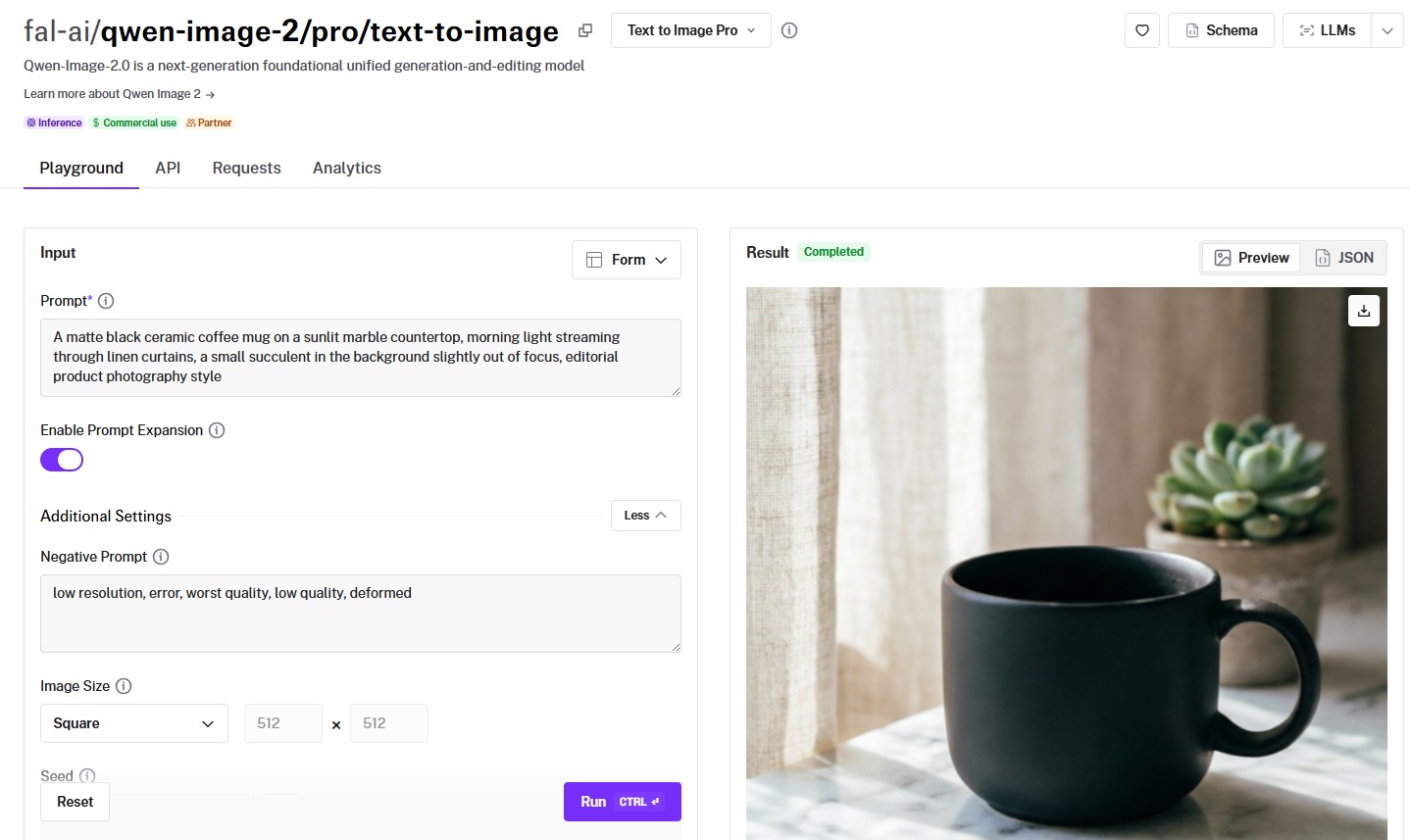
When to Use Which: A Decision Framework
Rather than declaring a winner, here's how I'd think about routing between the two families.
Choose FLUX when
- You need photorealistic output, and the aesthetic matters more than text accuracy.
- You're building production pipelines that benefit from multiple price tiers ($0.003 to $0.08 per image across the family).
- Your workflow depends on LoRA fine-tuning, and you want access to a mature ecosystem with established community tooling.
- You want the fastest possible generation for real-time features like live previews or interactive editors (schnell, flash, Turbo, klein).
- You need in-context editing with strong character consistency across sequential edits (Kontext).
- You want advanced prompting control with JSON-structured prompts, HEX color codes, or @ image referencing.
Choose Qwen Image when
- Your images contain text, and that text needs to be legible and perspective-correct across multiple languages.
- You're generating for multilingual markets and need strong text rendering beyond English.
- Compositional accuracy matters more than photorealistic rendering, and you want the model to follow complex multi-element prompts precisely.
- Your editing workflow involves layer decomposition, element removal, camera angle control, or targeted perspective transformations.
- You want the cheapest LoRA training cost ($2 per 1,000-step run).
- You need maximum text and layout quality for infographics, posters, or comics (Qwen Image 2.0 Pro).
Use both
Use both when you want to route text-heavy and multilingual requests through Qwen Image at $0.02/megapixel while sending photorealism and speed-critical work through FLUX.
Since both families share the same API structure on fal, this routing logic takes minutes to implement.
Recently Added







Run FLUX and Qwen Image on fal
If you want access to both FLUX and Qwen Image through a single API with pay-per-use pricing and no GPU management, fal is the fastest way to get started.
Test any model from either family in the playground or plug into the API in minutes.