![How To Use Kling 4.0: Prompts & Workflows [2026]](https://refinery.fal.media/url/https%3A%2F%2Fv3b.fal.media%2Ffiles%2Fb%2F0ab060df%2FKgRov2McTMsRewA-_yQlP.jpg/tr:w-1920,q-80/KgRov2McTMsRewA-_yQlP.webp)
I'll show you how I use Kling 4.0 on fal for media generation, running four invented brands (a canned tea, a leather tote, a watch and a lounge chair) through all four of its modes.
Every product in the final clips comes from a Nano Banana 2.1 still on fal, which ties the print on a can or the dial on a watch back to one approved image.
TL;DR
- Kling 4.0 is Kling AI's video model for 3 to 30 seconds of 720p or 1080p video with two-channel stereo audio, available today in our playground and in fal Agent.
- Four endpoints cover the work, with API access listed as coming soon:
kling/v4/text-to-video,kling/v4/image-to-video,kling/v4/reference-to-videoandkling/v4/video-to-video/edit. - I keep each product's look in a Kling 4.0 element built from one frontal still and up to three extra angles, since fal's schemas have no system prompt field.
- Reference-to-video takes up to 15 reference assets per request (as many as 7 of them elements), and the edit endpoint can place a product into a clip you already have.
- fal's Kling 4.0 rates are $0.157 per second at 720p and $0.235 at 1080p, or $0.094 and $0.141 when a video input is involved, billed on input plus output seconds and never less than twice the output.
- fal is the best place to run Kling 4.0, since its four modes and the Nano Banana 2.1 stills bill per use from one fal account, with no separate Kling AI or Google account needed.
- fal Agent can chain those runs from a single written brief, and Kling 3.0 is live on fal today for side-by-side tests against Kling 4.0.
Where can you run Kling 4.0 today?
The best place to run Kling 4.0 is on fal.
I'd normally test a single prompt in the playground first, where all four Kling 4.0 modes have their own forms.
You can also use fal Agent to turn a written brief into a plan that names the Kling 4.0 mode for each step, then waits for your approval before anything runs.
The finished clip comes back in the fal Agent chat, ready to download, the same way it does in the playground.
Here's the starting point for the four Kling 4.0 endpoints on fal:
kling/v4/text-to-videoneeds nothing but a prompt, or a list of per-shot prompts.kling/v4/image-to-videobegins from a start image, with an optional end image for the final frame.kling/v4/reference-to-videocombines a prompt with up to 15 reference assets, from photos of a set to elements for a product.kling/v4/video-to-video/editchanges a clip you upload, following a text instruction and any images or elements you add.
If you'd like the release background first, from the 4K and HDR plans to video extension, it's all in our Kling 4.0 explainer.
Kling AI published the showcase clips on our Kling 4.0 model page, and every clip in this guide was generated on fal.
What does each Kling 4.0 endpoint accept?
Each Kling 4.0 endpoint on fal accepts a prompt plus its own set of media, from none at all on text-to-video to a source clip on the edit endpoint.
All four of them produce 3 to 30 seconds of video at 720p or 1080p.
| Endpoint | Starts from | Other inputs | Aspect ratios in the schema | Default length |
|---|---|---|---|---|
kling/v4/text-to-video | prompt or multi_prompt | None | 16:9, 9:16, 1:1, 21:9 | 5 seconds |
kling/v4/image-to-video | start_image_url | end_image_url, multi_prompt | No aspect_ratio field | 5 seconds |
kling/v4/reference-to-video | prompt or multi_prompt | image_urls, video_urls, elements, start_image_url | auto, 16:9, 9:16, 1:1, 21:9 | 5 seconds |
kling/v4/video-to-video/edit | video_url and prompt | image_urls, image-only elements | No aspect_ratio field | Length of the source clip |
These are the Kling 4.0 fields I set most often on ecommerce work:
multi_prompttakes a list of shots with their own prompts and durations, 5 seconds by default, adding them up into one clip.- With all four schemas defaulting to 1080p, it's ideal to start test runs at 720p before switching back for the final render.
- An element is a
frontal_image_urlplus one to threereference_image_urls, or on reference-to-video a singlevideo_urlof 3 to 30 seconds. - On reference-to-video, a
voice_idfrom our Kling create-voice endpoint can be attached to as many as 3 elements, and the same cap of 3 applies to video elements. - Reference videos run 3 to 30 seconds each, though together with any element videos they can't pass 30 seconds in one request.
- On image-to-video, a start image can be up to 30 MB with at least 300 px on every side, and its aspect ratio has to fall between 0.40 and 2.50.
- A source clip for an edit can be up to 300 MB at 23.9 to 60.05 fps, with both sides between 700 and 4553 px.
- The prompt addresses inputs by position, which makes the first entry in
image_urls@Image1 and the second entry inelements@Element2. - Kling AI's release note puts the prompt limit at 8,000 tokens.
To see those defaults in action, I sent kling/v4/text-to-video a prompt with the other fields left alone, and the default run returns 5 seconds of 16:9 video at 1080p for about $1.18.
The pour shot carries no packaging, which keeps it within reach of text-to-video and lets the clip double as B-roll for the MOSSWELL product page.
Prompt (kling/v4/text-to-video, every other field at its default): Slow-motion close-up of pale gold sparkling green tea pouring from above into a tall clear glass of ice with a thin slice of yuzu, on a sunlit white marble counter. Bubbles rise through the tea and cling to the inside of the glass as it fills to the brim. The camera stays locked off at glass height with a shallow depth of field, lit by soft morning light from a window on the left. Sound: the pour and the ice cracking under it, with no music.
Generated using Kling 4.0 Text to Video on fal, an AI model from Kling AI.
Try it in ChatGPT Try it in fal AgentFor a story placement, the next run sets aspect_ratio to 9:16 and resolution to 720p, bringing the same 5 seconds down to about $0.79.
I also reworked the prompt's framing so the pour reads from top to bottom in a vertical frame.
Prompt (kling/v4/text-to-video, 9:16, 720p, duration left at 5 seconds): Slow-motion close-up of pale gold sparkling green tea pouring into a tall clear glass of ice with a thin slice of yuzu, on a sunlit white marble counter. The stream enters from the top edge of the vertical frame and the glass fills the lower half, with bubbles rising and clinging to the inside as it reaches the brim. A locked-off camera at glass height keeps a shallow depth of field in soft morning window light. Sound: the pour and the ice cracking under it, with no music.
Generated using Kling 4.0 Text to Video on fal, an AI model from Kling AI.
Try it in ChatGPT Try it in fal AgentHow do you turn a product into a Kling 4.0 element?
A Kling 4.0 element is a product or character defined by one frontal image plus up to three extra angles, or by one video clip on reference-to-video.
I tend to build mine from a Nano Banana 2.1 still plus one edit of that still for the second angle.
Packaging and markings go into the element, since the Kling 4.0 schemas have no system prompt field to hold brand rules.
With the look stored there, I write the prompt about the action and the camera move.
Text-to-video is the exception, because it accepts no references and the product is whatever the prompt's words describe.
The edit endpoint accepts elements too, though only image-based ones with a frontal image and one to three extra views.
I made the stills for this guide with Nano Banana 2.1 at 2K in a square 1:1 frame, leaving thinking on its medium default.
Front views come from google/nano-banana-2.1, while the second angles come from google/nano-banana-2.1/edit with the front view passed as image 1.
Once a catalogue grows past a handful of products, I'd recommend our Nano Banana 2.1 guide, which walks through both endpoints and the system prompts I use for brand rules.
| Brand | Product | What the element has to hold |
|---|---|---|
| MOSSWELL | Yuzu Green Tea in a 330 ml slim can | Sage green finish and both lines of print |
| BRAEWICK | Leith Tote in tan vegetable-tanned leather | Brass rivets and the debossed wordmark |
| VAUDREL | Rade 38 watch on a brown calfskin strap | Teal sunburst dial and the printed wordmark |
| TORVE | Bue lounge chair | Curved oak frame and cream bouclé |
Before an element goes into an ad, I'd normally give it a 5-second turntable on reference-to-video to check that the print holds as the product turns.
MOSSWELL's Peach Oolong can goes through that routine here, from its first still to the test clip.
Prompt (google/nano-banana-2.1, 1:1, 2K, medium thinking): Front view of one MOSSWELL Peach Oolong can on a pale stone plinth, shot at label height against a soft apricot backdrop. The 330 ml slim aluminium can has a matte dusty peach finish with a cream band around its middle, where "MOSSWELL" is printed in rounded dark green capitals above "PEACH OOLONG" in small spaced letters. A soft key light from the left picks out fine condensation on the upper half of the can. No props, and no words anywhere except on the can.
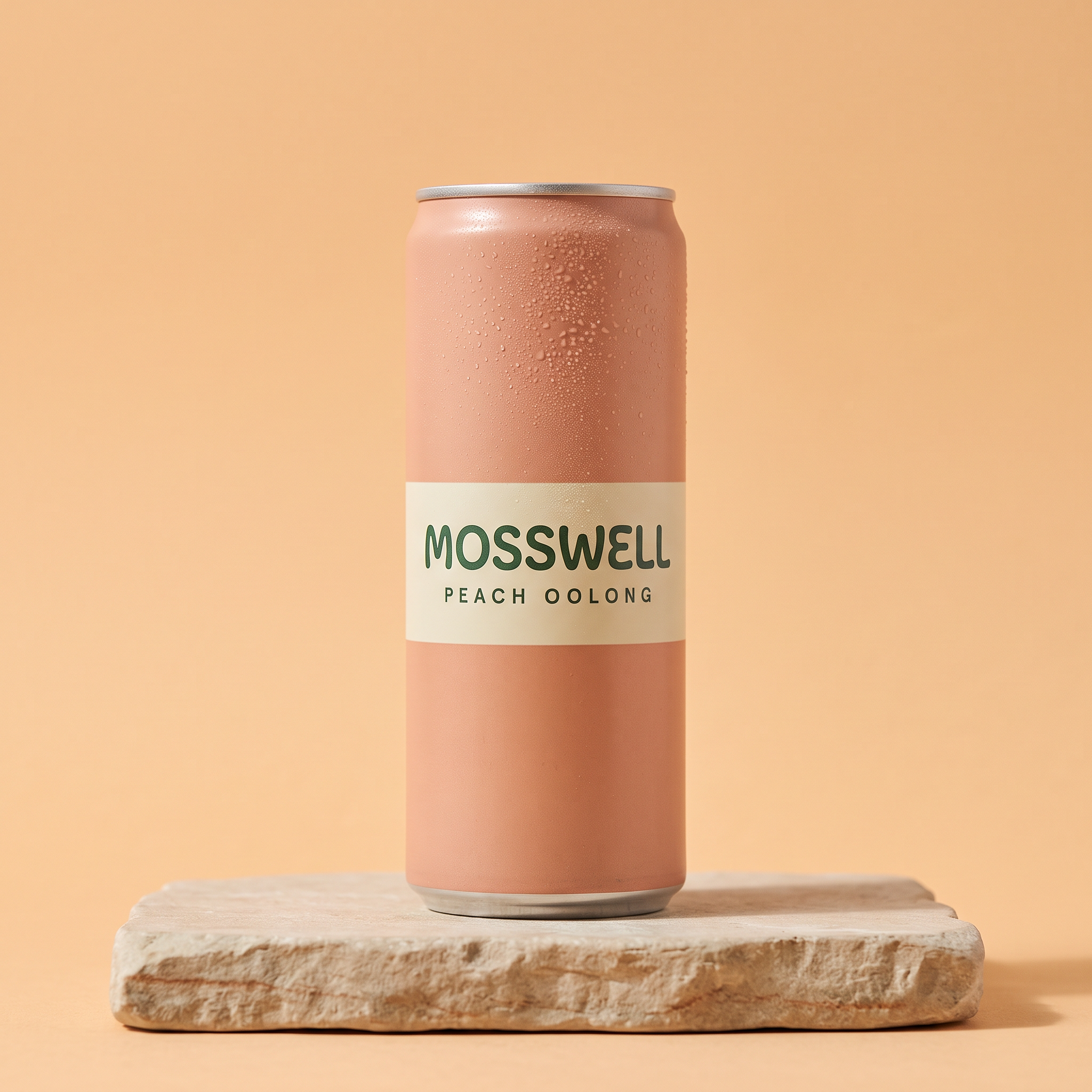
Generated using Nano Banana 2.1 on fal, an AI model from Google.
Prompt (google/nano-banana-2.1/edit, image 1: the Peach Oolong front still, 1:1, 2K, medium thinking): Turn the can from image 1 about 45 degrees to the left for a three-quarter view, with the side seam just visible at the edge. Leave the peach finish and the plinth as image 1 shows them.
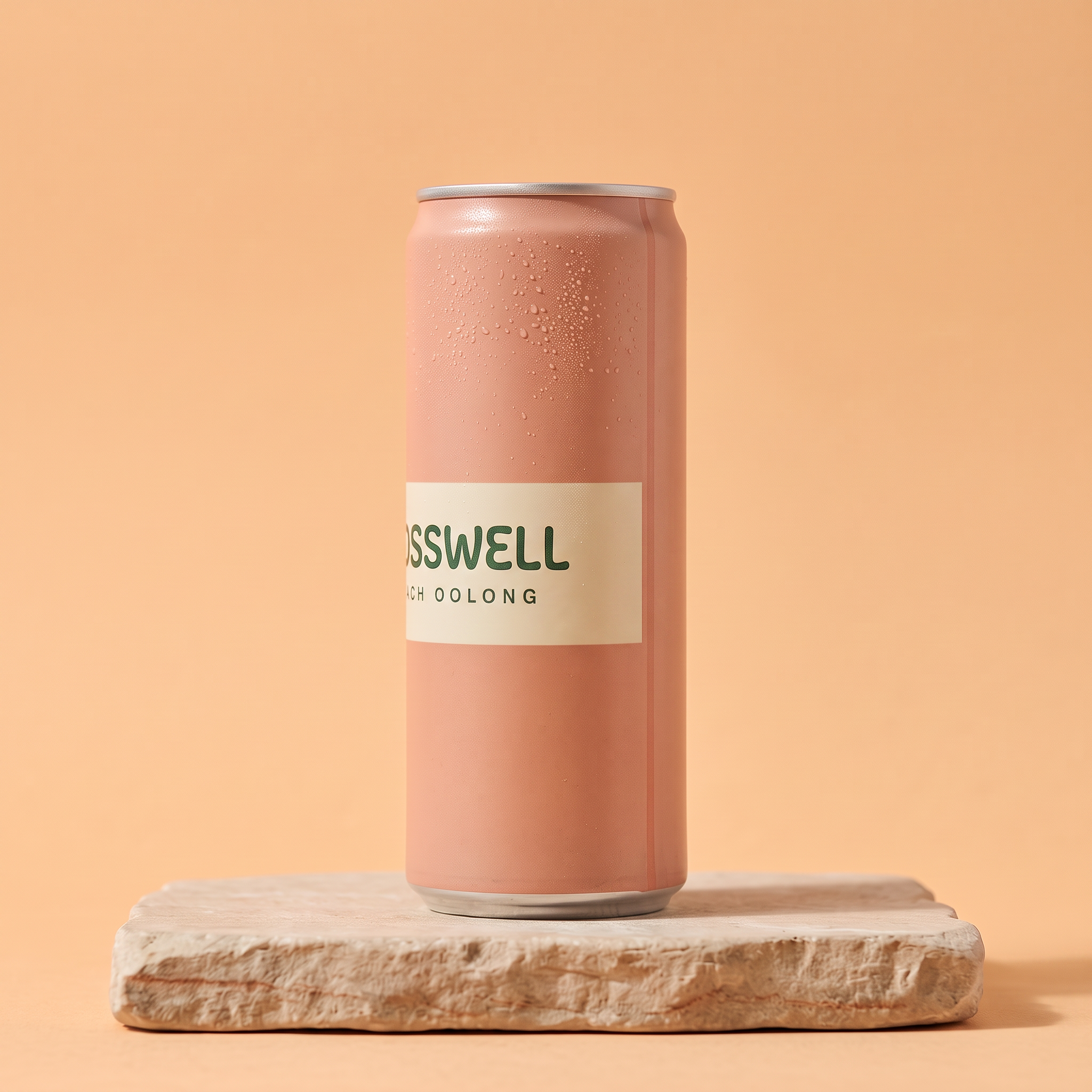
Generated using Nano Banana 2.1 Edit on fal, an AI model from Google.
A 5-second turntable at the 1080p rate costs about $1.18.
Prompt (kling/v4/reference-to-video, 1:1, 1080p, 5 seconds; Element1: frontal image = Peach Oolong front still, reference image = Peach Oolong three-quarter still): @Element1 stands on a slowly rotating pale stone plinth against a soft apricot backdrop, turning one full circle over the clip. The camera stays locked at label height, so the band's print passes the lens once and comes back to the front for the final frame. Even studio light with a soft highlight running down the can. Sound: a faint motor hum from the turntable and nothing else.
Generated using Kling 4.0 Reference to Video on fal, an AI model from Kling AI.
Try it in ChatGPT Try it in fal AgentThe frames I check are the ones where the band's lettering is side-on to the camera, because a misspelled word there would show up in any ad built on this element.
falMODEL APIs
The fastest, cheapest and most reliable way to run genAI models. 1 API, 100s of models
How should you structure a Kling 4.0 product ad prompt?
I structure a Kling 4.0 product ad prompt around two moments: the product's first appearance and the final hold where its pack can be read.
Everything else in the prompt is the action that gets the viewer from one to the other.
From writing a lot of these briefs, I find a tag easiest to track in the sentence where its reference enters the action, such as @Element1 at the moment the can comes into frame.
The two MOSSWELL hook clips and the BRAEWICK commuter speak in a British accent, named right next to the quoted line, and you'll want to choose yours from the English accents Kling AI lists.
In the Kling 4.0 generation prompts below, sound gets its own closing line, because none of the fal schemas has an audio field.
The BRAEWICK end card and the VAUDREL caption give their exact wording in quotes, along with where and when it appears, so I can check the lettering in the output letter by letter.
Here's that structure in an 8-second Peach Oolong ad, built on the element from the turntable test.
At the 1080p rate, those 8 seconds add $1.88 to the MOSSWELL total.
Prompt (kling/v4/reference-to-video, 9:16, 1080p, 8 seconds; Element1: frontal image = Peach Oolong front still, reference image = Peach Oolong three-quarter still): A sunny picnic blanket in a city park, filmed from just above the grass. A hand pulls @Element1 out of a cooler bag and sets it down on the blanket with the label toward the lens, the first thing the viewer sees clearly. Friends' hands pass a plate of sliced peaches across the frame, and someone cracks the can open with a small burst of fizz catching the sun. The camera eases in for the last two seconds and holds on @Element1 upright on the blanket, with "MOSSWELL" and "PEACH OOLONG" sharp and level. Sound: park birdsong and the crack of the tab, with no music.
Generated using Kling 4.0 Reference to Video on fal, an AI model from Kling AI.
Try it in ChatGPT Try it in fal AgentFor more shot vocabulary than four brands can cover, our Kling 4.0 prompting guide pairs each of its 60 official Kling 4.0 clips with a prompt for recreating it.
Testing a UGC hook on Kling 4.0 Text to Video
Kling 4.0 Text to Video can produce a creator-style hook with a spoken line and room sound from a prompt alone, though the can's design then depends entirely on how the prompt describes it.
MOSSWELL is the canned sparkling tea in this set of made-up brands, sold by a small London company.
Before building the Yuzu can's element, I wanted to know whether a mid-afternoon coffee swap would hold a viewer for 12 seconds.
I usually run a hook like this at 720p, where the 12-second test comes to $1.88.
Prompt (kling/v4/text-to-video, 9:16, 720p, 12 seconds): A vertical phone video, propped on a desk, of a man in his mid thirties with a close-cropped beard and a navy overshirt, working at a laptop in a bright co-working space with plants along the window behind him. He reaches off-screen and brings a slim 330 ml can into frame, matte sage green with a cream band around its middle, printed with "MOSSWELL" in rounded dark green capitals and "YUZU GREEN TEA" in small spaced letters. He cracks the tab right next to the phone's microphone and drinks. Then he turns to the lens and says in a dry British accent, "Three o'clock coffee is cancelled, and I've replaced it with this." For the last two seconds he holds the can up beside his face with the label square to the camera. Sound: the hiss of the tab and low office chatter, with no music.
Generated using Kling 4.0 Text to Video on fal, an AI model from Kling AI.
Try it in ChatGPT Try it in fal AgentI judge this pass on pacing and delivery alone, since text-to-video has no reference for the can and its print can drift from the real MOSSWELL design.
Reference to Video with the real MOSSWELL can
Once the MOSSWELL hook works, it goes back into Kling 4.0 Reference to Video as @Video1 for its timing and camera, while the can joins it as @Element1 with the actual print.
The element needs a front still from text-to-image and a three-quarter still edited from it.
Prompt (google/nano-banana-2.1, 1:1, 2K, medium thinking): A studio product photograph of a single MOSSWELL Yuzu Green Tea can standing upright on a pale stone plinth against a warm cream backdrop, front view at label height. The can is a 330 ml slim aluminium can with a matte sage green finish and a cream band around its middle. On the band, "MOSSWELL" is printed in rounded dark green capitals, with "YUZU GREEN TEA" in small spaced letters underneath. Fine condensation beads cover the upper half of the can, and a soft key light from the left leaves a gentle shadow on the plinth. Nothing else in frame and no lettering beyond the can's print.
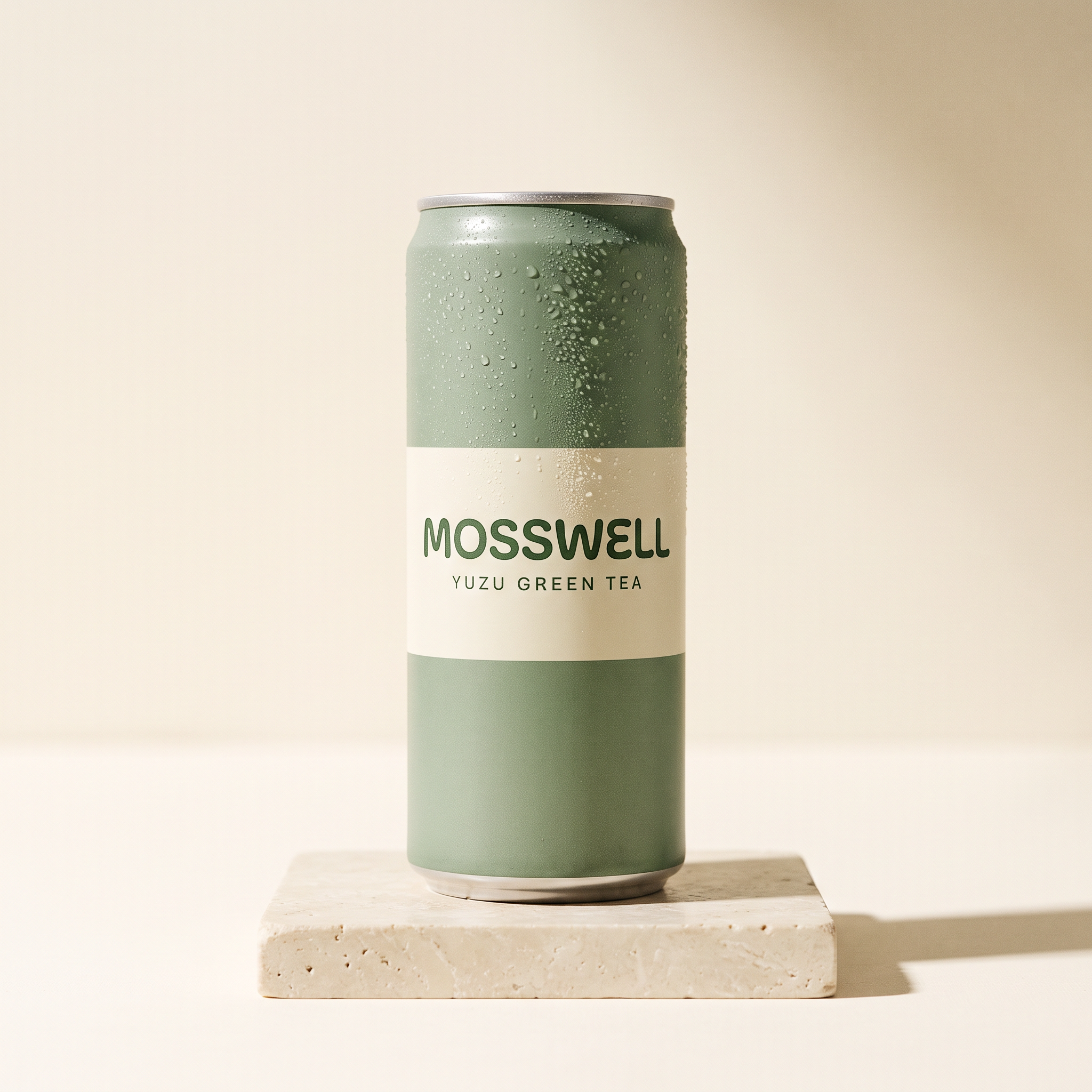
Generated using Nano Banana 2.1 on fal, an AI model from Google.
Prompt (google/nano-banana-2.1/edit, image 1: the MOSSWELL front still, 1:1, 2K, medium thinking): Rotate the can from image 1 by 45 degrees to the right for a three-quarter view, so the band's print wraps around the curve and the side seam shows. Leave the finish and condensation as image 1 has them.
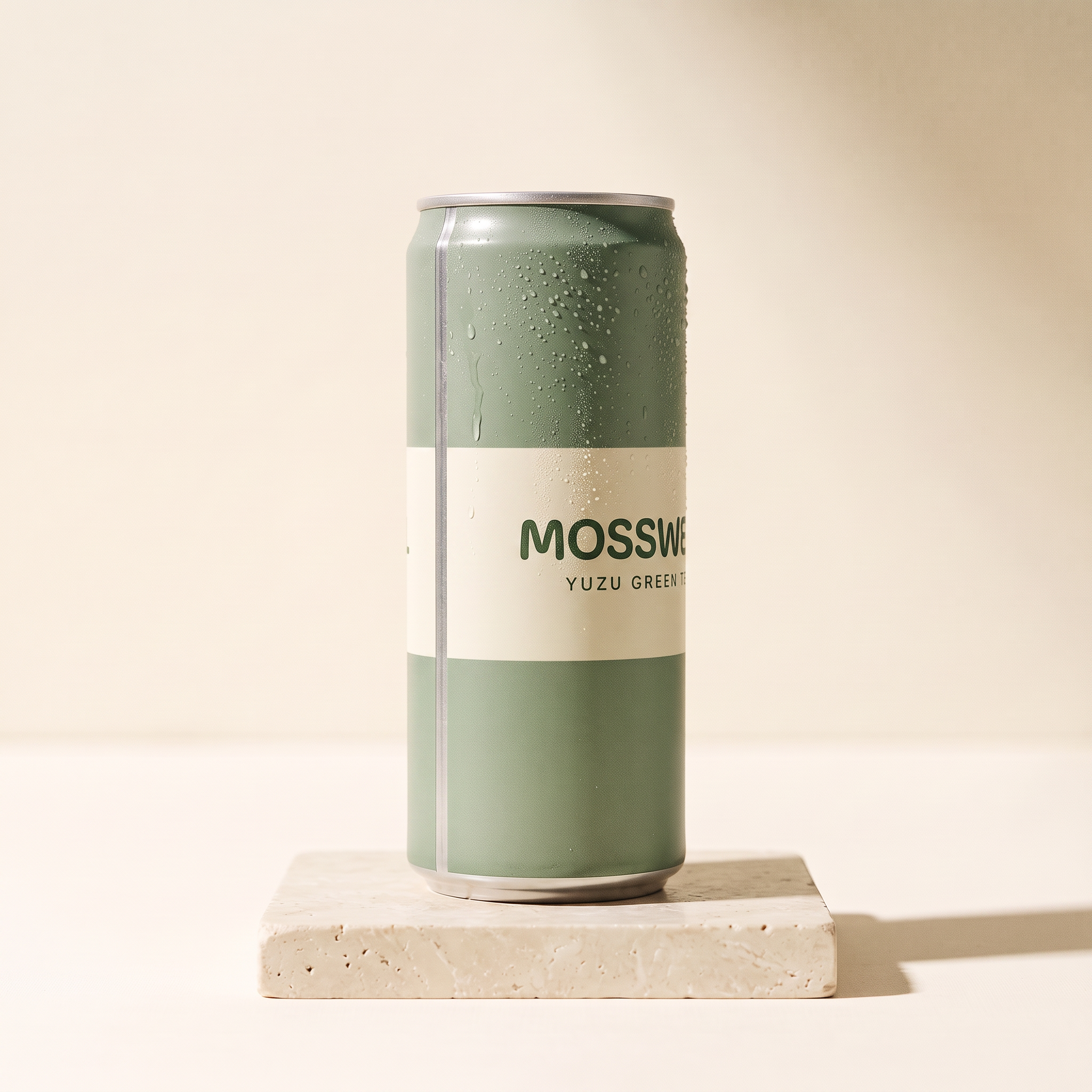
Generated using Nano Banana 2.1 Edit on fal, an AI model from Google.
With a 12-second @Video1 and a 12-second output at 1080p, this run bills 24 seconds at $0.141 for a total of $3.38.
A video input bills at least twice the output length, so a shorter @Video1 wouldn't have lowered the price of this run.
Prompt (kling/v4/reference-to-video, 9:16, 1080p, 12 seconds; Video1: the 720p hook; Element1: frontal image = MOSSWELL front still, reference image = MOSSWELL three-quarter still): Recreate @Video1 shot for shot, following its desk-level framing and the timing of the man's line. The can he holds is @Element1, and its print matches the element in every frame, cream band included. The man and the co-working space look as they do in @Video1, and he says the same line in the same dry British accent: "Three o'clock coffee is cancelled, and I've replaced it with this." Hold the final two seconds on @Element1 beside his face, with the MOSSWELL wordmark level and fully readable. Sound: the hiss of the tab and low office chatter, with no music.
Generated using Kling 4.0 Reference to Video on fal, an AI model from Kling AI.
Try it in ChatGPT Try it in fal AgentNote: Kling AI says a video input guides motion and pacing without listing identity among its jobs, so I'd check the man's face in this render against the 720p test before approving it.
BRAEWICK's how-it's-made clip from two frames
The BRAEWICK craft clip runs on Kling 4.0 Image to Video from two stills that share a camera position, one with the tote's cut leather parts and one with the finished bag.
I made BRAEWICK up as an Edinburgh workshop that sells its Leith Tote on how it's made.
I built the four BRAEWICK stills as a chain, with every edit starting from an earlier still, to keep the tote's leather and rivets identical from the first image to the last.
Prompt (google/nano-banana-2.1, 1:1, 2K, medium thinking): A catalogue packshot of the BRAEWICK Leith Tote from the front, standing on a warm off-white paper sweep. The tote is vegetable-tanned leather in a mid tan with dark brown painted edges and an open top closed by one brass magnetic snap. Two flat shoulder straps are fixed to the body with four brass rivets, and "BRAEWICK" is blind-debossed in small capitals in the lower right corner of the front panel. Soft diffused light comes from the left, with a gentle contact shadow under the base. No props, and no text other than the deboss.
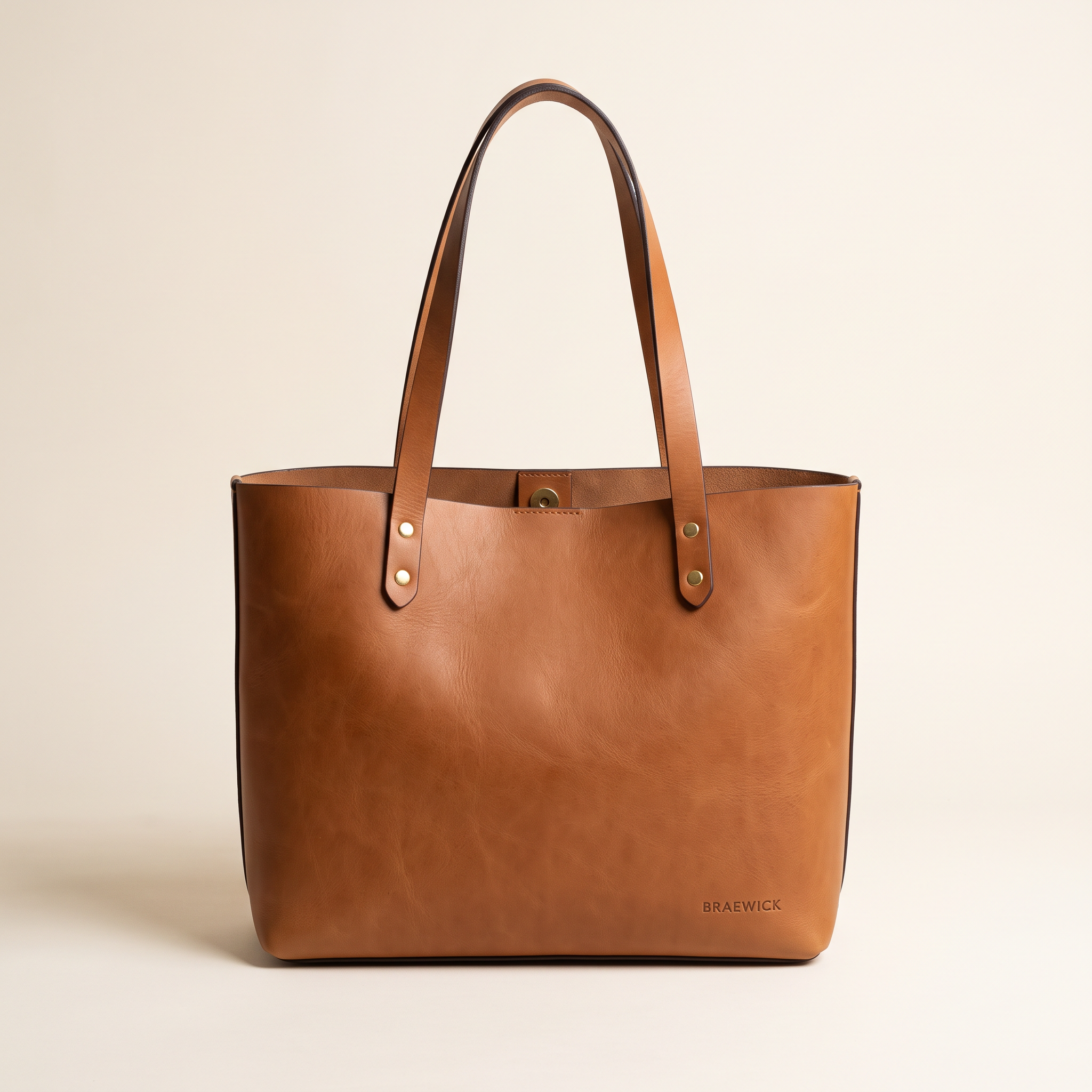
Generated using Nano Banana 2.1 on fal, an AI model from Google.
Prompt (google/nano-banana-2.1/edit, image 1: the BRAEWICK front still, 1:1, 2K, medium thinking): Turn the tote from image 1 to a three-quarter view from its left side, revealing the depth of the gusset and the stitching along the side seam. The leather colour and the debossed wordmark are unchanged from image 1, and the paper sweep and lighting stay as they were.
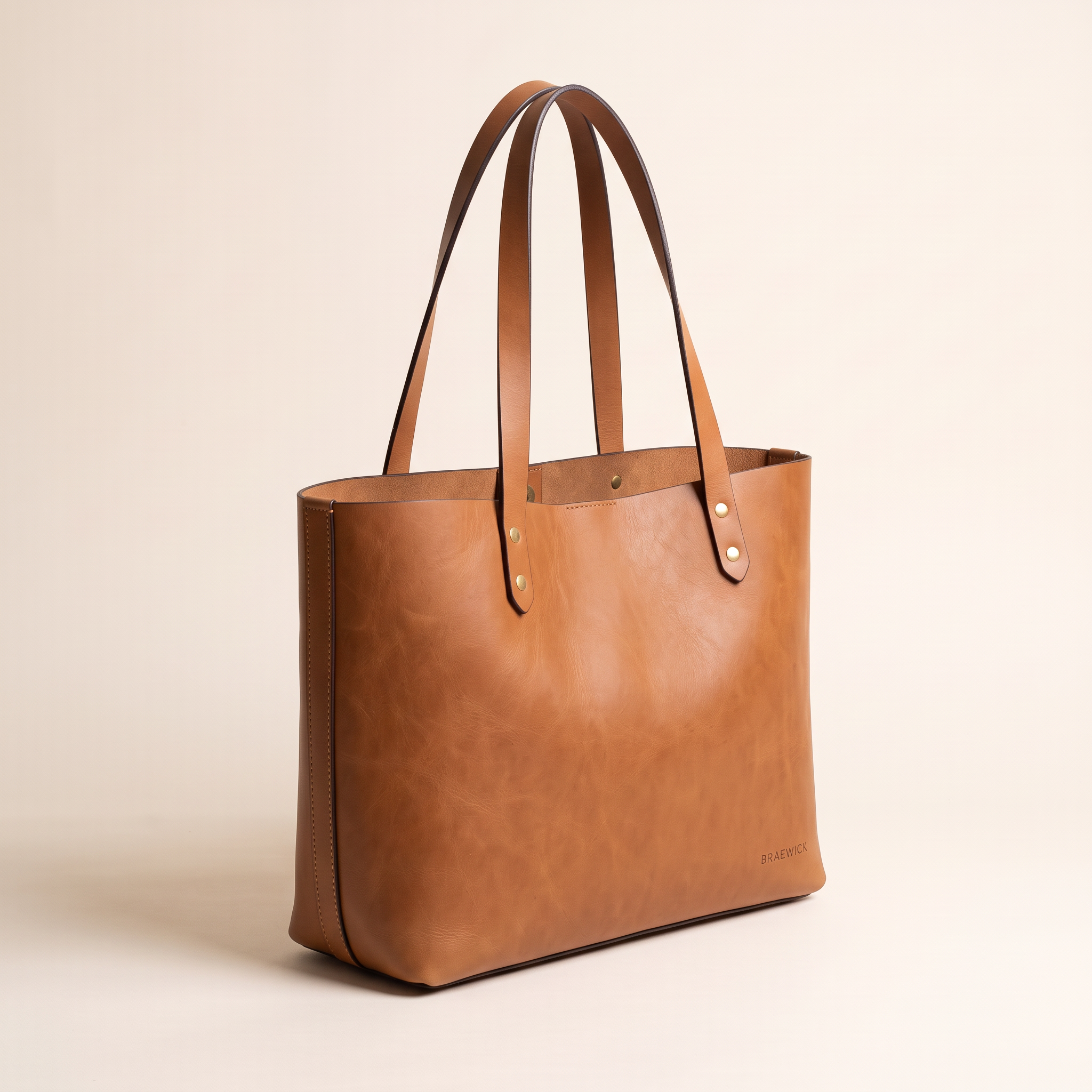
Generated using Nano Banana 2.1 Edit on fal, an AI model from Google.
Prompt (google/nano-banana-2.1/edit, image 1: the BRAEWICK front still, 1:1, 2K, medium thinking): Place the tote from image 1 on a scarred oak workbench in a small leather workshop, standing upright with its magnetic snap closed. A spool of waxed thread and a small pot of edge paint stand on the bench to its right. Low morning light comes through a tall window on the right of the frame. The tote is identical to image 1 in every detail.
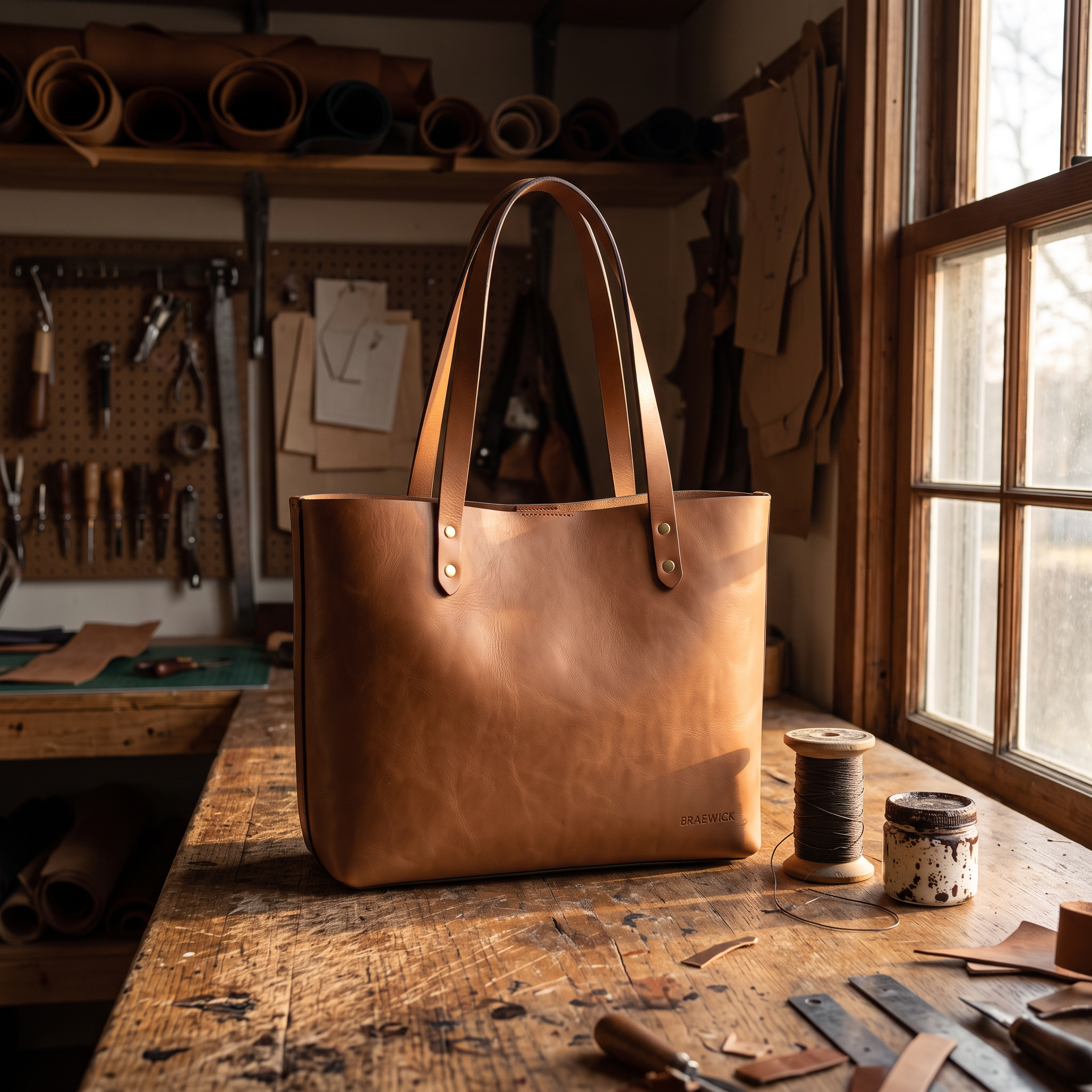
Generated using Nano Banana 2.1 Edit on fal, an AI model from Google.
Prompt (google/nano-banana-2.1/edit, image 1: the workbench still, 1:1, 2K, medium thinking): Replace the finished tote in image 1 with its unassembled parts, laid flat on the same workbench and seen from exactly the same camera position. Every cut panel and both shoulder straps are in the same tan leather, with four brass rivets and the magnetic snap in a small dish beside them. The thread spool and the paint pot keep their places in the morning window light.
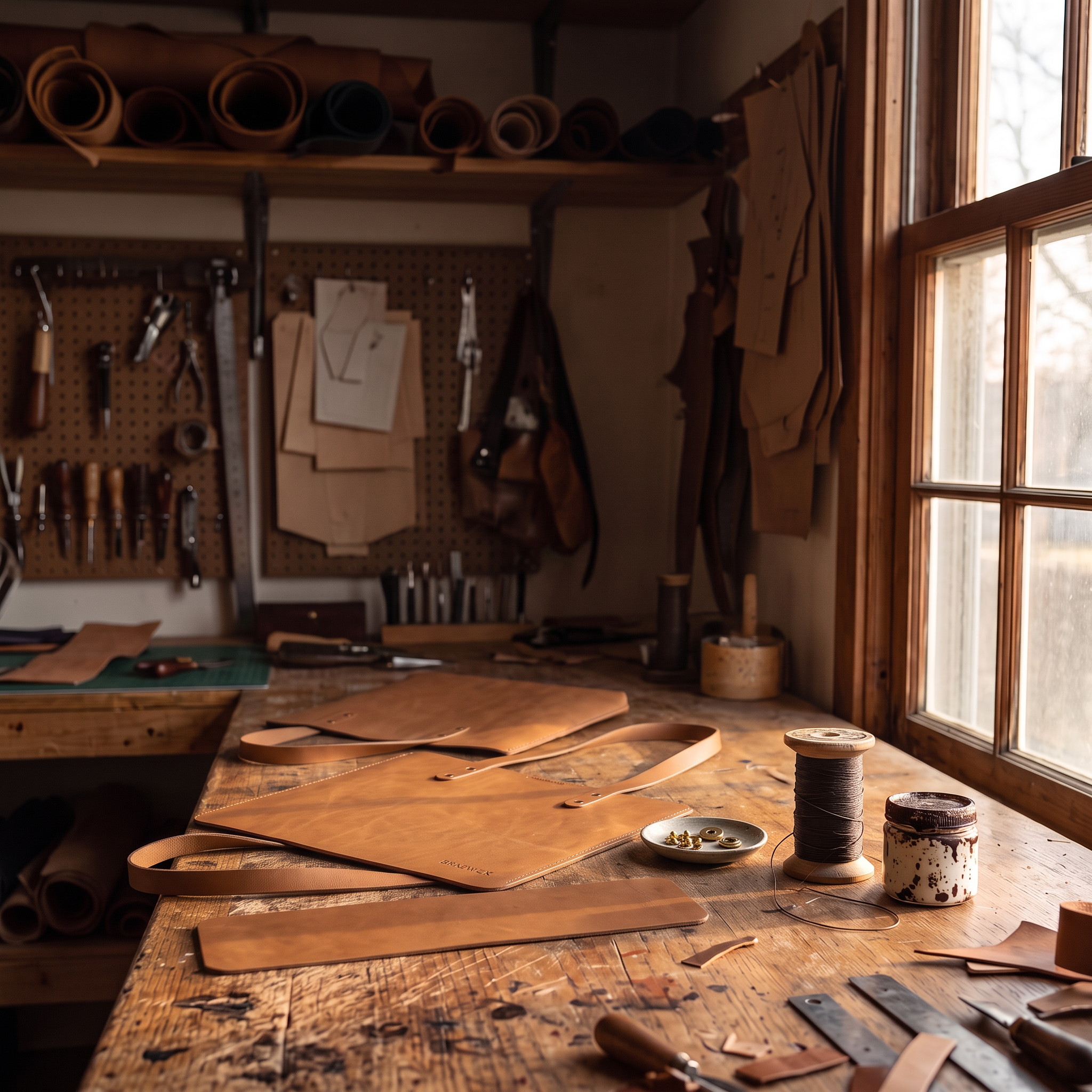
Generated using Nano Banana 2.1 Edit on fal, an AI model from Google.
Ten seconds of 1080p video put the craft clip at $2.35.
Because the image-to-video schema has no aspect_ratio field, I made both frames square for the product page's 1:1 gallery slot.
fal's schema doesn't say how a square start frame carries over to the output, so I'd check the shape of the first render before batching more.
Prompt (kling/v4/image-to-video, start image: the cut parts still, end image: the workbench still, 1080p, 10 seconds): A locked-off shot at bench height opens on the flat tan leather parts of the BRAEWICK tote laid out on the oak workbench. In a fast time-lapse, a craftsperson's hands stitch the side seams with waxed thread and set the four brass rivets with a hand press. The panels rise into the finished tote standing upright, and the clip settles on the composition of the end frame for its last two seconds. Sound: the tap of the rivet press and the pull of thread through leather.
Generated using Kling 4.0 Image to Video on fal, an AI model from Kling AI.
Try it in ChatGPT Try it in fal AgentFour shots of a BRAEWICK commuter in one generation
Kling 4.0 Reference to Video can split one generation into shots through multi_prompt, with a prompt and duration per shot, while two elements give the creator and the tote a fixed reference across the cuts.
For BRAEWICK's paid social, I wanted a commuter carrying the Leith Tote across four short shots, ending on a card with the brand line.
The creator is invented as well, built the same way as the products from a front still and a profile edit.
If the same creator will front a whole campaign, our AI character consistency guide goes further on reference sheets.
Prompt (google/nano-banana-2.1, 1:1, 2K, medium thinking): A casting photograph of a woman in her early thirties with shoulder-length auburn hair and light freckles, standing against a pale grey studio backdrop, full length and facing the camera. She wears a camel wool coat over a grey roll-neck with dark straight-leg jeans. Even soft light and a neutral expression, with empty hands and nothing written anywhere.
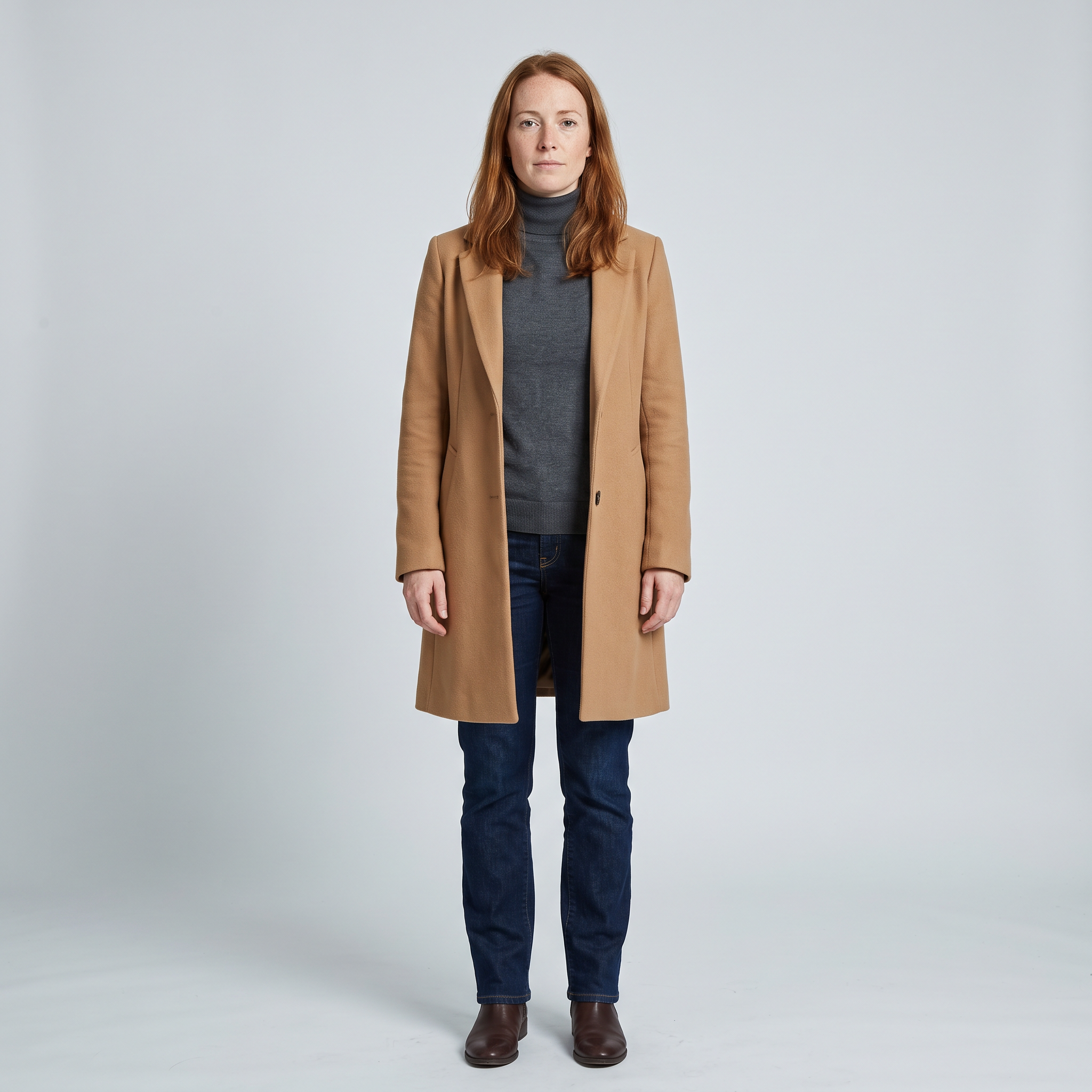
Generated using Nano Banana 2.1 on fal, an AI model from Google.
Prompt (google/nano-banana-2.1/edit, image 1: the creator still, 1:1, 2K, medium thinking): Photograph the woman from image 1 again in profile from her right side, full length, against the same pale grey backdrop. Her face and outfit stay exactly as image 1 shows them.
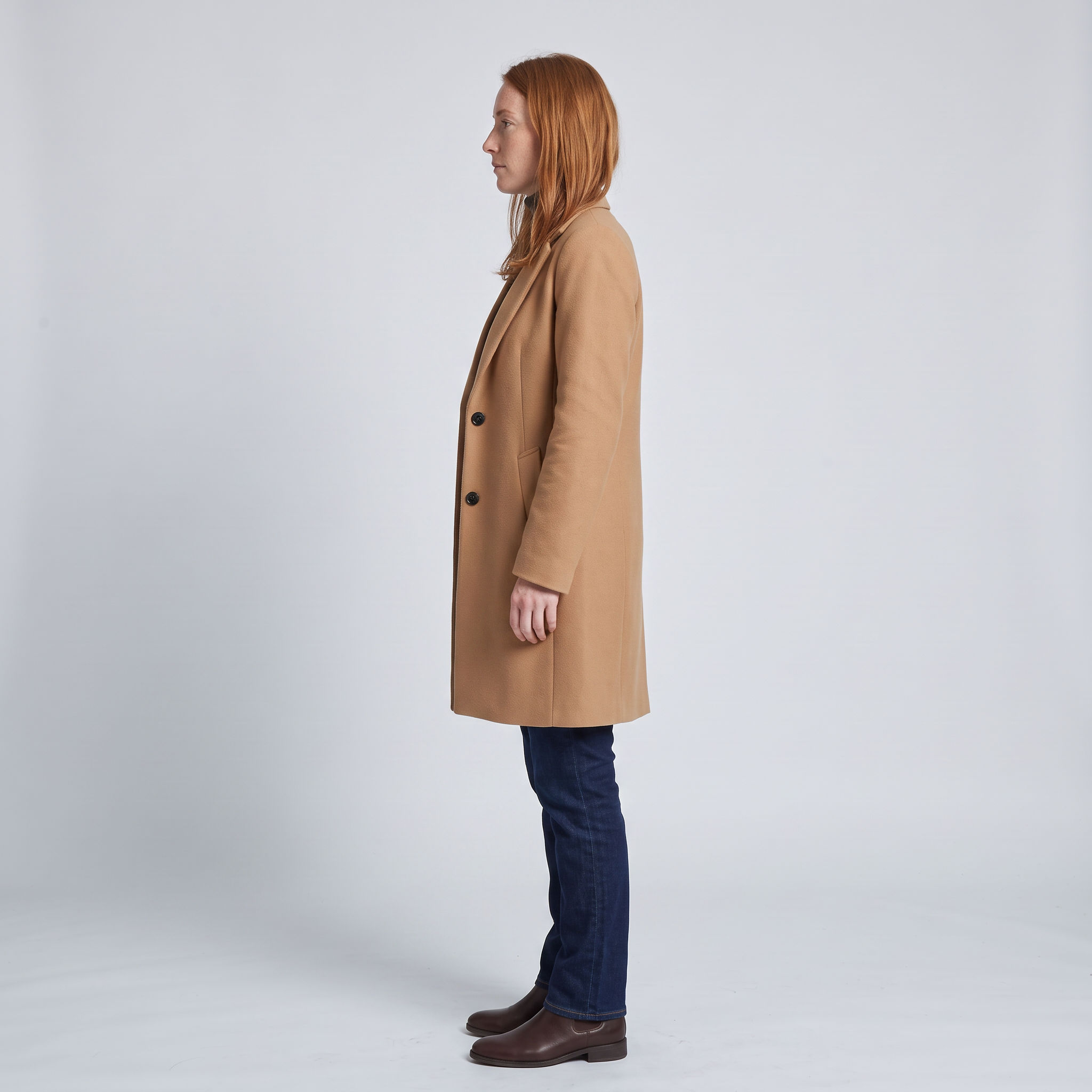
Generated using Nano Banana 2.1 Edit on fal, an AI model from Google.
In this request, Element1 is the tote with its front and three-quarter stills.
Element2 is the creator, using her front view as the frontal image and the profile as the extra angle.
A brand voice can go on Element2 as a voice_id from our Kling create-voice endpoint, though I left it out here and described the delivery in the prompt.
Sixteen seconds across the four shots comes to $3.76 at the 1080p rate.
Multi-shot prompts (kling/v4/reference-to-video, 16:9, 1080p; Element1: BRAEWICK tote; Element2: the creator):
Shot 1 (4 seconds): Morning on a busy Edinburgh railway platform. @Element2 walks toward the camera along the platform edge with @Element1 on her right shoulder, its front panel and debossed wordmark facing the lens. Handheld tracking shot, backing away at her walking pace, with the station roof soft in the background.
Shot 2 (4 seconds): Inside a quiet train carriage, @Element2 takes a window seat and lifts a grey laptop sleeve out of @Element1, setting the open tote on the seat beside her. Close medium shot from the aisle, with soft daylight moving across her face as the train pulls away.
Shot 3 (5 seconds): @Element2 turns to the camera with @Element1 held up by both straps and says in a relaxed British accent, "It takes my laptop and my lunch, and the strap never digs in." Medium close-up on a steady camera, with the passing countryside blurred in the window behind her.
Shot 4 (3 seconds): End card, with @Element1 resting alone on the empty seat with its front panel to camera while the line "BRAEWICK. Made in Edinburgh." appears in small cream capitals across the lower third. Locked-off shot in soft window light. Sound: the train fading out under a single piano note.
Generated using Kling 4.0 Reference to Video on fal, an AI model from Kling AI.
Try it in ChatGPT Try it in fal AgentAn ultrawide 21:9 hero for the VAUDREL homepage
For an ultrawide homepage hero, I'd recommend Kling 4.0 Reference to Video at 21:9, with the watch as an element and a prompt that leaves a clear area for site copy.
VAUDREL is the Geneva watchmaker among my four brands, launching its Rade 38 with a 10-second loop across the top of the homepage.
Text-to-video lists 21:9 too, though without references the dial would come from words alone.
Prompt (google/nano-banana-2.1, 1:1, 2K, medium thinking): A flat-lay product photograph of the VAUDREL Rade 38 wristwatch on dark grey slate, with the dial facing up toward the camera. The 38 mm polished steel case frames a deep teal sunburst dial with applied silver baton indices and a small date window at six o'clock. "VAUDREL" is printed in thin silver capitals below twelve o'clock, and the watch is on a dark brown calfskin strap with cream stitching. Soft overhead light with one long highlight across the crystal. No lettering anywhere except the dial.
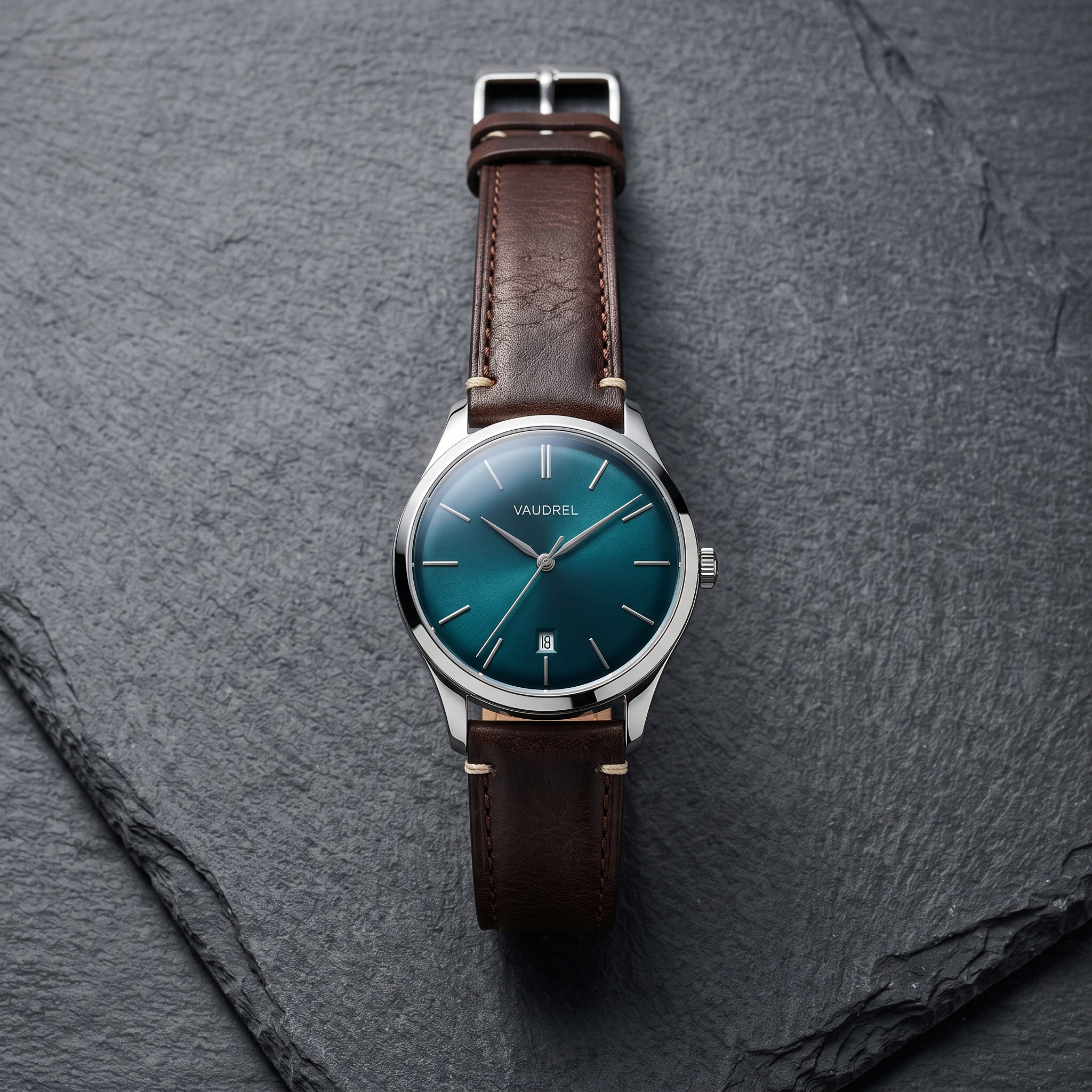
Generated using Nano Banana 2.1 on fal, an AI model from Google.
Prompt (google/nano-banana-2.1/edit, image 1: the VAUDREL front still, 1:1, 2K, medium thinking): Show the watch from image 1 from the crown side, raised slightly so the case profile and the signed crown are both visible. Nothing about the dial or strap changes from image 1.
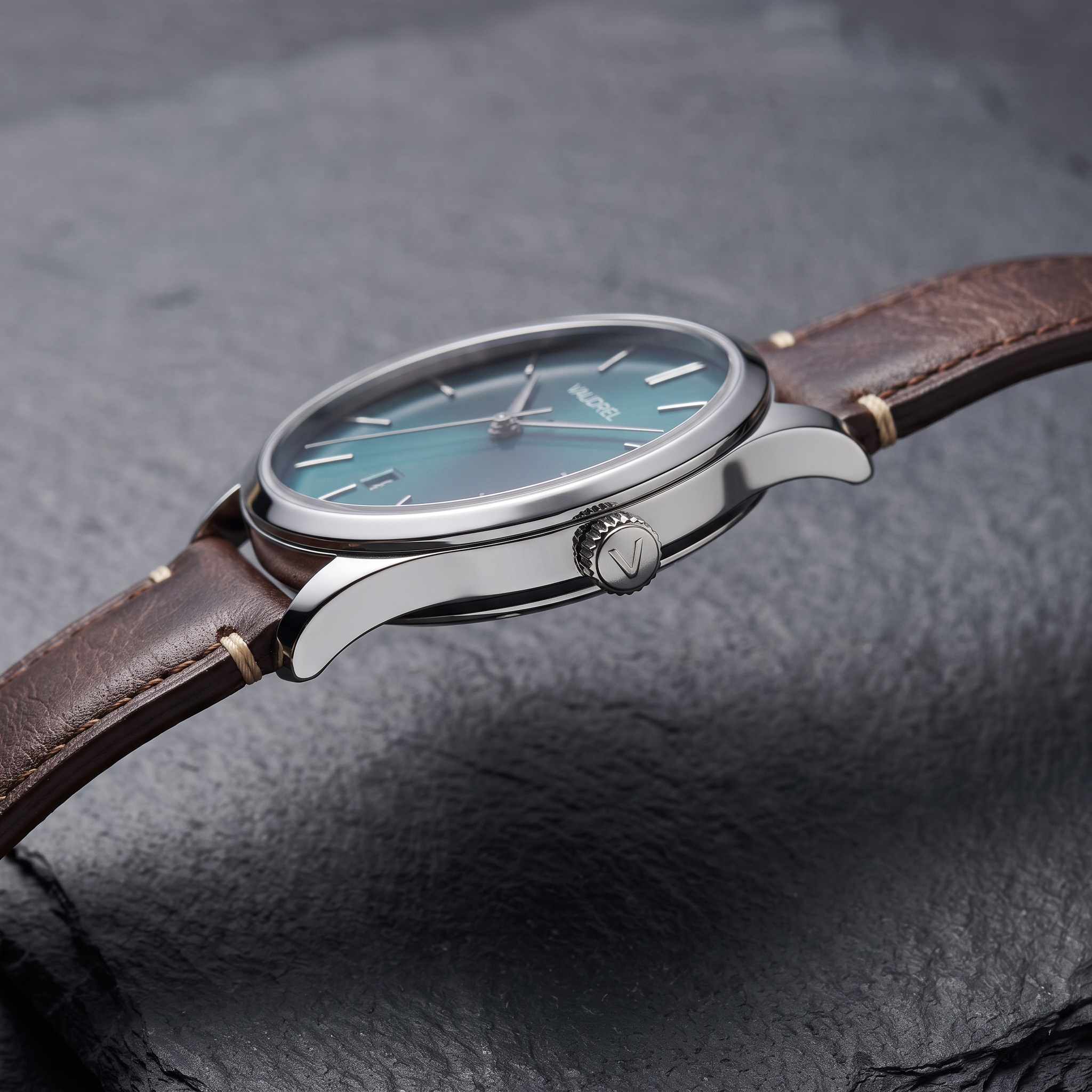
Generated using Nano Banana 2.1 Edit on fal, an AI model from Google.
At $0.235 a second, the 10-second 1080p hero comes to $2.35.
Prompt (kling/v4/reference-to-video, 21:9, 1080p, 10 seconds; Element1: frontal image = VAUDREL front still, reference image = VAUDREL side still): An ultrawide homepage film for VAUDREL. @Element1 lies on a wet slab of dark slate at the edge of Lake Geneva at dusk, with the water and the lights of the far shore soft and out of focus across the frame. The camera tracks slowly from left to right at dial height while a small wave reaches the slate and pulls back without touching the watch. As the camera passes, the sunburst dial catches the last light and brightens from deep teal to a lighter teal. The shot ends with @Element1 in the right third of the frame and open water filling the left two thirds, ready for site copy. Sound: small waves against stone and a faint breeze, without music.
Generated using Kling 4.0 Reference to Video on fal, an AI model from Kling AI.
Try it in ChatGPT Try it in fal AgentJapanese dialogue and captions for the VAUDREL Tokyo launch
Japanese is on Kling AI's list of languages Kling 4.0 can speak and render as text, so one prompt can carry both a spoken line and a caption for the Tokyo launch.
For the VAUDREL Tokyo version I added a boutique associate as a second element, built from a portrait and a profile.
A Japanese reader should hear the clip as well as read the caption before launch, since a mispronounced word won't show up when you scrub through frames.
The spoken line means "The dial is the colour of Lake Léman at dusk," and the caption reads "Tokyo limited model."
If the market team changes the line after approval, our lip sync guide shows how to put new audio on a finished clip.
Prompt (google/nano-banana-2.1, 1:1, 2K, medium thinking): A portrait photograph of a Japanese man in his mid forties with short greying hair and thin rimless glasses, facing the camera from the waist up against a warm grey backdrop. He wears a charcoal suit with a dark green knit tie and has a calm, attentive expression. Lit with soft even light against an empty backdrop, with no text anywhere.

Generated using Nano Banana 2.1 on fal, an AI model from Google.
Prompt (google/nano-banana-2.1/edit, image 1: the associate portrait, 1:1, 2K, medium thinking): Reframe the man from image 1 in profile from his left side, waist up, against the same warm grey backdrop. His face and suit are unchanged from image 1.

Generated using Nano Banana 2.1 Edit on fal, an AI model from Google.
The Tokyo cut runs 15 seconds at 1080p, about $3.53 at our rate.
Prompt (kling/v4/reference-to-video, 9:16, 1080p, 15 seconds; Element1: VAUDREL watch; Element2: the associate): A vertical launch video for VAUDREL in a quiet Ginza watch boutique with walnut counters and warm spotlights. @Element2 stands behind the counter and lifts @Element1 from a navy display tray, turning the dial toward the camera. He says in Japanese, calm and precise, "文字盤は、レマン湖の夕暮れの色です。" The camera starts in a medium shot and pushes in slowly until the watch in his hands fills the lower half of the frame. Across the top of the frame, "東京限定モデル" appears in thin white Japanese serif lettering two seconds in and stays legible until the last frame. Sound: soft boutique room tone and the click of the tray, no score.
Generated using Kling 4.0 Reference to Video on fal, an AI model from Kling AI.
Try it in ChatGPT Try it in fal AgentSwapping the TORVE chair into an existing room film
Kling 4.0 Video Editing takes a source clip of 3 to 30 seconds as @Video1, plus an image element for the new product.
The prompt then tells the model which object leaves the frame and which one takes its place.
TORVE stands in for a furniture brand with an existing room film, which I generated here with Kling 4.0 Text to Video so the whole chain runs on fal.
I ran the three TORVE steps through fal Agent with the chair and fabric stills attached.
Based on my experience, pasting the prompts inline as text keeps every word of them visible in the brief before fal Agent plans the run.
Brief (fal Agent):
Please run the three Kling 4.0 steps below in order, using each prompt word for word. Step 1 is kling/v4/text-to-video at 16:9 and 1080p for 10 seconds with prompt A. Step 2 is kling/v4/video-to-video/edit on the step 1 video at 1080p, with the two attached chair stills as Element1 (front still as the frontal image) and prompt B. Step 3 runs the same edit endpoint on the step 2 video at 1080p, with the attached swatch still as Image1 and prompt C. Once step 3 finishes, show me all three videos without running anything else.
Prompt A (kling/v4/text-to-video, 16:9, 1080p, 10 seconds): A slow, steady push-in across a bright Copenhagen living room with whitewashed oak floors and a tall window onto bare winter trees. A simple grey fabric armchair with square arms stands at an angle beside a low oak side table holding a ceramic lamp and a short stack of books. Late morning light falls across the floor from the window on the left, and sheer curtains stir slightly. The camera starts wide from the doorway and ends in a medium shot framing the armchair and the side table. Sound: quiet room tone and faint traffic from the street below, music left out.
Generated using Kling 4.0 Text to Video on fal, an AI model from Kling AI.
Try it in ChatGPT Try it in fal AgentPrompt A comes to $2.35 for its 10 seconds at 1080p.
The chair then needed its two stills before the swap could run.
Prompt (google/nano-banana-2.1, 1:1, 2K, medium thinking): A front-on studio shot of the TORVE Bue lounge chair on a light grey paper backdrop. The chair has a low seat and a continuous curved frame in solid white-oiled oak that forms both armrests in one arc. The seat and back are upholstered in cream bouclé with a single horizontal seam across the backrest. Soft daylight from the upper left leaves a faint shadow under the chair. No other objects and no text.
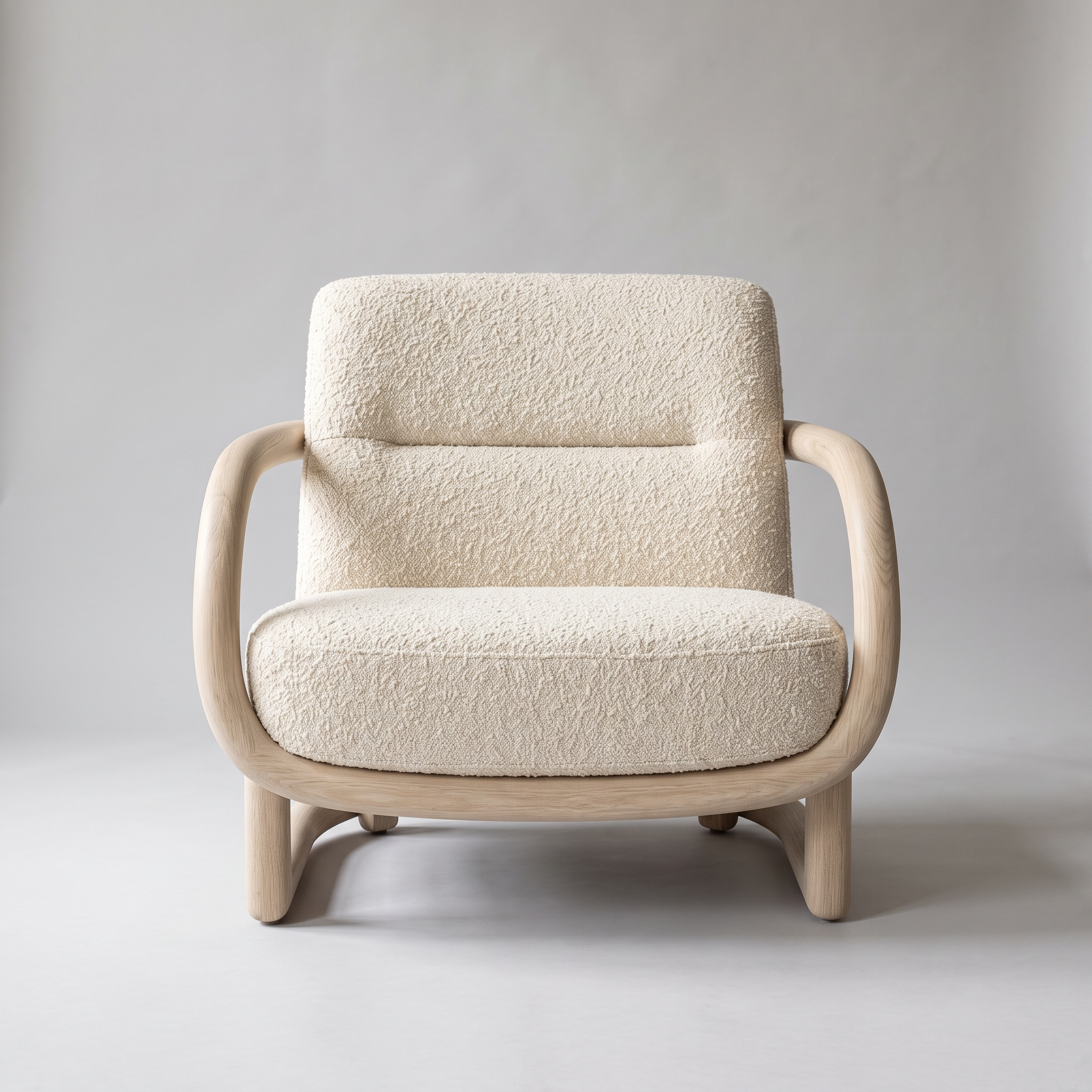
Generated using Nano Banana 2.1 on fal, an AI model from Google.
Prompt (google/nano-banana-2.1/edit, image 1: the TORVE front still, 1:1, 2K, medium thinking): Move the camera to the right side of the chair from image 1, at seat height, so the curve of the oak frame and the depth of the seat cushion are both clear. The oak finish and the cream bouclé stay identical to image 1.
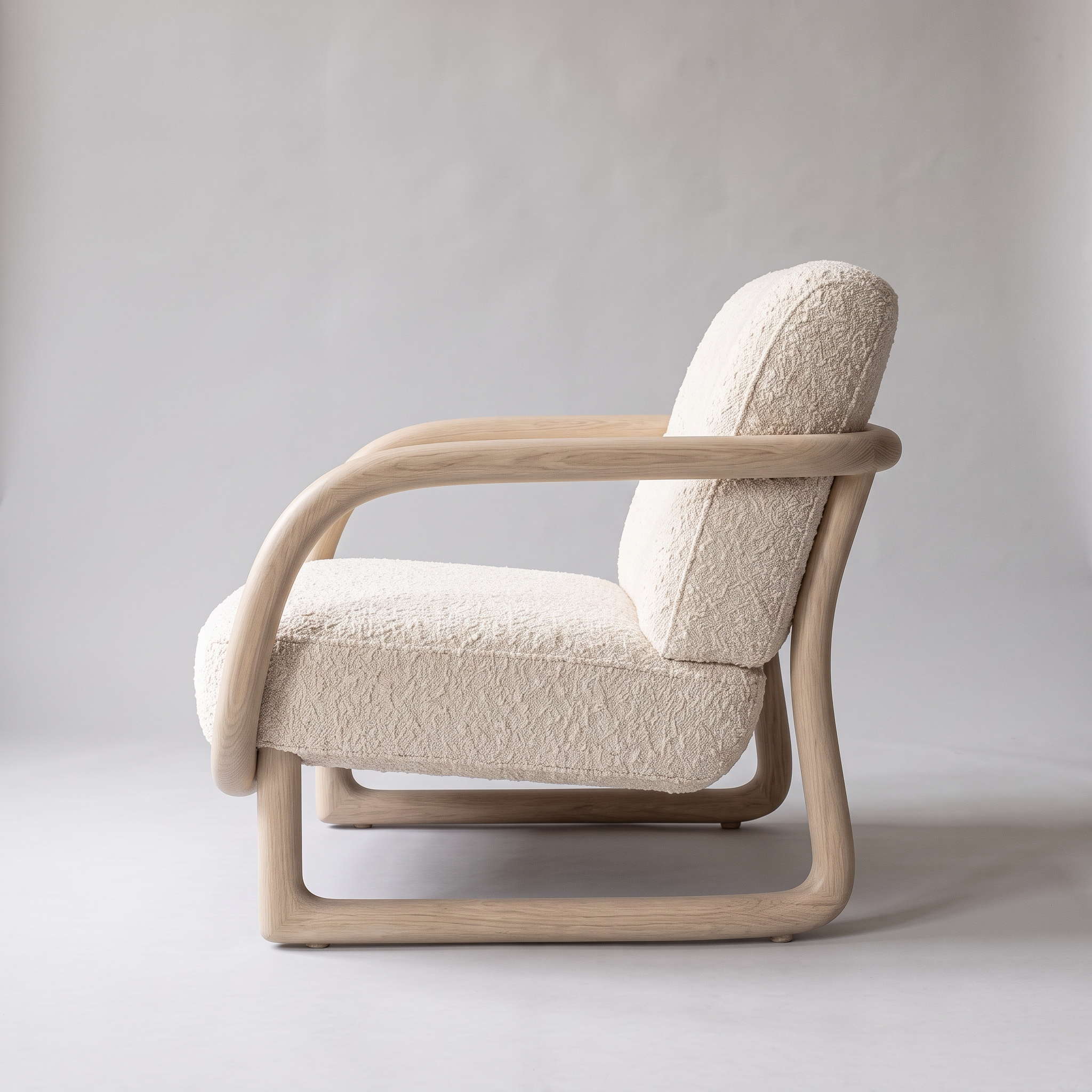
Generated using Nano Banana 2.1 Edit on fal, an AI model from Google.
Billed on a 10-second source plus a 10-second output, the swap comes to 20 seconds at $0.141, or $2.82.
Prompt B (kling/v4/video-to-video/edit, 1080p, duration left at the source length; Video1: the step 1 clip; Element1: frontal image = TORVE front still, reference image = TORVE side still): Replace the grey armchair in @Video1 with the TORVE Bue lounge chair from @Element1, with its curved oak frame and cream bouclé upholstery. Place it where the armchair stood, at the same angle beside the side table, with contact shadows on the floor that match the window light. Everything else in @Video1, from the curtains to the camera push-in, stays as it is.
Generated using Kling 4.0 Video Editing on fal, an AI model from Kling AI.
Try it in ChatGPT Try it in fal AgentA green colourway from one more TORVE edit
A second Kling 4.0 Video Editing pass handles the recolour, with a fabric swatch in image_urls as the reference and the room and camera move named as fixed in the prompt.
Since TORVE also sells the Bue in forest green bouclé, that colourway's product page video costs one more edit on the swapped clip.
That pass is another 20 billed seconds at $0.141, adding $2.82 for the green version.
Prompt (google/nano-banana-2.1, 1:1, 2K, medium thinking): A macro flat lay photograph of a square forest green bouclé fabric swatch with pinked edges on a light grey surface, lit softly from above so the looped texture of the yarn is clear. No other objects and no text.
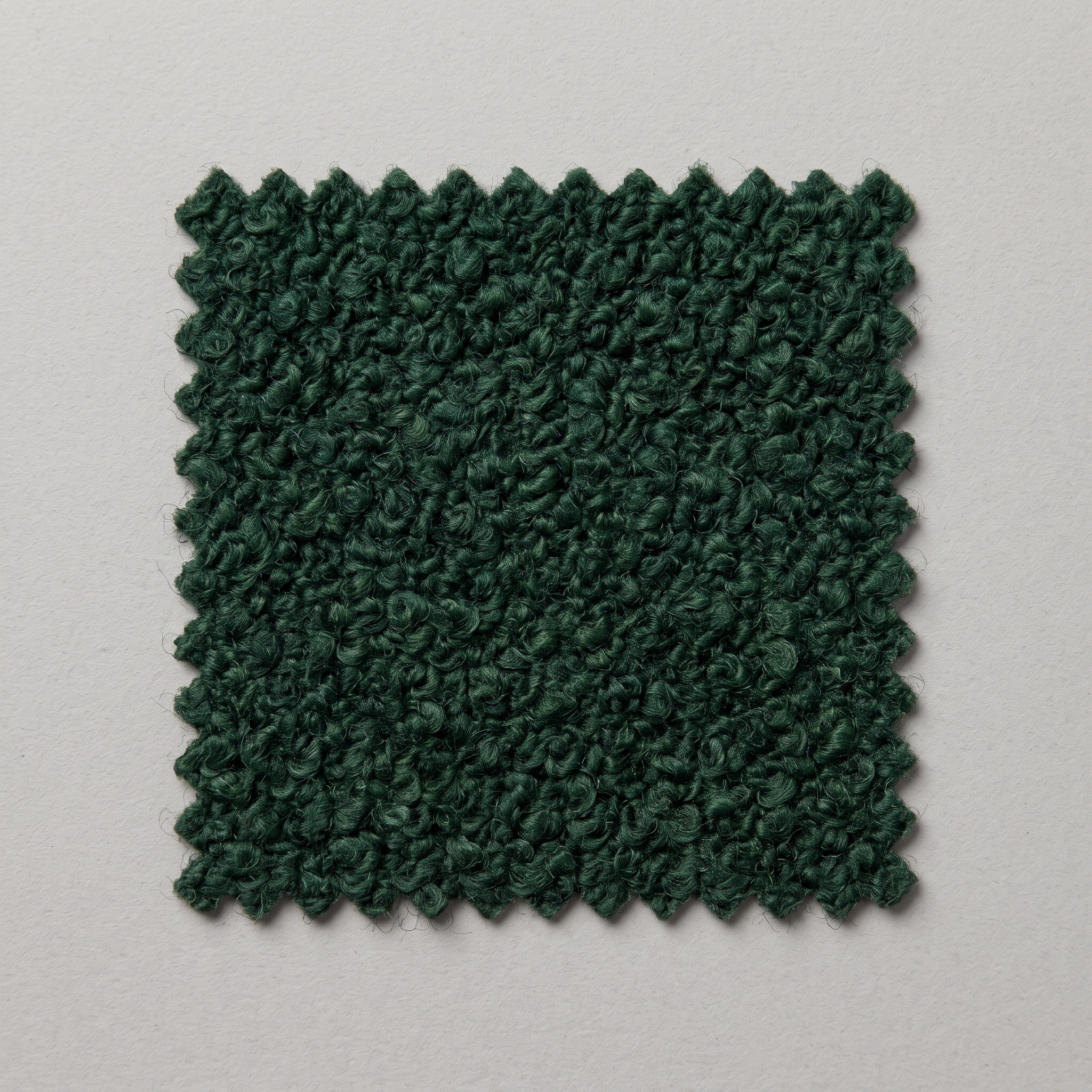
Generated using Nano Banana 2.1 on fal, an AI model from Google.
Prompt C (kling/v4/video-to-video/edit, 1080p, duration left at the source length; Video1: the step 2 clip; Image1: the green swatch still): In @Video1, reupholster the Bue lounge chair in the forest green bouclé shown in @Image1, keeping the same seam across the backrest and the same texture scale. The oak frame is untouched. Nothing else in @Video1 changes, from the window light to the camera move.
Generated using Kling 4.0 Video Editing on fal, an AI model from Kling AI.
Try it in ChatGPT Try it in fal AgentHow much does Kling 4.0 cost on fal?
Kling 4.0 bills per second on fal, at $0.157 for 720p and $0.235 for 1080p.
Runs that take a video input bill at $0.094 for 720p and $0.141 for 1080p, counted on the input plus the output and never less than twice the output length.
Video references and video elements on reference-to-video bill this way, and so does every run on the edit endpoint.
| Kling 4.0 run | 720p per second | 1080p per second | Seconds billed |
|---|---|---|---|
| Any run with no video input | $0.157 | $0.235 | Output length |
| Reference-to-video with a video reference or a video element | $0.094 | $0.141 | Input plus output, at least twice the output |
| Video editing | $0.094 | $0.141 | Input plus output, at least twice the output |
Because of that floor, a 10-second 1080p clip costs at least $2.82 with a video input and $2.35 without one.
| Brand | Kling 4.0 runs | Kling 4.0 cost | Nano Banana 2.1 stills | Brand total |
|---|---|---|---|---|
| MOSSWELL | Two 5 s endpoint tests, a 5 s turntable, an 8 s ad, a 12 s hook and its 12 s rebuild | $10.28 | 4 | $10.52 |
| BRAEWICK | 10 s craft clip and 16 s multi-shot, both 1080p | $6.11 | 6 | $6.47 |
| VAUDREL | 10 s at 21:9 and 15 s at 9:16, both 1080p | $5.88 | 4 | $6.12 |
| TORVE | 10 s source and two 10 s edits, all 1080p | $7.99 | 3 | $8.17 |
The four brands come to $31.28, about $30.26 of it on Kling 4.0 and the rest on stills.
Still prices come from our tests for Nano Banana 2.1 at 2K on medium thinking: $0.0593 for text-to-image and $0.0613 for an edit with one reference.
Those tests used a 16:9 output and a short prompt, so square stills with longer prompts can land slightly above or below those figures.
The token math behind those figures is laid out in our Nano Banana API guide.
Recently Added











Run Kling 4.0 on fal
A single Kling 4.0 generation now runs to 30 seconds with sound, enough for a full social ad from the hook to the end card.
On top of that length, the model takes elements that carry a product's look and edits footage a brand already owns.
On fal, the Nano Banana 2.1 stills and the Kling 4.0 clips come from one account with pay-per-use billing and no GPUs to manage.
You can start in any of the four Kling 4.0 playgrounds today or hand fal Agent a brief, while API access is on the way.
Frequently asked questions about Kling 4.0
Can Kling 4.0 videos made on fal run in paid ads?
fal marks all four Kling 4.0 endpoints for commercial use, which is the label I look for before a clip goes onto a product page or into paid social.
The brand running the ad still owns legal review of any real logos or product claims shown in a clip.
How many products can one Kling 4.0 generation include?
Kling 4.0 Reference to Video takes up to 7 elements per request, and as many as 3 of them can be video elements.
All reference assets together top out at 15 per generation, according to our Kling 4.0 model page.
Does Kling 4.0 generate the sound for a product video?
Yes, Kling 4.0 produces its own two-channel stereo soundtrack, from spoken lines to background ambience, timed to the picture in the same generation.
None of the four fal schemas has a field for sound effects or ambience, so those go in the prompt.
The one audio input is voice_id on reference-to-video elements, which binds a voice to a character.
Can Kling 4.0 keep a label readable while the camera moves?
Kling AI says on-screen text and logos in Kling 4.0 stay readable as the camera moves, in the same languages its speech covers.
That's the maker's claim, and the MOSSWELL can turning toward the lens is the stretch of frames I'd scrub through before an ad ships.
How long can a Kling 4.0 product video be?
Kling 4.0 clips last anywhere from 3 to 30 seconds per generation.
With multi_prompt, the clip lasts as long as its shot durations added together.
Longer pieces will be able to grow past that once Kling AI ships video extension, which it has announced for clips of up to 2 minutes.
![How To Use Ideogram V4: Prompts & Workflows [2026]](https://refinery.fal.media/url/https%3A%2F%2Fv3b.fal.media%2Ffiles%2Fb%2F0aa265fa%2FcWzF9yv1t94j1xFln_W_p.jpg/tr:w-1280,q-80/cWzF9yv1t94j1xFln_W_p.webp)


