This guide compares Happy Horse 1.0 and Seedance 2.0 on fal across text-to-video output, image-to-video controls, multilingual lip-sync, multi-shot workflows, native audio, pricing, and the production scenarios where each model is the right fit.
TL;DR
Happy Horse 1.0 is Alibaba's video model that generates audio and visuals in the same forward pass.
It supports lip-sync across seven explicitly named languages: English, Mandarin, Cantonese, Japanese, Korean, German, and French.
Pricing on fal sits at $0.14 per second at 720p and $0.28 per second at 1080p.
Seedance 2.0 is ByteDance's flagship video model with native audio, multi-shot generation via prompt labels, six aspect ratios, plus auto-mode, including 21:9 ultrawide, and start-frame plus end-frame control on image-to-video.
The standard tier on fal runs $0.3034 per second for text-to-video at 720p and $0.3024 per second for image-to-video at 720p, with a fast tier at $0.2419 per second.
Both models output up to 1080p, audio comes baked into every generation, and both endpoints plug into the fal SDK using the same calling pattern.
How do Happy Horse 1.0 and Seedance 2.0 compare head-to-head?
| Happy Horse 1.0 | Seedance 2.0 | |
|---|---|---|
| Best for | Multilingual dialogue with explicit named-language lip-sync, lower per-second cost at 720p | Multi-shot prompt-labeled sequences, ultrawide 21:9 output, auto-mode parameters, end-frame control on image-to-video |
| Price per second (720p, standard) | $0.14 | $0.3034 for text-to-video, $0.3024 for image-to-video |
| Fast tier price per second (720p) | None | $0.2419 across all endpoints |
| Maximum resolution | 1080p | 1080p |
| Resolution options | 720p, 1080p | 480p, 720p, 1080p |
| Duration range | 3 to 15 seconds (integer values) | 4 to 15 seconds, or auto |
| Aspect ratios | 16:9, 9:16, 1:1, 4:3, 3:4 | auto, 21:9, 16:9, 4:3, 1:1, 3:4, 9:16 |
| Native audio generation | Yes, single forward pass | Yes, single forward pass |
| Audio cost | Included in per-second price | Included in per-second price |
| Lip-sync | ✅ Native, including multilingual | ✅ Native (prompt-driven) |
| Multi-shot via prompt labels | ✅ Native multi-shot generation that supports character, setting, and audio consistency | ✅ Shot labels supported (Shot 1:, Shot 2:) |
| Commercial use | Yes | Yes |
How do Happy Horse 1.0 and Seedance 2.0 differ architecturally?
Both models generate audio and visuals from a single model, in one forward pass.
What changes between them is how much control the API hands back to you.
The Happy Horse 1.0 endpoint accepts a small, fixed parameter set: prompt, aspect ratio from five options, resolution at either 720p or 1080p, and duration as an integer between 3 and 15.
Audio is not a separately priced toggle, and there is no fast variant of the endpoint.
Whatever dialogue, ambient sound, and lip-sync the output contains (in any of the supported languages) comes out of how the model interprets the prompt directly.
Seedance 2.0 opens up that same interface in several directions.
Duration takes "auto" as a value, letting the model pick the clip length from the prompt content itself.
Aspect ratio takes "auto" too, inferring the ratio from the input image on image-to-video or from the prompt content on text-to-video.
Shot transitions live inside the prompt as natural-language labels: a prompt that opens with "Shot 1: a chef plating a dish" and continues with "Shot 2: a wide shot of the dining room" produces a single clip with the cut included.
The image-to-video endpoint adds an end_image_url parameter on top of the start frame, which means you can control the landing of the clip in addition to its opening.
Putting the two side by side:
Happy Horse 1.0 hands you a tight, flat-priced surface where everything is determined by resolution and duration.
Seedance 2.0 hands you a wider surface with more parameters at the input layer and a fast tier sitting underneath the standard one for cheaper iteration.
How do Happy Horse 1.0 and Seedance 2.0 compare visually?
The test you came for: here are four side-by-side tests using the same prompt on both models, all generated on fal:
Test 1: Multilingual dialogue with layered ambient audio
Prompt: "A radio operator at a remote weather station above the tree line speaks into a handheld VHF in German: "Kontrolle, hier Wetterstation Drei. Anflug-Koordinaten zwei-vier-sieben..." He pauses mid-sentence as static cuts through the channel. The shot starts on his mouth at the microphone, then slowly pulls back to reveal the snow-covered ridge behind him and the helicopter approaching from the valley. Sound: his clipped German consonants, the radio's hiss between transmissions, rotor wash building from the right of frame."
Happy Horse 1.0:
Generated using Happy Horse 1.0 on fal, an AI model from Alibaba.
Seedance 2.0:
Generated using Seedance 2.0 on fal, an AI model from ByteDance.
My take: We're witnessing a cinematic execution from both AI models with this example. Both Happy Horse 1.0 and Seedance 2.0 produced the required lip sync output that I was looking for, and did not make any mistakes.
However, Happy Horse 1.0 seems to have better world knowledge in this example, because it took into consideration that it's cold in the mountains, so that you can see the breath of the person speaking.
Check out our Happy Horse prompting guide, how to use Happy Horse guide, and Happy Horse review to learn more about the AI model and see the results of our testing.
Test 2: Three-shot sequence with macro-to-wide camera scale
Prompt: "Shot 1: a jeweller's loupe pressed against a raw uncut emerald on a black velvet pad, the gem's internal flaws magnified through the lens. Shot 2: pull back to reveal the jeweler, a woman in her sixties with white hair tied back, lowering the loupe and sliding a small brass scale across the workbench. Shot 3: wider shot of the workshop as she places the emerald on the scale, the digital readout flickering to 4.7 grams. No dialogue. Sound: the soft tap of the gem on the scale plate, the faint hum of a pendant lamp overhead, a clock ticking somewhere out of frame."
Happy Horse 1.0:
Generated using Happy Horse 1.0 on fal, an AI model from Alibaba.
Seedance 2.0:
Generated using Seedance 2.0 on fal, an AI model from ByteDance.
My take: Both AI models did a good job of the visualisation of the jeweller and how they work, although I wouldn't say I was satisfied with how they handled the scale in the end.
falMODEL APIs
The fastest, cheapest and most reliable way to run genAI models. 1 API, 100s of models
Test 3: Long-take camera crane with French dialogue and large-animal physics
Prompt: "A 14-second single take inside a working farrier's shed at dusk. A French-speaking farrier in his mid-forties files the hoof of a Belgian draft horse with a rasp, talking quietly in French to the apprentice holding the lead rope about the angle he is correcting. The camera starts low at hoof level, slowly cranes up along the horse's flank, and lands on the farrier's face as he straightens up and runs a thumb across the trimmed edge. The horse shifts its weight once during the shot. Sound: the rhythmic scrape of the rasp on hoof, the horse's heavy breath through its nostrils, hay rustling under shifting weight, the farrier's low voice carrying across the small space."
Happy Horse 1.0:
Generated using Happy Horse 1.0 on fal, an AI model from Alibaba.
Seedance 2.0:
Generated using Seedance 2.0 on fal, an AI model from ByteDance.
My take: Both Happy Horse 1.0 and Seedance 2.0 approached the scene differently, but I'm happy with their execution, as both of them technically followed my prompt correctly. Crème de la crème execution of the French lip-sync and accent as well.
Test 4: Image-to-video animating a frozen mid-action frame
Starting image: a beekeeper in a full white suit and mesh hood, mid-stride between two hive stacks, one gloved hand reaching toward a frame, bees dotting the air around him in mid-flight.
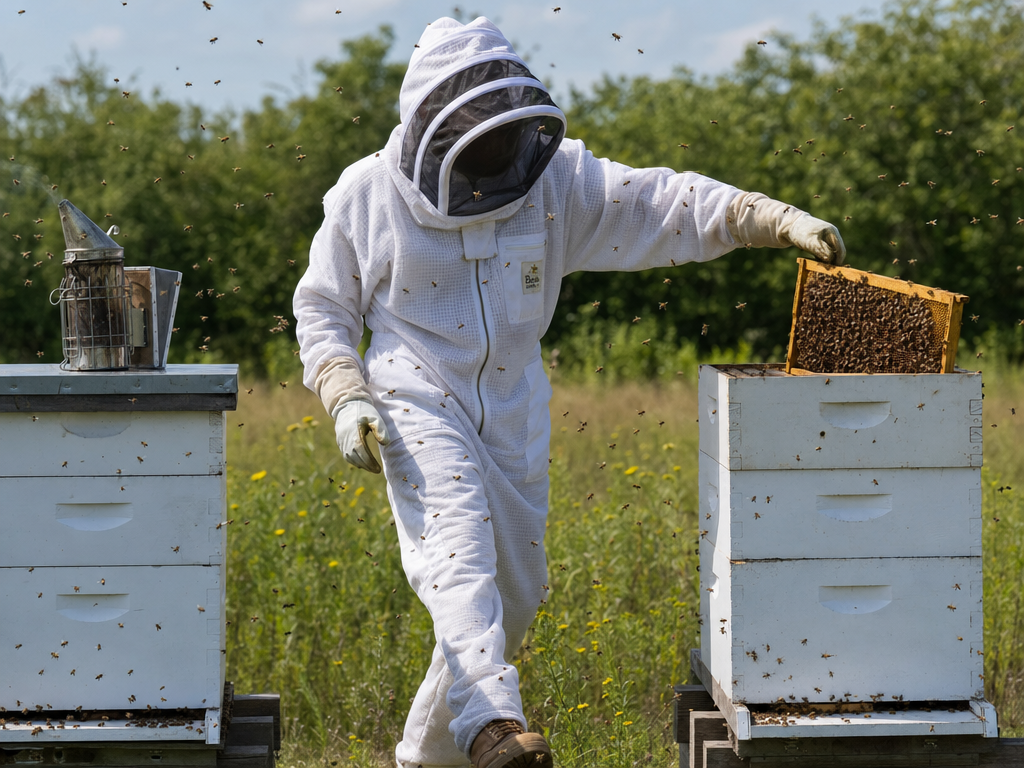
Generated using GPT Image 2 on fal, an AI model from OpenAI.
Prompt: "Animate forward. The hand closes around the frame, lifts it slowly out of the hive, and tilts it to inspect the comb. The bees continue to swirl, some landing on the suit, some flying off. The beekeeper exhales through the mesh, visibly fogging it. Sound: the persistent low drone of the colony, the soft creak of the wooden frame separating from the stack, the muffled breath through fabric."
Happy Horse 1.0:
Generated using Happy Horse 1.0 on fal, an AI model from Alibaba.
Seedance 2.0:
Generated using Seedance 2.0 on fal, an AI model from ByteDance.
My take: I would say that Seedance 2.0 did a better job out of the two in this example, as the comb looks more realistic and the colors of the setting seem more natural.
Despite this, I'd say that both models did a reasonably good job at following the instructions and producing the required output.
You can check out our Seedance 2.0 guide to learn more about how to best utilize the AI video generator's strengths, and you can check our Seedance 2.0 comparisons against Kling 3.0, Sora 2 Pro, and Veo 3.1 to see how they stack up.
What do Happy Horse 1.0 and Seedance 2.0 cost on fal?
Per-second billing applies to both, and the cost lines split apart quickly once you scale generations or change resolution.
Happy Horse 1.0 pricing on fal
Pricing is resolution-based with no separate audio toggle or fast tier:
720p: $0.14 per second.
1080p: $0.28 per second.
A 5-second 720p clip costs $0.70, and a 10-second 720p clip costs $1.40. Pushing the same clips to 1080p doubles both numbers to $1.40 and $2.80.
Seedance 2.0 pricing on fal
Two tiers exist across text-to-video and image-to-video, and audio is part of the rate at every tier:
Standard text-to-video at 720p: $0.3034 per second.
Standard image-to-video at 720p: $0.3024 per second.
Fast tier (text-to-video and image-to-video) at 720p: $0.2419 per second.
A 5-second standard text-to-video clip at 720p comes to $1.52. The same clip at 10 seconds is $3.03 on the standard tier and $2.42 on the fast tier.
Direct 720p comparison
A 10-second 720p text-to-video clip on each option:
Happy Horse 1.0: $1.40.
Seedance 2.0 standard: $3.03.
Seedance 2.0 fast: $2.42.
Let's plug those rates into the monthly volume:
100 ten-second clips per month: $140 on Happy Horse 1.0, $303 on Seedance 2.0 standard, $242 on Seedance 2.0 fast.
1,000 ten-second clips per month: $1,400, $3,030, and $2,420, respectively.
Happy Horse 1.0's standard rate at 720p is roughly 2.2x cheaper than Seedance 2.0 standard text-to-video and 1.7x cheaper than the Seedance 2.0 fast tier at the same resolution.
Both models support 1080p output, and Happy Horse 1.0's per-second rate doubles at 1080p relative to 720p.
How do you run Happy Horse 1.0 and Seedance 2.0 on fal?
Both models live behind the same fal SDK, so a switch between them is a one-line endpoint change.
javascript
import { fal } from "@fal-ai/client";

// Happy Horse 1.0 — text-to-video
const happyHorseResult = await fal.subscribe(
  "alibaba/happy-horse/text-to-video",
  {
    input: {
      prompt:
        "A jeweler examines a raw uncut emerald through a loupe, soft pendant light overhead, the faint hum of a workshop in the background.",
      aspect_ratio: "16:9",
      resolution: "1080p",
      duration: 10,
    },
    logs: true,
    onQueueUpdate: (update) => {
      if (update.status === "IN_PROGRESS") {
        update.logs.map((log) => log.message).forEach(console.log);
      }
    },
  }
);

console.log(happyHorseResult.data.video.url);

// Seedance 2.0 — text-to-video, same calling pattern
const seedanceResult = await fal.subscribe(
  "bytedance/seedance-2.0/text-to-video",
  {
    input: {
      prompt:
        "A jeweler examines a raw uncut emerald through a loupe, soft pendant light overhead, the faint hum of a workshop in the background.",
      aspect_ratio: "16:9",
      resolution: "720p",
      duration: "10",
      generate_audio: true,
    },
    logs: true,
    onQueueUpdate: (update) => {
      if (update.status === "IN_PROGRESS") {
        update.logs.map((log) => log.message).forEach(console.log);
      }
    },
  }
);

console.log(seedanceResult.data.video.url);
One schema-level note worth flagging: Happy Horse 1.0 takes duration as an integer between 3 and 15.
Seedance 2.0 takes duration as a string enum that includes "auto" and the values "4" through "15".
If you are routing between the two models in the same codebase, normalize the duration value before the API call.
For image-to-video, both models accept an image_url parameter that points to a hosted file or a base64 data URI. Seedance 2.0 also accepts an optional end_image_url for end-frame control.
When should you use Happy Horse 1.0 vs. Seedance 2.0?
Use Happy Horse 1.0 when
The brief calls for lip-sync in a specific named language (Mandarin, Cantonese, Japanese, Korean, German, or French), with documented schema-level coverage rather than inferred capability.
Your prompts run long and detailed, with multi-beat scene descriptions, sound direction, and camera choreography all in one input. The 2,500-character ceiling absorbs that without truncation.
Flat per-second pricing matters more than audio toggles or tier switching in your cost model.
Dialogue sits at the centre of the output: talking-head clips, monologue creator content, multilingual ad spots, localized training material.
Use Seedance 2.0 when
The output needs multiple shots with cuts inside a single generation (although Happy Horse 1.0 did a good job in this too), and writing shot labels into the prompt fits how you brief the content.
21:9 ultrawide is part of the aspect ratio requirement, including trailer-style cinematic content, anamorphic film looks, or ultrawide placements.
Image-to-video work depends on locking both the opening and closing frames of the clip.
Pipelines route varied scene types through a single endpoint, and you want duration: "auto" and aspect_ratio: "auto" to handle inference.
You can also use both models in the same pipeline.
The fal SDK uses the same calling pattern for either endpoint, so routing logic between them takes a handful of lines: dialogue-heavy multilingual scenes go to Happy Horse 1.0, multi-shot or end-frame-controlled work goes to Seedance 2.0.
Recently Added



















Ready to run Happy Horse 1.0 and Seedance 2.0?
Happy Horse 1.0 and Seedance 2.0 are both live on fal, with playground access and API endpoints for each.
Authentication, queueing, and result polling go through the same fal SDK pattern, so a routing layer that picks between the two adds only a handful of lines to your codebase.
The playground for Happy Horse 1.0 and Seedance 2.0 is the fastest way to see how each one handles your specific prompt structure. The API is the next step once you have picked your default.
Head to fal to start.
Happy Horse 1.0 vs. Seedance 2.0 FAQs
What makes Happy Horse 1.0 different from Seedance 2.0?
Happy Horse 1.0 documents lip-sync support across seven named languages (English, Mandarin, Cantonese, Japanese, Korean, German, French), which removes guesswork from multilingual briefs.
Its pricing is flat across the endpoint at $0.14 per second at 720p and $0.28 at 1080p, with no fast variant or audio surcharge layered on top.
The prompt field caps at 2,500 characters, which fits multi-beat scene descriptions and detailed sound or camera direction in one input.
What makes Seedance 2.0 different from Happy Horse 1.0?
Seedance 2.0 interprets shot labels in the prompt (Shot 1:, Shot 2:) and produces a single clip with the cuts baked in, rather than separate clips that need post-production stitching.
The aspect ratio enum includes 21:9 ultrawide, and both aspect ratio and duration accept "auto" as a value, letting the model infer framing and length from the prompt itself.
Image-to-video accepts an optional end_image_url alongside the start frame, giving control over where the clip lands as well as where it opens.
A fast tier at $0.2419 per second at 720p sits underneath the standard tier, with the same input schema.
Can both Happy Horse 1.0 and Seedance 2.0 be used for commercial projects?
Yes. Outputs from both Happy Horse 1.0 and Seedance 2.0 on fal carry full commercial rights.
How long can videos be from each model?
Happy Horse 1.0 generates videos between 3 and 15 seconds per call, with integer-second increments.
Seedance 2.0 generates videos between 4 and 15 seconds per call, with the option to set duration to "auto" and let the model pick the length based on the prompt content.
Do both Happy Horse 1.0 and Seedance 2.0 generate audio?
Yes. Both models generate audio in the same forward pass as the video, with sound effects, ambient audio, and dialogue handled natively.
On Happy Horse 1.0, audio is included in the per-second price by default.
On Seedance 2.0, audio is included in every tier's per-second price regardless of the generate_audio toggle setting.
![10 Best Image-to-Video APIs in 2026 [Reviewed]](https://refinery.fal.media/url/https%3A%2F%2Fv3b.fal.media%2Ffiles%2Fb%2F0a9eafb7%2FvhLf9ukH8MQphlcPiVSOi_best-image-to-video-apis-2026.jpg/tr:w-1280,q-80/vhLf9ukH8MQphlcPiVSOi_best-image-to-video-apis-2026.webp)
![How To Use Krea 2 Open Source: Prompts, Workflows & LoRA [2026]](https://refinery.fal.media/url/https%3A%2F%2Fv3b.fal.media%2Ffiles%2Fb%2F0aa34f53%2F2y6ROgROzoiWnnXbs82n5.jpg/tr:w-1280,q-80/2y6ROgROzoiWnnXbs82n5.webp)