I'll show you how to set up the Nano Banana 2.1 API on fal and use it to build a small ecommerce image pipeline in JavaScript and Python.
Every example works on one invented enameled Dutch oven that I generate once and reuse across the later requests.
TL;DR
- Nano Banana 2.1 is reached on fal at
google/nano-banana-2.1when you start from text, or atgoogle/nano-banana-2.1/editwhen you start from up to 14 reference images. - Billing is per token, with the output image making up almost all of a request's cost at $35.294 per 1M tokens.
- A text-to-image call costs about $0.040 at 1K and $0.134 at 4K, based on a prompt of about 100 tokens with thinking tokens left out.
- Setup takes a fal API key in
FAL_KEYand one client library,@fal-ai/clientfor JavaScript orfal-clientfor Python. - My five examples produce ten images of the same product for roughly $0.62 at 2K, using our model page rates and our October 2026 billing test.
- Nano Banana Pro ($0.15 per image) and Nano Banana 2 ($0.08 per 1K image) stay available on the same account for teams that want per-image billing.
Where is the best place to call the Nano Banana API?
fal is the best place to call the Nano Banana API for ecommerce work, because one fal key gives a catalog pipeline both Nano Banana 2.1 endpoints plus the queue and file storage around them.
Unless you restrict it, that same key also reaches the earlier Nano Banana tiers and more than 1,000 other generative media models, all drawing on one prepaid balance.
Outputs from both Nano Banana 2.1 endpoints can go on product listings or into paid ads, as we list the pair for commercial use.
I split the work between the two endpoints like this:
| Endpoint | Input | Typical ecommerce job |
|---|---|---|
google/nano-banana-2.1 | A text prompt | New packshots and concept renders |
google/nano-banana-2.1/edit | A prompt with up to 14 images, plus an optional video or PDF | Lifestyle scenes, new angles, resized placements and text layouts |
Calls made with subscribe or submit go through our queue in either client, while a direct call to fal.run returns the result in the same HTTP response.
We only bill for successful outputs, never for a request that fails with a server error (HTTP 500 or above) or for time spent waiting in the queue.
How much does the Nano Banana API cost on fal?
The Nano Banana 2.1 API on fal bills per token at the rates on our model page, with no flat per-image fee and no extra charge tied to any setting.
| Token type | Price per 1M tokens |
|---|---|
| Input (prompt text, images, video and PDF context) | $1.764 |
| Output text and thinking | $8.823 |
| Output image | $35.294 |
For one output from a prompt of about 100 tokens, before thinking and web search tokens, the model page works those rates out as follows:
| Output resolution | Approx. output image tokens | Text-to-image | Edit with two 1K input images |
|---|---|---|---|
| 1K (default) | 1,120 | $0.040 | $0.044 |
| 2K | 1,680 | $0.059 | $0.063 |
| 4K | 3,780 | $0.134 | $0.138 |
Nearly the whole bill is the output image, which is why a text-to-image call climbs from about $0.040 at 1K to $0.134 at 4K.
Reference images cost far less, at about 1,120 input tokens or roughly $0.002 apiece.
You can write long prompts without worrying about cost, as 1,000 tokens of prompt or system prompt text come to about $0.002.
With num_images set above 1, you pay for the prompt and every input image again on each extra output, because each image is a separate generation.
When enable_web_search is on, there's no separate fee, though Nano Banana 2.1 counts the search results it reads as input tokens.
Thinking tokens are priced as output text at $8.823 per 1M, and medium is the level applied unless you change thinking_level.
In the billing test behind our Nano Banana 2.1 vs. Nano Banana 2 comparison, medium thinking billed the same as minimal, while high added $0.0078 to $0.0139 per image (one 16:9 image from a short prompt, October 7, 2026).
I'd keep high thinking for dense layouts, like the recipe card near the end of this guide.
When I want a number before sending a request, I plug the token counts into this formula:
cost (USD) = (1.764 × input tokens + 8.823 × output text and thinking tokens + 35.294 × output image tokens) / 1,000,000
For the lifestyle edit below, a 2K output of 1,680 tokens plus about 1,270 input tokens for the packshot and prompt works out at roughly $0.0615 before thinking tokens.
For budget checks inside a dashboard, you'll want the live rate, which our Platform API returns for any endpoint ID:
bash
curl "https://api.fal.ai/v1/models/pricing?endpoint_id=google/nano-banana-2.1" \
  -H "Authorization: Key $FAL_KEY"
The response lists the billing unit and unit price for that endpoint.
Our wider Platform APIs can also estimate a request's cost before it runs or return usage line items by model.
Rates for the rest of our catalog are on the fal pricing page.
What does it take to set up the Nano Banana API on fal?
You can set up the Nano Banana API on fal in four steps, starting with credits and ending with a client library.
- Add credits: credits are prepaid on fal with a $1 minimum top-up, plus your purchases raise your concurrency limit over time.
- Create a key: after clicking Create Key on the API keys page, I'd pick the API preset unless you already know you need custom permissions.
- Export the key: both client libraries read
FAL_KEYfrom the environment of whatever process calls fal, so there's nothing else to configure. - Install a client: that's
@fal-ai/clientfrom npm for JavaScript, orfal-clientfrom PyPI for Python, imported asfal_client.
bash
# macOS or Linux
export FAL_KEY="your-api-key-here"

# JavaScript client
npm install --save @fal-ai/client

# Python client
pip install fal-client
A new key is shown in the dashboard only once, so it's ideal to have your secrets manager open before you click Create Key.
Every key belongs to the account it was created under, meaning team keys have to be made with the team selected in the top-left switcher.
For a catalog pipeline, I'd normally limit the key to the two Nano Banana 2.1 endpoint IDs from the Allowed models tab, keeping in mind that the list is locked once the key exists.
A key with a model restriction is stored as a custom policy that keeps the preset's permissions exactly as they stood on the day you created it.
Expiry is optional, anywhere from 1 hour to 1 year, after which the key has to be replaced.
Browser storefronts should reach fal through a server-side proxy, as our authentication docs recommend, because a key placed in client-side code is readable by anyone who opens the page.
falMODEL APIs
The fastest, cheapest and most reliable way to run genAI models. 1 API, 100s of models
What's the simplest way to generate a product packshot with the Nano Banana 2.1 API?
The simplest way is one fal.subscribe() call to google/nano-banana-2.1, which waits for the render and returns the image URLs under data.images.
Based on my experience, picking between two candidates is quicker than re-running a single one, so this request asks for two through num_images.
javascript
import { fal } from "@fal-ai/client";

const prompt =
  "A marketplace main image of a 26 cm round enameled cast iron Dutch oven " +
  "in matte sage green with a glossy cream enamel interior. It has two short loop handles " +
  "and a solid brass knob on the lid. The word FERROW is debossed in small capitals " +
  "on the lid beside the knob. Three-quarter view from slightly above with the lid on, " +
  "centered on a pure white seamless background, filling most of the frame. " +
  "One large overhead softbox gives a gentle highlight along the lid rim and a short, " +
  "soft contact shadow under the pot. Sharp focus across the whole product, " +
  "true-to-life color, no props and no text apart from the lid lettering.";

const { data } = await fal.subscribe("google/nano-banana-2.1", {
  input: {
    prompt,
    aspect_ratio: "1:1",
    resolution: "2K",
    num_images: 2,
    output_format: "png",
    seed: 2610,
  },
});

for (const image of data.images) {
  console.log(image.url, image.width, image.height);
}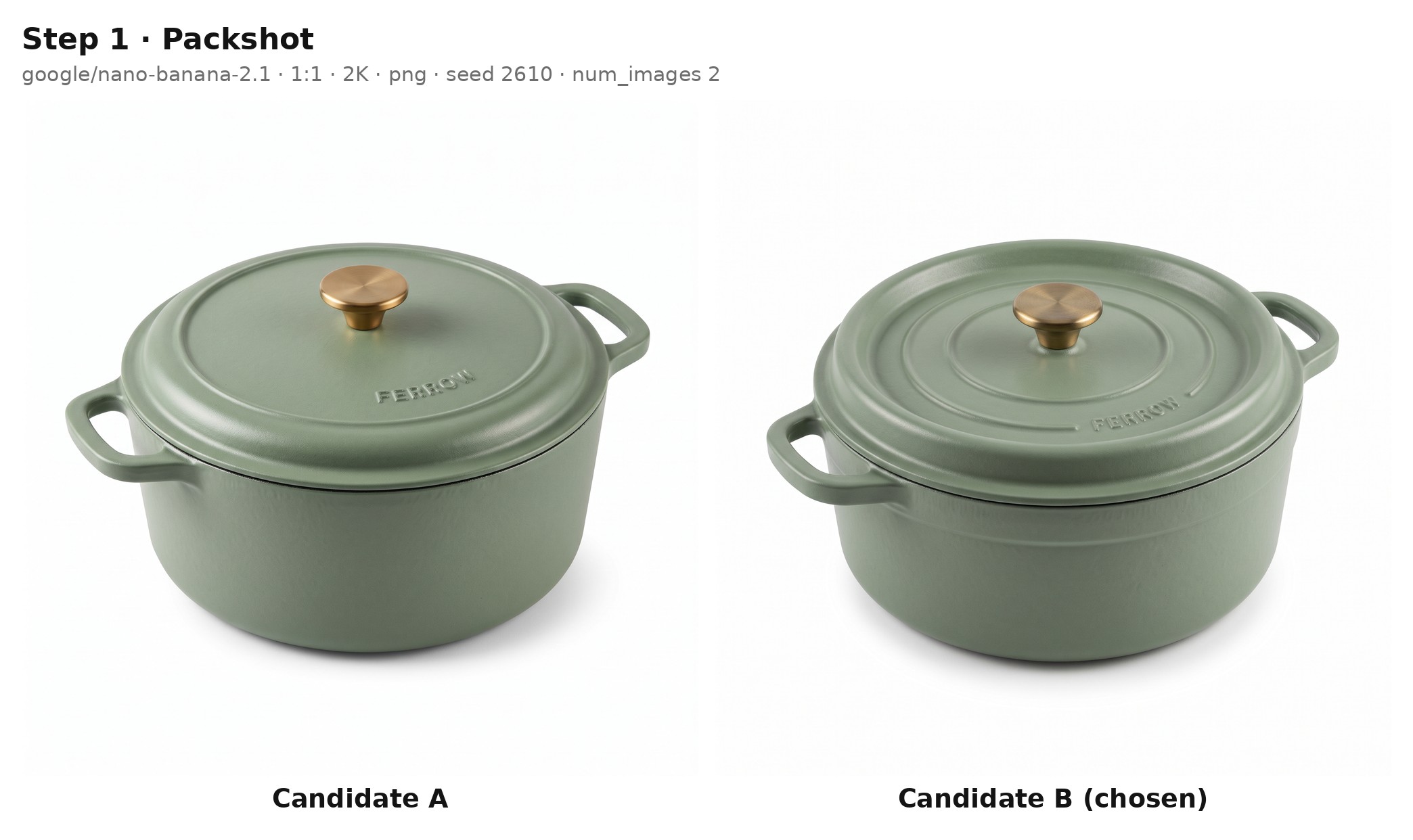
Generated using Nano Banana 2.1 on fal, an AI model from Google.
Try it in ChatGPT Try it in fal AgentBoth candidates come back in one response but bill as separate generations, putting this request at about $0.118 (two 2K outputs at $0.059 from a short prompt, before thinking).
FERROW is small lettering on the lid, so I render at 2K, the lowest size our model page suggests for small text.
Beside url, an image object carries content_type, file_name, width and height.
The top-level description field usually stays empty unless limit_generations is false.
The seed field is optional, and our schema describes it simply as the seed for the random number generator.
Whichever candidate shows the cleaner FERROW lettering becomes the input for the edits that follow.
Can the Nano Banana 2.1 edit endpoint place a product in a lifestyle scene?
Yes, google/nano-banana-2.1/edit takes the packshot URL in image_urls and builds a new scene around the Dutch oven, while the prompt names the product details that must not change.
The packshot's output URL goes straight into the request, as the edit endpoint accepts any publicly accessible URL or a file uploaded to fal storage.
python
import os

import fal_client

result = fal_client.subscribe(
    "google/nano-banana-2.1/edit",
    arguments={
        "prompt": (
            "Using the Dutch oven in image 1, create a lifestyle photo for a product page gallery. "
            "The pot stands on the front left burner of a matte black gas range, its lid tilted against the rim "
            "so a beef and red wine stew shows inside, with a little steam rising. "
            "Behind it, a warm oak countertop holds a bunch of thyme and a wooden spoon, softly out of focus, "
            "and morning daylight comes from a window on the right. "
            "Keep the sage green enamel, the cream interior, the loop handles, the brass knob "
            "and the FERROW lettering on the lid exactly as they appear in image 1."
        ),
        "image_urls": [os.environ["PACKSHOT_URL"]],
        "aspect_ratio": "4:5",
        "resolution": "2K",
    },
)

print(result["images"][0]["url"])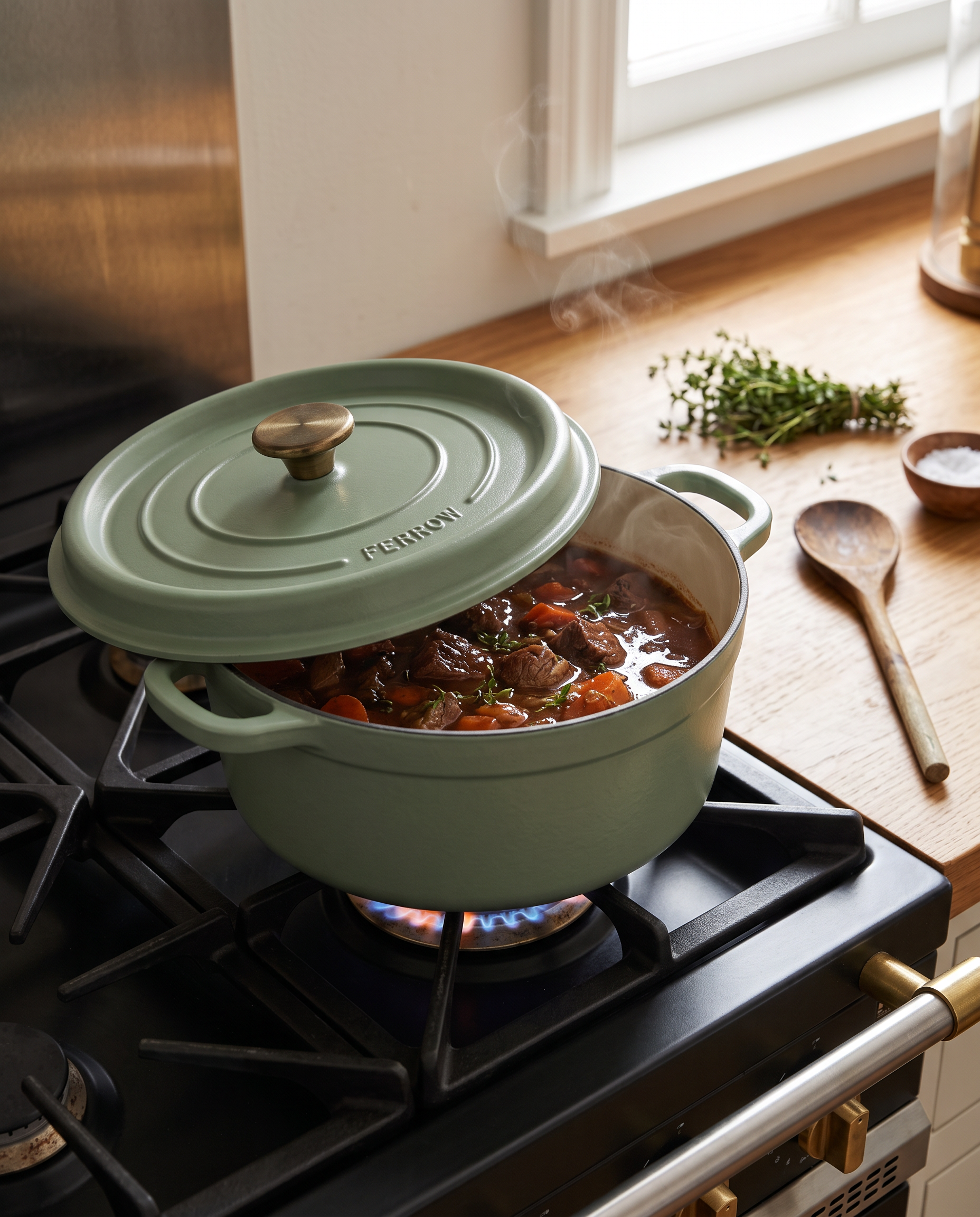
Generated using Nano Banana 2.1 Edit on fal, an AI model from Google.
Try it in ChatGPT Try it in fal AgentI set 4:5 by hand here for a product gallery slot, because the edit endpoint's auto ratio usually follows the square packshot.
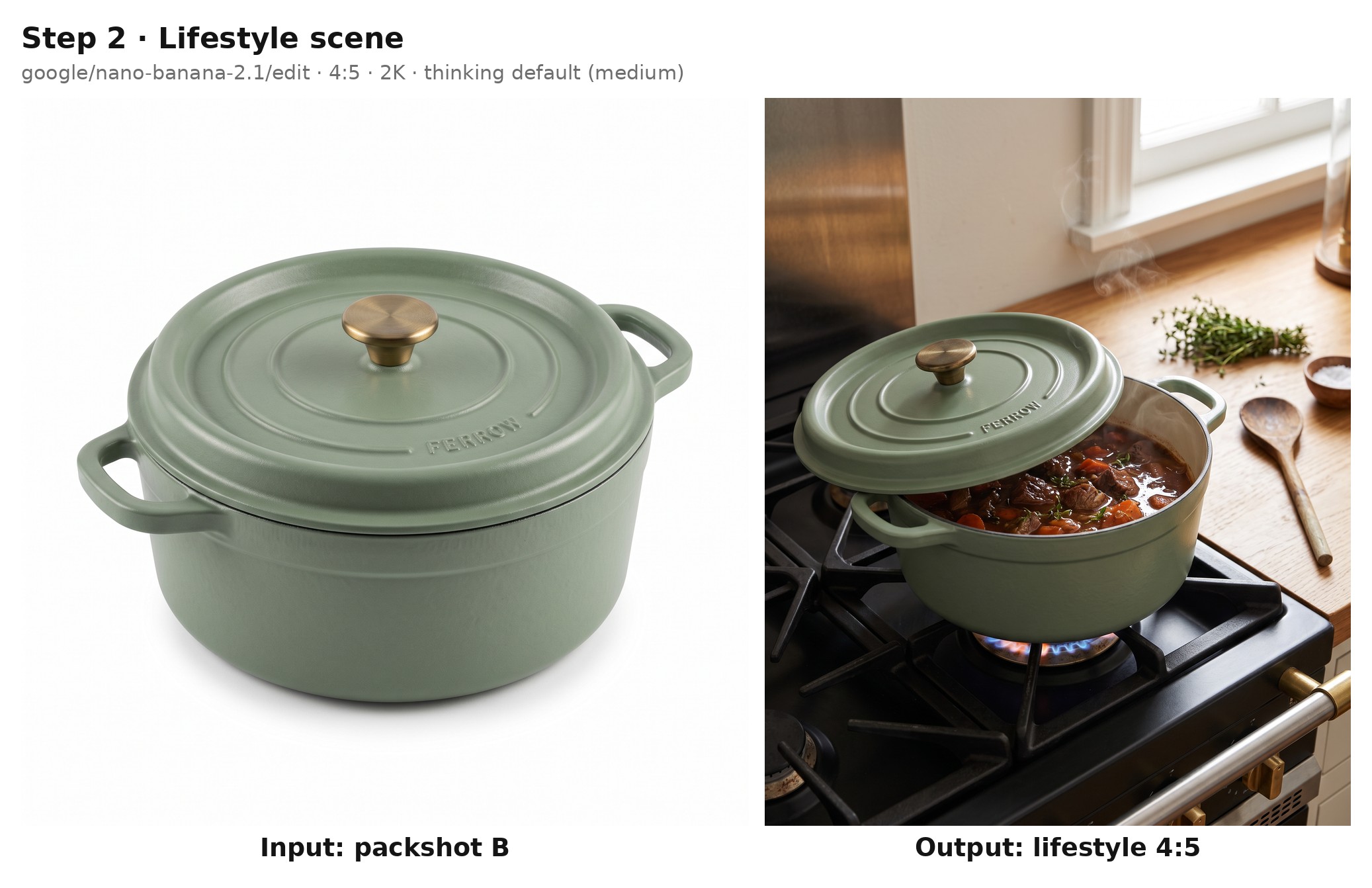
The last sentence of the prompt is the one I'd never drop, as it names the details a shopper will compare with the packshot.
For product photos that already exist on disk, fal_client.upload_file() returns a hosted URL you can drop into image_urls, much like fal.storage.upload() does in JavaScript.
Base64 data URIs are accepted too, but blob: URLs created inside a browser are not.
This one comes to about $0.061 at 2K, roughly the text-to-image price plus $0.002 for the packshot input.
How can a script batch product angles through the Nano Banana API queue?
fal.queue.submit() puts a Nano Banana 2.1 request in our queue and gives you its request ID before the image exists, letting one loop send four angle shots and collect the results later by ID or webhook.
javascript
import { writeFile } from "node:fs/promises";
import { fal } from "@fal-ai/client";

const packshotUrl = process.env.PACKSHOT_URL;

const angles = {
  front: "a straight-on front view at rim height, with both loop handles visible at the sides",
  top: "a top-down view looking straight onto the lid, with the brass knob and the FERROW lettering centered",
  open: "a three-quarter view from above with the lid resting beside the pot, showing the cream enamel interior",
  handle: "a close side view of one loop handle and the lid edge, cropped tight to show the enamel finish",
};

const requestIds = {};
for (const [name, view] of Object.entries(angles)) {
  const { request_id } = await fal.queue.submit("google/nano-banana-2.1/edit", {
    input: {
      prompt:
        `Photograph the Dutch oven from image 1 as ${view}. ` +
        "Keep the pure white background and the softbox lighting from image 1, " +
        "and change only the camera position so that every detail of the product stays identical.",
      image_urls: [packshotUrl],
      aspect_ratio: "1:1",
      resolution: "2K",
    },
    webhookUrl: "https://ferrow.example.com/hooks/fal",
  });
  requestIds[name] = request_id;
}

await writeFile("ferrow-angles.json", JSON.stringify(requestIds, null, 2));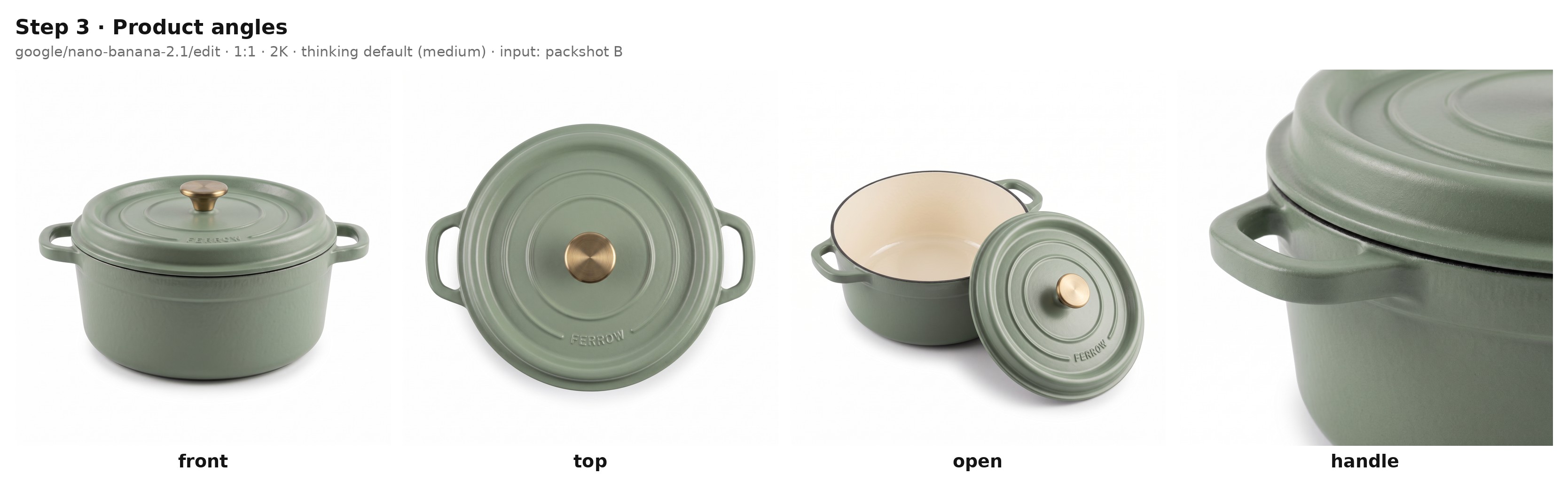
Generated using Nano Banana 2.1 Edit on fal, an AI model from Google.
Try it in ChatGPT Try it in fal AgentOur docs advise describing pose changes explicitly, and I apply the same habit to camera angles by naming each viewpoint in full.
The open view shows an interior the packshot never captured, so the model fills it in, and for a real product I'd check each angle against the item itself before it reaches a listing.
With webhookUrl set, we post each finished result to that address once the request completes.
Our webhooks guide covers the format of the payload that arrives at your endpoint.
A later run of the script can then read the saved IDs and pull whatever has finished:
javascript
import { readFile } from "node:fs/promises";
import { fal } from "@fal-ai/client";

const requestIds = JSON.parse(await readFile("ferrow-angles.json", "utf8"));

for (const [name, requestId] of Object.entries(requestIds)) {
  const status = await fal.queue.status("google/nano-banana-2.1/edit", { requestId });
  if (status.status === "COMPLETED") {
    const { data } = await fal.queue.result("google/nano-banana-2.1/edit", { requestId });
    console.log(name, data.images[0].url);
  }
}
How many of the four run in parallel depends on your account's concurrency limit, and the rest start as earlier requests finish.
The four edits add up to about $0.245 at 2K before any thinking tokens.
In Python, fal_client.submit() accepts the same webhook as webhook_url, while fal_client.result() fetches a finished request by its ID.
How do you recompose a product photo for different ad placements with the Nano Banana API?
I usually recompose a product photo for a new placement by sending it back to the Nano Banana 2.1 edit endpoint with a different aspect_ratio.
That field takes auto or one of 14 fixed ratios, from extreme 8:1 banners down to tall 1:8 strips.
Here, two edit calls turn the approved lifestyle image into a 9:16 story and a 4:1 email header.
| Category | Values |
|---|---|
| Landscape | 21:9, 16:9, 3:2, 4:3, 5:4 |
| Square | 1:1 |
| Portrait | 4:5, 3:4, 2:3, 9:16 |
| Extreme | 4:1, 1:4, 8:1, 1:8 |
python
import os

import fal_client

LIFESTYLE_URL = os.environ["LIFESTYLE_URL"]

PLACEMENTS = {
    "story": (
        "9:16",
        "Recompose this kitchen photo as a tall vertical frame for a social story. "
        "Keep the Dutch oven, the stew, the steam and the morning light exactly as they are. "
        "Extend the oak countertop below the pot and the window above it, "
        "keeping the upper quarter of the frame quiet enough for caption text.",
    ),
    "email": (
        "4:1",
        "Recompose this kitchen photo as a wide email header. "
        "Place the Dutch oven in the right third, unchanged, and extend the oak countertop "
        "and the window light across the left two thirds. "
        'In the left third, set the words "MEET THE SAGE DUTCH OVEN" in a thin cream serif, vertically centered.',
    ),
}

handles = {
    name: fal_client.submit(
        "google/nano-banana-2.1/edit",
        arguments={
            "prompt": prompt,
            "image_urls": [LIFESTYLE_URL],
            "aspect_ratio": ratio,
            "resolution": "2K",
        },
    )
    for name, (ratio, prompt) in PLACEMENTS.items()
}

for name, handle in handles.items():
    print(name, handle.get()["images"][0]["url"])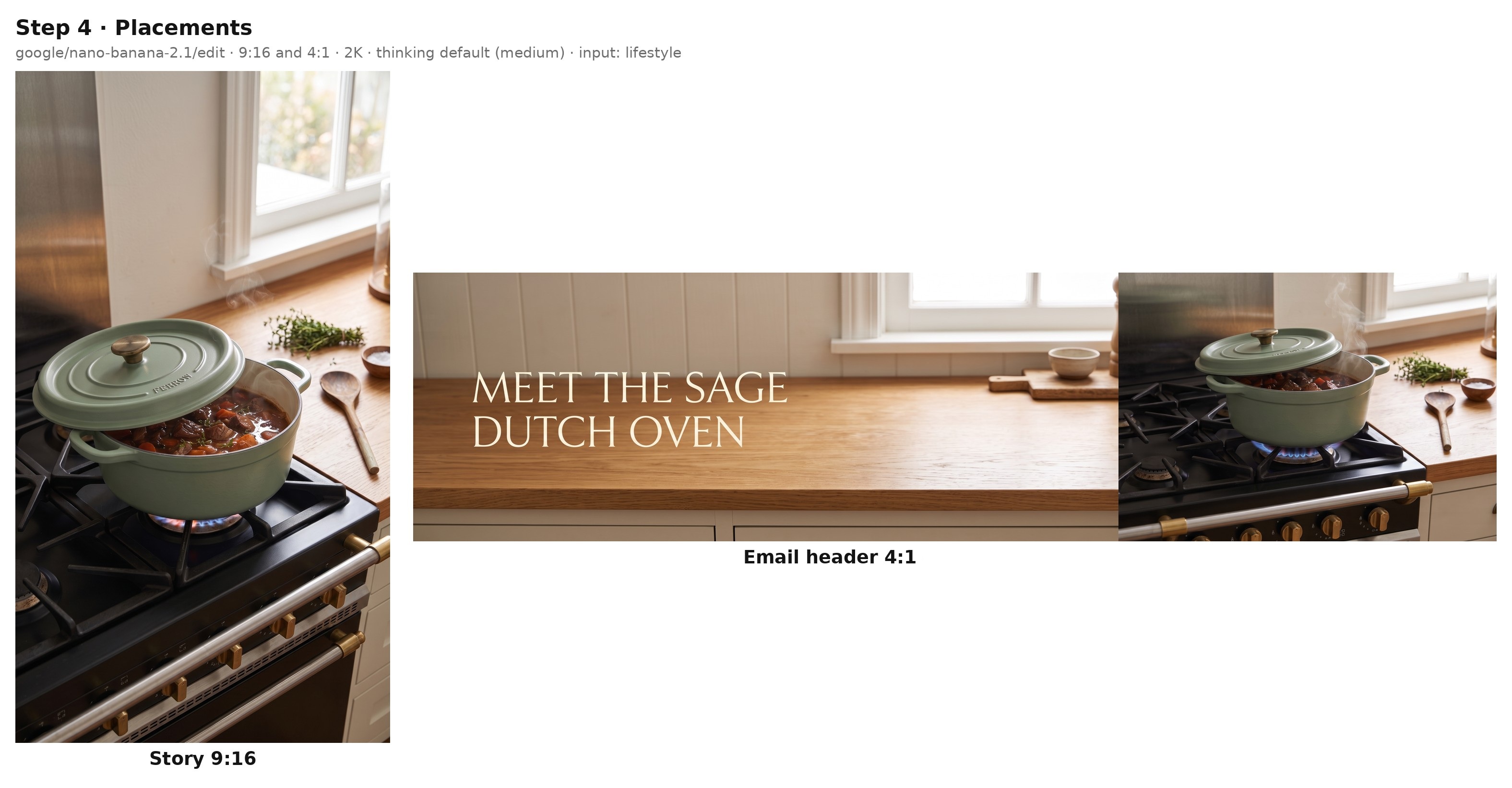
Generated using Nano Banana 2.1 Edit on fal, an AI model from Google.
Try it in ChatGPT Try it in fal AgentGoogle's 2K size table puts 9:16 at 1536 × 2752 pixels and 4:1 at 4096 × 1024, enough to crop or scale either image for its channel.
Google also resolved the tiling artifacts that 4:1, 1:4, 8:1 and 1:8 output showed at 2K and 4K in earlier versions, according to our model page.
Each prompt says what fills the extra canvas, since a recomposed frame needs more countertop and window than the 4:5 source contains.
In the email header, I quote the copy and give it a position, keeping the pot in the right third so the words have room on the left.
Because both requests are submitted before the script waits on either, they run side by side, for about $0.123 in total at 2K.
If you want these stills to move, our reference-to-video guide covers turning product images into video on fal.
Does the Nano Banana API render readable text on product content?
Nano Banana 2.1 renders legible text inside images, from menus to packaging.
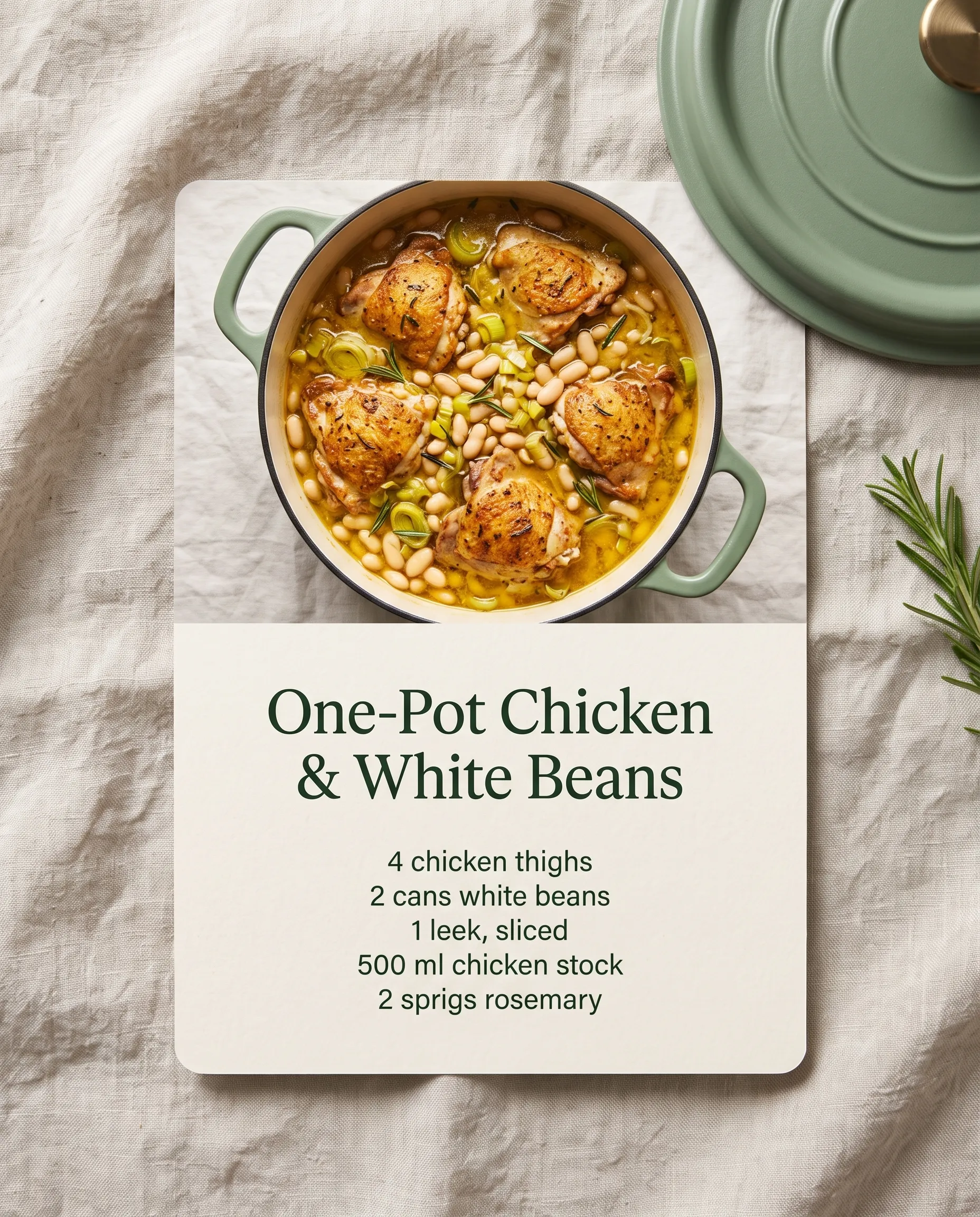
A recipe card with an exact ingredient list is a good test of that for a cookware product page.
I sent this one with cURL to fal.run, which returns the finished JSON in the HTTP response, whereas queue.fal.run would hand back a request ID first.
bash
curl -X POST "https://fal.run/google/nano-banana-2.1/edit" \
  -H "Authorization: Key $FAL_KEY" \
  -H "Content-Type: application/json" \
  -d '{
    "prompt": "Design a recipe card for a cookware product page, photographed flat on a pale linen tablecloth. The top half is a photo of the Dutch oven from image 1 with the lid off, filled with a golden chicken and white bean stew. The bottom half is cream card stock with the title \"One-Pot Chicken & White Beans\" in a dark green serif, followed by an ingredients list in a small sans-serif reading \"4 chicken thighs\", \"2 cans white beans\", \"1 leek, sliced\", \"500 ml chicken stock\" and \"2 sprigs rosemary\". Spell every line exactly as written and add no other text.",
    "image_urls": ["https://v3b.fal.media/files/..."],
    "aspect_ratio": "4:5",
    "resolution": "2K",
    "thinking_level": "high",
    "output_format": "webp"
  }'
Generated using Nano Banana 2.1 Edit on fal, an AI model from Google.
Try it in ChatGPT Try it in fal AgentI'd recommend high thinking for a layout like this one, where a photo shares the card with a title and five ingredient lines.
Our model page suggests the same setting for dense layouts in general.
Google's documentation suggests settling the wording before asking for an image that carries it.
So the card's copy is fixed before the request, and the prompt quotes every line of it and asks for no other text.
With output_format set to webp, the card arrives as a WebP file in place of the default png.
Our billing test for the Nano Banana 2.1 comparison measured $0.0743 for a 2K edit with one input and high thinking (one 16:9 image, short prompt).
The longer prompt here adds only a fraction of a cent to that.
What limits does the Nano Banana 2.1 API have?
The Nano Banana 2.1 API accepts prompts of 3 to 50,000 characters and returns 1 to 4 images per request.
Edits through google/nano-banana-2.1/edit can carry up to 14 images, plus an optional video or PDF no larger than 15 MB.
These are the other limits I plan around on catalog work:
- Consistency scope: Google sets the consistency ceiling at 10 high-fidelity objects and 4 characters per request.
- Smallest size: output starts at 1K, as the 512px (0.5K) option on Nano Banana 2 isn't part of this version.
- Small lettering: text that has to stay sharp belongs at 2K or 4K.
- Spatial layout: Google mentions occasional left and right confusion, so I check any placement the prompt specifies.
- Image count: a line like "make three versions" in the prompt is ignored while
limit_generationsstays true, which leavesnum_imagesas the dependable control. - Watermark: every image from Google's Nano Banana models includes a SynthID watermark.
- Moderation: strictness comes from
safety_tolerance, an API-only field where 1 blocks the most content and 6 the least, with 4 as the default.
When should you use Nano Banana Pro or Nano Banana 2 through the API?
Nano Banana Pro suits jobs that want Google's premium image tier at $0.15 per image below 4K, and Nano Banana 2 suits pipelines that depend on its 512px size or its existing per-image price list.
Both stay callable with the same fal API key and bill per image, whereas Nano Banana 2.1 bills per token.
| Nano Banana Pro | Nano Banana 2 | |
|---|---|---|
| Endpoints on fal | fal-ai/nano-banana-pro, fal-ai/nano-banana-pro/edit | fal-ai/nano-banana-2, fal-ai/nano-banana-2/edit |
| Google model | Gemini 3 Pro Image | Gemini 3.1 Flash Image |
| Price on fal | $0.15 per image, with 4K billed at double the rate | $0.08 per image at 1K, $0.12 at 2K, $0.16 at 4K and $0.06 at 512px |
| Web search | $0.015 extra per generation | $0.015 extra per generation |
| Reference capacity per Google | Up to 6 high-fidelity objects and 5 characters | Up to 10 high-fidelity objects and 4 characters |
Google calls Nano Banana Pro its premium choice for the most complex visual tasks, and our docs list it for brand work and product mockups.
Of the two, Nano Banana Pro is the one Google lists with style references, at up to 3 per request.
Nano Banana 2 offers minimal and high thinking, with high adding $0.002 per image.
Google's Gemini API documentation now recommends Nano Banana 2.1 for every new project, and that's where I'd start a new catalog too.
For the Pro tier, our Nano Banana Pro vs. Nano Banana 2 comparison and Nano Banana Pro guide go into more depth.
Recently Added













Run Nano Banana 2.1 on fal
A single product listing can need a packshot plus several scenes in different sizes, and an API lets you script that set once for the whole catalog.
Nano Banana 2.1 covers that work from two endpoints, with per-token pricing that starts at about $0.040 for a 1K image from a short prompt.
On fal, the same API key runs Nano Banana 2.1 next to the earlier Nano Banana tiers and more than 1,000 other models, without any GPU setup on your side.
The Nano Banana 2.1 playground runs any prompt from this guide in the browser, and our Nano Banana 2.1 prompting guide covers more ecommerce workflows.
Nano Banana API FAQ
Does the Nano Banana 2.1 API return image URLs or base64 data?
The Nano Banana 2.1 API returns hosted image URLs by default, listed alongside their content type and pixel dimensions.
With sync_mode set to true, you get data URIs back, though those outputs are then left out of your request history.
Can a fal API key be limited to the Nano Banana endpoints?
Yes, the Allowed models tab on the key creation screen can restrict a fal API key to google/nano-banana-2.1 and google/nano-banana-2.1/edit.
That restriction is fixed once the key exists, so a pipeline that later adds Nano Banana Pro will need a second key.
Are failed Nano Banana API requests billed on fal?
Nano Banana API requests that fail with a server error (HTTP 500 or above) are not billed on fal, nor is the time they spend waiting in the queue.
What you pay for is the successful output, priced from the tokens that request used.
Can Nano Banana 2.1 make a product image from a video?
The Nano Banana 2.1 edit endpoint can use a video as context through video_url, passing a YouTube URL straight to the model or downloading a video file of 15 MB or less.
Google suggests video input for thumbnails and posters, and for a store that can mean a cover image built from a product demo video.
How many images can one Nano Banana API request return?
A Nano Banana 2.1 request returns between 1 and 4 images, set through num_images, and every image is priced as a separate generation.
While limit_generations stays true, the model disregards any number of images requested in the prompt text.
![How To Use Nano Banana 2 Lite: Prompts & Workflows [2026]](https://refinery.fal.media/url/https%3A%2F%2Fv3b.fal.media%2Ffiles%2Fb%2F0aa263d4%2FgskEo8CDZbFmxFaNjXC_6.jpg/tr:w-1280,q-80/gskEo8CDZbFmxFaNjXC_6.webp)