I sent six ecommerce briefs to Nano Banana 2.1 and Nano Banana 2 on fal, starting with a fragrance ad and finishing with a four-frame TV spot storyboard.
Next to my test results, you'll find the request fields and per-image prices that change when a catalogue or campaign pipeline moves from the older endpoint to the newer one.
TL;DR
- Nano Banana 2.1 is Google's update to Nano Banana 2, arriving on fal under a new namespace with per-token billing.
- A new endpoint prefix: Nano Banana 2.1 runs at
google/nano-banana-2.1and google/nano-banana-2.1/edit, while Nano Banana 2 stays atfal-ai/nano-banana-2and fal-ai/nano-banana-2/edit, so migrating means changing the namespace as well as the version number. - A third thinking level: Nano Banana 2.1 adds medium between minimal and high and runs at it by default, whereas the Nano Banana 2 schema runs with thinking off when
thinking_levelis omitted. - Two options are gone: Nano Banana 2.1 has no 0.5K output size and no
audio_urlcontext field, though its edit endpoint still takesvideo_urlandpdf_url. - Billing moved from per image to per token: at 2K with minimal or medium thinking, one Nano Banana 2.1 image costs $0.0593 on our October 7, 2026 measurement (16:9, short prompt), compared with $0.12 for a Nano Banana 2 image at 2K without high thinking.
- A smaller saving at 4K: on the same basis, a 4K image costs $0.1335 on Nano Banana 2.1 and $0.16 on Nano Banana 2, cutting the gap to 16.6%.
- Editing and consistency scores: with thinking on for both models, Google's human side-by-side ratings put Nano Banana 2.1 at 1106 Elo for multi-character consistency (Nano Banana 2: 978) and 1049 for mask/ink-based editing (Nano Banana 2: 965).
- Both models run on fal today: the fal playground and our API reach all four endpoints through the same fal API key, letting you run a side-by-side test on your own briefs from one account.
Test conditions: I kept thinking_level at high throughout because it's the top level both schemas offer, and held resolution at 2K apart from the 8:1 banner in Test 2, run at 4K to probe the tiling fix.
Both models received word-for-word identical prompts and the same aspect ratio in each test.
The source frames for the three editing tests came from Nano Banana 2.1, meaning both edit endpoints worked from the same files and Nano Banana 2.1 was editing its own outputs.
How does Nano Banana 2.1 compare to Nano Banana 2?
Nano Banana 2.1 and Nano Banana 2 share their aspect ratio list and their 14-image reference cap on fal.
The two models differ first in thinking controls and billing; the table below adds the smaller schema gaps on either side.
| Nano Banana 2.1 | Nano Banana 2 | |
|---|---|---|
| Text-to-image endpoint | google/nano-banana-2.1 | fal-ai/nano-banana-2 |
| Edit endpoint | google/nano-banana-2.1/edit | fal-ai/nano-banana-2/edit |
| Google model | Gemini Nano Banana 2.1 (gemini-nano-banana-2.1) | Gemini 3.1 Flash Image |
| Output resolutions | 1K (default), 2K, 4K | 0.5K, 1K (default), 2K, 4K |
| Aspect ratios | auto plus 14 fixed ratios from 8:1 to 1:8 | auto plus 14 fixed ratios from 8:1 to 1:8 |
| Tiling fix on 4:1, 1:4, 8:1 and 1:8 at 2K and 4K | ✅ Listed by Google for 2.1 | Predates the fix |
| Thinking levels | minimal, medium, high | minimal, high |
Thinking when thinking_level is omitted | medium | Off, per the schema description |
| Reference images per edit call | Up to 14 | Up to 14 |
| Mask-based editing | ✅ Marks painted on the input image, no mask parameter | No mask parameter; our page describes language-driven edits |
| Edit context inputs | video_url, pdf_url | video_url, audio_url, pdf_url |
| Web search grounding | ✅ enable_web_search, search results billed as input tokens | ✅ enable_web_search, $0.015 when used |
system_prompt | ✅ | ✅ |
| Images per request | 1 to 4 | 1 to 4 |
| Output formats | jpeg, png, webp | jpeg, png, webp |
| Billing model | Per token | Per image |
| Price, 1K text to image, minimal thinking | $0.0396 | $0.08 |
| Price, 2K text to image, high thinking | $0.0732 | $0.122 |
| Price, 4K text to image, high thinking | $0.1435 | $0.162 |
| Commercial use | ✅ | ✅ |
What's new in Nano Banana 2.1 compared to Nano Banana 2?
Nano Banana 2.1 adds a medium thinking default and drops the 0.5K size and the audio_url field that Nano Banana 2 offers.
Google's model card covers the quality side, and its largest reported gain is in multi-character consistency.
Four changes are visible on our endpoint pages before you send a single request:
- Endpoint namespace: Nano Banana 2.1 is published under the google namespace on fal, with Nano Banana 2 still under fal-ai.
- Thinking enum and default: the Nano Banana 2 schema offers minimal and high and switches thinking off when the field is omitted; Nano Banana 2.1 adds medium and makes it the default.
- Resolution enum: the 0.5K option is absent from the Nano Banana 2.1 schema, which starts at 1K.
- Edit context fields: the Nano Banana 2.1 edit schema retains
video_urlandpdf_urlbut no longer listsaudio_url.
A Nano Banana 2 request body asking for resolution 0.5K or carrying audio_url has no counterpart in the Nano Banana 2.1 schema, so those requests need editing before they move.
The thinking change is easier to miss: a Nano Banana 2 request that never set thinking_level ran with thinking off, and the same body sent to Nano Banana 2.1 runs at medium.
Our October 7, 2026 measurements billed minimal and medium thinking identically on Nano Banana 2.1, so that default change didn't move the price in our tests.
Google presents Nano Banana 2.1 as the efficiency-focused option next to Nano Banana Pro, with the speed and cost profile of a Flash model.
On quality, Google's release material points to improvements in these areas:
- Visual quality: images look more realistic across the output sizes up to 4K, and 1K remains the default.
- Text and layout: text renders more cleanly and infographic layouts come out more accurate, including text in several languages.
- Extreme aspect ratios: the tiling artifacts seen on 4:1, 1:4, 8:1 and 1:8 images at 2K and 4K are fixed.
- Mask-based editing: edits follow regions painted or outlined on the input image more reliably than before.
- Subject consistency: Google reports better consistency across edits, within a stated limit of 4 characters and 10 objects per request.
Google's model card backs those claims with Elo scores from human side-by-side evaluations:
| Benchmark | Nano Banana 2.1 (Thinking) | Nano Banana 2.1 (No Thinking) | Nano Banana 2 (Thinking) |
|---|---|---|---|
| Text to image, overall preference | 1050 | 1015 | 990 |
| Infographic design | 1048 | 1001 | 961 |
| Infographic factuality (autorater score) | 0.521 | 0.328 | 0.179 |
| General editing | 1026 | 980 | 938 |
| Single-character consistency | 1028 | 1021 | 981 |
| Multi-character consistency | 1106 | 1068 | 978 |
| Mask/ink-based editing | 1049 | 1042 | 965 |
| Product consistency | 1024 | 981 | 955 |
| Stylization | 1062 | 1036 | 991 |
| Multi-reference editing | 1066 | 1041 | 988 |
Google's no-thinking configuration of Nano Banana 2.1 scores above thinking-enabled Nano Banana 2 in all nine Elo rows reproduced on our model pages.
The two Nano Banana 2.1 configurations differ by only seven points on mask/ink-based editing and on single-character consistency.
Their gap is widest on infographic design and general editing, at 47 and 46 points respectively.
Google also documents where Nano Banana 2.1 still needs help from the prompt: small text can blur at 1K, left and right can swap in spatial layouts, mask ink occasionally survives into the output, and a pose from the input image can carry over.
⚠️ The benchmark figures and quality claims above are Google's own, taken from the Nano Banana 2.1 model card, whose full version publishes the confidence intervals and methodology our summary leaves out.
Where can you run Nano Banana 2.1 and Nano Banana 2?
The best place to run Nano Banana 2.1 and Nano Banana 2 is on fal because one fal API key reaches all four of their endpoints, so you can test both models on the same brief in the playground or through our API without managing any GPUs.
Both models carry fal's Partner and Commercial use labels, so images from either one can go into commercial campaigns.
For catalogue-scale batches, fal.queue.submit with a webhookUrl returns a request ID straight away, which lets large batches of variant edits run without holding a connection open for each image.
Here is what that looks like:
import { fal } from "@fal-ai/client";

const result = await fal.subscribe("google/nano-banana-2.1", {
  input: {
    prompt: "An action shot of a black lab swimming in an inground suburban swimming pool. The camera is placed meticulously on the water line, dividing the image in half, revealing both the dogs head above water holding a tennis ball in it's mouth, and it's paws paddling underwater."
  },
  logs: true,
  onQueueUpdate: (update) => {
    if (update.status === "IN_PROGRESS") {
      update.logs.map((log) => log.message).forEach(console.log);
    }
  },
});

console.log(result.data);
console.log(result.requestId);
Nano Banana 2.1 vs. Nano Banana 2: text-to-image tests
I wrote each of the three text-to-image briefs below around one improvement Google lists for Nano Banana 2.1.
Both endpoints received the prompts at thinking_level high, using the resolution and aspect ratio given in each test heading.
Test 1: A fragrance launch ad with a price and small print (4:5, 2K)
A fragrance ad has to set a price line and legal small print in the same frame as the bottle, and retailers reject the asset over a single misspelled word.
I stacked four type sizes into one 4:5 frame, from a large display line at the top down to the small print a retailer's legal team asks for.
Prompt: "A 4:5 print advertisement for a new eau de parfum, art-directed like a luxury magazine page. A faceted clear glass bottle with a heavy brushed-gold cap stands on a slab of dark green marble beside a single split fig, lit by low warm light from the right that throws a long soft shadow across the stone. The bottle label reads 'ALDERIC' in spaced capitals with 'FIG HOUR' beneath it. Upper third: a large serif display line reading 'The last warm hour of summer'. Lower right, in a small sans-serif: 'ALDERIC FIG HOUR, Eau de Parfum 50 ml, $84'. Bottom edge, in the smallest type on the page: 'Available from 14 November at selected stores and alderic.com'. Deep green and gold palette with generous negative space, every letter spelled exactly as written. No logos beyond the label, no extra copy."
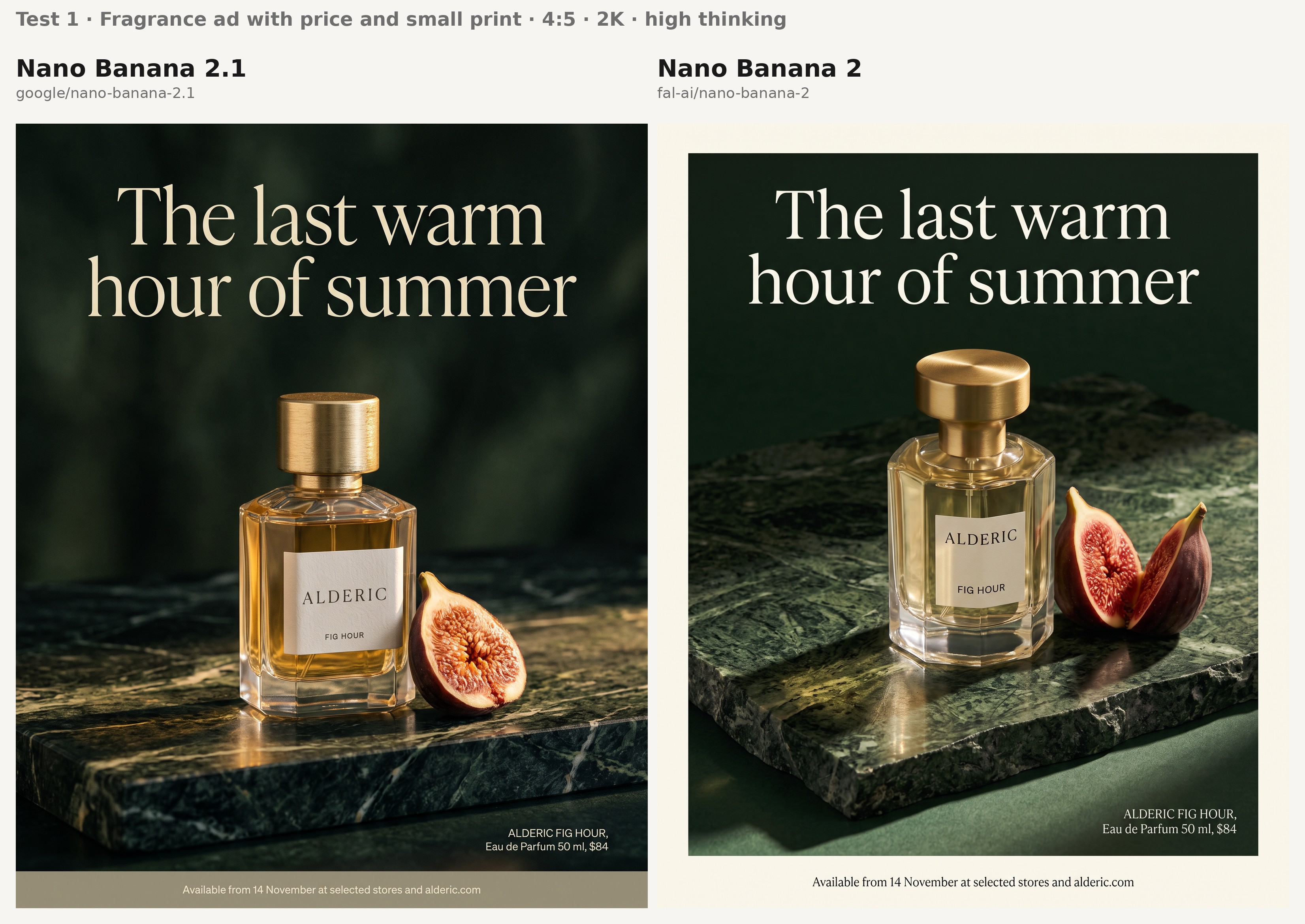
What I'm checking on both outputs:
- The bottle label and the price line spell 'ALDERIC' and 'FIG HOUR' identically, without a letter dropped from the brand name.
- The bottom line stays legible at 2K, with the serif display line kept visually apart from the sans-serif copy below it.
The bottle label is the line I'd check first, letter by letter, since a model can set the display line perfectly and still drop a letter from 'ALDERIC'.
I'd say that both models did a good job at the label and price line, and they both correctly spell ALDERIC/FIG HOUR, although I'm not too happy with Nano Banana 2's serif display kept apart from sans-serif copy.
Test 2: An 8:1 footwear hero banner at 4K
Wide hero banners are a staple of footwear storefronts; at 8:1, a model has to keep one continuous scene across a frame eight times wider than it is tall.
Google lists a fix for tiling artifacts on extreme ratios at 2K and 4K, so I lined six shoes up along one long plinth, where a seam would show as a duplicated shoe or a step in the concrete.
At 4K with high thinking, this banner costs $0.162 on Nano Banana 2 and about $0.1435 on Nano Banana 2.1, using our 16:9 measurement as the Nano Banana 2.1 reference.
Prompt: "A panoramic ecommerce hero banner, 8:1, photographed in a bright studio. A single long plinth of pale poured concrete runs the full width of the frame, carrying six running shoes in a row, evenly spaced, in six colorways: chalk white, signal orange, slate blue, moss green, sand and charcoal. All six share one design, a knit upper over a chunky foam midsole, angled in matching three-quarter view toward the left. The left fifth of the frame stays empty concrete wall for copy. Soft high-key light from above with one consistent shadow direction across the whole width, and fine concrete texture continuous from end to end. No logos or text anywhere in the frame."
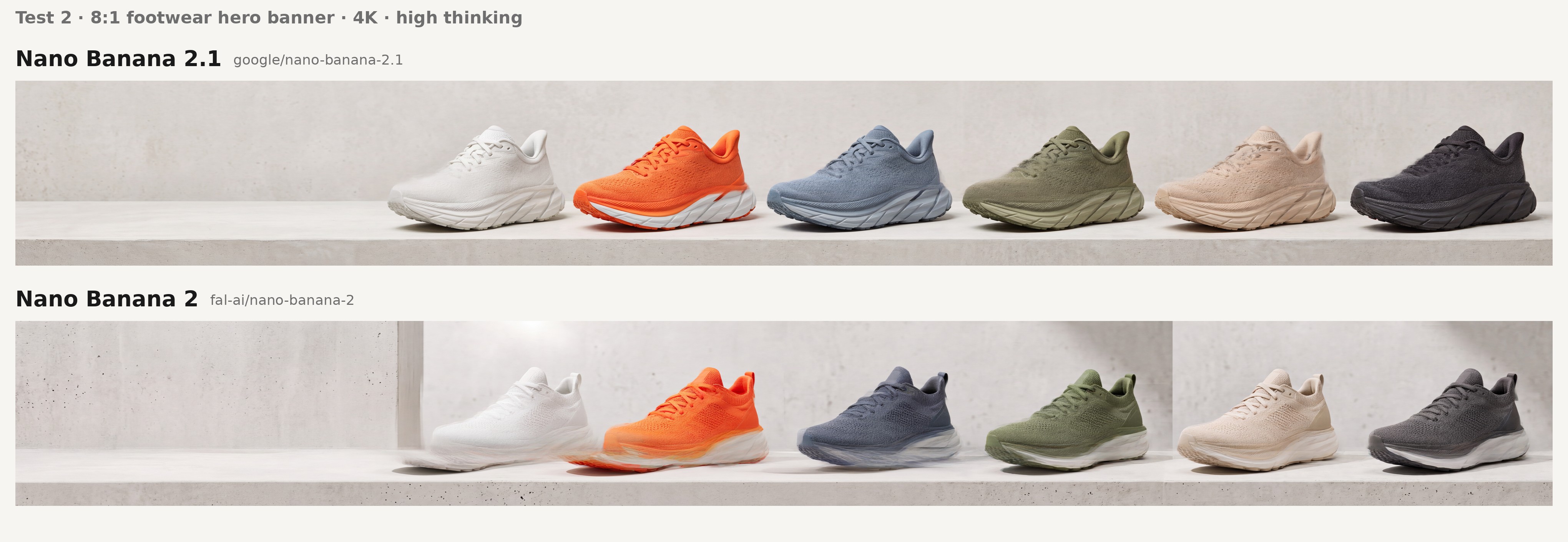
What to look for across the width:
- The six shoes keep one design and one shadow direction while their colorways stay distinct, with no shoe repeated anywhere in the row.
- The plinth and wall continue without a visible seam or a change in texture from the left edge to the right.
It seems like Nano Banana 2 couldn't properly render the first 3 shoes, although Nano Banana 2.1 did a really good job overall.
Test 3: A bilingual skincare carton in English and Japanese (3:2, 2K)
Skincare brands that export to Japan often print English and Japanese on the same carton, and I wanted to see both models set two writing systems at the same small size.
Because Google's notes for Nano Banana 2.1 mention text in several languages, I picked Japanese, where a single wrong character is easy to spot against the brief.
Prompt: "A studio product photograph, 3:2 landscape, of a slim matte white skincare carton standing upright beside its frosted glass jar on a pale sand-colored surface. The carton front carries two blocks of copy in a clean sans-serif. Upper block, English: 'ORRIN', then 'Barrier Repair Cream', then 'Ceramide complex with oat lipids', then '1.7 fl oz'. Lower block, Japanese: 'オリン', then 'バリアリペアクリーム', then 'セラミド配合', then '50 mL'. The jar lid carries only the word 'ORRIN'. Soft diffused light from the left with a faint contact shadow under both objects, colors kept neutral and true. Every character legible and spelled exactly as given, with no extra text and no logos."
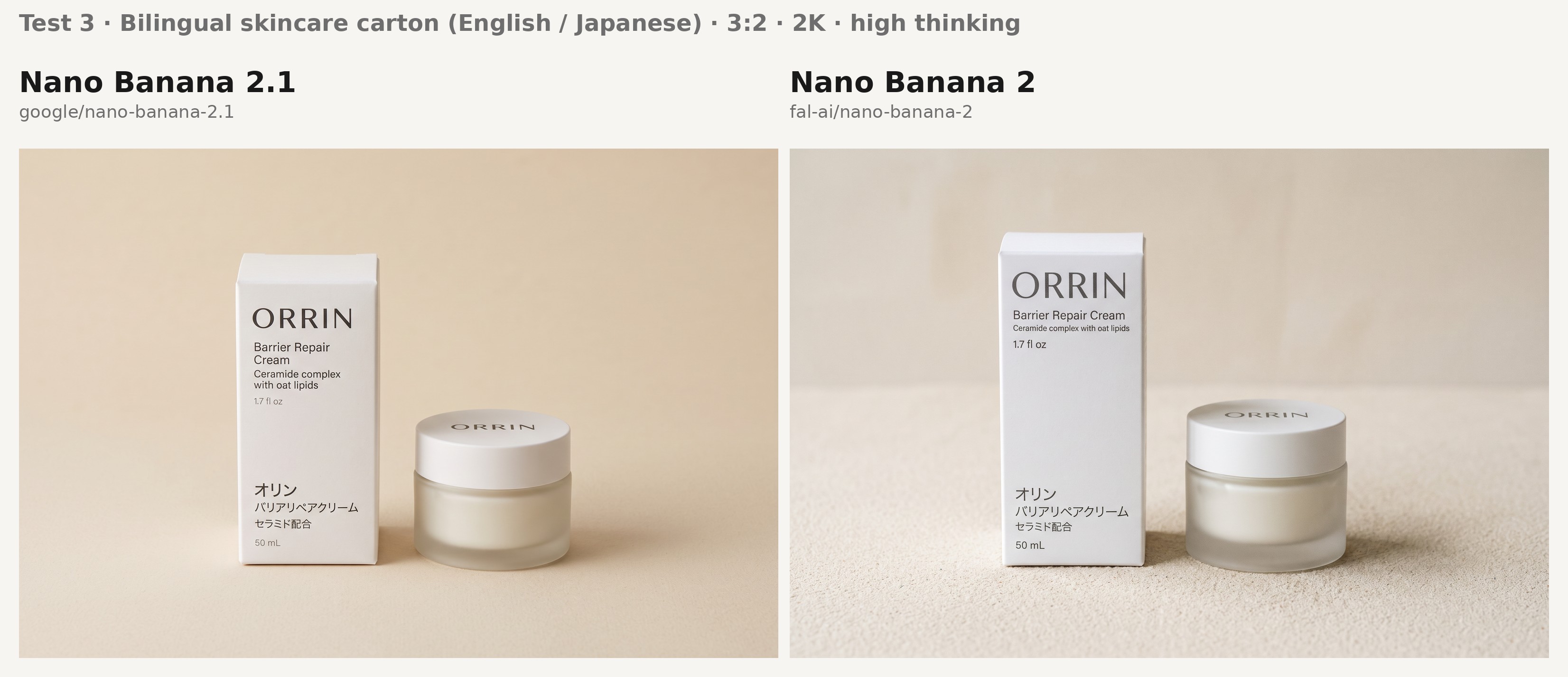
The two checks for this carton:
- The Japanese lines match the given characters exactly, including the long vowel mark in 'クリーム' and the run of katakana in 'バリアリペア'.
- The English and Japanese blocks follow the same line order, and 'ORRIN' appears alone on the jar lid.
I'd say that Nano Banana 2.1 played better with the colors in this one.
falMODEL APIs
The fastest, cheapest and most reliable way to run genAI models. 1 API, 100s of models
Nano Banana 2.1 vs. Nano Banana 2: editing tests
I generated the source frames for these three editing tests on Nano Banana 2.1 at 2K with high thinking, then sent identical files and prompts to both edit endpoints.
Nano Banana 2.1 is therefore editing its own outputs in these tests, with Nano Banana 2 working on pixels from its successor.
Test 4: A mask edit that changes one panel of a sneaker
Google lists mask-based editing among the notable leaps in Nano Banana 2.1, which I tested on a routine footwear catalogue job: producing a second colorway from a shoe photographed once.
Neither schema has a mask parameter, so the mask is red paint on the source image and the prompt describes what belongs inside the painted region.
Nano Banana 2 receives the same painted file and prompt, although our Nano Banana 2 Edit page describes its edits as driven by language and doesn't mention painted marks.
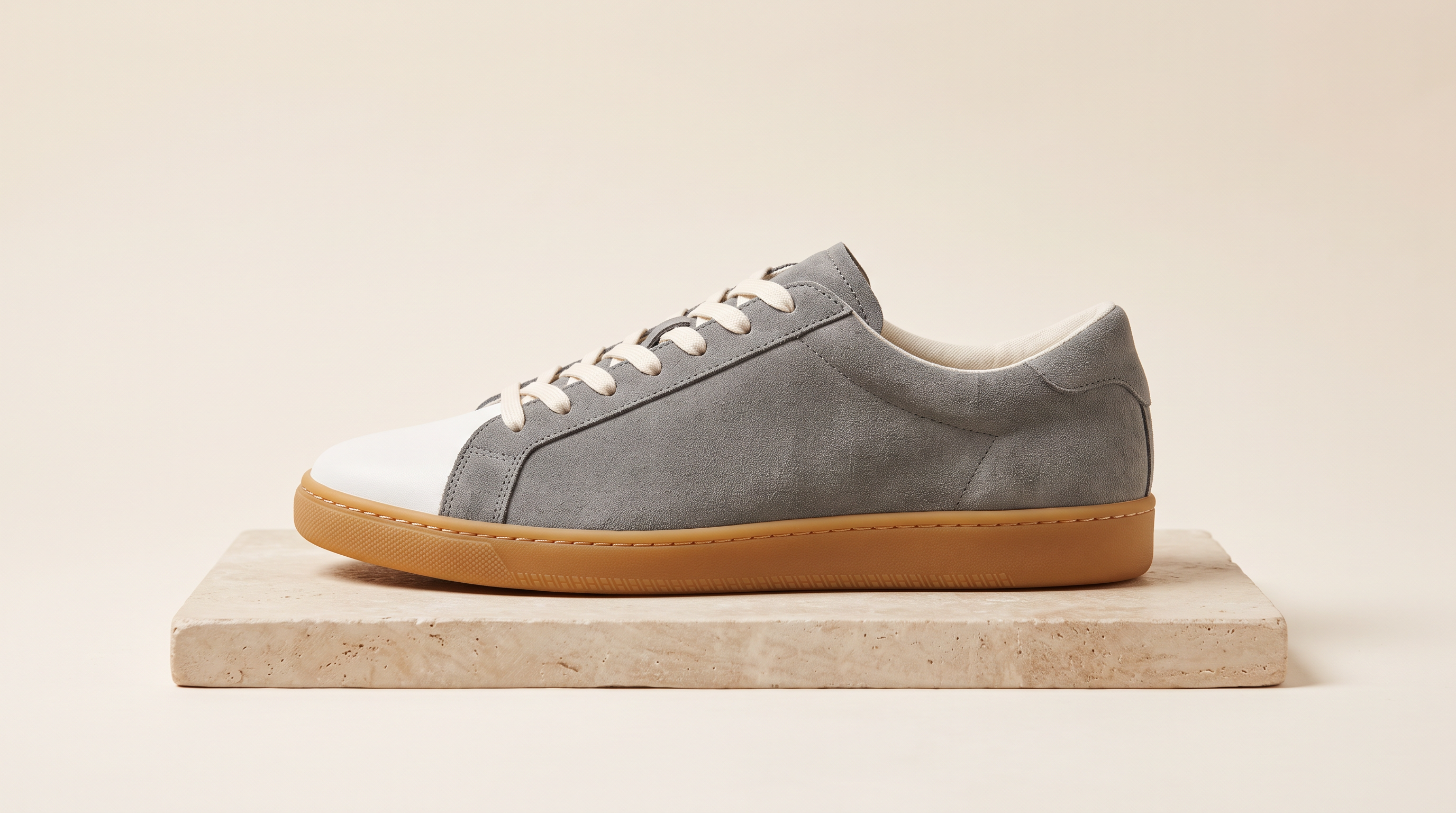
Source image, generated with Nano Banana 2.1: "A side-profile ecommerce product photograph of a low-top sneaker standing on a pale stone plinth against a warm off-white backdrop. The upper is grey suede with a smooth white leather toe cap, set on a gum rubber sole. Flat white laces run through six eyelets. Soft even studio light from above with a gentle contact shadow, and no logos or text."
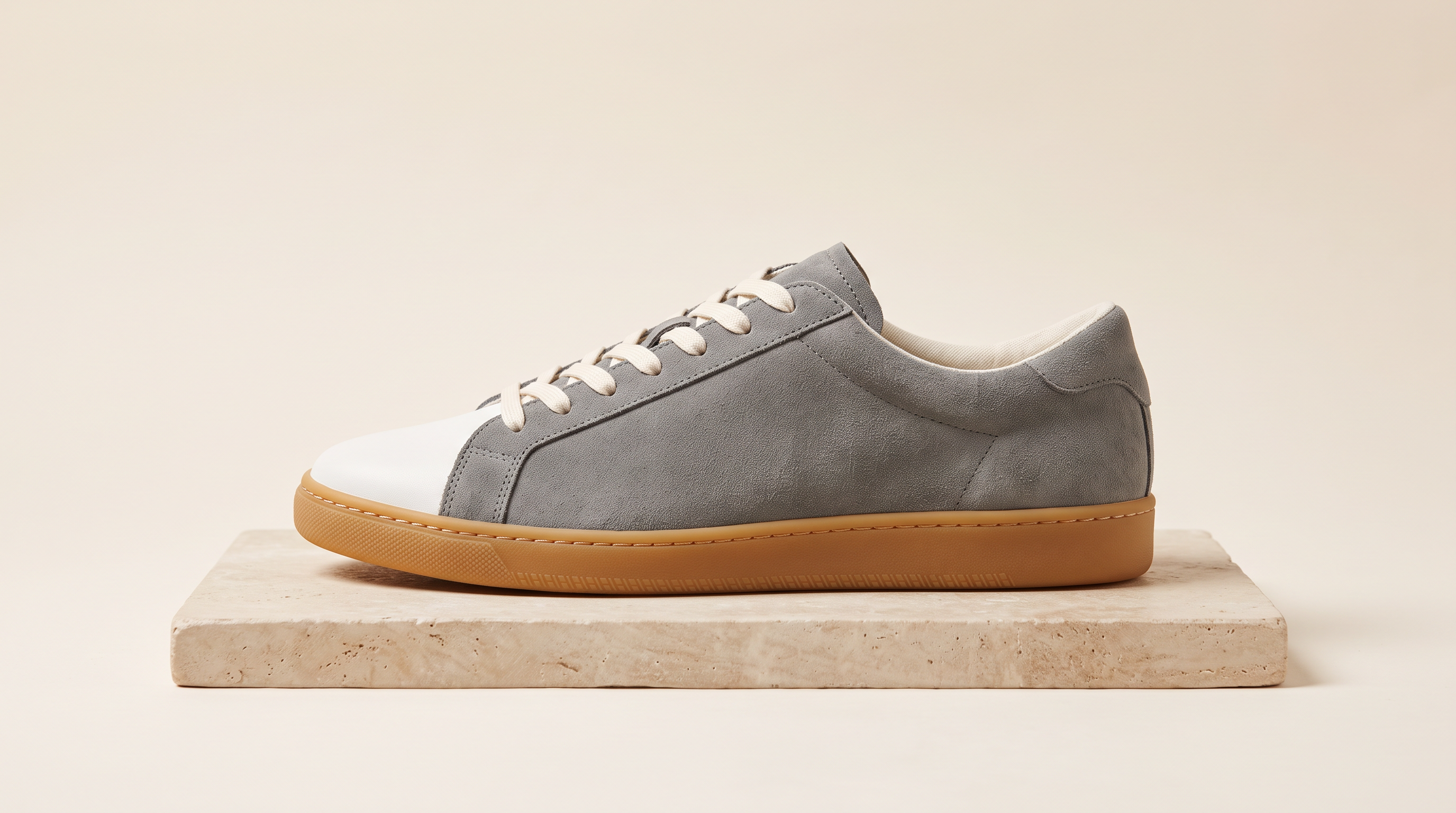
Generated using Nano Banana 2.1 on fal, an AI model from Google.
Before the edit, I painted a solid red (#FF0000) fill over the white leather toe cap by hand, leaving the rest of the shoe unpainted.
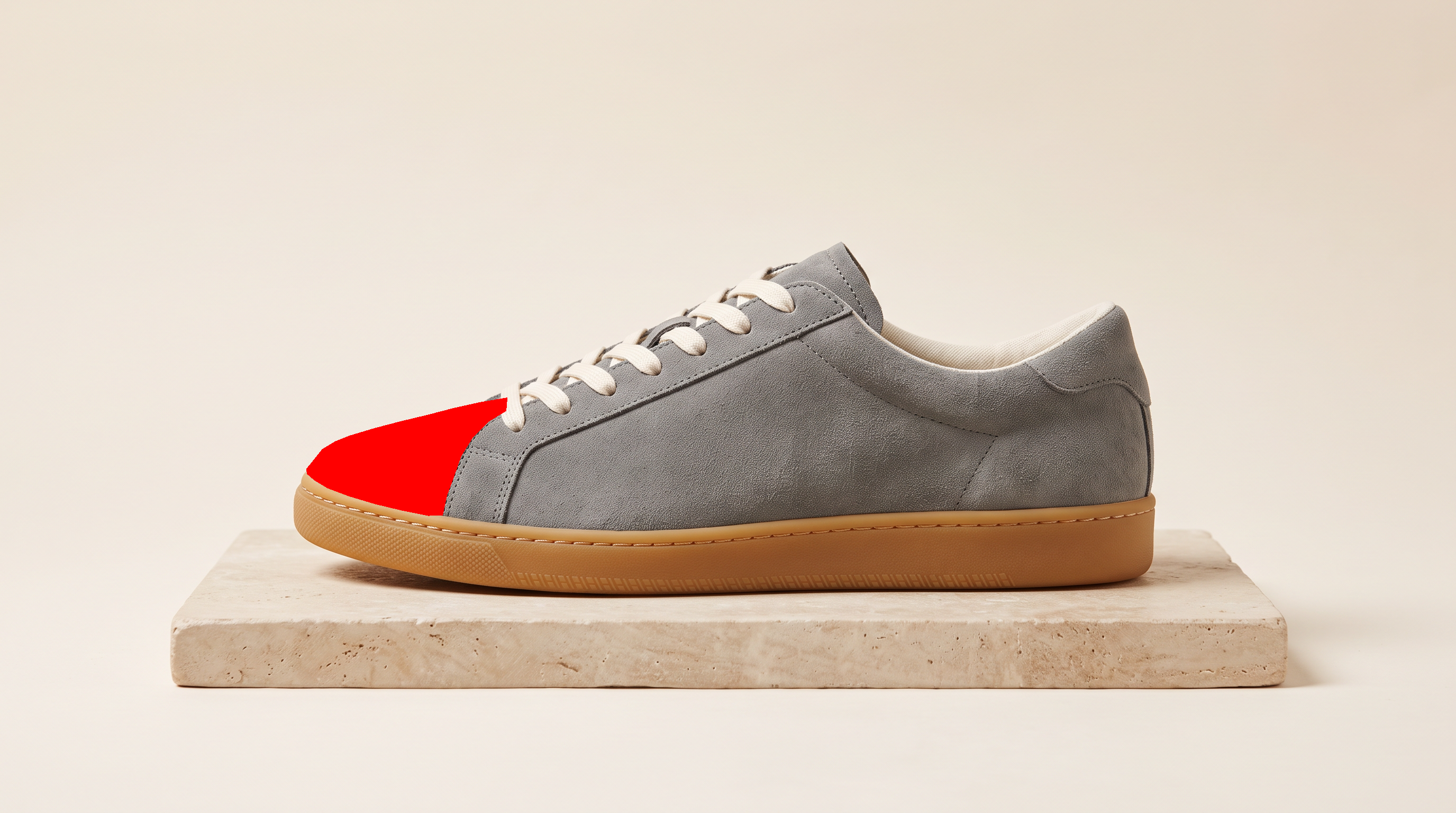
Source frame generated using Nano Banana 2.1 on fal, with the red mask painted by hand.
Edit prompt, sent to both edit endpoints: "Replace the area painted in red with the same toe cap in forest green suede, following the exact outline and stitching of the original cap. Keep the grey suede upper, the laces, the gum sole, the plinth and the lighting exactly as they are, and remove every trace of the red paint."
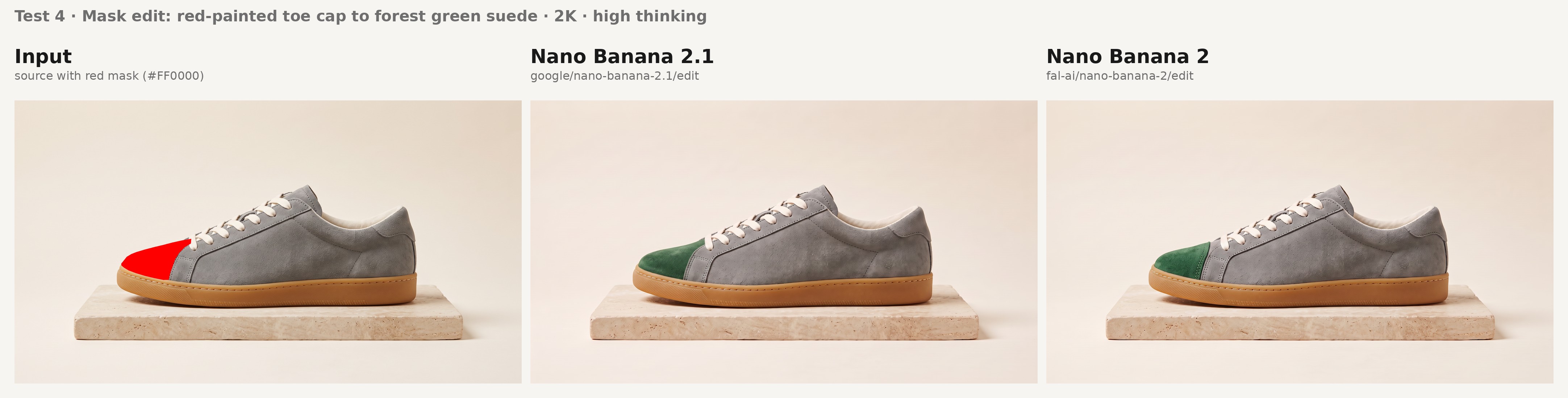
Inspection points for the colorway edit:
- No red paint or pink fringing survives at the edge of the new toe cap, which Google lists as an occasional failure for mask edits.
- The green suede follows the original outline and stitching while the rest of the shoe, plinth included, stays as it was in the source frame.
I'd say that both image generation models did a really good job here.
Test 5: A four-frame TV spot storyboard from one portrait
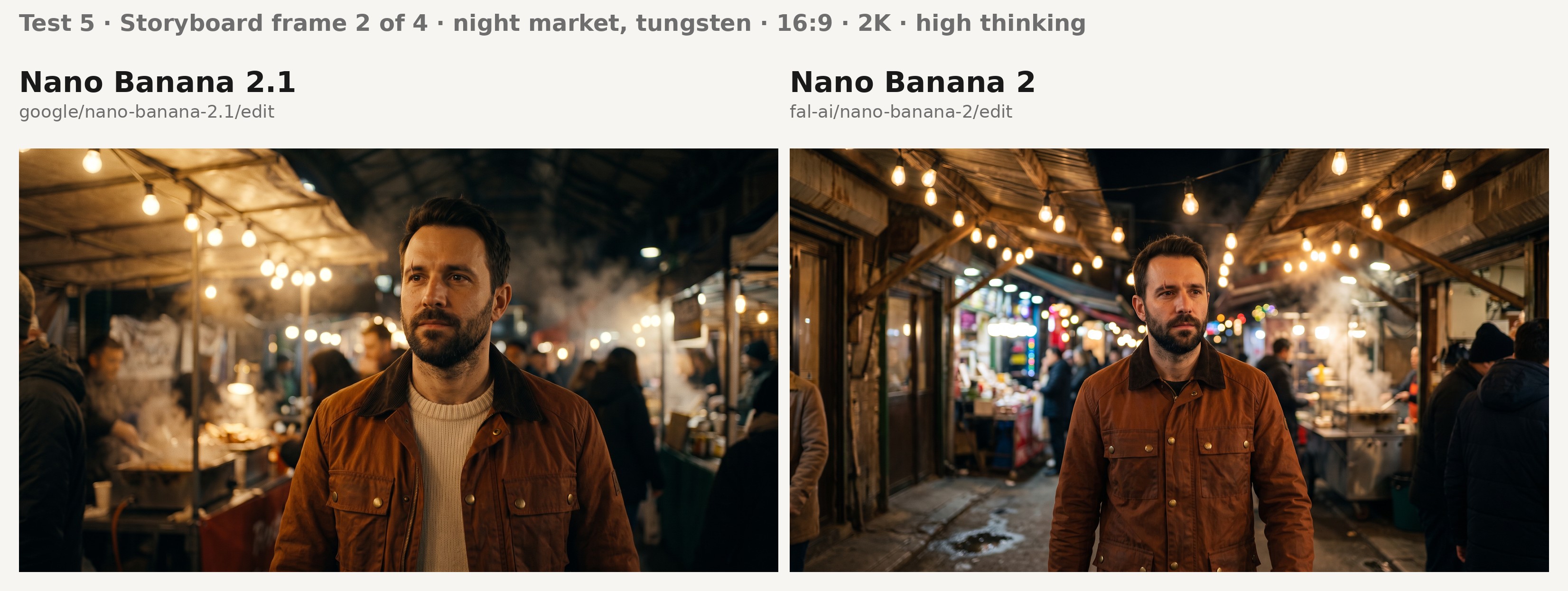
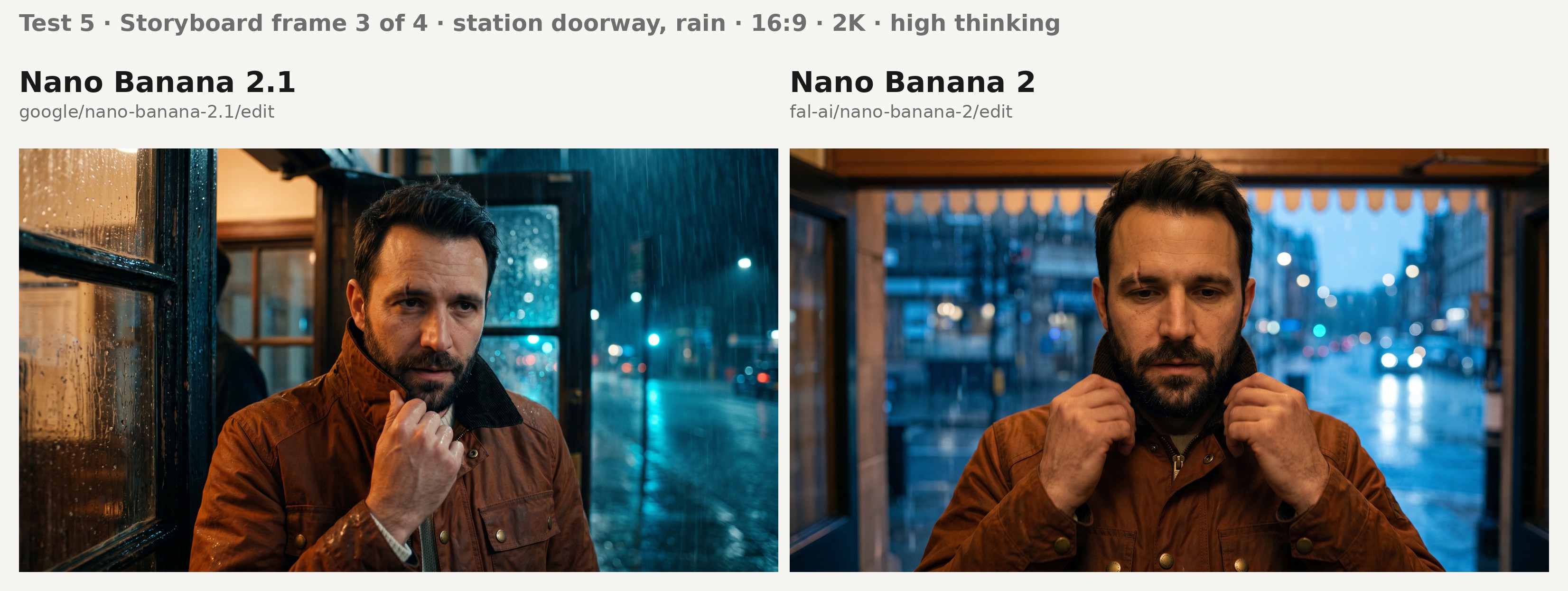
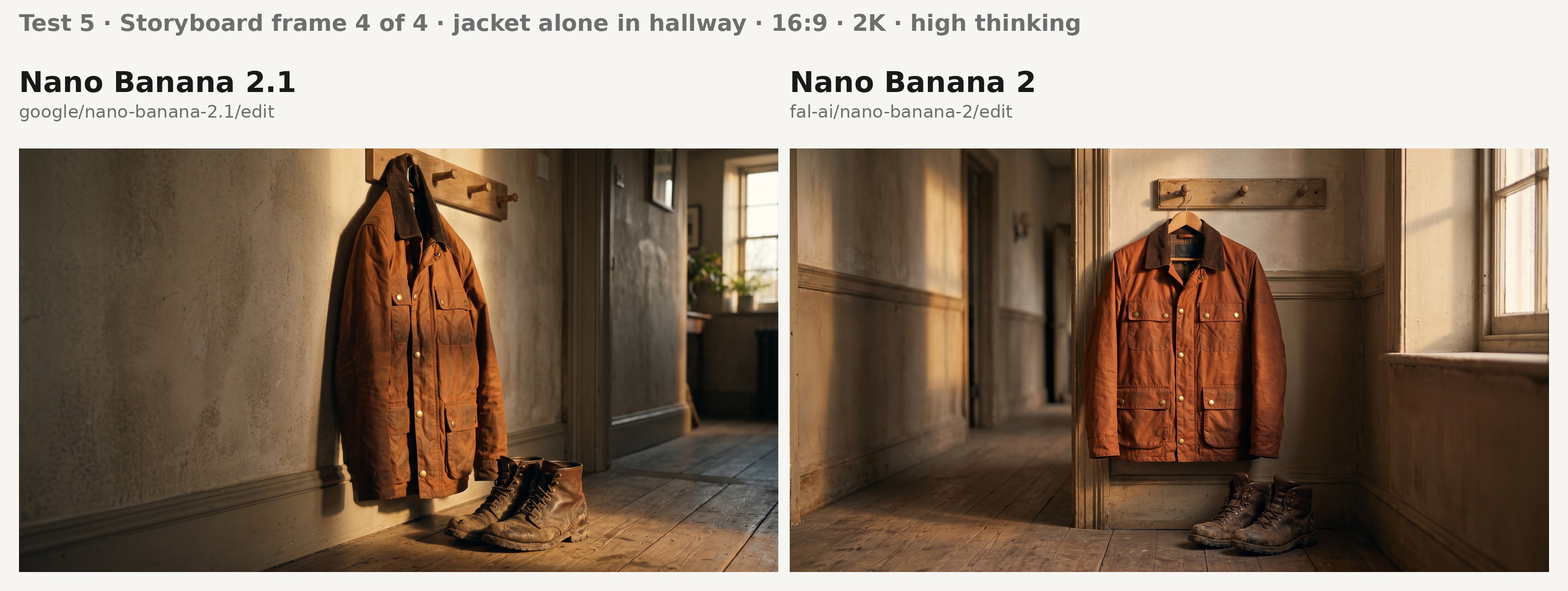
A storyboard built on a generated actor is only usable if the actor stays recognizable from one location to the next, so I sent one portrait to both edit endpoints four times, one frame per call.
I changed the light in every frame, from flat dawn to tungsten night, since likeness is harder to hold through a change of light than through a change of location alone.
Frame 4 drops the actor and asks for the jacket alone, since the jacket is the product the spot is selling.
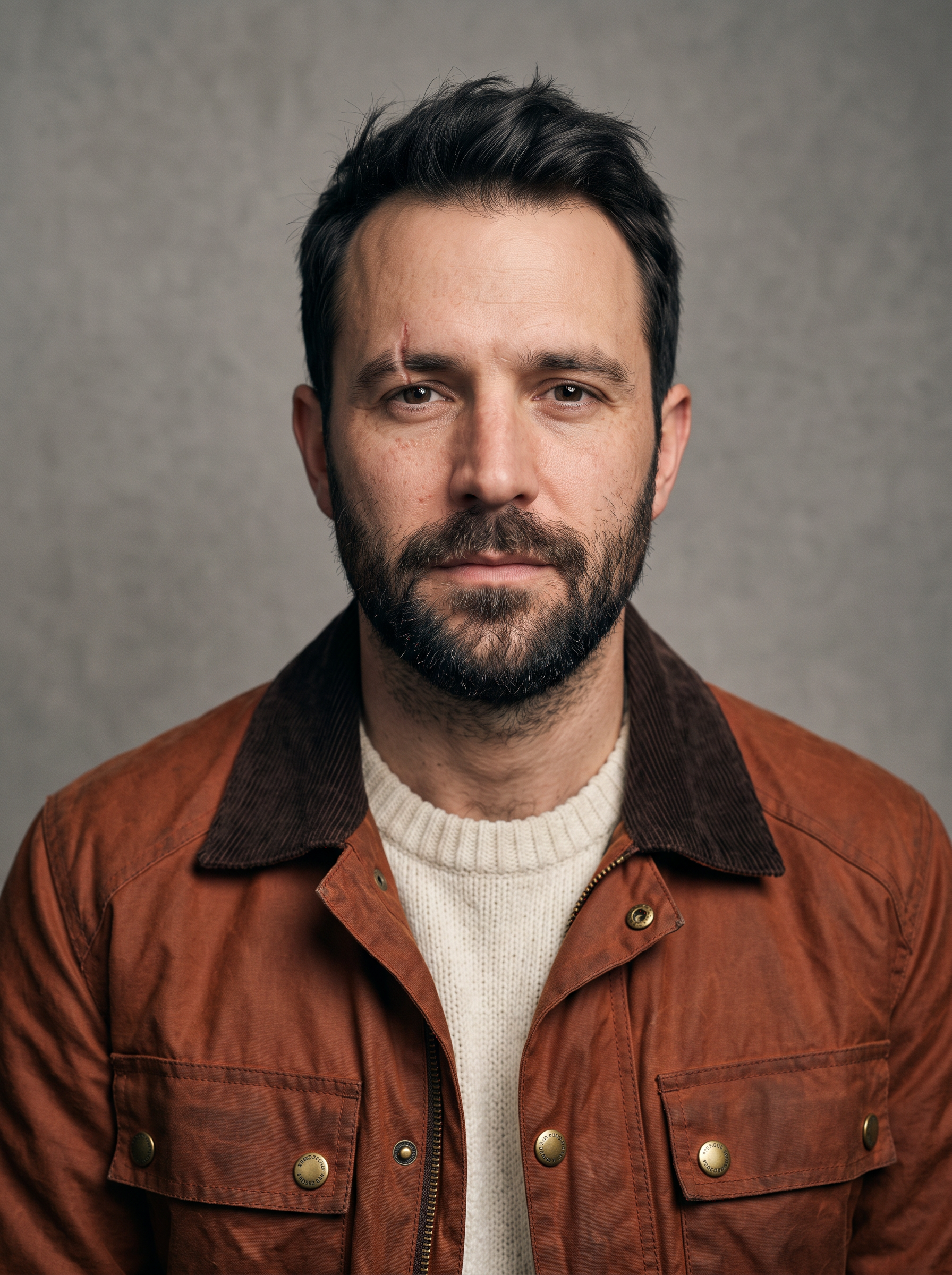
Source portrait, generated with Nano Banana 2.1 at 3:4: "A studio portrait of a man in his mid-thirties with a close-cropped dark beard and a small scar through his left eyebrow, head and shoulders, facing the camera. He wears a rust waxed-cotton field jacket with four brass snap buttons and a brown corduroy collar over a cream crew-neck knit. Neutral mid-grey backdrop, soft key light from the left, sharp focus, natural skin texture, no retouching."
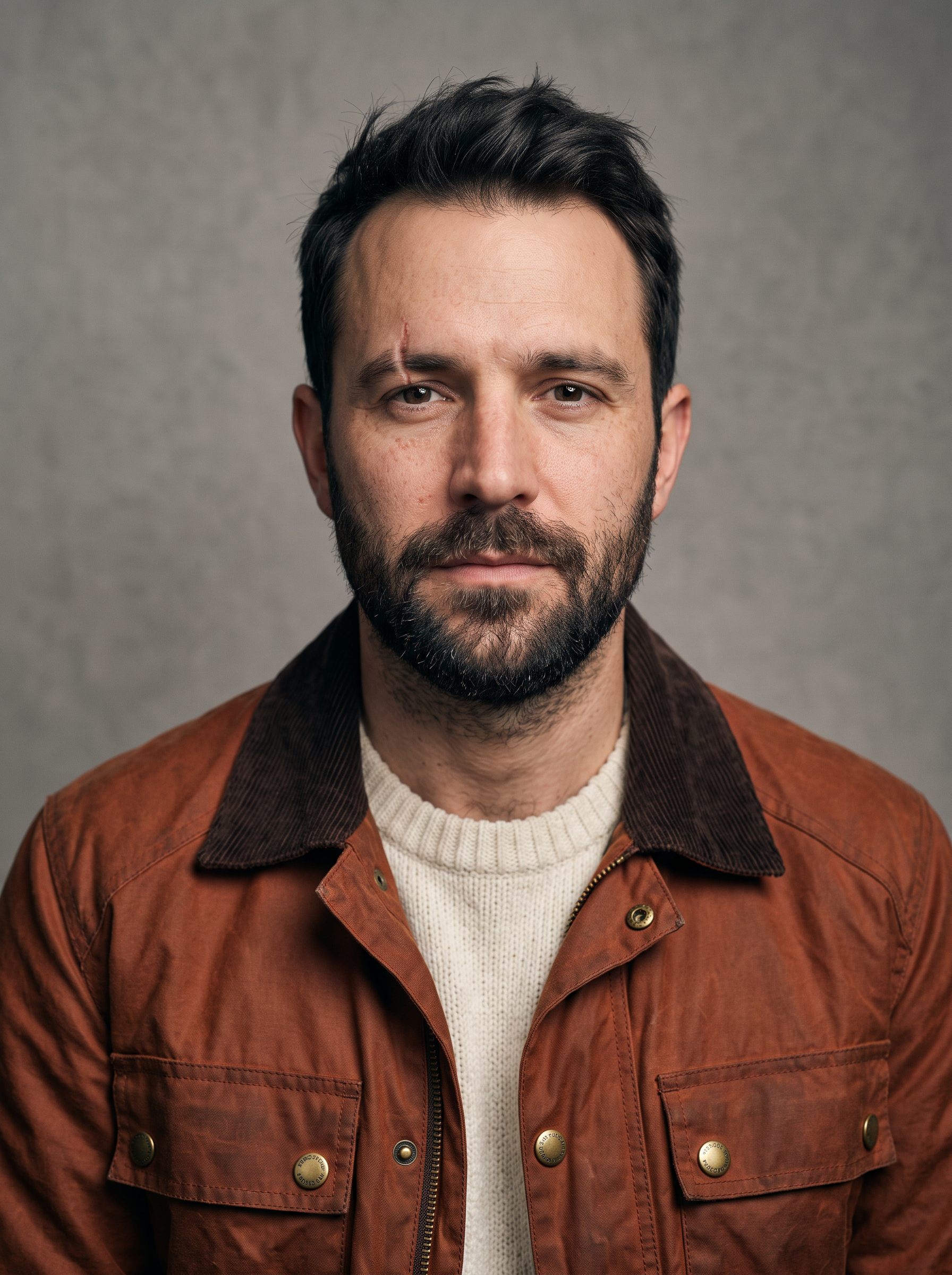
Generated using Nano Banana 2.1 on fal, an AI model from Google.
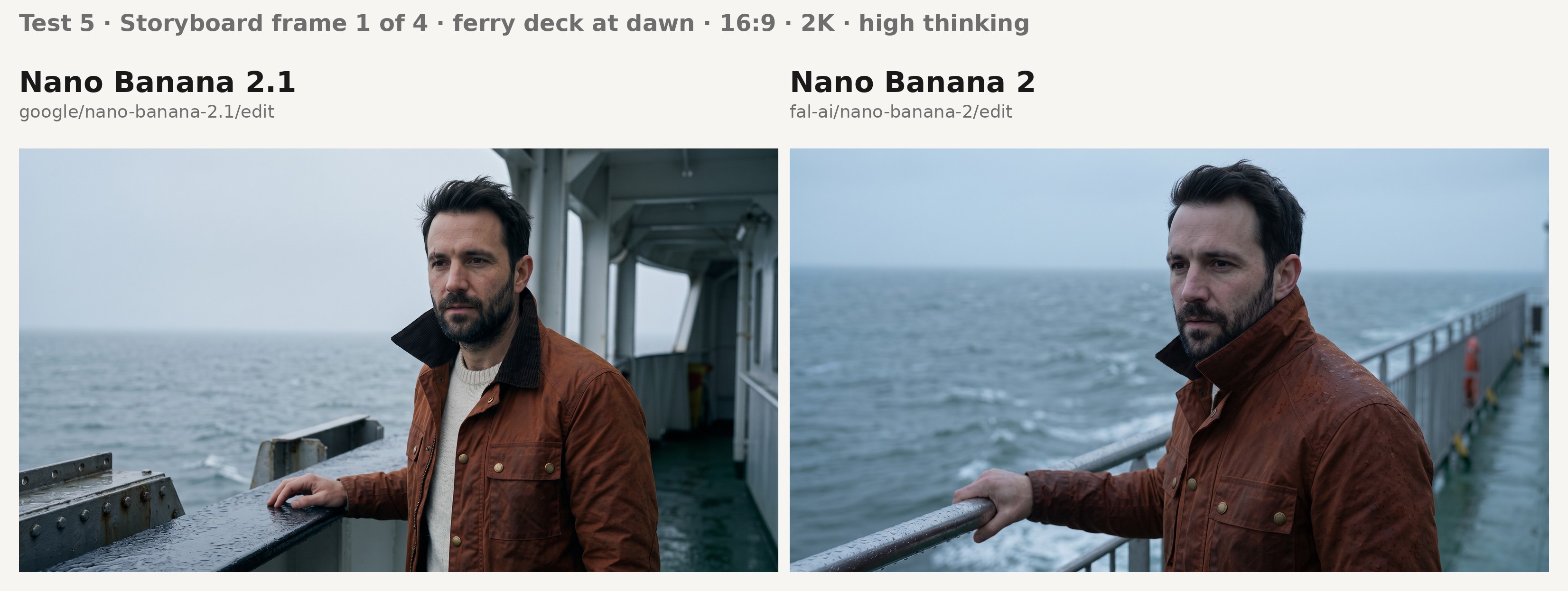
Frame 1 prompt, 16:9: "Storyboard frame 1 of 4 for an outerwear TV spot, cinematic still. The man from the reference image stands at the rail of a ferry deck at dawn with the wind lifting his collar. Behind him are wet steel railings and a grey sea under flat cool morning light. Keep the man's face and the scar through his left eyebrow exactly as in the reference. The rust waxed jacket keeps its four brass snaps and its corduroy collar. Photorealistic, no text or logos."
Frame 2 prompt, 16:9: "Storyboard frame 2 of 4 for an outerwear TV spot, cinematic still. The man from the reference image walks through a covered night market under strung tungsten bulbs, framed from the waist up. Warm practical light falls on his face, with the stalls soft behind him. Keep the man's face and the scar through his left eyebrow exactly as in the reference. The rust waxed jacket keeps its four brass snaps and its corduroy collar. Photorealistic, no text or logos."
Frame 3 prompt, 16:9: "Storyboard frame 3 of 4 for an outerwear TV spot, cinematic still. A close-up of the man from the reference image turning up the corduroy collar in a station doorway as rain falls in the street behind him. Cool blue light outside contrasts with the warm doorway light on his face. Keep the man's face and the scar through his left eyebrow exactly as in the reference. The rust waxed jacket keeps its four brass snaps and its corduroy collar. Photorealistic, no text or logos."
Frame 4 prompt, 16:9: "Storyboard frame 4 of 4 for an outerwear TV spot, cinematic still. The rust waxed jacket from the reference image hangs alone on a wooden peg in a hallway beside a pair of muddy leather boots, late afternoon window light from the right. The jacket keeps its four brass snaps and its corduroy collar exactly as in the reference. No person in frame, no text or logos."
What to check across the eight frames:
- The eyebrow scar stays on his left side in the three frames with the actor, since Google notes occasional left and right confusion.
- The jacket in frame 4 matches the portrait down to four brass snaps and the corduroy collar, in a hallway with nobody in it.
Test 6: Four product references composed into one campaign still
Accessories brands often shoot each product on its own and composite the campaign still later.
Google's multi-reference editing benchmark is the closest match to that job, with Nano Banana 2.1 at 1066 and Nano Banana 2 at 988.
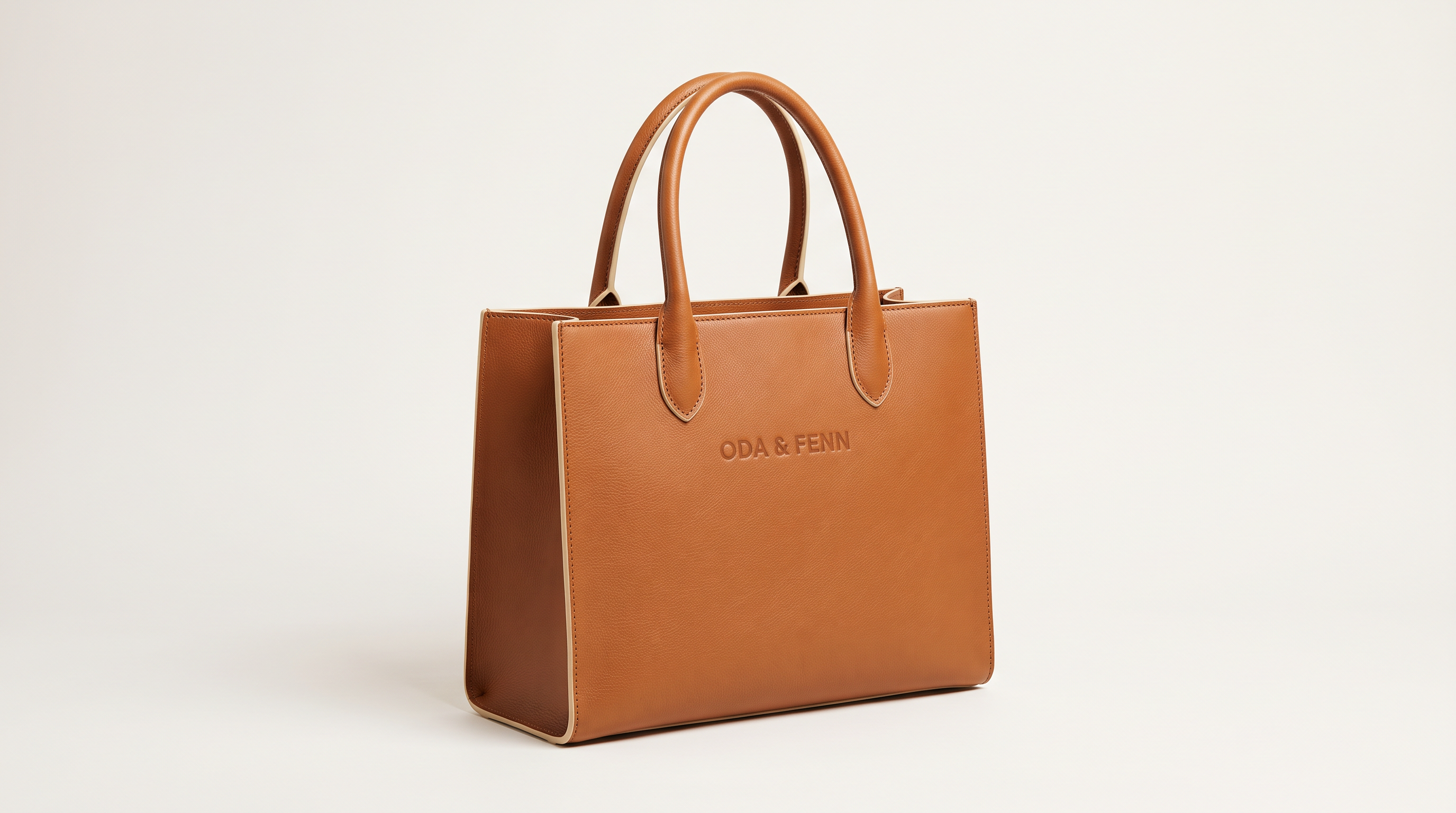
I gave the tote a blind-embossed wordmark so I could check product fidelity letter by letter alongside the composition.
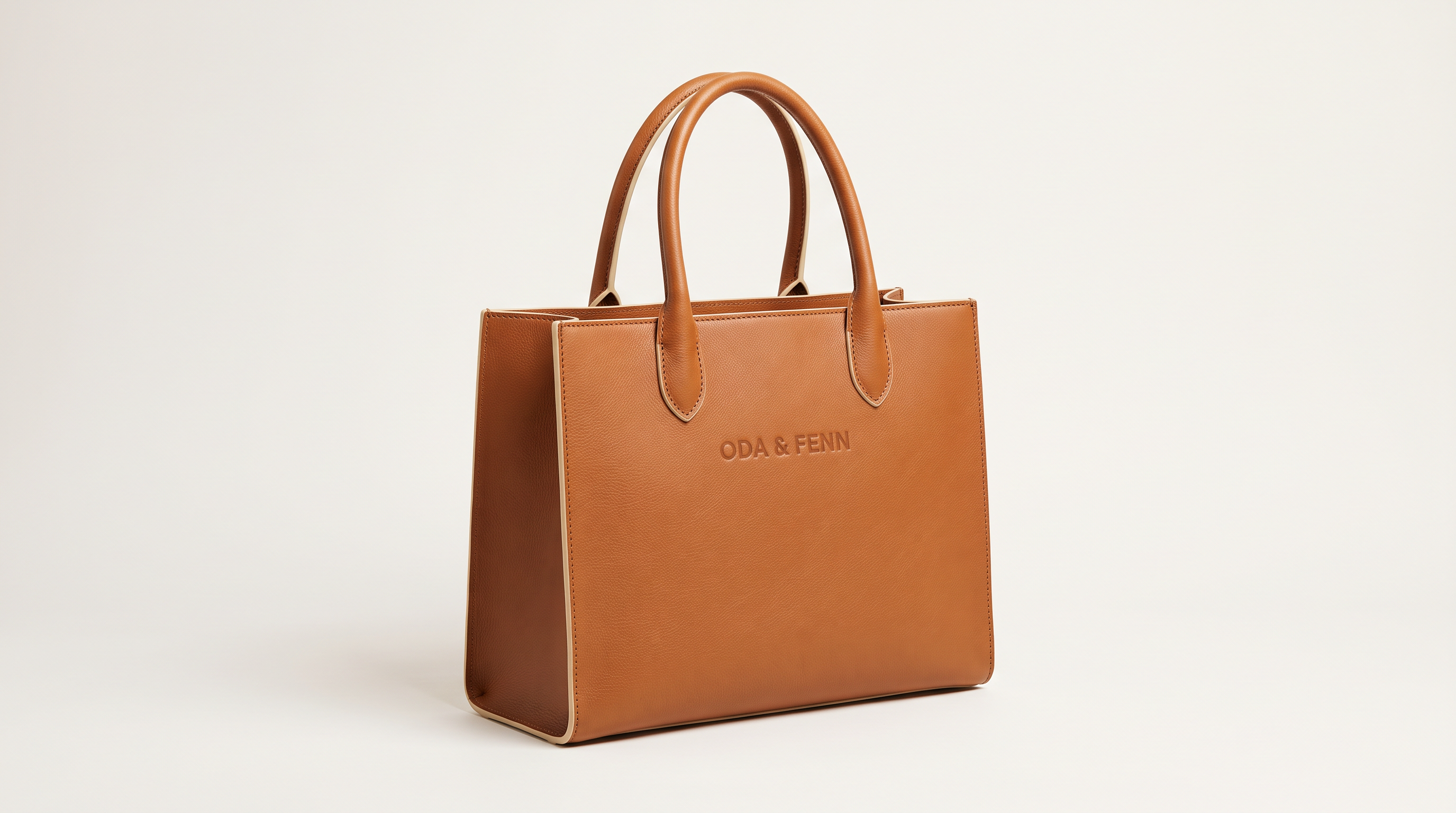
Image 1, generated with Nano Banana 2.1: "A studio packshot of a structured tan leather tote bag with two rolled handles and the wordmark 'ODA & FENN' blind-embossed on the front panel. The edges carry cream edge paint. The tote stands alone on an off-white studio backdrop under soft even light."
Generated using Nano Banana 2.1 on fal, an AI model from Google.
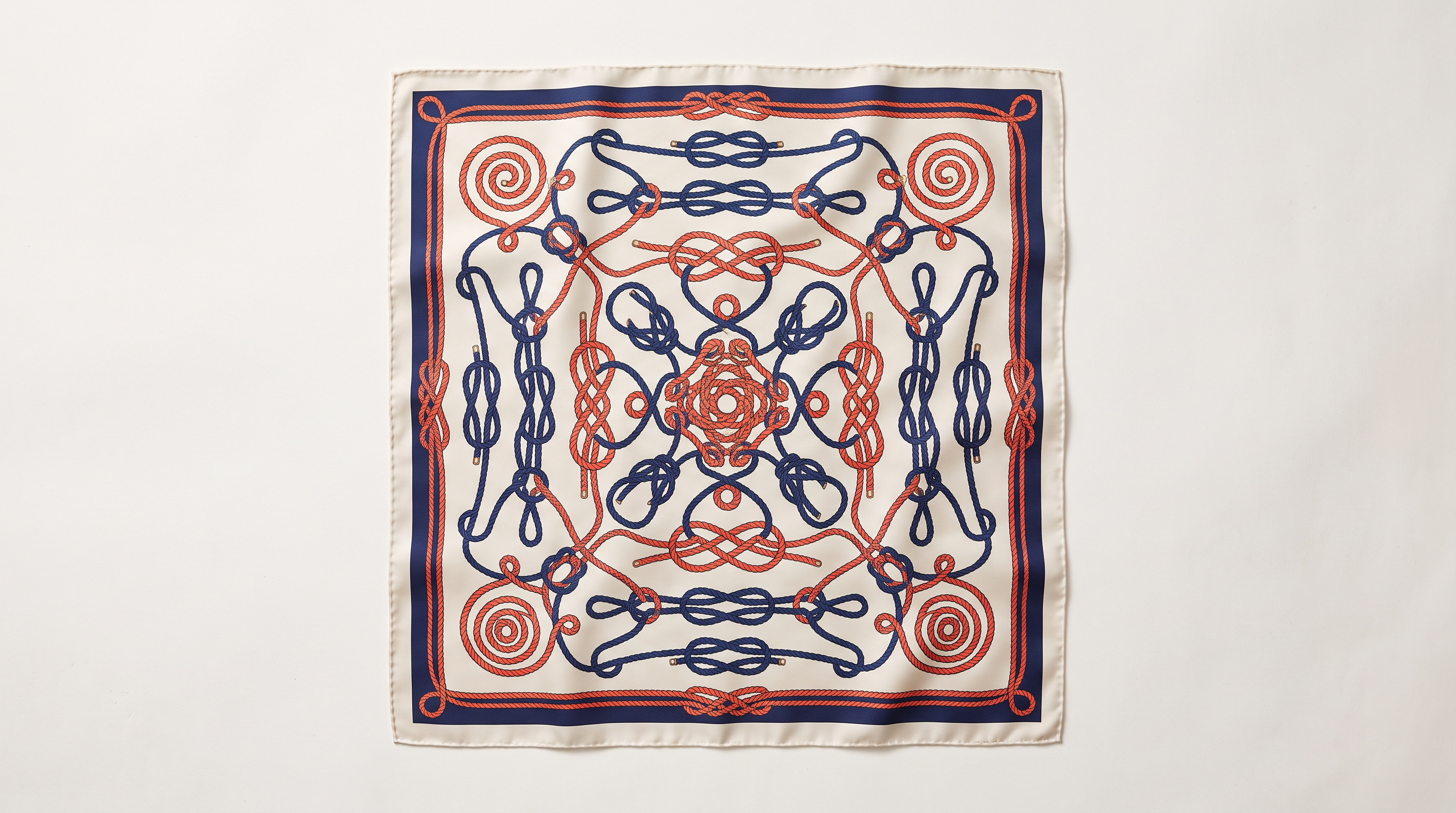
Image 2, generated with Nano Banana 2.1: "A flat-lay studio photograph of a square silk scarf printed with a navy and coral pattern of interlocking sailing knots, finished with a narrow hand-rolled hem. The scarf lies alone on an off-white studio backdrop under soft even light."
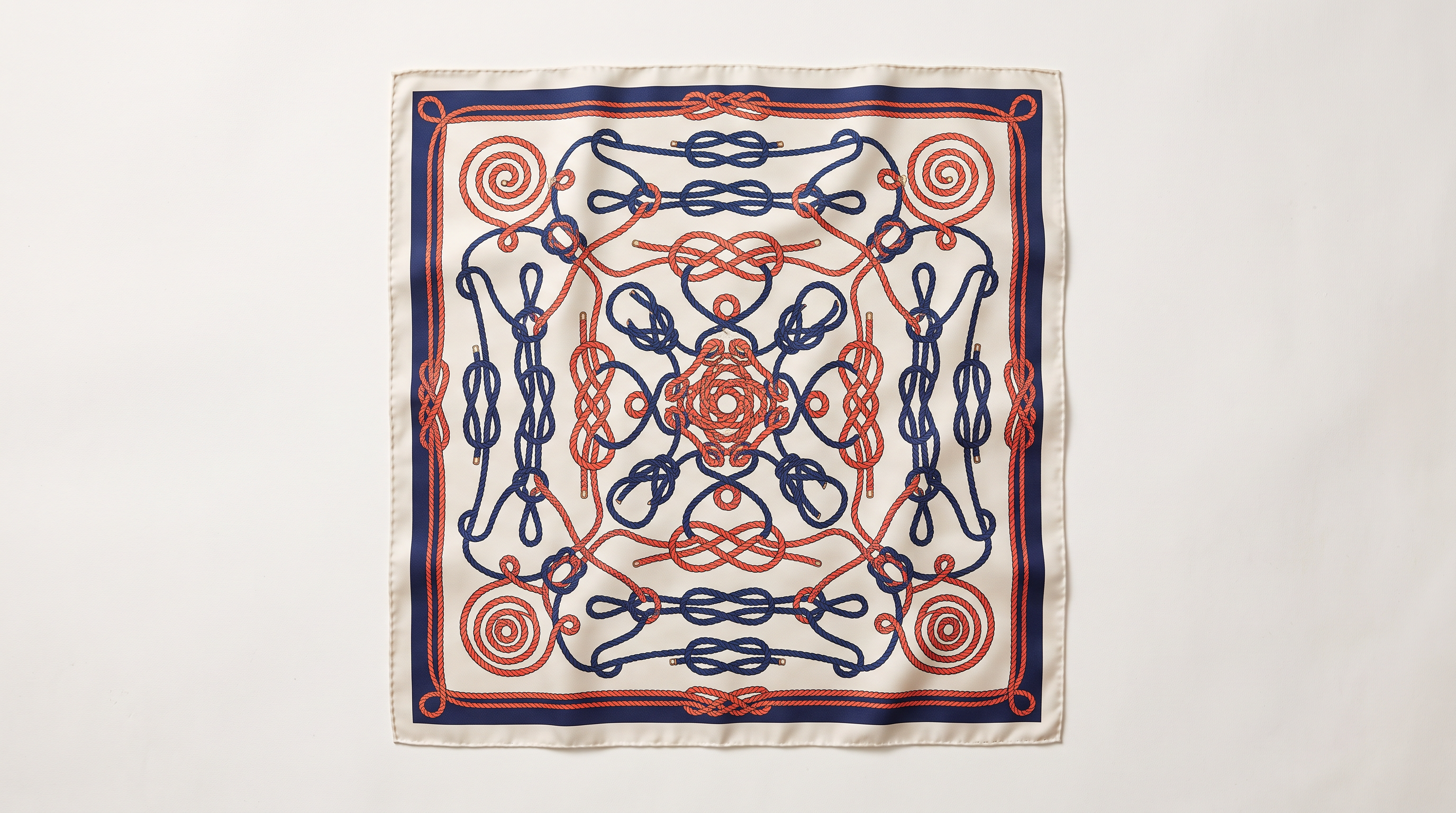
Generated using Nano Banana 2.1 on fal, an AI model from Google.
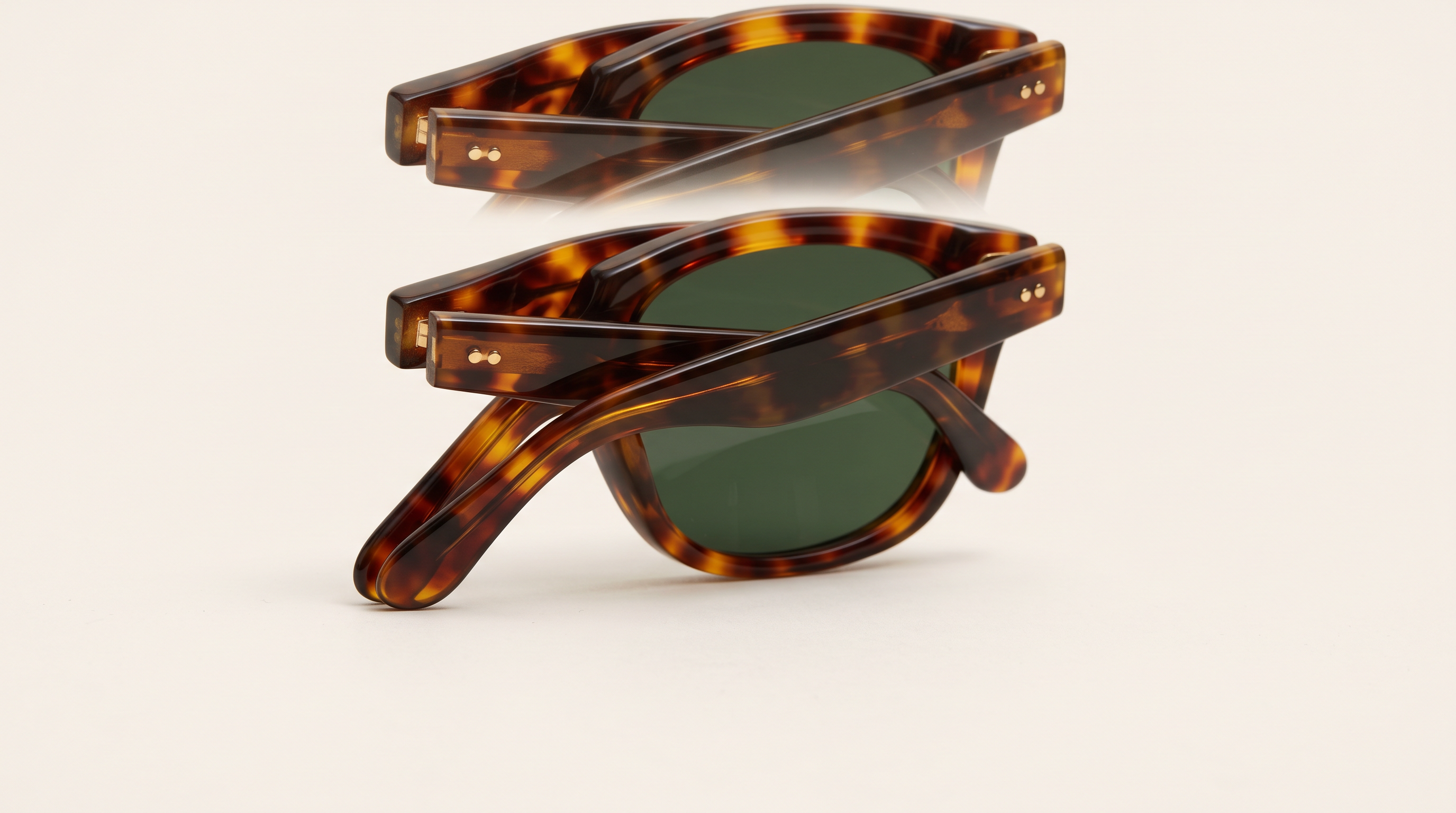
Image 3, generated with Nano Banana 2.1: "A studio packshot of folded tortoiseshell acetate sunglasses with green lenses and gold hinge pins. The sunglasses rest alone on an off-white studio backdrop under soft even light."
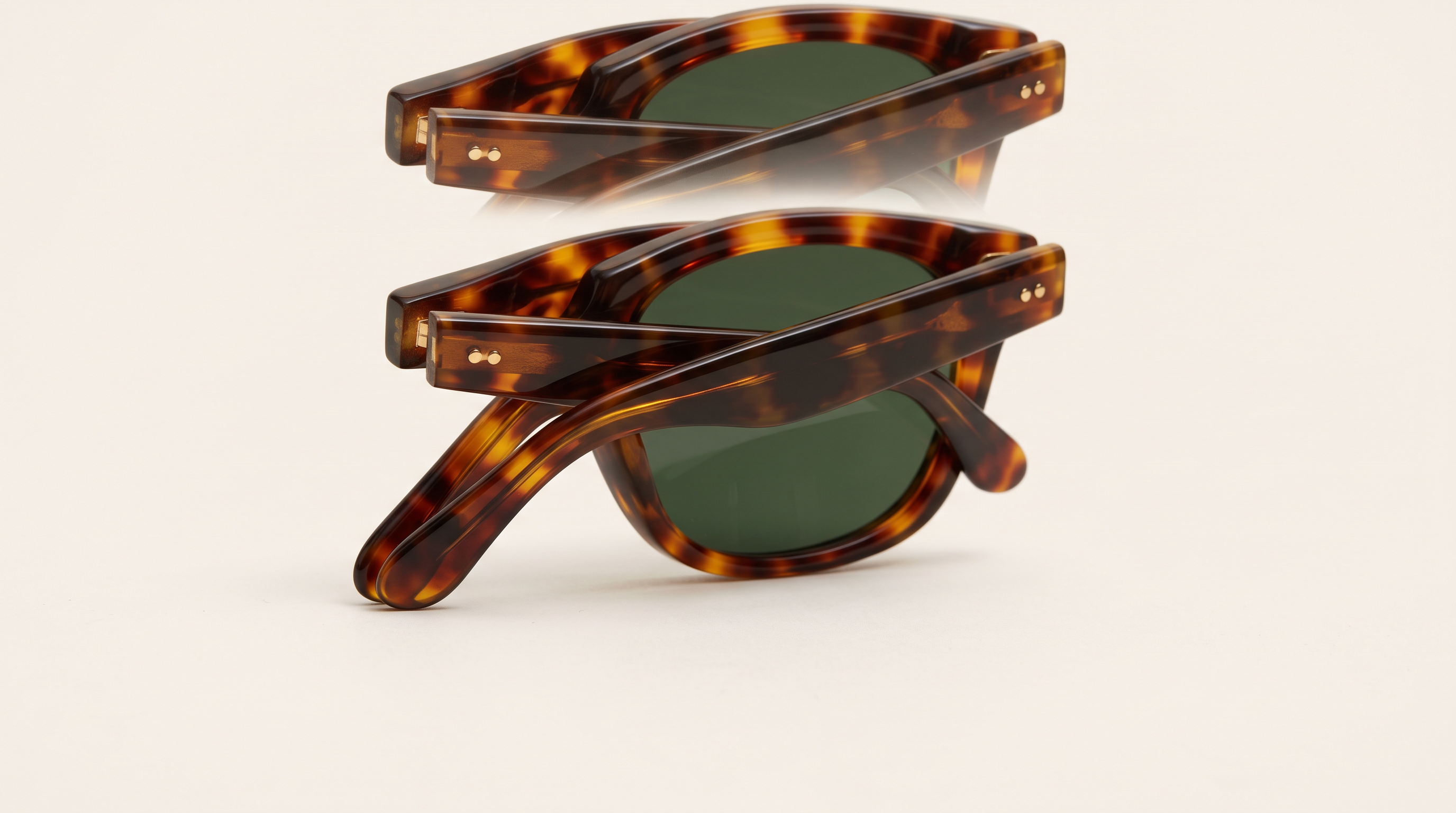
Generated using Nano Banana 2.1 on fal, an AI model from Google.
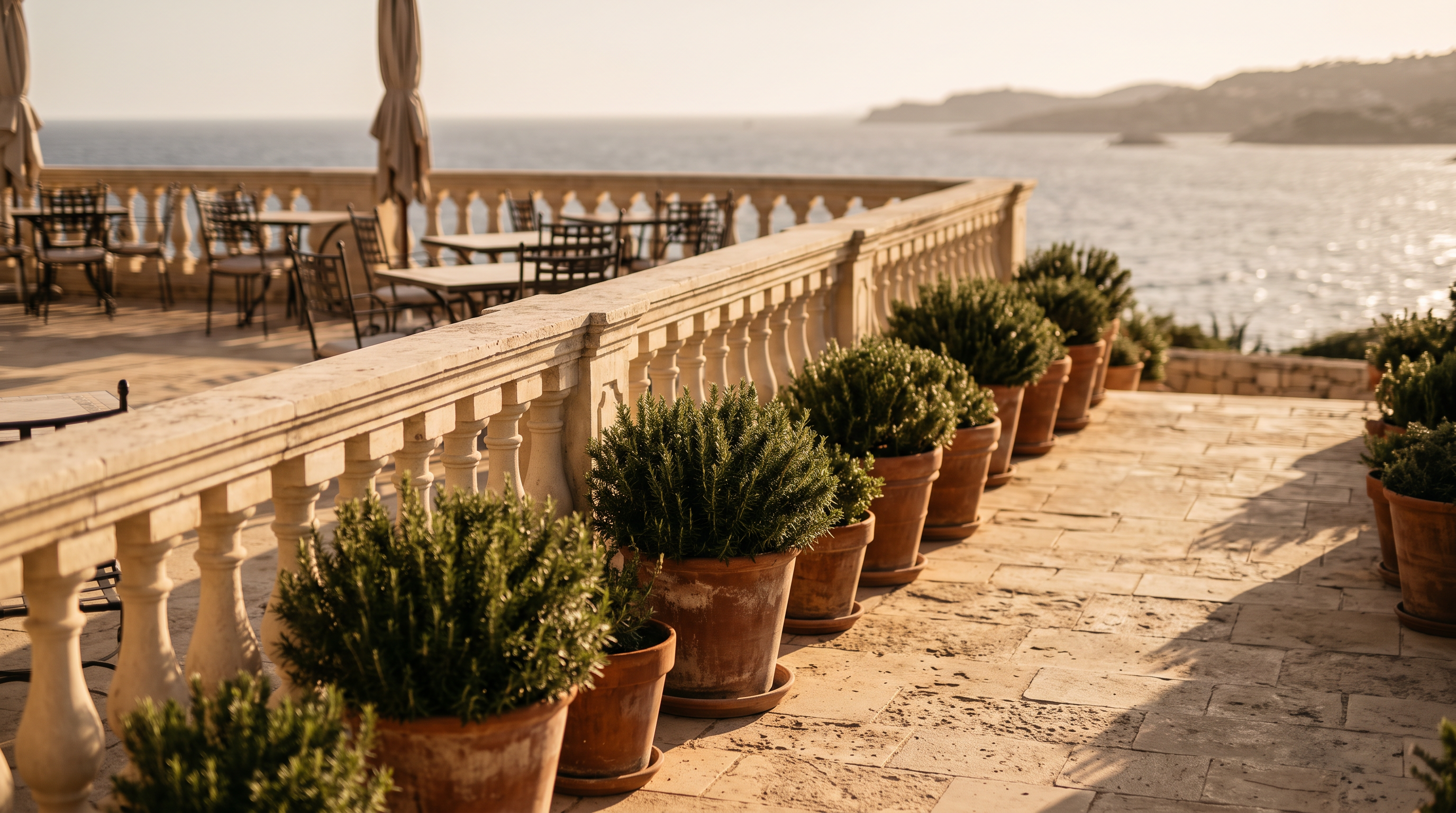
Image 4, generated with Nano Banana 2.1: "A photograph of a sunlit hotel terrace in late afternoon, with terracotta pots of rosemary along a pale limestone balustrade. A blurred sea fills the background, and nobody is in shot."
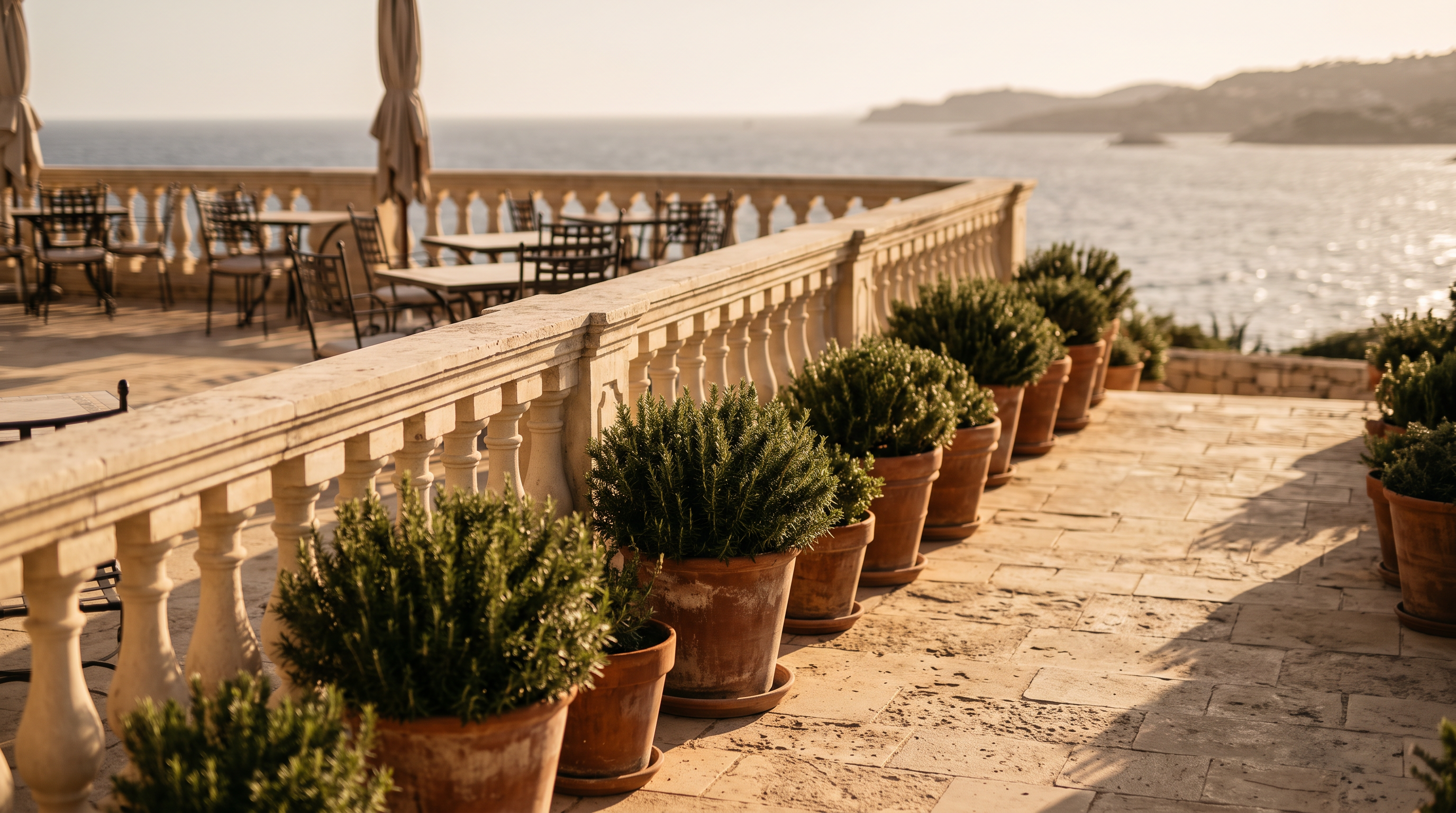
Generated using Nano Banana 2.1 on fal, an AI model from Google.
Settings for the composite: aspect_ratio 4:5, resolution 2K, thinking_level high, passing the four images to image_urls in the order above.
Prompt: "Image 1 is the tote, image 2 is the scarf, image 3 is the sunglasses and image 4 is the terrace. Place the tote from image 1 on the limestone balustrade in image 4, a little left of center, with the scarf from image 2 knotted loosely around one handle and the folded sunglasses from image 3 resting on the stone beside it. Keep the 'ODA & FENN' embossing and the cream edge paint on the tote exactly as in image 1. The scarf keeps its navy and coral knot pattern, and the sunglasses keep their green lenses and gold hinge pins. Relight all three products to match the warm low sun from the right in image 4, with soft contact shadows on the stone. The terrace stays as photographed with its pots and sea unchanged. Add nothing else to the scene, and no text beyond the embossing."
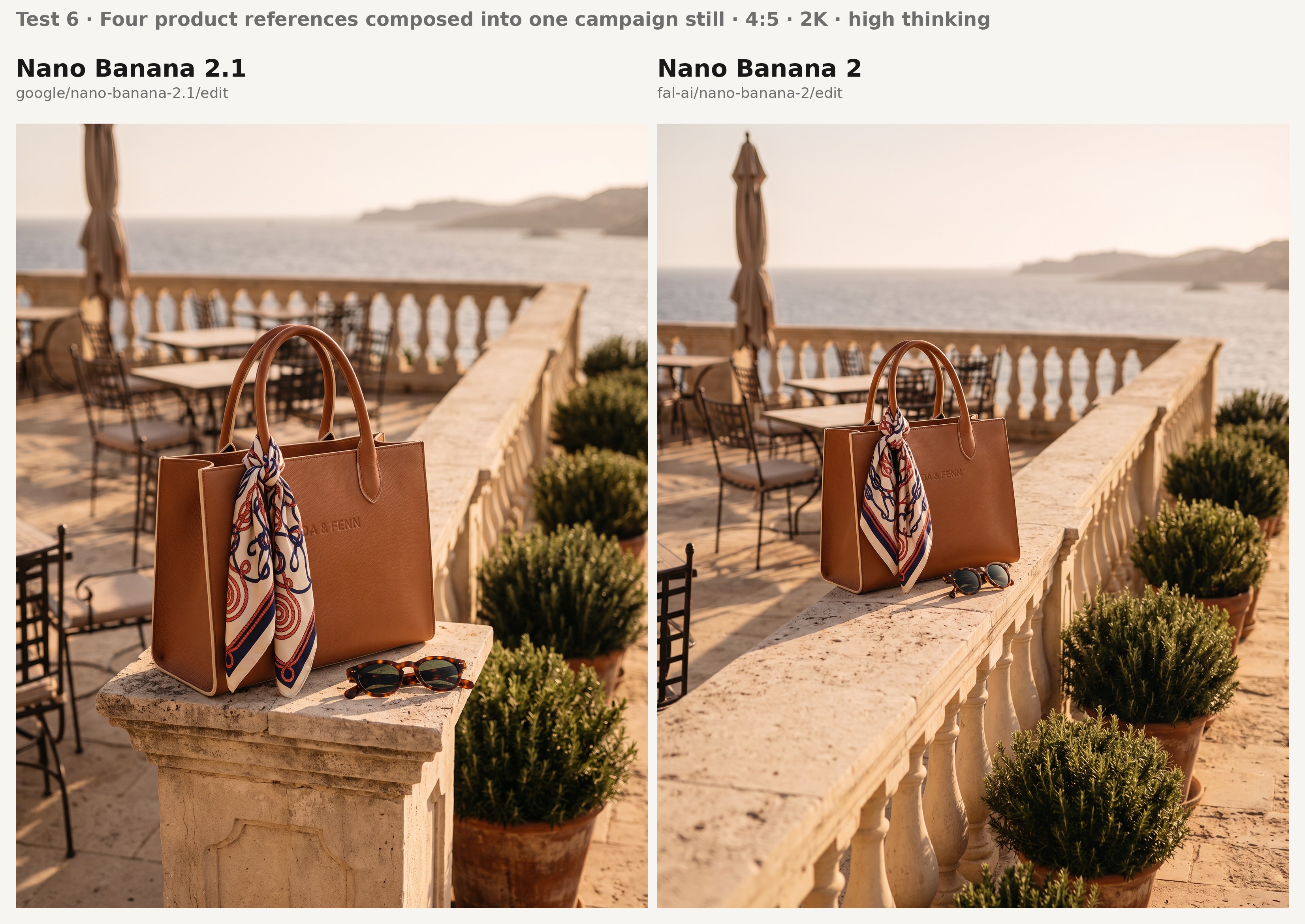
Four things to inspect on the two composites:
- The embossed 'ODA & FENN' wordmark survives the move with correct spelling and the ampersand intact.
- The scarf's knot pattern holds its navy and coral colorway where it wraps the handle, without turning into a generic print.
- The sunglasses come through with green lenses and gold hinge pins, folded as they were in image 3.
- The terrace looks as photographed while warm light from the right falls on the products placed into it.
How much do Nano Banana 2.1 and Nano Banana 2 cost on fal?
Nano Banana 2.1 bills by token on fal and Nano Banana 2 bills per image, which puts a 2K image at $0.0593 on Nano Banana 2.1 with minimal or medium thinking and at $0.12 on Nano Banana 2 without high thinking.
Because that Nano Banana 2.1 figure assumes one 16:9 image from a short prompt, longer prompts cost more through their extra text-input tokens.
Nano Banana 2.1 uses the same token rates on its text-to-image and edit endpoints:
- Input: $1.764 per million tokens, covering prompt text and any file passed in as context.
- Output: $8.823 per million tokens for text and thinking, and $35.294 per million for the image itself, which makes up most of the bill at roughly 1,680 tokens per 2K image.
With enable_web_search on, Nano Banana 2.1 bills retrieved search results as input tokens and charges no separate web search fee.
Our measured Nano Banana 2.1 table comes from real requests billed on October 7, 2026, each for a single 16:9 output from a short prompt, with editing figures assuming one reference image:
| Resolution | Text to image, minimal or medium thinking | Text to image, high thinking | Editing, minimal or medium thinking | Editing, high thinking |
|---|---|---|---|---|
| 1K (default) | $0.0396 | $0.0490 | $0.0415 | $0.0493 |
| 2K | $0.0593 | $0.0732 | $0.0613 | $0.0743 |
| 4K | $0.1335 | $0.1435 | $0.1354 | $0.1468 |
Nano Banana 2 starts at $0.08 per image at 1K, and its 2K and 4K outputs bill at 1.5 times and 2 times that rate.
The 0.5K size bills at 0.75 times the 1K rate, with $0.002 added for high thinking and $0.015 when web search is used.
Applied to each size, that rate card gives the following, identical on the text-to-image and edit endpoints:
| Resolution | Thinking off or minimal | High thinking | Web search, thinking off |
|---|---|---|---|
| 0.5K | $0.06 | $0.062 | $0.075 |
| 1K (default) | $0.08 | $0.082 | $0.095 |
| 2K | $0.12 | $0.122 | $0.135 |
| 4K | $0.16 | $0.162 | $0.175 |
At matching thinking levels, the two price lists line up like this:
| Setting | Nano Banana 2.1 | Nano Banana 2 | Nano Banana 2.1 difference |
|---|---|---|---|
| 1K, minimal thinking | $0.0396 | $0.08 | 50.5% lower |
| 2K, minimal thinking | $0.0593 | $0.12 | 50.6% lower |
| 4K, minimal thinking | $0.1335 | $0.16 | 16.6% lower |
| 2K, high thinking | $0.0732 | $0.122 | 40.0% lower |
| 4K, high thinking | $0.1435 | $0.162 | 11.4% lower |
The two models are closest in price at 4K, because Nano Banana 2.1 produces roughly 3.4 times as many output tokens there as at 1K (about 3,780 versus 1,120, per our model page) and the Nano Banana 2 rate card only doubles.
What editing adds: the Nano Banana 2 playground note lists one price per output image for both endpoints, without a separate line for reference images.
Our Nano Banana 2.1 Edit page puts each input image at about 1,120 tokens, or roughly $0.002, so a 14-reference composite at 2K with medium thinking comes to about $0.087 compared with $0.12 on Nano Banana 2.
At 4K, the same 14 references would put a Nano Banana 2.1 composite near $0.1615 at medium thinking and $0.1715 at high, slightly above the $0.16 and $0.162 Nano Banana 2 charges.
On that estimate, a 4K edit on Nano Banana 2.1 passes the Nano Banana 2 price from around ten references at high thinking and fourteen at medium.
What high thinking adds: in our measurements, switching Nano Banana 2.1 to high thinking added between $0.0078 and $0.0139 per image, where Nano Banana 2 adds $0.002.
For a catalogue team producing four lifestyle variants for each of 2,000 products, 8,000 single-reference edits at 2K with high thinking come to $594.40 on Nano Banana 2.1 and $976.00 on Nano Banana 2, with the Nano Banana 2.1 figure based on a 16:9 image from a short prompt.
💡 The playground pages for all four endpoints and our pricing page show the token rates and per-image prices in force on the day you run a job, which may differ from the figures above.
Should you build on Nano Banana 2.1 or stay on Nano Banana 2?
I'd say that Nano Banana 2.1 is the better starting point for most new ecommerce work on fal, since it costs about half as much at 1K and 2K and leads every Elo row reproduced on our model pages.
Nano Banana 2 still fits a few specific jobs, and the second list below covers them.
Choose Nano Banana 2.1 if
- Your catalogue renders at 1K or 2K: Nano Banana 2.1 costs about half per image at those sizes on our rates, for example $0.0593 versus $0.12 at 2K with minimal thinking (16:9, short prompt).
- You produce colorway or variant shots from one photograph: with mask-based editing you paint the panel that changes, and Google scores Nano Banana 2.1 at 1049 on that task to Nano Banana 2's 965.
- Your campaigns reuse the same talent across many frames: Google's multi-character consistency score for Nano Banana 2.1 is 1106 to Nano Banana 2's 978, and no other row on our model pages shows a wider gap.
- You need extreme banners at 2K or 4K: Nano Banana 2.1 carries Google's fix for tiling on 4:1, 1:4, 8:1 and 1:8 output at those two sizes.
Choose Nano Banana 2 if
- Your requests use 0.5K output or audio context: Nano Banana 2 still offers the 512px size at $0.06 per image and accepts
audio_urlon its edit endpoint, and neither appears in the Nano Banana 2.1 schema. - Your 4K edits carry around ten or more references at high thinking: our per-image input estimate puts Nano Banana 2.1 slightly above the $0.162 per image Nano Banana 2 charges for those requests.
For the Pro tier, see our Nano Banana Pro vs. Nano Banana 2 comparison and Nano Banana Pro guide.
Recently Added




Run Nano Banana 2.1 and Nano Banana 2 on fal
You can open either Nano Banana model in the fal playground right now, or call it from our API with a single fal API key.
The Nano Banana 2.1 endpoints are google/nano-banana-2.1 for text to image and google/nano-banana-2.1/edit for editing.
Nano Banana 2 is reached at fal-ai/nano-banana-2 and fal-ai/nano-banana-2/edit through the same subscribe and queue methods, and our Nano Banana 2 guide covers using it on fal.
Nano Banana 2.1 vs. Nano Banana 2 FAQs
What is the difference between Nano Banana 2.1 and Nano Banana 2?
Nano Banana 2.1 is Google's update to Nano Banana 2, adding a medium thinking level and posting higher scores in Google's editing and consistency evaluations.
On fal, Nano Banana 2.1 also bills per token, while Nano Banana 2 keeps a 0.5K output size and an audio_url input that the newer schema doesn't include.
Is Nano Banana 2.1 cheaper than Nano Banana 2 on fal?
For most requests yes, and the size of the saving depends on the resolution and on how many reference images an edit carries.
At 1K and 2K with minimal thinking, Nano Banana 2.1 runs about 50% under Nano Banana 2, for example $0.0593 compared with $0.12 at 2K on our October 7 measurement (16:9, short prompt).
At 4K, Nano Banana 2.1 is 16.6% cheaper, at $0.1335 to Nano Banana 2's $0.16 on the same basis.
Reference-heavy 4K edits are the exception, since around ten references at high thinking put Nano Banana 2.1 above the $0.162 per image Nano Banana 2 charges, on our per-image input estimate.
Does Nano Banana 2 still work on fal?
Yes, both Nano Banana 2 endpoints are live on fal with commercial use enabled, as of this writing.
Google's October 6, 2026 release notes list the underlying gemini-3.1-flash-image model as deprecated, so new projects are better started on Nano Banana 2.1.
Does Nano Banana 2.1 support 512px output?
No, the Nano Banana 2.1 schema starts at 1K and goes up to 4K, leaving out the 0.5K option Nano Banana 2 offers.
Preview calls that used 0.5K need to request 1K on Nano Banana 2.1.
How does mask-based editing work in Nano Banana 2.1?
You paint or outline the region directly on the input image and pass that marked image to google/nano-banana-2.1/edit through image_urls.
The prompt then names what replaces the marked area and asks for the marks to be removed, since Google notes that ink occasionally persists in the output.
How many reference images do Nano Banana 2.1 and Nano Banana 2 accept?
Both the Nano Banana 2.1 and Nano Banana 2 edit endpoints accept up to 14 images through image_urls.
Within that set, Google states that Nano Banana 2.1 holds up to 4 characters and 10 objects consistent in a single request.
Can Nano Banana 2.1 help with TV and video ad production?
Nano Banana 2.1 returns images plus an optional text description, which limits its role in TV and video advertising to storyboard frames and key art.
The Nano Banana 2.1 edit endpoint also accepts a video_url, either a file up to 15 MB or a YouTube link, for building a poster or thumbnail from an existing spot.
Can I use Nano Banana 2.1 images commercially?
Yes, both Nano Banana 2.1 and Nano Banana 2 are partner models on fal with commercial use enabled.