![How To Use Seedream 5.0 Pro: Prompts & Workflows [2026]](https://refinery.fal.media/url/https%3A%2F%2Fv3b.fal.media%2Ffiles%2Fb%2F0aa263f0%2FQoO-7lvm8ASuM5HWpb20X.jpg/tr:w-1920,q-80/QoO-7lvm8ASuM5HWpb20X.webp)
In this guide, I'll show you how Seedream 5.0 Pro thinks through a dense brief, what its grounded editor can do, how the multilingual text holds up, and five signature prompts ready for fal's playground or the API.
TL;DR
Seedream 5.0 Pro is ByteDance's flagship image model on fal, and it reads a brief the way an art director does. The AI image generation model thinks the brief through and plans the layout first, then renders, which is what lets it hold together on information-heavy work that usually needs a designer's hand.
Text rendering runs natively across 14 languages, right-to-left Arabic and accented Latin scripts included, so one template can carry localized copy without the letterforms breaking.
The photoreal side handles the hard cases: skin that reads as skin under real lighting, and camera techniques like a panning shot that keeps the subject sharp while the background streaks into motion blur.
The image editor works by location: You point at one element, change it, and everything around it is left alone, with layer separation, sketch completion, and up to 10 reference images for composites.
Pricing on fal is tentative for now: $0.0675 per image up to 1536x1536, and $0.135 per image up to the 2048x2048 ceiling, output as JPEG by default.
Where can you access Seedream 5.0 Pro?
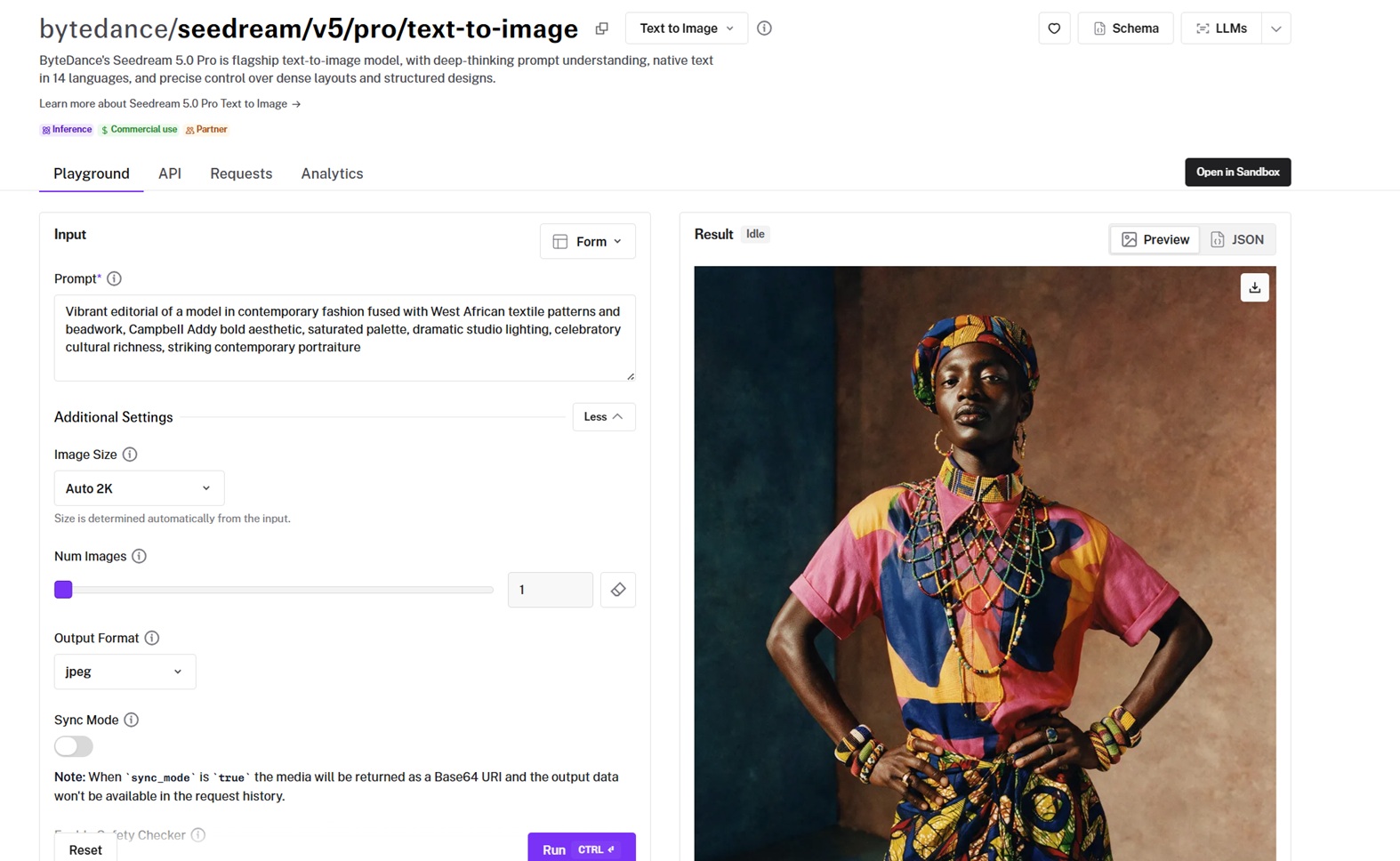
You can access Seedream 5.0 Pro on fal through two endpoints: bytedance/seedream/v5/pro/text-to-image for image generation and bytedance/seedream/v5/pro/edit for image editing.
You don't sign up for a plan or clear a minimum. Billing is per image, so the cost tracks exactly what you render.
The @fal-ai/client package covers every model on fal, which means the request below is the same shape you would send to any of them, with authentication and the queue handled for you.
Here is what an image generation request looks like:
javascript
import { fal } from "@fal-ai/client";

const result = await fal.subscribe(
  "bytedance/seedream/v5/pro/text-to-image",
  {
    input: {
      prompt:
        "Vibrant editorial of a model in contemporary fashion fused with West African textile patterns and beadwork, Campbell Addy bold aesthetic, saturated palette, dramatic studio lighting, celebratory cultural richness, striking contemporary portraiture",
    },
    logs: true,
    onQueueUpdate: (update) => {
      if (update.status === "IN_PROGRESS") {
        update.logs.map((log) => log.message).forEach(console.log);
      }
    },
  }
);

console.log(result.data);
console.log(result.requestId);
How do you write a prompt Seedream 5.0 Pro can act on?
Most models want a description of a picture.
Seedream 5.0 Pro takes that, but it can also take a specification, because it works through the logic of a brief and plans the layout before it renders.
That gives you two ways to write to it:
For a straight photograph, you want to brief it the way you would brief a photographer.
Subject first. Then where the camera stands. Then the light and the finish. And the model fills in the rest sensibly.
Prompt: A documentary photograph of a downhill mountain biker launching off a rock drop at golden hour, caught at the apex of the jump with the bike fully airborne, both wheels off the lip and a plume of dry dust exploding behind the rear tire. Shot on a 300mm prime at f4 from below the landing, the long lens compressing a jagged desert ridge into the background, the rider leaning the bike sideways mid-whip. Low warm sun rakes from behind, blowing the dust into a glowing orange haze and rim-lighting the rider's shoulders and helmet while the shadowed side stays deep and rich. Fine 35mm grain, tack-sharp on the rider and the bike against a slight motion blur in the flying grit, the heart-in-throat feel of the split second before the landing. Landscape_4_3.
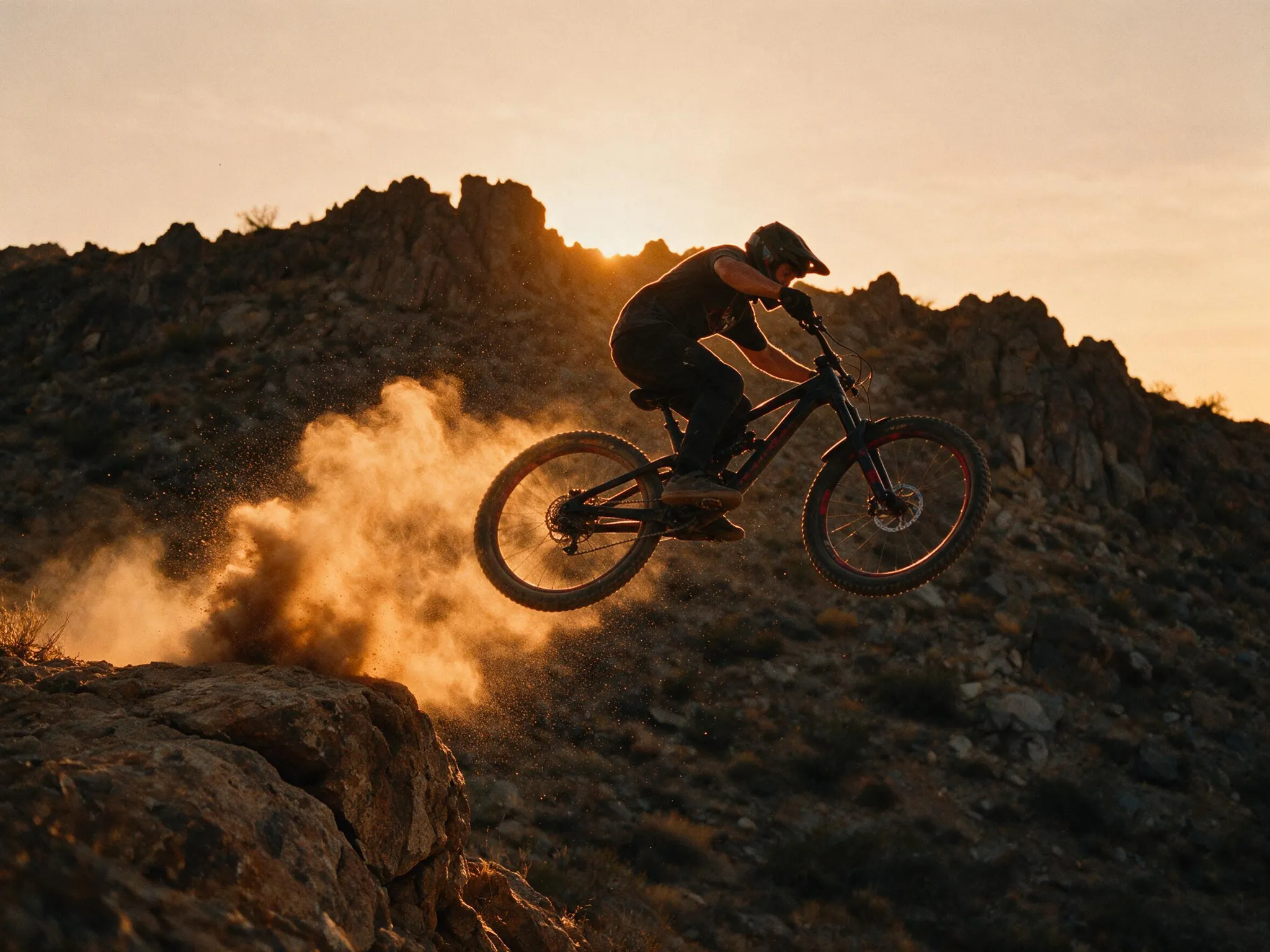
Generated using Seedream 5.0 Pro on fal, an AI model from ByteDance.
For anything built from parts, an infographic, a poster, an interface, you want to brief it the way you would hand off a layout:
Name the grid. The regions. What goes in each. Any copy wrapped in double quotes and a note on placement.
Prompt: A desktop web dashboard for a logistics analytics tool, dark theme, rendered like a polished production interface. A slim left sidebar of monochrome icons, then a header reading "Fleet Overview" with a date range "1 to 30 Jun" and a search field on the right. Four KPI cards run across the top reading "Active vehicles 214", "On-time 92.4%", "Avg delay 11m", and "Cost per mile $1.38", each with a small up or down trend arrow. Below them, a wide line chart titled "Deliveries per day" with two colored series and a legend, beside a donut chart titled "Fleet by region". Along the bottom, a data table with the column headers "Route", "Driver", "Status", "ETA" and five realistic rows, one flagged red as "Delayed". Crisp small sans type, a single amber accent on charcoal panels, thin borders and soft depth. landscape_16_9.
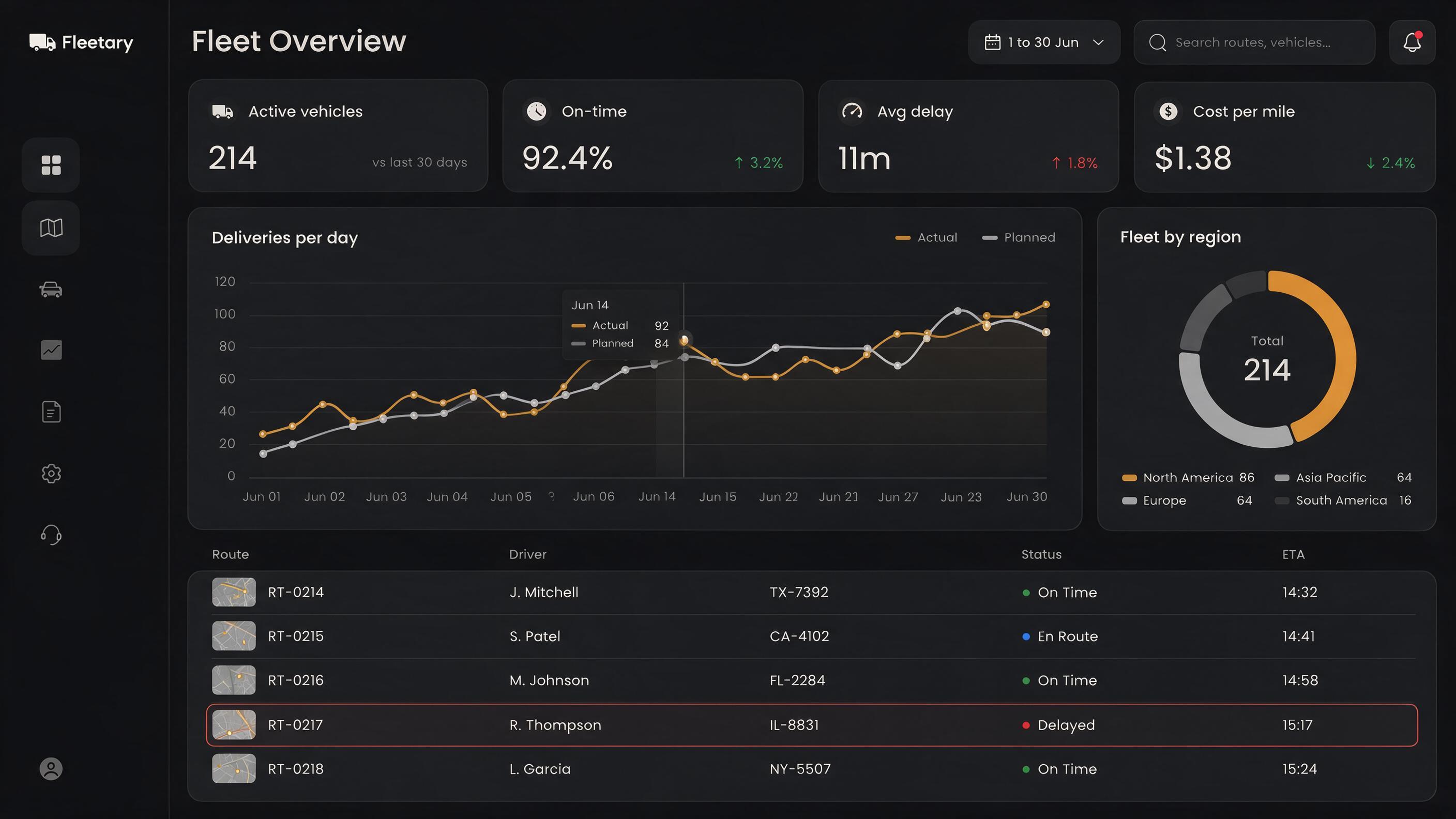
Generated using Seedream 5.0 Pro on fal, an AI model from ByteDance.
The model works out the arrangement, and it tracks more moving parts than a description-only prompt would suggest.
How does Seedream 5.0 Pro handle text and other languages?
Text rendering is what tips this model from image generation into design work.
The mechanic is the familiar one: you wrap the words you want on the image in double quotes and say where they belong.
The range is what stands out to me about the model.
Alongside English and Chinese, it can render type natively across a set of widely used languages, and it respects each writing system on its own terms.
Arabic joins its letters and runs right to left without you flagging the direction.
Latin scripts keep their diacritics, so a Spanish word like "PASIÓN" comes back with the accent in place.
Japanese and Chinese characters hold their strokes at small sizes.
On long, dense blocks of body copy, ByteDance says there is still room to improve in finer-grained text rendering and pixel-level editing consistency, so I zoom to full resolution and check every line before I trust it.
Here is a layout that leans on the multilingual side:
Prompt: A cinematic night photograph looking down a narrow rain-soaked night-market alley, neon and LED signs crowding both walls and reflecting in the wet ground. The signs carry real shop names in mixed scripts, glowing and legible: a large red Chinese sign reading "金龍茶室", a smaller Japanese sign "らーめん", a Korean sign "포장마차", and one English neon reading "OPEN 24H". Steam rises from a food stall mid-frame, a lone figure under an umbrella is silhouetted against the glow. Shot on a 35mm lens at f1.8, shallow focus on the nearest signs, saturated neon bleeding into the reflections, fine grain, the wet neon-noir look of art-house cinema. No other text in the frame. portrait_16_9.
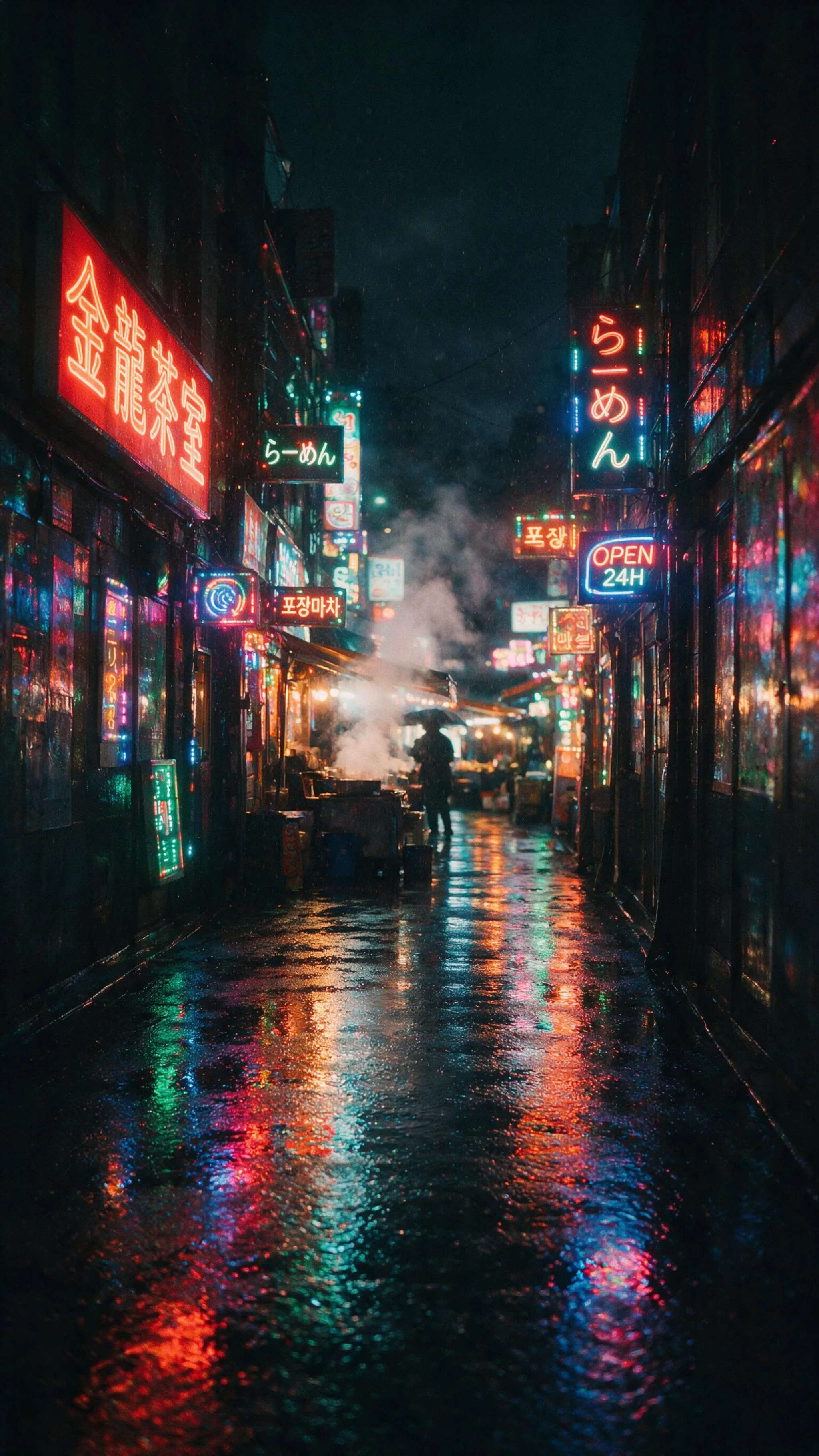
Generated using Seedream 5.0 Pro on fal, an AI model from ByteDance.
falMODEL APIs
The fastest, cheapest and most reliable way to run genAI models. 1 API, 100s of models
How specific should your Seedream 5.0 Pro prompt be?
The model resolves everything you leave open, and its fallback is the safe, average choice.
If you leave the palette unsaid, you'll get a competent, but most likely forgettable one.
And if you leave the layout unsaid, you'll get dead-center symmetry that might read as a template. So on this model, the detail worth spending words on is structural.
This is why you want to hand it the structure instead:
Prompt: A cinematic e-commerce hero shot of a single pair of tan leather boots on a weathered dark oak crate, three-quarter angle, shot on a 90mm macro at f5.6. One hard low key light rakes from the left like late-afternoon sun through a window, catching the full-grain leather, the waxed pull-up sheen, the stitched welt, and the brass eyelets, while a soft fill keeps the shadow side readable. Fine dust hangs in the light beam, a soft falloff into a deep charcoal background. In the lower-right third, clean small type reads "THE DRIFTER" over a thin line reading "Full-grain leather, Goodyear welted", with room left along the top for a headline. Rich shadow, tack-sharp on the leather grain and the stitching, warm color grade, high-end catalog realism, no other text in the frame. landscape_4_3.
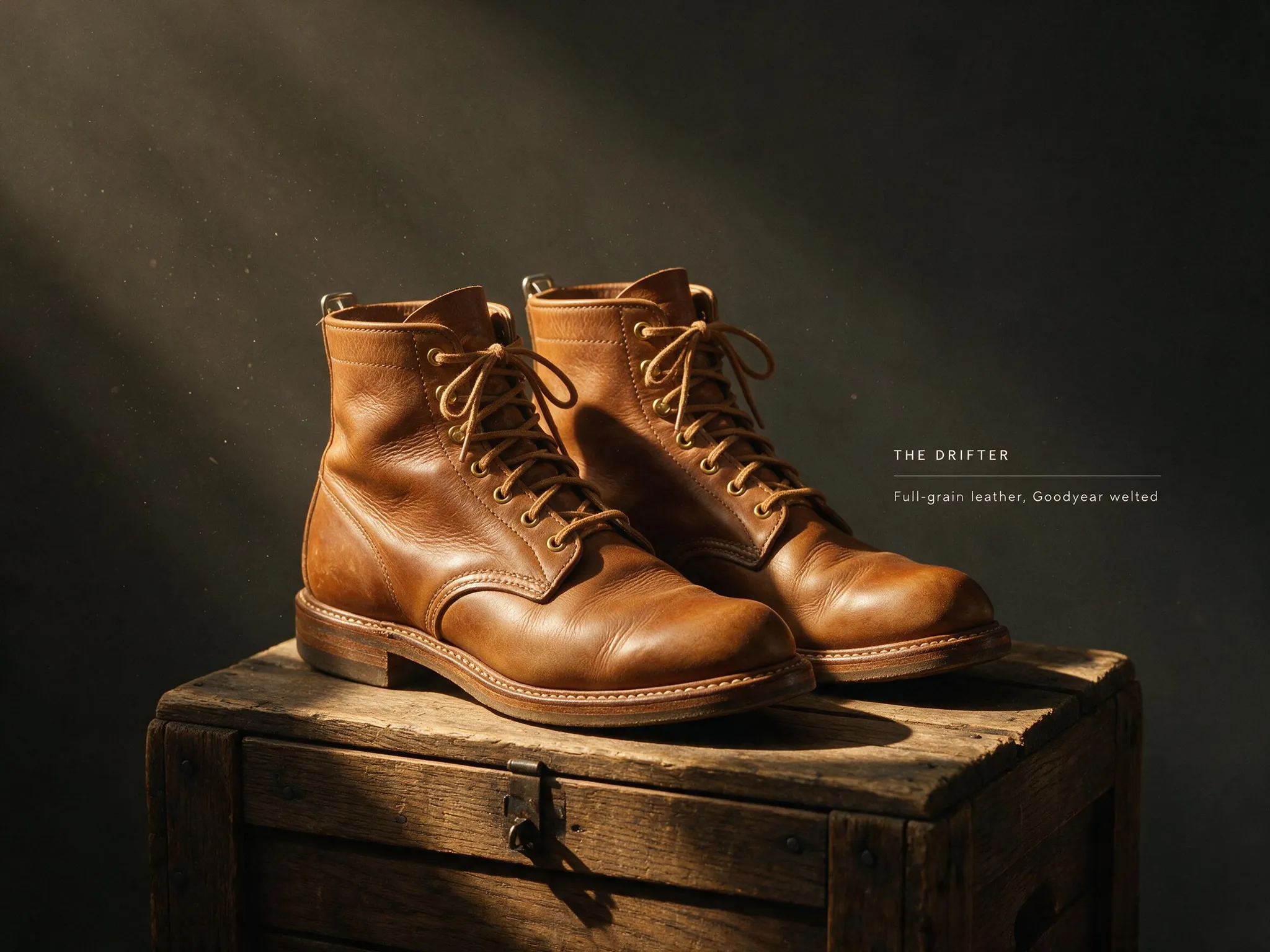
Generated using Seedream 5.0 Pro on fal, an AI model from ByteDance.
Observation: If you cram in more than the frame can hold, you can expect a few instructions to drop. When the same element keeps going missing, the prompt is usually overloaded, and I split it into two passes and stitch the results back together in the editor, which the image editing playground makes easy.
How do you keep Seedream 5.0 Pro output from looking obviously AI-generated?
The AI slop tell with this model, similar to other image generators, is rarely a rendering glitch. I feel like it is blandness, the safe choice it made because you didn't make one.
This is why you want to start with the staging. Left to compose a scene on its own, it centers the subject and lights it evenly, which is exactly what a generic render looks like.
You need to nudge it off-balance on purpose and hand it a real moment: the subject set off-center, a glance or a gesture caught mid-action, something in the foreground crossing into the frame.
Those deliberate calls are what signal a person set up the shot.
Then explain the light. The model reconstructs light convincingly from what I've seen so far, so tell it where the light comes from, how hard it falls, and what color it is, and drop "well lit," which only ever hands you that even, sourceless glow. A warm key against a cool rim reads as cinematic, while one flat wash reads as stock.
Next, get specific about surface, because texture is what the model actually renders in detail.
Name the wool fibers in a sweater, the subsurface glow under skin, the patchy fur on an animal, the grain in leather or brass. "Detailed" gets you nothing, the named material gets you the texture.
Then give the frame something to breathe: drifting mist, a shaft of volumetric light, a shallow depth of field, a thin rim tracing your subject. Atmosphere is what separates a crafted still from a flat cutout.
None of this is only for photographs. It works just as well when you are after a stylized, cinematic render.
Let's put all of this into a prompt so you can see what I mean:
Prompt: A cinematic 3D animated film still in the polished style of a modern feature animation, a stout old lighthouse keeper with a bulbous nose, bushy white eyebrows, and a chunky cable-knit sweater, crouched on the lighthouse gallery at dusk to share his sardine sandwich with a scruffy one-eyed tabby cat. Warm lantern light spills from the open doorway and catches every wool fiber of his sweater and the patchy fur of the cat, while cool blue storm light rakes in from the left and the lighthouse beam sweeps overhead through drifting sea mist. Rich subsurface scattering in the skin, expressive faces caught mid-smile, a thin rim of gold light tracing both characters, volumetric god rays through the mist, a painterly churn of dark waves far below. High-end cinematic animation lighting, warm-to-cool contrast, shallow depth of field, a wide anamorphic frame. landscape_16_9.
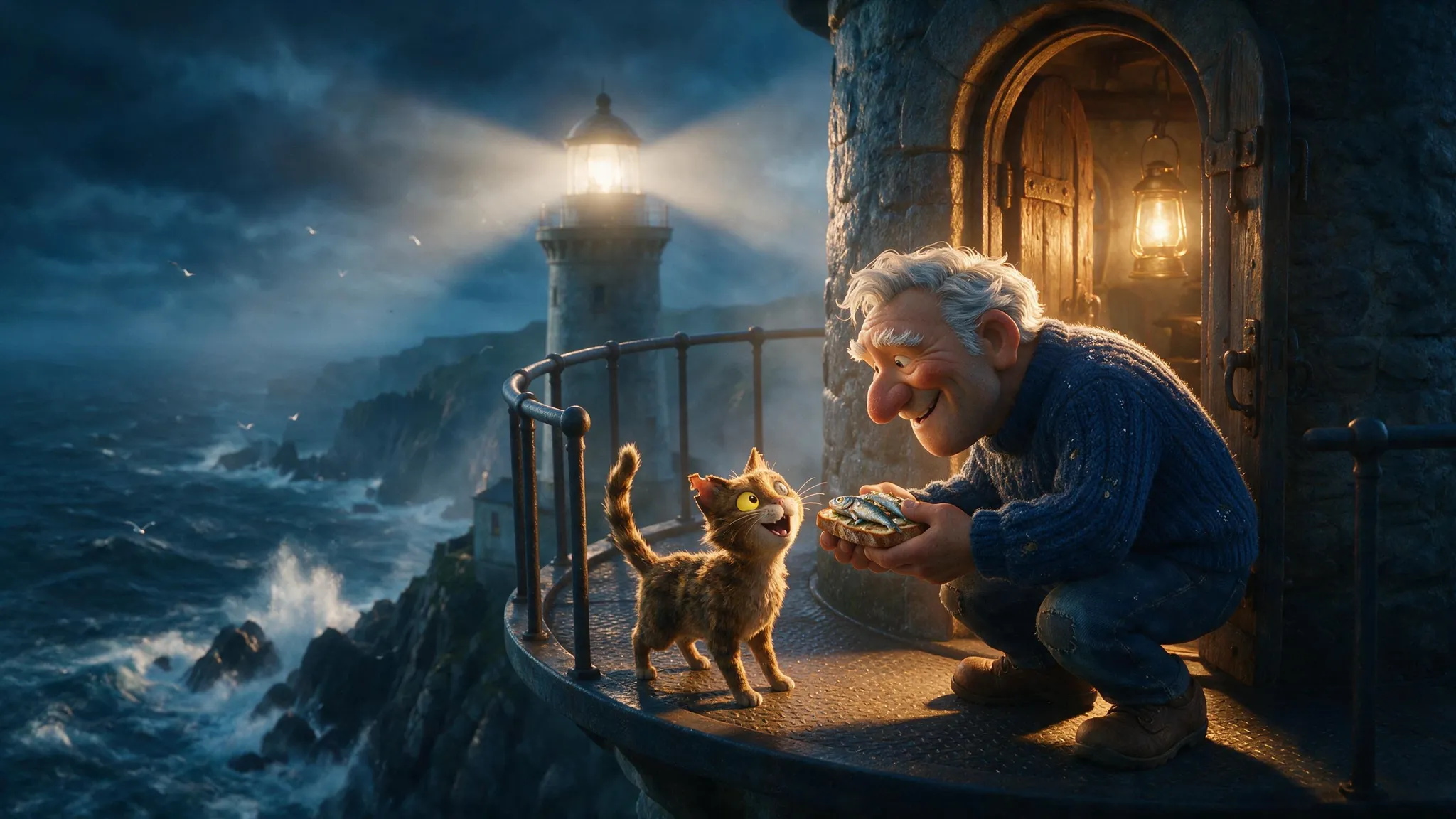
Generated using Seedream 5.0 Pro on fal, an AI model from ByteDance.
What are the best Seedream 5.0 Pro prompt patterns that play to its strengths? (copy these!)
Each of these prompts leans on something the model does well. You can take the prompts and swap in your own subject:
A cinematic film still
Two light sources at different color temperatures, their reflections thrown across a wet floor.
This is the kind of controlled lighting the model renders without tipping into video-game glow.
Prompt: A cinematic film still in a wide 2.39:1 anamorphic frame, a night-shift nurse standing alone at the far end of a hospital corridor at 3am, framed from behind and just off her right shoulder. The corridor recedes into near-black, and her only light comes from a vending machine glowing cold cyan-green to her left and the sodium-orange of an empty parking lot bleeding through a rain-flecked window ahead. The two color temperatures split across her pale blue scrubs and the waxed vinyl floor, which throws their reflections toward the camera. Fine 35mm grain, a faint horizontal anamorphic streak lifting off the vending machine, shallow focus holding her shoulder and the window while the far corridor melts away. Still, tired, held-breath mood. No text in the frame.
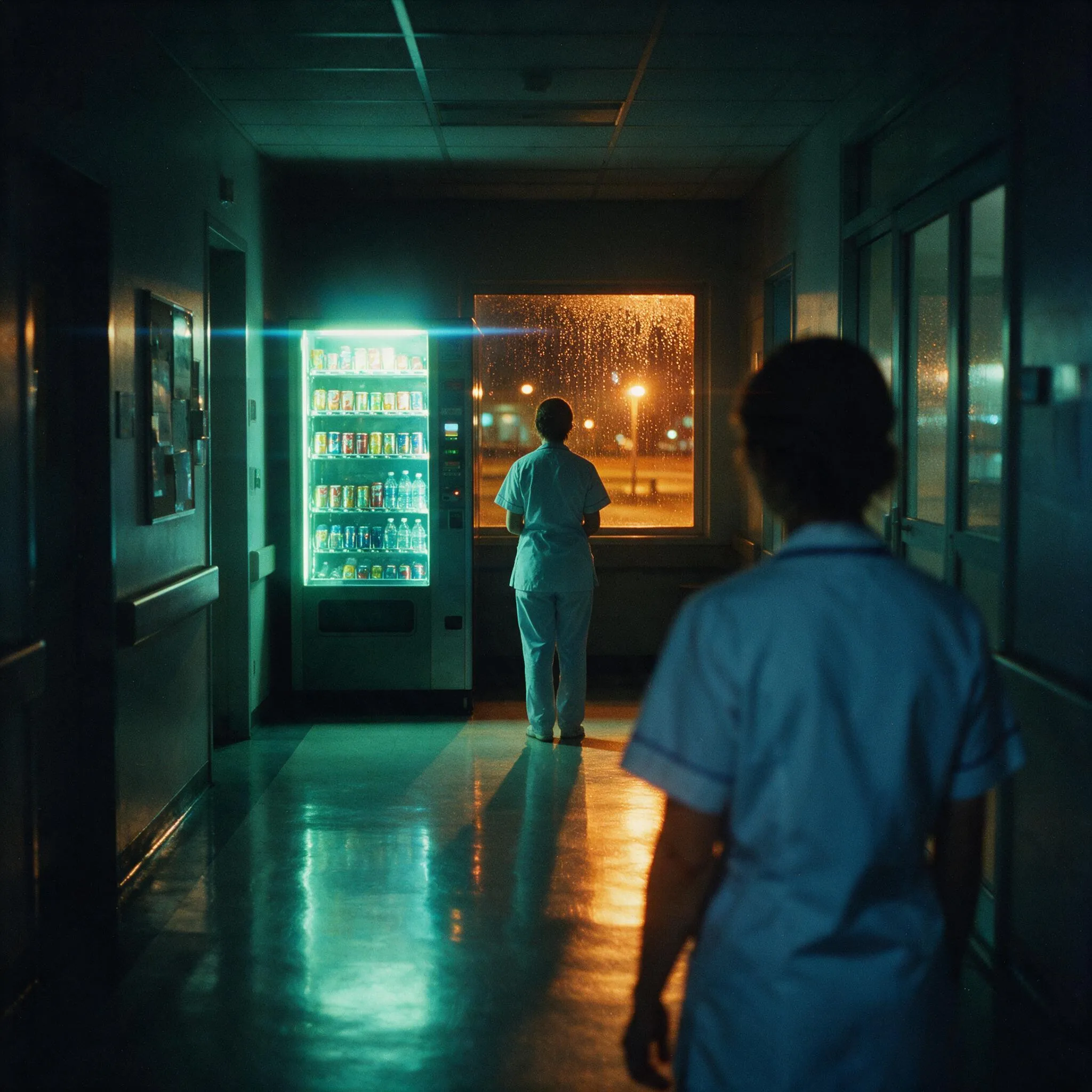
Generated using Seedream 5.0 Pro on fal, an AI model from ByteDance.
A sci-fi movie frame
Two suns cast two shadows from every object, each at a slightly different angle. Getting that right is a genuine test, and it is the kind of physical reasoning the model was built to handle.
Prompt: A frame from a hard science-fiction film, a lone geologist in a scuffed white pressure suit crouched on a cracked rust-red expanse, one gloved hand resting beside a seam of pale blue mineral that glows faintly from within. Behind her, a half-buried landing craft tilts at an angle, its hull scorched and streaked with dust. Two suns hang low on the horizon, a large amber one and a smaller white one, so every rock throws two overlapping shadows in slightly different directions. Thin atmospheric haze catches the light and softens the far distance. Shot wide on a 40mm lens, deep focus, a muted desaturated palette with the mineral's blue as the only cool note, fine cinematic grain, the emptiness pressing in around her. No text in the frame.

Generated using Seedream 5.0 Pro on fal, an AI model from ByteDance.
An advertising hero
A product ad has to look real under lighting that obviously is not, and carry a line of copy inside the frame. This one stacks frozen motion and embossed gold type on top of that.
Prompt: A premium advertising hero shot of a single square of dark chocolate snapping in half in mid-air, centered against a deep espresso-brown studio background. A fine burst of cocoa powder and a few cacao nibs scatter around the break, frozen sharp, a thin thread of molten chocolate stretched between the two halves. A hard rim light from behind rakes the powder and the glossy fracture, while a soft warm key from the lower left reveals the matte bloom across the chocolate's face. On the wrapper resting below, the brand reads "MARONNE" in an embossed gold serif, with a smaller line beneath it reading "72% single origin, Piura". Studio product photography, 100mm macro at f9, tack-sharp on the fracture and the gold type, deep controlled shadow, no other text in the frame.
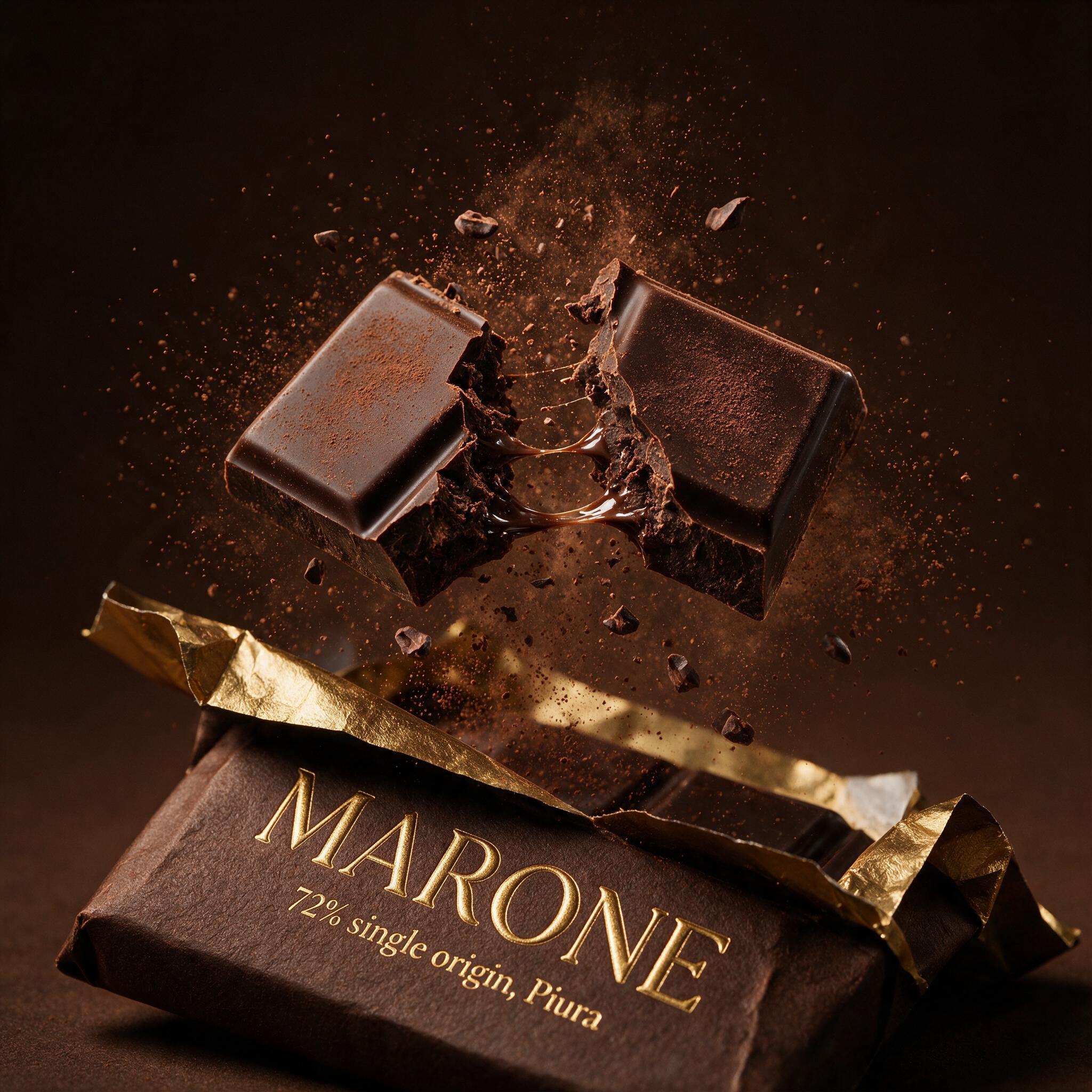
Generated using Seedream 5.0 Pro on fal, an AI model from ByteDance.
A complex infographic
The demo ByteDance opens with. The model has to place five depth zones, a creature and a label in each, a pressure gauge, and a legend, then spell every word correctly, all in a single pass.
Prompt: A high-resolution educational infographic in portrait orientation on a deep navy-to-black vertical gradient, titled "THE FIVE LAYERS OF THE OCEAN" in clean white sans-serif across the top. The frame is divided into five stacked horizontal bands, the water darkening from top to bottom, each carrying its zone name above a depth range: "SUNLIGHT" with "0 to 200m", "TWILIGHT" with "200 to 1000m", "MIDNIGHT" with "1000 to 4000m", "ABYSS" with "4000 to 6000m", and "TRENCH" with "6000 to 11000m". Each band holds one accurately drawn creature beside a short label: a sailfish, a lanternfish, a giant squid, a tripod fish, and a snailfish. A slim vertical gauge down the right edge shows pressure rising with depth, marked at three points. A small legend in the lower left maps a light dot to "sunlight reaches here" and a dark dot to "no light". Consistent margins, thin dividing rules between bands, crisp legible type at every size, every label and number spelled exactly as written.
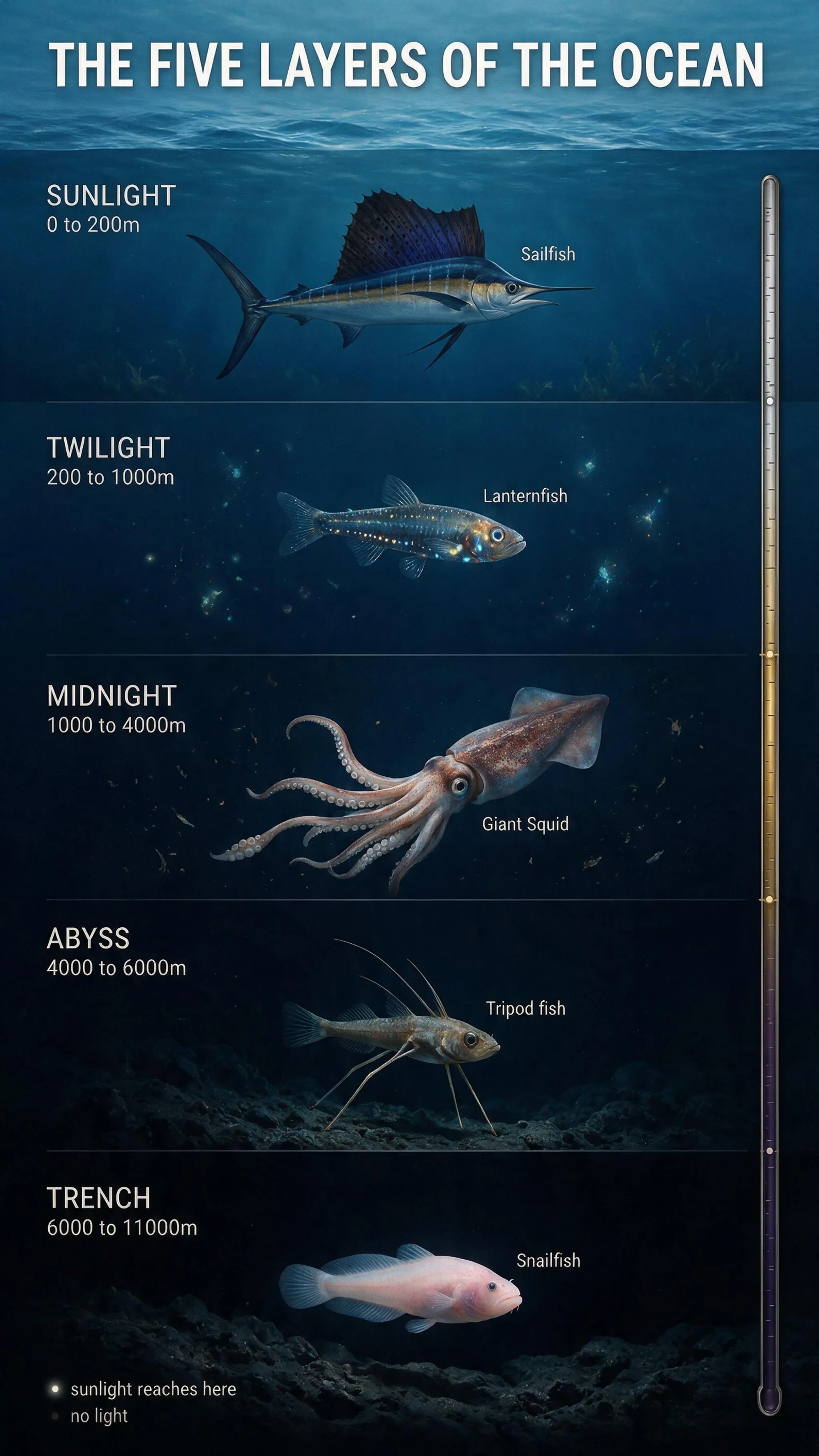
Generated using Seedream 5.0 Pro on fal, an AI model from ByteDance.
A photoreal interior
A clean, photoreal room reads as an actual photograph, and this one doubles as the base image for the annotation-frame editing further down, so it is worth generating first.
Prompt: A photorealistic straight-on daytime photograph of a mid-sized modern kitchen, shot at eye level with soft natural light from a large window on the left. A run of flat-front sage-green lower cabinets with brushed brass handles lines the back wall, under a white subway-tile backsplash and a shelf of open oak. A kitchen island with a white marble waterfall countertop stands in the center of the frame, three black leather bar stools tucked under its near edge. Two clear-glass globe pendant lights hang above the island. A stainless range and hood stand against the back wall, a small potted herb rests on the windowsill, wide oak floorboards run underfoot. Clean architectural-photography look, sharp throughout, neutral white balance. No text in the frame.
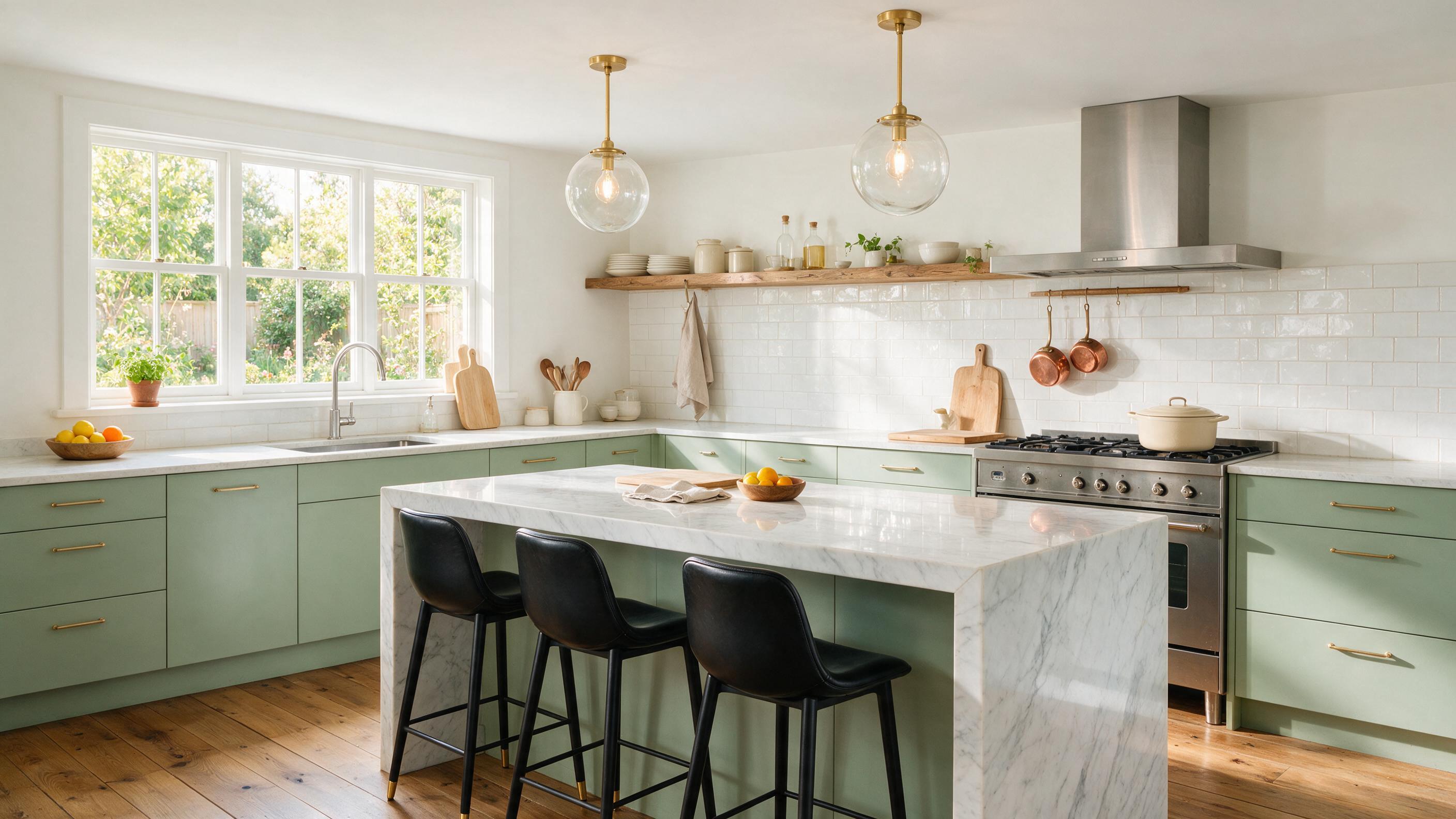
Generated using Seedream 5.0 Pro on fal, an AI model from ByteDance.
How does editing work in Seedream 5.0 Pro?
For a lot of people, the editor is the reason to reach for this model at all, so it is worth going through properly.
It runs on bytedance/seedream/v5/pro/edit, and the call adds one field over generation: image_urls, the list of pictures the model works from.
It takes up to 10, and if you send more, it keeps the last 10.
What sets it apart from a describe-and-regenerate editor is grounding.
The model reads where things are in the frame and what each region means, so it can change one element and hold everything else exactly as it was. The rule that gets clean results is the one you would give a retoucher: name the single thing that changes, and say the rest stays.
You want to start simple. Take the chocolate ad from the patterns above and rewrite one line of the label, nothing else:
Prompt: Change only the small line under the logo to read "85% single origin, Chuao". Keep the "MARONNE" wordmark, the chocolate, the cocoa burst, the gold type style, and the lighting exactly as they are.
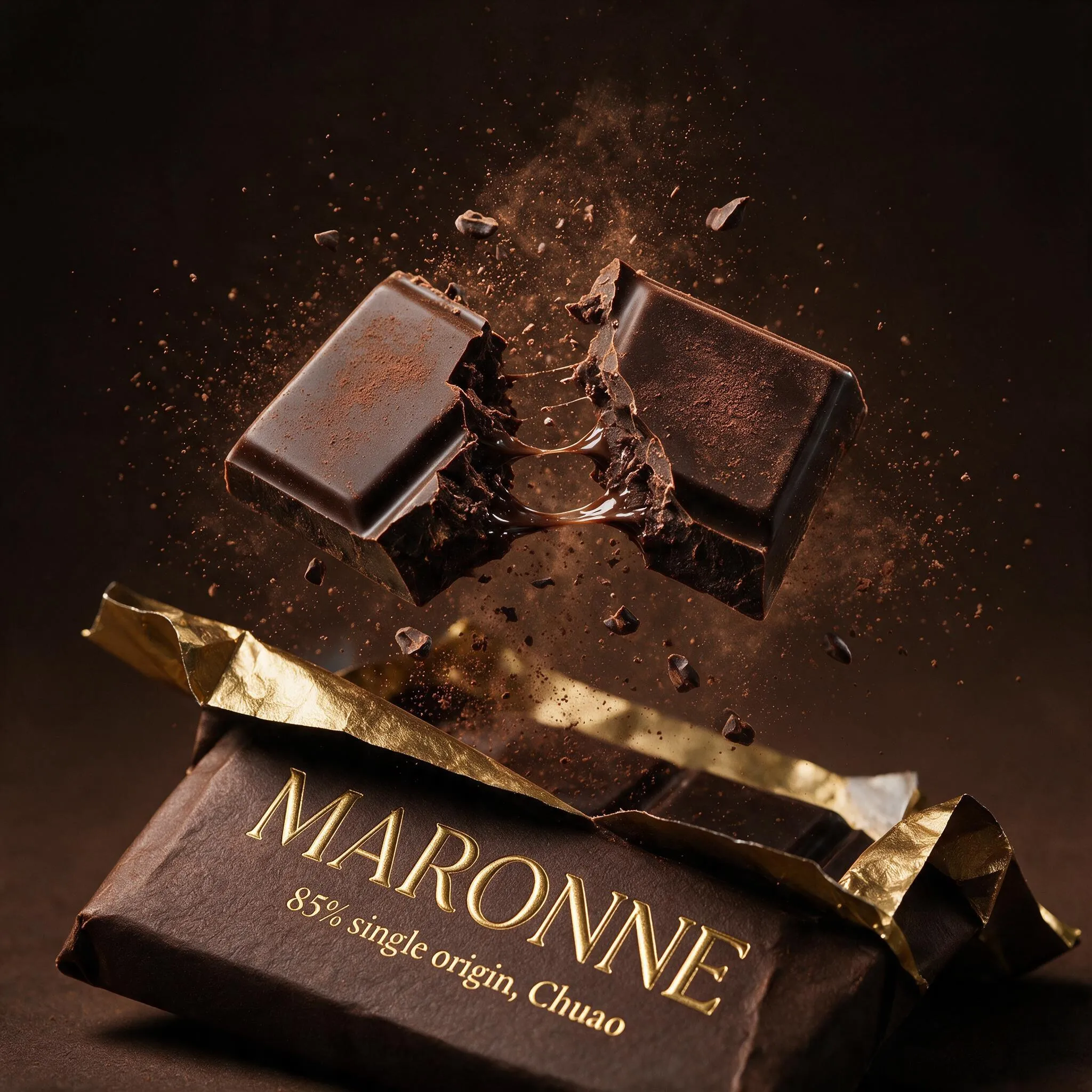
Generated using Seedream 5.0 Pro on fal, an AI model from ByteDance.
That is grounding on one region. Where it gets interesting is asking for several changes at once, each in its own spot.
Targeted edits with annotation frames
This is the move that sets the editor apart.
ByteDance's region isolation lets you draw colored boxes onto the input image and write one instruction per box, and the model keeps each change inside its own box while it holds the rest of the frame.
You draw the boxes in any editor (Paint does the job), upload the marked-up image, and write the prompt as a list keyed to the colors.
Take the photoreal kitchen from the patterns above, draw five colored boxes onto it, and hand over five swaps in a single pass:
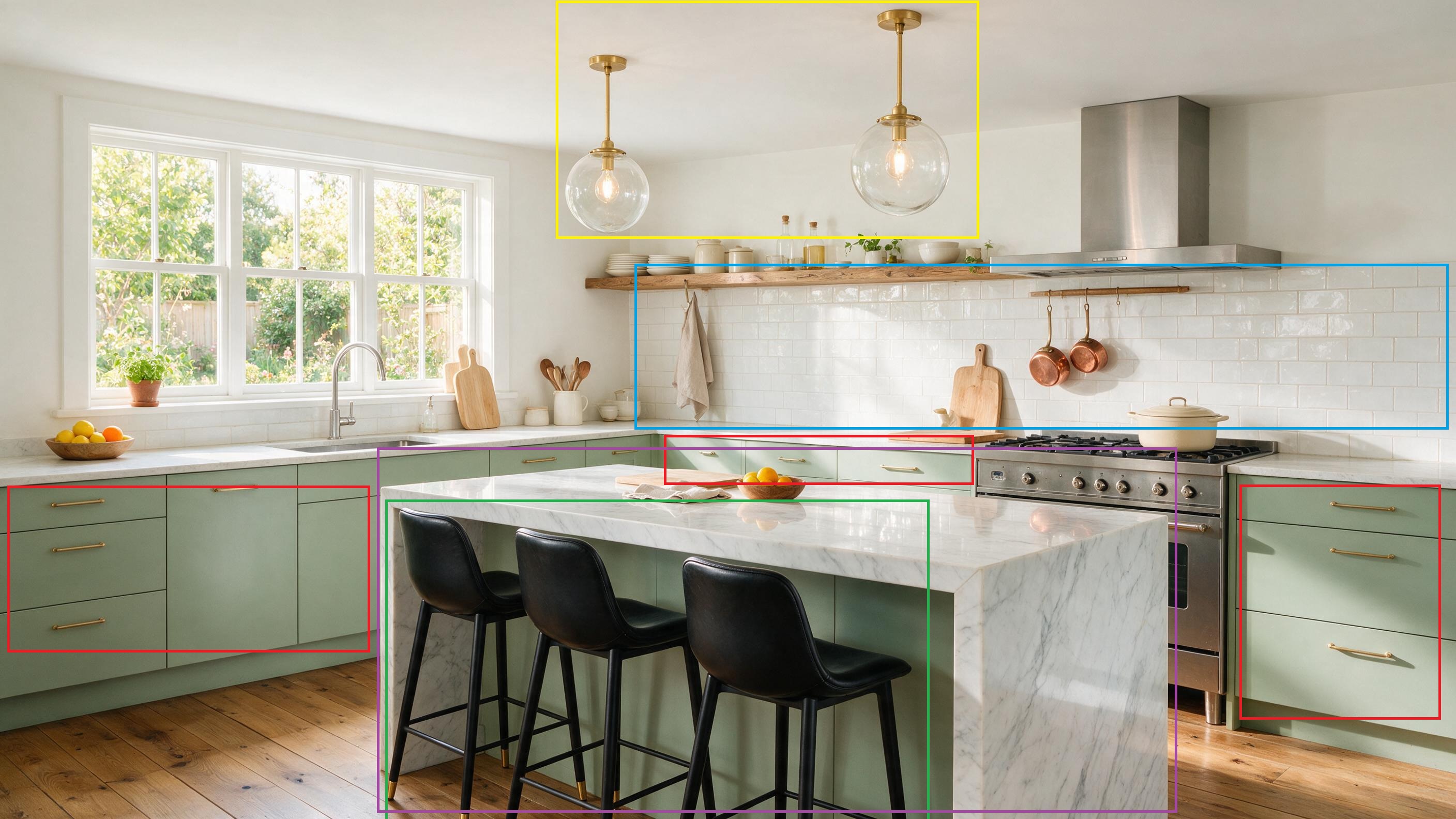
Prompt:
Red boxes on the lower cabinets: refinish them from sage green to deep matte navy, keep the brass handles and the same layout.
Blue box on the backsplash: replace the white subway tile with small hand-glazed zellige tile in warm terracotta, same area.
Yellow box on the two glass pendants: swap them for one long linear brass pendant centered over the island.
Green box on the bar stools: change the three black leather stools to pale oak stools with woven rush seats, same positions.
Purple box on the island countertop: change the white marble to honed black soapstone, keep the waterfall edge.
Keep everything else exactly the same, including the window light, the oak floor, the open shelving, and the range.
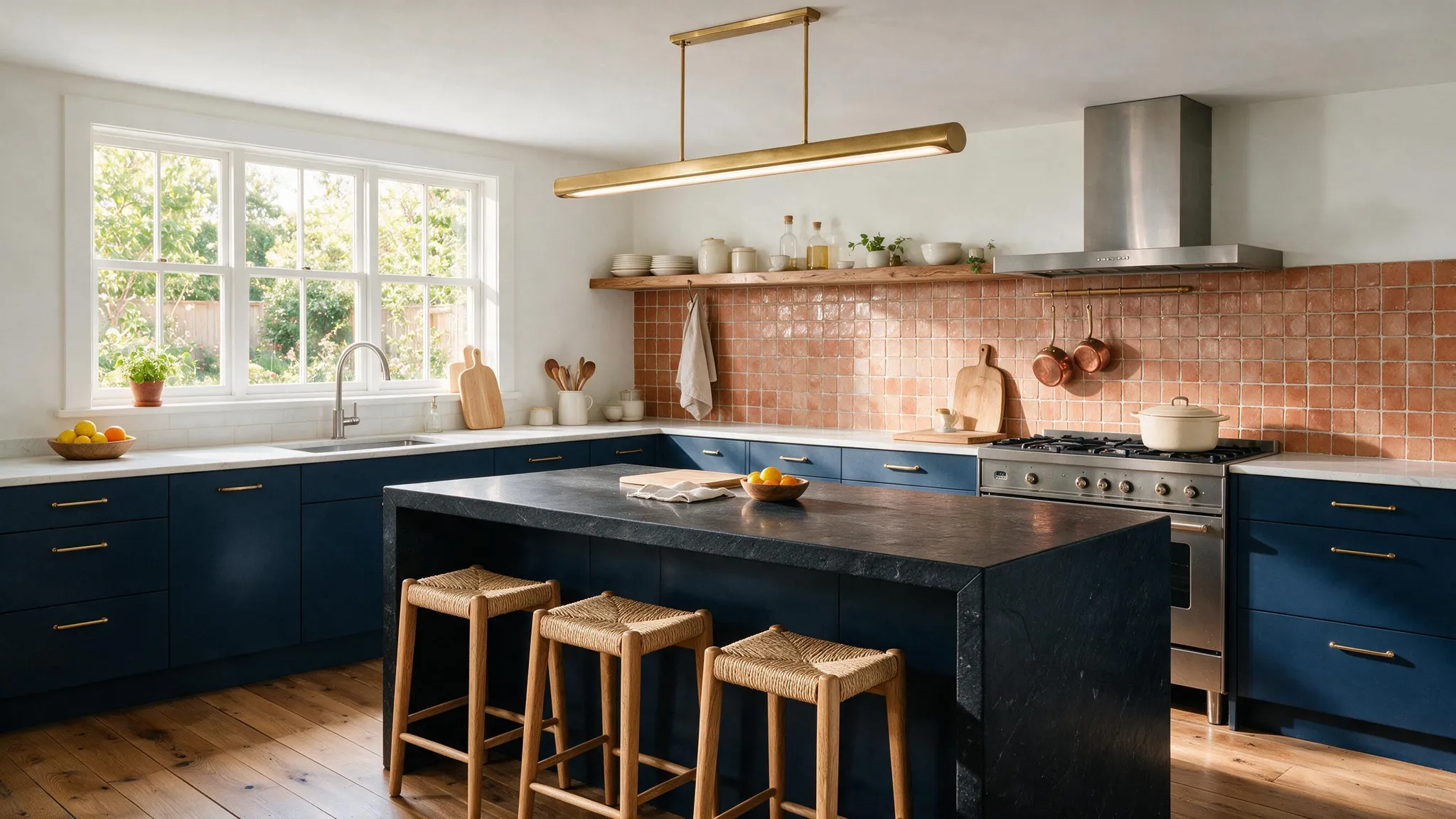
Generated using Seedream 5.0 Pro on fal, an AI model from ByteDance.
Compositing from multiple references
The other workflow worth setting up is multi-source compositing.
You feed the model separate plates, a product, a surface, a logo, a prop, and it fuses them into one frame with the perspective and lighting matched.
This is how you build an e-commerce hero without booking a photoshoot.
Generate the reference plates first, any model will do (I used Nano Banana 2 Lite since it's really good and fast). For a leather-goods hero, that is six clean shots, and the order matters, so keep them in sequence:
A slim full-grain tan leather cardholder, closed and empty, unbranded, photographed straight-on and centered on a pure white background, soft even studio light, sharp focus.
A dark walnut desk surface with fine visible grain, shot from directly above, warm even light, nothing else in frame.
A wordmark logo reading "HALSTED" in a fine engraved serif, matte charcoal, centered on a clean white background.
Three matte black payment cards and one folded banknote fanned out on a white background, shot top-down with a soft shadow.
A swatch of charcoal wool felt with soft visible fibers, shot flat from above, filling the frame.
A vintage solid-brass desk key with an ornate bow, lying on a white background, top-down, soft directional light catching the metal.
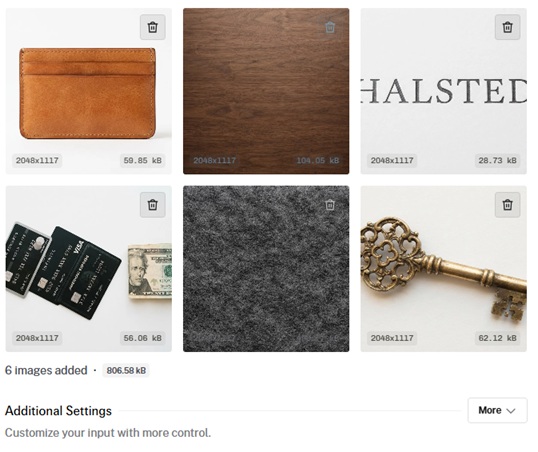
Then hand all six to the editor with one composite instruction:
Prompt: Compose a single premium e-commerce hero for a leather-goods brand from the references, in a top-down flat-lay. Lay the walnut surface from image 2 as the full background. Place the tan leather cardholder from image 1 slightly right of center, angled a few degrees. Deboss the "HALSTED" wordmark from image 3 into the front face of the cardholder as blind embossing that follows the grain, no ink. Fan the black cards and banknote from image 4 so they rise just out of the cardholder's pocket. Slide the charcoal felt from image 5 under the cardholder as a soft mat, its edge running diagonally out of the lower-left corner. Rest the brass key from image 6 in the open upper-right space, catching the light. Soft directional daylight from the upper left, one consistent shadow direction across every object, a warm neutral grade, enough depth of field that the cardholder and the debossed logo stay tack-sharp. Photorealistic top-down product photography, 50mm equivalent, no text beyond the debossed logo.
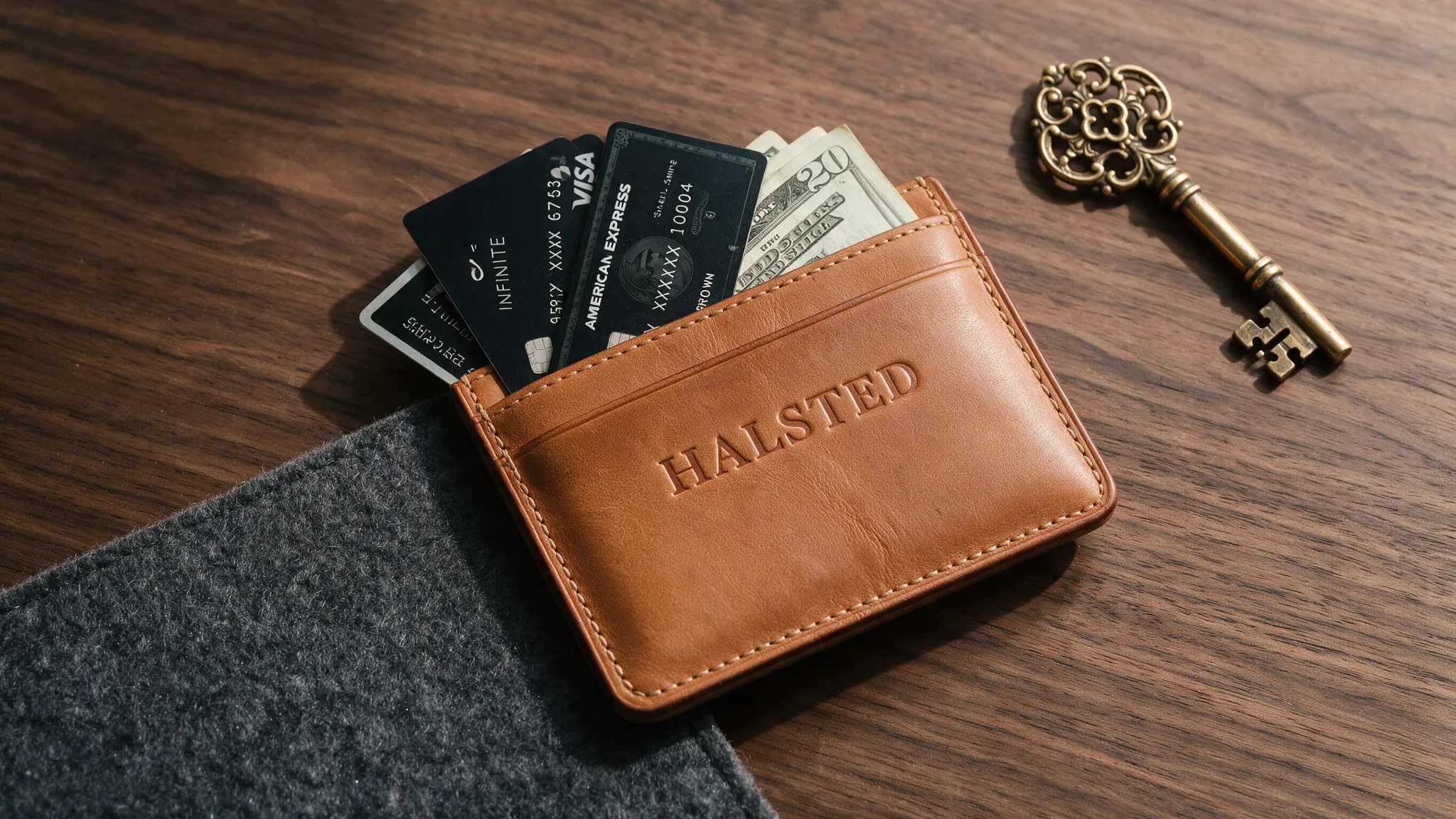
Generated using Seedream 5.0 Pro on fal, an AI model from ByteDance.
💡 Pro tip: The thing to watch is perspective. Each plate should be shot from roughly the angle it will occupy in the final frame, which is why a top-down flat-lay wants top-down references throughout.
What are Seedream 5.0 Pro's settings and how do you use them?
The Pro schema is lean, so there is not much to memorize.
Here is what matters:
image_size: named presets (square, square_hd, portrait_4_3, portrait_16_9, landscape_4_3, landscape_16_9) plus auto_1K and auto_2K, which default to auto_2K. For anything the presets miss, pass a custom width and height object. Total pixels stay between 1024x1024 and 2048x2048, and aspect ratios run from 1/16 up to 16, so wide banners and tall strips are reachable through custom sizing.
num_images: how many separate generations one call returns. Turn it up when you want variants to review in a sitting.
output_format: jpeg by default, with png available when you need it.
enable_safety_checker: on by default. It can only be switched off through the API, not the playground.
sync_mode: returns the image as a data URI in the response. Handy for quick round-trips, though the result then skips your request history.
How much does Seedream 5.0 Pro cost?
fal bills Seedream 5.0 Pro per image, and the pricing is tentative at launch, so treat these as current, not final.
Text-to-image currently runs $0.0675 per image for anything up to 1536x1536, and $0.135 per image for output between 1536x1536 and the 2048x2048 ceiling.
Editing prices the output image on the same two tiers, $0.0675 or $0.135 by size.
💡 The first input image is free, and every additional reference costs $0.0045.
This means a three-reference composite at standard resolution comes to $0.0675 for the output plus $0.0045 for each of the two extra inputs.
Recently Added












Run Seedream 5.0 Pro on fal
The playground is free to try, and the meter only starts when you generate.
The workflow that suits this model is not the reroll: you'll get further by nailing one strong base and then making small, targeted edits than by rolling a fresh generation and hoping the good parts come back.
This is why you want to first get the layout and the light right once, and refine everything else in the editor.
Creating a free fal account is all it takes to open the playground.
FAQs about prompting Seedream 5.0 Pro
Can I use Seedream 5.0 Pro images in ads and client work?
Yes. It carries fal's commercial use label, which clears output for ads, product pages, decks, and client work.
What resolution does it output?
Up to 2048x2048 (2K), delivered as JPEG by default, with PNG available.
How is Seedream 5.0 Pro different from Seedream 5.0 Lite?
Pro is the flagship for design reasoning: dense infographics, multi-tier layouts, grounded region editing, and photoreal texture.
Lite is the faster, higher-volume option and reaches a larger maximum resolution, a fit for batch production.
Both are available on fal, so switching is a matter of changing the endpoint string.
![10 Best Text-to-Speech APIs in 2026 [Reviewed]](https://refinery.fal.media/url/https%3A%2F%2Fv3b.fal.media%2Ffiles%2Fb%2F0a9c366c%2FVrh-xdtEWo_Kt9Hf9xYeW_1780097087241.jpeg/tr:w-1280,q-80/Vrh-xdtEWo_Kt9Hf9xYeW_1780097087241.webp)