![Seedance 2.0 Prompting Guide & Examples [2026]](https://refinery.fal.media/url/https%3A%2F%2Fv3b.fal.media%2Ffiles%2Fb%2F0a9e945a%2FnsNbCHwzblV9c3mgRtzst_seedance-2-0-prompting-guide.jpg/tr:w-1920,q-80/nsNbCHwzblV9c3mgRtzst_seedance-2-0-prompting-guide.webp)
This guide walks through Seedance 2.0's prompt formula, the habits I use to keep clips from coming out flat and obviously AI-generated, and a stack of hard, copy-ready text-to-video prompts you can run on fal today.
TL;DR
Seedance 2.0 writes the picture and the sound in the same pass, and that one fact changes how you write the prompt.
You're not describing a frame anymore. You're directing a short scene, including the camera move and the sound mix, and the model has to hold all of it together.
Seedance 2.0 follows plain natural language, so the prompts that work read like a short shot brief: who, doing what, where, shot how, and what it sounds like.
Put any spoken line in double quotes, and the model lip-syncs it, generates the voice, and times it to the cut.
You can stack several shots into one generation by writing the cuts out, and because the model renders real-world physics, you describe the consequence and not the action on its own.
On fal, it runs pay-per-use by the second, 720p at $0.3034/s and 1080p at $0.682/s, with audio generated in the same pass at no extra cost.
Where can you run Seedance 2.0?
You can run Seedance 2.0 on fal without a subscription or a minimum, paying only for the seconds you generate, on its playground, or via API.
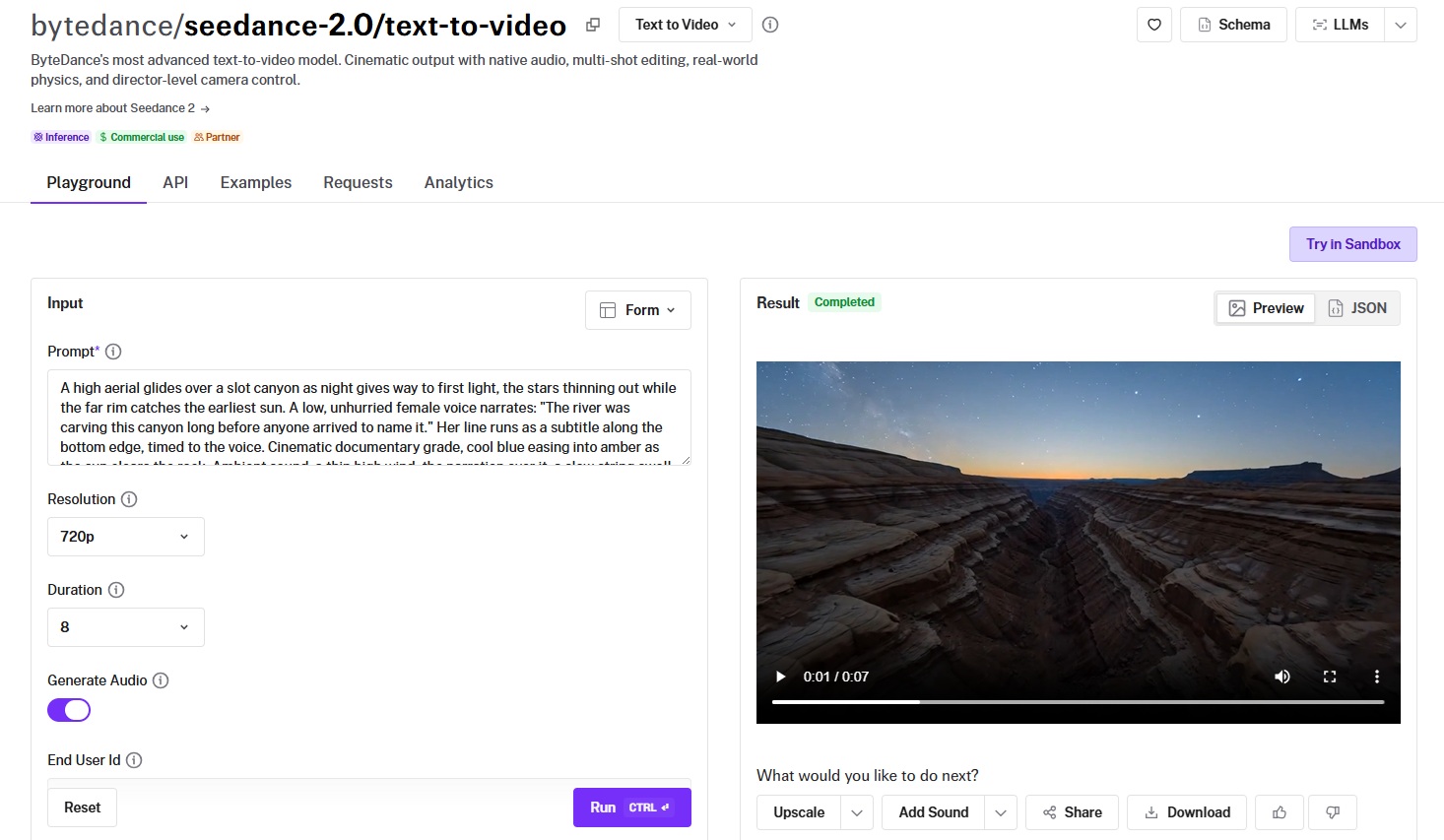
Setup is a one-time job.
All you have to do is wire up the @fal-ai/client SDK once, and every other video model on fal answers to the same calls, from Veo 3.1 to Kling, plus the 1,000+ other models in the catalog.
So the way you queue a job and read the result back stays the same no matter which endpoint you point at.
Spinning up a text-to-video generation takes a handful of lines:
javascript
import { fal } from "@fal-ai/client";

const result = await fal.subscribe("bytedance/seedance-2.0/text-to-video", {
  input: {
    prompt:
      "A spear-wielding warrior clashes with a dual-blade fighter in a maple leaf forest, autumn leaves scattering on each impact",
    resolution: "720p",
    duration: "auto",
    aspect_ratio: "16:9",
  },
});

console.log(result.data.video.url);
What's the prompt formula for Seedance 2.0?
ByteDance's own guidance lands on a simple structure for using Seedance 2.0, and it matches what I've seen hold up in testing.
Two parts do the heavy lifting:
Subject: who or what is on screen, in concrete terms.
Motion: what that subject is doing, and how.
Everything after that is optional, and you add it as the shot needs it:
Environment: the place, the time of day, the weather, the light.
Look: the finished style, from documentary realism to flat 2D animation.
Camera: the framing and the move, briefed the way you'd talk to a camera operator.
Audio: the dialogue, the ambient sound, the score, or the silence.
Loaded up with every layer, a prompt looks like this:
Prompt: A glassblower in a leather apron pulls a glowing orange gather of molten glass from the furnace, turns the rod steadily to keep it from slumping, then lifts a blowpipe to his lips and breathes into it as the bulb swells and the glass deepens from orange toward red. A dim workshop lit almost entirely by the mouth of the furnace, tools and half-finished pieces on the bench behind him, a warm documentary look with the highlights blown out slightly. The camera opens on a slow push-in toward his hands, then arcs around to catch the molten glass against the dark of the room. Audio: the low roar of the furnace, the creak of the turning rod, a faint hiss as the surface cools, no music.
Generated using Seedance 2.0 on fal, an AI model from ByteDance.
Every layer there is a decision the model no longer makes up on its own: the glassblower and what his hands are doing, the furnace light, the documentary grade, the push-in and the arc, and a mix built on the furnace roar with no music over it.
Note: If you set duration to "auto", the model will pick a length to fit the content, or pin it anywhere from 4 to 15 seconds.
How do you write dialogue, sound, and on-screen text with Seedance 2.0?
The model builds the audio and any on-screen text straight from the prompt, and each piece has its own way of being asked for.
Put the spoken words in double quotes, and the model voices them, matching the lip movement to each line.
Keep the lines short.
Long monologues drift out of sync, so I split a speech into a couple of shorter lines and let the cuts carry it.
Let's see how that looks like in reality:
Prompt: Two coworkers stand at a glass office wall at dusk, the city switching its lights on behind them. The senior woman, arms crossed, says: "You ran that client call better than I would have." The younger man glances at the floor, then back up, and answers: "I nearly hung up twice." Play her line dry and a little proud, his quiet and worn out. Hold a two-shot through the exchange, then cut to a tight single on whoever is speaking, lips matched to each line. Low room tone underneath, the soft drone of an air vent, no score.
Generated using Seedance 2.0 on fal, an AI model from ByteDance.
Subtitles work when you describe a voiceover and ask for the text along the bottom. The model matches the captions to the narration as it plays.
Prompt: A high aerial glides over a slot canyon as night gives way to first light, the stars thinning out while the far rim catches the earliest sun. A low, unhurried female voice narrates: "The river was carving this canyon long before anyone arrived to name it." Her line runs as a subtitle along the bottom edge, timed to the voice. Cinematic documentary grade, cool blue easing into amber as the sun clears the rock. Ambient sound: a thin high wind, the narration over it, a slow string swell beneath.
Generated using Seedance 2.0 on fal, an AI model from ByteDance.
For ambient sound on its own, I've noticed that the best way to approach is to treat the prompt like a sound brief.
You name the sounds you want in the mix, and write "no music" when you mean it, because an open prompt tends to come back scored like a car advert.
falMODEL APIs
The fastest, cheapest and most reliable way to run genAI models. 1 API, 100s of models
Why does a specific prompt beat a vague one in Seedance 2.0?
You can write two prompts aiming at the exact same clip and get wildly different footage back.
The difference comes down to how much you decided for the model versus how much you left it to fill in.
Take a dancer, written loose and written tight.
Vague:
Prompt: A beautiful cinematic video of a dancer, stunning, 8k, masterpiece, epic.
Generated using Seedance 2.0 on fal, an AI model from ByteDance.
Visual:
Prompt: A flamenco dancer in a deep red dress drops into a low spin on a worn wooden stage, the skirt flaring wide before she snaps upright and stamps twice, dust lifting in the single hard spotlight above her. Shot from a low front angle on a long lens, the background falling into black, a warm amber grade with hard-edged shadows. Audio: the sharp crack of heel strikes, a single guitar picking up tempo, the rasp of fabric, no crowd.
Generated using Seedance 2.0 on fal, an AI model from ByteDance.
The first one isn't bad, and for a quick mood test it can do the job.
But the moment you're producing something for a client or a campaign, that gap starts to cost you.
The vague version gave the model almost nothing, so it defaulted to the blandest reading it could find: a stock dancer under flat, even light.
The visual version set the dress, the spin, the heel strikes, the lone spotlight, and the guitar, so the model spent its effort rendering your scene and not inventing one.
What are the anti-slop rules for video prompts with Seedance 2.0?
When clips keep coming back looking machine-made, a few habits fix most of it.
Motion is what the model animates, so spend your words on verbs: "A stunning dancer" gives it nothing to work with, while "a dancer dropping into a low spin, the skirt flaring, then snapping upright" gives it a path to follow.
Camera language pays off: Dolly, pan, tilt, crane, push-in, rack focus, locked-off, the model reads all of these cleanly, where "epic cinematic camera" can go a hundred directions.
Audio is where most people under-direct: You want to name the diegetic sounds, the rain on metal, the room tone, and call for silence on purpose, because a prompt that stays quiet about sound rarely comes back quiet.
Physics needs a consequence to chase: "Leaves scatter on each impact" or "the mug slides and tips" gives the model something concrete to resolve toward.
If you want a cut, say so: Spell out "cut to" between shots and the model honors a shot list far more reliably than it invents one.
Short dialogue beats long: I'll take two clipped lines across a cut over one long line that loses sync halfway through.
What are the best text-to-video prompt patterns for Seedance 2.0?
A handful of patterns I keep reaching for, each one built around a different thing the model is good at.
Swap in your own subject and scene.
Hard motion and real physics
The 2.0 jump is most obvious with bodies in motion. Give the model weight and contact points, and limbs actually carry momentum:
Prompt: A free-runner sprints along a low city rooftop, plants one hand on a concrete ledge and vaults it, lands rolling, then springs up and keeps moving toward the gap at the edge. Loose gravel kicks up on the landing, a jacket flaps with the motion, the body weight reads in every contact with the ground. Camera tracks alongside at chest height, matching pace, a touch of handheld. Overcast flat daylight, muted grade. Audio: feet slapping concrete, fabric snapping, breath, distant city hum, no music.
Generated using Seedance 2.0 on fal, an AI model from ByteDance.
A spot that cuts between shots
One generation, three cuts, a title on the closing frame. Good for a fast spec ad.
Prompt: A spec ad for a kraft-paper coffee bag, built as three cuts in one take. Open on a close-up of beans tumbling into a grinder, then cut to a barista's hands tamping a portafilter on a wooden counter, then cut to a finished flat white sliding across the bar toward the camera. Warm side light, shallow focus throughout, a calm unhurried pace. On the final shot, the words "SLOW MORNINGS" fade up in the lower third in a thin serif, dark brown against the cream foam. Audio: the grind, the hiss of steam, a low acoustic guitar, no voiceover.
Generated using Seedance 2.0 on fal, an AI model from ByteDance.
When the sound is the scene
Sometimes the audio carries the whole thing, and music only gets in the way.
Prompt: First light on a pine forest after rain, mist sitting low between the trunks, water dripping from the needles while a single shaft of sun cuts through the canopy as it lifts. Slow push-in along the forest floor, moss and wet bark in sharp focus, the light shifting as the camera moves. Cool naturalistic grade warming slightly as the sun strengthens. Audio carries the scene: heavy droplets hitting leaves, a far-off bird, the faint creak of branches, no music at all.
Generated using Seedance 2.0 on fal, an AI model from ByteDance.
Hero shot for a product launch
Product ads live or die on one satisfying physical moment, a pour or a splash shot in macro.
The model handles that kind of liquid and contact behaviour without much fuss, which makes it a quick way to mock up a hero spot.
Prompt: A hero spot for a canned sparkling grapefruit soda. The chilled can sits on a wet black stone slab, beads of condensation sliding down the aluminium, then a hand enters frame and pops the tab with a sharp hiss as a fine spray lifts off the opening. The camera holds a tight macro on the can and pushes in slowly as the spray settles, studio lighting with a hard rim light catching the water droplets and the brushed metal. Clean premium product-ad look, cool desaturated grade with the grapefruit-pink label staying vivid. Once the can settles, the words "CRACK SOMETHING BRIGHT" fade up in the lower third in a tight modern sans-serif. Audio: the crisp pop of the tab, the fizz settling, a single low bass note, no voiceover.
Generated using Seedance 2.0 on fal, an AI model from ByteDance.
Put a spokesperson on camera
So much of paid social right now is one person talking straight to the lens.
Lip-synced dialogue means you write the script and skip the casting call, and you can drop in a product beat with a quick cut.
Prompt: A UGC-style ad shot on a phone, vertical framing. A woman in her late twenties sits on a sunlit sofa holding a small amber skincare bottle, talking straight to camera with the easy energy of a creator. She says: "I'm not going to pretend three drops changed my life, but my skin stopped freaking out, so." She gives a small shrug and a half-smile on the last word. Slightly handheld, natural window light, the warm faintly oversaturated look of a good phone camera, no studio polish. Cut to a two-second insert of her hands shaking the bottle and a single drop landing on a fingertip, then back to her face. Audio: her voice clear and casual, light room tone, a soft lo-fi beat low in the mix.
Generated using Seedance 2.0 on fal, an AI model from ByteDance.
How much does Seedance 2.0 cost on fal?
fal bills Seedance 2.0 by the second on a pay-as-you-go basis with no subscription or minimum commitments behind it.
The published per-second rates with audio are $0.3034 for 720p and $0.682 for 1080p.
480p is the fastest, lightest tier, billed on the same underlying formula as the others, so it lands below the 720p rate.
Under those headline numbers, the real meter is token-based.
You're charged $0.014 per 1,000 tokens, and the token count comes out to output height times output width times duration in seconds times 24, all divided by 1,024.
So your bill scales with two things: how many pixels each frame holds, and how long the clip runs.
A 720p frame at 1280 by 720 comes to roughly 21,600 tokens a second, which lands at about $0.30, matching the published rate.
If you drop to 480p, the pixel count falls, so the same formula returns a smaller number, while 1080p climbs to the $0.682 figure.
Audio is generated in the same pass and doesn't change the price, so there's no reason to switch it off to save money.
From the API, two settings actually move the number: resolution and duration.
Aspect ratio barely touches it, because the model keeps the total pixel count close to constant across shapes inside a given resolution, so a 16:9 clip and a 9:16 clip of the same length cost about the same.
Recently Added
































Run Seedance 2.0 on fal
On fal, Seedance 2.0 bills by the second with nothing to commit to up front, so a throwaway five-second 720p test runs about $1.50, not a subscription.
Start with 5-second clips at 720p to lock your style, then push the duration or step up to 1080p once the look is right.
Whatever you generate can go straight back into fal for an upscale or an edit before it ships.
Sign up to fal for free to get started.
FAQs about prompting Seedance 2.0
Why does my Seedance 2.0 video look generic?
It can be due to a vague prompt.
Mood words like "beautiful" or "cinematic" give the model essentially nothing it can point a camera at, so it settles for the most average reading of the scene.
This is why you want to tell it the specific move and the specific sounds you want carried, and the averageness goes away.
Every call you make is one the model doesn't have to invent for you.
How do I get dialogue that stays in lip-sync?
You can put the line in double quotes so the model knows to speak it, keep each line short, and name the tone you're after, something like dry or worn-out.
Then cut to whoever's talking.
Long unbroken speeches lose sync the fastest, so I split a speech into a couple of shorter lines and let the edit carry it.
Can I get more than one shot in a single generation?
Yes, and it's one of the better reasons to reach for Seedance 2.0.
You can write the cuts into the prompt with "cut to" or "then the camera moves to," and the model holds the characters and the look consistent across each shot.
Three quick cuts in one take is well within range.
How long can a clip be with Seedance 2.0, and should I use auto duration?
Anywhere from 4 to 15 seconds, or set duration to auto and let the model fit the length to the content.
I usually start at 5 seconds to nail the style cheaply, then extend once the look holds.
Auto is a fine default when you're not yet sure what the beat needs.
![How To Use FLUX 3: Prompts & Workflows [2026]](https://refinery.fal.media/url/https%3A%2F%2Fv3b.fal.media%2Ffiles%2Fb%2F0aa634ac%2FQDj7UCejgvCv5IKAwDFLP.jpg/tr:w-1280,q-80/QDj7UCejgvCv5IKAwDFLP.webp)
![How To Use Happy Horse 1.1: Prompts & Workflows [2026]](https://refinery.fal.media/url/https%3A%2F%2Fv3b.fal.media%2Ffiles%2Fb%2F0aa19894%2FclLqI9V4Uw-DPcJRXp9la.jpg/tr:w-1280,q-80/clLqI9V4Uw-DPcJRXp9la.webp)