This guide compares GPT Image 2 and Nano Banana 2 on fal: how each model renders text, how photorealism is handled, what the editing endpoints accept, and how pricing actually works.
TL;DR
GPT Image 2 launched on April 21, 2026 on fal, the next step in OpenAI's image lineup after GPT Image 1.5.
It runs three quality tiers: low, medium, and high.
The price spread across those tiers is steep: A low-quality 1024x768 render lands at $0.005, while a high-quality 3840x2160 render lands at $0.401.
Underneath the per-image numbers, there's a token-based meter that bills text and image tokens separately, so a longer prompt can run higher than the table projection at the same output size.
The text-to-image endpoint takes 6 aspect ratio presets or custom dimensions in multiples of 16, up to a 3840px max edge.
The edit endpoint takes multiple input images, with the same three quality tiers and streaming support as the text-to-image side.
There's also an openai_api_key field for routing through your own OpenAI quota when that fits the team's billing setup better.
Nano Banana 2 is the Flash-tier sibling in Google's Nano Banana family, built on the Gemini 3.1 Flash Image foundation.
Per-image pricing is fixed by resolution: $0.06 at 0.5K, $0.08 at 1K, $0.12 at 2K, $0.16 at 4K.
Two opt-in surcharges sit on top. Web search grounding adds $0.015 per generation. High thinking adds $0.002.
The text-to-image endpoint takes 14 aspect ratio presets plus auto, including extreme widths like 4:1 and 8:1, and their inverses.
Character identity holds across generations for up to 5 people per call, per Google's spec.
SynthID watermarking ships on every output regardless of resolution or thinking level.
Both models are commercial-use on fal, and both handle dense-text rendering in multiple scripts as a headline capability.
The biggest divergences between GPT Image 2 and Nano Banana 2 sit in three areas: how reasoning gets priced, how many reference images the edit endpoint accepts, and whether the model can ground itself in real-time web information.
Here's how they compare head-to-head:
How do GPT Image 2 and Nano Banana 2 compare?
| GPT Image 2 | Nano Banana 2 | |
|---|---|---|
| Architecture | GPT-Image-2 (OpenAI) | Gemini 3.1 Flash Image (Google) |
| Best for | Text and photorealism with token-billed quality tiers; BYOK pipelines | Multi-image editing; web-grounded factual visuals; predictable per-image pricing |
| Price (1024x1024 high) | $0.211 per image | $0.08 per image at 1K |
| Price (4K high) | $0.401 per image at 3840x2160 | $0.16 per image at 4K |
| Lowest tier | $0.005 per image at 1024x768 low quality | $0.06 per image at 0.5K |
| Quality control | quality: low, medium, high | thinking_level: minimal, high (optional) |
| Billing structure | Token-based meter ($5.00 to $30.00 per 1M tokens depending on type), with per-image projections at common sizes | Fixed per-image, resolution multiplier |
| Text rendering | Latin and CJK script support per OpenAI's documentation | Per-character typography validation in multiple languages per Google's documentation |
| Character consistency | Not exposed as a parameter on this endpoint | Up to 5 people per generation per Google's spec |
| Web search grounding | Not available. Knowledge cutoff date is December 2025. | Optional, $0.015 per generation |
| Editing endpoint | Multiple reference images. | Up to 14 reference images, all text-to-image add-ons available |
| Resolution rules | 655,360 to 8,294,400 total pixels, max edge 3840px, edges in multiples of 16, max aspect 3:1 | 0.5K, 1K (default), 2K, 4K |
| Aspect ratios | 6 presets plus custom (text-to-image); auto inferred on edit | 14 presets plus auto, including 4:1, 1:4, 8:1, 1:8 |
| Custom dimensions | Yes, any {width, height} within the resolution rules | No, fixed resolution tiers only |
| Streaming | Yes, both endpoints | No |
| BYOK | Yes, openai_api_key | No |
| Watermarking | No | SynthID on every output |
| Commercial use | Yes | Yes |
What's the architectural difference between GPT Image 2 and Nano Banana 2?
Both GPT Image 2 and Nano Banana 2 produce text rendering as a headline feature, both interpret prompts through reasoning before they render pixels, and both list multilingual layouts and dense text as core use cases on their fal product pages.
The convergence is what makes the matchup interesting.
I think that the question stops being "which one renders text" and becomes "how each model gets to legible typography, and what the route through reasoning costs."
GPT Image 2 runs on OpenAI's GPT-Image-2 architecture, which OpenAI positions as a quality-first model.
Its text appears inside scenes with accurate spelling and clean letter spacing across English-script and East Asian-script languages.
The quality parameter (low, medium, high) is the dial that controls how much computing power the model spends on the prompt before rendering.
GPT Image 2 scales its reasoning time based on how complex the prompt is, and that variable thinking is also the source of the token-based billing structure underneath the per-image projections.
Image-token output is priced separately from text-token input, and a high-quality 4K render carries far more output token weight than a low-quality 1024x768 one.
A long prompt at the same output size can also push the cost above the table projection through input-token volume alone.
Nano Banana 2 belongs to Google's Nano Banana family as the Flash-tier variant, built on the Gemini 3.1 Flash Image foundation.
The model is designed to offer advanced world knowledge, production-ready specs, subject consistency, and all of this at a Flash speed, according to Google's docs.
Reasoning depth is exposed as thinking_level, with two settings: minimal and high.
Web search grounding is a separate toggle (enable_web_search), and it carries its own per-generation cost.
The Flash architecture's role is execution speed once reasoning is done.
Per-image rates depend on the resolution tier rather than the prompt's length or complexity, so a long descriptive prompt costs the same as a short one at the same output size.
So here's where the two architectures actually differ:
-
GPT Image 2 ties reasoning, output detail, and billing together through its three quality tiers, with token usage as the underlying meter.
-
Nano Banana 2 separates reasoning, web grounding, and rendering rate into independent toggles, with resolution tier as the meter.
How do GPT Image 2 and Nano Banana 2 look side-by-side?
I decided to test both AI models across four prompts, each one built to hit a different architectural claim head-on:
Test 1: Multilingual signage with mixed Latin and CJK scripts
Prompt: A photorealistic interior view of a Tokyo metro station platform during evening rush hour, looking down the platform from a wide-angle perspective. The exit sign overhead reads 'EXIT' in white sans-serif on green, with the kanji '出口' directly beneath in equal weight, and the romaji 'Deguchi' in smaller letters below that. To the left, a yellow caution panel reads '足元注意' in vertical kanji with the smaller hiragana 'あしもとちゅうい' to its right, and the English 'WATCH YOUR STEP' beneath both. A digital information board mounted on the ceiling cycles between three lines: '次の電車 銀座方面 17:42', 'Next train: Toward Ginza 5:42pm', and 'NEXT 銀座 ⇒ 5:42'. The platform floor has yellow tactile paving with English 'PRIORITY SEAT AHEAD' and Japanese 'お先にどうぞ' painted in alternating sections. Tiled walls in cream and dark blue, fluorescent lighting, a single red emergency phone box mounted on a column with the kanji '緊急電話' above it. No people in the frame. Sharp typography, all text legible at standard zoom, characters proportionally accurate.
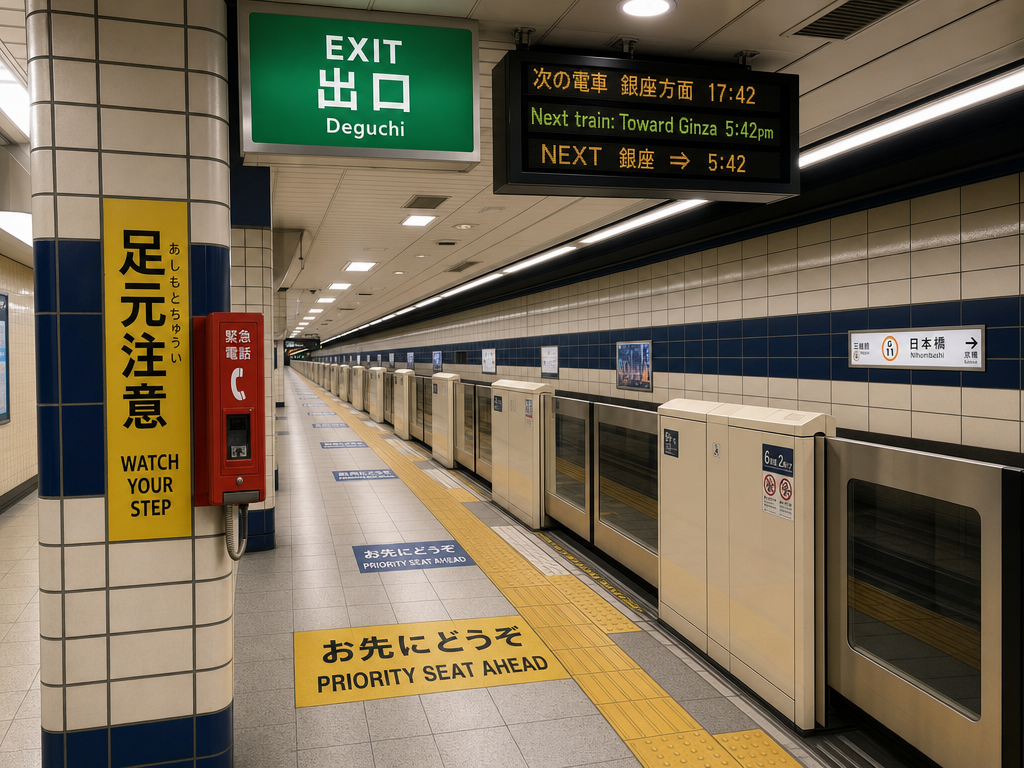
Generated using GPT Image 2 on fal, an AI model from OpenAI.
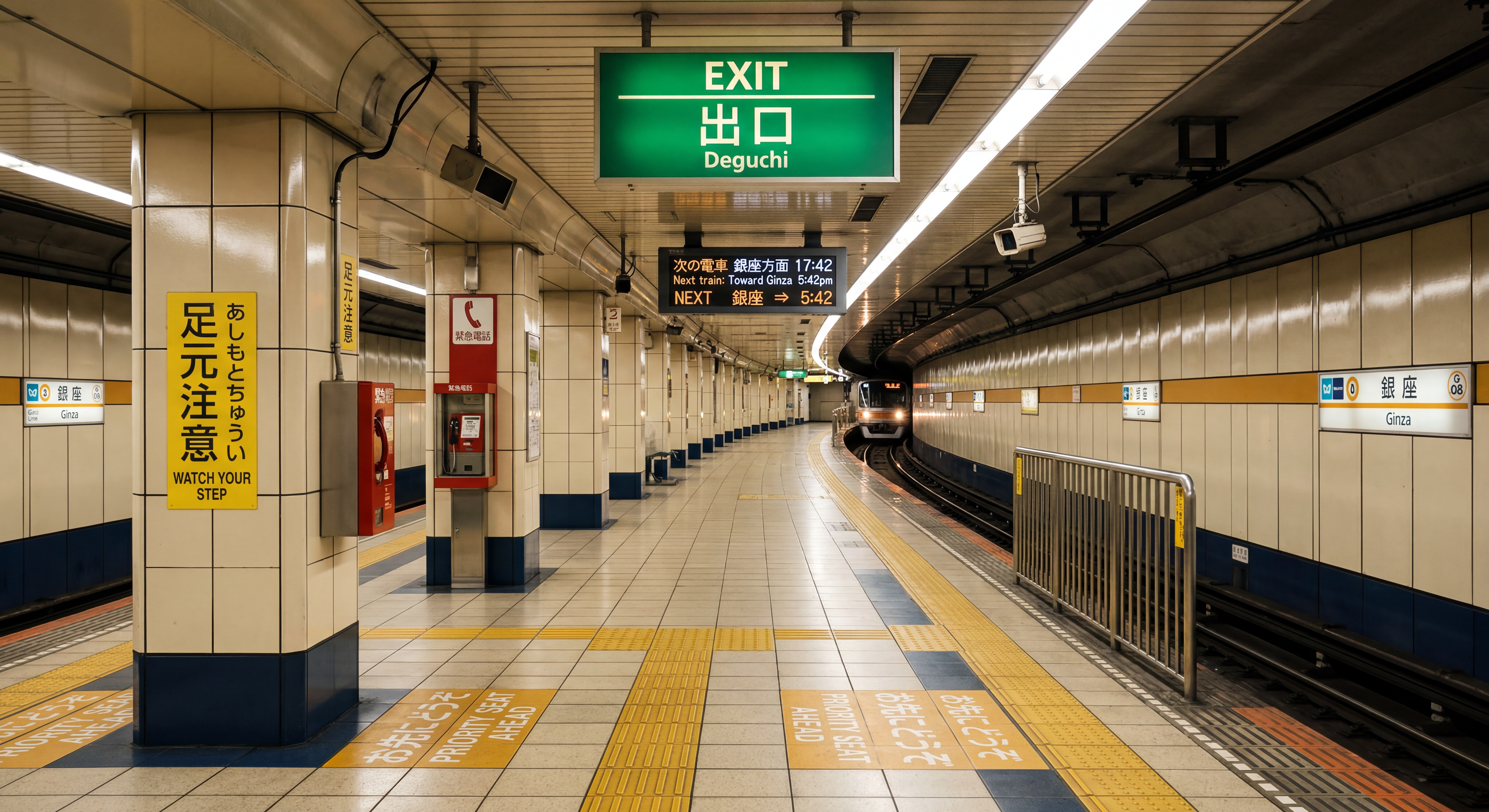
Generated using Nano Banana 2 on fal, an AI model from Google.
My take: At first glance, both AI image models did a good job of following instructions, although I was surprised to find that Nano Banana 2 generated a subway train as well.
However, as I started looking into the details, I can see that GPT Image 2 was not able to properly render the second ''Priority seat ahead'' text (the blue one).
Nano Banana 2 made a critical mistake too: it put ''Ginza'' signs on the right and left of the image, as if this is the current station that we're in, instead of the destination.
Nano Banana 2 wins out on photorealism this time around, but GPT Image 2 won the logic game.
You can check our guide on how you can use Nano Banana 2, and also what makes Nano Banana 2 different from Nano Banana Pro.
Test 2: Web-grounded architectural reference
Prompt: A photorealistic architectural photograph of Habitat 67 in Montreal, Canada, taken from across the Saint Lawrence River at dusk in late September. The modular concrete cuboid apartment units stack at irregular angles in their characteristic stepped configuration, with terraced rooftop gardens visible on the upper modules. Soft golden hour light catches the exposed concrete on the river-facing side, while the eastern face is in cool blue shadow. Some apartment windows are lit from inside with warm tungsten light. The river in the foreground is calm with the building reflected on the water surface. Shot on a 50mm lens, f/8, sharp focus throughout. No people, no boats, no obvious modern signage in the frame, just the building and the river.
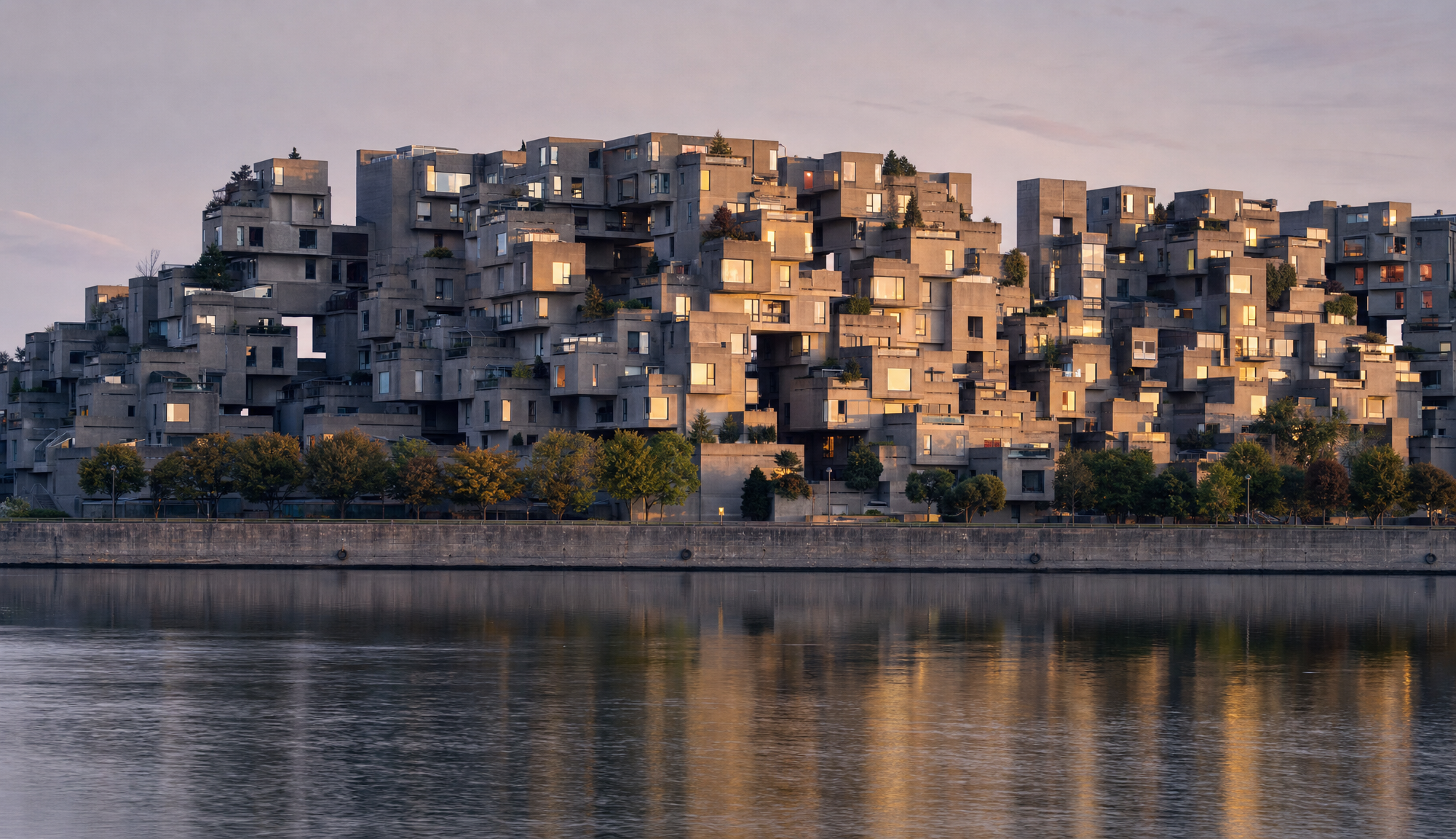
Generated using GPT Image 2 on fal, an AI model from OpenAI.
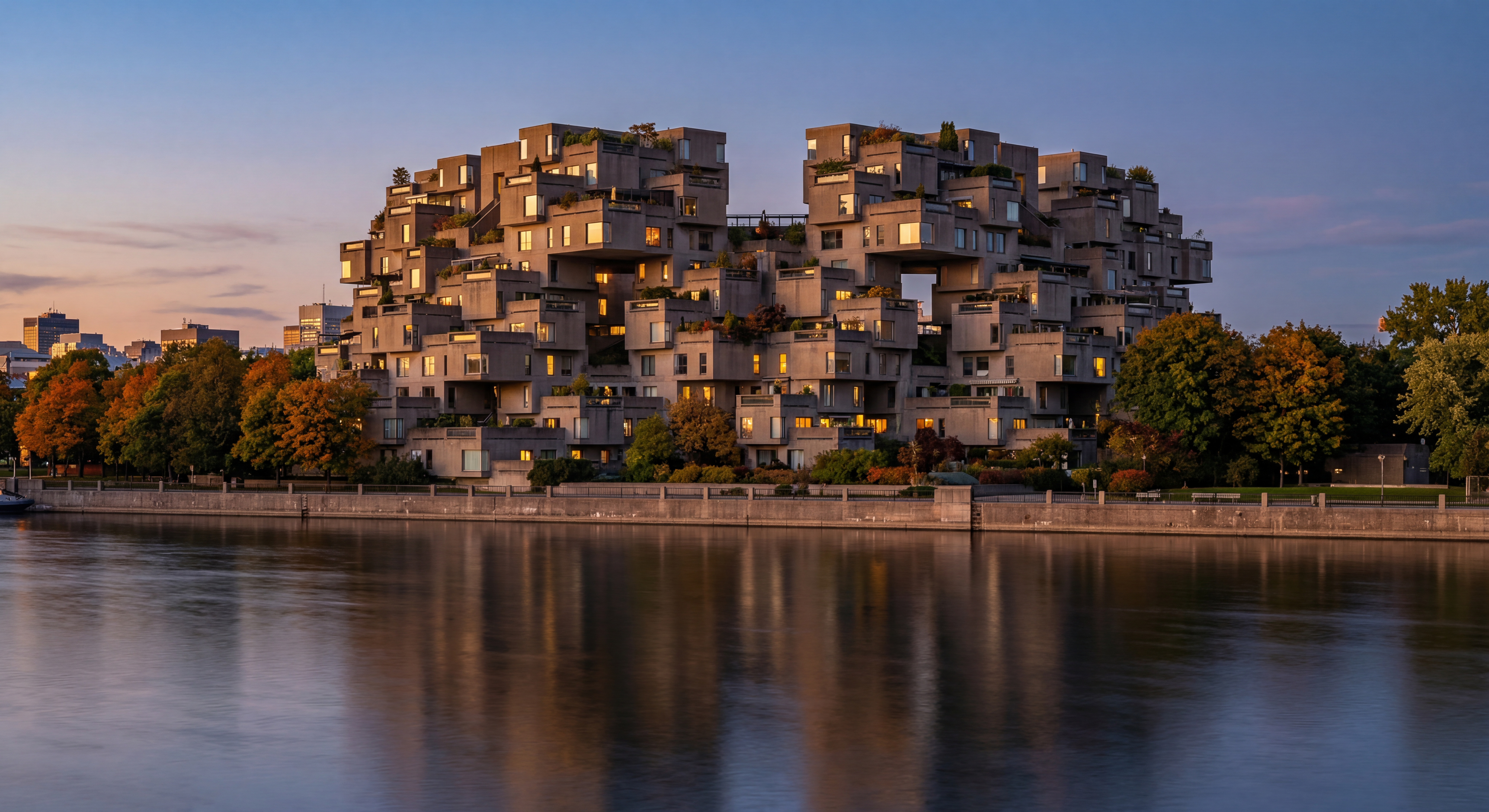
Generated using Nano Banana 2 on fal, an AI model from Google.
My take: I enabled Nano Banana 2's web search to see the difference between what both AI image generation models would give me.
For reference, this is what Habitat 67 looks like in real life:

It appears that Nano Banana 2's representation seems to be more accurate than GPT Image 2's representation, which made the complex wider than it appears to be, as the AI model had to use its training data for this.
falMODEL APIs
The fastest, cheapest and most reliable way to run genAI models. 1 API, 100s of models
Test 3: Dense scientific infographic with cross-referenced labels
Prompt: A scientific infographic poster designed for a peer-reviewed journal cover, titled 'Heat Transfer Coefficients Across Turbine Blade Cooling Channels' in a clean serif type at the top. The main composition is a labeled cross-section diagram of a single turbine blade with five internal cooling channels, each annotated with arrows pointing to flow direction and small data tables showing 'h-conv: 1,240 W/m²·K', 'Re: 18,500', 'ΔT: 412°C' for each channel respectively. To the right of the blade diagram, a stacked bar chart compares 'Channel A' through 'Channel E' on the y-axis against 'Cooling Efficiency (%)' on the x-axis, with values 73, 81, 67, 78, and 84 visibly labeled at the end of each bar. Below the chart, a short explanatory paragraph reads in two columns of justified body text. A dotted thermal gradient legend in the bottom-right shows 'Cool ← 200°C ─ 600°C ─ 1000°C → Hot' with appropriate color coding. White background, professional layout, no decorative flourishes, all text rendered crisply at body-text size.
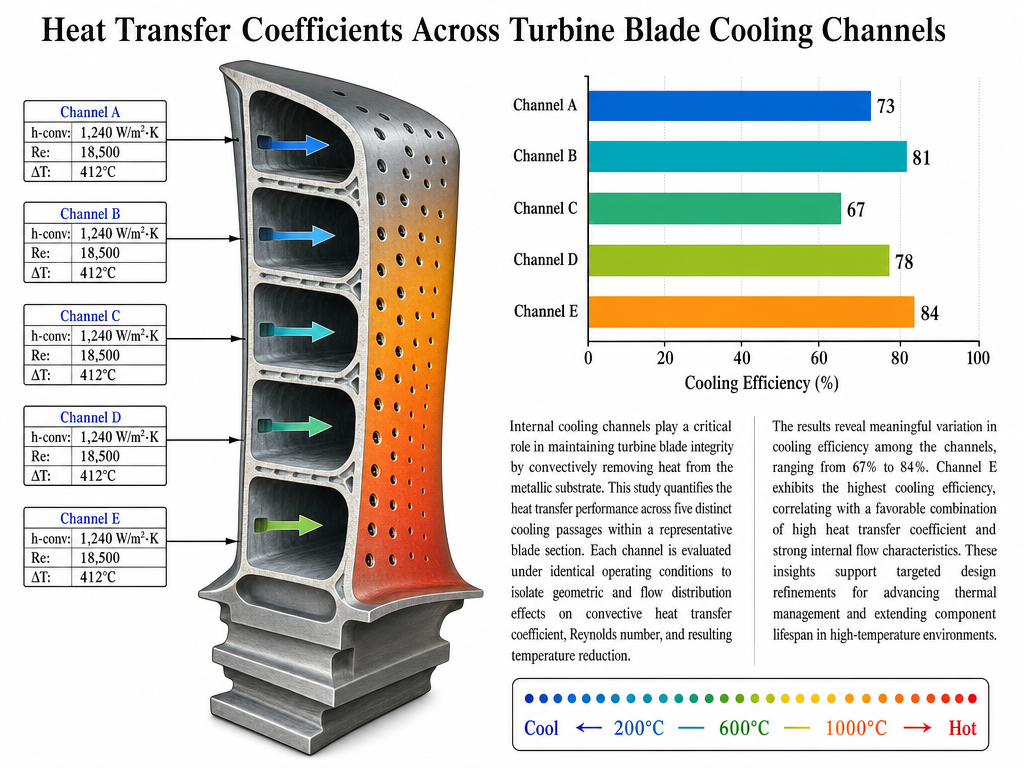
Generated using GPT Image 2 on fal, an AI model from OpenAI.
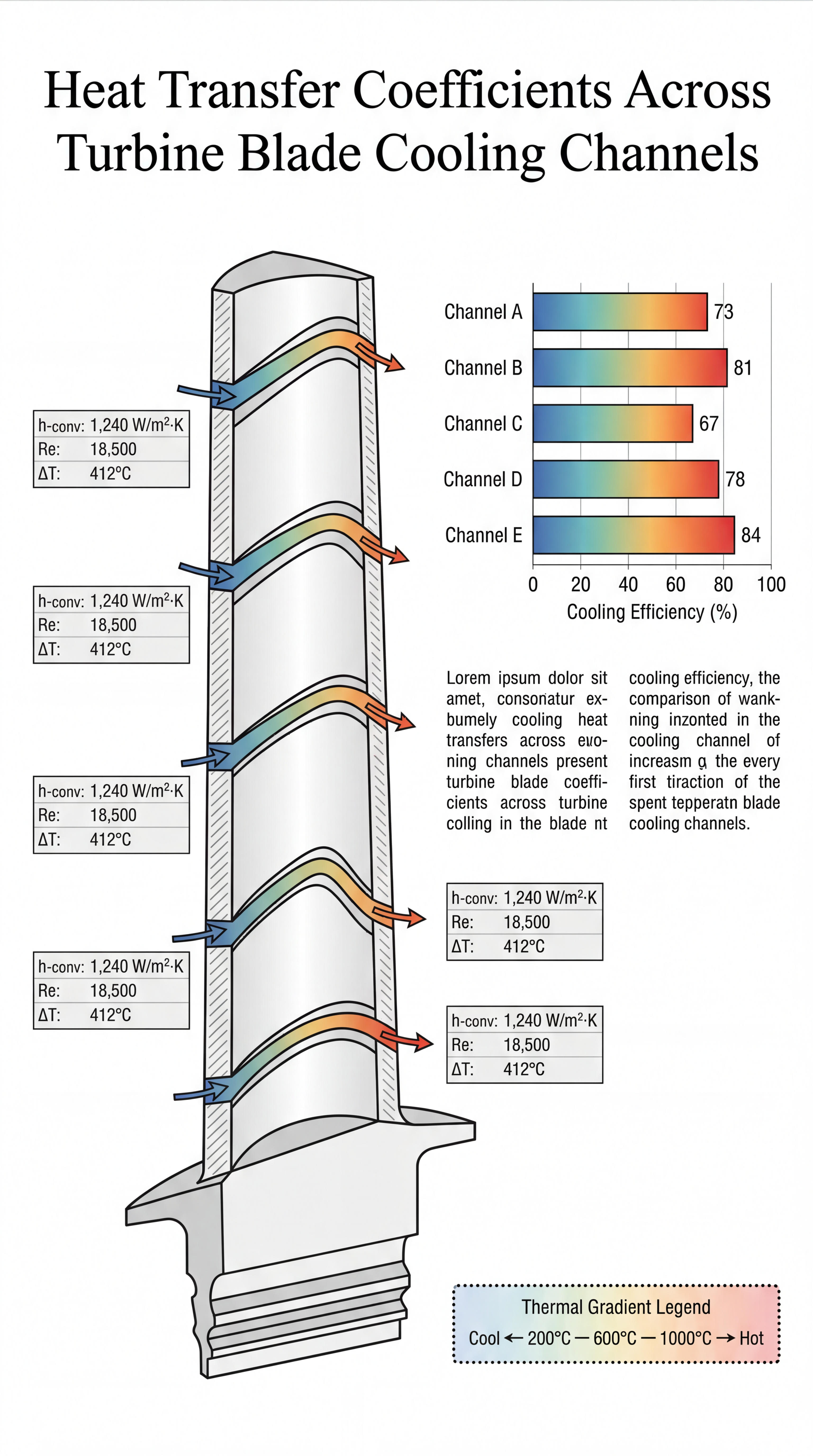
Generated using Nano Banana 2 on fal, an AI model from Google.
My take: This was a relatively advanced test, and I have to give my props to both GPT Image 2 and Nano Banana 2 on this one. They both created a good representation of what I was looking for, with the right color gradient, graphics, and image formats (although they took a different approach here).
My only criticism of Nano Banana 2 from here would be that it started out the text with templated text (lorem ipsum content), instead of using its thinking capabilities to generate reasonable text.
You can take a look at how you can use GPT Image 2, our GPT Image 2 prompting guide, and also our dedicated GPT Image 2 Review.
Test 4: Hard light, glass refraction, and metallic reflections
Prompt: A photorealistic still life shot directly down from above onto a sheet of crinkled aluminum foil laid on a dark wood table. On the foil, in a single compact composition: a half-peeled lemon with its zest curling up at the right edge, a small steel bowl containing seven raw oysters arranged in a spiral with their shells half-open exposing iridescent interiors, a single black porcelain spoon resting at a 45-degree angle across the bowl's rim, three dried red chilies scattered at irregular intervals, and a clear glass tumbler half-filled with a pale yellow liquid showing slight condensation on its outer surface. A diagonal beam of cool morning light from the upper-left corner catches the foil's crinkles, creating dozens of tiny bright reflections across the metallic surface and casting soft sharp-edged shadows behind every object. The glass tumbler bends and warps the light passing through it, projecting a curved bright caustic onto the foil to its right. No text, no labels, no human elements. 100mm macro lens, f/5.6, focus on the lemon.
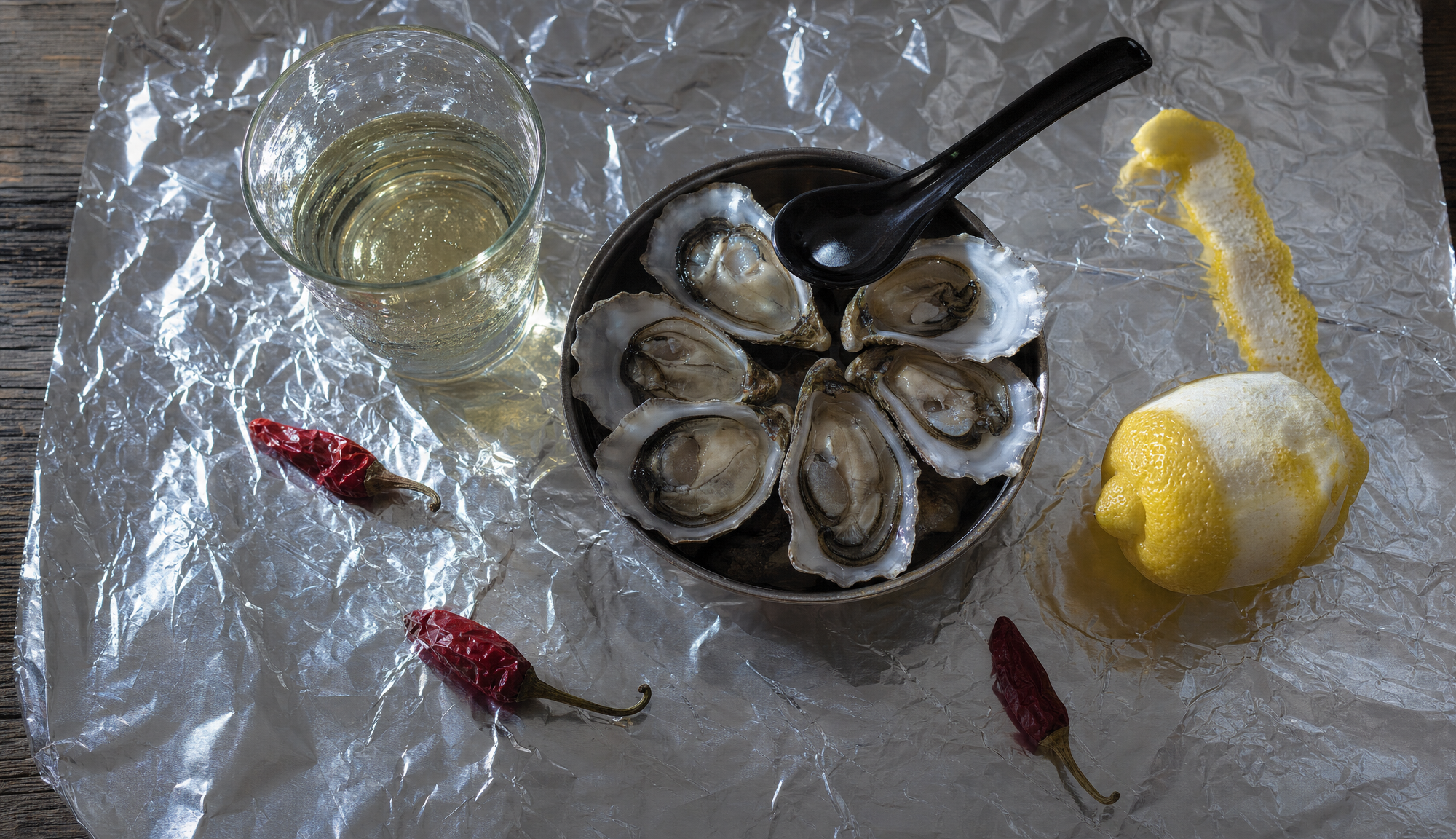
Generated using GPT Image 2 on fal, an AI model from OpenAI.
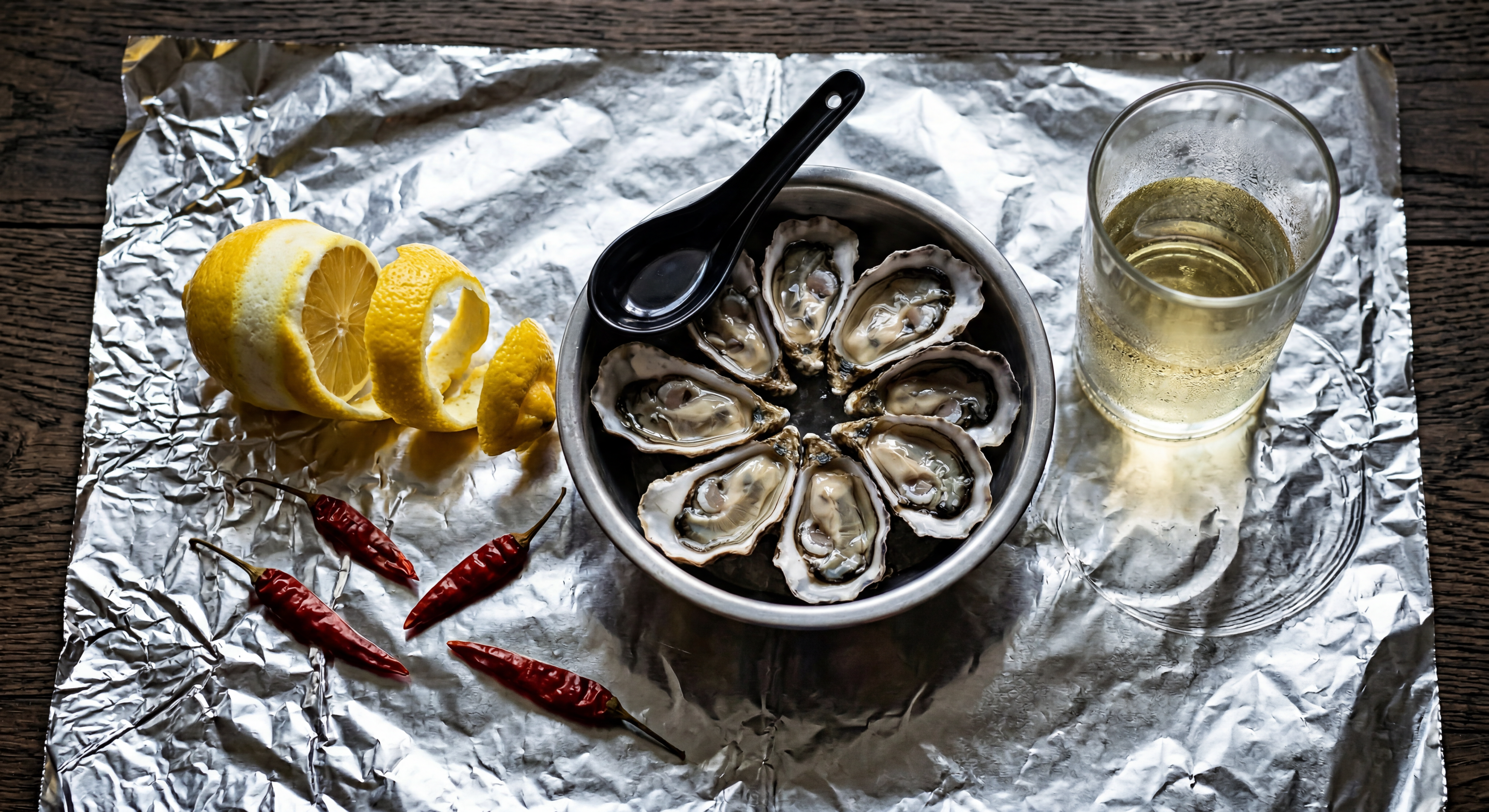
Generated using Nano Banana 2 on fal, an AI model from Google.
My take: I was just about to write down how much I preferred GPT Image 2's superior photorealism and lighting, but then, I counted the oysters: 6, instead of 7. It also did not do a good job of the half-peeled lemon part.
When it comes to Nano Banana 2, I also noticed that it put 4 dried red chillies instead of the required 3, so I was also disappointed to see this.
However, this is the thing about image generation models: they can get some details wrong, which is why it's important that we use their edit endpoints so that we can even out the small errors to get the required output.
What does it cost to run GPT Image 2 vs. Nano Banana 2 on fal?
Per-image billing applies to both, but the structures behind the per-image numbers behave differently.
GPT Image 2 prices on fal are projections at common output sizes, calculated from the model's underlying token meter.
Actual cost on a given request can shift up or down based on prompt length, image input size for the edit endpoint, and how much reasoning the model spends on the request.
Token rates are: $5.00 per million text input tokens, $1.25 cached, $10.00 output.
Image tokens run $8.00 per million input, $2.00 cached, $30.00 output.
Per-image projections at common sizes for the text-to-image endpoint:
| Size | Low | Medium | High |
|---|---|---|---|
| 1024 x 768 | $0.005 | $0.037 | $0.145 |
| 1024 x 1024 | $0.006 | $0.053 | $0.211 |
| 1024 x 1536 | $0.005 | $0.042 | $0.165 |
| 1920 x 1080 | $0.005 | $0.040 | $0.158 |
| 2560 x 1440 | $0.007 | $0.056 | $0.222 |
| 3840 x 2160 | $0.012 | $0.101 | $0.401 |
Per-image projections for the edit endpoint (one input image included):
| Size | Low | Medium | High |
|---|---|---|---|
| 1024 x 768 | $0.011 | $0.043 | $0.151 |
| 1024 x 1024 | $0.015 | $0.061 | $0.219 |
| 1024 x 1536 | $0.018 | $0.054 | $0.178 |
| 1920 x 1080 | $0.017 | $0.053 | $0.158 |
| 2560 x 1440 | $0.019 | $0.068 | $0.234 |
| 3840 x 2160 | $0.024 | $0.113 | $0.413 |
The edit endpoint runs slightly higher than text-to-image at every size and tier because the input image consumes image input tokens at $8.00 per million.
The takeaway: at a fixed output size, prompt length and reasoning depth can move the per-image cost above the projection.
For budget-sensitive work, sampling actual prompts against actual responses is the only reliable way to size the spread.
Nano Banana 2's structure is flat by comparison. Per-image base rates depend directly on resolution.
| Tier | Resolution | Multiplier | Per image |
|---|---|---|---|
| 0.5K | 512x512 | 0.75x | $0.06 |
| 1K | default | 1x | $0.08 |
| 2K | 1.5x | $0.12 | |
| 4K | 2x | $0.16 |
Two opt-in surcharges sit on top: $0.015 per generation for web search grounding, $0.002 per generation for high thinking.
A 1K render with both web search and high thinking active runs $0.097 per image regardless of prompt length.
A 4K render with web search active runs $0.175 per image regardless of prompt length.
For 1,000 images per month at common configurations:
| Configuration | Monthly cost for 1,000 images |
|---|---|
| GPT Image 2, low quality 1024x768 | $5 |
| GPT Image 2, medium quality 1024x1024 | $53 |
| GPT Image 2, high quality 1024x1024 | $211 |
| GPT Image 2, high quality 3840x2160 | $401 |
| Nano Banana 2, 0.5K | $60 |
| Nano Banana 2, 1K | $80 |
| Nano Banana 2, 1K with web search | $95 |
| Nano Banana 2, 4K | $160 |
GPT Image 2's quality enum gives you a wide pricing band where prototyping at low quality runs $5 per 1,000 images and final 4K hero assets run $401 per 1,000.
The trade-off there is that prompt length and complexity can shift the actual bill above the projection.
Nano Banana 2 takes a different approach: less quality flexibility for more billing predictability.
Per-image rates depend on resolution alone, with thinking and web search as line items that show up only when used.
A finance team can model expected monthly spend off the table without modeling prompt distributions.
How do you run GPT Image 2 and Nano Banana 2 on fal?
Both endpoints sit behind the @fal-ai/client SDK.
Once FAL_KEY is set as an environment variable, switching between the two is a one-line endpoint change.
javascript
import { fal } from "@fal-ai/client";

// GPT Image 2 - text-to-image
const gptResult = await fal.subscribe("openai/gpt-image-2", {
  input: {
    prompt:
      "A wooden bookshelf with twelve labeled binder spines reading Q1 2026 through Q4 2028, backlit by a warm desk lamp",
    image_size: "landscape_4_3",
    quality: "high",
  },
});

// Nano Banana 2 - text-to-image
const nbResult = await fal.subscribe("fal-ai/nano-banana-2", {
  input: {
    prompt:
      "A wooden bookshelf with twelve labeled binder spines reading Q1 2026 through Q4 2028, backlit by a warm desk lamp",
    aspect_ratio: "4:3",
    resolution: "1K",
  },
});
Both calls take a prompt string, after which the parameter sets diverge.
GPT Image 2 reads image_size (a 6-preset enum or a {width, height} object with multiples-of-16 constraints), quality (low, medium, high), num_images, output_format, sync_mode, and an optional openai_api_key for BYOK.
Nano Banana 2 reads aspect_ratio (14 presets plus auto), resolution (0.5K through 4K), num_images (capped at 4), output_format, seed, safety_tolerance (1 through 6), sync_mode, and the two optional reasoning controls thinking_level and enable_web_search.
Both endpoints have edit variants. You can pass image_urls to either to enter editing mode.
Nano Banana 2's edit endpoint accepts up to 14 image URLs in a single call.
For browser-based testing without code, both models have playgrounds on fal.
A few comparison runs through the playground is the easiest way to feel how the parameter surfaces differ.
When should you use GPT Image 2 vs. Nano Banana 2?
Here are the different use cases of GPT Image 2 and Nano Banana 2:
When you're working with GPT Image 2
-
A pipeline that does prototyping at low quality and final 4K hero shots at high quality, all without changing endpoints, gets that range from the quality enum at $5 per 1,000 images on the cheap end and $401 per 1,000 on the high end.
-
If the brief specifies an exact pixel size that doesn't map onto a preset, the
{width, height}object on the text-to-image endpoint covers it. -
Teams already on OpenAI's billing, or with reserved capacity to draw down, can route image generation through BYOK.
-
For finance and engineering audits where actual cost per request matters more than per-image projections, the OpenAIUsage object returned in every response has the receipts.
-
There's a streaming option, which would show you the process of delivering partial image data or real-time, iterative visual updates.
When you're working with Nano Banana 2
-
Compositing and multi-source workflows, where context is scattered across multiple source images, are what the 14-reference-image edit endpoint is built for.
-
Web search grounding earns its place on any project where the rendered output needs to look like a real-world thing rather than a generic interpretation: a real product, a real place, and/or a current visual reference.
-
The up-to-5-character identity helps with storyboarding and campaign work, where the same characters need to appear consistent across separate generations.
-
Teams that need predictable monthly spend numbers will prefer the resolution-tied per-image rate.
-
Cinematic 21:9, banner 4:1, or vertical-scroll 1:8 formats fall inside the 14-preset aspect ratio set, including the extremes.
Behind one SDK
As both endpoints share the same SDK shape, routing between them is seamless.
Generation requests that need web grounding or multi-image composites go to Nano Banana 2; while generation requests that need token-billed quality tiers, custom pixel dimensions, or multi-image edits can go to GPT Image 2.
Your content production team can wire both endpoints into a single internal generation API and switch per request type.
Recently Added














Run GPT Image 2 and Nano Banana 2 on fal
The two endpoints fit different production shapes.
-
GPT Image 2 handles token-billed quality-tier work, multi-image editing, custom dimensions, and BYOK setups.
-
Nano Banana 2 handles fixed-rate Flash work, multi-image composite editing, and optional web grounding.
I've noticed that many teams won't lock in on one and ignore the other; instead, they route between them based on what each request actually needs.
If you want both endpoints behind one API, with pay-per-use pricing and zero infrastructure to manage, fal hosts both AI models, alongside 1,000+ more. The API takes a few lines of @fal-ai/client to integrate.
GPT Image 2 vs. Nano Banana 2 FAQs
What is the main difference between GPT Image 2 and Nano Banana 2?
GPT Image 2 runs on OpenAI's GPT-Image-2 architecture, with three quality tiers that scale reasoning depth and price together, and a token-based billing model where prompt length and complexity affect cost.
Nano Banana 2 runs on Google's Gemini 3.1 Flash Image foundation, with fixed per-image pricing tied to resolution and optional add-ons for web search and high thinking.
However, both AI image models produce best-in-class text rendering and photorealistic output, as I was able to test out, with dedicated image editing endpoints on each.
What's the resolution ceiling on GPT Image 2 and Nano Banana 2?
GPT Image 2 supports flexible resolutions up to 3840px on the longest edge with both dimensions as multiples of 16, total pixels between 655,360 and 8,294,400, and a max aspect ratio of 3:1.
Custom {width, height} is supported alongside the 6 preset names.
Nano Banana 2 offers four discrete resolution tiers (0.5K, 1K, 2K, 4K) and 14 aspect ratio presets plus auto, including extreme ratios from 4:1 to 8:1.
How does image editing work on GPT Image 2 and Nano Banana 2?
GPT Image 2's edit endpoint takes multiple reference images and a natural-language prompt.
The same three quality tiers and resolution rules from the text-to-image endpoint apply, with auto added as a preset option. Streaming is also supported.
Nano Banana 2's edit endpoint takes up to 14 reference images and a natural-language prompt.
The same resolution tiers and optional thinking_level and enable_web_search controls from the text-to-image endpoint apply.
Which model has web search grounding?
Nano Banana 2 exposes enable_web_search and enable_google_search for grounding outputs in real-time web information at $0.015 per generation.
GPT Image 2 on fal does not expose an equivalent on either its text-to-image or editing endpoint.
Can both GPT Image 2 and Nano Banana 2 be used in commercial projects?
Yes. Output from both GPT Image 2 and Nano Banana 2 on fal can be used in commercial projects.
![10 Best Video-to-Video APIs in 2026 [Reviewed]](https://refinery.fal.media/url/https%3A%2F%2Fv3b.fal.media%2Ffiles%2Fb%2F0aa0ad7c%2FCnYBY_0niENSKUXkMaEIf_best-video-to-video-apis-2026.jpg/tr:w-1280,q-80/CnYBY_0niENSKUXkMaEIf_best-video-to-video-apis-2026.webp)
![How To Use LTX-2.5: Prompts & Workflows [2026]](https://refinery.fal.media/url/https%3A%2F%2Fv3b.fal.media%2Ffiles%2Fb%2F0aa6bbe3%2FmDUJlHttJdksDteEA8gq0.jpg/tr:w-1280,q-80/mDUJlHttJdksDteEA8gq0.webp)