![Seedance 2.5 Workflows: Text-to-Video, Image-to-Video, References & Editing [2026]](https://refinery.fal.media/url/https%3A%2F%2Fv3b.fal.media%2Ffiles%2Fb%2F0aa63087%2FWbpT8JAY2FG_naNgsprJl.jpg/tr:w-1920,q-80/WbpT8JAY2FG_naNgsprJl.webp)
In this guide, I'll cover how to prompt every endpoint Dreamina Seedance 2.5 has, from one cinematic line through to a timed 30-second shot list, with prompts you can paste into fal's playground or drop straight into an API call.
TL;DR
Dreamina Seedance 2.5 is ByteDance's latest video model, with sound and picture generated jointly inside one latent space, so the audio arrives finished alongside the frames. Output runs for any whole number of seconds from 4 to 30, at 480p or 720p, 24 fps on fal.
Duration is what changes your prompting: the model is built to reason over a full thirty-second take in one pass, so a prompt for this video generator has to carry a sequence, not a single moment, written as consecutive stages with a named ending frame for each.
Three endpoints cover a text prompt on its own, a single still with an optional end frame, and up to 50 multimodal references split across 30 images, 10 videos and 10 audio clips.
The reference endpoint doubles as the editing and extension pipeline, addressing every input by position in the prompt.
fal is the best place to run all three Dreamina Seedance 2.5 endpoints behind one API key, billed on tokens at $0.0214 per 1,000 with nothing to provision, reachable through the playground, Sandbox, API, MCP server and CLI.
Where can you access Seedance 2.5?
The best place to access Dreamina Seedance 2.5 is on fal, billed per token of generated output, with no plan and no minimum spend.
You can access the model on our playground, Sandbox, API, MCP server and CLI.
There are three available endpoints, and what separates them is mostly what you're allowed to attach:
bytedance/seedance-2.5/text-to-video takes a prompt on its own.
bytedance/seedance-2.5/image-to-video takes image_url as the opening frame, plus an optional end_image_url when you want to choose where the clip lands.
bytedance/seedance-2.5/reference-to-video takes image_urls, video_urls and audio_urls, addressed by position in the prompt.
Editing and extension both run through this one.
Here's an example text-to-video call if you want to use fal's API:
javascript
import { fal } from "@fal-ai/client";

const result = await fal.subscribe("bytedance/seedance-2.5/text-to-video", {
  input: {
    prompt:
      "An octopus finds a football in the ocean and excitedly calls its octopus friends to come and play. Cut scene to an octopus football game under the sea.",
  },
  logs: true,
  onQueueUpdate: (update) => {
    if (update.status === "IN_PROGRESS") {
      update.logs.map((log) => log.message).forEach(console.log);
    }
  },
});

console.log(result.data);
console.log(result.requestId);
Switching endpoints is a one-line change to the model string plus whichever media field the new endpoint wants.
That pattern holds across the other 1,000 models on the platform, so the auth and billing side gets learned once and then stops being interesting.
What does a Seedance 2.5 prompt need?
The model reasons over the whole take in one go, so your prompt has to carry the whole take.
Coming off a five-second model, that adjustment is bigger than it sounds.
Five seconds is a moment being described.
Thirty seconds is a sequence, and whatever part of the sequence you leave unordered, the model will order for you.
BytePlus is specific about the fix.
You want to write a multi-beat shot as consecutive stages, hand each stage one primary change, and name what should be on screen when that stage ends.
Nobody does the third part, and the third part is what keeps beat two from starting before beat one has landed.
Timestamps work too, as consecutive non-overlapping ranges like 0 to 5s and 5 to 12s.
You want to calibrate what you're buying, though.
BytePlus treats a range as an allocation of screen time, so it governs proportion and pacing across the clip.
If you need something to hit on a specific frame, you're doing that in an editor.
Dialogue belongs inside double quotes.
That's the trigger for lip-synced audio.
Four shapes cover nearly everything, and picking the shape matters more than the word count.
The cinematic one-liner: A sentence or two in the order a director would say it: camera, subject, action, environment, look, sound. My default, and correct for one continuous shot carrying one idea.
The bracketed field block: Labelled fields in brackets, the shape our playground ships as its default prompt. It pays off when the look is doing heavy work, because the grade line can be rewritten without disturbing any of the action lines. Holding that separation in flowing prose is much harder.
Staged beats: Stage 1, Stage 2, Stage 3, one primary change each, ending frame named. Anything built on cause and effect, where beat two is meaningless until beat one has finished.
The timed shot list: Ranges with one beat each. Ad spots, and anything where the pacing is part of what you're delivering.
Let's see the default shape doing its job, in exactly that order:
Prompt, duration: 8, aspect_ratio: 4:3: A locked medium from floor level, a flamenco dancer alone in a dark practice room, driving a long footwork sequence until dust lifts off the boards and hangs in the light. One bare bulb overhead and mirrors down one wall. High-contrast black and white, heavy grain, no camera movement at any point. Heel work carrying the entire soundtrack, breath through the nose, the crack of a hand against the wall keeping time, no music.
Generated using Dreamina Seedance 2.5 on fal, an AI model from ByteDance.
falMODEL APIs
The fastest, cheapest and most reliable way to run genAI models. 1 API, 100s of models
How do you prompt Seedance 2.5 for text-to-video?
With the text-to-video endpoint, you want to write the prompt, pick 480p or 720p, pick an aspect ratio, set a duration, leave audio on, and run.
Here are four prompts below, a different shape each, ordered from loosest to most controlled:
A single continuous shot as a one-liner
Any new video model gets this treatment from me before anything else, because a loose prompt shows you what the model supplies unprompted, and that's the most useful thing to learn about it early.
Prompt, duration: 10, aspect_ratio: 16:9: A night stage of a gravel rally, shot from a spectator bank in the pines. A boxy 1980s four-wheel-drive rally car with a large white number 7 door plate comes through a long left-hander, six roof-mounted spotlights cutting solid cones through the fog, gravel sheeting off the inside wheels and rattling into the trees, the suspension loading hard as the car steps sideways and gathers itself. A marshal in a hi-vis vest stands at the corner exit with a rolled flag. Long lens from behind a snow pole, hand-held, heavy grain, the beams flaring across the lens as the car passes. Anti-lag cracks between gearshifts, stones drumming on the wheel arches, cowbells and shouting from the bank, then the engine note falling away up the hill.
Generated using Dreamina Seedance 2.5 on fal, an AI model from ByteDance.
➡️ I loaded that one deliberately, because every editing example later in the guide runs on this exact clip.
A stylised action beat as a bracketed field block
Bracketed fields pay for the extra typing when the style carries the shot:
Prompt, duration: 8, aspect_ratio: 21:9: 【Concept】: A rooftop pursuit from a rain-season crime picture, three beats, no dialogue. 【Style】: Hollywood action grade, anamorphic, dark and saturated, practical neon only, hard rim light on wet surfaces, no lens flares. 【Duration】: 8 seconds 【Scene】: The roof of a tenement block at 2am in monsoon rain. Forests of bamboo scaffolding, laundry lines strung between water tanks, a cracked satellite dish, neon bleeding up from the street six floors below, standing water across the concrete. 【Action】: Beat one, a courier in a soaked windbreaker clears a low parapet at full speed and lands in ankle-deep water. Beat two, a laundry line catches his shoulder and a bedsheet tears free and flies across the lens. Beat three, he drops through a stairwell hatch and the hatch slams behind him. 【Camera】: Chest-height hand-held, following, whip-pan on each beat change, cut hard between beats with no dissolves. 【Audio】: Rain on corrugated steel, water displacing underfoot, the bedsheet snapping, the hatch slamming. No music.
Generated using Dreamina Seedance 2.5 on fal, an AI model from ByteDance.
The 【Style】 block is the only line I'd expect to rewrite between attempts.
Everything else can stay put while you push the grade around, which is the entire reason to type brackets in the first place.
A cause-and-effect sequence written as staged beats
Staged beats suit anything where beat two is meaningless until beat one has finished.
Stored energy, then release, then consequence:
Prompt, duration: 12, aspect_ratio: 21:9: Stage 1: A siege trebuchet on a chalk ridge at first light, a crew of six working a windlass, the counterweight box climbing while the throwing arm drags down against it. Frost still on the timber, rope stretching under load. Ends with the arm fully cocked and held, the sling laid out flat along the ground with the stone seated in it. Stage 2: The trigger is knocked and the counterweight drops. The arm sweeps up through frame, the sling whips over the top and releases, and the stone leaves at the apex. Ends on the arm at full extension, still shuddering, the empty sling flying loose. Stage 3: The camera stays with the stone across the valley and into a curtain wall, masonry punching inward and dust blowing out sideways along the ramparts. Ends wide on the breach with dust drifting off the ridge. Look: long lens on the throw, cold blue dawn light, heavy film grain, deep focus on the wide. Audio: the windlass ratchet counting up, rope under strain, the timber crack of the release, then almost nothing while the stone is in the air, and the impact.
Generated using Dreamina Seedance 2.5 on fal, an AI model from ByteDance.
A 30-second ad as a timed shot list
One of the standout capabilities of the AI video generator is native 30-second single-shot video generation, so let's give it a try:
Prompt, duration: 30, aspect_ratio: 16:9: A 30-second commercial for a pair of hand-welted leather boots, built as one unbroken low tracking shot. The camera stays at ankle height and tracks backwards at walking pace for the entire clip. The boots never leave frame and never cut. The ground and the world behind them change four times mid-stride. 0 to 6s: Wet granite setts in a city lane at night, hard rain, neon bleeding across the puddles, water sheeting off the welt with every step. On screen at the end of this stage: mid-stride, heel down, water thrown forward. 6 to 12s: With no cut the setts become the cracked salt crust of a desert flat under hard midday sun, dust puffing from each footfall, the leather already dusted pale. On screen at the end: mid-stride on white crust, dust hanging. 12 to 18s: The salt becomes black jungle mud over a broken boardwalk, mud closing over the toe cap and stretching as the foot lifts, warm heavy rain coming through the canopy. On screen at the end: the sole lifting with mud pulling off it in strings. 18 to 24s: The mud becomes fresh glacier snow, the crust breaking under each step, the leather now dark with water and scuffed across the toe. On screen at the end: mid-stride, snow collapsing around the boot. 24 to 30s: The snow becomes polished oak parquet in a warm lit room. The boots are clean and freshly oiled, and they come to a stop. On screen at the end: locked and static on both boots at rest. Look: shot on anamorphic glass, ankle height throughout, one continuous backwards track, shallow depth on the leather with each world soft behind it. The grade shifts with the environment, from cold neon to hard white to deep green to blue to warm amber. Audio carries every transition: rain on granite and city noise, then dry wind and grit underfoot, then mud sucking and rain on leaves, then snow crust breaking, then all of it dropping away to a quiet room, one floorboard creak and a fire. No music and no dialogue.
Generated using Dreamina Seedance 2.5 on fal, an AI model from ByteDance.
How do you animate a still image with Seedance 2.5?
Your still image becomes frame one, and the model works forward from there.
This splits the prompt in half: motion in one part, protection in the other, where you name what the still already got right and want left alone.
A character still with one physical event and a spoken line
Image prompt: A handmade stop-motion film still in the style of a practical puppet feature, a badger bush pilot in a cracked leather flying helmet with goggles pushed up on his forehead, wedged into the cockpit of a patched-together floatplane at night. Shot tight over his right shoulder and through the windscreen, rain hammering the glass and running sideways across it, the instrument panel lit from below in green so the light catches the felted fur of his cheek and the visible fingerprints pressed into the clay of his snout. A hand-stitched flying jacket with a repaired tear at the elbow, a brass compass swinging off a hook, a folded chart on his knee, a torch clamped between his teeth. Rich tactile materials, a faint seam line along the brow the way real stop-motion puppets show, shallow depth of field, cold rain-blue outside against warm panel light inside, wide cinematic frame. No text in the frame.
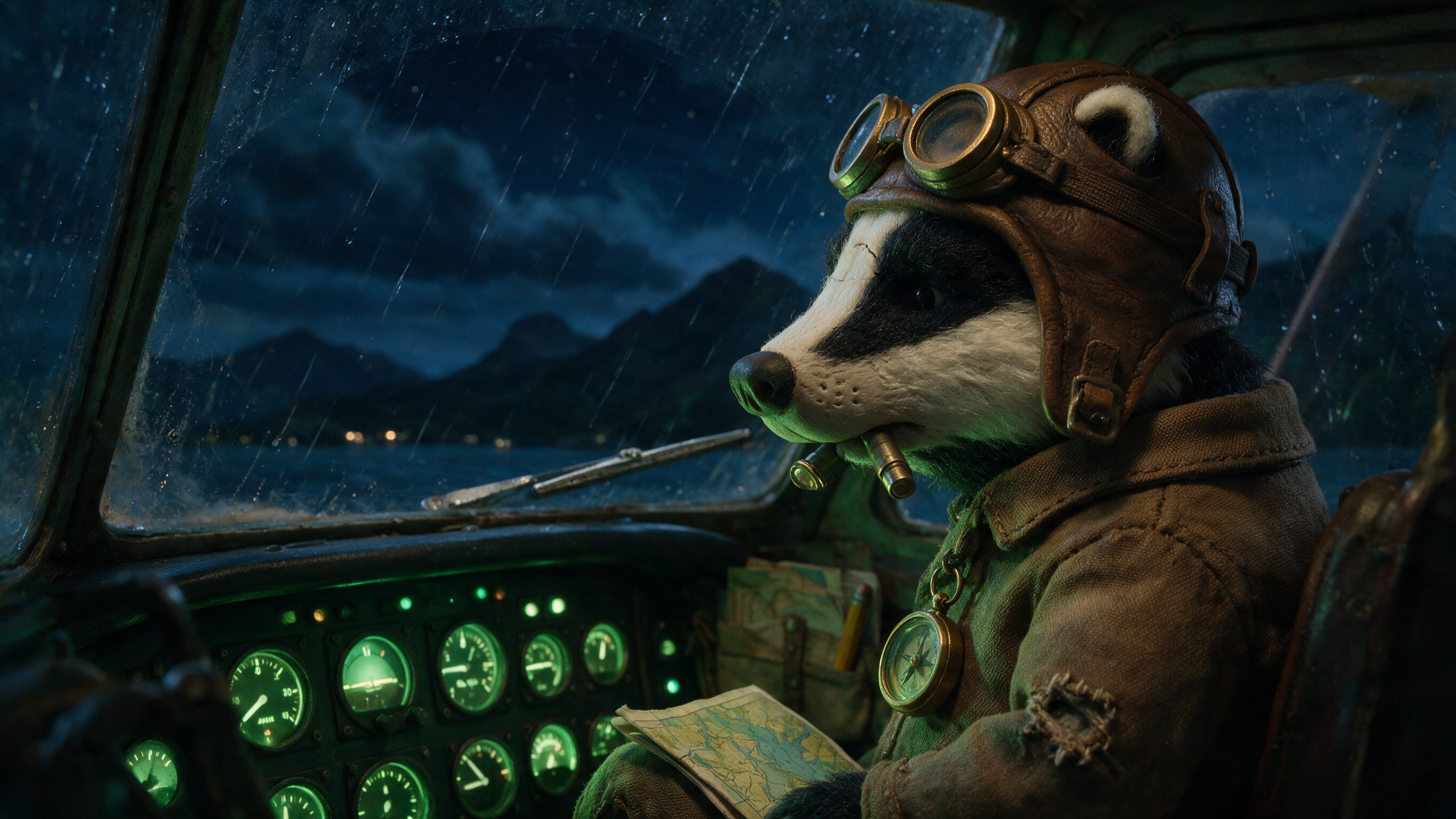
Image generated by Seedream 5.0 Pro on fal, an AI model from ByteDance.
Video prompt, duration: 10: Lightning fires outside and blows the cockpit white for a moment, then the panel light comes back, and the artificial horizon rolls hard to the left. He takes the torch out of his teeth and drops it, gets both hands on the yoke and hauls it back, ears flattening, and says through his teeth: "Not tonight. Not tonight." The chart slides off his knee and the compass swings across the frame. Hold his exact face, helmet, jacket and the green panel lighting from the still, and keep the camera over his shoulder throughout, shaking with the airframe. Rain on the windscreen, the engine note surging and dropping, metal stressing, thunder arriving late behind the flash, no music. No on-screen text, no subtitles.
Generated using Dreamina Seedance 2.5 on fal, an AI model from ByteDance.
The stop-motion medium is doing work here beyond charm.
Puppet material gives physics something honest to push against, so a compass swinging on its hook and a chart sliding off a knee both read as weight, and a slightly stiff limb reads as the medium doing its job.
Two frames, with the end state pinned
end_image_url lands the clip on a composition you choose.
Reach for it when the destination is the point of the shot.
Build the second frame by editing the first, never by writing a fresh text-to-image prompt.
Two independent generations of "the same ballroom" will disagree about the parquet pattern and the window line, and you've then asked the model to reconcile a room that changed identity mid-clip on top of performing the animation.
Start frame prompt: A cinematic film still of a derelict grand ballroom in a closed hotel, shot dead-on from the doorway at eye level. Every chandelier bagged in grey muslin, dust sheets draped over stacked chairs along both walls, the parquet grey with dust, the mirrors fogged. Shutters closed across the far windows with one bar of hard daylight coming through a broken slat and landing across the floor. Cold desaturated grade, deep shadow in the corners, 35mm, wide frame. No text.
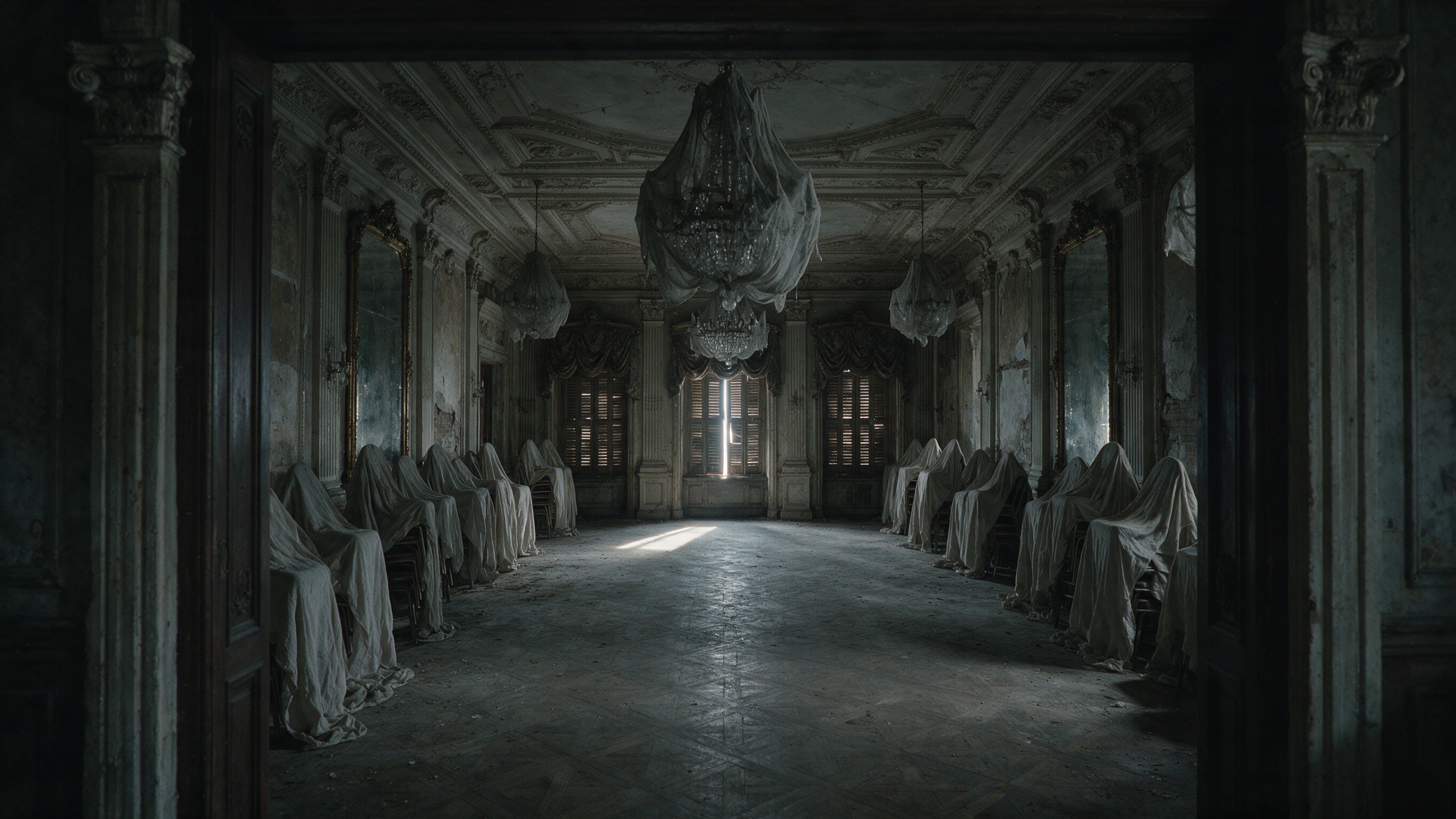
Image generated by Seedream 5.0 Pro on fal, an AI model from ByteDance.
End frame prompt, run on the start frame with Seedream 5.0 Lite Edit: Keep the room, the doorway camera position, the parquet layout, the mirrors and the window line exactly as they are. Take the muslin bags off the chandeliers and light every candle in them, clear away the dust sheets and the stacked chairs, polish the parquet so it reflects the chandelier light, and open the shutters onto blue evening. Warm gold grade, the room fully lit and empty. Same lens, same framing, nothing moved.
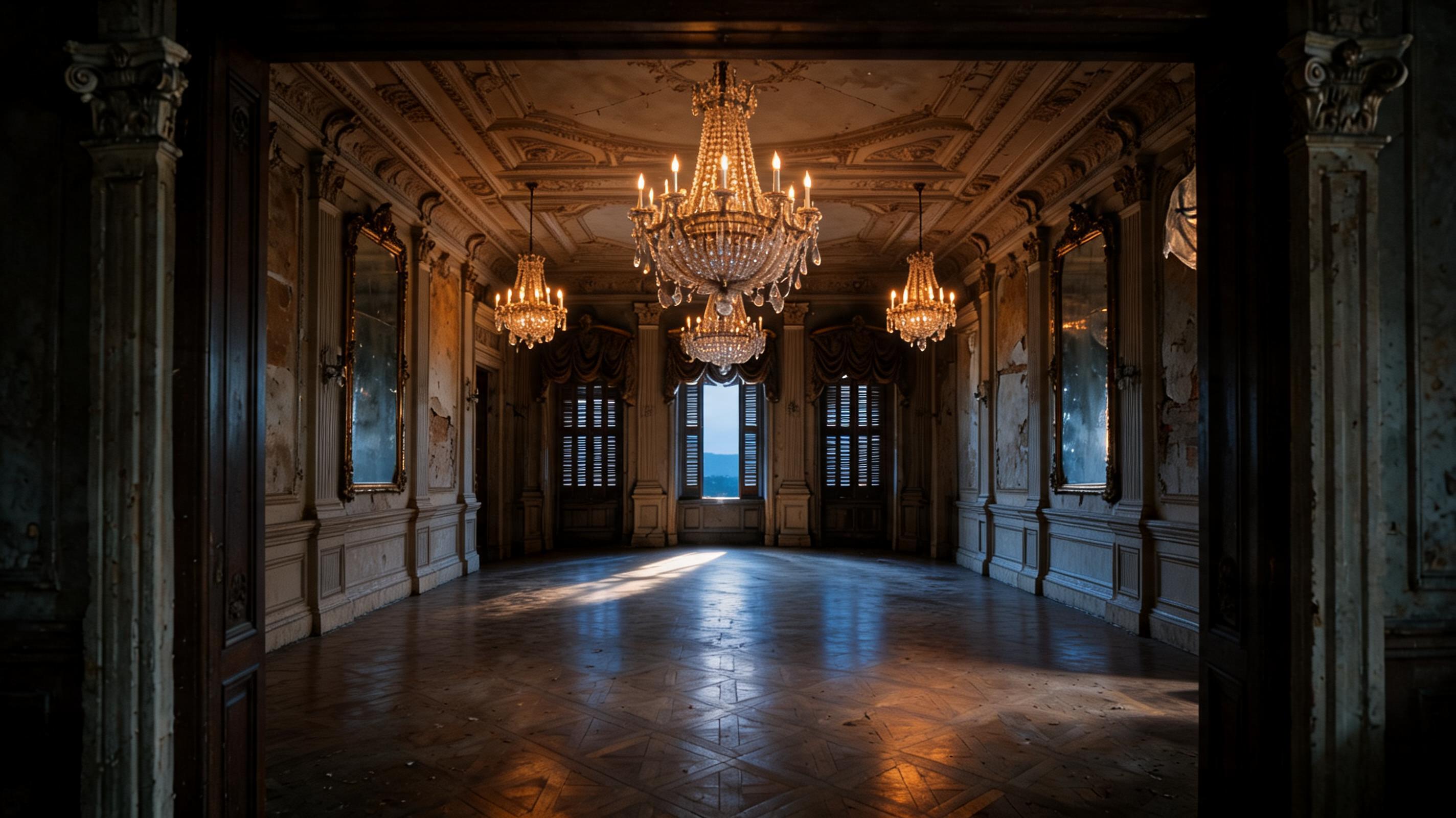
Image generated by Seedream 5.0 Lite Edit on fal, an AI model from ByteDance.
Video prompt, duration: 12: One continuous restoration, camera locked to the doorway position for the whole clip. The bar of daylight fades out, and the dust sheets lift off the chairs and rise out of the top of frame in one slow movement, releasing dust that catches the light on the way up. The muslin comes off the chandeliers next and the candles take one by one from the centre of the room outwards, warming the space as they go, and the parquet clears and comes up to a shine underneath them. The shutters swing open on blue evening last. No cuts and no camera move at any point. Dust sheets snapping in the air, muslin sliding off brass, the room reverb tightening as the space fills, one sustained low string note under all of it and no percussion. No on-screen text.
Generated using Dreamina Seedance 2.5 on fal, an AI model from ByteDance.
What that video prompt omits is the interesting part.
It never once describes the restored room, because the end frame has already handled it.
What the two frames leave open is sequence: which candle lights first, whether the sheets go up before the shutters open, how long the dust hangs in the beam, and when the daylight bar finally dies.
How do you use reference-to-video with Seedance 2.5?
Seedance 2.5's reference-to-video is the controllable endpoint, and the one worth putting real hours into.
The way it works is that you attach references for appearance, motion, composition and rhythm, then use the prompt to assign each one a role.
References are addressed by position: @Image1, @Video1, @Audio1, numbered by their order in the list you pass.
A composition prompt that reuses one of our previous generations
The badger returns for this one, and reusing him is the entire argument for the endpoint.
The still from the image-to-video section becomes @Image1, a new set becomes @Image2, and a twelve-second cue carries the timing.
Set image prompt for @Image2: A handmade stop-motion film still of a floating fuel barge in a mangrove lagoon at dawn, no characters in frame. A rusted pump with a hand crank, stacked jerry cans, a corrugated roof over a small counter, an oil rainbow on the water, mangrove roots close on both sides, mist sitting low. Practical puppet-feature look: visible material texture, felted moss on the timber, hand-painted signage with no readable letters, warm dawn light against blue-green shadow, wide cinematic frame.
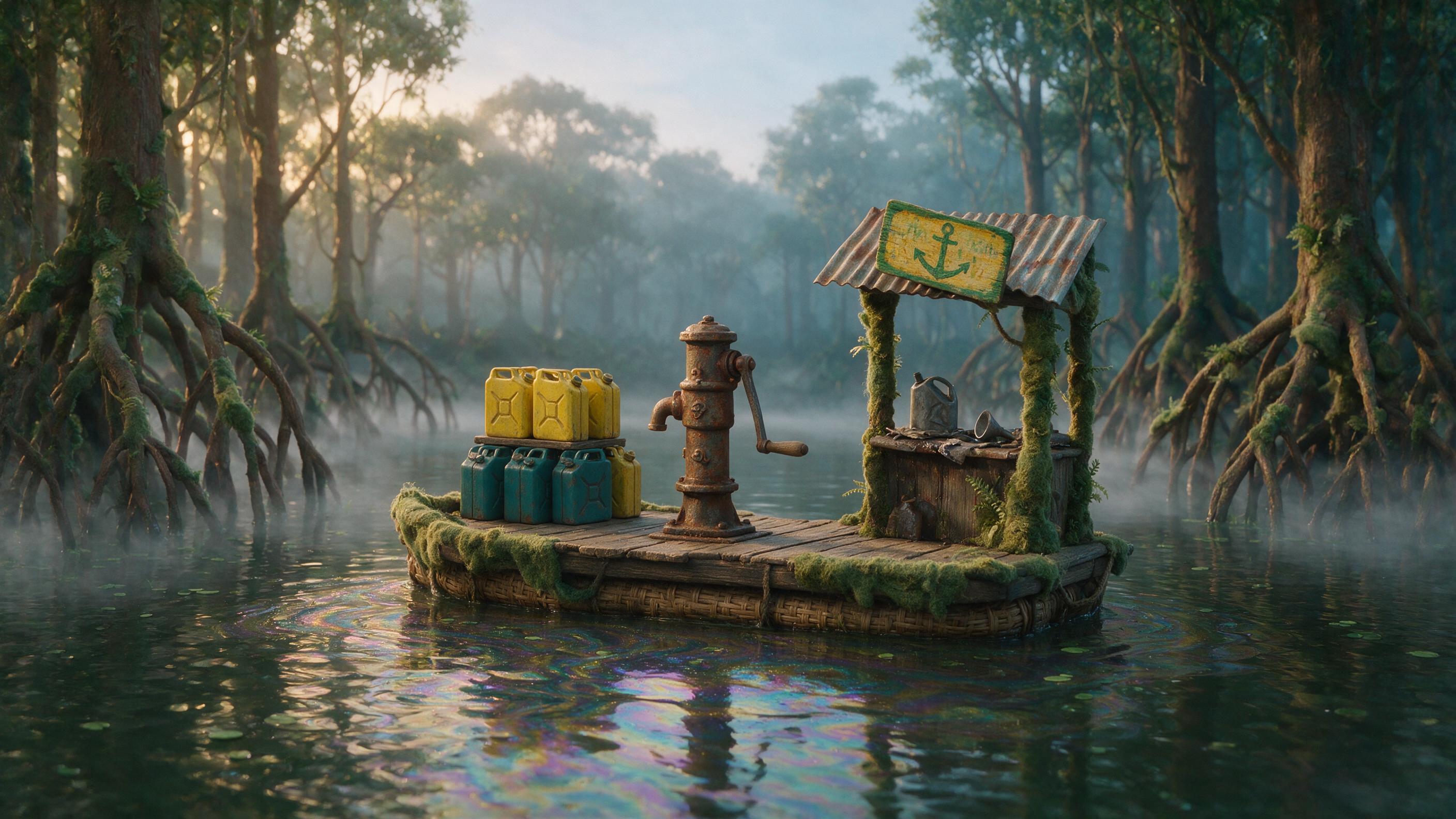
Image generated by Seedream 5.0 Pro on fal, an AI model from ByteDance.
@Audio1 has to be generated first, and its tempo isn't a taste decision.
Four camera positions across twelve seconds means four bars, and four bars inside twelve seconds is 80 BPM in 4/4.
Do that arithmetic before you write the music prompt, because a cue at any other tempo turns "one cut per bar" into a cut landing wherever it likes.
Audio prompt, on fal-ai/elevenlabs/music, music_length_ms: 12000, force_instrumental: true: An instrumental cue for a handmade stop-motion short, 80 BPM in 4/4, exactly four bars, with a hard accent on the first beat of every bar so picture cuts have something to land on. A small workshop band, four players at most: plucked upright bass walking the downbeats, a muted trumpet holding one long phrase across bars two and three, brushed snare on a wire, tack piano answering on the offbeats. Warm and unhurried, tuned a little loose, with the feel of four people playing in a shed at dawn. Keep the arrangement sparse and the top end open, because sound effects sit over the whole thing. No vocals and no fade at the end.
Generated using ElevenLabs Music on fal, an AI model from ElevenLabs.
And here's the final reference prompt, duration: 12, aspect_ratio: 16:9: The badger pilot from @Image1 climbs out of his cockpit onto the float of the plane and steps across onto the barge from @Image2, crouches at the pump and starts working the hand crank, water slapping the floats under him. Hold his exact puppet build from @Image1: the leather helmet, the goggles on his forehead, the repaired tear at the elbow, the fingerprints in the clay. Keep the barge, the pump, the mangroves and the dawn light from @Image2 exactly as they are. Cut on the rhythm of @Audio1, one cut per bar, four camera positions in this order: wide from across the water, low on the float, macro on the crank turning, high three-quarter as he straightens up. Practical stop-motion look throughout, 35mm, shallow depth of field. Pump squeak and fuel hose, water on timber, mangrove birds, the cue from @Audio1 underneath. No on-screen text.
Generated using Dreamina Seedance 2.5 on fal, an AI model from ByteDance.
How to edit a clip you already generated?
Editing runs through this same endpoint: reference-to-video.
All you have to do is pass your footage in as a video reference, then name what changes and what holds, in that order.
You can also keep every pass to a single change, trim the source before you send it since input video seconds bill alongside output, and if the shot could still be regenerated from scratch, do that first.
Below, the rooftop pursuit from earlier, dropped into a completely different climate with the choreography left alone:
Edit prompt, with the 8-second rooftop clip as @Video1 (I also left the duration as auto): Take the monsoon night in @Video1 to a dry, dust-heavy late afternoon. The rain becomes airborne dust and heat shimmer, the standing water dries to bare concrete with dust puffing where the courier lands, and the neon coming up from the street becomes low orange sun raking across the water tanks. Hold every camera move, the courier's exact route over the parapet, the laundry line catching his shoulder, the bedsheet tearing loose and the hatch slam, all on the same frames as the original. Drop the rain and the water underfoot from the soundtrack, keep the bedsheet snap and the hatch, and put dry wind and grit underneath.
Generated using Dreamina Seedance 2.5 on fal, an AI model from ByteDance.
Note: In this situation, naming the sounds to drop matters as much as naming the picture.
Audio comes out of the same pass, so an edit that takes the rain away will take the bedsheet snap with it unless you stop it.
How much does Seedance 2.5 cost on fal?
Everything is token-based, at $0.0214 per 1,000 tokens at 480p and 720p.
tokens = (output_height x output_width x duration_seconds x 24) / 1024
On reference-to-video, if video inputs are provided, input video duration gets added to output duration inside the formula, and the total is then multiplied by 0.6.
Image and audio references are free.
| What you're running | 720p | 480p |
|---|---|---|
| Text-to-video, image-to-video | ~$0.4730 per second | ~$0.2205 per second |
| Reference-to-video, images and audio only | ~$0.4730 per second | ~$0.2205 per second |
| Reference-to-video with a video reference | ~$0.2838 per billed second | ~$0.1323 per billed second |
Disclaimer: Those are our own per-second approximations for 16:9, and they come out a couple of percent above what the formula returns, so read them as a ceiling and budget from the token maths.
Recently Added











Start creating with Seedance 2.5 on fal
One key opens all three. Nothing recurring, and the invoice only counts pixels and seconds you actually asked for (plus any reference video you send).
You can sketch a sequence from text, animate a still, pin both ends of a transformation, hold a character across a scene change with up to 50 references, or edit and continue footage you already have, all from the same integration.
Signing up for fal is free, and all of it runs in the playground before you write any code.
Seedance 2.5 FAQs
How long can a Seedance 2.5 clip be?
Any whole number of seconds from 4 to 30, natively, on all three endpoints.
Nothing gets stitched or spliced, so there are no splice points for appearance or lighting to drift at.
Setting duration to auto hands the length decision to the model.
Does Seedance 2.5 generate audio?
Yes, in the same pass as the picture, at no additional token cost.
Sound and visuals get produced jointly in one latent space, and that joint pass is what makes lip sync and impact timing work with no post-production layer.
You want to give the audio something concrete to act on (e.g., gravel, rain, machinery and footfall).
How do I get lip-synced dialogue?
You can get lip-synced dialogue by putting the line in double quotes inside the prompt.
What languages does Seedance 2.5 support?
Major languages including Chinese, English, Spanish, Indonesian, Malay, Thai, Arabic, Portuguese, Vietnamese, Japanese and Korean, so a story gets made natively with no dubbing pass.
How many references can I pass to reference-to-video?
Up to 50 files, with a maximum of 30 images, 10 videos and 10 audio clips.
Video and audio references each cap at 30.2 seconds of combined duration, and audio references need at least one image or video reference alongside them.
Can I use Seedance 2.5 clips in commercial work?
Yes. Seedance 2.5 is listed for commercial use on fal, so output can go into paid campaigns and client deliverables.
Why should you use fal to run Seedance 2.5?
Queueing and webhooks are already solved; there are no GPUs to keep warm, and one client library covers all three endpoints.
Commercial use is covered, subject to fal's terms.
And the playground exists so a shot can be pressure-tested in a browser tab long before it goes anywhere near your codebase, which is the part I use most.
![How To Use Reve 2.1: Prompts & Workflows [2026]](https://refinery.fal.media/url/https%3A%2F%2Fv3b.fal.media%2Ffiles%2Fb%2F0aa30d29%2Fu_6F-C3_TrrNWDHjrPiNz.jpg/tr:w-1280,q-80/u_6F-C3_TrrNWDHjrPiNz.webp)
![What is Seedance 2.5? Everything You Need to Know [2026]](https://refinery.fal.media/url/https%3A%2F%2Fv3b.fal.media%2Ffiles%2Fb%2F0aa63095%2FxJ5ttmbJKh8poGeQwhqqj.jpg/tr:w-1280,q-80/xJ5ttmbJKh8poGeQwhqqj.webp)