A 3D viewer on a product page can start from photos a store already has, and I'll show you how to turn those photos into GLB meshes and Gaussian splats on fal.
The walkthrough runs SAM 3D Objects, SAM 3D Body, SAM 3D Align and Idol in our playground on homeware and furniture shots plus one potted plant, with short JavaScript snippets for two of the runs at the end.
TL;DR
- To generate a 3D model from an image with AI, you send one photo to an image-to-3D model and get back a GLB mesh or a Gaussian splat that opens in a product viewer or 3D software.
- fal is the best place to do it, because one API key covers all of our 3D models and you pay per run without managing any GPUs.
- The right model depends on the photo: SAM 3D Objects and Idol handle products, from busy room shots to clean packshots, while SAM 3D Body and SAM 3D Align bring a person into the scene for scale.
- No studio shoot is needed, since a single catalog photo is enough input, and the full walkthrough in this guide costs about $0.44 at our current rates.
- I test each endpoint in our playground first, then move the same settings into code through
@fal-ai/client.
Can AI turn a product photo into a 3D model?
Yes, AI can turn a single product photo into a 3D model with one API call on fal.
SAM 3D Objects returns the product as both a mesh and a Gaussian splat, while Idol returns a splat with a point-cloud preview.
A mesh is the format most 3D software expects, with triangles describing the shape and either a baked texture or per-vertex colors describing the surface.
A Gaussian splat stores the object as hundreds of thousands of small colored blobs in 3D space and opens in viewers that support splats.
Before single-image models, I'd have needed a turntable shoot with dozens of overlapping photos to get one product into 3D.
With SAM 3D Objects, SAM 3D Body, SAM 3D Align and Idol, one image is enough, so a lifestyle shot from your catalog or a packshot from a past shoot can be the entire input.
If you'd like the wider picture, including models that start from a text prompt, our guide to creating 3D models with generative AI covers it.
Where should you generate 3D models from images with AI?
The best place to generate 3D models from images with AI is fal, where SAM 3D Objects, SAM 3D Body, SAM 3D Align and Idol run next to the rest of our 3D catalog under one account.
That catalog also includes image-to-3D models such as Hunyuan 3D Pro and Trellis 2, so you can try a second reconstruction of the same photo with the same API key.
I like that each model page pairs a playground with an API for the same model, which means settings tested in the browser carry straight into code.
Billing is pay-per-run from prepaid credits, with SAM 3D at $0.02 per unit and Idol at $0.10 per generation, and there's no subscription to start.
We run the GPUs, so a catalog-sized batch of product photos goes through our queue without any infrastructure on your side.
Results come back as hosted GLB and PLY files, ready to download into Blender or your own storage.
Which image-to-3D endpoint on fal should you use?
Use SAM 3D Objects for a product inside a real photo, Idol for a single isolated object, SAM 3D Body for people and SAM 3D Align when a person and a product share one scene.
I've kept this guide to three fal endpoints that rebuild a model from one ordinary image, plus SAM 3D Align, which combines SAM 3D Body and SAM 3D Objects meshes into one scene:
| Endpoint | Endpoint ID | Best input | What comes back | Price on fal |
|---|---|---|---|---|
| SAM 3D Objects | fal-ai/sam-3/3d-objects | A real photo with other things in frame, plus a prompt, points, boxes or masks that pick the product | A GLB mesh and a Gaussian splat .ply, with per-object metadata | $0.02 per unit |
| Idol | speridlabs/idol | One object per image, either a render or a photograph | A Gaussian splat .ply, a GLB of the splat's points, the cropped input and a predicted camera | $0.10 per generation |
| SAM 3D Body | fal-ai/sam-3/3d-body | A photo with one or more people in it | A combined GLB, a PLY mesh per person, a visualization PNG and keypoint metadata | $0.02 per unit |
| SAM 3D Align | fal-ai/sam-3/3d-align | The original photo and its SAM 3D Body mesh, optionally with a SAM 3D Objects GLB | The aligned body as PLY and GLB, an overlay PNG and, with an object mesh, a scene GLB | $0.02 per unit |
Note: models that start from a written description have their own text-to-3D guide.
Commercial use is listed on all four model pages, with the full conditions in our terms of service.
Do you need a clean product photo for image-to-3D?
No, SAM 3D Objects doesn't need a clean product photo, since our model page positions it for everyday shots where the product shares the frame with other things.
It's ideal to start with a photo that suits the endpoint you plan to call:
- SAM 3D Objects: I feed it styled room shots straight from a catalog and pick out the product with a short text prompt like table lamp, point clicks, boxes or one mask per object.
- Idol: it expects one object per image and removes the background itself, with Image Type set to synthetic for renders and AI-made pictures or to real for a photograph, which gets a looser crop.
- SAM 3D Body: I keep the whole figure in frame, because its 70 keypoints run all the way to the hands and feet.
- SAM 3D Align: it requires the original image and the SAM 3D Body mesh made from it, while a SAM 3D Objects mesh from the same photo is optional.
For the source photos themselves, two things are worth knowing:
- Where mine come from: Nano Banana 2.1 at 2K, so you can reuse the same prompts, though photos from your own store go through the same steps.
- Making and uploading them: our AI image API tutorial and Nano Banana 2.1 prompting guide cover photos like these, and the Image Url field also takes a file you drag in or paste, in formats such as JPG, PNG, WebP and HEIC.
falMODEL APIs
The fastest, cheapest and most reliable way to run genAI models. 1 API, 100s of models
How do you generate 3D models from product photos on fal?
You generate a 3D model from a product photo on fal by opening the endpoint's playground, adding the photo to Image Url, setting the fields that pick your subject and downloading the files from the result panel.
A new account needs a prepaid top-up of at least $1 before its first generation, since runs draw on credits.
The four examples below each cover a different kind of product photo, so you can jump to the one that matches yours.
I'd recommend reading the last example in full, since it chains three calls on a single photo.
Pull a table lamp out of a busy bedroom photo with SAM 3D Objects
My first product is a linen-shaded table lamp, photographed the way a lifestyle shoot would show it on a crowded bedside table.
Source photo prompt (Nano Banana 2.1, 4:3, 2K): Lifestyle photo of a lived-in bedroom on an overcast morning. A table lamp with a pleated oatmeal linen shade and a glazed sage-green ceramic base stands on a walnut bedside table. A stack of paperback books and a pair of reading glasses rest against the lamp's base, and a trailing pothos plant spills over the table's edge. The duvet is rumpled, and part of a framed print shows on the wall behind. Soft window light from the left, photographed at eye level on a 35mm lens, realistic colors and no text anywhere in the image.
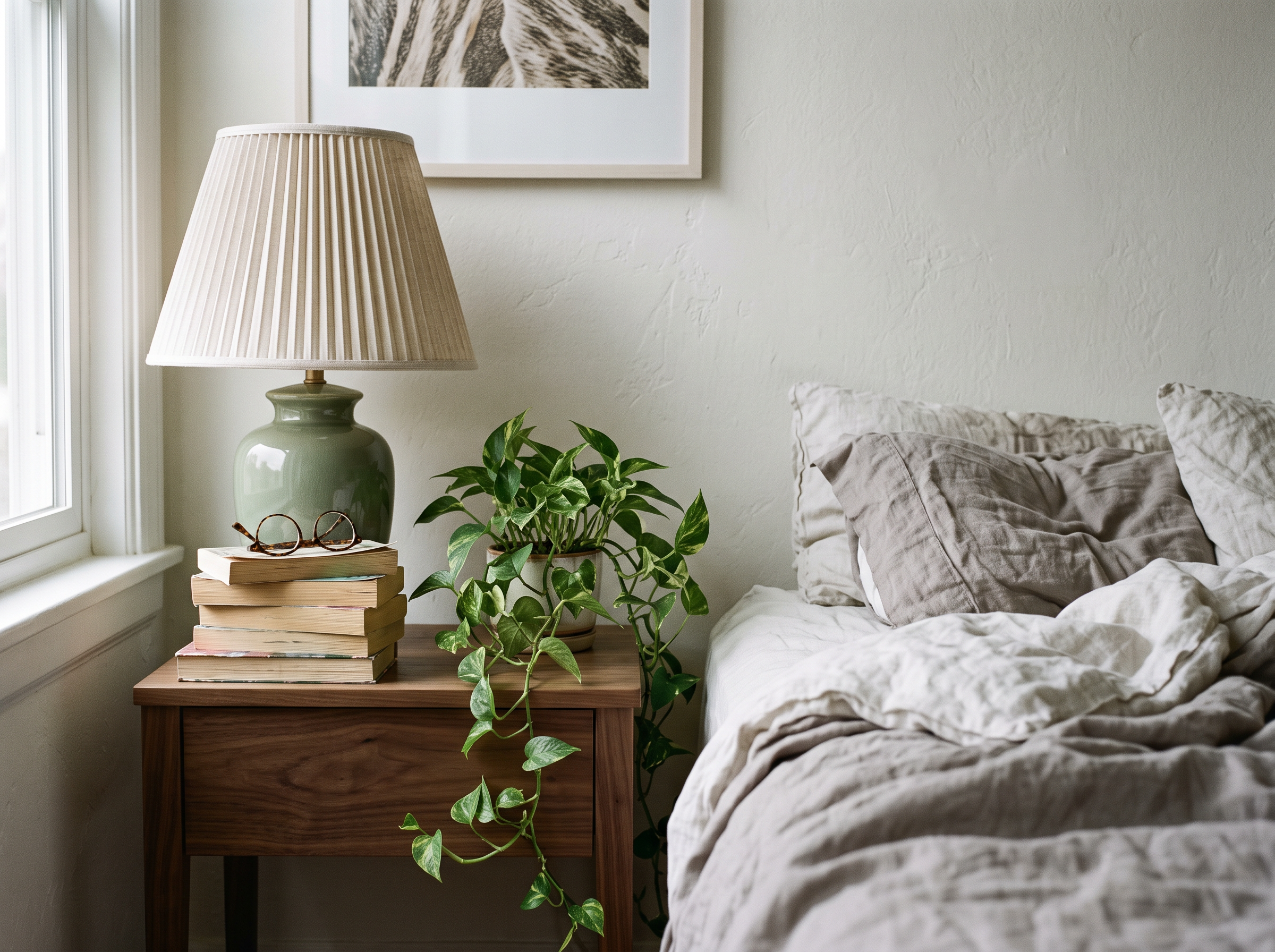
Generated using Nano Banana 2.1 on fal, an AI model from Google.
In the SAM 3D Objects playground, I used these settings:
| Field | Value |
|---|---|
| Image Url | The bedroom photo |
| Prompt | table lamp |
| Export Textured Glb | On |
The schema default for Prompt is car, so the playground opens with that word filled in until you type the product name over it.
By default, Export Textured Glb stays off and the color is stored on the mesh vertices.
I usually switch it on for anything headed to a product page, since the GLB then carries a baked texture and UV coordinates.
The result panel returned the lamp as model_glb and gaussian_splat, along with metadata that places the lamp in the photo's 3D coordinates.
Generated using SAM 3D Objects on fal, an AI model from Meta.
Try it in ChatGPT Try it in fal AgentIf a text prompt also catches something touching the product, the schema lets you add a point prompt with label 1 on the product and a second point with label 0 on the neighbor.
Two products, one photo: box prompts in SAM 3D Objects
For a styled shot that pairs two products, one SAM 3D Objects request can return a separate model for both products.
Source photo prompt (Nano Banana 2.1, 3:2, 2K): Lifestyle photo of an entryway console table in a bright hallway with whitewashed brick walls. On the left half of the console stands a tall ribbed stoneware vase in matte charcoal, holding a few stems of dried pampas grass. On the right half, a round woven rattan basket with leather handles holds rolled linen towels. A small brass key tray and a folded wool scarf lie between the two products, and a coat hangs on a hook above the console. Afternoon daylight, a straight-on view from standing height, realistic catalog colors and no text or logos.
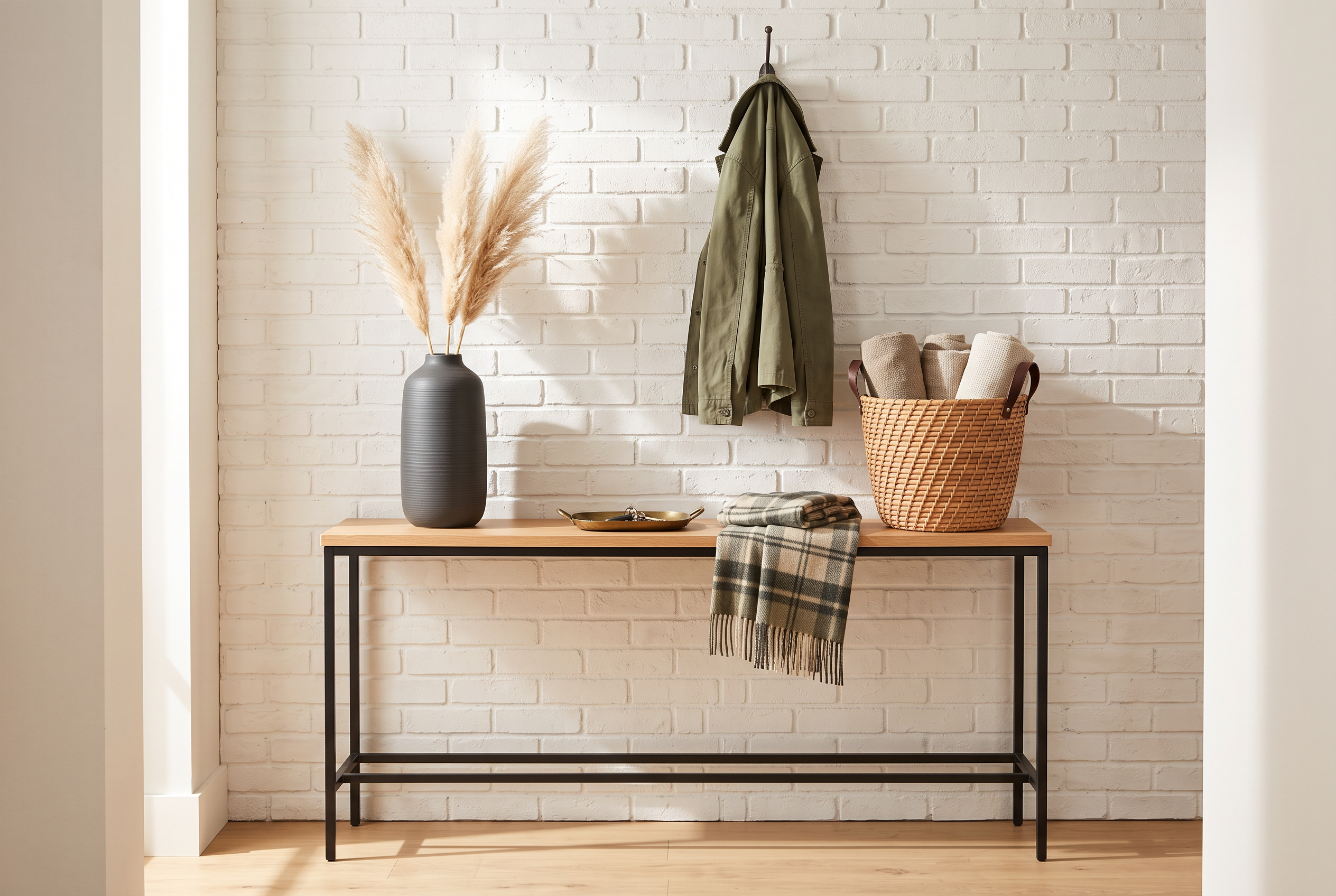
Generated using Nano Banana 2.1 on fal, an AI model from Google.
For this run, the SAM 3D Objects settings looked like this:
| Field | Value |
|---|---|
| Image Url | The console photo |
| Prompt | Cleared (the field starts as car) |
| Box Prompts | One box around the vase and one around the basket |
| Export Textured Glb | On |
These were the two boxes I entered for the vase and the basket, in that order:
json
[
  { "x_min": 210, "y_min": 260, "x_max": 640, "y_max": 1180 },
  { "x_min": 1290, "y_min": 720, "x_max": 1890, "y_max": 1190 }
]
Box values are pixel positions in the source photo, and you'll want to read them off the real image in an editor that shows the cursor position.
Boxes given the same object_id refine one product together, since the schema otherwise treats every box as a separate object.
With two objects in the request, the result added individual_glbs and individual_splats next to the combined scene files, giving the vase and the basket their own downloads.
Generated using SAM 3D Objects on fal, an AI model from Meta.
Generated using SAM 3D Objects on fal, an AI model from Meta.
Try it in ChatGPT Try it in fal AgentA potted olive tree as a Gaussian splat with Idol
For this example, I picked a potted olive tree for a plant shop's listing and ran Idol on a clean studio packshot of it.
Source photo prompt (Nano Banana 2.1, 1:1, 2K): Studio packshot of a young olive tree about 60 cm tall, with a slender twisted trunk and silvery-green leaves, planted in a round unglazed terracotta pot. The pot stands on a pale grey paper sweep under soft, even light from a large overhead softbox, with a faint contact shadow below it. The whole tree and pot are in frame with space on every side, and nothing else appears in the image, including text.
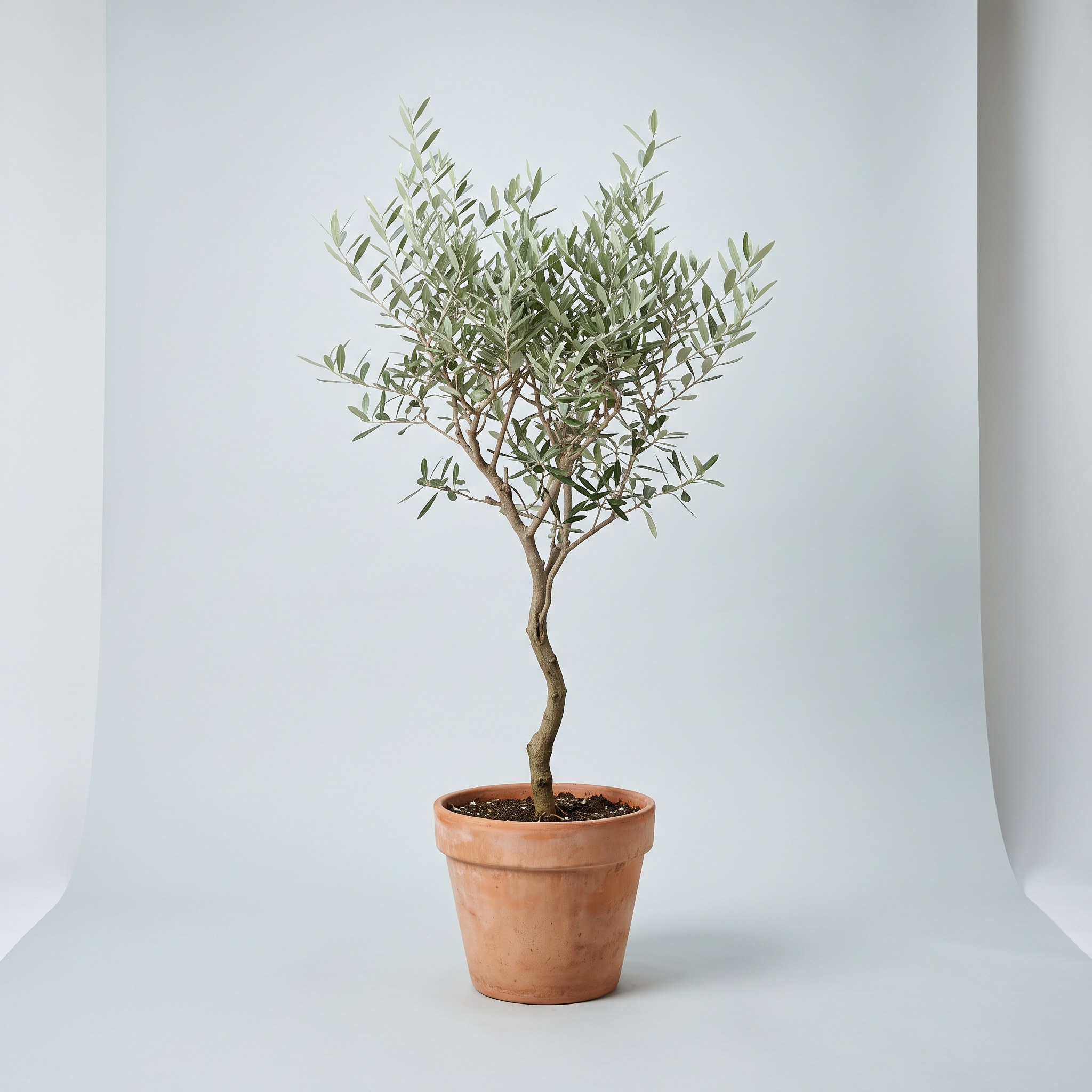
Generated using Nano Banana 2.1 on fal, an AI model from Google.
I'd normally leave Idol on its defaults for a first take, so the only field I filled in was the image:
| Field | Value |
|---|---|
| Image Url | The olive tree packshot |
| Image Type | synthetic (default) |
| Num Gaussians | 262144 (default) |
| Num Inference Steps | 50 (default) |
| Guidance Scale | 3 (default) |
Synthetic was the right Image Type here, as Nano Banana 2.1 generated the packshot and the schema reserves real for photographs.
Num Gaussians sets the target size of the splat, trimmed to the nearest lower multiple of 32.
According to the schema, fewer inference steps mean a faster run with some loss of detail.
Guidance Scale, left at its default of 3, sets how closely the splat follows the input image.
In the result, model_mesh holds the Gaussian splat .ply in spite of its name, and model_glb holds only the splat's center points as colored dots.
Opened in a regular GLB viewer, that second file shows a dotted preview of the tree.
The response also carries preprocessed_image with the background-free crop Idol used, plus camera with the yaw, pitch, radius and field of view it predicted for the input.
Generated using Idol on fal, an AI model from Sperid Labs.
Try it in ChatGPT Try it in fal AgentPlacing a person beside a standing desk with SAM 3D Body and SAM 3D Align
This example runs three calls on one lifestyle photo of a man working at a standing desk, since a desk listing is easier to judge with a person beside it for scale.
Source photo prompt (Nano Banana 2.1, 4:3, 2K): Lifestyle photo of a bright home office with pale oak floors and a large window on the left. A man in his forties wearing a navy overshirt and grey chinos stands at a white electric standing desk raised to elbow height, typing on a laptop with both hands. The desk has a light oak top and two slim white legs with flat feet, and its open frame leaves his legs and shoes visible underneath. His whole body from head to shoes and the entire desk are in frame. Natural daylight, photographed from a three-quarter angle at standing eye level, realistic catalog colors and no text.
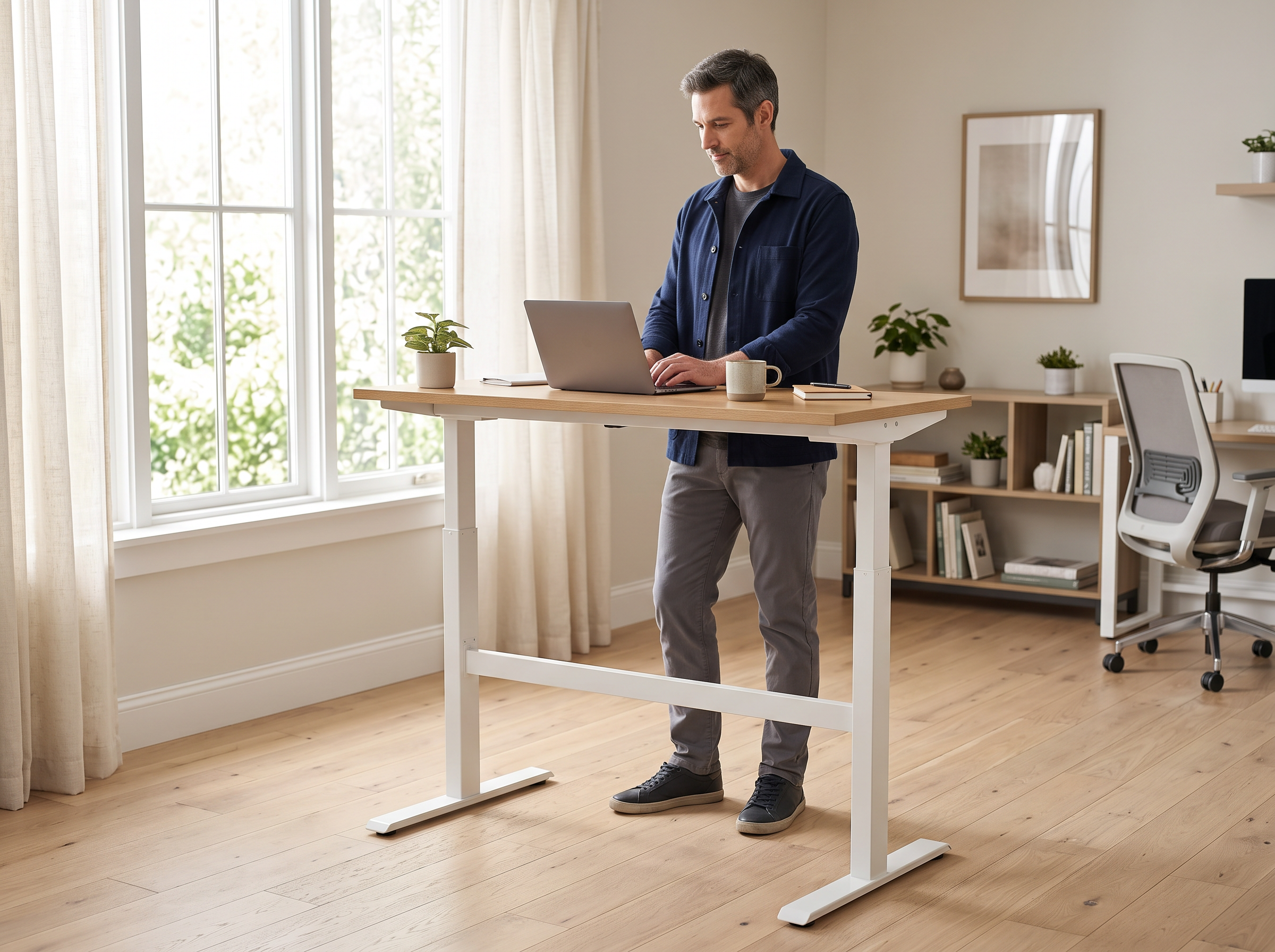
Generated using Nano Banana 2.1 on fal, an AI model from Google.
The SAM 3D Body playground settings for this photo were:
| Field | Value |
|---|---|
| Image Url | The standing desk photo |
| Export Meshes | On (default) |
| Include 3D Keypoints | Off |
| Include Mhr Params | On (default) |
No mask was needed for SAM 3D Body to find the man in the standing desk photo.
For photos where you'd like to choose the person yourself, the Mask Url field takes a white-on-black mask.
I switched Include 3D Keypoints off, as that option draws keypoint spheres into the GLB and I wanted the body mesh on its own in that file.
Based on my experience, the visualization PNG is the quickest pose check, because it puts the original photo, the keypoints, the mesh and a side view in one image.
In the metadata, each person gets 2D and 3D keypoints, a bounding box, an estimated focal_length and, with Include Mhr Params on, the parameters of Meta's Momentum Human Rig (MHR) body model.
Generated using SAM 3D Body on fal, an AI model from Meta.
With the body mesh ready, SAM 3D Align brings the man and a desk mesh from SAM 3D Objects into one coordinate frame.
Our model page describes that alignment as matching the proportions and positions in the original photo.
The desk came first, from one more SAM 3D Objects run on the same photo:
| Field | Value |
|---|---|
| Image Url | The standing desk photo |
| Prompt | standing desk |
| Export Textured Glb | On |
With both meshes ready, I filled in the SAM 3D Align playground:
| Field | Value |
|---|---|
| Image Url | The standing desk photo |
| Body Mesh Url | The .ply file from meshes in the previous step |
| Object Mesh Url | The desk's model_glb |
| Focal Length | The focal_length value from the previous step |
| Body Mask Url | Empty |
SAM 3D Align estimates depth from the original photo with MoGe, falling back on that estimate for the focal length when the Focal Length field is left empty.
With Body Mask Url left empty, as in my run, SAM 3D Align works from the full image.
Only with Object Mesh Url filled in does the response include scene_glb, which holds the man and the desk together as one GLB.
The aligned body also comes back on its own as body_mesh_ply and model_glb.
Alongside it, a visualization lays the aligned body over the original photo, and the metadata records the scale_factor and translation that SAM 3D Align applied to the body.
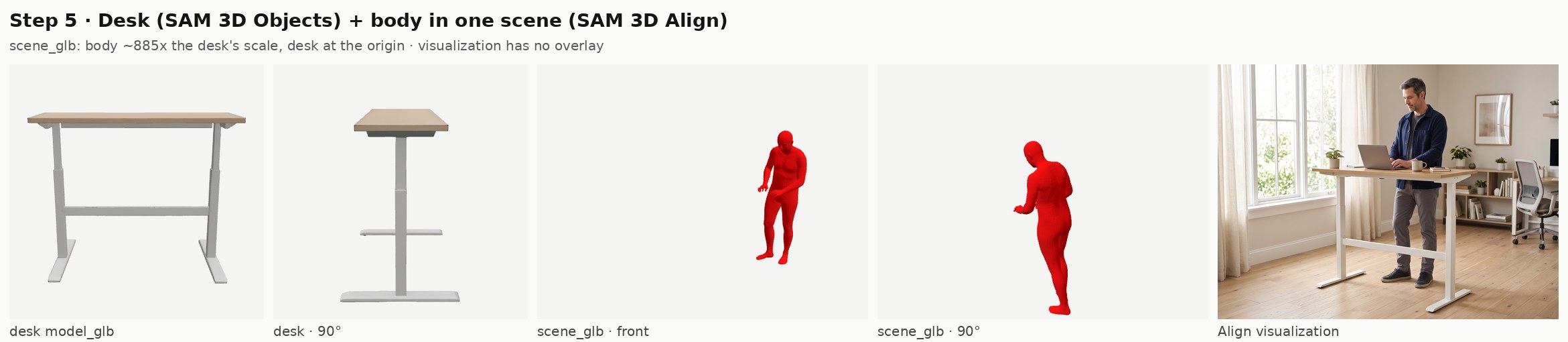
Generated using SAM 3D Align on fal, an AI model from Meta.
Try it in ChatGPT Try it in fal AgentThe desk scene used three SAM 3D runs at $0.02 each, so the finished scene_glb cost $0.06 on top of its source photo.
Calling SAM 3D and Idol from JavaScript
The same four endpoints run from code through @fal-ai/client, where fal.subscribe() waits for the result and returns the fields you saw in the playground.
The client installs with npm install --save @fal-ai/client and reads your key from the FAL_KEY environment variable.
Here's the Idol run from example #3 as a script:
javascript
import { fal } from "@fal-ai/client";

const { data } = await fal.subscribe("speridlabs/idol", {
  input: {
    image_url: "https://example.com/olive-tree-packshot.png",
    image_type: "synthetic",
  },
});

console.log(data.model_mesh.url);
console.log(data.model_glb.url, data.num_gaussians);
The standing desk scene from example #4 takes a few more lines, starting from a photo on disk:
javascript
import { readFile } from "node:fs/promises";
import { fal } from "@fal-ai/client";

const urlOf = (file) => (typeof file === "string" ? file : file.url);

const photo = new File([await readFile("standing-desk.jpg")], "standing-desk.jpg", { type: "image/jpeg" });
const imageUrl = await fal.storage.upload(photo);

const [body, desk] = await Promise.all([
  fal.subscribe("fal-ai/sam-3/3d-body", {
    input: { image_url: imageUrl, include_3d_keypoints: false },
  }),
  fal.subscribe("fal-ai/sam-3/3d-objects", {
    input: { image_url: imageUrl, prompt: "standing desk", export_textured_glb: true },
  }),
]);

const scene = await fal.subscribe("fal-ai/sam-3/3d-align", {
  input: {
    image_url: imageUrl,
    body_mesh_url: urlOf(body.data.meshes[0]),
    object_mesh_url: urlOf(desk.data.model_glb),
    focal_length: body.data.metadata.people[0].focal_length,
  },
});

console.log(urlOf(scene.data.scene_glb));
I upload local photos with fal.storage.upload(), which returns a URL the endpoints can read and sidesteps image hosts that block or rate-limit outside requests.
Neither the SAM 3D Body call nor the SAM 3D Objects call depends on the other, so the script runs them together in Promise.all before SAM 3D Align starts.
The urlOf helper is there for model_glb, which the schemas type as a File object even though some example responses show a bare URL string.
For a catalog-sized batch, fal.queue.submit() with a webhookUrl hands back a request ID straight away.
You can adapt the webhook receiver from our AI video API tutorial for finished 3D files.
In a storefront, these calls belong on your server, and our server-side integration guide covers proxying requests so FAL_KEY never ships in browser or mobile code.
If your pipeline runs on Python, fal_client.subscribe() works with these endpoint IDs and input fields unchanged.
For more Python patterns on the three SAM 3D endpoints, including caching and retries, see our SAM 3D developer guide.
What files do SAM 3D and Idol return?
The three SAM 3D endpoints return GLB meshes with PLY files alongside them, while Idol returns a Gaussian splat .ply with a GLB of its points.
| Output field | Endpoint | Format | What it holds |
|---|---|---|---|
model_glb | SAM 3D Objects | GLB | The reconstructed product, or a combined scene when several objects were requested |
gaussian_splat | SAM 3D Objects | PLY splat | The same reconstruction as a Gaussian splat |
individual_glbs, individual_splats | SAM 3D Objects | GLB, PLY | One file per object, returned for multi-object requests only |
artifacts_zip | SAM 3D Objects | ZIP | All files and metadata in one download |
model_mesh | Idol | PLY splat | The Gaussian splat, despite the field name |
model_glb | Idol | GLB | A point-cloud preview of the splat's centers |
model_glb, meshes | SAM 3D Body | GLB, PLY | All detected bodies in one GLB, plus a PLY per person |
scene_glb | SAM 3D Align | GLB | The aligned body and the object mesh in one file |
Blender and most other 3D software import GLB and PLY meshes directly, and GLB files also load in web viewers that support glTF, since GLB is glTF's binary format.
Splat files are a different case and need a viewer or engine plugin that renders Gaussian splats.
The SAM 3D Objects metadata gives the reconstructed objects a rotation quaternion, a translation, a scale and a camera pose, which helps if you rebuild the room around the product later.
Because output files stay on our CDN for a limited time, I move the GLB files into the store's own storage once a run completes.
The retention period for hosted output files is listed in our CDN docs.
For a project where generated 3D assets ended up in something playable, our GPT-6 Astra game build shows characters and props from fal inside a browser game.
How much does image-to-3D cost on fal?
Image-to-3D on fal costs $0.02 per unit on the three SAM 3D endpoints and $0.10 per generation for Idol, at the prices our playground showed in November 2026.
| Endpoint | Price on fal | Runs in this guide | Cost in this guide |
|---|---|---|---|
| SAM 3D Objects | $0.02 per unit | 3 | $0.06 |
| SAM 3D Body | $0.02 per unit | 1 | $0.02 |
| SAM 3D Align | $0.02 per unit | 1 | $0.02 |
| Idol | $0.10 per generation | 1 | $0.10 |
| Nano Banana 2.1 at 2K | About $0.059 per 2K image at medium thinking | 4 source photos | About $0.24 |
| Total | 10 runs | About $0.44 |
If the two-product console request bills as two units, the SAM 3D Objects row and the total each rise by $0.02.
Nano Banana 2.1 is priced by tokens, so the $0.059 figure is our model page's estimate for a 2K image from a roughly 100-token prompt at medium thinking.
My source prompts run a little longer than that, which changes the total by well under a cent.
The full token math for Nano Banana 2.1 is in our Nano Banana API guide.
Any extra take costs its row's price again, so another Idol seed comes to $0.10 more.
Here are some fixes for common image-to-3D problems
Below are problems you may hit on SAM 3D Objects, SAM 3D Body, SAM 3D Align and Idol, each paired with the field or input that fixes it.
| Symptom | Likely cause | Fix |
|---|---|---|
| SAM 3D Objects rebuilds a car or an unrelated object | The Prompt field still holds its default value, car | Replace it with the product's name, such as table lamp |
| SAM 3D Objects finds too many or too few objects | Detection Threshold is on the model default | Set a value from 0.1 to 1.0, where lower values return more detections with less precision |
No individual_glbs in the response | The request covered a single object | Use model_glb, as per-object files only come back for multi-object requests |
| The product GLB has vertex colors and no texture | Export Textured Glb was off | Switch it on for a baked texture with UVs |
| Idol's GLB looks like a cloud of dots | model_glb is a point-cloud preview | Open the model_mesh splat file in a splat viewer |
| Idol crops a real photograph too tightly | Image Type is still set to synthetic | Set Image Type to real for photographs |
| SAM 3D Body includes a person in the background | Automatic detection reconstructs everyone it finds | Send a Mask Url with the chosen person in white on black |
| Keypoint spheres appear on the body GLB | Include 3D Keypoints is on by default | Switch it off before the run |
SAM 3D Align returns no scene_glb | Object Mesh Url was empty | Add the SAM 3D Objects model_glb URL |
| An endpoint can't load the image URL | The image host blocks or rate-limits outside requests | Upload the photo to fal storage first |
Recently Added







Run SAM 3D and Idol on fal
Image-to-3D models can now rebuild products and the people using them from ordinary catalog photos.
SAM 3D Objects and Idol handle the product side of a listing, while SAM 3D Body with SAM 3D Align adds a person to the same scene.
One fal account runs all four endpoints next to more than 1,000 other models, billed per run with no GPUs for you to manage.
My habit is to settle the settings in the playgrounds before any of these calls move into code.
Image-to-3D on fal FAQ
Does SAM 3D Objects accept depth data from a scanner?
Yes, SAM 3D Objects accepts a pointmap or depth file in NPY or NPZ format through pointmap_url, and our model page suggests it for depth captured with LiDAR or structured light.
The file goes in by URL, so depth from a scanner has to be saved as a NumPy array file before the run.
What pose data does SAM 3D Body return?
For each detected person, SAM 3D Body returns 2D and 3D coordinates for 70 keypoints, plus MHR shape and pose parameters when Include Mhr Params is on.
The keypoint_names list gives the 70 names in the same order as the coordinate arrays, making it simple to find a given joint by its index.
How many people can SAM 3D Body reconstruct from one photo?
SAM 3D Body reconstructs each person it detects and reports the count as num_people, with one PLY mesh per person as long as Export Meshes is on.
Our schema doesn't list a maximum number of people, though the Mask Url field can narrow a crowded photo down to one person.
Can I run SAM 3D and Idol from Claude?
Claude can run SAM 3D and Idol through the fal MCP server, and our Claude and MCP guide covers adding that connector to Claude and to Claude Code.
That guide builds video ads, though its connector setup and its quote-then-approve prompting carry over to 3D runs.
Which Image Type should Idol use for a photograph?
For a photograph, Idol's Image Type should be real, which gives a looser crop than the synthetic setting meant for renders and AI-made pictures.