I'll show you how to call the Kling 4.0 API on fal and run all four of its endpoints from JavaScript and Python, with the last example sent over cURL.
The examples sell one invented camping lantern, moving from a product spot to UGC creator ads that reuse the same stills and clips.
TL;DR
- Kling 4.0 runs on fal through four endpoints,
kling/v4/text-to-video,kling/v4/image-to-video,kling/v4/reference-to-videoandkling/v4/video-to-video/edit, all producing 3 to 30 seconds of video at 720p or 1080p. - Generation costs $0.235 per output second at 1080p and $0.157 at 720p, so a 10-second 1080p clip comes to $2.35.
- Video Editing, and reference-to-video requests that carry video inputs, cost $0.094 a second at 720p or $0.141 at 1080p, counted on input plus output length with a floor of twice the output.
- You'll need one fal API key exported as
FAL_KEYand a client library, either@fal-ai/clientfrom npm orfal-clientfrom PyPI. - The five Kling requests in this guide come to about $15.60 at 1080p, plus roughly $0.30 for the five Nano Banana 2.1 stills they start from, at our model page rates as of October 2026.
- Kling O3 4K runs on the same fal account at $0.42 per second for native 4K clips of 3 to 15 seconds.
- fal is the strongest place to run the Kling API as one API key reaches every Kling 4.0 and Kling O3 4K endpoint from a single prepaid balance, and server errors or queue time are never billed.
Where is the best place to call the Kling API?
fal is the best place to call the Kling API for ad production, since one fal key reaches all four Kling 4.0 endpoints, along with the queue and media storage a video pipeline leans on.
An unscoped key also calls Kling O3 4K and the earlier generations covered in our Kling 3.0 Pro guide and Kling 2.6 Pro developer guide, with one credit balance covering all 64 Kling models we host.
Kling 4.0 is marked for commercial projects, with our Commercial use badge on all four of its model pages.
Here's how the endpoints line up with the ad formats I build later on:
| Endpoint | Starts from | Ad format in this guide |
|---|---|---|
kling/v4/text-to-video | A prompt, or a list of per-shot prompts | Multi-shot product hero spot |
kling/v4/image-to-video | A start frame and optional end frame, with up to 8 keyframes between | Studio lights-down reveal |
kling/v4/reference-to-video | Image and video references, plus elements and voices | UGC creator ad and hook tests |
kling/v4/video-to-video/edit | A 3 to 30 second source video with optional references | Colorway swap in a finished ad |
Outside the API, Kling 4.0 is also available in the Kling 4.0 playground and fal Agent, where all four of its modes run as well.
Our model pages describe video generation as a long-running job, which is why every example here goes through the queue, either from a client library or from queue.fal.run, and none uses the synchronous fal.run route.
How much does the Kling API cost on fal?
Kling 4.0 on fal costs $0.235 per second of output at 1080p and $0.157 at 720p on its three generation endpoints, according to our model pages as of October 2026.
Kling 4.0 Video Editing charges $0.141 per second at 1080p and $0.094 at 720p, and Kling 4.0 Reference to Video moves to that pricing once a video reference or video element is attached.
| Request type | 720p per second | 1080p per second | Seconds billed |
|---|---|---|---|
| Text to Video | $0.157 | $0.235 | Output length |
| Image to Video | $0.157 | $0.235 | Output length |
| Reference to Video, image references only | $0.157 | $0.235 | Output length |
| Reference to Video with video references or video elements | $0.094 | $0.141 | Input plus output, at least 2× output |
| Video Editing | $0.094 | $0.141 | Input plus output, at least 2× output |
Those two video-input rows look cheaper, but our playground notes bill them on the input length plus the output length, with a floor of twice the output.
The billed length for those two request types follows this formula:
billed seconds = max(input seconds + output seconds, 2 × output seconds)
For the colorway edit near the end of this guide, a 12-second source re-rendered at full length counts as 24 billed seconds and costs $3.384 at 1080p.
The floor applies when the output runs longer than the video input, so a 10-second Reference to Video clip guided by a 4-second reference video bills 20 seconds, not 14.
On the three generation endpoints, a clip's price is just its length times the rate:
| Clip length | 720p | 1080p |
|---|---|---|
| 5 seconds | $0.785 | $1.175 |
| 10 seconds | $1.57 | $2.35 |
| 15 seconds | $2.355 | $3.525 |
| 30 seconds | $4.71 | $7.05 |
Our pricing notes for Kling 4.0 list no charge for image inputs, so I've priced start frames and reference stills at zero in this guide's totals.
I'd keep a close eye on resolution, because three of the four Kling 4.0 playground forms open at 720p while each endpoint's API schema defaults to 1080p.
A script that leaves resolution out therefore pays the 1080p rate.
If you prototype in the playground before moving fields into code, you'll want to set it explicitly too, as I do on all my calls.
Before setting a budget alert, I query our Platform API for the current unit price of the endpoint:
bash
curl "https://api.fal.ai/v1/models/pricing?endpoint_id=kling/v4/video-to-video/edit" \
  -H "Authorization: Key $FAL_KEY"
The same Platform APIs can also return a cost estimate before a job runs.
How do you get a Kling API key on fal?
You get a Kling API key on fal by creating an ordinary fal API key, since one key authenticates the Kling 4.0 endpoints along with any other model on your account.
Credits: usage comes out of a prepaid balance that starts from a $1 top-up, and your concurrency limit grows as you buy more credits.
- API key: I create mine from the dashboard's API keys screen with the API preset, as our docs suggest when you're unsure which preset fits.
- Model limits: the Allowed models tab can lock a key to the four
kling/v4endpoint IDs for good. - Environment and client: both client libraries read the key from
FAL_KEY, with@fal-ai/clientcoming from npm andfal-clientfrom PyPI (imported in Python asfal_client).
bash
# macOS or Linux
export FAL_KEY="your-api-key-here"

# Windows PowerShell
$env:FAL_KEY="your-api-key-here"

# JavaScript client
npm install --save @fal-ai/client

# Python client (imported as fal_client)
pip install fal-client
There's no way to reveal a new key again after its creation dialog closes.
Keys are scoped to whichever account the top-left switcher shows when you create them, which is why a team key needs the team selected first.
Scoped keys are saved as custom policies, so they won't pick up later changes we make to the API preset.
Expiry dates range between 1 hour and 1 year, and a key can also be set never to expire.
On storefront projects I keep FAL_KEY on the server and send browser calls through the route described in our proxy setup guide.
falMODEL APIs
The fastest, cheapest and most reliable way to run genAI models. 1 API, 100s of models
Which Kling 4.0 endpoint turns a text brief into a multi-shot product ad?
kling/v4/text-to-video turns a text brief into a multi-shot product ad when you send multi_prompt, where each entry holds one shot's prompt and duration.
I leave the top-level duration field out of the request, as the finished clip runs for the sum of the shot durations.
For the hero spot, I wrote a 5-second shot and a 7-second shot at a lakeside campsite, making 12 seconds of 16:9 video that costs $2.82 at 1080p.
When one brief doesn't give me enough shot ideas, I'd normally borrow from the 60 official Kling 4.0 results in our Kling 4.0 prompting guide.
python
import fal_client

LANTERN = (
    "a rechargeable camping lantern with a frosted glass globe and an olive green silicone base, "
    "topped by a brushed copper cap engraved with the word HALOFERN"
)

SHOTS = [
    (
        5,
        "Wide shot at dusk of a lakeside campsite. "
        f"On a weathered wooden camp table stands {LANTERN}, switched off, as the camera dollies slowly toward it. "
        "A hand reaches in and twists the copper cap a quarter turn, and the frosted globe warms "
        "to a soft amber glow with a faint click.",
    ),
    (
        7,
        f"Locked-off wide shot after nightfall. {LANTERN} glows on the camp table beside two enamel mugs, "
        "its light spilling onto a canvas tent and rippling on the black water while a loon calls across the lake.",
    ),
]


def show_logs(update):
    if isinstance(update, fal_client.InProgress):
        for log in update.logs:
            print(log["message"])


result = fal_client.subscribe(
    "kling/v4/text-to-video",
    arguments={
        "multi_prompt": [{"prompt": prompt, "duration": seconds} for seconds, prompt in SHOTS],
        "aspect_ratio": "16:9",
        "resolution": "1080p",
    },
    with_logs=True,
    on_queue_update=show_logs,
)

print(result["video"]["url"])
Generated using Kling 4.0 Text to Video on fal, an AI model from Kuaishou.
Try it in ChatGPT Try it in fal AgentBased on my experience, I get a steadier product across shots when I restate its details in each one, which is why the lantern's description is a single variable dropped into the two multi_prompt entries.
Our Kling 4.0 page lists stereo audio with lip sync, and since the schema has no audio field, the click of the cap and the loon call come from the shot prompts.
With with_logs=True, the callback prints queue logs while the clip renders.
The response holds a single video object whose url field points to the finished MP4.
I store that URL next to the prompt that produced it, so any later edit can be traced back to the exact wording.
Is it possible to animate between two product stills with Kling 4.0 Image to Video?
Yes, kling/v4/image-to-video animates from the still in start_image_url to the one in end_image_url, with up to 8 more keyframes allowed between them in middle_image_urls.
The reveal starts on the unlit lantern against a grey studio backdrop and ends on the same framing with the studio dark and the globe glowing.
It's ideal to start a reveal like this from a clean packshot, and the JavaScript below makes the two stills with Nano Banana 2.1 and then hands their URLs to Kling 4.0.
javascript
import { fal } from "@fal-ai/client";

async function firstImage(endpoint, input) {
  const { data } = await fal.subscribe(endpoint, { input });
  return data.images[0].url;
}

const packshotUrl = await firstImage("google/nano-banana-2.1", {
  prompt:
    "A product photo of a rechargeable camping lantern on a pale grey paper studio backdrop, seen in " +
    "three-quarter view from slightly above and switched off. The lantern has a frosted glass globe and " +
    "an olive green silicone base, with a brushed copper top cap engraved with the word HALOFERN in small " +
    "capitals. Soft key light comes from the left, with sharp focus across the product and no other " +
    "objects or text.",
  aspect_ratio: "16:9",
  resolution: "2K",
});

const litUrl = await firstImage("google/nano-banana-2.1/edit", {
  prompt:
    "The lantern from image 1 in exactly the same position and framing, now switched on. The studio " +
    "lights are dimmed almost to black, and the frosted globe glows warm amber, throwing a soft pool of " +
    "light across the grey backdrop. The copper cap and its HALOFERN engraving look exactly as they do " +
    "in image 1.",
  image_urls: [packshotUrl],
  aspect_ratio: "16:9",
  resolution: "2K",
});

const { data, requestId } = await fal.subscribe("kling/v4/image-to-video", {
  input: {
    prompt:
      "Locked-off studio shot. Over the first half of the clip the studio lights fade down while " +
      "the frosted globe of the lantern brightens from off to a warm amber glow. The light spreads " +
      "across the grey backdrop and catches the engraved copper cap, and the lantern itself never " +
      "moves. A soft electrical hum rises as the glow builds.",
    start_image_url: packshotUrl,
    end_image_url: litUrl,
    duration: 8,
    resolution: "1080p",
  },
});

console.log({ requestId, packshotUrl, litUrl, video: data.video.url });
Generated using Kling 4.0 Image to Video on fal, an AI model from Kuaishou.
Try it in ChatGPT Try it in fal AgentThe Kling 4.0 Image to Video schema lists no aspect ratio setting, so I generate both stills in the 16:9 shape I want for the reveal.
That ratio works out to about 1.78, inside the 0.40 to 2.50 range the schema allows for a start frame.
For shots that only need a first frame, our AI video API tutorial animates single product photos with MiniMax H3 Max.
I locked the camera off on purpose, because the two stills share one framing and any camera move would need to land back where it began.
At 8 seconds and 1080p, the Kling request costs $1.88, plus about $0.12 for the two stills at 2K, going by the token rates in our Nano Banana API guide.
A reveal with beats in between can pass extra frames through middle_image_urls, listed in playback order.
Since the packshot returns in the next three examples, I keep its URL in a PACKSHOT_URL environment variable.
How does Kling 4.0 Reference to Video keep a UGC creator and product consistent?
Kling 4.0 Reference to Video keeps a UGC creator and product consistent by taking the creator as an entry in elements and the product as a still in image_urls, named @Element1 and @Image1 in the prompt.
An element is built from a frontal image plus one to three views from other angles, or from a 3 to 8 second video of the subject.
If references are new to you, our reference-to-video guide goes deeper into the approach.
I generated the creator's frontal portrait and a three-quarter view with Nano Banana 2.1 in the same Python script, then wrote a 12-second selfie-style ad around her that costs $2.82 at 1080p.
python
import os

import fal_client


def first_image(endpoint, arguments):
    return fal_client.subscribe(endpoint, arguments=arguments)["images"][0]["url"]


creator_front = first_image(
    "google/nano-banana-2.1",
    {
        "prompt": (
            "A chest-up phone photo of a woman in her late twenties facing the camera with a relaxed smile. "
            "She has shoulder-length curly auburn hair and wears a mustard yellow fleece jacket. "
            "She stands in soft evening daylight on an apartment balcony, with the natural skin texture "
            "of a real person filmed on a phone."
        ),
        "aspect_ratio": "3:4",
        "resolution": "2K",
    },
)

creator_side = first_image(
    "google/nano-banana-2.1/edit",
    {
        "prompt": (
            "The woman from image 1 in a three-quarter view, turned toward her left shoulder "
            "on the same balcony in the same light. Her face and jacket match image 1 exactly."
        ),
        "image_urls": [creator_front],
        "aspect_ratio": "3:4",
        "resolution": "2K",
    },
)

result = fal_client.subscribe(
    "kling/v4/reference-to-video",
    arguments={
        "prompt": (
            "Vertical selfie-style phone video on a small apartment balcony at blue hour, "
            "with warm string lights out of focus behind. @Element1 holds the camping lantern from @Image1 "
            'close to the lens and says, "Okay, this lantern has come on every trip I took this year." '
            "She twists the copper top cap and the frosted globe fills her face with warm amber light. "
            "She sets the lantern on the balcony railing and looks back at the camera to say, "
            '"And back home, it\'s the only light I use out here." '
            "The engraved copper cap and the olive green base match @Image1 exactly. "
            "Slight handheld sway and a natural phone camera look, with no captions or on-screen text."
        ),
        "elements": [
            {"frontal_image_url": creator_front, "reference_image_urls": [creator_side]}
        ],
        "image_urls": [os.environ["PACKSHOT_URL"]],
        "duration": 12,
        "aspect_ratio": "9:16",
        "resolution": "1080p",
    },
)

print(creator_front, creator_side, sep="\n")
print(result["video"]["url"])
Generated using Kling 4.0 Reference to Video on fal, an AI model from Kuaishou.
Try it in ChatGPT Try it in fal AgentI kept this ad on the standard $0.235 rate by sending only image references, since video inputs move Kling 4.0 Reference to Video to the $0.141 rate counted on input plus output seconds.
I put spoken lines in double quotes and kept them to two short ones, leaving room in 12 seconds for the twist of the cap and the move to the railing.
Her lines describe her own use of the lantern, because in my experience spec-sheet copy rarely sounds natural when a person says it out loud.
voice_ids can pin a specific voice, taking up to 3 IDs from our Kling create-voice endpoint that the prompt then calls @Voice1 and onward.
Can you test several UGC hooks in one Kling API batch?
You can test several UGC hooks in one Kling API batch with fal.queue.submit(), which returns a request ID the moment a job is accepted and lets a webhook collect the finished clips.
I usually test hooks in batches of four, changing only the opening line so the template below swaps the quoted words and nothing else.
Each variant is a 5-second 9:16 clip at 1080p that reuses the creator element and lantern packshot from the full ad.
javascript
import { writeFile } from "node:fs/promises";
import { fal } from "@fal-ai/client";

const creator = {
  frontal_image_url: process.env.CREATOR_FRONT_URL,
  reference_image_urls: [process.env.CREATOR_SIDE_URL],
};

const hooks = {
  outage: "When the power went out last week, this was the only thing I reached for.",
  garage: "Stop packing camping lights that look like they came out of a garage.",
  balcony: "I bought this for camping and it ended up staying on my balcony all summer.",
  gift: "If you're shopping for someone who camps, this is the gift I'd get them.",
};

const queued = {};
for (const [name, line] of Object.entries(hooks)) {
  const { request_id } = await fal.queue.submit("kling/v4/reference-to-video", {
    input: {
      prompt:
        "Vertical selfie-style phone video on a small apartment balcony at blue hour, with warm string " +
        "lights out of focus behind. @Element1 holds the glowing camping lantern from @Image1 close " +
        `to the lens and says, "${line}" The engraved copper cap and the olive green base match ` +
        "@Image1 exactly. Slight handheld sway and a natural phone camera look, with no captions " +
        "or on-screen text.",
      elements: [creator],
      image_urls: [process.env.PACKSHOT_URL],
      duration: 5,
      aspect_ratio: "9:16",
      resolution: "1080p",
    },
    webhookUrl: "https://halofern.example.com/api/fal-webhook",
  });
  queued[name] = request_id;
}

await writeFile("halofern-hooks.json", JSON.stringify(queued, null, 2));
console.log(queued);
Generated using Kling 4.0 Reference to Video on fal, an AI model from Kuaishou.
Try it in ChatGPT Try it in fal AgentOnce a clip is ready, we POST its result to the webhookUrl address, and our webhooks guide documents the payload along with its signature headers.
You'll only see as many hooks rendering at once as your concurrency limit allows, with the rest held in the queue.
The four clips cost $4.70 together, at $0.235 per second for 20 seconds of video.
💡 Pro tip: if a delivery doesn't show up, I'd check the saved request IDs from Python against the same queue:
python
import json

import fal_client

ENDPOINT = "kling/v4/reference-to-video"

with open("halofern-hooks.json") as f:
    queued = json.load(f)

for hook, request_id in queued.items():
    status = fal_client.status(ENDPOINT, request_id)
    if isinstance(status, fal_client.Completed):
        video = fal_client.result(ENDPOINT, request_id)["video"]
        print(hook, video["url"])
    else:
        print(hook, "not finished:", type(status).__name__)
fal_client.status() returns a status object, but only a Completed one has a result ready to fetch.
What does Kling 4.0 Video Editing need to swap a product colorway?
Kling 4.0 Video Editing needs only the finished ad in video_url (@Video1) and an edit prompt to swap a product colorway through kling/v4/video-to-video/edit, though a still of the new colorway in image_urls (@Image1) helps a lot.
Our schema sets the edit's duration to the source length by default, so editing the 12-second UGC ad gives back another 12-second clip.
I made the sand colorway from the packshot with one Nano Banana 2.1 edit:
Sand colorway still (Nano Banana 2.1 Edit, packshot as image 1, 16:9, 2K): The lantern from image 1 with its silicone base changed from olive green to a warm sand beige. The copper cap and the grey backdrop stay identical to image 1.
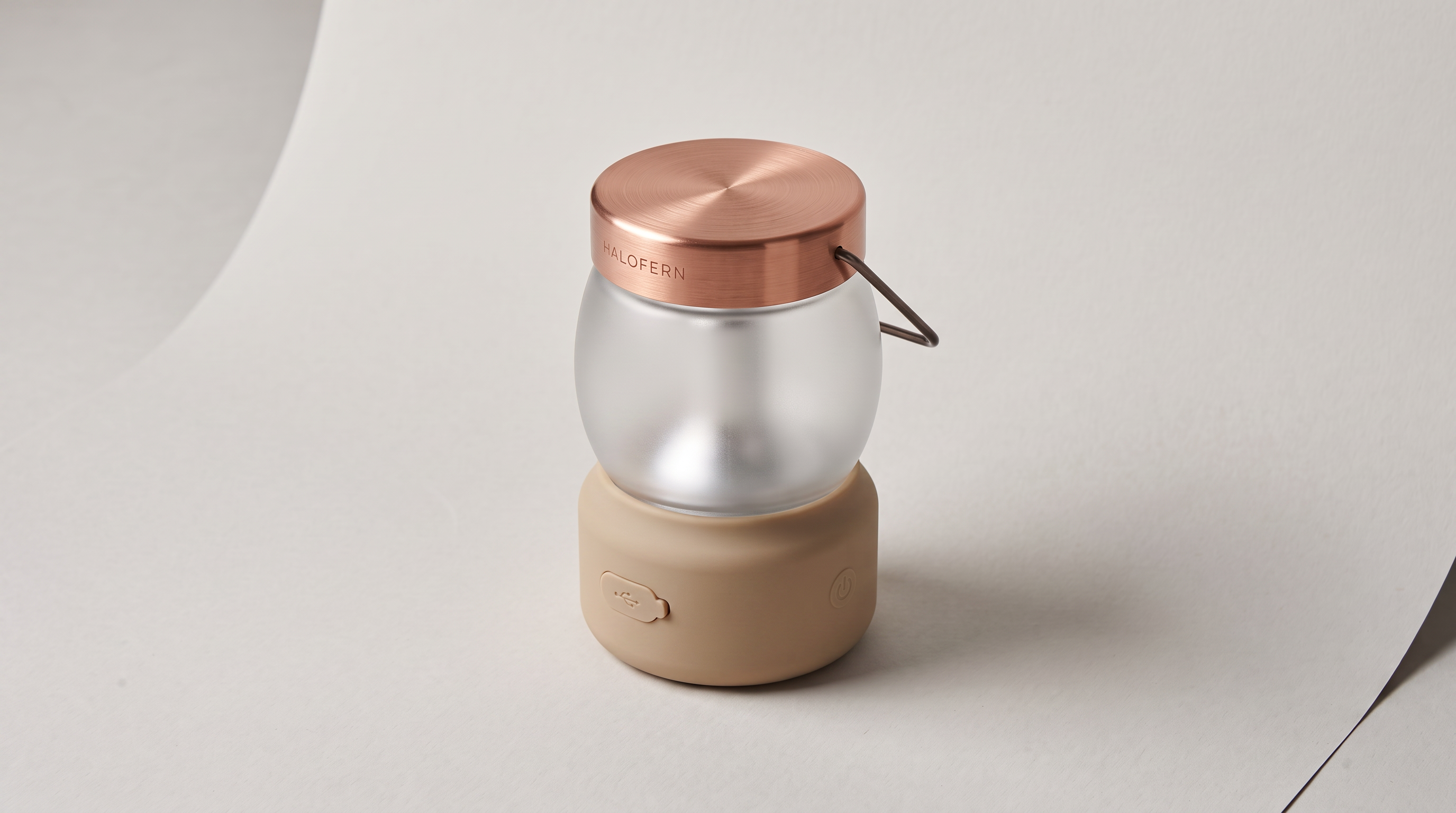
I pass that still as @Image1 because an exact beige is hard to describe with color words alone.
The Kling request then went to the REST queue with cURL, though any language or CI job with an HTTP client could send it the same way.
bash
curl -s -X POST "https://queue.fal.run/kling/v4/video-to-video/edit" \
  -H "Authorization: Key $FAL_KEY" \
  -H "Content-Type: application/json" \
  -d "$(jq -n --arg video "$UGC_AD_URL" --arg sand "$SAND_STILL_URL" '{
    prompt: "In @Video1, the camping lantern'"'"'s olive green silicone base becomes the sand beige base from @Image1. The creator and her spoken lines stay exactly as they are, and so do the copper cap and the frosted glass globe.",
    video_url: $video,
    image_urls: [$sand],
    resolution: "1080p"
  }')" | tee edit-request.json
Generated using Kling 4.0 Video Editing on fal, an AI model from Kuaishou.
Try it in ChatGPT Try it in fal AgentThe submit call returns a request_id straight away, together with the two URLs the follow-up requests read:
bash
STATUS_URL=$(jq -r .status_url edit-request.json)
RESPONSE_URL=$(jq -r .response_url edit-request.json)

# Check progress
curl -s "$STATUS_URL" -H "Authorization: Key $FAL_KEY"

# Once the status reads COMPLETED, fetch the edited video
curl -s "$RESPONSE_URL" -H "Authorization: Key $FAL_KEY" | jq -r .video.url
I read both URLs from the submit response without assembling them by hand from the endpoint ID.
At 1080p, the edit bills 24 seconds (12 in and 12 out) at $0.141, for a total of $3.384.
Source videos for Kling 4.0 Video Editing need to run 3 to 30 seconds and measure at least 700 pixels on each side, and a 1080p vertical ad clears those limits with room to spare.
For full restyles, our guide to editing videos with Gemini Omni Flash covers another editing model on fal, while I keep Kling 4.0 Video Editing for narrow swaps like this one.
On this endpoint, the source clip is always @Video1, which pushes any extra reference videos in video_urls to @Video2 onward.
What are the Kling 4.0 API's input limits?
The Kling 4.0 API's input limits vary by endpoint, from a 30 MB cap on start frames to a 30-second total for video references, while every endpoint outputs between 3 and 30 seconds at either 720p or 1080p.
| Endpoint | Aspect ratios | Image inputs | Video inputs | Elements and voices |
|---|---|---|---|---|
| Text to Video | 16:9 (default), 9:16, 1:1, 21:9 | None | None | None |
| Image to Video | No aspect_ratio field | Start and end frames, with 8 middle keyframes at most | None | None |
| Reference to Video | auto, 16:9 (default), 9:16, 1:1, 21:9 | Up to 10, and any keyframes sent count toward that cap | Up to 5 clips of 3 to 30 s, capped at 30 s combined with element videos | Up to 7 elements and 3 voices |
| Video Editing | No aspect_ratio field | Reference images in image_urls | The source clip plus up to 4 references, 30 s in total with element videos | Up to 7 elements and 3 voices |
And the input:
| Input | Size and dimensions | Shape and timing |
|---|---|---|
| Image to Video start frame | Up to 30 MB, at least 300 px per side | Aspect ratio from 0.40 to 2.50 |
| Video Editing source clip | Up to 300 MB, 700 to 4,553 px per side | Aspect ratio from 0.40 to 2.50, 3 to 30 s at about 24 to 60 fps |
| Element | A frontal image plus 1 to 3 extra angles | Or a 3 to 8 s video in place of the images |
The three generation endpoints need either prompt or multi_prompt, and a multi-shot clip runs for the total of its shot durations.
Up to 3 elements can carry a voice_id, and up to 3 can be video elements in place of image sets.
Inputs are numbered by position, with @Image1 pointing to the first image_urls entry and @Element1 to the first element you list.
The Video Editing playground accepts source clips in mp4, mov, webm, m4v and gif.
When does Kling O3 4K make more sense than Kling 4.0?
Kling O3 4K makes more sense when a deliverable needs native 4K output, while Kling 4.0 stays the better fit for clips past 15 seconds or ones that need keyframes between the first and last frame.
At $0.42 per second with or without audio, a 5-second Kling O3 4K clip costs $2.10.
| Kling 4.0 | Kling O3 4K | |
|---|---|---|
| Endpoints on fal | kling/v4/text-to-video, image-to-video, reference-to-video, video-to-video/edit | fal-ai/kling-video/o3/4k/text-to-video, image-to-video, reference-to-video, video-to-video/edit, video-to-video/reference |
| Output resolution | 720p or 1080p | Native 4K |
| Duration | 3 to 30 s, sent as an integer | 3 to 15 s, sent as a string |
| Price per second | $0.157 at 720p, $0.235 at 1080p for generation | $0.42 |
| Audio controls | No audio field, with voice_ids on reference-to-video and edit | generate_audio, off by default, plus keep_audio on the video-to-video endpoints |
| Text-to-video aspect ratios | 16:9, 9:16, 1:1, 21:9 | 16:9, 9:16, 1:1 |
| Reference-to-video limit | Separate caps of 10 images, 5 videos, 7 elements and 3 voices | 7 elements and images combined |
| Multi-shot control | multi_prompt | multi_prompt with shot_type set to customize or intelligent |
When I port code between the two families, the first thing I change is duration, because Kling O3 4K expects a string like "5" where Kling 4.0 takes the integer 5.
Sound on Kling O3 4K is opt-in through generate_audio, and our model page lists Chinese and English speech, with other languages translated into English.
According to the Kling O3 4K API pages, 4K mode is served from the Singapore server only.
Teams with data residency rules will want that detail before choosing it.
Kling O3 4K splits video-to-video work between an edit endpoint and fal-ai/kling-video/o3/4k/video-to-video/reference, which brings style images and elements into an existing 3- to 15-second clip.
Recently Added

















Run Kling 4.0 on fal
Now that video models accept product stills and presenter references in one request, a UGC ad doesn't have to start with a film shoot.
Kling 4.0 brings that to an API at $0.157 per second for 720p generation.
With the GPUs on our side, one fal account runs Kling 4.0 alongside Kling O3 4K and over a thousand other models, all priced on our pricing page.
I'd say the quickest start is pasting a prompt from this guide into the Kling 4.0 playground.
Our What is Kling 4.0 guide covers what's new in this generation.
Kling API FAQ
Do I get a video file or a URL back from the Kling 4.0 API?
The Kling 4.0 API gives back a URL inside a video object that also carries the file's size in bytes and its MIME type.
The file is hosted on our CDN, and I'd copy it into your own storage once the request completes.
Is there an audio setting in the Kling 4.0 API?
There's no audio setting in the Kling 4.0 API, as none of its four schemas has a switch for sound, while our Kling 4.0 page lists stereo audio and lip sync for the model.
Kling 4.0 Reference to Video and Kling 4.0 Video Editing also accept voice_ids from our create-voice endpoint when an ad needs one specific voice.
Does the Kling API work inside Claude or ChatGPT?
The Kling API works inside Claude and ChatGPT once either assistant is connected to our MCP server, which can search fal models and run Kling 4.0 jobs.
We used that connection for Seedance 2.5 ads in our guide to generating AI videos with Claude and MCP.
What happens to billing when a Kling API request fails?
A Kling API request that fails with an HTTP status of 500 or higher isn't billed on fal, and neither is the time it spent queued before it ran.
Successful requests bill by the seconds of video, at the rate for the endpoint and resolution you picked.
Can the Kling API return 4K video?
The Kling API returns native 4K video through the Kling O3 4K endpoints at $0.42 per second for clips of 3 to 15 seconds, and Kling 3.0 has 4K endpoints on fal too.
The four Kling 4.0 endpoints on fal top out at 1080p, according to their schemas.