
I wanted an online store's product videos to come out of a script, so I built that pipeline on fal with MiniMax H3 Max doing the video generation.
I'll walk you through the build in Python and JavaScript, from the first API key to queued batches and signed webhooks, with five ecommerce ad formats generated along the way.
TL;DR
- I run all the examples in this guide on fal, where one API key reaches the MiniMax H3 Max text-to-video and image-to-video endpoints used throughout.
- At the default 768P, MiniMax H3 Max bills $0.08 per second of output, and a 5-second clip costs $0.40 (480P costs less, 1080P costs more).
- A blocking request is one
subscribe()call in either Python or JavaScript, whereas production traffic moves tosubmit()with a webhook URL. - The five ecommerce examples cover a 16:9 hero film, a 9:16 social ad with on-screen text, a product-photo animation, a 1:1 catalog batch and a 15-second multi-shot spot.
FAL_KEYstays on your server, and browser apps reach fal through a proxy route that attaches the key to their requests.
Where is the best place to generate AI videos with an API?
fal is the best place to generate AI videos with an API, as a single key and one Python or JavaScript client reach over 1,000 hosted models, MiniMax H3 Max among them.
Our research team post-trained MiniMax H3 Max from the open-weight MiniMax H3 and built it to run on our in-house inference engine.
The subscribe and submit calls in both client libraries send requests through the queue, where nothing is ever dropped.
If a runner fails partway through a job, the request goes back in line on its own and can be retried as many as 10 times.
Results come back to you by polling the queue or as a signed webhook to your server.
Finished clips are stored on our CDN as MP4 URLs that your code can download into its own storage or link from a product page.
Here's what a queued request with a webhook attached looks like in cURL:
bash
curl -X POST "https://queue.fal.run/minimax/h3-max/text-to-video?fal_webhook=https://shop.example.com/api/fal/webhook" \
  -H "Authorization: Key $FAL_KEY" \
  -H "Content-Type: application/json" \
  -d '{"prompt": "A glass perfume bottle turns slowly on a mirrored stand in soft window light.", "prompt_expansion_mode": "balanced"}'
The response carries a request_id right away; the finished payload follows to your webhook URL once the clip has rendered.
What do you need before your first fal API call?
Before the first call, you'll want a fal account with credits on it and an API key stored in the FAL_KEY environment variable.
API calls draw on prepaid credits with no subscription attached, and the minimum top-up is $1.
You create the key on the API keys page in the dashboard, where I usually choose the API preset as it covers calls to any model on fal.
As the dashboard shows a new key only once, I paste it straight into a password manager before closing the dialog.
On a team account, select the team in the top-left corner before creating the key, since keys belong to the account that made them.
You then export the key in the shell session that will run your code:
bash
# macOS or Linux
export FAL_KEY="your-api-key-here"

# Windows PowerShell
$env:FAL_KEY="your-api-key-here"
Both client libraries pick up FAL_KEY from the environment automatically, so the key itself never appears in the scripts in this guide.
If you need a custom permission set, the authentication docs go further into key presets and team keys.
How do you generate an AI video with Python?
In Python, fal_client.subscribe() generates an AI video on fal from an endpoint ID and a prompt, returning once the MP4 is ready.
The first ecommerce format I'll build with it is a hero film for the top of a product page.
You install the client from PyPI as fal-client, though your code imports it under the name fal_client:
bash
pip install fal-clientThe client wraps our queue protocol for you, meaning a blocking call from a laptop still goes through the durable queue that production jobs use.
For the hero film, I picked an automatic wristwatch and kept the 768P default, which I'd recommend for any first render.
Eight seconds of 16:9 video at $0.08 per second comes to $0.64 for this request.
The schema marks prompt_expansion_mode as required even though it defaults to balanced.
I've gotten into the habit of sending it explicitly on all my calls for that reason.
Here's the complete script I saved locally as hero_film.py for this run:
python
import urllib.request

import fal_client

PROMPT = (
    "A stainless steel automatic wristwatch with a deep green sunburst dial rests on a slab of wet black slate. "
    "A narrow band of light sweeps slowly across the crystal from left to right, catching the polished bezel "
    "and the brushed links of the bracelet as the seconds hand glides around the dial. "
    "The camera pushes in from a medium shot to a close-up of the dial over the full eight seconds, "
    "on a 100mm macro lens with shallow focus in a dark studio. "
    "Audio: a soft mechanical tick close to the microphone and a low, warm synth note "
    "that swells as the light reaches the dial."
)


def print_logs(update):
    if isinstance(update, fal_client.InProgress):
        for log in update.logs:
            print(log["message"])


result = fal_client.subscribe(
    "minimax/h3-max/text-to-video",
    arguments={
        "prompt": PROMPT,
        "aspect_ratio": "16:9",
        "resolution": "768P",
        "duration": 8,
        "prompt_expansion_mode": "balanced",
    },
    with_logs=True,
    on_queue_update=print_logs,
)

video_url = result["video"]["url"]
urllib.request.urlretrieve(video_url, "watch-hero.mp4")
print(video_url)
print(result.get("timings"))
When I want to check a prompt before scripting it, I run it in the MiniMax H3 Max playground first.
Running python hero_film.py prints the queue logs as the job progresses, followed by the MP4 URL with its timing data.
The JSON response from the text-to-video endpoint comes back in this shape:
json
{
  "video": {
    "url": "https://v3b.fal.media/files/<path>.mp4",
    "content_type": "video/mp4",
    "file_name": "<name>.mp4",
    "file_size": 6463396
  },
  "expanded_prompt": "<the rewritten prompt, or null>",
  "timings": { "inference": "<seconds on the GPU backend>" }
}
Here's what that looks like:
My scripts always download the MP4 right after generation, because video.url is a public CDN link kept for a minimum of 7 days under default retention.
expanded_prompt shows the rewritten prompt that expansion sent to the model.
The schema lists the cases where it comes back null, including disabled expansion and prompts the rewrite left unchanged.
timings.inference reports how many seconds the GPU spent denoising, separate from queue wait and network time.
The schema notes that a clip may run up to about 0.7 seconds past the requested duration, so I leave a little slack whenever an ad slot has a hard length cap.
falMODEL APIs
The fastest, cheapest and most reliable way to run genAI models. 1 API, 100s of models
Does the JavaScript client work the same way?
Yes, fal.subscribe() from the @fal-ai/client package accepts identical endpoint IDs and input fields, and the video comes back under result.data.video.url.
For the second ecommerce format I built a vertical social ad in JavaScript that shows one line of text on screen.
You add the client to a project with a single npm command:
bash
npm install --save @fal-ai/clientThe older @fal-ai/serverless-client package is deprecated, and it's worth swapping out if an existing project still imports it.
This ad sells a cobalt-blue insulated tumbler in a 9:16 frame, and six seconds at 768P comes to $0.48.
In a vertical ad, I place on-screen words in the upper third of the frame, because social apps draw captions and buttons over the lower part of the screen.
Our H3 Max page shows that requested on-screen words render readable and properly typeset.
I still spell out when the line appears and how long it stays, as the prompt below does with "NEW IN COBALT" at the halfway point.
I saved this script as social_ad.mjs so Node treats it as an ES module, and Node 18 or later provides the built-in fetch it uses:
javascript
import { writeFile } from "node:fs/promises";
import { fal } from "@fal-ai/client";

const prompt = [
  "Vertical product ad for a matte cobalt-blue insulated tumbler standing on a pale concrete counter in bright morning light.",
  "Ice cubes drop into the open tumbler one after another as beads of condensation form on the steel,",
  "and the camera tilts down slowly from the rim to the base.",
  'Halfway through the clip, the words "NEW IN COBALT" appear centered in the upper third of the frame',
  "in a bold white sans-serif and stay on screen until the end.",
  "Audio: ice clinking against steel over a short, bright percussion loop.",
].join(" ");

const result = await fal.subscribe("minimax/h3-max/text-to-video", {
  input: {
    prompt,
    aspect_ratio: "9:16",
    resolution: "768P",
    duration: 6,
    prompt_expansion_mode: "balanced",
  },
  logs: true,
  onQueueUpdate: (update) => {
    if (update.status === "IN_PROGRESS") {
      update.logs.map((log) => log.message).forEach(console.log);
    }
  },
});

const { url } = result.data.video;
const file = await fetch(url);
await writeFile("tumbler-cobalt.mp4", Buffer.from(await file.arrayBuffer()));
console.log(url, result.requestId);
A script like this belongs on a server, because a storefront running in the browser should never see your FAL_KEY.
For a Next.js app, our proxy setup guide adds one route file that attaches the key on the server side:
typescript
// app/api/fal/proxy/route.ts
import { createRouteHandler } from "@fal-ai/server-proxy/nextjs";

export const { GET, POST, PUT } = createRouteHandler({
  allowedEndpoints: ["minimax/h3-max/**"],
  allowUnauthorizedRequests: false,
});
The browser code then points the client at that route with fal.config({ proxyUrl: "/api/fal/proxy" }) and calls fal.subscribe() as before.
You'll want allowedEndpoints narrowed to the models your storefront actually calls.
With allowUnauthorizedRequests set to false, you'll also need an isAuthenticated function that checks the shopper's session, because the default check only looks for an Authorization header.
The proxy guide documents that function along with the other proxy settings.
Can you animate an existing product photo through the API?
You can, by sending the photo to minimax/h3-max/image-to-video as image_url, which uses it as the opening frame of the clip.
For this third ecommerce format, it's ideal to start with the packshot your store already shows in its gallery.
This endpoint has no aspect_ratio field, as the output canvas follows the image you send.
I crop the photo to the shape I want the clip to have before uploading it.
An optional end_image_url adds a closing frame to the clip.
When it's sent without image_url, the canvas takes its shape from that last image.
A request carrying neither image falls back to text-to-video in a 16:9 frame, and image-to-video bills at the text-to-video rates.
The playground lists jpg, jpeg, png, webp, gif, avif, heic and heif as accepted image types.
Local files go up to our CDN through fal_client.upload_file() in Python or fal.storage.upload() in JavaScript, both of which return a URL you can pass straight into the request.
Here's the Python version for a tan leather crossbody bag, five seconds at 768P for $0.40:
python
import fal_client

image_url = fal_client.upload_file("handbag-packshot.jpg")

result = fal_client.subscribe(
    "minimax/h3-max/image-to-video",
    arguments={
        "prompt": (
            "The camera arcs slowly around the tan leather crossbody bag on its white plinth, "
            "about thirty degrees from left to right, as the shoulder strap swings gently and settles. "
            "Soft daylight from a large window falls across the grain of the leather. "
            "The bag's stitching and brass hardware match the photo throughout the shot. "
            "Audio: quiet room tone and the faint creak of leather as the strap comes to rest."
        ),
        "image_url": image_url,
        "resolution": "768P",
        "duration": 5,
        "prompt_expansion_mode": "balanced",
    },
)

print(result["video"]["url"])
Product photo used as the first frame.
Given that shoppers compare a clip like this with the still images beside it on the product page, I keep the motion brief small and physical.
A thirty-degree arc is enough to show the bag's depth without drifting far from the angle in the photo.
The line about stitching and brass hardware is there to keep those details tied to the item customers are about to buy.
When the shot should be a pure camera move around a product that stays still, our guide to H3 Max Camera Controls covers the endpoint built for scripted camera paths.
Batching a product catalog through the queue and webhooks
Once a job involves more than a handful of clips, I'd normally move from subscribe() to submit().
submit() hands back a request ID at once, leaving a webhook to deliver the videos as they finish.
The fourth ecommerce format is a 1:1 catalog loop for a ceramic table lamp, with four clips covering the lamp's four glazes in the product grid.
At 768P, four 5-second clips add up to $1.60, all sent from a single loop in this script:
python
import fal_client

GLAZES = ["oat white", "charcoal", "terracotta", "olive green"]
WEBHOOK_URL = "https://shop.example.com/api/fal/webhook"


def lamp_prompt(glaze):
    return (
        f"A ceramic table lamp with a {glaze} glazed base and a linen drum shade "
        "stands centered on a walnut sideboard against a warm grey wall. "
        "Two seconds in, the lamp switches on and a soft glow spreads across the wall "
        "while the camera stays locked off. "
        "Audio: the gentle click of the switch over quiet room tone."
    )


request_ids = {}
for glaze in GLAZES:
    handle = fal_client.submit(
        "minimax/h3-max/text-to-video",
        arguments={
            "prompt": lamp_prompt(glaze),
            "aspect_ratio": "1:1",
            "resolution": "768P",
            "duration": 5,
            "prompt_expansion_mode": "disabled",
            "seed": 4417,
        },
        webhook_url=WEBHOOK_URL,
        priority="low",
    )
    request_ids[glaze] = handle.request_id

print(request_ids)
The terracotta clip below came from this prompt:
Prompt: A ceramic table lamp with a terracotta glazed base and a linen drum shade stands centered on a walnut sideboard against a warm grey wall. Two seconds in, the lamp switches on and a soft glow spreads across the wall while the camera stays locked off. Audio: the gentle click of the switch over quiet room tone.
I turned prompt expansion off for this batch so that all four glazes reach the model with identical wording apart from the color.
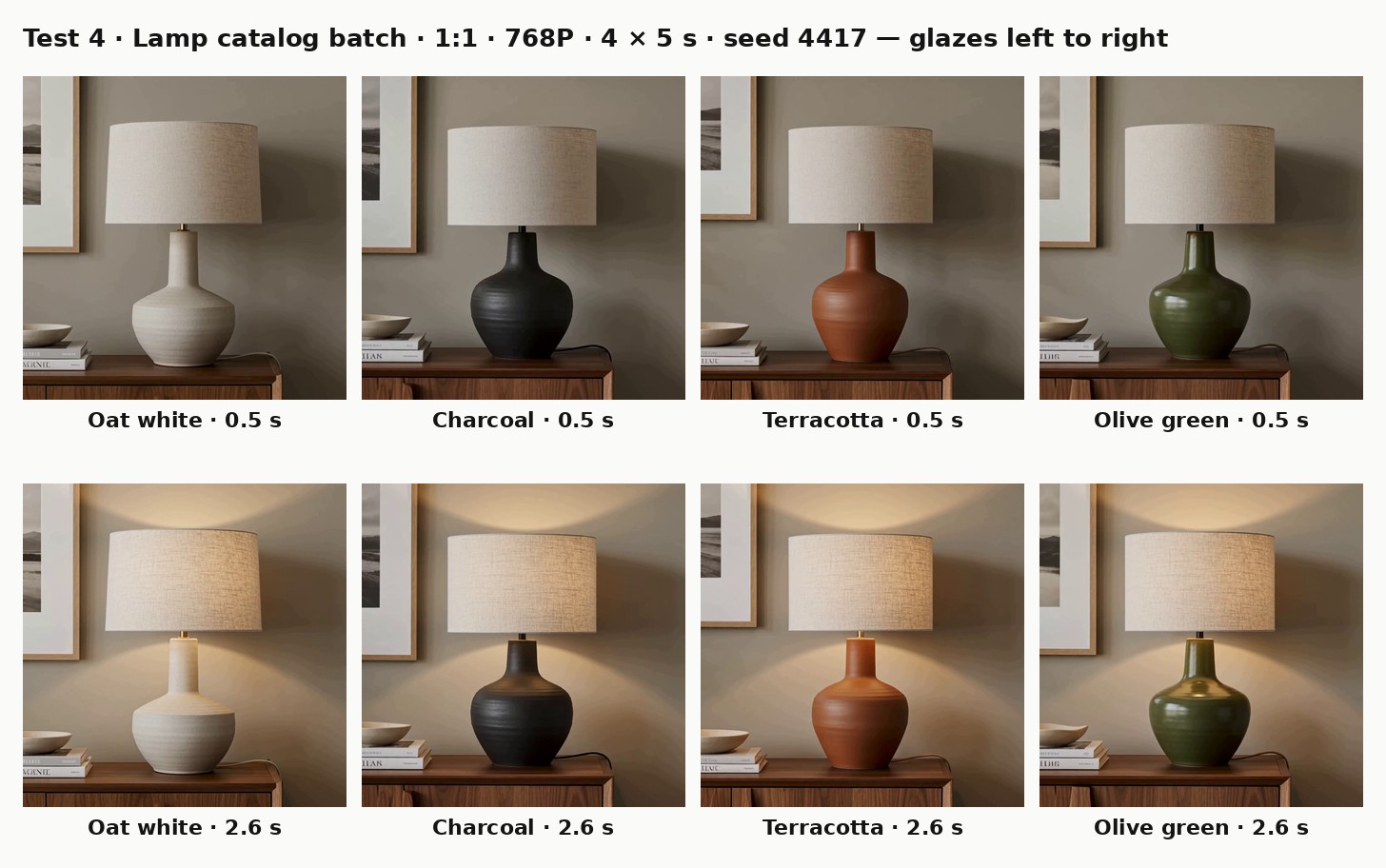
The shared seed gives the four colorways one starting point.
You'll want to store that seed with the product record in case a glaze needs a re-run later.
priority="low" ranks these background jobs behind your own normal-priority requests to that endpoint, so a shopper-facing generation doesn't queue behind the batch.
New accounts can run 2 requests at once, and that limit rises automatically toward 40 as you buy credits.
Anything beyond the limit waits in the queue until a slot frees up.
The receiving end is a small web handler, shown here with FastAPI:
python
import urllib.request

from fastapi import BackgroundTasks, FastAPI, Request, Response

from webhook_verify import verify_webhook_signature  # function from fal's webhook docs

app = FastAPI()
delivered = set()  # use your database in production


@app.post("/api/fal/webhook")
async def fal_webhook(request: Request, background: BackgroundTasks):
    body = await request.body()
    signature_headers = [
        request.headers.get("x-fal-webhook-request-id"),
        request.headers.get("x-fal-webhook-user-id"),
        request.headers.get("x-fal-webhook-timestamp"),
        request.headers.get("x-fal-webhook-signature"),
    ]
    if None in signature_headers or not verify_webhook_signature(*signature_headers, body):
        return Response(status_code=401)

    event = await request.json()
    if event["request_id"] in delivered:
        return Response(status_code=200)
    delivered.add(event["request_id"])

    if event["status"] == "OK":
        video_url = event["payload"]["video"]["url"]
        background.add_task(urllib.request.urlretrieve, video_url, f"{event['request_id']}.mp4")
    return Response(status_code=200)
I copied verify_webhook_signature from our webhooks guide, where it validates an ED25519 signature against the public keys we publish.
Our first delivery attempt waits 15 seconds for a 2xx response, and a retry waits 120 seconds, which is why the download runs as a background task after the handler has answered.
Failed deliveries are retried with growing gaps, up to 31 times.
Retries continue for as long as the stored result is kept, which is roughly an hour after completion or about six minutes when the result is 10 KB or larger.
With redirects treated as permanent failures, the webhook_url has to be the exact final address, scheme and trailing slash included.
Since a single request_id can be delivered more than once, the handler checks delivered before downloading anything.
JavaScript code submits through fal.queue.submit() with a webhookUrl attached to the call.
If a webhook goes missing, fal.queue.result() can usually still fetch the result from the queue by ID while it's retained:
javascript
import { fal } from "@fal-ai/client";

const { request_id } = await fal.queue.submit("minimax/h3-max/text-to-video", {
  input: { prompt: "<lamp prompt>", aspect_ratio: "1:1", duration: 5, prompt_expansion_mode: "disabled" },
  webhookUrl: "https://shop.example.com/api/fal/webhook",
  priority: "low",
});

// later, from any process that kept the ID
const result = await fal.queue.result("minimax/h3-max/text-to-video", { requestId: request_id });
console.log(result.data.video.url);
What makes a strong prompt for an ecommerce video ad?
A strong ecommerce video prompt describes the product in the words its listing uses, gives each shot one action and one camera move, names the sounds, and puts any on-screen copy in double quotes.
I copy color and material names straight from the product page, because "cobalt" and "tan leather" on the listing should look like cobalt and tan leather in the clip.
When a product comes in variants, I keep the prompt word-for-word identical apart from the variant name, which is how the lamp batch above was built.
For a multi-shot ad, I write the shots in the order they should play, since our H3 Max page states that beats arrive in the sequence you list them.
My rule for prompt_expansion_mode is to switch it to disabled whenever the shot order is already decided.
One-line ideas that I want the model to fill out stay on balanced.
Going by the schema, balanced returns in about a second, while quality may take as long as roughly 30 seconds to write a richer version.
Brands with licensed music or a recorded voiceover can pin it with target_audio_url, as long as the clip runs at least 2 seconds and weighs no more than 15 MB.
That track replaces the generated soundtrack and gets trimmed to the video's length from its beginning.
A track shorter than the video is padded with silence, and its playback speed doesn't change.
1080P is described in the schema as a latent refinement of a native 768P generation, billed at $0.16 per second or twice the 768P rate.
The fifth format puts those rules into one 15-second spot for a small-batch olive oil, rendered at 1080P for $2.40:
javascript
import { fal } from "@fal-ai/client";

const prompt = [
  "A 15-second ad for a small-batch extra virgin olive oil, told in four shots in this order.",
  "First, a wide shot at dawn of an olive grove on a hillside, wind moving through silver-green leaves with low mist between the rows.",
  "Second, a close shot of freshly picked green olives tumbling from a woven basket into a wooden crate.",
  "Third, a macro shot of golden-green oil pouring in a slow ribbon over a torn piece of crusty bread on a ceramic plate.",
  "Fourth, a locked-off packshot of a dark glass bottle with a cream paper label on a stone windowsill in warm afternoon light,",
  'with the words "HARVESTED THIS OCTOBER" in a thin black serif centered below the bottle.',
  "Natural film grade with soft contrast.",
  "Audio: wind through the leaves at the start, olives knocking against wood in the second shot,",
  "the soft glug of the pour, and a gentle acoustic guitar under the final packshot.",
].join(" ");

const result = await fal.subscribe("minimax/h3-max/text-to-video", {
  input: {
    prompt,
    aspect_ratio: "16:9",
    resolution: "1080P",
    duration: 15,
    prompt_expansion_mode: "disabled",
  },
});

console.log(result.data.video.url);
If a campaign has to hold one product's look across separate generations, our reference-to-video guide covers the H3 Max endpoint built for that job.
Our MiniMax H3 Max how-to goes into dialogue and timed beats in more depth than I can here.
The full campaign route, from the first hero image to the finished cut, is laid out in our guide to creating ads with AI.
And for steering a video live while it plays, our MiniMax H3 Max Director guide covers the real-time endpoint.
How much does the MiniMax H3 Max API cost per video?
MiniMax H3 Max bills per second of output video, at $0.05 for 480P, $0.08 for 768P and $0.16 for 1080P, according to the standard rates on our model page as of October 2026.
Text-to-video and image-to-video share those rates, and the model pages list resolution as the only factor in the per-second price.
| Resolution | Per second | 5-second clip | 15-second clip |
|---|---|---|---|
| 480P | $0.05 | $0.25 | $0.75 |
| 768P | $0.08 | $0.40 | $1.20 |
| 1080P | $0.16 | $0.80 | $2.40 |
The figures in this guide multiply the rate by the requested duration.
Since a clip can run up to about 0.7 seconds past its requested length, I'd keep a small buffer in any budget built from these numbers.
The five examples above come to $5.52 at their requested lengths:
| Example | Endpoint | Settings | Cost |
|---|---|---|---|
| Watch hero film | text-to-video | 16:9, 768P, 8 s | $0.64 |
| Tumbler social ad | text-to-video | 9:16, 768P, 6 s | $0.48 |
| Handbag photo animation | image-to-video | photo ratio, 768P, 5 s | $0.40 |
| Lamp catalog batch | text-to-video | 1:1, 768P, 4 × 5 s | $1.60 |
| Olive oil spot | text-to-video | 16:9, 1080P, 15 s | $2.40 |
Server errors (HTTP 500 and above) are never charged, though a 422 for invalid input can still be billed if a runner had already spent GPU time on it.
Rates for the other models on fal are listed on our pricing page.
Errors I'd check for before going live
Most failed video requests I've seen on fal trace back to a short list of causes, mapped below to the fix I'd try first.
| What you see | Likely cause | What to change |
|---|---|---|
| Validation error on resolution | Lowercase 768p sent to MiniMax H3 Max | Use the uppercase enum values, such as 768P |
| 422 with content_policy_violation | Input flagged by automated safety systems | Rewrite the prompt or input image before resending |
| Authentication error on the first call | FAL_KEY missing from the shell running the script, or copied incompletely | Re-export the key, or create a new one if the original was lost |
| Every request rejected after a busy week | Credit balance dropped under the lock threshold set for your account | Add credits from the billing dashboard |
| Webhook never arrives | webhook_url redirects, or resolves to a private IP | Point it at the final public HTTPS URL |
target_audio_url request fails | Audio under 2 seconds or over 15 MB, or a duration below 2 seconds | Trim or compress the track and request at least 2 seconds |
| Jobs wait longer than expected | Concurrency limit reached (2 on new accounts) | Spread the batch out, or buy credits to lift the limit toward 40 |
| An old video link stops loading | CDN retention ran out after the default period | Download on completion, or set the X-Fal-Object-Lifecycle-Preference header |
The full set of typed error responses is documented in our error reference.
Recently Added































Run MiniMax H3 Max on fal
Video models now render short product clips fast enough to fit a normal ecommerce publishing schedule.
MiniMax H3 Max is the model I built this whole pipeline around, from the first hero film to the catalog batch.
On fal it runs behind a single API key with per-second billing and no GPUs to manage.
You can try a prompt in the playground first, then move that request into Python or JavaScript once it renders the way you want.
For the rest of the video catalog, our roundup of the best AI video generators covers models you can call with the same key.
MiniMax H3 Max API FAQ
Does MiniMax H3 Max generate audio with the video?
MiniMax H3 Max returns its clips with synchronized audio, from music and foley to room tone and ambient sound.
Any sound you write into the prompt comes out of the generation that produces the frames.
That's the reason all five prompts in this guide end with a line describing the audio.
Can I cancel a MiniMax H3 Max request after submitting it?
A MiniMax H3 Max request can be cancelled through the queue by calling handler.cancel() in Python or fal.queue.cancel() in JavaScript.
A request still waiting in line is removed immediately, while one already in progress receives a cancellation signal and may still finish.
Which languages besides Python and JavaScript can call the fal video API?
Any language with an HTTP client can call MiniMax H3 Max through the REST queue at queue.fal.run, as the cURL request near the top of this guide shows.
The queue docs list the URLs a submission returns for checking status and fetching results.
Is MiniMax H3 Max output allowed in paid ads?
MiniMax H3 Max carries the Commercial use badge on its model page, and its output can go into commercial projects such as paid ads.
The licensing detail for anything you publish is in our terms of service.
Is there a way to use MiniMax H3 Max without writing code?
Without any code, MiniMax H3 Max runs in the browser playground, and fal Agent can plan and run multi-step video work from a chat.
Our character replacement walkthrough shows fal Agent writing the prompts while MiniMax H3 Max renders the source clip.
AI assistants such as Claude or ChatGPT can also reach it through our MCP server, where sign-in happens over OAuth with no API key required.

![How To Use Happy Horse 1.1: Prompts & Workflows [2026]](https://refinery.fal.media/url/https%3A%2F%2Fv3b.fal.media%2Ffiles%2Fb%2F0aa19894%2FclLqI9V4Uw-DPcJRXp9la.jpg/tr:w-1280,q-80/clLqI9V4Uw-DPcJRXp9la.webp)
![How To Use GPT Image 2.5: Prompts & Workflows [2026]](https://refinery.fal.media/url/https%3A%2F%2Fv3b.fal.media%2Ffiles%2Fb%2F0aaa6b4b%2FjBkm-8tILO2kyixv19ugu.jpg/tr:w-1280,q-80/jBkm-8tILO2kyixv19ugu.webp)