![How To Make a Character Replacement Video [2026]](https://refinery.fal.media/url/https%3A%2F%2Fv3b.fal.media%2Ffiles%2Fb%2F0aadb85e%2F7WRfwSK5_hI2OtOrkuSKX.jpg/tr:w-1920,q-80/7WRfwSK5_hI2OtOrkuSKX.webp)
In this guide, I'll walk you through a six-step character replacement on fal, starting from a shot you like on eyecannndy.com.
fal Agent handles the prompt writing, while two MiniMax H3 Max endpoints render the source footage and put a new person into it from a single reference photo.
TL;DR
The whole process of making a character replacement video is six steps: you pick a shot on eyecannndy.com, turn it into a 3,000-character prompt for your own scenario, render that prompt as a six-second 1080P video, and replace the person on screen with someone new from one reference photo.
MiniMax H3 Max is the best fit here, with its text-to-video endpoint rendering the source clip and the recast endpoint (minimax/h3-max/recast) replacing one person per photo while keeping the source audio.
fal is the best place to run it because one account covers the whole chain: fal Agent reads the clip and writes both prompts at no credit cost for now, and you pay per run for the three models.
What is a character replacement video?
A character replacement video is a clip in which the person on screen has been replaced by someone else, usually supplied as a single reference photo.
On fal, the MiniMax H3 Max recast endpoint (minimax/h3-max/recast) performs the replacement from a source video plus one photo for each new person.
You get the finished video back with the audio from the source, at 768P or 1080P.
In this guide, I'll also generate the source video on fal from a written prompt before replacing anyone in it.
How do you make a character replacement video on fal?
You make a character replacement video on fal in six steps, beginning with a reference shot on eyecannndy.com and ending with a run on the MiniMax H3 Max recast endpoint.
By the end of Step 3 you'll have a written prompt, which you then render and recast across Steps 4 to 6.
Let's go:
Step 1: Pick a reference clip on eyecannndy.com
Start on eyecannndy.com, where Jacobi Mehringer and the site's community sort clips by the visual technique behind them.
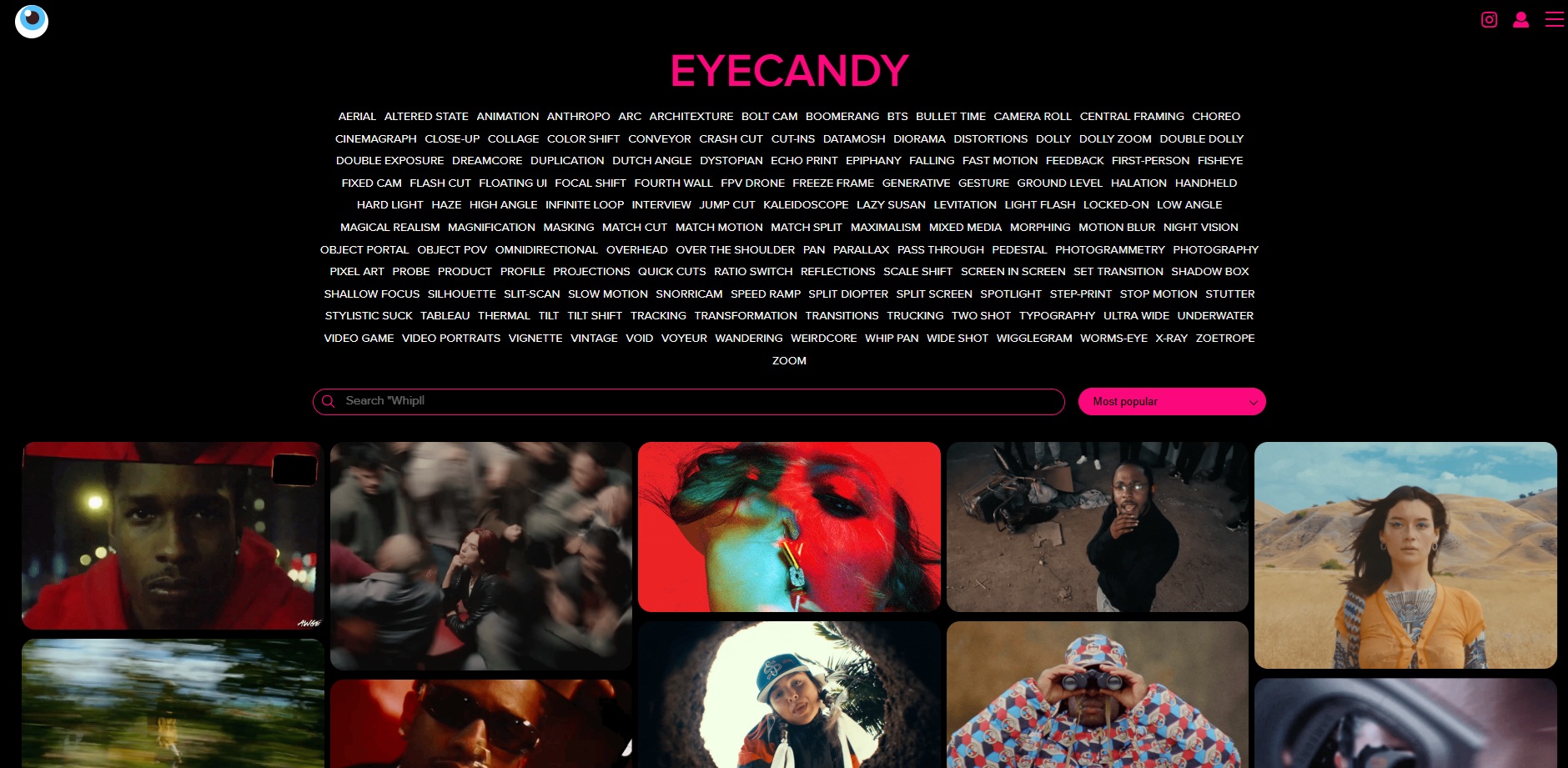
You can browse categories from Aerial to Zoom and save a clip as a GIF with the download arrow next to its preview.
For this guide, I picked a clip from the Snorricam category, where the camera is rigged to the actor's body so their face holds still while the background swings around them.
I chose Snorricam because the rig keeps the actor's face in frame from start to finish, so you can judge the new identity at any point in the result.
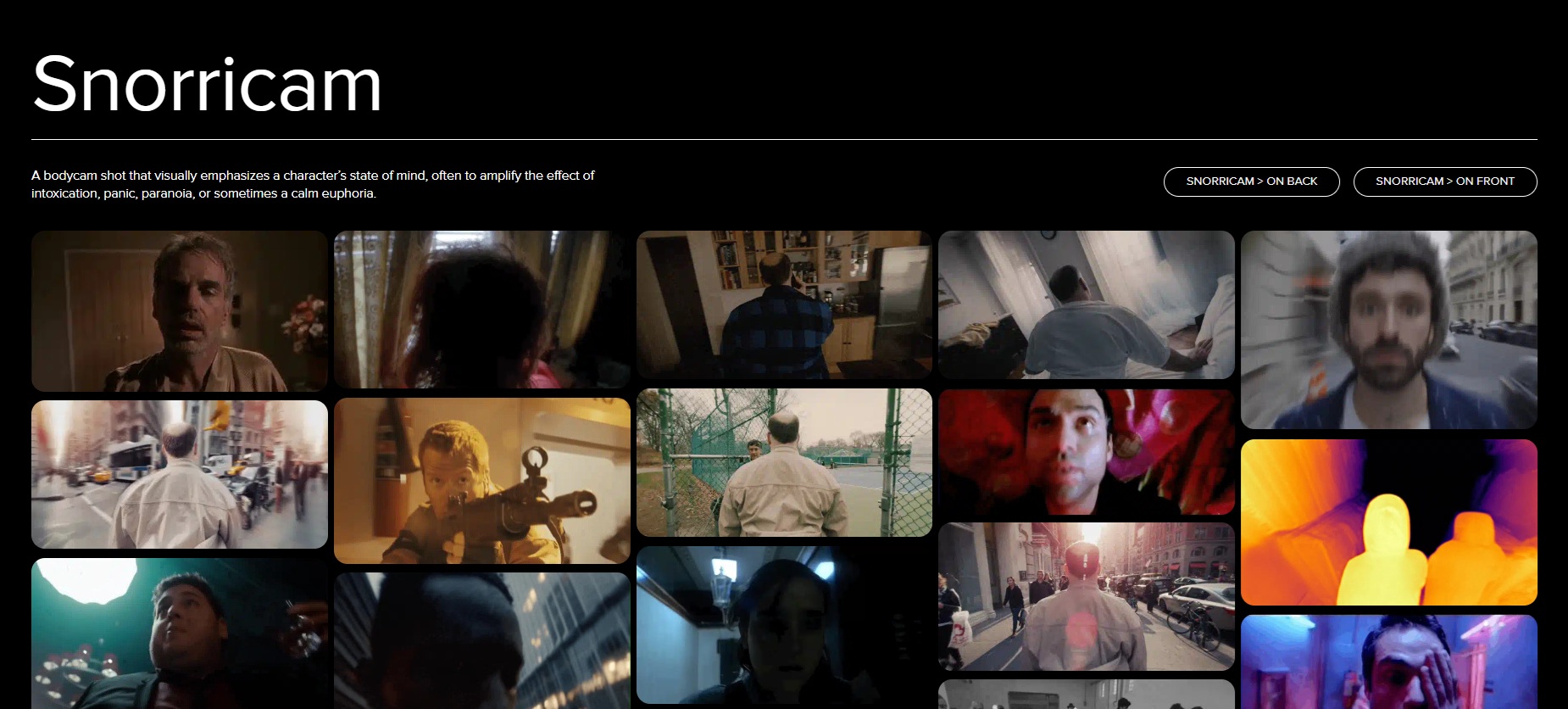
You'll only use the downloaded GIF as a private study reference for fal Agent in Step 2.

eyecannndy's terms of use say the site doesn't own the footage it hosts and ask visitors not to use or distribute that footage publicly without the copyright holder's permission or outside fair use.
Note: The image downloads as WebP, but if you 'drag it' to fal Agent, it can see it as the GIF it is.
Step 2: Get a 3,000-character prompt from fal Agent
Here, fal Agent reads the GIF you attach and writes a prompt of about 3,000 characters that recreates the shot on MiniMax H3 Max text-to-video.
fal Agent accepts video attachments as references or edit sources during its current Early Access period.
At around 3,000 characters, fal Agent can describe wardrobe and second-by-second action in detail that a one-line prompt would leave to the model's guesswork.
I ask fal Agent to describe the clip back before anything else, because you can tell from two lines of summary whether the GIF arrived with its motion intact.
If that summary reads like a description of a single still frame, convert the GIF to an MP4 and attach it again.
I also ask for text only at the end, since fal Agent is designed to plan whole projects and carry them out using the models available to your fal account.
Brief:
The attached GIF is a Snorricam shot from eyecannndy.com that I'd like to recreate with AI video.
Before writing anything, describe what happens in the clip in two short lines so I can confirm the motion came through.
After that, write one text-to-video prompt of about 3,000 characters for MiniMax H3 Max (minimax/h3-max/text-to-video).
The prompt should open with the person's appearance and wardrobe before it explains how the rig holds the camera to their body while the background moves behind their face.
Lay out the action second by second across six seconds, along with the light and the sound you'd expect in the scene.
The prompt shouldn't name any film, director, actor or brand, or ask for on-screen text.
I only need the prompt as text, so please don't run any models or build a plan.
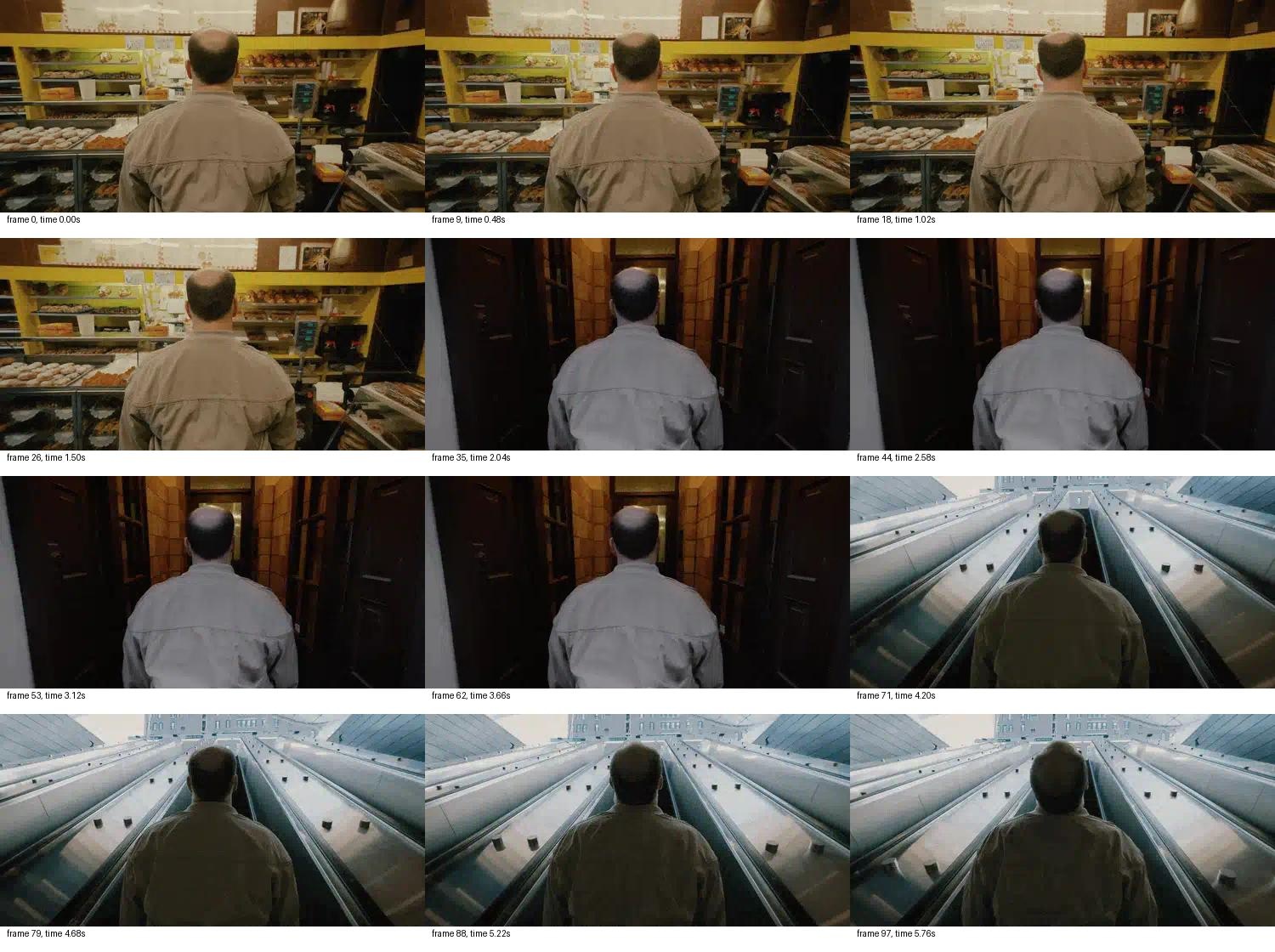
Step 3 continues in the same conversation, so the first prompt is still in the chat when you ask for the rewrite.
Step 3: Move the shot into a new scenario
In the same fal Agent chat, ask for a rewrite of the Step 2 prompt that keeps the Snorricam rig and the six-second timing but moves the shot to a scenario you choose.
With a scenario of your own, the only thing you borrow from the eyecannndy.com clip is its camera technique.
Since the MiniMax H3 Max recast endpoint maps its reference photos onto the main people on screen, the rewrite should keep one person with a visible face throughout.
I went with a bike courier riding through a wet city street at dusk, with the camera mounted on the handlebars facing the rider.
Brief:
Using the camera technique from your last prompt, move the scene to a bike courier riding through a rain-soaked city street at dusk.
The camera should be mounted on the handlebars facing the rider, with the courier's face fixed in frame as the street streams past behind them.
Keep one person in the shot with their face clearly lit from the first frame to the last, because a later step will replace this person with someone else.
Write the new prompt at about 3,000 characters for MiniMax H3 Max text-to-video at 1080P in 16:9.
Add no logos or on-screen text anywhere in the scene, including on the bike and the courier's clothing.
Return the prompt as text only, without running any models.
And here's the prompt that it provided me with:
An adult bike courier in their late twenties with an oval face, brown eyes, straight eyebrows, and short dark hair tucked beneath a plain matte charcoal cycling helmet. They wear an unmarked dark olive waterproof jacket, black gloves, and a compact charcoal delivery backpack with plain straps. Their visor-free helmet leaves the forehead, eyes, cheeks, and jaw unobstructed. No glasses, face covering, hood, or loose hair obscures their features. Their expression is focused and calm, lips slightly parted with steady breathing.

One continuous six-second shot on a rain-soaked city street at dusk, composed in horizontal 16:9. The camera is rigidly mounted at the center of the bicycle handlebars, facing backward toward the rider, slightly below their eye line. Frame their helmet, full face, shoulders, and upper chest, with both gloved hands visible near the lower corners. A moderate wide-angle lens gives depth to the passing street without distorting facial proportions. The rider maintains a steady torso position and a nearly fixed head-to-camera distance, keeping their face centered at a consistent scale. This is an attached-camera perspective, not an external tracking shot: the courier remains visually anchored while the street recedes behind them. Small road vibrations affect the whole frame, with no independent camera drift, orbit, zoom, or reframing.

0–1 seconds: Begin already moving at a moderate, controlled cycling pace. The courier's entire face is clearly illuminated and sharply readable from the very first frame. Rain beads on their helmet and jacket. Behind their shoulders, wet asphalt and empty storefronts recede toward the distant center of the street, while nearby facades slide outward toward the frame edges.

1–2 seconds: The courier continues pedaling smoothly, shoulders making a restrained rhythmic rise and fall. Warm streetlamps pass through the background, stretching into amber reflections across puddles. Their gaze remains forward toward the road, just above the lens, with no substantial head turn.

2–3 seconds: The bicycle crosses a shallow puddle. A brief, low splash rises at the bottom edges, never reaching the face or lens. One small vertical vibration conveys the uneven road; the rider's face immediately settles back into the same centered position.

3–4 seconds: They make a subtle steering correction along the otherwise straight street. Background perspective shifts gently sideways while their head remains nearly frontal. Cool dusk sky and dark building fronts contrast with the warm pools of reflected streetlight.

4–5 seconds: A soft breath escapes parted lips. Fine rain streaks catch the light beside their cheeks, without concealing facial features. The courier keeps both hands on the bars and maintains speed. Plain shop windows and blank architectural surfaces stream behind them.

5–6 seconds: Continue the same steady ride, ending while still in motion, with the face fully visible, evenly lit, and at the original scale. No cut, fade, dramatic turn, or final pose.

A small diffused light fixed beside the camera provides constant soft frontal illumination, natural skin tones, and clear eye detail throughout. Ambient blue-gray dusk and amber streetlights shape the background without changing facial exposure. Keep rain off the lens and motion blur confined mainly to the surroundings. Sound: steady rainfall, wet tire hiss, quiet chain movement, a brief puddle splash, light wind, and close breathing; no speech or music. Exactly one person appears throughout, including reflections. No logos, lettering, numbers, signage, graphics, or on-screen text anywhere, including clothing, helmet, backpack, bicycle, and buildings.
falMODEL APIs
The fastest, cheapest and most reliable way to run genAI models. 1 API, 100s of models
Step 4: Render the source video on MiniMax H3 Max at 1080P
Run the Step 3 prompt on minimax/h3-max/text-to-video in our playground with the settings below to get six seconds of 16:9 video at 1080P (pretty much by saying 'go ahead and generate it', the beauty of conversational AI!).
I used H3 Max for the source clip because our post-training on it targeted prompt adherence, and a 3,000-character prompt gives the model plenty to adhere to.
| Setting | Value | Reason |
|---|---|---|
| Prompt | The full Step 3 prompt from fal Agent | Keeps the scene and its timing as fal Agent wrote them |
| Duration | 6 | Clears the five-second minimum the MiniMax H3 Max recast endpoint sets for source videos |
| Resolution | 1080P | Lines up with the recast endpoint's default output resolution |
| Aspect Ratio | 16:9 | The format named in the Step 3 brief |
| Prompt Expansion Mode | disabled | Skips the expansion pass, per the schema |
| Seed | random | Gives a fresh take on the first run |
With balanced or quality mode, H3 Max spends time rewriting your prompt before generation, which a 3,000-character prompt from fal Agent doesn't need.
At 1080P, H3 Max applies latent refinement to a native 768P generation, as the resolution field explains.
The clip costs $0.96, from six seconds of 16:9 at our standard 1080P rate of $0.16 per second.
Generated using H3 Max on fal, a post-trained variant of MiniMax H3.
Copy the video URL from the result panel before moving on, since Step 5 needs it.
Step 5: Load the video and a reference photo into the recast endpoint
In Step 5, you generate a photo of the new person on Seedream 5.0 Lite, then load it with the Step 4 video into the MiniMax H3 Max recast endpoint.
ByteDance's Seedream 5.0 Lite runs on fal at fal-ai/bytedance/seedream/v5/lite/text-to-image, and one image costs $0.035.
I set the image size to portrait_4_3 and wrote the prompt around one front-facing person, since the recast endpoint expects a separate photo for each person you add.
To match the courier scenario from Step 3, the new rider wears cycling gear in the photo.
Prompt: Photograph of a woman in her late twenties with a short black bob and light freckles, wearing a mustard-yellow waterproof cycling jacket over a grey hoodie. She stands against a light-grey wall and faces the camera directly, framed from the waist up. Soft, even daylight falls on her face, and the focus is sharp on her eyes. The image carries no text or logos of any kind.
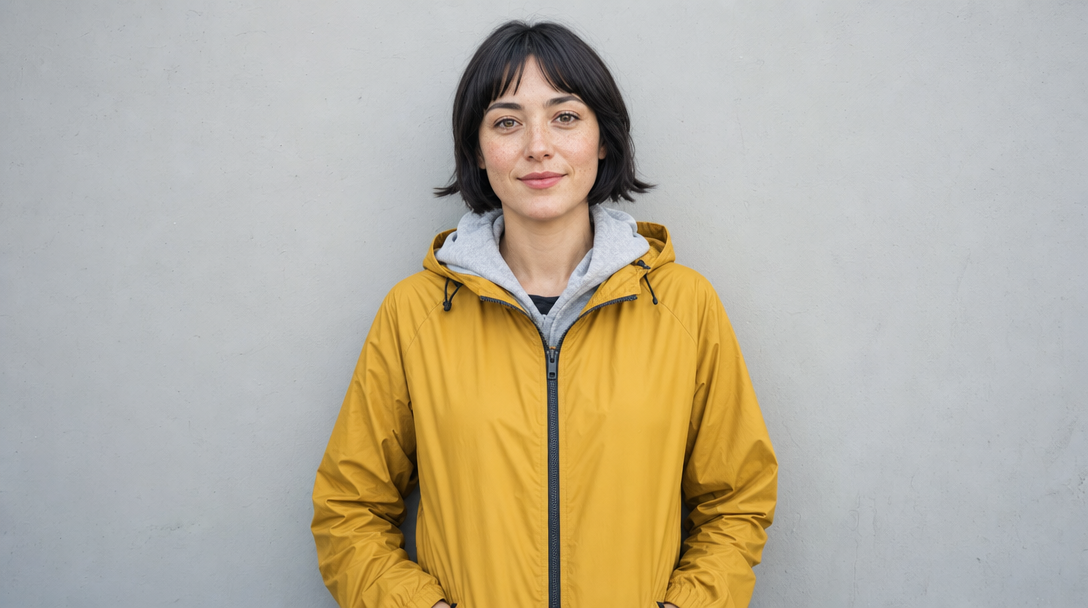
Generated using Seedream 5.0 Lite on fal, an AI model from ByteDance.
On minimax/h3-max/recast, the Step 4 video URL goes into the Video URL field, with the Seedream photo's URL in Reference Image URLs.
The video can be an MP4, MOV, WebM, M4V or GIF file of 5 to 30 seconds, as long as no individual shot exceeds 15 seconds.
One photo is enough for a single rider, since the recast endpoint matches reference photos to the main people on screen in left-to-right order by default.
You can leave the optional Prompt field empty for a one-person replacement, and Resolution already defaults to 1080P.
To do the replacement, I prompted fal Agent:
I'd like to replace the person in a video I generated, using the MiniMax H3 Max recast endpoint (minimax/h3-max/recast).
The source video is my six-second 1080P H3 Max clip.
The reference photo of the new person is here.
Please use that exact endpoint, and if my account can't call it, tell me without switching to another model.
The source video goes in video_url, and the photo is the only entry in reference_image_urls.
Keep the resolution at 1080P and leave the optional prompt field empty.
Before running anything, check that the video is between 5 and 30 seconds long and show me the price of one run.
Once I approve, run the job a single time and send back the output video URL along with the seed it used.
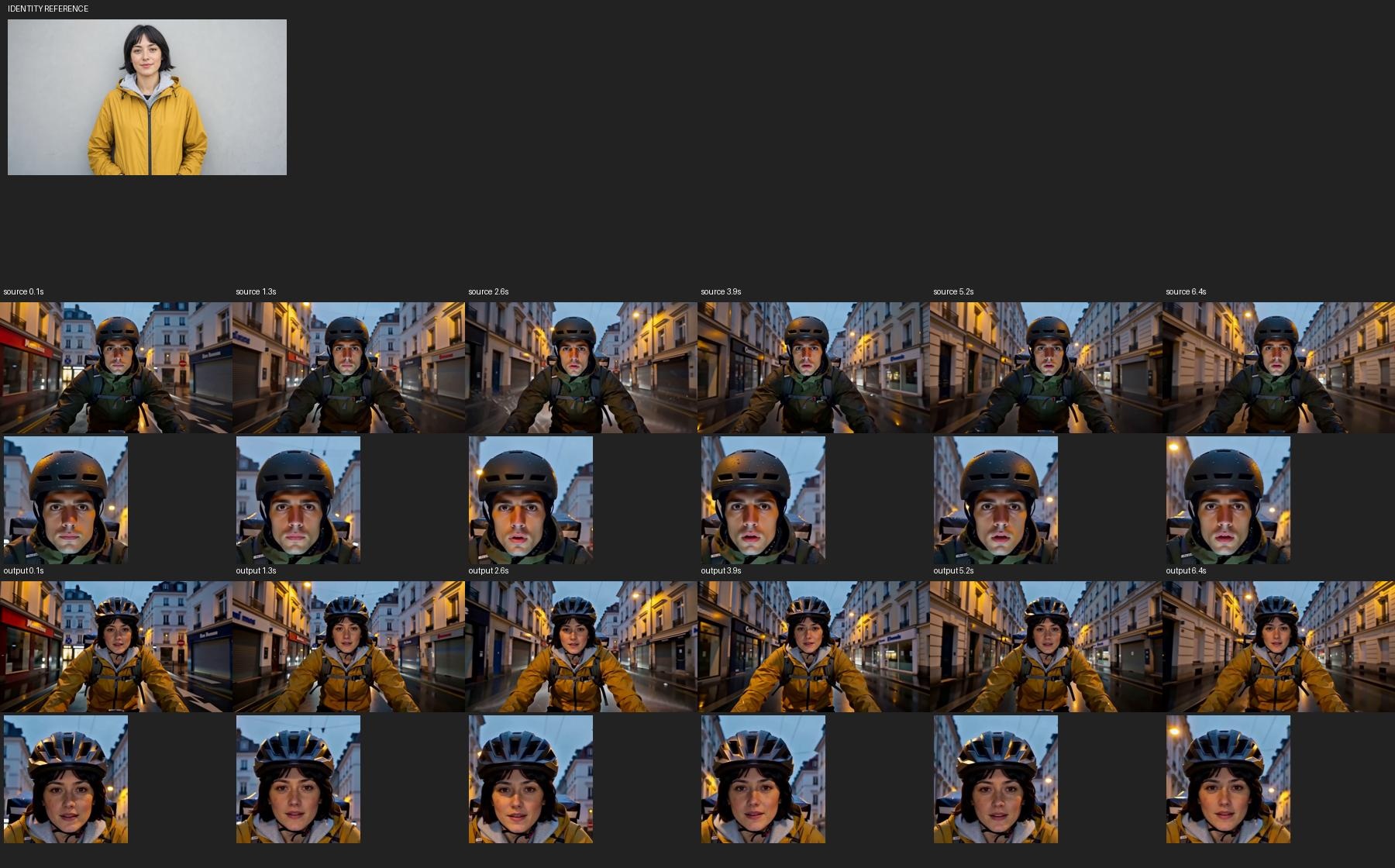
Step 6: Run the recast and compare it with the source
The MiniMax H3 Max recast endpoint returns the Step 4 video with the rider replaced by the person from the Seedream photo, plus the seed it used.
Click Run in the playground to start the job, which bills at $0.05 per unit.
The output schema says the recast keeps the sound from the source video, so any audio in the Step 4 clip carries into the replacement.
Generated using the MiniMax H3 Max recast endpoint on fal.
With the Seedream photo open beside the player, you want to judge the new rider's face against it at the start and the end of the clip.
Then play the replacement clip against the Step 4 clip to check the street and the soundtrack.
If the new identity drifts in part of the clip, you can rerun the recast endpoint with a new seed on the same two inputs.
The Prompt field also takes a short instruction about which person maps to which photo, or about any other detail you want kept or changed.
And then I thought… what if I asked fal Agent to run the original GIF from eyecannndy for me in its original format?
Here's the result:
Video generated by MiniMax H3 Max Recast on fal Agent.
fal Agent replaced the man with the courier woman while keeping the bakery, corridor, escalator, and original camera movement.
What settings does the MiniMax H3 Max recast endpoint accept?
The MiniMax H3 Max recast endpoint accepts five inputs, of which only the source video and the reference photos are required.
| Field | What the schema accepts | Setting in this guide |
|---|---|---|
video_url | A clip of 5 to 30 seconds in which no individual shot exceeds 15 seconds | The six-second H3 Max clip from Step 4 |
reference_image_urls | A photo for each person you add, matched left to right to the main people on screen by default | One Seedream 5.0 Lite photo |
prompt | An optional instruction mapping people to photos, or naming other details to keep or change | Left empty |
resolution | 768P or 1080P, with 1080P as the default | 1080P |
seed | An integer, picked at random when left empty | Random |
You want to hold on to the returned seed if you want to rerun a take you liked with the same inputs.
By default, a reference photo replaces its person in all the shots where that person appears, according to the schema.
How much does a character replacement video cost on fal?
At our standard rates, the inputs for a six-second 16:9 character replacement cost $0.995, made up of $0.96 for the 1080P source video and $0.035 for the reference photo.
The rates come from each model's playground page, with the H3 Max and recast endpoint pages checked on October 4, 2026.
| Step | Endpoint | Standard rate on fal | Cost in this guide |
|---|---|---|---|
| 2 and 3: clip analysis and both prompts | fal Agent | No charge for reasoning or video understanding at the time of writing | $0, on a plan from $50 per month |
| 4: source video, six seconds, 16:9 | minimax/h3-max/text-to-video | $0.16 per second at 1080P | $0.96 |
| 5: reference photo | fal-ai/bytedance/seedream/v5/lite/text-to-image | $0.035 per image | $0.035 |
| 6: replacement at 1080P | minimax/h3-max/recast | $0.05 per unit | $3.49 |
The H3 Max playground may show a temporary discount on the day you run it, but the figures here are our standard rates.
A new fal account has zero credits until you add at least $1.
fal Agent's Early Access plans start with Starter at $50 per month, which includes $50 in credits, and go up to Max at $1,000 per month before a custom Enterprise tier.
The free reasoning and video understanding apply for now, so check fal Agent's current pricing before you build a routine around them.
Can you run a character replacement through the fal API?
Yes, the replacement in Step 6 runs through our JavaScript client with the same two inputs you load in the playground, while Steps 2 and 3 stay in fal Agent.
Our client reads your fal API key from the FAL_KEY environment variable, so set that before the first call.
javascript
import { fal } from "@fal-ai/client";

const result = await fal.subscribe("minimax/h3-max/recast", {
  input: {
    video_url: "https://v3b.fal.media/files/b/0aac0919/5NYtHn5-5dxFlbH_U9oQW_video.mp4",
    reference_image_urls: ["https://v3b.fal.media/files/b/0aac0904/DYyrpDKza8aflsP6mMm0i_76qcS0F8.png"]
  },
  logs: true,
  onQueueUpdate: (update) => {
    if (update.status === "IN_PROGRESS") {
      update.logs.map((log) => log.message).forEach(console.log);
    }
  },
});

console.log(result.data);
console.log(result.requestId);
Recently Added
















Build your own character replacement video on fal
With the workflow above, you can take one technique from eyecannndy.com all the way to a 1080P replacement, using fal Agent and three models on a single fal account.
The Snorricam courier from this guide makes a good first run, since the rider's face stays in frame long enough to judge the replacement properly.
One fal account gives you pay-per-run API access to more than 1,000 generative media models on GPU infrastructure we manage.
Frequently asked questions
Can the MiniMax H3 Max recast endpoint replace more than one person?
Yes, the MiniMax H3 Max recast endpoint takes one reference photo for each new person and, by default, matches the photos to the main people on screen in left-to-right order.
When that order doesn't fit the scene, the optional Prompt field can state which person becomes which photo.
Does the replacement video keep the original sound?
Yes, the MiniMax H3 Max recast endpoint hands back the replacement clip with the audio from the source video, according to its output schema.
Here, that means whatever audio the Step 4 H3 Max clip carries.
How long can the source video for a character replacement be?
The MiniMax H3 Max recast endpoint accepts source videos of 5 to 30 seconds with no shot over 15 seconds.
The six-second clip in this guide stays within that range, overrun included.
![What is H3 Max Camera Controls (Multi-Angle) & How To Use It? [2026]](https://refinery.fal.media/url/https%3A%2F%2Fv3b.fal.media%2Ffiles%2Fb%2F0aabbf2b%2Fq8usbuG4heGtr4-AYyqfk.jpg/tr:w-1280,q-80/q8usbuG4heGtr4-AYyqfk.webp)
![How To Use Grok Imagine: Prompts & Workflows [2026]](https://refinery.fal.media/url/https%3A%2F%2Fv3b.fal.media%2Ffiles%2Fb%2F0aa3f6f2%2FeqWDXFmZkKpp4cIZtsH-V.jpg/tr:w-1280,q-80/eqWDXFmZkKpp4cIZtsH-V.webp)