![How To Use MiniMax H3 Max by fal [2026]](https://refinery.fal.media/url/https%3A%2F%2Fv3b.fal.media%2Ffiles%2Fb%2F0aa8d8df%2FzGardl5KrzR208BCfi318.jpg/tr:w-1920,q-80/zGardl5KrzR208BCfi318.webp)
MiniMax H3 Max is the video model fal post-trained itself, and it answers a prompt differently enough from the base model to need its own guide.
I ran seven briefs across all three endpoints for this guide, and each section below says what its brief was testing and which settings mattered.
TL;DR
We at fal built MiniMax H3 Max by post-training the open-weight MiniMax H3 base model for adherence and aesthetics, with audio predicted alongside the frames.
Clips run from 5 to 15 seconds at either 480p or 768p.
Three endpoints cover it: text-to-video, image-to-video, which doubles as first-to-last keyframe generation once you add an end frame, and reference-to-video, which conditions a generation on up to 12 files you supply.
The MiniMax H3 Max tool page hands out five free generations every day with no account, and past that the model is metered on fal at $0.08 a second at 768p.
What is MiniMax H3 Max, and who built it?
MiniMax H3 Max is a video generation model that we at fal post-trained on top of the open-weight MiniMax H3 base model, released jointly with MiniMax and hosted on fal.
Output is 480p or 768p in clips of 5 to 15 seconds, with synchronized audio generated alongside the picture.
The base model underneath uses a unified multimodal context.
A clip and its soundtrack therefore arrive from one pass, and that behavior carried through post-training unchanged.
What did fal change during post-training?
fal's research team put a large volume of new data through post-training, aimed at prompt adherence and aesthetics.
A significant share of the post-training compute went into verifiable reinforcement learning tasks, run through fal's own RL framework against real generation workloads and human preference data.
You notice the adherence work first, in two ways:
- Beats play back in the order you list them.
- Text you ask for on screen comes back legible and correctly set.
How was MiniMax H3 Max designed around fal's inference engine?
MiniMax H3 Max was architected against the inference engine fal runs in-house, after four years of that team's work on serving diffusion models.
Most speed work happens after the weights exist, when the serving path has to accept whatever it is handed.
Here the two were designed together, and quality was fixed before speed got pushed as far as it would go.
In practice, a five-second 768p clip can finish in under three seconds.
Where can you access MiniMax H3 Max?
MiniMax H3 Max runs on fal, the company that post-trained it, billed by the second with no plan attached and no minimum commitment.
There are three endpoints:
minimax/h3-max/text-to-video requires only a prompt, with aspect ratio as the one field unique to it.
minimax/h3-max/image-to-video animates from an image_url, treating that still as frame one.
Supplying end_image_url as well turns the same call into first-to-last keyframe generation.
Because image_url is optional there, a text-only request to the image endpoint gets handled as text-to-video at 16:9.
minimax/h3-max/reference-to-video takes reference_image_urls, reference_video_urls and reference_audio_urls, and the prompt points at each file by modality and position.
All three endpoints share prompt, duration, resolution, prompt_expansion_mode, seed, enable_safety_checker and sync_mode.
A text-to-video request through fal's JavaScript client looks like this:
import { fal } from "@fal-ai/client";

const result = await fal.subscribe("minimax/h3-max/text-to-video", {
  input: {
    prompt: "A white kitten chases a butterfly across a sunlit garden. Gentle camera tracking, natural movement, soft afternoon light filtering through the leaves.",
    prompt_expansion_mode: "balanced",
  },
  logs: true,
  onQueueUpdate: (update) => {
    if (update.status === "IN_PROGRESS") {
      update.logs.map((log) => log.message).forEach(console.log);
    }
  },
});

console.log(result.data);
console.log(result.requestId);
How do you prompt MiniMax H3 Max for text-to-video?
Text-to-video runs on a prompt alone, with aspect ratio, duration and resolution as the only other fields you will reach for.
Precision buys more than length does, because a specific noun and a specific verb survive to the render while a pile of adjectives hands those same decisions back to the model.
Your wording is a brief for the expansion pass as well as the generator, given that the prompt gets rewritten on its way in unless you turn that off.
The seven prompts below all run at 768p as single requests with no post work, and the sound came back inside the file:
A single-line prompt
The shortest useful prompt is one sentence of picture and one of sound, enough for a single subject doing one physical thing.
Prompt, duration: 5, resolution: 768P, aspect ratio: 9:16: Vertical phone footage of a creator tearing open a matte black mystery box on a white duvet, ring light caught in the plastic, one hand shaking the packing paper out onto the bed before pulling a pair of sunglasses free and holding them up to the lens. Handheld phone-camera look, slightly overexposed, focus hunting once and catching. Sound: tape ripping off cardboard, paper crumpling, a bracelet knocking against the box, close room tone from a small bedroom.
Generated using MiniMax H3 Max on fal.
Tape peeling off cardboard gives the audio pass a hard source to render.
An abstract mood cue leaves that same slot empty.
Vertical is set on the request and not in the prompt, and 9:16 is one of six ratios text-to-video accepts.
A prompt with timed beats
Timestamped ranges suit a clip where one moment has to arrive on a mark.
Prompt, duration: 10, resolution: 768P, aspect ratio: 16:9: A rooftop chase from a spy thriller, shot on long lenses across Istanbul at dusk. 0.0 to 3.5s: a man in a torn linen shirt sprints over clay tiles and clears the gap between two buildings, satellite dishes and washing lines whipping past him. 3.5 to 7.0s: a wide drone beat as two pursuers fan out along the roofline behind him, minarets and the strait going gold beyond. 7.0 to 10.0s: he crashes through hanging laundry, drops onto a market awning and rolls off it into the crowd below. Handheld on the sprint, locked and wide on the drone beat, 35mm grain with heavy backlight. Sound: boots on clay tile, corrugated metal buckling, canvas tearing, gulls and a distant call to prayer carrying over all of it, no music.
Generated using MiniMax H3 Max on fal.
➡️ Note: make the beats add up to the duration you set.
Duration is a separate field, and a brief that runs past it gives the model nowhere to put the last beat.
How do you direct sound and dialogue in MiniMax H3 Max?
MiniMax H3 Max predicts audio alongside the frames, which puts sound direction in the same brief as the picture.
Naming the effects, the room tone and the moment a cue lands is part of the shot, and the mix arrives already lined up.
Dialogue goes inside double quotes.
One pass produces the spoken line, its lip sync, and the acoustics of the room around it.
Prompt, duration: 8, resolution: 768P, aspect ratio: 16:9: A closing argument in a wood-panelled courtroom. A defense attorney in her fifties stops pacing, puts one hand flat on the jury rail, looks straight down the lens and says, quiet and unhurried: "My client was three hundred miles away that night. Ask the man who drove him." She holds the look a beat, then turns back toward the bench. Hard shafts of afternoon light through high windows, dust hanging in them, 40mm, shallow focus, almost no camera movement. Sound: her voice close and dry in a room full of people, one chair creaking, a pen moving on paper, the gallery going quiet underneath the line. No music, no on-screen text.
Generated using MiniMax H3 Max on fal.
💡 Two habits to keep on any line of dialogue.
You want to give the delivery a direction, since "quiet and unhurried" changes the read as much as the words themselves do.
Then close the prompt with a note against on-screen text. It costs nothing if the model was never going to add any.
falMODEL APIs
The fastest, cheapest and most reliable way to run genAI models. 1 API, 100s of models
How do you hold one character across several shots?
MiniMax H3 Max holds one character across cuts inside a single generation.
A three-shot sequence needs one call, not three stitched together. Repetition does it.
This is why you want to describe the character the same way in every beat, down to the coat, because a changed adjective between beats is how you end up with two different people.
Prompt, duration: 10, resolution: 768P, aspect ratio: 21:9: Three shots of the same model for a fashion campaign, a woman with a short black bob in a scarlet trench coat belted at the waist. 0.0 to 3.5s: she walks toward camera through a neon-lit underpass, pink and cyan reflections running along the wet floor beside her. CUT. 3.5 to 7.0s: the same woman in the same scarlet trench coat on a rooftop helipad at dusk, the coat pulling hard in the wind, city haze behind her. CUT. 7.0 to 10.0s: the same woman in the same scarlet trench coat crossing an empty marble lobby, heels loud on the stone, ceiling light panels sliding over her as she goes. Anamorphic wide, high fashion film grade, one consistent look from beat to beat. Sound: footsteps changing surface on every cut, wind across the rooftop, one low pulse under all three beats and nothing else.
Generated using MiniMax H3 Max on fal.
➡️ Note: 21:9 is available on text-to-video only. Image-to-video takes its aspect ratio from the still you pass in.
How do you animate a still image with MiniMax H3 Max?
Image-to-video takes one still as the opening frame and generates the clip forward from it, with the output aspect ratio following that image.
The prompt carries an extra instruction on this endpoint.
Along with the motion you want, name the parts of the still to leave untouched.
A clip that holds your framing and your lighting is worth more than one that drifts off both.
Animating a product still
Product work wants one physical event inside a frame that does not move, something an editor can cut around later.
Image prompt, generated with Nano Banana 2 Lite: A hero food photograph of a double smash burger on a slate board, two seared patties with molten orange cheese running over the edges, toasted brioche crown resting on top and slightly tilted, pickles and burnt-edge onions visible at the seam, hard side light from the left with a warm fill, deep shadow background, razor-sharp on the crust of the patty, high-end menu photography, no logos, no text.
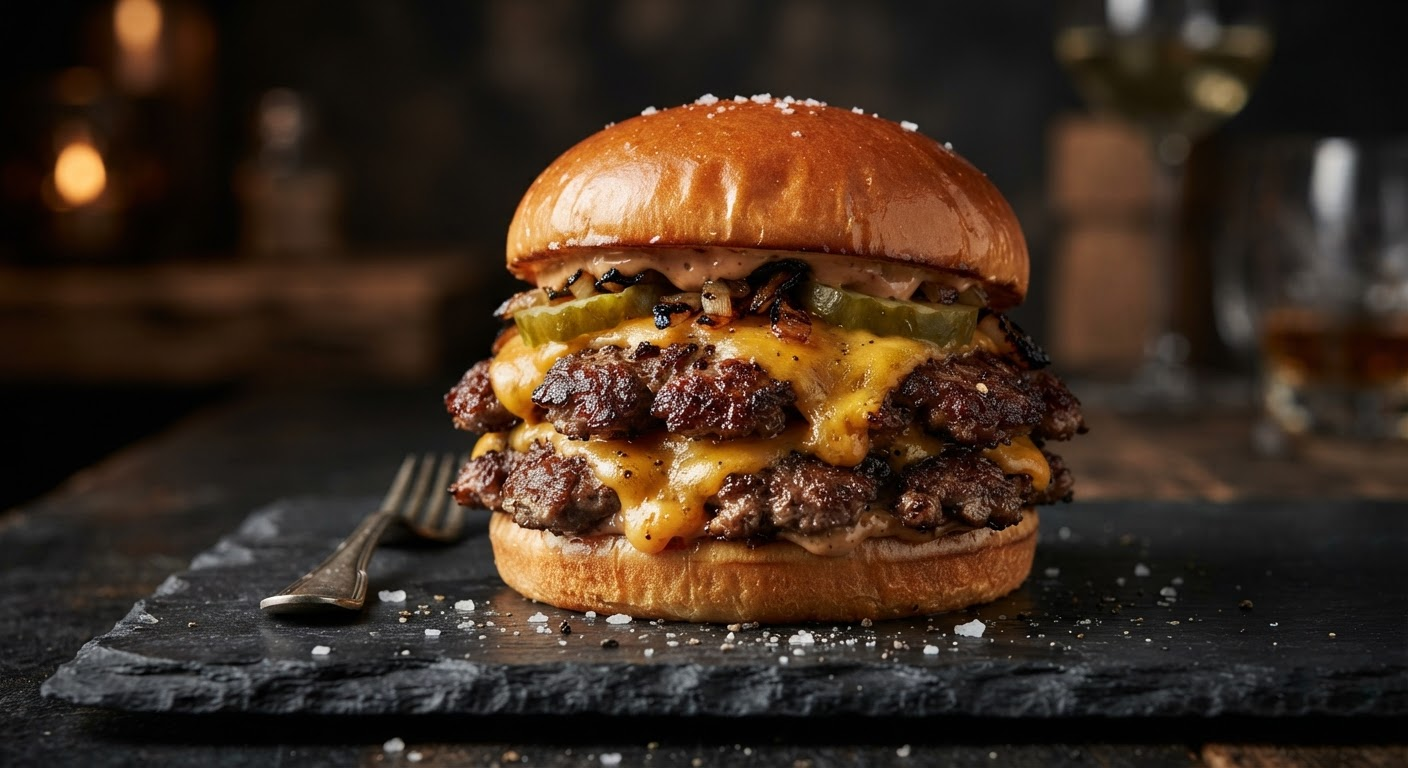
Image generated by Nano Banana 2 Lite on fal, an AI model from Google.
Video prompt, duration: 5, resolution: 768P: A gloved hand comes in from the right, presses the brioche crown down onto the stack and lifts it away again, dragging a long thread of melted cheese up with it before the thread snaps back onto the patty. Hold the slate board, the hard side light and the framing exactly as they are in the still, and keep the camera locked off throughout. Sound: the soft compression of the bun, cheese pulling, a faint sizzle off the patty, no music.
Generated using MiniMax H3 Max on fal.
💡 Product frames are also where 480P holds up best. A locked-off camera over a dark background has almost no moving detail to lose.
Animating a portrait
A portrait needs the opposite of a locked frame.
A slight camera move keeps a person from reading as a photograph with motion painted onto it.
Image prompt, generated with Nano Banana 2 Lite: A photorealistic close portrait of a firefighter in a burning stairwell, breathing mask pushed up onto her helmet, soot streaked across her cheekbones, high-visibility strips on her coat catching the light, orange glow blooming from the landing above her and smoke layered across the top of frame, 85mm, shallow depth of field, cinematic film still, no text.
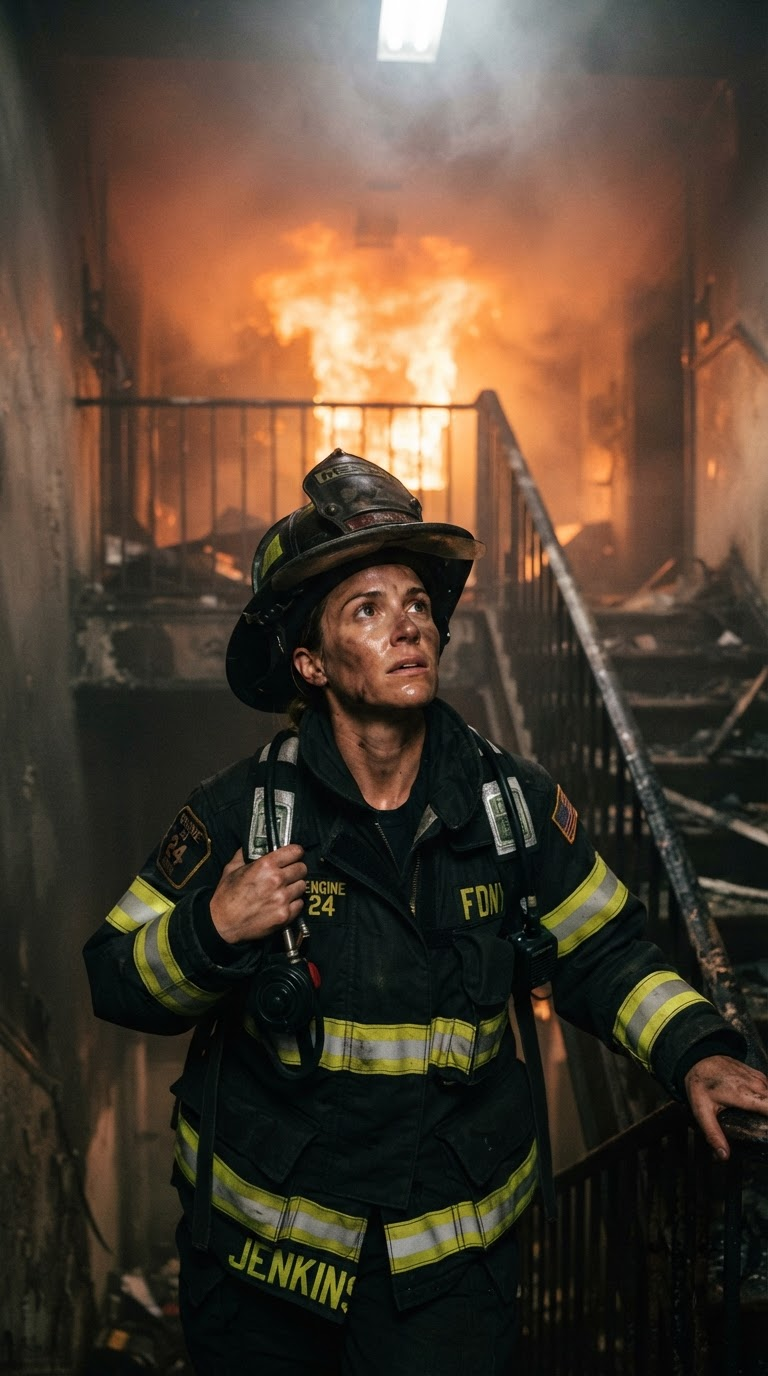
Image generated by Nano Banana 2 Lite on fal, an AI model from Google.
Video prompt, duration: 8, resolution: 768P: She pulls the breathing mask down over her face and seals it, then looks up toward the landing as embers drift down through the frame and the glow above her flares brighter across her visor. Push the camera in very slightly across the clip, and keep her face, the coat strips and the stairwell behind her exactly as they are in the still. Sound: the hiss and click of the regulator, her breathing going close and filtered inside the mask, timber cracking above, radio traffic buried under it, no music.
Generated using MiniMax H3 Max on fal.
How do you use reference to video with MiniMax H3 Max?
Reference to video conditions a generation on files you supply, and the prompt points at each one by modality and position: Image 1, Image 2, Video 1, Audio 1.
minimax/h3-max/reference-to-video accepts three lists, reference_image_urls, reference_video_urls and reference_audio_urls, adding up to 12 files across all three.
Reference clips run 2 to 15 seconds each, with combined length capped at 15 seconds, and the same limits apply to reference audio.
Audio cannot travel on its own, so a request with reference audio needs at least one reference image or video alongside it.
This is the endpoint for holding a subject across separate calls, which is the part the single-generation trick above cannot do.
Reference image, generated with Nano Banana 2 Lite: A studio product photograph of a pair of red high-top basketball sneakers with a cream gum sole and black laces, set side by side on polished concrete, shot square on at ankle height, hard key light from the left with a soft fill, deep shadow behind them, razor-sharp on the stitching and the eyelets, high-end footwear campaign photography, no logos, no text.
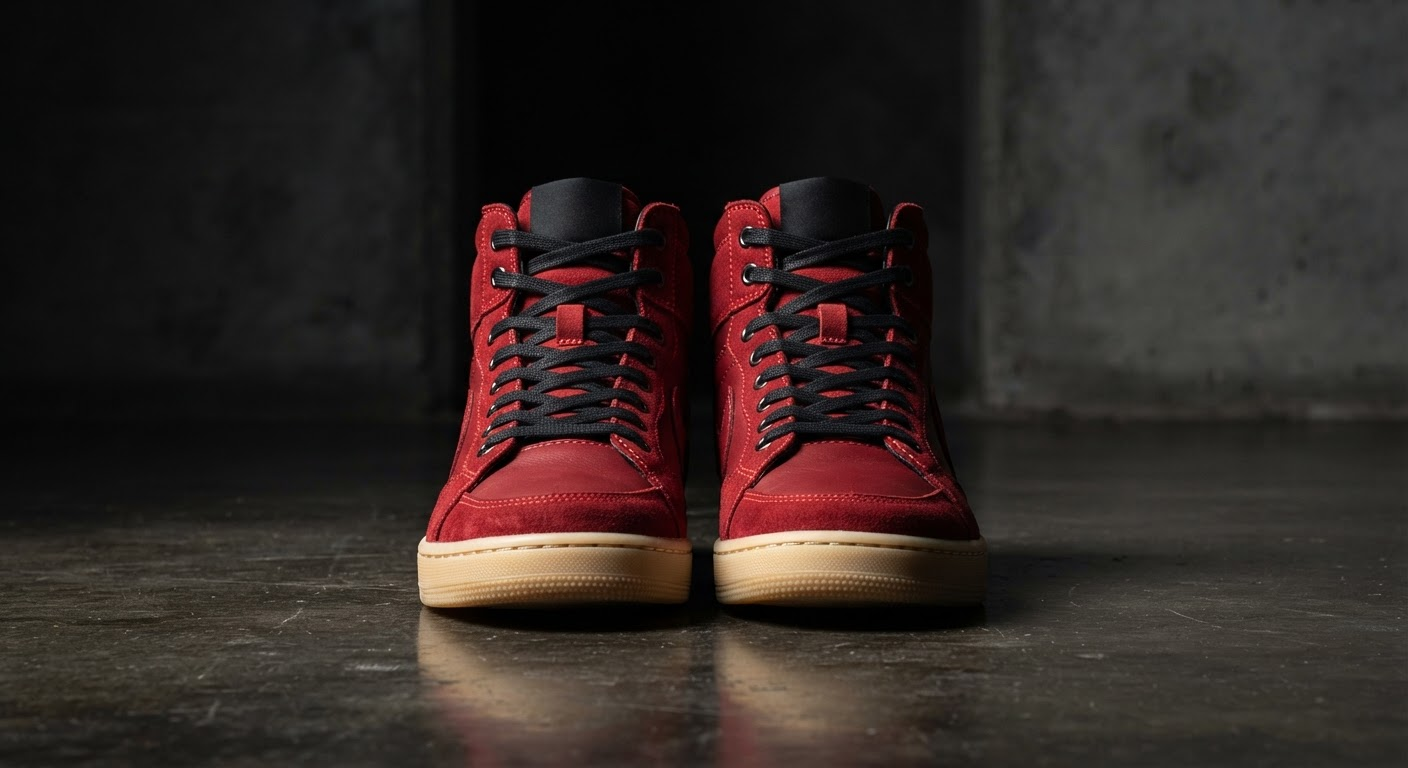
Image generated by Nano Banana 2 Lite on fal, an AI model from Google.
Reference image, generated with Nano Banana 2 Lite: A photorealistic portrait of a streetball player in his early twenties on an outdoor court at dusk, in an unmarked navy mesh jersey with a white number 7 and a thin gold chain, close-cropped hair, chain-link fence and floodlights behind him, warm low sun across one side of his face, 85mm, shallow depth of field, cinematic documentary still, no text.
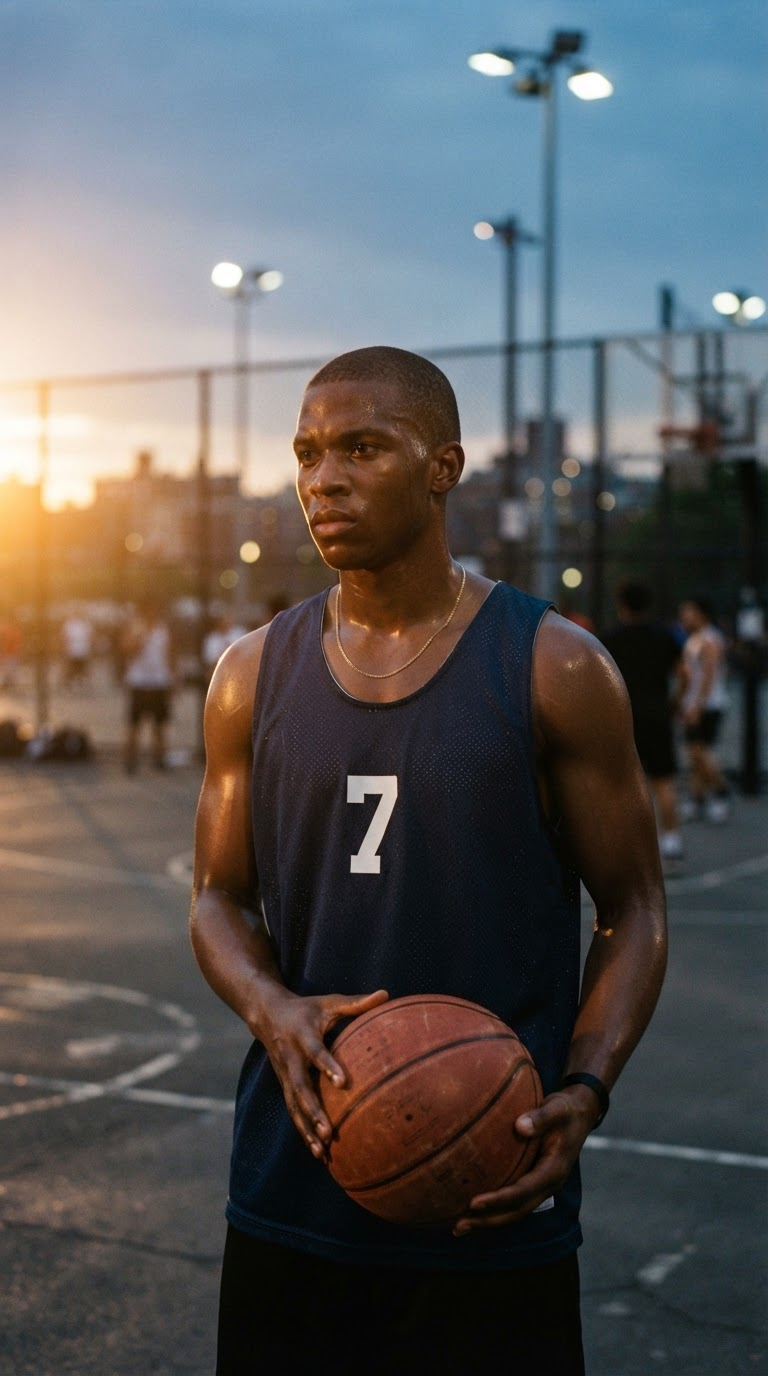
Image generated by Nano Banana 2 Lite on fal, an AI model from Google.
Prompt, duration: 5, resolution: 768P, aspect ratio: 16:9, two entries in reference_image_urls: Image 1 is the shoe. Image 2 is the player. Keep both consistent with their reference images. He finishes lacing the red high-tops courtside, stands, and takes off up the court, the camera tracking low alongside him until he goes into a crossover at the free-throw line. Outdoor court at dusk under floodlights, chain-link fence behind, warm haze in the air. Sound: the ball on cracked asphalt, sneaker squeak and grit underfoot, the fence rattling as he passes, a couple of voices off court, no music.
Generated using MiniMax H3 Max on fal.
What settings give the best results with MiniMax H3 Max?
768P, a duration in the 5 to 10 second band, and prompt expansion left on balanced is the setup I would start from.
Resolution: two values, 480P and 768P, with 768P as the default and the tier the post-training was aimed at.
At 16:9 that is 1344 by 768 at 24 fps. For 2K output, I'd recommend you use standard MiniMax H3.
Duration: 5 seconds is the default and 15 is the ceiling.
Render time tracks output length closely, so a full 15 seconds of video comes back in roughly the same 15 seconds.
Aspect ratio: text-to-video accepts 21:9, 16:9, 4:3, 1:1, 3:4 and 9:16, defaulting to 16:9.
Reference-to-video takes those same six and adds adaptive, which is its default.
Image-to-video inherits the ratio of the image you pass.
Prompt expansion: prompt_expansion_mode controls how much rewriting happens before generation.
Balanced is the default, and the rewrite it runs adds roughly a second, so wall-clock time stays close to render time.
Quality is worth avoiding by default.
Its rewrite alone can run to 30 seconds, spending the model's whole speed advantage before a frame exists.
Seed: omitting seed gets you a random one.
Passing a seed back gives you a fixed starting point when you want to compare two versions of one brief.
Expansion rewrites the prompt before generation, so a repeated seed is a reference point and not a guarantee of an identical frame.
All three endpoints return a timings object, where timings.inference reports how long the backend spent denoising.
How much does MiniMax H3 Max cost on fal?
Billing is per second of output, at $0.05 a second for 480p and $0.08 a second for 768p.
A finished minute at 768p therefore lands at $4.80, with no subscription and no minimum spend.
| Clip length | 480p | 768p |
|---|---|---|
| 5 seconds | $0.25 | $0.40 |
| 10 seconds | $0.50 | $0.80 |
| 15 seconds | $0.75 | $1.20 |
No endpoint lists an audio surcharge on generated sound.
The seven clips in this guide are 51 seconds of 768p output in total, which is $4.08 before the four source images.
How much do reference inputs cost on MiniMax H3 Max?
Reference inputs bill separately from the video, measured in tokens pooled across every image, clip and audio file in one request.
The first 4,096 tokens are free, and beyond that each 1,000 tokens costs $0.02.
An image's token count is its width times its height, divided by 1024.
A 1024 by 1024 image is 1,024 tokens, so the first four of those are free and each one after costs $0.02.
A 2048 by 2048 image is 4,096 tokens on its own, which uses the whole allowance, and each one after that costs $0.08.
Reference video is priced on its length and on the resolution you are generating at, not on the resolution of the clip you upload, so a 480p and a 768p reference of the same length cost the same.
That works out to 2,886 tokens per second of reference when generating at 480p, and 7,459 tokens per second at 768p.
| Generating at | Reference length | Tokens | Billable after allowance | Cost |
|---|---|---|---|---|
| 480p | 5s | 14,430 | 10,334 | $0.21 |
| 480p | 10s | 28,860 | 24,764 | $0.50 |
| 480p | 15s | 43,290 | 39,194 | $0.78 |
| 768p | 5s | 37,296 | 33,200 | $0.66 |
| 768p | 10s | 74,592 | 70,496 | $1.41 |
| 768p | 15s | 111,888 | 107,792 | $2.16 |
💡 Here's a practical loop: draft at 480P and 5 seconds while you are still deciding what the shot is, then move to 768P and your real duration once the brief has stopped changing.
How is MiniMax H3 Max different from standard MiniMax H3?
MiniMax H3 Max is the fast, adherence-tuned model fal post-trained, and standard MiniMax H3 is the frontier base model with the wider feature set.
MiniMax H3 Max generates 5 to 15 seconds at 480p or 768p, returns five seconds of 768p in under three seconds, and now covers all three routes: text-to-video, image-to-video and reference-to-video.
Standard MiniMax H3 reaches 2K and adds instruction-based video editing, which MiniMax H3 Max does not have.
Our engineering team at fal reports standard MiniMax H3 running roughly 15 times quicker on fal's own stack than on MiniMax's inference.
I would:
- Pick MiniMax H3 Max when turnaround and hitting the brief are what the job is about.
- Pick standard MiniMax H3 when the deliverable has to be 2K, or when instruction-based editing is part of the workflow.
➡️ Reference conditioning now exists on both, so it is no longer a reason to pick one over the other.
How do you use MiniMax H3 Max for free?
Five MiniMax H3 Max generations a day are free on the model's own tool page, with no account needed.
Every free run comes back in about three seconds, carrying five seconds of 768p picture with its audio already in place.
The count resets on a rolling 24-hour window.
Signing in to fal adds five more a day through the Sandbox, and those can run out to 15 seconds.
The free tool takes an image as well as a prompt.
Image-to-video is available there without an API key.
Anything past 5 seconds needs the signed-in Sandbox or the API, which is where the 8 and 10 second prompts below were run.
Recently Added





Start creating with MiniMax H3 Max on fal
fal offers MiniMax H3 Max at three endpoints behind a single API key, metered by the second, with no capacity to reserve.
One integration covers writing a shot from words, animating a still you already have, running a move between two frames, packing a short sequence into a single 10-second call, and conditioning a generation on references you supply.
The tool page gives out five free generations a day without an account, and the playground will run either endpoint in a browser tab before any code gets written.
MiniMax H3 Max FAQs
Who made MiniMax H3 Max?
fal post-trained MiniMax H3 Max on top of the open-weight MiniMax H3 base model, and MiniMax lists the model as a joint release with fal.
fal did the post-training and the inference work behind it, using its own RL framework, and hosts the model.
How long can a MiniMax H3 Max clip be?
Anywhere from 5 to 15 seconds in a single generation, with 5 seconds as the default.
fal states 24 fps for 768p output at 16:9.
The free no-login tool is fixed at 5 seconds, and signing in to fal raises that to 15 in the Sandbox.
What resolutions does MiniMax H3 Max support?
MiniMax H3 Max generates at 480p and 768p, with 768p as the default and the tier the post-training was aimed at. At 16:9, 768p output is 1344 by 768.
Does MiniMax H3 Max generate audio?
Yes, generated alongside the frames in the same pass, at no extra charge. Effects, room tone, ambience and dialogue all come from the same prompt.
Describing the sound is part of writing the shot.
How fast is MiniMax H3 Max?
Five seconds of 768p video comes back in under three seconds.
The render finishes before the clip would finish playing.
fal puts that at roughly 35 times the throughput of MiniMax's own hosted H3 endpoint, and around 15 times the pace of the quality tier fal considers comparable.
All three endpoints return a timings.inference field reporting backend denoise time.
Can MiniMax H3 Max keep a character consistent across shots?
Yes, inside a single generation.
Across two or three beats in one prompt, the face, wardrobe and grade hold through the cuts.
The hold depends on describing the person identically in each beat.
Carrying an identity across separate calls is what the reference-to-video endpoint is for, and that route is now live.
How many reference files can MiniMax H3 Max take?
Up to 12 across all three lists combined, covering reference images, reference video clips and reference audio.
Reference clips and audio run 2 to 15 seconds each, and the combined length of each list is capped at 15 seconds.
Reference audio cannot be the only input, so it needs at least one reference image or video with it.
How much does MiniMax H3 Max cost?
$0.05 a second at 480p and $0.08 a second at 768p, billed per second of output with no subscription.
Reference to video adds a separate charge for the files you condition on, with the first 4,096 reference tokens free.
Five generations a day are free on the tool page without an account, and five more a day in the Sandbox once you sign in.
Can I use MiniMax H3 Max clips commercially?
Yes. Anything you generate through it may be used in commercial projects, paid campaigns and client work included.
fal's terms of service carry the licensing detail and anything specific to a given model.

![How To Use Gemini Omni Flash 1.1: Prompts & Workflows [2026]](https://refinery.fal.media/url/https%3A%2F%2Fv3b.fal.media%2Ffiles%2Fb%2F0aa980d2%2FCQSjgFTnyKN_hFvYMZ4d1.jpg/tr:w-1280,q-80/CQSjgFTnyKN_hFvYMZ4d1.webp)
![10 Best Text-to-Speech APIs in 2026 [Reviewed]](https://refinery.fal.media/url/https%3A%2F%2Fv3b.fal.media%2Ffiles%2Fb%2F0a9c366c%2FVrh-xdtEWo_Kt9Hf9xYeW_1780097087241.jpeg/tr:w-1280,q-80/Vrh-xdtEWo_Kt9Hf9xYeW_1780097087241.webp)