![How To Create a Multi-Angle Video With Seedance 2.5? [2026]](https://refinery.fal.media/url/https%3A%2F%2Fv3b.fal.media%2Ffiles%2Fb%2F0aac4654%2Fl_XpD5ZyeaxkHTMN-k3Na.jpg/tr:w-1920,q-80/l_XpD5ZyeaxkHTMN-k3Na.webp)
With Seedance 2.5, you can take one locked-off clip and create the same performance from new camera positions, so a single phone take can become a cut that moves between close-ups and wides.
This guide follows one build on fal from scratch: a 20-second talking-to-camera clip re-shot as 13 angles, through fal Agent, although you can do it by hand as well.
TL;DR
Seedance 2.5 re-shoots a clip on bytedance/seedance-2.5/reference-to-video with task set to editing, driven by a prompt that pins down the timestamps and assigns a camera position to every time range.
Measure the timestamps on the take itself, using frames for the physical actions and ElevenLabs Scribe v2 word timings for the speech.
Run the edit as a 480p test first, and once it holds up against the take, run the same prompt and inputs at 1080p, or finish the 480p run in draft mode through bytedance/seedance-2.5/draft/complete.
fal Agent can plan and run the whole chain from one brief, pausing at approval checkpoints you set, though the stages also work by hand in our playground.
On fal, our 20.08-second edit comes to $5.18 as a 480p test and about $27.40 at 1080p.
What is a multi-angle video in Seedance 2.5?
A multi-angle video in Seedance 2.5 is an edit of an existing clip where the performance and its soundtrack stay fixed while the camera position and lens change from one time range to the next.
You get it from the reference-to-video endpoint in editing mode, which reworks the video you pass in and switches aspect ratio and duration to auto on its own.
Reference mode is the endpoint's default and treats the same media as guidance for a new clip, so the task field has to be switched to editing before anything runs.
Our prompt names the original tripod the A-camera, meaning the one lens the performance was aimed at.
New positions are described in relation to it, giving his eyeline a fixed target in shots from angles he never faced.
What do you need to make a multi-angle video with Seedance 2.5?
A multi-angle video with Seedance 2.5 needs one continuous locked-off take with its own audio, plus a fal account with credits.
The take also has to fit the limits of the video_urls field on the reference-to-video endpoint.
| Limit | Value |
|---|---|
| Formats | MP4 or MOV |
| Length per video | 1.8 to 30.2 seconds |
| File size | Up to 200 MB |
| Frame size | 300 to 6,000 pixels per side |
| Aspect ratio | 0.4 to 2.5 |
| Frame rate | 24 to 60 FPS |
Output on the same endpoint runs from 4 to 30 seconds, so you want to aim for a take inside that window.
Keep the camera locked and the take in one continuous shot, because the prompt measures all of its timestamps against that single clock.
As the talking windows come from the soundtrack, the take needs audio of its own, recorded or generated.
You want to give the performer a few props, since the coverage plan changes angle on physical actions and any object he picks up or throws becomes a natural place to cut.
Our performer has an espresso cup and a green apple to work through between stretches of typing.
💡 The agent route also needs fal Agent access, currently in Early Access through a fal Agent Pro or fal Agent Max credit tier or an enterprise agreement.
How do you create a multi-angle video with Seedance 2.5 in fal Agent?
In fal Agent, you describe the scene and the coverage you want in one message, then approve the plan card the agent proposes.
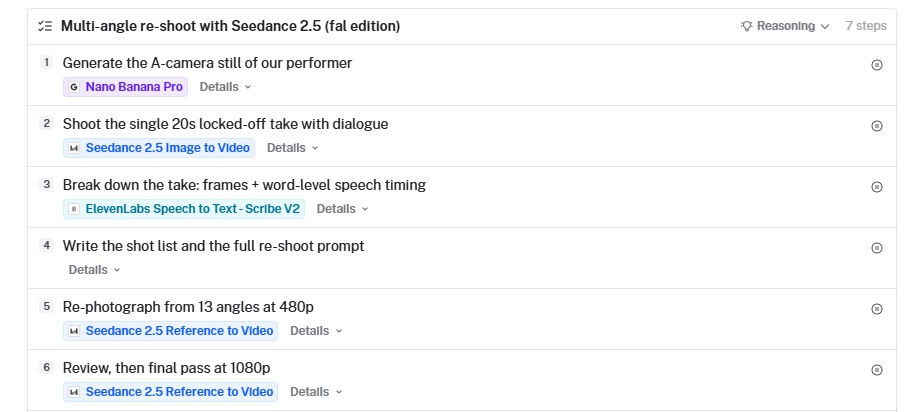
Two approval checkpoints hold the chain at the still and at the 480p test, so the longer and pricier runs only start after you've seen what came before them.
Step 1: Brief fal Agent on the scene and the coverage
A single message is enough for the brief, as long as it names the performer, his wardrobe, the location and every prop he'll touch, with a count for each.
Write the actions as a timed script with spoken lines in double quotes, then close the brief with the number of camera positions you want and a request to pause after the still and again after the 480p test.
Here's a brief written for our courtyard scene.
Plan a multi-angle re-shoot with Seedance 2.5, starting from a generated take.

Performer: mid-twenties man, short dark curls, thin gold-rimmed round glasses, rust-orange ribbed beanie, cream corduroy overshirt worn open on a white t-shirt, sitting in a woven rattan chair.

Set: a Mediterranean bakery courtyard. He's at a small round table topped with terracotta tiles. Behind him are lime-washed walls, an arched doorway with a faded teal door, an olive tree in a pot and a hand-painted panel of lemon tiles. On the table: one open silver laptop, one blue espresso cup on its saucer, one green apple.

Take: 20 seconds from a locked-off tripod at seated eye level, one continuous shot with dialogue.
0-2s: he gestures and says "Okay, so this morning did not go to plan."
2-5s: he types while saying "I opened my inbox and just... closed it again."
5-9s: he reaches for the cup and sips, silent.
9-12s: he sets it down, says "Honestly, though," picks up the apple and says "This courtyard fixes everything."
12-14s: he tosses the apple about a meter up and catches it.
14-16s: he bites the apple and chews.
16-18s: he shrugs and says "Mm, worth it."
18-20s: he lowers his hands and stays still.

Coverage: measure the take with frames and word-level speech timings, then re-shoot it from 13 camera positions in one reference-to-video edit, cutting on the actions. His eyes stay on the original camera in every new angle, and only the last shot returns to that position.

Run the edit at 480p first, then run it again at 1080p once I approve it. Add approval checkpoints after the still and after the 480p test.
Our run came back as a seven-step plan card covering an A-camera still, the source take, a timing breakdown, the shot list and prompt, a 480p pass, a 1080p pass and a write-up.
A model chip on every step shows what runs where and lets you pin a different model before approving anything.
Beyond pinning models, you can rename, reorder, add or remove steps before the plan runs.
Any step carrying an approval checkpoint holds the whole chain until you sign it off.
Step 2: Approve the A-camera still
First on the plan comes the reference frame for the whole build, a still that locks in the performer's look and where the A-camera stands.
fal Agent sent it to Nano Banana Pro at 16:9 and 2K, with a prompt written as a description of a single video frame.
Locked-off wide video frame from seated eye level, directly in front of a young man in his mid-twenties sitting alone at a small round terracotta-tiled bistro table in a sunlit Mediterranean bakery courtyard, framed from mid-thigh up, looking straight into the lens mid-sentence with relaxed open hands. Short curly dark hair, round thin gold wire glasses, rust-orange ribbed knit beanie, cream corduroy overshirt open over a white t-shirt, olive chinos. Woven rattan cafe chair. On the table: open silver laptop angled toward him, small speckled blue ceramic espresso cup on a saucer, one shiny green apple. Behind him: whitewashed lime-plaster wall, arched wooden doorway with faded teal paint, potted olive tree, stacked terracotta pots, a small hand-painted tile panel of lemons. Soft bright overcast daylight, no hard shadows, warm natural grade, realistic phone-video look, 16:9, no text, no people in background.
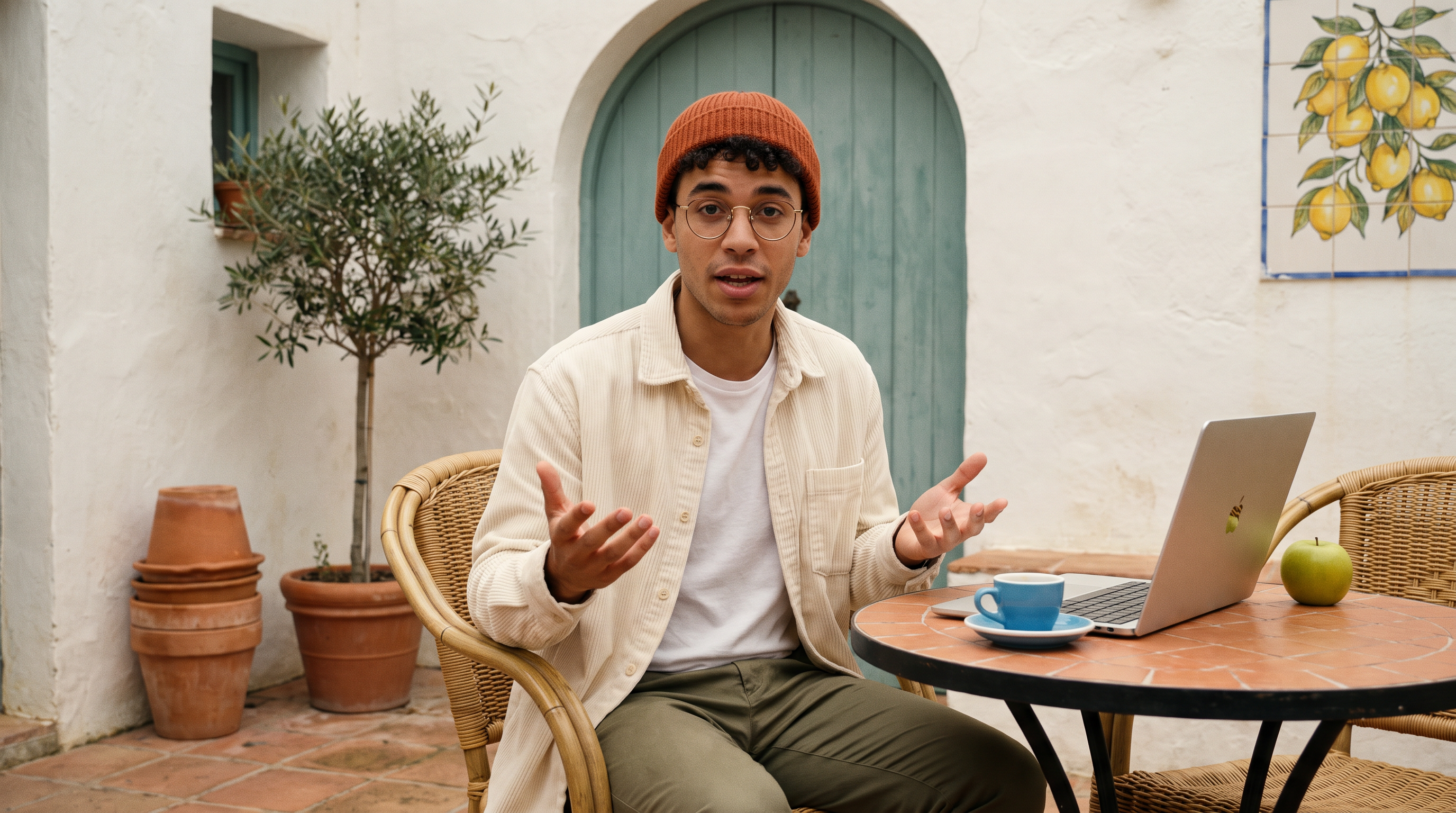
Generated using Nano Banana Pro on fal, an AI model from Google.
Putting a number on each prop, as in "one shiny green apple," hands later stages a count to hold on to, and the re-shoot prompt repeats those counts.
Everything he'll handle belongs on the table in front of him, within reach of his chair.
Step 3: Approve the source take
With the still approved, fal Agent animated it into a 20-second, 1080p source take on bytedance/seedance-2.5/image-to-video.
The performance went in as a timed script, one uncut shot from a static camera with the dialogue generated in the same pass.
Static locked-off tripod camera, no camera movement, one continuous uncut take. The young man in the beanie and glasses sits at the tiled table and talks to camera in a relaxed, upbeat voice. 0-2s: he gestures with open hands, saying "Okay, so this morning did not go to plan." 2-5s: he looks down and types on the laptop while still talking: "I opened my inbox and just... closed it again." 5-6s: he reaches for the blue espresso cup. 6-9s: lifts it and sips, silent. 9-10s: sets it on the saucer and says "Honestly, though?" 10-12s: picks up the green apple, saying "This courtyard fixes everything." 12-14s: tosses the apple up about a metre and catches it. 14-16s: bites the apple and chews silently. 16-18s: still chewing, says "Mm, worth it," shrugs with open palms. 18-20s: lowers his hands to the table and sits still. Soft overcast daylight, courtyard ambience, real-time natural motion.
Generated using Seedance 2.5 on fal, an AI model from ByteDance.
Lines in double quotes come back as lip-synced speech, so our 20.08-second take arrived with its dialogue already in place.
With your own footage, attach the clip to the brief in step 1 and remove steps 2 and 3 from the plan card.
Step 4: Build the timing map from frames and word timings
fal Agent measured the take in two passes, one over the picture and one over the soundtrack, with results recorded to two decimals.
For the picture, its Frame Extract tool pulled a contact sheet at one frame per second and a denser sheet at four per second across the apple toss.
On the audio side, its Audio Editor tool split out the soundtrack and ElevenLabs Scribe v2 returned a start and end time for every word.
Words less than about 0.3 seconds apart join the same talking window.
Everything outside those windows counts as quiet, slurp and crunch included, because Scribe v2 tags those as sounds in the transcript.
Our talking windows came out as 0.00 to 2.04, 2.66 to 3.94, 4.84 to 5.44, 9.40 to 9.92, 10.74 to 12.08, 16.20 to 16.40 and 17.52 to 17.92.
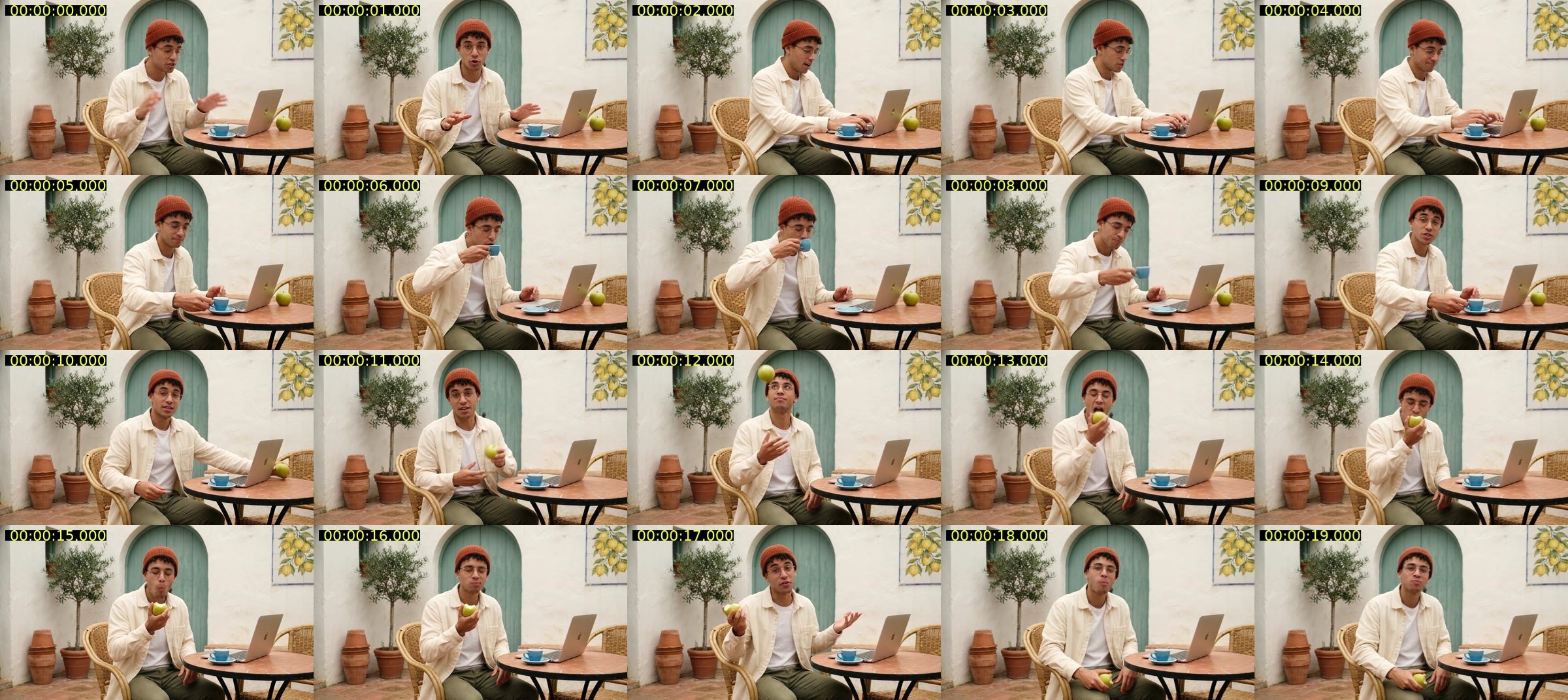
Sheet generated on fal Agent through its frame-extract endpoint in the process of configuring the video. Its internal prompt was: Take contact sheet, 1 fps.
In the frames, the apple leaves his hand at about 12.20, peaks at 12.50 and lands back in the same hand at 12.75, three-quarters of a second before the first bite at 13.50.
Before trusting any contact sheet, you want to pick one frame you can identify exactly, such as the apple at its highest point, and compare its label with the player's own clock.
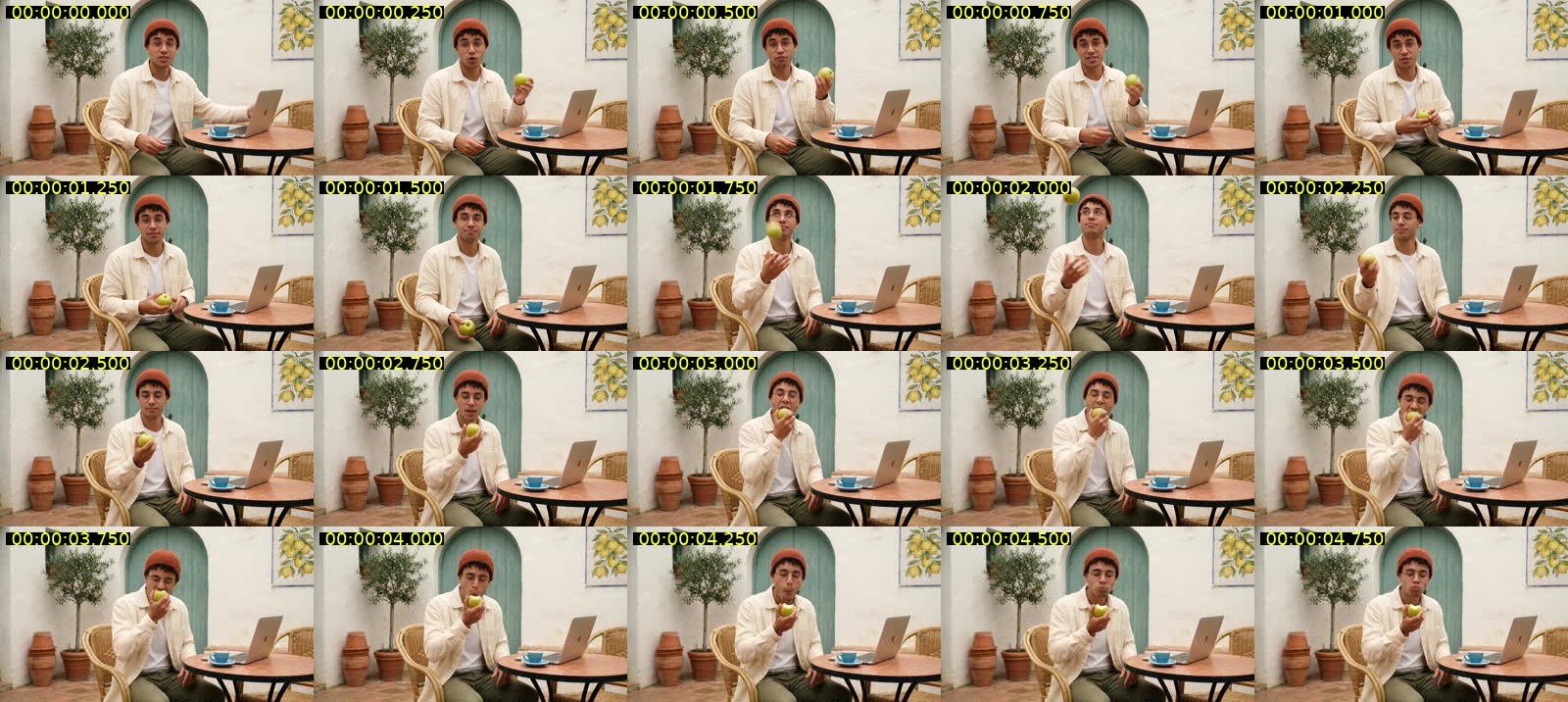
Settle the take's final length before measuring anything, because a trim after this point shifts all the numbers that follow the cut.
Step 5: Review the shot list and the re-shoot prompt
From the timing map, fal Agent split the take into 13 time ranges, each ending on an action, and gave every range its own placement, lens, focus depth and, where it helps, a camera move.
The coverage opens at knee height and rises, then looks back at him over the laptop lid before pulling out to a high corner wide of the courtyard.
Later shots drop beneath the apple for the toss and swing round him on a handheld arc for the shrug.
The single shot on the A-camera axis, and the only time he looks into the lens, comes last.
Here's the full prompt exactly as it ran, with the take as @Video1 and the A-camera still as @Image1.
THE TAKE
@Video1 is a single finished take: one static wide on a tripod, 20.08 s, with its own live audio. A young man sits at a small round terracotta-tile table in a whitewashed bakery courtyard and talks to one camera. @Image1 is a frame from that same take, for wardrobe and set reference only. Treat the performance as already filmed and final. Your job is coverage, not direction: film the exact same 20.08 seconds again from thirteen other places, as if thirteen more cameras had been rolling in the courtyard at the same time. Each output frame shows his body in exactly the pose it has at that timestamp of @Video1, moving at the same speed. Run the full 20.08 s. Leave the audio of @Video1 untouched and locked to picture.

LOCKED ELEMENTS
Nothing about the event changes: his performance, posture, hand positions and what they hold, head turns, where his eyes point, mouth shapes, blinks, how fast he moves, when each action starts and stops, the light, exposure, colour balance, grade, clothes, props and set dressing. Camera placement and lens are the only things you are allowed to change.

MOUTH MAP (read off the audio of @Video1)
TALKING: 0.00-2.04, 2.66-3.94, 4.84-5.44, 9.40-9.92, 10.74-12.08, 16.20-16.40 (a closed-lip "Mm"), 17.52-17.92.
QUIET: 2.04-2.66, 3.94-4.84, 5.44-9.40 (reach and sip, a small slurp at 9.10-9.38), 9.92-10.74, 12.08-16.20 (toss, catch, bite, chewing, crunch 15.5-16.1), 16.40-17.52, 17.92-20.08.
Any time his mouth is in frame during a TALKING window, his lips follow the audio of @Video1. From 2.00 to 5.40 he is looking down at the keyboard and typing, and he keeps talking in the TALKING parts of that stretch: eyes on the keys does not mean mouth shut. Never invent lines in a QUIET window and never freeze his mouth in a TALKING one.

WHERE HE LOOKS
The whole take was performed for one lens only, the A-camera: the original tripod, straight in front of him at seated eye height. His gaze stays pinned to that spot in every new angle, except for the glances down at the laptop, cup and apple and the look up at the apple that already exist in @Video1. He never notices, searches for or turns toward any of the new cameras. From the side we see him in profile or three-quarter, from overhead we see the top of the beanie and his glasses, from behind we see beanie and curls. Only the last shot (18.00-20.08) sits back on the A-camera axis, so only there does he look into the lens.

CLOCK
Everything plays in real time, frame for frame with @Video1. No slow motion, speed ramps, freeze frames, reversals, repeats or retiming anywhere, including the apple toss.

APPLE FLIGHT
The green apple leaves his hand at about 12.20, peaks just above the beanie at about 12.50 and lands back in the same hand at 12.75. It is in the air for barely half a second. Do not float, hang, slow or duplicate it. Before 12.20 and after 12.75 it is in his hand; he bites it at about 13.50. There is only ever one apple.

OPEN AIR ABOVE
Whenever a camera looks up, above him is only the top of the lime-washed wall, the edge of the teal arched door frame, olive leaves and a flat, pale, even overcast sky. No buildings, rooftops, antennas, wires, birds, planes, sun, dramatic clouds, flare or signs.

COVERAGE
[00:00.00-00:02.04] Low front-left, lens at knee height, 28mm feel, slow rise upward, moderate depth of field. Open palms gesturing, olive tree and teal door rising behind him. Talking, three-quarter to us, eyes on the A-camera, not this lens.
[00:02.04-00:03.10] Tight side close-up from his right, 85mm feel, shallow focus, curls under the beanie sharp, gold glasses rim catching soft light, lemon tile panel a blur behind. His head tips down toward the laptop; talking resumes at 2.66.
[00:03.10-00:05.44] Reverse over the top edge of the silver laptop lid, 50mm feel, lid edge soft in the near foreground, his downturned face in focus beyond it, typing. Talking 3.10-3.94 and 4.84-5.44, quiet in between.
[00:05.44-00:06.50] Lens skimming the tabletop at tile level, slow sideways slide past the green apple toward the blue cup and saucer, 35mm feel. His hand enters and takes the cup handle. Quiet.
[00:06.50-00:09.40] Close-up from front-right three-quarter, 100mm feel, very shallow focus. Cup rises to his lips, he sips, small slurp 9.10-9.38, cup back to the saucer by 9.40. Quiet.
[00:09.40-00:10.74] Wide from a high corner of the courtyard, as if from a first-floor window, 21mm feel, deep focus, locked. He is small at his table: stacked terracotta pots, potted olive tree, teal arched door, lemon tiles, tiled floor. "Honestly though" 9.40-9.92.
[00:10.74-00:12.08] Macro at tile level on the green apple, his face soft far behind. His hand closes around the apple and lifts it out of frame. Talking in the blur 10.74-12.08.
[00:12.08-00:12.90] Low under the apple looking up, 24mm feel. It leaves his fingers at 12.20, rises against the wall top and pale overcast sky, turns once, drops back into his hand at 12.75, face tipped up watching it.
[00:12.90-00:13.50] Behind him over his left shoulder, 40mm feel. Rust beanie and dark curls fill frame-left, cream corduroy shoulder, the apple coming up toward his mouth. Beyond him only plain lime-washed wall; no camera, tripod or crew anywhere. No face. Quiet.
[00:13.50-00:15.00] Extreme close-up in profile from his right, 135mm feel, razor-thin focus: glasses arm, jaw and the apple. He bites, the skin cracks, he chews. Nothing above the eyebrow.
[00:15.00-00:16.40] Straight down from overhead, 24mm feel, deep focus, locked. Round terracotta tiles, silver laptop, blue cup on saucer, top of the rust beanie at the frame edge, bitten apple in his hand. Chewing, closed-lip "Mm" at 16.20.
[00:16.40-00:18.00] Gentle handheld arc from camera-right toward front-right, 35mm feel, olive tree and pots sliding behind in parallax. One-handed shrug around 17.0, "Worth it" 17.52-17.92. His eyes stay just off this moving lens, on the A-camera spot.
[00:18.00-00:20.08] BACK ON THE A-CAMERA AXIS. Medium close-up straight in front of him at seated eye level, 50mm feel, locked. He lowers his hands to his lap and sits still, looking into the lens. Hold to 20.08.

CONTINUITY BIBLE (the same in every shot)
Man in his mid-twenties, warm olive-brown skin, short dark curly hair, light stubble, round thin gold wire glasses, rust-orange ribbed knit beanie, cream corduroy overshirt worn open over a plain white t-shirt, olive-khaki chinos. Rattan bistro chair, a second empty rattan chair beside the table. Small round table with a terracotta tile mosaic top, black iron rim and legs. On the table: one open silver laptop, one blue espresso cup on a blue saucer, one green apple. Behind him: rough lime-washed white walls, a teal plank door in an arched doorway, a small teal-framed window, a potted olive tree, a stack of terracotta pots, a hand-painted lemon tile panel, terracotta floor tiles. Soft, even overcast daylight with gentle shadows, unchanged in direction and softness. Warm, natural grade: chalky whites, faded teal, terracotta orange, warm skin. He is alone; nobody else enters.

No captions, subtitles, text, watermarks or added logos anywhere.
On your own clip, the timestamps in MOUTH MAP, WHERE HE LOOKS, APPLE FLIGHT and COVERAGE come from your timing map, and CONTINUITY BIBLE needs a fresh description of your performer and set.
THE TAKE only needs your new duration and a line on your scene, while LOCKED ELEMENTS and CLOCK carry over as written.
OPEN AIR ABOVE gets a new list of what's overhead in your location, and if nothing leaves your performer's hand, drop APPLE FLIGHT along with the shot under the apple.
Step 6: Run the 480p test
Next, fal Agent sent the edit to bytedance/seedance-2.5/reference-to-video as a 480p test with the inputs below.
| Field | Value |
|---|---|
task | editing |
video_urls | the source take, referenced as @Video1 |
image_urls | the A-camera still, referenced as @Image1 for wardrobe and set |
resolution | 480p |
generate_audio | true |
Editing mode sets duration and aspect ratio to auto, so neither appears in the inputs.
The checkpoint on this step holds the chain until you've gone through the 480p test with the checks in the next section.
Generated using Seedance 2.5 on fal, an AI model from ByteDance.
Step 7: Render the 1080p version
After the 480p test passed, fal Agent ran the same prompt and inputs again on bytedance/seedance-2.5/reference-to-video with resolution set to 1080p.
That second run is a fresh generation, so the 1080p file needs the same checks as the 480p one before it goes anywhere.
Draft mode is the other route on fal, and we didn't use it in this build.
Setting draft to true on the 480p run returns a draft_id with the video, and bytedance/seedance-2.5/draft/complete renders that task again at 1080p from the ID alone, within seven days and from the same account.
Generated using Seedance 2.5 on fal, an AI model from ByteDance.
What should you check in a Seedance 2.5 480p test before the 1080p render?
Check the Seedance 2.5 480p test against the take at the timestamps the prompt pins down, and move to 1080p only when all six checks below hold up.
At $5.18, a second 480p test is a small price for catching a problem before a 1080p run that costs about $27.40 for this clip.
Start with lip sync in the reverse over the laptop lid from 3.10 to 5.44, where he's looking down and still talking, and treat a closed mouth in either talking window there as a fail.
In the side close-up from his right and the handheld arc from 16.40, his eyes should stay on the A-camera spot, with the closing shot from 18.00 as the only one that looks into the lens.
The low angle under the toss, from 12.08, needs one apple leaving his hand around 12.20 and landing back by 12.75 at normal speed.
That same upward frame should hold nothing above him apart from the top of the wall, the edge of the teal door frame, olive leaves and flat overcast sky.
Count the cups and apples in the overhead shot from 15.00, then scan the wall past his shoulder in the shot from 12.90 for stray camera gear or crew.
Finally, the output should run the full 20.08 seconds, with his lines landing at the same moments as in the take.
If one check fails, you can rewrite only the prompt lines for that shot and run another 480p test.
falMODEL APIs
The fastest, cheapest and most reliable way to run genAI models. 1 API, 100s of models
How do you create a multi-angle video with Seedance 2.5 in the fal playground?
In the playground, the Seedance 2.5 build takes five runs across five fal endpoints, with the timing map and prompt left for you to write.
The prompts are the same ones shown in the fal Agent steps.
Generate the A-camera still on fal-ai/nano-banana-pro with the still prompt at 16:9 and 2K.
- Animate the still on bytedance/seedance-2.5/image-to-video using the take prompt, with duration set to 20 and resolution to 1080p.
- Step through the take in a player with frame-by-frame control, such as VLC, and note the frame where each action begins and the frame where it ends.
- Export the take's audio as MP3 or WAV and run it on fal-ai/elevenlabs/speech-to-text/scribe-v2, which accepts MP3, OGG, WAV, M4A and AAC and returns each word with its start and end in seconds.
- Write the shot list and prompt from your timing map and a description of the set and wardrobe, by hand or with an LLM.
- Run the 480p test on bytedance/seedance-2.5/reference-to-video with the take under video URLs, the still under image URLs, task set to editing and resolution at 480p.
- Once the test passes, run the same inputs again with resolution at 1080p, or switch draft on in step 6 and paste the
draft_idfrom its JSON into bytedance/seedance-2.5/draft/complete.
References use the @Video1 and @Image1 form from the endpoint's schema, numbered by each file's position in its list.
How much does a multi-angle video with Seedance 2.5 cost on fal?
Our 20.08-second multi-angle edit comes to $5.18 as a 480p test and about $27.40 at 1080p on fal, with Seedance 2.5 billed at $0.0214 per 1,000 tokens for 480p and 720p output and roughly $0.0234 per 1,000 tokens for 1080p.
We count tokens as output height × output width × (input video seconds plus output seconds) × 24 ÷ 1024, and multiply the total by 0.6 whenever a video input is attached.
Image references and the audio toggle leave the price unchanged, so the A-camera still adds nothing to the edit.
| Stage | Endpoint | Our settings | Cost |
|---|---|---|---|
| A-camera still | fal-ai/nano-banana-pro | one image at 2K | $0.15 |
| Source take | bytedance/seedance-2.5/image-to-video | 20 seconds at 1080p | about $23.28 |
| Speech timing | fal-ai/elevenlabs/speech-to-text/scribe-v2 | 20.08 seconds of audio | under $0.01 |
| 480p test edit | bytedance/seedance-2.5/reference-to-video | 864 × 496, 20.08 seconds in and out | $5.18 |
| 1080p edit | bytedance/seedance-2.5/reference-to-video | 1920 × 1080, 20.08 seconds in and out | about $27.40 |
For the 480p test, 864 × 496 × 40.16 × 24 ÷ 1024 gives 403,367 tokens, or $8.63 before the 0.6 multiplier and $5.18 after it.
The 1080p run is 1,951,776 tokens at roughly $0.0234 per 1,000, which lands at $45.67 before the multiplier and about $27.40 after it, bringing all five runs to about $56.
Our 1080p image-to-video rate is roughly $1.164 per second, putting the 20-second take at about $23.28.
At 720p, the same take comes to 432,000 tokens and $9.24.
Scribe v2 costs $0.008 per minute of input audio, while a 2K Nano Banana Pro image is $0.15.
In draft mode, the completion call on bytedance/seedance-2.5/draft/complete costs $0.0214 per 1,000 tokens.
Inside fal Agent, you pay for the model runs at our standard rates, and at the time of writing, the agent's reasoning, sandbox, web search and video understanding cost nothing extra.
Recently Added












Run Seedance 2.5 on fal
Video models can now rework a clip you've already shot, with Seedance 2.5 accepting a full take of up to 30 seconds in editing mode.
On fal, the whole build, from the still to the 1080p edit, runs behind one API key with per-use billing.
Start from a brief in fal Agent, or run the stages yourself in the playground and through the API.
Frequently asked questions
Can you use your own footage with Seedance 2.5?
Yes, Seedance 2.5 accepts your own MP4 or MOV clip as the video reference, provided it runs 1.8 to 30.2 seconds at 24 to 60 FPS and stays under 200 MB.
You skip the still and the image-to-video run and build the timing map from your own file.
How many camera angles fit in one Seedance 2.5 edit?
Our Seedance 2.5 docs don't set a cap on camera positions per edit.
The 20.08-second take in this guide carried 13 shots, about 1.5 seconds each on average.
How is a Seedance 2.5 multi-angle edit different from H3 Max Camera Controls?
H3 Max Camera Controls moves a virtual camera around one frozen still for 5 to 15 seconds, while a Seedance 2.5 edit keeps the performance moving and changes the camera between time ranges.
H3 Max is fal's post-trained variant of MiniMax H3, covered in detail in our H3 Max Camera Controls guide.
What resolutions does a Seedance 2.5 edit support on fal?
The Seedance 2.5 reference-to-video schema on fal offers three resolutions from 480p up to 1080p, with 720p as the default, though a completed draft always renders at 1080p.
![What is H3 Max Camera Controls (Multi-Angle) & How To Use It? [2026]](https://refinery.fal.media/url/https%3A%2F%2Fv3b.fal.media%2Ffiles%2Fb%2F0aabbf2b%2Fq8usbuG4heGtr4-AYyqfk.jpg/tr:w-1280,q-80/q8usbuG4heGtr4-AYyqfk.webp)