![What is MiniMax H3 Max Director & How To Use It? [2026]](https://refinery.fal.media/url/https%3A%2F%2Fv3b.fal.media%2Ffiles%2Fb%2F0aa9c5ed%2FEYK9k-1uD5wRCvCjKMymm.jpg/tr:w-1920,q-80/EYK9k-1uD5wRCvCjKMymm.webp)
Most video models take a prompt and hand back a finished file once generation completes.
MiniMax H3 Max Director works on a session. You open a connection, the model starts streaming video and synchronized audio to your browser, and you keep sending new prompts while the stream is still running.
fal hosts the model at minimax/h3-max/director, and the same sequence applies whether you run it from the playground or from your own code.
This guide covers what MiniMax H3 Max Director is, how a streaming session is structured, which settings to lock before you connect, how to write opening and live prompts, how to integrate the model through the API, and what a session costs on fal.
TL;DR
MiniMax H3 Max Director generates one continuous video stream with synchronized audio, steered by prompts you send mid-session.
Output arrives over WebRTC as 24 fps video and 32000 Hz audio, generated in 10-second chunks. Resolution is 480p or 768p, and the aspect ratio is 16:9, 9:16, or 1:1.
Resolution, aspect ratio, first frame image, memory, and seed are fixed for the life of the session.
Live direction happens through a prompt message carrying a strictly increasing prompt_version.
Pricing on fal is $0.08 per second of video generated, with every session billed at a 60-second minimum.
Sessions run up to 2 minutes by default, and longer sessions are available for approved use cases on request.
What is MiniMax H3 Max Director?
MiniMax H3 Max Director is a real-time video model served on fal at minimax/h3-max/director that produces a single continuous video stream with synchronized audio while accepting new text directions during playback.
It is our own work, by our engineering team, and we were also behind the 'sibling' H3 Max endpoints, which are post-trained variants of MiniMax H3.
The unit of output is the session, and not the clip.
You give MiniMax H3 Max Director an opening prompt that establishes a world, and the model begins generating.
While that stream plays, you can send further prompts describing what should happen next.
Each new direction applies to chunks the model has not generated yet, so footage already delivered stays as it was.
The model is served over a WebRTC contract described by an AsyncAPI document, which is why the integration uses a real-time client and a persistent connection in place of a queued request.
| Property | Value |
|---|---|
| Endpoint | minimax/h3-max/director |
| Model family | MiniMax H3 Max |
| Delivery | WebRTC session with video and audio receive tracks |
| Frame rate | 24 fps |
| Audio sample rate | 32000 Hz |
| Chunk length | 10 seconds |
| Continuation playback | 8.5 seconds |
| Continuation context | 39 frames |
| Resolutions | 480p, 768p |
| Aspect ratios | 16:9, 9:16, 1:1 |
| Prompt length | 1 to 50,000 characters |
| Memory | 1 to 50 prior segment prompts, default 12 |
| Protocol version | 1 |
| Commercial use | Yes |
How is MiniMax H3 Max Director different from clip-based video generation?
Clip-based generation completes a round trip and returns a finished file, which is the right shape for most video work.
MiniMax H3 Max Director keeps the loop open, generating in 10-second chunks and folding your latest direction into whatever it produces next.
Continuity across those chunks comes from two mechanisms:
The first is visual: session_info reports 39 continuation context frames, which form the visual bridge between one chunk and the next.
Those frames are the visual bridge: each chunk is generated conditioned on the tail of the one before it, which is what holds a face, a wardrobe detail, a room's geometry, and a lighting setup steady across the seam.
The second is textual: a rolling window of your prior segment prompts, twelve by default, feeds a prompt expander that interprets your next direction with that history in view.
At the top of the range, the world's early decisions stay in play for a long time.
At the bottom, MiniMax H3 Max Director tracks your most recent instruction closely and forgets what you asked for eight beats ago.
The practical consequence for writing is that a Director prompt is never a description of a finished video.
Your first prompt sets up something that can keep going. Every prompt after that decides the next moment.
How does a MiniMax H3 Max Director session work?
A MiniMax H3 Max Director session runs on four client messages and twelve server messages exchanged over a single WebRTC connection.
You configure the session once, the server confirms and reports its capabilities, chunks begin arriving, and you send prompts until you stop.
These four go out from your client:
| Client message | Purpose |
|---|---|
configure | Opens the session with the world prompt and every locked setting. Sent once. |
prompt | Sends a new direction. Requires a prompt_version higher than the last one. |
ping | Carries a timestamp for latency measurement. Answered with pong. |
stop | Ends generation. |
Twelve come back the other way:
| Server message | What it tells you |
|---|---|
configured | The session settings the server accepted. |
session_info | Fixed session capabilities and constants. |
chunk | A generated segment, with its index, playback seconds, buffer depth, and generation timing. |
chunk_metrics | Per-chunk timing gauges in milliseconds. |
prompt_pending | Your direction was received and is queued. |
prompt_applied | Your direction is now in effect. |
prompt_rejected | Your direction was blocked, with reason content_policy. |
deadline_missed | Generation fell behind playback. |
error | Something failed, with one of ten error codes. |
pong | Reply to a ping, echoing your client timestamp. |
session_metrics | Rolling session timing statistics. |
stream_exhausted | The session ended, either stopped or session_limit. |
During development, you want to watch the chunk message.
It reports buffer_depth_seconds and next_generation_estimate_seconds, which together tell you whether the model is comfortably ahead of playback or about to run short.
falMODEL APIs
The fastest, cheapest and most reliable way to run genAI models. 1 API, 100s of models
How do you run MiniMax H3 Max Director in the fal playground?
A MiniMax H3 Max Director session in the playground takes six steps, and all six happen on one page.
Open the model page at minimax/h3-max/director and sign in to your fal account. You can also create a free account if you haven't done so already.
Choose a starting point from the gallery of example worlds, which spans comedy, anime, documentary, sports broadcast, and cinema, or write your own from scratch.
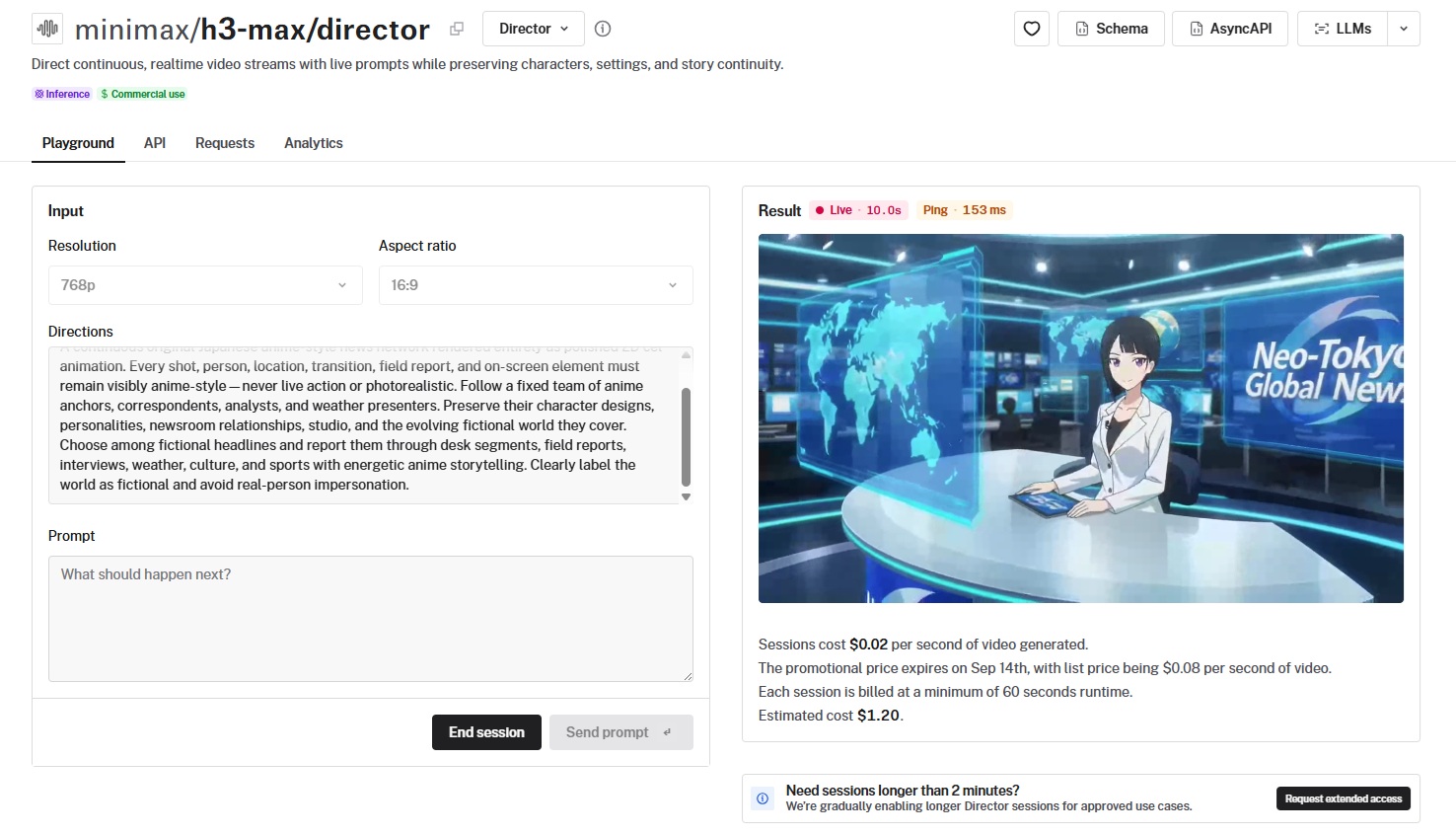
Set resolution and aspect ratio, which default to 768p and 16:9.
Add a first frame image if you want the opening segment grounded in a specific composition or style, by dragging in a file, dropping an image from a web page, pasting from the clipboard, or providing a URL in jpg, jpeg, png, webp, gif, or avif format.
Write your opening prompt and press Connect, or use the Ctrl and Enter shortcut.
After the connection opens, that same box takes your next direction, and everything you send from then on steers the chunks still to come.
For example, in the Anime Breaking News example, I wrote down "report on the news that something bad happened in England", and the reporter started talking about the country.
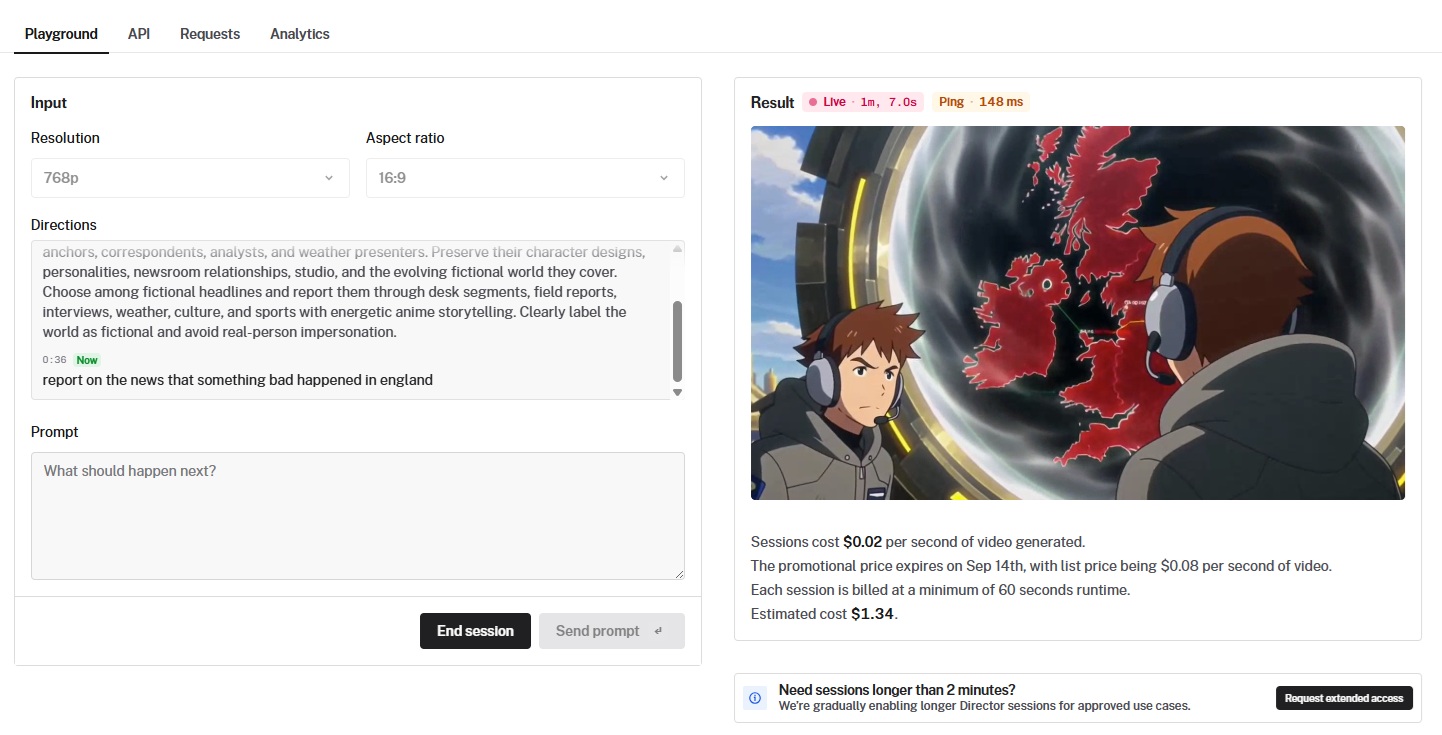
Here's how the full broadcast looked:
Stream generated using MiniMax H3 Max Director by fal.
What are the settings that you need to lock before you connect?
The configure message carries five settings, and none of them can change once a MiniMax H3 Max Director session is running.
To change any of them, close the connection and open a new one.
A mid-session change attempt returns the error code immutable_settings.
| Setting | Values | Default | What it controls |
|---|---|---|---|
resolution | 480p, 768p | 768p | Output resolution for the whole session. 480p suits early exploration of a world. |
aspect_ratio | 16:9, 9:16, 1:1 | 16:9 | The canvas your compositions and camera moves are written for. |
image_url | Image URL or null | null | The exact first frame. Per the schema, the image is visible to the opening prompt expansion as well, which grounds the first segment in what the picture shows. |
memory | 1 to 50 | 12 | How much of your earlier prompt history the expander can still see when it interprets a new direction. |
seed | Integer or null | null | Fixes the opening setup so you can rerun and compare variations of the same world. |
How do you write an opening prompt for MiniMax H3 Max Director?
An opening prompt for MiniMax H3 Max Director should define a world that can keep producing scenes, name what has to stay identical across every chunk, supply a reason for new situations to arise, and begin on an action already underway.
An opening prompt has four working parts:
- The world and its visual language: genre, era, medium, palette, lens behavior, lighting.
- The constants: faces, wardrobe, objects, locations, and relationships that must survive every later direction.
- A repeatable source of new situations: something structural about the world that keeps generating reasons for the next scene to exist.
- An opening action, with something unresolved: not a summary of the premise, but a moment already in motion.
💡 You want to use the word "preserve" for that second item. It gives later directions something concrete to refer back to.
The first example below builds a broadcast world, and the second asks for something much slower, in a luxury advertising register.
Prompt: A continuous original late-night automotive program shot on a dark soundstage, following the same two presenters and the same slow-rotating display platform. Preserve their faces, their tailored dark wardrobe, the black studio floor, the ring of overhead key lights, and the calm broadcast delivery. Each segment brings a new original concept vehicle onto the platform for the presenters to walk around and discuss. Open on the taller presenter mid-sentence, one hand resting on a matte grey fender as the platform turns beneath it.
And, to make it look like a commercial break, I also added this advertisement in the end:
Prompt: A continuous luxury fragrance film set across the terraces of a limestone villa above the sea, held in one unbroken golden hour. Preserve the faceted amber glass bottle, the warm sand and bronze palette, the shallow depth of field, and the unhurried camera. Each new terrace or room introduces one material detail, such as linen, still water, brass, or wet stone, for the light to catch. Open on the bottle standing on a sun-warmed ledge as a linen curtain lifts behind it and the sea falls out of focus.
Generated using MiniMax H3 Max Director on fal.
How do you use MiniMax H3 Max Director through fal's API?
fal's API follows the same sequence as the playground.
All you have to do is install the real-time client, open a session through a server proxy, send one configure message, then send prompt messages as the stream runs.
The realtime client is on the alpha channel:
bash
npm install @fal-ai/client@alpha @fal-ai/server-proxy@alphafal.realtime.open is alpha-only and may change in a minor version, so you want to pin your versions.
Your FAL_KEY belongs on the server.
For a Next.js App Router app, create app/api/fal/proxy/route.ts:
typescript
import { route } from "@fal-ai/server-proxy/nextjs";

export const { GET, POST, PUT } = route;
You can set FAL_KEY in the server environment.
Put your own authentication in front of that route before deploying, because anyone who can reach an unprotected proxy can spend against your account.
Then open the session:
javascript
import { createFalClient } from "@fal-ai/client";
import { wma } from "@fal-ai/client/realtime";

const fal = createFalClient({ proxyUrl: "/api/fal/proxy" });

const session = fal.realtime.open(wma("minimax/h3-max/director"), {
  receive: [
    "video",
    "audio"
  ],
  onMedia: (stream) => {
      const element = document.querySelector("video");
      if (element) element.srcObject = stream;
    },
  onData: (raw) => {
      const message = JSON.parse(raw);
      console.log(message);
    },
  onState: (state) => console.log("realtime:", state),
  onError: (error) => console.error(error),
});


// Send any client message described below.
session.send({
  "prompt_version": 1,
  "type": "configure",
  "protocol_version": 1,
  "prompt": "A continuous original live-action stream following a group of friends as they explore a new city."
});

// Later, release the peer connection and network resources:
// await session.close();
Every prompt message needs a prompt_version strictly higher than the last one you sent.
The API returns stale_prompt_version if the number repeats or drops.
To close out, send a stop message and release the connection:
javascript
session.send({ type: "stop" });
await session.close();
What is MiniMax H3 Max Director pricing on fal?
MiniMax H3 Max Director costs $0.08 per second of video generated on fal, and every session is billed at a minimum of 60 seconds of runtime.
| Session length | Cost at $0.08 per second |
|---|---|
| 60 seconds (billing minimum) | $4.80 |
| 90 seconds | $7.20 |
| 120 seconds (standard cap) | $9.60 |
You want to plan around the 60-second minimum.
A ten-second chunk represents $0.80 of generated video at that rate, but no session bills below $4.80, so a run you cut short after fifteen seconds still costs a full minute.
The most affordable habit here would be to write your first few live directions before you connect, so you are not composing them while the meter runs.
💡 fal bills per use with no subscription and no minimum commitment.
What are the limits on a MiniMax H3 Max Director session?
Sessions run up to 2 minutes by default.
We're enabling longer sessions gradually for approved use cases, and there is a request form on the model page for extended access.
Here are the rest of the constraints that you should be aware of before you build:
- Only one session runs per machine, so parallel sessions need parallel machines.
- Prompt text is capped at 50,000 characters, which applies to the opening world prompt and to every live direction.
- Memory accepts values from 1 to 50 prior segment prompts.
- Resolution, aspect ratio, first frame image, memory, and seed cannot change without reconnecting.
Recently Added






















Start directing with MiniMax H3 Max Director on fal
MiniMax H3 Max Director changes what a prompt is for.
The first one raises a world, and every one after that decides its next moment.
Open the playground at models/minimax/h3-max/director, write a world you would want to keep watching, and start directing.
And if you haven't signed up for fal yet, you can start by creating your free account.
Frequently asked questions
Does MiniMax H3 Max Director generate sound?
Yes.
MiniMax H3 Max Director generates audio synchronized with the video at 32000 Hz, delivered as a separate receive track on the same WebRTC session.
Can you change the resolution during a MiniMax H3 Max Director session?
No.
Resolution is set in the configure message and locked for the session, so changing it requires closing the connection and opening a new one.
Mid-session, the server rejects the change with immutable_settings.
Can you start a MiniMax H3 Max Director session from an image?
Yes. You can pass an image URL to image_url in the configure message.
That image becomes the exact first frame.
The opening prompt expansion also sees the image, so your first segment is grounded in its composition and style.
What happens if MiniMax H3 Max Director falls behind on generation?
The server sends a deadline_missed message, and its documented behavior is freeze_video_and_silence_audio_until_ready.
The message includes late_by_seconds and chunk_index so your application can surface a buffering state to viewers.
![10 Best Image-to-Video APIs in 2026 [Reviewed]](https://refinery.fal.media/url/https%3A%2F%2Fv3b.fal.media%2Ffiles%2Fb%2F0a9eafb7%2FvhLf9ukH8MQphlcPiVSOi_best-image-to-video-apis-2026.jpg/tr:w-1280,q-80/vhLf9ukH8MQphlcPiVSOi_best-image-to-video-apis-2026.webp)