An online store needs fresh banners and sale ads every season, and Nano Banana 2.1 on fal can produce that whole set from a handful of API calls.
I'll show you the Python and JavaScript code that goes from the first API key to a queued batch of localized ads, with five ecommerce image formats built in between.
TL;DR
- All five examples in this tutorial run on fal, where a single key calls Nano Banana 2.1 at
google/nano-banana-2.1for new images and atgoogle/nano-banana-2.1/editfor changes to existing ones. - Nano Banana 2.1 bills per token, which our model page translates into roughly $0.040 per 1K image and $0.134 per 4K image from a short prompt (medium thinking, as of October 2026).
fal_client.subscribe()andfal.subscribe()wait for the image, whilesubmit()returns a request ID for batch work.- My five formats are a 21:9 collection banner, a gift set composed from two packshots, a live engraving preview, a sale ad localized for five markets and a luggage size guide.
- In the storefront example,
FAL_KEYstays on the server and the browser sends only a shopper's initials.
Where is the best place to generate AI images with an API?
The best place to generate AI images with an API is fal, since one key and a single client library cover more than 1,000 hosted models, Nano Banana 2.1 among them.
Nano Banana 2.1 is listed in our documentation as the default text-to-image model, with its edit endpoint as the default for image edits, and that pairing made it an easy pick for a catalog pipeline.
Both model pages show a Commercial use tag, and the conditions for published images are set out in our terms of service.
Your code can wait for a Nano Banana 2.1 image in a few different ways, depending on which call it makes:
| Call | What happens | Where I use it |
|---|---|---|
run(), sent to fal.run | A synchronous HTTP request that answers with the finished output in one response | Throwaway scripts and prototypes |
subscribe() | The request goes through our queue, and the client polls until the image is ready | Single images in scripts and server routes |
submit() | The queue replies immediately with a request ID, and the result arrives by webhook or lookup | Batches and background jobs |
Automatic retries and status tracking come with the queue, which is why my direct fal.run calls never leave a test script.
From a terminal, a queued Nano Banana 2.1 request takes one cURL command:
curl -X POST "https://queue.fal.run/google/nano-banana-2.1" \
-H "Authorization: Key $FAL_KEY" \
-H "Content-Type: application/json" \
-d '{"prompt": "A pair of olive suede low-top sneakers on a pale oak floor in soft daylight, side view, catalog photograph.", "aspect_ratio": "4:5", "resolution": "2K"}'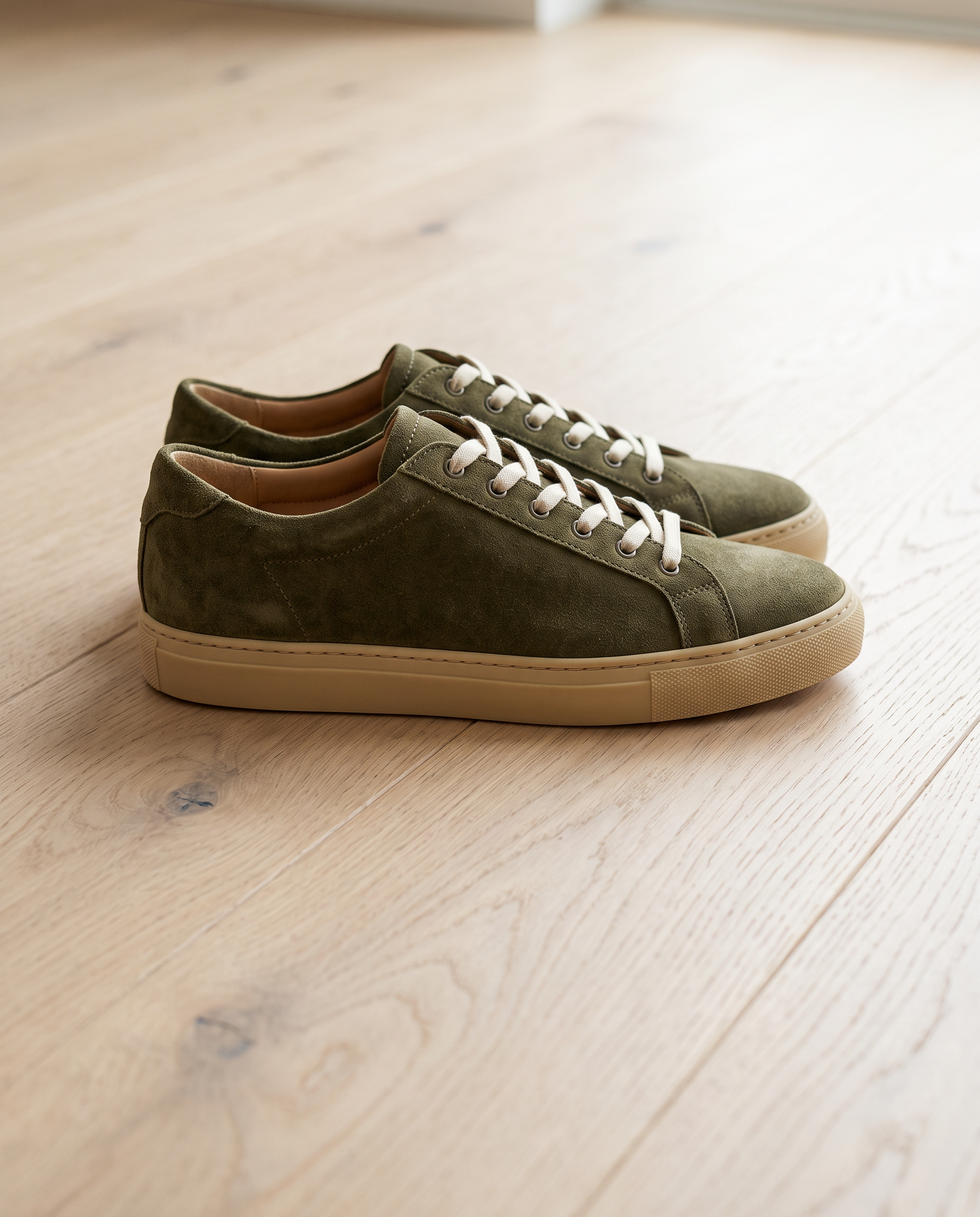 Try it in ChatGPT
Try it in fal Agent
Try it in ChatGPT
Try it in fal Agent
The reply comes back before the image exists, carrying a request_id that you can use to check the status and collect the result later.
What do you need before calling Nano Banana 2.1 on fal?
Before your first Nano Banana 2.1 request, you need a fal account with prepaid credits and an API key exported as FAL_KEY wherever your code runs.
Calls to our Model APIs are paid from prepaid credits, with a $1 minimum top-up and no subscription required.
Keys come from the API keys section of the dashboard, where Create Key asks for a name and a permission preset.
The API preset reaches any model we host and covers everything in this tutorial.
The dashboard displays a freshly created key a single time, so mine went straight into the store's secrets manager.
Setting an expiry is optional, and based on my experience a one-year limit suits a storefront key, as an Expiring soon badge appears on the keys page ahead of the date.
pip install fal-client gives you the fal_client module, and npm install --save @fal-ai/client adds the JavaScript client:
# Python
pip install fal-client

# JavaScript
npm install --save @fal-ai/client
Both clients pick up FAL_KEY from environment variables on their own, keeping the key out of all the code in this tutorial:
# Shell that runs the Python scripts (macOS or Linux)
export FAL_KEY="your-api-key-here"

# .env.local in the root of the Next.js storefront
FAL_KEY=your-api-key-here
As Next.js loads .env.local without any setup code, the server route in the JavaScript section finds the key there.
Passing the key through fal.config({ credentials }) also works, though a key written into source code tends to end up in a repository sooner or later.
Permission presets and custom policies are covered in more depth in our authentication docs.
How do you generate an AI image with Python?
Python's fal_client.subscribe() creates an AI image by posting your prompt to google/nano-banana-2.1, then hands back a dictionary of image URLs when the render finishes.
The first job I gave it was a 21:9 banner for the top of a tea shop's autumn collection page.
Most stores put a collection banner's copy in the page's HTML, so it stays searchable and easy to translate, leaving the left third of the frame empty for that text.
You'll want 2K for a banner that spans a wide desktop screen, while jpeg output gives you a lighter file on the page.
The whole job fits in one short script, saved here as collection_banner.py:
from pathlib import Path

import fal_client
import httpx

PROMPT = (
    "A wide banner photograph for an autumn tea collection. "
    "On a dark walnut table, a glass teapot of amber oolong steams beside two cylindrical tea tins, "
    "one burnt orange and one deep plum, each with a small blank cream paper label. "
    "Dried orange slices and a few cinnamon sticks lie between the tins. "
    "Low late-afternoon sunlight comes from the right, and the background falls away into warm shadow. "
    "The products fill the right two thirds of the frame. "
    "The left third holds only soft, out-of-focus walnut and shadow, kept clear for website text. "
    "Shot at table height on a 50mm lens with natural color and no lettering anywhere in the image."
)

result = fal_client.subscribe(
    "google/nano-banana-2.1",
    arguments={
        "prompt": PROMPT,
        "aspect_ratio": "21:9",
        "resolution": "2K",
        "output_format": "jpeg",
    },
)

image = result["images"][0]
Path("autumn-tea-banner.jpg").write_bytes(httpx.get(image["url"]).content)
print(image["url"], image.get("width"), image.get("height"))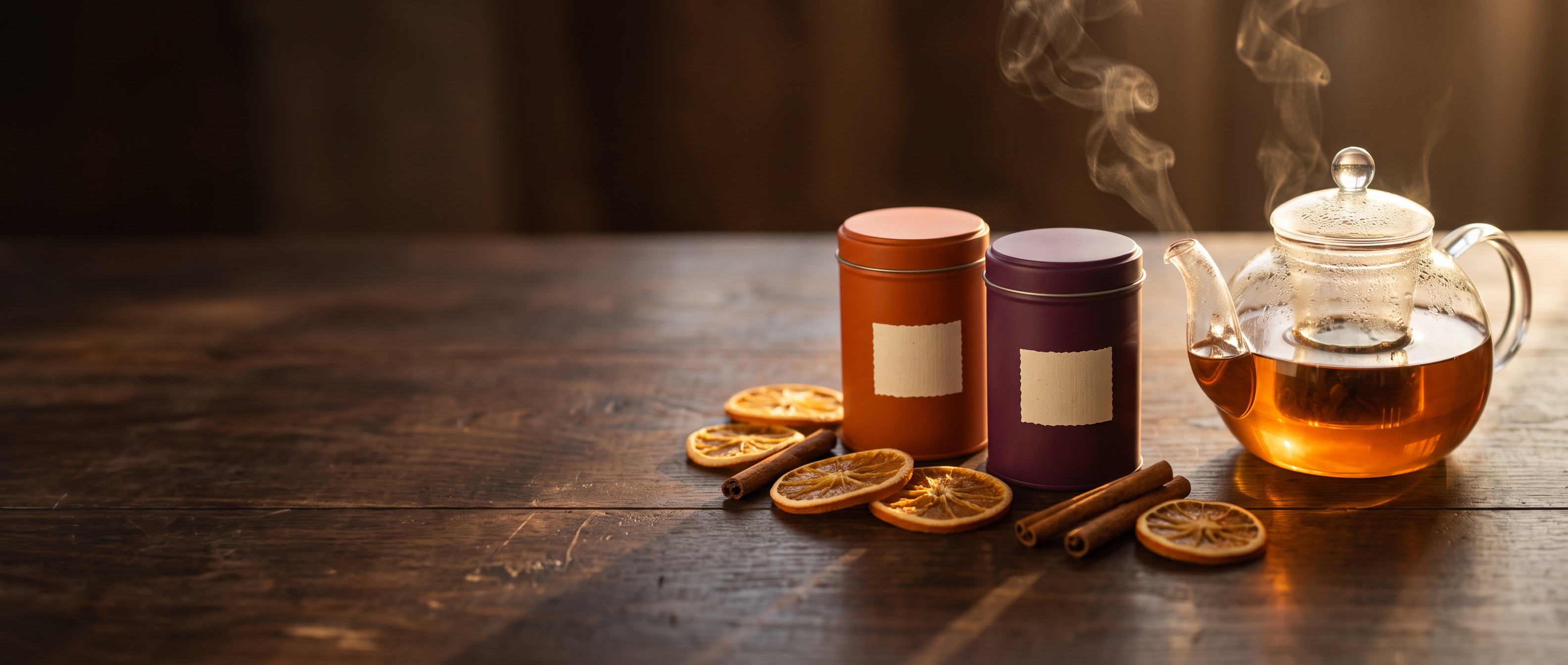
Generated using Nano Banana 2.1 on fal, an AI model from Google.
Try it in ChatGPT Try it in fal AgentThe download step needs no extra package, because httpx comes installed as a dependency of fal-client.
Here's the structure you'll get back from a successful google/nano-banana-2.1 request:
{
  "images": [
    {
      "url": "https://v3b.fal.media/files/<path>.jpg",
      "content_type": "image/jpeg",
      "file_name": "<name>.jpg",
      "width": <integer>,
      "height": <integer>
    }
  ],
  "description": ""
}
The script saves the banner locally the moment it exists, because the store's CMS should serve its own copy, and our CDN docs explain how long hosted files are kept.
It's worth storing width and height in the asset record too, since an img tag that declares both reserves the banner's space before the file loads.
The description field normally comes back as an empty string; our model page says text appears there mainly when limit_generations is switched to false.
Our model page lists $0.059 for a 2K image from a short prompt at medium thinking.
This banner prompt runs longer than that, though the extra text adds only a fraction of a cent.
falMODEL APIs
The fastest, cheapest and most reliable way to run genAI models. 1 API, 100s of models
Can the Nano Banana 2.1 API combine existing product photos?
Yes, the Nano Banana 2.1 API combines product photos through google/nano-banana-2.1/edit, which takes up to 14 images in image_urls and composes a new image from them as your prompt directs.
To try it, I composed a holiday gift set for a skincare brand from two packshots the brand already shows on its product pages.
Photos on disk reach our storage through fal_client.upload_file(), and the URL it returns goes straight into image_urls.
Publicly accessible image URLs are accepted by the edit endpoint as well.
Some hosts block cross-site requests or treat the download as bot traffic, though, so I'd normally upload store photos to fal storage before an edit.
import fal_client

serum_url = fal_client.upload_file("vitamin-c-serum.png")
cream_url = fal_client.upload_file("night-cream.png")

result = fal_client.subscribe(
    "google/nano-banana-2.1/edit",
    arguments={
        "prompt": (
            "Combine the amber dropper bottle of vitamin C serum from image 1 and the frosted white jar "
            "of night cream from image 2 into a gift set photo for a holiday gift guide. "
            "Both products stand upright inside an open sage-green gift box lined with cream tissue paper, "
            "the serum on the left and the jar on the right, on a pale stone surface. "
            "Soft window light comes from the left and casts gentle shadows into the box. "
            "The labels and the packaging shapes must match the source photos."
        ),
        "image_urls": [serum_url, cream_url],
        "aspect_ratio": "3:2",
        "resolution": "2K",
    },
)

print(result["images"][0]["url"])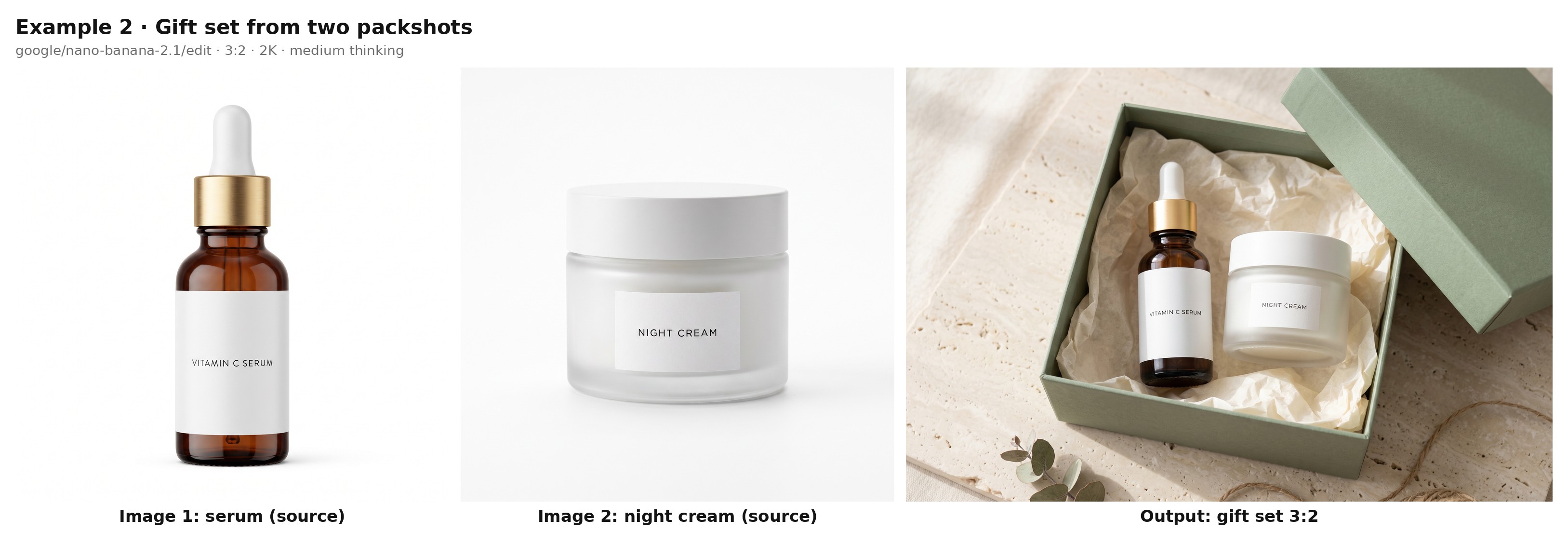
Generated using Nano Banana 2.1 Edit on fal, an AI model from Google.
Try it in ChatGPT Try it in fal AgentIn the prompt, I refer to the photos by their order in image_urls and describe what each one shows, leaving no doubt about which bottle is which.
An edit left on auto usually takes its aspect ratio from the input images, and the gift guide on this store uses landscape tiles, which is why the request asks for 3:2 by name.
Google rates Nano Banana 2.1 for up to 10 high-fidelity objects per request, so a bundle can grow well beyond this pair.
For edits limited to one region, Nano Banana 2.1 can also work from marks drawn on an input image.
The edit endpoint has no separate mask field, so I outline the area on the photo and describe what should replace it.
That edit lands near $0.063 at 2K on our model page's figures for two 1K inputs.
Can you run Nano Banana 2.1 from JavaScript in a storefront?
You can, as @fal-ai/client calls google/nano-banana-2.1 and its edit endpoint through fal.subscribe().
In a storefront, I'd keep that call inside a server route, with your pages talking only to that route.
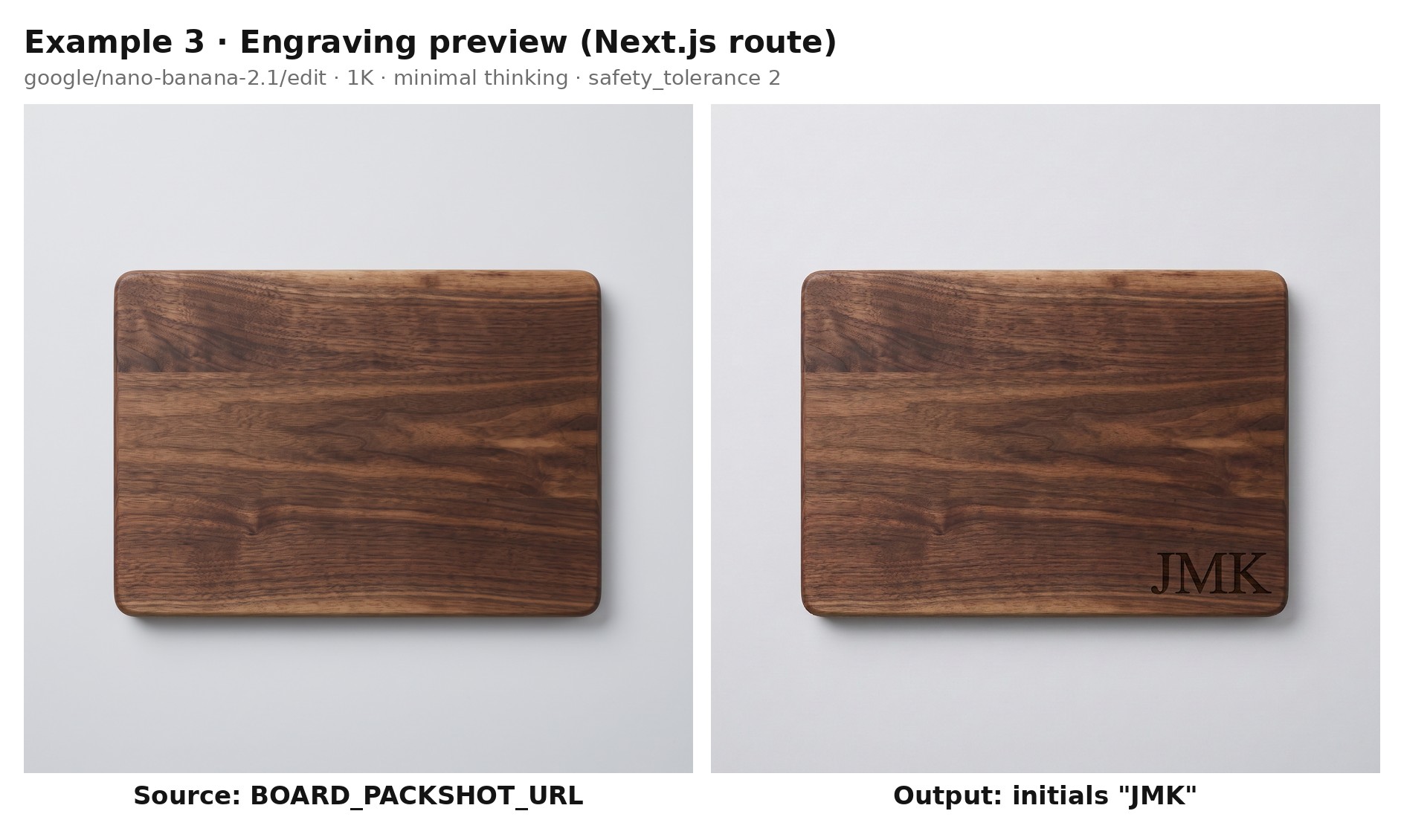
The storefront feature I built with it is an engraving preview that shows a shopper's initials on a walnut cutting board before they order.
The browser posts only the initials to the route below, and the server adds the store's own packshot URL and the rest of the prompt before calling fal.
The server side is a single Next.js route handler, saved as app/api/engraving-preview/route.js:
import { fal } from "@fal-ai/client";

const BOARD_PHOTO = process.env.BOARD_PACKSHOT_URL;

export async function POST(request) {
  const body = await request.json();
  const initials = String(body.initials ?? "")
    .toUpperCase()
    .replace(/[^A-Z]/g, "")
    .slice(0, 3);

  if (!initials) {
    return Response.json({ error: "Enter up to three letters." }, { status: 400 });
  }

  const { data, requestId } = await fal.subscribe("google/nano-banana-2.1/edit", {
    input: {
      prompt:
        `On the walnut cutting board in image 1, laser-engrave the letters "${initials}" ` +
        "in a classic serif, centered in the lower right corner of the board, a shade darker than the wood. " +
        "Leave the rest of the board and the background untouched.",
      image_urls: [BOARD_PHOTO],
      resolution: "1K",
      thinking_level: "minimal",
      safety_tolerance: "2",
    },
  });

  return Response.json({ url: data.images[0].url, requestId });
}
Generated using Nano Banana 2.1 Edit on fal, an AI model from Google.
Try it in ChatGPT Try it in fal AgentA fetch from the product page to /api/engraving-preview, with the initials in a JSON body, returns the preview URL for an img tag.
Since the route accepts no more than three letters from A to Z, a visitor can't turn it into a general image generator on the store's account.
You'll want to rate-limit the route per visitor as well, since each preview is a billed request.
safety_tolerance is an API-only field on a scale from 1 to 6, where 1 is strictest and our default is 4.
I'd recommend tightening it to 2 on a route that any stranger can reach.
Our model page recommends minimal thinking_level for faster results and lists it as the lower-cost setting, so the preview route uses it.
A preview shown at card size on a product page holds up at 1K, which puts it near $0.042 per request on our model page's short-prompt figures.
At that rate, 1,000 shoppers trying their initials come to roughly $42.
Setting sync_mode to true returns the image as a data URI and leaves the output out of your request history.
💡 Pro tip: pages that have to call fal straight from the browser can use our server-side proxy to add your key on the server.
Batching localized sale ads through the queue
fal_client.submit() queues each Nano Banana 2.1 job and hands its request ID straight back, which suits a batch that nobody is watching in real time.
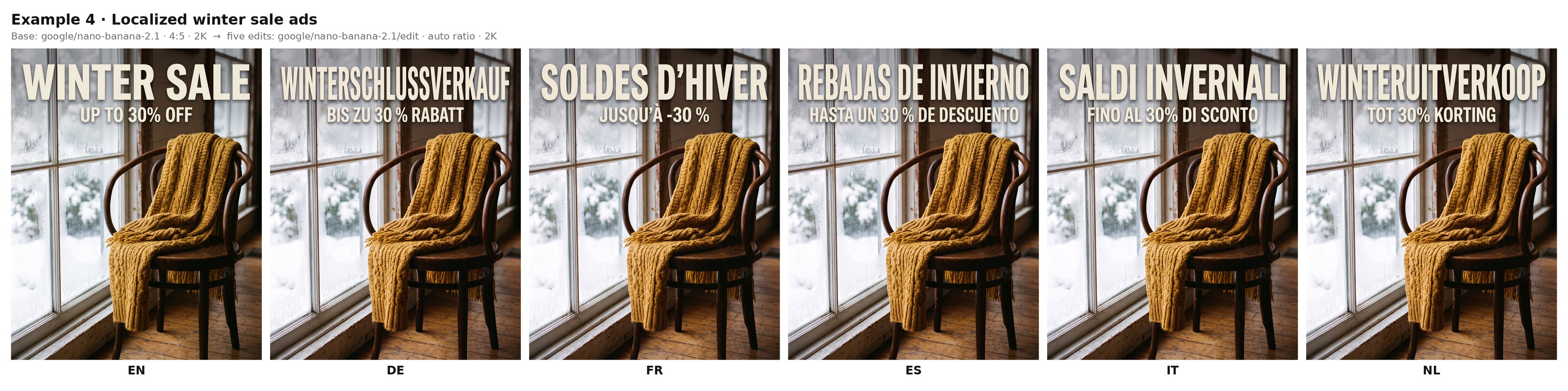
The batch here is a knitwear shop's winter sale ad, generated once in English and then edited into German, French, Spanish, Italian and Dutch for five regional storefronts.
Since all five versions start from the same approved ad, the photograph and layout begin identical across markets.
The edit prompt then asks for the words to change and nothing else.
import fal_client

WEBHOOK_URL = "https://shop.example.com/hooks/fal-images"

base = fal_client.subscribe(
    "google/nano-banana-2.1",
    arguments={
        "prompt": (
            "A social feed ad for a winter sale at a knitwear shop. "
            "A chunky mustard-yellow wool scarf is draped over the back of a bentwood chair beside a frosted window, "
            "lit by soft snow light from the left. "
            'Across the top of the frame, the words "WINTER SALE" appear in a heavy cream sans-serif, '
            'with "UP TO 30% OFF" below them in a smaller size. '
            "No other text appears in the image."
        ),
        "aspect_ratio": "4:5",
        "resolution": "2K",
    },
)
base_url = base["images"][0]["url"]

MARKETS = {
    "de": ("WINTERSCHLUSSVERKAUF", "BIS ZU 30 % RABATT"),
    "fr": ("SOLDES D'HIVER", "JUSQU'À -30 %"),
    "es": ("REBAJAS DE INVIERNO", "HASTA UN 30 % DE DESCUENTO"),
    "it": ("SALDI INVERNALI", "FINO AL 30% DI SCONTO"),
    "nl": ("WINTERUITVERKOOP", "TOT 30% KORTING"),
}

request_ids = {}
for market, (title, offer) in MARKETS.items():
    handle = fal_client.submit(
        "google/nano-banana-2.1/edit",
        arguments={
            "prompt": (
                f'Using the ad in image 1, replace "WINTER SALE" with "{title}" '
                f'and "UP TO 30% OFF" with "{offer}". '
                "Keep both lines in their original typeface and position, reducing the type size only if a line needs more room. "
                "Keep everything else in the image exactly the same."
            ),
            "image_urls": [base_url],
            "resolution": "2K",
        },
        webhook_url=WEBHOOK_URL,
    )
    request_ids[market] = handle.request_id

print(base_url, request_ids)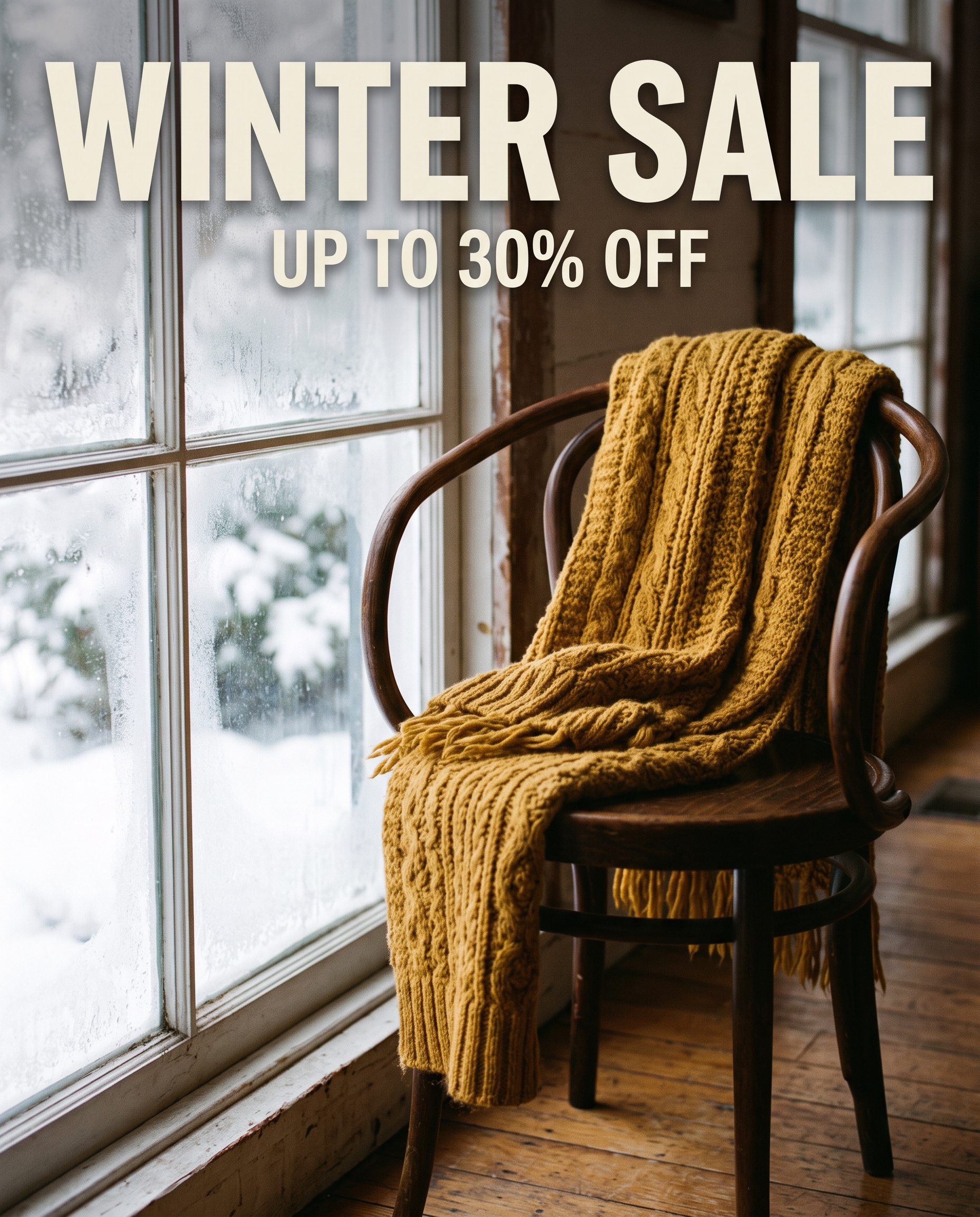
Generated using Nano Banana 2.1 on fal, an AI model from Google.
Here's how all of them look next to one another:
 Try it in ChatGPT
Try it in fal Agent
Try it in ChatGPT
Try it in fal Agent
With aspect_ratio left unset, the edits fall back to auto, which usually keeps the 4:5 frame of the source ad.
WINTERSCHLUSSVERKAUF runs to 20 letters against the 10 in WINTER SALE, so the prompt permits a smaller type size when a line needs the room.
Google highlights localized text rendering across several languages for Nano Banana 2.1.
I'd still have a native speaker read each version before the ads run.
We post each finished image to WEBHOOK_URL, and our webhooks guide documents both the payload and the signature your handler should verify before trusting it.
The script prints the IDs it collects, since fal_client.result() can return the output for a stored request ID if a delivery goes missing.
A brand-new account works through these five edits two at a time, since our concurrency limits start at 2 parallel requests.
Credit purchases lift that ceiling toward 40 over time, while the remaining requests hold their place in the queue.
From JavaScript, fal.queue.submit() takes the same input with a webhookUrl option, while fal.queue.result() pulls a completed output by request ID.
Counting $0.059 for the English base and roughly $0.061 per edit, the six requests total about $0.36 at 2K on our model page's short-prompt figures.
What makes a strong prompt for an ecommerce image?
A strong ecommerce prompt for Nano Banana 2.1 keeps the store's standing art direction in system_prompt and saves the prompt itself for the product and its place in the frame.
system_prompt is a separate input for a persistent style or set of rules, and brand guidelines that stay fixed from one image to the next belong there.
It's ideal to describe positions in thirds of the frame or by corner.
Google reports occasional left and right mix-ups, so placement is the first thing I check on a new template's early outputs.
On-image copy goes in double quotes, followed by a line that rules out any other text.
You'll want 2K or 4K for small lettering, since Google's own guidance warns that small text tends to blur at 1K.
Based on my experience, thinking_level set to high is worth its small extra cost on layouts with many labeled parts, such as size charts and spec sheets.
In Google's evaluations, turning thinking on lifted Nano Banana 2.1's infographic factuality score from 0.328 to 0.521.
enable_web_search pulls live Google Search results into a generation, though I leave it off for product work because a listing's details should come from the store's own catalog.
The luggage size guide below puts those habits together, with the brand rules in system_prompt and the specs quoted in the prompt:
import { fal } from "@fal-ai/client";

const systemPrompt = [
  "You design product graphics for an online luggage store.",
  "Use a warm off-white background with charcoal text in a geometric sans-serif.",
  "Terracotta is the only accent color.",
  "Show products as clean studio photographs, never as illustrations.",
  "Add no text or logos beyond what the request asks for.",
].join(" ");

const prompt = [
  "A size guide graphic for a range of hard-shell suitcases.",
  "Four photographs of the same navy suitcase stand in a row from smallest to largest,",
  "with their wheels on one shared baseline so a shopper can compare heights at a glance.",
  'At the top, the title "FIND YOUR SIZE" in charcoal.',
  "Under each suitcase, print its name and specs exactly as follows:",
  '"CABIN", "55 × 40 × 20 cm", "39 L";',
  '"CABIN PLUS", "60 × 42 × 24 cm", "52 L";',
  '"MEDIUM", "68 × 46 × 28 cm", "78 L";',
  '"LARGE", "78 × 52 × 31 cm", "112 L".',
  "Spell and space the figures exactly as written, with no other text.",
].join(" ");

const { data } = await fal.subscribe("google/nano-banana-2.1", {
  input: {
    prompt,
    system_prompt: systemPrompt,
    aspect_ratio: "3:4",
    resolution: "2K",
    thinking_level: "high",
  },
});

console.log(data.images[0].url);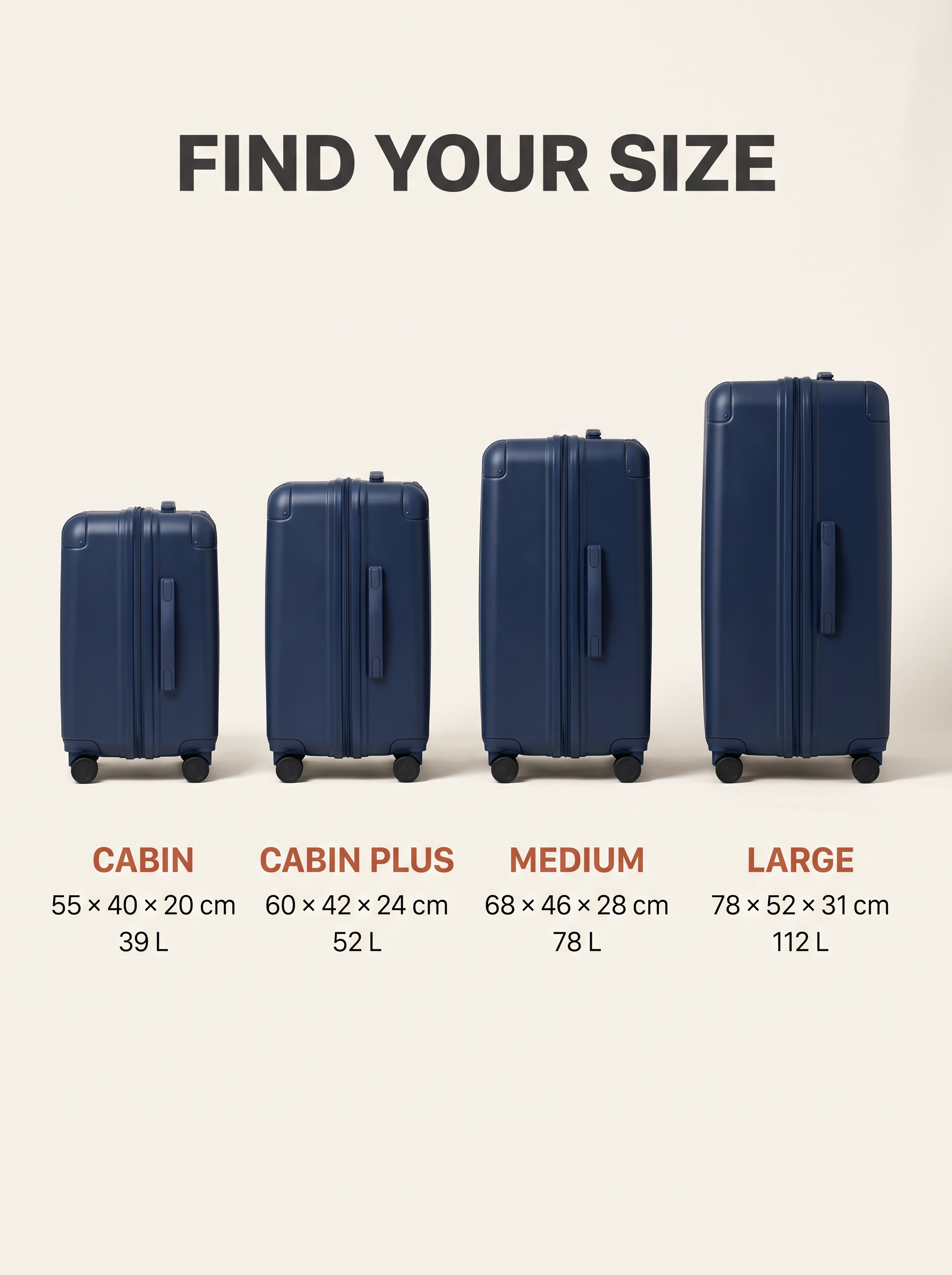
Generated using Nano Banana 2.1 on fal, an AI model from Google.
Try it in ChatGPT Try it in fal AgentHigh thinking adds a little to the bill here, as the billing test for our Nano Banana 2.1 vs. Nano Banana 2 comparison measured $0.0078 to $0.0139 extra per image.
On top of the $0.059 short-prompt price at 2K, that puts this graphic near $0.07.
Customers choose luggage from a guide like this one, and before publishing it I check all four sets of figures against the product data.
There's more on prompt patterns in our Nano Banana 2.1 how-to guide.
If text-heavy layouts are central to your catalog, our Nano Banana 2.1 vs. GPT Image 2.5 article puts the two models side by side.
How much does the Nano Banana 2.1 API cost per image?
As of October 2026, Nano Banana 2.1 bills per token on fal, and our model page converts those rates into these costs for one image from a roughly 100-token prompt at medium thinking:
| Resolution | Text-to-image | Edit with two 1K input images |
|---|---|---|
| 1K (default) | $0.040 | $0.044 |
| 2K | $0.059 | $0.063 |
| 4K | $0.134 | $0.138 |
Output image tokens account for most of each figure in that table.
Waiting in our queue costs nothing, and neither does a request that ends in a server error with a status of 500 or higher.
Using those short-prompt figures plus the measured cost of high thinking, the five examples in this tutorial come to about $0.60 at the settings below:
| Format | Endpoint | Request settings | Estimated cost |
|---|---|---|---|
| Tea collection banner | google/nano-banana-2.1 | 21:9, 2K | $0.059 |
| Skincare gift set | google/nano-banana-2.1/edit | 3:2, 2K, two input images | $0.063 |
| Engraving preview | google/nano-banana-2.1/edit | 1K, one input image, minimal thinking | $0.042 |
| Localized sale ads | Both endpoints | 4:5, 2K, one base image and five edits | $0.364 |
| Luggage size guide | google/nano-banana-2.1 | 3:4, 2K, high thinking | about $0.07 |
These are estimates built from published per-token rates, while the actual charge for any request depends on the tokens it used.
Our pricing page lists the rates for the other image models a fal key can call.
Errors to rule out before launch
The table pairs the Nano Banana 2.1 failures most worth planning for with their usual cause and the first fix to try.
| Symptom | Usual cause | Fix |
|---|---|---|
| Validation error on resolution | A value outside the enum, such as 2k or 1080p | 1K, 2K or 4K, written exactly that way |
| Edit request fails with a long reference list | More than 14 URLs in image_urls, the documented maximum | Fewer references per request, split across several calls |
| The model can't read an input image | The image host blocks cross-site or bot-like requests | A fal storage URL from upload_file() or fal.storage.upload() |
| Prompt asks for three versions, one image returns | limit_generations defaults to true and ignores counts written in the prompt | num_images, which accepts 1 to 4 |
| Small lettering looks soft | The image was rendered at 1K | 2K or 4K output |
| 422 with content_policy_violation | Automated safety systems flagged the prompt or an input image | A reworded prompt or a different input image |
| Requests start failing on a date you didn't plan for | The key reached its expiry date | A new key, since expired keys can't authenticate |
| A call to another model is refused | The key was limited to an Allowed models list at creation | A second key, as that list is fixed once the key exists |
| A batch takes longer than expected | The concurrency limit, 2 on new accounts, is in use | Fewer jobs in flight at once, or a larger credit balance, which raises the limit toward 40 |
| An old image link stops loading | The file passed its CDN retention period | A copy in your own storage as soon as each request completes |
Recently Added



Run Nano Banana 2.1 on fal
Image models now handle a good share of the artwork a store refreshes each season, from collection banners to sale ads for several markets.
Nano Banana 2.1 produced all five formats in this tutorial from two endpoints, with token-based prices that start near four cents for a 1K image.
The key you created for Nano Banana 2.1 also reaches the rest of our 1,000+ model catalog on fal, and none of the GPU work needs your attention.
Before a prompt from this tutorial goes into code, the Nano Banana 2.1 playground lets you try it in the browser.
Our roundups of the best AI image generators and AI image editing tools cover the other models available through that key.
Nano Banana 2.1 API FAQ
What's the largest image the Nano Banana 2.1 API can generate?
The largest Nano Banana 2.1 output is 4K, which our model page puts at about 16 megapixels, against roughly 4 megapixels at 2K.
The endpoint also accepts extreme aspect ratios of 4:1, 1:4, 8:1 and 1:8 for site-wide promo strips and tall mobile banners.
Can the Nano Banana 2.1 API return a transparent background?
The Nano Banana 2.1 input schema has no transparency or background field, so a marketplace that wants a pure white background needs that background described in the prompt.
When you need a true transparent cutout, the BiRefNet v2 endpoint (fal-ai/birefnet/v2) removes backgrounds through the API with your existing key, and our Background Remover tool does the job in the browser without any code.
Can Nano Banana 2.1 work from a supplier's PDF spec sheet?
The Nano Banana 2.1 edit endpoint accepts a PDF of up to 15 MB in pdf_url as context, and image_urls becomes optional once a PDF or video is supplied.
Exact figures, like the suitcase dimensions above, still belong in the prompt, with the PDF serving as background material.
Does the fal Python client support asyncio?
The fal Python client includes async versions of its calls, such as fal_client.subscribe_async() and fal_client.submit_async(), for services built on asyncio.
Those async calls take the same endpoint IDs and arguments as the synchronous ones.
Can I compare Nano Banana 2.1 with other image models before writing code?
Our Sandbox runs one prompt across several models side by side and estimates the cost before anything renders.
That makes it a quick way to confirm whether Nano Banana 2.1 or another image model suits a catalog before any of this code exists.
![How To Use Gemini Omni Flash 1.1: Prompts & Workflows [2026]](https://refinery.fal.media/url/https%3A%2F%2Fv3b.fal.media%2Ffiles%2Fb%2F0aa980d2%2FCQSjgFTnyKN_hFvYMZ4d1.jpg/tr:w-1280,q-80/CQSjgFTnyKN_hFvYMZ4d1.webp)
![How To Use Reve 2.1: Prompts & Workflows [2026]](https://refinery.fal.media/url/https%3A%2F%2Fv3b.fal.media%2Ffiles%2Fb%2F0aa30d29%2Fu_6F-C3_TrrNWDHjrPiNz.jpg/tr:w-1280,q-80/u_6F-C3_TrrNWDHjrPiNz.webp)

