When I pick an image model for a storefront, I want two answers: whether it keeps a perfume label or an ambassador's face intact through an edit, and what a finished asset costs at the size I ship.
I wrote seven ecommerce briefs to get those answers for Nano Banana 2.1, GPT Image 2.5 Flare and GPT Image 2.5 Sunburst on fal, from a bilingual fragrance poster to two frames of a running shoe TV spot.
TL;DR
- Nano Banana 2.1 is Google's Flash-tier image model, controlled through a resolution tier and a thinking level, while OpenAI's GPT Image 2.5 comes in two variants that you control through exact pixel size and a quality setting from low to max.
- For one 16:9 image from a short prompt, Nano Banana 2.1 at 2K costs $0.0593 and GPT Image 2.5 at 2560x1440 on high costs $0.05529.
- GPT Image 2.5 goes as low as $0.00402 for low quality at 1024x768; at the top, Nano Banana 2.1 goes up to 4K, about 16 megapixels, for $0.1335 per 16:9 image from a short prompt.
- Only on Nano Banana 2.1: web search grounding, video or PDF context on edits, a system prompt, a seed field and aspect ratios out to 8:1 and 1:8.
- GPT Image 2.5's extras: transparent backgrounds, a separate mask file through
mask_url,output_compressionfor jpeg and webp, and room for 16 references per edit to Nano Banana 2.1's 14. - Flare or Sunburst: fal charges the same for both variants, so you choose between them on generation time and detail alone, which our GPT Image 2.5 vs. GPT Image 2 comparison tests across six briefs.
- With thinking on, Nano Banana 2.1 outscores Nano Banana 2 on all seven editing benchmarks in Google's model card, including 1049 to 965 on mask editing and 1106 to 978 on multi-character consistency.
- The best place to run both models is on fal, as Nano Banana 2.1 and GPT Image 2.5 share one fal API key and bill per use, so you pay only for the images you generate while testing all three on your own catalogue.
Which specs differ between Nano Banana 2.1 and GPT Image 2.5?
The biggest spec differences are in how you size and steer an image: Nano Banana 2.1 uses a resolution tier and a thinking level, and GPT Image 2.5 uses exact pixel dimensions and a quality level across two variants.
Reference caps and region editing differ too, as the table below shows field by field.
| Nano Banana 2.1 | GPT Image 2.5 Flare | GPT Image 2.5 Sunburst | |
|---|---|---|---|
| Developer | OpenAI | OpenAI | |
| Endpoints on fal | google/nano-banana-2.1, google/nano-banana-2.1/edit | openai/gpt-image-2.5/flare/text-to-image, openai/gpt-image-2.5/flare/edit | openai/gpt-image-2.5/sunburst/text-to-image, openai/gpt-image-2.5/sunburst/edit |
| How our model pages describe it | Flash-tier speed, up to 4K | Default for most applications, fast | Precision-focused, longer generation times |
| Effort control | thinking_level: minimal, medium (default), high | quality: auto, low, medium, high (default), xhigh, max | quality: auto, low, medium, high (default), xhigh, max |
| Size control | resolution: 1K (default), 2K, 4K | image_size: six presets plus auto, or custom width and height | image_size: six presets plus auto, or custom width and height |
| Largest output | 4K, about 16 megapixels | 3840px edge, 8,294,400 pixels | 3840px edge, 8,294,400 pixels |
| Aspect ratios | 14 fixed values from 1:8 to 8:1, plus auto | Any ratio up to 3:1, both sides multiples of 16 | Any ratio up to 3:1, both sides multiples of 16 |
| Default size, text to image | 1K, aspect ratio auto | landscape_4_3 | landscape_4_3 |
| Default size, editing | 1K, ratio usually matches the input | auto, inferred from the input images | auto, inferred from the input images |
| Reference images per edit | Up to 14 (4 characters and 10 objects consistent, per Google) | Up to 16 | Up to 16 |
| Region editing | Marks painted on the input image, no mask parameter | ✅ mask_url | ✅ mask_url |
| Video or PDF as context | ✅ video_url (file up to 15 MB or a YouTube URL) and pdf_url (up to 15 MB) on edit | ❌ No field in the schema | ❌ No field in the schema |
| Web search grounding | ✅ enable_web_search | ❌ No field in the schema | ❌ No field in the schema |
| System prompt | ✅ system_prompt | ❌ No field in the schema | ❌ No field in the schema |
| Seed | ✅ seed | ❌ No field in the schema | ❌ No field in the schema |
| Transparent background | ❌ No background field in the schema | ✅ background: "transparent" | ✅ background: "transparent" |
| Output formats | jpeg, png, webp (png default) | jpeg, png, webp (png default) | jpeg, png, webp (png default) |
output_compression | ❌ No field in the schema | ✅ 0 to 100 on jpeg and webp | ✅ 0 to 100 on jpeg and webp |
| Images per request | 1 to 4 | num_images, default 1 | num_images, default 1 |
| Moderation control | safety_tolerance 1 to 6, API only, default 4 | enable_safety_checker, false for authorized callers | enable_safety_checker, false for authorized callers |
| Price, about 1 megapixel | $0.0396 (1K, 16:9) | $0.05268 (1024x1024, high) | $0.05268 (1024x1024, high) |
| Price, about 4 megapixels | $0.0593 (2K, 16:9) | $0.05529 (2560x1440, high) | $0.05529 (2560x1440, high) |
| Price, largest output | $0.1335 (4K, 16:9) | $0.10008 on high, $0.40026 on max (3840x2160) | $0.10008 on high, $0.40026 on max (3840x2160) |
| Commercial use | ✅ | ✅ | ✅ |
Why does GPT Image 2.5 use pixel sizes while Nano Banana 2.1 uses tiers?
The two models tie output size to cost in different ways: Nano Banana 2.1 counts a fixed number of output tokens per resolution tier and uses thinking as its effort control, whereas GPT Image 2.5 prices each image by the pixel size and quality level you request.
On the Nano Banana 2.1 side, size and effort work like this:
- Nano Banana 2.1 is Google's update to Gemini 3.1 Flash Image, better known as Nano Banana 2, and keeps that model's Flash-level speed and cost efficiency.
- Google pitches the 2.1 model as a more efficient option than Nano Banana Pro, and its Gemini API model code is gemini-nano-banana-2.1.
- With
thinking_levelyou set how long Nano Banana 2.1 reasons before it draws, from minimal for faster results up to high for dense compositions, and we bill those thinking tokens as output text at $8.823 per million. - In Google's evaluations the thinking version led the no-thinking version on each published benchmark, with infographic factuality rising from 0.328 to 0.521.
- Size is a tier you pick, at about 1,120 output tokens for a 1K image and 3,780 for 4K by Google's count, and the aspect ratio only changes the shape.
On the GPT Image 2.5 side, both variants follow the same rules:
- GPT Image 2.5 takes any width and height in multiples of 16 up to a 3840px edge, as long as the total stays between 655,360 and 8,294,400 pixels.
- Quality is the effort dial, and per the schema, higher settings add detail along with latency and token usage, while auto lets the model choose a level for you.
- Flare and Sunburst take identical parameters and share one price table.
- On our pages, Flare is OpenAI's default for most applications, while Sunburst is the precision-focused variant that trades longer generation times for finer intricate detail.
For cost and speed, here's how the models compare:
- Budget on Nano Banana 2.1: predictable once you've picked a tier and a thinking level, because each extra 1,000 prompt tokens adds only about $0.002.
- Budget on GPT Image 2.5: you set most of the price through size and quality, though our pricing notes add that longer prompts and world-knowledge requests cost more.
- Speed claims: Nano Banana 2.1 keeps the Flash-level pace of Nano Banana 2 by Google's account, while OpenAI says Flare cuts latency by up to half compared with GPT Image 2.
- Speed levers: you can drop Nano Banana 2.1 to minimal thinking or move either GPT Image 2.5 variant below high quality.
💡 In a live product configurator preview, the faster options are Nano Banana 2.1 at minimal thinking and GPT Image 2.5 Flare below high, while Sunburst is better kept for batch jobs that run in a queue.
How were the tests set up?
I gave all three models identical prompt text in each test, on a matched 4.2 to 4.3 megapixel grid at each model's default effort.
Nano Banana 2.1 ran at 2K, about 4 megapixels, with thinking_level left at medium.
Flare and Sunburst both ran at their default quality of high, with image_size set to the width and height Nano Banana 2.1 returned for each aspect ratio.
OpenAI labels GPT Image 2.5 output above 3,686,400 pixels experimental, and every GPT frame in this article is slightly past that mark.
I requested one PNG per call and generated the editing sources on Flux 2, which isn't one of the models under test.
I kept features that only one model has, such as transparency or video context, to the spec table and the feature section.
The aspect ratio and pixel size for each test were set as follows:
| Test | Nano Banana 2.1 | GPT Image 2.5 image_size |
|---|---|---|
| 1. Fragrance poster | aspect_ratio 2:3, resolution 2K | 1696x2528 |
| 2. Listing infographic | aspect_ratio 1:1, resolution 2K | 2048x2048 |
| 3. Sneaker close-up | aspect_ratio 16:9, resolution 2K | 2752x1536 |
| 4. Vanity mirror edit | aspect_ratio 4:5, resolution 2K | 1856x2304 |
| 5. Campaign frame | aspect_ratio 3:4, resolution 2K | 1792x2400 |
| 6. TV spot frames | aspect_ratio 16:9, resolution 2K | 2752x1536 |
| 7. Colourway edit | aspect_ratio 1:1, resolution 2K | 2048x2048 |
Text-to-image tests on three e-commerce briefs
I ran three briefs through the text-to-image endpoints, one image per model per test, using the settings in the table above.
Test 1: A bilingual fragrance launch poster (2:3)
Fragrance brands often run one key visual across several markets, so this poster puts an English wordmark and a Japanese line in a single layout.
I'm checking whether the Japanese line comes back correctly formed and whether the small print stays sharp at 2K, since Google says small text can blur at 1K.
Prompt: "A vertical retail poster for a fragrance launch. Centre of the frame: a heavy rectangular glass perfume bottle with bevelled shoulders and a matte black cap, half filled with pale gold liquid, standing on a slab of wet grey slate beside two halved figs with their cut faces turned to the camera. Background: a soft gradient from sea-mist blue at the top to warm sand at the base, with loose salt crystals scattered across the slate and catching one hard key light from the upper right. Lettering, top to bottom: the house name 'ELSWYTH' in widely tracked thin serif capitals; the fragrance name 'SALT FIG' large in a high-contrast serif; the Japanese line '塩といちじくの香り' set under the bottle in a matching mincho face; and along the bottom edge, 'Eau de Parfum 50 ml' on the left with 'Launching 2 March' on the right in a small sans serif. All lettering spelled exactly as given, the Japanese characters correctly formed, nothing else written on the poster and no watermark."
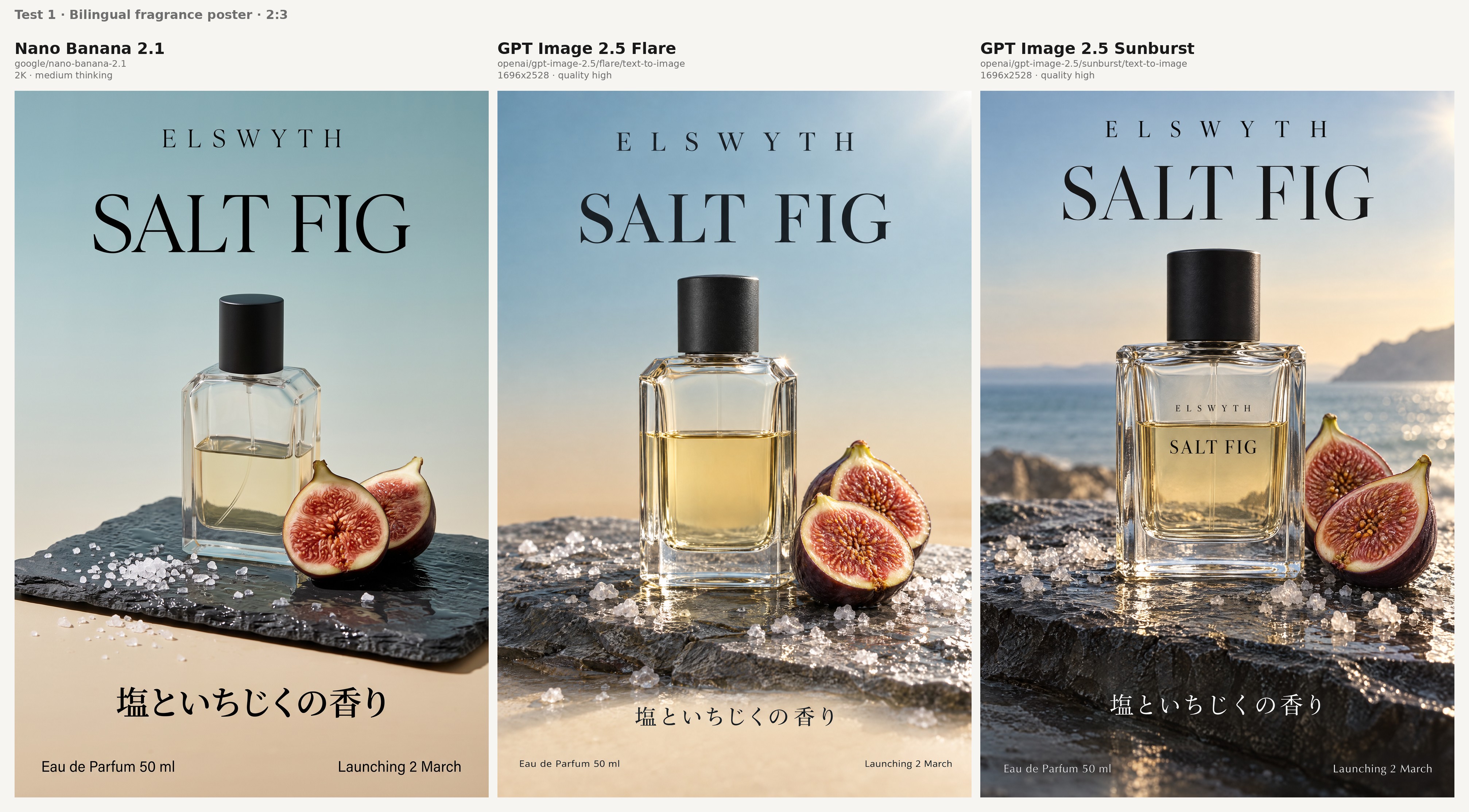
Both items on my checklist for this poster are about type:
- The Japanese line reads 塩といちじくの香り with all nine characters in order and no invented strokes.
- 'Eau de Parfum 50 ml' and 'Launching 2 March' stay crisp in the bottom strip when you view the poster at full size.
Test 2: A running shoe listing infographic (1:1)
Many shoe listings use a square infographic with callouts as the second or third image after the main product shot.
Infographic design is one of the categories Google scored for Nano Banana 2.1, at 1048 Elo with thinking compared with 961 for Nano Banana 2.
I kept thinking_level at medium to show the out-of-the-box result, though Google's tips point to high for dense layouts, which costs $0.0732 per 2K image in our 16:9 billing.
Prompt: "A square product listing infographic for an online shoe store, on a clean white background. In the centre, a lightweight road running shoe in pale grey engineered mesh on a thick white foam midsole, shown in side profile and turned slightly toward the camera. Four callouts with thin grey leader lines, each line ending exactly on the part it names: 'Engineered mesh upper' at the toe box, 'Nitrogen-infused foam midsole' at the midsole, '8 mm heel-to-toe drop' at the heel stack and 'Carbon rubber outsole' at the forefoot tread. Top left, the product name 'LARKSPUR TR-2' in a bold geometric sans serif. Along the bottom, a row of four small line icons labelled 'Breathable', 'Neutral support', '248 g (UK 8)' and 'Free returns', all drawn with the same stroke weight. All labels legible and spelled exactly as written, no watermark and no extra copy."
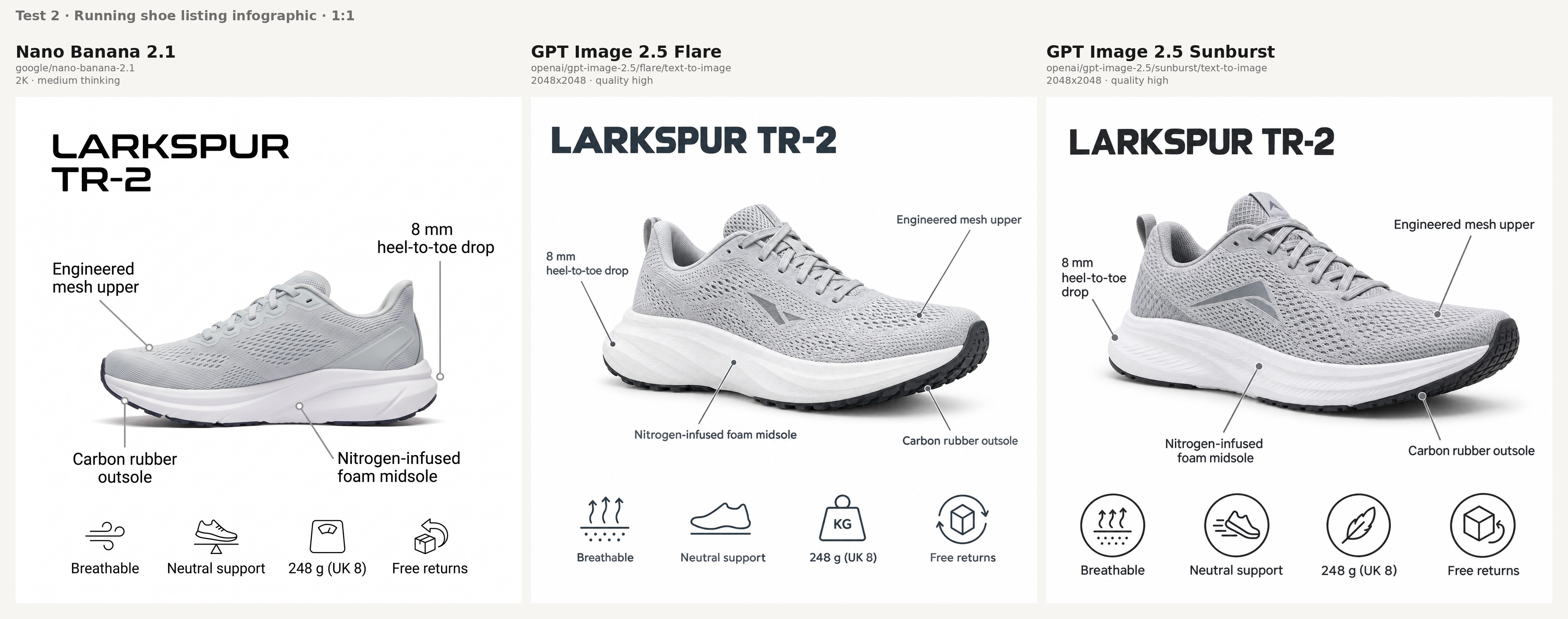
Trace the callouts on each infographic before reading any of the copy:
- All four leader lines end on the parts their labels name, with the drop callout pointing at the heel stack.
- 'LARKSPUR TR-2' keeps both its hyphen and its final digit in the corner.
- '248 g (UK 8)' renders with both brackets and the space between the number and the g.
- The four icons share one stroke weight and one drawing style, so the bottom row reads as one designed set.
Test 3: Sneaker materials at zoom distance (16:9)
I put brushed suede next to full-grain leather because the two read alike at a glance.
I also wrote a stitch density into the prompt so the spacing can be checked at full size.
Sunburst is positioned on our model page as the variant for intricate detail, and I wanted to see it next to Flare and Nano Banana 2.1 on the same pixel grid.
Prompt: "A macro product photograph in a wide 16:9 frame, showing the toe and vamp of a premium leather and suede sneaker at close range for a zoomable product page. An off-white full-grain leather toe cap meets a tan suede overlay along a double row of tonal stitching at about eight stitches per inch. The suede nap runs in one visible direction and lightens where it was brushed, while the leather shows fine natural grain and one soft crease across the flex point. Two flat waxed cotton laces cross through the lowest pair of eyelets, each eyelet finished in brushed brass with a thin rim of dark edge paint around the hole. Low raking light from the left to bring out texture, a soft fill from the right, neutral white balance, sharp focus from the stitch line to the eyelets and a gentle falloff behind them. No logos and no text."
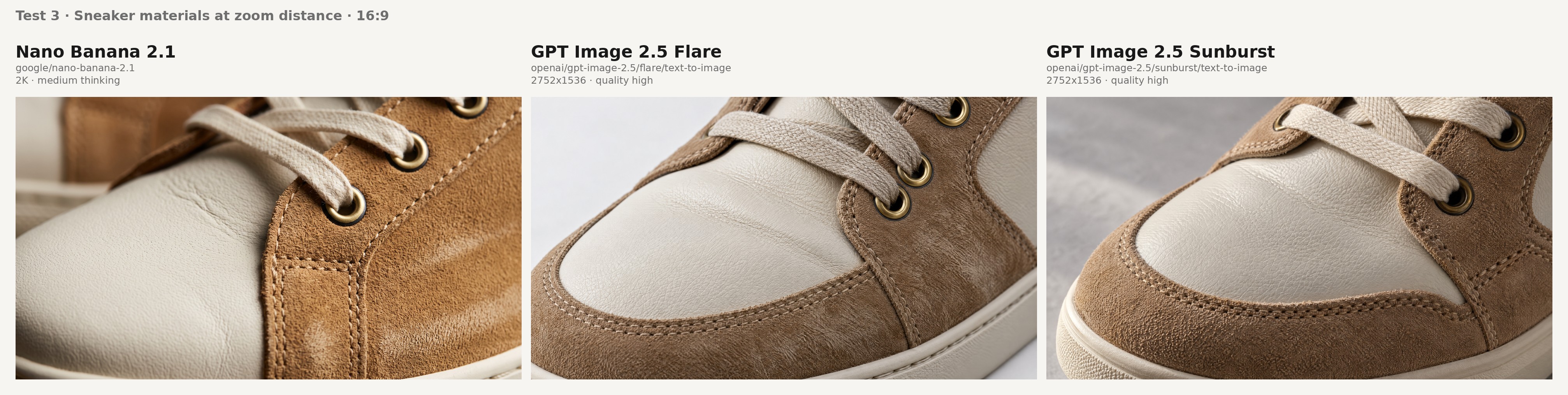
Start at 100% zoom on the stitch rows; with two parallel rows at a stated density, you can tell quickly whether a model drew real stitches or a stitch-like texture.
The suede nap and the leather grain should stay distinct along the toe cap seam.
Each eyelet should read as a brushed brass ring with a dark painted edge around the hole, a detail that's easy to fake at thumbnail size and hard to fake at 100%.
falMODEL APIs
The fastest, cheapest and most reliable way to run genAI models. 1 API, 100s of models
Editing tests on product shots and campaign frames
I generated all four editing sources on Flux 2 so that none of the three models gets an input drawn in its own house style.
In Test 7 alone, each model received its edit region in the form its own schema accepts, and otherwise the inputs were identical.
Test 4: A perfume bottle beside a vanity mirror (4:5)
Our Nano Banana 2.1 page shows product placement with the label intact.
I raised the difficulty with a mirror that has to show that label a second time, reversed.
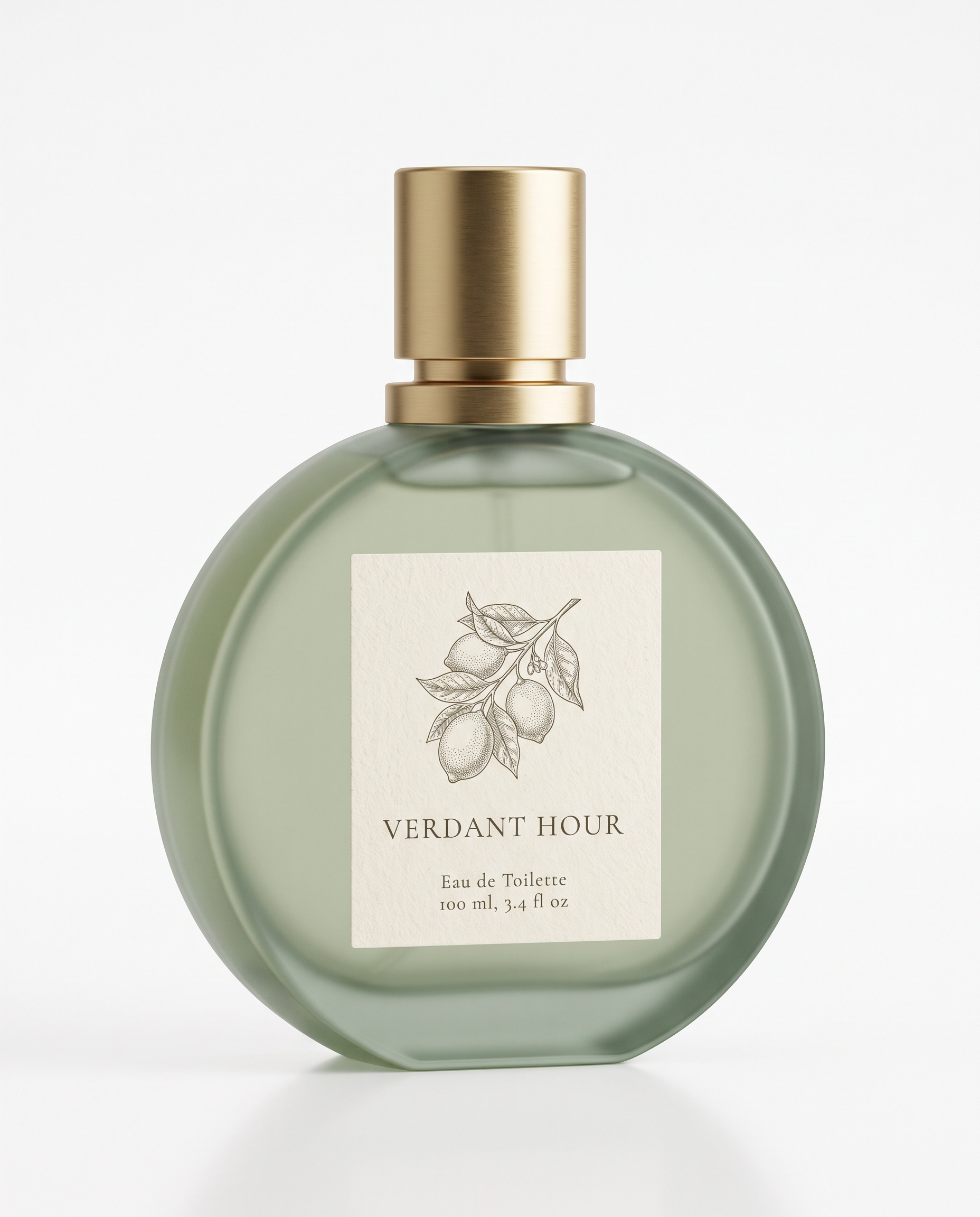
Source packshot prompt, made on Flux 2: "A clean e-commerce packshot of a round, flat-sided perfume bottle in frosted green glass with a brushed gold collar and a cylindrical gold cap, shot straight on against a white studio sweep. A cream paper label across the front shows a fine engraved-style lemon branch above the name 'VERDANT HOUR' in a small serif, with two lines of small print beneath it: 'Eau de Toilette' and '100 ml, 3.4 fl oz'. Even softbox lighting with a gentle highlight down the left edge of the glass, no props."
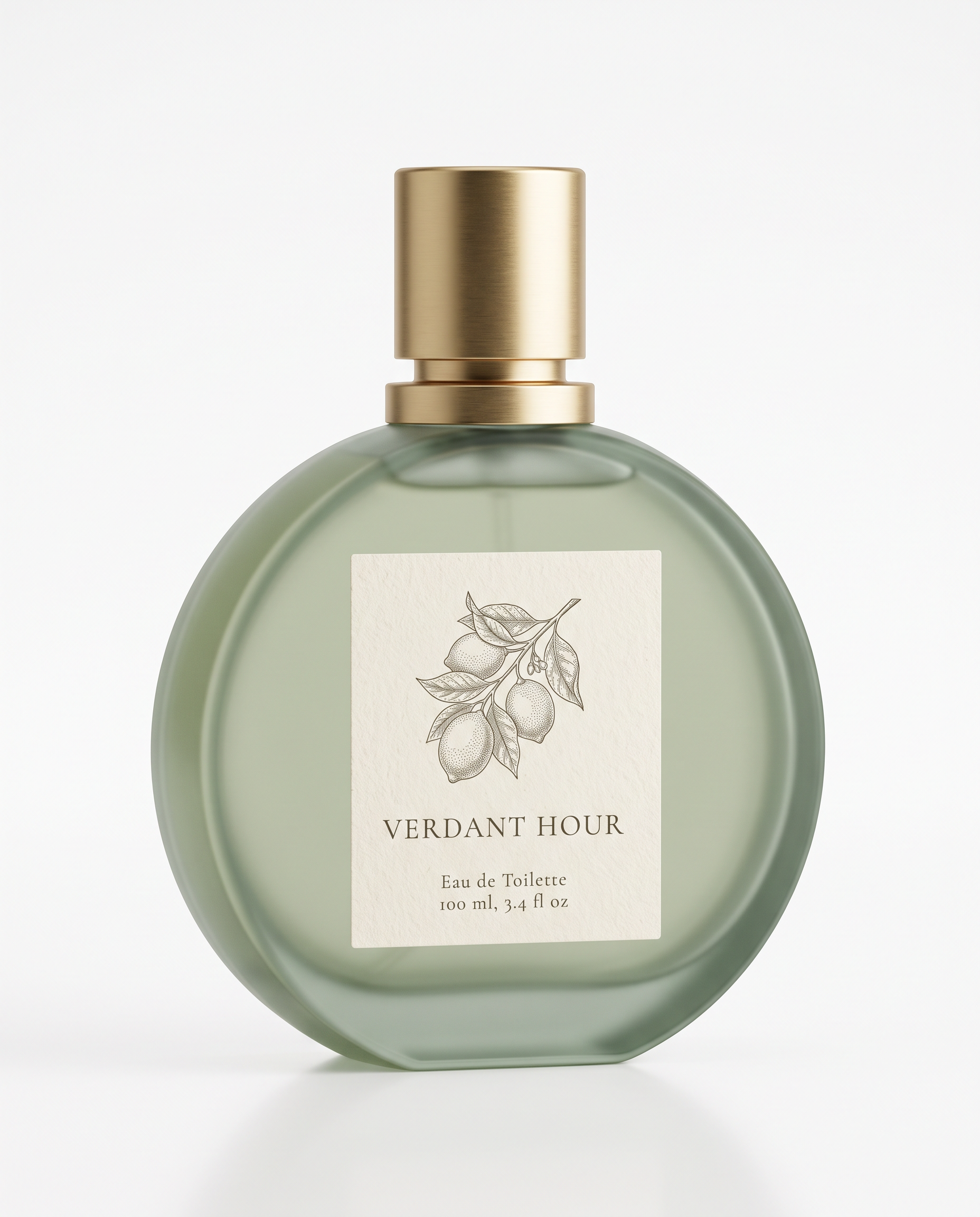
Generated using Flux 2 on fal, an AI model from Black Forest Labs.
Edit prompt, sent to all three edit endpoints with the packshot as the only reference: "Stand the perfume bottle from the image on a pale marble bathroom vanity in morning light, turned three-quarters to the camera, next to a round wall mirror that shows the front of the bottle and its label in reflection. The bottle itself stays identical to the image, from the frosted green glass and gold cap to the lemon branch illustration and all of the label text. In the mirror, the label reads in reverse, as a real reflection would, at the same size and angle as the bottle in front of it. Warm low sun from a window on the right, casting a soft shadow across the marble with a faint green tint where the light passes through the glass. A folded linen hand towel behind the bottle is the only other object on the vanity, with no added text."
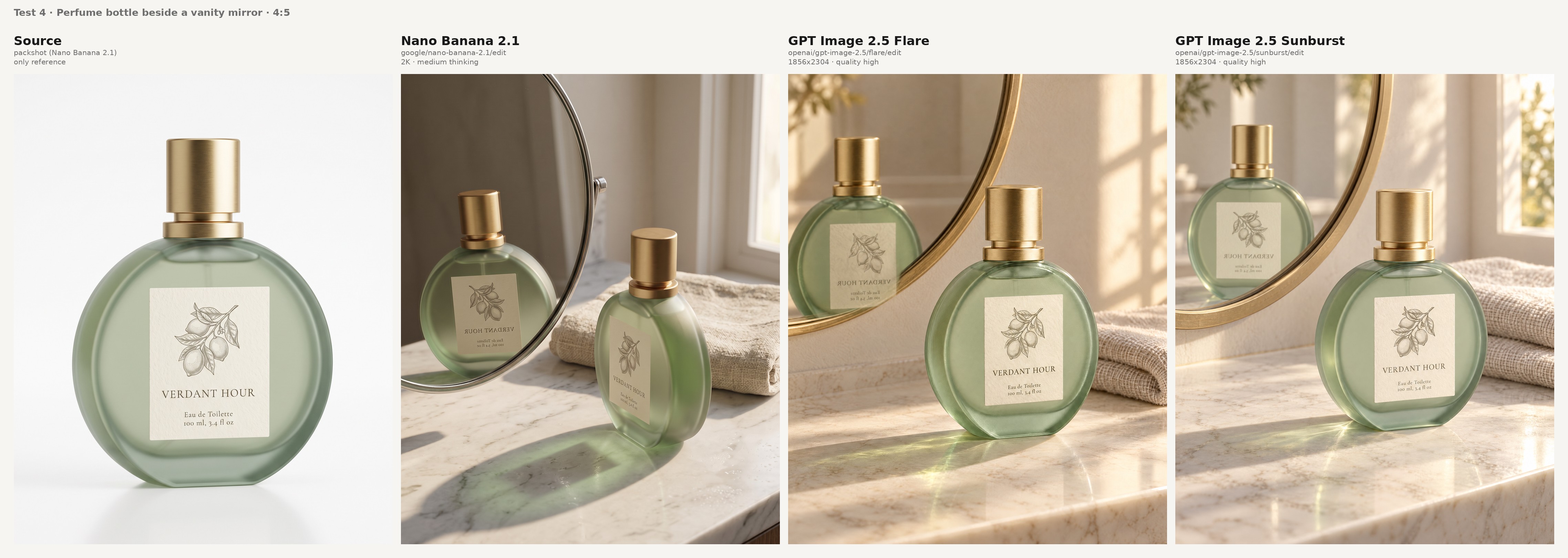
For the vanity shot, I'd check the bottle first and the reflection second:
- The label on the bottle matches the packshot letter by letter, down to the '3.4 fl oz' line, which is the smallest type in the source.
- The mirrored label reads in reverse at a believable size and position, not as a second copy facing forward.
Test 5: A four-reference footwear campaign frame (3:4)
Four references are well inside both caps, with Nano Banana 2.1 taking up to 14 per edit and GPT Image 2.5 up to 16.
The difficult part is turning a side-profile sneaker shot into a mirrored pair on two feet without losing its colour blocking.
The four references went to image_urls in the order below.
Reference 1 prompt, the woman, made on Flux 2: "A studio portrait framed from the chest up of a woman in her late twenties with a sharp asymmetric black bob that falls longer on her right side and a thin silver hoop in her left nostril, wearing a rust-red track jacket with a cream stripe down each sleeve. Neutral grey backdrop, soft frontal key light, natural skin texture, looking straight into the lens."
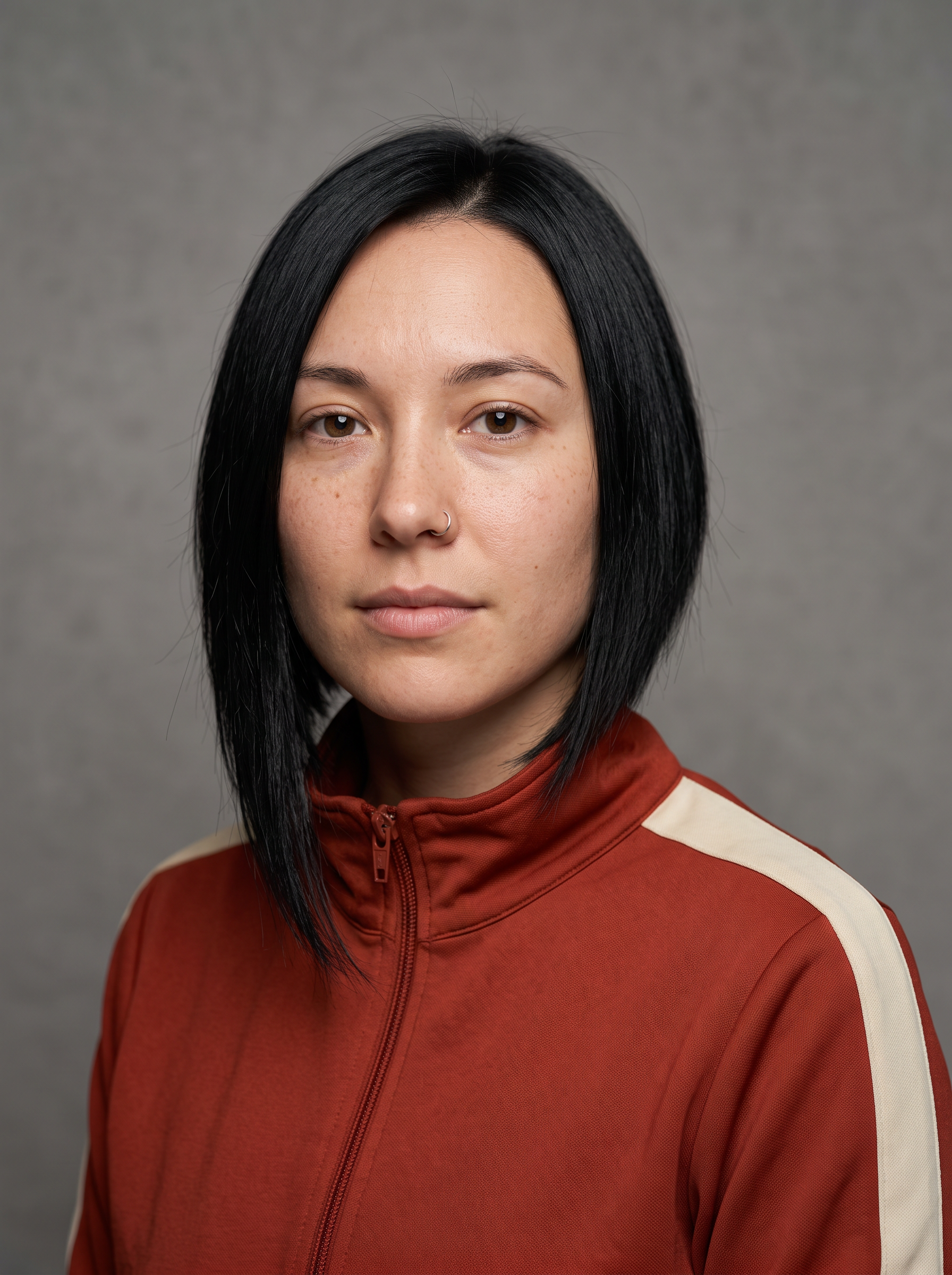
Generated using Flux 2 on fal, an AI model from Black Forest Labs.
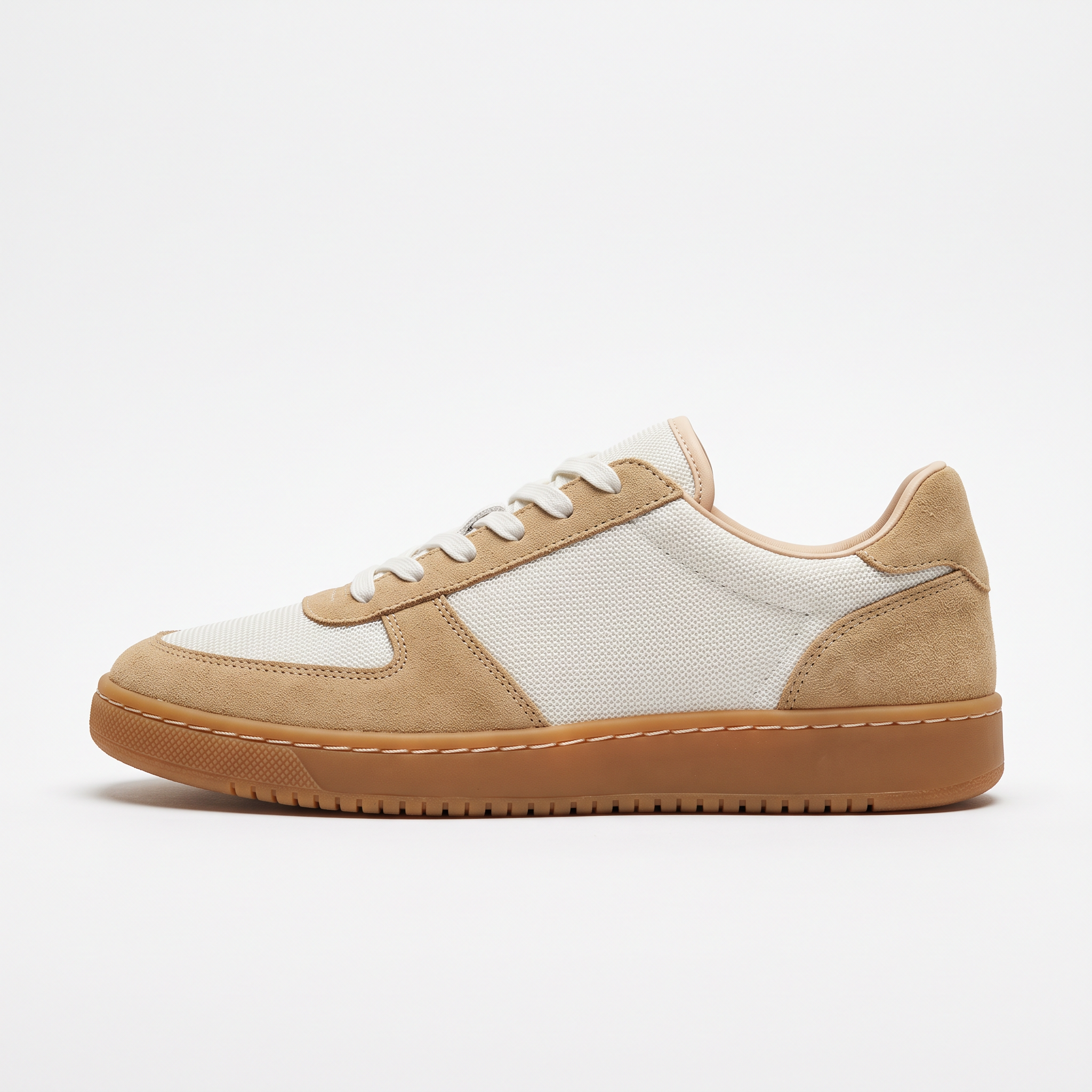
Reference 2 prompt, the sneaker, made on Flux 2: "An e-commerce product photograph of a low-top lifestyle sneaker in side profile against a white studio sweep, toe pointing left. The upper is off-white mesh with tan suede overlays wrapping the toe and the heel, on a gum rubber cupsole with a visible stitched welt; the laces are flat and white. Even softbox lighting, a soft contact shadow, no logos and no text."
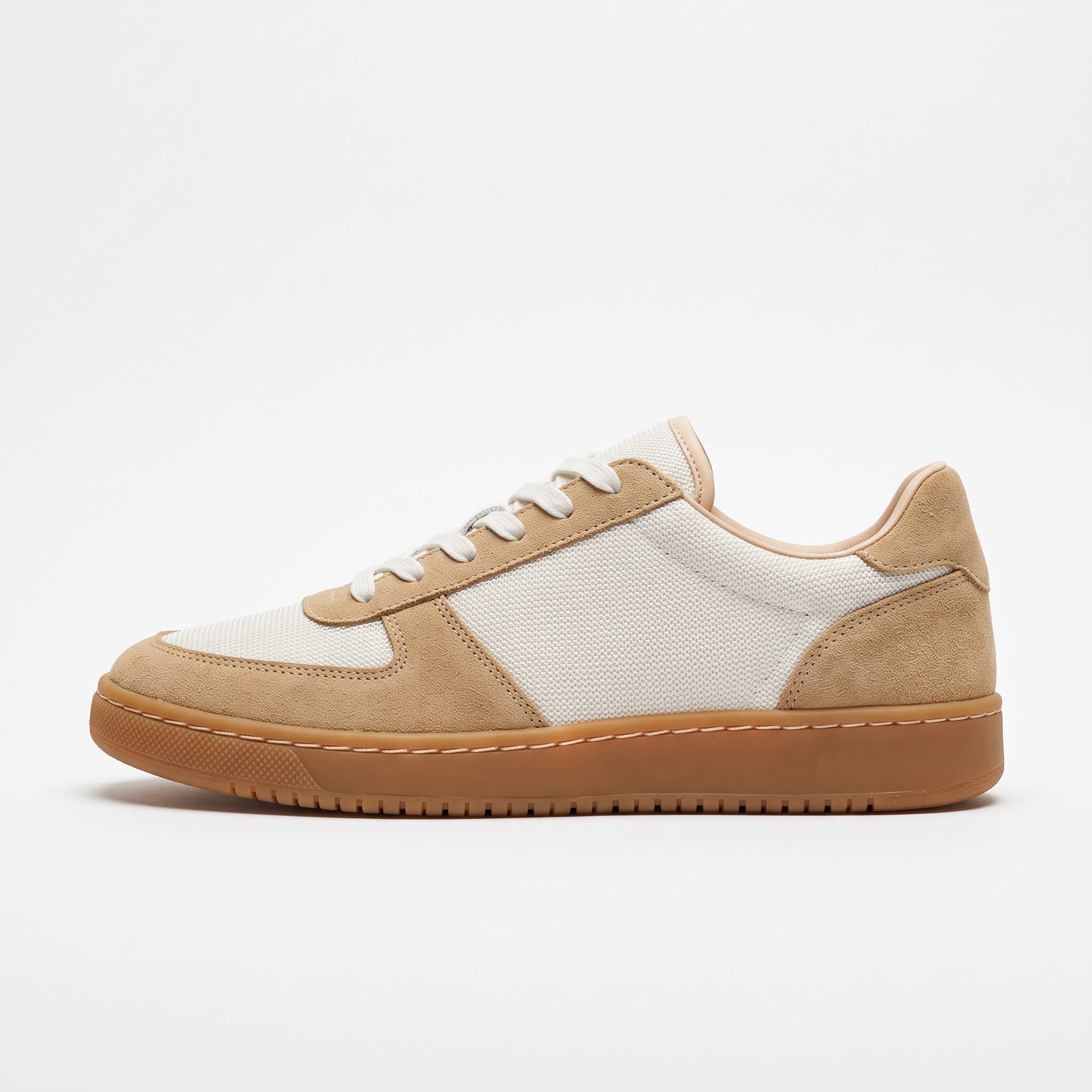
Generated using Flux 2 on fal, an AI model from Black Forest Labs.
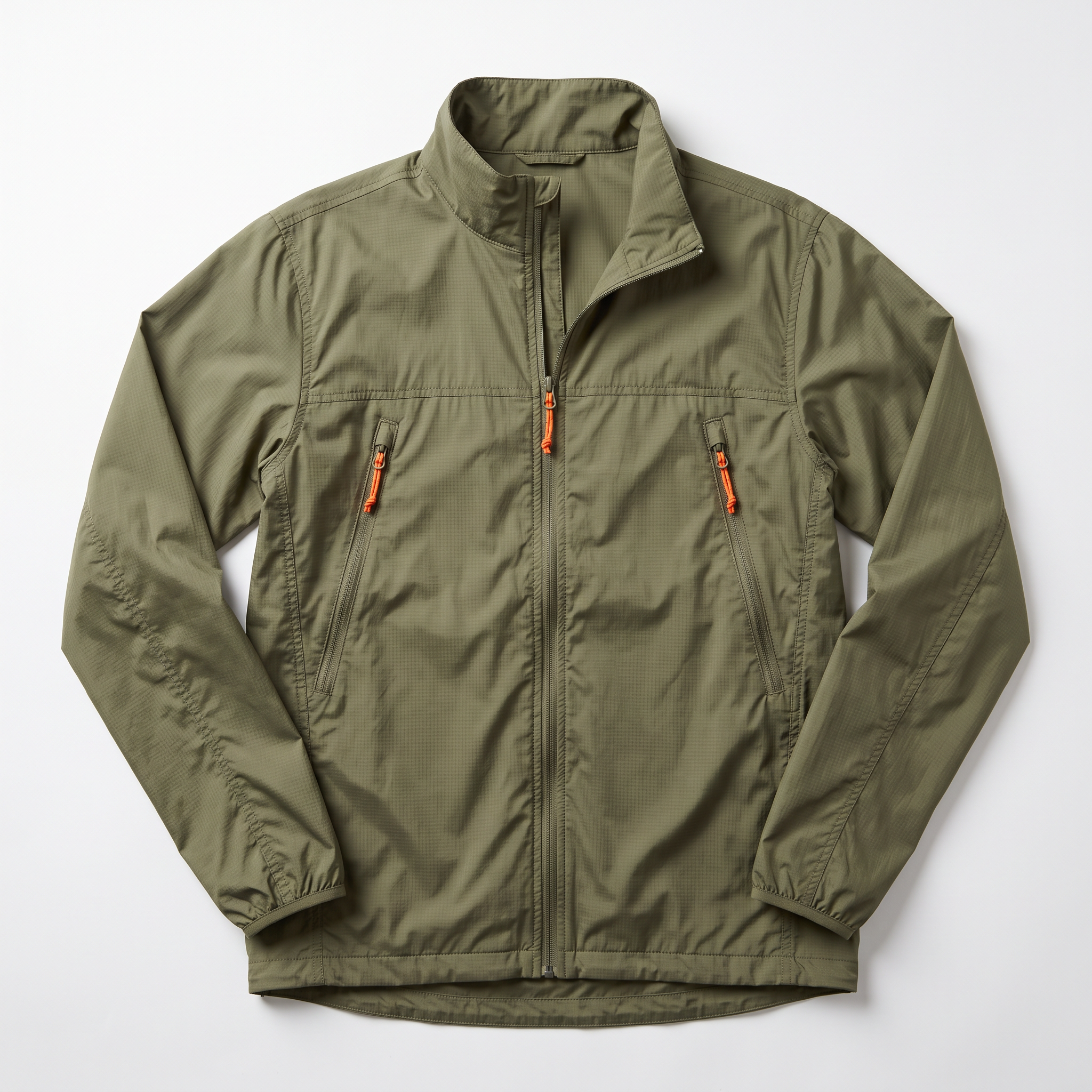
Reference 3 prompt, the jacket, made on Flux 2: "A flat-lay product photograph of a lightweight olive-green ripstop shell jacket on a white background, unzipped halfway, with a stand-up collar and two diagonal chest pockets fitted with orange zip pulls. Soft overhead light with all seams visible and no logos or text."
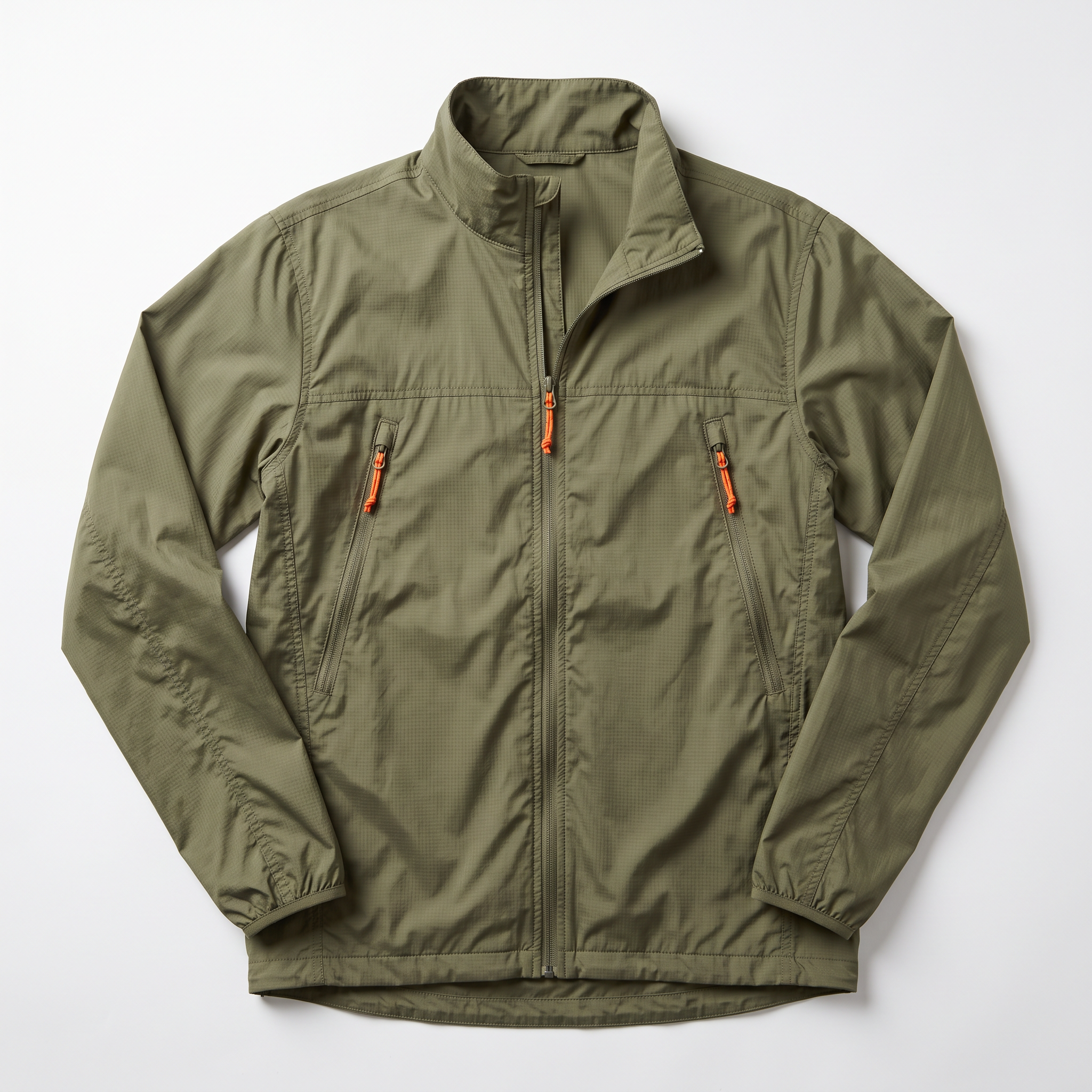
Generated using Flux 2 on fal, an AI model from Black Forest Labs.
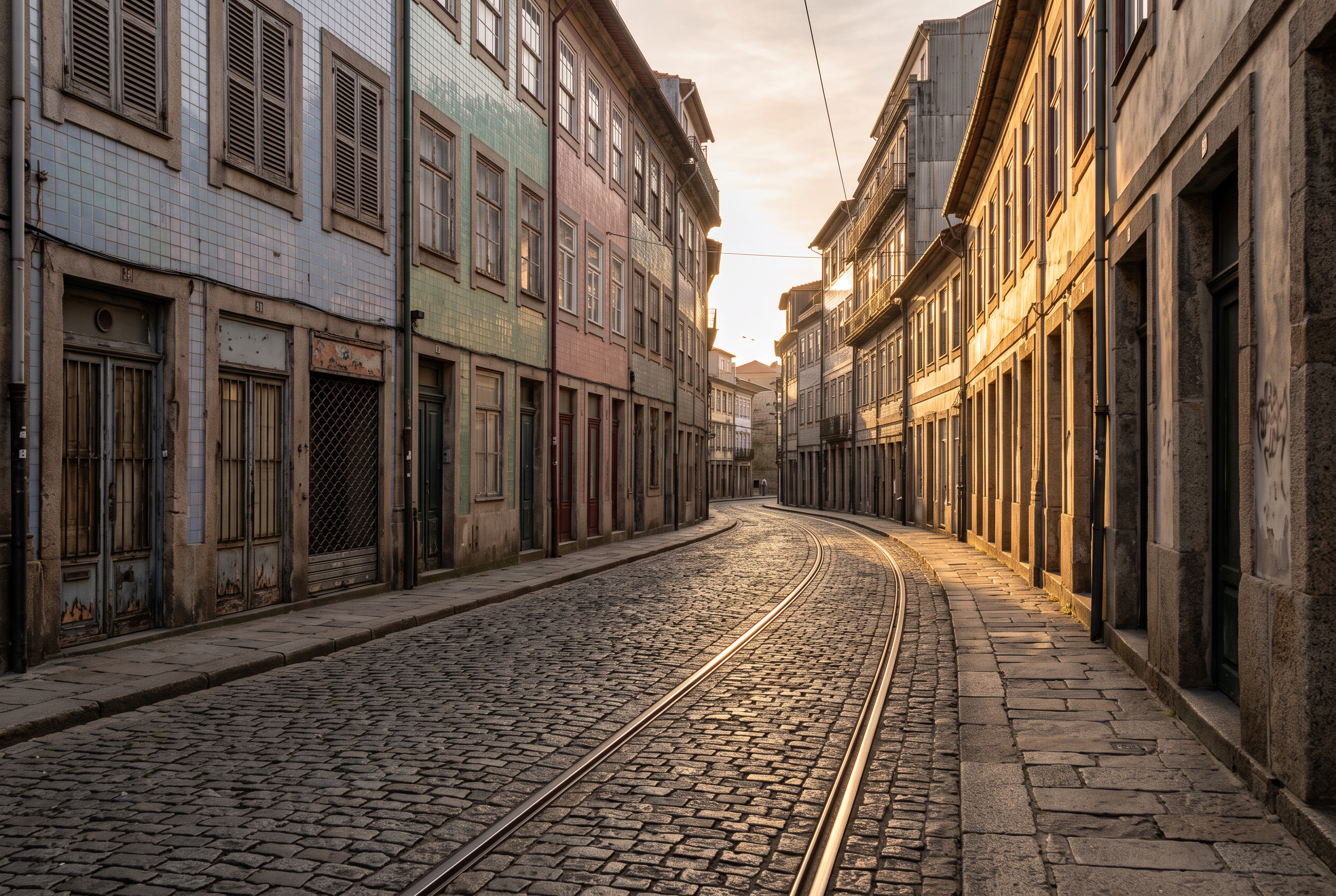
Reference 4 prompt, the street, made on Flux 2: "A photograph of an empty cobbled side street in Porto in late afternoon, with pastel tiled shopfronts and closed wooden shutters on the left and a tram line curving away into the distance. Shot at eye level from the middle of the street in long warm light, with no people or text in frame."
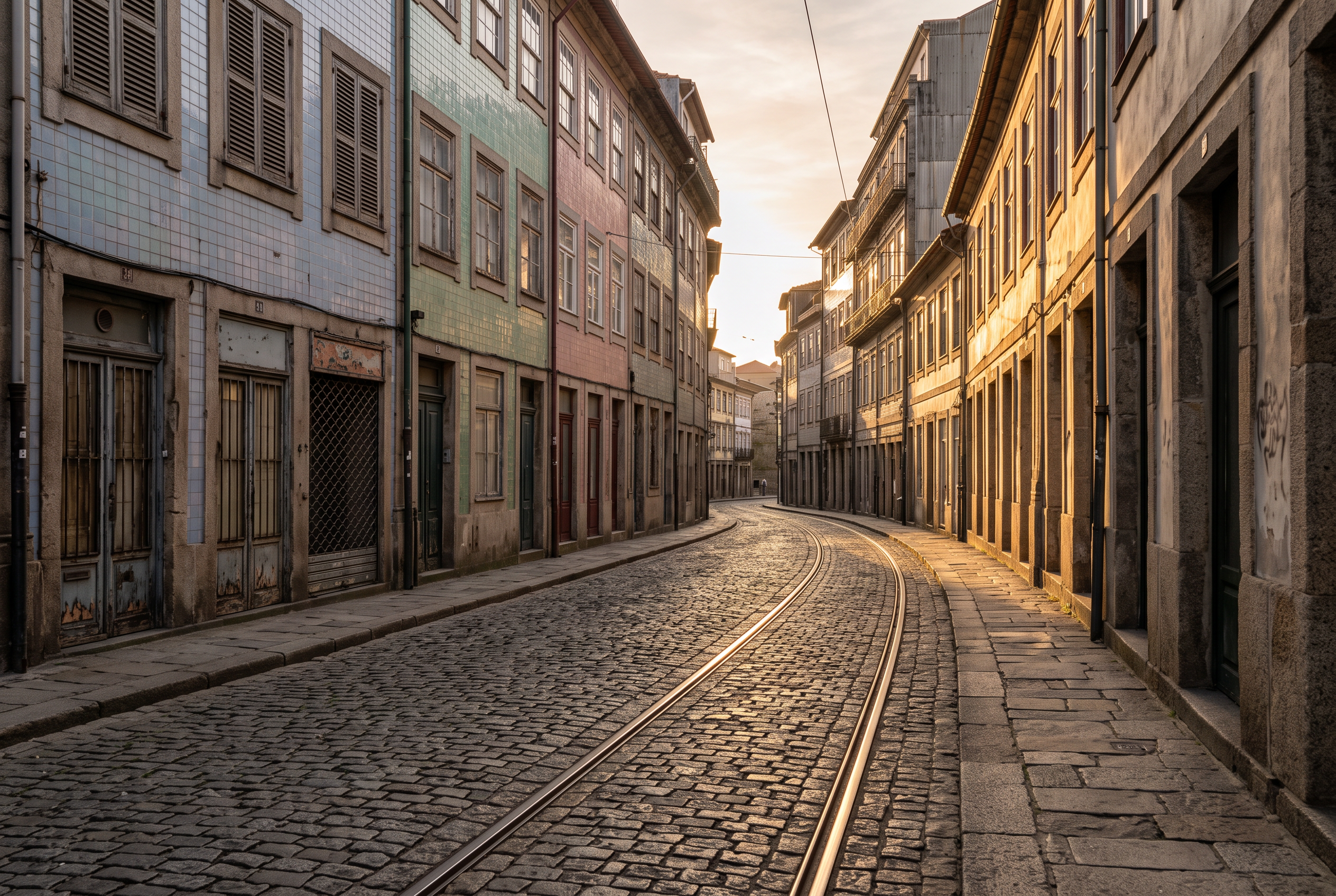
Generated using Flux 2 on fal, an AI model from Black Forest Labs.
Edit prompt: "Four references in order: the first is the woman, the second the sneaker, the third the jacket and the fourth the street. Create a vertical campaign photograph for a footwear brand: the woman from the first image walks toward the camera down the street from the fourth image, wearing the jacket from the third image half zipped over a white crew-neck T-shirt, with straight dark jeans and the sneakers from the second image on both feet. Match her face and the asymmetric bob from the first image exactly, with the longer side still on her right. Carry the sneaker over panel for panel, with the tan suede at the toe and heel and the gum sole with its welt stitching unchanged, shown laced on both feet. The jacket keeps its olive ripstop and orange zip pulls, and the street keeps its tiled shopfronts and tram line, lit by low sun from behind her left shoulder. Full-length framing with the sneakers in sharp focus near the bottom of the frame, with no text or logos."
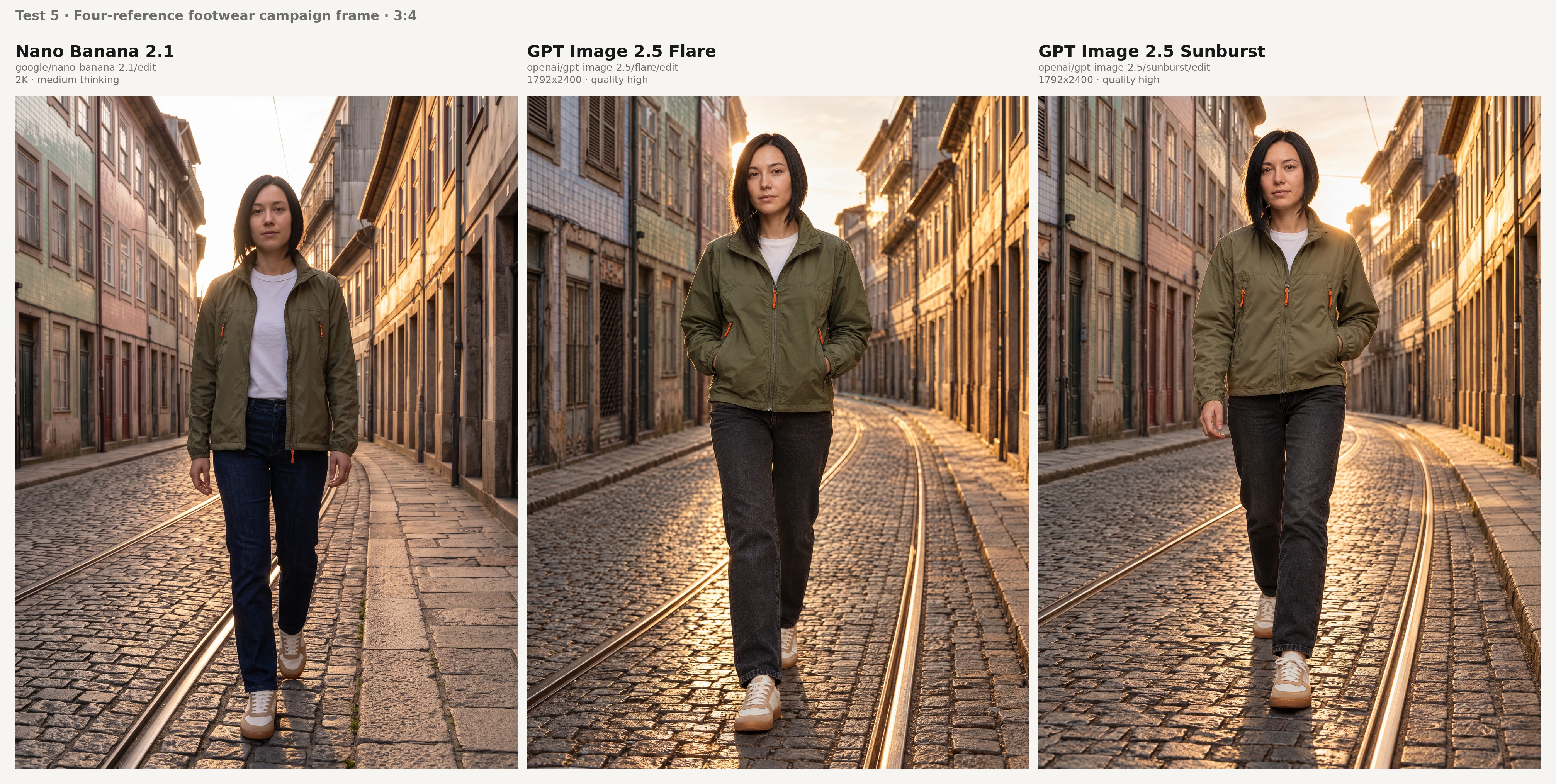
In all three frames, check the feet first and her hair second:
- Both shoes keep the tan suede at the toe and heel, with the pair drawn as a true left and right shoe.
- Her bob still falls longer on her right side, which deserves a zoom because Google's tips mention occasional left and right confusion.
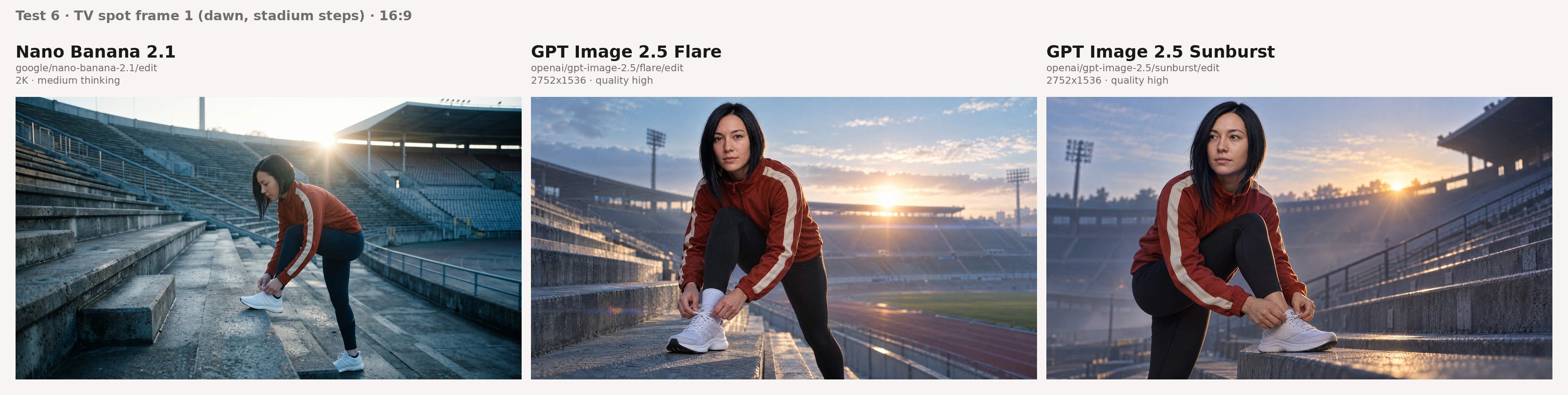
Test 6: One ambassador across two frames of a TV spot (16:9)
A TV spot needs the same face in every shot, so I sent the Test 5 portrait into two separate edit calls, one per frame, that shared nothing between them.
Google's own summary of Nano Banana 2.1 names subject consistency as one of its biggest improvements.
On the GPT Image 2.5 side, our edit pages say a referenced subject stays recognizable through style changes and repeated edits.
The portrait was the only reference image in both of the edit calls.
Frame 1 prompt, the opening shot: "Using the woman in the image, create a frame from a TV commercial for a running shoe brand: a wide shot at dawn on the concrete steps of an empty stadium, where she ties the laces of a white running shoe with one foot raised on a step, wearing the same rust-red track jacket with the cream sleeve stripes. Match the reference exactly on her face and the asymmetric black bob that falls longer on her right side, down to the thin silver hoop in her left nostril. Cinematic 16:9 composition, cool blue morning light with warm sun breaking over the stands behind her, light haze, anamorphic lens character, no on-screen text."
Frame 2 prompt, the closing shot: "Using the woman in the image, create the closing frame of the same TV commercial: a medium close-up at night on a city rooftop after a run, as she pulls the zip of the rust-red track jacket up to her chin and looks past the camera, her breath visible in the cold air and city lights soft behind her. Match the reference exactly on her face and the asymmetric black bob that falls longer on her right side, down to the thin silver hoop in her left nostril. Cinematic 16:9 composition lit by one practical light from an open rooftop door spilling warm light from the left, with no on-screen text."
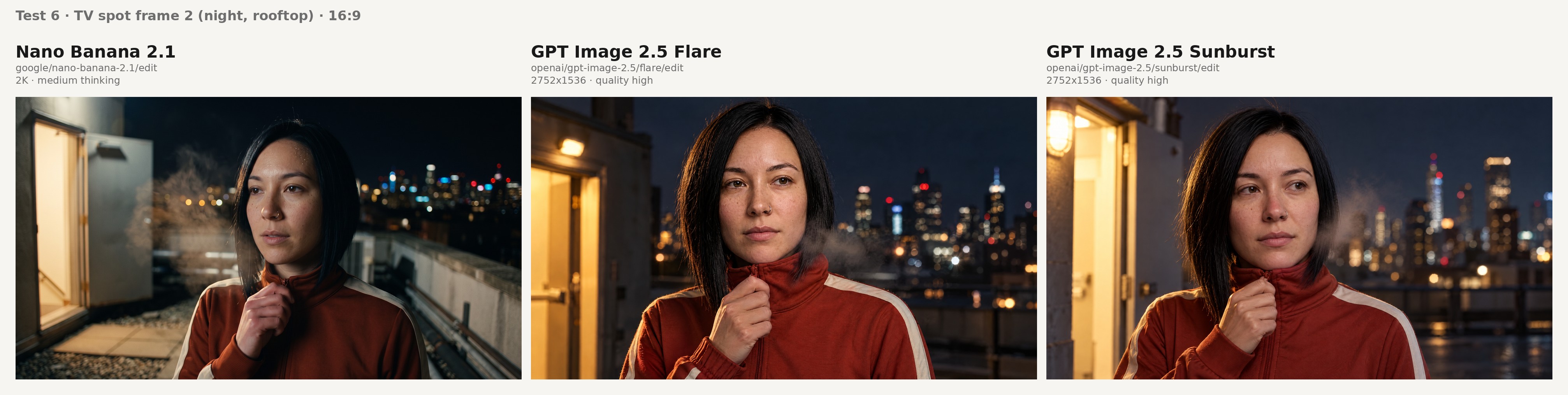
For continuity, compare each model's two frames on these points:
- The longer side of the bob stays on her right and the hoop stays in her left nostril in both frames.
- The rust-red track jacket keeps its cream sleeve stripes from the wide dawn shot to the rooftop close-up.
Test 7: A sneaker colourway change inside a marked region (1:1)
Nano Banana 2.1 and GPT Image 2.5 can both edit a chosen region, but Nano Banana 2.1 reads the region from paint on the input image while GPT Image 2.5 reads it from a separate file passed as mask_url.
For this test, Nano Banana 2.1 got the Test 5 sneaker with its suede overlays painted red, and both GPT Image 2.5 variants got the unpainted sneaker plus a mask over the same panels.
In Google's mask and ink editing benchmark, the thinking version of Nano Banana 2.1 reached 1049 Elo, 84 points above Nano Banana 2.
Prompt, identical for all three edit endpoints: "Recolour only the suede overlays inside the marked area, the panels wrapping the toe and the heel, from tan to deep forest green, keeping the suede texture and the direction of its nap. Leave the mesh upper, the laces, the gum sole, the welt stitching and the white background exactly as they are. Remove any marking paint from the result."
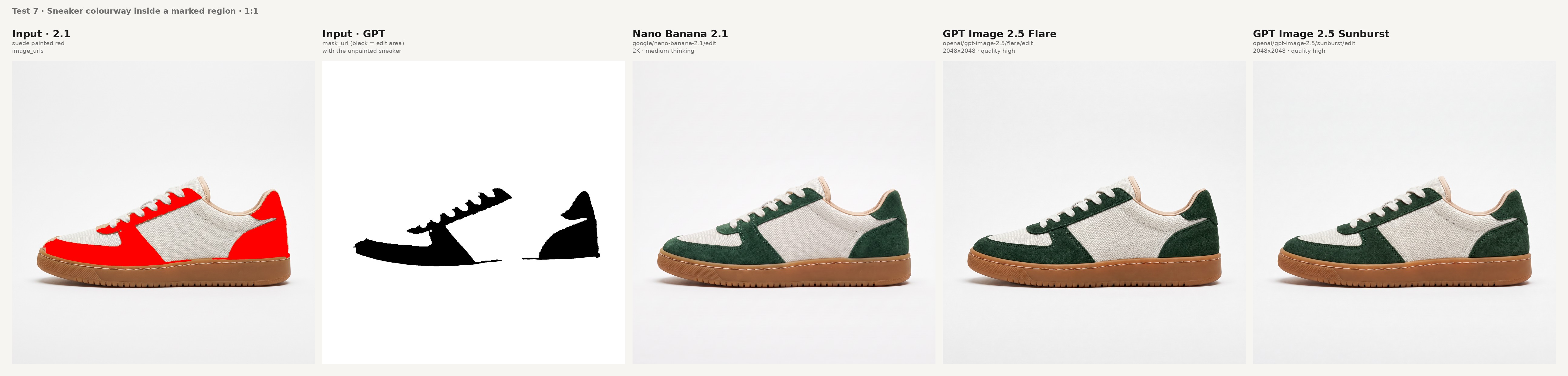
Both of these need to be true before the colourway edit counts as a pass:
- Only the suede panels turn green, with no bleed into the mesh or onto the welt stitching.
- Everything outside the marked panels matches the source when you flip between the before and after frames.
What does a Nano Banana 2.1 or GPT Image 2.5 image cost on fal?
A 2K Nano Banana 2.1 image costs $0.0593 and a 2560x1440 GPT Image 2.5 image on high costs $0.05529, both in 16:9 with a brief prompt.
Our GPT table has no size at exactly 4 megapixels, so 2560x1440 is the closest match, at about 3.7 megapixels.
Both figures come from our model pages as of October 11, 2026, and both models bill by the token underneath:
| Token type (price per million) | Nano Banana 2.1 | GPT Image 2.5 (Flare and Sunburst) |
|---|---|---|
| Text input | $1.764 | $5.00 |
| Image input | $1.764 | $8.00 |
| Cached text input | Not listed | $1.25 |
| Cached image input | Not listed | $2.00 |
| Text and thinking output | $8.823 | $10.00 |
| Image output | $35.294 | $30.00 |
We round GPT Image 2.5 totals up to the nearest $0.0001.
Nano Banana 2.1 billed prices
The Nano Banana 2.1 figures below are amounts we billed for real requests on October 7, 2026, each one a 16:9 render with a brief prompt:
| Resolution | Text to image, minimal or medium thinking | Text to image, high thinking | Editing, minimal or medium thinking | Editing, high thinking |
|---|---|---|---|---|
| 1K (default) | $0.0396 | $0.0490 | $0.0415 | $0.0493 |
| 2K | $0.0593 | $0.0732 | $0.0613 | $0.0743 |
| 4K | $0.1335 | $0.1435 | $0.1354 | $0.1468 |
The editing columns assume one reference image on each request we measured.
Minimal and medium thinking billed at the same price in each of those measurements.
Nano Banana 2.1 has no 512px tier, which Nano Banana 2 offered, so its lowest price point is 1K.
The GPT Image 2.5 rate table
The GPT Image 2.5 table below covers Flare and Sunburst alike, and the edit figures include one input image:
| Size | low | medium | high | xhigh | max |
|---|---|---|---|---|---|
| 1024x768 | $0.00402 | $0.00903 | $0.03612 | $0.06420 | $0.14445 |
| 1024x1024 | $0.00588 | $0.01317 | $0.05268 | $0.09366 | $0.21072 |
| 1024x1536 | $0.00474 | $0.01029 | $0.04116 | $0.07377 | $0.16464 |
| 1920x1080 | $0.00441 | $0.01029 | $0.03960 | $0.07041 | $0.15840 |
| 2560x1440 | $0.00615 | $0.01434 | $0.05529 | $0.09828 | $0.22110 |
| 3840x2160 | $0.01113 | $0.02595 | $0.10008 | $0.17790 | $0.40026 |
Editing and reference costs
An extra input image on Nano Banana 2.1 adds roughly $0.002, which puts the four-reference edit in Test 5 at about $0.067 at 2K.
Longer clips and documents cost more per edit, because we bill video and PDF context as input tokens as well.
Each reference beyond the first adds image input tokens to a GPT Image 2.5 edit at $8.00 per million, since our edit figures include one input image.
💡 Which model is cheaper depends on the size you ship: at about 1 megapixel, Nano Banana 2.1 costs about 25% less than GPT Image 2.5 on high, while near 4 megapixels the two are under half a cent apart.
How do you call Nano Banana 2.1 and GPT Image 2.5 through the fal API?
Call both models through the @fal-ai/client SDK with one fal API key, using google/nano-banana-2.1 for Nano Banana 2.1 and openai/gpt-image-2.5/flare/text-to-image or openai/gpt-image-2.5/sunburst/text-to-image for GPT Image 2.5.
Nano Banana 2.1 takes aspect_ratio and resolution, whereas GPT Image 2.5 takes image_size and quality.
Here's what that looks like for Nano Banana 2.1:
import { fal } from "@fal-ai/client";

const result = await fal.subscribe("google/nano-banana-2.1", {
  input: {
    prompt: "An action shot of a black lab swimming in an inground suburban swimming pool. The camera is placed meticulously on the water line, dividing the image in half, revealing both the dogs head above water holding a tennis ball in it's mouth, and it's paws paddling underwater."
  },
  logs: true,
  onQueueUpdate: (update) => {
    if (update.status === "IN_PROGRESS") {
      update.logs.map((log) => log.message).forEach(console.log);
    }
  },
});

console.log(result.data);
console.log(result.requestId);
Queue submission and file uploads work the same way on all six endpoints, as does image_urls on both models' edit endpoints.
GPT Image 2.5 adds mask_url to its edit calls, while Nano Banana 2.1 adds video_url and pdf_url to its own.
Both are partner models on fal with commercial use enabled.
Any of the six endpoints can be tried in the playground before you write code.
Should you use Nano Banana 2.1 or GPT Image 2.5?
I'd say that Nano Banana 2.1 fits try-on composites, backed by Google's documented consistency limits, and formats wider than 3:1, while GPT Image 2.5 fits transparent cutouts and reusable masks.
For jobs both models handle, run the seven tests above on your own products before you commit.
Choose Nano Banana 2.1 if
- You're building try-on images from separate product photos: Google specifies consistency for four characters and ten objects per Nano Banana 2.1 request, enough for a model wearing a jacket and shoes taken from their own packshots.
- You already have the footage: the Nano Banana 2.1 edit endpoint accepts a TV commercial or a spec sheet PDF as context for a poster or a listing graphic.
- Your banners are wider than 3:1: 4:1 and 8:1 heroes, plus 1:4 and 1:8 mobile strips, are native aspect ratios on Nano Banana 2.1.
- You print or crop large: a 4K Nano Banana 2.1 image has about 16 megapixels and costs $0.1335 at 16:9 in our measured billing.
- Promo graphics quote details that change:
enable_web_searchpulls current Google Search results into the generation at no separate fee, since we bill those results as input tokens. - Most of what you ship is around 1 megapixel: Nano Banana 2.1 at 1K costs $0.0396 per 16:9 image, roughly a quarter less than GPT Image 2.5 at 1024x1024 on high.
Choose GPT Image 2.5 Flare if
- Your product pages use cutouts on coloured backgrounds: Flare's text to image and edit endpoints accept background: "transparent", with png or webp output holding the alpha channel.
- You run many colourway edits on one product photo:
mask_urltakes the region as its own file, so one mask can cover the whole run. - You need drafts for under a cent: Flare's low quality starts at $0.00402 and medium at $0.00903, both at 1024x768.
- Shoppers see previews generated live: Flare is the GPT Image 2.5 variant built for speed and set as OpenAI's everyday default.
Choose GPT Image 2.5 Sunburst if
- Shoppers will zoom into the image on a product page: our model page positions Sunburst for premium visual work that needs extra fidelity on intricate detail.
- A product photo goes through several rounds of retouching: the Sunburst edit endpoint is described as keeping edits inside the instruction and holding subject and composition steady across many rounds.
- You need a ceiling above high: xhigh and max cost $0.09366 and $0.21072 at 1024x1024 on Sunburst, the same as on Flare.
- The job runs in a batch queue: Sunburst accepts longer generation times in exchange for detail, which fits work no one watches in real time.
💡 You can use both when a catalogue mixes these jobs: try-on composites and wide banners can go to Nano Banana 2.1, and cutouts and masked colourway runs to GPT Image 2.5.
Both run through the same SDK and API key on fal, and the code section above covers the field differences.
Recently Added







Test Nano Banana 2.1 and GPT Image 2.5 on your own products with fal
Google and OpenAI shipped these point releases in September and October 2026, both with editing upgrades aimed at the same commercial work, from product placement to multi-round revisions.
You'll only know which one fits your catalogue after testing on your own products, which costs time and credits.
On fal, both models run under one API key with pay-per-use billing and no GPU management, so a side-by-side on your own SKUs bills only for the generations you run.
Nano Banana 2.1 is live at google/nano-banana-2.1 and google/nano-banana-2.1/edit, and GPT Image 2.5 at openai/gpt-image-2.5/flare/text-to-image, openai/gpt-image-2.5/flare/edit, openai/gpt-image-2.5/sunburst/text-to-image and openai/gpt-image-2.5/sunburst/edit.
Nano Banana 2.1 vs. GPT Image 2.5 FAQs
What is the difference between Nano Banana 2.1 and GPT Image 2.5?
Google's Nano Banana 2.1 is a Flash-tier model you size by tier, up to 4K, and steer with thinking levels, and it also handles web search grounding and video or PDF context on edits.
OpenAI's GPT Image 2.5 comes as Flare and Sunburst and takes exact pixel sizes plus a quality level from low to max; its schema also adds transparent backgrounds and mask_url.
Is Nano Banana 2.1 cheaper than GPT Image 2.5?
Nano Banana 2.1 is cheaper at about 1 megapixel, and near 4 megapixels the two are under half a cent apart, based on our model pages as of October 11, 2026.
At 1K, Nano Banana 2.1 costs $0.0396 for a 16:9 image with a brief prompt, compared with $0.05268 for GPT Image 2.5 on high at 1024x1024.
One tier up, it's $0.0593 for Nano Banana 2.1 at 2K versus $0.05529 for GPT Image 2.5 on high at 2560x1440, a size with slightly fewer pixels.
GPT Image 2.5's low and medium settings cost less than any Nano Banana 2.1 tier at each published size.
Does Nano Banana 2.1 support transparent backgrounds?
The Nano Banana 2.1 schema on fal has no background parameter, and transparent output isn't documented on either Nano Banana 2.1 endpoint.
GPT Image 2.5 accepts background: "transparent" on all four of its endpoints.
If you need a cutout from a Nano Banana 2.1 image, our Background Remover can handle that as a separate step.
How many reference images does each model accept per edit?
Nano Banana 2.1 takes up to 14 reference images per edit through image_urls, with Google quoting consistency for as many as 4 characters and 10 objects in a single request.
GPT Image 2.5 takes up to 16 through image_urls on both its Flare and Sunburst edit endpoints.
How do you mark an edit region on each model?
Nano Banana 2.1 has no mask parameter: you paint or outline the region on the input image and describe the change, ideally asking the model to remove the marks.
GPT Image 2.5 takes the region as a separate image through mask_url on its Flare and Sunburst edit endpoints, which leaves the source image unmarked.
Which GPT Image 2.5 variant should you test against Nano Banana 2.1?
Test both GPT Image 2.5 variants if you can, because we charge the same for Flare and Sunburst.
With time for only one, choose Flare for everyday work and Sunburst for close-up detail or edits that go through many rounds.
What video and document inputs does Nano Banana 2.1 accept?
The Nano Banana 2.1 edit endpoint accepts video_url, either a video file up to 15 MB or a YouTube URL, and pdf_url for a PDF up to 15 MB.
Google's suggested uses for the video route include thumbnails and posters built from a scene.
Neither GPT Image 2.5 edit schema lists a video input of any kind.
Do Nano Banana 2.1 and GPT Image 2.5 allow commercial use on fal?
Yes, Nano Banana 2.1 and GPT Image 2.5 are both partner models on fal with commercial use enabled on all six endpoints.