In this guide, I'll compare Seedream 5.0 Pro and GPT Image 2, including how each one turns a prompt into pixels, how their two editing surfaces actually differ, what they cost per image on fal, and which one to reach for on a given job.
TL;DR
Seedream 5.0 Pro is ByteDance's flagship image model, and on fal it splits into a text-to-image endpoint (bytedance/seedream/v5/pro/text-to-image) and a grounded editing endpoint (bytedance/seedream/v5/pro/edit).
It bills per output image by area, at a tentative $0.0675 for anything up to 1536x1536 and $0.135 for output between 1536x1536 and 2048x2048.
Its edit endpoint targets specific regions straight from your prompt, no mask required, while the rest of the frame holds steady, and it reads up to 10 reference images in a single call.
GPT Image 2 is OpenAI's latest image model, available on fal at openai/gpt-image-2 and openai/gpt-image-2/edit.
It's billed on image and text tokens, which works out to roughly $0.145 for a 1024x768 render at high quality and scales with size and prompt complexity.
Where it pulls ahead is a quality dial that trades compute for fidelity, real-time streaming on both endpoints, mask-based inpainting for pixel-exact region control, and a bring-your-own-key option that routes through your OpenAI account.
The split is fairly clean: Seedream 5.0 Pro costs less per image and leans into region-precise editing and multi-source compositing, while GPT Image 2 costs more but brings mask control, streaming feedback, a compute dial for cheap drafts, and a bring-your-own-key path.
How do Seedream 5.0 Pro and GPT Image 2 compare?
Let's see how Seedream 5.0 Pro compares against GPT Image 2 on paper before I move to testing them:
| Seedream 5.0 Pro | GPT Image 2 | |
|---|---|---|
| Maker | ByteDance | OpenAI |
| Best for | Region-precise editing, dense multilingual text, structured layouts, multi-reference compositing | Prompt adherence, text-heavy generation, mask inpainting, world-knowledge scenes |
| Text-to-image price (1024x768) | $0.0675 (falls in the sub-1536 tier) | About $0.005 low, $0.037 medium, $0.145 high |
| Text-to-image price (2K square) | $0.135 at 2048x2048 | Token-billed; 2560x1440 lands near $0.056 medium, $0.222 high |
| Billing basis | Per output image, two area tiers | Image and text tokens, priced by size and quality |
| Quality control | Fixed pipeline, no quality parameter | quality: low, medium, high, auto |
| Text rendering | Native text in 14 languages, per ByteDance | Latin and CJK scripts |
| Editing surface | Prompt-driven region targeting, no mask needed | Prompt edits plus optional mask |
| Region targeting | Grounded, described in the prompt or by annotation frames | White-region mask marks the editable area |
| Reference images | Up to 10 | List of image URLs, no fixed cap stated |
| Streaming | Not exposed | Yes, both endpoints |
| Resolution range | 1024x1024 to 2048x2048 total pixels, aspect 1:16 to 16:1 | 655,360 to 8,294,400 pixels, max edge 3840, aspect up to 3:1 |
| Custom dimensions | Yes | Yes, both edges multiples of 16 |
| Output formats | JPEG, PNG (JPEG default) | PNG, JPEG, WebP (PNG default) |
| Safety control | enable_safety_checker, disable via API only | Not available |
| Bring your own key | No | Yes, openai_api_key |
| Commercial use | Yes | Yes |
Where can you access Seedream 5.0 Pro and GPT Image 2?
Both Seedream 5.0 Pro and GPT Image 2 are available on fal, with a browser playground for clicking around and an API for production, and neither asks for a subscription or a minimum spend.
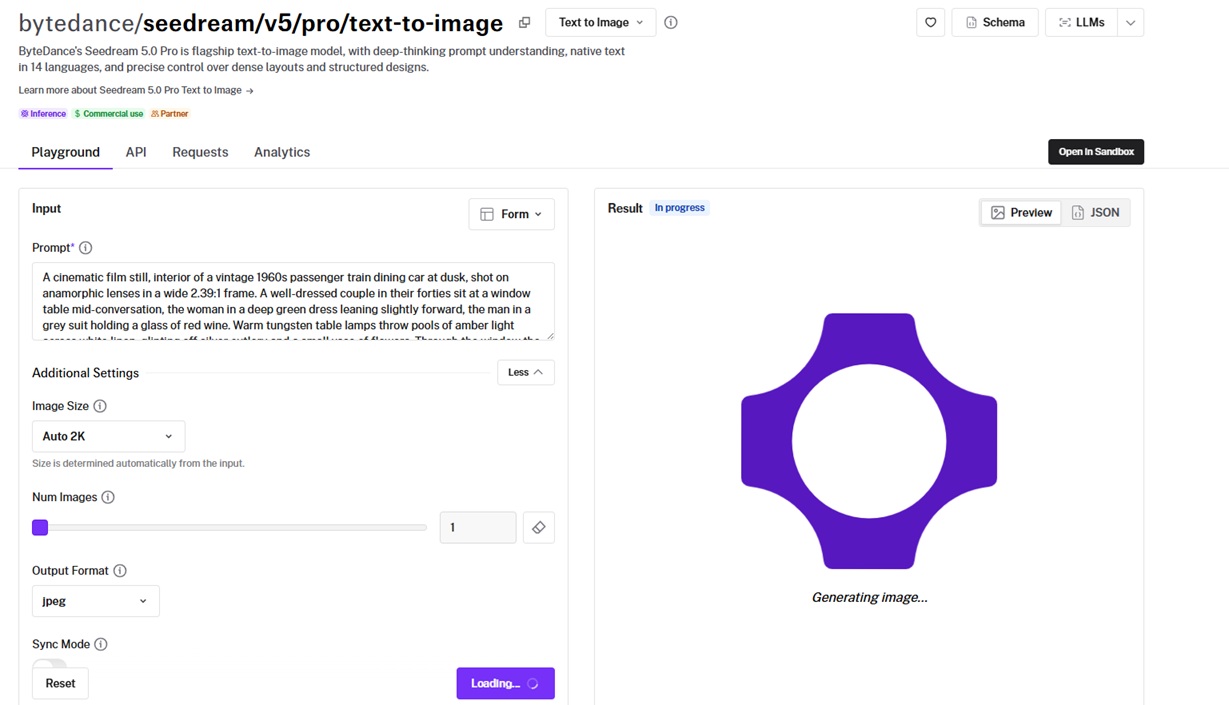
You pay per render and nothing else, since Seedream 5.0 Pro meters each output image by area and GPT Image 2 meters the tokens behind each generation.
The way it works is that you install @fal-ai/client once and it talks to both, and the same request pattern works across the over 1,000 other models on fal, so whatever you wire up here transfers.
Swapping the endpoint string doesn't change auth, the queue, error handling, or how you're billed.
Both come back in a few lines of code:
import { fal } from "@fal-ai/client";

const result = await fal.subscribe(
  "bytedance/seedream/v5/pro/text-to-image",
  {
    input: {
      prompt:
        "Vibrant editorial of a model in contemporary fashion fused with West African textile patterns and beadwork, Campbell Addy bold aesthetic, saturated palette, dramatic studio lighting, celebratory cultural richness, striking contemporary portraiture",
    },
    logs: true,
    onQueueUpdate: (update) => {
      if (update.status === "IN_PROGRESS") {
        update.logs.map((log) => log.message).forEach(console.log);
      }
    },
  }
);

console.log(result.data);
console.log(result.requestId);
The edit endpoints work the same way, at bytedance/seedream/v5/pro/edit and openai/gpt-image-2/edit, both taking an image_urls list, with GPT Image 2 also accepting a mask for pixel-level region control.
How do Seedream 5.0 Pro and GPT Image 2 work differently?
The first thing I check with any two image models is how they read a prompt, and that's where these split.
Seedream 5.0 Pro keeps its prompt-understanding step tucked inside the model, with nothing for you to adjust.
GPT Image 2 hands you that step as a setting.
Seedream 5.0 Pro folds what ByteDance calls deep-thinking prompt understanding into the model, and its text-to-image pitch is built around dense layouts, structured designs, and native text in 14 languages.
There's no quality slider to set. You send a prompt and a size, the pipeline runs once, and you pay for the pixels it produces.
GPT Image 2 puts a variable-compute stage in front, and it reasons about the input text and spends more or less time depending on how complex the request is.
You govern that through the quality parameter, with low, medium, high, and auto as the settings.
Turning it down cuts the token count and the bill, which is useful when you're drafting and don't need the full render.
Editing is the half I find more interesting, and it's where the two really diverge.
Seedream 5.0 Pro's edit endpoint is grounded and region-precise.
You describe the change, and the model localizes it, holding everything you didn't mention exactly as it was.
It also reads annotation frames drawn onto the input, so you can label a region with a colored box and write an instruction for just that box, then tell the model to leave the rest untouched.
On top of that, it does layer separation and sketch completion, and it takes up to 10 reference images in a single call for multi-source work.
GPT Image 2 approaches editing through masks.
You pass a black-and-white mask alongside the input; the white pixels mark what the model may change, and the black pixels are held exactly. Skip the mask, and it edits from the prompt alone.
Its edit endpoint also accepts a list of reference images for cross-image context, and it streams partial results as they render, so an editing tool can show the image taking shape while the request finishes.
Put simply:
Seedream 5.0 Pro wants you to name the region, in a sentence or an annotation box.
GPT Image 2 takes the sentence too, and adds a mask when you want the boundary set to the exact pixel.
How do Seedream 5.0 Pro and GPT Image 2 handle the same prompt?
I ran six identical-prompt tests, four generated from scratch and two editing an existing image.
I built each to push on something specific, and every prompt pins down exact text, lenses, lighting, and counts, since loose prompts only get you loose comparisons:
Test 1: Data infographic with dense typographic hierarchy
I like starting with an infographic because it hammers layout and in-image text in the same shot.
I packed this one with a title, three stat cards, a labeled bar chart, and a legend, so if either model fumbles the spacing or misspells a label, you'll spot it right away:
Prompt: A flat high-resolution infographic poster on a soft cream background, portrait orientation, titled 'THE STATE OF REMOTE WORK 2026' in bold navy sans-serif across the top, with the subtitle 'A snapshot of how teams work now' in lighter grey beneath it. Below the header, a row of three rounded stat cards: the first reads '42%' above 'fully remote', the second '31%' above 'hybrid', the third '27%' above 'on-site', each percentage in large teal numerals with a thin line icon above it. Under the cards, a horizontal bar chart titled 'Top reasons cited', with four labeled bars reading 'Flexible hours', 'No commute', 'Focus time', and 'Cost savings', the longest bar tagged '68%'. A small legend in the bottom-left maps teal to 'employees' and orange to 'managers'. A footer line reads 'Source: internal survey, n = 1,240'. Consistent margins, thin dividing rules between sections, subtle drop shadows on the cards, crisp readable type throughout. Every label and number spelled exactly as written.
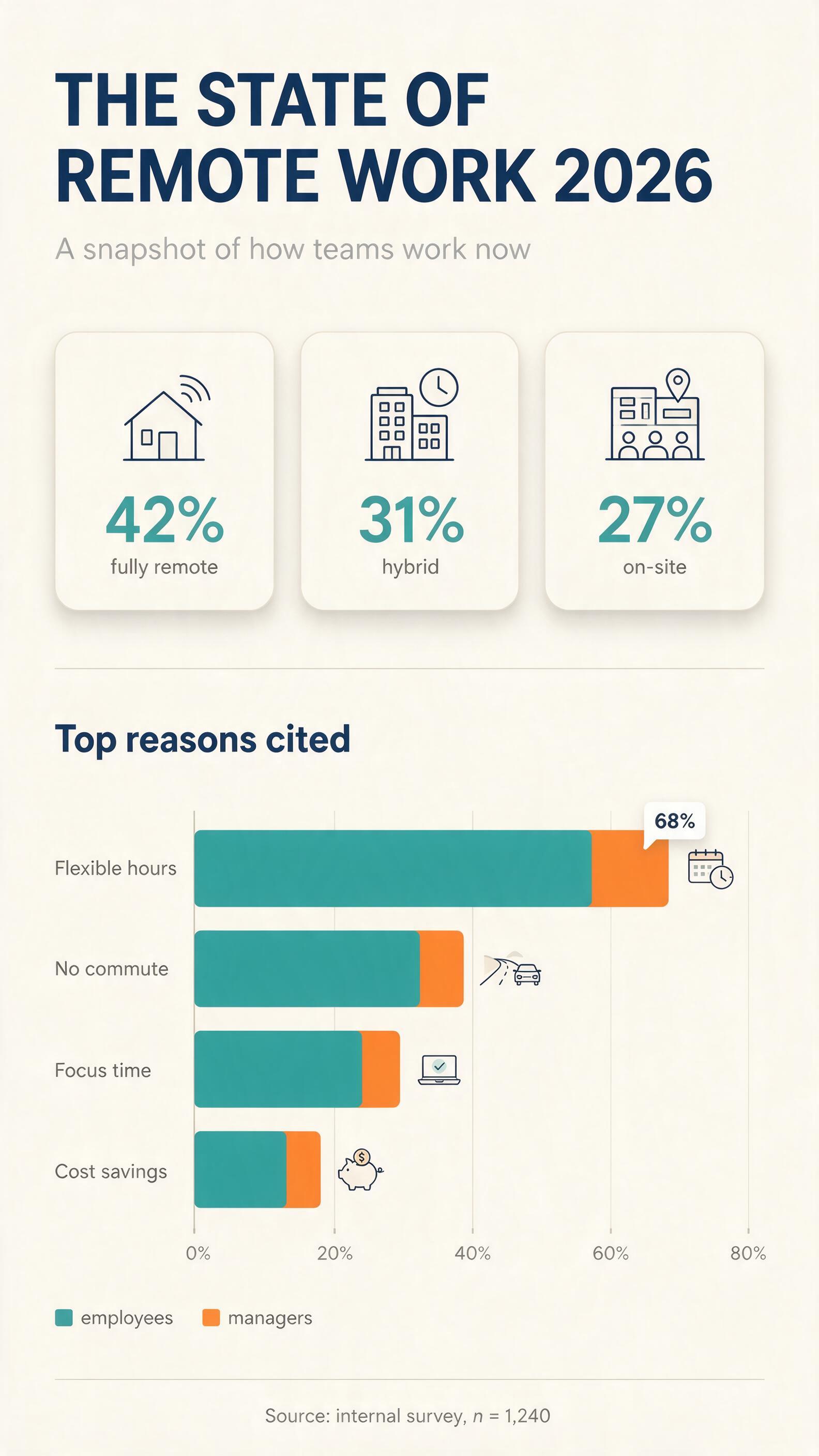
Generated using Seedream 5.0 Pro on fal, an AI model from ByteDance.
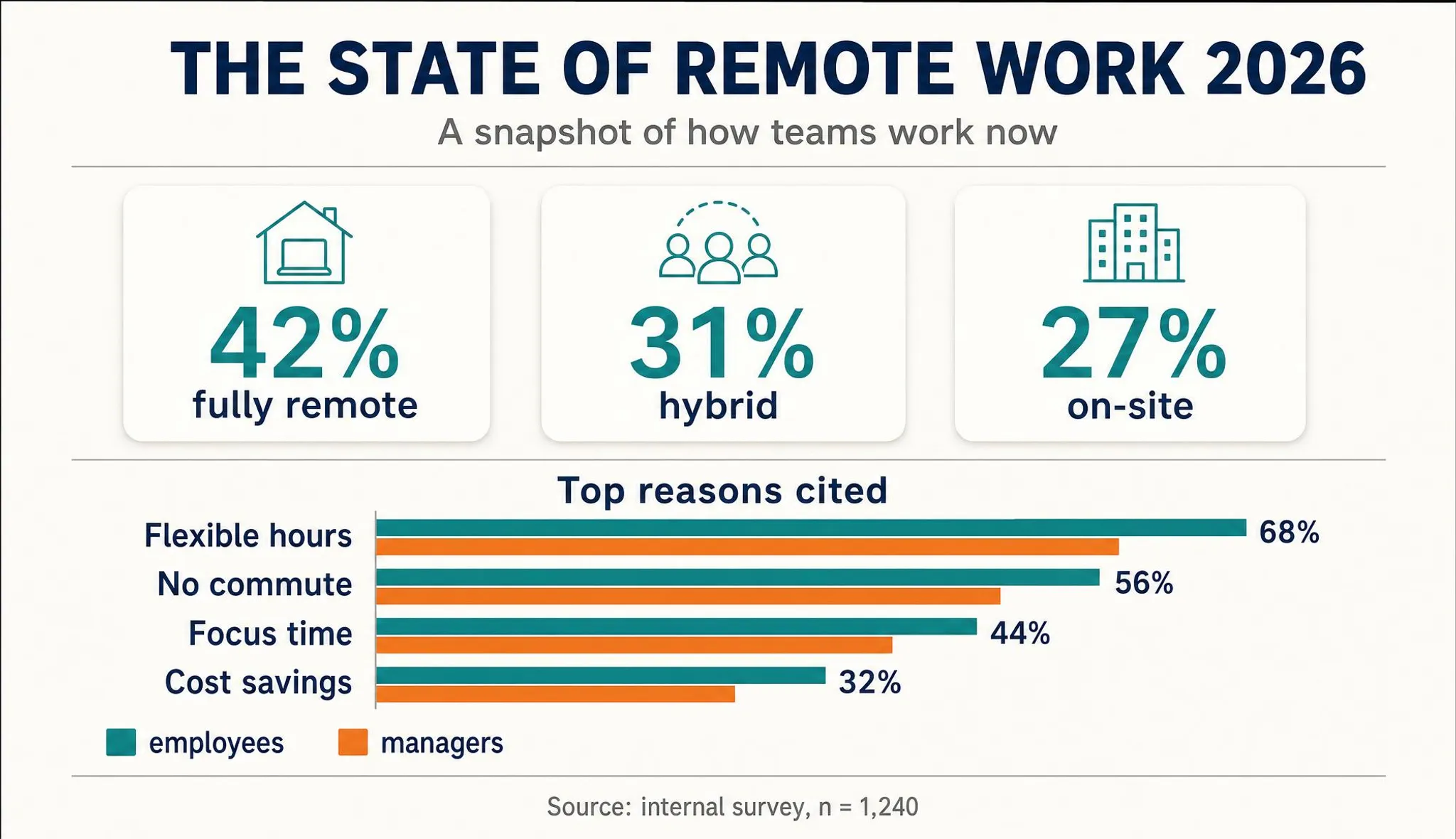
Generated using GPT Image 2 on fal, an AI model from OpenAI.
Notes: Both models did a really good job of what I initially wanted to see, although I'd rather use Seedream 5.0 Pro's output in an article with its infographic-style output (I let it have some creative freedom) while GPT Image 2's in a social media post.
Test 2: Cinematic film still on a moving train
For the cinema test, I wanted something that leans on lighting and mood the way a real DP thinks about a scene.
I put two people under warm practical lamps with the landscape smearing past the window behind them, which is a lot to ask for in one frame.
Prompt: A cinematic film still, interior of a vintage 1960s passenger train dining car at dusk, shot on anamorphic lenses in a wide 2.39:1 frame. A well-dressed couple in their forties sit at a window table mid-conversation, the woman in a deep green dress leaning slightly forward, the man in a grey suit holding a glass of red wine. Warm tungsten table lamps throw pools of amber light across white linen, glinting off silver cutlery and a small vase of flowers. Through the window the landscape streaks past in horizontal motion blur under the last blue light of dusk. Fine 35mm film grain, a gentle anamorphic flare off the lamps, shallow depth of field with soft falloff, muted teal shadows set against the warm highlights. Natural period styling, no text in the frame.
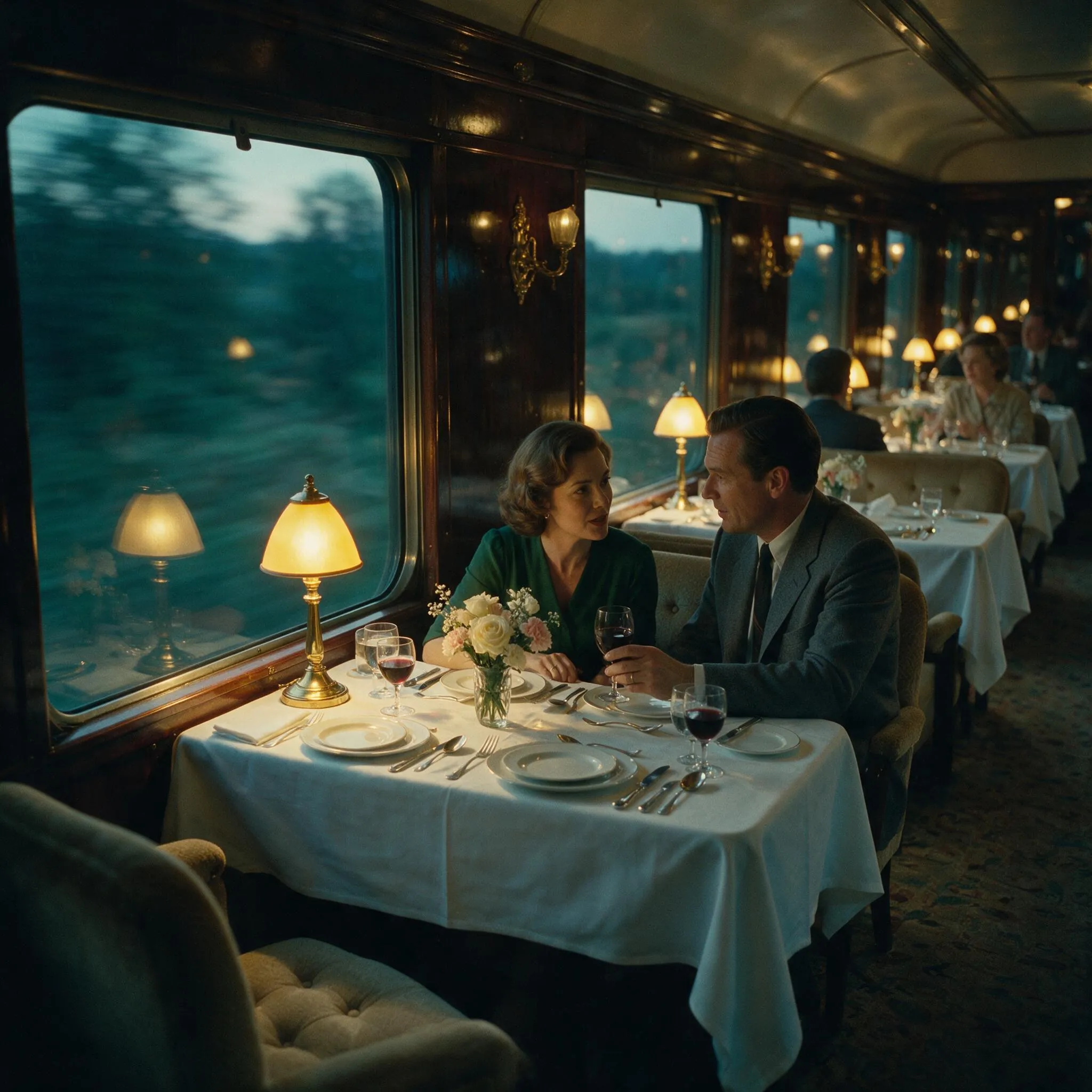
Generated using Seedream 5.0 Pro on fal, an AI model from ByteDance.
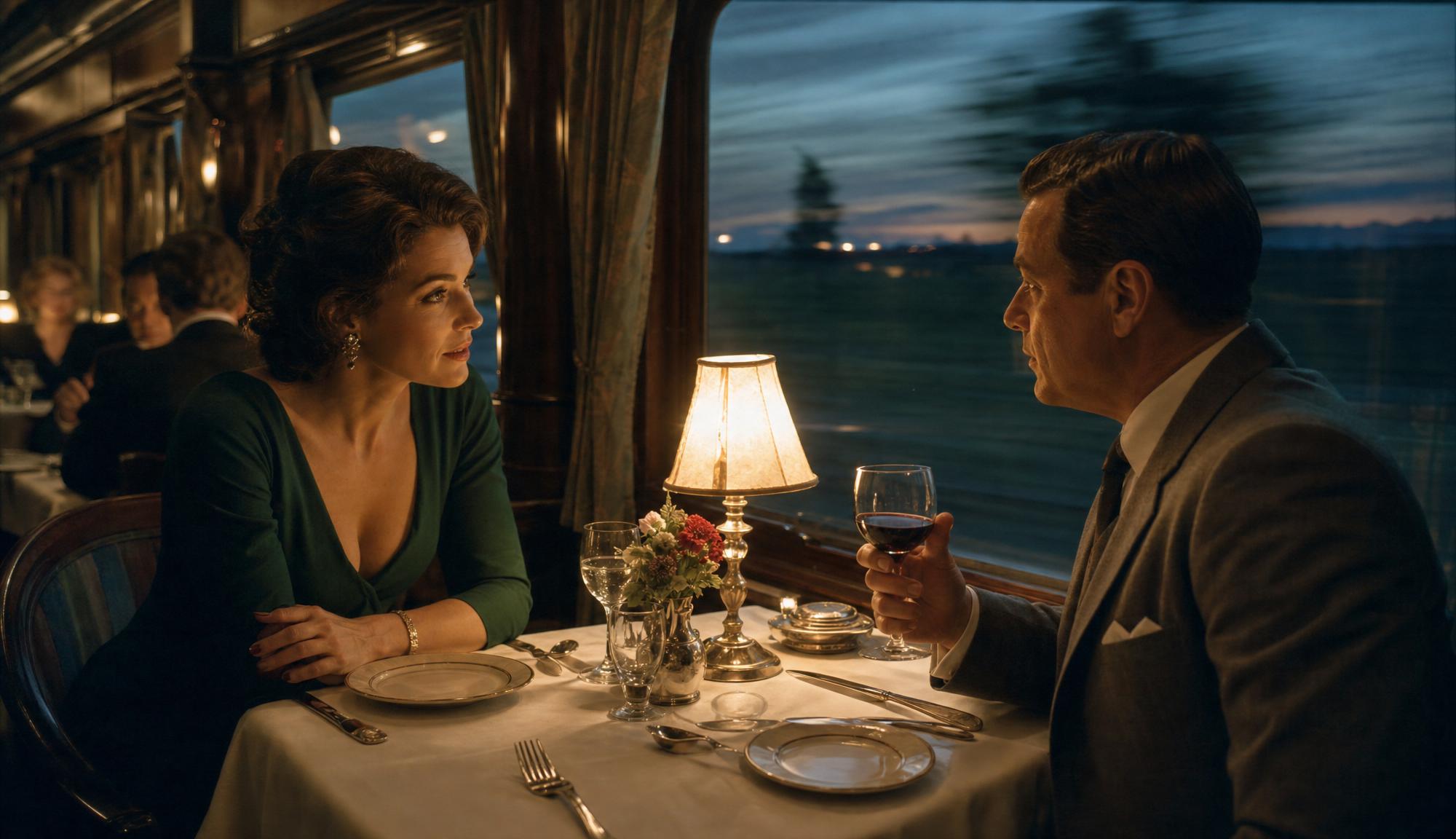
Generated using GPT Image 2 on fal, an AI model from OpenAI.
Notes: Both images are quite realistic, I should say, and I can appreciate the warm lamp and teal shadow separation that give them a cinematic feel.
falMODEL APIs
The fastest, cheapest and most reliable way to run genAI models. 1 API, 100s of models
Test 3: Beverage advertising hero with splash and tagline
Ad work has to sell a product that looks real under obviously art-directed lighting, usually with a line of copy inside the frame.
So I asked for a splash hero with a tagline baked in, which stacks tricky liquid physics on top of the text:
Prompt: A premium advertising hero shot of a frosted glass bottle of artisanal citrus soda, centered on a dark reflective surface against a deep charcoal background. The bottle is caught mid-splash, a burst of clear soda and two orange slices frozen in the air around it, droplets scattering outward and catching a hard rim light from behind. Heavy condensation beads on the glass, a soft blue key light from the left, a warm orange rim light tracing the bottle's edge. The label reads 'SUNDROP' in a clean uppercase sans, with a small tagline beneath it reading 'Bottled sunshine, zero sugar'. A faint reflection of the bottle pools on the wet surface below. Studio product photography, 100mm macro lens at f8, tack-sharp focus on the label, dramatic high-contrast lighting, no other text in the frame.
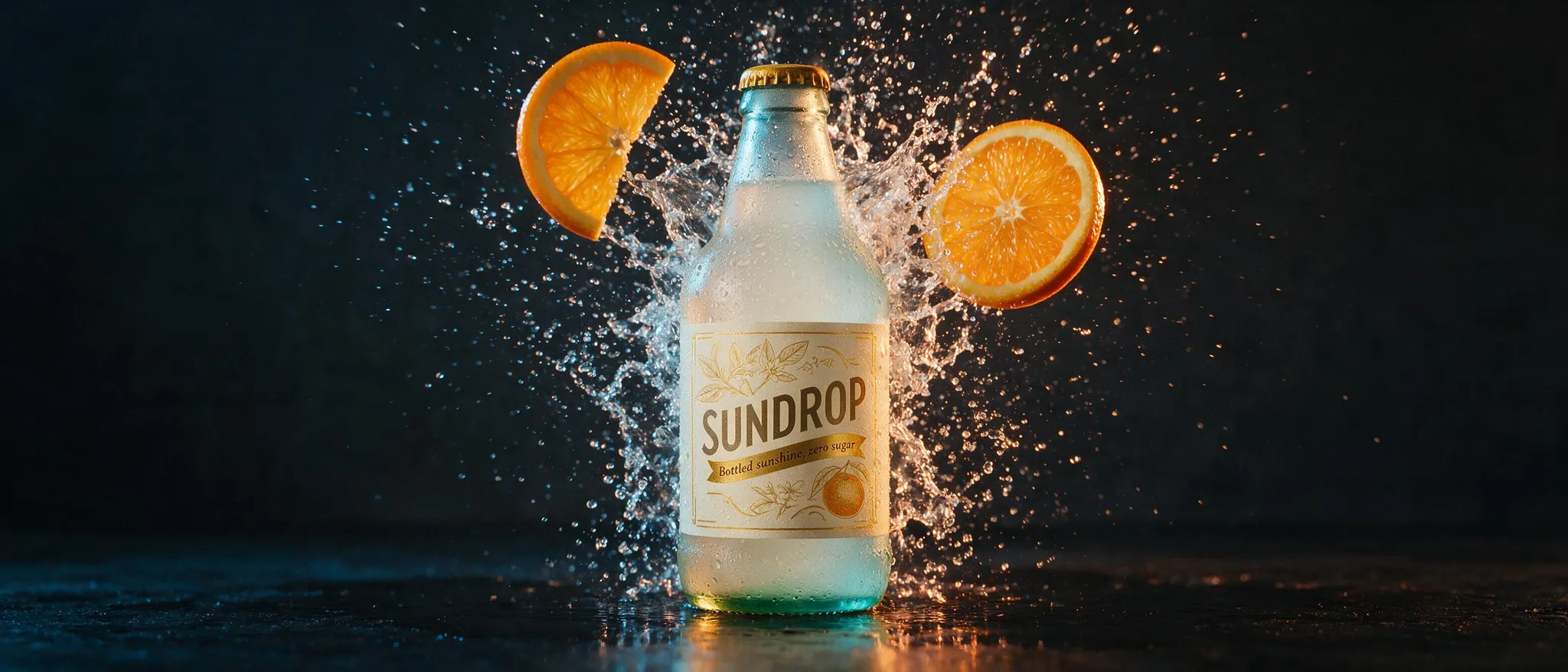
Generated using Seedream 5.0 Pro on fal, an AI model from ByteDance.
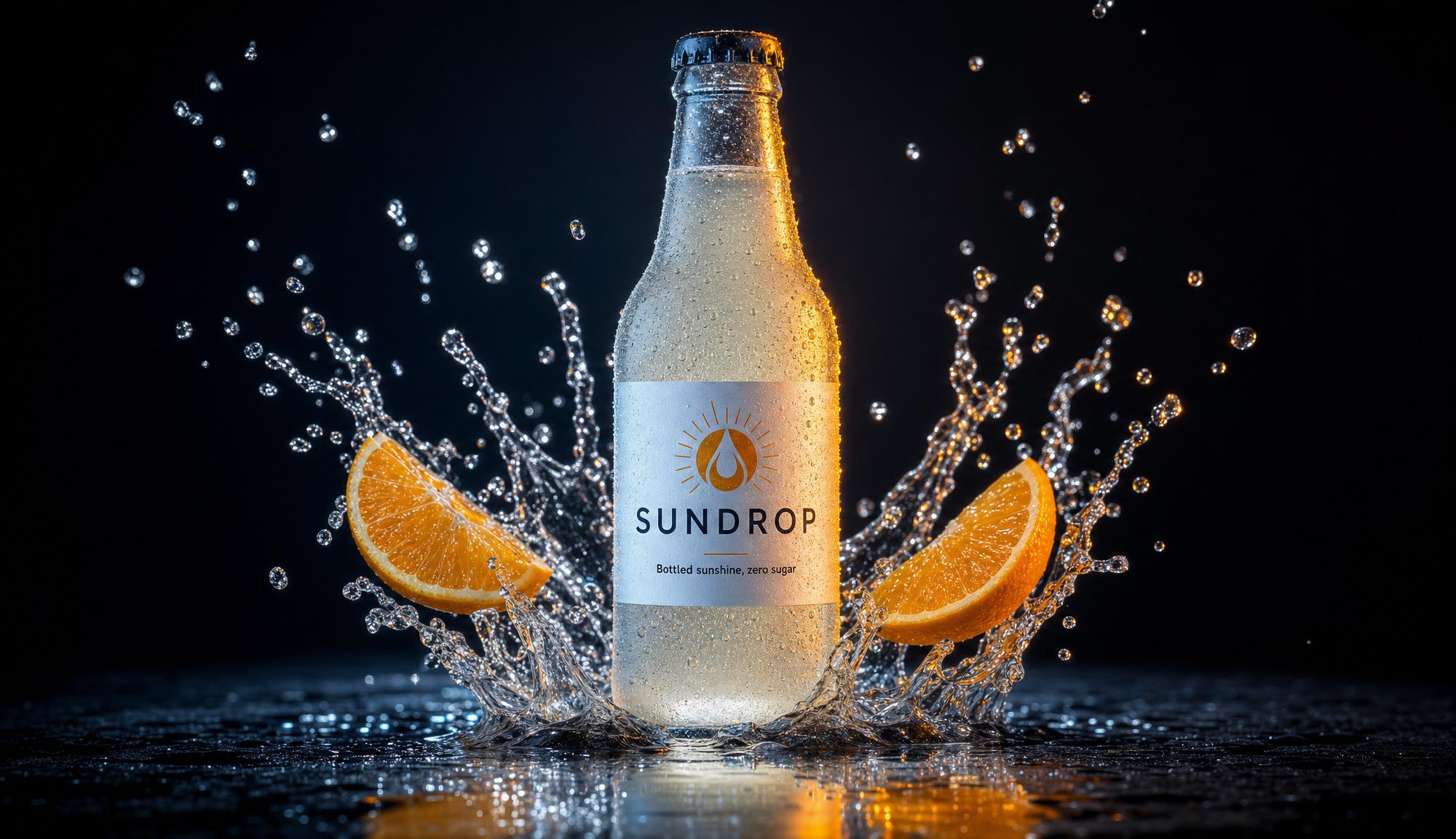
Generated using GPT Image 2 on fal, an AI model from OpenAI.
Notes: Both image generators handled the request differently, although I'm a bigger fan of GPT Image 2's generation here since it looks more realistic, although I like Seedream 5.0's generated bottle better.
Test 4: Avant-garde fashion editorial portrait
With creative work, my worry is always that a model nails the concept but plastics over the skin.
So I paired unretouched skin with a sculptural paper headpiece and lit the whole thing with hard colored gels.
Prompt: A high-fashion editorial portrait of a model shot against a continuous deep-magenta paper backdrop, lit with hard colored gels, cyan from the left and warm amber from the right, meeting across the face. The model wears an elaborate sculptural headpiece built from hundreds of folded white paper cranes cascading over one shoulder. Unretouched skin with natural texture, visible pores and a light sheen on the cheekbones, bold graphic makeup with a single swept line of gold across the eyes. A direct, confident gaze into the lens. The paper cranes cast crisp small shadows onto the skin and shoulder. Editorial studio lighting with a hard key and deep falloff, 85mm lens at f4, sharp focus on the eyes, rich saturated color, high-end magazine finish. No text in the frame.
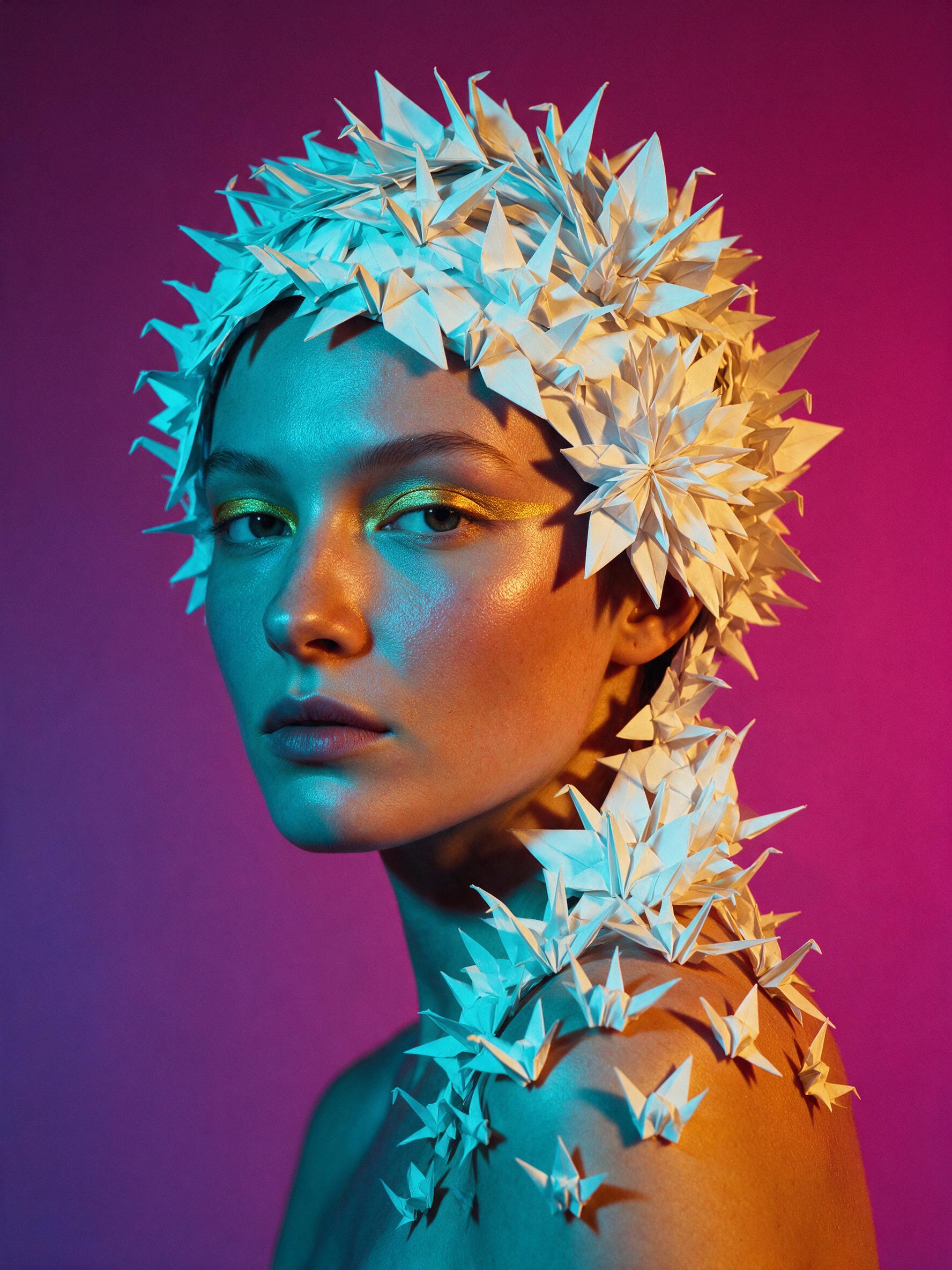
Generated using Seedream 5.0 Pro on fal, an AI model from ByteDance.
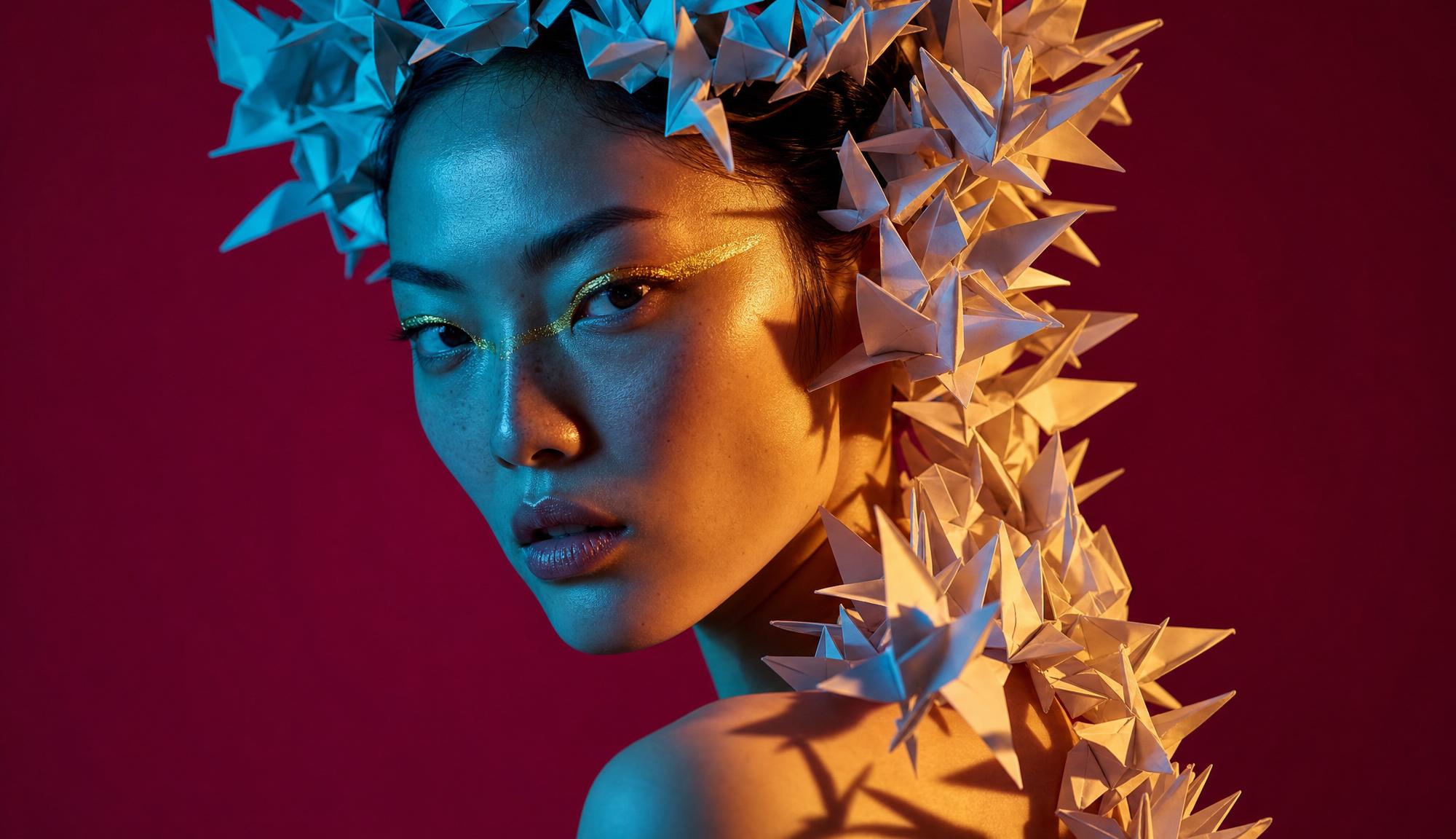
Generated using GPT Image 2 on fal, an AI model from OpenAI.
Note: You can check our comprehensive GPT Image 2 prompting guide.
Test 5: Region-precise interior redesign with annotation frames
This is the one I was most curious about: annotation-frame editing on a single interior.
I drew five colored boxes on one room photo generated with Nano Banana 2, each carrying a different design swap, and the trick is getting every change to stay inside its own box while the room and its daylight hold.
Base image: a photorealistic straight-on daytime photo of a mid-sized living room, with a grey three-seat sofa on the back wall, a round wooden coffee table, a large abstract painting above the sofa, a floor lamp in the right corner, a patterned area rug, and a potted plant by the window.
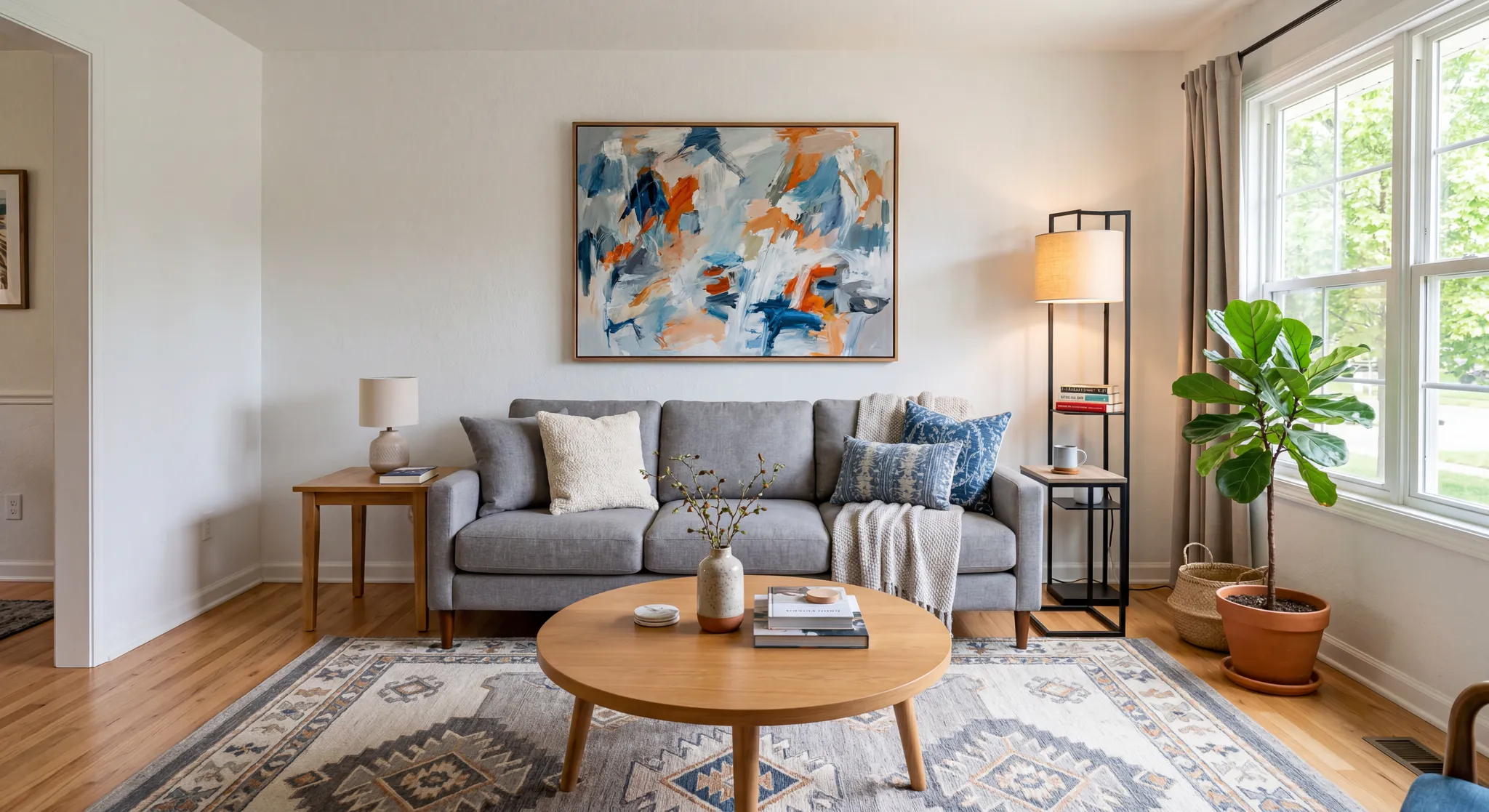
Generated using Nano Banana 2 on fal.
For the Seedream 5.0 run, I drew 5 colored boxes into the image using Paint (my old friend), and then wrote up the prompt of what I wanted to change.
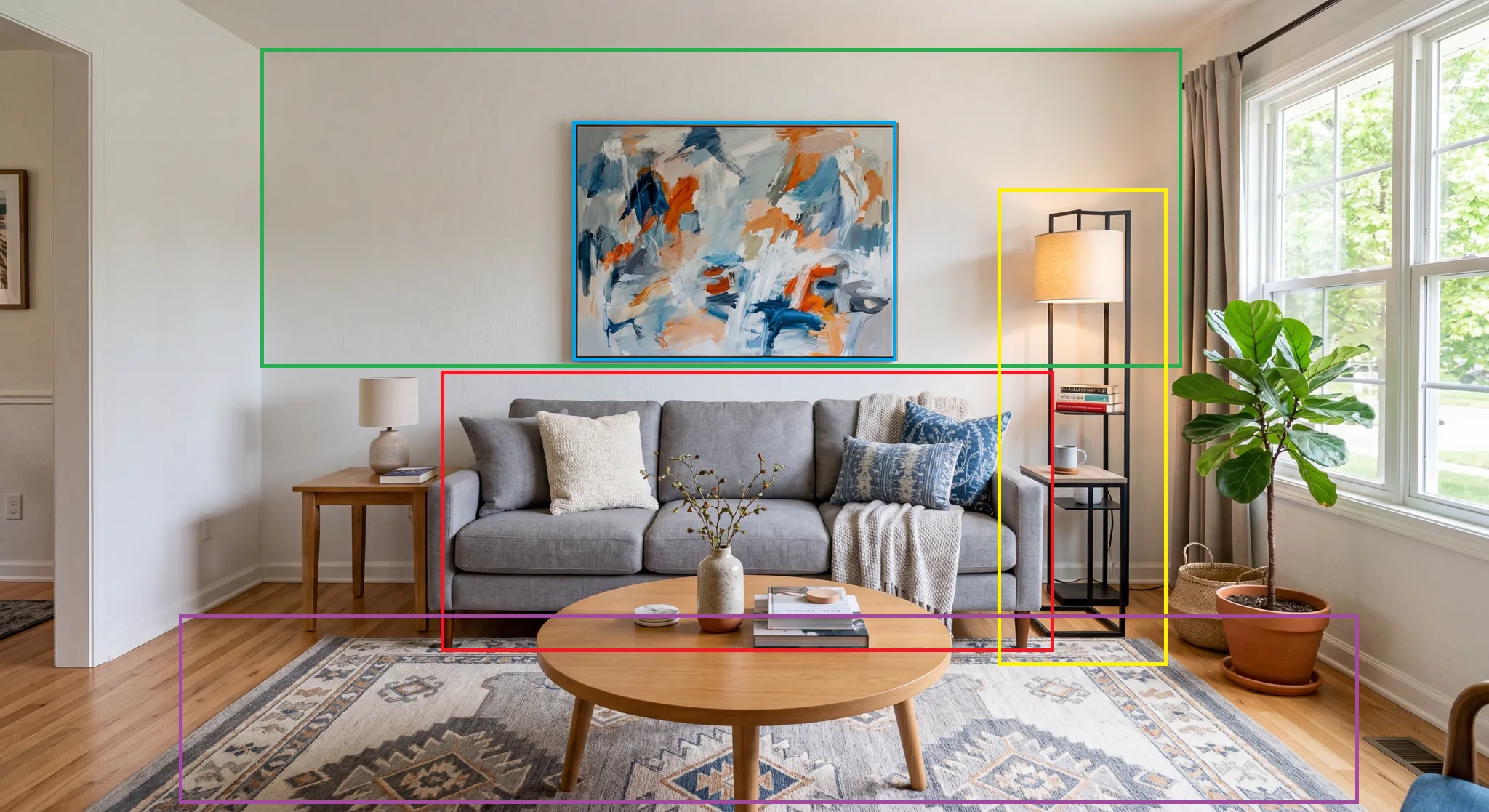
Prompt:
Red box on the sofa: reupholster it in deep forest-green velvet, keep the same shape and position.
Green box on the wall behind the sofa: change the paint from white to a warm terracotta, leave the painting untouched.
Blue box on the abstract painting: replace it with a large framed black-and-white architectural photograph at the same frame size.
Yellow box on the floor lamp: swap it for a brass arc lamp curving over the sofa.
Purple box on the area rug: change the patterned rug to a flat-woven cream and charcoal geometric rug.
Keep everything else in the room exactly the same, including the window light, the coffee table, and the plant.
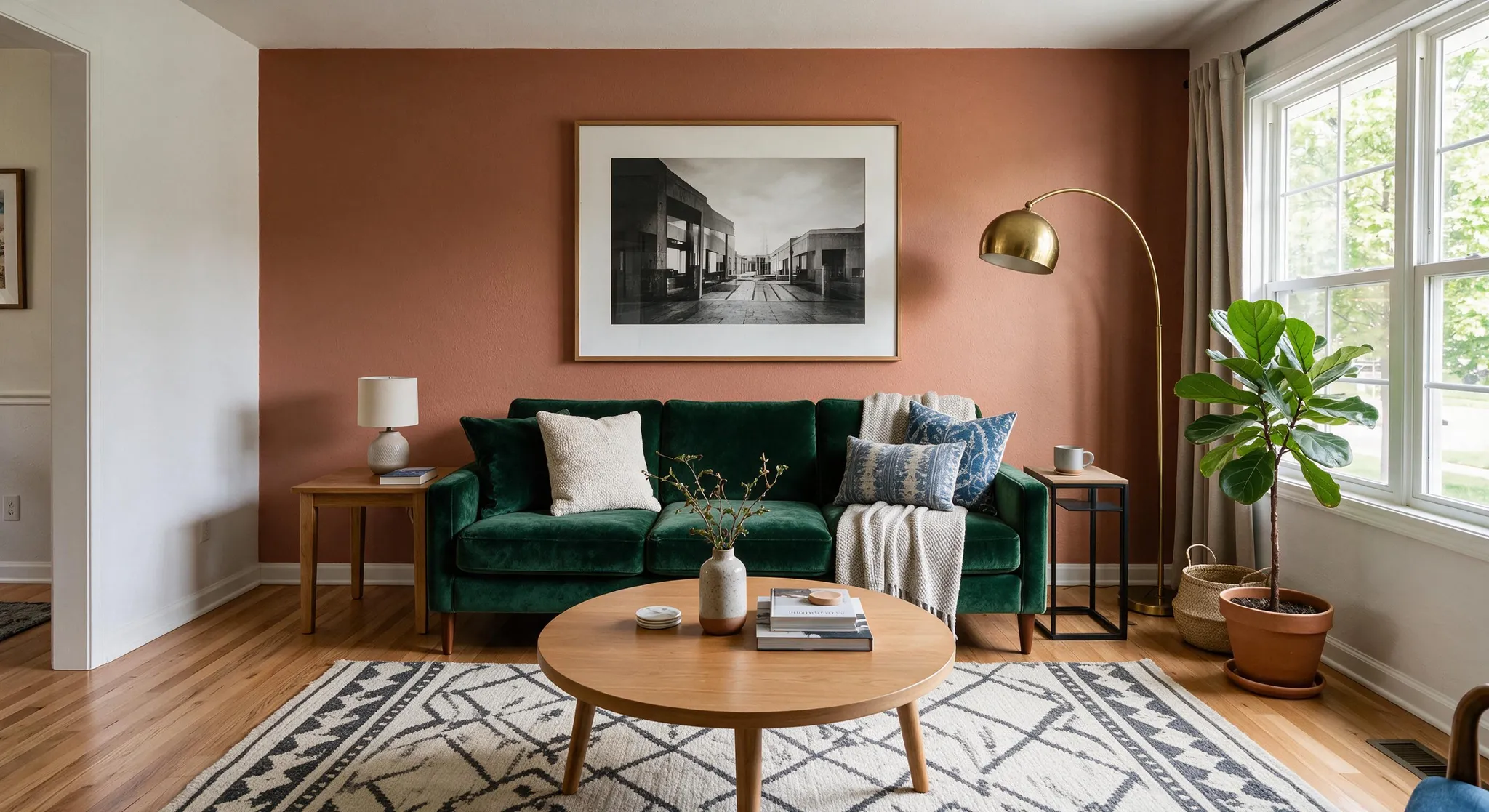
Generated using Seedream 5.0 Pro on fal, an AI model from ByteDance.
Crème de la crème execution.
For the GPT Image 2 run, I decided to start with the clean base image and try prosing my way into the edits. I thought that if it's not good enough, I can add a mask if changes start spilling outside the area on the first try.
Prompt: Apply these changes and keep the rest of the room identical: reupholster the sofa in deep forest-green velvet in the same shape and position, repaint the wall behind it from white to warm terracotta without touching the painting, replace the abstract painting with a large framed black-and-white architectural photograph at the same frame size, swap the floor lamp for a brass arc lamp curving over the sofa, and change the patterned rug to a flat-woven cream and charcoal geometric rug. Preserve the window light, the coffee table, and the potted plant.
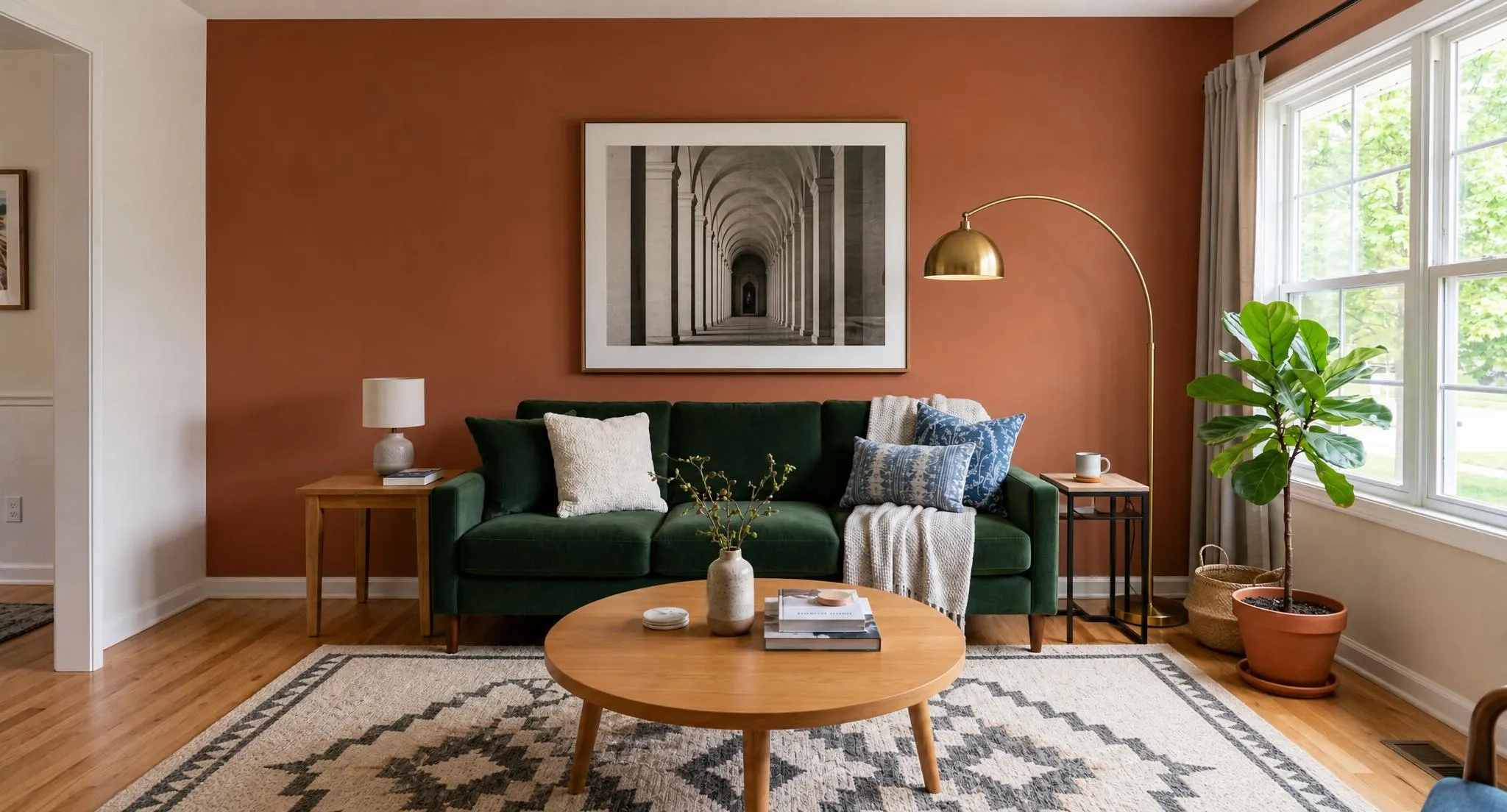
Generated using GPT Image 2 on fal, an AI model from OpenAI.
Needless to say, there was no need to use a mask for GPT Image 2 edit - the model did a really good job.
Test 6: Multi-reference cosmetics ad composite
A real campaign hero is usually assembled from separate plates, and that's the job the multi-reference slots handle.
I fed both models five sources and asked them to build one skincare ad, which means the perspective and lighting have to line up, and the logo has to sit cleanly on curved glass.
References (it's important you have them in this order):
A frosted glass serum dropper bottle, unlabeled, on a white background.
A slab of pale grey-veined marble shot from above.
A brand logo, the word 'AURA' in a thin serif with a small leaf mark.
A length of draped ivory silk with soft folds.
A sprig of fresh eucalyptus with green-silver leaves.
For the generation of these 5 images, I used Nano Banana 2 Lite, which generated the images faster than you can say "Nano Banana 2 Lite".
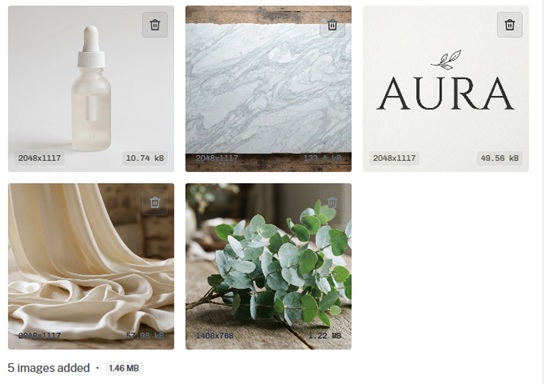
Prompt: Compose a single luxury skincare advertisement from the references. Stand the frosted serum bottle from image 1 upright, slightly right of center, on the marble surface from image 2. Print the 'AURA' logo from image 3 onto the front of the bottle in soft matte white, following the curve of the glass. Drape the ivory silk from image 4 loosely behind and to the left so it pools on the marble and catches a soft window light. Lay the eucalyptus sprig from image 5 flat in front of the bottle, one leaf overlapping its base. Soft diffused daylight from the upper left, a gentle reflection of the bottle on the polished marble, a calm neutral grade with cool highlights. Add a small tagline in the lower-right reading 'quiet skin, every morning'. Photorealistic advertising still, 90mm lens at f5.6, sharp focus on the bottle and logo.
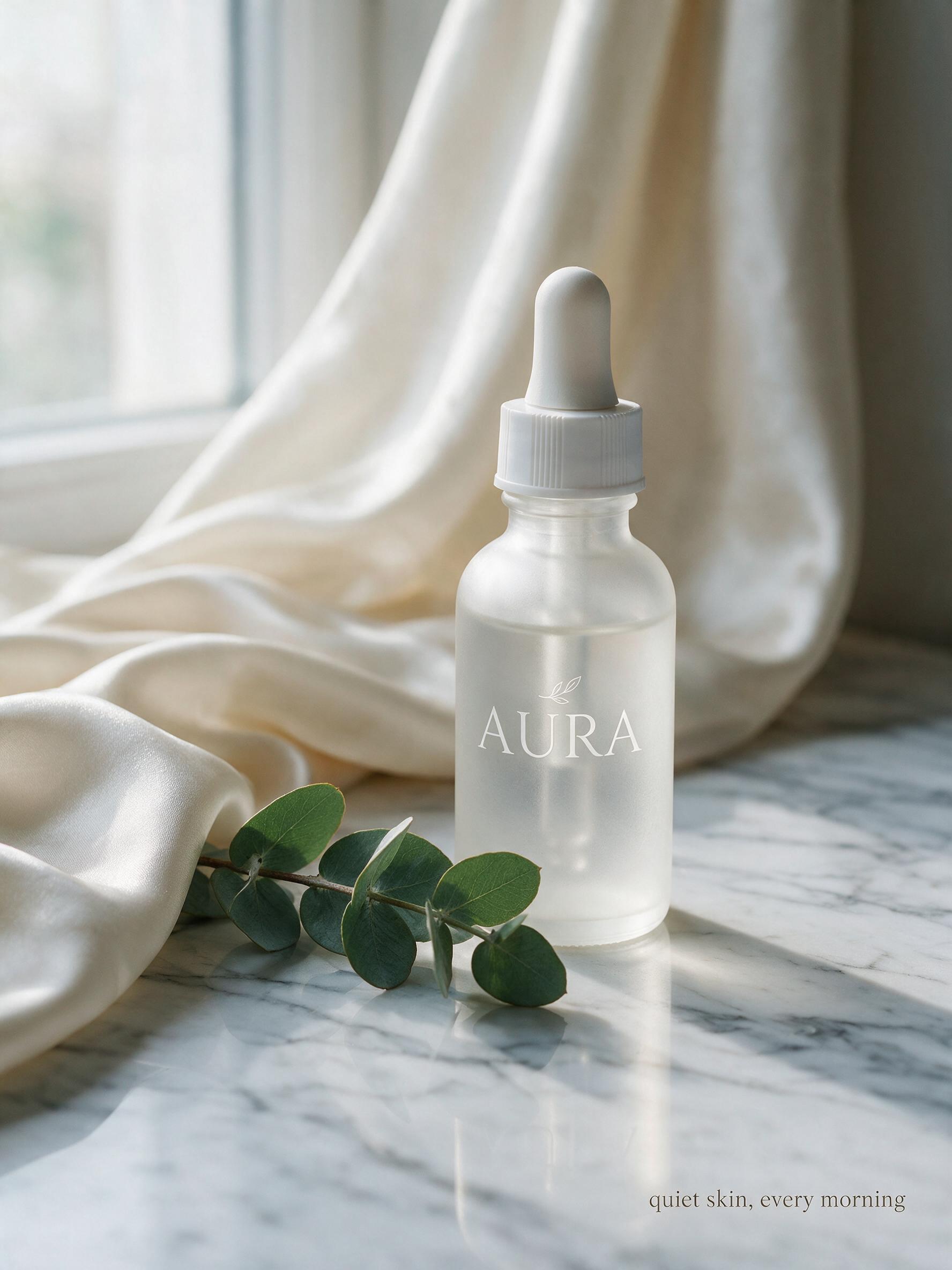
Generated using Seedream 5.0 Pro on fal, an AI model from ByteDance.
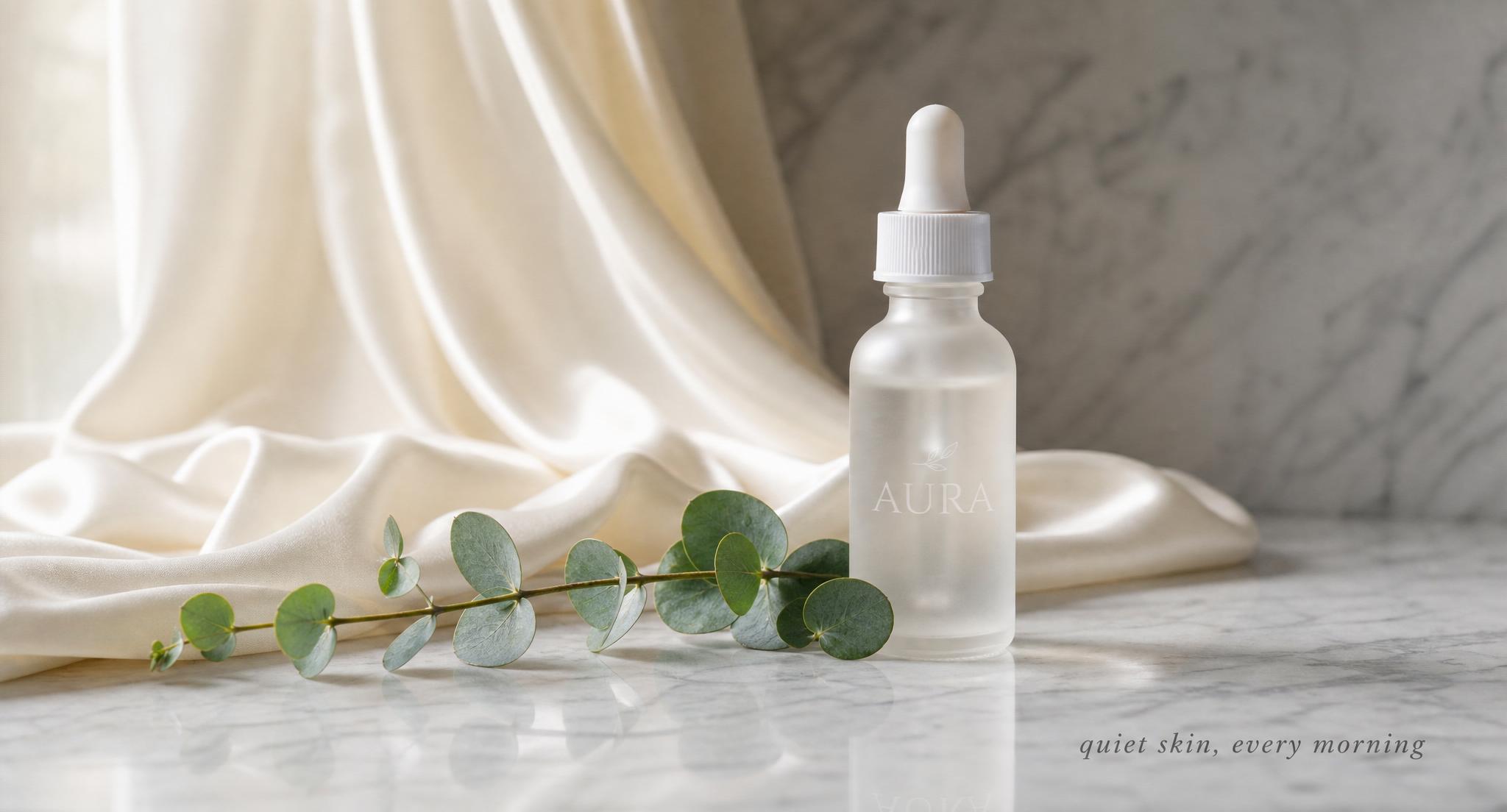
Generated using GPT Image 2 on fal, an AI model from OpenAI.
What do Seedream 5.0 Pro and GPT Image 2 cost on fal?
These two don't price the same way, so let me lay both meters side by side.
Seedream 5.0 Pro charges per output image, split into two tiers by pixel area. Pricing is marked tentative on the playground, so confirm it before you build a budget around it.
| Output size | Seedream 5.0 Pro (text-to-image) |
|---|---|
| Up to 1536x1536 | $0.0675 per image |
| 1536x1536 to 2048x2048 | $0.135 per image |
On the edit endpoint, the same output tiers apply, and there's a small surcharge for reference images: the first input image is free, and every additional input costs $0.0045.
For example, a three-reference edit at the lower tier works out to $0.0675 plus two times $0.0045, so $0.0765 for the render.
GPT Image 2 bills on tokens, both text and image, which means the number tracks output size and quality, and creeps up as a prompt asks for more reasoning.
The size table below is the practical per-image cost at each quality setting for text-to-image.
| Output size | Low | Medium | High |
|---|---|---|---|
| 1024x768 | $0.005 | $0.037 | $0.145 |
| 1024x1024 | $0.006 | $0.053 | $0.211 |
| 1024x1536 | $0.005 | $0.042 | $0.165 |
| 1920x1080 | $0.005 | $0.040 | $0.158 |
| 2560x1440 | $0.007 | $0.056 | $0.222 |
| 3840x2160 | $0.012 | $0.101 | $0.401 |
Editing on GPT Image 2 costs a little more at each cell because the input image is counted too.
A 1024x1024 edit at high runs $0.219 against $0.211 for generation, and a 3840x2160 edit at high is $0.413.
What can Seedream 5.0 do that GPT Image 2 can't and vice versa?
Once you get past raw generation, the real separation is in the editing surfaces and a few endpoint features, and that's the part I'd read closely before committing to one.
Seedream 5.0 Pro brings a set of editing moves GPT Image 2 doesn't expose:
Annotation-frame prompting, where you draw a colored box on the input and write an instruction for just that region, which makes multi-spot edits legible and keeps them from spilling into each other.
Sketch completion, taking a rough line drawing and finishing it into a full render while holding the drawn layout.
Layer separation, pulling a subject off its background so you can change one without disturbing the other.
A hard ceiling of 10 reference images per call for multi-source composites.
Native text generation across 14 languages aimed at dense and structured layouts.
GPT Image 2 answers with a different toolkit:
Mask-based inpainting, where a black-and-white mask marks the editable region to the pixel, for edits that call for a drawn boundary, not a described one.
Real-time streaming on both endpoints, so an interactive tool can show the image forming.
A quality dial (low through high, plus auto) that trades compute and cost for fidelity, handy for cheap drafts.
Bring-your-own-key, passing an openai_api_key to route through your own OpenAI account and quota.
A wider pixel ceiling, up to a 3840px edge and 8,294,400 total pixels, with WebP as an output option alongside PNG and JPEG.
For teams whose editing is mostly localized changes on a fixed frame, the annotation and grounding tools make Seedream 5.0 Pro the first one to try.
On the other hand, anyone building a live editing UI or working from hand-drawn masks will get more out of GPT Image 2.
When should you reach for Seedream 5.0 Pro vs. GPT Image 2?
I'm not going to 'crown a winner', so here's how I'd pick between the two.
Choose Seedream 5.0 Pro when:
You're editing one region of an image and need the rest held steady, described in the prompt with no mask to draw by hand.
You're running multi-spot edits on a single frame and want annotation boxes to keep them separated.
You're compositing from several sources at once, up to 10 reference images in a call.
You're turning rough sketches or wireframes into finished renders while preserving the drawn layout.
Your output is text-heavy across languages, or built on dense and structured layouts.
Per-image cost matters and your output stays under 1536 on the long edge, where the rate is lowest.
Choose GPT Image 2 when:
You want a drawn mask to bound an edit exactly, for surgical background swaps or product touch-ups.
You're building an interactive editor and want streaming so the image appears as it renders.
You're drafting at volume and want a quality dial to run cheap passes, then push final assets to high.
You need to route generation through your own OpenAI account with a bring-your-own-key setup.
Your brief calls for large output past 2048px, up to a 3840px edge, or WebP delivery.
The two also pair well inside one pipeline.
You can rough out concepts on GPT Image 2 at low for cents a render, then pass the finalists to Seedream 5.0 Pro for the region-precise editing and multi-reference compositing.
The shared schema on fal keeps that handoff to a small change in the endpoint and a couple of input fields, not a re-integration.
Recently Added


Run Seedream 5.0 Pro and GPT Image 2 on fal
The image-model shelf is crowded, and Seedream 5.0 Pro and GPT Image 2 are both near the top of it.
Figuring out which one suits a given job is the actual work, and doing it blind burns credits and afternoons.
On fal, you can run both from one integration and pay only for what you generate, with no GPU to manage, which makes side-by-side testing cheap.
In fact, you can open the playground and throw the same prompt at each, or wire the API into your app when you're ready.
Seedream 5.0 Pro vs. GPT Image 2 FAQs
What's the core difference between Seedream 5.0 Pro and GPT Image 2?
Seedream 5.0 Pro is ByteDance's flagship image model, billed per output image across two area tiers, with editing that targets regions from the prompt or from annotation boxes.
It also does sketch completion and layer separation, and takes up to 10 reference images in a call.
GPT Image 2 is OpenAI's model, billed on image and text tokens, with a quality dial for trading compute against fidelity, streaming on both endpoints, mask-based inpainting for pixel-exact edits, and a bring-your-own-key option.
Both generate strong in-image text, and both are commercial-use on fal.
How does editing differ between Seedream 5.0 Pro and GPT Image 2?
Seedream 5.0 Pro edits are grounded and region-precise.
You describe the change or draw a colored box around a region, and the model localizes the edit while holding the rest of the frame, with no mask involved.
GPT Image 2 edits from the prompt by default, and accepts a black-and-white mask when you want the editable boundary drawn to the pixel, with the white area marking what it may change.
Both accept multiple reference images, and GPT Image 2 streams partial results as the edit renders.
What do Seedream 5.0 Pro and GPT Image 2 cost on fal?
Seedream 5.0 Pro is a tentative $0.0675 per image up to 1536x1536 and $0.135 up to 2048x2048, with edits adding $0.0045 for each reference image past the first.
GPT Image 2 is token-billed, which lands around $0.145 for a 1024x768 render at high quality and scales with size and quality, dropping to a few cents at low quality.
Neither carries a subscription or a minimum commitment.
What resolutions can Seedream 5.0 Pro and GPT Image 2 reach?
Seedream 5.0 Pro works between 1024x1024 and 2048x2048 total pixels, with aspect ratios from 1:16 to 16:1 and custom dimensions supported.
GPT Image 2 spans 655,360 to 8,294,400 total pixels, up to a 3840px edge and a 3:1 aspect ratio, with both dimensions as multiples of 16.
Can Seedream 5.0 Pro and GPT Image 2 be used commercially?
Yes. Commercial use is enabled for Seedream 5.0 Pro and GPT Image 2 outputs generated through fal.
Check each model's page for the current terms before shipping outputs into a commercial project.