To rank the 10 best AI image-to-video generators for photoshoots, I gave each one the same fashion editorial still and motion prompt on fal, then priced 10 seconds of its 1080p output.
My test frame is a model in a camel coat on a concrete staircase, and the motion I asked for is a head turn to the lens followed by two steps down toward the camera.
TL;DR
- FLUX 3 Max is the model I'd start a photoshoot on, turning one frame plus an optional end frame into 5 to 20 seconds of video at list rates of $0.29 per second for 1080p or $0.17 for 720p on fal.
- Kling 4.0 takes up to eight middle keyframes between its first and last frames, letting several picks from one shoot steer a single 3 to 30-second clip at $0.235 per second in 1080p.
- H3 Max can replace its generated soundtrack with an audio file you supply at $0.16 per second for 1080P output, while H3 Max Turbo halves that rate with the same request fields.
- Kling 3.0 Pro takes the talent's frontal photo plus up to three reference angles as an element named in the prompt, at $0.168 per second with audio on.
- At 1080p and 10 seconds per clip, my test runs range from $0.80 on H3 Max Turbo to about $11.64 on Seedance 2.5, using list rates from fal's model pages as of November 2026.
- fal is the best place to run FLUX 3 Max with the nine models below it because you can compare all ten in our playground, then move the winning setup into production through the same API.
What is the best AI image-to-video generator for photoshoots?
FLUX 3 Max is the best AI image-to-video generator for photoshoots, turning a finished still into 5 to 20 seconds of 720p video with upscales to 1080p and above on fal, plus an optional end frame for landing on a second approved image.
Right behind it are Kling 4.0 at #2 and H3 Max at #3, followed by seven more models that suit narrower photoshoot jobs:
| AI Model | Best for | Frames you can pass | Clip length | How a 9:16 still is handled | Price on fal | 10-second clip at 1080p |
|---|---|---|---|---|---|---|
| FLUX 3 Max | Frontier-quality motion from one approved frame | Start, optional end | 5 to 20 seconds | auto follows the still, with 9:16 and 3:4 selectable | $0.17 to $0.29 per second (720p to 1080p) | $2.90 |
| Kling 4.0 | Lookbooks built from several frames of one shoot | Start, up to 8 middle, optional end | 3 to 30 seconds | No aspect field, start image between 0.40 and 2.50 | $0.157 to $0.235 per second (720p to 1080p) | $2.35 |
| H3 Max | Clips cut to a track you supply | Optional start, optional end | Set in seconds, default 5 | Canvas follows the still | $0.05 to $0.16 per second (480P to 1080P) | $1.60 |
| Wan 3.0 Prime | Portrait and print crops, including 3:4 | Start, optional end | Set in seconds, default 5 | adaptive by default, with 9:16 and 3:4 selectable | $0.068 to $0.28 per second (480p to 1080p) | $2.80 |
| Seedance 2.5 | Long takes from TIFF or HEIC exports | Start, optional end | 4 to 30 seconds, or auto | Fixed to auto | About $0.2205 to $1.164 per second (480p to 1080p) | About $11.64 |
| Kling 3.0 Pro | The same face across several clips | Start, optional end, elements | 3 to 15 seconds | Inferred from the start image | $0.112 to $0.196 per second (audio off to voice control) | $1.68 with audio on |
| Gemini Omni Flash 1.2 | 4K campaign masters | Start, optional end | 3 to 15 seconds (10 with an end image) | 16:9 by default, 9:16 selectable | $0.0273 to $0.2457 per second (360p to 4K), plus input tokens | About $1.23 plus input tokens |
| LTX 2.5 Pro | Preset camera moves | Start, optional end | 6 to 10 seconds in 2-second steps, or auto | auto reads the still, with 16:9 and 9:16 fixed options | $0.12 to $0.17 per second (720p to 1080p) | $1.70 |
| H3 Max Turbo | High-volume social cutdowns | Optional start, optional end | Set in seconds, default 5 | Canvas follows the still | $0.025 to $0.08 per second (480P to 1080P) | $0.80 |
| Grok Imagine 1.5 | Quick teasers from a lean request | Start | Set in seconds, default 6 | No aspect field | $0.08 to $0.25 per second (480p to 1080p) | $2.50 |
Note: all prices come from the fal model pages in November 2026, at list rates without launch promotions.
The last column uses my test settings of 10 seconds at 1080p with default audio, and since Kling 3.0 Pro has no resolution field, its figure is the audio-on rate.
Gemini Omni Flash 1.2 also bills input tokens at $1.50 per million on top of its per-second rate.
⚠️ Here's what I weighed when ranking these image-to-video models for photoshoots:
- Starts from a finished still: every model on the list animates your uploaded photo, and nine of them document it as the clip's first frame.
- Ties the clip to more of the shoot: I gave extra weight to end frames and keyframes, because they let me pin the motion to images the client has already approved.
- Vertical delivery: since I tested with a 9:16 still, I checked how each endpoint reads a vertical frame.
- Cost of 10 seconds at 1080p: I priced every model at list rates for my test settings and left launch discounts out, since the current promotions on FLUX 3 Max and both H3 Max tiers end this month.
Apart from FLUX 3 Max's preliminary Artificial Analysis result, no leaderboard shaped this order, which follows how I route fashion and portrait work in practice.
How I set up the photoshoot test
The source frame came from Nano Banana 2.1 on fal, rendered at 2K in a 9:16 frame (1536 × 2752) from this prompt:
Prompt: Fashion editorial photograph in a 9:16 vertical frame. A woman in her early thirties with a sleek low bun and small gold hoop earrings stands on the third step of a wide concrete staircase outside a brutalist building in late afternoon light. She wears a long camel wool coat open over a pleated ivory midi skirt, with her right hand in the coat pocket. Her face is turned slightly to the right of the camera with a calm, neutral expression and closed lips. Low warm sun from the left throws long diagonal shadows across the steps and the pale concrete wall behind her. The camera frames her full length from a slightly low angle, with sharp focus on her face and the texture of the wool. No text or other people in frame.
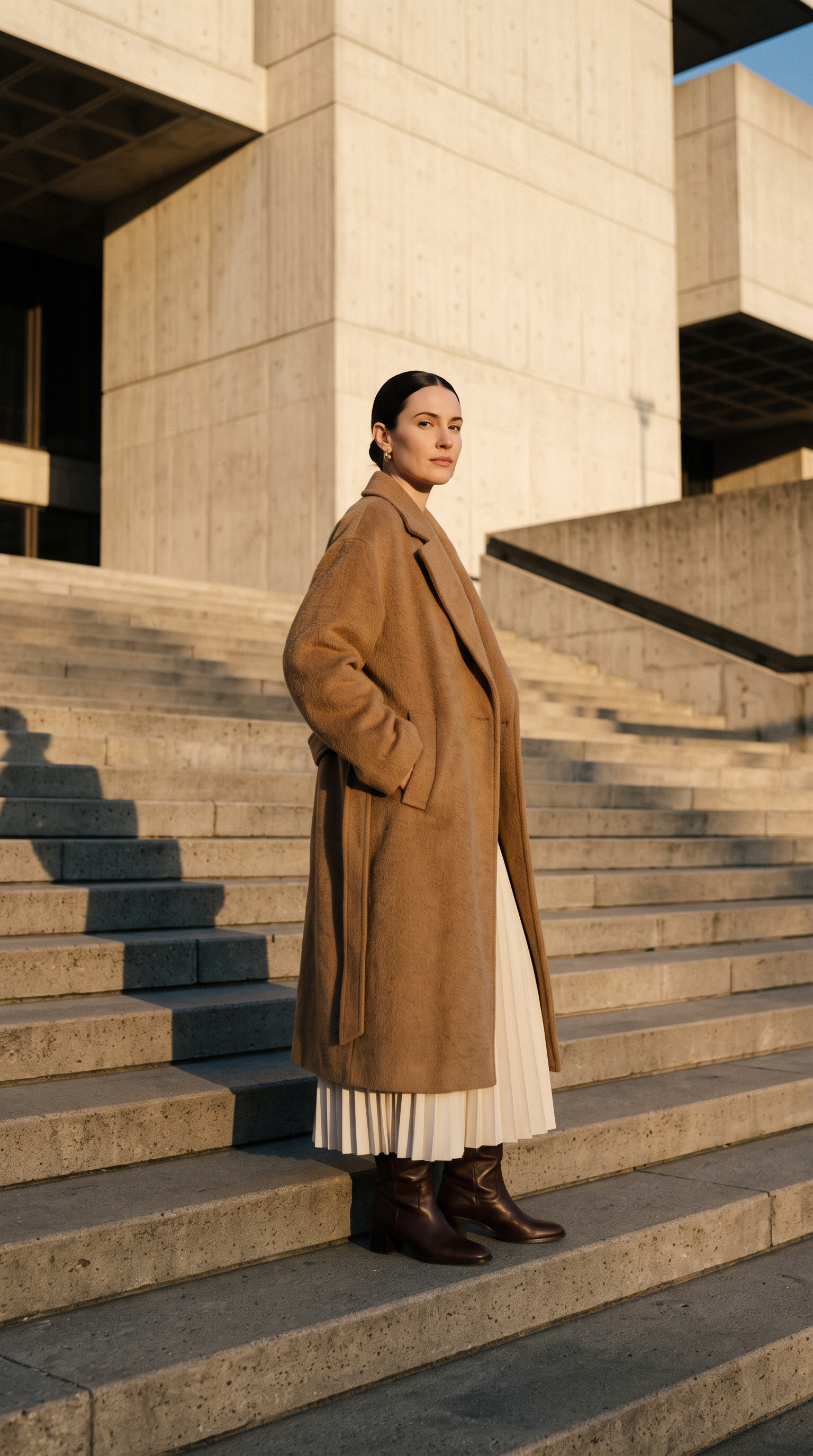
Generated using Nano Banana 2.1 on fal, an AI model from Google.
Try it in ChatGPT Try it in fal AgentWhen a shoot needs a matching series of looks around the same talent, the Nano Banana 2.1 prompting guide covers the settings and edit workflows I'd reach for.
I went vertical because Gemini Omni Flash 1.2 and LTX 2.5 Pro both keep their fixed output shapes to 16:9 and 9:16, which also happens to be the frame Reels and TikTok expect.
The motion prompt below went to all ten models alongside that still, apart from a Seedance 2.5 exception covered in its section:
Prompt: She turns her head to look straight into the lens, then walks down two steps toward the camera with her right hand still in the coat pocket. The open coat swings out behind her and the skirt pleats fan open as she moves. The camera pulls back slowly at the same low angle so her whole figure stays in frame. The building and the long shadows on the stairs stay as they are in the image. Soft wind and footsteps on concrete, no music and no dialogue.
I set the duration to 10 seconds on all ten requests and chose 1080p wherever an endpoint has a resolution field, with one fallback to 720p on Gemini Omni Flash 1.2.
On FLUX 3 Max, that 1080p is an upscale of a 720p generation, while H3 Max and H3 Max Turbo refine a native 768P render up to 1080P.
Gemini Omni Flash 1.2 starts on 16:9, so I switched its aspect_ratio to 9:16, whereas the rest stayed on auto or adaptive or have no aspect field to set.
Audio stayed on each model's default setting, and the prompt's last line covers wind and footsteps for the models that generate sound.
I didn't touch any other field, so FLUX 3 Max kept its high reasoning level and LTX 2.5 Pro ran without a camera_motion preset.
Note: if your shoot centers on a product, our 10 Best AI Image-to-Video Generators in 2026 list runs a packshot through a partly different set of ten models at 720p and 768P.
To send a batch like this from a chat window, our Claude and MCP video guide covers connecting our MCP server to Claude and Claude Code.
#1: FLUX 3 Max
Best for: Photographers and brand teams who want an approved frame from a finished shoot to move at frontier quality, sometimes ending on a second approved image.
Similar to: H3 Max, Kling 4.0.
fal Research post-trained FLUX 3 Max from FLUX 3 Video together with Black Forest Labs, aiming at closer prompt following and better-looking output at lower latency.
FLUX 3 Max ranks joint #1 in Artificial Analysis's preliminary image-to-video evaluation, while our benchmark configuration had it generating a 10-second video in about 11 seconds.
Performance
Generated using FLUX 3 Max on fal, a post-trained variant of FLUX 3 Video.
Try it in ChatGPT Try it in fal Agent- Prompting from an approved frame: as the still already fixes the composition, my prompt only describes what moves after the first frame and skips styling details the image already shows, like the coat's color or her hairstyle.
- Closing on a second image: if the client approved a closing pose too, I pass that frame as
end_image_url. - Portrait and print shapes: on auto, FLUX 3 Max follows the shape of the still, with fixed options from 21:9 down to 9:16 that include 3:4 and 1:1.
- Reasoning level: the default is high, and since our schema notes that more reasoning means slower generation, I'd drop to low when turnaround leads the brief.
- Shoot exports: TIFF and HEIC aren't among the formats the FLUX 3 Max schema lists for its frames, so you'll want to export raw-processed images as JPEG or PNG before uploading.
- Length and upscales: any whole number of seconds from 5 to 20 works, and every resolution above 720p, 2K and 4K included, is an upscale of the 720p generation.
How to run FLUX 3 Max on fal
A FLUX 3 Max request needs a prompt and an image_url at blackforestlabs/flux-3-max/image-to-video, and the response returns the seed next to the video in case you want to regenerate a take.
The FLUX 3 Max model page also lists a Keyframes-to-Video endpoint for sequences guided by more than one frame from the same shoot.
For prompt structure, the FLUX 3 Max prompting guide breaks down five parts and 50 examples you can adapt to editorial motion.
Pricing
My 1080p test clip from FLUX 3 Max comes to $2.90 at the list rate of $0.29 per second.
At the default 720p resolution, FLUX 3 Max costs $0.17 per second.
#2: Kling 4.0
Best for: Lookbook clips that travel through several frames from one shoot inside a single generation of up to 30 seconds.
Similar to: FLUX 3 Max, Kling 3.0 Pro.
Kuaishou's Kling 4.0 generates between 3 and 30 seconds of video from a starting image, at 720p or 1080p.
Between the first and last frames, Kling 4.0 accepts up to eight ordered middle keyframes, so a run of poses from a contact sheet can guide one continuous clip.
Performance
Generated using Kling 4.0 on fal, an AI model from Kuaishou.
Try it in ChatGPT Try it in fal Agent- Keyframes from the contact sheet: based on my experience, it's best to pull the middle frames from one lighting setup, so the light and color stay consistent from one pose to the next.
- Previews without a prompt: if you leave the prompt empty and skip
multi_prompt, Kling 4.0 animates the frames on their own, and I use that run to check that a keyframe set connects before writing any direction. - Shot-by-shot direction: with
multi_prompt, each shot gets its own text and seconds, and the clip's length is the sum of those seconds. - Upload limits: a 9:16 portrait works out to a 0.5625 ratio, comfortably inside the start image's 0.40 to 2.50 window, and that start image can be up to 30 MB.
- Default resolution: Kling 4.0 starts at 1080p, meaning my test run needed no change beyond the 10-second duration.
How to run Kling 4.0 on fal
At kling/v4/image-to-video, the opening frame goes in start_image_url, while end_image_url and middle_image_urls stay optional.
The Kling API guide on fal learn walks through the four Kling 4.0 endpoints, including per-second pricing and schema limits.
Pricing
My 10-second Kling 4.0 test came to $2.35 at $0.235 per second for 1080p.
At 720p, Kling 4.0 costs $0.157 per second for the same clip length.
A full 30-second lookbook at 1080p would cost $7.05 at the same rate.
#3: H3 Max
Best for: Brand teams that need a photoshoot clip set to a track they already own, at per-second rates of $0.16 or less.
Similar to: H3 Max Turbo, FLUX 3 Max.
H3 Max comes from fal Research, which post-trained MiniMax H3 to follow prompts more closely with better aesthetics and served it on an inference stack we designed alongside it for throughput.
H3 Max can also swap its generated soundtrack for an audio file you supply.
Performance
Generated using H3 Max on fal, a post-trained variant of MiniMax H3.
Try it in ChatGPT Try it in fal Agent- Your own soundtrack: a
target_audio_urlclip needs at least 2 seconds and can weigh up to 15 MB, and H3 Max keeps the opening of a longer file while padding a shorter one with silence. - Seeing the rewrite: with
prompt_expansion_modeon quality, the rewrite gets up to roughly 30 seconds, andexpanded_promptin the response holds the rewritten text unless expansion ran inside MiniMax's hosted API. - Ending on the strongest frame: I'd send
end_image_urlwithout animage_urlwhen the best shot of a shoot works better as a final pose, since H3 Max then builds the clip toward it. - Keeping a take: I'd normally set a seed on every H3 Max request, because an empty field gets a random one and the response schema doesn't return it.
How to run H3 Max on fal
H3 Max treats image_url as optional at minimax/h3-max/image-to-video, and a request with neither image runs as text-to-video at 16:9 by default.
Our AI video API tutorial builds a product-photo animation pipeline on H3 Max in Python and JavaScript, with queued batches and webhooks.
Pricing
Ten seconds of H3 Max at 1080P costs $1.60 on fal, based on the standard rate of $0.16 per second.
At the 768P default, H3 Max costs $0.08 per second, and 480P comes in at $0.05.
falMODEL APIs
The fastest, cheapest and most reliable way to run genAI models. 1 API, 100s of models
#4: Wan 3.0 Prime
Best for: Portrait and print-led shoots that need the subject and framing of the original photo carried into motion, 3:4 crops included.
Similar to: FLUX 3 Max, Seedance 2.5.
Alibaba built Wan 3.0 Prime as the Prime tier of Wan 3.0, and its model page frames it around holding a source image's subject and framing steady while motion and camera moves are added.
Among its aspect_ratio options is 3:4 for portraits headed to print, next to an adaptive default.
Performance
Generated using Wan 3.0 Prime on fal, an AI model from Alibaba.
Try it in ChatGPT Try it in fal Agent- Editorial brief on the page: the prompt preloaded on the Wan 3.0 Prime model page is a six-clip fashion brief, and its one-movement-per-clip layout makes a good template for shoots with several looks.
- Audio field name: the sound toggle here is called
audio, so a request copied from a model that usesgenerate_audioneeds that key renamed. - Length check: it's worth reading the generated duration in the response before dropping the clip onto a timeline.
- Seed for revisions: Wan 3.0 Prime returns the seed it used, and I keep that number with the client's assets in case a revision needs the same motion.
- Default resolution: because Wan 3.0 Prime already starts at 1080p, the test request carried no resolution value at all.
How to run Wan 3.0 Prime on fal
Wan 3.0 Prime names its opening-frame field start_image_url at alibaba/wan-3.0-prime/image-to-video, matching what Kling 4.0 and Kling 3.0 Pro use.
Our Wan 3 vs. Seedance 2.5 comparison puts the standard Wan 3.0 tier through matched ecommerce ad tests, one of them a start-and-end-frame image-to-video shot.
Pricing
On fal, Wan 3.0 Prime charges $0.28 per second at 1080p, or $2.80 for a 10-second clip.
At 720p you'd pay $0.14 per second, with 480p at $0.068 per second.
#5: Seedance 2.5
Best for: Long continuous shots built from high-resolution TIFF or HEIC exports, previewed as a 480p draft before the final render.
Similar to: Kling 4.0, Wan 3.0 Prime.
ByteDance's Seedance 2.5 runs on a US-hosted image-to-video endpoint on fal, generating 4 to 30 seconds with sound at up to 1080p.
The Seedance 2.5 schema accepts eight image formats, TIFF and HEIC among them, at up to 30 MB per file.
Performance
In my run, Seedance 2.5 rejected the original still for "likenesses of real people" on the US endpoint, and the global endpoint returned the same rejection.
The rejection came back even with no prompt at all, so the block was on the image itself.
Eight inputs were turned down in total, including smaller JPEG copies and new stills with her face turned away or hidden behind sunglasses.
The run that went through used the same still cropped from the collar down, so the input held no head, and I removed the head-turn clause from the motion prompt:
Prompt: She walks down two steps toward the camera with her right hand still in the coat pocket. The open coat swings out behind her and the skirt pleats fan open as she moves. The camera pulls back slowly at the same low angle so her whole figure stays in frame. The building and the long shadows on the stairs stay as they are in the image. Soft wind and footsteps on concrete, no music and no dialogue.
Since the crop leaves her head out, the face that appears once the camera pulls back is one Seedance 2.5 generated, not the talent from the original shoot.
Generated using Seedance 2.5 on fal, an AI model from ByteDance.
Try it in ChatGPT Try it in fal Agent- Draft first: with
draftset to true, Seedance 2.5 renders a 480p preview plus adraft_id, and US drafts can be completed at 1080p within 7 days on the same account. - Vertical stills: because Seedance 2.5 fixes image-to-video requests to an auto aspect ratio, my 9:16 frame needed no extra setting.
- Budgeting long takes: a 30-second 1080p take would run about $34.92 at roughly $1.164 per second, so I'd lock the motion in a draft before rendering it.
- Master files: for a campaign file headed to an editor,
bitrate_modeon high requests a heavier encode than the standard default.
How to run Seedance 2.5 on fal
Seedance 2.5 requires only image_url at bytedance/seedance-2.5/us/image-to-video, because the motion prompt is optional.
The MiniMax H3 Max vs. Seedance 2.5 head-to-head runs six identical shots through both models, image-to-video tests included.
Pricing
Seedance 2.5 runs roughly $1.164 per second at 1080p on the US endpoint, about $11.64 for my 10-second test clip.
Lower tiers cost roughly $0.473 per second at 720p and about $0.2205 for 480p drafts.
Those per-second figures come from token billing, which charges $0.0214 per thousand tokens at 480p and 720p and roughly $0.0234 per thousand at 1080p.
#6: Kling 3.0 Pro
Best for: Multi-clip shoots where the same talent has to look identical from one clip to the next, guided by reference photos of the face and outfit.
Similar to: Kling 4.0, Wan 3.0 Prime.
Kuaishou offers Kling 3.0 Pro as the higher tier of Kling 3.0 image-to-video, with native audio and clips of 3 to 15 seconds.
Its elements field takes a frontal image plus one to three reference angles of a character or object, which you then call by name in the prompt as @Element1.
Performance
Generated using Kling 3.0 Pro on fal, an AI model from Kuaishou.
Try it in ChatGPT Try it in fal Agent- Talent references: since
frontal_image_urlis the element's main view, the talent's straight-on headshot goes there, with a three-quarter frame from the same shoot added toreference_image_urls. - Clip shape: Kling 3.0 Pro reads the aspect ratio from the start image, so a 9:16 still gives a vertical clip.
- Steering away from defects: the default
negative_promptreads "blur, distort, and low quality", andcfg_scalestarts at 0.5 for how closely the output follows the prompt. - Shot structure: Kling 3.0 Pro plans the shot structure itself when
shot_typeis intelligent, whereas customize keeps your ownmulti_promptlist in charge. - Spoken lines: native audio covers Chinese and English, with prompts in other languages translated into English speech.
How to run Kling 3.0 Pro on fal
Calls to fal-ai/kling-video/v3/pro/image-to-video need start_image_url plus either prompt or multi_prompt, never both.
For final masters, the related endpoints on the model page include a 4K variant at fal-ai/kling-video/v3/pro/image-to-video/4k.
If you're weighing the two Kling generations for a series, Kling 4.0 vs. Kling 3.0 compares their frame controls and reference inputs on fal.
Pricing
Kling 3.0 Pro bills $0.168 per second with its default audio on, for a total of $1.68 on my 10-second test.
Without audio, the rate is $0.112 per second, though voice control during audio generation lifts it to $0.196.
#7: Gemini Omni Flash 1.2
Best for: Campaign masters that need 4K output from one still, with lower tiers on the same endpoint for checking motion first.
Similar to: LTX 2.5 Pro, FLUX 3 Max.
Google's Gemini Omni Flash 1.2 brings native audio to image-to-video on fal across four output tiers, from 360p previews up to 4K.
When an end image joins the request, Gemini Omni Flash 1.2 interpolates from the first frame to the last, capping the clip at 10 seconds.
Performance
Generated using Gemini Omni Flash 1.2 on fal, an AI model from Google.
Try it in ChatGPT Try it in fal Agent- Vertical setting: Gemini Omni Flash 1.2 offers 16:9 or 9:16 and defaults to 16:9, so a portrait still needs
aspect_ratiochanged before the request goes out. - Length: Gemini Omni Flash 1.2 defaults to 8 seconds within a 3 to 15-second range.
- 4K masters: at 4K, the same 10-second take costs about $2.46 before input tokens.
- Sound included: native audio is part of the per-second rate on the model page.
How to run Gemini Omni Flash 1.2 on fal
Gemini Omni Flash 1.2 takes a prompt and an image_url at google/gemini-omni-flash/v1.2/image-to-video, plus end_image_url for interpolation.
The earlier Gemini Omni Flash 1.1 is covered in our product-shot image-to-video ranking, tested there on an earbuds packshot.
Pricing
A 10-second 1080p clip from Gemini Omni Flash 1.2 costs about $1.23 at $0.1229 per second, before input tokens.
Input tokens are listed at $1.50 per million on top of that.
The cheaper Gemini Omni Flash 1.2 tiers run $0.0819 per second at 720p and $0.0273 per second at 360p.
#8: LTX 2.5 Pro
Best for: Shoots that call for a named camera move picked from a preset list, keeping the direction independent of prompt wording.
Similar to: Gemini Omni Flash 1.2, Wan 3.0 Prime.
LTX 2.5 Pro puts Lightricks' open-source LTX-2.5 behind a quality-focused image-to-video endpoint, with picture and synchronized sound rendered together.
A camera_motion field on LTX 2.5 Pro picks from eight preset moves, focus_shift and jib_up among them.
Performance
Generated using LTX 2.5 Pro on fal, an AI model from Lightricks.
Try it in ChatGPT Try it in fal Agent- Preset moves: the
camera_motionlist covers dolly moves in four directions, two jib moves, a static camera and focus_shift. - Leaving the preset off: I kept
camera_motionunset for the test and let the prompt describe the pull-back, though dolly_out is the preset to try on a second pass. - Frame rate: LTX 2.5 Pro renders at 25 fps by default, with 24 for a film cadence or 50 when a higher frame rate suits the edit.
- Clip length: LTX 2.5 Pro tops out at 10 seconds in fixed steps from 6, which is why I used 10 as the length for the whole test.
- Shape: on auto, the aspect ratio comes from the input image, with 16:9 and 9:16 as the two fixed choices.
How to run LTX 2.5 Pro on fal
Requests to lightricks/ltx-2.5/image-to-video/pro need an image_url and a prompt, with resolution starting at 1080p by default.
You'll want LTX 2.5 Upscale on fal when a delivery spec asks for more pixels, since it raises existing H.264 or HEVC video to 4K or 8K.
Pricing
LTX 2.5 Pro cost $1.70 for my 1080p test at $0.17 per second, against $0.12 per second on its 720p tier.
#9: H3 Max Turbo
Best for: High-volume social cutdowns from a full shoot, where many stills need motion at the lowest per-second rate in this list.
Similar to: H3 Max, Grok Imagine 1.5.
H3 Max Turbo is the Turbo variant of H3 Max, also a post-trained MiniMax H3 co-optimized with our inference stack for higher throughput.
The model shares the H3 Max request schema field for field, at half the per-second rate in each resolution tier.
Performance
Generated using H3 Max Turbo on fal, a post-trained variant of MiniMax H3.
Try it in ChatGPT Try it in fal Agent- Batch math: at the 768P default, fifty 10-second clips from one shoot cost $20 at standard rates.
- Speed: H3 Max Turbo took first place in our test of the fastest AI video generation models on fal.
How to run H3 Max Turbo on fal
H3 Max Turbo uses the endpoint minimax/h3-max-turbo/image-to-video and takes the same request fields as H3 Max, end_image_url and target_audio_url included.
I log the timings object from each response, since it reports GPU inference seconds and makes the two H3 Max tiers easy to compare.
Pricing
At standard rates, H3 Max Turbo charges $0.08 per second at 1080P, half the H3 Max rate, for $0.80 per 10-second clip.
H3 Max Turbo's 768P default costs $0.04 per second, while 480P drafts cost $0.025.
#10: Grok Imagine 1.5
Best for: Quick teasers with audio from a single still, set up through a handful of request fields.
Similar to: H3 Max Turbo, Gemini Omni Flash 1.2.
xAI's Grok Imagine 1.5 generates a clip with audio from one input image on its image-to-video endpoint, at up to 1080p.
Apart from a safety checker toggle, the Grok Imagine 1.5 schema keeps to a prompt, an image, a duration and a resolution, which makes it one of the leanest requests on this list.
Performance
Generated using Grok Imagine 1.5 on fal, an AI model from xAI.
Try it in ChatGPT Try it in fal Agent- Duration: Grok Imagine 1.5 defaults to 6 seconds, so I set 10 for the test, though the model page example runs a full 15-second clip.
- Timed prompts: that same example splits its clip into labeled time ranges like (0-5s) and (5-10s), and that layout is worth testing for a teaser with a set order of beats, even though the schema documents no timing field.
- Resolution: since 720p is the default, I raised Grok Imagine 1.5 to 1080p to keep it level with the rest of the test.
- Output check: width and height come back in the response, so you can confirm the clip is vertical before placing it on a 9:16 timeline.
How to run Grok Imagine 1.5 on fal
Both prompt and image_url are marked as required for xai/grok-imagine-video/v1.5/image-to-video in the Grok Imagine 1.5 playground.
Pricing
At $0.25 per second for 1080p on fal, Grok Imagine 1.5 charged $2.50 for the 10-second test clip.
The 720p tier costs $0.14 per second and 480p costs $0.08, with totals scaling linearly with duration.
How did the ten models handle the editorial still?
H3 Max Turbo was the only model in my run to carry out every part of the brief, from the head turn and the two steps down to the coat swing and the requested sound.
FLUX 3 Max produced one of the strongest coat and pleat movements, though her boots touched the frame edge between 6.5 and 8 seconds before the camera pulled back quickly.
I've kept the order above as it was, because it weighs each model's controls and output range alongside this one take of one prompt.
| AI Model | Followed the brief | Coat and pleats | Framing and set | Sound | Output | Time to result | Cost at list rates |
|---|---|---|---|---|---|---|---|
| FLUX 3 Max | Every beat on cue | Strong swing | Boots touch the frame edge at 6.5 to 8 s, then a fast pull-back; set unchanged | Footsteps plus birdsong | 1088×1920, 10.0 s | 45 s | $2.90 |
| Kling 4.0 | Every beat on cue | Gentle swing | Whole figure held; set unchanged | Wind and footsteps | 1076×1924, 10.0 s | 7.1 min | $2.35 |
| H3 Max | Walks to the bottom of the stairs | Swings as asked | Whole figure held; set unchanged | Wind and footsteps | 1076×1928, 10.1 s | 20 s | $1.60 |
| Wan 3.0 Prime | Walks onto the plaza; hand leaves the pocket by 5 s | Swings as asked | Whole figure held; a buttoned waistcoat appears | Footsteps | 1074×1926 at 30 fps | 1.7 min | $2.80 |
| Seedance 2.5 (collar-down crop) | About three steps, hand in pocket; no head turn requested | Pleats fan wide, coat belt swings | Pulls back to the whole figure; set unchanged | Wind and footsteps | 1080×1920, 10.0 s, HEVC | 117 s | About $11.64 |
| Kling 3.0 Pro | Walks onto the plaza | Mild swing | Whole figure held; set unchanged | Nearly silent (−54 dB) | 1072×1928, 10.0 s | 5.1 min | $1.68 |
| Gemini Omni Flash 1.2 | Every beat on cue | Mild coat swing, pleats as asked | Whole figure held; set unchanged | Wind and footsteps | 720×1280 after two failed 1080p runs | 55 s | $0.82 plus input tokens |
| LTX 2.5 Pro | Head turn on cue, steps partly off; hands move to her hips | Exaggerated swing; coat slides off the shoulders | Feet leave the frame from 5 s; windows appear late | Near silent, steady hum | 1080×1920, 10.3 s | 69 s | $1.70 |
| H3 Max Turbo | Every beat on cue | Strong swing | Whole figure held; set unchanged | Wind and footsteps | 1076×1928, 10.1 s | 17 s | $0.80 |
| Grok Imagine 1.5 | Every beat on cue | Mild coat swing, pleats as asked | Whole figure held; set unchanged | Music from 7.8 s | 1088×1920, 10.0 s | 53 s on the second try | $2.50 |
Note: each row is one take, and time to result is how long that take took to come back after I submitted it.
Can you batch a whole photoshoot through all ten models from Python?
Yes, fal's Python client can upload a still from disk once and fan it out to all ten endpoints, provided you map each request to that endpoint's own field names.
The image field and the duration format both change between endpoints, as this table of my vertical 1080p requests at 10 seconds shows:
| AI Model | Image field | Duration value | Resolution value | Aspect setting |
|---|---|---|---|---|
| FLUX 3 Max | image_url | 10 | "1080p" | "auto" (default) |
| Kling 4.0 | start_image_url | 10 | "1080p" (default) | No field |
| H3 Max | image_url | 10 | "1080P" | Follows the image |
| Wan 3.0 Prime | start_image_url | 10 | "1080p" (default) | "adaptive" (default) |
| Seedance 2.5 | image_url | "10" | "1080p" | "auto" (fixed) |
| Kling 3.0 Pro | start_image_url | "10" | No field | Inferred from the image |
| Gemini Omni Flash 1.2 | image_url | 10 | "1080p" | "9:16" |
| LTX 2.5 Pro | image_url | "10" | "1080p" (default) | "auto" (default) |
| H3 Max Turbo | image_url | 10 | "1080P" | Follows the image |
| Grok Imagine 1.5 | image_url | 10 | "1080p" | No field |
I usually batch a shoot like this in Python, submitting every job first and collecting the results afterwards:
python
import fal_client

STILL = fal_client.upload_file("camel-coat-staircase-9x16.png")
PROMPT = (
    "She turns her head to look straight into the lens, then walks down two steps "
    "toward the camera with her right hand still in the coat pocket. The open coat "
    "swings out behind her and the skirt pleats fan open as she moves. The camera "
    "pulls back slowly at the same low angle so her whole figure stays in frame. "
    "The building and the long shadows on the stairs stay as they are in the image. "
    "Soft wind and footsteps on concrete, no music and no dialogue."
)

jobs = {
    "blackforestlabs/flux-3-max/image-to-video": {"image_url": STILL, "duration": 10, "resolution": "1080p"},
    "kling/v4/image-to-video": {"start_image_url": STILL, "duration": 10},
    "minimax/h3-max/image-to-video": {"image_url": STILL, "duration": 10, "resolution": "1080P"},
    "alibaba/wan-3.0-prime/image-to-video": {"start_image_url": STILL, "duration": 10},
    "bytedance/seedance-2.5/us/image-to-video": {"image_url": STILL, "duration": "10", "resolution": "1080p"},
    "fal-ai/kling-video/v3/pro/image-to-video": {"start_image_url": STILL, "duration": "10"},
    "google/gemini-omni-flash/v1.2/image-to-video": {"image_url": STILL, "duration": 10, "resolution": "1080p", "aspect_ratio": "9:16"},
    "lightricks/ltx-2.5/image-to-video/pro": {"image_url": STILL, "duration": "10"},
    "minimax/h3-max-turbo/image-to-video": {"image_url": STILL, "duration": 10, "resolution": "1080P"},
    "xai/grok-imagine-video/v1.5/image-to-video": {"image_url": STILL, "duration": 10, "resolution": "1080p"},
}

handles = {
    endpoint: fal_client.submit(endpoint, arguments={"prompt": PROMPT, **fields})
    for endpoint, fields in jobs.items()
}

for endpoint, handle in handles.items():
    result = handle.get()
    print(endpoint, result["video"]["url"])
As submit queues each job right away and waits on them one at a time, the loop finishes roughly when the slowest of the ten models does.
In my run, the slowest of the ten was Kling 4.0 at 7.1 minutes, while H3 Max Turbo came back in 17 seconds.
Which model should handle each kind of photoshoot clip?
I'd start most photoshoot deliverables on FLUX 3 Max, as one still and a short motion prompt return up to 20 seconds of 1080p video with an optional end frame.
When the brief is narrower, I'd recommend matching the deliverable to one of these models:
- A lookbook that moves through several poses: Kling 4.0, with up to eight middle keyframes pulled from one lighting setup.
- A run of clips with the same face: Kling 3.0 Pro, with the talent's frontal and three-quarter photos passed as one element that every prompt names.
- A cut set to a licensed track: H3 Max through
target_audio_url, or H3 Max Turbo when the clip count runs high. - A 4K campaign master: Gemini Omni Flash 1.2, which charges $0.2457 per second at 4K.
- A specific camera move: LTX 2.5 Pro, where
camera_motionsets one of eight preset moves directly in the request.
Recently Added







Put your photoshoot stills in motion with fal
fal runs all ten of these image-to-video models behind one API, and at my 1080p settings a 10-second clip ranges from $0.80 on H3 Max Turbo to about $11.64 on Seedance 2.5.
My full test batch of ten clips adds up to about $28.79 at list rates, with Gemini Omni Flash 1.2's input tokens on top.
My default for a new shoot is FLUX 3 Max, with Kling 4.0 joining when the brief has several frames to connect and Kling 3.0 Pro when one face has to carry a whole series.
FAQs
Can AI turn photos from a photoshoot into a video?
Yes, all ten models here turn a finished photoshoot still into video on fal, starting from the image and using a text prompt to direct the motion.
Nine of the ten also take a second image as the last frame, while Kling 4.0 adds up to eight frames in between.
Which AI video model keeps the talent's face consistent across clips?
Kling 3.0 Pro is the model on this list built for that job, taking a frontal photo plus up to three reference angles as an element you name in each prompt.
With the other nine, it's ideal to start every clip from a still of the same shoot, since that photo is what each model animates.
What aspect ratio should photoshoot videos use?
For Reels and TikTok, 9:16 is the ratio to deliver, and FLUX 3 Max, Wan 3.0 Prime, Gemini Omni Flash 1.2 and LTX 2.5 Pro all list it as an explicit option.
Kling 3.0 Pro and both H3 Max tiers take the shape from the still itself, while FLUX 3 Max and Wan 3.0 Prime add 3:4 for print-led campaigns.
How much does it cost to animate a photoshoot with AI?
Ten seconds of 1080p video from one still costs between $0.80 on H3 Max Turbo and about $11.64 on Seedance 2.5, based on fal's list rates on November 14, 2026.
A 20-look shoot with one 10-second clip per look comes to $16 on H3 Max Turbo or $58 on FLUX 3 Max at those rates.
Which file formats can I upload from a shoot?
Seedance 2.5 accepts TIFF and HEIC files up to 30 MB, while the FLUX 3 Max schema lists neither, so you'll want JPEG or PNG exports when one still has to work on all ten models.
Kling 4.0 sets its own limits for the start image, at up to 30 MB and at least 300 pixels on each side.
Are AI-generated photoshoot videos cleared for commercial use?
All ten endpoints in this guide are marked for commercial use on their fal model pages.
Rights to the source photos and the talent's likeness still need clearing under your own shoot agreements before a clip runs in paid placements.