I ran six video briefs through Kling 4.0 and Kling 3.0 Pro on fal, from a selfie-style espresso machine review to a 30-second creator take that only the newer model can render in one call.
TL;DR
- Kling 4.0 and Kling 3.0 (Kling AI) are both available on fal through text-to-video, image-to-video, reference-to-video and editing endpoints, with Kling 3.0 split across Kling V3 and Kling O3.
- Kling 4.0 runs in our playground and fal Agent today, with API access coming soon, while Kling 3.0 Pro is also callable through our API.
- Kling 4.0 is billed per second of output at $0.157 at 720p and $0.235 at 1080p, whereas Kling 3.0 Pro costs $0.168 per second on Kling V3 Pro and $0.14 on Kling O3 Pro at 1080p with audio.
- A 15-second 1080p text-to-video clip with audio costs $3.525 on Kling 4.0 and $2.52 on Kling V3 Pro at those rates.
- A single Kling 4.0 generation runs 3 to 30 seconds at 720p or 1080p, against 3 to 15 seconds on the Kling 3.0 Pro endpoints, and 4K output is limited to Kling 3.0's separate 4K endpoints at $0.42 per second.
- Kling 4.0 reference-to-video accepts up to 10 images, 5 videos and 7 elements per request with 15 assets at most, while Kling O3 Pro caps elements plus reference images at 4 when a video is involved.
- Input video duration is charged on Kling 4.0, which bills reference-video and edit requests on input plus output seconds at $0.141 per second at 1080p with a floor of twice the output, while Kling O3 Pro edits bill $0.168 per generated second on 3 to 10-second clips.
- Each test used identical prompts at matching durations and aspect ratios on both models, with Kling 4.0 at 1080p, audio switched on for Kling 3.0, and reference stills and the edit source clip made in Nano Banana 2.1 and Seedance 2.5.
- fal is the best place to run Kling 4.0 and Kling 3.0, as one fal account covers all eight endpoints with no GPUs to provision, so a team can compare both generations in the playground and keep Kling 3.0 Pro in production through our API until Kling 4.0 API access opens.
How does Kling 4.0 compare to Kling 3.0?
Kling 4.0 generates longer clips from more reference inputs, while Kling 3.0 is the generation you can call through our API today, with lower 1080p rates on its Pro tier and a separate 4K tier.
Below, I've lined up the four Kling 4.0 endpoints with the Kling V3 Pro and Kling O3 Pro endpoints I tested them against.
| Kling 4.0 | Kling 3.0 Pro (V3 and O3) | |
|---|---|---|
| Text-to-video endpoint | kling/v4/text-to-video | fal-ai/kling-video/v3/pro/text-to-video |
| Image-to-video endpoint | kling/v4/image-to-video | fal-ai/kling-video/v3/pro/image-to-video |
| Reference-to-video endpoint | kling/v4/reference-to-video | fal-ai/kling-video/o3/pro/reference-to-video |
| Edit endpoint | kling/v4/video-to-video/edit | fal-ai/kling-video/o3/pro/video-to-video/edit |
| Access on fal | Playground and fal Agent, API coming soon | Playground, fal Agent and API |
| Clip length | 3 to 30 seconds | 3 to 15 seconds |
| Resolution on fal | 720p or 1080p (default 1080p) | Up to 1080p on Pro, 4K on separate 4K endpoints |
| Aspect ratios | 16:9, 9:16, 1:1, 21:9, plus auto on reference-to-video | 16:9, 9:16, 1:1 |
| Audio | Two-channel stereo with lip sync, no audio field in the schema | generate_audio, default true on V3 and false on O3 |
| Multi-shot | multi_prompt, clip length equals the sum of shot durations | multi_prompt plus shot_type (customize or intelligent) |
| Start and end frames | ✅ | ✅ |
| Reference inputs | Images (10), videos (5, with 30 s combined) and elements (7), capped at 15 assets per request | image_urls and elements, 4 in total when a video is involved |
| Voice on elements | voice_id on up to 3 elements | voice_id on element inputs |
| Edit source clip | 3 to 30 seconds, 700 to 4553 px, up to 300 MB | 3 to 10 seconds, 720 to 2160 px, up to 200 MB |
| Price, 1080p with audio | $0.235 per second | $0.168 per second (V3 Pro), $0.14 per second (O3 Pro) |
| Price, editing at 1080p | $0.141 per second of input plus output, at least 2× the output | $0.168 per generated second (O3 Pro) |
| Drafting option | Kling 4.0 Flash, 720p, 3 to 20 seconds, early access | Standard tiers of Kling V3 and Kling O3 |
| Commercial use | ✅ | ✅ |
| Speech languages | Ten, with accents such as British and Indian English, and lip sync that covers sung vocals | Chinese and English voice output on V3 Pro, other languages translated to English |
| Prompt length and keyframes (Kling AI specs) | Up to 8,000 tokens and 10 keyframe images; the fal image-to-video schema takes a start and an optional end frame | Start and optional end frame on image-to-video |
| Announced as coming soon | 4K, 10-bit HDR at 1080p and 4K, and video extension up to 2 minutes | 4K already live on separate 4K endpoints |
What changed between Kling 3.0 and Kling 4.0?
Kling 4.0 lifts the single-generation limit from 15 to 30 seconds and covers in one model what Kling 3.0 splits across two lines.
On fal, Kling V3 handles prompt-driven generation and Kling O3 (Omni) handles reference-heavy work, whereas Kling 4.0 takes text, image, reference and editing requests under one kling/v4 namespace.
If you're porting a Kling 3.0 Pro request body, it's worth checking these fields first:
| Field | Kling 3.0 Pro | Kling 4.0 |
|---|---|---|
duration | String from "3" to "15" | Integer from 3 to 30 |
resolution | Not in the Pro schemas | "720p" or "1080p", default "1080p" |
aspect_ratio | "16:9", "9:16" or "1:1" | Adds "21:9", plus "auto" on reference-to-video |
generate_audio | Default true on V3 Pro, default false on O3 Pro | Not in the schema |
shot_type | "customize" or "intelligent" | Not in the schema |
negative_prompt and cfg_scale | On V3 Pro | Not in the schema |
| Video references | A video_url inside an element | video_urls (up to 5) plus up to 3 video elements |
| Edit output length | No duration field on O3 Pro edit | duration field, defaults to the source length |
| Source audio on edits | keep_audio, default true | Not in the schema |
Kling AI also claims steadier fast action in tracking and orbit shots and more accurate lip sync, which the tests below put to work.
falMODEL APIs
The fastest, cheapest and most reliable way to run genAI models. 1 API, 100s of models
How I set up the Kling 4.0 and Kling 3.0 tests
Since Kling 4.0 API access hasn't opened, every Kling 4.0 test ran in our playground.
I kept Kling 3.0 Pro in the same playground so both models shared one interface throughout.
Within each pair, the prompt text, aspect ratio, and duration matched exactly.
Resolution stayed at the 1080p default on Kling 4.0, matched by the Kling 3.0 Pro tier, which our Kling 3.0 page lists at up to 1080p.
If you repeat these tests, you'll want to switch generate_audio on by hand for Kling O3 Pro reference-to-video, since it defaults to false.
Kling V3 Pro already defaults audio to true, and I left its default negative prompt and cfg_scale of 0.5 untouched because Kling 4.0 has no matching fields.
Spoken lines are written in lowercase with brand names in capitals, following the Kling V3 Pro schema's advice for English speech, then sent unchanged to both models.
Reference stills come from Nano Banana 2.1 and the editing clip from Seedance 2.5, which keeps third-party material on both sides of the comparison.
Test 1: A UGC espresso machine review with spoken lines (9:16, 10 seconds)
Lip sync was my main concern for this brief, because viewers spot a voice that drifts off a creator's mouth within seconds.
Both text-to-video endpoints got two lines in a British accent plus a price caption, since Kling AI lists British English among the Kling 4.0 accents.
The Kling V3 Pro schema names English voice output without listing accents, so the accent is a Kling 4.0 option I wanted to see both models attempt.
Settings: duration 10 and aspect_ratio 9:16 on kling/v4/text-to-video and fal-ai/kling-video/v3/pro/text-to-video, plus resolution 1080p on Kling 4.0.
Prompt: A vertical selfie-style UGC review, filmed on a handheld phone in a kitchen with a white tiled backsplash and soft morning window light. A woman in her late twenties with curly auburn hair and a mustard knit jumper stands beside a compact matte sage-green espresso machine with a brushed steel portafilter. She looks into the lens and says in a warm British accent: "okay, so this is the MORNA mini, and it pulls a proper flat white in under a minute." She presses the single brass button, and a thin stream of espresso runs into a clear glass cup as the machine hums. She lifts the cup toward the lens and adds with a smile: "my counter finally has room again." White caption text near the bottom of the frame reads 'MORNA Mini · £249' and stays readable for the whole clip. Slight natural sway in the framing, with room sound from the machine's hum and a faint kettle click.
Generated using Kling 4.0 on fal, an AI model from Kling AI.
Generated using Kling 3.0 Pro (V3) on fal, an AI model from Kling AI.
Try it in ChatGPT Try it in fal AgentI'd compare the two clips on lip sync and the caption:
- Lip movement follows both lines, including the brand name "MORNA" in the first one, and the British accent holds from start to finish.
- The "£249" caption keeps its spelling and stays readable while the phone framing sways.
Test 2: A four-shot carry-on suitcase spot with an end card (16:9, 15 seconds)
For a multi-shot product spot, I split 15 seconds into four shots through multi_prompt, giving both models the same 4, 4, 4 and 3-second durations.
Continuity across cuts is the risk here, so the green shell has to look the same on the terminal floor as it does on the end card.
On Kling V3 Pro, I left shot_type on customize so the cuts follow my shot list, with both runs at aspect_ratio 16:9 and Kling 4.0 at 1080p.
Shot 1 (4 seconds): Wide shot inside a bright airport terminal at dawn, where a forest-green hard-shell carry-on with a ribbed polycarbonate shell glides on its spinner wheels across pale polished floor tiles. The traveller pulling it is seen only from the waist down in charcoal trousers, and a low tracking camera moves alongside the case to the soft rumble of its wheels.
Shot 2 (4 seconds): Macro close-up of the same green suitcase as a hand presses the chrome button on top and the aluminium handle extends with a crisp metallic click. The ribbed shell texture stays sharp in the foreground under a shallow depth of field.
Shot 3 (4 seconds): Overhead shot of the suitcase lying open on a hotel bed, revealing two compression panels as a hand zips the mesh divider shut over folded shirts. Warm bedside lamp light, with the sound of the zip clear and close to the camera.
Shot 4 (3 seconds): A clean end card of the closed green suitcase standing upright against a warm off-white studio wall. Bold black sans-serif text above it reads 'HALDEN Carry-On', with '$289' in smaller type beneath, both spelled exactly as written, while gentle music swells and resolves.
Generated using Kling 4.0 on fal, an AI model from Kling AI.
Generated using Kling 3.0 Pro (V3) on fal, an AI model from Kling AI.
Try it in ChatGPT Try it in fal AgentThe ribbing on the shell and the aluminium handle are the first details I'd check across all four cuts.
After that, the end card should spell "HALDEN Carry-On" and "$289" exactly while the music resolves on the final shot.
Test 3: A camping lantern switching on between a start and end frame (16:9, 8 seconds)
Start and end frames are my default brief for a product reveal that has to land on an approved packshot.
Kling 4.0 and Kling V3 Pro both take start_image_url and end_image_url, so I could compare how the two models move between the same two states.
The hard part is the light change, since the diffuser has to brighten while the lantern keeps its exact shape.
Start frame prompt (Nano Banana 2.1, 16:9, 2K): A product photograph at dusk of a matte olive-green camping lantern with a frosted cylindrical diffuser and a ribbed dial on its base, switched off. Its folding steel handle is raised, and the lantern stands on a weathered wooden picnic table beside a closed paperback. A pine forest fades into deep blue twilight behind it, lit only by the last cool light in the sky. No text or logos appear anywhere on the lantern or in the frame.

Generated using Nano Banana 2.1 on fal, an AI model from Google.
End frame prompt (Nano Banana 2.1 Edit, with the start frame as input): The lantern is now switched on, its frosted diffuser glowing warm amber and throwing a soft pool of light across the tabletop and the paperback. The lantern's shape and handle position stay exactly as they are, with the camera framing unchanged.

Generated using Nano Banana 2.1 on fal, an AI model from Google.
Video prompt: A hand enters from the right and turns the ribbed dial on the lantern's base by a quarter turn. The diffuser flickers once and then settles into a steady warm amber glow that spreads across the table as the sky deepens toward night. A soft click comes from the dial, and crickets start up in the pines behind the table. The camera stays locked off at table height for the whole shot.
Generated using Kling 4.0 on fal, an AI model from Kling AI.
Generated using Kling 3.0 Pro (V3) on fal, an AI model from Kling AI.
Try it in ChatGPT Try it in fal AgentNote: both requests used the same two images and an 8-second duration, with resolution 1080p on Kling 4.0 and generate_audio on Kling V3 Pro.
The last frame is where I'd start reviewing these two clips:
- It should land on the lit composition from the Nano Banana 2.1 edit without a visible jump.
- The hand turns the dial without bending it, and the handle stays raised through the whole light change.
Test 4: A runner's water bottle ad from three references (9:16, 12 seconds)
Here I needed reference-to-video to hold two identities at once: the runner on camera and the 'TIDELINE' wordmark on his bottle.
Both identities went in as elements built from two Nano Banana 2.1 images apiece, and a park photo became @Image1.
The same set went to kling/v4/reference-to-video and fal-ai/kling-video/o3/pro/reference-to-video at 12 seconds and 9:16, with Kling 4.0 at 1080p and generate_audio switched on for Kling O3 Pro.
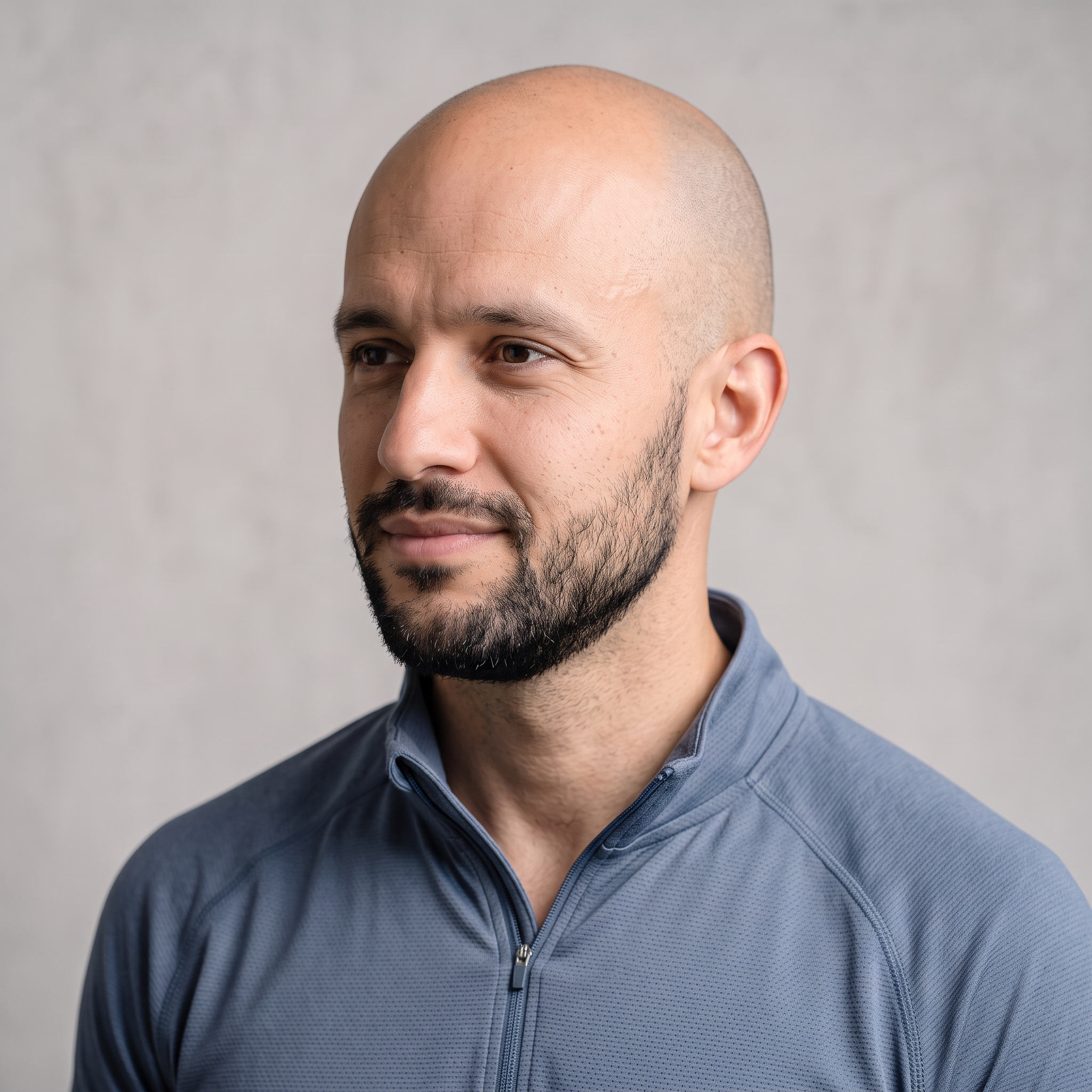
Element 1, frontal image (Nano Banana 2.1): A head-and-shoulders portrait of a man in his early thirties with a shaved head and a short black beard, wearing a slate-blue zip-neck running top. He faces the camera against a light-grey backdrop under soft even light.

Generated using Nano Banana 2.1 on fal, an AI model from Google.
Element 1, reference image (Nano Banana 2.1 Edit): The same man in a three-quarter left profile, with the lighting and backdrop unchanged.
Generated using Nano Banana 2.1 on fal, an AI model from Google.
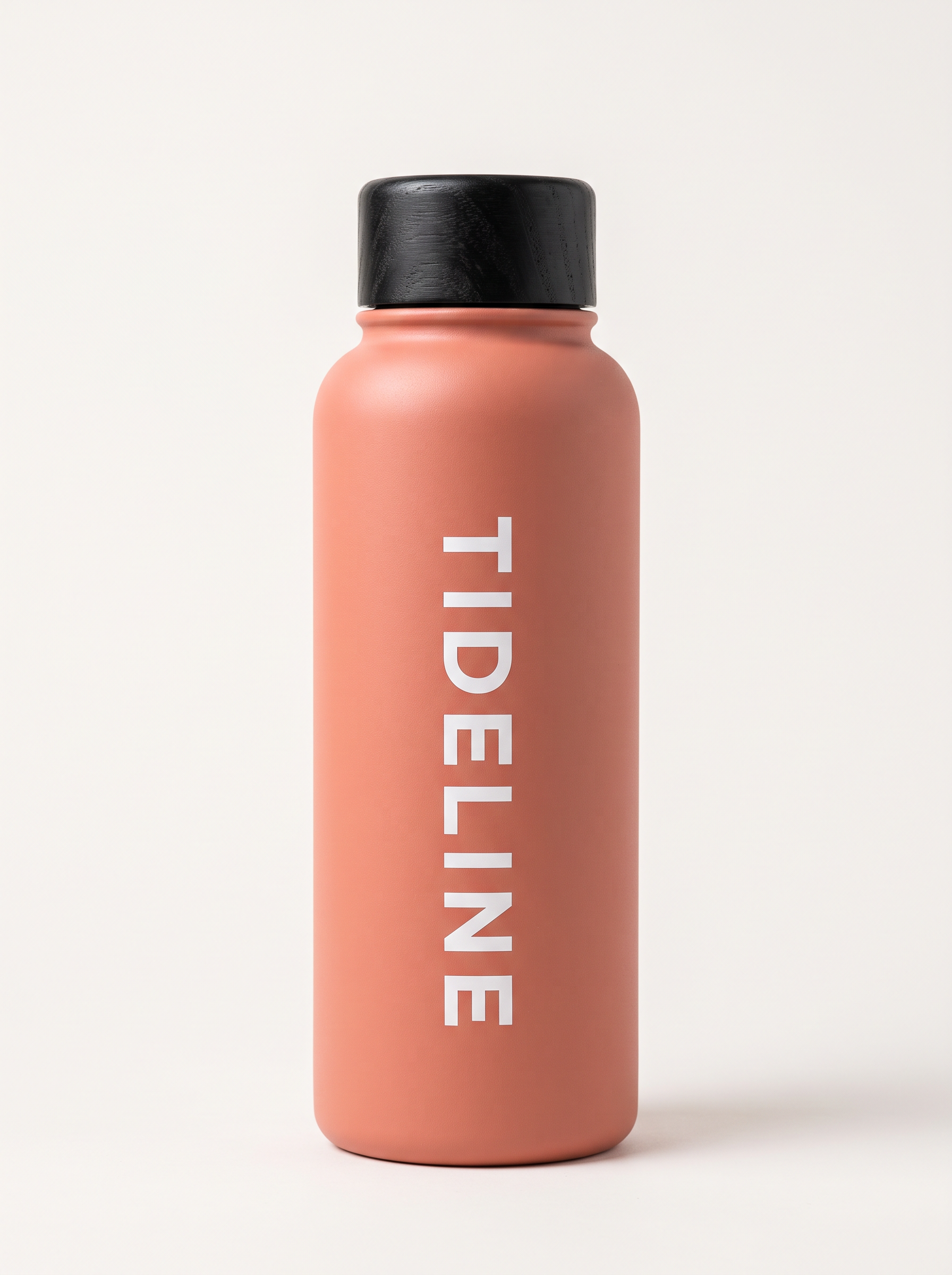
Element 2, frontal image (Nano Banana 2.1): A studio packshot of a matte coral insulated steel water bottle with a black bamboo screw lid and the white wordmark 'TIDELINE' printed vertically down the front. The bottle stands against an off-white backdrop in soft even light.
Generated using Nano Banana 2.1 on fal, an AI model from Google.
Element 2, reference image (Nano Banana 2.1 Edit): The same bottle rotated to show its back, where '32 OZ' is printed in small white type near the base.
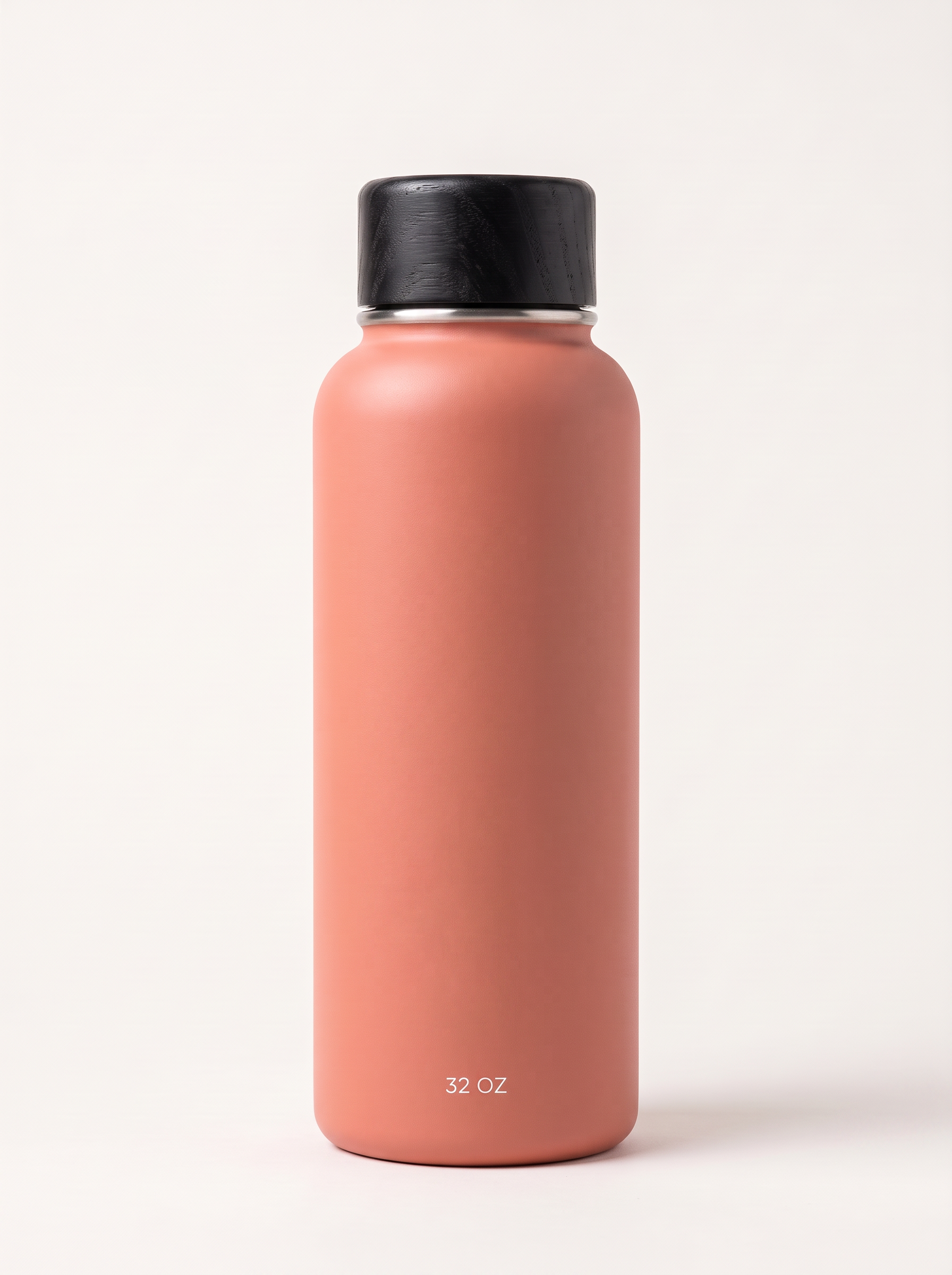
Generated using Nano Banana 2.1 on fal, an AI model from Google.
Image 1 (Nano Banana 2.1): A sunlit city park running path in early morning, edged by a low stone wall and tall plane trees, with nobody in the frame.

Generated using Nano Banana 2.1 on fal, an AI model from Google.
Video prompt: @Element1 slows from a jog to a stop beside the low stone wall in @Image1 and pulls @Element2 from his waist pack. He twists off the bamboo lid and takes a long drink before turning the bottle so the 'TIDELINE' wordmark faces the lens. Looking into the camera, he says in a relaxed American accent: "six miles in and the water's still ice cold. that's my whole review." Vertical handheld framing from chest height, with morning birdsong and distant traffic underneath his voice.
Generated using Kling 4.0 on fal, an AI model from Kling AI.
Generated using Kling O3 Pro on fal, an AI model from Kling AI.
Try it in ChatGPT Try it in fal AgentBased on my experience with product references, I'd review these two ads in this order:
- The wordmark reads "TIDELINE" with every letter in place once the bottle turns toward the lens.
- The bottle keeps its coral finish and black bamboo lid from the moment it leaves the waist pack until he lowers it after drinking.
- The runner's face and beard match the two element images as the head turns toward the camera.
- His spoken line lands on his mouth, with one consistent voice across both sentences.
Test 5: Swapping the drinks can in a creator clip (9:16, 8 seconds)
Swapping the product inside an approved creator clip is a quick way to get several ad variants out of one performance.
I generated the source clip in Seedance 2.5 at 720p and 9:16, which fits the size and length limits of both edit endpoints.
Kling O3 Pro keeps the source audio by default through keep_audio, but the Kling 4.0 edit schema lists no audio setting, so her spoken sentence is the first thing to listen for.
Source clip prompt (Seedance 2.5, 9:16, 720p, 8 seconds): A vertical talking-to-camera clip filmed in a bright home kitchen on a weekday afternoon. A woman in her forties with a silver bob and thin gold-rimmed glasses holds a blank white aluminium drinks can with no label at chest height. She says: "this is what I grab at three in the afternoon now," and then taps the can twice with one fingernail. Handheld phone framing with soft daylight from a window on the left and a quiet fridge hum.
Generated using Seedance 2.5 on fal, an AI model from ByteDance.
Product image (Nano Banana 2.1): A studio packshot of a slim 355 ml aluminium can of sparkling yerba mate with a matte teal finish and the wordmark 'MERIDIAN' printed in tall cream letters. Off-white backdrop and soft even light, with no other text on the can.
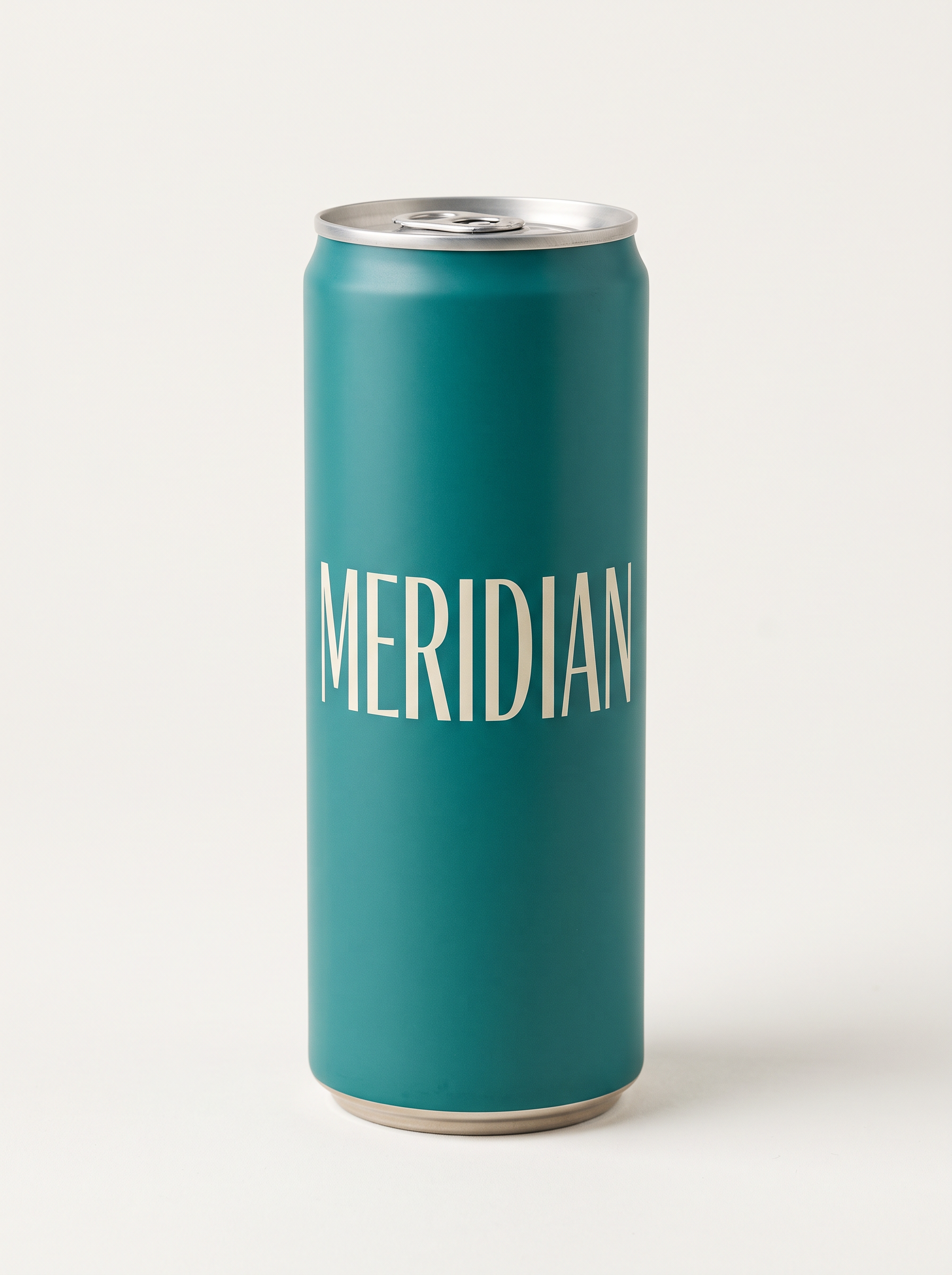
Generated using Nano Banana 2.1 on fal, an AI model from Google.
Edit prompt: Replace the blank white can in @Video1 with the teal 'MERIDIAN' can from @Image1, held the same way at chest height with the wordmark facing the camera. The woman's performance and the kitchen stay untouched, and the new can picks up the window light from the left.
Generated using Kling 4.0 on fal, an AI model from Kling AI.
Generated using Kling O3 Pro on fal, an AI model from Kling AI.
Try it in ChatGPT Try it in fal AgentHands are where I'd look first, because her fingers have to wrap the new can through both taps without a fingernail passing through the metal.
The 'MERIDIAN' wordmark should stay legible too, and her spoken line and lip movement should still match the source clip.
Test 6: A 30-second six-shot creator ad with the Test 4 references (9:16)
Kling 3.0 Pro isn't in this test, because every Kling 3.0 endpoint covered here stops at 15 seconds.
I reused the three references from Test 4 so length is the only new variable, then split the 30 seconds into six 5-second shots through multi_prompt on kling/v4/reference-to-video at 9:16 and 1080p.
It's ideal to start with a 720p draft of a take this long, which costs $4.71 against $7.05 for the 1080p render.
Each shot carries one simple action, which is easier for the model to hold than a single long take, so my checks focus on whether the runner and the bottle still match by the last two shots.
Shot 1 (5 seconds): Wide shot of the park path in @Image1 in early morning light, as @Element1 jogs toward the camera along the low stone wall with @Element2 clipped to his waist pack. The camera stays still, with birdsong and soft footsteps on gravel.
Shot 2 (5 seconds): Medium shot of @Element1 stopped beside the stone wall, breathing hard, as he looks into the camera and says: "every run ends the same way, with cold water."
Shot 3 (5 seconds): Close-up of his hands twisting the black bamboo lid off @Element2, with the 'TIDELINE' wordmark facing the lens and the park softly blurred behind.
Shot 4 (5 seconds): Side-on medium shot as @Element1 takes a long drink from @Element2, with low sunlight behind him and the plane trees out of focus.
Shot 5 (5 seconds): Slow push-in on @Element1 as he lowers the bottle and says to the camera with a smile: "six miles in and it's still ice cold."
Shot 6 (5 seconds): Product close-up of @Element2 standing on top of the stone wall with the 'TIDELINE' wordmark sharp, while @Element1 jogs away down the path in soft focus behind it.
Generated using Kling 4.0 on fal, an AI model from Kling AI.
Try it in ChatGPT Try it in fal AgentBy the last two shots, the runner's face and the bottle's wordmark should still match the Test 4 references, and the spoken lines in Shots 2 and 5 should land on his mouth.
What do Kling 4.0 and Kling 3.0 cost per second on fal?
On fal, Kling 4.0 bills $0.157 for each second of 720p output and $0.235 for each second at 1080p.
On the same date, Kling 3.0 Pro billed $0.168 per second with audio on Kling V3 Pro and $0.14 per second with audio on Kling O3 Pro, both at 1080p.
| Endpoint | Rate | What is billed |
|---|---|---|
| Kling 4.0 text-to-video, image-to-video, reference-to-video without video inputs | $0.157 per second at 720p, $0.235 at 1080p | Output seconds |
| Kling 4.0 reference-to-video with video references or video elements | $0.094 per second at 720p, $0.141 at 1080p | Input plus output seconds, at least 2× the output |
| Kling 4.0 video editing | $0.094 per second at 720p, $0.141 at 1080p | Input plus output seconds, at least 2× the output |
| Kling V3 Pro text-to-video and image-to-video | $0.112 audio off, $0.168 audio on, $0.196 with voice control | Output seconds |
| Kling O3 Pro text-to-video and reference-to-video | $0.112 audio off, $0.14 audio on | Output seconds |
| Kling O3 Pro video editing | $0.168 per second | Output seconds |
| Kling V3 and Kling O3 4K endpoints | $0.42 per second, audio on or off | Output seconds |
Kling 4.0 reference-to-video switches to the video-input rate once a request includes a reference video or a video element.
In that mode, and on the Kling 4.0 edit endpoint, we bill input plus output length with a floor of twice the output length.
Kling V3 Pro and Kling O3 Pro both drop to $0.112 per second with audio off, while voice control raises Kling V3 Pro to $0.196 per second.
The Kling 3.0 4K endpoints bill $0.42 per second whether audio is on or off, and our docs note that only the Singapore server supports 4K mode.
Is Kling 4.0 available on fal alongside Kling 3.0?
Yes, Kling 4.0 runs in our playground and in fal Agent today, and Kling 3.0 Pro runs in both of those as well as through our API.
fal Agent can also choose the Kling 4.0 mode from a written brief, so you don't have to pick an endpoint yourself.
The Kling 3.0 Pro endpoints in this comparison are Kling V3 Pro text-to-video, Kling V3 Pro image-to-video, Kling O3 Pro reference-to-video and Kling O3 Pro edit.
Both model families carry the Commercial use and Partner labels on their endpoint pages.
Below, I queue the Test 2 shot list on Kling V3 Pro with a webhook, which is how I'd normally run a batch of product spots.
import { fal } from "@fal-ai/client";

const { request_id } = await fal.queue.submit("fal-ai/kling-video/v3/pro/text-to-video", {
  input: {
    multi_prompt: [
      { prompt: "Wide tracking shot of a forest-green carry-on rolling through a bright airport terminal at dawn.", duration: "4" },
      { prompt: "Macro close-up as a hand presses the chrome button and the aluminium handle extends with a click.", duration: "4" },
      { prompt: "Overhead shot of the open suitcase on a hotel bed while a hand zips the mesh divider shut.", duration: "4" },
      { prompt: "End card of the closed suitcase against an off-white wall under the text 'HALDEN Carry-On'.", duration: "3" }
    ],
    shot_type: "customize",
    aspect_ratio: "16:9",
    generate_audio: true
  },
  webhookUrl: "https://your-server.example.com/fal-webhook"
});

console.log(request_id);
Recently Added














Getting started with Kling 4.0 and Kling 3.0 on fal
Kling 4.0 is open in our playground and fal Agent now, with Kling 3.0 Pro adding our API as a third route on the same fal account.
The four Kling 4.0 endpoints are kling/v4/text-to-video, kling/v4/image-to-video, kling/v4/reference-to-video and kling/v4/video-to-video/edit.
For background, our explainer on what Kling 4.0 is covers the release, and our Seedance 2.0 vs. Kling 3.0 and Kling V3 Pro vs. Hailuo 2.3 Pro comparisons put Kling 3.0 next to other model families.
For the wider lineup, our guide to the best AI video generators covers the other video models you can call through the same API.
If start frames are central to your pipeline, our ranking of the best image-to-video APIs compares Kling V3 Pro and Kling O3 Pro with other image-to-video options.
Kling 4.0 vs. Kling 3.0 FAQs
What is the difference between Kling 4.0 and Kling 3.0?
Kling 4.0 is the newer Kling AI video model, generating up to 30 seconds per clip from text, images, up to 15 references or an existing video.
Kling 3.0 on fal is split between Kling V3 and Kling O3, with clips capped at 15 seconds and a 4K tier next to its 1080p Pro endpoints.
What is the maximum clip length on Kling 4.0 and Kling 3.0?
The ceiling is 30 seconds per generation on Kling 4.0 and 15 seconds on the Kling 3.0 Pro endpoints, with a 3-second minimum on both.
With multi_prompt on Kling 4.0, the clip length equals the sum of the shot durations you set.
Kling AI says video extension to 2 minutes is on the way for Kling 4.0.
Is Kling 4.0 more expensive than Kling 3.0 on fal?
At 1080p with audio, yes: Kling 4.0 costs $0.235 per second, compared with $0.168 on Kling V3 Pro and $0.14 on Kling O3 Pro.
Kling 4.0 drops to $0.157 per second at 720p, whereas the Kling 3.0 4K endpoints cost $0.42 per second.
What is the highest resolution Kling 4.0 renders on fal?
The Kling 4.0 endpoints on fal currently render at 720p or 1080p, with 1080p as the default.
Kling AI's spec table does list 4K and marks 10-bit HDR at 1080p and 4K as coming soon, while Kling 3.0 already outputs 4K on fal through its 4K endpoints.
Can you still use Kling 3.0 on fal?
Yes, Kling 3.0 is still on fal, including the Kling V3 Pro and Kling O3 Pro endpoints this comparison uses.
Beyond the Pro tier, Kling 3.0 keeps its Standard and 4K tiers on fal, all of which you can call through our API.
Can Kling 4.0 and Kling 3.0 videos be used commercially?
Yes, the Kling 4.0 and Kling 3.0 endpoints on fal carry the Commercial use and Partner labels.
Our terms of service set out the full usage rights for clips generated through either model on fal.