![How To Use GPT Image 2.5: Prompts & Workflows [2026]](https://refinery.fal.media/url/https%3A%2F%2Fv3b.fal.media%2Ffiles%2Fb%2F0aaa6b4b%2FjBkm-8tILO2kyixv19ugu.jpg/tr:w-1920,q-80/jBkm-8tILO2kyixv19ugu.webp)
This guide covers prompting both GPT Image 2.5 variants on fal: how the two differ, which settings move the result, prompts for cinematic frames, catalogue product work, dense type and 4K detail, and how the edit endpoints hold a scene together across successive rounds.
TL;DR
GPT Image 2.5 is OpenAI's newest image model, shipped as two variants that share one API surface, with Flare tuned for speed and Sunburst spending longer per request to hold fine structure together. Output runs to 3840px on the long edge, at five quality levels plus auto, with png, jpeg or webp back.
Quality is what changes your prompting: a brief for this image generator gets re-run across two variants, five quality levels, and however many edit passes a job needs, so it has to be written as swappable blocks with the on-image wording locked, not as one paragraph you retype every round.
Four endpoints cover text-to-image and editing on each variant, all taking the same parameters, with image_urls and mask_url the only two fields unique to editing.
The edit endpoints double as the compositing and cutout pipeline, taking up to 16 references addressed by number in the prompt, an optional mask, and returning a real alpha channel when background is set to transparent.
fal is the best place to run all four GPT Image 2.5 endpoints behind one API key, billed per image from $0.00402 with nothing to provision, reachable through the playground, Sandbox, API, MCP server, fal's agent and CLI.
Where can you access GPT Image 2.5?
You can access GPT Image 2.5 on fal, where one API key covers both variants and both modes across four endpoints.
Every endpoint has its own browser playground.
The whole set installs through one package, @fal-ai/client, and you do the integration work once.
Nothing here runs on a subscription, and nothing is priced per seat.
Credit starts at $1, and each request draws down against the images it returns.
All four endpoints are marked for commercial use:
- openai/gpt-image-2.5/flare/text-to-image
- openai/gpt-image-2.5/flare/edit
- openai/gpt-image-2.5/sunburst/text-to-image
- openai/gpt-image-2.5/sunburst/edit
A generation request looks like this:
javascript
import { fal } from "@fal-ai/client";

const result = await fal.subscribe("openai/gpt-image-2.5/flare/text-to-image", {
  input: {
    prompt: "create a realistic image taken with iphone at these coordinates 41°43′32″N 49°56′49″W 15 April 1912"
  },
  logs: true,
  onQueueUpdate: (update) => {
    if (update.status === "IN_PROGRESS") {
      update.logs.map((log) => log.message).forEach(console.log);
    }
  },
});

console.log(result.data);
console.log(result.requestId);
Which GPT Image 2.5 variant should you use?
I'd recommend you start with GPT Image 2.5 Flare, and move to Sunburst when a frame will be enlarged or examined closely.
OpenAI published both on September 8, 2026, putting Flare at a quality gain over GPT Image 2 with a latency cut of up to 50%.
That makes Flare the right starting point for batch jobs and for anything with a user waiting on the result.
Sunburst spends longer per request and returns more fine structure.
Everything else about the two is identical:
- Same parameter set across all four endpoints.
- Same five quality levels plus auto.
- Same 3840px ceiling on the long edge.
- Same price at every size and quality combination.
Swapping endpoints is a one-string change, so running both against your own briefs is cheap.
OpenAI's migration advice is worth following:
- Coming from a GPT Image 2 workflow that already meets your bar: run Flare against it and measure the latency difference.
- Coming from one where GPT Image 2 fell short: confirm Sunburst clears the bar first, then re-run the same prompts on Flare and step down if the quality holds.
Disclaimer: this sequence reflects OpenAI's own guidance for GPT Image 2.5, and it matches what we've seen running the two side by side.
What settings does GPT Image 2.5 have?
All four GPT Image 2.5 endpoints share one parameter set, with image_urls and mask_url the only fields unique to editing.
Worth reading before the prompting sections, since quality and image size shape the output and the invoice together.
prompt: your brief, in whatever format you'll find easiest to maintain.image_size: six presets coveringsquare_hd,square,portrait_4_3,portrait_16_9,landscape_4_3andlandscape_16_9, plus auto, plus a custom object carrying width and height. Generation starts atlandscape_4_3, which the fal playground resolves to 1024 x 768. Editing starts at auto and reads the shape off your inputs. Custom sizes need both edges divisible by 16, a long edge no greater than 3840px, a ratio no wider than 3:1, and a total pixel count between 655,360 and 8,294,400.quality: auto, low, medium, high, xhigh or max, starting at high. xhigh and max did not exist before this release.background: auto, transparent or opaque, starting at auto. Transparent needs png or webp output alongside it.num_images: the count one request returns, billed image by image, set to 1 unless you change it. The fal model page puts the ceiling at four per request.output_format: png by default, with jpeg and webp available.output_compression: 0 to 100, accepted only whenoutput_formatis jpeg or webp.image_urls: edit endpoints only, as many as 16 references per request.mask_url: edit endpoints only, for restricting an edit to one area of the frame.sync_mode: returns the image inline as a data URI. That request then stays out of your history.
One caution at the top of the size envelope: OpenAI marks any output above 3,686,400 total pixels as experimental, which is the equivalent of 2560 x 1440 and puts every 4K render past the line.
Give those a closer read before you commit a template to that size.
What makes a good GPT Image 2.5 prompt?
A good GPT Image 2.5 prompt is one you can re-run without rewriting it, and this is a model that gets re-run constantly: across two variants, five quality levels, and however many edit passes a job turns out to need.
So the brief wants structuring for the second and third attempt, not the first.
Write it in blocks
OpenAI's position is that the format itself carries no advantage. A paragraph and a set of labeled sections deliver the same brief, as does a JSON-like object.
The only real difference is how easy each one is to change a week later. Blocks win on that.
Every block gets a single job, with the purpose of the image in the first one. A change to the light then touches one block and leaves the subject untouched.
Flag whatever sets your quality floor
OpenAI recommends comparing medium against high wherever an image carries small type, dense information or more than one typeface.
That is a prompt-level decision as much as a settings one.
A brief containing a nine-line parts key has its quality floor set by the parts key, and knowing that up front stops you judging legibility off a batch of low-quality drafts that was never going to show it.
A brief with nothing small in it will hold up at low for a long while.
Lock the wording early
Most of a brief tolerates being re-run.
Quoted copy does not.
A title that comes back spelled two ways across a set means producing the set again, and the wording deserves settling before the first serious render.
Decide the frame before you write
image_size is a prompt-time decision on GPT Image 2.5, not a repair job afterwards.
The presets and the custom envelope produce genuinely different shapes.
OpenAI's guidance is to put the composition and the placement constraints inside the brief itself.
A caveat on camera language while we're here.
Per OpenAI, focal lengths and apertures register as cues for appearance and not as a simulation, so writing 50mm nudges the rendering without fixing the geometry.
An underwritten brief fails the re-run test before it fails anything else:
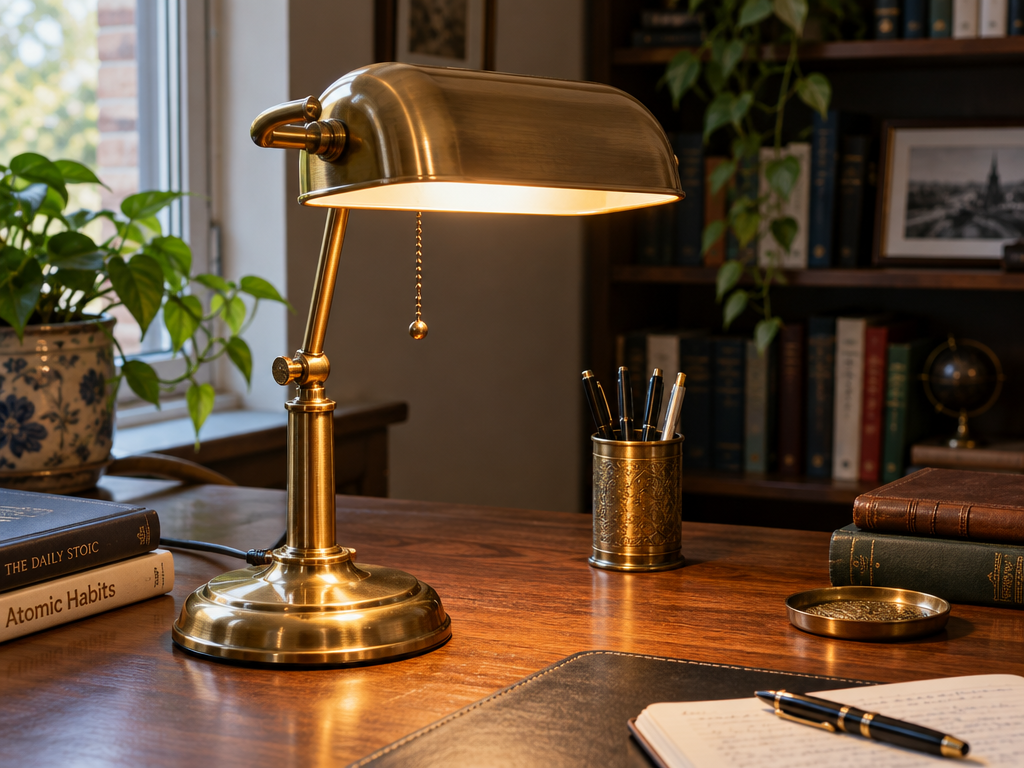
Prompt (Flare, 1024 x 768, medium quality): A brass desk lamp on a desk, nice lighting, very detailed.
Generated using GPT Image 2.5 Flare on fal, an AI model from OpenAI.
The problem is that nothing in that line tells you which part to change when the result misses.
The room, the wall colour, the light direction, the camera height and everything else on the desk were all chosen for you, and none of those choices is written down anywhere you can edit.
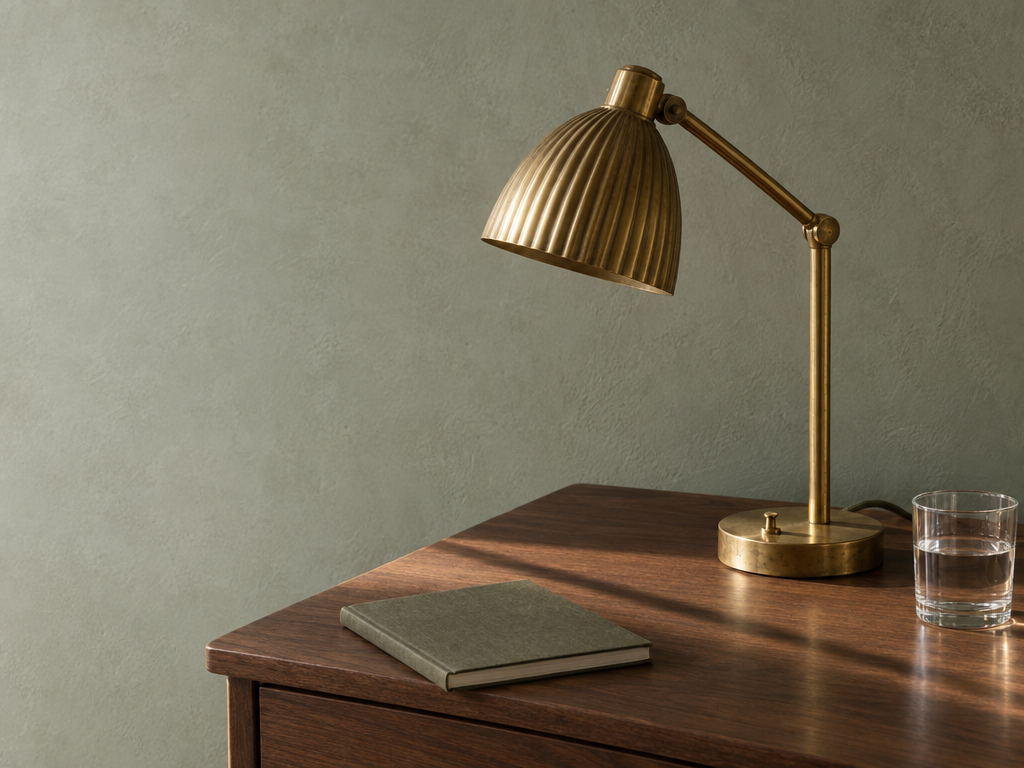
Here's the same idea in blocks:
Prompt (Flare, 1024 x 768, high quality): PURPOSE A photograph for an interiors catalogue, horizontal crop, product held in the right two-thirds. SUBJECT A brass desk lamp with a ribbed shade on a walnut writing desk, against a limewashed wall in pale grey green. MATERIALS: Unlacquered brass carrying a warm patina and fingerprints near the switch, a fabric-wrapped cord running off the back edge, a closed notebook and a glass of water beside it. LIGHT Late afternoon sun entering low from the left, one hard shadow thrown by the lamp arm across the desk, the bulb switched off. CAMERA AND FRAME Photorealistic, eye level, 50mm equivalent, the left third of the wall kept clear and evenly lit so a caption can sit there. EXCLUDE No text anywhere in the frame.
Generated using GPT Image 2.5 Flare on fal, an AI model from OpenAI.
How do you get exact wording into a GPT Image 2.5 image?
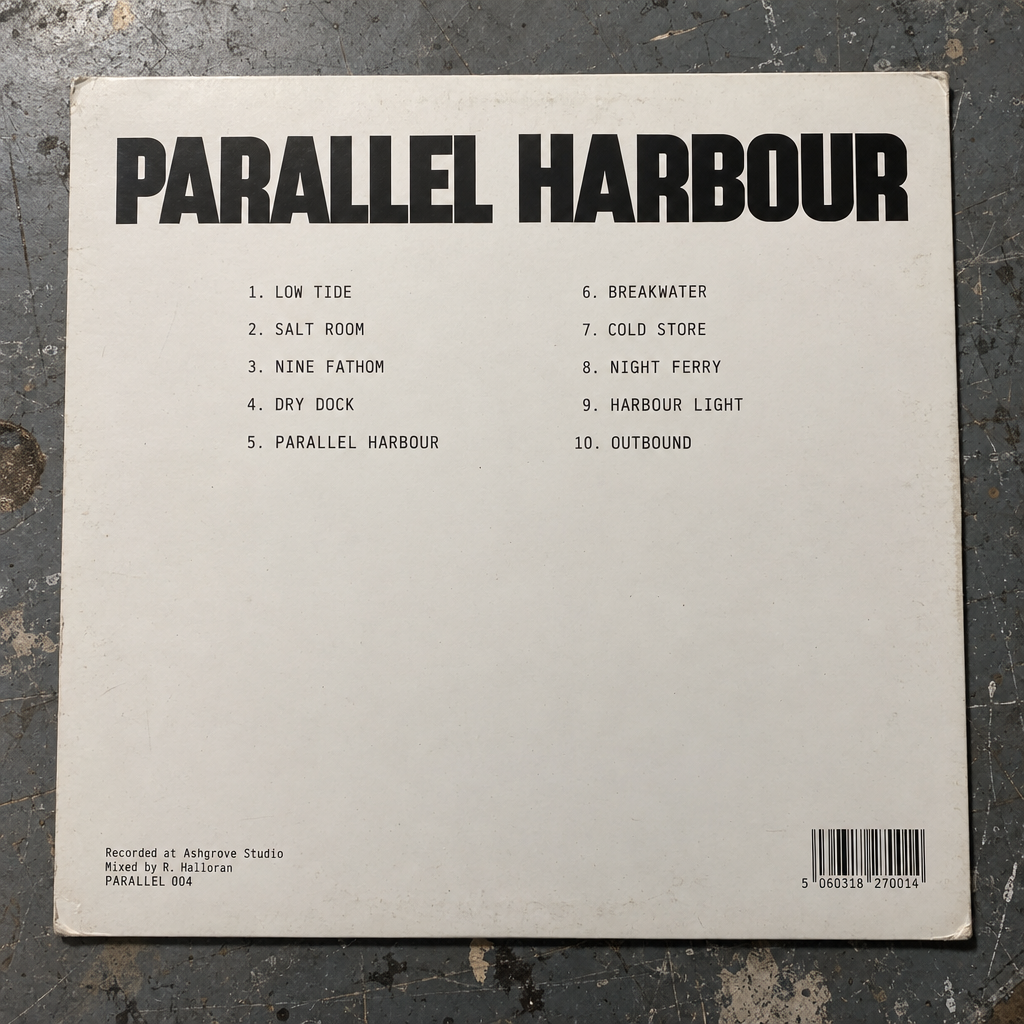
GPT Image 2.5 renders wording accurately when the prompt quotes it exactly and states how many times it appears, with position and typography described in the same breath.
Invented brand names sometimes need spelling letter by letter before they land, and asking for no extra text is a real instruction that does real work.
Then read the output back. Legible and correct are different properties.
OpenAI suggests comparing medium against high on anything carrying small type, dense information or more than one typeface, and that matches what we see.
Small copy is the clearest case for spending on the upper quality tiers.
Prompt (Sunburst, 1024 x 1024, high quality): An overhead photograph of a 12 inch record sleeve on a scuffed studio table under one soft overhead light, back of the sleeve facing up, printed on unvarnished chalk white board. A heavy geometric sans title across the top reads "PARALLEL HARBOUR". Beneath it a two column tracklist in small monospaced capitals, reading "1. LOW TIDE", "2. SALT ROOM", "3. NINE FATHOM", "4. DRY DOCK", "5. PARALLEL HARBOUR" on the left and "6. BREAKWATER", "7. COLD STORE", "8. NIGHT FERRY", "9. HARBOUR LIGHT", "10. OUTBOUND" on the right. A three line credit block bottom left in tiny type reads "Recorded at Ashgrove Studio", "Mixed by R. Halloran", "PARALLEL 004". A barcode block bottom right. No other text.
Generated using GPT Image 2.5 Sunburst on fal, an AI model from OpenAI.
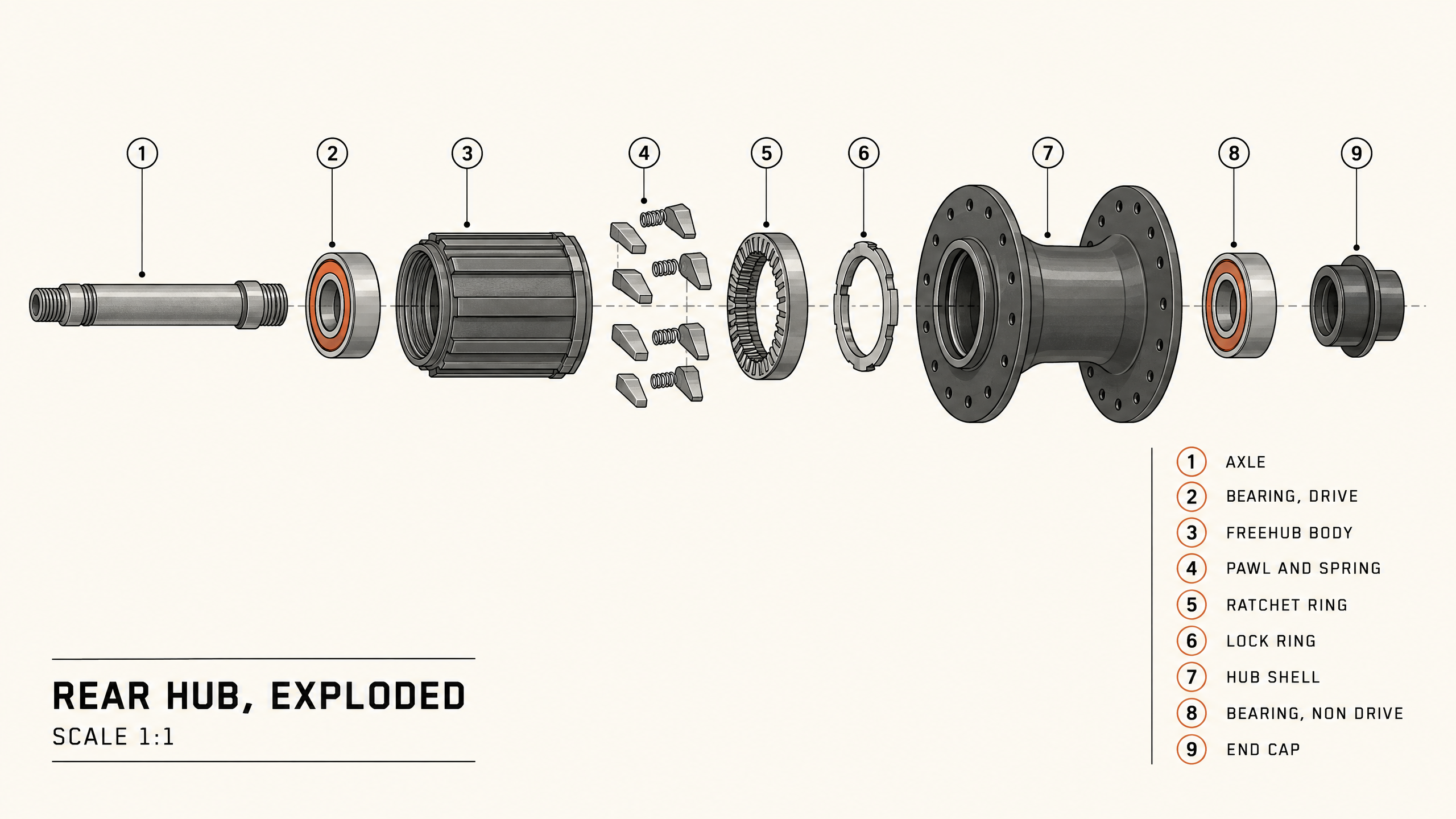
Information design puts the same rule under heavier load, since every label has to be spelled right and pointed at the right part.
Prompt (Sunburst, 2560 x 1440, xhigh quality): A technical illustration of an exploded rear bicycle hub on warm off white, drawn as a clean line diagram with flat two tone shading in graphite and one rust orange accent. Components along a single horizontal axis in assembly order, evenly spaced, each with a numbered leader line: axle, drive side bearing, freehub body, six pawls with springs, ratchet ring, lock ring, hub shell with twenty four flanged spoke holes, non drive bearing, end cap. A parts key down the right side in small sans capitals, numbered 1 to 9 to match the callouts, reading "AXLE", "BEARING, DRIVE", "FREEHUB BODY", "PAWL AND SPRING", "RATCHET RING", "LOCK RING", "HUB SHELL", "BEARING, NON DRIVE", "END CAP". A title block lower left reads "REAR HUB, EXPLODED" over "SCALE 1:1". Every label spelled as written, no other text.
Generated using GPT Image 2.5 Sunburst on fal, an AI model from OpenAI.
falMODEL APIs
The fastest, cheapest and most reliable way to run genAI models. 1 API, 100s of models
Which prompts work best on GPT Image 2.5?
GPT Image 2.5 responds best to briefs that settle the purpose first and the light and framing straight after, and the five patterns below put that into practice across cinematic, product and fine-detail work.
A cinematic wide with room held for titles
Prompt (Flare, 2560 x 1440, high quality): A wide night exterior of a shuttered roadside service station on a high desert highway, viewed from across the road at a low angle so the forecourt canopy slices across the upper frame. Two sodium lamps still burning over empty pumps, shop windows dark, a single pickup at the lot edge with its cab light on. Wet asphalt holding reflections after rain, distant hills reduced to flat silhouette, no moon. Deep uncluttered shadow across the bottom third so titles can sit over it, muted amber against cold blue, fine grain, no text in the image.
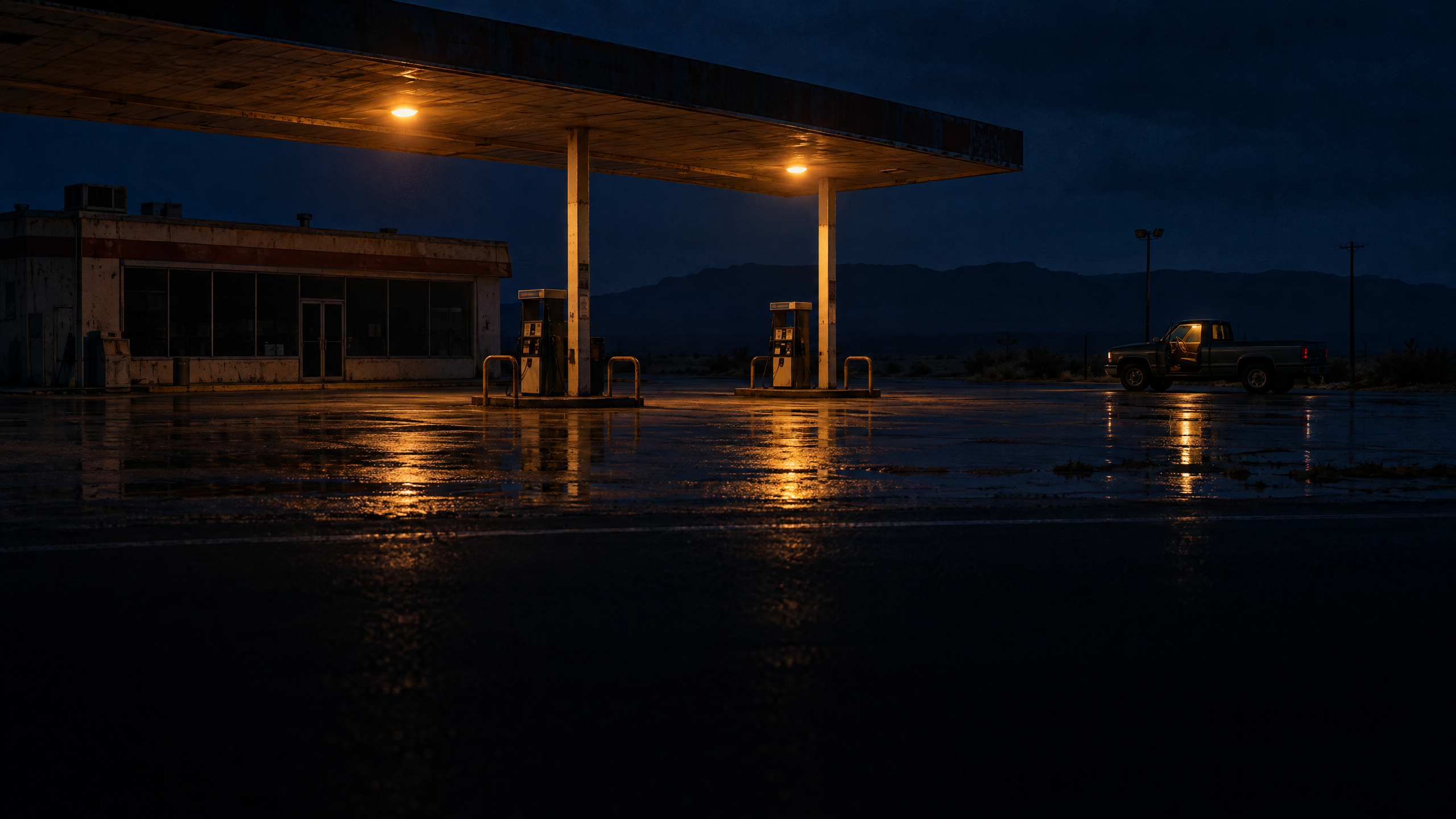
Generated using GPT Image 2.5 Flare on fal, an AI model from OpenAI.
An interior lit only by practicals
Prompt (Sunburst, 1024 x 1536, high quality): A photorealistic interior frame from a ferry's lower saloon at night, upright crop, camera at seated eye level looking down the cabin. Rows of worn ochre vinyl benches, condensation tracking down the windows, a vending machine glowing at the far end as the single bright source, overhead strip lights off. One raincoat folded on a seat in the middle distance, a paper cup tipped on the floor against the swell. Colour pulled green in the shadows and warm at the machine, handheld framing with a slight lean, visible grain, nobody in the frame.
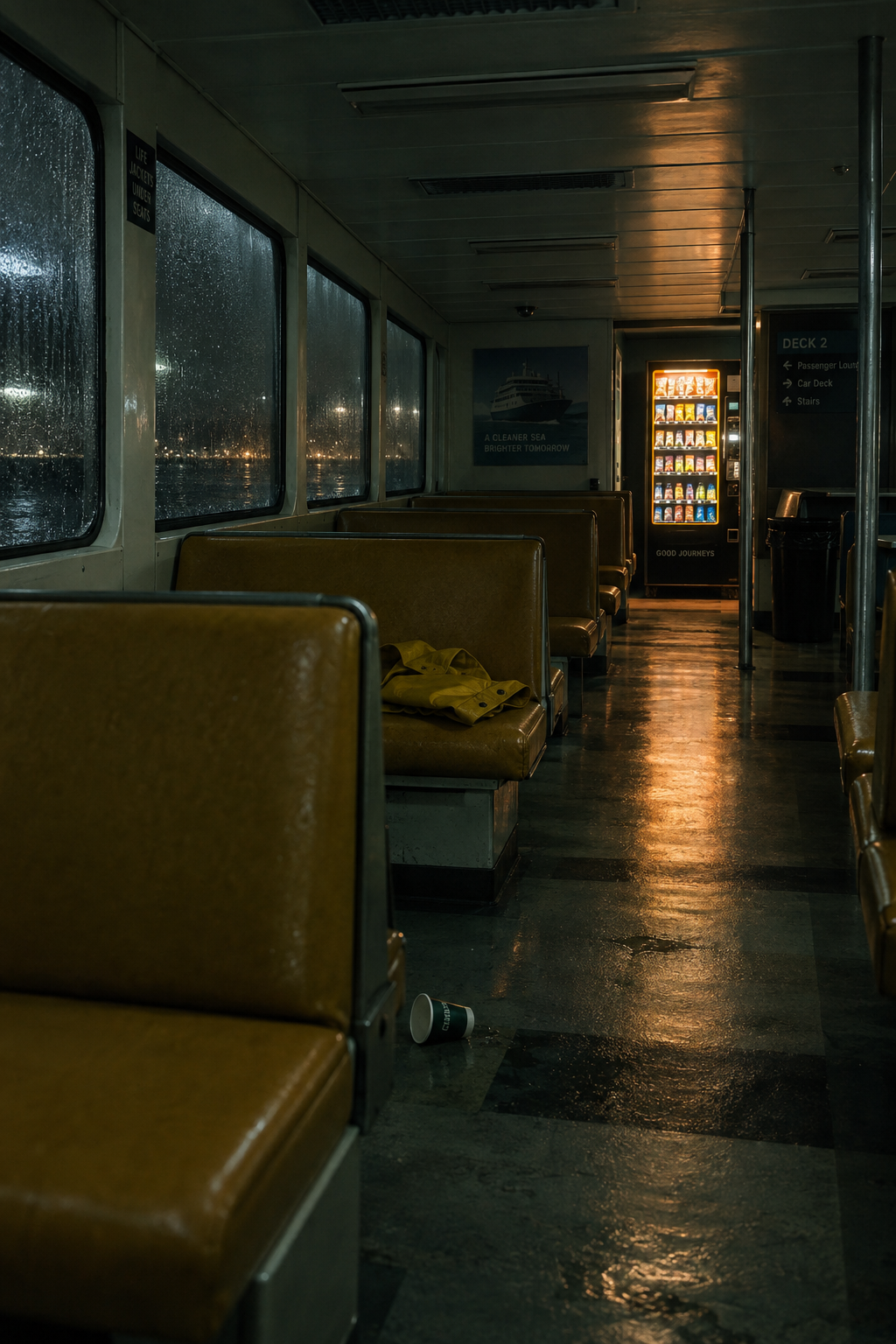
Generated using GPT Image 2.5 Sunburst on fal, an AI model from OpenAI.
A catalogue product shot
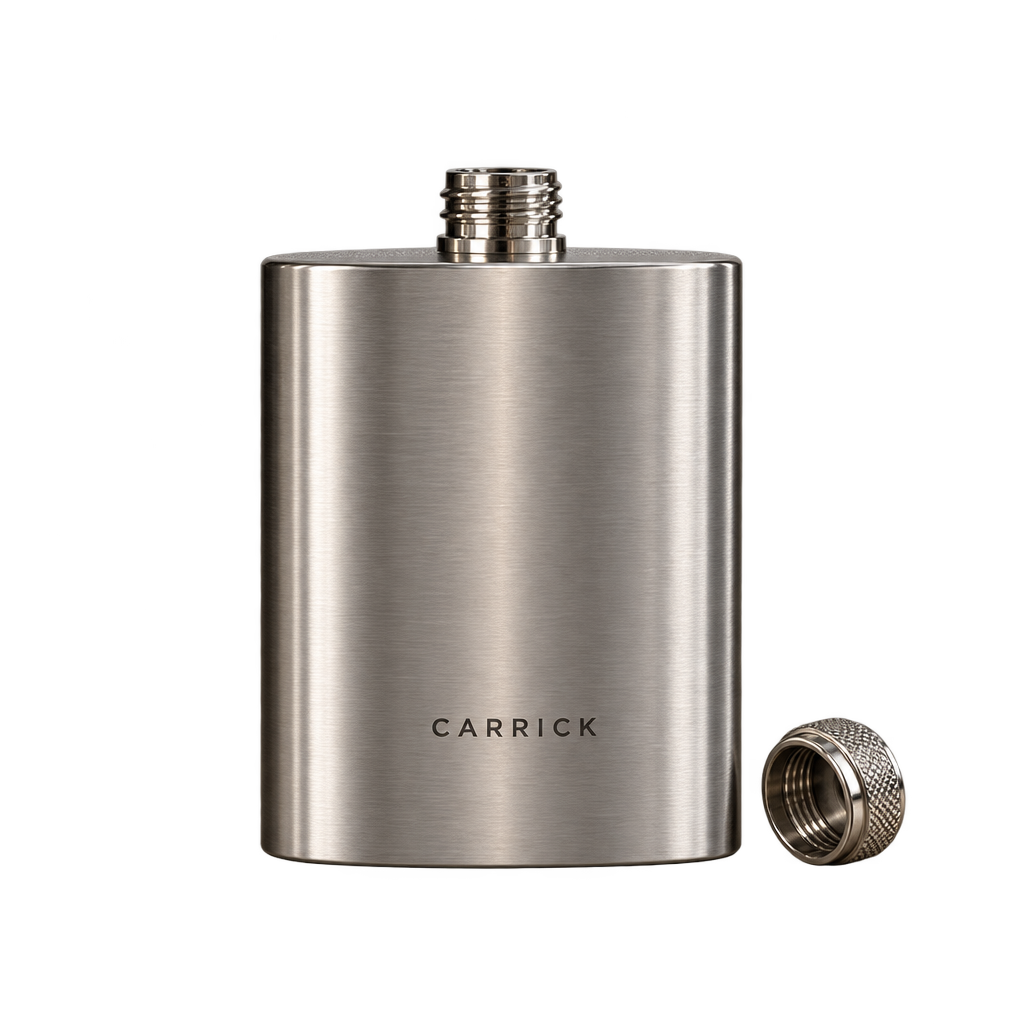
Prompt (Flare, 1024 x 1024, high quality): A product photograph for a catalogue, square crop, subject standing alone on an unbroken sweep of chalk white paper with room on all sides. A brushed stainless vacuum flask upright under a matte charcoal lid, the wordmark "CARRICK" laser etched into the steel in narrow capitals with "500 ML" below it in smaller type, and a small "18-8" stamp near the base. Broad soft light from the front left, one crisp contact shadow, a faint specular line down the right edge of the steel. Accurate colour, no props, no studio reflections in the metal, no text beyond the three marks named.
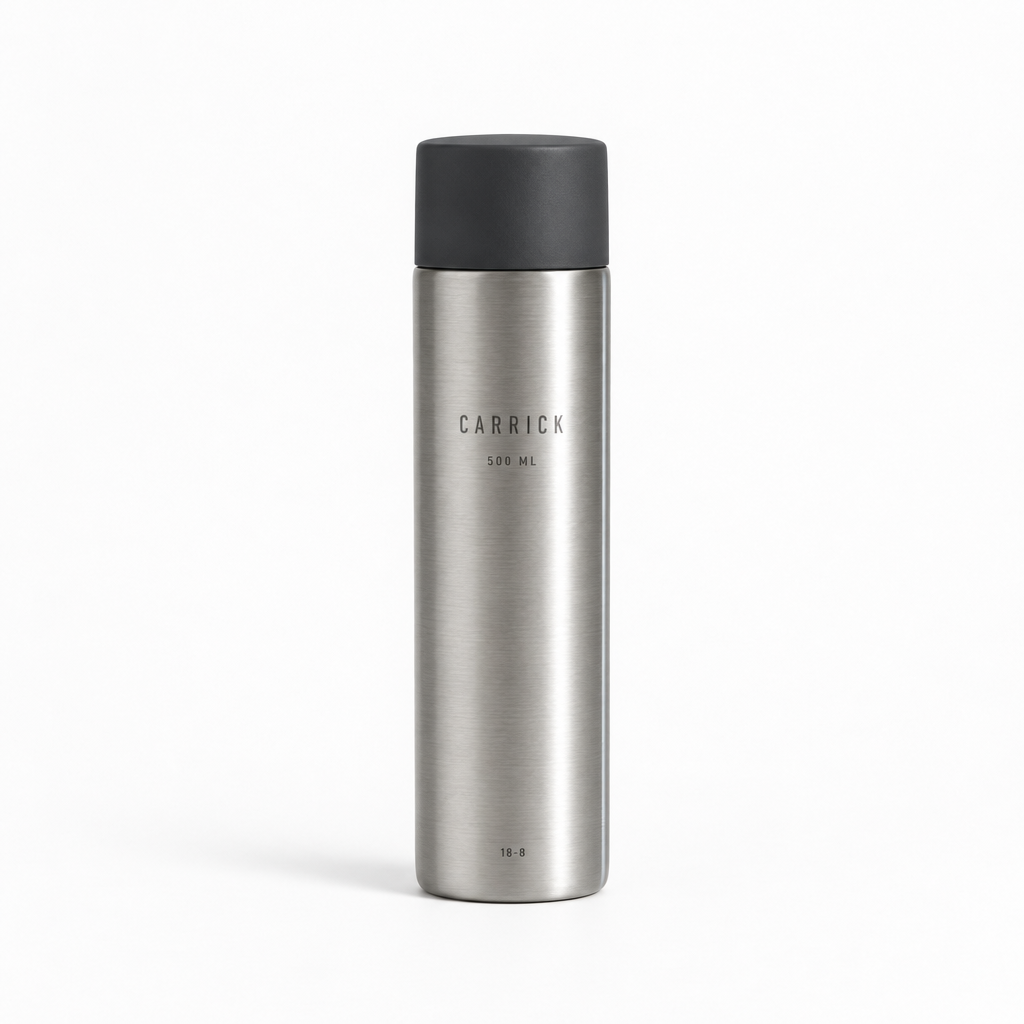
Generated using GPT Image 2.5 Flare on fal, an AI model from OpenAI.
The same product in a lived-in setting
Prompt (Flare, 2560 x 1440, high quality): The same brushed stainless flask in use on a granite kitchen counter, horizontal crop, flask left of centre with its lid off and resting beside it. A folded tea towel, a bowl of clementines and a half open paper coffee bag occupy the right of the frame at shallower focus, with "CARRICK" still readable on the flask body. Direct morning sun through a window on the right throwing a long shadow toward the camera, warm neutral colour, nothing else in shot.
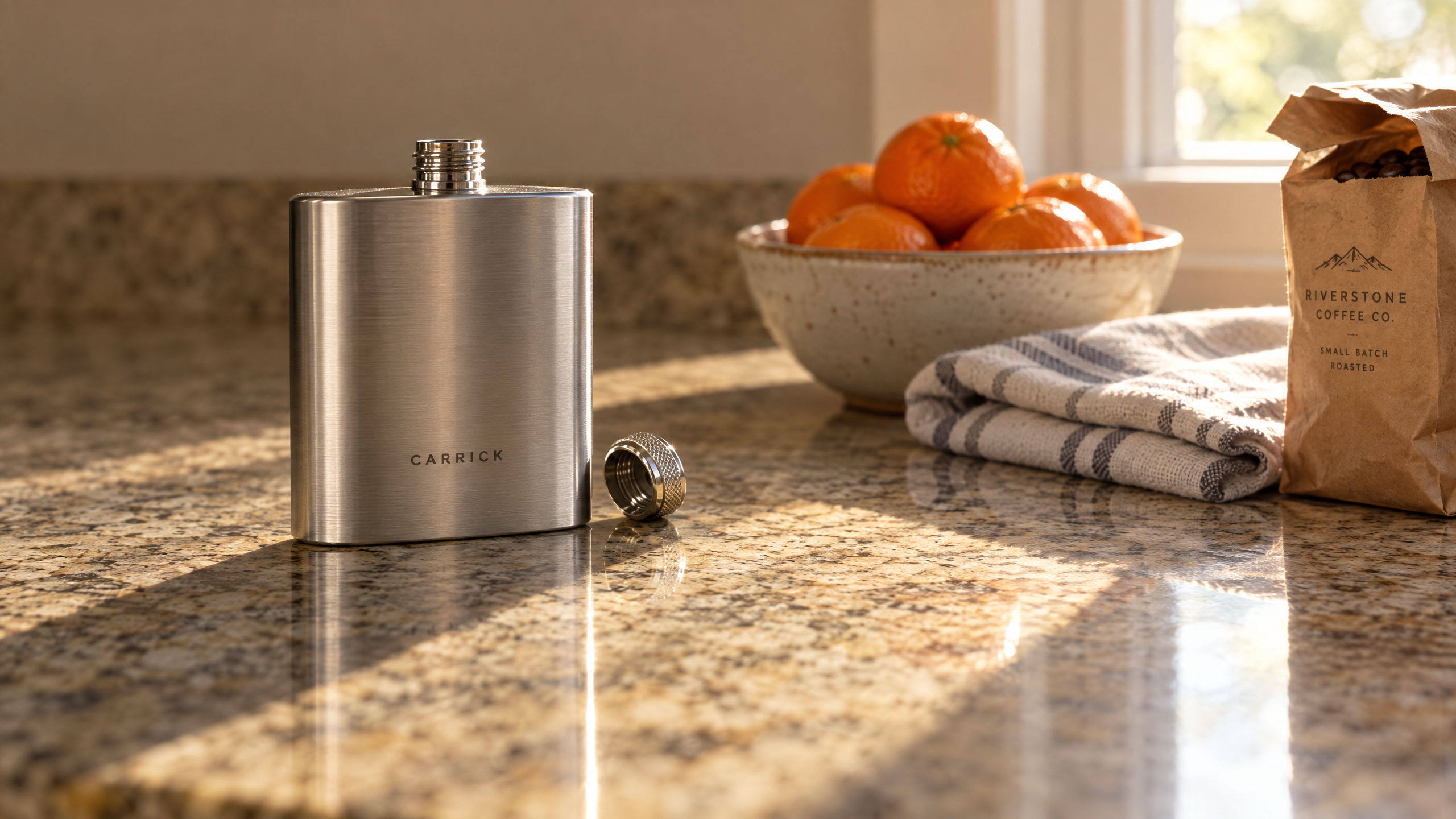
Generated using GPT Image 2.5 Flare on fal, an AI model from OpenAI.
Fine detail at 3840 x 2160 on Sunburst
The Flare and Sunburst decision changes the result more in this pattern than in any other.
At 4K on xhigh, Sunburst keeps neighbouring fine detail from merging, so a listing page can carry close crops pulled from the same file with no second shoot.
Prompt (Sunburst, 3840 x 2160, xhigh quality): A product detail photograph for a listing page, framed tight on the corner of a tan vegetable-tanned leather cardholder lying flat on slate, lit by soft light from the upper left with a weak fill from the right. The pebbled grain reads differently across the curve of the edge, and the burnished edge paint sits slightly proud of the leather with one faint brush mark left in it. Saddle stitching runs as two interlocking passes of waxed linen thread, every stitch separately visible, the thread showing its twist. A brass press stud at the top of the frame carries fine machining circles and a shallow scuff. Accurate colour, natural leather sheen, no text or logo anywhere in the frame.
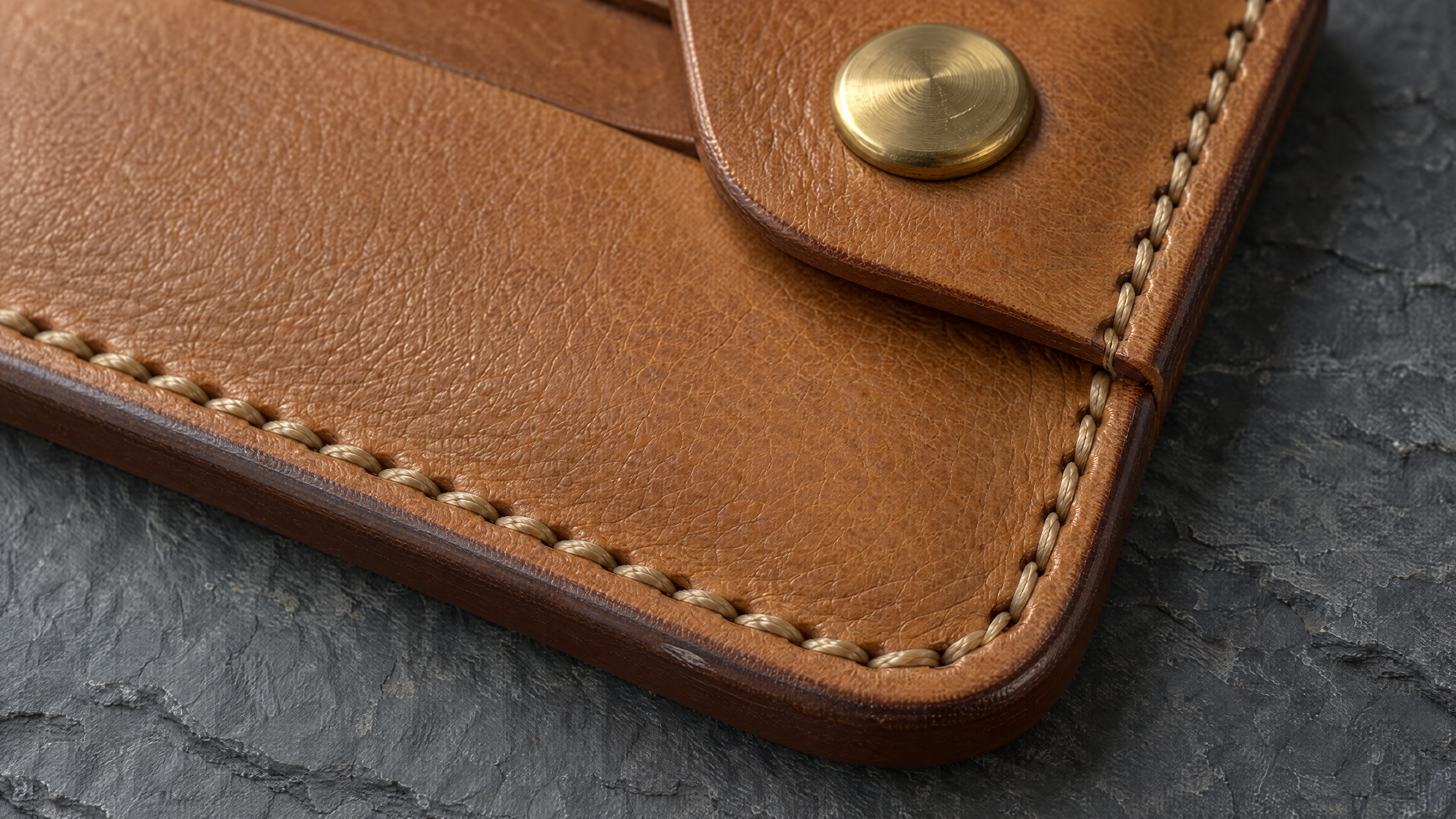
Generated using GPT Image 2.5 Sunburst on fal, an AI model from OpenAI.
How do you edit an image with GPT Image 2.5?
Editing on GPT Image 2.5 means sending your images to openai/gpt-image-2.5/flare/edit or openai/gpt-image-2.5/sunburst/edit with an instruction that names the change and lists what has to stay put.
image_urls on both edit endpoints takes as many as 16 references.
mask_url restricts a change to one area of the frame.
image_size starts at auto on the edit endpoints and reads its shape off the input, so an upright frame comes back upright unless you say otherwise.
Precision here is a writing problem and not a tooling one. A change described on its own leaves the model to decide how far it reaches.
Listing the parts that must not move settles that in advance.
One instruction carrying two changes will usually cost you more retries than two separate passes would.
There's a limit to what prompting can promise, and OpenAI is direct about it: repeated edits can still shift details you meant to keep, so restate the constraints every round, and when a region has to come back pixel for pixel, do the compositing yourself on the approved output.
One change per pass
Both rounds below run on the desk lamp frame from earlier, each fed the previous output.
Round 1 (Flare edit, high quality): Change only the lamp. Swap the brass for powder coated matte black across the shade and the arm, holding the same shape, the same position and the same switch. Desk, wall, notebook, glass, shadow direction and the clear left third all stay exactly as they are.
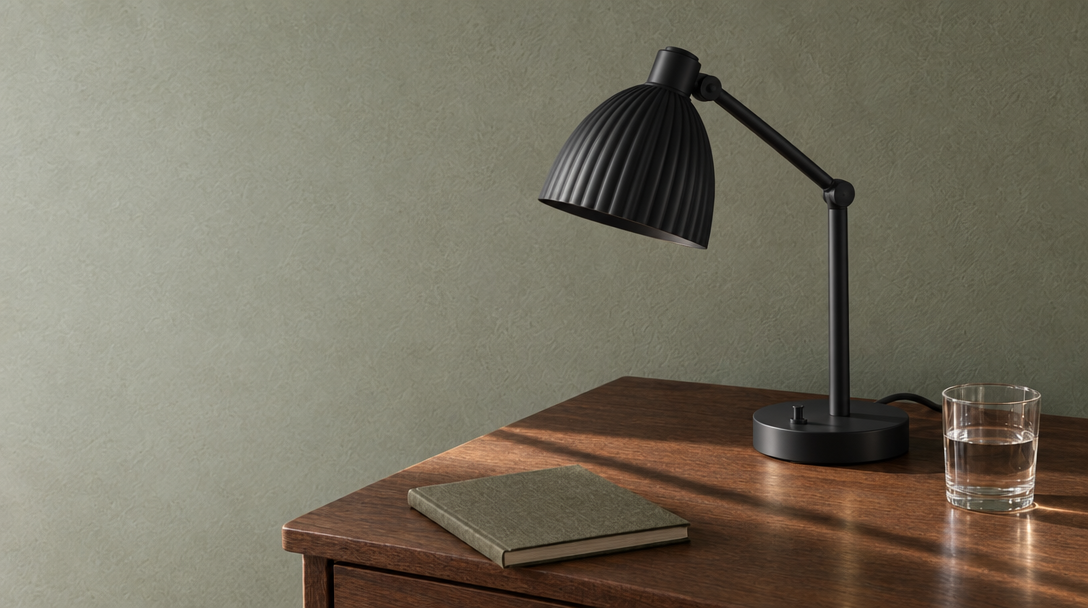
Generated using GPT Image 2.5 Flare Edit on fal, an AI model from OpenAI.
Round 2 (Flare edit, high quality): Change only the time of day. Move the room to late evening with the lamp switched on and pooling warm light across the desk, window light gone, the wall falling into shadow. Lamp geometry, desk, objects on it and framing stay identical, and the left third of the wall stays clear.
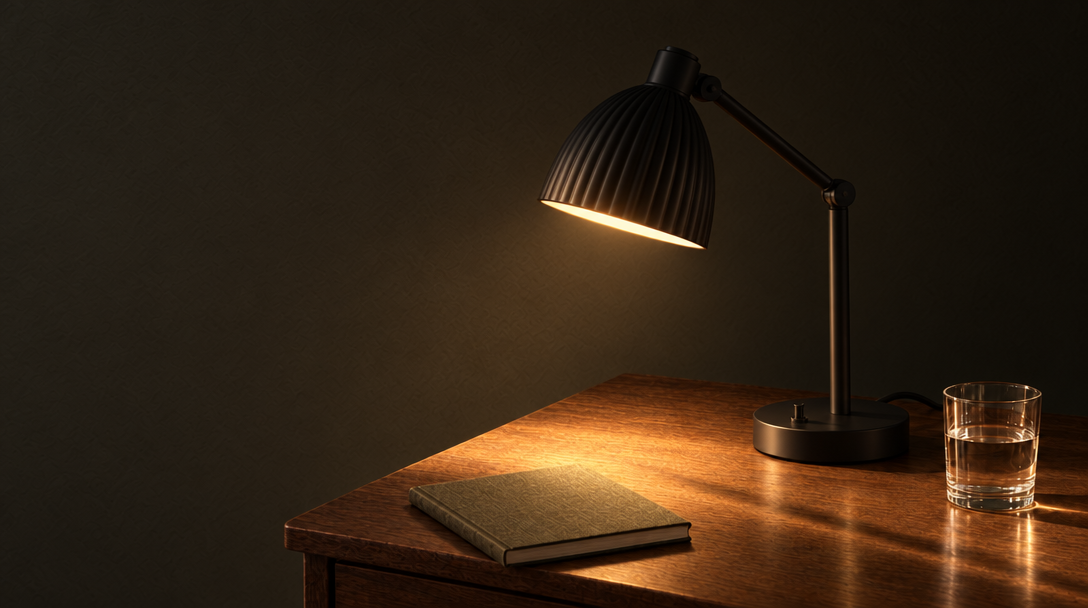
Generated using GPT Image 2.5 Flare Edit on fal, an AI model from OpenAI.
Combining references
With 16 input slots available, the habit that pays off is numbering them in the prompt and handing each one a job.
Prompt (Flare edit, 1024 x 768, high quality, two inputs): Image 1 is the original desk lamp frame, taken before either edit round, and image 2 is the product. Desk, wall, lamp, light direction and the empty left third of image 1 are all fixed. Stand the flask from image 2 on the right of the desk behind the notebook, scaled correctly against the lamp for a 500 ml flask, lit by the same low sun from the left, casting a shadow that matches the one already on the desk. Keep "CARRICK" readable and change nothing else.
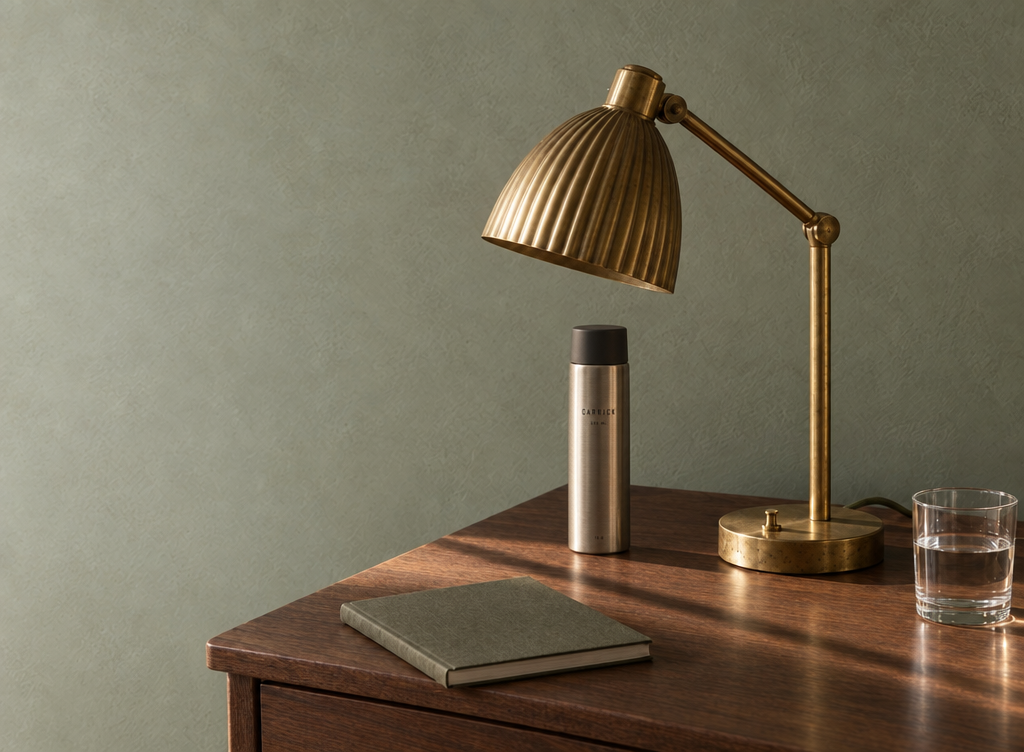
Generated using GPT Image 2.5 Sunburst Edit on fal, an AI model from OpenAI.
How do transparent backgrounds work on GPT Image 2.5?
GPT Image 2.5 returns a genuine alpha channel when the background is set to transparent and the output format is PNG or WebP.
A product pipeline loses its masking step either way, generating the asset fresh or keying out one you already have.
Prompt (Flare edit, 1024 x 1024, high quality, background transparent, PNG output): Return only the flask, keyed out to full transparency. Hold the body geometry, the lid proportions and the etched wordmark exactly as they arrived. Edges clean through the brushed steel and the charcoal lid, with no light halo along them. Centre the subject with even margin. Studio sweep and contact shadow both go, and nothing gets painted in behind.
Generated using GPT Image 2.5 Flare Edit on fal, an AI model from OpenAI.
Two checks before that asset travels anywhere:
- The first one is in the file and not on screen, since a checkerboard drawn into the pixels will look right at a glance and carry no alpha at all.
- The second is
output_compression, unset on PNG and applicable only to jpeg and webp.
How much does GPT Image 2.5 cost on fal?
Every GPT Image 2.5 request is priced per image returned, with the quality level and the output size setting the rate, and Flare and Sunburst costing the same at every combination.
The per-image figures at the canonical sizes, read from the fal model pages and current as of September 2026:
| Size | low | medium | high | xhigh | max |
|---|---|---|---|---|---|
| 1024 x 768 | $0.00402 | $0.00903 | $0.03612 | $0.06420 | $0.14445 |
| 1024 x 1024 | $0.00588 | $0.01317 | $0.05268 | $0.09366 | $0.21072 |
| 1024 x 1536 | $0.00474 | $0.01029 | $0.04116 | $0.07377 | $0.16464 |
| 1920 x 1080 | $0.00441 | $0.01029 | $0.03960 | $0.07041 | $0.15840 |
| 2560 x 1440 | $0.00615 | $0.01434 | $0.05529 | $0.09828 | $0.22110 |
| 3840 x 2160 | $0.01113 | $0.02595 | $0.10008 | $0.17790 | $0.40026 |
Quality is the lever that actually moves the number.
At 1024 x 1024, walking from low up to max multiplies the cost by about 36, while walking from the smallest size to 4K at a fixed quality multiplies it by under 3.
Underneath the table, GPT Image 2.5 bills by token:
- Text tokens run $5.00 per million on input, $1.25 when cached and $10.00 on output.
- Image tokens run $8.00, $2.00 and $30.00 across those same three lines.
Every total gets rounded up to the next $0.0001.
A long brief therefore costs slightly more than a short one, and a request leaning on world knowledge costs more than a flat description.
Against real work, the numbers stay small.
The three examples below multiply the table rates out, and a long brief will push each of them up a little.
An exploration of 30 drafts at low quality and 1024 x 1024 comes to $0.1764, and six finals at high quality and 2560 x 1440 add $0.33174, putting the whole round of 36 images at $0.50814.
Eight edit passes at high quality and 2560 x 1440 run $0.44232.
A single 4K hero costs $0.10008 at high, $0.17790 at xhigh and $0.40026 at max.
Recently Added









Start generating with GPT Image 2.5 on fal
Opening a GPT Image 2.5 playground costs nothing, and no charge lands until you press run.
Our own loop has settled into four steps:
- Draft wide on Flare at low: a dozen variations to find the composition, because at $0.00588 each you can afford to be wrong repeatedly.
- Promote one brief to high: whichever draft survives gets a single clean pass.
- Move to Sunburst at xhigh sparingly: reserve it for frames going somewhere they'll be seen large.
- Finish on the edit endpoints: one instruction per pass, constraints restated every time.
An account costs nothing to open on fal, and $1 of credit is all that stands between you and the first request.
Over 1,000 models run behind that same key, and an approved frame can move into an upscaler or a video endpoint with no new client to wire up.
Frequently asked questions about GPT Image 2.5
What is the difference between GPT Image 2.5 Flare and Sunburst?
Speed against fine detail. Flare handles most jobs. Sunburst spends longer per request to hold intricate structure together.
The two cost the same at every size and quality, so price stays out of the decision.
Can I use GPT Image 2.5 output commercially?
Yes. All four GPT Image 2.5 endpoints carry the commercial use label on fal. OpenAI's own usage policies still apply to what you generate.
What is the largest image GPT Image 2.5 can generate?
3840 x 2160, with 3840px the ceiling on the long edge. OpenAI marks anything above 3,686,400 total pixels as experimental, and every 4K render sits past that line, so give those a closer read than the smaller sizes.
How many reference images does GPT Image 2.5 editing accept?
Sixteen, alongside an optional mask when a change has to stay inside one area of the frame.
Does GPT Image 2.5 generate transparent backgrounds?
Yes. background set to transparent with png or webp output returns a genuine alpha channel. A cutout then drops into a layout with no masking pass in between.
What is new in GPT Image 2.5?
Per OpenAI, dated September 8, 2026: Flare runs at up to 50% lower latency than GPT Image 2 with a quality gain on top, a requested style holds more consistently across a set, subjects in reference photos stay recognisable as they move between styles, and edits survive later rounds more reliably.
The quality ladder also gained xhigh and max above the previous ceiling.
![10 Best Video-to-Video APIs in 2026 [Reviewed]](https://refinery.fal.media/url/https%3A%2F%2Fv3b.fal.media%2Ffiles%2Fb%2F0aa0ad7c%2FCnYBY_0niENSKUXkMaEIf_best-video-to-video-apis-2026.jpg/tr:w-1280,q-80/CnYBY_0niENSKUXkMaEIf_best-video-to-video-apis-2026.webp)
