![How To Use GPT-6 Astra for Video Editing [2026]](https://refinery.fal.media/url/https%3A%2F%2Fv3b.fal.media%2Ffiles%2Fb%2F0aaccd45%2FEjhkMmqNCeXgPjrrnRgU5.jpg/tr:w-1920,q-80/EjhkMmqNCeXgPjrrnRgU5.webp)
GPT-6 Astra can edit video, but the route you pick decides whether it trims a timeline or changes what the camera actually captured.
For the second kind, I'd point e-commerce and UGC teams to the fal plugin in ChatGPT, which puts over 1,000 fal models in reach of GPT-6 Astra without leaving the conversation.
Below, I'll generate three product clips in fal's playground and edit each one with GPT-6 Astra.
TL;DR
GPT-6 Astra can edit video by operating a desktop editor or writing editing code in Codex, and through the fal plugin in ChatGPT, it can also change what's inside the shot.
The fal route pairs GPT-6 Astra with MiniMax H3 Max reference-to-video, and GPT-6 Astra grades every render from stills pulled by fal's extract-nth-frame utility because it reads text and images only.
Each 768P source clip costs $0.40, and editing a five-second 16:9 clip at 24 fps costs $0.42 at 480P or $0.96 at 768P.
Can you actually edit videos with GPT-6 Astra?
Yes, GPT-6 Astra can edit video, although it always works through a tool, because OpenAI lists text and images as its only inputs and text as its only output.
There are three practical routes to take today, and each one suits a different kind of edit:
Computer Use in the ChatGPT desktop app lets GPT-6 Astra see and operate a desktop editor on macOS or Windows, clicking through it the way a person would.
Codex with code tools has GPT-6 Astra writing FFmpeg commands for trims and conversions, or building templated clips on Remotion and HyperFrames.
The fal plugin in ChatGPT hands the render to MiniMax H3 Max reference-to-video, which draws the shot again with a new setting or new light while GPT-6 Astra writes and grades the job.
The fal route keeps everything in one ChatGPT conversation, from the first request to the rendered clip, and you'll be able to select from our catalog of AI video generators, including Seedance 2.5 and Wan 3.
The table below compares the three routes on the criteria that decide which one fits a job:
| GPT-6 Astra with the fal plugin | GPT-6 Astra with Computer Use | GPT-6 Astra in Codex with code tools | |
|---|---|---|---|
| Where it runs | ChatGPT | ChatGPT desktop app on macOS or Windows | Codex, working in a project folder |
| What it can change | What's inside the frame, re-rendered by a video model | Anything the editor's own tools can do | Cuts, conversions, captions and code-built graphics |
| Setup | Plugin install and an OAuth sign-in to fal | Computer Use plugin, plus Screen Recording and Accessibility permissions on macOS | Local tools such as FFmpeg, and Node.js 22 with FFmpeg for HyperFrames |
| Generative models | Over 1,000 on fal | Whatever the editor includes | None for video, though HyperFrames adds TTS and transcription |
| Cost | ChatGPT plan plus per-run fal pricing | ChatGPT plan, plus whatever your editor costs | ChatGPT plan, open-source tools, and a Remotion company license where required |
| Best fit | New settings, restyles and relighting on short product clips | Work inside an existing edit project | Repeatable templates and motion graphics |
💡 E-commerce and UGC teams will find fal the best fit of the three, since they mostly ask for a product they already filmed shown in new settings and new light. Timeline cuts and caption styling still belong to the other two routes, and nothing stops you from finishing a fal edit in the editor you already use.
What does GPT-6 Astra do in a fal video edit?
In a fal edit, GPT-6 Astra writes the render job and grades what comes back, while MiniMax H3 Max reference-to-video (the reference-to-video endpoint I'll use in this guide) re-renders the footage on fal.
Up to 12 reference files fit in one MiniMax H3 Max reference-to-video request, and the prompt names each by type and position, so the first reference clip you supply is Video 1.
fal Research built MiniMax H3 Max by post-training MiniMax H3 for closer prompt adherence and stronger aesthetics.
Inside ChatGPT, the fal plugin gives GPT-6 Astra tools to get a model recommendation, read an endpoint schema, check pricing, upload a source, submit a job and poll it by request ID.
The method below treats every render as a fresh take on your shot, naming the details you can't lose before rendering and checking for them afterwards.
Why use the fal plugin for GPT-6 Astra video edits?
One connection covers the render model and the small utilities a video edit needs around it, billed per run at standard fal rates.
fal is a generative media platform with over 1,000 models behind one API.
Our catalog also carries FFmpeg utilities for the steps around a render, such as fal-ai/workflow-utilities/extract-nth-frame for pulling stills GPT-6 Astra can read and fal-ai/ffmpeg-api/merge-audio-video for laying a new soundtrack under the picture.
Clips generated in fal's playground come back as hosted URLs on fal's CDN, so the same file can go straight into a GPT-6 Astra request without a separate upload.
There's no API key to paste during setup, and the plugin itself carries no fee on top of the model runs.
New fal accounts start at zero credits and need at least a $1 top-up before the first run.
Our guide to the top use cases for GPT-6 Astra runs five agent briefs end to end, from a 10-second product spot to a playable browser game.
How do you connect fal to GPT-6 Astra in ChatGPT?
Setup is an install from the ChatGPT and Codex plugin directory followed by an OAuth sign-in to your fal account, then a new chat with GPT-6 Astra selected.
Open the fal listing in the ChatGPT plugin directory and install it (or just ask ChatGPT to help you install it).
Sign in to fal when ChatGPT asks you to authorize the connection, which links the plugin to the credits on your fal account.
Start a new conversation, as fal's setup steps direct after the install.
Pick GPT-6 Astra in that conversation's model picker before you send the first request.
Plugin availability varies with your ChatGPT plan and workspace settings, and some workspaces need an admin to approve the connection before it works.
The plugin signs in with your personal fal account by default.
Credits held on a team account need one extra step, selecting Use for MCP on that team in fal's Account settings.
The first edit request below doubles as a connection check, reading the endpoint schema and price before anything bills.
When the plugin's tools don't appear in the chat, confirm the authorization and start a fresh conversation.
How do you run a full video edit with GPT-6 Astra?
For this guide, I'll generate the source clips in fal's playground first, then paste each clip's URL into a GPT-6 Astra request in ChatGPT that names what should change and what must stay.
The walkthrough uses three unbranded e-commerce shots and takes the perfume clip through every step before editing the other two.
1. Generate three e-commerce source clips in fal's playground
Open minimax/h3-max/text-to-video in fal's playground and set duration to 5, resolution to 768P, aspect ratio to 16:9 and prompt expansion to disabled for all three clips.
Disabled expansion sends each prompt to the model exactly as written, which keeps the source footage predictable for the edits that follow.
At fal's standard rate of $0.08 per second at 768P, each five-second clip costs $0.40.
The perfume bottle comes first, since the walkthrough edits it in the most detail and its faceted cap makes drift easy to spot in frame pairs.
Prompt: An unbranded amber glass perfume bottle with a faceted glass cap turns slowly on a small white turntable. It rests on a bare oak desk in front of an off-white wall, lit by soft daylight from a window on the left. The camera is locked off at bottle height in a medium close-up for the full five seconds. Quiet room tone only. No text, no logos, no people.
Generated using H3 Max on fal, a post-trained variant of MiniMax H3.
The running shoe gives the restyle edit plenty of motion and spray to hold on to.
Prompt: Low tracking shot at ground level, moving right to left, as a white running shoe with a gum sole lands in a shallow rain puddle on dark asphalt and throws a crown of spray. Overcast light and wet reflections on the road, with the runner visible only from the ankle down. Soft splash and footstep sounds. No text, no logos.
Generated using H3 Max on fal, a post-trained variant of MiniMax H3.
The headphones get a slow push-in, which the relighting edit has to keep intact.
Prompt: Matte black over-ear headphones rest on a brushed aluminum stand on a white paper studio sweep. The camera pushes in slowly from a three-quarter angle over five seconds and ends on the ear cup stitching. Even overhead softbox light with a faint shadow under the stand. No text, no logos, no people.
Generated using H3 Max on fal, a post-trained variant of MiniMax H3.
Each result comes back with a hosted MP4 URL, so copy all three before moving over to ChatGPT.
2. Send the first edit request to GPT-6 Astra
Open a new ChatGPT chat with GPT-6 Astra selected and paste this request, replacing the bracketed text with the perfume clip's URL from the playground.
The request splits the edit into a change list and a keep list.
Most of the effort belongs in the keep list, since MiniMax H3 Max reference-to-video draws the whole shot again and anything you leave unnamed can come back different.
I'd build keep lists around what a viewer would notice first, such as silhouette, surface color, the direction of motion and the final composition.
Each keep-list line enters the render prompt as an instruction and comes back after the render as the test GPT-6 Astra grades the output frames against.
Changing only one thing per attempt helps too, as a background swap and a new camera move in the same render leave two suspects when the bottle cap starts to drift.
You're editing a product clip for a fragrance launch, and every model run should go through the fal plugin.
Source: [URL of the perfume clip from fal's playground], five seconds of an amber glass perfume bottle turning on a small turntable against a bare desk.
Change list: replace the desk and wall with wet black basalt at blue hour, with a low mist behind the bottle and one warm practical light raking across the glass from the left.
Keep list: the bottle's silhouette, faceted cap and amber liquid; the turntable's speed and direction; the camera framing and distance, with no added movement; the composition of the final frame.
Before generating anything, read the current schema for minimax/h3-max/reference-to-video and confirm it accepts this clip as a reference video.
Get the current price, including reference tokens for this clip, and show me the estimate for one attempt at 480P and one at 768P.
Wait for my approval before generating.
Write the render prompt, call the source Video 1 and turn every keep-list line into an instruction.
Then generate one version at 480P, five seconds, 16:9, with prompt expansion set to balanced.
Submit it as a queued job and keep checking that same request ID until it completes, without ever resubmitting a job that is still running.
When it finishes, pull stills from the source and the output with fal-ai/workflow-utilities/extract-nth-frame, using the same frame_interval on both.
Pair the stills in order and grade each pair against the keep list.
Return the video URL, endpoint, settings, seed, request ID, expanded prompt, price estimate and graded frame pairs.
After I approve the estimate, keep going without checking in unless a decision needs me.
3. Approve the estimate to run the 480p video
The estimate should split each resolution into the output charge and the reference surcharge before you approve anything.
fal's rates give $0.42 for one attempt at 480P and $0.96 for one at 768P when the reference is a five-second 16:9 clip at 24 fps.
Footage recorded on a phone at 30 fps packs more frames into the same five seconds than fal's 24 fps examples, pushing the reference surcharge above those figures.
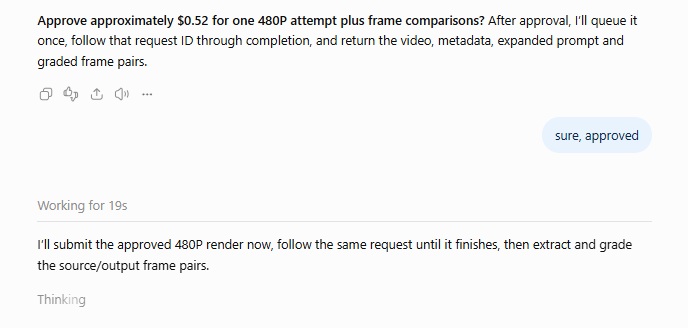
You can ask GPT-6 Astra for any keep-list line the prompt left out before the job goes to the queue.
Note: Video runs on fal are queued, so GPT-6 Astra submits the job once and polls its request ID until the video is ready.
An accepted status only confirms that the job has joined fal's queue for processing.
If a status check times out, have GPT-6 Astra look up the existing request ID, because fal's plugin documentation says a second submission creates a second billable job.
And, after I was happy with the result, I asked it to run the same render at 1080p.
The other two clips run through the same loop with shorter requests, because GPT-6 Astra already has the pricing and grading instructions from the first request in the same chat.
The running shoe gets a full restyle, which narrows the keep list to the geometry of the shoe and the timing of the splash.
Prompt (this time, I'm going straight for 1080p):
Next edit in this chat, using [URL of the running shoe clip] as the source.
Change list: restyle the whole shot as gouache animation painted by hand, with thick visible strokes and a limited teal and cream palette.
Keep list: the shoe's silhouette, gum sole and lace pattern; the splash timing and the low right-to-left tracking move; the framing of the final frame.
I want you to render it at 1080p directly this time around, five seconds, 16:9.
Frame pairs will show changes to the sole and laces, while any flicker in the painted texture only shows up when you watch the clip at full speed.
The headphones get a relight that swaps the studio softbox look for late golden-hour window light, with warm blind shadows crossing the stand.
Next edit in this chat, using [URL of the headphones clip] as the source.
Change list: relight the shot as late golden-hour window light, with warm venetian-blind shadows sliding slowly across the stand and the white sweep.
Keep list: the headphones' shape, matte finish and ear cup stitching; the aluminum stand and its position on the sweep; the slow three-quarter push-in, ending on the stitching.
I want you to render it at 1080p directly this time around, five seconds, 16:9.
Grade the ear cup stitching closely on this one, since moving shadows cross it in every frame of the push-in.
falMODEL APIs
The fastest, cheapest and most reliable way to run genAI models. 1 API, 100s of models
Can GPT-6 Astra judge a render from still frames?
GPT-6 Astra can grade a render from matched pairs of stills, one from the source and one from the output at the same point in the clip, each scored against the keep list.
fal-ai/workflow-utilities/extract-nth-frame saves one frame out of every N as a PNG and uses 12 as the default N.
On a 24 fps clip, that default produces a still every half second.
GPT-6 Astra can't read a clip's frame rate from the stills, so tell it when you bring your own footage, since a 30 fps phone clip needs a frame_interval of 15 to match that spacing.
Useful grades read like "cap facets soften between 2.5s and 3.5s, keep line 1."
Ten stills across five seconds still leave half-second gaps, wide enough for a stutter in the turntable or a pop in the soundtrack to slip through.
Watch the full clip at normal speed yourself, then scrub through any moment GPT-6 Astra flagged in its grades.
In a chat where the returned stills don't come through as viewable images, you can download them and attach them to the conversation yourself.
What are the MiniMax H3 Max reference-to-video settings for an edit?
Six of the schema's fields on MiniMax H3 Max reference-to-video need a deliberate value for an edit, so no default stays in place by accident:
| Field | Values on fal | Setting for an edit |
|---|---|---|
reference_video_urls | Clips of 2 to 15 seconds each, 15 seconds combined, up to 12 reference files in total | The source clip, referenced as Video 1 |
duration | Whole seconds, default 5, pricing tables run to 15 | The source's length, rounded to a whole second |
aspect_ratio | adaptive by default, or 21:9, 16:9, 4:3, 1:1, 3:4, 9:16 | The source's ratio |
resolution | 480P, 768P or 1080P, default 768P | 480P for drafts, 768P or 1080P for the final |
prompt_expansion_mode | disabled, balanced or quality | balanced while drafting, disabled for a fixed final prompt |
seed | Returned with every output | Random on the first attempt, then the seed from the attempt you're revising |
Does an approved GPT-6 Astra edit run through the fal API as well?
Yes, the same request runs from fal's JavaScript client once GPT-6 Astra has a prompt and seed that pass the keep list.
The API route needs a fal API key set as FAL_KEY, because the plugin's OAuth sign-in doesn't hand you a key for your own code.
javascript
import { fal } from "@fal-ai/client";

const result = await fal.subscribe("minimax/h3-max/reference-to-video", {
  input: {
    prompt: "Image 1 is the female protagonist. Image 2 is her small dog. Keep the woman and dog consistent with their respective reference images while they walk together through a sunlit garden.",
    prompt_expansion_mode: "disabled"
  },
  logs: true,
  onQueueUpdate: (update) => {
    if (update.status === "IN_PROGRESS") {
      update.logs.map((log) => log.message).forEach(console.log);
    }
  },
});

console.log(result.data);
console.log(result.requestId);
How much does a GPT-6 Astra video edit cost on fal?
On fal's standard playground rates, one five-second MiniMax H3 Max reference-to-video edit costs $0.42 at 480P, $0.96 at 768P and $1.36 at 1080P.
Those totals assume one five-second 16:9 reference clip at 24 fps, matching the case fal's own pricing examples use.
Output bills by requested duration and resolution, while reference inputs share an allowance of 4,096 tokens per request and bill at $0.02 per 1,000 tokens beyond it, prorated.
| 480P | 768P | 1080P | |
|---|---|---|---|
| Output rate per second | $0.05 | $0.08 | $0.16 |
| Five seconds of output | $0.25 | $0.40 | $0.80 |
| Tokens for a five-second reference clip | 12,480 | 32,256 | 32,256 |
| Reference surcharge after the allowance | $0.17 | $0.56 | $0.56 |
| Total per edit attempt | $0.42 | $0.96 | $1.36 |
Source clips from MiniMax H3 Max text-to-video bill at the same per-second output rates with no reference charge, so each five-second 768P source costs $0.40.
Other frame rates and aspect ratios change the reference surcharge, since fal counts tokens from the frames and shape of each clip.
At 768P, the reference surcharge is larger than the output charge, and a shorter reference clip brings it down as long as that clip still carries the motion you want.
On the ChatGPT side, you need a plan with GPT-6 Astra access.
Should you use GPT-6 Astra or fal Agent for video editing?
fal Agent is fal's own generative media agent, now in Early Access, which plans a project and runs it across the models your fal account can call.
For video work, it can read the footage you attach as an edit source and bills only for model runs, with its reasoning, sandbox, web search and video understanding free at the time of writing.
You can pick fal Agent when the agent should see the source footage itself, and GPT-6 Astra with the fal plugin when the edit belongs to a bigger ChatGPT project.
A launch plan or a landing page built in the same chat is the typical example, because GPT-6 Astra can handle that surrounding work too.
GPT-6 Astra is OpenAI's general-purpose model, which reaches fal's catalog through the fal plugin and reviews footage as still frames.
| GPT-6 Astra with the fal plugin | fal Agent | |
|---|---|---|
| Where it runs | ChatGPT | fal's site, as an Early Access product |
| Footage input | Text and image input, with edits reviewed through extracted stills | Video attachments accepted as references or edit sources |
| Video understanding | Not a supported modality | Included, with no charge at the time of writing |
| Model choice | GPT-6 Astra searches fal's catalog and reads schemas through the plugin | Chooses from the models your fal account can call |
| Cost | Your ChatGPT plan, plus fal model runs at standard rates | From $50 per month with $50 in credits, model runs billed against credits |
fal Agent is in Early Access and bills model runs only.
Its reasoning, sandbox, web search, URL reading and video understanding carry no charge at the time of writing, which fal describes as a temporary arrangement.
| Tier | Price per month | Monthly credits | Usage discount |
|---|---|---|---|
| fal Agent Starter | $50 | $50 | None |
| fal Agent Pro | $200 | $200 | 5% |
| fal Agent Max | $1,000 | $1,000 | 10% |
| Enterprise | Custom | Custom volume | Custom rates |
The Pro and Max discounts apply to UI, Sandbox, Playground and CLI usage, while API usage stays pay-as-you-go on every tier.
Recently Added
















Run your first GPT-6 Astra edit on fal
Of the routes GPT-6 Astra can take into video editing, the fal plugin is the one built around re-rendering what's inside the shot, as long as every render gets checked against a written keep list.
You can generate a five-second product clip in fal's playground, then run the perfume request on it at 480P through the fal plugin in ChatGPT.
fal gives you over 1,000 models behind one API with pay-per-use pricing and no GPUs to manage.
For edits where the agent should see the video itself, fal Agent is the other route worth trying.
Frequently asked questions
Can GPT-6 Astra watch a video file?
No, OpenAI lists text and image as GPT-6 Astra's only inputs. The clip travels to fal by URL, leaving GPT-6 Astra to work from stills extracted from it.
Can GPT-6 Astra generate the source clips as well?
Yes, GPT-6 Astra can run minimax/h3-max/text-to-video through the fal plugin, although the playground makes it easier to compare takes and pick a source before editing.
Does a shorter reference clip lower the price of a MiniMax H3 Max edit?
Yes, at 768P a two-second 16:9 reference at 24 fps adds $0.16 compared with $0.56 for five seconds, though MiniMax H3 Max reference-to-video then has less motion to follow.
Does the fal plugin work in Codex as well?
Yes, the fal plugin runs in ChatGPT and Codex from the same plugin directory.
Codex CLI installs it through its plugins slash command, although the Codex IDE extension doesn't support plugins at all.
![What is H3 Max Camera Controls (Multi-Angle) & How To Use It? [2026]](https://refinery.fal.media/url/https%3A%2F%2Fv3b.fal.media%2Ffiles%2Fb%2F0aabbf2b%2Fq8usbuG4heGtr4-AYyqfk.jpg/tr:w-1280,q-80/q8usbuG4heGtr4-AYyqfk.webp)
![What is Kling 4.0? Everything You Need to Know [2026]](https://refinery.fal.media/url/https%3A%2F%2Fv3b.fal.media%2Ffiles%2Fb%2F0aac880f%2FiTfQ74jiVsnY8JWOk7yeH.jpg/tr:w-1280,q-80/iTfQ74jiVsnY8JWOk7yeH.webp)