![How To Use Gemini Omni Flash 1.1: Prompts & Workflows [2026]](https://refinery.fal.media/url/https%3A%2F%2Fv3b.fal.media%2Ffiles%2Fb%2F0aa980d2%2FCQSjgFTnyKN_hFvYMZ4d1.jpg/tr:w-1920,q-80/CQSjgFTnyKN_hFvYMZ4d1.webp)
In this guide, I'll cover how to prompt every endpoint Gemini Omni Flash 1.1 has, from a four-word line through to a shot assembled from reference stills and three seconds of borrowed movement, with prompts you can paste into fal's playground or drop straight into an API call.
TL;DR
Gemini Omni Flash 1.1 is Google's multimodal video model, and it comes with synchronized native audio, real-world knowledge and physics understanding, and camera direction taken straight from natural language.
fal hosts four endpoints: text-to-video, image-to-video, edit and reference-to-video.
Resolution runs 360p, 720p, 1080p and 4K on all four endpoints: text-to-video, image-to-video and reference-to-video add a 16:9 or 9:16 aspect ratio and a duration in whole seconds. Edit takes neither.
Price is set by resolution and doesn't change between endpoints, running from $0.03 a second at 360p up to $0.30 a second at 4K. A test render at the bottom of that ladder costs almost nothing, so I put every new prompt through 360p before paying for a finished version.
Where can you access Gemini Omni Flash 1.1?
Gemini Omni Flash 1.1 runs on fal across four endpoints, and you pay for the seconds of video that come back.
Here's what each one takes:
google/gemini-omni-flash/v1.1/text-to-video needs a prompt and nothing else.
google/gemini-omni-flash/v1.1/image-to-video adds image_url as the opening frame, and an optional end_image_url that the model interpolates toward.
google/gemini-omni-flash/v1.1/edit takes video_url and an instruction describing the change.
google/gemini-omni-flash/v1.1/reference-to-video takes image_urls and reference_video_urls, up to three reference videos of three seconds each.
Three of the four expose aspect_ratio, resolution and duration.
Edit is the exception, with a schema limited to prompt, video_url and resolution.
Watch the casing on the resolution enum. 4K output is 4k in lowercase in all four schemas.
A text-to-video call through fal's API looks like this:
javascript
import { fal } from "@fal-ai/client";

const result = await fal.subscribe("google/gemini-omni-flash/v1.1/text-to-video", {
  input: {
    prompt: "A cinematic wide shot of a lighthouse on a rocky cliff at dusk, waves crashing below, the beam sweeping across the dark sea."
  },
  logs: true,
  onQueueUpdate: (update) => {
    if (update.status === "IN_PROGRESS") {
      update.logs.map((log) => log.message).forEach(console.log);
    }
  },
});

console.log(result.data);
console.log(result.requestId);
If you'd rather not write code, each of the four has its own playground page with a form covering that endpoint's parameters.
fal's Sandbox goes a step further and puts one prompt through Gemini Omni Flash 1.1 and a second model at the same time. For a shot I wasn't confident any model could hold, that's the first thing I'd reach for.
What's more, fal's Agent, MCP server and CLI reach the same four endpoints from a chat window or a terminal.
What does a Gemini Omni Flash 1.1 prompt need?
A Gemini Omni Flash 1.1 prompt needs the subject, the action, the camera move, the look and the sound, all written as instructions.
Google's prompt guide for the model breaks a prompt into the same components and starts with the subject, on the grounds that specificity is what keeps output from going generic.
Google's published examples for Omni 1.1 read like direction given to a crew, not like descriptions of a finished frame.
They name camera moves in film language: an optical dolly zoom, a mechanical snap zoom, a whip pan, a 360-degree orbit, and they trust the model to know what those mean.
Length also matters less than you'd expect.
Google's examples run from four words up to a full paragraph, and both extremes appear in the same announcement.
How do you prompt Gemini Omni Flash 1.1 for text-to-video?
Text-to-video on Gemini Omni Flash 1.1 has exactly one required field, the prompt, so the entire outcome is in the writing.
You can then choose an aspect ratio and a resolution, set a duration in whole seconds, paste the prompt and run it.
A dialogue scene from a period thriller
Two speaking parts, one camera move, and a location that has to hold behind both of them.
Prompt, aspect_ratio 16:9, resolution 720p, duration 10: A handoff scene from a Cold War spy picture, shot on a night express. One continuous shot, no cuts. It opens on a long lens down the corridor of a sleeper car, a woman in a gray traveling coat walking toward the camera with a leather document case, compartment doors sliding past her on both sides. She stops beside a man in a homburg reading a timetable, sets the case down on the floor without looking at him, and says, quietly: "The Vienna train doesn't stop tonight." He answers without lifting his eyes from the timetable: "Then neither do we." The camera pushes in past her shoulder as she keeps walking out of frame. Tungsten practicals flickering with the track, heavy 35mm grain, deep green shadow the length of the corridor. Rails under the floor, glass rattling in the compartment doors, both voices low and close, no music. No titles or subtitles.
Generated using Gemini Omni Flash 1.1 on fal, an AI model from Google.
➡️ Note: those two lines are short on purpose. A ten-second clip carrying a camera move has to fit the dialogue around the movement, and my instinct is to cut words before cutting the shot.
A footwear spot as one unbroken take
Prompt, aspect_ratio 9:16, resolution 720p, duration 8: A spot for a running shoe, cut as one unbroken take. The camera starts at ankle height on a wet rooftop basketball court at night, a single pair of shoes stepping into frame and breaking into a sprint across the painted lines. It rises and swings around the runner as she goes, holding her the same size in frame while the towers behind her stretch out with the move, then drops back to the surface as she plants hard and cuts left, water throwing off the tread. Blue and magenta spill from the court lights, hard specular reflections in the standing water, shallow focus on a 35mm lens. The camera stays locked to the runner for the whole take. Rubber gripping wet paint, breath, rain landing on the deck, one low bass note arriving as she plants, no voice. No on-screen text.
Generated using Gemini Omni Flash 1.1 on fal, an AI model from Google.
💡 The vertical frame is doing work here beyond the platform it's cut for.
A 9:16 crop leaves less room for a moving subject to escape, so I'd expect the lock-to-subject line to hold more easily than it would in 16:9.
falMODEL APIs
The fastest, cheapest and most reliable way to run genAI models. 1 API, 100s of models
How do you animate a still image with Gemini Omni Flash 1.1?
Image-to-video on Gemini Omni Flash 1.1 takes a still as image_url and grows a clip out from it, and adding an optional end_image_url turns the same endpoint into a first and last frame interpolation.
Both variants load an extra duty onto the prompt. You have to name the parts of the still that must survive.
A UGC testimonial with a spoken line
Image prompt: A vertical phone photograph of a woman in her early thirties at a bathroom mirror in the morning, holding the phone up in her right hand so her forearm and the phone are visible in the reflection, an unbranded frosted glass serum bottle in her left hand raised beside her jaw. Damp hair pushed back with a claw clip, no makeup, visible pores and a healing spot on her chin, a gray ribbed tank top. Warm bulb light above the mirror mixed with cold daylight from a window behind her, water spots across the glass, a crowded shelf of bottles and a folded towel out of focus at the edge of frame. Real phone-camera texture with slight motion softness, no beauty filter, no portrait-mode edge, no logos and no text anywhere.
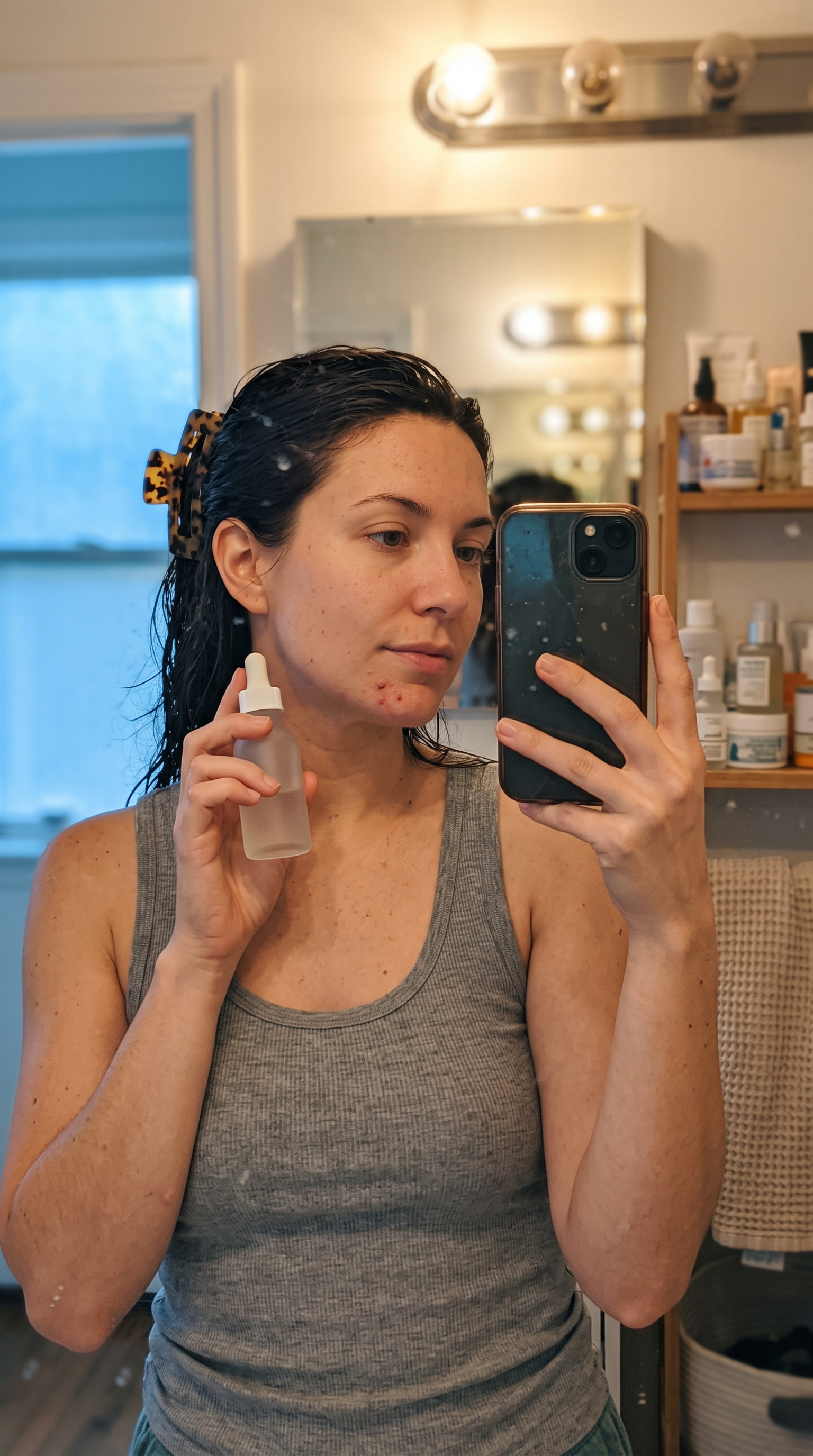
Image generated by Nano Banana 2 on fal, an AI model from Google.
Video prompt, aspect_ratio 9:16, resolution 720p, duration 8: She tips the bottle against her fingertips, presses it into her cheek in two quick passes, then looks straight into the lens and says: "Week three. I stopped taking the before pictures because nobody believed the after ones." She laughs at the end of the line and glances off to the side. Nothing about the mirror, the shelf or either light source should change from the still. The phone stays handheld, with the small drift a real arm makes. Her voice close and slightly boxy off the tile, a tap running in another room, no music. No captions.
Generated using Gemini Omni Flash 1.1 on fal, an AI model from Google.
➡️ Note: the handheld instruction is the one I'd fight for on a UGC cut. A locked-off frame reads as a tripod, and a tripod reads as an ad.
A product open using both frames
On a first and last frame job, the two images decide most of the result, and generating them independently is the mistake worth avoiding.
You want to separate text-to-image calls to produce two products that almost match, and almost is worse than obviously different.
The model has to reconcile that gap somewhere inside your eight seconds, and it gets to choose where.
I'll generate the opening still first, then edit that exact file into the closing still. Same leather, same plinth, same shadow, because it's the same image underneath.
Opening frame prompt: A studio product photograph of a tan grained-leather weekender bag standing closed on a raw concrete plinth, shot square on at bag height, brass zip pull hanging straight down, one hard key light from the upper left and a crisp shadow falling to the right, flat warm gray background, 85mm lens, no logos and no text anywhere.
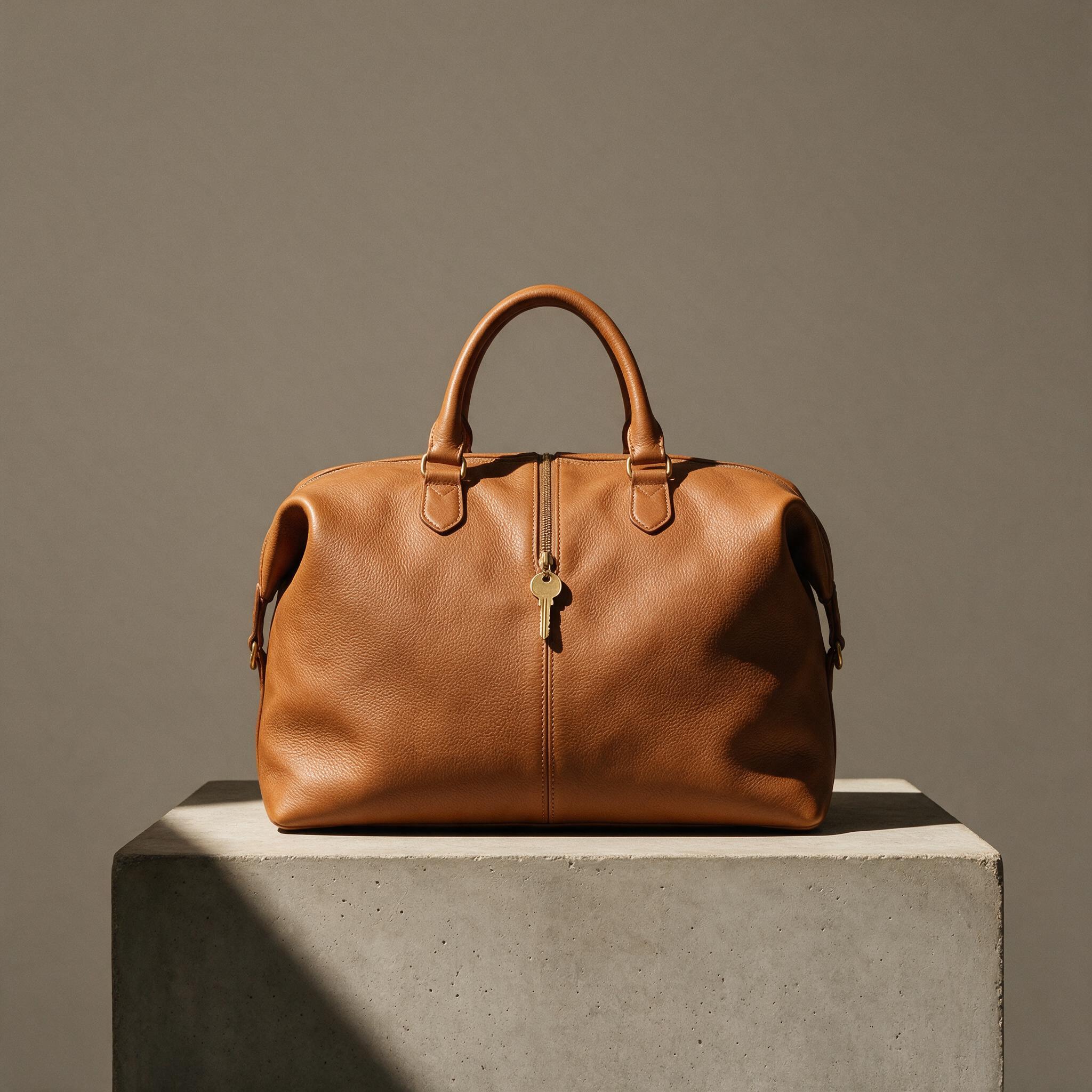
Image generated by Seedream 5.0 on fal, an AI model from ByteDance.
Closing frame, made by editing the file above with Nano Banana 2 Edit: Keep the same bag, the same concrete plinth, the same key light and the same gray background. Move the camera to a three-quarter angle from the front right so the side panel and the end pocket are both visible, and open the main zip halfway so the lining and a rolled linen shirt inside are showing. Same lens, same shadow direction, and leave the rest of the frame alone.
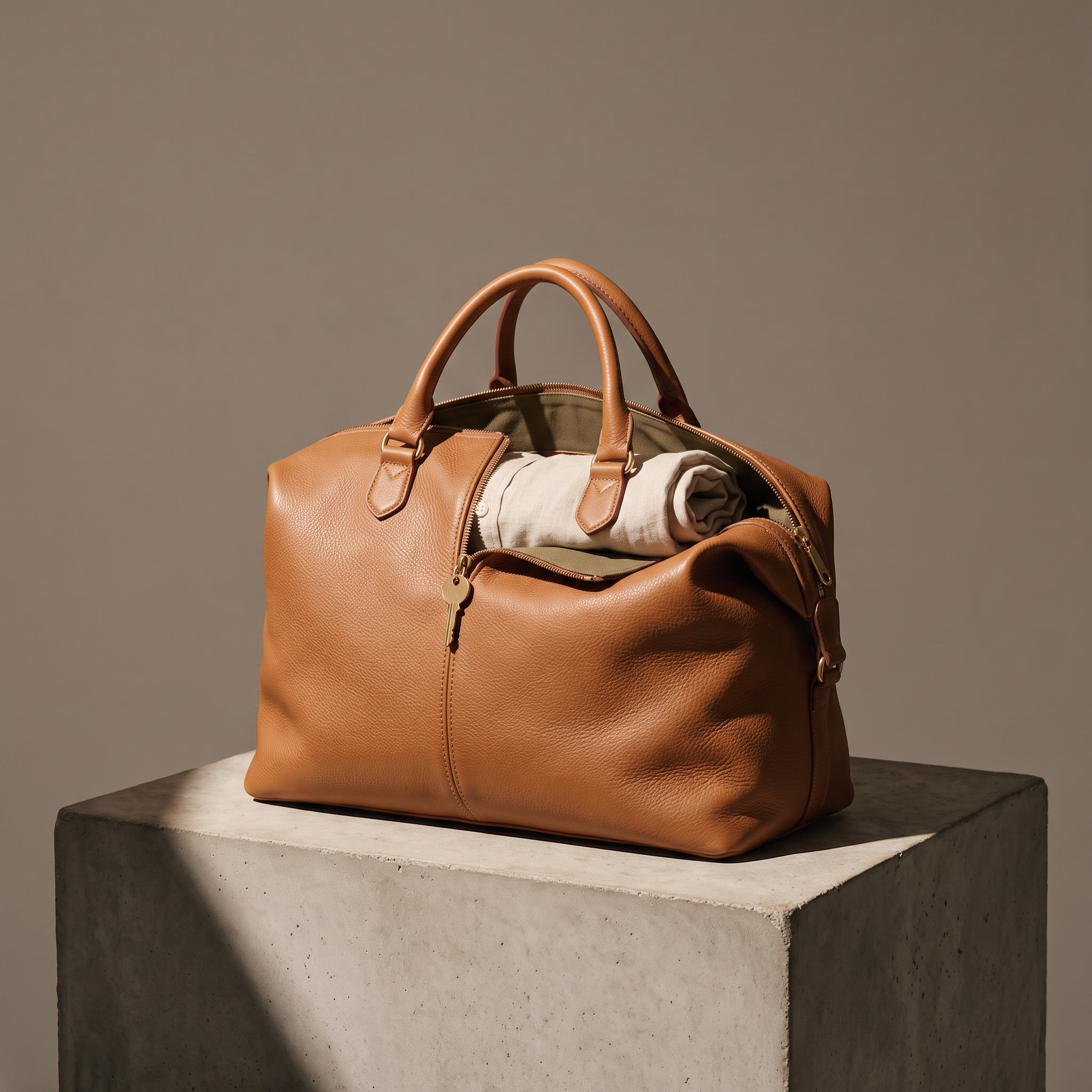
Image generated by Nano Banana 2 Edit on fal, an AI model from Google.
Video prompt, aspect_ratio 16:9, resolution 720p, duration 8: One continuous camera move from the square-on view to the three-quarter angle, orbiting right around the plinth at bag height while the zip draws back and the mouth of the bag opens under its own weight. The leather flexes along the fold as it opens, and the brass pull swings once and settles. The key light, the shadow direction and the gray background stay put for the whole move. No cuts. Zip teeth, leather creaking, quiet studio room tone, no music.
Generated using Gemini Omni Flash 1.1 on fal, an AI model from Google.
💡 Naming both ends of a move fixes the destination and leaves the middle negotiable. On a product orbit, where nobody is studying the halfway point, that's a good trade.
How do you edit a video with Gemini Omni Flash 1.1?
The edit endpoint on Gemini Omni Flash 1.1 takes a video URL and an instruction, and it applies the requested change while preserving the parts of the scene you want kept, carrying character and scene consistency across successive edits.
I'd recommend you keep the instruction short. You need to provide the AI video generator with a simple instruction describing the edit, not an elaborate one.
Then write the preservation half down. The model has no way of knowing which parts of your frame were expensive to get right.
A set change on a product clip
Source: the weekender bag clip generated in the image-to-video section above.
Prompt, resolution 720p: Put the bag on a pale limestone block and warm the background to a soft sand tone. Keep the bag itself, the key light, the shadow direction and the camera move exactly as they are.
Generated using Gemini Omni Flash 1.1 on fal, an AI model from Google.
Notice how there's only one sentence of change and one sentence of preservation.
For a catalog with six colorways in it, that's one video generation and five edits, and every version inherits the same camera move.
An era regrade, then a second pass on the result
Source: the night train corridor clip generated in the text-to-video section above.
Prompt, resolution 720p: Regrade the corridor to faded Eastmancolor with magenta-shifted highlights and visible gate weave, and change the man's homburg to a flat cap. Keep both faces, the dialogue, the rest of the wardrobe, and the camera move.
Generated using Gemini Omni Flash 1.1 on fal, an AI model from Google.
Now run a second edit on that output. The consistency claim in fal's description either holds up on this pass or it doesn't.
Second pass prompt, resolution 720p: Add rain streaking down the compartment windows and a third passenger asleep behind the glass of the compartment they're standing beside. Keep the grade, both characters, the dialogue and the camera move from the previous pass.
Generated using Gemini Omni Flash 1.1 on fal, an AI model from Google.
➡️ Note: the edit schema carries no duration and no aspect_ratio field, so both appear to come off the source clip.
Anything you want longer or wider than the original has to go back through text-to-video or image-to-video.
How do you build a video from references with Gemini Omni Flash 1.1?
Reference-to-video on Gemini Omni Flash 1.1 takes images and short videos together and reasons across all of them, and characters keep their face, clothing and voice throughout.
Reference media is sent in list order ahead of the prompt, and you address each item positionally.
The first image in image_urls is <IMAGE_REF_0>, the second is <IMAGE_REF_1>, and the first entry in reference_video_urls is <VIDEO_REF_0>.
You get up to three reference videos, and each one has to be three seconds or shorter.
A campaign shot built from a face, a location and a camera move
Character reference prompt: A photographic portrait of a woman in her late thirties from the chest up, dark hair cut blunt at the jaw, a camel wool overcoat over a black roll neck, neutral expression, even soft light from the front, flat mid gray background, sharp focus, no logos and no text.
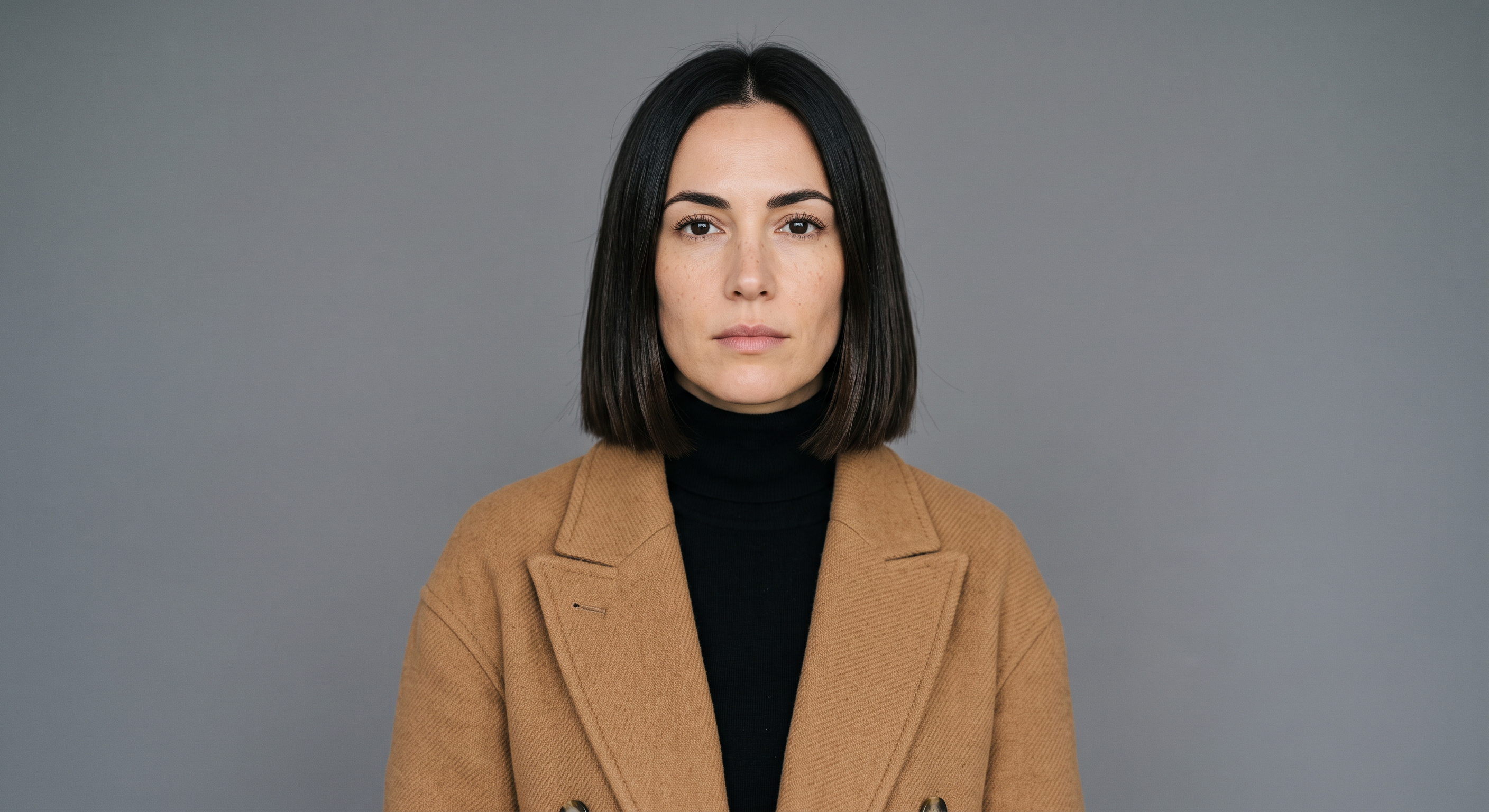
Image generated by Nano Banana 2 on fal, an AI model from Google.
Location reference prompt: An empty hotel corridor at night, polished dark stone floor, brass sconces at intervals along the right wall, closed walnut doors on the left, a runner carpet down the middle, warm pooled light between long stretches of shadow, wide lens at chest height, no people and no text.
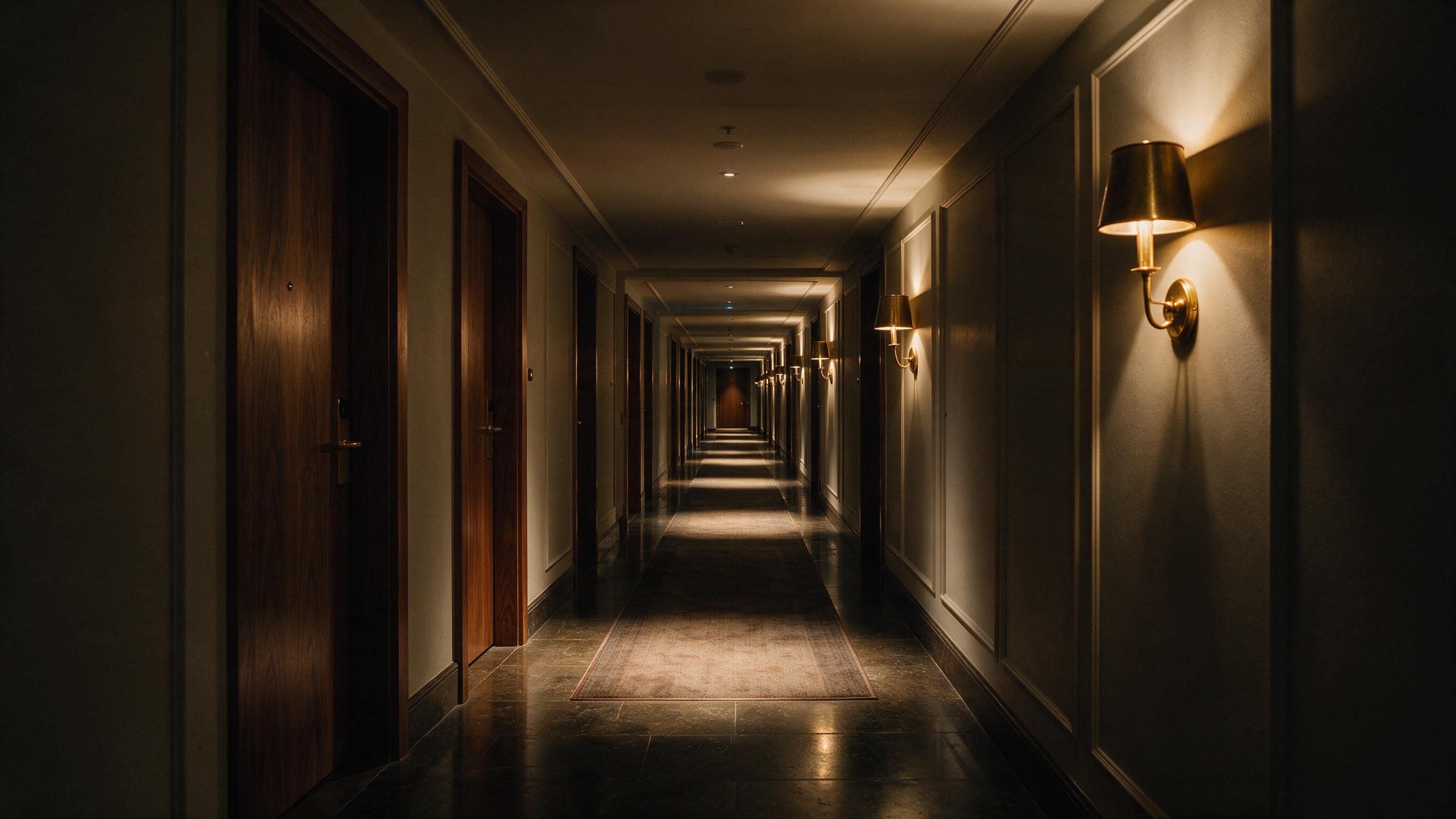
Image generated by Seedream 5.0 Pro on fal, an AI model from ByteDance.
For <VIDEO_REF_0>, three seconds of a slow forward dolly at chest height will do. Anything you've shot, generated or pulled from your own footage library works, as long as you trim it under the cap.
Prompt, aspect_ratio 16:9, resolution 720p, duration 8: The woman in <IMAGE_REF_0> walks the length of the corridor in <IMAGE_REF_1>, carrying a tan leather weekender bag at her side. Match the camera to the dolly move in <VIDEO_REF_0>, same speed and same height off the floor. Her face, her hair and the camel overcoat carry over from the reference image unchanged, and the sconces and the shadow pooling carry over from the corridor. One continuous shot, no cuts. Heels on stone, the bag handle creaking, a distant air handler, no music. No text of any kind in frame.
Generated using Gemini Omni Flash 1.1 on fal, an AI model from Google.
A stunt beat matched to a reference performance
Body mechanics is the interesting use for a video reference, because a vault written out in words is a guess and the same movement handed over as footage is a specification.
Character reference prompt: A photographic full-length shot of a man in his early thirties standing square to camera, cropped hair, taped knuckles and taped wrists, a sleeveless canvas work jacket over a sweat-marked vest, loose dark trousers and worn canvas shoes, even overcast light, flat concrete wall behind him, no logos and no text.
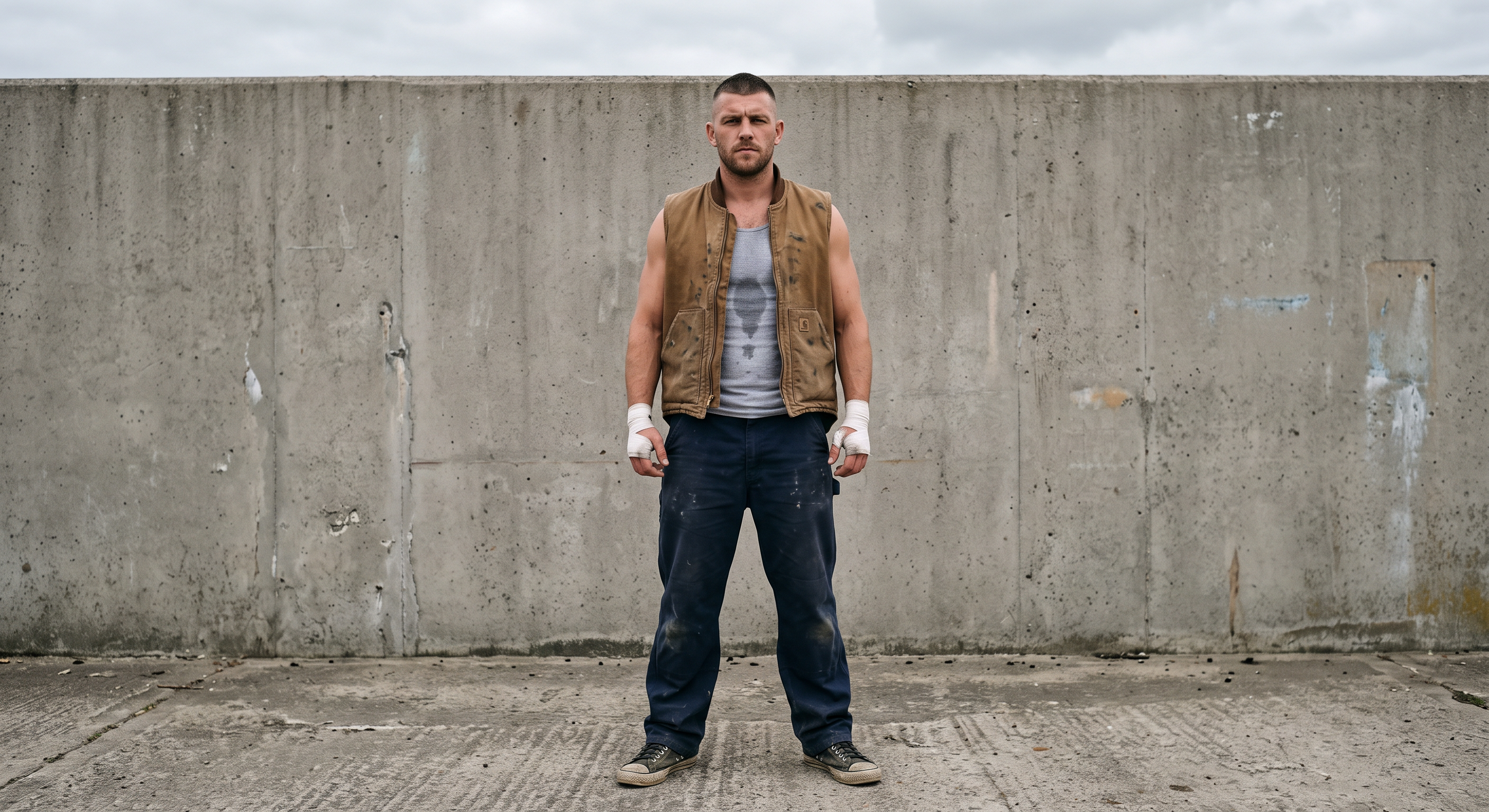
Image generated by Nano Banana 2 on fal, an AI model from Google.
Location reference prompt: A rooftop courtyard at dusk, cracked concrete underfoot with gravel drifted into the corners, a low parapet wall across the back with a city skyline going hazy behind it, two rusted vent stacks on the left, long orange light raking across the ground from camera right, no people and no text.
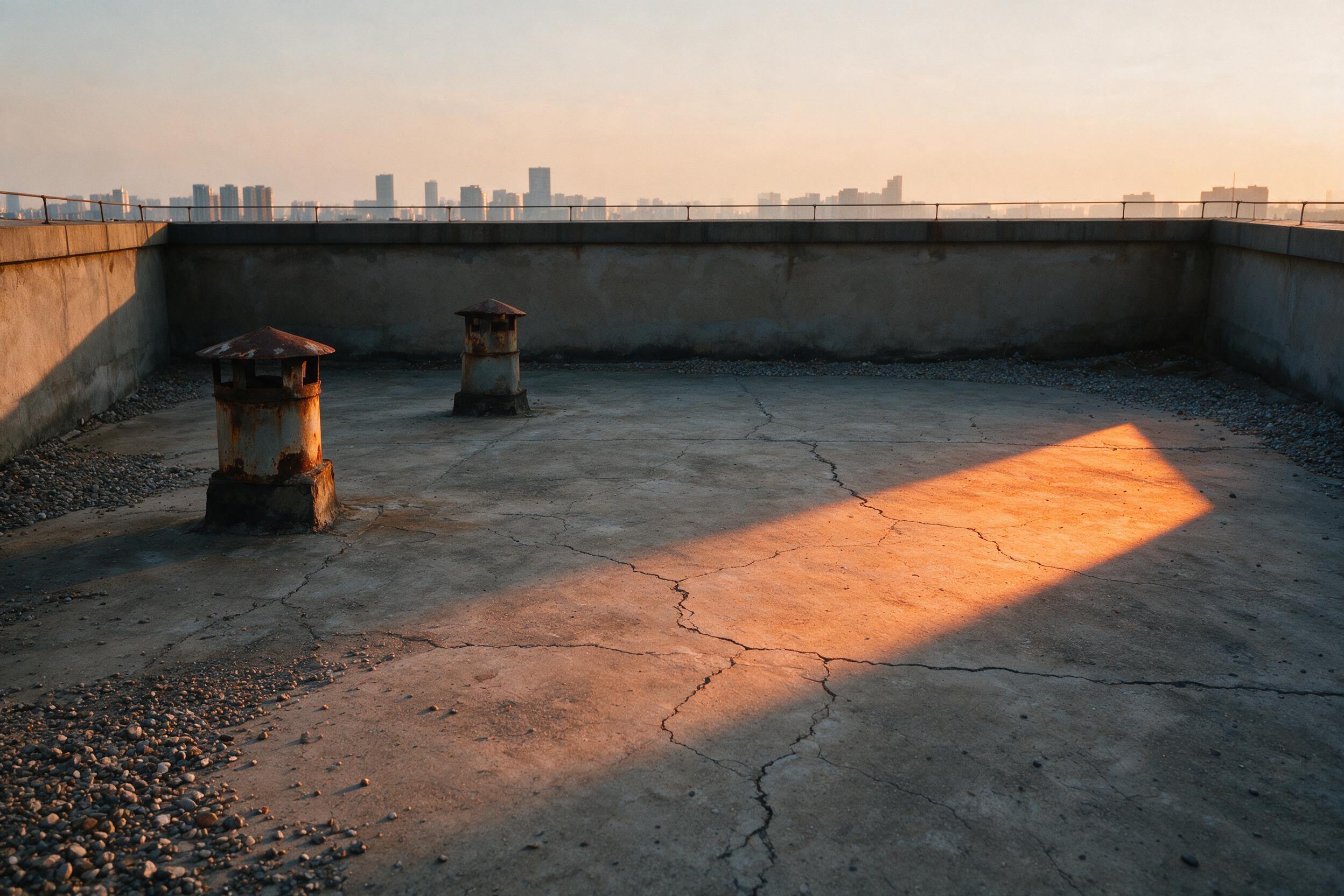
Image generated by Seedream 5.0 on fal, an AI model from ByteDance.
For <VIDEO_REF_0>, use three seconds of the vault and roll itself, shot on a phone or taken from footage you hold the rights to.
The movement is the entire reason the reference is there, so trim to the beat and drop everything around it.
Prompt, aspect_ratio 16:9, resolution 720p, duration 8: The man in <IMAGE_REF_0> performs the vault and shoulder roll from <VIDEO_REF_0>, in the rooftop courtyard shown in <IMAGE_REF_1>, at dusk. Match the timing and the body mechanics of the reference video exactly, then let him come up out of the roll and turn back toward camera. His face, the taped hands and the canvas jacket come from the reference image. Handheld on a long lens, one continuous shot, no cuts. Gravel under the landing, canvas dragging on concrete, hard breathing, a low percussion figure underneath, no dialogue. No on-screen text.
Generated using Gemini Omni Flash 1.1 on fal, an AI model from Google.
💡 Three seconds per reference video is a real constraint on what you can hand over.
A single clean beat with a start and a finish inside it will do more for you than three seconds lifted out of the middle of a longer move.
How much does Gemini Omni Flash 1.1 cost on fal?
Gemini Omni Flash 1.1 bills per second of output video, priced by resolution, at the same rate across all four endpoints.
| Resolution | Per second | 8-second clip | 10-second clip |
|---|---|---|---|
| 360p | $0.03/s | $0.24 | $0.30 |
| 720p | $0.10/s | $0.80 | $1.00 |
| 1080p | $0.15/s | $1.20 | $1.50 |
| 4K | $0.30/s | $2.40 | $3.00 |
Edit bills the same way: on the length of the video it returns, so a colorway pass on an eight-second product clip at 4K costs the same $2.40 the original generation did.
No endpoint carries a separate charge for audio.
Recently Added







Start creating with Gemini Omni Flash 1.1 on fal
You get all four endpoints from a single API key, metered by the second, with no infrastructure to stand up first.
Write a scene from text, animate a still, hold both ends of a camera move, restyle a clip you already shot, or hand the model a face and a movement you supply yourself and let it reason across both.
Creating a fal account is free, and all four endpoints have a browser form, so the first version of a shot doesn't have to go through your codebase.
Gemini Omni Flash 1.1 FAQs
Can you use Gemini Omni Flash 1.1 clips in commercial work?
Yes. All four Gemini Omni Flash 1.1 endpoints on fal carry the commercial use designation, so output can ship in paid advertising or go out as client work.
fal's terms of service cover the licensing detail and anything specific to this model.
Does Gemini Omni Flash 1.1 generate audio?
Yes. Picture and sound come out of one generation, and no endpoint adds a charge for the audio.
fal's endpoint descriptions credit the text-to-video and image-to-video endpoints with synchronized native audio, and Google's published examples direct dialogue, score and effects from inside the prompt.
How long can a Gemini Omni Flash 1.1 clip be?
duration takes a whole number of seconds and defaults to 8 on text-to-video, image-to-video and reference-to-video.
The edit endpoint has no duration field, so an edited clip appears to run as long as the video you fed it.
What resolutions and aspect ratios does Gemini Omni Flash 1.1 support?
360p, 720p, 1080p and 4K, with 720p as the default on every endpoint. Text-to-video, image-to-video and reference-to-video take an aspect ratio of 16:9 or 9:16 and default to 16:9. Edit has no aspect ratio field at all.
The enum value for 4K in the API is 4k, lowercase.
Can you set a first and last frame with Gemini Omni Flash 1.1?
Yes, through the image-to-video endpoint.
Pass your opening still as image_url and your closing still as end_image_url, and Gemini Omni Flash 1.1 interpolates between the two in the order you listed them. Google calls this out as the route to camera orbits, zoom transitions and looping clips that hold together.
How many reference videos can Gemini Omni Flash 1.1 take?
Up to three, and each one has to be three seconds or shorter.
Reference images and reference videos travel in the same request on the reference-to-video endpoint, and your prompt addresses them as <IMAGE_REF_0> and <VIDEO_REF_0>, numbered by list order.
Why should you use fal to run Gemini Omni Flash 1.1?
All four Gemini Omni Flash 1.1 endpoints run through a single fal client, which handles the queue and the webhooks for you, with no GPU to stand up and no plan to sign.
That same client also reaches the more than 1,000 other models on fal, so trading Gemini Omni Flash 1.1 for a different video model is a change to one string.
Output is licensed for commercial work, and the playground will take a test shot before any of this reaches your codebase.
![How To Generate AI Videos Using Claude and MCP [2026]](https://refinery.fal.media/url/https%3A%2F%2Fv3b.fal.media%2Ffiles%2Fb%2F0aaf916f%2Fq8BHWGB1lp94_TzmLRBdE.jpg/tr:w-1280,q-80/q8BHWGB1lp94_TzmLRBdE.webp)