


Topaz Upscale API for Video & Images
Run Topaz Labs' full video and image enhancement catalog on fal. Sixteen task-specific endpoints covering precision upscaling, generative restoration, creative enhancement, denoising, frame interpolation, SDR to HDR conversion, sharpening and more. Led by newest models Starlight Precise 2.6 for video and Wonder 3.5 for images.

One Catalog, Every Enhancement Job
Diffusion restoration for video
Starlight is Topaz's generative video line designed to transform and improve both GenAI and archival sources. Starlight models intelligently add new detail and texture while preserving artistic intent. Starlight Precise 2.6 is the flagship and adds realism to AI-generated footage, Starlight Mini restores archival material, and Starlight Fast 2 is the quickest and cheapest way through a diffusion pass.
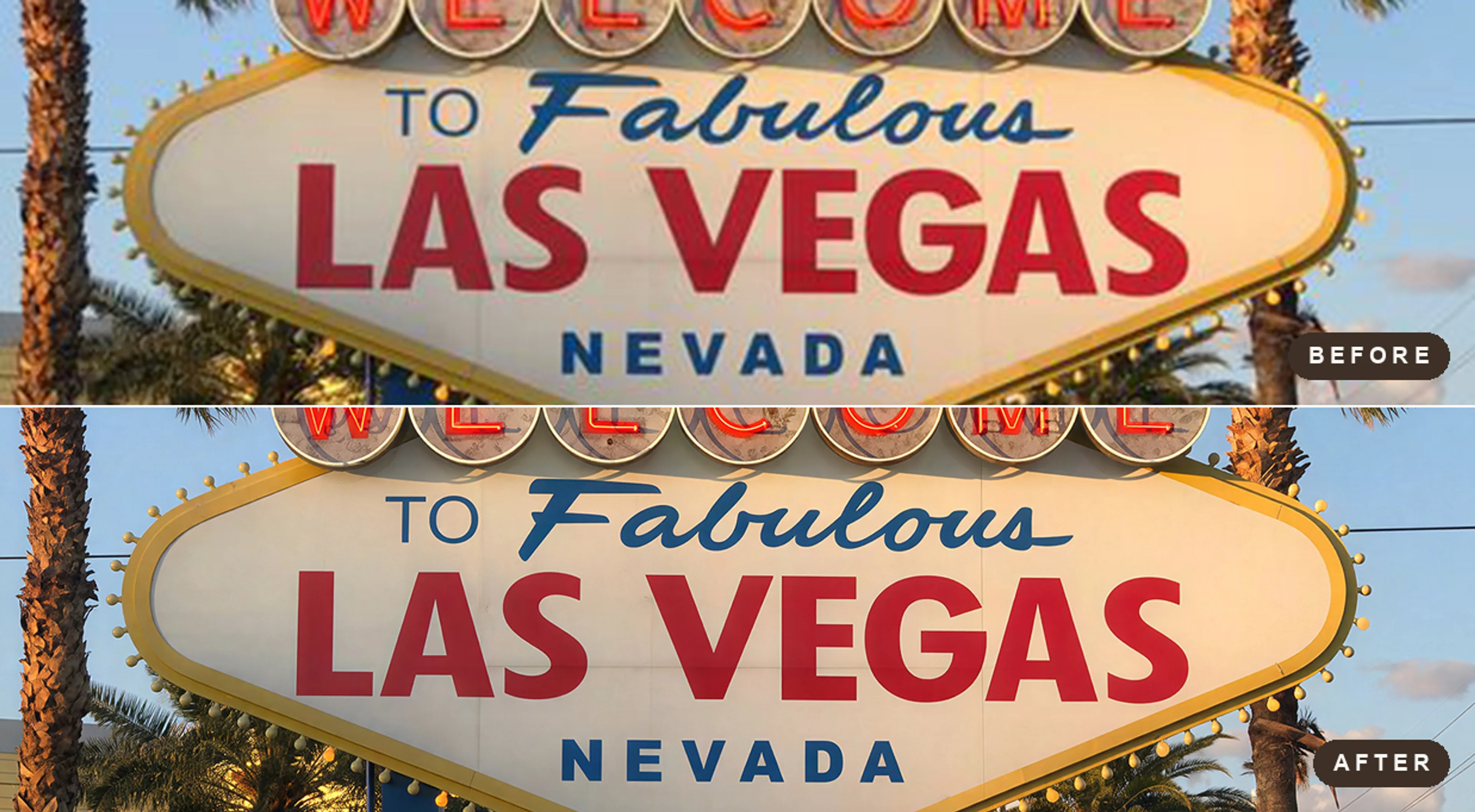
Generative upscaling for stills
Wonder provides generative upscaling for all image and photo types, with precise, realistic detail and exceptional results on compressed sources and text. Wonder reconstructs detail rather than interpolating it, which is what separates a usable 4x enlargement from a soft one. Wonder 3.5 is the newest model in the family with finer detail and fewer repetitive patterns, Wonder 3 is the endpoint default, and Recover 3, Standard MAX and Redefine sit alongside them for rebuilds, high-fidelity enlargement and prompt-guided work.
Creative enhancement with real controls
The creative endpoints infer and create new detail and texture instead of only preserving what is there, which suits stylized and AI-generated sources. Astra 2 upscales video with creativity, realism, sharpness and optional prompt guidance. Bloom 2 does the same for images with a nine-step creativity scale, autoprompt and color preservation.
SDR to HDR, ready for grading
Hyperion converts 8-bit SDR footage to HDR, redistributing luminance and color across tonal ranges while protecting detail in text, faces and motion. Resolution and frame rate are kept from the source, and the endpoint writes 10-bit ProRes as well as MP4, so the result drops straight into a grading and finishing pipeline.
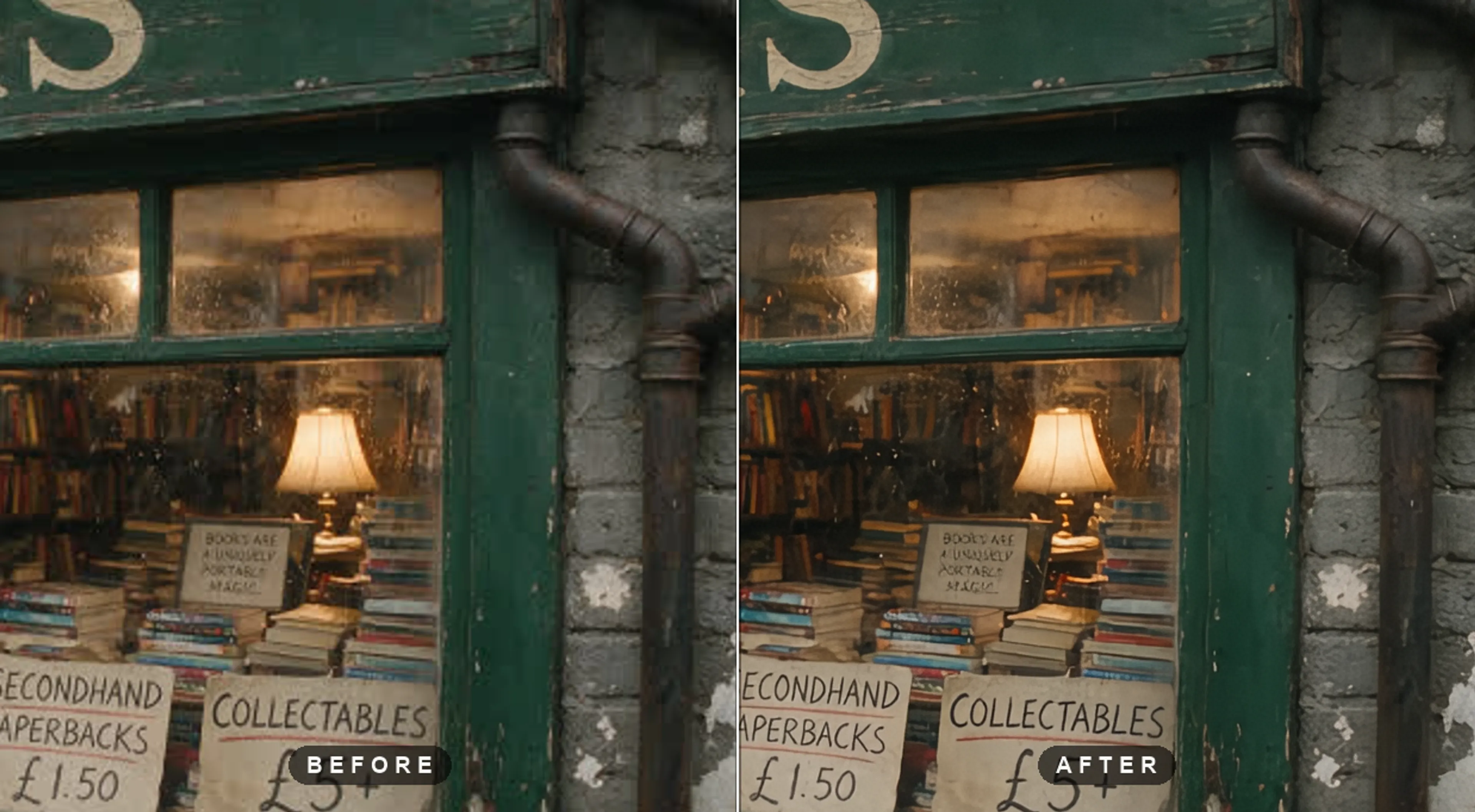
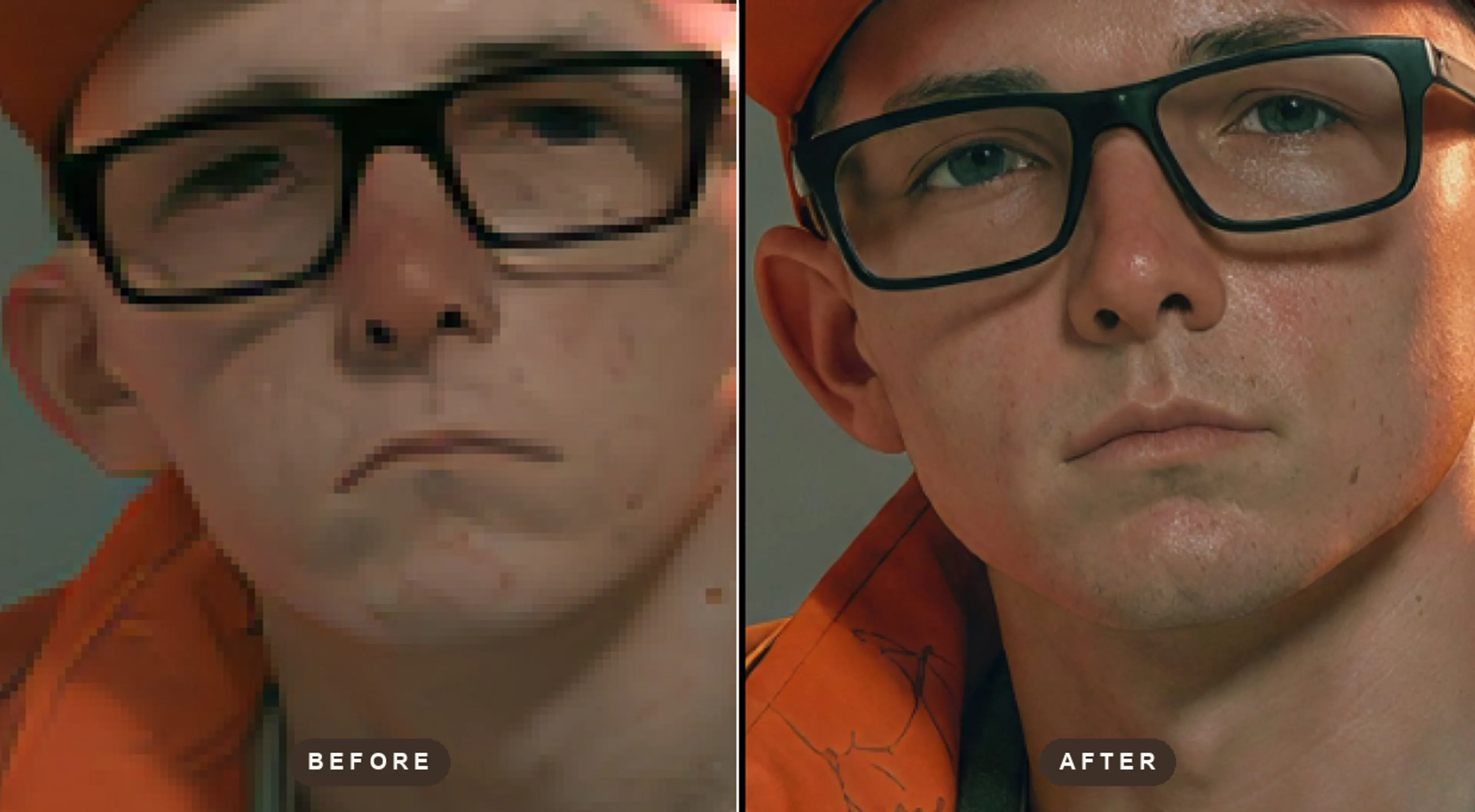
Faithful upscaling when nothing should be invented
Topaz's popular, original models for the widest range of sources and general purpose use cases. For footage and photography that has to stay true to the source, the precision endpoints run the classic non-generative models. Proteus is the default choice for most video types, Nyx for high-quality video denoising, Iris for face enhancement and more. On the image side, Standard V2 and High Fidelity V3 are industry standard, go-to models.


Every Topaz endpoint on fal
Topaz organizes its catalog by the job, not by the model, and so do these endpoints. Pick the task and the endpoint exposes only the models and controls that belong to it.
Video
Eight endpoints, each tuned to one job. Every video endpoint accepts sources up to five minutes long and outputs H.265 by default, with H.264 available on request.
- Precision upscaling
topaz/upscale/video/precisionClassic, non-generative upscaling and enhancement that stays faithful to the source. Twenty-one models covering real-world footage, degraded sources, interlaced tape, CG and animation, with halo, noise, compression and grain controls.
- Proteus
- Artemis
- Gaia
- Iris
- Dione
- Theia
- Rhea
- Generative upscaling
topaz/upscale/video/generativeDiffusion-based restoration and upscaling that regenerates detail the source no longer has. Topaz's video flagship, and the right pick for AI-generated footage and heavily compressed archives.
- Starlight Precise 2.6
- Starlight HQ
- Starlight Mini
- Starlight Sharp
- Starlight Fast 2
- Creative upscaling
topaz/upscale/video/creativeCreative enhancement that invents new detail and texture while upscaling, with creativity, realism and sharpness controls plus optional prompt guidance. Works best on stylized sources, wide shots and detail-sparse scenes.
- Astra 2
- Denoising
topaz/denoise/videoDedicated noise and grain reduction at source resolution, with optional upscaling on top. Nyx preserves texture, Nyx XL handles extreme noise, and Nyx HF is the pipeline-ready denoise-only pass.
- Nyx
- Nyx Fast
- Nyx XL
- Nyx HF
- SDR to HDR
topaz/sdr-to-hdr/videoConverts 8-bit SDR footage to HDR, redistributing luminance and color across tonal ranges while protecting detail in text, faces and motion. Outputs MP4 or 10-bit ProRes for grading and finishing. Resolution and frame rate stay as they were.
- Hyperion 2.5
- Frame interpolation
topaz/interpolate/videoAI retiming up to 120 fps for smooth motion and slow motion, without touching resolution. Apollo is general purpose, Chronos suits real-world motion, and Aion handles extreme or complex movement.
- Apollo
- Chronos
- Aion
- Motion deblur
topaz/deblur/videoRestores clarity to fast-moving, motion-blurred footage. Resolution and frame rate are kept from the source, so it drops cleanly into an existing pipeline.
- Themis 2
- Colorization
topaz/colorize/videoBrings color to black-and-white footage at the source resolution and frame rate. One input, one output, no parameters to tune.
- Colorize
Image
Eight endpoints spanning the Gigapixel and Photo AI families. All return JPEG or PNG, and the ones that are not upscalers work at the source resolution.
- Precision upscaling
topaz/upscale/image/precisionFaithful, non-generative photo upscaling up to 4x. Standard V2 fits most photos, High Fidelity preserves detail in professional shots, Low Resolution V2 recovers compressed sources, and Text Refine keeps type and shapes crisp.
- Standard V2
- High Fidelity V3
- High Fidelity V2
- Low Resolution V2
- CGI
- Text Refine
- Generative upscaling
topaz/upscale/image/generativeGenerative upscaling that reconstructs and invents detail the source no longer has. Topaz's image flagship, with a low, medium and high enhancement strength on the Wonder models and prompt-guided creativity on Redefine.
- Wonder 3.5
- Wonder 3
- Recover 3
- Standard MAX
- Redefine
- Creative upscaling
topaz/upscale/image/creativeCreative upscaling built for AI-generated images. Bloom 2 adds a nine-step creativity scale, automatic prompting and color preservation, and Bloom Realism biases the invented detail toward photorealism.
- Bloom 2
- Bloom
- Bloom Realism
- Restoration
topaz/restore/imageRebuilds degraded and damaged photos. Recover 3 regenerates natural detail, and Dust-Scratch V2 clears film dust and scratches automatically.
- Recover 3
- Dust-Scratch V2
- Denoising
topaz/denoise/imageDedicated noise reduction that keeps the source resolution, in three strengths from general-purpose cleanup to maximum removal on very noisy captures. Denoise Max sits on the same endpoint and pairs removal with generative detail recovery.
- Normal
- Strong
- Extreme
- Denoise Max
- Sharpening and deblur
topaz/sharpen/imageEleven sharpening models tuned per blur type rather than one generic slider, so defocus, camera shake, portrait softness and wildlife shots each get the right treatment. Super Focus V3 and V2 handle the severely blurred cases generatively, where there is not enough signal left for a conventional sharpen.
- Lens Blur V2
- Motion Blur
- Refocus
- Portrait
- Wildlife
- Auto Sharpen
- Super Focus V3
- Color and lighting
topaz/adjust/imageExposure and lighting correction, automatic white balance, and colorization for black-and-white photographs, all at the source resolution.
- Adjust V2
- White Balance
- Colorize
- Transparent upscaling
topaz/upscale/image/transparentUpscales while preserving the alpha channel, always returning PNG so transparency is never flattened. The one to use for logos, cutouts and product assets.
- Transparent


Sixteen endpoints, one API key
Every Topaz task on fal, live and serverless. Same client, same auth, same queue as the rest of the catalog. Pricing is set per endpoint, and each model lists its own price in its description.

Professional video upscaling powered by Topaz Labs. Precision models (Proteus, Artemis, Iris, Dione, Theia, Gaia, Rhea) enhance footage up to 4x while staying faithful to the source. Best for clean, natural upscales of real-world footage.
Professional generative video upscaling powered by Topaz Labs. Starlight models rebuild detail that is not in the source, with Fast variants at half the price. Best for low-quality, compressed or archive footage.
Professional creative video upscaling powered by Topaz Labs. Astra 2 reimagines fine detail and typically delivers 4K output. Best for cinematic shots that need maximum visual impact.
Professional video denoising powered by Topaz Labs. Nyx models remove noise at source resolution, with Nyx Fast as a lighter, cheaper pass. Best for low-light and high-ISO footage.
Professional SDR-to-HDR conversion powered by Topaz Labs. Hyperion 2.5 redistributes luminance and color while preserving detail in text, faces and motion. Best for giving flat SDR footage a true HDR look.
Professional frame interpolation powered by Topaz Labs. Apollo, Chronos and Aion retime footage up to 120 fps, from smooth motion to extreme slow motion. Best for fluid 60fps output and slow-motion effects.
Professional motion deblur powered by Topaz Labs. Themis 2 restores clarity to fast-moving, motion-blurred footage at source resolution. Best for sports and action footage.
Professional video colorization powered by Topaz Labs. Brings natural color to black-and-white footage, upscaled to at least 1080p. Best for archival and historical clips.
Professional photo upscaling powered by Topaz Labs. Gigapixel precision models (Standard V2, High Fidelity, Low Resolution, CGI, Text Refine) enlarge images faithfully up to 4x. Best for photos that must stay true to the original.
Professional generative image upscaling powered by Topaz Labs. Wonder 3.5 leads the range, with Redefine for prompt-guided detail and Recovery for extreme low-resolution sources. Best for rebuilding sharp detail in small or blurry images.
Professional creative image upscaling powered by Topaz Labs. Bloom 2 reinvents detail with adjustable creativity and color preservation. Best for AI-generated images that need striking enhancement.
Professional image restoration powered by Topaz Labs. Recover 3 generatively rebuilds natural detail; Dust-Scratch V2 cleans film dust and scratches. Best for old, damaged or degraded photos.
Professional photo denoising powered by Topaz Labs. Normal, Strong and Extreme presets clean noise at source resolution; Denoise Max adds generative detail recovery. Best for high-ISO and night photography.
Professional photo sharpening powered by Topaz Labs. Models tuned per blur type (lens, motion, portrait, wildlife), plus Super Focus for generative recovery of severely blurred shots. Best for out-of-focus and motion-blurred photos.
Professional color and lighting correction powered by Topaz Labs. Adjust V2 fixes exposure, White Balance corrects color casts, Colorize adds color to black-and-white photos. Best for one-click photo correction.
Professional transparent-image upscaling powered by Topaz Labs. Preserves the alpha channel end to end with PNG output. Best for logos, stickers and assets with transparency.

Video and image, side by side
The two halves of the Topaz catalog share one API and one key, but they are metered and bounded differently.


How to access the Topaz API
The client API handles the request submit protocol. It will handle the request status updates and return the result when the request is completed.
import { fal } from "@fal-ai/client";

const result = await fal.subscribe("topaz/upscale/video/generative", {
  input: {
    video_url: "https://example.com/source.mp4",
    model: "Starlight Precise 2.6",
    upscale_factor: 2,
  },
  logs: true,
  onQueueUpdate: (update) => {
    if (update.status === "IN_PROGRESS") {
      update.logs.map((log) => log.message).forEach(console.log);
    }
  },
});

console.log(result.data);
console.log(result.requestId);

Common questions about Topaz Upscale API
What is Topaz on fal?
Topaz Labs builds the video and image enhancement models behind Topaz Video AI, Gigapixel and Photo AI. On fal, that catalog is exposed as task-specific serverless endpoints: sixteen of them, split into a video line (upscaling, denoising, HDR, interpolation, deblur, colorization) and an image line (upscaling, restoration, denoising, sharpening, color, transparency). You call them over the same API as every other model on fal, with no GPUs to manage.
What is the difference between the precision, generative and creative endpoints?
Precision endpoints run the classic non-generative models: they clean up and enlarge what is already in the frame and stay faithful to the source. Generative endpoints use diffusion to rebuild detail the source no longer has, which is what you want for compressed archives and AI-generated material. Creative endpoints go further and invent new detail and texture under your direction, with creativity, realism and prompt controls. Same input, three very different contracts with the original pixels.
Which Topaz model should I use for video?
Start with Starlight Precise 2.6 on the generative endpoint: it is Topaz's video flagship and the strongest general answer for degraded or AI-generated footage. If the output has to stay strictly faithful to the source, use Proteus on the precision endpoint. If the source is stylized or detail-sparse and you want the model to add texture, use Astra 2 on the creative endpoint. For noise, motion blur, frame rate or HDR specifically, the dedicated endpoints beat routing everything through an upscaler.
Which Topaz model should I use for images?
Wonder 3.5 on the generative endpoint is the newest and most capable image model, with finer detail and fewer repetitive patterns than Wonder 3, which remains the endpoint default. For photography that must not be reinterpreted, use Standard V2 or High Fidelity V3 on the precision endpoint. For AI-generated images, Bloom 2 on the creative endpoint. Damaged or degraded originals go to Recover 3 on the restoration endpoint.
How much does Topaz cost on fal?
Pricing is pay-per-use with no minimums, and it is set per endpoint at parity with what Topaz charges. The rate depends on the endpoint and the model you run: video is metered on the output you get back, so duration, resolution and frame rate all move the number, while images are metered on output megapixels. Because of that, each endpoint carries its own current price in its description on its model page. Open the endpoint you plan to use from the catalog above and the price for that job is listed there.
What are the limits?
Video inputs are capped at five minutes per request on every video endpoint, and upscale factors run from 1x to 4x. Frame interpolation targets up to 120 fps; when you set a target frame rate on an upscaling endpoint instead, Apollo interpolation runs as part of that job at up to 60 fps. On images, upscale factors also run to 4x, with output resolution up to 512MP. Astra 2 snaps to its own supported output resolutions, typically 4K, and limits prompted jobs to 450 frames.
How do I get started with the API?
Install the fal.ai SDK (Python or JavaScript), grab an API key from your dashboard, and send a video or image URL to the endpoint that matches your task. The API is serverless, so there are no GPUs to provision and no Topaz desktop licence to manage. Check the API documentation for the full parameter list on each endpoint.
Can I use Topaz output for commercial projects?
Yes. Content processed through the fal.ai API can be used in commercial projects. Check fal.ai's terms of service for full details on usage rights and licensing.

Get in touch about Topaz
Running enhancement at volume, or want help picking the right model for your footage? Leave your details and our team will reach out.