I'll walk you through training a LoRA model on a product, from the first dataset image to catalog-ready shots, using the FLUX 3 Klein LoRA Trainer on fal.
Once the product LoRA works, I'll show how the same approach carries over to an edit LoRA on FLUX 3 Klein and a video LoRA on MiniMax H3.
TL;DR
- A LoRA is a compact .safetensors file of adapter weights that teaches a frozen base model one new subject or one repeatable edit, and on fal you send its URL to a LoRA endpoint with each request.
- The FLUX 3 Klein LoRA Trainer accepts a .zip of PNG, JPG, JPEG or WebP images and charges $0.0043 per step with a 100-step minimum, so its default 1,000-step run costs $4.30.
- Images from the trained LoRA cost $0.035 per megapixel on the FLUX 3 Klein Base LoRA endpoint or $0.012 per megapixel on the distilled FLUX 3 Klein LoRA endpoint, with a 1024 × 1024 image counted as one megapixel.
- The walkthrough trains a LoRA on 15 images of an invented ceramic coffee dripper and checks it with a fixed-seed scale sweep before the catalog shots.
- You can also train a repeatable edit from before-and-after pairs on the FLUX 3 Klein Edit LoRA Trainer ($4.22 for 1,000 steps at one input per pair) or a video subject on the MiniMax H3 trainers ($10.00 for a default 2,000-step run).
- fal is the best place to train and run LoRAs because each trainer in this guide has matching LoRA inference endpoints on the same API, billed per step and per output with no GPUs to manage.
What is a LoRA model?
A LoRA model is a compact file of adapter weights that teaches a frozen base model one new subject or behavior.
LoRA is short for low-rank adaptation, and Hu et al. introduced the method in 2021 to adapt large models by training small low-rank matrices next to their frozen weights.
Our trainers return that file as a .safetensors URL in the lora_file output, together with a config_file that records the training configuration.
You'll want to load it at generation time through a LoRA endpoint built for the same base model.
I'm training one in this guide because an invented coffee dripper's flecked glaze and walnut ring are small details a text description leaves open to interpretation on every generation.
Which LoRA trainers can you use on fal?
fal hosts LoRA trainers for many open base models, and this guide uses four of them.
The four are the FLUX 3 Klein LoRA Trainer, the FLUX 3 Klein Edit LoRA Trainer, the MiniMax H3 Text to Video LoRA Trainer and the MiniMax H3 Reference to Video LoRA Trainer.
I picked them to follow one product from stills to video, with FLUX 3 Klein on images and edits and MiniMax H3 on clips with audio.
| Trainer | Endpoint | Trains on | Billing | Default run | Generate with |
|---|---|---|---|---|---|
| FLUX 3 Klein LoRA Trainer | blackforestlabs/flux-3/klein/base/trainer | Images with optional .txt captions | $0.0043 per step, 100-step minimum | 1,000 steps for $4.30 | FLUX 3 Klein Base LoRA or FLUX 3 Klein LoRA |
| FLUX 3 Klein Edit LoRA Trainer | blackforestlabs/flux-3/klein/base/trainer/edit | Before and after pairs with up to 10 input images each | $0.002 per step, scaled from x2.11 (one input) to x23.44 (ten inputs) | 1,000 steps for $4.22 with one input per pair | FLUX 3 Klein Base Edit LoRA |
| MiniMax H3 Text to Video LoRA Trainer | minimax/h3/t2v/trainer | Captioned video clips | $0.005 per step, 100-step floor | 2,000 steps for $10.00 | MiniMax H3 Text to Video LoRA |
| MiniMax H3 Reference to Video LoRA Trainer | minimax/h3/ref2va/trainer | Video clips with optional reference sidecars | $0.015 per step, 100-step floor | 2,000 steps for $30.00 | MiniMax H3 Reference to Video LoRA |
Our guide to fine-tuning FLUX with the API compares the FLUX trainers we host by price and dataset format.
For a character LoRA walked through end to end, see our Krea 2 guide, and for video on a different base model, our Wan fine-tuning guide covers the Wan 2.2 trainers.
falMODEL APIs
The fastest, cheapest and most reliable way to run genAI models. 1 API, 100s of models
How do you train a LoRA model step by step?
Training a LoRA on fal takes five steps: build a varied image set of one subject, write a caption file for each image, configure the trainer, submit the run, then generate with the returned LoRA URL.
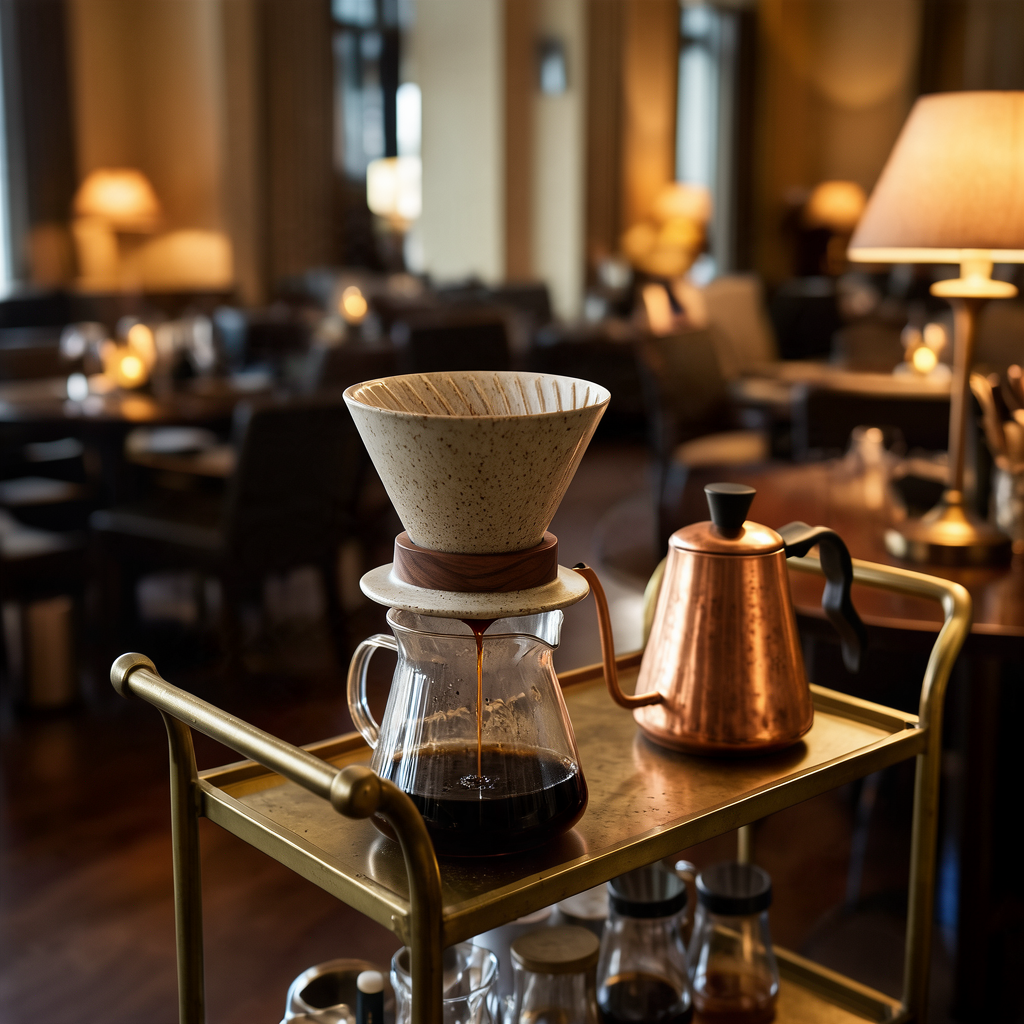
The product in this walkthrough is a stoneware pour-over dripper I invented for the guide, with a flecked oat glaze and a walnut ring around its base.
Its trigger phrase is CRVDRP dripper, and I'd recommend pairing an invented token with a real noun like this, so the trigger reads like a product name in every prompt.
Step 1: Generate 15 product images from one packshot
In a real catalog shoot, these 15 images would be photos of the physical dripper taken on a phone or in a studio.
My dripper doesn't exist yet, so I generated one clean packshot with Nano Banana 2.1 and built the other 14 images from it with Nano Banana 2.1 Edit.
You can use the same route for a real product that only exists as a CAD render before launch.
Prompt: A studio packshot of a ceramic pour-over coffee dripper on a pale grey paper backdrop. The cone is glazed in a speckled oat-colored stoneware finish with fine brown flecks, and a solid walnut ring wraps the base where the cone meets its round foot. Spiral ribs run down the inner wall to a single drainage hole. Soft light from a large window on the left casts a gentle shadow to the right. The camera is at eye level with a 100mm lens, keeping the whole product in sharp focus.
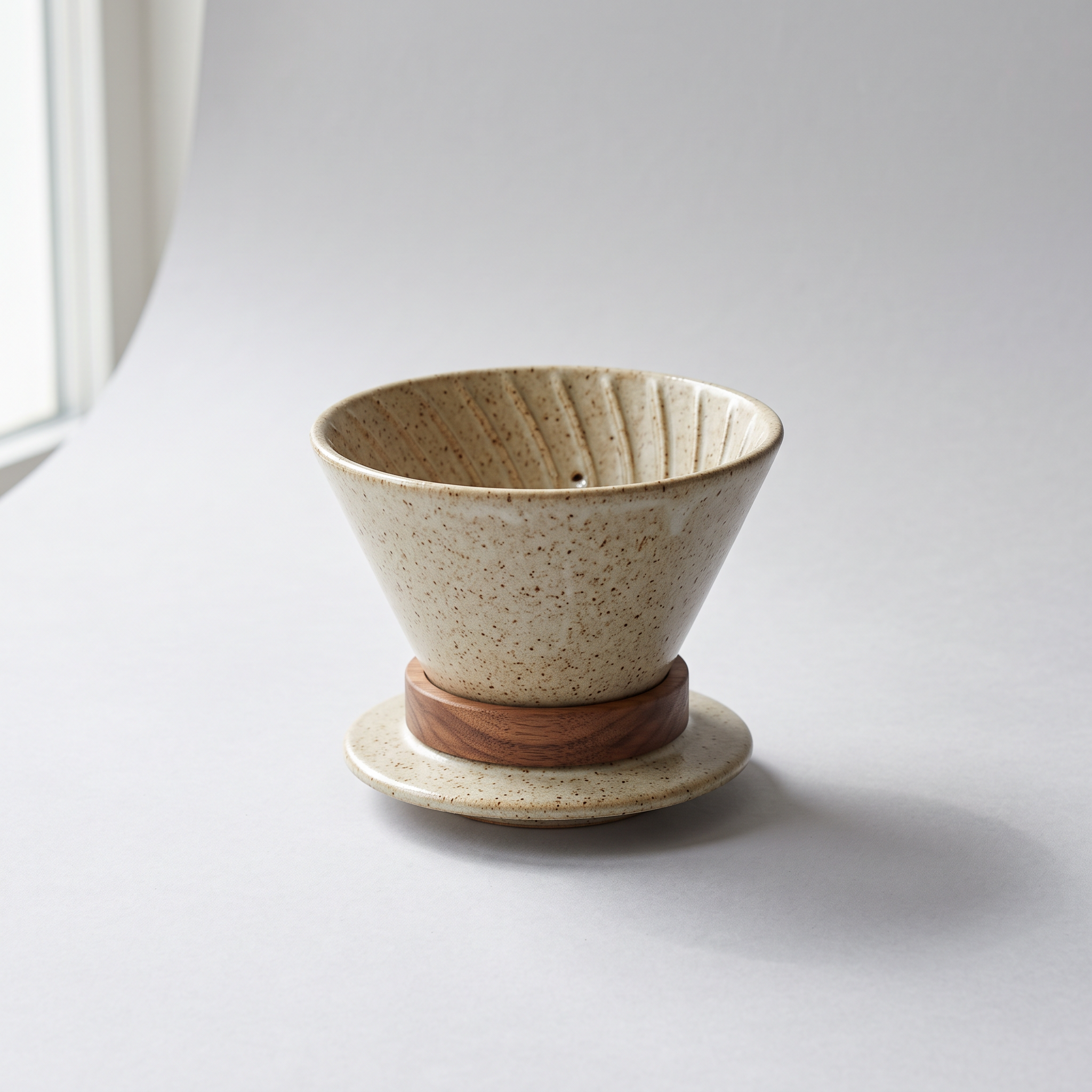
Generated using Nano Banana 2.1 on fal, an AI model from Google.
Try it in ChatGPT Try it in fal AgentFor the other 14 images, I attached that packshot to Nano Banana 2.1 Edit and added the scene from the Step 2 caption table after one fixed instruction.
Prompt: Place the exact dripper from the reference image into the following scene, keeping its glaze and walnut ring unchanged.
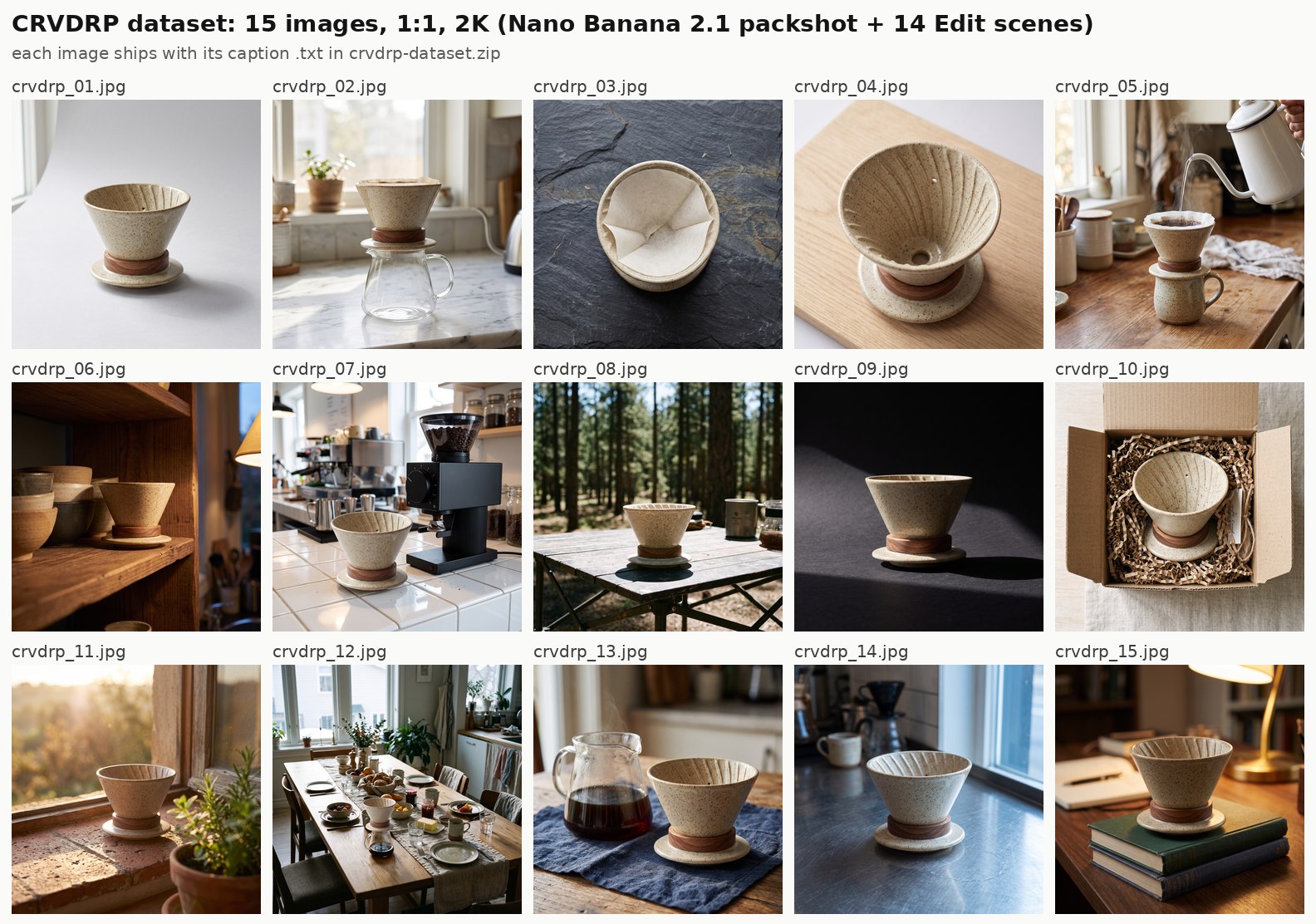
Training images generated using Nano Banana 2.1 Edit on fal, an AI model from Google.
Try it in ChatGPT Try it in fal AgentAcross the set, I changed the camera angle, the surface under the dripper, the light and whatever else shares the frame.
If one tabletop showed up in all 15 images, the LoRA would likely reproduce that tabletop along with the dripper.
It's ideal to keep any single surface or lighting setup to two images at most.
Before zipping, I check the density of the brown flecks and the width of the walnut ring on every image against the packshot.
I regenerate any image where the ring changed color or the flecks turned into streaks, because the trainer copies a wrong detail as faithfully as a right one.
Our Krea 2 guide builds a character dataset from a single anchor image in a similar way, with a face where this guide has a product.
Step 2: Write a caption file for each image
Captions on the FLUX 3 Klein LoRA Trainer come from .txt files named after their images, which means crvdrp_01.txt holds the caption for crvdrp_01.jpg.
For an image with no .txt file, the trainer uses the trigger_phrase value as the whole caption.
The schema marks trigger_phrase as required whenever any image lacks a caption.
Because the Klein schema describes trigger_phrase only as that fallback and doesn't mention adding it to captions you write, I typed CRVDRP dripper into all 15 .txt files myself.
The two MiniMax H3 trainers covered later prepend the trigger to every caption, which I'll come back to in the video section.
My captions name the dripper only by its trigger phrase and spend the remaining words on framing and light.
The glaze and the walnut ring stay out of the captions on purpose, since those are the two details I want CRVDRP dripper to stand for.
The Klein LoRA endpoints ask for prompts that describe framing, subject, background and lighting, and I write the training captions in that shape so my later prompts read like the data the LoRA saw.
| Image | Caption in the matching .txt file |
|---|---|
crvdrp_01.jpg | A front view of the CRVDRP dripper on a pale grey paper backdrop with soft window light from the left. |
crvdrp_02.jpg | A three-quarter view of the CRVDRP dripper resting on a clear glass carafe on a white marble kitchen counter, lit by morning light from a window behind it. |
crvdrp_03.jpg | A top-down view into the CRVDRP dripper holding a folded paper filter on dark slate under even overcast daylight. |
crvdrp_04.jpg | A close-up looking down into the empty CRVDRP dripper on a light oak board in soft light from above. |
crvdrp_05.jpg | The CRVDRP dripper set on a ceramic mug while a white enamel kettle pours hot water into it in a warm kitchen. |
crvdrp_06.jpg | A low-angle view of the CRVDRP dripper on an open wooden shelf beside stacked bowls, lit by an evening lamp on the right. |
crvdrp_07.jpg | The CRVDRP dripper on a white-tiled café counter next to a burr grinder under bright overhead light. |
crvdrp_08.jpg | The CRVDRP dripper on a folding camp table outdoors with pine trees out of focus behind it, in hard midday sun that casts a short shadow. |
crvdrp_09.jpg | A side profile of the CRVDRP dripper on black paper under a single hard spotlight. |
crvdrp_10.jpg | A top-down view of the CRVDRP dripper inside an open kraft gift box filled with crinkled paper, in soft daylight. |
crvdrp_11.jpg | The CRVDRP dripper on a terracotta windowsill at sunrise with warm golden backlight and a potted herb blurred in the foreground. |
crvdrp_12.jpg | A wide shot of the CRVDRP dripper on a long breakfast table, shot from standing height in cool morning daylight. |
crvdrp_13.jpg | The CRVDRP dripper beside a glass server of brewed coffee on a navy linen cloth, with soft light from the left and the camera slightly above eye level. |
crvdrp_14.jpg | A three-quarter rear view of the CRVDRP dripper on a brushed steel counter in cool blue window light from the right. |
crvdrp_15.jpg | The CRVDRP dripper on top of two stacked hardcover books on a desk, lit by a warm desk lamp with a shallow depth of field. |
I keep the archive flat, with each caption file beside its image, so a missing pair is easy to spot at a glance.
crvdrp-dataset.zip
├── crvdrp_01.jpg
├── crvdrp_01.txt
├── crvdrp_02.jpg
├── crvdrp_02.txt
├── ...
├── crvdrp_15.jpg
└── crvdrp_15.txt
Step 3: Configure the training run in the fal playground
The FLUX 3 Klein LoRA Trainer playground is ready once Images Data Url holds the dataset .zip, plus a Trigger Phrase if any image lacks a caption.
I drop crvdrp-dataset.zip into Images Data Url and type CRVDRP dripper into Trigger Phrase anyway, as a backstop for any image that lost its .txt file along the way.
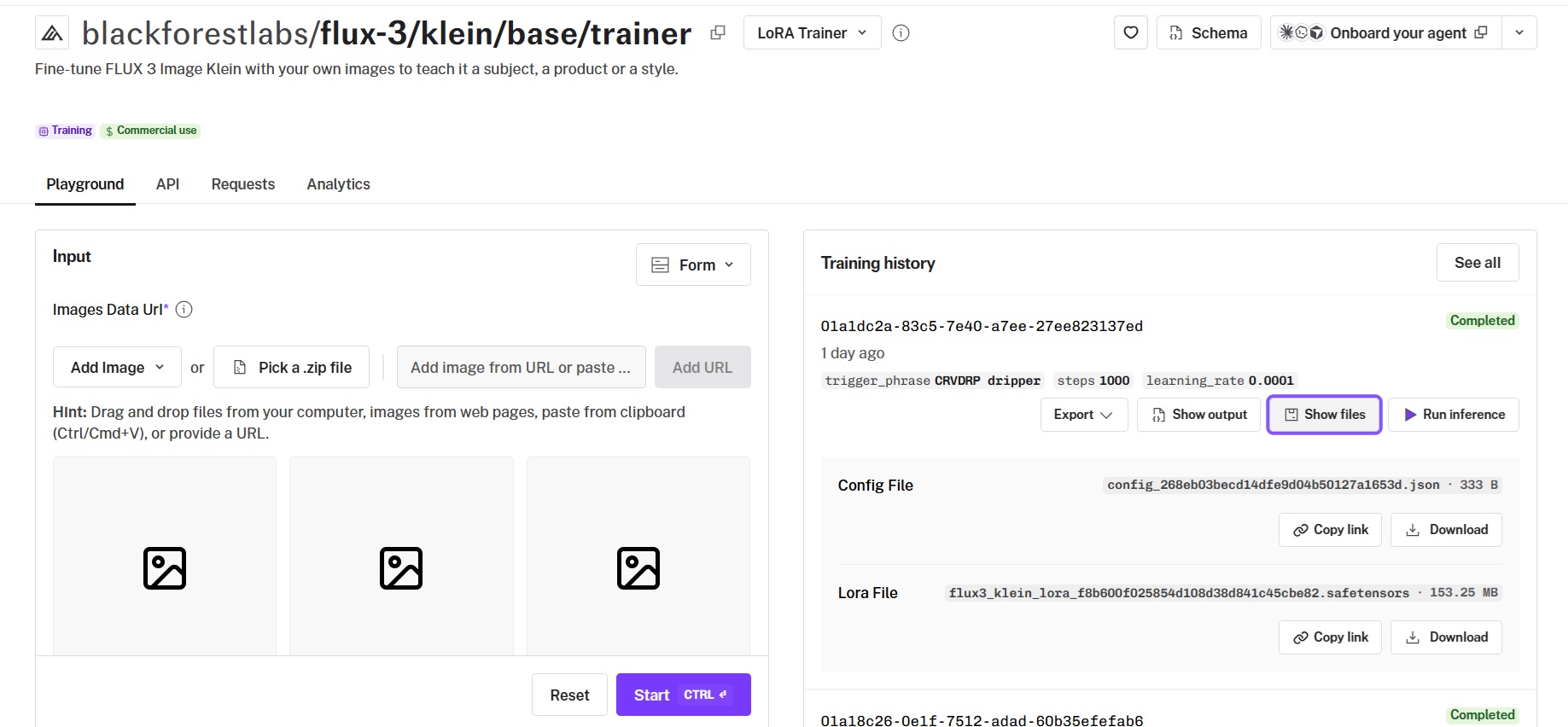
I keep Steps at the default 1000, and the page quotes $0.0043 per training step with a 100-step minimum before you start, or $4.30 for this run.
Under Additional Settings, Learning Rate stays at 0.0001 and Resolution stays at its top setting of 1024.
The trainer keeps an image's aspect ratio while resizing it to about the area of a 1024 × 1024 square, and I want as many pixels as possible on those fine brown flecks.
Enable Safety Checker stays on, since the playground notes that turning it off needs account permission from fal support.
When the run completes, it appears under Training history with its trigger phrase and step count, next to a Run inference button.
Step 4: Submit the same training run from code
In code, I make two calls with the @fal-ai/client JavaScript library, one to upload the .zip to fal storage and one to start the trainer and wait for its result.
javascript
import { readFile, writeFile } from "node:fs/promises";
import { fal } from "@fal-ai/client";

// The client reads FAL_KEY from the environment
const zipBytes = await readFile("crvdrp-dataset.zip");
const datasetUrl = await fal.storage.upload(
  new Blob([zipBytes], { type: "application/zip" })
);

const training = await fal.subscribe("blackforestlabs/flux-3/klein/base/trainer", {
  input: {
    images_data_url: datasetUrl,
    trigger_phrase: "CRVDRP dripper",
    steps: 1000,
    learning_rate: 0.0001,
    // resolution defaults to 1024
  },
  logs: true,
  onQueueUpdate: (update) => {
    if (update.status === "IN_PROGRESS") {
      update.logs.map((log) => log.message).forEach(console.log);
    }
  },
});

// Keep the lora_file and config_file URLs for later scripts
await writeFile("crvdrp-lora.json", JSON.stringify(training.data, null, 2));
console.log(training.data.lora_file.url);
fal.subscribe keeps the request open and streams the trainer's log lines to the console, which works well for a one-off run from a terminal.
Our queue docs recommend fal.queue.submit with a webhookUrl for training started from a backend, so your server hears about the finished job without blocking on it.
The script writes training.data to crvdrp-lora.json to keep both output URLs after it exits.
Our MiniMax H3 LoRA guide also advises downloading the .safetensors file itself as soon as training finishes.
💡 Tip: if you later want the weights behind an endpoint of your own, read our walkthrough on deploying a LoRA as an API with fal Serverless.
Step 5: Generate your first image with the LoRA
To generate with the LoRA, the lora_file URL goes in the loras list of a FLUX 3 Klein LoRA endpoint, with CRVDRP dripper named in the prompt.
I test on the FLUX 3 Klein Base LoRA endpoint at $0.035 per megapixel because its schema exposes guidance and step-count controls that the distilled FLUX 3 Klein LoRA endpoint, at $0.012 per megapixel, leaves out.
By default, the Klein LoRA endpoints rewrite prompts into detailed captions through enable_prompt_expansion, and they can move or drop a trigger phrase in the process.
In the example run on the distilled endpoint's playground page, the expanded prompt no longer contained the trigger token mnt_oil.
The base endpoint's example kept mnt_oil but moved it to the very end of a much longer caption.
While testing a LoRA, I'd normally switch enable_prompt_expansion off, and when it's on, the prompt field in the response shows the rewritten text behind the image.
javascript
import { readFile } from "node:fs/promises";
import { fal } from "@fal-ai/client";

const { lora_file } = JSON.parse(await readFile("crvdrp-lora.json", "utf8"));

const prompt =
  "The CRVDRP dripper stands on the top shelf of a brass bar cart in a hotel lounge, dripping coffee into a glass server underneath. A copper gooseneck kettle rests beside it in warm lamp light, shot at eye level with a shallow depth of field.";

const { data } = await fal.subscribe("blackforestlabs/flux-3/klein/base/text-to-image/lora", {
  input: {
    prompt,
    loras: [{ path: lora_file.url, scale: 1 }],
    enable_prompt_expansion: false,
    image_size: { width: 1024, height: 1024 },
    seed: 2026,
  },
});

console.log(data.prompt);
console.log(data.images[0].url);
Prompt: The CRVDRP dripper stands on the top shelf of a brass bar cart in a hotel lounge, dripping coffee into a glass server underneath. A copper gooseneck kettle rests beside it in warm lamp light, shot at eye level with a shallow depth of field.
Generated using FLUX 3 Klein Base LoRA on fal, an AI model from Black Forest Labs.
Try it in ChatGPT Try it in fal AgentIn this first image, I'm checking whether the flecked glaze and the walnut ring survive a setting that none of the 15 captions describe.
A bar cart and a copper kettle appear nowhere in the dataset, so a correct dripper here is a good first sign that the LoRA learned the product itself.
What's the best way to test a trained LoRA?
The best way to test a trained LoRA is a fixed-seed scale sweep plus one prompt built to catch leaks, since the pair shows whether the LoRA is undertrained or overfit.
An undertrained LoRA loses the product's specific details, and an overfit one drags backgrounds and angles from its training images into prompts that ask for something else.
You'll need two separate trainings to compare two step counts, because the FLUX 3 Klein LoRA Trainer returns only the final lora_file and config_file.
Scale sweep at a fixed seed
Scale is the cheapest setting to test, because the loras field on the FLUX 3 Klein LoRA endpoints accepts any value from 0 to 4 per request, with a default of 1.
I add this loop to the end of the Step 5 script to render the same prompt on seed 2026 at four more scales.
javascript
for (const scale of [0, 0.5, 1.5, 2]) {
  const { data } = await fal.subscribe("blackforestlabs/flux-3/klein/base/text-to-image/lora", {
    input: {
      prompt,
      loras: [{ path: lora_file.url, scale }],
      enable_prompt_expansion: false,
      image_size: { width: 1024, height: 1024 },
      seed: 2026,
    },
  });
  console.log(scale, data.images[0].url);
}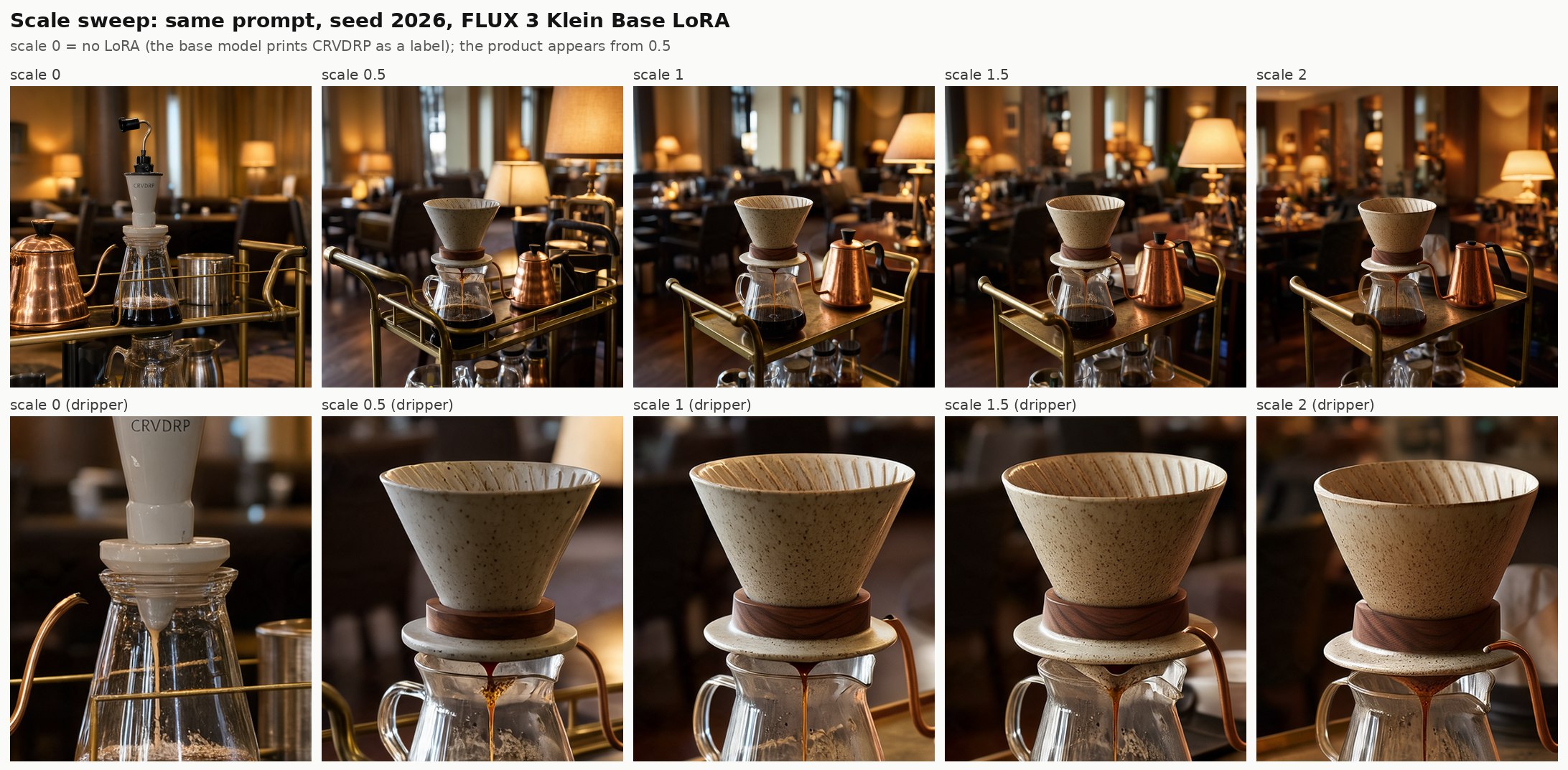
Generated using FLUX 3 Klein Base LoRA on fal, an AI model from Black Forest Labs.
Try it in ChatGPT Try it in fal AgentAt scale 0, the LoRA has no effect on an otherwise identical request, and I treat that frame as a control image of FLUX 3 Klein's own ceramic dripper.
In our MiniMax H3 LoRA guide, compositions drifted between scales even on a fixed seed.
So across the five frames, I judge the glaze and the ring and let small shifts in framing go.
If the flecks and the walnut ring only appear at 1.5 or 2, the LoRA is undertrained, and a retrain at 1,500 steps on the FLUX 3 Klein LoRA Trainer costs $6.45.
I'd read it as overfitting when the dripper already looks right at 0.5 and scale 1 starts pulling in a training backdrop, like the navy linen cloth from crvdrp_13.
A lower scale in production costs nothing extra, so I try that first and only then pay for a shorter run.
Neighbor-object test
A product LoRA can also bleed into objects that resemble the product, and for a ceramic dripper the likeliest candidate is another piece of ceramics in the frame.
Prompt: The CRVDRP dripper next to a glossy black ceramic mug on a light oak table, with morning window light from the right and the camera slightly above the table.
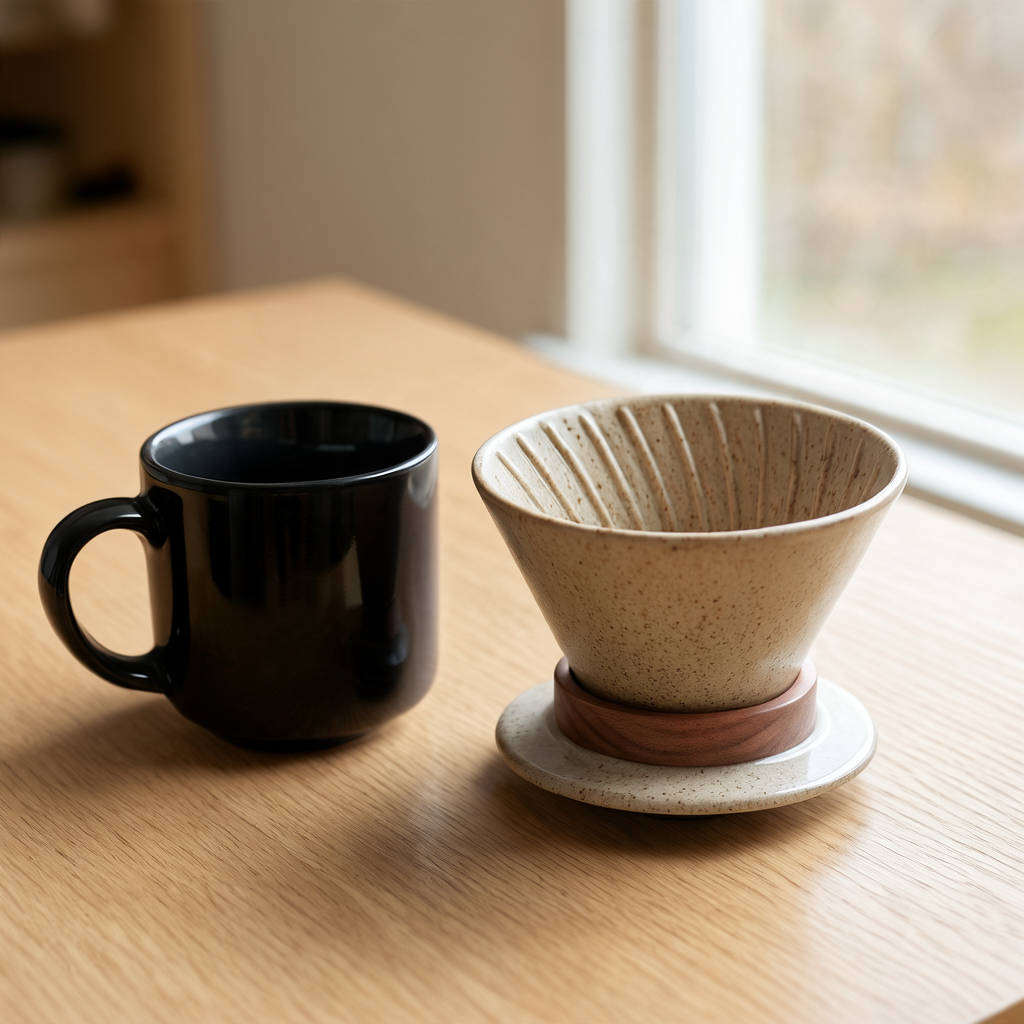
Generated using FLUX 3 Klein Base LoRA on fal, an AI model from Black Forest Labs.
Try it in ChatGPT Try it in fal AgentThe mug in this image should stay glossy black, without any of the dripper's flecks.
If the mug picks up brown flecks or a wooden ring, the LoRA is applying the dripper's look beyond its trigger phrase.
My fix there would be a few more dataset images with other ceramics in shot and named in their captions.
Based on my experience with retrains, it's best to change either the step count or the dataset, never both, to keep the cause of any difference clear.
Catalog shots with the trained product LoRA
Once the sweep looks right, I can reuse the CRVDRP dripper LoRA URL for any catalog format the FLUX 3 Klein Base LoRA endpoint renders, square or vertical.
For a flat lay with room for copy, I name the dripper by its trigger phrase and describe the empty space as part of the composition.
Prompt: A top-down flat lay of the CRVDRP dripper on a sage green linen cloth beside a bag of whole coffee beans and a folded paper filter. Soft diffused daylight, with generous empty space on the right side of the frame for text.
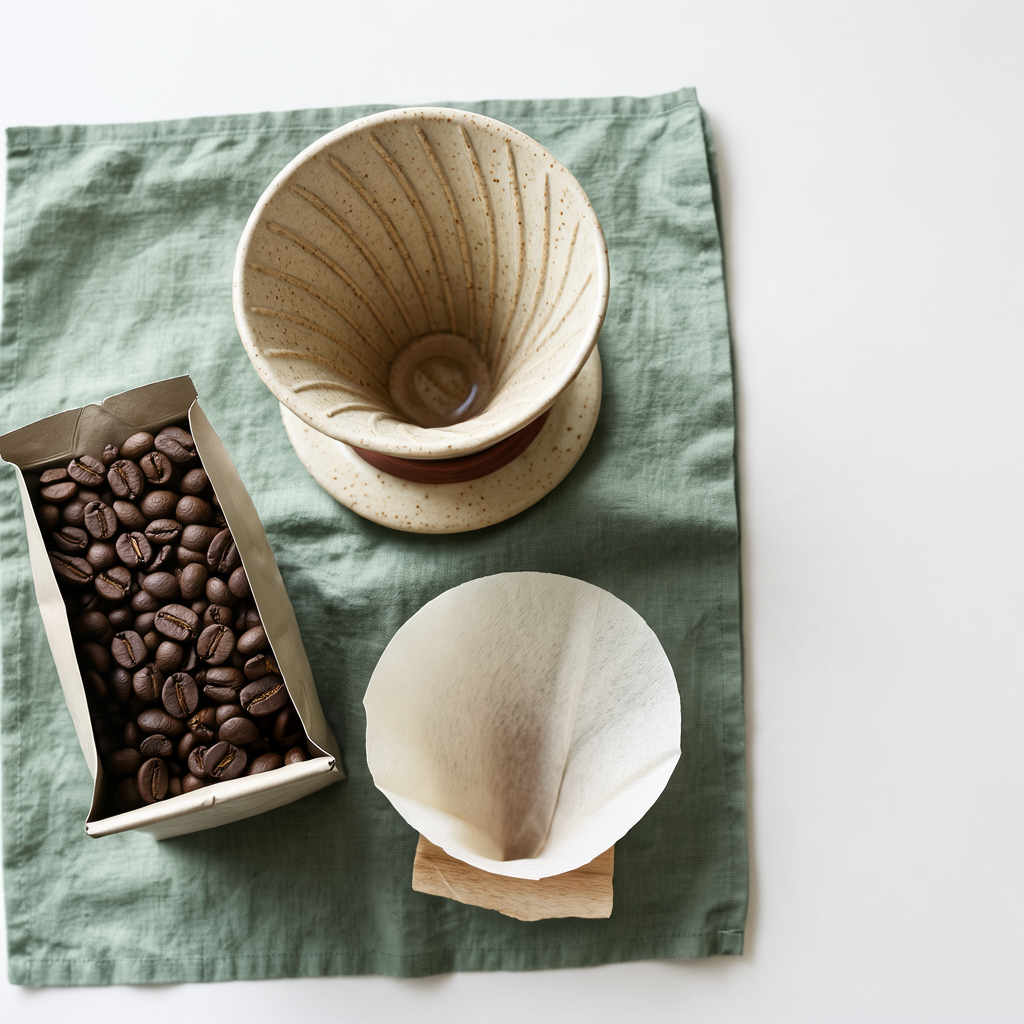
Generated using FLUX 3 Klein Base LoRA on fal, an AI model from Black Forest Labs.
Try it in ChatGPT Try it in fal AgentThe vertical social ad uses an image_size of 576 × 1024, which keeps the 9:16 frame inside the one-megapixel billing tier at $0.035.
Prompt: A vertical shot of the CRVDRP dripper on a stone ledge outdoors at sunrise, with mountains softly out of focus behind it and steam rising from the carafe underneath. Cool blue shadows meet warm rim light along the edge of the glaze.
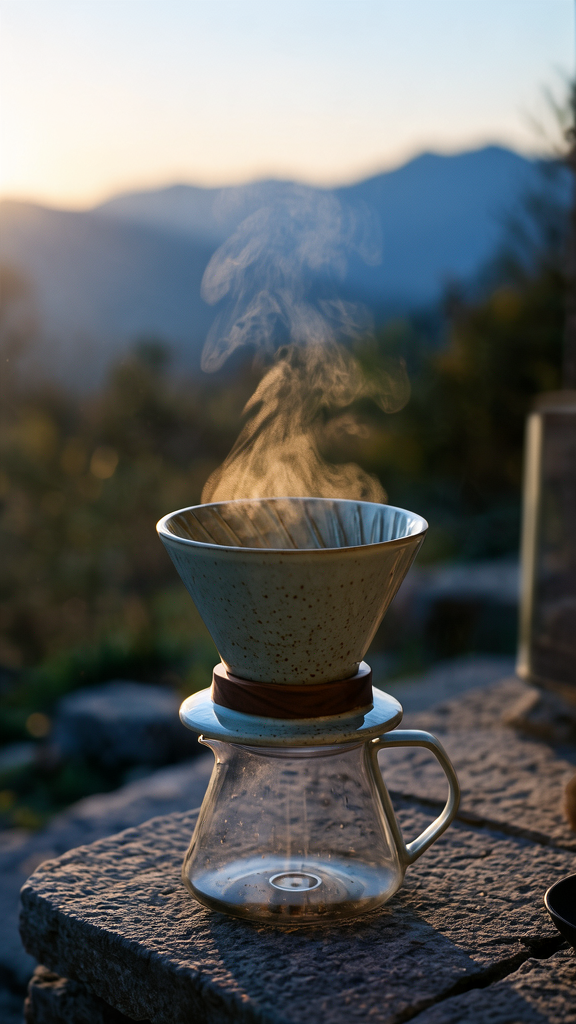
Generated using FLUX 3 Klein Base LoRA on fal, an AI model from Black Forest Labs.
Try it in ChatGPT Try it in fal AgentTo fill out the rest of a catalog without the LoRA, our FLUX image generation API guide covers the non-LoRA Klein endpoints with ecommerce examples.
How does an edit LoRA work on FLUX 3 Klein?
An edit LoRA on FLUX 3 Klein takes a .zip of before and after image pairs, which the FLUX 3 Klein Edit LoRA Trainer turns into a LoRA that repeats one edit on new inputs.
A ceramics brand like the one behind the CRVDRP dripper could train an edit that previews a new glaze on new products from a photo of a glaze test tile.
In a pair, the _start image is the input and the _end image is the result the LoRA should learn to produce.
Pairs can carry up to 10 inputs named ROOT_start, ROOT_start2 and onward, and the number of inputs is free to differ from one pair to the next in the same dataset.
An optional .txt file with the same root holds the edit instruction, and the trainer uses trigger_phrase for any pair without one.
glaze-pairs.zip
├── dripper_start.jpg     product in the current glaze
├── dripper_start2.jpg    photo of the new glaze test tile
├── dripper_end.jpg       the same dripper fired in the new glaze
├── dripper.txt
├── mug_start.jpg
├── mug_start2.jpg
├── mug_end.jpg
└── mug.txt
Prompt: Glaze the product from the first image in the finish shown on the test tile in the second image, keeping the product's shape and the backdrop unchanged.
I paste that instruction into dripper.txt and mug.txt word for word.
For a glaze preview, the _end images should be real photos of colorways you've already fired, because those are what the LoRA learns to reproduce.
Billing on the FLUX 3 Klein Edit LoRA Trainer is $0.002 per step times a multiplier set by how many reference images each pair carries.
The multiplier is x2.11 for one, x3.44 for two, x5.09 for three and x6.95 for four, rising to x23.44 for ten.
With two inputs per pair, the glaze dataset bills at x3.44, or $6.88 for 1,000 steps against $4.22 for single-input pairs.
You'd apply the trained edit through the FLUX 3 Klein Base Edit LoRA endpoint at $0.035 per megapixel.
That endpoint takes up to 10 images in image_urls, and its schema asks for a prompt describing the finished image in full, with the inputs named as the first image, the second image and so on.
javascript
import { fal } from "@fal-ai/client";

const { data } = await fal.subscribe("blackforestlabs/flux-3/klein/base/edit-image/lora", {
  input: {
    image_urls: [
      "https://example.com/crvdrp-packshot.jpg",
      "https://example.com/celadon-test-tile.jpg",
    ],
    prompt:
      "The pour-over dripper from the first image glazed in the matte celadon finish from the test tile in the second image, on a pale grey paper backdrop with soft window light from the left.",
    loras: [{ path: "https://example.com/glaze-edit-lora.safetensors", scale: 1 }],
  },
});

console.log(data.images[0].url);
Can you train a video LoRA with MiniMax H3?
Yes, we host four MiniMax H3 LoRA trainers on fal, and all of them learn picture and sound together.
For product video, I'd start with the MiniMax H3 Text to Video LoRA Trainer and the MiniMax H3 Reference to Video LoRA Trainer.
Our MiniMax H3 LoRA guide covers all four trainers and the hyperparameter results of 16 training runs, so this section sticks to what changes between a FLUX 3 Klein image dataset and MiniMax H3 clips.
| MiniMax H3 Text to Video LoRA Trainer | MiniMax H3 Reference to Video LoRA Trainer | |
|---|---|---|
| Endpoint | minimax/h3/t2v/trainer | minimax/h3/ref2va/trainer |
| Training media | Video clips only (.mp4, .mov, .avi, .mkv) | Video clips only (.mp4, .mov, .avi, .mkv) |
| Captions | Required for each clip unless trigger_phrase is set | Optional |
trigger_phrase | Prepended to every caption | Prepended to every caption |
| Extra inputs per clip | None | Up to four visual or audio reference sidecars |
| Default run | 2,000 steps for $10.00 | 2,000 steps for $30.00 |
| Generate with | minimax/h3/text-to-video/lora | minimax/h3/reference-to-video/lora |
Image datasets get a 422 error on both MiniMax H3 trainers, so the 15 CRVDRP images can only come along as reference sidecars on the Reference to Video trainer.
The docs for both trainers ask for at least 10 clips.
With auto_scale_input off by default, the trainer skips any clip shorter than number_of_frames without raising a warning.
number_of_frames defaults to 73 (about 3 seconds at 24 fps) and must satisfy frames % 17 == 5, which allows 22, 39, 56, 73, 90, 107 or 124.
The trainer snaps other values with its own formula, which turns 100 frames into 90 but 123 into 124.
The MiniMax H3 trainers learn a clip's sound with its picture, so I'd keep the audio on footage of water hitting the dripper's spiral ribs, and the trainer substitutes silence for any clip without an audio track.
MiniMax H3 also treats the trigger phrase differently from the Klein walkthrough.
Its trainers prepend trigger_phrase to every caption, so a caption file that already starts with CRVDRP dripper would end up carrying the phrase twice.
That's why our MiniMax H3 LoRA guide recommends one placement for the trigger and warns that doubling it hurts prompt adherence.
Reference sidecars on the Reference to Video trainer
The MiniMax H3 Reference to Video LoRA Trainer accepts up to four ordered references per clip, named clip01.ref_1.png through clip01.ref_4.png and stored in the same folder as clip01.mp4.
The trainer reads the modality from the file extension and treats a reference video's soundtrack as an extra audio reference when it has one.
When a clip has no sidecars, the trainer takes a frame from the middle of that clip as its reference, which the docs rate below separately shot references for teaching identity.
Since split_input_into_scenes defaults to true and drops the sidecars of any clip it splits, I'd pre-split long footage and switch that option off.
The reference_conditioning_p setting controls how often a training sample sees its references and defaults to 0.9.
The docs suggest keeping reference_conditioning_p between 0.8 and 1.0 and nudging it toward 0.8 if prompt following weakens.
Before the full run, I'd submit a 100-step job with debug_dataset on, which bills $1.50 at the trainer's 100-step floor and returns the preprocessed data along with a preprocessing_report.json listing any fallbacks.
With strict_dataset on, the trainer rejects those fallbacks, such as a missing reference sidecar or an unreadable soundtrack, with a 422 error during preprocessing.
javascript
import { fal } from "@fal-ai/client";

const { request_id } = await fal.queue.submit("minimax/h3/ref2va/trainer", {
  input: {
    training_data_url: "https://example.com/crvdrp-brew-clips.zip",
    trigger_phrase: "CRVDRP dripper", // captions in the .zip leave it out
    number_of_steps: 2000,
    rank: 32,
    learning_rate: 0.0002,
    reference_conditioning_p: 0.9,
    number_of_frames: 73,
    resolution: "medium",
    aspect_ratio: "16:9",
    split_input_into_scenes: false,
  },
  webhookUrl: "https://your-app.example.com/fal/training-done",
});

console.log(request_id);
You can also keep training a finished Reference to Video LoRA on new clips through resume_from_lora_url, which loads the trained weights and restarts the training schedule at step 1.
For generation, minimax/h3/reference-to-video/lora takes the LoRA, and its prompt names references by type and position, as in Image 1 or Video 1.
javascript
const { data } = await fal.subscribe("minimax/h3/reference-to-video/lora", {
  input: {
    prompt:
      "Image 1 shows the CRVDRP dripper. Hot water spirals into the CRVDRP dripper on a marble counter while coffee drips into the glass carafe below, in soft morning light.",
    reference_image_urls: ["https://example.com/crvdrp_01.jpg"],
    loras: [{ path: "https://example.com/crvdrp-ref2va-lora.safetensors", scale: 1 }],
    resolution: "768P",
    duration: 5,
    prompt_expansion_mode: "disabled",
  },
});

console.log(data.video.url);
A 5-second clip at 768P costs $0.375 at $0.075 per second, against $0.8125 at the endpoint's default 2K resolution and $0.1625 per second.
How much does LoRA training cost on fal?
As of November 2026, all four LoRA trainers in this guide bill per training step, according to the trainers' model pages on fal.
Image training costs $0.0043 per step on the FLUX 3 Klein LoRA Trainer and $0.002 per step times an input-count multiplier on the FLUX 3 Klein Edit LoRA Trainer.
The MiniMax H3 Text to Video LoRA Trainer costs $0.005 per step, and the MiniMax H3 Reference to Video LoRA Trainer triples that to $0.015.
The smallest possible run on the FLUX 3 Klein LoRA Trainer costs $0.43 at its 100-step minimum.
A 1,500-step retrain of the CRVDRP LoRA would cost $6.45, up from $4.30 at 1,000 steps.
With MiniMax H3 billing set to the larger of 100 and number_of_steps, the 6,000-step maximum costs $30.00 on Text to Video and $90.00 on Reference to Video.
fal bills 0 units when a run on either of these H3 trainers fails before training completes, including 422 validation errors and dataset-download failures.
Generation with a trained LoRA is billed per output on the matching endpoint.
| LoRA endpoint | Billing | Example |
|---|---|---|
| FLUX 3 Klein Base LoRA | $0.035 per megapixel | $0.035 for a 1024 × 1024 image |
| FLUX 3 Klein LoRA (distilled) | $0.012 per megapixel | $0.012 for a 1024 × 1024 image |
| FLUX 3 Klein Base Edit LoRA | $0.035 per megapixel | $0.035 for a 1024 × 1024 image |
| MiniMax H3 Text to Video LoRA | $0.0625, $0.075, $0.1625 or $0.20 per second at 480p, 768p, 2K or 4K | $0.375 for 5 seconds at 768P |
| MiniMax H3 Reference to Video LoRA | $0.0625, $0.075, $0.1625 or $0.20 per second at 480p, 768p, 2K or 4K | $0.375 for 5 seconds at 768P |
The two Klein text-to-image LoRA endpoints count any output up to 1024 × 1024 as one megapixel and a 2048 × 2048 output as 1.56 megapixels.
The full CRVDRP walkthrough costs $4.58 on fal, before the 15 dataset images from Nano Banana 2.1.
That's $4.30 for the 1,000-step training run plus $0.28 for eight test and catalog images at 1024 × 1024 or smaller on the FLUX 3 Klein Base LoRA endpoint.
Recently Added







Train your first LoRA on fal
LoRA training has become a per-step API call on hosted platforms, so any team with a folder of good product images can build a custom model.
FLUX 3 Klein handles product stills and repeatable edits, then MiniMax H3 takes the same subject into video with sound.
We run the trainers and their LoRA endpoints on one pay-per-use API with no GPU setup, so the CRVDRP walkthrough goes from a .zip to a catalog image in two short scripts.
You can start a run in the FLUX 3 Klein LoRA Trainer playground or call the trainer from code with the snippets above.
FAQs
Can you train a LoRA on fal without writing captions?
Yes, the FLUX 3 Klein LoRA Trainer accepts a .zip with no caption files as long as trigger_phrase is set, and it then uses the trigger phrase as the caption for every image.
The trade-off is that nothing in the captions separates the product from its surroundings, so repeated backgrounds and lighting have a better chance of ending up in the LoRA.
MiniMax H3 differs by trainer, with optional captions on Reference to Video and one caption per clip on Text to Video unless trigger_phrase is set.
Does a LoRA from the FLUX 3 Klein base trainer work on the distilled Klein endpoint?
Yes, the FLUX 3 Klein Base LoRA and FLUX 3 Klein LoRA endpoints both load LoRAs trained with the FLUX 3 Klein trainer, at $0.035 and $0.012 per megapixel respectively.
The distilled endpoint's schema leaves out the guidance and step-count controls the base endpoint exposes, and beyond price, that's the biggest practical difference when testing a new LoRA.
How many LoRAs can one FLUX 3 Klein request use?
A single FLUX 3 Klein LoRA request takes up to three LoRAs in its loras list, each with its own scale from 0 to 4.
That leaves room to pair the CRVDRP dripper LoRA with a style LoRA trained on the same base model.
Are failed LoRA training runs charged on fal?
Not on the two MiniMax H3 trainers in this guide, where a run that fails before training completes, for example on a 422 validation error or a dataset-download failure, bills 0 units.
The FLUX 3 Klein trainer pages list a 100-step minimum without describing failed runs, so I double-check file names and caption pairings before submitting a Klein job.