
Why train a LoRA for MiniMax H3
MiniMax H3 is a 33-billion-parameter Diffusion Transformer that generates video with synchronized audio at 24 fps.1 It is a strong generalist, and that is exactly why LoRA adapters work so well on it: a small, cheap fine-tune can push the whole model toward a specific look - photorealistic people, a color grade, a camera language - without touching the base weights.2
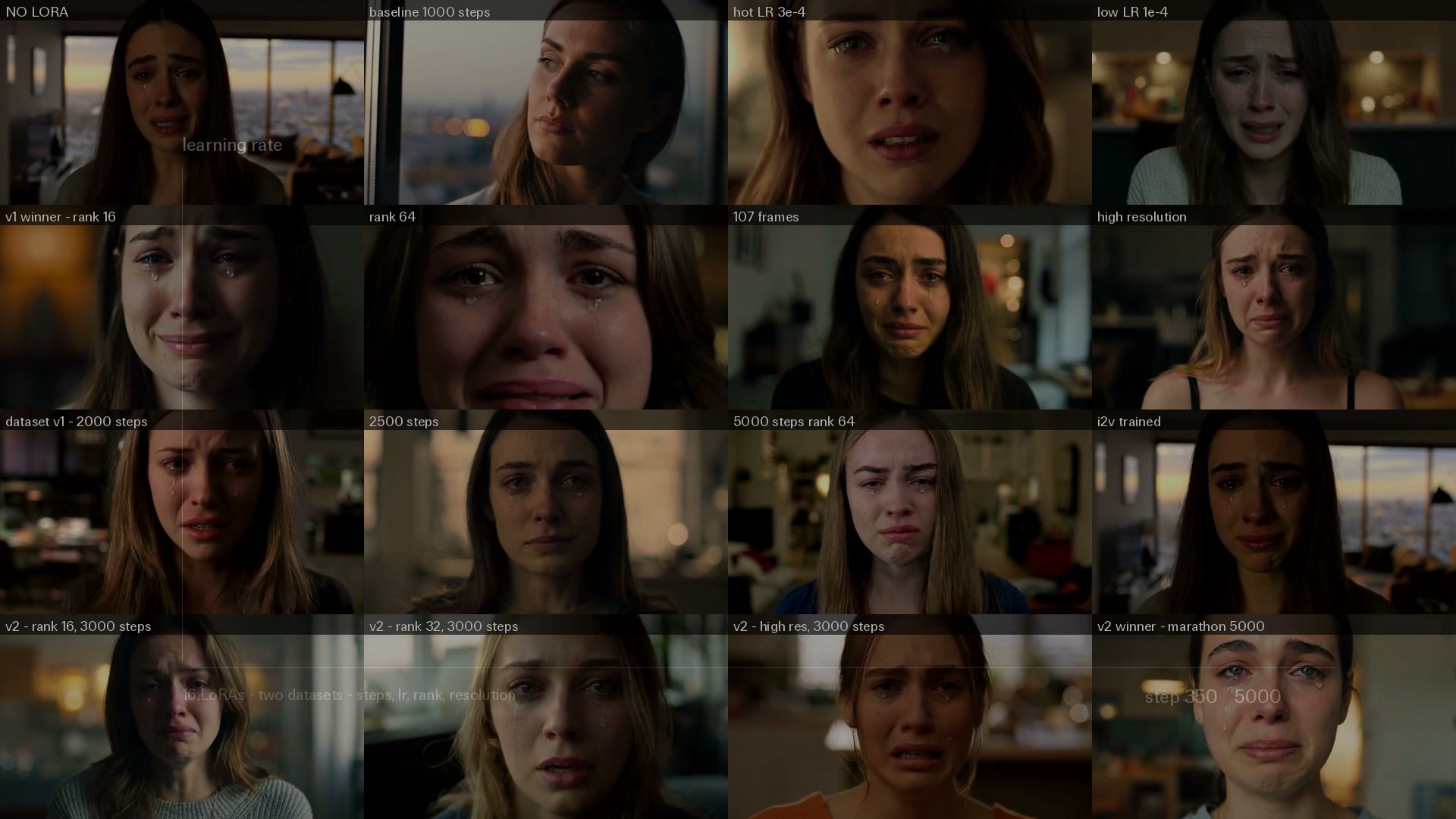
The grid above is one prompt and one seed generated through sixteen different LoRA configurations we trained while building our Realism People adapter. Everything in this guide comes from that campaign: two dataset versions, sixteen training runs, and more than 1,300 test generations reviewed by hand.
The four trainers
fal exposes one trainer per H3 task. All of them take the same zip dataset format and return a .safetensors LoRA file plus an inference config.
| Trainer | Task |
|---|---|
| minimax/h3/t2v/trainer | Text to video with audio |
| minimax/h3/i2v/trainer | Image to video (first-frame conditioning) |
| minimax/h3/flf2v/trainer | First-last-frame to video |
| minimax/h3/ref2va/trainer | Reference video + image to video with audio |
All four bill per training step, so your budget scales linearly with number_of_steps; the current per-step rate is displayed on each trainer's model page. Pick the trainer that matches how you will run inference: a style adapter that will be used with text prompts belongs on the t2v trainer; if your product animates still images, train on i2v so the LoRA learns under first-frame conditioning.
Dataset preparation
Dataset quality decides more than any hyperparameter. The trainer accepts a zip archive of videos (or images, but never both) with optional caption sidecars: 01.mp4 next to 01.txt, 02.mp4 next to 02.txt, and so on.
Requirements that matter:
- 10 files minimum; our best results came from 50-200 clips
- Supported formats: .mp4, .mov, .avi, .mkv
- Clips of 3-15 seconds; anything longer than 30 seconds is split into scenes automatically (
split_input_into_scenes) - Exact 24.000 fps - H3 is a 24 fps model, so resample anything that is 23.976, 25 or 30 fps
- Clean first and last frames: trim fade-ins and black frames, they end up in the training samples
- Keep the audio track. H3 trains video and audio jointly, so silent or noisy audio teaches the model exactly that
Resolution buckets. Normalize your clips to a small set of resolutions with dimensions that are multiples of 32 and comparable areas. We used three buckets: 1280x704 for 16:9, 1280x544 for scope, 960x704 for near-square, with scale-to-fill and center crop. Mixed random resolutions waste training signal.
Watch out for slow motion. A surprising amount of live-action footage is delivered slowed down - shot at 50-60 fps and played back at 25-30. Two thirds of the people clips we audited for our dataset were slow motion, which teaches the model dreamy, floaty movement. We classified every clip with a vision LLM and retimed the slowed ones back to natural speed (setpts plus atempo) before training. If your generations drift toward slow motion, your dataset is the reason.
Captions and the trigger word. Write one flowing paragraph per clip describing subject, action, setting, lighting and camera. Then choose one strategy for the trigger word and never both at once: either pass trigger_phrase to the trainer, which prepends it to every caption, or bake the trigger directly into your caption files and leave trigger_phrase empty. Duplicating it degrades prompt adherence.
Before paying for a full run, submit once with debug_dataset: true: the trainer returns a downloadable archive of your preprocessed samples so you can verify crops, frame counts and captions.
Launching a training
python
import fal_client

handle = fal_client.submit(
    "minimax/h3/t2v/trainer",
    arguments={
        "training_data_url": "https://your-bucket.example.com/dataset.zip",
        "number_of_steps": 3000,
        "learning_rate": 2e-4,
        "rank": 16,
        "resolution": "medium",
        "number_of_frames": 73,
        "frame_rate": 24,
        "auto_scale_input": True,
        "trigger_phrase": "",  # already baked into our captions
    },
)

result = handle.get()
print(result["lora_file"]["url"])
Parameters worth understanding:
| Parameter | Default | Notes |
|---|---|---|
number_of_steps | 2000 | Scale with dataset size; see the sweep results below |
learning_rate | 2e-4 | 2e-4 converges fast; 1e-4 is the slow-cook option for long runs |
rank | 32 | 8, 16, 32, 64 or 128. Style adapters rarely need more than 16 |
resolution | medium | high trains on larger buckets and costs more memory and time |
number_of_frames | 73 | Must satisfy frames % 17 == 5 (22, 39, 56, 73, 90, 107, 124) |
auto_scale_input | false | Set true so clips are rescaled to the target frame count and fps |
strict_dataset | false | Set true to fail on blank captions or missing audio instead of silent fallbacks |
Training runs on the fal queue: poll the status URL or attach a webhook. Queue logs are incremental - each line is delivered once - so accumulate them on your side if you want a full transcript.
What sixteen runs taught us about hyperparameters
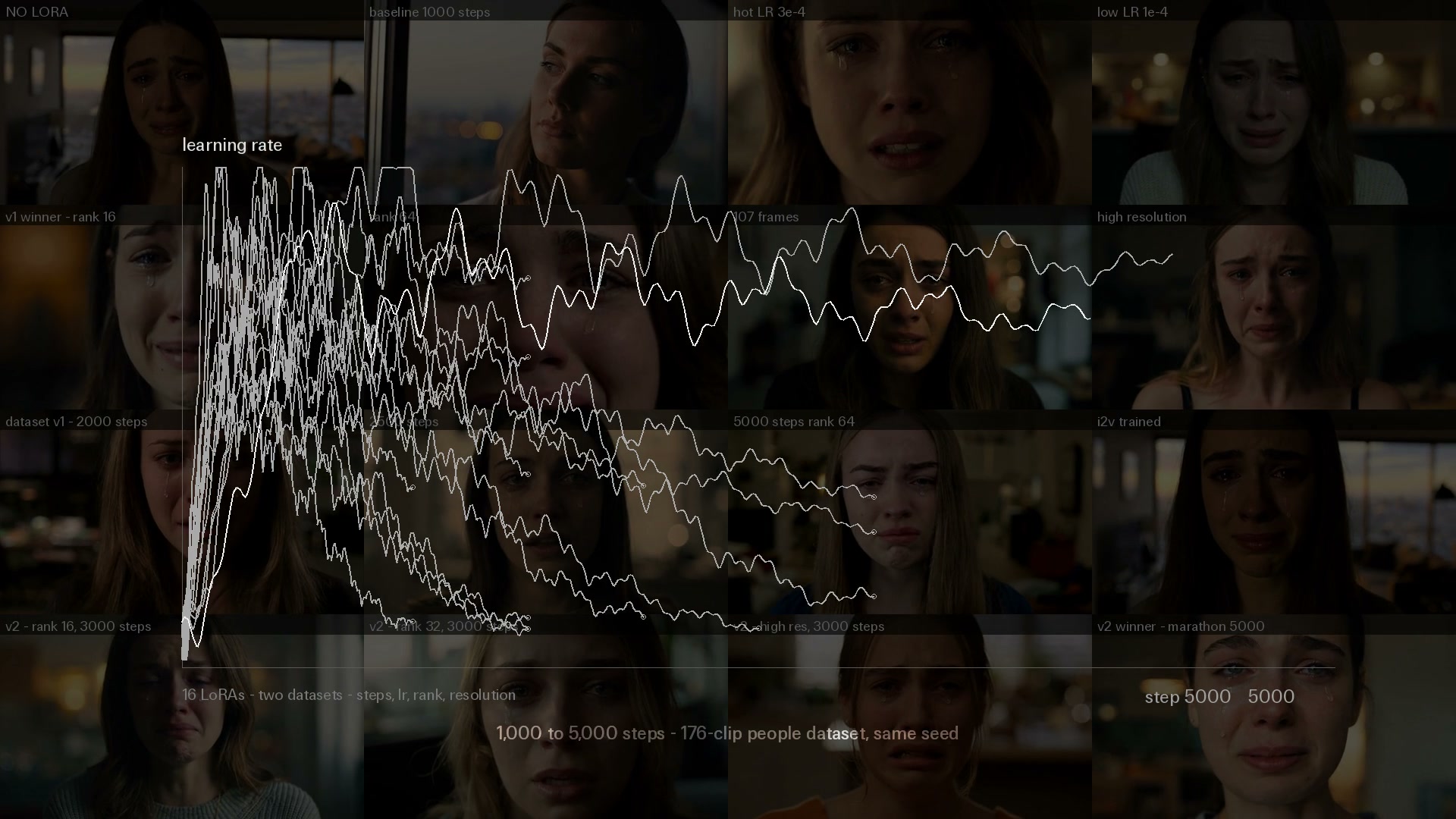
We trained eleven configurations on a first 53-clip dataset, then five more on a 176-clip people-focused dataset, varying steps, learning rate, rank, frame count and resolution.
- Rank 16 beat rank 32 and 64 for a realism style adapter, in blind human votes. Higher ranks add capacity the task does not need, and the files are 2-4x larger.
- Steps must scale with the dataset. 1,500 steps won on 53 clips; the same recipe needed 3,000+ on 176 clips. Oversized step counts on small datasets overfit: our first 5,000-step marathon lost the blind vote on the small dataset, then the same slow-cook approach won once the dataset tripled.
- The winner was slow-cooked: rank 16, 5,000 steps at learning rate 1e-4 on 176 clips. Lower learning rate with more steps produced steadier detail than 2e-4 variants at 3,000 steps.
- Training resolution
highwas not worth it for 768P inference. It trains on larger internal buckets at real extra cost, and the blind comparisons showed no consistent advantage.
Evaluate with same-seed A/B pairs
The only evaluation that held up was the paired one: generate the same prompt with the same seed on the same /lora endpoint, once with "scale": 0 and once with "scale": 1. Scale zero runs the identical pipeline with the LoRA mathematically absent, so the pair isolates exactly what the adapter changes. We verified that a zero-scale pass and a no-LoRA pass differ only by encoding noise.
One caveat: with a different LoRA (or a different scale), the same seed does not give the same composition. Every denoising step compounds the weight differences, so compositions diverge - compare distributions and details, not shot-for-shot framing. We reviewed 100 same-seed duels by hand to pick the final adapter; blind voting across a wider pool works even better if you have teammates to spare.
Using your LoRA
Apply the trained weights on the matching LoRA inference endpoint - text-to-video or image-to-video - and start the prompt with your trigger word:
json
{
  "prompt": "r34l1sm, close-up of an old fisherman's weathered face in sea spray, deep wrinkles, eyes squinting at the horizon, cinematic, photorealistic",
  "loras": [{ "path": "https://.../your-lora.safetensors", "scale": 1.0 }],
  "duration": 5,
  "resolution": "768P"
}
Same prompt, same seed: base model on the left, the trained realism adapter on the right. A scale of 1.0 is the intended strength; 0.6-0.8 keeps a lighter touch.
Recommended - and not recommended
Do:
- Review every clip by hand before training. We built a one-keystroke review page and kept 176 clips out of 253 candidates; the rejects were exactly the shots that would have polluted the style.
- Keep your sources diverse: many near-identical clips from the same shoot teach the model that shoot, not your style. Cap how many clips any single source contributes.
- Caption what you want the model to reproduce - subject, action, setting, lighting, camera - and describe motion at its natural speed.
- Run
debug_dataset: truefirst, then one cheap 1,000-step run, then sweep several configurations in parallel with the same seed for comparison. - Use footage you have the rights to train on.
Don't:
- Don't put the trigger word in both
trigger_phraseand the captions - one or the other. - Don't feed slow-motion footage untimed; retime it or caption it explicitly as slow motion.
- Don't train 5,000 steps on 50 clips: on our small dataset the marathon overfit and lost the blind vote. Long runs only paid off once the dataset grew.
- Don't judge a LoRA on one generation. Same seed with different weights still composes differently; compare across many prompts before deciding.
- Don't rely on temporary CDN URLs: download and archive your
.safetensorsas soon as training completes.
Time and budget
| Configuration | Trainer | Wall-clock |
|---|---|---|
| 2,000 steps (default) | t2v | ~1.5 h |
| 3,000 steps, rank 16 | t2v | ~2 h |
| 5,000 steps, rank 16, lr 1e-4 | t2v | ~2.5 h |
| 2,500 steps, rank 32 | i2v | ~2 h |
Billing is per training step, so cost scales linearly with number_of_steps - check the current rate on each trainer's model page. Wall-clock varies with queue position. Run several configurations in parallel rather than iterating serially: our five-run sweep finished in an afternoon and the whole campaign cost a fraction of one day of GPU rental.
Recently Added
















References
-
MiniMaxAI. "MiniMax-H3." Hugging Face model card. https://huggingface.co/MiniMaxAI/MiniMax-H3 ↩
-
Hu, E.J., et al. "LoRA: Low-Rank Adaptation of Large Language Models." arXiv preprint arXiv:2106.09685, 2021. https://arxiv.org/abs/2106.09685 ↩